 REALMS-1375
Numbers on Signs Bug - Signs typed with numbers are erased and end up blank on wall
UPDATE 10/18: This is a REALM ONLY PROBLEM. When REALM downloaded to local computer SIGNS work just fine.
Writable BOOKS in the REALM work fine. SIGNS do not. Are there different Keyboard input routines where SIGNS still treat numbers as math?
What does PC 1.13.8 mean? Is this JAVA only stuff? My Win 10 Bedrock is 1.7
How to I tell you this is Win 10 Bedrock REALM ONLY in your "Affects Version/s:" Field Dropdown?
Do REALMS have versions?
Summary - Multiple Problems with SIGNS on BEDROCK WIN 10 REALMS
See Comment Number One and Comment Number Two for Detailed Examples about the SIGNS
Typing Numbers (or dashes) at the beginning of any of the lines on a four line sign in Win 10 Bedrock on a Realm causes the final sign to end up blank (all typing lost, blank sign on wall). Typing numbers in middle gives one line sign.
Comment Three: Sometimes only 2 - 6 letters are places on final sign. Should I be keeping track of times and days of the Week?
(Suggested solution, internal representation of numbers should be Text on a Minecraft sign (not numeric). I have no need to do math with numbers on my signs.
Linked Issues
duplicates3
 MCPE-47544



Created Issue:
Numbers on Signs Bug - Signs typed with numbers are erased and end up blank on wall
Environment
Detail discussion of the "Numbers *on *Signs" Bug (present for past 6 months)
(Suggested solution, internal representation of numbers should be Text on a sign (not numeric). I have no need to do math with numbers on my signs.NOTE
MCPE-1.6 is probably wrong
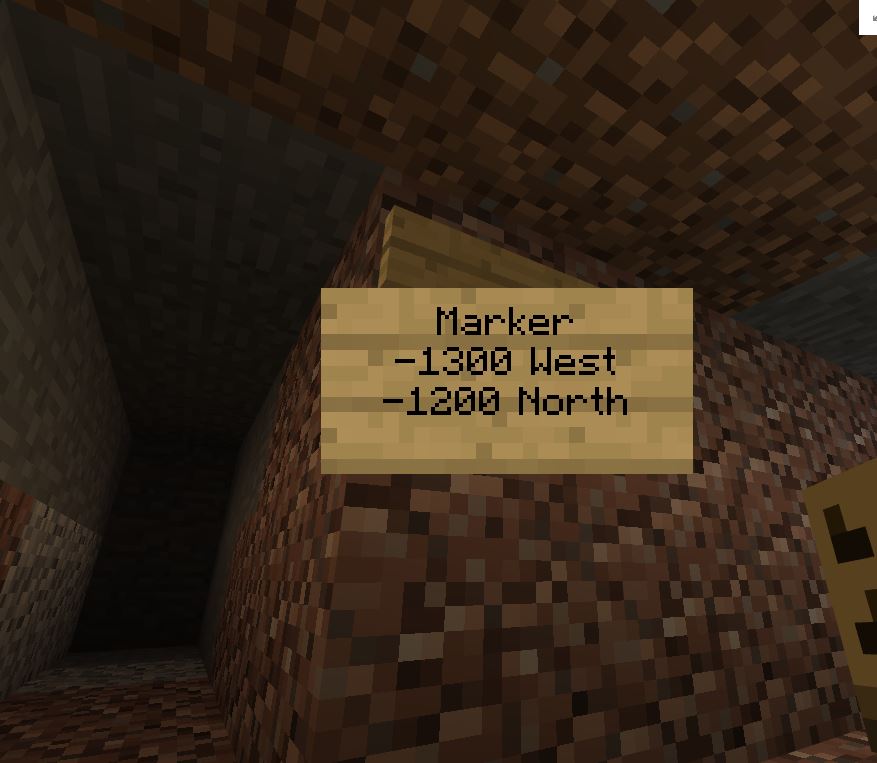
Win 10 bedrock. versions 1.3 through 1.7 at least. Describing this bug (your bug) took me a lot of time. Why do you insist (red star) I know your internal version naming -MCPE-1.6 - before I can talk to you. Customers should describe bugs as they see, them using their words to describe the systems they are using, and not have to know your internal naming systems before they talk to you.Sign on wall behind shows the word Marker as I type. It also seems to show the Carriage return on line one.
-12 does not show (starts harming the display) and next 0 erases entire sign on line two
Now typing further causes the back sign to flash for a moment
Next 00 on line 2 after some backspacing restored the sign (We lucked out today. Usually I can't restore the sign once it has been erased by a -12)
Win 10 Bedrock in a realm, Todays version is 1.7, with realm upgrade.
This is the same kind of buggy behavior for the last 6 months
Sign Bug Example two, Slightly different behavior still possibly related to displaying negative numbers.
Sign on wall flashes as I type characters in the first line.
This time -12 from second line still shows on back sign, but typing 00 causes the sign to be erased and typing west does not correct sign on back wall (Picture 2)
Final sign (Picture 3) on wall (blank) showing location
Win 10 Bedrock, Version 1.3 - 1.7, Realm = "Planting Spiritual Values" seed
Now called Building Communities DRight now signs are working only about 30 percent of the time for me, because I use (try to use) the minus sign (dash) and *numbers *for the location (West and North)
Third example
Here is the sign I typed (without the - sign) to see if just numbers are OK. In this example numbers are still causing the final display to be blank.
(Picture 4)Here is the sign I got on the wall (blank)
(Picture 5)Note: Sometimes I can't even type my name. Bob's Stuff ends up with just Bo on the sign, possibly related to not handling punctuation (apostrophes) as text
Attachments5
You lost my original long description of the problem. I am not going to perfect it as I did originally
Your Bug Collecting software is buggy (you displayed two windows, apparently I typed to the wrong one)Detail discussion of the Intermittent Sign Bug.
Sign on wall behind shows the word Marker as I type. It also seems to show the Carriage return on line one.
-12 does not show and next 0 erases entire sign on line two
Now typing further causes the back sign to flash for a moment
Next 00 on line 2 restored the sign (We lucked out today. Usually I can't restore the sign once it has been erased by a -12)
Win 10 Bedrock in a realm, Todays version is 1.7, with realm upgrade.
This is the same kind of buggy behavior for the last 6 months
You lost my original long description of the problem. I am not going to perfect it as I did originally
Your Bug Collecting software is buggy (you displayed two windows, apparently I typed to the wrong one)
Detail discussion of the Intermittent Sign Bug.
Sign on wall behind shows the word Marker as I type. It also seems to show the Carriage return on line one.
-12 does not show and next 0 erases entire sign on line two
Now typing further causes the backsignto flash for a moment
Next 00 on line 2 restored the sign (We lucked out today. Usually I can't restorethesign once it has been erased by a -12)
Win 10 Bedrock in a realm, Todays version is 1.7, with realm upgrade.
This is the same kind of buggy behavior for the last 6 months
Detail discussion of the Numbers on Signs Bug. Example 1
Sign on wall behind shows the word Marker as I type. It also seems to show the Carriage return on line one.
-12 does not show and next 0 erases entire sign on line two
Now typing further causes the back sign to flash for a moment
Next 00 on line 2 restored the sign (We lucked out today. Usually I can't restore the sign once it has been erased by a -12)
Win 10 Bedrock in a realm, Todays version is 1.7, with realm upgrade.
This is the same kind of buggy behavior for the last 6 months
---
Sign Bug Example two, Slightly different behavior still related to displaying negative numbers.
Sign on wall flashes as I type Characters in the first line.
This time -12 still show on second line , but typing 00 causes the sign to be erased and typing west Does not correct sign on back wall (Picture 2)
Final sign (Picture 3) on wall (blank) showing location
Win 10 Bedrock, Version 1.3 - 1.7, Realm
"Planting Spiritual Values" seed
Now called Building Communities D
Right now signs are working only about 30 percent of the time for me, because I use the - sign for the location (west and north)
Third example
Here is the sign I typed (without the - sign)
(Picture 4)
Here is the sign I got
(Picture 5)
screenshot-1.png
Detail discussion of the Numbers on Signs Bug. Example 1
Sign on wall behind shows the word Marker as I type. It also seems to show the Carriage return on line one.
-12 does not show and next 0 erases entire sign on line two
Now typing further causes the back sign to flash for a moment
Next 00 on line 2 restored the sign (We lucked out today. Usually I can't restore the sign once it has been erased by a -12)
Win 10 Bedrock in a realm, Todays version is 1.7, with realm upgrade.
This is the same kind of buggy behavior for the last 6 months
---
Sign Bug Example two, Slightly different behavior still related to displaying negative numbers.
Sign on wall flashes as I type Characters in the first line.
This time -12 still show on second line , but typing 00 causes the sign to be erased and typing west Does not correct sign on back wall (Picture 2)
Final sign (Picture 3) on wall (blank) showing location
Win 10 Bedrock, Version 1.3 - 1.7, Realm
"Planting Spiritual Values" seed
Now called Building Communities D
Right now signs are working only about 30 percent of the time for me, because I use the - sign for the location (west and north)
Third example
Here is the sign I typed (without the - sign)
(Picture 4)
Here is the sign I got
(Picture 5)
(Original description of problem lost)
Detail discussion of the Numbers on Signs Bug. Example 1
Sign on wall behind shows the word Marker as I type. It also seems to show the Carriage return on line one.
-12 does not show and next 0 erases entire sign on line two
Now typing further causes the back sign to flash for a moment
Next 00 on line 2 restored the sign (We lucked out today. Usually I can't restore the sign once it has been erased by a -12)
Win 10 Bedrock in a realm, Todays version is 1.7, with realm upgrade.
This is the same kind of buggy behavior for the last 6 months
---
Sign Bug Example two, Slightly different behavior still related to displaying negative numbers.
Sign on wall flashes as I type Characters in the first line.
This time -12 still show on second line , but typing 00 causes the sign to be erased and typing west Does not correct sign on back wall (Picture 2)
Final sign (Picture 3) on wall (blank) showing location
Win 10 Bedrock, Version 1.3 - 1.7, Realm
"Planting Spiritual Values" seed
Now called Building Communities D
Right now signs are working only about 30 percent of the time for me, because I use the - sign for the location (west and north)
Third example
Here is the sign I typed (without the - sign)
(Picture 4)
Here is the sign I got
(Picture 5)
(Original description of problem lost)
Detail discussion of the Numbers on Signs Bug. Example 1
Sign on wall behind shows the word Marker as I type. It also seems to show the Carriage return on line one.
-12 does not show and next 0 erases entire sign on line two
Now typing further causes the back sign to flash for a moment
Next 00 on line 2 restored the sign (We lucked out today. Usually I can't restore the sign once it has been erased by a -12)
Win 10 Bedrock in a realm, Todays version is 1.7, with realm upgrade.
This is the same kind of buggy behavior for the last 6 months
---
S
ign Bug Example two, Slightly different behavior still related to displaying negative numbers.Sign on wall flashes as I type Characters in the first line.
This time -12 still show on second line , but typing 00 causes the sign to be erased and typing west Does not correct sign on back wall (Picture 2)
Final sign (Picture 3) on wall (blank) showing location
Win 10 Bedrock, Version 1.3 - 1.7, Realm
"Planting Spiritual Values" seed
Now called Building Communities D
Right now signs are working only about 30 percent of the time for me, because I use the - sign for the location (west and north)
Third example
Here is the sign I typed (without the - sign)
(Picture 4)
Here is the sign I got
(Picture 5)
See Comment Number one for Detailed Examples
Typing Numbers (or dashes) at the beginning of any of the lines on a four line sign in Win 10 Bedrock on a Realm causes the final sign to end up blank (all typing lost, blank sign on wall)
See Comment Number one for Detailed Examples
Typing Numbers (or dashes) at the beginning of any of the lines on a four line sign in Win 10 Bedrock on a Realm causes the final sign to end up blank (all typing lost, blank sign on wall)
See Comment Number one for Detailed Examples
Typing Numbers (or dashes) at the beginning of any of the lines on a four line sign in Win 10 Bedrock on a Realm causes the final sign to end up blank (all typing lost, blank sign on wall)
(Suggested solution, internal representation of numbers should be Text on a Minecraft sign (not numeric). I have no need to do math with numbers on my signs.
See Comment Number one for Detailed Examples
Typing Numbers (or dashes) at the beginning of any of the lines on a four line sign in Win 10 Bedrock on a Realm causes the final sign to end up blank (all typing lost, blank sign on wall). Typing numbers in middle gives one line sign.
(Suggested solution, internal representation of numbers should be Text on a Minecraft sign (not numeric). I have no need to do math with numbers on my signs.
See Comment Number
one for Detailed Examples
Typing Numbers (or dashes) at the beginning of any of the lines on a four line sign in Win 10 Bedrock on a Realm causes the final sign to end up blank (all typing lost, blank sign on wall). Typing numbers in middle gives one line sign.
(Suggested solution, internal representation of numbers should be Text on a Minecraft sign (not numeric). I have no need to do math with numbers on my signs.
See Comment Number One and Comment Number Two for Detailed Examples
Typing Numbers (or dashes) at the beginning of any of the lines on a four line sign in Win 10 Bedrock on a Realm causes the final sign to end up blank (all typing lost, blank sign on wall). Typing numbers in middle gives one line sign.
(Suggested solution, internal representation of numbers should be Text on a Minecraft sign (not numeric). I have no need to do math with numbers on my signs.
UPDATE 10/18: This is a REALM ONLY PROBLEM. When downloaded to local computer signs work just fine.
See Comment Number One and Comment Number Two for Detailed Examples
Typing Numbers (or dashes) at the beginning of any of the lines on a four line sign in Win 10 Bedrock on a Realm causes the final sign to end up blank (all typing lost, blank sign on wall). Typing numbers in middle gives one line sign.
(Suggested solution, internal representation of numbers should be Text on a Minecraft sign (not numeric). I have no need to do math with numbers on my signs.
UPDATE 10/18: This is a REALM ONLY PROBLEM. When downloaded to local computer signs work just fine.
What does PC 1.13.8 mean? Is this JAVA only stuff? My Win 10 Bedrock is 1.7
See Comment Number One and Comment Number Two for Detailed Examples
Typing Numbers (or dashes) at the beginning of any of the lines on a four line sign in Win 10 Bedrock on a Realm causes the final sign to end up blank (all typing lost, blank sign on wall). Typing numbers in middle gives one line sign.
(Suggested solution, internal representation of numbers should be Text on a Minecraft sign (not numeric). I have no need to do math with numbers on my signs.
UPDATE 10/18: This is a REALM ONLY PROBLEM. When downloaded to local computer
signswork just fine.What does PC 1.13.8 mean? Is this JAVA only stuff? My Win 10 Bedrock is 1.7
See Comment Number One and Comment Number Two for Detailed Examples
Typing Numbers (or dashes) at the beginning of any of the lines on a four line sign in Win 10 Bedrock on a Realm causes the final sign to end up blank (all typing lost, blank sign on wall). Typing numbers in middle gives one line sign.
(Suggested solution, internal representation of numbers should be Text on a Minecraft sign (not numeric). I have no need to do math with numbers on my signs.
UPDATE 10/18: This is a REALM ONLY PROBLEM. When REALM downloaded to local computer SIGNS work just fine.
Writable BOOKS in the REALM work fine. SIGNS do not. Are there different Keyboard input routines where SIGNS still treat numbers as math?
What does PC 1.13.8 mean? Is this JAVA only stuff? My Win 10 Bedrock is 1.7
How to I tell you this is Win 10 Bedrock REALM ONLY in your "Affects Version/s:" Field Dropdown?
Do REALMS have versions?
Summary - Multiple Problems with SIGNS on BEDROCK WIN 10 REALMS
See Comment Number One and Comment Number Two for Detailed Examples about the SIGNS
Typing Numbers (or dashes) at the beginning of any of the lines on a four line sign in Win 10 Bedrock on a Realm causes the final sign to end up blank (all typing lost, blank sign on wall). Typing numbers in middle gives one line sign.
Comment Three: Sometimes only 2 - 6 letters are places on final sign. Should I be keeping track of times and days of the Week?
(Suggested solution, internal representation of numbers should be Text on a Minecraft sign (not numeric). I have no need to do math with numbers on my signs.
![[Mojang] Fredrik Telenius](../../../data/avatars/users/10122.svg)
duplicates

![[Mojang] Mega_Spud (Jay Wells)](../../../data/avatars/users/92696.png)
is duplicated by
Detail discussion of the "Numbers *on *Signs" Bug (present for past 6 months)
(Suggested solution, internal representation of numbers should be Text on a sign (not numeric). I have no need to do math with numbers on my signs.NOTE
MCPE-1.6 is probably wrong
Win 10 bedrock. versions 1.3 through 1.7 at least. Describing this bug (your bug) took me a lot of time. Why do you insist (red star) I know your internal version naming -MCPE-1.6 - before I can talk to you. Customers should describe bugs as they see, them using their words to describe the systems they are using, and not have to know your internal naming systems before they talk to you.Sign on wall behind shows the word Marker as I type. It also seems to show the Carriage return on line one.
-12 does not show (starts harming the display) and next 0 erases entire sign on line two
Now typing further causes the back sign to flash for a moment
Next 00 on line 2 after some backspacing restored the sign (We lucked out today. Usually I can't restore the sign once it has been erased by a -12)
Win 10 Bedrock in a realm, Todays version is 1.7, with realm upgrade.
This is the same kind of buggy behavior for the last 6 months
Sign Bug Example two, Slightly different behavior still possibly related to displaying negative numbers.
Sign on wall flashes as I type characters in the first line.
This time -12 from second line still shows on back sign, but typing 00 causes the sign to be erased and typing west does not correct sign on back wall (Picture 2)
Final sign (Picture 3) on wall (blank) showing location
Win 10 Bedrock, Version 1.3 - 1.7, Realm = "Planting Spiritual Values" seed
Now called Building Communities DRight now signs are working only about 30 percent of the time for me, because I use (try to use) the minus sign (dash) and *numbers *for the location (West and North)
Third example
Here is the sign I typed (without the - sign) to see if just numbers are OK. In this example numbers are still causing the final display to be blank.
(Picture 4)Here is the sign I got on the wall (blank)
(Picture 5)Note: Sometimes I can't even type my name. Bob's Stuff ends up with just Bo on the sign, possibly related to not handling punctuation (apostrophes) as text
![[Bot] Arisa](../../../data/avatars/users/43007.png)
duplicates
duplicates

Similar bug to mine reported on
This is still happening in my realm, as well as other problems with input from bedrock code base to a realm. When realm is copied (downloaded) problem disappears
I don't understand the comment from [Bot] Ariza. Is this related to JAVA - Bedrock naming confusion. Please use English to FULLY describe versions, not internal Mojang labels.
I have had the bug described here for at least 3 months in survival Bedrock Win 10 1.3 thru 1.7 WHEN ON MY (Bedrock) REALM, not when I download the REALM and play the copy in survival on the local bedrock win 10 PC (same machine, same bedrock code in machine, same world (after conversion from Bedrock Realm to local)
REALMS-1375<- Where this is described in more detail
Thank you for your report!
We're actually already tracking this issue at REALMS-1375, so we will resolve and link this ticket as a duplicate.
If you would like to add a vote and any extra information to the main ticket it would be appreciated.
If you haven't already, you might like to make use of the search feature, to see if the issue has already been mentioned.
Quick Links:
📓 Issue Guidelines – 💬 Mojang Support – 📧 Suggestions – 📖 Minecraft Wiki
Here is my original text - Saved in your "Environment:" Field above.
Detail discussion of the "Numbers *on *Signs" Bug (present for past 6 months)
(Suggested solution, internal representation of numbers should be Text on a minecraft sign (not numeric).
NOTE
MCPE-1.6 is probably wrongWin 10 bedrock. versions 1.3 through 1.7 at least, in a Realm. Describing this bug (your bug) took me a lot of time. Why do you insist (red star) I know your internal version naming -
MCPE-1.6 - before I can talk to you. Customers should describe bugs as they see them using their words to describe the systems they are using, and not have to know your internal naming systems before they talk to you. Helping you with your numbers should be optional, not mandatory! Is that what the "Environment:" Field is for. If so, why the red star on your Version Field?Example One
Sign on wall behind editing sign shows the word Marker as I type. It also seems to show the Carriage return on line one.
On line two, -12 does not show (starts harming the display) and next 0 erases entire sign
Now typing further causes the back sign to flash for a moment

Next 00 on line 2 after some backspacing restored the sign (We lucked out today. Usually I can't restore the sign once it has been erased by a -12)
Win 10 Bedrock in a realm, Todays version is 1.7, with realm upgrade.
This is the same kind of buggy behavior for the last 6 months
Sign Bug Example two, Slightly different behavior still possibly related to displaying negative numbers.
Sign on wall flashes as I type characters in the first line.
This time -12 from second line still shows on back sign, but typing 00 causes the sign to be erased and typing west does not correct sign on back wall (Picture 2)
Final sign (Picture 3) on wall (blank) showing location coordinates
Win 10 Bedrock, Version 1.3 - 1.7, Realm = "Planting Spiritual Values" seed
Now called Building Communities D
Right now signs are working only about 30 percent of the time for me, because I use (try to use) the minus sign (dash) and numbers for the location (West and North)
Example 3
Here is the sign I typed (without the - sign) to see if just numbers are OK. In this example numbers are still causing the final display to be blank.
(Picture 4)
Here is the sign I got on the wall (blank)
(Picture 5)
Note: Sometimes I can't even type my name. Bob's Stuff ends up with just Bo on the sign, possibly related to not handling punctuation (apostrophes) as text. But when I tried typing without the apostrophe, the resulting sign still had only first 2 letters of my original.
The problem is not just numbers at the beginning of the line,
There is a problem with numbers in the middle as well
My 4 line sign as typed
Dalio 1 Portal
East -1518
North -1506
High 69
The resulting sign is all on one line with ## signs replacing last two numbers as in picture
— THIS IS A REALM ONLY PROBLEM FOR ME. —
When I download a COPY of the REALM to my local computer, and then play the copy, I can type numbers and signs work.
Tonight my signs in the Realm were limited to 6 characters, before the 7th character erased the sign.
I wanted to make a sign for Anthony Smith. Anthon was the only sign I could make, the 'y' or a space caused the sign to go blank.
I need to use signs for many things. I can play locally with children, but none of their builds will be saved to the Realm. I will try WRITABLE BOOKS - they see to work ok.
Sample of the sign I am typing, and Final Result. After 6 letters typed, each additional letter flashes the final sign message on the sign, and then erases it.
Similar issue to what others are seeing with ### showing up instead of text. This also causes line breaks to be removed. Issue occurred when I tried to use a sign to put in multiple lines of bowling scores/symbols with separating spaces.
Blank signs also happen with words and not just numbers. There are examples such as: "Thomas", "Franklin", "Henry", "Bob", "Andrew", "Grace", "Bill", and probably many others that I haven't had the time to test. Some of these only cause the sign to become blank if they're the only word on the sign, but some can stay visible if other words are also present. I really have no idea what is causing this issue, as text really shouldn't disappear like this, especially since these words (likely and hopefully) aren't on the banned words list Minecraft has.
Blank signs also can happen when you write a letter followed by a period and then some text, such as "H. Ford" (which was one alternative I tried in order to not have a blank sign when writing "Henry Ford", but both texts end up blank). The latter letter rule is very finicky, and doesn't always occur, but the fact that it occurs under some instances, such as "C. Text" and "U. Iguana" shows that there is some underlying problems in the system.
Likely, the entire censorship system on Realms needs a major overhaul to stop these issues from occurring, allowing users who are not in the wrong to write their signs peacefully. There are many other instances of signs becoming blank that I have experienced in multiple survival and creative worlds, so there are likely many other finicky aspects to signs becoming blank that I just haven't been able to test in addition to the examples shown in this post.
only happens with names for some reason. this makes signs impossible to type on realms.
I am unable to reproduce the original problem described in this report - that it the inability to type numbers on signs. I created signs that matched the summary and they all appeared correct. However, I was able to reproduce the issue with typing names. Whenever I create a sign with just a name on it (Thomas, Franklin, etc) the text shows briefly when the sign is placed and then disappears.
We have been unable to reproduce the issue mentioned in this report (specifically regarding numbers), if this specific issue is still occurring for you please comment back.
However there is still an ongoing bug report regarding some words being censored (
REALMS-3491) please check that report first to make sure your issue isn't covered by that report.Cleaning up old tickets: This ticket had been set to 'Awaiting Response', but has not received a response from the reporter (~3 months+) so is being closed as Incomplete. If you feel this is still a valid issue then please comment, or create a new ticket following the Issue Guidelines which includes steps to reproduce the problem.
Quick Links:
📓 Issue Guidelines – 💬 Mojang Support – 📧 Suggestions – 📖 Minecraft Wiki