 MCPE-1
Trapdoors can't be crafted in survival
In survival mode, trapdoors can't be crafted.
 Johan Bernhardsson
is duplicated by
![[Mojang] Grum (Erik Broes)](../../../data/assets/gravatar/grum.png)
is duplicated by
is duplicated by
is duplicated by
is duplicated by
is duplicated by

is duplicated by

23B8496F-4581-456B-8071-65B5B08622BF.jpeg
![[Mod] OcelotOnesie](../../../data/avatars/users/43220.png)

![[Mod] Urielsalis](../../../data/assets/gravatar/urielsalis.jpeg)
![[Mod] tryashtar](../../../data/avatars/users/41963.png)

![[Mod] turbo](../../../data/avatars/users/92867.png)
Yes, this duplicates MCPE-1
Duplicates MCPE-1, please refer to that issue instead.
Given that the point of an issue tracker is to organize and track individual issues, don't you think lumping several issues into one is a bit counterproductive? How do you expect something like this to be resolved?
Everything you mention here duplicates another ticket already filed (roughly, see below).
duplicates MCPE-1
duplicates MCPE-184
duplicates MCPE-25
duplicates MCPE-23
duplicates MCPE-131 
WRT ticket 131, it's unclear from your description whether this is the same issue, but I suspect that it is is.
In any case, please make sure you're not reporting issues that have been reported already; instead, if you have information to add, add it in the appropriate ticket... and please only report one issue per ticket; there's no way for the devs to effectively resolve tickets like this.
No public issues have a priority other than Minor. Common sense suggests that Android will get the new features in the next build, including the fix addressing MCPE-1.

Jameson D Miller: You are using Windows 10 Edition, not the Java Edition, right?
If so please change the "Affected Versions" field to "MCPE-1.*"

Hello
Apologies but I do not know what our version is except it states version 1.4.0.5 on Amazon when we purchased the game 5 weeks ago. I clicked on version MCPE-1.2 just to be able to report my issue.
I purchased a job lot of coins for my son to download the Halloween Mash Up. Half way through the download it stalled. When we got back into it we had lost all the coins we had just purchased and all of the worlds purchased & free are now locked.
We have this game on an Amazon Kindle Fire and have had no problems with purchases until tonight.
Please confirm how we can get our coins back and unlock the worlds again; also are we safe to try downloading the Halloween Mash Up again once this is fixed?
I have searched for other issues but only found one to do with iphones which is unresolved.
Thank you!

won't let me go into the setting with out it freezing on me so i gotta close the game and reopen it (only does this on realms) . its say MCPE-1.2 is the platform but its really on the xbox one

Windows 10
Actually MCPE-1.4.0 but that's not an option in the version drop-down yet.

![[Mojang] Mega_Spud (Jay Wells)](../../../data/avatars/users/92696.png)
Here is my original text - Saved in your "Environment:" Field above.
Detail discussion of the "Numbers *on *Signs" Bug (present for past 6 months)
(Suggested solution, internal representation of numbers should be Text on a minecraft sign (not numeric).
NOTE MCPE-1.6 is probably wrong
Win 10 bedrock. versions 1.3 through 1.7 at least, in a Realm. Describing this bug (your bug) took me a lot of time. Why do you insist (red star) I know your internal version naming - MCPE-1.6 - before I can talk to you. Customers should describe bugs as they see them using their words to describe the systems they are using, and not have to know your internal naming systems before they talk to you. Helping you with your numbers should be optional, not mandatory! Is that what the "Environment:" Field is for. If so, why the red star on your Version Field?
Example One
Sign on wall behind editing sign shows the word Marker as I type. It also seems to show the Carriage return on line one.
On line two, -12 does not show (starts harming the display) and next 0 erases entire sign
Now typing further causes the back sign to flash for a moment
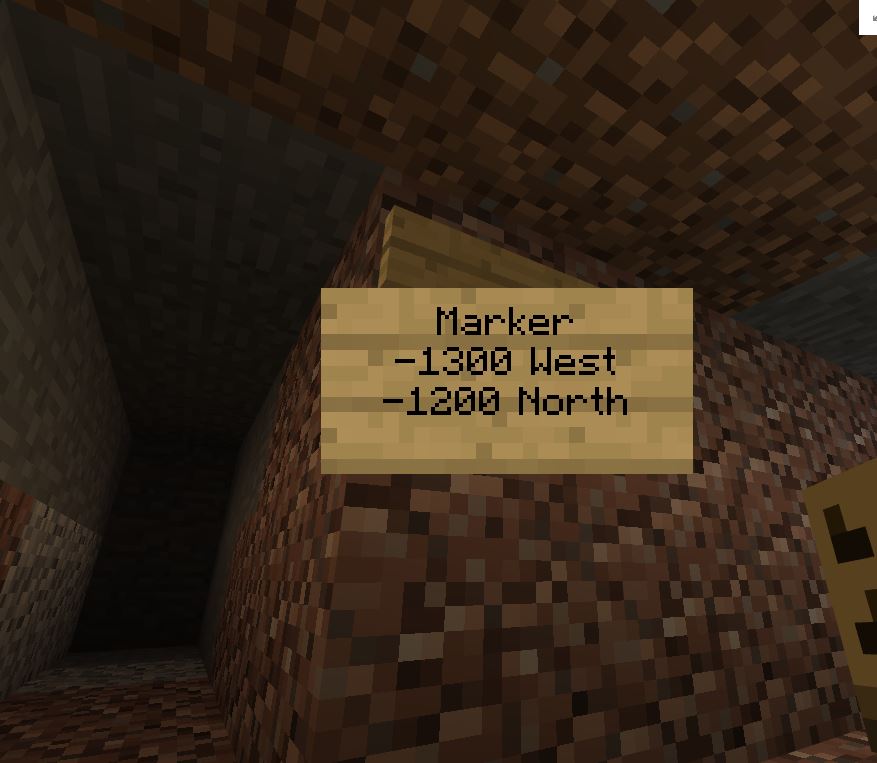
Next 00 on line 2 after some backspacing restored the sign (We lucked out today. Usually I can't restore the sign once it has been erased by a -12)
Win 10 Bedrock in a realm, Todays version is 1.7, with realm upgrade.
This is the same kind of buggy behavior for the last 6 months
Sign Bug Example two, Slightly different behavior still possibly related to displaying negative numbers.
Sign on wall flashes as I type characters in the first line.
This time -12 from second line still shows on back sign, but typing 00 causes the sign to be erased and typing west does not correct sign on back wall (Picture 2)
Final sign (Picture 3) on wall (blank) showing location coordinates
Win 10 Bedrock, Version 1.3 - 1.7, Realm = "Planting Spiritual Values" seed
Now called Building Communities D
Right now signs are working only about 30 percent of the time for me, because I use (try to use) the minus sign (dash) and numbers for the location (West and North)
Example 3
Here is the sign I typed (without the - sign) to see if just numbers are OK. In this example numbers are still causing the final display to be blank.
(Picture 4)
Here is the sign I got on the wall (blank)
(Picture 5)
Note: Sometimes I can't even type my name. Bob's Stuff ends up with just Bo on the sign, possibly related to not handling punctuation (apostrophes) as text. But when I tried typing without the apostrophe, the resulting sign still had only first 2 letters of my original.
Bedrock Edition MCPE-1.12.1 too, Xbox players, Windows 10 players, Switch Players, and Android players all have this problem.

The site is sometimes down for certain device on Jira
When I Either Refresh the page, this shows up and I can only search by using like MC-1 MCPE-1 and other else which it gets very annoying,
Website error message; An unknown Error Occurred
Affected Platforms were PC and Mobile
See my screenshot when it comes
I am unable to attach a screenshot because the site is currently down
This was due to a wrongly set category for the trapdoors. Has been fixed for 0.5.0.
Are you reporting this for
MCPE-1to show a example?And also when I click the items with inventory is not open