 Vyacheslav Makhonin
- BPS
- bps
- Europe/Stockholm
- Yes
- No
 MCPE-15191
 BDS-895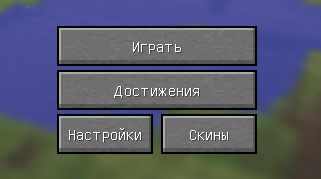
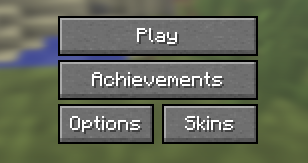
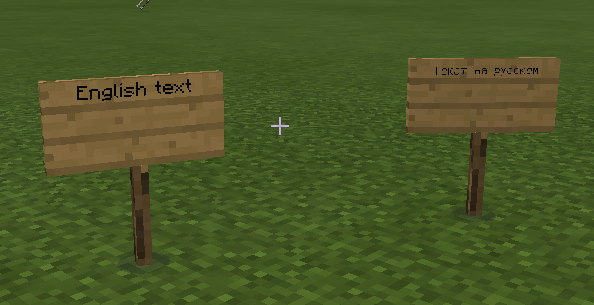
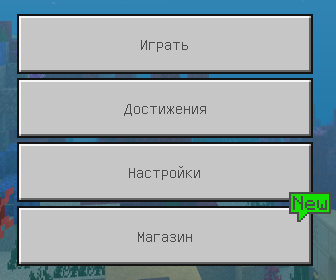
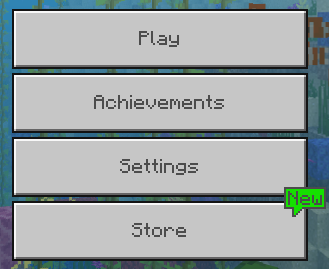
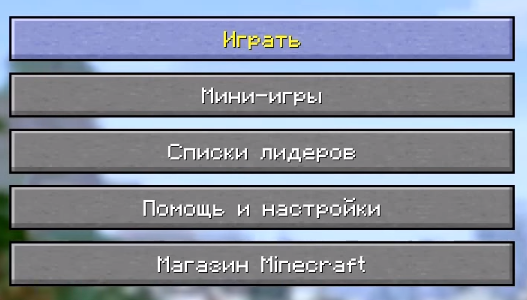





The Unicode font is very thin and unreadable.
Examples:
- Gui scale small
/normal.- Signs from 2-3 blocks distance.
This is clone of MC-2488 for MCPE. MCCE versions are not affected (see attachment)
The Unicode font is very thin and unreadable.
Examples:
- Gui scale small;
- Signs from 2-3 blocks distance.
This is clone of MC-2488 for MCPE. MCCE versions are not affected (see attachment)
The Unicode font is very thin and unreadable.
Examples:
- Gui scale small
;- Signs from 2-3 blocks distance.
This is clone of MC-2488 for MCPE. MCCE versions are not affected (see attachment)
The Unicode font is very thin and unreadable.
Examples:
- Gui scale small.
- Signs from 2-3 blocks distance.
This is clone of MC-2488 for MCPE. MCCE versions are not affected (see attachment)
The Unicode font is very thin and unreadable.
Examples:
- Gui scale small.
- Signs from 2-3 blocks distance.
This is clone of MC-2488 for MCPE. MCCE versions are not affected (see attachment)
Minecraft Font addon fixes that issue.
The Unicode font is very thin and unreadable.
Examples:
- Gui scale small.
- Signs from 2-3 blocks distance.
This is clone of MC-2488 for MCPE. MCCE versions are not affected (see attachment)
Minecraft Font addon fixes th
atissue.The Unicode font is very thin and unreadable.
Examples:
- Gui scale small.
- Signs from 2-3 blocks distance.
This is clone of MC-2488 for MCPE. MCCE versions are not affected (see attachment)
Minecraft Font addon fixes this issue.
menu_english_1.6.PNG
The Unicode font is very thin and unreadable.
Examples:
- Gui scale small.
- Signs from 2-3 blocks distance.
This is clone of MC-2488 for MCPE.
MCCEversions are not affected (see attachment)Minecraft Font addon fixes this issue.
The Unicode font is very thin and unreadable.
Examples:
- Gui scale small.
- Signs from 2-3 blocks distance.
This is clone of MC-2488 for MCPE. Legacy Console Edition versions are not affected (see attachment)
Minecraft Font addon fixes this issue.
The Unicode font is hard to read from a bit of distance [+Java Parity]
In Java Edition, Librarians can buy 2 Written Books for one emerald in trading system.
But it doesn't work in Bedrock Edition.
There is section about this in librarian trades file, but it is broken - invalid ID for book and, so, it's commented by slashes.
If you will change this section manually - it is fully works without problems.
In Java Edition, Librarians can buy 2 Written Books for one emerald in trading system.
But it doesn't work in Bedrock Edition.
There is section about this in librarian trades file, but it is broken - invalid ID for book and, so, it's commented by slashes.
If you will change this section manually - it is fully works without problems.
Video on YouTube
Steps to reproduce:
- Enter to the "Play menu" using a gamepad
- Use a mouse/keyboard
Steps to reproduce:
- Enter to the "Play menu" using a gamepad
- Use a mouse/keyboard
Steps to reproduce:
- Enter to the "Play menu" using a gamepad
- Use a mouse/keyboard
Steps to reproduce:
- Enter to the "Play menu" using a gamepad
- Use a mouse/keyboard
In a different situations with longtime running Bedrock Server mobs just won't naturally spawns at world (Overworld/Nether/End).
It's can be fixed only with server restart, but not for long time - spawn rate brokes again when some count of players will connect to game, play some time and disconnect.
Steps to reproduce:
- Run Bedrock Dedicated Server;
- Play some time with other players;
- Do a disconnect from server;
- ...
Here's an example from my dragon battle game (in russian, but it's not important). There's no any hostile mobs was spawned during a gameplay (excl. Ender Dragon)
[Gameplay on YouTube|https://www.youtube.com/watch?v=QoXbCUA4nRk]
delete
Broken spawn rate for mobsdelete
delete
In a different situations with longtime running game server mobs just won't naturally spawns at world (Overworld/Nether/End).
It's can be fixed only with server restart, but not for long time - spawn rate brokes again when some count of players will connect to game, play some time and disconnect.
Steps to reproduce:
- Run multiplayer game;
- Play some time with other players;
- Do a disconnect from server;
- ...
Here's an example from my dragon battle game (in russian, but it's not important). There's no any hostile mobs was spawned during a gameplay (excl. Ender Dragon)
Gameplay on YouTube - http://www.youtube.com/watch?v=QoXbCUA4nRk
deleteBroken spawn rate for mobs
Broken spawnratefor mobsBroken spawn algorithm for mobs
In a different situations with longtime running game server mobs just won't naturally spawns at world (Overworld/Nether/End).
It's can be fixed only with server restart, but not for long time - spawn rate brokes again when some count of players will connect to game, play some time and disconnect.
Steps to reproduce:
- Run multiplayer game;
- Play some time with other players;
- Do a disconnect from server;
- ...
Here's an example from my dragon battle game (in russian, but it's not important). There's no any hostile mobs (and Endermans) was spawned during a gameplay (excl. Ender Dragon)
Gameplay on YouTube - http://www.youtube.com/watch?v=QoXbCUA4nRk
In a different situations with longtime running Bedrock Server mobs just won't naturally spawns at world (Overworld/Nether/End).
It's can be fixed only with server restart, but not for long time - spawn rate brokes again when some count of players will connect to game, play some time and disconnect.
Steps to reproduce:
- Run Bedrock Dedicated Server;
- Play some time with other players;
- Do a disconnect from server;
- ...
Here's an example from my dragon battle game (in russian, but it's not important). There's no any hostile mobs was spawned during a gameplay (excl. Ender Dragon)
[Gameplay on YouTube|http
s://www.youtube.com/watch?v=QoXbCUA4nRk]
In a different situations with longtime running Bedrock Server mobs just won't naturally spawns at world (Overworld/Nether/End).
It's can be fixed only with server restart, but not for long time - spawn rate brokes again when some count of players will connect to game, play some time and disconnect.
Steps to reproduce:
- Run Bedrock Dedicated Server;
- Play some time with other players;
- Do a disconnect from server;
- ...
Here's an example from my dragon battle game (in russian, but it's not important). There's no any hostile mobs was spawned during a gameplay (excl. Ender Dragon)
[Gameplay on YouTube|http://www.youtube.com/watch?v=QoXbCUA4nRk]In a different situations with longtime running Bedrock Server mobs just won't naturally spawns at world (Overworld/Nether/End).
It's can be fixed only with server restart, but not for long time - spawn rate brokes again when some count of players will connect to game, play some time and disconnect.
Steps to reproduce:
- Run Bedrock Dedicated Server;
- Play some time with other players;
- Do a disconnect from server;
- ...
Here's an example from my dragon battle game (in russian, but it's not important). There's no any hostile mobs was spawned during a gameplay (excl. Ender Dragon)
Gameplay on YouTube - http://www.youtube.com/watch?v=QoXbCUA4nRk
Broken spawnratefor mobs (1.11)Broken spawn algorithm for mobs (1.11)
In a different situations with longtime running Bedrock Server mobs just won't naturally spawns at world (Overworld/Nether/End).
It's can be fixed only with server restart, but not for long time - spawn rate brokes again when some count of players will connect to game, play some time and disconnect.
Steps to reproduce:
- Run Bedrock Dedicated Server;
- Play some time with other players;
- Do a disconnect from server;
- ...
Here's an example from my dragon battle game (in russian, but it's not important). There's no any hostile mobs (and Endermans) was spawned during a gameplay (excl. Ender Dragon)
Gameplay on YouTube - http://www.youtube.com/watch?v=QoXbCUA4nRk
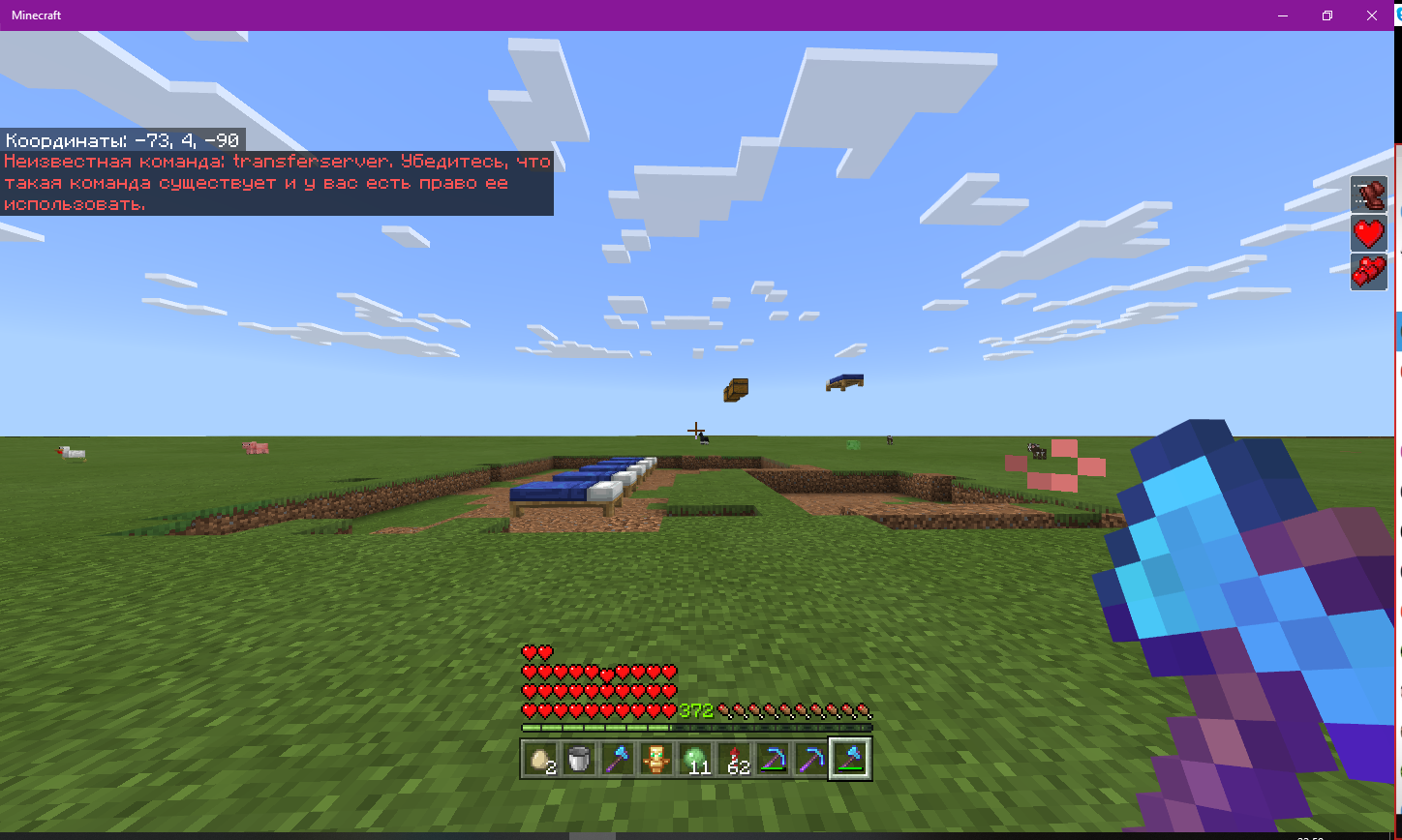
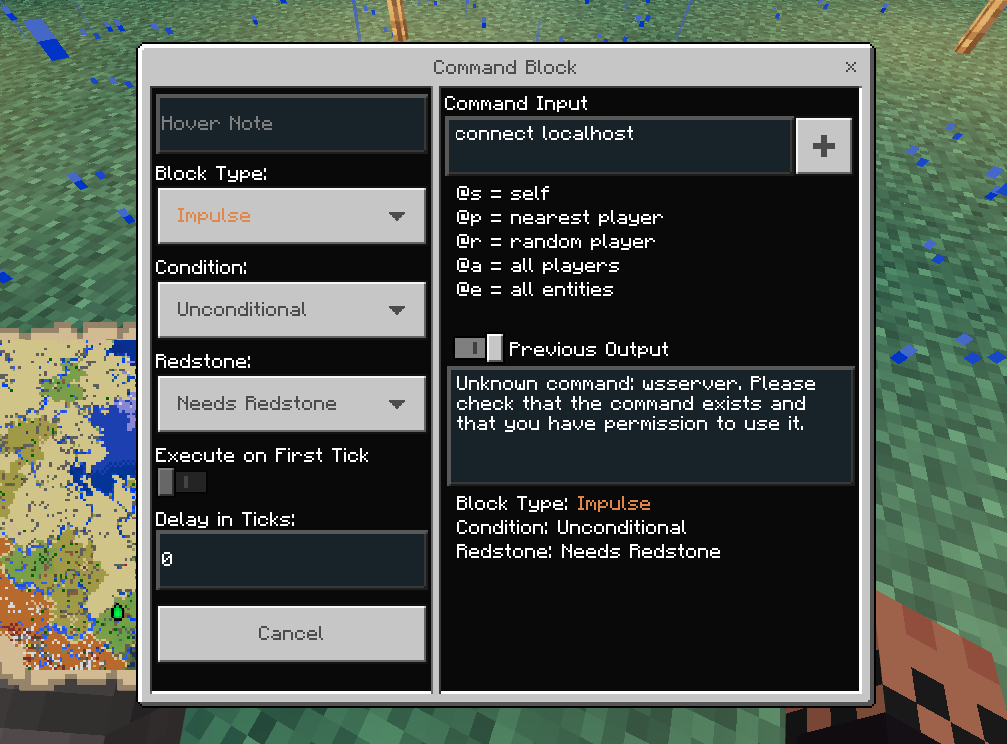
There's no any information about command in changelogs after 1.1.5, so it's look like a bug.
Command doesn't appear at command list at all and doesn't work.
Before 1.2:
After 1.2:
Listed command doesn't work on servers.
This command does not work when connected to any server running on the BDS platform.
At the same time, if you try to enter this command from the command line of the BDS, then no error and other things will be shown.The bug is similar to that described in
[MCPE-42545|https://bugs.mojang.com/projects/MCPE/issues/MCPE-42545], but differs in essence in that the problem occurs regardless of the "Experimental gameplay" switchListed command doesn't work on servers.
This command does not work when connected to any server running on the BDS platform.
At the same time, if you try to enter this command from the command line of the BDS, then no error and other things will be shown.The bug is similar to that described in
MCPE-42545, but differs in essence in that the problem occurs regardless of the "Experimental gameplay" switch
Listed command doesn't work on servers.
This command does
not work when connected to any server running on the BDS platform.
At the same time, if you try to enter this command from the command line of the BDS, then noerrorand other things will be shown.The bug is similar to that described in
MCPE-42545, but differs in essence in that the problem occurs regardless of the "Experimental gameplay" switchListed commands doesn't work on servers.
This commands doesn't work when player connected to any server running on the BDS platform.
At the same time, if you try to enter this command from the command line of the BDS, then no any effect and other things will be show.The bug is similar to that described in
MCPE-42545, but differs in essence in that the problem occurs regardless of the "Experimental gameplay" switch

Vyacheslav Makhonin Thanks for the example pictures! 
When executing the "help" command in BDS v1.14.32.1, it now seems that there are only 3 help-pages instead of 18 (like back in v1.12). The connect or wsserver command isn't even listed anymore, but executing one of them doesn't result in an error like
"Unknown command: example. Please check that the command exists and that you have permission to use it."
that pops up when trying to run any non-existing arbitrary command.

Importing comments from BDS-1206:
Vyacheslav Makhonin:
What I expected to happen was...:
The connection will be established, which BDS will notify us of, and the WebSocket server will receive messages from the game chat.
[singleplayer as example, /connect 127.0.0.1]
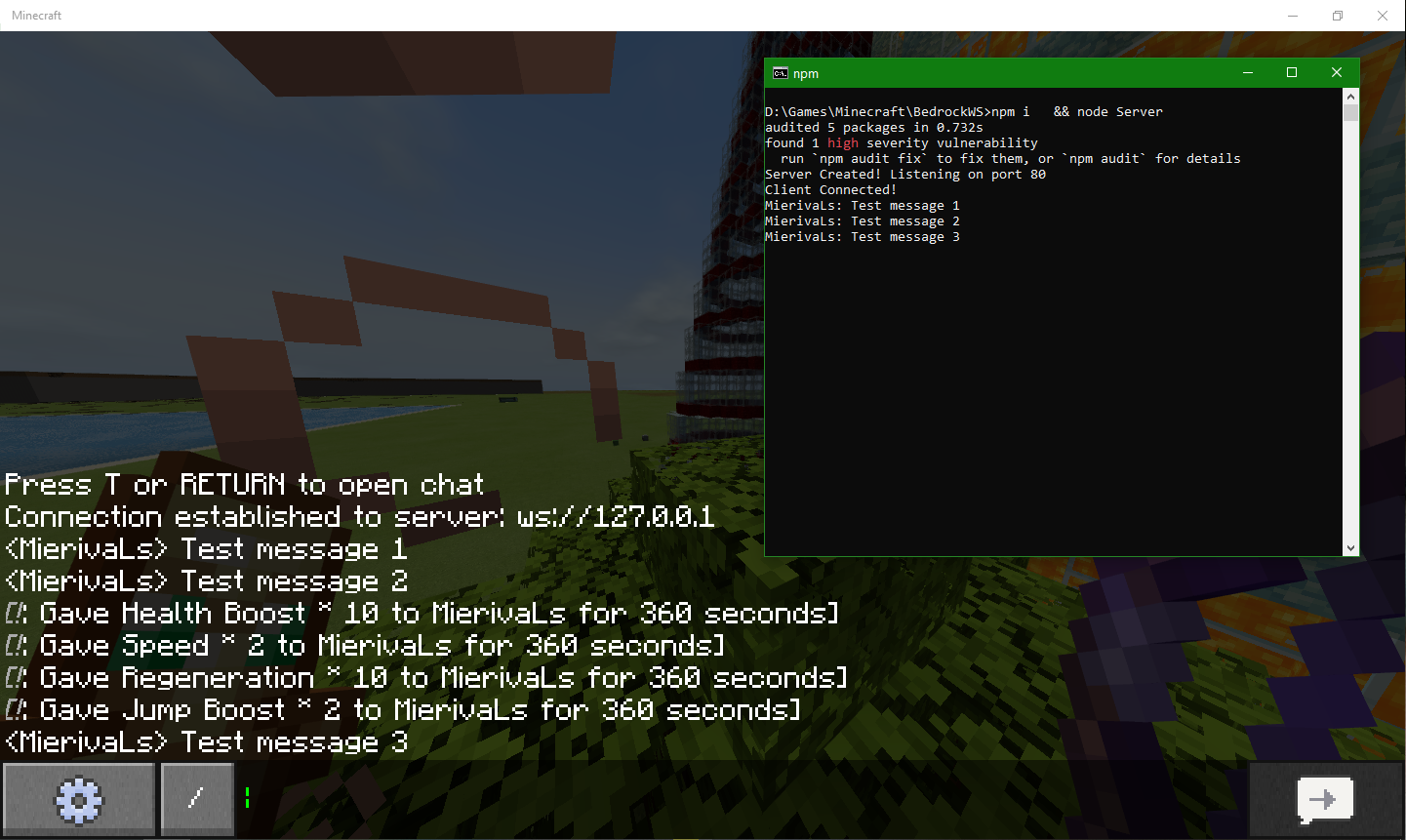
What actually happened was...:
No reaction to command input from the server side.
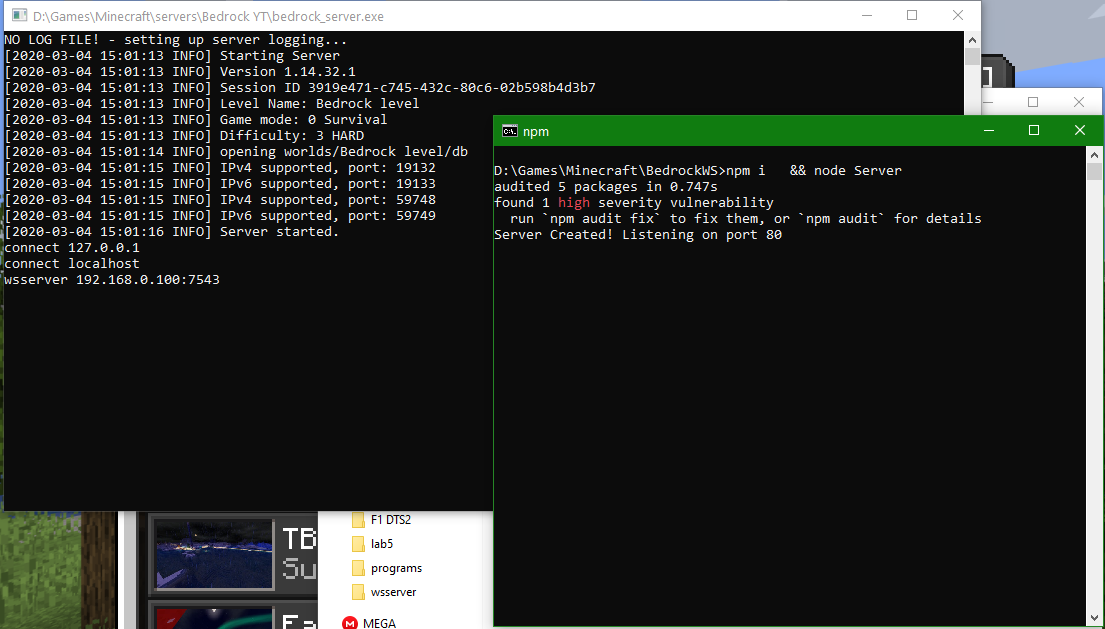
Steps to Reproduce:
- Run any WebSocket-server software;
- Run BDS;
- Insert command connect [uri] or wsserver [uri].
clarkx86:
Vyacheslav Makhonin Thanks for the example pictures!
When executing the "help" command in BDS v1.14.32.1, it now seems that there are only 3 help-pages instead of 18 (like back in v1.12). The connect or wsserver command isn't even listed anymore, but executing one of them doesn't result in an error like
"Unknown command: example. Please check that the command exists and that you have permission to use it."
that pops up when trying to run any non-existing arbitrary command.
@Mega_Spud, but Kapos' Default Font from MC-2488 uses bigger font, which looks like default Minecraft font. So, it's possible to do that in vanilla MCPE, I think.
Confirmed for 1.10.1.
Link for addon that fixes this issue was added.
It's partically fixed in MC-2488 for Java Edition by font replacement. Hopefully it will be fixed for Bedrock too.
You can use old version of Windows 10 edition for this achievement. It's fully works on 1.2.10, for example.
Will it be changed anytime soon? It's very useful slot which need to show in HUD.
Seems inactual in 1.11 by full trading replacement.
Jonathan Hanzel , there's no any information on changelogs about that.
Miguel Avelar but is it impossible to activate this command for Windows 10/Android/iOS only? Like the ability to add a third-party Ip address from the server menu in the game, which currently work on Win10/Android/iOS.
Alex Alex, Please see the bug description more closely. Command was work before 1.2, but with 1.2 disappeared without mention in the changelogs.
Given the emphasis on parity between versions, it's a good time to recall this issue.
The problem is still present in 1.15 betas/1.14 release. On Win10/Android, you can use the add-on with a modified font to solve the problem, but this action is not available on consoles, which is sad. I hope the solution will be included in the release of one of the upcoming updates, technically it is enough to simply include the font from the add-on provided in the bug description into the game.
ihave privacy it doesn't work anyway. Command doesn't give any effect, like errors or something.
Still in 1.15.0.53
Still in 1.14.x/1.15.x
There's no nether-related things in current beta.
Same issue in 1.14.30. Another ISP doesn't give any effect.
Still doesn't work in 1.14.32.1.
What I expected to happen was...:
The connection will be established, which BDS will notify us of, and the WebSocket server will receive messages from the game chat.
[singleplayer as example, /connect 127.0.0.1]
What actually happened was...:
No reaction to command input from the server side.
Steps to Reproduce:
Hope it will be fixed.