The Unicode font is hard to read from a bit of distance [+Java Parity]
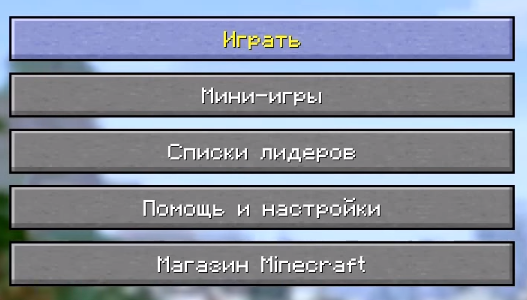
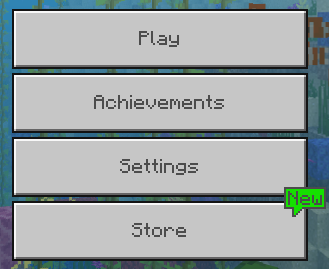
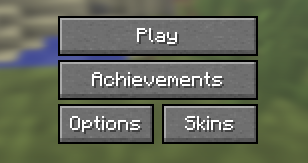
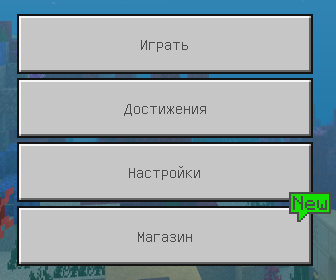
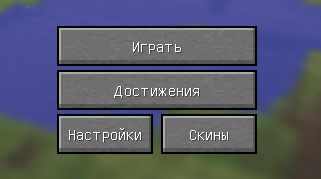
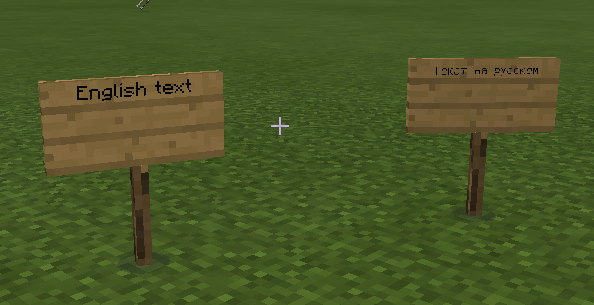
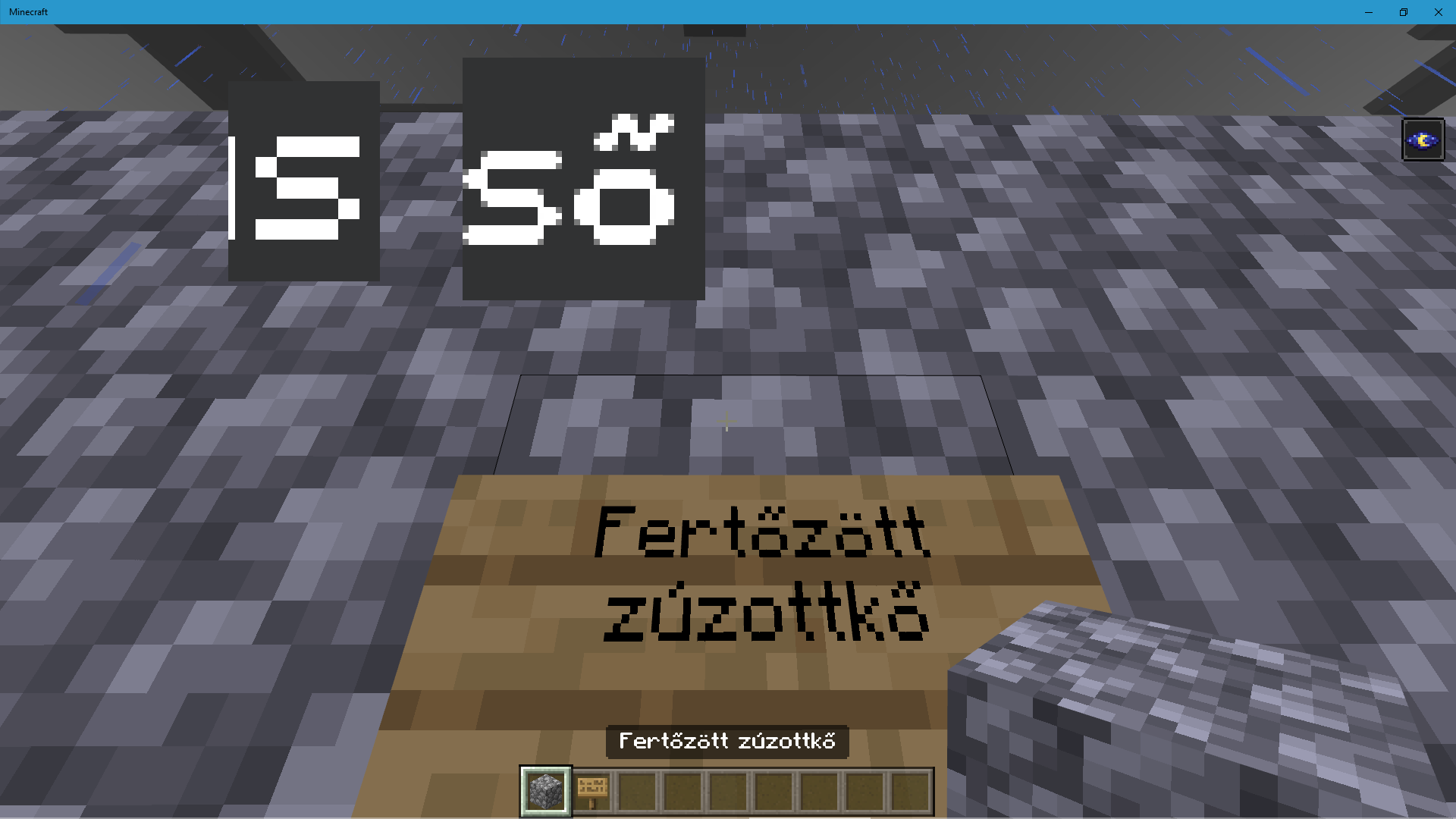
The Unicode font is very thin and unreadable.
Examples:
- Gui scale small.
- Signs from 2-3 blocks distance.
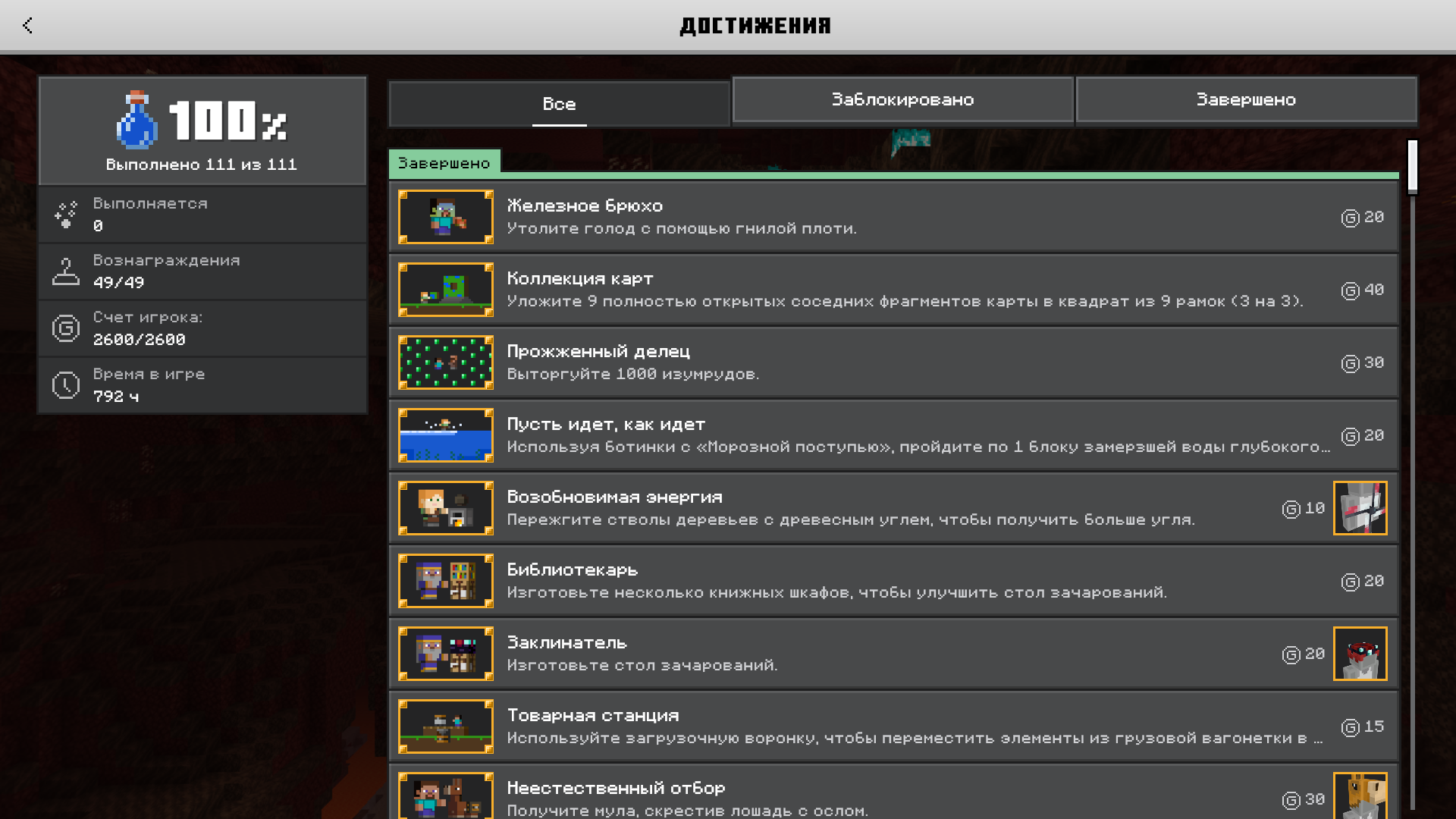
This is clone of MC-2488 for MCPE. Legacy Console Edition versions are not affected (see attachment)
Minecraft Font addon MinecraftFont.mcpack fixes this issue.
Linked Issues
is duplicated by9
 MCPE-25203Some words in Polish language have wrong size.DuplicateMCPE-25787Russian fontDuplicateMCPE-33609Some text in different languages and different font is too small or too big.DuplicateMCPE-42685Report on defect of Font.DuplicateMCPE-111269Wrong cyrrilic fontDuplicateMCPE-137835Cyrillic font parityDuplicateMCPE-157854No font support for characters other than Latin letters and numbersDuplicateMCPE-169108Polish text uses Unicode fontDuplicateMCPE-174242Some characters are not in minecraft font.Duplicate
relates to7
MCPE-51456Turkish Lira sign (₺) appears as " " in the gameConfirmedMCPE-50452Font inconsistency between Mojangles.ttf and in-game chatCommunity ConsensusMCPE-4534Chat bug, letters make smallers (Survival and Creative)Works As IntendedMCPE-139157Including a single special character changes the font of the entire messageWorks As Intended MC-2488The Unicode font is hard to read from a bit of distance
 NormalMCPE-19698Font on some UI elements displayed blurryCannot ReproduceMCPE-28401Text on signs turns to a weird font once I put an apostrophe.Fixed
Attachments9
![[Mod] EVGENSYPERPRO](../../../data/avatars/users/92853.png)

- Unresolved
 Vyacheslav Makhonin
- 59
- 30
- Confirmed
- 552063
- Multiple
- Android, iOS, Windows Phone, Windows 10
- accessibility font sign unicode
1.19.80.22 Preview - 1.21.51 Hotfix
1.19.80.22 Preview 1.13.0.1 Beta 1.12.0.14 Beta 1.19.30.22 Preview 1.19.10.23 Preview 1.19.10.22 Preview 1.17.30.20 Beta 1.17.10 1.16.210.60 Beta 1.16.0.51 Beta 1.15.0.56 Beta 1.15.0.54 Beta 1.15.0.53 Beta 1.15.0.51 Beta 1.14.30.51 Beta 1.14.25.1 Beta 1.14.21 1.14.20 Hotfix 1.14.2.50 Beta 1.14.1 Hotfix 1.13.0.18 Beta 1.13.0.13 Beta 1.13.0.9 Beta 1.12.0.12 Beta 1.12.0.11 Beta 1.12.0.10 Beta 1.12.0.9 Beta 1.12.0.2 Beta 1.11.0.10 Beta 0.14.3 0.15.0 Beta build 2 0.15.0 Beta build 3 0.15.0 0.15.1 Beta 1 0.15.1 0.15.2 0.15.3 0.15.4 0.15.6 0.15.90.0 0.15.7 0.15.90.1 0.15.90.2 0.15.8 0.15.90.7 0.16.0 1.5.2.1 1.6.0.8 Beta 1.5.3 1.6.0.30 Beta 1.6.0 1.7.0.5 Beta 1.8.0.11 Beta 1.7.0 1.9.0 1.11.0.1 Beta 1.11.0.3 Beta 1.11.0.4 Beta 1.11.0.8 Beta 1.11.0.9 Beta 1.10.1 (Windows 10 only) 1.10.0 1.11.0 1.12.0.3 Beta 1.12.0.4 Beta 1.12.0.6 Beta 1.11.1 1.11.2 1.11.3 1.11.4 1.13.0.4 Beta 1.13.0.2 Beta 1.12.1 1.12.0 1.14.0 1.14.30 Hotfix 1.16.100 1.16.201 Hotfix 1.19.1 Switch 1.19.0 1.19.20 1.19.50.23 Preview 1.19.41 1.20.0.21 Preview 1.19.73 1.20.12 Hotfix 1.21.21 Hotfix 1.21.22 Hotfix 1.21.51 Hotfix
Created Issue:
The Unicode font is hard to read from a bit of distance
The Unicode font is very thin and unreadable.
Examples:
- Gui scale small/normal.
- Signs from 2-3 blocks distance.
This is clone of https://bugs.mojang.com/browse/MC-2488 for MCPE. MCCE versions are not affected (see attachment)
Attachments4
menu_russian_xbox.PNG
- Unresolved
- Open
- Unconfirmed
- Windows
- Android, iOS, Windows Phone, Windows 10
- 0.14.3 0.15.0 Beta build 2

The Unicode font is very thin and unreadable.
Examples:
- Gui scale small/normal.
- Signs from 2-3 blocks distance.
This is clone of https://bugs.mojang.com/browse/MC-2488 for MCPE. MCCE versions are not affected (see attachment)The Unicode font is very thin and unreadable.
Examples:
- Gui scale small/normal.
- Signs from 2-3 blocks distance.
This is clone of MC-2488 for MCPE. MCCE versions are not affected (see attachment)
relates to
The Unicode font is very thin and unreadable.
Examples:
- Gui scale small
/normal.- Signs from 2-3 blocks distance.
This is clone of MC-2488 for MCPE. MCCE versions are not affected (see attachment)
The Unicode font is very thin and unreadable.
Examples:
- Gui scale small;
- Signs from 2-3 blocks distance.
This is clone of MC-2488 for MCPE. MCCE versions are not affected (see attachment)
The Unicode font is very thin and unreadable.
Examples:
- Gui scale small
;- Signs from 2-3 blocks distance.
This is clone of MC-2488 for MCPE. MCCE versions are not affected (see attachment)
The Unicode font is very thin and unreadable.
Examples:
- Gui scale small.
- Signs from 2-3 blocks distance.
This is clone of MC-2488 for MCPE. MCCE versions are not affected (see attachment)
![[Mojang] MissMarzenia (Aleksandra Zajac)](../../../data/assets/gravatar/missmarzenia.png)

![[Bot] Arisa](../../../data/assets/gravatar/mustek2.png)
The Unicode font is very thin and unreadable.
Examples:
- Gui scale small.
- Signs from 2-3 blocks distance.
This is clone of MC-2488 for MCPE. MCCE versions are not affected (see attachment)
Minecraft Font addon fixes that issue.
The Unicode font is very thin and unreadable.
Examples:
- Gui scale small.
- Signs from 2-3 blocks distance.
This is clone of MC-2488 for MCPE. MCCE versions are not affected (see attachment)
Minecraft Font addon fixes th
atissue.The Unicode font is very thin and unreadable.
Examples:
- Gui scale small.
- Signs from 2-3 blocks distance.
This is clone of MC-2488 for MCPE. MCCE versions are not affected (see attachment)
Minecraft Font addon fixes this issue.

![[MCPE Mod] Celesian](../../../data/avatars/users/81635.png)
is duplicated by
![[Mojang] Mega_Spud (Jay Wells)](../../../data/avatars/users/92696.png)
is duplicated by
is duplicated by
The Unicode font is very thin and unreadable.
Examples:
- Gui scale small.
- Signs from 2-3 blocks distance.
This is clone of MC-2488 for MCPE.
MCCEversions are not affected (see attachment)Minecraft Font addon fixes this issue.
The Unicode font is very thin and unreadable.
Examples:
- Gui scale small.
- Signs from 2-3 blocks distance.
This is clone of MC-2488 for MCPE. Legacy Console Edition versions are not affected (see attachment)
Minecraft Font addon fixes this issue.
is duplicated by
The Unicode font is hard to read from a bit of distance [+Java Parity]
![[MCQA] Kinga Izdebska](../../../data/avatars/users/18949.svg)
is duplicated by
![[Bot] Arisa](../../../data/avatars/users/43007.png)
![[MCQA] v-magwar](../../../data/avatars/users/18935.svg)
is duplicated by
![[Mod] tryashtar](../../../data/avatars/users/41963.png)
![[MCQA] Justyna Oleś](../../../data/avatars/users/18934.svg)
is duplicated by
The Unicode font is very thin and unreadable.
Examples:
- Gui scale small.
- Signs from 2-3 blocks distance.
This is clone of MC-2488 for MCPE. Legacy Console Edition versions are not affected (see attachment)
Minecraft Font addon fixes this issue.
The Unicode font is very thin and unreadable.
Examples:
- Gui scale small.
- Signs from 2-3 blocks distance.
This is clone of MC-2488 for MCPE. Legacy Console Edition versions are not affected (see attachment)
Minecraft Font addon MinecraftFont.mcpack
is duplicated by
is duplicated by
relates to
![[MCPE Helper] Aspergerian](../../../data/avatars/users/64928.png)
![[Mod] Greymagic27](../../../data/avatars/users/92875.png)
![[Mod] bemoty](../../../data/avatars/users/50554.png)
Thank you for your report!
However, this issue is a Duplicate of MCPE-15191.
If you have additional information, please add it to that report.
Please search before reporting, as it's likely that one exists already.
Quick Links:
📓 Issue Guidelines – 💬 Community Support – 📧 Customer Support – 📖 Game Wiki
Thank you for your report!
However, this issue is a Duplicate of MCPE-15191.
If you have additional information, please add it to that report.
Please search before reporting, as it's likely that one exists already.
Quick Links:
📓 Issue Guidelines – 💬 Community Support – 📧 Customer Support – 📖 Game Wiki
Thank you for your report!
However, this issue has been closed as a Duplicate of MCPE-15191.
Your additional information and observations are very useful, so if you can add them to the comments section of the parent issue it would be appreciated.
If you have not, you might like to make use of the search feature before making a new ticket, as it's likely that the issue has been reported already.
Quick Links:
📓 Issue Guidelines – 💬 Community Support – 📧 Feedback – 📖 Game Wiki
Thank you for your report!
We're actually already tracking this issue at MCPE-15191, so we will resolve and link this ticket as a duplicate.
If you would like to add a vote and any extra information to the main ticket it would be appreciated.
If you haven't already, you might like to make use of the search feature, to see if the issue has already been mentioned.
Quick Links:
📓 Issue Guidelines – 💬 Mojang Support – 📧 Suggestions – 📖 Minecraft Wiki
Thank you for your report!
We're tracking this issue in MCPE-15191, so this ticket is being resolved and linked as a duplicate.
If you would like to add a vote and any extra information to the main ticket it would be appreciated.
If you haven't already, you might like to make use of the search feature to see if the issue has already been mentioned.
Quick Links:
📓 Bug Tracker Guidelines – 💬 Community Support – 📧 Mojang Support
📓 Project Summary – ✍️ Feedback and Suggestions – 📖 Game Wiki
Summary:
When activating a font that changes the thin font in the bedrock minecraft MCPE-15191, the distance of the letters does not increase after a simple activation. Because of this, the letters overlap. BUT if you restart minecraft the font will be loaded normally. Now if you turn off the font (vanilla minecraft), the distance between the letters will be very large. This can also be fixed by restarting the game.
This bug (like many others) appeared in 1.16 and was missing on 1.14.60 and earlier.
This is clearly a mistake loading the texture pack! And since this is a very popular texture pack (MCPE-15191) - it is a little inconvenient to activate)
By the way. The thin font doesn't match the new font from the achievements) But that's not the case for this report! 

Steps to reproduce:
- Download the bold font MinecraftFont.mcpack
- Moving on to the language with thin font.
- We activate the texture pack.
- We restart minecraft.
- We deactivate the resource pack.
Observed results:
The texture pack is incorrectly activated and deactivated.
The problem is solved by restarting minecraft.
Expected results:
The texture pack should start correctly immediately after adding the texture pack.
However, there was no bug in version 1.14.60 and earlier.
Video:
1.14.60 Minecraft 2021-04-07 23-00-33.mp4
Activating texturepack Minecraft 2021-04-07 23-07-37.mp4
Restart after activation Minecraft 2021-04-07 23-08-24.mp4
Deactivation of texturepack Minecraft 2021-04-07 23-15-21.mp4
relates to MCPE-15191

1.17.30.20 is not a version that ever existed for Minecraft Java edition. If you're talking about Minecraft Bedrock edition, then you should go here instead: MCPE-15191
The issue
When writing a message, the presence of a single character not supported by Bedrock's font results in the entire message changing font.
Examples



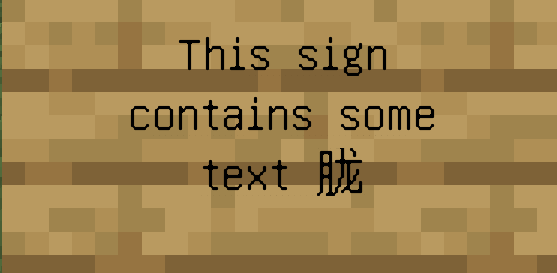


Since the unicode font is very hard to read (MCPE-15191), this presents an accessibility issue.
Expected behavior
Only the unsupported character should change; the rest of the message should use the correct font.

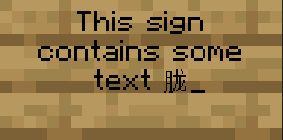

How to reproduce
Type any normal english message into chat.
Now paste in this character: 胧
Observed result: the entire message swapped to the unicode font
Expected result: only the pasted character should use the unicode font
Thank you for your report!
We're tracking this issue in MCPE-15191, so this ticket is being resolved and linked as a duplicate.
If you would like to add a vote and any extra information to the main ticket it would be appreciated.
If you haven't already, you might like to make use of the search feature to see if the issue has already been mentioned.
Quick Links:
📓 Bug Tracker Guidelines – 💬 Community Support – 📧 Mojang Support
📓 Project Summary – ✍️ Feedback and Suggestions – 📖 Game Wiki
– I am a bot. This action was performed automatically! The ticket was resolved by one of our moderators, and I left this message to give more information to you.
I don't mind if this is revisited, but it seems to me to be a duplicate MCPE-4534
Can be linked to MCPE-15191 for ease of tracking
Thank you for your report!
We're tracking this issue in MCPE-15191, so this ticket is being resolved and linked as a duplicate.
If you would like to add a vote and any extra information to the main ticket it would be appreciated.
If you haven't already, you might like to make use of the search feature to see if the issue has already been mentioned.
Quick Links:
📓 Bug Tracker Guidelines – 💬 Community Support – 📧 Mojang Support
📓 Project Summary – ✍️ Feedback and Suggestions – 📖 Game Wiki
Thank you for your report!
We're tracking this issue in MCPE-15191, so this ticket is being resolved and linked as a duplicate.
If you would like to add a vote and any extra information to the main ticket it would be appreciated.
If you haven't already, you might like to make use of the search feature to see if the issue has already been mentioned.
Quick Links:
📓 Bug Tracker Guidelines – 📧 Mojang Support
📓 Project Summary – ✍️ Feedback and Suggestions – 📖 Game Wiki
Thank you for your report!
We're tracking this issue in MCPE-15191, so this ticket is being resolved and linked as a duplicate.
If you would like to add a vote and any extra information to the main ticket it would be appreciated.
If you haven't already, you might like to make use of the search feature to see if the issue has already been mentioned.
Quick Links:
📓 Bug Tracker Guidelines – 💬 Community Support – 📧 Mojang Support
📓 Project Summary – ✍️ Feedback and Suggestions – 📖 Game Wiki
– I am a bot. This action was performed automatically! The ticket was resolved by one of our moderators, and I left this message to give more information to you.
Relates to
MCPE-4534@Mega_Spud, but Kapos' Default Font from MC-2488 uses bigger font, which looks like default Minecraft font. So, it's possible to do that in vanilla MCPE, I think.
This issue has been resolved as Won't Fix. If you would like to continue this further, please head over to the Minecraft: Pocket Edition Forums.
Reopened, should be kept like pc variant.
Please do not mark unreleased versions as affected.
You don't have access to them yet.
Was told so by Ola Malka.
Set to postponed, as it won't be fixed soon.
Link for addon that fixes this issue was added.
Why is this postponed?
Because it won't get fixed any time soon.
Oh, okay. Hopefully this won't be forgotten in the mean time.
I think all languages have this bug.When I played on Chinese,the font was sort of slimmer then English.
It's partically fixed in MC-2488 for Java Edition by font replacement. Hopefully it will be fixed for Bedrock too.
Given the emphasis on parity between versions, it's a good time to recall this issue.
The problem is still present in 1.15 betas/1.14 release. On Win10/Android, you can use the add-on with a modified font to solve the problem, but this action is not available on consoles, which is sad. I hope the solution will be included in the release of one of the upcoming updates, technically it is enough to simply include the font from the add-on provided in the bug description into the game.
Still in 1.15.0.53
Affects 1.16.100.
Affects 1.16.210.60
Achievements are in bold print. Why not make the font the main one?

It still affects the latest version)
Added a pack to the report as the link in the report is not working.
Please note that since version 1.16 there is an activation error, as a result of which you need to re-enter minecraft to activate / deactivate MCPE-124149.
MinecraftFont.mcpack
Problem is still present with signs in 1.17.30.20, where inclusion of a single inflected character (in my case Ł) in a line of text on a sign will cause the entire line on that sign to change to the hard-to-read unicode font.
The Unicode font is almost impossible to read in a device with a screen smaller than 6.5", even for a written Book & Quill where the text is upclose to the reader. The Unicode font used ingame must be reenginered.
By the way, found an addon wich solves it: https://mcpedl.com/mojangles-international-fontpack/
Still is issue in 1.18
The mod dosen't work with polish text.
For me this font addon has anti-aliasing on it when it's not on signs.
still an issue in 1.20.62
still an issue in Preview 1.21.30.25
Strangely, Ore UI uses the Minecraft Seven font, which is slightly modified than the Java one, but the game itself uses Mojangles, created by 4J Studios and when you put a modified font based on glyphs, it thickens