 CapFan
- capfan
- capfan
- America/Chicago
- Yes
- No

 MCPE-19588
 Low
Low
![[Mojang] Grum (Erik Broes)](../../../data/assets/gravatar/grum.png)
 MC-138093
 MCL-21345





With previous versions, as recent as 1.6.4, you could shift-click on servers in the server list to rearrange the order of your list. (Shift-Arrow also worked) Those of us with a long list greatly appreciate this feature.
However, 1.7.2 appears to have broken this functionality.
Still no longer working as late as snapshot 14w30c
Hostile mobs spawn on the surface despite light levels over 7.
Testing methodology: Create a new superflat world. To avoid slime spawns, I set dirt height to 64, though the effect happens at the default setting of 2.
Observation: Despite being day, hostile mobs spawn on the surface. This also happens inside well lit closed areas as well (see attachment).
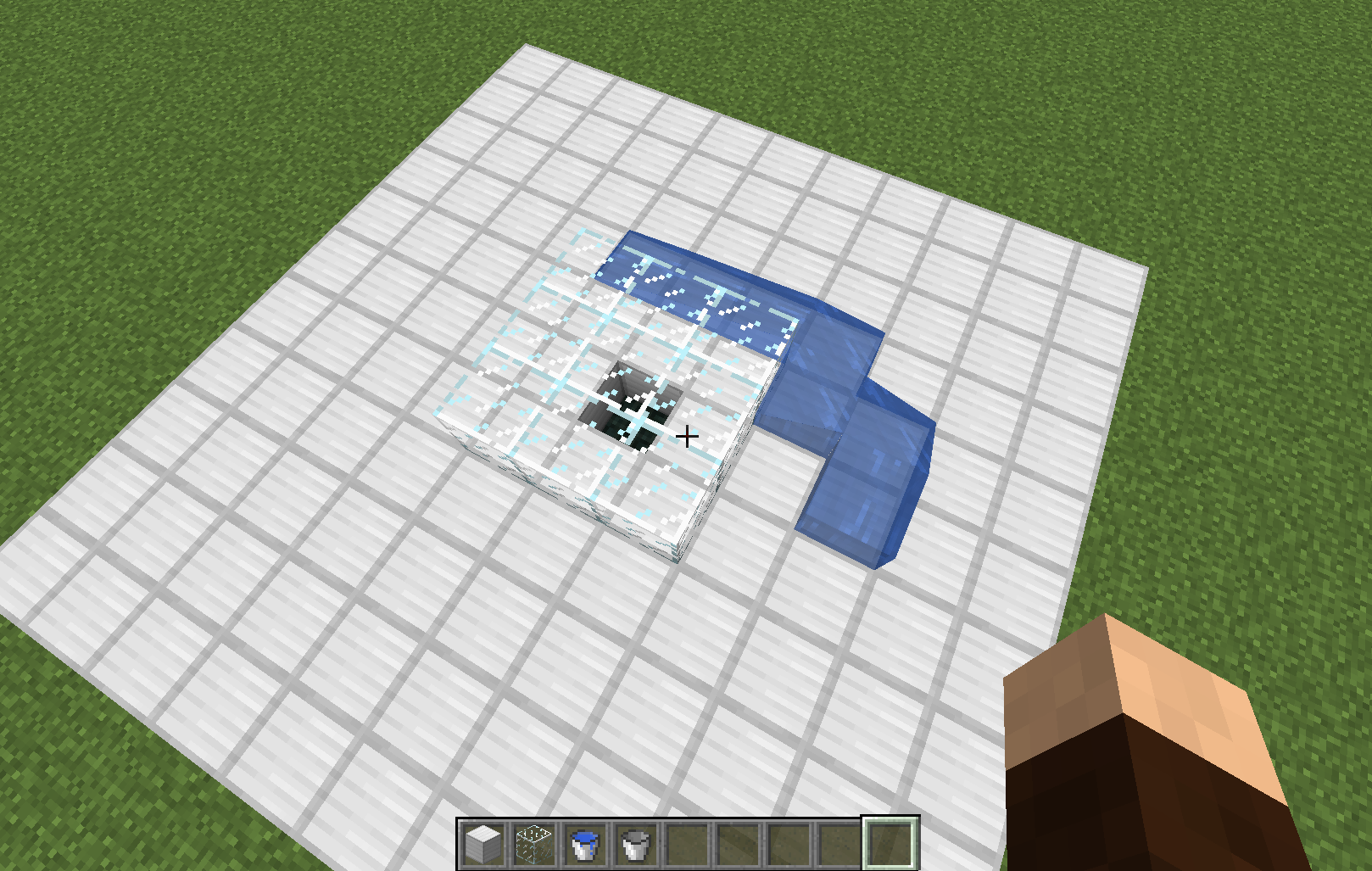
Water flows toward lower blocks even when they're covered. They see
dthe South side of the block first, then East, then North, then West. The attached screenshot demonstrates placed water circling a covered hole.Water flows toward lower blocks even when they're covered. They seek the South side of the block first, then East, then North, then West. The attached screenshot demonstrates placed water circling a covered hole.
Water flows toward lower blocks even when they're covered. They seek the South side of the block first, then East, then North, then West. The attached screenshot demonstrate
splaced water circling a covered hole.Water flows toward lower blocks even when they're covered. They seek the South side of the block first, then East, then North, then West. The attached screenshots demonstrate placed water circling a covered hole.
Using 1.13.2, when launching the game pressing "Play", the game crashes while loading. If you switch the same profile to 1.13.1, it runs fine. I've tested
in areinstalled fully default state with the same results.
The Windows event log (attached) indicates 0xc0000005 exception in lwjgl.dll. Game log and Launcher Output also attached.
Using 1.13.2, when launching the game pressing "Play", the game crashes while loading. If you switch the same profile to 1.13.1, it runs fine. I've tested with MC reinstalled fully default state with the same results.
The Windows event log (attached) indicates 0xc0000005 exception in lwjgl.dll. Game log and Launcher Output also attached.
Using 1.13.2, when launching the game pressing "Play", the game crashes while loading. If you switch the same profile to 1.13.1, it runs fine. I've tested with MC reinstalled fully default state, with all background software and tasks stopped with the same results.
The Windows event log (attached) indicates 0xc0000005 exception in lwjgl.dll. Game log and Launcher Output also attached.
Using 1.13.2, when launching the game pressing "Play", the game crashes while loading. If you switch the same profile to 1.13.1, it runs fine. I've tested with MC reinstalled in a fully default state, with all background software and tasks stopped with the same results.
The Windows event log (attached) indicates 0xc0000005 exception in lwjgl.dll. Game log and Launcher Output also attached.
I am able to reproduce this issue. You can see the realm invite envelope on the Realms button in the main menu, but the envelope icon is missing on the Realms screen. It's not just hidden, as clicking the area does not open the realm invite acceptance dialog.
Main Menu.jpg
This isn't the same issue as
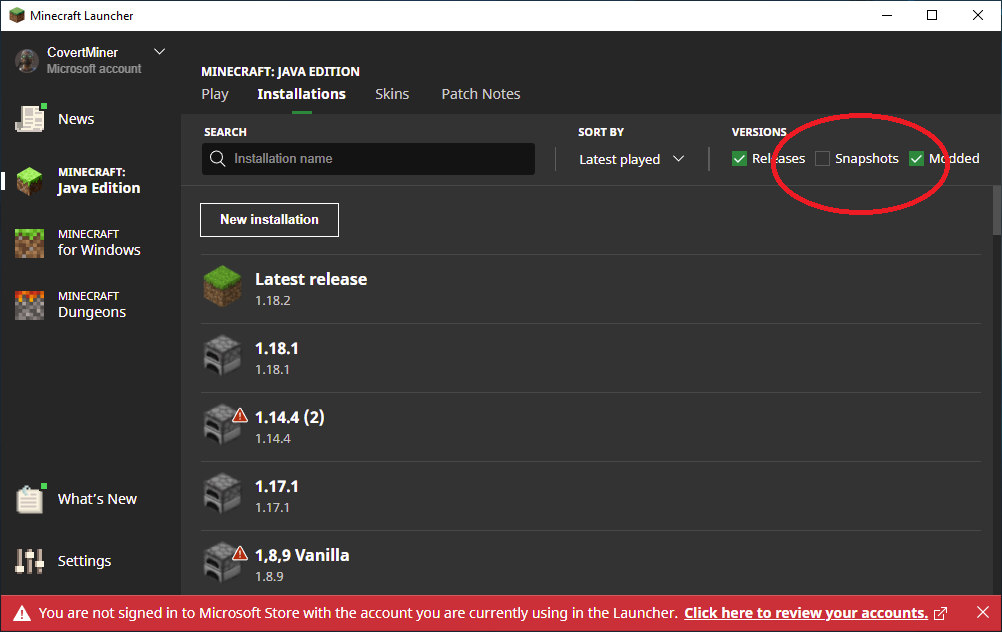
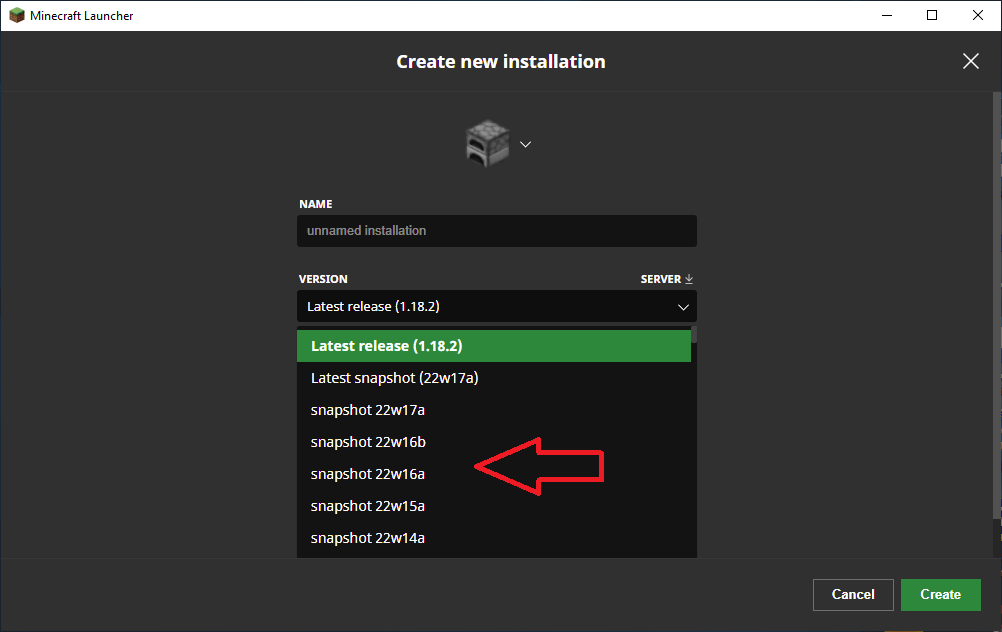
MCL-14797. In this case, the setting change (unchecking snapshots checkbox) saves just fine. The problem is that the versions list does not respect the setting, and includes snapshots when it shouldn't.

CapFan, the way it happens on your screenshot is intended:
Since this is how it should look if the screen is not big enough for the GUI.
It just can't fit if you have it on the side. Also, it should behave the way you want if you change the GUI scale to normal, as there would be space to fit both inventory and recipe book side by side.
You need to create a new Windows username without any special characters, changing your current username DOES NOT work
Windows 7, 8, 8.1: https://support.microsoft.com/en-us/help/13951/windows-create-user-account#create-user-account=windows
*NOTE:* Scroll down for Windows 7 instructions, use the Windows 8.1 instructions for Windows 8
Windows 10: https://support.microsoft.com/en-us/help/4026923/windows-10-create-a-local-user-or-administrator-account
Description from MC-143300 (CapFan):
Testing result Summary: Windows userpaths with non-ANSI characters will result in a client crash. This cannot be fixed with --workDir.
Setup: I created four administrator accounts, Test, Testö, TestĂ, and Testş. Methodology: With each account I attempted to run Minecraft normally, and run Minecraft with --workDir directed to C:\MC_Root\.
Result details: The Test username (English) is in both Ascii and ANSI sets. This was my control to verify that the testing methodology was sound. In both cases, the client ran normally. The Testö username (Swedish) is not ascii, but is in the ANSI set (alt+0246). In both cases, the client ran normally.
The TestĂ username (Vietnamese) and Testş username (Azerbaijani) are not in the ANSI set. Running with default settings produces the "Could not find or load main class net.minecraft.client.main.Main" error (launcher_log.txt). Running with --workDir C:\MC argument produces the "java.lang.UnsatisfiedLinkError: Failed to locate library: lwjgl.dll" error (crash-2019-01-28_15.04.56-client.txt).
---- Minecraft Crash Report ----
// Hi. I'm Minecraft, and I'm a crashaholic.

Time: 27.08.18 20:22
Description: Initializing game

java.lang.UnsatisfiedLinkError: Failed to locate library: lwjgl.dll
	at org.lwjgl.system.Library.loadSystem(Library.java:147)
	at org.lwjgl.system.Library.loadSystem(Library.java:67)
	at org.lwjgl.system.Library.<clinit>(Library.java:50)
	at org.lwjgl.system.MemoryUtil.<clinit>(MemoryUtil.java:61)
	at org.lwjgl.system.MemoryStack.<init>(MemoryStack.java:61)
	at org.lwjgl.system.MemoryStack.create(MemoryStack.java:82)
	at org.lwjgl.system.MemoryStack.create(MemoryStack.java:71)
	at org.lwjgl.system.MemoryStack$$Lambda$809/1436538348.get(Unknown Source)
	at java.lang.ThreadLocal$SuppliedThreadLocal.initialValue(ThreadLocal.java:284)
	at java.lang.ThreadLocal.setInitialValue(ThreadLocal.java:180)
	at java.lang.ThreadLocal.get(ThreadLocal.java:170)
	at org.lwjgl.system.MemoryStack.stackGet(MemoryStack.java:628)
	at org.lwjgl.system.MemoryStack.stackPush(MemoryStack.java:637)
	at cgc.a(SourceFile:127)
	at cfs.an(SourceFile:557)
	at cfs.am(SourceFile:436)
	at cfs.a(SourceFile:380)
	at net.minecraft.client.main.Main.main(SourceFile:144)


A detailed walkthrough of the error, its code path and all known details is as follows:
---------------------------------------------------------------------------------------

-- Head --
Thread: Client thread
Stacktrace:
	at org.lwjgl.system.Library.loadSystem(Library.java:147)
	at org.lwjgl.system.Library.loadSystem(Library.java:67)
	at org.lwjgl.system.Library.<clinit>(Library.java:50)
	at org.lwjgl.system.MemoryUtil.<clinit>(MemoryUtil.java:61)
	at org.lwjgl.system.MemoryStack.<init>(MemoryStack.java:61)
	at org.lwjgl.system.MemoryStack.create(MemoryStack.java:82)
	at org.lwjgl.system.MemoryStack.create(MemoryStack.java:71)
	at org.lwjgl.system.MemoryStack$$Lambda$809/1436538348.get(Unknown Source)
	at java.lang.ThreadLocal$SuppliedThreadLocal.initialValue(ThreadLocal.java:284)
	at java.lang.ThreadLocal.setInitialValue(ThreadLocal.java:180)
	at java.lang.ThreadLocal.get(ThreadLocal.java:170)
	at org.lwjgl.system.MemoryStack.stackGet(MemoryStack.java:628)
	at org.lwjgl.system.MemoryStack.stackPush(MemoryStack.java:637)
	at cgc.a(SourceFile:127)
	at cfs.an(SourceFile:557)
	at cfs.am(SourceFile:436)

-- Initialization --
Details:
Stacktrace:
	at cfs.a(SourceFile:380)
	at net.minecraft.client.main.Main.main(SourceFile:144)

-- System Details --
Details:
	Minecraft Version: 1.13.1
	Operating System: Windows 7 (amd64) version 6.1
	Java Version: 1.8.0_51, Oracle Corporation
	Java VM Version: Java HotSpot(TM) 64-Bit Server VM (mixed mode), Oracle Corporation
	Memory: 393038896 bytes (374 MB) / 536870912 bytes (512 MB) up to 2147483648 bytes (2048 MB)
	JVM Flags: 9 total; -XX:HeapDumpPath=MojangTricksIntelDriversForPerformance_javaw.exe_minecraft.exe.heapdump -Xss1M -Xmx2G -XX:+UnlockExperimentalVMOptions -XX:+UseG1GC -XX:G1NewSizePercent=20 -XX:G1ReservePercent=20 -XX:MaxGCPauseMillis=50 -XX:G1HeapRegionSize=16M
	Launched Version: 1.13.1
	LWJGL: 3.1.6 build 14
	OpenGL: ~~ERROR~~ NoClassDefFoundError: Could not initialize class org.lwjgl.system.Library
	GL Caps:
	Using VBOs: Yes
	Is Modded: Probably not. Jar signature remains and client brand is untouched.
	Type: Client (map_client.txt)
	Resource Packs:
	Current Language: ~~ERROR~~ NullPointerException: null
	Profiler Position: N/A (disabled)
	CPU: <unknown>
For clarity, the report was shift-click, which seems to be broken. The resolution here simply points to a related function (shift-arrow). Does this mean the functionality was removed or is this an unintended bug?
Crash report attached per instructions
An issue that I reported was closed as duplicate and referenced here. This issue, however, was closed without being addressed.
Although there is a different key combination that performs a similar but not exact function, the original report reporting the function of Shift-Click failing to function with the 1.7.2 update is still valid.
Has the reported functionality been intentionally removed, or is this an unintentional bug?
This is still a concern with 14w30c.
This issue is still present as of 14w30c
What's unique here is that the slimeblock shouldn't provide initial momentum at all, and especially not continue to infinitely increase momentum by sitting on the slimeblock.
The bug requires the player to be fully submerged for this bug to occur. If you create frost 1 block under the surface of the water, it vanishes normally. If you create frost 2 or more blocks under the surface of the water, it never vanishes.
EDIT: further testing reveals that this is a light level issue. Placing glowstone underwater near the frost blocks causes them to begin breaking. This would also include frost not breaking at night.
While putting together a clean test environment to demonstrate the issue, I've discovered that I can only reproduce this issue on a Spigot server.
Please disregard this bug report.
This is the same problem that's well described in
MC-54484Testing with 17w14a. This issue still happens.
Game set to 1024x768. Open crafting table. This is the resulting GUI: http://i.imgur.com/RrN1lkk.png
confirmed for 17w18b
http://i.imgur.com/K0velE2.png
Maria Lemon, This issue occurs when you select any 4:3 aspect ratio. Here is a screenshot of 1.12-Pre6 at 1280x960: http://i.imgur.com/KUjPzjF.png
If this were happening at some wacky resolution that no one uses, this might be a non issue. The trouble is, this happens at the default 4:3 monitor resolution and impacts a meaningful number of people.
In fact, this is exactly it. at the 1280x960 resolution I was testing, "Large" works fine but "Auto" sets the GUI scale to a size larger than "large" and the inventory subsequently fails. This isn't the only failure, as a number of option menus are also cropped on the sides.
Having said that, I suspect "Auto" being the real problem makes this report a duplicate of MC-37839.
This issue occurs on 1.12 PreRelease-7. Screenshots at standard 4:3 @ 1280x960:
http://i.imgur.com/jO34iZa.png
http://i.imgur.com/frxyDLe.png
@[Mod] Pokechu22 , I've tested your modified GLFW and it does indeed fix the issue with both RDP and KaVoom. Your efforts are stunningly impressive. I appreciate that this will take some time to filter it's way into the official release.
I'm having exactly this same issue.
1.13.1 and older run just fine. 1.13.2 and 18w43b both crash shortly after pressing play roughly 90% of the time (when it does run, play is normal until I exit). No game log (latest.log) or crash report are created. The launcher game output states:
The launcher log does contain the error and stops here:
[1025/131816:INFO:GameCallbacks.cpp(199)] game/cft (Client thread) info LWJGL Version: 3.1.6 build 14
[1025/131819:INFO:GameCallbacks.cpp(199)] launcher/launcher (main) info
[1025/131819:INFO:GameCallbacks.cpp(199)] launcher/monitor (Process Monitor) fatal Process crashed with exit code -1073741819
Minecraft IRC support was unable to identify any issues with the computer and is suggesting that I reload Windows. However, Since 1.13.1 and older run without error, I am having difficulty accepting the the issue is with the system when the failure is specific to the last two versions.
EDIT: I've attached the Windows event log, which points to lwjgl.dll
Thank you for the reply, Neko. These are not the solutions. I am testing with both the bundled Java and a clean install of jre1.8.0_181. Both produce the same error. I do not have D3Dgear installed. I have tested with several versions of Nvidia drivers, including 398.82 and 416.34 (latest version, clean install) for my 660Ti, all with the same result.
Again, 1.13.1 runs without any error. Only 1.13.2 and 18w43b produce the error.
[Mod] Pokechu22, the bug report includes two conditions and two outcomes. One condition is a vanilla state, whereas the other is using --workDir (which should be a workaround for the initial crash, but instead produces a different unexpected error).
Note in the last paragraph, the specific logs are matched to the tests. Your confusion results from mismatching tests and log results. If you'd like more or specific logs, I can happily produce them. Edit: To help clarify things, I've attached both Launcher_log files (with and without the --workDir argument).
My goal here is to focus on the underlying issue: common characters from certain languages prevent the game from running. This results in two distinct outcomes, depending on how the game is run. This bug report illustrates both.
Invalidating and moving my post is certainly fine, as long as we don't lose track of the broader issue and both errors that result (not just the single error listed in the target bug report).
As a reminder, there are two possible outcomes caused by non-ANSI characters in the Windows userpath:
Under default conditions, the user will receive the following: Error: Could not find or load main class net.minecraft.client.main.Main
When using the --workDir argument avoid the Windows userpath, the user will receive the following: java.lang.UnsatisfiedLinkError: Failed to locate library: lwjgl.dll
Actually, this isn't a local system problem at all. The file hosted on the UK cloud server has an invalid checksum, and needs to be updated.
Your world appears to be corrupted, and may require a restart to fix. If you can't restart that world, you may find it quite buggy, and suffer from unexpected crashes. Best of luck.
As of 1.14.3, this issue seems to have been resolved. I can no longer reproduce this issue.
With the 1.14.4 release, the issue has returned. Raw Input "Off" does solve the problem" for me.
The same cycle can be exploited between a Cartographer an Librarian, buying Glass blocks and selling Glass Panes.
I disagree with this being considered "reasonable". Place 1 flower, pick up 3-4 flowers. Hundreds of duplicated items in minutes.
With today's launcher update, my square no longer spins indefinitely, but rather I now get the red "Something went wrong in the login process" in the upper right corner.
Can confirm. When first opening a container, you cannot hold an item and shift-double-click to move all stacks from one container to the other. Only after an initial shift-single-click can you then shift-double-click to move all the stacks.
Further, once you can shift-double-click, you can only move the item type that you moved with shift-single-click regardless of what items you shift-double-click on.
I am unable to reproduce this issue in 24w03a.
I can still duplicate the issue in 24w10a
Edit: Still happening in 24w11a