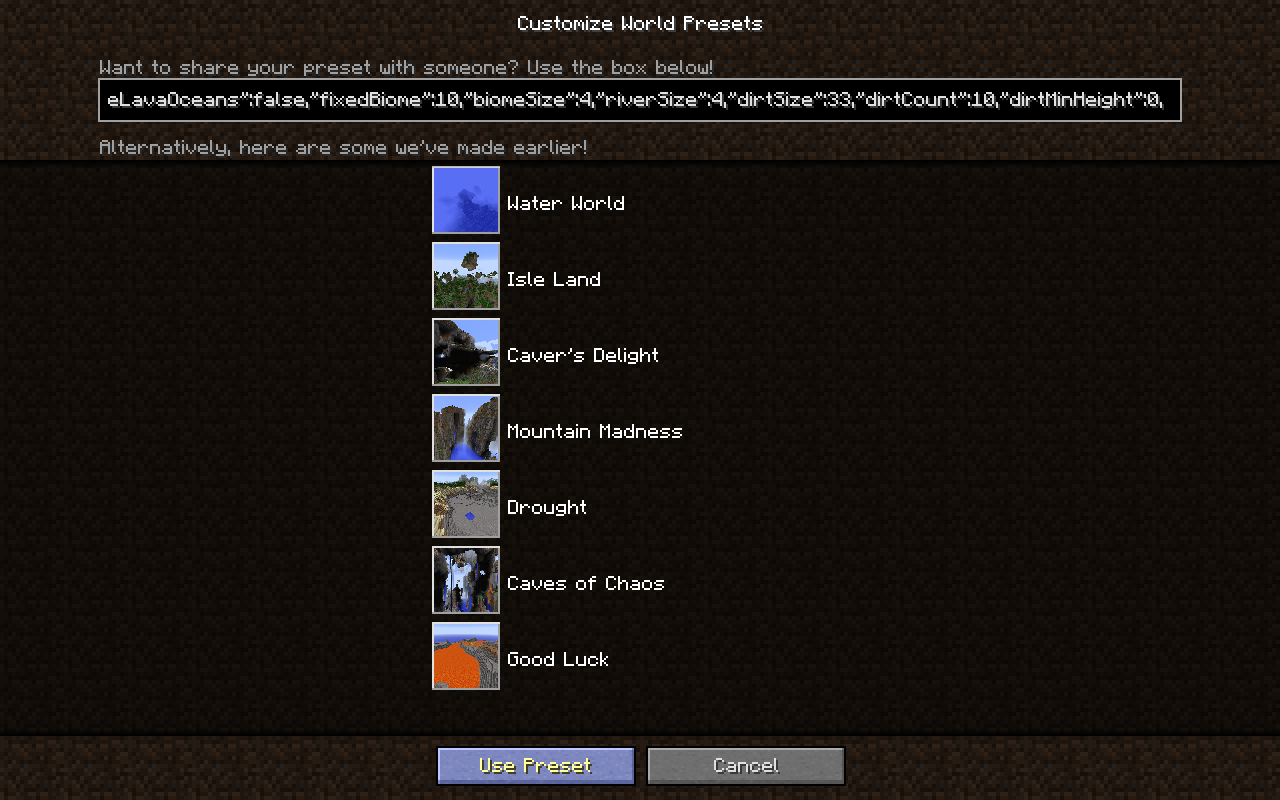
Customized World Preset Biome ID >= 8 adds 2
To reproduce:
- Create New World.
- Select "Customized" World type.
- Click on "Customize".
- Choose any biome after "River", click "Done".
- Re-click on "Customize", see the slider has moved forward 2 ticks.
Also:
- If "Mesa Plateau F" or "Mesa Plateau" biome is chosen,
- Re-click on "Customize", see the slider is graphically off its track, and the label simply reads "Biome: ?".
- (Does not crash in 1.11.2 and forward, but has previously caused a crash, see attachment)
Code analysis by Cubitect can be found in this comment.
Linked Issues
is duplicated by25
 MC-53473Customized world settings Biome sliders change when you re-customize the worldDuplicateMC-55430[Customized World Type] Returning to the "Customize" menu can select another biomeDuplicateMC-55550Minecraft Crashing when editing customised world settingsDuplicateMC-5564414w20b: World Generation CrashDuplicateMC-55940Customized world boime slider got moveDuplicateMC-56144Clicking done on Customized menu and then clicking customize again crashes.DuplicateMC-56630Customized World Preset Biome ID >= 8 adds 2.DuplicateMC-57523In the Customized world settings, the biome selection doesn't work properly.DuplicateMC-61769Bug On Custimisible WorldsDuplicateMC-61948Customized - Fixed Biome slider not workingDuplicateMC-63643Customized terrain presets not workingDuplicateMC-66823Hopper: java.lang.NullPointerException: Updating screen eventsDuplicateMC-66917Biome slider label slightly off.DuplicateMC-68330Choosing a biome in customized chooses the next biome on the sliderDuplicateMC-73434Custom World Settings biome selectDuplicateMC-77195Recreating a Customized world changes BiomeDuplicateMC-79914World Customization Feature: Biome Selection Changes if you Exit UI.DuplicateMC-92214Custom World Biome Setting Doesn't Remember CorrectlyDuplicateMC-94818Customized world Biome selector straysDuplicateMC-96843Biomes set as settings in a Custom/Flat world don't coincide with world generated biomes.DuplicateMC-96857Some selected biomes change when re-customizing your worldDuplicateMC-105848Custom world biome select not workingDuplicateMC-110106When you customize by creating a world biome becomes random.DuplicateMC-120209Ice Plains bugDuplicateMC-123991Jungle switches to jungle edge in world customizationDuplicate
Attachments13




![[Mod] bemoty](../../../data/avatars/users/50554.png)
Created Issue:
My game is crashed when i was trying to re-create my world and customize it
---- Minecraft Crash Report ----
// Don't be sad. I'll do better next time, I promise!Time: 3/5/2014 6:08 μμ
Description: Updating screen eventsjava.lang.NullPointerException: Updating screen events
at bmh.b(SourceFile:499)
at bmh.a(SourceFile:455)
at bkw.e(SourceFile:53)
at bkw.<init>(SourceFile:25)
at blj.a(SourceFile:163)
at blj.a(SourceFile:137)
at blj.r(SourceFile:41)
at blj.<init>(SourceFile:32)
at bmh.g(SourceFile:364)
at bmh.s_(SourceFile:220)
at bnd.a(SourceFile:205)
at bjf.a(SourceFile:688)
at bmd.a(SourceFile:271)
at bnd.a(SourceFile:180)
at bmd.a(SourceFile:317)
at bnd.d(SourceFile:242)
at bnd.k(SourceFile:219)
at bjf.p(SourceFile:1387)
at bjf.ai(SourceFile:801)
at bjf.f(SourceFile:755)
at net.minecraft.client.main.Main.main(SourceFile:121)A detailed walkthrough of the error, its code path and all known details is as follows:
---------------------------------------------------------------------------------------– Head –
Stacktrace:
at bmh.b(SourceFile:499)
at bmh.a(SourceFile:455)
at bkw.e(SourceFile:53)
at bkw.<init>(SourceFile:25)
at blj.a(SourceFile:163)
at blj.a(SourceFile:137)
at blj.r(SourceFile:41)
at blj.<init>(SourceFile:32)
at bmh.g(SourceFile:364)
at bmh.s_(SourceFile:220)
at bnd.a(SourceFile:205)
at bjf.a(SourceFile:688)
at bmd.a(SourceFile:271)
at bnd.a(SourceFile:180)
at bmd.a(SourceFile:317)
at bnd.d(SourceFile:242)
at bnd.k(SourceFile:219)– Affected screen –
Details:
Screen name: bmh
Stacktrace:
at bjf.p(SourceFile:1387)
at bjf.ai(SourceFile:801)
at bjf.f(SourceFile:755)
at net.minecraft.client.main.Main.main(SourceFile:121)– System Details –
Details:
Minecraft Version: 14w18b
Operating System: Windows Vista (x86) version 6.0
Java Version: 1.7.0_55, Oracle Corporation
Java VM Version: Java HotSpot(TM) Client VM (mixed mode, sharing), Oracle Corporation
Memory: 38029736 bytes (36 MB) / 124878848 bytes (119 MB) up to 518979584 bytes (494 MB)
JVM Flags: 2 total; -XX:HeapDumpPath=MojangTricksIntelDriversForPerformance_javaw.exe_minecraft.exe.heapdump -Xmx512M
IntCache: cache: 0, tcache: 0, allocated: 0, tallocated: 0
Launched Version: 14w18b
LWJGL: 2.9.1
OpenGL: GeForce 9300M GS/PCI/SSE2 GL version 2.1.2, NVIDIA Corporation
GL Caps: Using GL 1.3 multitexturing.
Using GL 1.3 texture combiners.
Using framebuffer objects because EXT_framebuffer_object is supported.
Anisotropic filtering is supported and maximum anisotropy is 16.
Shaders are available because OpenGL 2.1 is supported.Is Modded: Probably not. Jar signature remains and client brand is untouched.
Type: Client (map_client.txt)
Resource Packs: []
Current Language: English (US)
Profiler Position: N/A (disabled)
Anisotropic Filtering: Off (1)Environment
Windows Vista

is duplicated by
---- Minecraft Crash Report ----
// Don't be sad. I'll do better next time, I promise!Time: 3/5/2014 6:08 μμ
Description: Updating screen eventsjava.lang.NullPointerException: Updating screen events
at bmh.b(SourceFile:499)
at bmh.a(SourceFile:455)
at bkw.e(SourceFile:53)
at bkw.<init>(SourceFile:25)
at blj.a(SourceFile:163)
at blj.a(SourceFile:137)
at blj.r(SourceFile:41)
at blj.<init>(SourceFile:32)
at bmh.g(SourceFile:364)
at bmh.s_(SourceFile:220)
at bnd.a(SourceFile:205)
at bjf.a(SourceFile:688)
at bmd.a(SourceFile:271)
at bnd.a(SourceFile:180)
at bmd.a(SourceFile:317)
at bnd.d(SourceFile:242)
at bnd.k(SourceFile:219)
at bjf.p(SourceFile:1387)
at bjf.ai(SourceFile:801)
at bjf.f(SourceFile:755)
at net.minecraft.client.main.Main.main(SourceFile:121)A detailed walkthrough of the error, its code path and all known details is as follows:
---------------------------------------------------------------------------------------– Head –
Stacktrace:
at bmh.b(SourceFile:499)
at bmh.a(SourceFile:455)
at bkw.e(SourceFile:53)
at bkw.<init>(SourceFile:25)
at blj.a(SourceFile:163)
at blj.a(SourceFile:137)
at blj.r(SourceFile:41)
at blj.<init>(SourceFile:32)
at bmh.g(SourceFile:364)
at bmh.s_(SourceFile:220)
at bnd.a(SourceFile:205)
at bjf.a(SourceFile:688)
at bmd.a(SourceFile:271)
at bnd.a(SourceFile:180)
at bmd.a(SourceFile:317)
at bnd.d(SourceFile:242)
at bnd.k(SourceFile:219)– Affected screen –
Details:
Screen name: bmh
Stacktrace:
at bjf.p(SourceFile:1387)
at bjf.ai(SourceFile:801)
at bjf.f(SourceFile:755)
at net.minecraft.client.main.Main.main(SourceFile:121)– System Details –
Details:
Minecraft Version: 14w18b
Operating System: Windows Vista (x86) version 6.0
Java Version: 1.7.0_55, Oracle Corporation
Java VM Version: Java HotSpot(TM) Client VM (mixed mode, sharing), Oracle Corporation
Memory: 38029736 bytes (36 MB) / 124878848 bytes (119 MB) up to 518979584 bytes (494 MB)
JVM Flags: 2 total; -XX:HeapDumpPath=MojangTricksIntelDriversForPerformance_javaw.exe_minecraft.exe.heapdump -Xmx512M
IntCache: cache: 0, tcache: 0, allocated: 0, tallocated: 0
Launched Version: 14w18b
LWJGL: 2.9.1
OpenGL: GeForce 9300M GS/PCI/SSE2 GL version 2.1.2, NVIDIA Corporation
GL Caps: Using GL 1.3 multitexturing.
Using GL 1.3 texture combiners.
Using framebuffer objects because EXT_framebuffer_object is supported.
Anisotropic filtering is supported and maximum anisotropy is 16.
Shaders are available because OpenGL 2.1 is supported.Is Modded: Probably not. Jar signature remains and client brand is untouched.
Type: Client (map_client.txt)
Resource Packs: []
Current Language: English (US)
Profiler Position: N/A (disabled)
Anisotropic Filtering: Off (1)---- Minecraft Crash Report ---- // Don't be sad. I'll do better next time, I promise! Time: 3/5/2014 6:08 μμ Description: Updating screen events java.lang.NullPointerException: Updating screen events at bmh.b(SourceFile:499) at bmh.a(SourceFile:455) at bkw.e(SourceFile:53) at bkw.<init>(SourceFile:25) at blj.a(SourceFile:163) at blj.a(SourceFile:137) at blj.r(SourceFile:41) at blj.<init>(SourceFile:32) at bmh.g(SourceFile:364) at bmh.s_(SourceFile:220) at bnd.a(SourceFile:205) at bjf.a(SourceFile:688) at bmd.a(SourceFile:271) at bnd.a(SourceFile:180) at bmd.a(SourceFile:317) at bnd.d(SourceFile:242) at bnd.k(SourceFile:219) at bjf.p(SourceFile:1387) at bjf.ai(SourceFile:801) at bjf.f(SourceFile:755) at net.minecraft.client.main.Main.main(SourceFile:121) A detailed walkthrough of the error, its code path and all known details is as follows: --------------------------------------------------------------------------------------- -- Head -- Stacktrace: at bmh.b(SourceFile:499) at bmh.a(SourceFile:455) at bkw.e(SourceFile:53) at bkw.<init>(SourceFile:25) at blj.a(SourceFile:163) at blj.a(SourceFile:137) at blj.r(SourceFile:41) at blj.<init>(SourceFile:32) at bmh.g(SourceFile:364) at bmh.s_(SourceFile:220) at bnd.a(SourceFile:205) at bjf.a(SourceFile:688) at bmd.a(SourceFile:271) at bnd.a(SourceFile:180) at bmd.a(SourceFile:317) at bnd.d(SourceFile:242) at bnd.k(SourceFile:219) -- Affected screen -- Details: Screen name: bmh Stacktrace: at bjf.p(SourceFile:1387) at bjf.ai(SourceFile:801) at bjf.f(SourceFile:755) at net.minecraft.client.main.Main.main(SourceFile:121) -- System Details -- Details: Minecraft Version: 14w18b Operating System: Windows Vista (x86) version 6.0 Java Version: 1.7.0_55, Oracle Corporation Java VM Version: Java HotSpot(TM) Client VM (mixed mode, sharing), Oracle Corporation Memory: 38029736 bytes (36 MB) / 124878848 bytes (119 MB) up to 518979584 bytes (494 MB) JVM Flags: 2 total; -XX:HeapDumpPath=MojangTricksIntelDriversForPerformance_javaw.exe_minecraft.exe.heapdump -Xmx512M IntCache: cache: 0, tcache: 0, allocated: 0, tallocated: 0 Launched Version: 14w18b LWJGL: 2.9.1 OpenGL: GeForce 9300M GS/PCI/SSE2 GL version 2.1.2, NVIDIA Corporation GL Caps: Using GL 1.3 multitexturing. Using GL 1.3 texture combiners. Using framebuffer objects because EXT_framebuffer_object is supported. Anisotropic filtering is supported and maximum anisotropy is 16. Shaders are available because OpenGL 2.1 is supported. Is Modded: Probably not. Jar signature remains and client brand is untouched. Type: Client (map_client.txt) Resource Packs: [] Current Language: English (US) Profiler Position: N/A (disabled) Anisotropic Filtering: Off (1)
is duplicated by
is duplicated by
is duplicated by
My game is crashed when i was trying to re-create my world and customize itCustomized World Preset Biome ID >= 8 adds 2
relates to
is duplicated by
relates to
![[Mod] Torabi](../../../data/assets/gravatar/torabi.png)
is duplicated by
---- Minecraft Crash Report ---- // Don't be sad. I'll do better next time, I promise! Time: 3/5/2014 6:08 μμ Description: Updating screen events java.lang.NullPointerException: Updating screen events at bmh.b(SourceFile:499) at bmh.a(SourceFile:455) at bkw.e(SourceFile:53) at bkw.<init>(SourceFile:25) at blj.a(SourceFile:163) at blj.a(SourceFile:137) at blj.r(SourceFile:41) at blj.<init>(SourceFile:32) at bmh.g(SourceFile:364) at bmh.s_(SourceFile:220) at bnd.a(SourceFile:205) at bjf.a(SourceFile:688) at bmd.a(SourceFile:271) at bnd.a(SourceFile:180) at bmd.a(SourceFile:317) at bnd.d(SourceFile:242) at bnd.k(SourceFile:219) at bjf.p(SourceFile:1387) at bjf.ai(SourceFile:801) at bjf.f(SourceFile:755) at net.minecraft.client.main.Main.main(SourceFile:121) A detailed walkthrough of the error, its code path and all known details is as follows: --------------------------------------------------------------------------------------- -- Head -- Stacktrace: at bmh.b(SourceFile:499) at bmh.a(SourceFile:455) at bkw.e(SourceFile:53) at bkw.<init>(SourceFile:25) at blj.a(SourceFile:163) at blj.a(SourceFile:137) at blj.r(SourceFile:41) at blj.<init>(SourceFile:32) at bmh.g(SourceFile:364) at bmh.s_(SourceFile:220) at bnd.a(SourceFile:205) at bjf.a(SourceFile:688) at bmd.a(SourceFile:271) at bnd.a(SourceFile:180) at bmd.a(SourceFile:317) at bnd.d(SourceFile:242) at bnd.k(SourceFile:219) -- Affected screen -- Details: Screen name: bmh Stacktrace: at bjf.p(SourceFile:1387) at bjf.ai(SourceFile:801) at bjf.f(SourceFile:755) at net.minecraft.client.main.Main.main(SourceFile:121) -- System Details -- Details: Minecraft Version: 14w18b Operating System: Windows Vista (x86) version 6.0 Java Version: 1.7.0_55, Oracle Corporation Java VM Version: Java HotSpot(TM) Client VM (mixed mode, sharing), Oracle Corporation Memory: 38029736 bytes (36 MB) / 124878848 bytes (119 MB) up to 518979584 bytes (494 MB) JVM Flags: 2 total; -XX:HeapDumpPath=MojangTricksIntelDriversForPerformance_javaw.exe_minecraft.exe.heapdump -Xmx512M IntCache: cache: 0, tcache: 0, allocated: 0, tallocated: 0 Launched Version: 14w18b LWJGL: 2.9.1 OpenGL: GeForce 9300M GS/PCI/SSE2 GL version 2.1.2, NVIDIA Corporation GL Caps: Using GL 1.3 multitexturing. Using GL 1.3 texture combiners. Using framebuffer objects because EXT_framebuffer_object is supported. Anisotropic filtering is supported and maximum anisotropy is 16. Shaders are available because OpenGL 2.1 is supported. Is Modded: Probably not. Jar signature remains and client brand is untouched. Type: Client (map_client.txt) Resource Packs: [] Current Language: English (US) Profiler Position: N/A (disabled) Anisotropic Filtering: Off (1)To reproduce:
- Create New World.
- Select "Customized" World type.
- Click on "Customize".
- Choose "Mesa Plateau" biome
- Re-Click on "Customize".
You'll crash.---- Minecraft Crash Report ---- // Don't be sad. I'll do better next time, I promise! Time: 3/5/2014 6:08 μμ Description: Updating screen events java.lang.NullPointerException: Updating screen events at bmh.b(SourceFile:499) at bmh.a(SourceFile:455) at bkw.e(SourceFile:53) at bkw.<init>(SourceFile:25) at blj.a(SourceFile:163) at blj.a(SourceFile:137) at blj.r(SourceFile:41) at blj.<init>(SourceFile:32) at bmh.g(SourceFile:364) at bmh.s_(SourceFile:220) at bnd.a(SourceFile:205) at bjf.a(SourceFile:688) at bmd.a(SourceFile:271) at bnd.a(SourceFile:180) at bmd.a(SourceFile:317) at bnd.d(SourceFile:242) at bnd.k(SourceFile:219) at bjf.p(SourceFile:1387) at bjf.ai(SourceFile:801) at bjf.f(SourceFile:755) at net.minecraft.client.main.Main.main(SourceFile:121) A detailed walkthrough of the error, its code path and all known details is as follows: --------------------------------------------------------------------------------------- -- Head -- Stacktrace: at bmh.b(SourceFile:499) at bmh.a(SourceFile:455) at bkw.e(SourceFile:53) at bkw.<init>(SourceFile:25) at blj.a(SourceFile:163) at blj.a(SourceFile:137) at blj.r(SourceFile:41) at blj.<init>(SourceFile:32) at bmh.g(SourceFile:364) at bmh.s_(SourceFile:220) at bnd.a(SourceFile:205) at bjf.a(SourceFile:688) at bmd.a(SourceFile:271) at bnd.a(SourceFile:180) at bmd.a(SourceFile:317) at bnd.d(SourceFile:242) at bnd.k(SourceFile:219) -- Affected screen -- Details: Screen name: bmh Stacktrace: at bjf.p(SourceFile:1387) at bjf.ai(SourceFile:801) at bjf.f(SourceFile:755) at net.minecraft.client.main.Main.main(SourceFile:121) -- System Details -- Details: Minecraft Version: 14w18b Operating System: Windows Vista (x86) version 6.0 Java Version: 1.7.0_55, Oracle Corporation Java VM Version: Java HotSpot(TM) Client VM (mixed mode, sharing), Oracle Corporation Memory: 38029736 bytes (36 MB) / 124878848 bytes (119 MB) up to 518979584 bytes (494 MB) JVM Flags: 2 total; -XX:HeapDumpPath=MojangTricksIntelDriversForPerformance_javaw.exe_minecraft.exe.heapdump -Xmx512M IntCache: cache: 0, tcache: 0, allocated: 0, tallocated: 0 Launched Version: 14w18b LWJGL: 2.9.1 OpenGL: GeForce 9300M GS/PCI/SSE2 GL version 2.1.2, NVIDIA Corporation GL Caps: Using GL 1.3 multitexturing. Using GL 1.3 texture combiners. Using framebuffer objects because EXT_framebuffer_object is supported. Anisotropic filtering is supported and maximum anisotropy is 16. Shaders are available because OpenGL 2.1 is supported. Is Modded: Probably not. Jar signature remains and client brand is untouched. Type: Client (map_client.txt) Resource Packs: [] Current Language: English (US) Profiler Position: N/A (disabled) Anisotropic Filtering: Off (1)
is duplicated by
is duplicated by

is duplicated by
relates to
is duplicated by

Confirmed for 1.8-pre1.
is duplicated by
is duplicated by
is duplicated by
relates to
is duplicated by
relates to
relates to
is duplicated by
relates to
is duplicated by
is duplicated by
is duplicated by
is duplicated by
is duplicated by
is duplicated by

is duplicated by
To reproduce:
- Create New World.
- Select "Customized" World type.
- Click on "Customize".
- Choose "Mesa Plateau" biome
- Re-Click on "Customize".
You'll crash.---- Minecraft Crash Report ---- // Don't be sad. I'll do better next time, I promise! Time: 3/5/2014 6:08 μμ Description: Updating screen events java.lang.NullPointerException: Updating screen events at bmh.b(SourceFile:499) at bmh.a(SourceFile:455) at bkw.e(SourceFile:53) at bkw.<init>(SourceFile:25) at blj.a(SourceFile:163) at blj.a(SourceFile:137) at blj.r(SourceFile:41) at blj.<init>(SourceFile:32) at bmh.g(SourceFile:364) at bmh.s_(SourceFile:220) at bnd.a(SourceFile:205) at bjf.a(SourceFile:688) at bmd.a(SourceFile:271) at bnd.a(SourceFile:180) at bmd.a(SourceFile:317) at bnd.d(SourceFile:242) at bnd.k(SourceFile:219) at bjf.p(SourceFile:1387) at bjf.ai(SourceFile:801) at bjf.f(SourceFile:755) at net.minecraft.client.main.Main.main(SourceFile:121) A detailed walkthrough of the error, its code path and all known details is as follows: --------------------------------------------------------------------------------------- -- Head -- Stacktrace: at bmh.b(SourceFile:499) at bmh.a(SourceFile:455) at bkw.e(SourceFile:53) at bkw.<init>(SourceFile:25) at blj.a(SourceFile:163) at blj.a(SourceFile:137) at blj.r(SourceFile:41) at blj.<init>(SourceFile:32) at bmh.g(SourceFile:364) at bmh.s_(SourceFile:220) at bnd.a(SourceFile:205) at bjf.a(SourceFile:688) at bmd.a(SourceFile:271) at bnd.a(SourceFile:180) at bmd.a(SourceFile:317) at bnd.d(SourceFile:242) at bnd.k(SourceFile:219) -- Affected screen -- Details: Screen name: bmh Stacktrace: at bjf.p(SourceFile:1387) at bjf.ai(SourceFile:801) at bjf.f(SourceFile:755) at net.minecraft.client.main.Main.main(SourceFile:121) -- System Details -- Details: Minecraft Version: 14w18b Operating System: Windows Vista (x86) version 6.0 Java Version: 1.7.0_55, Oracle Corporation Java VM Version: Java HotSpot(TM) Client VM (mixed mode, sharing), Oracle Corporation Memory: 38029736 bytes (36 MB) / 124878848 bytes (119 MB) up to 518979584 bytes (494 MB) JVM Flags: 2 total; -XX:HeapDumpPath=MojangTricksIntelDriversForPerformance_javaw.exe_minecraft.exe.heapdump -Xmx512M IntCache: cache: 0, tcache: 0, allocated: 0, tallocated: 0 Launched Version: 14w18b LWJGL: 2.9.1 OpenGL: GeForce 9300M GS/PCI/SSE2 GL version 2.1.2, NVIDIA Corporation GL Caps: Using GL 1.3 multitexturing. Using GL 1.3 texture combiners. Using framebuffer objects because EXT_framebuffer_object is supported. Anisotropic filtering is supported and maximum anisotropy is 16. Shaders are available because OpenGL 2.1 is supported. Is Modded: Probably not. Jar signature remains and client brand is untouched. Type: Client (map_client.txt) Resource Packs: [] Current Language: English (US) Profiler Position: N/A (disabled) Anisotropic Filtering: Off (1)
![[Mod] Neko](../../../data/avatars/users/92901.png)
![[Mod] Michael Wobst](../../../data/avatars/users/37868.png)
To reproduce:
- Create New World.
- Select "Customized" World type.
- Click on "Customize".
- Choose "Mesa Plateau" biome
- Re-Click on "Customize".
You'll crash.---- Minecraft Crash Report ---- // Don't be sad. I'll do better next time, I promise! Time: 3/5/2014 6:08 μμ Description: Updating screen events java.lang.NullPointerException: Updating screen events at bmh.b(SourceFile:499) at bmh.a(SourceFile:455) at bkw.e(SourceFile:53) at bkw.<init>(SourceFile:25) at blj.a(SourceFile:163) at blj.a(SourceFile:137) at blj.r(SourceFile:41) at blj.<init>(SourceFile:32) at bmh.g(SourceFile:364) at bmh.s_(SourceFile:220) at bnd.a(SourceFile:205) at bjf.a(SourceFile:688) at bmd.a(SourceFile:271) at bnd.a(SourceFile:180) at bmd.a(SourceFile:317) at bnd.d(SourceFile:242) at bnd.k(SourceFile:219) at bjf.p(SourceFile:1387) at bjf.ai(SourceFile:801) at bjf.f(SourceFile:755) at net.minecraft.client.main.Main.main(SourceFile:121) A detailed walkthrough of the error, its code path and all known details is as follows: --------------------------------------------------------------------------------------- -- Head -- Stacktrace: at bmh.b(SourceFile:499) at bmh.a(SourceFile:455) at bkw.e(SourceFile:53) at bkw.<init>(SourceFile:25) at blj.a(SourceFile:163) at blj.a(SourceFile:137) at blj.r(SourceFile:41) at blj.<init>(SourceFile:32) at bmh.g(SourceFile:364) at bmh.s_(SourceFile:220) at bnd.a(SourceFile:205) at bjf.a(SourceFile:688) at bmd.a(SourceFile:271) at bnd.a(SourceFile:180) at bmd.a(SourceFile:317) at bnd.d(SourceFile:242) at bnd.k(SourceFile:219) -- Affected screen -- Details: Screen name: bmh Stacktrace: at bjf.p(SourceFile:1387) at bjf.ai(SourceFile:801) at bjf.f(SourceFile:755) at net.minecraft.client.main.Main.main(SourceFile:121) -- System Details -- Details: Minecraft Version: 14w18b Operating System: Windows Vista (x86) version 6.0 Java Version: 1.7.0_55, Oracle Corporation Java VM Version: Java HotSpot(TM) Client VM (mixed mode, sharing), Oracle Corporation Memory: 38029736 bytes (36 MB) / 124878848 bytes (119 MB) up to 518979584 bytes (494 MB) JVM Flags: 2 total; -XX:HeapDumpPath=MojangTricksIntelDriversForPerformance_javaw.exe_minecraft.exe.heapdump -Xmx512M IntCache: cache: 0, tcache: 0, allocated: 0, tallocated: 0 Launched Version: 14w18b LWJGL: 2.9.1 OpenGL: GeForce 9300M GS/PCI/SSE2 GL version 2.1.2, NVIDIA Corporation GL Caps: Using GL 1.3 multitexturing. Using GL 1.3 texture combiners. Using framebuffer objects because EXT_framebuffer_object is supported. Anisotropic filtering is supported and maximum anisotropy is 16. Shaders are available because OpenGL 2.1 is supported. Is Modded: Probably not. Jar signature remains and client brand is untouched. Type: Client (map_client.txt) Resource Packs: [] Current Language: English (US) Profiler Position: N/A (disabled) Anisotropic Filtering: Off (1)
To reproduce:
- Create New World.
- Select "Customized" World type.
- Click on "Customize".
- Choose "Mesa Plateau" biome
- Re-Click on "Customize".
You'll crash.---- Minecraft Crash Report ---- // Don't be sad. I'll do better next time, I promise! Time: 3/5/2014 6:08 μμ Description: Updating screen events java.lang.NullPointerException: Updating screen events at bmh.b(SourceFile:499) at bmh.a(SourceFile:455) at bkw.e(SourceFile:53) at bkw.<init>(SourceFile:25) at blj.a(SourceFile:163) at blj.a(SourceFile:137) at blj.r(SourceFile:41) at blj.<init>(SourceFile:32) at bmh.g(SourceFile:364) at bmh.s_(SourceFile:220) at bnd.a(SourceFile:205) at bjf.a(SourceFile:688) at bmd.a(SourceFile:271) at bnd.a(SourceFile:180) at bmd.a(SourceFile:317) at bnd.d(SourceFile:242) at bnd.k(SourceFile:219) at bjf.p(SourceFile:1387) at bjf.ai(SourceFile:801) at bjf.f(SourceFile:755) at net.minecraft.client.main.Main.main(SourceFile:121) A detailed walkthrough of the error, its code path and all known details is as follows: --------------------------------------------------------------------------------------- -- Head -- Stacktrace: at bmh.b(SourceFile:499) at bmh.a(SourceFile:455) at bkw.e(SourceFile:53) at bkw.<init>(SourceFile:25) at blj.a(SourceFile:163) at blj.a(SourceFile:137) at blj.r(SourceFile:41) at blj.<init>(SourceFile:32) at bmh.g(SourceFile:364) at bmh.s_(SourceFile:220) at bnd.a(SourceFile:205) at bjf.a(SourceFile:688) at bmd.a(SourceFile:271) at bnd.a(SourceFile:180) at bmd.a(SourceFile:317) at bnd.d(SourceFile:242) at bnd.k(SourceFile:219) -- Affected screen -- Details: Screen name: bmh Stacktrace: at bjf.p(SourceFile:1387) at bjf.ai(SourceFile:801) at bjf.f(SourceFile:755) at net.minecraft.client.main.Main.main(SourceFile:121) -- System Details -- Details: Minecraft Version: 14w18b Operating System: Windows Vista (x86) version 6.0 Java Version: 1.7.0_55, Oracle Corporation Java VM Version: Java HotSpot(TM) Client VM (mixed mode, sharing), Oracle Corporation Memory: 38029736 bytes (36 MB) / 124878848 bytes (119 MB) up to 518979584 bytes (494 MB) JVM Flags: 2 total; -XX:HeapDumpPath=MojangTricksIntelDriversForPerformance_javaw.exe_minecraft.exe.heapdump -Xmx512M IntCache: cache: 0, tcache: 0, allocated: 0, tallocated: 0 Launched Version: 14w18b LWJGL: 2.9.1 OpenGL: GeForce 9300M GS/PCI/SSE2 GL version 2.1.2, NVIDIA Corporation GL Caps: Using GL 1.3 multitexturing. Using GL 1.3 texture combiners. Using framebuffer objects because EXT_framebuffer_object is supported. Anisotropic filtering is supported and maximum anisotropy is 16. Shaders are available because OpenGL 2.1 is supported. Is Modded: Probably not. Jar signature remains and client brand is untouched. Type: Client (map_client.txt) Resource Packs: [] Current Language: English (US) Profiler Position: N/A (disabled) Anisotropic Filtering: Off (1)
Code analysis by Cubitect can be found in this comment.
is duplicated by

is duplicated by

To reproduce:
- Create New World.
- Select "Customized" World type.
- Click on "Customize".
- Choose "Mesa Plateau" biome
- Re-Click on "Customize".
You'll crash.---- Minecraft Crash Report ---- // Don't be sad. I'll do better next time, I promise! Time: 3/5/2014 6:08 μμ Description: Updating screen events java.lang.NullPointerException: Updating screen events at bmh.b(SourceFile:499) at bmh.a(SourceFile:455) at bkw.e(SourceFile:53) at bkw.<init>(SourceFile:25) at blj.a(SourceFile:163) at blj.a(SourceFile:137) at blj.r(SourceFile:41) at blj.<init>(SourceFile:32) at bmh.g(SourceFile:364) at bmh.s_(SourceFile:220) at bnd.a(SourceFile:205) at bjf.a(SourceFile:688) at bmd.a(SourceFile:271) at bnd.a(SourceFile:180) at bmd.a(SourceFile:317) at bnd.d(SourceFile:242) at bnd.k(SourceFile:219) at bjf.p(SourceFile:1387) at bjf.ai(SourceFile:801) at bjf.f(SourceFile:755) at net.minecraft.client.main.Main.main(SourceFile:121) A detailed walkthrough of the error, its code path and all known details is as follows: --------------------------------------------------------------------------------------- -- Head -- Stacktrace: at bmh.b(SourceFile:499) at bmh.a(SourceFile:455) at bkw.e(SourceFile:53) at bkw.<init>(SourceFile:25) at blj.a(SourceFile:163) at blj.a(SourceFile:137) at blj.r(SourceFile:41) at blj.<init>(SourceFile:32) at bmh.g(SourceFile:364) at bmh.s_(SourceFile:220) at bnd.a(SourceFile:205) at bjf.a(SourceFile:688) at bmd.a(SourceFile:271) at bnd.a(SourceFile:180) at bmd.a(SourceFile:317) at bnd.d(SourceFile:242) at bnd.k(SourceFile:219) -- Affected screen -- Details: Screen name: bmh Stacktrace: at bjf.p(SourceFile:1387) at bjf.ai(SourceFile:801) at bjf.f(SourceFile:755) at net.minecraft.client.main.Main.main(SourceFile:121) -- System Details -- Details: Minecraft Version: 14w18b Operating System: Windows Vista (x86) version 6.0 Java Version: 1.7.0_55, Oracle Corporation Java VM Version: Java HotSpot(TM) Client VM (mixed mode, sharing), Oracle Corporation Memory: 38029736 bytes (36 MB) / 124878848 bytes (119 MB) up to 518979584 bytes (494 MB) JVM Flags: 2 total; -XX:HeapDumpPath=MojangTricksIntelDriversForPerformance_javaw.exe_minecraft.exe.heapdump -Xmx512M IntCache: cache: 0, tcache: 0, allocated: 0, tallocated: 0 Launched Version: 14w18b LWJGL: 2.9.1 OpenGL: GeForce 9300M GS/PCI/SSE2 GL version 2.1.2, NVIDIA Corporation GL Caps: Using GL 1.3 multitexturing. Using GL 1.3 texture combiners. Using framebuffer objects because EXT_framebuffer_object is supported. Anisotropic filtering is supported and maximum anisotropy is 16. Shaders are available because OpenGL 2.1 is supported. Is Modded: Probably not. Jar signature remains and client brand is untouched. Type: Client (map_client.txt) Resource Packs: [] Current Language: English (US) Profiler Position: N/A (disabled) Anisotropic Filtering: Off (1)
Code analysis by Cubitect can be found in this comment.
To reproduce:
- Create New World.
- Select "Customized" World type.
- Click on "Customize".
- Choose any biome after "River", click "Done".
- Re-click on "Customize", see the slider has moved forward 2 ticks.
Also:
- If "Mesa Plateau F" or "Mesa Plateau" biome is chosen,
- Re-click on "Customize", see the slider is graphically off its track, and the label simply reads "Biome: ?".
- (Does not crash in 1.11.2 and forward, but has previously caused a crash, see attachment)
Code analysis by Cubitect can be found in this comment.
is duplicated by
![[Mod] tryashtar](../../../data/avatars/users/41963.png)
is duplicated by

![[Mod] Ezekiel (ezfe)](../../../data/assets/gravatar/ezekielelin.jpeg)
is blocked by
![[Mojang] Nathan Adams](../../../data/assets/gravatar/dinnerbone.png)
![[Mojang] slicedlime](../../../data/assets/gravatar/slicedlime.jpeg)
Just discoverd that the crash report part has already been posted here :
MC-54484
I dont know how it works here, but it seems for me, that this Bug is still marked as dublication of MC-54484
Will anybody pay attention to it this way?
Its the first bug i report here, so i dont know how long something like confirmation of the bug normaly takes.
Perhaps i am just a bit impatient because i want to create my red Planet.
![[Mod] Sonicwave](../../../data/avatars/users/94627.png)
Dupe of MC-54484.
Failing to reproduce this issue with seed 1104859589434701128 (Typo ? Triple checked that) and the customized preset from the ticket description.
Strangely the biome in the customize screen is printed as "?" (Because of MC-54484 ?)

this is MC-54484 I think
This ticket has been marked as a duplicate of MC-54484, in favor of the better description or information provided.
 Please do not mark issues as private, unless your bug report is an exploit or contains information about your username or server.
Thank you for your report!
However, this issue is a Duplicate of MC-54484.
It has been linked to this report. If you have additional information, please add it to that report.
Please search before reporting, as it's likely that one exists already.
Quick Links:
📓 Issue Guidelines – 💬 Community Support – 📧 Customer Support – 📖 Game Wiki
Thank you for your report!
However, this issue is a Duplicate of MC-54484.
It has been linked to this report. If you have additional information, please add it to that report.
Please search before reporting, as it's likely that one exists already.
Quick Links:
📓 Issue Guidelines – 💬 Community Support – 📧 Customer Support – 📖 Game Wiki
Confirmed for 14w20b.
To reproduce:
You'll crash.
Confirmed for 14w21b.
Its important to note that crashing isn't the only issue here.
When using the world customization, if you use a preset code that contains a fixedBiome with a value of 8 or greater, Minecraft will add 2 to that number upon clicking Use Preset. Another way to invoke this bug is, from within the world customization menu, select a biome of FrozenOcean or greater, click Presets then Use Preset, and see that the biome has advanced by 2 even though the preset code was not altered. If you try this with the last two biomes (Mesa Plateau F or Mesa Plateau), Minecraft will crash.
So basically any fixedBiome greater than 8 is adding 2 for you due to the fact hell, and sky aren't available on customized?, which is more the cause of the crash.
Confirmed for 14w25b.
Yep. Not fixed in 14w25b.
14w32d
Confirmed for 1.8-pre1. But for me, it's actually not crashing. It's showing "Biome: ?" in the button. The world generates normally with that option.
The game does not crash either in 1.8pre2. The main issue is fixed.
Confirmed for 1.8.1-pre2:
MC-73434One of the problems of the biome setting in the custom world settings menu still exists in 1.8.1-pre2. Set it to a certain biome, exit the menu, re-enter the menu, and it will be a different biome. I set it to DesertHills, then exited and re-entered, and it said TaigaHills.
The key of the problem is the fact that the biome 8 and 9, respectively the hell and end biome, can't be selected in customized. So for the biome 8 and all the above, there is a difference of 2 between the real biome id and the id of the biome on the slider in customized. Some menu give the wrong id so when you either either; go to "Presets" and press "Use Presets "; or; exit the customized menu ("Done") than come back ("Customize"); the slider move forward of 2, changing the biome.
This part of the problem is still in 1.8.1.
This bug is caused from dealing with the Hell and Sky biomes in a bad manner. The intended behavior was apparently to remove those biomes from the list in the biome selector. However, this offset in biomeIDs is dealt with in the wrong bit of code: in the preset string interpretation, which is often executed multiple times (e.g. when the "Customize World Settings" are opened). Instead, the offset calculation should be done immediately where the value of the slider is evaluated.
There are two easy fixes that could be done here. The first option is the simplest and my favorite, which is simply to keep the Hell and Sky in the biome selector. They don't really harm anyone. The second option would be to do the offset management right at the slider read out, just as I mentioned.
I will also try to explain this bug and fixes in terms of code. I got the original code through MCP, but I will only show the key bits here, with a bunch of variables renamed, to help convey the information (also so I'm not posting actual source code).
Current code:
As I mentioned, this bit of code is in totally the wrong place! Nothing in this class should deal with any sort of offset, as it may be called multiple times.
An implementation of the the first fix would be:
An implementation of the the second fix would be:
Also, in order to get the right position of the slider upon reload, one has to change the default value of the slider, to revert the offset.
After "createWorld.customize.custom.fixedBiome" in GuiCustomizeWorldScreen.java, change
to
After this overkill of a comment I should mention that I can confirm this bug (not the crash, but the offsets) in versions 1.8, 1.8.8 and 15w49b
P.S.
I tested the all the fixes in MCP for 1.8.
Confirmed for the 1.9 release.
Game doesn't crash anymore in 1.10.2.
Instead, this happens:
screenshot is attached
Please link in the description to Cubitect's code analysis
Confirmed for 16w38a
Still present in 16w40a
Confirmed for 16w44a
Still in 1.11-pre1
Confirmed for 16w50a
+2 Bug Begins at FrozenOcean for me.
1.11.2
Confirmed for 17w15a
Confirmed for 1.12: 17w17b
Confirmed for 18w05a
Please vote to get this fixed as it seems like an easy fix, but a tedious annoyance to players.