Resource Pack and Controls menu are cut off when window has 4:3 ratio
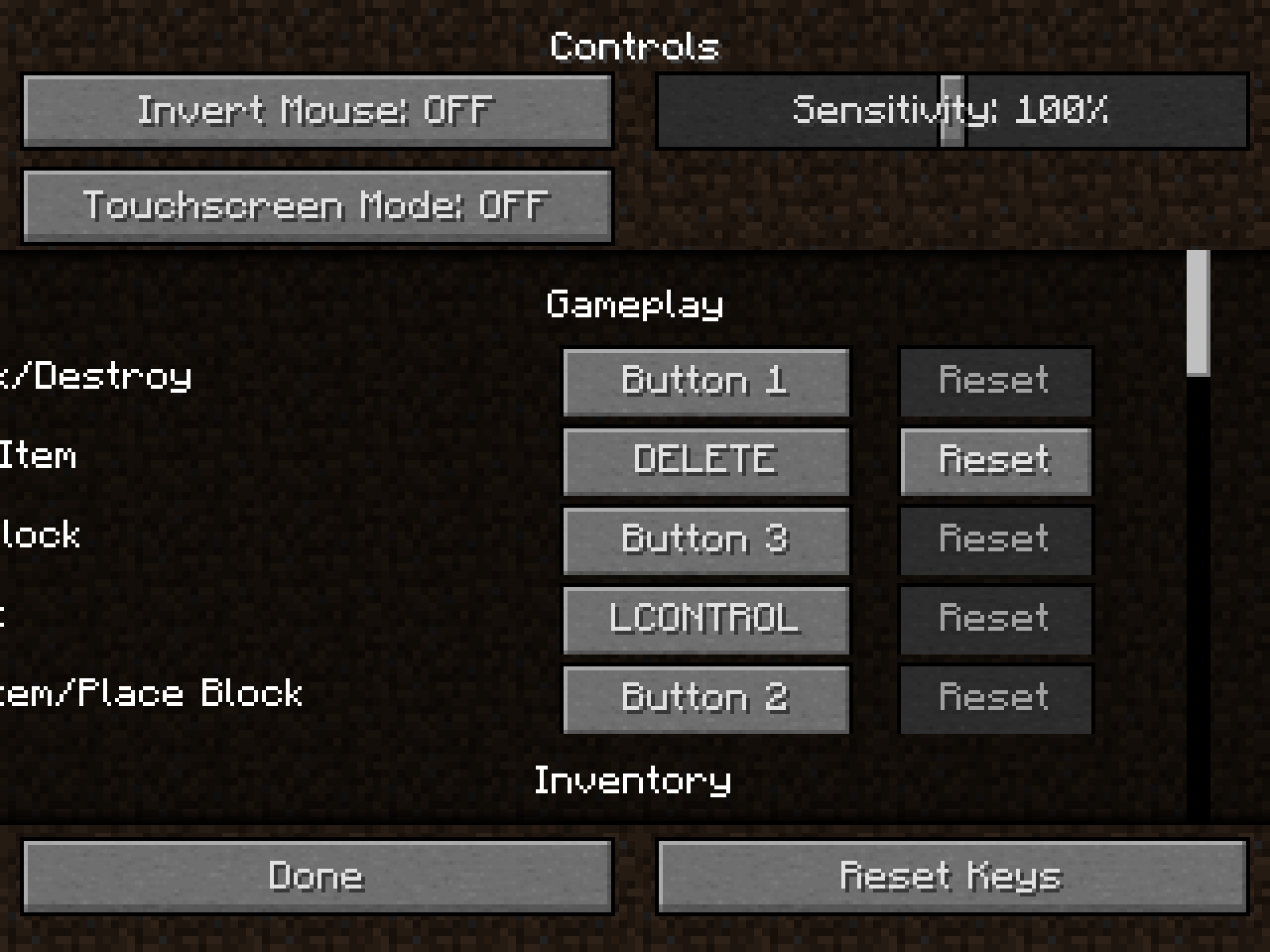
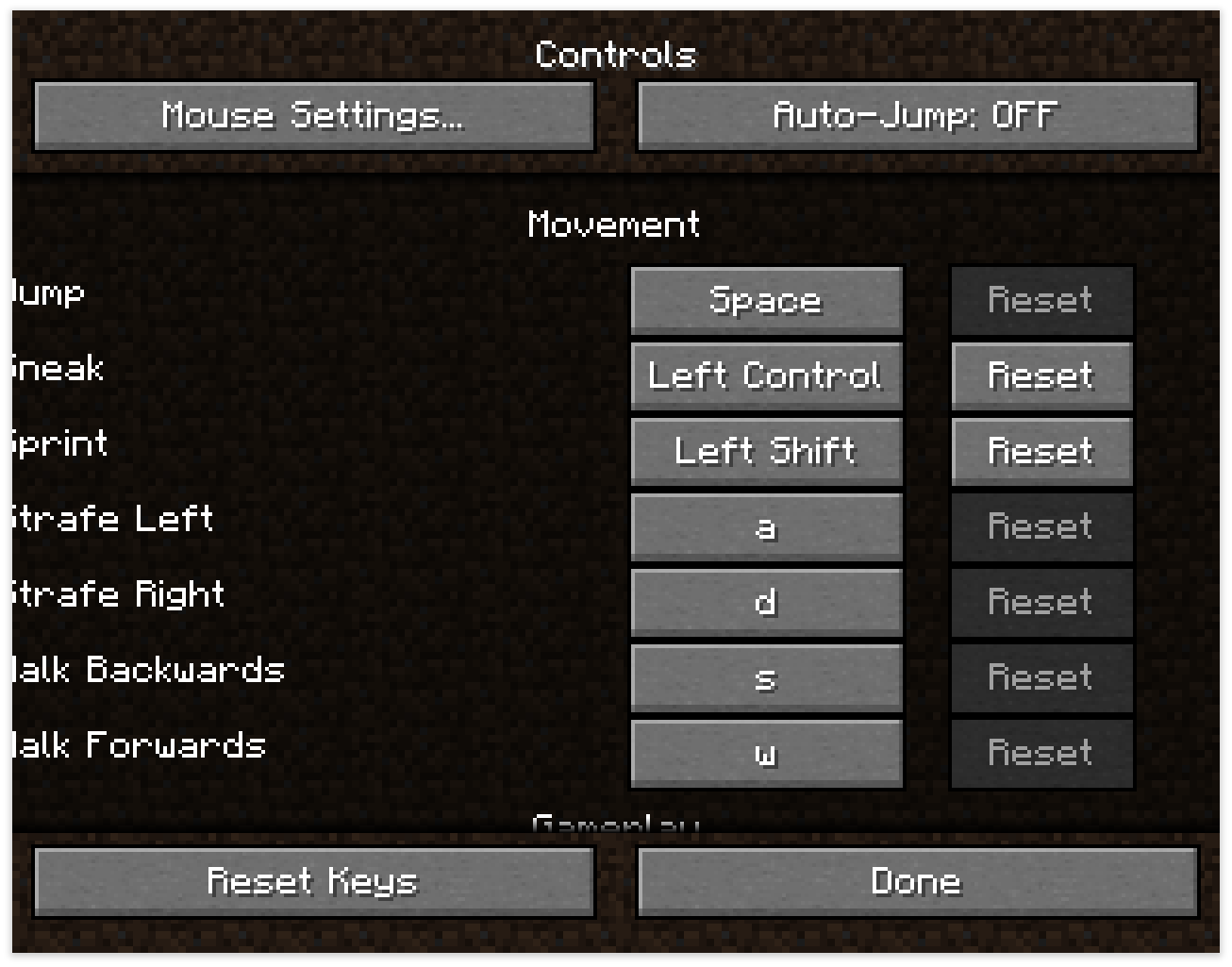
When the game window has a 4:3 ratio, the resource pack and controls menus will be cut off.
Steps to Reproduce:
- Put the game in a 4:3 ratio
- Recommended is 640x480p
- Enter either the resource pack, or controls menu
Observed Behavior:
The screen will be cut off, and some elements of the screen will not entirely be viewable.
Expected Result:
The screen would be visibile entirely, and no elements would be cut off.
Screenshots/Videos:
Resource Packs:

Controls:
Notes:
Related to other 'cut off screen' issues:
MC-234163 MC-84824 MC-238712 MC-262606 MC-265292 MC-263968
Linked Issues
is duplicated by8
 MC-30383Resource packs GUI trimmed in Auto GUI scale.DuplicateMC-44404Cut off key names in controls options with large guiDuplicateMC-74172controls and resource pack screens partially hidden with a 4:3 aspect ratioDuplicateMC-84338GUI Scale: Auto incorrect on "Controls" screen at certain aspect ratiosDuplicateMC-161474Resource pack screen has bad margins with odd screen sizeDuplicateMC-169766Minecraft resource loader is off screenDuplicateMC-197789Resource pack menu cut off in fullscreen modeDuplicateMC-262995Pack selection menu is cut off on fullscreen max GUI scale with certain resolutionsDuplicate
relates to7
MC-234163The hover text displayed from the traffic light icon in the realms menu can get cut off at the edge of the screen LowMC-238712Long titles, action bars, held item tooltips, and subtitles get cut off at the edges of the screen
 NormalMC-262606Splash text gets cut off at the edge of the screenLowMC-263968Long advancement tooltips get cut off at the edge of the screen on large GUI scalesNormalMC-265292Command syntax help can get cut off at the edge of the screenLowMC-84824Held items are not fully displayed to the player in resolutions that are not widescreenNormalMC-115070Issue with crafting table UI on non-16:9 instancesFixed


- Unresolved
![[Mod] Jiingy](../../../data/avatars/users/91802.png) [Mod] Jiingy
[Mod] Jiingy Collin Clevinger
- 13
- 6
- Confirmed
- UI
- UI menu resource-pack ui-bug
13w36a - 1.20.5
13w36a 13w36b 1.7.2 1.7.4 14w02b 14w02c 14w05b 14w08a 1.7.5 1.8 1.8.1-pre3 1.8.1-pre4 15w44b 1.10.2 16w42a 1.11.2 17w13b 1.12-pre6 1.12-pre7 1.12.1 1.12.2 18w03b 1.13.1 18w48a 18w48b 18w49a 1.14.2 1.14.4 1.15.1 1.16.2 21w11a 1.19.4 1.20-pre6 1.20.2 23w41a 1.20.3-pre4 1.20.3-rc1 1.20.4 24w07a 1.20.5
Created Issue:
Resource Pack UI Bug
When opening the Resource Pack menu, I noticed some of the UI is cut off on the side of the screen when it should not be. This only applies to resolutions with a 4:3 ratio such as 1280 x 1024 as far as I know but may apply to others.
To reproduce:
1: Have a monitor with a 4:3 ratio and resolution.
2. Open Minecraft.
3. Open Resource Pack Menu.Environment
Windows 8.1 Pro Java Version 7 Update 45 (build 1.7.0_45-b18)
Attachments1
I have this too, beacause you have the GUI SCALE in AUTO and you have a 4:3 or 5:4 screen like me

![[Mod] Ezekiel (ezfe)](../../../data/assets/gravatar/ezekielelin.jpeg)
is duplicated by
is duplicated by

![[Bot] Arisa](../../../data/assets/gravatar/mustek2.png)
When opening the Resource Pack menu, I noticed some of the UI is cut off on the side of the screen when it should not be. This only applies to resolutions with a 4:3 ratio such as 1280 x 1024 as far as I know but may apply to others.
To reproduce:
1: Have a monitor with a 4:3 ratio and resolution.
2. Open Minecraft.
3. Open Resource Pack Menu.When opening the Resource Pack (or Controls) menu, I noticed some of the UI is cut off on the side of the screen when it should not be. This only applies to resolutions with a 4:3 ratio such as 1280 x 1024 as far as I know but may apply to others.
Resource Pack UI BugResource Pack and Controls menu are cut off when window has 4:3 ratio
is duplicated by

![[Mod] Michael Wobst](../../../data/avatars/users/37868.png)
![[Mojang] Nathan Adams](../../../data/assets/gravatar/dinnerbone.png)
![[Mod] violine1101](../../../data/avatars/users/92858.png)
![[Mod] CubeTheThird](../../../data/assets/gravatar/cubethethird.jpeg)
Windows 8.1 Pro Java Version 7 Update 45 (build 1.7.0_45-b18)
is duplicated by
is duplicated by
![[Bot] Arisa](../../../data/avatars/users/43007.png)

relates to
relates to
relates to
is duplicated by
![[Mod] tryashtar](../../../data/avatars/users/41963.png)
is duplicated by
![[Mod] turbo](../../../data/avatars/users/92867.png)
is duplicated by
When
opening the Resource Pack (or Controls) menu, I noticed some of the UI is cut off on the side of the screen when it should not be. This only applies to resolutions with a 4:3 ratio such as 1280 x 1024 as far as I know but may apply to others.When the game window has a 4:3 ratio, the resource pack and controls menus will be cut off.
Steps to Reproduce:
- Put the game in a 4:3 ratio
- Recommended is 640x480p
- Enter either the resource pack, or controls menu
Observed & Expected Results:
- The screen will be cut off, and some elements of the screen will not entirely be viewable.
- The screen would be visibile entirely, and no elements would be cut off.
Screenshots/Videos:
Resource Packs
Controls
Notes:
Old description:
When opening the Resource Pack (or Controls) menu, I noticed some of the UI is cut off on the side of the screen when it should not be. This only applies to resolutions with a 4:3 ratio such as 1280 x 1024 as far as I know but may apply to others.
When the game window has a 4:3 ratio, the resource pack and controls menus will be cut off.
Steps to Reproduce:
- Put the game in a 4:3 ratio
- Recommended is 640x480p
- Enter either the resource pack, or controls menu
Observed
& Expected Results:
Screenshots/Videos:
Resource Packs
Controls
Notes:
Old description:
When opening the Resource Pack (or Controls) menu, I noticed some of the UI is cut off on the side of the screen when it should not be. This only applies to resolutions with a 4:3 ratio such as 1280 x 1024 as far as I know but may apply to others.
When the game window has a 4:3 ratio, the resource pack and controls menus will be cut off.
Steps to Reproduce:
- Put the game in a 4:3 ratio
- Recommended is 640x480p
- Enter either the resource pack, or controls menu
Observed Behavior:
The screen will be cut off, and some elements of the screen will not entirely be viewable.
Expected Result:
The screen would be visibile entirely, and no elements would be cut off.
Screenshots/Videos:
Resource Packs:
Controls:
Notes:
Related to other 'cut off screen' issues:
MC-234163 MC-84824 MC-238712 MC-262606 MC-265292 MC-263968
When the game window has a 4:3 ratio, the resource pack and controls menus will be cut off.
Steps to Reproduce:
- Put the game in a 4:3 ratio
- Recommended is 640x480p
- Enter either the resource pack, or controls menu
Observed Behavior:
The screen will be cut off, and some elements of the screen will not entirely be viewable.
Expected Result:
The screen would be visibile entirely, and no elements would be cut off.
Screenshots/Videos:
Resource Packs:
Controls:
Notes:
Related to other 'cut off screen' issues:
MC-234163 MC-84824 MC-238712 MC-262606 MC-265292 MC-263968When the game window has a 4:3 ratio, the resource pack and controls menus will be cut off.
Steps to Reproduce:
- Put the game in a 4:3 ratio
- Recommended is 640x480p
- Enter either the resource pack, or controls menu
Observed Behavior:
The screen will be cut off, and some elements of the screen will not entirely be viewable.
Expected Result:
The screen would be visibile entirely, and no elements would be cut off.
Screenshots/Videos:
Resource Packs:
Controls:
Notes:
Related to other 'cut off screen' issues:
MC-234163 MC-84824 MC-238712 MC-262606 MC-265292 MC-263968
relates to
You're right. After a few more searches, I found MC-37839.
I'll add my findings to that issue. This one can be closed.
Thank you for your report!
However, this issue has been closed as a Duplicate of MC-37839.
It has been linked to this report. If you have additional information, please add it to that report.
Please search before reporting, as it's likely that one exists already.
Quick Links:
📓 Issue Guidelines – 💬 Community Support – 📧 Customer Support – 📖 Game Wiki
I think the issue is Minecraft calculating the Auto GUI scale by the size of the normal inventory, thus (mostly) setting the GUI scale to Large which leads to the recipe book overlapping the inventory on 4:3 screens.
In fact, this is exactly it. at the 1280x960 resolution I was testing, "Large" works fine but "Auto" sets the GUI scale to a size larger than "large" and the inventory subsequently fails. This isn't the only failure, as a number of option menus are also cropped on the sides.
Having said that, I suspect "Auto" being the real problem makes this report a duplicate of MC-37839.
Thank you for your report!
We're actually already tracking this issue in MC-37839, so I resolved and linked this ticket as a duplicate.
If you would like to add a vote and any extra information to the main ticket it would be appreciated.
If you haven't already, you might like to make use of the search feature in the future to see if the issue has already been reported.
Quick Links:
📓 Issue Guidelines – 💬 Community Support – 📧 Customer Support – 📖 Game Wiki
Forward-resolved towards MC-37839, that ticket has been updated more frequently.
Thank you for your report!
However, we are already tracking this issue, and this report is a Duplicate of MC-37839, which is a report that has not been resolved yet.
If you want, you can upvote the parent ticket, and enable watching to receive any updates about it - if you believe you have any information that may be important for this issue, please leave a comment on the parent. Please also use the search function in the future to prevent duplicate reports.
Quick Links:
📓 Issue Guidelines – 🛠 Community Support – 📧 Customer Support – ✍️ Feedback and Suggestions – 📖 Game Wiki
💬 Mojira Subreddit – 💬 Mojira Discord
Thank you for your report!
We're tracking this issue in MC-37839, so this ticket is being resolved and linked as a duplicate.
If you would like to add a vote and any extra information to the main ticket it would be appreciated.
If you haven't already, you might like to make use of the search feature to see if the issue has already been mentioned.
Quick Links:
📓 Bug Tracker Guidelines – 💬 Community Support – 📧 Mojang Support
📓 Project Summary – ✍️ Feedback and Suggestions – 📖 Game Wiki
– I am a bot. This action was performed automatically! Please report any issues on Discord or Reddit
Does MC-37839 describe your issue?

Is this still a concern in the latest Minecraft version 14w02c? If so, please update the affected versions in order to best aid Mojang ensuring bugs are still valid in the latest releases/pre-releases.
Yes, I have a 4:3 screen and this is in the 14w02c
I have tested on 14w05b and can say this still occurs.
Still around in 1.8.
It's also worth nothing that having Minecraft open in a non-full-screen window and manually adjusting the width of the window also causes this. It doesn't have to be because of your monitor, just the proportions of the window Minecraft is running in.
This problem also occurs in the controls menu.
And it's still around in Minecraft 1.8.1-pre4.
See also
MC-74172.Is this still an issue in the most recent versions (currently that is 1.10.2, or 16w42a) of Minecraft? If so, please update the affected versions and help us keeping this ticket updated from time to time.
This issue occurs on 1.12 PreRelease-7. Screenshots at standard 4:3 @ 1280x960:
http://i.imgur.com/jO34iZa.png
http://i.imgur.com/frxyDLe.png
Still an issue in 1.14.2
Can confirm in 21w11a on a 5:4 monitor.

I'd like to request ownership of this issue seeing as the original poster has been inactive since posting this back in 2013.