Huge lighting updates lag the game.
The bug
This bug causes alot of light updates, dropping your FPS to 0 and most likely crashing your game.
This has been used for around a year now on several servers, this causes players to crash their game.
How to reproduce
- Create a new world (superflat, cheats on)
- Execute command: /fill ~20 ~200 ~-20 ~-20 ~200 ~20 stone
- Teleport yourself up to the platform. (/tp @a ~ ~205 ~)
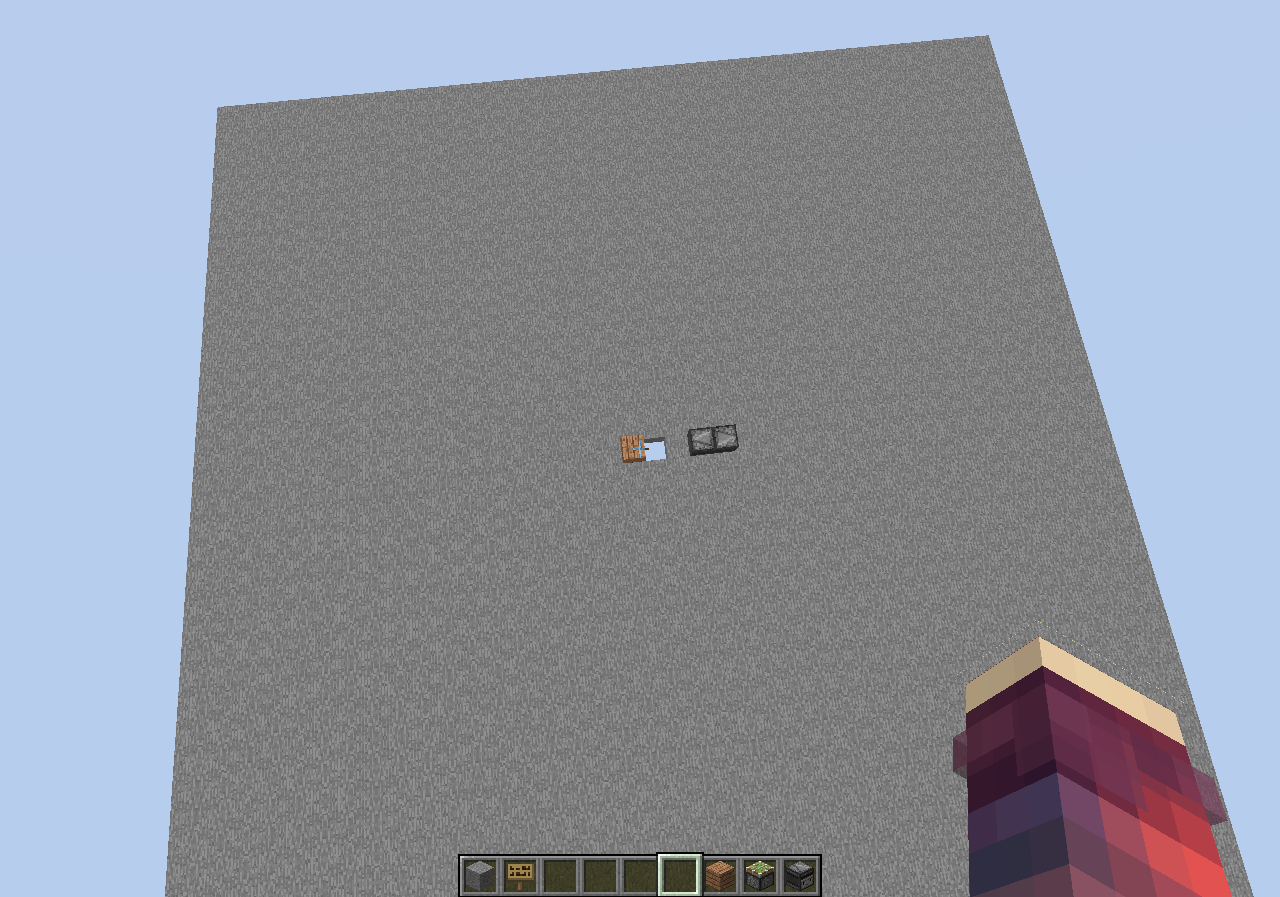
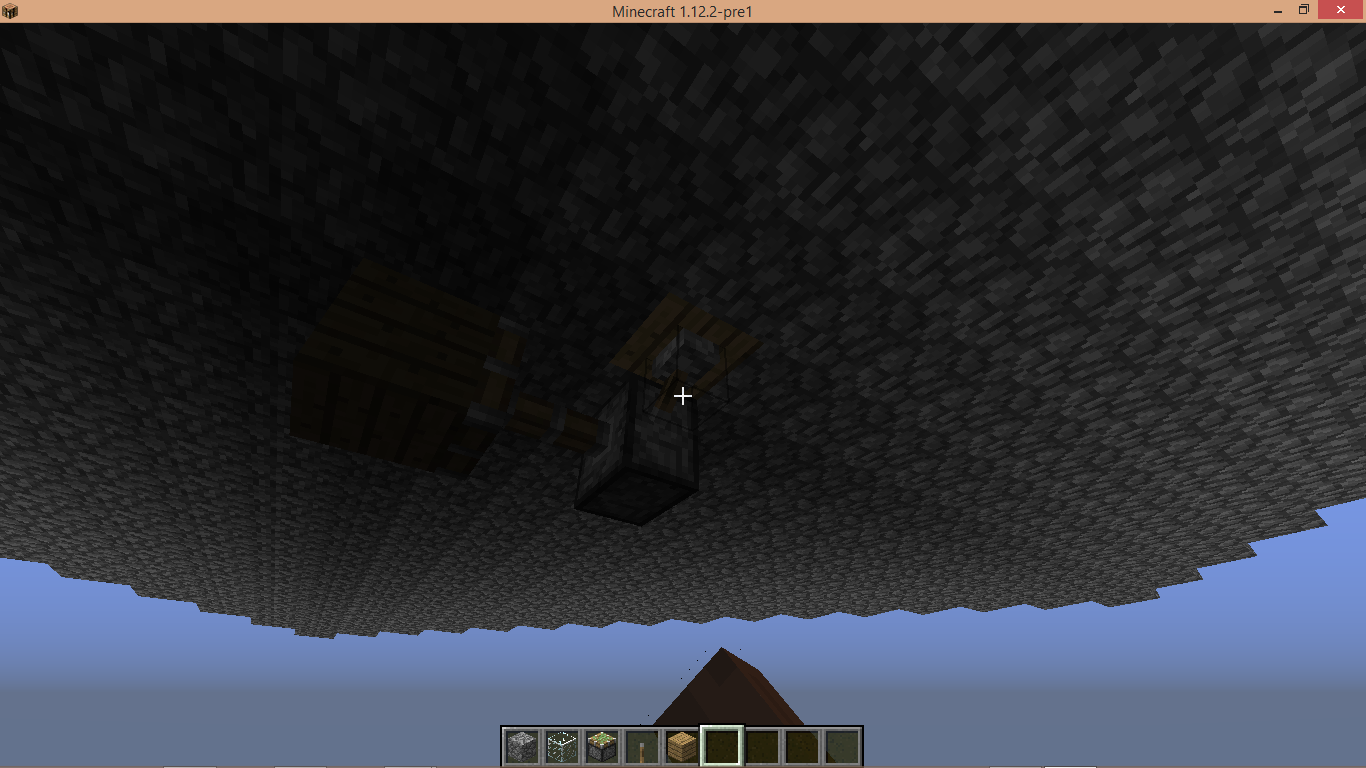
- Place 2 observers facing into each other, make a hole 1 block away from the observer. (See screenshot for setup. the observers is to make a repeating redstone clock)
- Just place the piston so it pulls the block over the hole.
- Prepare yourself to see your FPS drop to 0.
Code analysis
The following is based on a decompiled version of Minecraft 1.12 using MCP940.
In the method net.minecraft.world.chunk.setBlockState() you have this~~
if (j >= i1)
{
this.relightBlock(i, j + 1, k);
}
which relight blocks, but this is causing the massive FPS drops. What this does is, if j (posY) is bigger then i1, it will relight the block on the X, Y + 1, Z the player is.
If you remove the '+ 1' this issue will be fixed. idk why though.
if (j >= i1)
{
this.relightBlock(i, j, k);
}
----------------------------------------------------------------------
When making a Creative world with bedrock at the bottom, air for most, and bedrock at the top, when you break the bedrock the game lags for about 7 seconds.
Example superflat preset: 3;minecraft:bedrock,250*minecraft:air,minecraft:bedrock;1;
I made a program that will take the "Something's taking too long!" messages and put it in a list. In the attached list, you can see that root.tick.level.connection is taking a VERY long time.
I hope this gets fixed soon, because it can be a huge exploit on servers.
^ original report
Linked Issues
is duplicated by18
 MC-70253Big lag spike when placing blocks in very specific circumstances.DuplicateMC-72310Huge momentary block lag when placing a blockDuplicateMC-74637Lag spike created when brakeing/placing blocks or light sources.DuplicateMC-87947Placing blocks high in the air causes client lagDuplicateMC-92035When breaking or replacing a hole on the last layer, game stuckDuplicateMC-92686Extreme sudden fps drop and lag when covering the void from viewDuplicateMC-95513Using /fill command for large range causes game stuck or a crashDuplicateMC-101850Massive lag with light updatesDuplicateMC-102346Minecraft freezes for a second when building in the airDuplicateMC-104458Lag when breaking block over the voidDuplicateMC-104812/fill on top of worldDuplicateMC-105156Shadows cause lag in the overworld!DuplicateMC-105353Lag, when you are placing a Block, which blocks the view in the voidDuplicateMC-118032Light freezes mcDuplicateMC-125149Slabs at y 256 causing major lagDuplicateMC-126740Huge block lag DuplicateMC-132376Game Freezes When Block is PlacedDuplicateMC-136549Skylight / light updates FPS lagDuplicate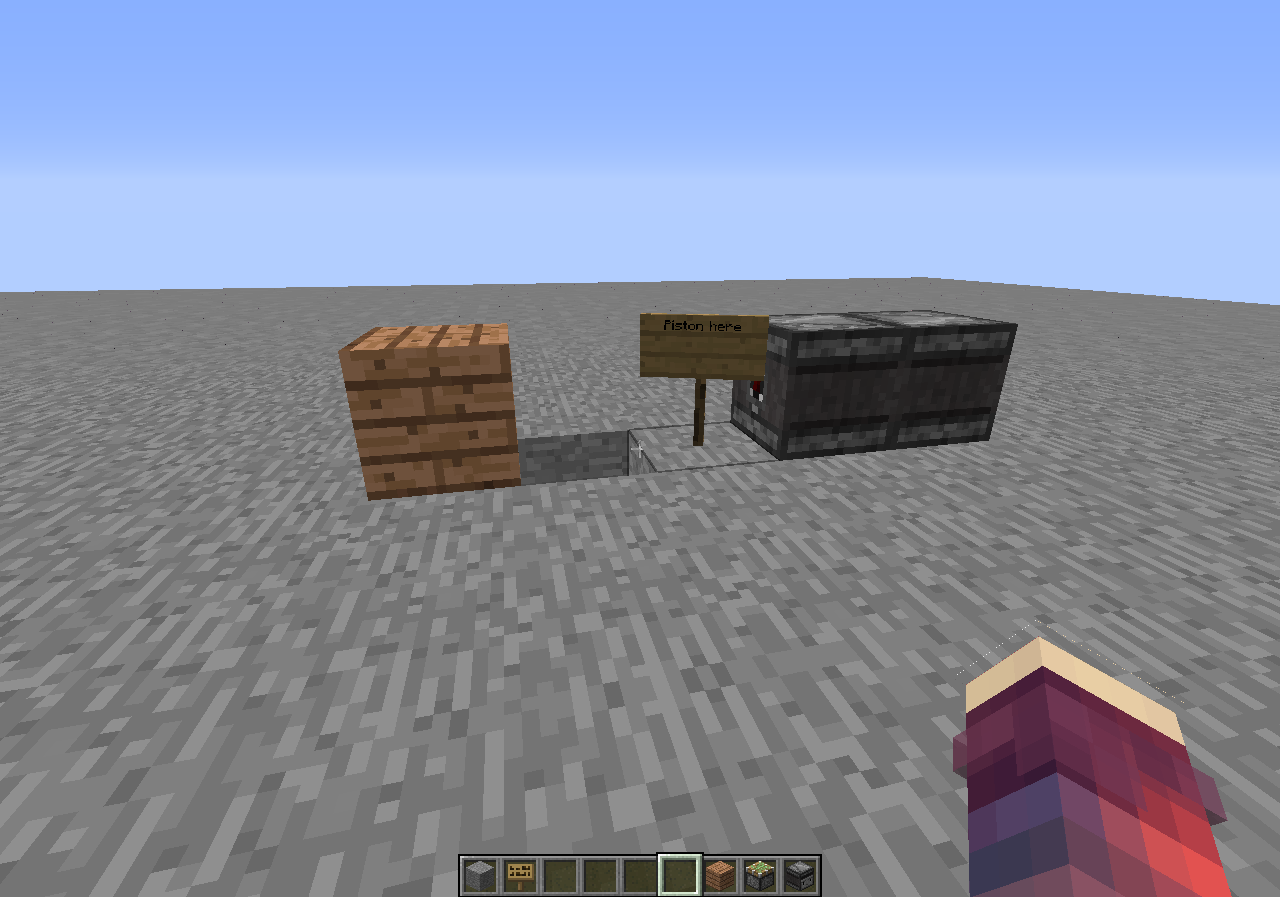




Created Issue:
Huge lighting updates lag the game.
When making a Creative world with bedrock at the bottom, air for most, and bedrock at the top, when you break the bedrock the game lags for about 7 seconds.
I also tried this with a ComputerCraft Turtle, since it uses a fake player, and with a loop the game was basically frozen.
I made a program that will take the "Something's taking too long!" messages and put it in a list. In the attached list, you can see that root.tick.level.connection is taking a VERY long time. That was the test with the Turtle.
I hope this gets fixed soon, because it can be a huge exploit on servers.
Environment
Windows 7, Java 7
Attachments1
Windows
7, Java 7Windows 8, Java 7


is duplicated by
is duplicated by
is duplicated by
is duplicated by
is duplicated by
![[Mod] Torabi](../../../data/assets/gravatar/torabi.png)
is duplicated by
is duplicated by

is duplicated by
is duplicated by
is duplicated by
is duplicated by
is duplicated by
is duplicated by
![[Mod] Michael Wobst](../../../data/avatars/users/37868.png)
![[Mod] Neko](../../../data/avatars/users/92901.png)
is duplicated by
![[Mod] tryashtar](../../../data/avatars/users/41963.png)
When making a Creative world with bedrock at the bottom, air for most, and bedrock at the top, when you break the bedrock the game lags for about 7 seconds.
I also tried this with a ComputerCraft Turtle, since it uses a fake player, and with a loop the game was basically frozen.I made a program that will take the "Something's taking too long!" messages and put it in a list. In the attached list, you can see that root.tick.level.connection is taking a VERY long time.
That was the test with the Turtle.I hope this gets fixed soon, because it can be a huge exploit on servers.
When making a Creative world with bedrock at the bottom, air for most, and bedrock at the top, when you break the bedrock the game lags for about 7 seconds.
Example superflat preset: {[3;minecraft:bedrock,250*minecraft:air,minecraft:bedrock;1;}}
I made a program that will take the "Something's taking too long!" messages and put it in a list. In the attached list, you can see that root.tick.level.connection is taking a VERY long time.
I hope this gets fixed soon, because it can be a huge exploit on servers.
When making a Creative world with bedrock at the bottom, air for most, and bedrock at the top, when you break the bedrock the game lags for about 7 seconds.
Example superflat preset: {[3;minecraft:bedrock,250*minecraft:air,minecraft:bedrock;1;}}
I made a program that will take the "Something's taking too long!" messages and put it in a list. In the attached list, you can see that root.tick.level.connection is taking a VERY long time.
I hope this gets fixed soon, because it can be a huge exploit on servers.
When making a Creative world with bedrock at the bottom, air for most, and bedrock at the top, when you break the bedrock the game lags for about 7 seconds.
Example superflat preset: 3;minecraft:bedrock,250*minecraft:air,minecraft:bedrock;1;
I made a program that will take the "Something's taking too long!" messages and put it in a list. In the attached list, you can see that root.tick.level.connection is taking a VERY long time.
I hope this gets fixed soon, because it can be a huge exploit on servers.
![[Mod] Pokechu22](../../../data/avatars/users/92931.png)
![[Mod] violine1101](../../../data/avatars/users/92858.png)
is duplicated by
Windows 8, Java 7
is duplicated by

is duplicated by

is duplicated by
When making a Creative world with bedrock at the bottom, air for most, and bedrock at the top, when you break the bedrock the game lags for about 7 seconds.Example superflat preset: 3;minecraft:bedrock,250*minecraft:air,minecraft:bedrock;1;
I made a program that will take the "Something's taking too long!" messages and put it in a list. In the attached list, you can see that root.tick.level.connection is taking a VERY long time.
I hope this gets fixed soon, because it can be a huge exploit on servers.
The bug
This bug causes alot of light updates, dropping your FPS to 0 and most likely crashing your game.
This has been used for around a year now on several servers, this causes players to crash their game.
How to reproduce
- Create a new world (superflat, cheats on)
- Execute command: /fill ~20 ~200 ~-20 ~-20 ~200 ~20 stone
- Teleport yourself up to the platform. (/tp @a ~ ~205 ~)
- Place 2 observers facing into each other, make a hole 1 block away from the observer. (See screenshot for setup. the observers is to make a repeating redstone clock)
- Just place the piston so it pulls the block over the hole.
- Prepare yourself to see your FPS drop to 0.
- IF YOU DONT HAVE A GOOD PC, YOUR GAME WILL CRASH ***
Code analysis
The following is based on a decompiled version of Minecraft 1.12 using MCP940.
The reason for this is that in the method
net.minecraft.world.chunk.setBlockState(BlockPos, IBlockState),
In this method you have this piece of code: this.relightBlock(i, j + 1, k);
If you remove the '+ 1' the issue is fixed. (line: 657)
^ I'll attach a video with the '+ 1' and without the '+ 1'.
----------------------------------------------------------------------
When making a Creative world with bedrock at the bottom, air for most, and bedrock at the top, when you break the bedrock the game lags for about 7 seconds.
Example superflat preset: 3;minecraft:bedrock,250*minecraft:air,minecraft:bedrock;1;
I made a program that will take the "Something's taking too long!" messages and put it in a list. In the attached list, you can see that root.tick.level.connection is taking a VERY long time.
I hope this gets fixed soon, because it can be a huge exploit on servers.
^ original report
The bug
This bug causes alot of light updates, dropping your FPS to 0 and most likely crashing your game.
This has been used for around a year now on several servers, this causes players to crash their game.
How to reproduce
- Create a new world (superflat, cheats on)
- Execute command: /fill ~20 ~200 ~-20 ~-20 ~200 ~20 stone
- Teleport yourself up to the platform. (/tp @a ~ ~205 ~)
- Place 2 observers facing into each other, make a hole 1 block away from the observer. (See screenshot for setup. the observers is to make a repeating redstone clock)
- Just place the piston so it pulls the block over the hole.
- Prepare yourself to see your FPS drop to 0.
- IF YOU DONT HAVE A GOOD PC, YOUR GAME WILL CRASH ***
Code analysis
The following is based on a decompiled version of Minecraft 1.12 using MCP940.
The reason for this is that in the method
net.minecraft.world.chunk.setBlockState(BlockPos, IBlockState),
In this method you have this piece of code: this.relightBlock(i, j + 1, k);
If you remove the '+ 1' the issue is fixed. (line: 657)
^ I'll attach a video with the '+ 1' and without the '+ 1'.
----------------------------------------------------------------------
When making a Creative world with bedrock at the bottom, air for most, and bedrock at the top, when you break the bedrock the game lags for about 7 seconds.
Example superflat preset: 3;minecraft:bedrock,250*minecraft:air,minecraft:bedrock;1;
I made a program that will take the "Something's taking too long!" messages and put it in a list. In the attached list, you can see that root.tick.level.connection is taking a VERY long time.
I hope this gets fixed soon, because it can be a huge exploit on servers.
^ original report
The bug
This bug causes alot of light updates, dropping your FPS to 0 and most likely crashing your game.
This has been used for around a year now on several servers, this causes players to crash their game.
How to reproduce
- Create a new world (superflat, cheats on)
- Execute command: /fill ~20 ~200 ~-20 ~-20 ~200 ~20 stone
- Teleport yourself up to the platform. (/tp @a ~ ~205 ~)
- Place 2 observers facing into each other, make a hole 1 block away from the observer. (See screenshot for setup. the observers is to make a repeating redstone clock)
- Just place the piston so it pulls the block over the hole.
- Prepare yourself to see your FPS drop to 0.
- IF YOU DONT HAVE A GOOD PC, YOUR GAME WILL CRASH ***
Code analysis
The following is based on a decompiled version of Minecraft 1.12 using MCP940.
The reason for this is that in the method
net.minecraft.world.chunk.setBlockState(BlockPos, IBlockState),
In this method you have this piece of code: this.relightBlock(i, j + 1, k);
If you remove the '+ 1' the issue is fixed. (line: 657)
^ I'll attach a video with the '+ 1' and without the '+ 1'.
----------------------------------------------------------------------
When making a Creative world with bedrock at the bottom, air for most, and bedrock at the top, when you break the bedrock the game lags for about 7 seconds.
Example superflat preset: 3;minecraft:bedrock,250*minecraft:air,minecraft:bedrock;1;
I made a program that will take the "Something's taking too long!" messages and put it in a list. In the attached list, you can see that root.tick.level.connection is taking a VERY long time.
I hope this gets fixed soon, because it can be a huge exploit on servers.
^ original report
The bug
This bug causes alot of light updates, dropping your FPS to 0 and most likely crashing your game.
This has been used for around a year now on several servers, this causes players to crash their game.
How to reproduce
- Create a new world (superflat, cheats on)
- Execute command: /fill ~20 ~200 ~-20 ~-20 ~200 ~20 stone
- Teleport yourself up to the platform. (/tp @a ~ ~205 ~)
- Place 2 observers facing into each other, make a hole 1 block away from the observer. (See screenshot for setup. the observers is to make a repeating redstone clock)
- Just place the piston so it pulls the block over the hole.
- Prepare yourself to see your FPS drop to 0.
- IF YOU DONT HAVE A GOOD PC, YOUR GAME WILL CRASH ***
Code analysis
The following is based on a decompiled version of Minecraft 1.12 using MCP940.
The reason for this is that in the method
net.minecraft.world.chunk.setBlockState(BlockPos, IBlockState),
In this method you have this piece of code: this.relightBlock(i, j + 1, k);
If you remove the '+ 1' the issue is fixed. (line: 657)
^ I'll attach a video with the '+ 1' and without the '+ 1'.
----------------------------------------------------------------------
When making a Creative world with bedrock at the bottom, air for most, and bedrock at the top, when you break the bedrock the game lags for about 7 seconds.
Example superflat preset: 3;minecraft:bedrock,250*minecraft:air,minecraft:bedrock;1;
I made a program that will take the "Something's taking too long!" messages and put it in a list. In the attached list, you can see that root.tick.level.connection is taking a VERY long time.
I hope this gets fixed soon, because it can be a huge exploit on servers.
^ original report
The bug
This bug causes alot of light updates, dropping your FPS to 0 and most likely crashing your game.
This has been used for around a year now on several servers, this causes players to crash their game.
How to reproduce
- Create a new world (superflat, cheats on)
- Execute command: /fill ~20 ~200 ~-20 ~-20 ~200 ~20 stone
- Teleport yourself up to the platform. (/tp @a ~ ~205 ~)
- Place 2 observers facing into each other, make a hole 1 block away from the observer. (See screenshot for setup. the observers is to make a repeating redstone clock)
- Just place the piston so it pulls the block over the hole.
- Prepare yourself to see your FPS drop to 0.
Code analysis
The following is based on a decompiled version of Minecraft 1.12 using MCP940.
In the method net.minecraft.world.chunk.setBlockState() you have this~~
if (j >= i1) { this.relightBlock(i, j + 1, k); }which relight blocks, but this is causing the massive FPS drops. What this does is, if j (posY) is bigger then i1, it will relight the block on the X, Y + 1, Z the player is.
If you remove the '+ 1' this issue will be fixed. idk why though.
if (j >= i1) { this.relightBlock(i, j, k); }----------------------------------------------------------------------
When making a Creative world with bedrock at the bottom, air for most, and bedrock at the top, when you break the bedrock the game lags for about 7 seconds.
Example superflat preset: 3;minecraft:bedrock,250*minecraft:air,minecraft:bedrock;1;
I made a program that will take the "Something's taking too long!" messages and put it in a list. In the attached list, you can see that root.tick.level.connection is taking a VERY long time.
I hope this gets fixed soon, because it can be a huge exploit on servers.
^ original report
![[Mojang] Georgii Gavrichev](../../../data/avatars/users/22428.png) [Mojang] Georgii Gavrichev
[Mojang] Georgii GavrichevIt's worth noting that the only two other bug reports showing up for a search for root.tick.level.connection are MC-11571, which is about a one-time issue on block breaking rather than a continuous lag problem, and MC-12799, which does not provide enough information to conclude whether or not it is the same issue as this or not. I rather think that it isn't, because this particular bug occurs only along a fairly narrow "corridor" of sorts, rather than in a larger general region as MC-12799 describes.
Does MC-11571 describe your issue? This looks like the same thing (lighting updates)
![[Mod] Sonicwave](../../../data/avatars/users/94627.png)
Could be related to MC-11571.
Duplicate of MC-11571.
Dupe of MC-11571.
Given the described scenarios, this is almost certainly a result of lighting updates, which are comparatively expensive calculations. MC-11571 is the open issue for this problem.
@Meri Diana
There is a bug report for lag created by huge lighting updates MC-11571, but not one specifically for 1.9.
The only source of light reaching the pistons in that video is the redstone torch, right? Does the lag disappear if you remove it(and power the pistons differently)?
Indeed [Mod] Skylinerw.
Duplicate of MC-11571 for that exact reason.
Dupe of MC-11571
Also, only report bugs found in the vanilla version of the game. The server you are playing seems modified.
![[Helper] gaspoweredpick](../../../data/avatars/users/80904.png)
I can confirm this without LAN mode but i confirm this more of a lag problem that stays after you go to the menu. so maybe this is not MC-72943, if its not a duplicate, i can only confirm this caused by MC-11571 with the lag causing huge lag problems with the menu screen and taking a long time to save the game or not being able to save due to so much lag. taking a long time to save is probably intended or can be fixed to cause less lag.

![[Mod] Asteraoth](../../../data/avatars/users/92886.png)
Also, root.tick.keyboard lags when you break the block.
Please force a crash by pressing F3 + C for 10 seconds while ingame and attach the crash report here.
In vanilla, I made a piston that would extend and rectract on an uncovered block. The lag was horrendous. I got down to 0 fps before the F3+C worked. I can upload the world if you want me to.
Yes, please upload the world.
The crash report isn't helpful.
I don't think I broke the redstone, so it may still be running.
Confirmed.
Getting
in the console.
Cannot reproduce in 14w11b. World preset used:
The used:
to cause as many lighting updates as possible. Smooth lighting at maximum, render distance 16.
I can reproduce this in the latest 14w11b snapshot. Causes lag that lasts just under half a second.
Way to reproduce:
1. Create a new world and dig down with a 1x1 tunnel to bedrock level.
2. Use the fill command to dig out a 40x10x40 area around you.
3. Remove all light in the area.
4. While standing in the empty area, place 1 block in the tunnel you dug to block the light from the sky. Can also be seen when the block is removed.
I've heard that this can be problematic for complicated, exposed redstone mechanisms (because lighting updates need to occur whenever dust and such turns on/off).
Are the affected versions still getting updated? (
MC-72310is for 1.8.)Confirmed for 1.8.1-pre2.
I noticed that this only happens with opaque blocks, implying that it is a lighting issue. Also, if the hole you are filling in is filled with water, it won't lag. By the way, a much easier way to test this is to just make a one layer thick superflat world.
Confirmed for 1.8.1. As a prove that this is related to lighting, if you cover yourself in a 1x2x1 hole with no light (or any room with a low light level), open a hole to the void, and then cover it, it will not lag, because of the low light level. But if you don't block the light, it will lag a lot.
Confirmed in 1.8.2-pre4. The lag seems much more extreme when blocking the light than when removing the block.
confirmed for 15w44b
"Simple" build that confirms the issue.
Punch obsidian to observe normal behavior.
Toggle lever (This slides a block under the chest to expose darkness)
Punch obsidian to observe the lag.
These spike to 50% for me:
root.gamerenderer.level.terrain_setup.culling.build_near 1.8.9
root.tick.level.entities.blockEntities.aqr.checkedPosition 15w51b
The way I came across this bug was when changing a large 1 block tall plane of grass blocks. Since there was no light underneath the platform, it would lag when removing the light from underneath the platform when the hole creating the light (from the sky) was filled in. This only happened when the light went away.
For me it specifically caused a 2 - 3 second lag in root.tick.keyboard
Well you can add 1.9.2 to the list and I don't really think this is a creative only issue either... I noticed lagspikes when building the roof and the last block just kills it completely (client and server both on quite some hardware)...
https://www.youtube.com/watch?v=UdZ-mKk5i1Q
Still happening in the 1.12 pre-release 6
Still in 1.12.2 Pre-release. Please fix this Mojang.

If you put a Piston on the right Position with a clock you can effectively crash every client in the sourrounding.
From all comments I noticed this is both client-side and server-side issue. When removing light source at underground, it would lag more than if you remove it at surface during daytime. More checks needed about light updates client-side and server-side.
This is affecting every 1.13 snapshot as well.
This also occurs on Java 8 and on Linux.
confirmed for breaking last bedrock level on 18w30b
change "fill ~20 ~200 ~-20 ~-20 ~200 ~20" to "/fill ~20 240 ~-20 ~-20 240 ~20"
and "/tp @a ~ ~205 ~" to "/tp @p ~ 250 ~"
RedCMD It literally doesn't matter. you still drop frames on Y: 200
If the stone platform is at y=200
and is 57 or more blocks across (square)
and all blocks under the platform is air
X=29 (Distance of Light spread from center) Y=200 (Height of platform)
Breaking the block in the middle will produce .5(X^2+1)Y+1 = 84200 (84k) skylight updates
X=15 (Sky Light level) Y=200 (Height of platform)
Replacing the block will produce Y((X^2+2)X^2/3)+X = 3405015 (3405k, 3.4million) skylight updates
Oh and redstone dust does NOT produce light updates (they cause block updates)
Repeaters used to in 1.5.2 but that got removed due to lag