 Chris
Chris
- minecraftchrizz
- minecraftchrizz
- Europe/Stockholm
- Yes
- No
![[Mojang] Jeb (Jens Bergensten)](../../../data/assets/gravatar/jeb.jpeg)
 MC-32107
 Low
Low











Minecartsspacing out whenreloggingMinecarts not moving correctly after relogging
Repeatersstaying onin a comparator-clockRepeaters not turning off in a comparator-clock
Powering 2 pistonson top of each other extends the top one instead of the bottompistonPowering 2 pistons extends the wrong piston!
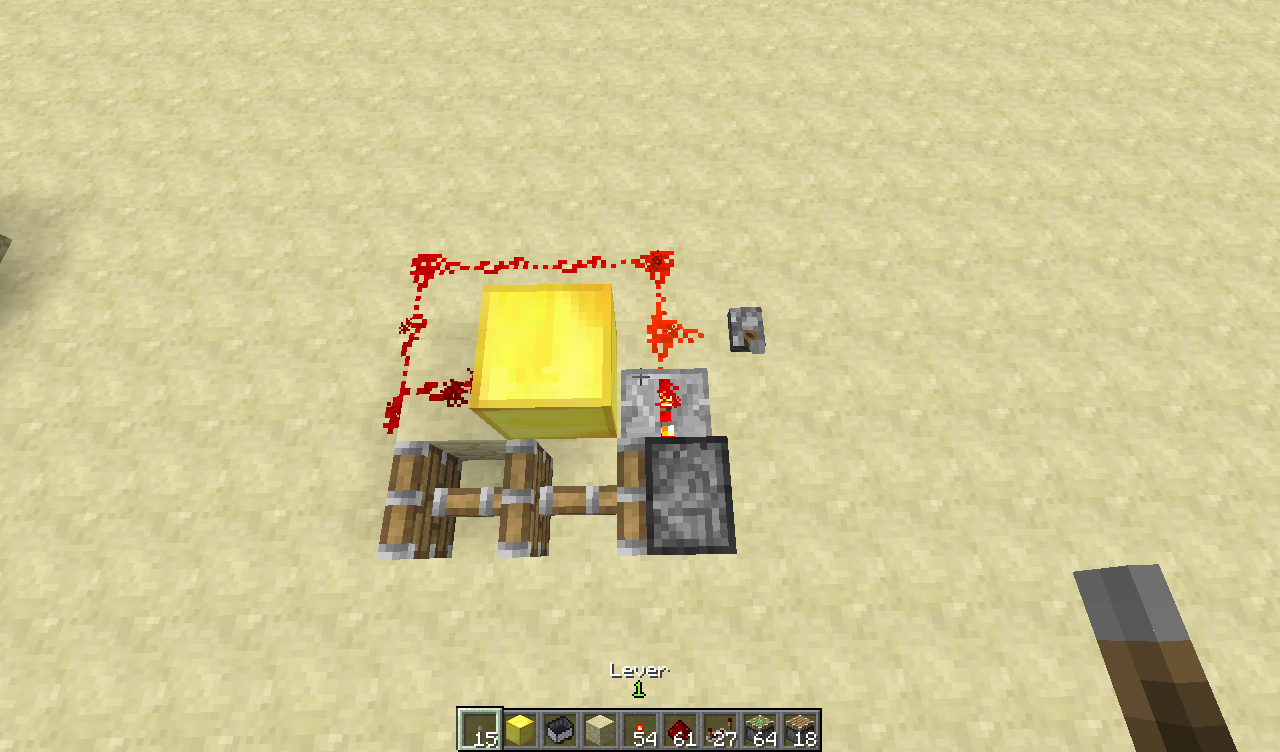
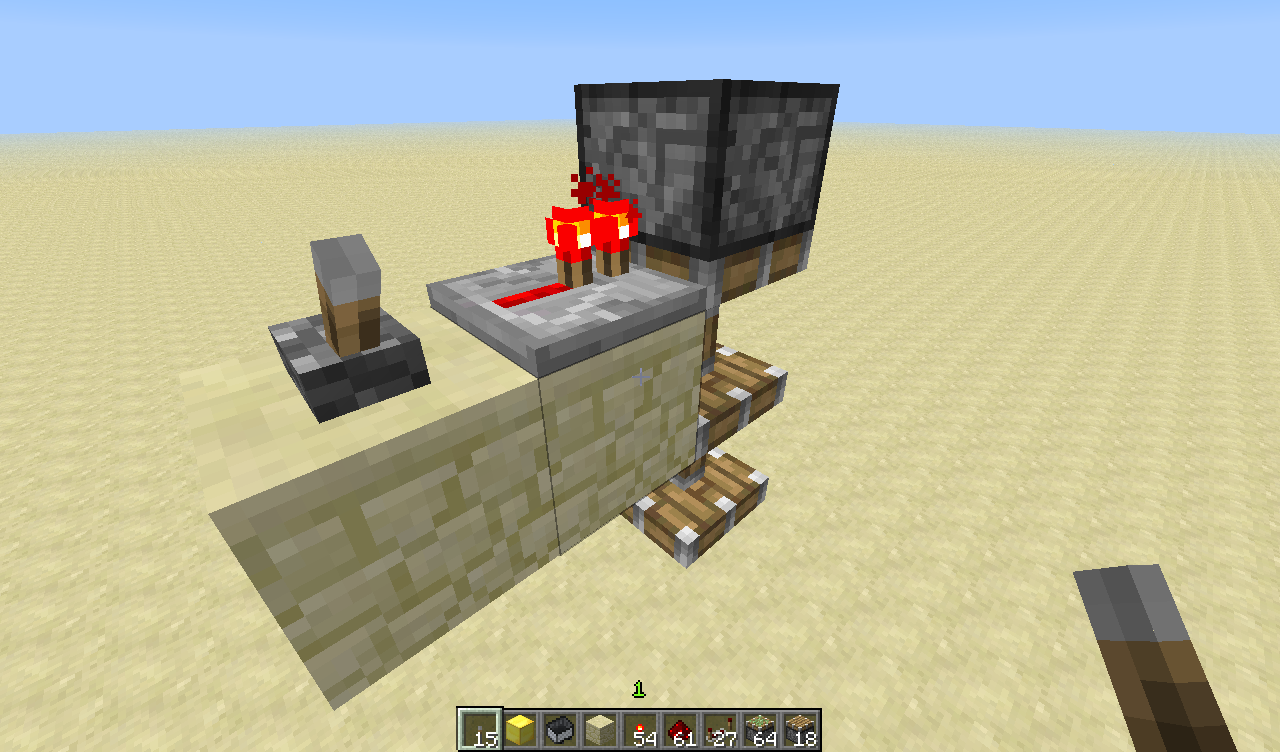
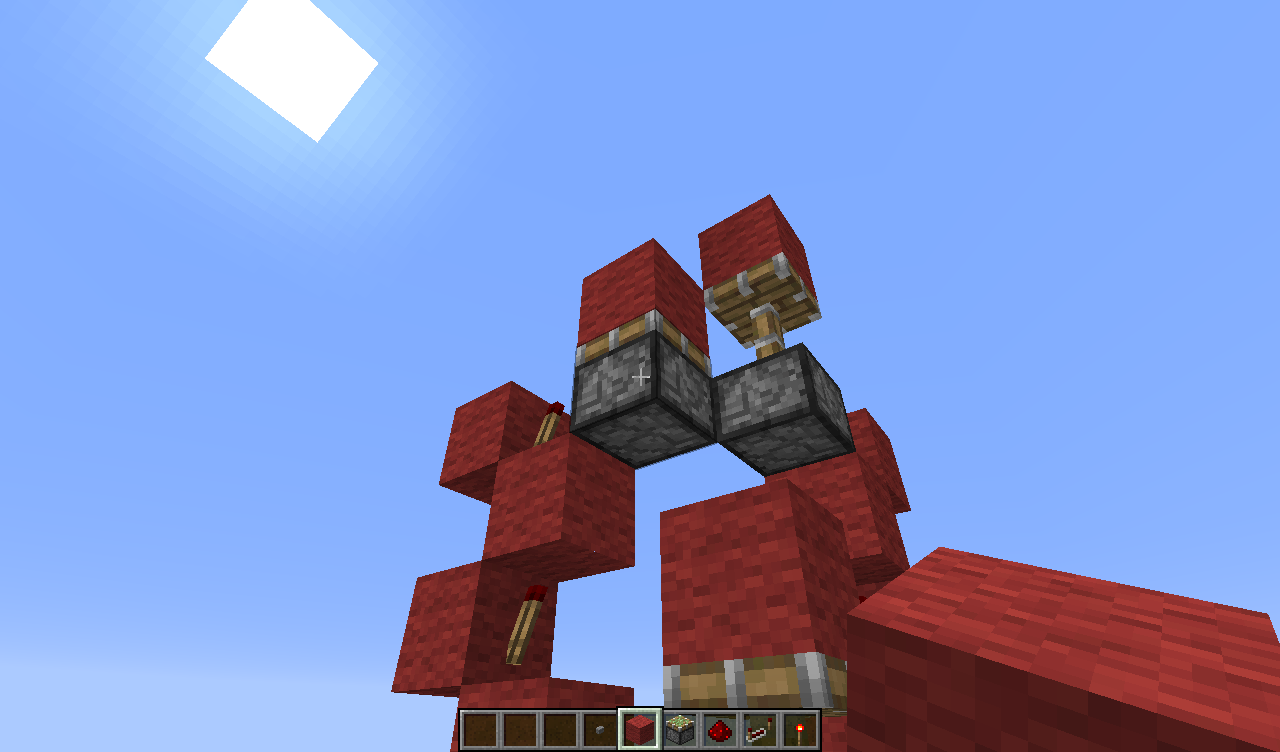
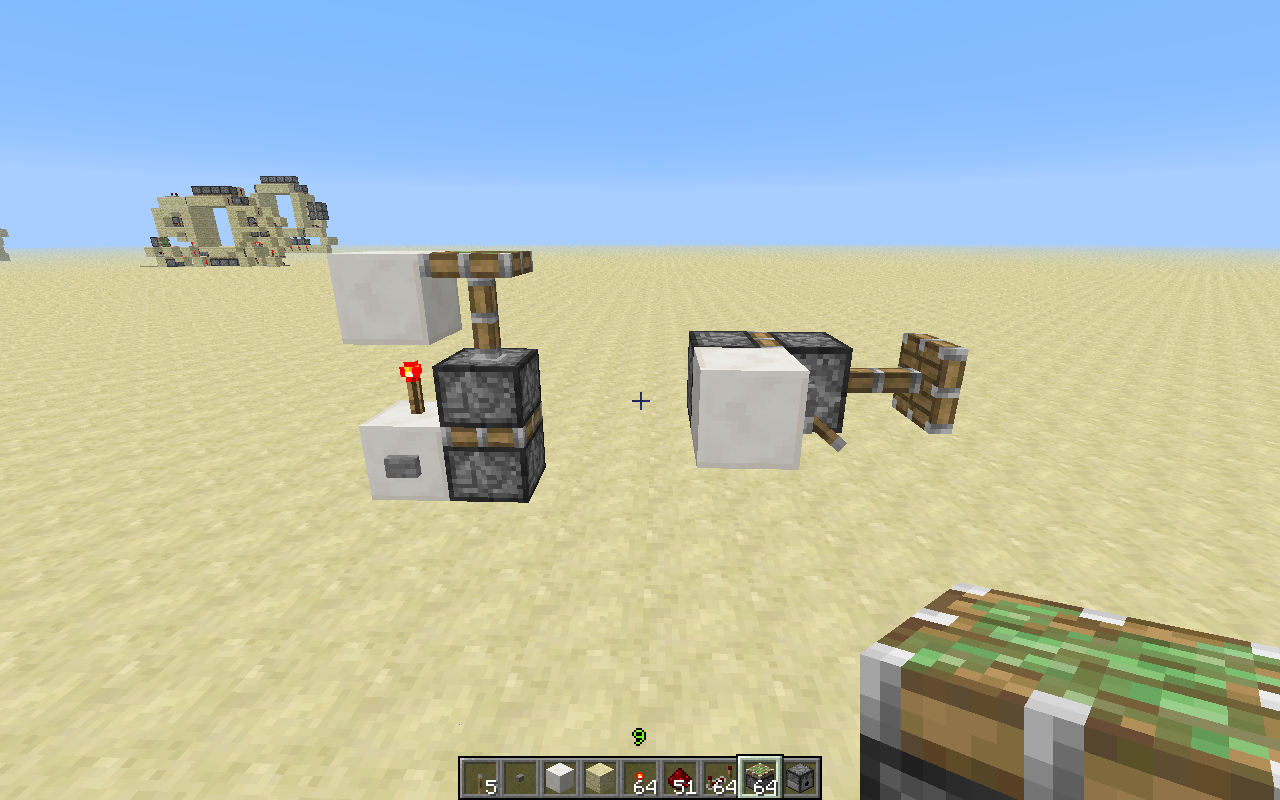
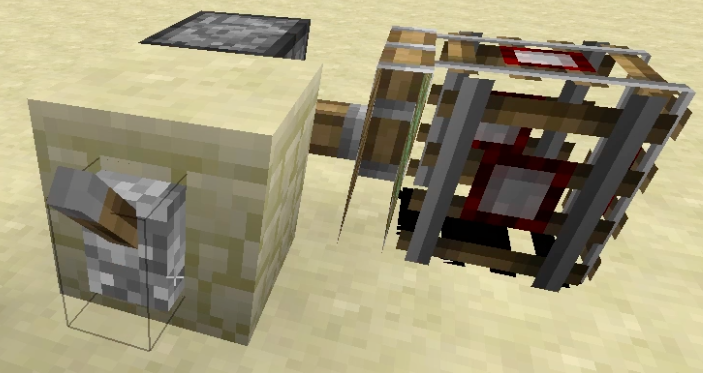
I powered 2 pistons facing upwards on top of each other with a torch, I expected the bottom piston to extend like it did in all previous versions.
Instead it
tries toextend thebottompistonbut then it extends the top piston.How to reproduce:
1. Build the setup fromthepicture.
2. Activate the lever.
3. Notice that thebottompistonlooks like it's gonnaextendbutinstead the toppistonextends.I powered 2 pistons facing upwards on top of each other with a torch, I expected the bottom piston to extend first and after that the top one like it did in all previous versions.
Instead it extends the top piston. (There is also a visual glitch, it looks like the bottom piston extends but in fact the top one does)
How to reproduce:
1. Build the setup from my picture.
2. Activate the lever.
3. Notice that the top piston extends instead of the bottom piston.
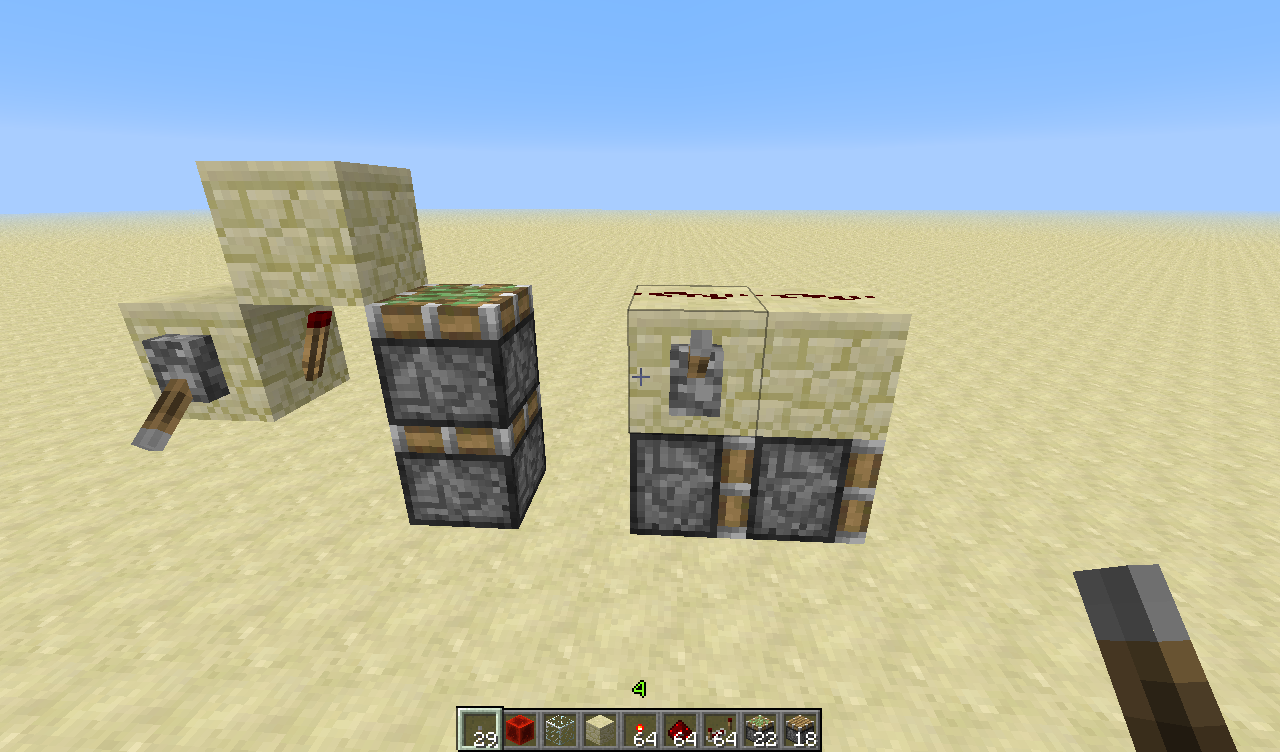
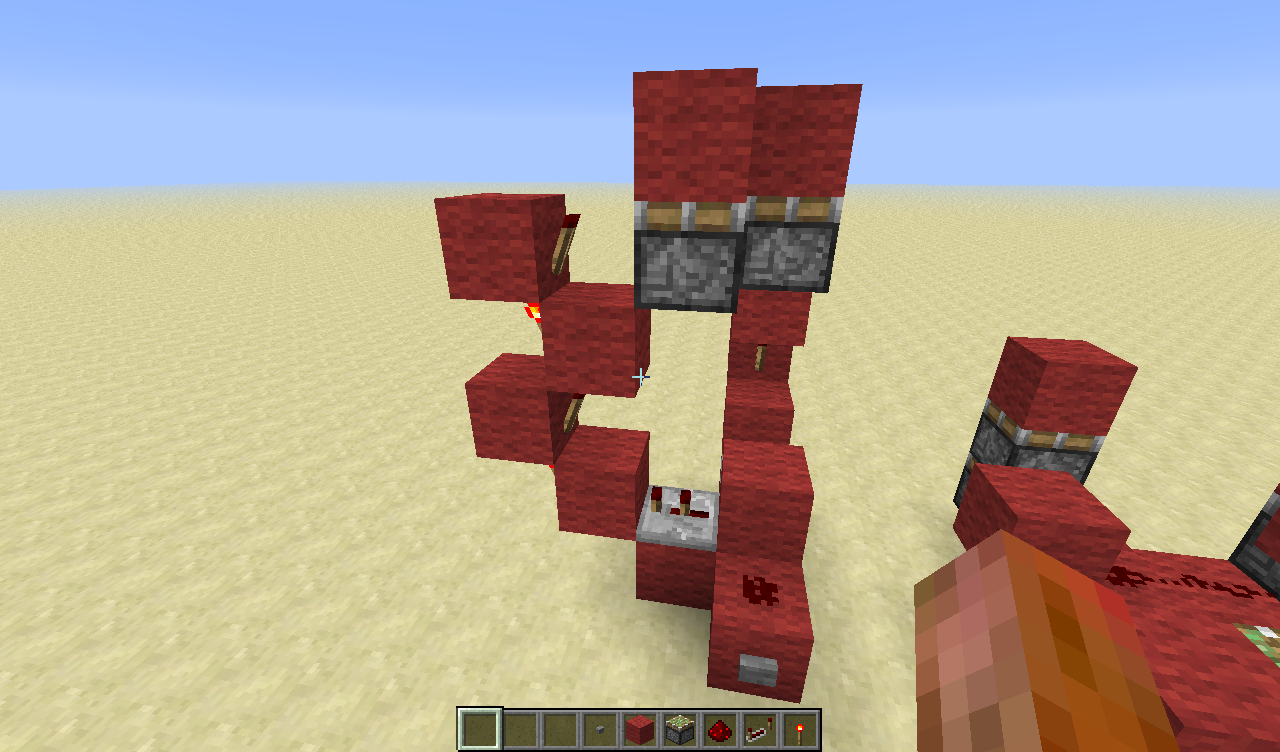
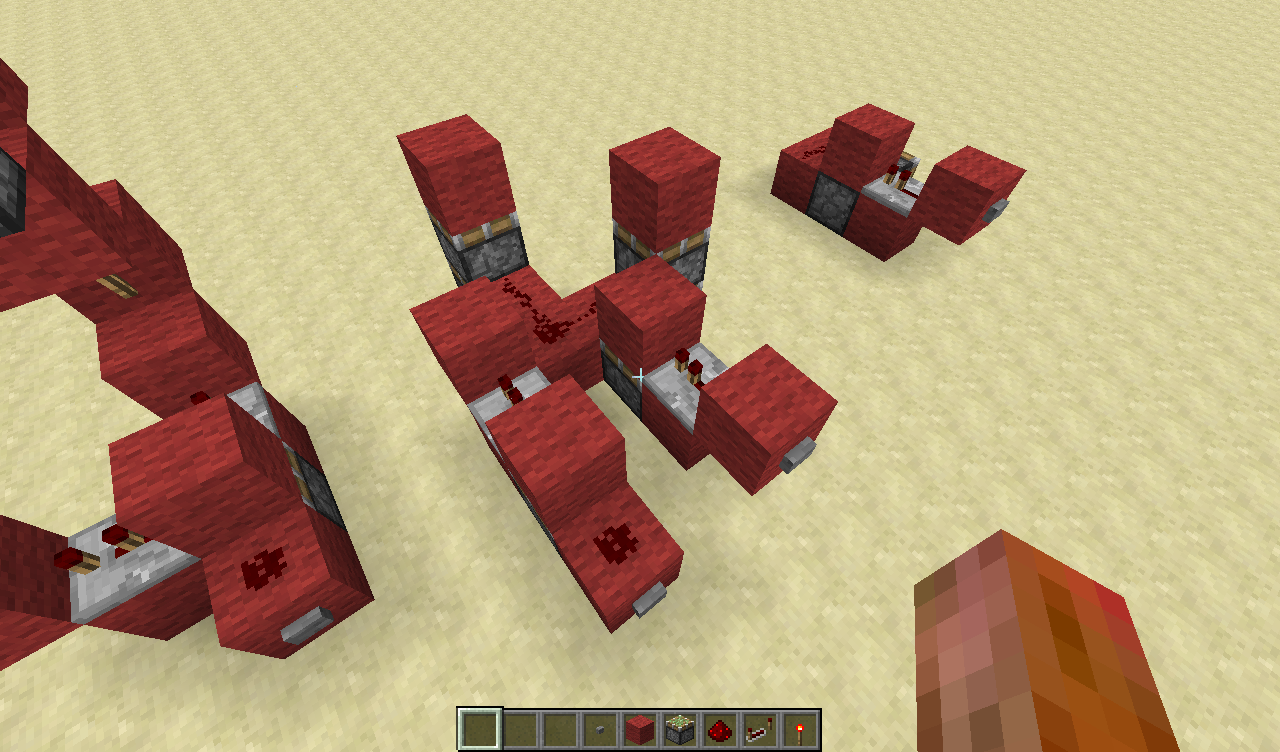
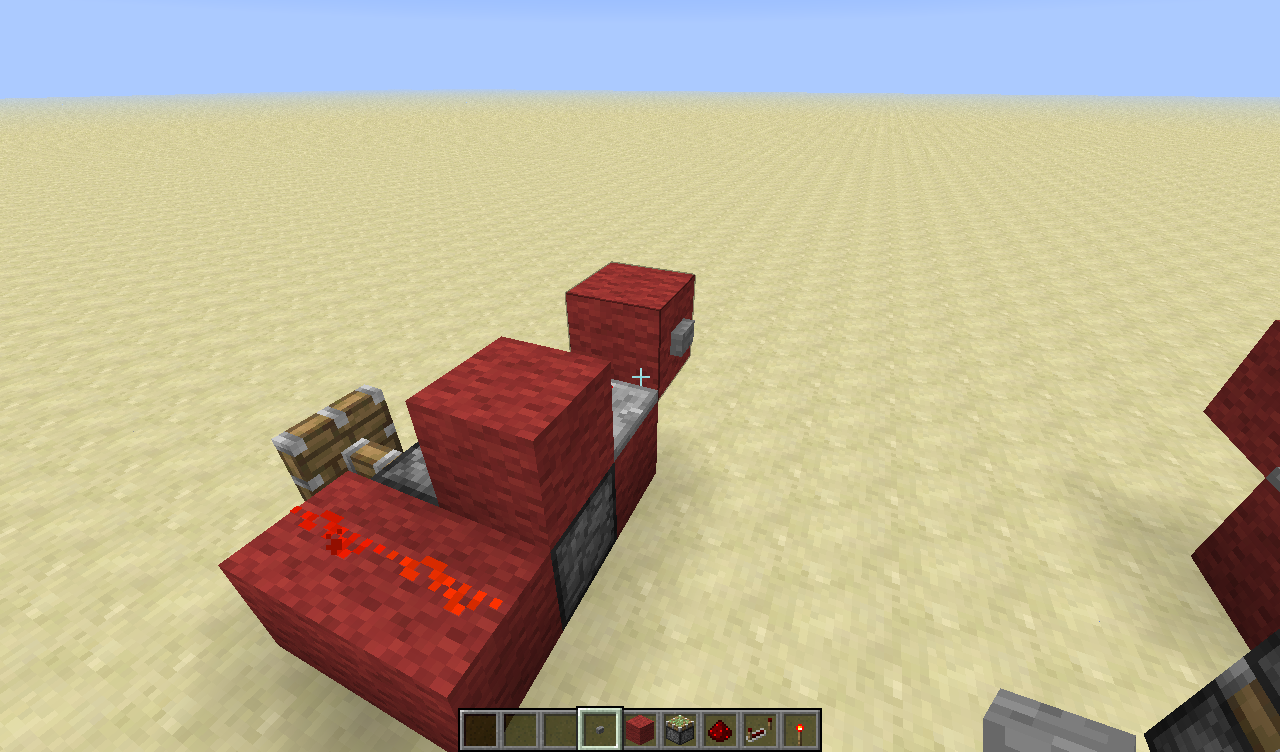
I placed a redstonetorch on the side of a powered block and I expected both redstonetorches on the top to turn on for a short while (2 redstoneticks)
But instead only 1 of the redstonetorches gave a signal. (2 redstoneticks) The other torch did not give a pulse.
How to reproduce:
1. Build themachine onthe picture.
2. Make sure that the lever is activated
3. Place the redstonetorch I am pointing at in the picture at the side of the block with the lever.
4. Notice that only 1 of the torches gives a signal.Suggestion:
Making redstonetorches so that
a 1 tick pulse will output a 1 tick pulse
a 2 tick pulse will output a 2 tick pulse
a 3 tick pulse will output a 3 tick pulse
etc.I placed a redstonetorch on the side of a powered block (which creates a 1-tick pulse) and I expected both redstonetorches on the top to give a pulse
But instead only 1 of the redstonetorches gave a signal. (2 redstoneticks) The other torch did not give a pulse.How to reproduce:
1. Build the setup from the picture.
2. Make sure that the lever is activated
3. Place the redstonetorch I am pointing at in the picture at the side of the block with the lever.
4. Notice that only 1 of the torches gives a signal.Suggestion:
Making redstonetorches so that
a 1 tick pulse will output a 1 tick pulse
a 2 tick pulse will output a 2 tick pulse
a 3 tick pulse will output a 3 tick pulse
etc.
MinecartSpawner that spawns 2 FallingSand riding eachother often spawnsonly 1 of the FallingSandMinecartSpawner that spawns 2 FallingSand riding eachother often spawns the bottom one twice.
So I Spawned a MinecartSpawner with a commandblock. The command was the following:
summon MinecartSpawner ~ ~6 ~1 {SpawnRange:3,MinSpawnDelay:3,MaxSpawnDelay:3,SpawnData:{TileID:152,Time:1,DropItem:0,Riding:{id:"FallingSand",TileID:22,Time:1,DropItem:0}},EntityId:"FallingSand",SpawnCount:1}
This creates a MinecartSpawner that spawns 2 FallingSand riding eachother, so what I expected to happen is that the MinecartSpawner would spawn a Lapisblock (id 22) with a redstoneblock (id 152) on top.
However, it often spawns 2 lapisblocks on top of eachother instead of a redstoneblock on top of a lapisblock.
How to reproduce:
1. Put the command in a commandblock.
2. Power the commandblock
3. Notice that the SpawnerMinecart often spawns 2 lapisblocks instead of a lapisblock with a redstoneblock on top.So I Spawned a MinecartSpawner with a commandblock. The command was the following:
/summon MinecartSpawner ~ ~6 ~1 {SpawnRange:3,MinSpawnDelay:3,MaxSpawnDelay:3,SpawnData:{TileID:152,Time:1,DropItem:0,Riding:{id:"FallingSand",TileID:22,Time:1,DropItem:0}},EntityId:"FallingSand",SpawnCount:1}
{/code}This creates a MinecartSpawner that spawns 2 FallingSand riding eachother, so what I expected to happen is that the MinecartSpawner would spawn a Lapisblock (id 22) with a redstoneblock (id 152) on top.
However, it often spawns 2 lapisblocks on top of eachother instead of a redstoneblock on top of a lapisblock.
How to reproduce:
1. Put the command in a commandblock.
2. Power the commandblock
3. Notice that the SpawnerMinecart often spawns 2 lapisblocks instead of a lapisblock with a redstoneblock on top.
So I Spawned a MinecartSpawner with a commandblock. The command was the following:
/summon MinecartSpawner ~ ~6 ~1 {SpawnRange:3,MinSpawnDelay:3,MaxSpawnDelay:3,SpawnData:{TileID:152,Time:1,DropItem:0,Riding:{id:"FallingSand",TileID:22,Time:1,DropItem:0}},EntityId:"FallingSand",SpawnCount:1}
{/code}This creates a MinecartSpawner that spawns 2 FallingSand riding eachother, so what I expected to happen is that the MinecartSpawner would spawn a Lapisblock (id 22) with a redstoneblock (id 152) on top.
However, it often spawns 2 lapisblocks on top of eachother instead of a redstoneblock on top of a lapisblock.
How to reproduce:
1. Put the command in a commandblock.
2. Power the commandblock
3. Notice that the SpawnerMinecart often spawns 2 lapisblocks instead of a lapisblock with a redstoneblock on top.So I Spawned a MinecartSpawner with a commandblock. The command was the following:
/summon MinecartSpawner ~ ~6 ~1 {SpawnRange:3,MinSpawnDelay:3,MaxSpawnDelay:3,SpawnData:{TileID:152,Time:1,DropItem:0,Riding:{id:"FallingSand",TileID:22,Time:1,DropItem:0}},EntityId:"FallingSand",SpawnCount:1}This creates a MinecartSpawner that spawns 2 FallingSand riding eachother, so what I expected to happen is that the MinecartSpawner would spawn a Lapisblock (id 22) with a redstoneblock (id 152) on top.
However, it often spawns 2 lapisblocks on top of eachother instead of a redstoneblock on top of a lapisblock.
How to reproduce:
1. Put the command in a commandblock.
2. Power the commandblock
3. Notice that the SpawnerMinecart often spawns 2 lapisblocks instead of a lapisblock with a redstoneblock on top.
So I Spawned a MinecartSpawner with a commandblock. The command was the following:
/summon MinecartSpawner ~ ~6 ~1 {SpawnRange:3,MinSpawnDelay:3,MaxSpawnDelay:3,SpawnData:{TileID:152,Time:1,DropItem:0,Riding:{id:"FallingSand",TileID:22,Time:1,DropItem:0}},EntityId:"FallingSand",SpawnCount:1}This creates a MinecartSpawner that spawns 2 FallingSand riding eachother, so what I expected to happen is that the MinecartSpawner would spawn a Lapisblock (id 22) with a redstoneblock (id 152) on top.
However, it often spawns
2lapisblockson top of eachother instead of a redstoneblock on top of a lapisblock.How to reproduce:
1. Put the command in a commandblock.
2. Power the commandblock
3. Notice that the SpawnerMinecart often spawns 2 lapisblocks instead of a lapisblock with a redstoneblock on top.So I Spawned a MinecartSpawner with a commandblock. The command was the following:
/summon MinecartSpawner ~ ~6 ~1 {SpawnRange:3,MinSpawnDelay:3,MaxSpawnDelay:3,SpawnData:{TileID:152,Time:1,DropItem:0,Riding:{id:"FallingSand",TileID:22,Time:1,DropItem:0}},EntityId:"FallingSand",SpawnCount:1}This creates a MinecartSpawner that spawns 2 FallingSand riding eachother, so what I expected to happen is that the MinecartSpawner would spawn a Lapisblock (id 22) with a redstoneblock (id 152) on top.
However, it often spawns just a lapisblocks and then later is spawns another one on top of it.
How to reproduce:
1. Put the command in a commandblock.
2. Power the commandblock
3. Notice that the SpawnerMinecart often spawns 2 lapisblocks instead of a lapisblock with a redstoneblock on top.
So I Spawned a MinecartSpawner with a commandblock. The command was the following:
/summon MinecartSpawner ~ ~6 ~1 {SpawnRange:3,MinSpawnDelay:3,MaxSpawnDelay:3,SpawnData:{TileID:152,Time:1,DropItem:0,Riding:{id:"FallingSand",TileID:22,Time:1,DropItem:0}},EntityId:"FallingSand",SpawnCount:1}This creates a MinecartSpawner that spawns 2 FallingSand riding eachother, so what I expected to happen is that the MinecartSpawner would spawn a Lapisblock (id 22) with a redstoneblock (id 152) on top.
However, it often spawns just a lapisblocks and then later is spawns another one on top of it.
How to reproduce:
1. Put the command in a commandblock.
2. Power the commandblock
3. Notice that the SpawnerMinecart often spawns 2 lapisblocks instead of a lapisblock with a redstoneblock on top.So I Spawned a MinecartSpawner with a commandblock. The command was the following: (edited to the 1.8 format but the same thing happened in 1.7)
/summon MinecartSpawner ~ ~6 ~1 {SpawnRange:3,MinSpawnDelay:3,MaxSpawnDelay:3,SpawnData:{Block:redstone_block,Time:1,DropItem:0,Riding:{id:"FallingSand",Block:lapis_block,Time:1,DropItem:0}},EntityId:"FallingSand",SpawnCount:1}This creates a MinecartSpawner that spawns 2 FallingSand riding eachother, so what I expected to happen is that the MinecartSpawner would spawn a Lapisblock (id 22) with a redstoneblock (id 152) on top.
However, it often spawns just a lapisblocks and then later is spawns another one on top of it. Another thing (this only happens in 14w03) is that it spawns a fake Pig that you can hit, and /say @e doesn't detect those pigs either. (it disappears after relogging)
How to reproduce:
1. Put the command in a commandblock.
2. Power the commandblock
3. Notice that the SpawnerMinecart often spawns 2 lapisblocks instead of a lapisblock with a redstoneblock on top.
4. Notice that a Fake Pig has spawned together with the minecartspawner.
So I Spawned a MinecartSpawner with a commandblock. The command was the following: (edited to the 1.8 format but the same thing happened in 1.7)
/summon MinecartSpawner ~ ~6 ~1 {SpawnRange:3,MinSpawnDelay:3,MaxSpawnDelay:3,SpawnData:{Block:redstone_block,Time:1,DropItem:0,Riding:{id:"FallingSand",Block:lapis_block,Time:1,DropItem:0}},EntityId:"FallingSand",SpawnCount:1}This creates a MinecartSpawner that spawns 2 FallingSand riding eachother, so what I expected to happen is that the MinecartSpawner would spawn a Lapisblock (id 22) with a redstoneblock (id 152) on top.
However, it often spawns just a lapisblocks and then later is spawns another one on top of it. Another thing (this only happens in 14w03 and 14w04) is that it spawns a fake Pig that you can hit, and /say @e doesn't detect those pigs either. (it disappears after relogging)
How to reproduce:
1. Put the command in a commandblock.
2. Power the commandblock
3. Notice that the SpawnerMinecart often spawns 2 lapisblocks instead of a lapisblock with a redstoneblock on top.
4. Notice that a Fake Pig has spawned together with the minecartspawner.
So I Spawned a MinecartSpawner with a commandblock. The command was the following: (edited to the 1.8 format but the same thing happened in 1.7)
/summon MinecartSpawner ~ ~6 ~1 {SpawnRange:3,MinSpawnDelay:3,MaxSpawnDelay:3,SpawnData:{Block:redstone_block,Time:1,DropItem:0,Riding:{id:"FallingSand",Block:lapis_block,Time:1,DropItem:0}},EntityId:"FallingSand",SpawnCount:1}This creates a MinecartSpawner that spawns 2 FallingSand riding eachother, so what I expected to happen is that the MinecartSpawner would spawn a Lapisblock (id 22) with a redstoneblock (id 152) on top.
However, it often spawns just a lapisblocks and then later is spawns another one on top of it. Another thing (this only happens in 14w03 and
14w04) is that it spawns a fake Pig that you can hit, and /say @e doesn't detect those pigs either.(it disappears after relogging)How to reproduce:
1. Put the command in a commandblock.
2. Power the commandblock
3. Notice that the SpawnerMinecart often spawns 2 lapisblocks instead of a lapisblock with a redstoneblock on top.
4. Notice that a Fake Pig has spawned together with the minecartspawner.So I Spawned a MinecartSpawner with a commandblock. The command was the following: (edited to the 1.8 format but the same thing happened in 1.7)
/summon MinecartSpawner ~ ~6 ~1 {SpawnRange:3,MinSpawnDelay:3,MaxSpawnDelay:3,SpawnData:{Block:redstone_block,Time:1,DropItem:0,Riding:{id:"FallingSand",Block:lapis_block,Time:1,DropItem:0}},EntityId:"FallingSand",SpawnCount:1}This creates a MinecartSpawner that spawns 2 FallingSand riding eachother, so what I expected to happen is that the MinecartSpawner would spawn a Lapisblock (id 22) with a redstoneblock (id 152) on top.
However, it often spawns just a lapisblocks and then later is spawns another one on top of it. Another thing (this only happens in 14w03 and further) is that it spawns a fake Pig that you can hit, and /say @e doesn't detect those pigs either.
From 14w06a on, the falling sand entities replace the floor the minecart is standing on, and a lot of the spawned sand is invisible until you relog. Spawnerminecarts are getting buggier and buggier.
How to reproduce:
1. Put the command in a commandblock.
2. Power the commandblock
3. Notice that the SpawnerMinecart often spawns 2 lapisblocks instead of a lapisblock with a redstoneblock on top.
4. Notice that a Fake Pig has spawned together with the minecartspawner.
MinecartSpawner that spawns 2 FallingSand riding eachother often spawns the bottom onetwice.MinecartSpawner that spawns 2 FallingSand riding eachother often spawns only the bottom one.
So I Spawned a MinecartSpawner with a commandblock. The command was the following: (edited to the 1.8 format but the same thing happened in 1.7)
/summon MinecartSpawner ~ ~6 ~1 {SpawnRange:3,MinSpawnDelay:3,MaxSpawnDelay:3,SpawnData:{Block:redstone_block,Time:1,DropItem:0,Riding:{id:"FallingSand",Block:lapis_block,Time:1,DropItem:0}},EntityId:"FallingSand",SpawnCount:1}This creates a MinecartSpawner that spawns 2 FallingSand riding eachother, so what I expected to happen is that the MinecartSpawner would spawn a Lapisblock (id 22) with a redstoneblock (id 152) on top.
However, it often spawns just a lapisblocks and then later is spawns another one on top of it. Another thing (this only happens in 14w03 and further) is that it spawns a fake Pig that you can hit, and /say @e doesn't detect those pigs either.
From 14w06a on, the falling sand entities replace the floor the minecart is standing on, and a lot of the spawned sand is invisible until you relog. Spawnerminecarts are getting buggier and buggier.
How to reproduce:
1. Put the command in a commandblock.
2. Power the commandblock
3. Notice that the SpawnerMinecart often spawns 2 lapisblocks instead of a lapisblock with a redstoneblock on top.
4. Notice that a Fake Pig has spawned together with the minecartspawner.
5. Notice that the floorblocks are deleted.
6. Notice that some of the spawned sand is invisible.
So I Spawned a MinecartSpawner with a commandblock. The command was the following: (edited to the 1.8 format but the same thing happened in 1.7)
/summon MinecartSpawner ~ ~6 ~1 {SpawnRange:3,MinSpawnDelay:3,MaxSpawnDelay:3,SpawnData:{Block:redstone_block,Time:1,DropItem:0,Riding:{id:"FallingSand",Block:lapis_block,Time:1,DropItem:0}},EntityId:"FallingSand",SpawnCount:1}This creates a MinecartSpawner that spawns 2 FallingSand riding eachother, so what I expected to happen is that the MinecartSpawner would spawn a Lapisblock (id 22) with a redstoneblock (id 152) on top.
However, it often spawns just a lapisblocks and then later is spawns another one on top of it. Another thing (this only happens in 14w03 and further) is that it spawns a fake Pig that you can hit, and /say @e doesn't detect those pigs either.
From 14w06a on,
the falling sand entities replace the floor the minecart is standingon, and a lot of the spawned sand is invisibleuntil yourelog. Spawnerminecarts are getting buggier and buggier.How to reproduce:
1. Put the command in a commandblock.
2. Power the commandblock
3. Notice that the SpawnerMinecart often spawns 2 lapisblocks instead of a lapisblock with a redstoneblock on top.
4. Notice that a Fake Pig has spawned together with the minecartspawner.
5. Notice that the floorblocks are deleted.
6. Notice that some of the spawned sand is invisible.So I Spawned a MinecartSpawner with a commandblock. The command was the following: (edited to the 1.8 format but the same thing happened in 1.7)
/summon MinecartSpawner ~ ~6 ~1 {SpawnRange:3,MinSpawnDelay:3,MaxSpawnDelay:3,SpawnData:{Block:redstone_block,Time:1,DropItem:0,Riding:{id:"FallingSand",Block:lapis_block,Time:1,DropItem:0}},EntityId:"FallingSand",SpawnCount:1}This creates a MinecartSpawner that spawns 2 FallingSand riding eachother, so what I expected to happen is that the MinecartSpawner would spawn a Lapisblock (id 22) with a redstoneblock (id 152) on top.
However, it often spawns just a lapisblocks and then later is spawns another one on top of it. Another thing (this only happens in 14w03 and further) is that it spawns a fake Pig that you can hit, and /say @e doesn't detect those pigs either.
From 14w06a on, The floorblocks appear to be gone, and a lot of the spawned sand is invisible. This both gets fixed after relogging. Spawnerminecarts are getting buggier and buggier.
How to reproduce:
1. Put the command in a commandblock.
2. Power the commandblock
3. Notice that the SpawnerMinecart often spawns 2 lapisblocks instead of a lapisblock with a redstoneblock on top.
4. Notice that a Fake Pig has spawned together with the minecartspawner.
5. Notice that the floorblocks are deleted.
6. Notice that some of the spawned sand is invisible.
So I Spawned a MinecartSpawner with a commandblock. The command was the following: (edited to the 1.8 format but the same thing happened in 1.7)
/summon MinecartSpawner ~ ~6 ~1 {SpawnRange:3,MinSpawnDelay:3,MaxSpawnDelay:3,SpawnData:{Block:redstone_block,Time:1,DropItem:0,Riding:{id:"FallingSand",Block:lapis_block,Time:1,DropItem:0}},EntityId:"FallingSand",SpawnCount:1}This creates a MinecartSpawner that spawns 2 FallingSand riding eachother, so what I expected to happen is that the MinecartSpawner would spawn a Lapisblock (id 22) with a redstoneblock (id 152) on top.
However, it often spawns just a lapisblocks and then later is spawns another one on top of it.
Another thing (this only happens in 14w03 and further) is that it spawns a fake Pig that you can hit, and /say @e doesn't detect those pigs either.From 14w06a on,
The floorblocks appear to be gone, and a lotof the spawnedsand isinvisible. This both gets fixed after relogging. Spawnerminecarts are getting buggier and buggier.How to reproduce:
1. Put the command in a commandblock.
2. Power the commandblock
3. Notice that the SpawnerMinecart often spawns 2 lapisblocks instead of a lapisblock with a redstoneblock on top.
4. Notice thata Fake Pig has spawned together with theminecartspawner.
5. Notice that the floorblocks are deleted.
6. Notice that some of the spawned sand is invisible.So I Spawned a MinecartSpawner with a commandblock. The command was the following: (edited to the 1.8 format but the same thing happened in 1.7)
/summon MinecartSpawner ~ ~6 ~1 {SpawnRange:3,MinSpawnDelay:3,MaxSpawnDelay:3,SpawnData:{Block:redstone_block,Time:1,DropItem:0,Riding:{id:"FallingSand",Block:lapis_block,Time:1,DropItem:0}},EntityId:"FallingSand",SpawnCount:1}This creates a MinecartSpawner that spawns 2 FallingSand riding eachother, so what I expected to happen is that the MinecartSpawner would spawn a Lapisblock (id 22) with a redstoneblock (id 152) on top.
However, it often spawns just a lapisblocks and then later is spawns another one on top of it.
From 14w06a on, Some of the spawned blocks are invisible. They become visible again after relogging.
How to reproduce:
1. Put the command in a commandblock.
2. Power the commandblock
3. Notice that the SpawnerMinecart often spawns 2 lapisblocks instead of a lapisblock with a redstoneblock on top.
4. Notice that some of the spawned blocks are invisible.
So I spawned a MinecartSpawner with a commandblock. The command was the following:
summon MinecartSpawner ~ ~6 ~.1 {SpawnRange:0,MinSpawnDelay:3,MaxSpawnDelay:3,SpawnData:
{TileID:152,Time:1,DropItem:0},EntityId:"FallingSand",SpawnCount:1}
This creates a spawner with a SpawnRange of 0 that spawns redstoneblocks, so I expected it to spawn redstoneblock in the block the MinecartSpawner is in.
However, the MinecartSpawner spawns the blocks in the block it is in and the block above that, and also the block underneath the block the MinecartSpawner is standing on.
The weird thing though is, that this doesn't happen when the MinecartSpawner is at an exact. (
in the command it said: ~ ~6 ~.1if you replace the .1 with a 1 it doesn't spawn blocks below the floor, but it still does spawn above the block the MinecartSpawner is in.)How to reproduce:
1. Put the command in a commandblock. (make sure there it will spawn on a 1 high platform, so that it can spawn underneath the floor)
2. Power the commandblock.
3. Notice that the MinecartSpawner spawns blocks above the block it is in and below the block it is standing on even though the SpawnRange is 0.So I spawned a MinecartSpawner with a commandblock. The command was the following:
summon MinecartSpawner ~ ~6 ~.1 {SpawnRange:0,MinSpawnDelay:3,MaxSpawnDelay:3,SpawnData:
{TileID:152,Time:1,DropItem:0},EntityId:"FallingSand",SpawnCount:1}
This creates a spawner with a SpawnRange of 0 that spawns redstoneblocks, so I expected it to spawn redstoneblock in the block the MinecartSpawner is in.
However, the MinecartSpawner spawns the blocks in the block it is in and the block above that, and also the block underneath the block the MinecartSpawner is standing on.
The weird thing though is, that this doesn't happen when the MinecartSpawner is at an exact coordinate. (In the command it said: ~ ~6 ~.1 If you replace the .1 with a 1 it doesn't spawn blocks below the floor, but it still does spawn above the block the MinecartSpawner is in.)
How to reproduce:
1. Put the command in a commandblock. (make sure there it will spawn on a 1 high platform, so that it can spawn underneath the floor)
2. Power the commandblock.
3. Notice that the MinecartSpawner spawns blocks above the block it is in and below the block it is standing on even though the SpawnRange is 0.
So I spawned a MinecartSpawner with a commandblock. The command was the following:
/summon MinecartSpawner ~ ~6 ~.1 {SpawnRange:0,MinSpawnDelay:3,MaxSpawnDelay:3,SpawnData:{TileID:152,Time:1,DropItem:0},EntityId:"FallingSand",SpawnCount:1}This creates a spawner with a SpawnRange of 0 that spawns redstoneblocks, so I expected it to spawn redstoneblock in the block the MinecartSpawner is in.
However, the MinecartSpawner spawns the blocks in the block it is in a
ndthe block above that, and also the block underneath the block the MinecartSpawner is standing on.The weird thing though is, that this doesn't happen when the MinecartSpawner is at an exact coordinate. (In the command it said: ~ ~6 ~.1 If you replace the .1 with a 1 it doesn't spawn blocks below the floor, but it still does spawn above the block the MinecartSpawner is in.)
How to reproduce:
1. Put the command in a commandblock. (make sure there it will spawn on a 1 high platform, so that it can spawn underneath the floor)
2. Power the commandblock.
3. Notice that the MinecartSpawner spawns blocks above the block it is in and below the block it is standing on even though the SpawnRange is 0.So I spawned a MinecartSpawner with a commandblock. The command was the following:
/summon MinecartSpawner ~ ~6 ~.1 {SpawnRange:0,MinSpawnDelay:3,MaxSpawnDelay:3,SpawnData:{TileID:152,Time:1,DropItem:0},EntityId:"FallingSand",SpawnCount:1}This creates a spawner with a SpawnRange of 0 that spawns redstoneblocks, so I expected it to spawn redstoneblock in the block the MinecartSpawner is in.
However, the MinecartSpawner spawns the blocks in the block it is in as well as the block above that, and also the block underneath the block the MinecartSpawner is standing on.
The weird thing though is, that this doesn't happen when the MinecartSpawner is at an exact coordinate. (In the command it said: ~ ~6 ~.1 If you replace the .1 with a 1 it doesn't spawn blocks below the floor, but it still does spawn above the block the MinecartSpawner is in.)
How to reproduce:
1. Put the command in a commandblock. (make sure there it will spawn on a 1 high platform, so that it can spawn underneath the floor)
2. Power the commandblock.
3. Notice that the MinecartSpawner spawns blocks above the block it is in and below the block it is standing on even though the SpawnRange is 0.
So I spawned a MinecartSpawner with a commandblock. The command was the following:
/summon MinecartSpawner ~ ~6 ~.1 {SpawnRange:0,MinSpawnDelay:3,MaxSpawnDelay:3,SpawnData:{TileID:152,Time:1,DropItem:0},EntityId:"FallingSand",SpawnCount:1}This creates a spawner with a SpawnRange of 0 that spawns redstoneblocks, so I expected it to spawn redstoneblock in the block the MinecartSpawner is in.
However, the MinecartSpawner spawns the blocks in the block it is in as well as the block above that, and also the block underneath the block the MinecartSpawner is standing on.
The weird thing though is, that this doesn't happen when the MinecartSpawner is at an exact coordinate. (In the command it said: ~ ~6 ~.1 If you replace the .1 with a 1 it doesn't spawn blocks below the floor, but it still does spawn above the block the MinecartSpawner is in.)
How to reproduce:
1. Put the command in a commandblock. (make sure there it will spawn ona 1 high platform, so that it can spawn underneath the floor)
2. Power the commandblock.
3. Notice that the MinecartSpawner spawns blocks above the block it is in and below the block it is standing on even though the SpawnRange is 0.So I spawned a MinecartSpawner with a commandblock. The command was the following:
/summon MinecartSpawner ~ ~6 ~.1 {SpawnRange:0,MinSpawnDelay:3,MaxSpawnDelay:3,SpawnData:{TileID:152,Time:1,DropItem:0},EntityId:"FallingSand",SpawnCount:1}This creates a spawner with a SpawnRange of 0 that spawns redstoneblocks, so I expected it to spawn redstoneblock in the block the MinecartSpawner is in.
However, the MinecartSpawner spawns the blocks in the block it is in as well as the block above that, and also the block underneath the block the MinecartSpawner is standing on.
The weird thing though is, that this doesn't happen when the MinecartSpawner is at an exact coordinate. (In the command it said: ~ ~6 ~.1 If you replace the .1 with a 1 it doesn't spawn blocks below the floor, but it still does spawn above the block the MinecartSpawner is in.)
How to reproduce:
1. Put the command in a commandblock. (make sure there is a 1 high platform above the commandblock, so that it can spawn underneath the floor)
2. Power the commandblock.
3. Notice that the MinecartSpawner spawns blocks above the block it is in and below the block it is standing on even though the SpawnRange is 0.
So I spawned a MinecartSpawner with a commandblock. The command was the following:
/summon MinecartSpawner ~ ~6 ~.1 {SpawnRange:0,MinSpawnDelay:3,MaxSpawnDelay:3,SpawnData:{TileID:152,Time:1,DropItem:0},EntityId:"FallingSand",SpawnCount:1}This creates a spawner with a SpawnRange of 0 that spawns redstoneblocks, so I expected it to spawn redstoneblock in the block the MinecartSpawner is in.
However, the MinecartSpawner spawns the blocks in the block it is in as well as the block above that, and also the block underneath the block the MinecartSpawner is standing on.
The weird thing though is, that this doesn't happen when the MinecartSpawner is at an exact coordinate. (In the command it said: ~ ~6 ~.1 If you replace the .1 with a 1 it doesn't spawn blocks below the floor, but it still does spawn above the block the MinecartSpawner is in.)
How to reproduce:
1. Put the command in a commandblock. (make sure there is a 1 high platform above the commandblock, so that it can spawn underneath the floor)
2. Power the commandblock.
3. Notice that the MinecartSpawner spawns blocks above the block it is in and below the block it is standing on even though the SpawnRange is 0.So I spawned a MinecartSpawner with a commandblock. The command was the following: (edited to 1.8 format, but the same thing happened in 1.7)
/summon MinecartSpawner ~ ~6 ~.1 {SpawnRange:0,MinSpawnDelay:3,MaxSpawnDelay:3,SpawnData:{Block:redstone_block,Time:1,DropItem:0},EntityId:"FallingSand",SpawnCount:1}This creates a spawner with a SpawnRange of 0 that spawns redstoneblocks, so I expected it to spawn redstoneblock in the block the MinecartSpawner is in.
However, the MinecartSpawner spawns the blocks in the block it is in as well as the block above that, and also the block underneath the block the MinecartSpawner is standing on. Another thing (this only happens in 14w03) is that it spawns a fake Pig that you can hit, and /say @e doesn't detect those pigs either.
The weird thing though is, that this doesn't happen when the MinecartSpawner is at an exact coordinate. (In the command it said: ~ ~6 ~.1 If you replace the .1 with a 1 it doesn't spawn blocks below the floor, but it still does spawn above the block the MinecartSpawner is in.)
How to reproduce:
1. Put the command in a commandblock. (make sure there is a 1 high platform above the commandblock, so that it can spawn underneath the floor)
2. Power the commandblock.
3. Notice that the MinecartSpawner spawns blocks above the block it is in and below the block it is standing on even though the SpawnRange is 0.
4. Notice that a Fake Pig has spawned together with the minecartspawner.
So I spawned a MinecartSpawner with a commandblock. The command was the following: (edited to 1.8 format, but the same thing happened in 1.7)
/summon MinecartSpawner ~ ~6 ~.1 {SpawnRange:0,MinSpawnDelay:3,MaxSpawnDelay:3,SpawnData:{Block:redstone_block,Time:1,DropItem:0},EntityId:"FallingSand",SpawnCount:1}This creates a spawner with a SpawnRange of 0 that spawns redstoneblocks, so I expected it to spawn redstoneblock in the block the MinecartSpawner is in.
However, the MinecartSpawner spawns the blocks in the block it is in as well as the block above that, and also the block underneath the block the MinecartSpawner is standing on. Another thing (this only happens in 14w03 and 14w04) is that it spawns a fake Pig that you can hit, and /say @e doesn't detect those pigs either.
The weird thing though is, that this doesn't happen when the MinecartSpawner is at an exact coordinate. (In the command it said: ~ ~6 ~.1 If you replace the .1 with a 1 it doesn't spawn blocks below the floor, but it still does spawn above the block the MinecartSpawner is in.)
How to reproduce:
1. Put the command in a commandblock. (make sure there is a 1 high platform above the commandblock, so that it can spawn underneath the floor)
2. Power the commandblock.
3. Notice that the MinecartSpawner spawns blocks above the block it is in and below the block it is standing on even though the SpawnRange is 0.
4. Notice that a Fake Pig has spawned together with the minecartspawner.
So I spawned a MinecartSpawner with a commandblock. The command was the following: (edited to 1.8 format, but the same thing happened in 1.7)
/summon MinecartSpawner ~ ~6 ~.1 {SpawnRange:0,MinSpawnDelay:3,MaxSpawnDelay:3,SpawnData:{Block:redstone_block,Time:1,DropItem:0},EntityId:"FallingSand",SpawnCount:1}This creates a spawner with a SpawnRange of 0 that spawns redstoneblocks, so I expected it to spawn redstoneblock in the block the MinecartSpawner is in.
However, the MinecartSpawner spawns the blocks in the block it is in as well as the block above that, and also the block underneath the block the MinecartSpawner is standing on.
Another thing (this only happens in 14w03 and 14w04) is that it spawns a fake Pig that you can hit, and /say @e doesn't detect those pigs either.
The weird thing though is, that this doesn't happen when the MinecartSpawner is atan exact coordinate. (In the command it said: ~ ~6 ~.1 If you replace the .1 witha1 it doesn't spawn blocks below the floor, but it still does spawn above the block the MinecartSpawner is in.)How to reproduce:
1. Put the command in a commandblock. (make sure there is a 1 high platform above the commandblock, so that it can spawn underneath the floor)
2. Power the commandblock.
3. Notice that the MinecartSpawner spawns blocks above the block it is in and below the block it is standing on even though the SpawnRange is 0.
4. Notice that a Fake Pig has spawned together with the minecartspawner.So I spawned a MinecartSpawner with a commandblock. The command was the following: (edited to 1.8 format, but the same thing happened in 1.7)
/summon MinecartSpawner ~ ~6 ~.1 {SpawnRange:0,MinSpawnDelay:3,MaxSpawnDelay:3,SpawnData:{Block:redstone_block,Time:1,DropItem:0},EntityId:"FallingSand",SpawnCount:1}This creates a spawner with a SpawnRange of 0 that spawns redstoneblocks, so I expected it to spawn redstoneblock in the block the MinecartSpawner is in.
However, the MinecartSpawner spawns the blocks in the block it is in as well as the block above that, and also the block underneath the block the MinecartSpawner is standing on.
Another thing (this only happens in 14w03 and further) is that it spawns a fake Pig that you can hit, and /say @e doesn't detect those pigs either.
From 14w06a on, the falling sand entities replace the floor the minecart is standing on, and a lot of the spawned sand is invisible until you relog. Spawnerminecarts are getting buggier and buggier.
The weird thing though is, that this doesn't happen when the MinecartSpawner is at an exact coordinate. (In the command it said: ~ ~6 ~.1 If you replace the .1 with a 1 it doesn't spawn blocks below the floor, but it still does spawn above the block the MinecartSpawner is in.)
How to reproduce:
1. Put the command in a commandblock. (make sure there is a 1 high platform above the commandblock, so that it can spawn underneath the floor)
2. Power the commandblock.
3. Notice that the MinecartSpawner spawns blocks above the block it is in and below the block it is standing on even though the SpawnRange is 0.
4. Notice that a Fake Pig has spawned together with the minecartspawner.
So I spawned a MinecartSpawner with a commandblock. The command was the following: (edited to 1.8 format, but the same thing happened in 1.7)
/summon MinecartSpawner ~ ~6 ~.1 {SpawnRange:0,MinSpawnDelay:3,MaxSpawnDelay:3,SpawnData:{Block:redstone_block,Time:1,DropItem:0},EntityId:"FallingSand",SpawnCount:1}This creates a spawner with a SpawnRange of 0 that spawns redstoneblocks, so I expected it to spawn redstoneblock in the block the MinecartSpawner is in.
However, the MinecartSpawner spawns the blocks in the block it is in as well as the block above that, and also the block underneath the block the MinecartSpawner is standing on.
Another thing (this only happens in 14w03 and further) is that it spawns a fake Pig that you can hit, and /say @e doesn't detect those pigs either.
From 14w06a on, the falling sand entities replace the floor the minecart is standing on, and a lot of the spawned sand is invisible until you relog. Spawnerminecarts are getting buggier and buggier.
The weird thing though is, that this doesn't happen when the MinecartSpawner is at an exact coordinate. (In the command it said: ~ ~6 ~.1 If you replace the .1 with a 1 it doesn't spawn blocks below the floor, but it still does spawn above the block the MinecartSpawner is in.)
How to reproduce:
1. Put the command in a commandblock. (make sure there is a 1 high platform above the commandblock, so that it can spawn underneath the floor)
2. Power the commandblock.
3. Notice that the MinecartSpawner spawns blocks above the block it is in and below the block it is standing on even though the SpawnRange is 0.
4. Notice that a Fake Pig has spawned together with the minecartspawner.
5. Notice that the floorblock is deleted.
6. Notice that some of the spawned sand is invisible.
So I spawned a MinecartSpawner with a commandblock. The command was the following: (edited to 1.8 format, but the same thing happened in 1.7)
/summon MinecartSpawner ~ ~6 ~.1 {SpawnRange:0,MinSpawnDelay:3,MaxSpawnDelay:3,SpawnData:{Block:redstone_block,Time:1,DropItem:0},EntityId:"FallingSand",SpawnCount:1}This creates a spawner with a SpawnRange of 0 that spawns redstoneblocks, so I expected it to spawn redstoneblock in the block the MinecartSpawner is in.
However, the MinecartSpawner spawns the blocks in the block it is in as well as the block above that, and also the block underneath the block the MinecartSpawner is standing on.
Another thing (this only happens in 14w03 and further) is that it spawns a fake Pig that you can hit, and /say @e doesn't detect those pigs either.
From 14w06a on, the f
alling sand entities replace the floor the minecart is standingon, anda lotof the spawned sand is invisibleuntilyou relog. Spawnerminecarts are getting buggier and buggier.The weird thing though is, that this doesn't happen when the MinecartSpawner is at an exact coordinate. (In the command it said: ~ ~6 ~.1 If you replace the .1 with a 1 it doesn't spawn blocks below the floor, but it still does spawn above the block the MinecartSpawner is in.)
How to reproduce:
1. Put the command in a commandblock. (make sure there is a 1 high platform above the commandblock, so that it can spawn underneath the floor)
2. Power the commandblock.
3. Notice that the MinecartSpawner spawns blocks above the block it is in and below the block it is standing on even though the SpawnRange is 0.
4. Notice that a Fake Pig has spawned together with the minecartspawner.
5. Notice that the floorblock is deleted.
6. Notice that some of the spawned sand is invisible.So I spawned a MinecartSpawner with a commandblock. The command was the following: (edited to 1.8 format, but the same thing happened in 1.7)
/summon MinecartSpawner ~ ~6 ~.1 {SpawnRange:0,MinSpawnDelay:3,MaxSpawnDelay:3,SpawnData:{Block:redstone_block,Time:1,DropItem:0},EntityId:"FallingSand",SpawnCount:1}This creates a spawner with a SpawnRange of 0 that spawns redstoneblocks, so I expected it to spawn redstoneblock in the block the MinecartSpawner is in.
However, the MinecartSpawner spawns the blocks in the block it is in as well as the block above that, and also the block underneath the block the MinecartSpawner is standing on.
Another thing (this only happens in 14w03 and further) is that it spawns a fake Pig that you can hit, and /say @e doesn't detect those pigs either.
From 14w06a on, the floorblock appears to be gone, and some of the spawned sand is invisible. This both gets fixed after you relog. Spawnerminecarts are getting buggier and buggier.
The weird thing though is, that this doesn't happen when the MinecartSpawner is at an exact coordinate. (In the command it said: ~ ~6 ~.1 If you replace the .1 with a 1 it doesn't spawn blocks below the floor, but it still does spawn above the block the MinecartSpawner is in.)
How to reproduce:
1. Put the command in a commandblock. (make sure there is a 1 high platform above the commandblock, so that it can spawn underneath the floor)
2. Power the commandblock.
3. Notice that the MinecartSpawner spawns blocks above the block it is in and below the block it is standing on even though the SpawnRange is 0.
4. Notice that a Fake Pig has spawned together with the minecartspawner.
5. Notice that the floorblock is deleted.
6. Notice that some of the spawned sand is invisible.
So I spawned a MinecartSpawner with a commandblock. The command was the following: (edited to 1.8 format, but the same thing happened in 1.7)
/summon MinecartSpawner ~ ~6 ~.1 {SpawnRange:0,MinSpawnDelay:3,MaxSpawnDelay:3,SpawnData:{Block:redstone_block,Time:1,DropItem:0},EntityId:"FallingSand",SpawnCount:1}This creates a spawner with a SpawnRange of 0 that spawns redstoneblocks, so I expected it to spawn redstoneblock in the block the MinecartSpawner is in.
However, the MinecartSpawner spawns the blocks in the block it is in as well as the block above that, and also the block underneath the block the MinecartSpawner is standing on.
Another thing (this only happens in 14w03 and further) is that it spawns a fake Pig that you can hit, and /say @e doesn't detect those pigs either.
From 14w06a on, the floorblock appears to be gone, and some of the spawned sand is invisible. This both gets fixed after you relog. Spawnerminecarts are getting buggier and buggier.The weird thing though is, that this doesn't happen when the MinecartSpawner is at an exact coordinate. (In the command it said: ~ ~6 ~.1 If you replace the .1 with a 1 it doesn't spawn blocks below the floor, but it still does spawn above the block the MinecartSpawner is in.)
How to reproduce:
1. Put the command in a commandblock. (make sure there is a 1 high platform above the commandblock, so that it can spawn underneath the floor)
2. Power the commandblock.
3. Notice that the MinecartSpawner spawns blocks above the block it is in and below the block it is standing on even though the SpawnRange is 0.
4. Notice that a Fake Pig has spawned together with the minecartspawner.
5. Notice that the floorblock is deleted.
6. Notice that some of the spawnedsand isinvisible.So I spawned a MinecartSpawner with a commandblock. The command was the following: (edited to 1.8 format, but the same thing happened in 1.7)
/summon MinecartSpawner ~ ~6 ~.1 {SpawnRange:0,MinSpawnDelay:3,MaxSpawnDelay:3,SpawnData:{Block:redstone_block,Time:1,DropItem:0},EntityId:"FallingSand",SpawnCount:1}This creates a spawner with a SpawnRange of 0 that spawns redstoneblocks, so I expected it to spawn redstoneblock in the block the MinecartSpawner is in.
However, the MinecartSpawner spawns the blocks in the block it is in as well as the block above that, and also the block underneath the block the MinecartSpawner is standing on.
From 14w06a on, some of the spawned blocks are invisible. They become visible again after relogging.
The weird thing though is, that the minecartspawner doesn't drop blocks below the floor when it is at an exact coordinate. (In the command it said: ~ ~6 ~.1 If you replace the .1 with a 1 it doesn't spawn blocks below the floor, but it still does spawn above the block the MinecartSpawner is in.)
How to reproduce:
1. Put the command in a commandblock. (make sure there is a 1 high platform above the commandblock, so that it can spawn underneath the floor)
2. Power the commandblock.
3. Notice that the MinecartSpawner spawns blocks above the block it is in and below the block it is standing on even though the SpawnRange is 0.
4. Notice that some of the spawned blocks are invisible.
So I extended a piston with a rail in front of it, and while it was extending, the rails seemed to occupy a full block. The same thing happens when you retract a piston.
So I extended a piston with a rail in front of it, and while it was extending, the rails seemed to occupy a full block. The same thing happens when you retract a piston.
(This happens with all types of rail)
So I extended a piston with a rail in front of it, and while it was extending, the rails seemed to occupy a full block. The same thing happens when you retract a piston.
(This happens with all types of rail)So I extended a piston with a rail in front of it, and while it was extending, the rail seemed to occupy a full block. The same thing happens when you retract a piston.
After some further testing I found that it happens to all non-full blocks. Fences for example, turn into wood blocks, carpet turns into wool and slabs turn into full blocks. (After the extension and retraction they are turned back to normal though, so it's only visual.)
Rails occupy a full block when moved by pistonNon-full blocks occupy a full block when moved by piston
Screenshot 2014-05-03 05.23.02.png
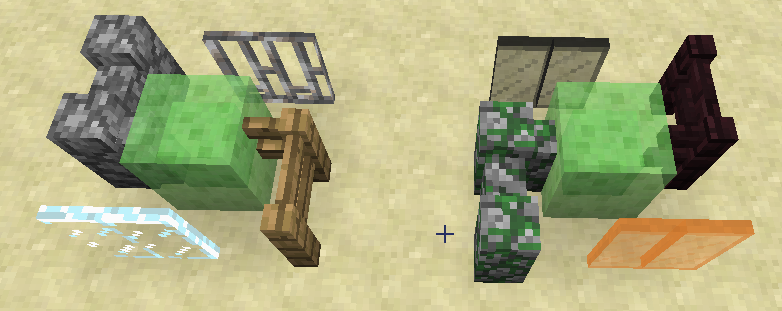
Glass panes and iron bars don't connect to slimeblockGlass panes and iron bars don't connect to solid, graphically transparent blocks (slimeblock, endportalframe and spawner)
I placed a glass pane next to a slimeblock and it didn't connect, despite slimeblocks being solid blocks. I then placed a fence next to a slimeblock and it did connect.
I
'm not entirely sure if the panes not connecting is the bug, or the fence connecting is, but I think the panes should connect.I placed a glass pane next to a slimeblock and it didn't connect, despite slimeblocks being solid blocks. I then placed a fence next to a slimeblock and it did connect.
It turns out that (stained) glass panes and iron bars don't connect to blocks that are solid, but graphically transparent. The only blocks that have this property are: Slimeblock, endportalframe and mobspawner.
I see, but I think this still should be fixed because it's really useful to transport Withers. For example, you can use the Wither to make a treefarm or you can make him mine. I think it's better to make it so that withers regenerate in minecarts.
Hmm I don't agree on that, you can still make these farms, it's just harder to get them at the right position without escaping. I think the REAL bug is that it doesn't generate health. So you shouldn't create another bug to 'fix' it. The Wither is the only mob now that can't ride a minecart which is not how it should be in my opinion.
Why would that be a reason?
It's not ONLY a visual glitch, it should extend the bottom piston first and after that the top piston.
(btw I don't know why you added 2 pictures, I don't think it makes it clearer.)
Powering a piston diagonally with a block is a BUD. I don't think BUDs are bugs.
Powering pistons diagonally with a torch is NOT a BUD. That is normal behavior.
Because of this Bug you can't make a simple double extender anymore. (the extending circuit always was activated by 1 torch, now you have to power the bottom piston first and then you can power the torch.)
I'll explain:
A piston cannot retract an extended piston.
The retracting of a piston takes time. (about 1 tick, not exactly sure)
The pistons are both de-powered at the exact same time.
That means that the pistons will both retract at the exact same time.
When the bottom piston starts retracting, the top piston isn't retracted yet.
That means the bottom piston shouldn't grab the piston above it, because it can't retract an extended piston.
Derp, duplicated myself, I thought it was something different but it's not.
If it would retract both the piston and the block above, it would indeed be easier but that's not the case. It only retracts the piston and it leaves the block, this makes it harder to make double extenders instead of easier.
Yes, this bug does still occur in version 13w48b.
Yes, this bug does still occur in version 13w48b.
Yes, in fact, the bug become worse, besides a spawnerminecart, the commandblock now also summons a fake Pig.
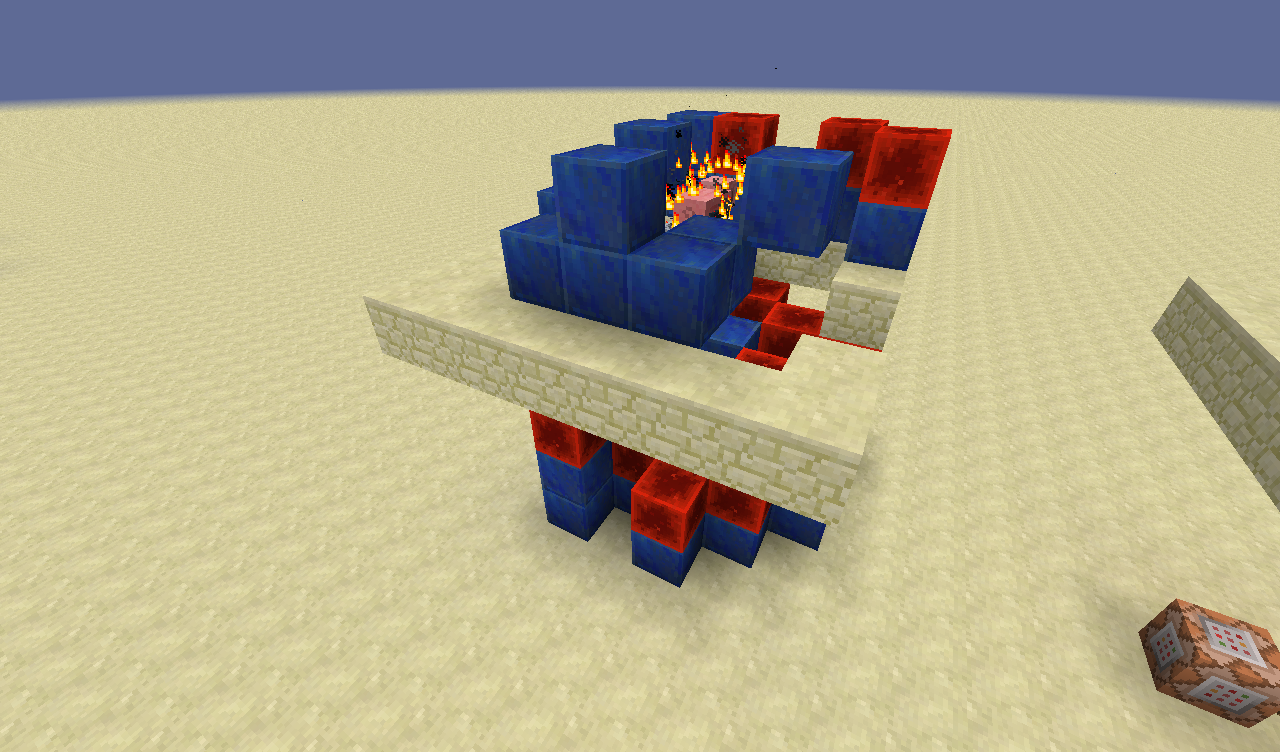
As you can see, redstoneblocks were spawned underneath the platform. They also got spawned in and above the minecart but you can't see those, because of another bug causing the spawned blocks to be invisible. As well as that, you can also see a fake pig, it will disappear after relogging. Reloggin will also make the other redstoneblocks visible, and it will fix the fake hole that the minecart created.
As you can see, there are lapis blocks on top of each other, which shouldn't be happening because on top of each lapis block, there was a redstoneblock riding it. There is also another bug causing some spawned blocks to be invisible. As well as that, you can also see a fake pig, and you can see fake holes in the ground. The pig, the fake holes and the invisible blocks will be fixed after relogging.
This is still a concern in snapshot 14w07a.
In singleplayer, the item disappears after relogging.
In multiplayer the item disappears when you unload the chunks.
Can you change the up- and downwards spawnrange of spawners? And if so, how?
This is not a bug, cactus is not a full block, like chests and anvils.
The limit is at 32k, but any command longer than 16369 won't be typable, but still executable. Also, I'm interested in the filter you used, can you send a link?
Confirmed for snapshot 14w17a.
Related to
MC-53675Again, this is not a bug, cactus, chest and fence are blocks that aren't a full block. It is only logical that you can interact with what's behind it. This is probably most understandable for fences, you can see that you'r actually in the water when walking up against them. Same goes for chest and cactus, but now you are only touching the water a little bit.
Confirmed for snapshot 14w20b
Edit: also comfirmed for snapshot 14w21a 14w21b
In minecraft: yes. If you stand in lava for 2.5 inches it also burns you. And if you were to change it, then what would be the limit?
Blah is right, this is just an ordinary BUD.
Confirmed for snapshot 14w25a, 14w25b, 14w26a and 14w26b
Edit: Also confirmed for 14w27a and 14w27b
Edit 2: Also confirmed for snapshot 14w28a and 14w28b
Edit 3: Confirmed for snapshot 14w29a and 14w29b, 14w30a and 14w30b
Christopher, it's easier to build the setup from the picture then to download a world that contains it.
MC-56541got fixed so quickly because it was uploaded by a popular youtuber who asked the viewers to vote on the bug.I guess it would help if I would provide a fix for this bug, but I'm not a coder, so I can't. So for now, votes are the only thing that help.
There is a new bug that prevents this bug from being tested; if you spawn in the spawnerminecart, minecraft crashes.
This bug does still occur in 14w28b. I wonder why our results are different, maybe it has something to do with coordinatedependency.
Confirmed for 14w32d (haven't tested a,b and c, but it's save to assume the bug exists in those versions as well.)
Edit: confirmed for 14w33a
Edit 2: Confirmed for 1.8 pre-release
Even though I don't play mc anymore, I agree with DicoTheRedstoner; this 'bugfix' breaks more than it fixes and should therefore not be implemented in 1.9.