 Oblixoid
- Oblixoid
- JIRAUSER720479
- America/Vancouver
- Yes
- No
 MCPE-173571MCPE-174479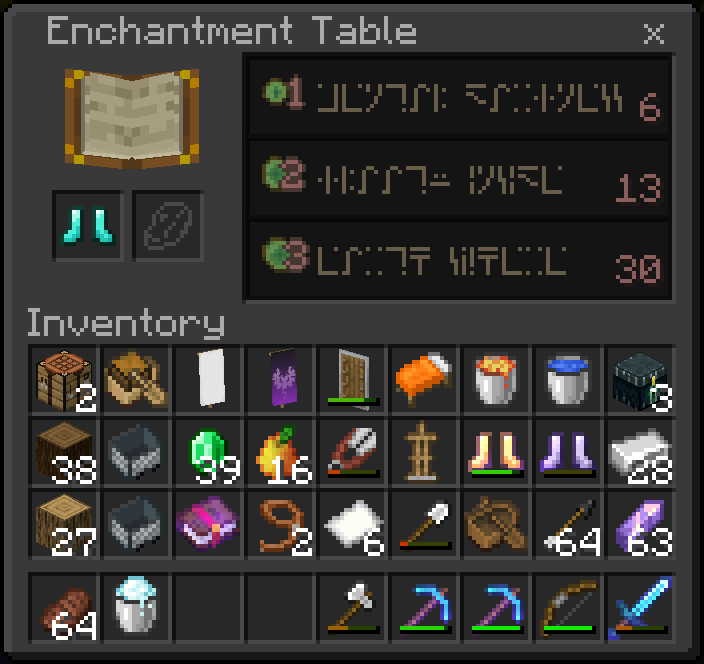



- Open preview without touching the screen (mouse will work fine)
- Touch screen
Notice while moving mouse, players head in bottom right Snaps to the last spot the cursor was, and doesn’t move any more
- Open preview without touching the screen (mouse will work fine)
- Touch screen
- The cursor will no longer appear or work at all
Notice while moving the mouse, players head in bottom right Snaps to the last spot the cursor was, and doesn’t move any more
- Open preview without touching the screen (mouse will work fine)
- Touch screen
- The cursor will no longer appear or work at all
Notice while moving the mouse, players head in bottom right Snaps to the last spot the cursor was, and doesn’t move any more
Steps to Reproduce:{}
- Open preview without touching the screen (mouse will work fine)
- Touch screen
- The cursor will no longer appear or work at all
{}Observed Results:{}
Cursor controls stop working after using touch controlsExpected Results:
{}Moving the mouse would return to cursor controls
Steps to Reproduce:{}
- Open preview without touching the screen (mouse will work fine)
- Touch screen
- The cursor will no longer appear or work at all
{}Observed Results:{}
Cursor controls stop working after using touch controlsExpected Results:
{}Moving the mouse would return to cursor controlsSteps to Reproduce:{}
- Open preview without touching the screen (mouse will work fine)
- Touch screen
- The cursor will no longer appear or work at all
Observed Results:
Cursor controls stop working after using touch controlsExpected Results:
Moving the mouse would return to cursor controls
Steps to Reproduce:{}
- Open preview without touching the screen (mouse will work fine)
- Touch screen
- The cursor will no longer appear or work at all
Observed Results:
Cursor controls stop working after using touch controlsExpected Results:
Moving the mouse would return to cursor controls
Steps to Reproduce:
- Open
preview without touching the screen (mouse will work fine)- Touch screen
- The cursor will no longer appear or work at all
Observed Results:
Cursor controls stop working after using touch controlsExpected Results:
Moving the mouse would return to cursor controlsSteps to Reproduce:
- Open an affected version with a mouse connected to your device
- Touch screen
- The cursor will no longer appear or work at all
Observed Results:
Cursor controls stop working after using touch controlsExpected Results:
Moving the mouse would return to cursor controls
Steps to Reproduce:
- Open
an affected versionwith a mouse connected to your deviceTouch screen- The cursor will no longer appear or work at all
Observed Results:
Cursor controls stop working after using touch controlsExpected Results:
Moving the mouse would return to cursor controlsSteps to Reproduce:
- Open the game with a mouse connected to your device
- From the main menu, touch screen
- The cursor will no longer appear or work at all
Observed Results:
Cursor controls stop working after using touch controlsExpected Results:
Moving the mouse would return to cursor controls
Steps to Reproduce:
- Open the game with a mouse connected to your device
- From the main menu, touch screen
- The cursor will
no longer appear or work at allObserved Results:
Cursor controls stop working after using touch controlsExpected Results:
Moving the mouse would return to cursor controlsSteps to Reproduce:
- Open the game with a mouse connected to your device
- From the main menu, touch screen
- The cursor will be stuck
Observed Results:
Cursor controls stop working after using touch controlsExpected Results:
Moving the mouse would return to cursor controls
Steps to Reproduce:
- Open the game with a mouse connected to your device
- From the main menu,
touchscreen- T
he cursor will be stuckObserved Results:
Cursorcontrols stop working after using touch controlsExpected Results:
Moving the mouse would return to cursor controlsSteps to Reproduce:
- Open the game with a mouse connected to your device
- From the main menu, switch to touch controls by simply touching the screen
- Try to switch back by simply moving your mouse
Observed Results:
The cursor will be frozen: your character will look at where it was when you switched to touch, and if it was over a button, it will be hovered overExpected Results:
When switching back to mouse controls on the main menu, the mouse would be able to moveNote:
Switching when in-game will work, and then when you back out to the main menu you can switch controls properly
the text "Enchantment Table" is aligned
the item slots for equipment and lapis or off by half a pixel vertically
the enchant list box is off width by half a pixel, making it aligned on the right by not the left
In the first enchant:
- the 1xp is a half on both axes
- SGA text is horizontally a half
- the 1 is vertically a quarter
the enchant separator is off by a quarter and lacking a quarter on the top
In the first enchant:
IMG_7677-1.mov
Steps to Reproduce:
- On a slot with a character creator skin, equip a non character creator skin (skin pack or imported skin)
- Go to the marketplace
summer celebration section- Select any item that will display how it will look on your character creator skin (equipping the item or not doesn’t make a difference)
Observed Results:
Upon backing out to the main menu, your skin slot will be switched to the character creator skinExpected Results:
Your skin would stay as the one you selectedSteps to Reproduce:
- On a slot with a character creator skin, equip a non character creator skin (skin pack or imported skin)
- Go to the marketplace, and if there's a daily gift banner at the top:
- Select any item that will display how it will look on your character creator skin (equipping the item or not doesn’t make a difference)
Observed Results:
Upon backing out to the main menu, your skin slot will be switched to the character creator skinExpected Results:
Your skin would stay as the one you selected
“§” text modifier behaves weirdly when next to a line break€ £ ¥ § … ‘ “ all delete text behind them when typed after
Steps to Reproduce:
- single tap the destroy or interact
- around the exact time you’ve un-tapped, move and hold the joystick
- try repeatedly, tapping slightly sooner or slightly longer
Observed Results:
if you get the timing right you’ll only be holding the joystick but the destroy or interact button will still be heldExpected Results:
The buttons would be let go when un-pressedNotes
This isn’tjust an edge case,
It’ll take around 10 minutes of server pvp stuff for me tohave this happen,
somedaysI’m much more prone to this timing, andin turn it happens almost every time I try to hitSteps to Reproduce:
- single tap the destroy or interact
- around the exact time you’ve un-tapped, move and hold the joystick
- try repeatedly, tapping slightly sooner or slightly longer
Observed Results:
if you get the timing right you’ll only be holding the joystick but the destroy or interact button will still be heldExpected Results:
The buttons would be let go when un-pressedNotes
This isn’t a rare occurrence,
It’ll take around at most 10 minutes of server pvp stuff for me to experience this,
quite often I’m much more prone to this timing, and the majority of times I try, I am either unable to build or attack without having to briefly lift all fingers off the screen
![[Mod] EVGENSYPERPRO](../../../data/avatars/users/92853.png)
vanilla-parity - which I added to the report means that the behavior in java is different from bedrock
It’s important when communicating information
(especially when many people are trying to communicate with fewer people)
to simplify things into ways that the other person can make there own observations
as it’s much quicker for these people to observe things themselves than it is reading someone else’s observations.
This is the way the mods usually want bugs to be reported:
Steps to Reproduce:
Observed Results:
Your inventory will open and a single screen tap action will happen; firework activation, block placement, fence gate opening/closing
Expected Results:
Taping to open inventory, will only open the inventory
I do think there maybe should be a medium for additional bits you noticed (like the fact that turning on split controls isn’t a requirement but dose help you see how it’s single tapping) but idk about how to go about fitting that information in
Additionally, might you have been hovering your normal interaction finger slightly off the Surface of the screen
and lowering it around the same millisecond that your other finger is opening your inventory making both tap at nearly the same time?
Because I tested it, and trying to do this, I could get it to happen intentionally pressing with two fingers but not when just tapping once to open the inventory
This happens with cave sounds too
(also, the volume seems to drop off quite quickly when you move just a few blocks away from a sound, I think its worth checking to see whether or not its in parity with java)
The issue is that that the top left emote is hovered over by default, if you tap and swipe from the outside of the emotes to the top left emote it will un-hover and let you let go to select
You should make a ticket for the emote thumbnail not showing, as a haven’t found a ticket for one yet
Running on iPad
It is still misaligned after deactivating all my resource packs
You can test this by taking a screenshot, removing the background, and aligning this checker pattern behind it
If you have accesses to settings on the realm, check that "Mob Loot" is turned on and that "Entities Drop Loot" near the bottom is also on
iPad 6th gen
I think the issue is, there’s now an extra delay before the stack starts splitting making it slower, and more difficult to time specific amounts of items
The creative thing has been reported and fixed:
MCPE-162124But I think you could edit your report to just about the double tap to shift click,
as I haven’t found any circumstance that the system is useful,
and it’s been a nonstop hindrance in pretty much all aspects of inventory
Yes, it behaves the same
You might have checked a thing to always log you in.
For me, incognito always forces me type in the account info.
Hope that works for you
Basic hoodie - By Minecraft has also gone missing,
I've tracked down a link to the original item, and it now has a lock icon on it, like would be present on a achievement locked item, but it has no associated achievement,
it has the equip button and you can press it and your guy dose a spin and the button goes away as if you equipped it, but than it just disappears as you back out of the skin creator
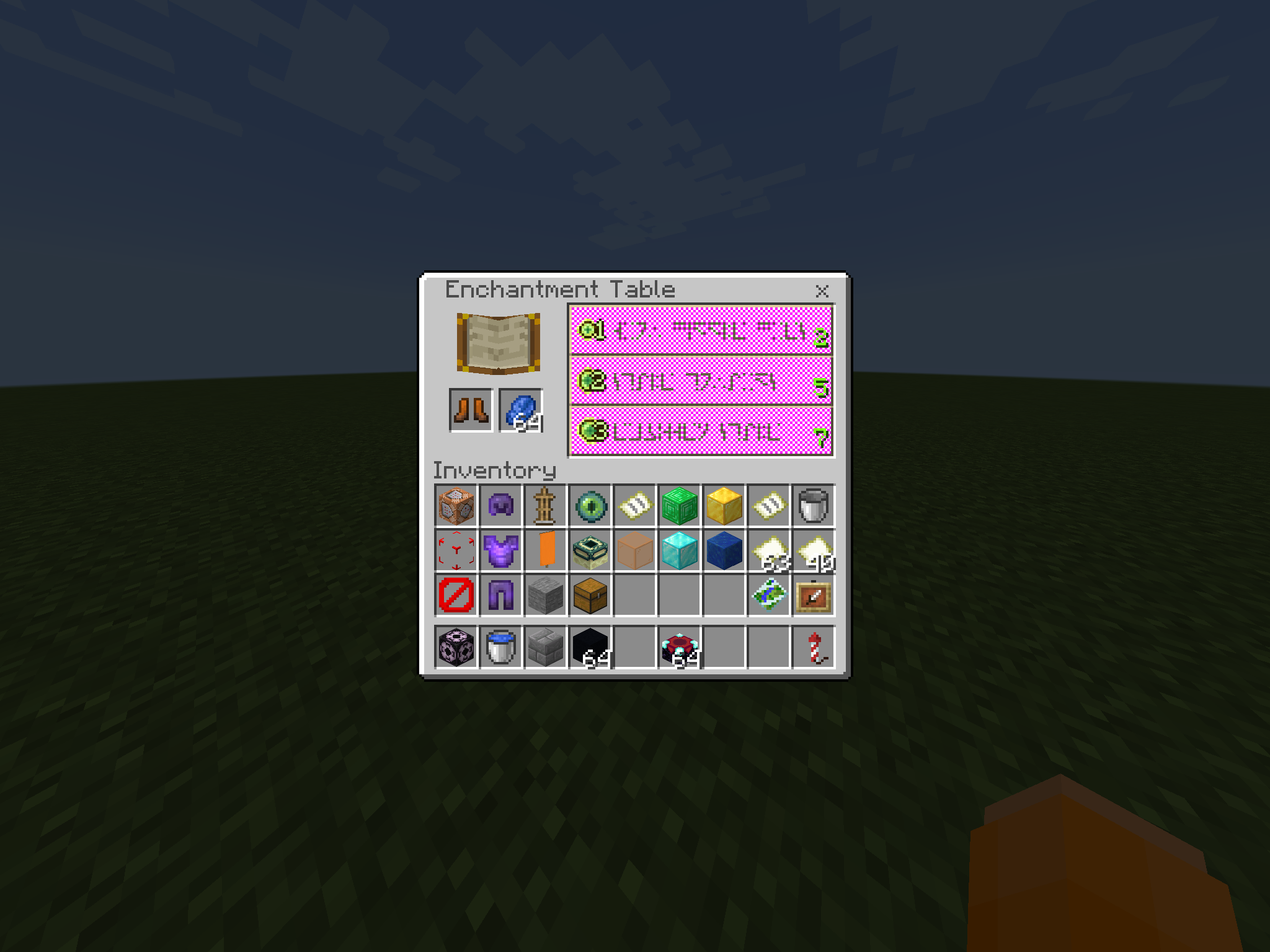
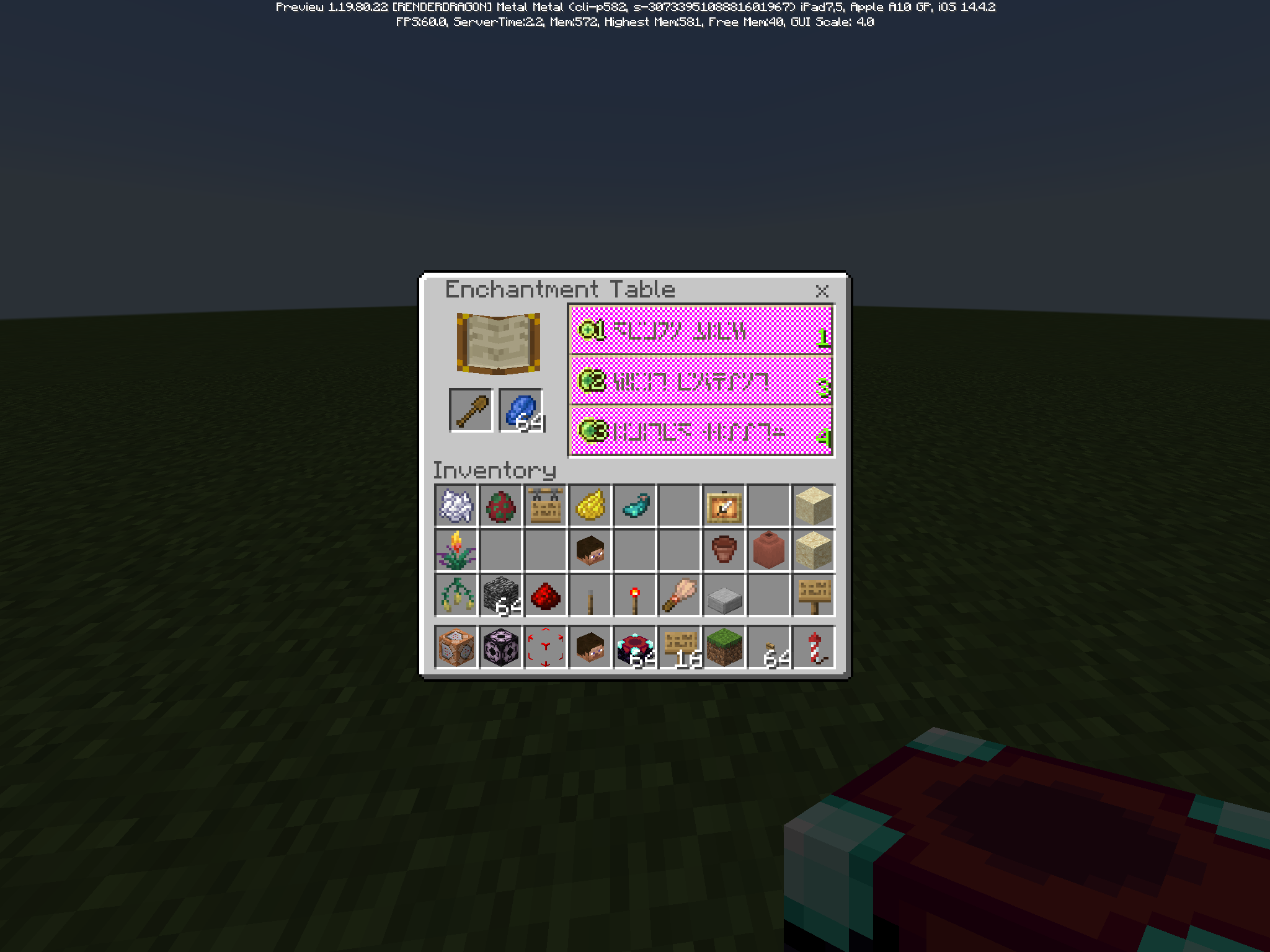
the text "Enchantment Table" is aligned
the item slots for the equipment and lapis are off by half a pixel vertically
the enchantment list box is off width by half a pixel, making it aligned on the right, but not the left
i’ve learnt this now
the previous pictures show the pink grid aligned to the left
here is a properly right aligned grid:
In the first enchant:
the enchant separator is off by a quarter and lacking a quarter on the top
In the second enchant:
the enchant separator is off by a half and lacking a quarter on the top
In the third enchant:
With this report,
it sounds like your saying: when tapping not on the button, the button doesn’t get tapped
(I’ve played exclusively on classic controls for a few years, and i’m quite frequently annoyed by miss-tapping buttons)
so are you saying that you would like the aria around the button that detects taps, to be bigger/currently it is too small?
or that when your finger may accidentally slowly slide off the button, that it should stay pushed?
IMG_7677.mov
in this video you can see 1 item crafted from the first tap initiating tapping quickly
than nothing as I continue tapping quickly
than more items start being crafted as I ramp down in speed enough for them to be successfully crafted
I am using an iPad
whoops, updated the wrong report
I think what going on is, an experience orb has more experience than needed to repair the mending armour piece it gets assigned to, and the remainder is split with the experience bar instead of other mending items,
and this is most obvious with the furnace xp because it is giving you much bigger experience orbs so it ends up splitting the majority of it to the experience bar
Expected Results:
extra experience prioritizes splitting with other mending items first when applicable
I’d also like to add,
that the message is quite confusing,
It could be interpreted that the skin would maybe roam around as a fake second player in your games
from players that don’t know what skins are,
to players fully aware,
I don’t think it sounds like what it’s trying to communicate,
which is: ‘this is what you will look like to other players
Upon further review,
I think the text modifier by itself triggers the unusual text deleting,
and the cursor visual bug may be entirely unrelated
€ £ ¥ § … ‘ “
all seem to also have this previous text deleting behaviour
Tried this on 1.20.40 ios, and it simply puts you at the top of the list without any attempt to put you back where you were
Also affects iOS
For me, this appears fixed in 1.20.81 with the 15-year anniversary daily items
This dose not affect 1.21.2,
it seems to be fixed
Underline and strikethrough are still missing,
and I think assigning them to two of the remaining letters: v w x y z would just be making the consistency problem worse,
I think this should be 'disruptively' changed, changing copper and redstone trim colours to v and w,
I think the people who already know how modifiers work will be able to find out what changed, just like how they found out about the new modifiers in the first place, and correct the text they've made fairly easily
(and more of a feature idea: wouldn't it be cool if with this change §s and §i modified text into enchantment table language (SGA), and illager runes, changing diamond and iron to x and y)
For me it's very consistently no more then a second before I crash, and there's no lag leading up to it, I load in and everything works fine for a split second, then as you can see in Quick crash.mp4: Minecraft just simply closes,
(Other multiplayer is still working completely fine)
This report seems to be for the same bug as in: MCPE-174371
Also beebee, you're looking for reports: MCPE-178343 and MCPE-185774
If you really do want the cape, and this bug continues to be unfixed near the end of the event, you may be able to let someone you trust log in to your account on their own device and earn it for you, or you yourself log in to another device if you have multiple available to you
(unless the issue you're experiencing is one linked to your account, though I have personally tried this and it did fully work on their device and I now have the cape)
I think postponed usually means that they can't yet directly fix this bug, so there may be other bugs that need to be fixed or things they need to set up to be able to then properly fix this bug