 Phoenix616
- Phoenix616
- phoenix616
- Europe/Stockholm
- Yes
- No
 MC-77793
![[Mojang] Nathan Adams](../../../data/assets/gravatar/dinnerbone.png)
![[Mojang] Searge (Michael Stoyke)](../../../data/assets/gravatar/searge.png)
 MCL-12120


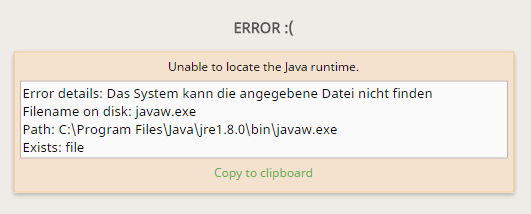


When setting the resolution for the snapshot profile the game fails to start and only shows the "Game Crash" message. There is no error in the latest.log (it's empty) nor the nativelog.txt.
The game output viewer shows:
4019 debugs5 infos 16:35:28 launcher main info Preparing to launch minecraft client for 17w43a 16:35:29 launcher main info Checking installations. 16:35:29 launcher main info Minecraft client 17w43a is ready to start. 16:35:29 launcher main info Starting! 16:35:29 launcher main info Using default game log configuration client-1.12.xml (outputs XML)Also to differentiate this from the other reports: This
When setting the resolution for the snapshot profile the game fails to start and only shows the "Game Crash" message. There is no error in the latest.log (it's empty) nor the nativelog.txt.
The game output viewer shows:
4019 debugs5 infos 16:35:28 launcher main info Preparing to launch minecraft client for 17w43a 16:35:29 launcher main info Checking installations. 16:35:29 launcher main info Minecraft client 17w43a is ready to start. 16:35:29 launcher main info Starting! 16:35:29 launcher main info Using default game log configuration client-1.12.xml (outputs XML)Also to differentiate this from the other reports: This does not happen with t1.12
When setting the resolution for the snapshot profile the game fails to start and only shows the "Game Crash" message. There is no error in the latest.log (it's empty) nor the nativelog.txt.
The game output viewer shows:
4019 debugs5 infos 16:35:28 launcher main info Preparing to launch minecraft client for 17w43a 16:35:29 launcher main info Checking installations. 16:35:29 launcher main info Minecraft client 17w43a is ready to start. 16:35:29 launcher main info Starting! 16:35:29 launcher main info Using default game log configuration client-1.12.xml (outputs XML)Also to differentiate this from the other reports: This does not happen with the 1.12.2 release nor did I have any mod profiles installed before. (The launcher is run in a completely clean folder)
When using an URL for a server resource pack that points to a web server using a Let's Encrypt certificate the client fails to download the pack. (Stuck at 100% and sending failed resource pack status packet)
Only happens when using the bundled Java runtime which seems to be the 2015 released update 51, error does not happen with the most recent update 201 (seeing as the old version was released before Let's Encrypted being a thing I suspect that version 51 does not include their root certificate in the key/trust store so updating the bundled version or relying on the certificates by the installed if available could be possible solutions for this issue)
The actual stacktrace is attached.
Edit: I just noticed that I forget to actually provide an example URL that causes this issue: https://cdn.moep.tv/files/Empty.zip
When using an URL for a server resource pack that points to a web server using a Let's Encrypt certificate the client fails to download the pack. (Stuck at 100% and sending failed resource pack status packet)
Only happens when using the bundled Java runtime which seems to be the 2015 released update 51, error does not happen with the most recent update 201 (seeing as the old version was released before Let's Encrypted being a thing I suspect that version 51 does not include their root certificate in the key/trust store so updating the bundled version or relying on the certificates by the installed java/OS if available could be possible solutions for this issue)
The actual stacktrace is attached.
Edit: I just noticed that I forget to actually provide an example URL that causes this issue: https://cdn.moep.tv/files/Empty.zip
I am experiencing a similar issue (but without the launcher actually crashing, the error message popup is the same). Here is the [^launcher_log.txt] (there is no crash report). It happens no matter which profile and after the latest launcher update as far as I can tell.
Also interestingly it seems to try to submit a crash report (but fails) even though I have those turned off in the setting?
launcher_log.txt
When trying to start the game with latest beta launcher it will fail to do so with a "Game crashed" error. (stable 2.1.5964 works fine) In the launcher_log.txt it looks like it can't find the main class even though it's clearly inside the version jar file? (And changing to a different version/making it redownload doesn't solve it)
More information like the system environment and tested java/Minecraft versions in the attached launcher_log.txt.
When trying to start the game with latest beta launcher it will fail to do so with a "Game crashed" error. (stable 2.1.5964 works fine) In the launcher_log.txt it looks like it can't find the main class even though it's clearly inside the version jar file? (And changing to a different version/making it redownload doesn't solve it)
More information like the system environment and tested java/Minecraft versions in the attached launcher_log.txt.
Possibly related to MCL-12098 although my launcher doesn't crash in Windows itself and the other issue is with an older launcher version.
After the latest beta update the launcher crashes when trying to start certain custom profiles. (See attached) The profile(s) works in stable (2.2.1862)
Unfortunately I'm unable to find any kind of updated log for the launcher. If that gets created and is necessary then please point me into its direction.
EDIT: The error seems to only occur when trying to start the game in certain (previously used) Minecraft game directories, not in others getting me to believe that something in this old directory is not liked by the launcher update?
Seeing as
MC-265673was closed now as a duplicate of this I feel like this should be reopened now. I don't think this is a feature request. The client unnecessarily reloading the complete resources wasting processing power and energy in the process seems like a bug to me (besides the actually lost functionality of course which some might think of as a feature request but in reality breaking this makes server resource packs basically unusable in any of the wide-spread settings that they are used).Please re-evaluate if it's not possible to improve this process somehow so that packs do not always need to be reloaded if they didn't actually change.

@Phoenix616: Mojang / Searge decided that this is not a bug.

Phoenix616, you don't have to comment when you can update the affected versions yourself

Phoenix616 you could be right.
But if that is the only problem, they could add a new segment to the region-datfiles.
E.g. instead of checking all chunks block by block, they could store the portal locations in a separate array, and update this everytime when a new portal is activated or disabled.
With that behavoir searching for portals would be very fast, maybe it would even improve the current performance.

Hi Phoenix616, was this issue resolved in the end? Do you feel like Mojang has something that needs fixing regarding this matter?
Hey Phoenix616, I might actually have closed this bug prematurely. Would you mind checking that the versions we have available as beta is working for you? You can enable this by going to Settings, ticking the box, and restarting the Launcher.
As I said: This bug was indicated as being fixed and it still is present in the newest version released today. Therefore this is not a duplicate but a new bug that has to get addressed as it breaks the functionality of the tag itself and the game as a whole.
As Searge said, the original bug was the result of "[Mobs having] different rules about showing the name." and is still in the game and not fixed.
Custom names for items worked in all 1.8 releases as far as I can tell. It is not related to this (invalid closed) report for mobs.
@Kumasasa These "other rules" are the bug I am talking about. It worked pre1.8 and isn't now. That matches the definition of a bug for me. I don't see how not fixing this and insisting that a bug is intended behavior will benefit anyone.
This issue has been finally fixed in in the first 1.9 snapshot. Apparently it was indeed a bug all along...
Well for me a bug from an update is a change in behavior which was not advertised in a changelog and was therefor unintended but we., the feature is back and will hopefully not get broken in the future.
Reproduced in completely Vanilla 1.9.2 single player. Not sure if and how that could be fixed 'though.
Version 2.0.700 was released today, get your stuff together, bot
Thank you for that info, that's all I really need. Is there some official place where one can get all command line options? (Because neither -help nor --help do output anything)
I suggest you open an extra ticket for that issue as this was about the set "APPDATA=%~dp0" method, not the --workDir parameter.
As this is the only ticket that I found that directly states my issue I'm commenting here instead of opening a new one (for now).
I propose to re-open this ticket as this has not been fixed yet (1.12.1) and is especially annoying when using server resource packs.
There is no need for the client to reload all resources and textures, it only needs to reload changed ones. I suggest re-labelling it as an enhancement rather than a bug. (instead of just closing it?)
Confirmed for 17w47a
@FVbico: Care to explain how this is a bug but the complete absence of tags (e.g.
MC-131130) is not?Just received the launcher update and it indeed works now as I expected it. Thank you!
Still possible on 1.14.1 with this setup:
Use the levers to start it. Might require some manual restarts until the timing is right and the middle sand block doesn't flicker anymore. Then place the cactus on top and watch it grow.
Having an almost identical error in 1.14.2 pre 1: https://gist.github.com/e525acad55e5f95fd2d8a7425a7ee9ac
World was tried to upgrade from 1.12.2 (didn't work in 1.13.2 either, just didn't notice it then). World was first created in 2012 (not sure which version) ran on servers that updated through the version but not sure if ever upgraded fully or automatically updated due to loading.
World file: https://moep.tv/files/brokenupgradeworld.zip (can't upload here because too big. Single region file: r.18.12.mca ) One of the broken chunks is at 597, 411.
> I cannot see any situation where a changing of the search radius to 1024 in overworld would break anything.
Searching 64 times more area for a valid portal would be extremely decremental to the server performance....
How is that a support issue? It's clearly a bug as it happens in the latest update of the launcher beta only and doesn't happen when using the stable version. Something changed in the latest beta which made it break so it's a bug, not a support request. (This is why people like me are willing to put up with beta test versions btw.: so that bugs can be found and fixed before they reach the stable branch.)
Exact same issue still happens with 1.15.2.
You guys have to realize that even without any players online the server will still load and tick the spawn chunks unless you changed settings/modified your server to avoid that. With the chunk handling changes that were made starting in 1.13 this process has indeed been more impactful but comparing an active game server to any other idle process that does nothing but wait is a bit unfair.
This is called quasi-connectivity and has been around for ages now. Pretty sure some snapshot changes were even reverted to keep this behaviour intact so this might be intended behaviour as of right now.
I don't really understand how game messages not changing the language when the language is changed in the settings is not a bug.
@jamei there is a workaround for this: Simply append the URL of the pack with the hash of the pack e.g. https://example.com/mypack.zip#9q3pam2eimqp0 This will make the client treat that as a completely new pack and re-download it (as the URL changed) instead of testing the local pack and failing to refresh it. But to the web server itself offering the pack the URL will look the same as before as it ignored parameters after a "hashtag". (I currently use this method in my resourcepacks Spigot/Bungee/Velocity plugins to work around this issue)
The only downside for this is that old packs are going to stay in the player's server-resource-packs folder which isn't ideal if you have large packs that change often.
@jamie I was referring to the Vanilla server resource packs functionality, not some plugin. (And if you mean my plugin then that functionality is already built-in to work around this bug)
Can you please provide me with some info where (crash) logs for the launcher are stored? Or what changes were made in the launcher which would prevent the profile in question from starting? (Because it worked just fine in 2.2.1862 so something in the launcher must've changed)
@Justin Drennan I'm talking about the Launcher log, not the game. The launcher does not generate logs there.
@Ined can you please provide the requested information, it's impossible to debug this (and the dll doesn't contain debug information). Just as a note: The profile is a valid one which worked before and the launcher shouldn't crash if a startup error or invalid profile occurs? Seeing as this is now in stable this bug should become a way higher priority... I don't get how this even made it out of the test version.
Opened an issue with fabric anyways but I still believe that the launcher should handle whatever error occurs there more gracefully.
Someone over at fabric pointed out to me where the launcher log was stored, somehow I missed that. Attached it to the issue.
Yes, the new beta solves this. Sorry for not including the launcher log and information about the custom java installation in the original issue.
Seeing as 21w19a now ships with Java 16.0.1 this is most likely resolved. Unfortunately I can't test that right now but if anyone does please feel free to comment so this can hopefully be closed.
Another "fun" side effect of this: Translation keys that are in the language file in another namespace's folder are overriding Vanilla ones so there is no way to guarantee that your own translations will never conflict with the game.
I support the solution of just adding namespace support to language keys.
Please reopen, MC-162441 which is the same but for signs is still open too. As far as I can tell this might've even been a feature that was in the game at some point but broke? (I didn't use translatables back then the sign one apparently worked so I don't really know that)
Same issue is present in the chat:
MC-212304Still an issue on 2.3.280 with Pop!_OS 22.04.
Issue also occurs for me since yesterday or so. Used launcher version: Windows 10.0 2.3.508.
Basically no matter which resolution is set in the installation's properties it will simply launch the game in default resolution.
Steps to reproduce:
Still happening in 24w39a
As for the expected behaviour: I don't think it should be shortened. It should move the text and the buttons further down and allow scrolling eventually. Hiding parts of the link circumvents the whole reason of this screen existing...