 Radon8472
- Radon8472
- radon8472
- Europe/Stockholm
- Yes
- No
 MC-155097





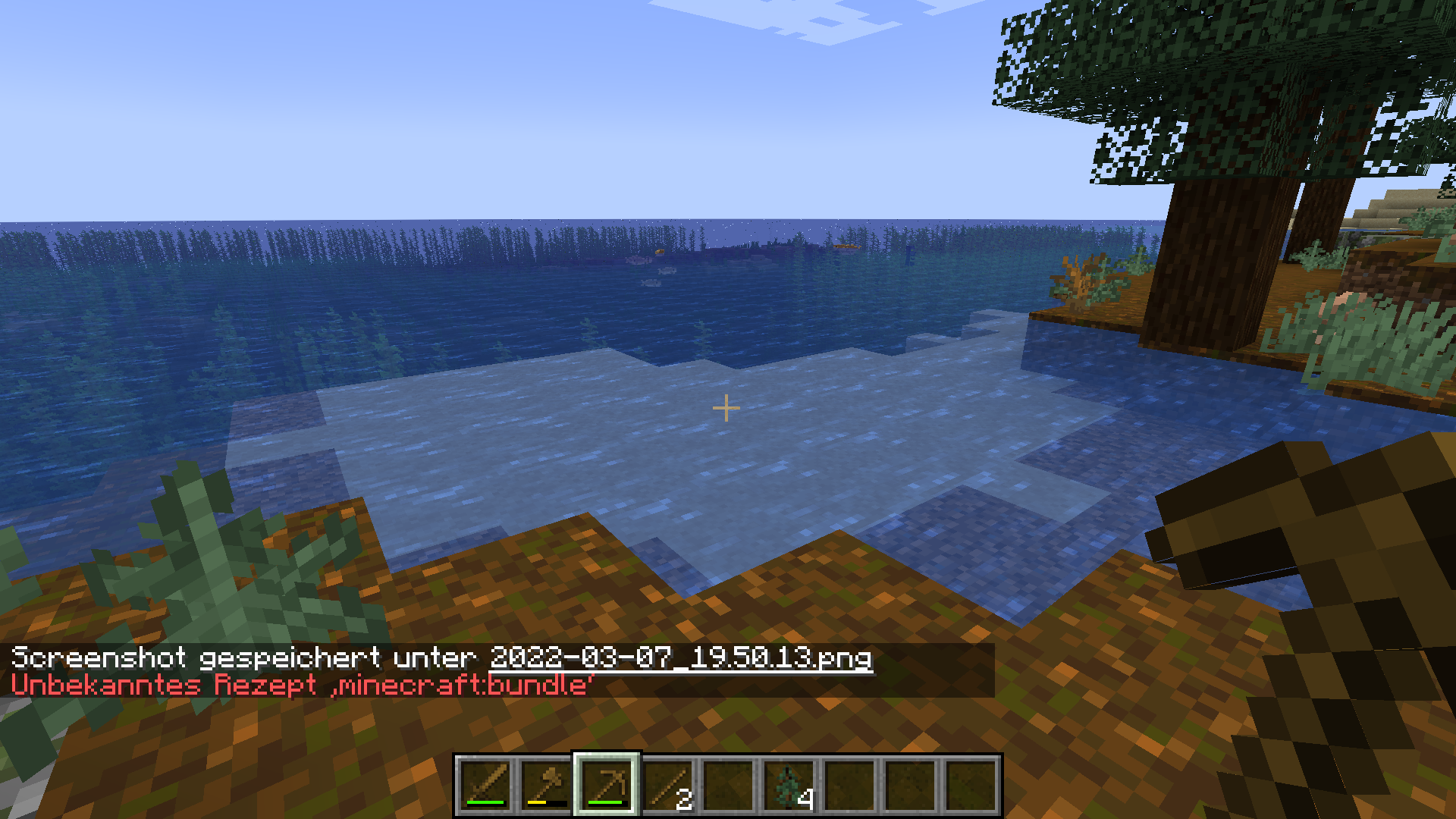


I noticed a bug when I tried to play my world in the latest version (currently world is saved in version 1.12.2).
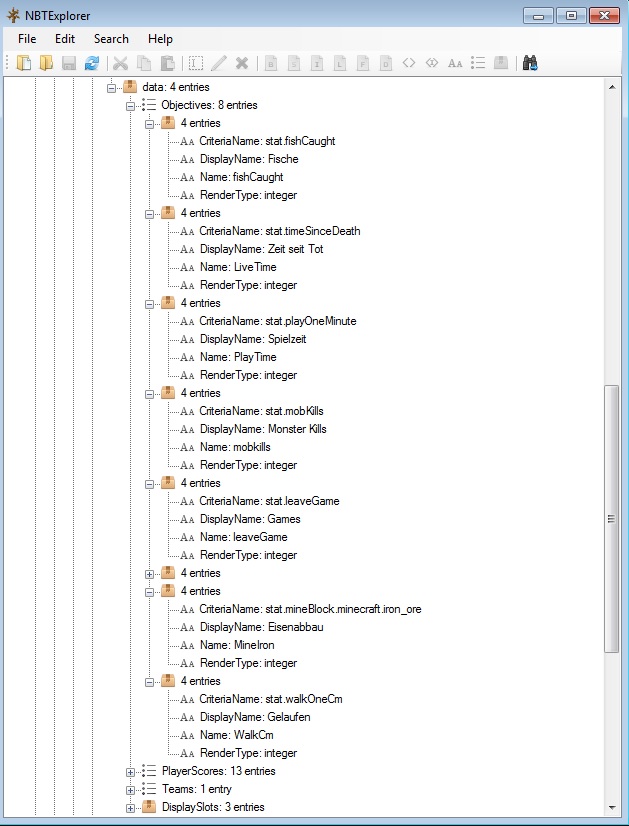
Problem is that the most Scoreboard values are not showing.After checking the scoreboard.dat in nbt-explorer I discovered what the problem is:
In 1.14.x names and structure of the stats-file changed, so the stats muss now be accessed with a different name / path.
The scoreboard file seems to be not updated when opening the world, and in still contains the old names, which are now "invalid".Expected behavoir:
- When opening a older world in version 1.14.x, the scoreboards should be displayed like before updating the world
Actuall behavoir:
- Scoreboard file is untoched from the update
- All "old" stats-names in the scoreboard-file are not "invalid" and they are removed the next time you execute any /scoreboard- command
- Result is, that the objectives are removed from the scoreboard.dat what results in scoreboards are not shown in 1.14 version of this world
How to fix:
- When opening scoreboard file check if it contains a "DataVersion"
- if it does NOT contain this, it is saved before 1.14 and needs update
- To Update the files simply walk overall objectives and check for old stat names and replace them to the new syntax of 1.14
e.g. replace
- "stat.leaveGame" to "minecraft.custom:minecraft.leave_game"
- "stat.mineBlock.minecraft.iron_ore" to "minecraft.mined:minecraft.iron_ore"
- I tried to use the "optimize world" Option with a backup of my world, the result was the same, Scoreboard file was NOT Updated.
- I mad another test with the minecraft-server.jar--> same issue, scoreboard is not updated.
I noticed a bug when I tried to play my world in the latest version (currently world is saved in version 1.12.2).
Problem is that the most Scoreboard values are not showing.After checking the scoreboard.dat in nbt-explorer I discovered what the problem is:
In 1.14.x names and structure of the stats-file changed, so the stats muss now be accessed with a different name / path.
The scoreboard file seems to be not updated when opening the world, and in still contains the old names, which are now "invalid".Expected behavoir:
- When opening a older world in version 1.14.x, the scoreboards should be displayed like before updating the world
Actuall behavoir:
- Scoreboard file is untoched from the update
- All "old" stats-names in the scoreboard-file are not "invalid" and they are removed the next time you execute any /scoreboard- command
- Result is, that the objectives are removed from the scoreboard.dat what results in scoreboards are not shown in 1.14 version of this world
How to fix:
- When opening scoreboard file check if it contains a "DataVersion"
- if it does NOT contain this, it is saved before 1.14 and needs update
- To Update the files simply walk overall objectives and check for old stat names and replace them to the new syntax of 1.14
e.g. replace
- "stat.leaveGame" to "minecraft.custom:minecraft.leave_game"
- "stat.mineBlock.minecraft.iron_ore" to "minecraft.mined:minecraft.iron_ore"
I tried to use the "optimize world" Option with a backup of my world, the result was the same, Scoreboard file was NOT Updated.
I made another test with the minecraft-server.jar--> same issue, scoreboard is not updated.
I noticed a bug when I tried to play my world in the latest version (currently world is saved in version 1.12.2).
Problem is that the most Scoreboard values are not showing.After checking the scoreboard.dat in nbt-explorer I discovered what the problem is:
In 1.14.x names and structure of the stats-file changed, so the stats muss now be accessed with a different name / path.
The scoreboard file seems to be not updated when opening the world, and in still contains the old names, which are now "invalid".Expected behavoir:
- When opening a older world in version 1.14.x, the scoreboards should be displayed like before updating the world
Actuall behavoir:
- Scoreboard file is untoched from the update
- All "old" stats-names in the scoreboard-file are not "invalid" and they are removed the next time you execute any /scoreboard- command
- Result is, that the objectives are removed from the scoreboard.dat what results in scoreboards are not shown in 1.14 version of this world
How to fix:
- When opening scoreboard file check if it contains a "DataVersion"
- if it does NOT contain this, it is saved before 1.14 and needs update
- To Update the files simply walk overall objectives and check for old stat names and replace them to the new syntax of 1.14
e.g. replace
- "stat.leaveGame" to "minecraft.custom:minecraft.leave_game"
- "stat.mineBlock.minecraft.iron_ore" to "minecraft.mined:minecraft.iron_ore"
I tried to use the "optimize world" Option with a backup of my world, the result was the same, Scoreboard file was NOT Updated.
I made another test with the minecraft-server.jar--> same issue, scoreboard is not updated.
I noticed a bug when I tried to play my world in the latest version (currently world is saved in version 1.12.2).
Problem is that the most Scoreboard values are not showing.After checking the scoreboard.dat in nbt-explorer I discovered what the problem is:
In 1.14.x names and structure of the stats-file changed, so the stats muss now be accessed with a different name / path.
The scoreboard file seems to be not updated when opening the world, and in still contains the old names, which are now "invalid".Expected behavoir:
- When opening a older world in version 1.14.x, the scoreboards should be displayed like before updating the world
Actuall behavoir:
- Scoreboard file is untoched from the update
- All "old" stats-names in the scoreboard-file are not "invalid" and they are removed the next time you execute any /scoreboard- command
- Result is, that the objectives are removed from the scoreboard.dat what results in scoreboards are not shown in 1.14 version of this world
How to fix:
- When opening scoreboard file check if it contains a "DataVersion"
- if it does NOT contain this, it is saved before 1.14 and needs update
- To Update the files simply walk overall objectives and check for old stat names and replace them to the new syntax of 1.14
e.g. replace
to
minecraft.custom:minecraft.leave_game
to
minecraft.mined:minecraft.iron_ore
I tried to use the "optimize world" Option with a backup of my world, the result was the same, Scoreboard file was NOT Updated.
I made another test with the minecraft-server.jar--> same issue, scoreboard is not updated.
I noticed a bug when I tried to play my world in the latest version (currently world is saved in version 1.12.2).
Problem is that the most Scoreboard values are not showing.After checking the scoreboard.dat in nbt-explorer I discovered what the problem is:
In 1.14.x names and structure of the stats-file changed, so the stats muss now be accessed with a different name / path.
The scoreboard file seems to be not updated when opening the world, and in still contains the old names, which are now "invalid".Expected behavoir:
- When opening a older world in version 1.14.x, the scoreboards should be displayed like before updating the world
Actuall behavoir:
- Scoreboard file is untoched from the update
- All "old" stats-names in the scoreboard-file are not "invalid" and they are removed the next time you execute any /scoreboard- command
- Result is, that the objective
s are removed from the scoreboard.dat what results in scoreboards are not shown in 1.14 version of this worldHow to fix:
- When opening scoreboard file check if it contains a "DataVersion"
- if it does NOT contain this, it is saved before 1.14 and needs update
- To Update the files simply walk overall objectives and check for old stat names and replace them to the new syntax of 1.14
e.g. replace
to
minecraft.custom:minecraft.leave_game
to
minecraft.mined:minecraft.iron_ore
I tried to use the "optimize world" Option with a backup of my world, the result was the same, Scoreboard file was NOT Updated.
I made another test with the minecraft-server.jar--> same issue, scoreboard is not updated.
I noticed a bug when I tried to play my world in the latest version (currently world is saved in version 1.12.2).
Problem is that the most Scoreboard values are not showing.After checking the scoreboard.dat in nbt-explorer I discovered what the problem is:
In 1.14.x names and structure of the stats-file changed, so the stats muss now be accessed with a different name / path.
The scoreboard file seems to be not updated when opening the world, and in still contains the old names, which are now "invalid".Expected behavoir:
- When opening a older world in version 1.14.x, the scoreboards should be displayed like before updating the world
Actuall behavoir:
- Scoreboard file is untoched from the update
- All "old" stats-names in the scoreboard-file are not "invalid" and they are removed the next time you execute any /scoreboard- command
- Result is, that the invalid objective-names are not shown in 1.14 (or higher) version of this world
- When you try to add or modiify objectives the "old" will be completely removed from the scoreboard.dat what results in loosing your statistics
How to test:
- Create or open any world saved bevore version 1.13
- Create any scoreboard objectives and assign displayslot
- leave the world and restart game in the latest version (or any other affected version)
- open and/or convert the world to this version
- check your scoreboard
How to fix:
- When opening scoreboard file check if it contains a "DataVersion"
- if it does NOT contain this, it is saved before 1.14 and needs update
- To Update the files simply walk overall objectives and check for old stat names and replace them to the new syntax of 1.14
e.g. replace
to
minecraft.custom:minecraft.leave_game
to
minecraft.mined:minecraft.iron_ore
I tried to use the "optimize world" Option with a backup of my world, the result was the same, Scoreboard file was NOT Updated.
I made another test with the minecraft-server.jar--> same issue, scoreboard is not updated.
I noticed a bug when I tried to play my world in the latest version (currently world is saved in version 1.12.2).
Problem is that the most Scoreboard values are not showing.After checking the scoreboard.dat in nbt-explorer I discovered what the problem is:
In 1.14.x names and structure of the stats-file changed, so the stats muss now be accessed with a different name / path.
The scoreboard file seems to be not updated when opening the world, and in still contains the old names, which are now "invalid".Expected behavoir:
- When opening a older world in version 1.14.x, the scoreboards should be displayed like before updating the world
Actuall behavoir:
- Scoreboard file is untoched from the update
- All "old" stats-names in the scoreboard-file are not "invalid" and they are removed the next time you execute any /scoreboard- command
- Result is, that the invalid objective-names are not shown in 1.14 (or higher) version of this world
- When you try to add or modiify objectives the "old" will be completely removed from the scoreboard.dat what results in loosing your statistics
How to test:
- Create or open any world saved bevore version 1.13
- Create any scoreboard objectives and assign displayslot
- leave the world and restart game in the latest version (or any other affected version)
- open and/or convert the world to this version
- check your scoreboard
How to fix:
- When opening scoreboard file check if it contains a "DataVersion"
- if it does NOT contain this, it is saved before 1.14 and needs update
- To Update the files simply walk overall objectives and check for old stat names and replace them to the new syntax of 1.14
e.g. replace
to
minecraft.custom:minecraft.leave_game
to
minecraft.mined:minecraft.iron_ore
I tried to use the "optimize world" Option with a backup of my world, the result was the same, Scoreboard file was NOT Updated.
I made another test with the minecraft-server.jar--> same issue, scoreboard is not updated.
I noticed a bug when I tried to play my world in the latest version (currently world is saved in version 1.12.2).
Problem is that the most Scoreboard values are not showing.After checking the scoreboard.dat in nbt-explorer I discovered what the problem is:
In 1.14.x names and structure of the stats-file changed, so the stats muss now be accessed with a different name / path.
The scoreboard file seems to be not updated when opening the world, and in still contains the old names, which are now "invalid".Expected behavoir:
- When opening a older world in version 1.14.x, the scoreboards should be displayed like before updating the world
Actuall behavoir:
- Scoreboard file is untoched from the update
- All "old" stats-names in the scoreboard-file are not "invalid" and they are removed the next time you execute any /scoreboard- command
- Result is, that the invalid objective-names are not shown in 1.14 (or higher) version of this world
- When you try to add or modiify objectives the "old" will be completely removed from the scoreboard.dat what results in loosing your statistics
How to test:
- Create or open any world saved bevore version 1.13
- Create any scoreboard objectives and assign displayslot
- leave the world and restart game in the latest version (or any other affected version)
- open and/or convert the world to this version
- check your scoreboard (look at you screen, and you will see nothing, try
/scoreboard objectives listand all objectives (which are no dummy objectives) will be gone
How to fix:
- When opening scoreboard file check if it contains a "DataVersion"
- if it does NOT contain this, it is saved before 1.14 and needs update
- To Update the files simply walk overall objectives and check for old stat names and replace them to the new syntax of 1.14
e.g. replace
to
minecraft.custom:minecraft.leave_game
to
minecraft.mined:minecraft.iron_ore
I tried to use the "optimize world" Option with a backup of my world, the result was the same, Scoreboard file was NOT Updated.
I made another test with the minecraft-server.jar--> same issue, scoreboard is not updated.
Scoreboardisobjectives are not updated (when opening 1.12.x world)
I noticed a bug when I tried to play my world in the latest version (currently world is saved in version 1.12.2).
Problem is that the most Scoreboard values are not showing.After checking the scoreboard.dat in nbt-explorer I discovered what the problem is:
In 1.14.x names and structure of the stats-file changed, so the stats mus
snow be accessed with a different name / path.
The scoreboard file seems to be not updated when opening the world, and in still contains the old names, which are now "invalid".Expected behavoir:
- When opening a older world in version 1.14.x, the scoreboards should be displayed like before updating the world
Actuall behavoir:
- Scoreboard file is untoched from the update
- All "old" stats-names in the scoreboard-file are not "invalid" and they are removed the next time you execute any /scoreboard- command
- Result is, that the invalid objective-names are not shown in 1.14 (or higher) version of this world
- When you try to add or modiify objectives the "old" will be completely removed from the scoreboard.dat what results in loosing your statistics
How to test:
- Create or open any world saved bevore version 1.13
- Create any scoreboard objectives and assign displayslot
- leave the world and restart game in the latest version (or any other affected version)
- open and/or convert the world to this version
- check your scoreboard (look at you screen, and you will see nothing, try
/scoreboard objectives listand all objectives (which are no dummy objectives) will be gone
How to fix:
- When opening scoreboard file check if it contains a "DataVersion"
- if it does NOT contain this, it is saved before 1.14 and needs update
- To Update the files simply walk overall objectives and check for old stat names and replace them to the new syntax of 1.14
e.g. replace
to
minecraft.custom:minecraft.leave_game
to
minecraft.mined:minecraft.iron_ore
I tried to use the "optimize world" Option with a backup of my world, the result was the same, Scoreboard file was NOT Updated.
I made another test with the minecraft-server.jar--> same issue, scoreboard is not updated.
I noticed a bug when I tried to play my world in the latest version (currently world is saved in version 1.12.2).
Problem is that the most Scoreboard values are not showing.After checking the scoreboard.dat in nbt-explorer I discovered what the problem is:
In 1.14.x names and structure of the stats-file changed, so the stats must now be accessed with a different name / path.
The scoreboard file seems to be not updated when opening the world, and in still contains the old names, which are now "invalid".Expected behavoir:
- When opening a older world in version 1.14.x, the scoreboards should be displayed like before updating the world
Actuall behavoir:
- Scoreboard file is untoched from the update
- All "old" stats-names in the scoreboard-file are not "invalid" and they are removed the next time you execute any /scoreboard- command
- Result is, that the invalid objective-names are not shown in 1.14 (or higher) version of this world
- When you try to add or modiify objectives the "old" will be completely removed from the scoreboard.dat what results in loosing your statistics
How to test:
- Create or open any world saved bevore version 1.13
- Create any scoreboard objectives and assign displayslot
- leave the world and restart game in the latest version (or any other affected version)
- open and/or convert the world to this version
- check your scoreboard (look at you screen, and you will see nothing, try
/scoreboard objectives listand all objectives (which are no dummy objectives) will be gone
How to fix:
- When opening scoreboard file check if it contains a "DataVersion"
- if it does NOT contain this, it is saved before 1.14 and needs update
- To Update the files simply walk overall objectives and check for old stat names and replace them to the new syntax of 1.14
e.g. replace
to
minecraft.custom:minecraft.leave_game
to
minecraft.mined:minecraft.iron_ore
I tried to use the "optimize world" Option with a backup of my world, the result was the same, Scoreboard file was NOT Updated.
I made another test with the minecraft-server.jar--> same issue, scoreboard is not updated.
I noticed a bug when I tried to play my world in the latest version (currently world is saved in version 1.12.2).
Problem is that the most Scoreboard values are not showing.After checking the scoreboard.dat in nbt-explorer I discovered what the problem is:
In 1.14.x names and structure of the stats-file changed, so the stats must now be accessed with a different name / path.
The scoreboard file seems to be not updated when opening the world, and in still contains the old names, which are now "invalid".Expected behavoir:
- When opening a older world in version 1.14.x, the scoreboards should be displayed like before updating the world
Actuall behavoir:
- Scoreboard file is untoched from the update
- All "old" stats-names in the scoreboard-file are not "invalid" and they are removed the next time you execute any /scoreboard- command
- Result is, that the invalid objective-names are not shown in 1.14 (or higher) version of this world
- When you try to add or modiify objectives the "old" will be completely removed from the scoreboard.dat what results in loosing your statistics
How to test:
- Create or open any world saved bevore version 1.13
- Create any scoreboard objectives and assign displayslot
- leave the world and restart game in the latest version (or any other affected version)
- open and/or convert the world to this version
- check your scoreboard (look at your screen), and you will see nothing, try
/scoreboard objectives listand all objectives (which are no dummy objectives) will be gone
How to fix:
- When opening scoreboard file check if it contains a "DataVersion"
- if it does NOT contain this, it is saved before 1.14 and needs update
- To Update the files simply walk overall objectives and check for old stat names and replace them to the new syntax of 1.14
e.g. replace
to
minecraft.custom:minecraft.leave_game
to
minecraft.mined:minecraft.iron_ore
I tried to use the "optimize world" Option with a backup of my world, the result was the same, Scoreboard file was NOT Updated.
I made another test with the minecraft-server.jar--> same issue, scoreboard is not updated.
I noticed a bug when I tried to play my world in the latest version (currently world is saved in version 1.12.2).
Problem is that the most Scoreboard values are not showing.After checking the scoreboard.dat in nbt-explorer I discovered what the problem is:
In 1.14.x names and structure of the stats-file changed, so the stats must now be accessed with a different name / path.
The scoreboard file seems to be not updated when opening the world, and in still contains the old names, which are now "invalid".Expected behavoir:
- When opening a older world in version 1.14.x, the scoreboards should be displayed like before updating the world
Actuall behavoir:
- Scoreboard file is untoched from the update
- All "old" stats-names in the scoreboard-file are not "invalid" and they are removed the next time you execute any /scoreboard- command
- Result is, that the invalid objective-names are not shown in 1.14 (or higher) version of this world
- When you try to add or modiify objectives the "old" will be completely removed from the scoreboard.dat what results in loosing your statistics
How to test:
- Create or open any world saved bevore version 1.13
- Create any scoreboard objectives and assign displayslot
- leave the world and restart game in the latest version (or any other affected version)
- open and/or convert the world to this version
- check your scoreboard (look at your screen), and you will see nothing, try
/scoreboard objectives listand all objectives (which are no dummy objectives) will be gone
How to fix:
- When opening scoreboard file check if it contains a "DataVersion"
- if it does NOT contain this, it is saved before 1.14 and needs update
- To Update the files simply walk overall objectives and check for old stat names and replace them to the new syntax of 1.14
e.g. replace
to
minecraft.custom:minecraft.leave_game
to
minecraft.mined:minecraft.iron_ore
I tried to use the "optimize world" Option with a backup of my world, the result was the same, Scoreboard file was NOT Updated.
I made another test with the minecraft-server.jar--> same issue, scoreboard is not updated.
Update:
Steps to reproduce in 1.16:
- Open or Create a World in any version below 1.16 and run:
You will see the scoreboard for your player on the sidebar
- Close game, and open the world in 1.16 (e.g. 1.16.5)
- You will see, scorebord is no longer shown
run/scoreboard players list @sA message shows "Error while executing the command"
- After you leave the world the scoreboard entry will be removed from your scoreboard.dat
The reason is for this error is yust simple: when a Item (or Monster) that was used in a scoreboard is renamed in an update (like zombie_pigman and zombified_piglin in 1.16) the scoreboard objective becomes invalid.
Scoreboard objectives are not updated (whenopening 1.12.x world)Scoreboard objectives are not updated (when converting a world to version with renamed stats)
scoreboard--Objectives-renamed-with-nbt-explorer.dat
Scoreboard objectivesarenot updated(when converting a world to version with renamed stats)Scoreboard objectives lost (not updated when converting a world to version with renamed stats)
I noticed a bug when I tried to play my world in the latest version (currently world is saved in version 1.12.2).
Problem is that the most Scoreboard values are not showing.After checking the scoreboard.dat in nbt-explorer I discovered what the problem is:
In 1.14.x names and structure of the stats-file changed, so the stats must now be accessed with a different name / path.
The scoreboard file seems to be not updated when opening the world, and in still contains the old names, which are now "invalid".Expected behavoir:
- When opening a older world in version 1.14.x, the scoreboards should be displayed like before updating the world
Actuall behavoir:
- Scoreboard file is untoched from the update
- All "old" stats-names in the scoreboard-file are not "invalid" and they are removed the next time you execute any /scoreboard- command
- Result is, that the invalid objective-names are not shown in 1.14 (or higher) version of this world
- When you try to add or modiify objectives the "old" will be completely removed from the scoreboard.dat what results in loosing your statistics
How to test:
- Create or open any world saved bevore version 1.13
- Create any scoreboard objectives and assign displayslot
- leave the world and restart game in the latest version (or any other affected version)
- open and/or convert the world to this version
- check your scoreboard (look at your screen), and you will see nothing, try
/scoreboard objectives listand all objectives (which are no dummy objectives) will be gone
How to fix:
- When opening scoreboard file check if it contains a "DataVersion"
- if it does NOT contain this, it is saved before 1.14 and needs update
- To Update the files simply walk overall objectives and check for old stat names and replace them to the new syntax of 1.14
e.g. replace
to
minecraft.custom:minecraft.leave_game
to
minecraft.mined:minecraft.iron_ore
I tried to use the "optimize world" Option with a backup of my world, the result was the same, Scoreboard file was NOT Updated.
I made another test with the minecraft-server.jar--> same issue, scoreboard is not updated.
Update:
Steps to reproduce in 1.16:
- Open or Create a World in any version below 1.16 and run:
You will see the scoreboard for your player on the sidebar
- Close game, and open the world in 1.16 (e.g. 1.16.5)
- You will see, scorebord is no longer shown
run/scoreboard players list @sA message shows "Error while executing the command"
- After you leave the world the scoreboard entry will be removed from your scoreboard.dat
The reason is for this error is yust simple: when a Item (or Monster) that was used in a scoreboard is renamed in an update (like zombie_pigman and zombified_piglin in 1.16) the scoreboard objective becomes invalid.
I noticed a bug when I tried to play my world in the latest version (currently world is saved in version 1.12.2).
Problem is that the most Scoreboard values are not showing.After checking the scoreboard.dat in nbt-explorer I discovered what the problem is:
In 1.14.x names and structure of the stats-file changed, so the stats must now be accessed with a different name / path.
The scoreboard file seems to be not updated when opening the world, and in still contains the old names, which are now "invalid".Expected behavoir:
- When opening a older world in version 1.14.x, the scoreboards should be displayed like before updating the world
Actuall behavoir:
- Scoreboard file is untoched from the update
- All "old" stats-names in the scoreboard-file are not "invalid" and they are removed the next time you execute any /scoreboard- command
- Result is, that the invalid objective-names are not shown in 1.14 (or higher) version of this world
- When you try to add or modiify objectives the "old" will be completely removed from the scoreboard.dat what results in loosing your statistics
How to test:
- Create or open any world saved bevore version 1.13
- Create any scoreboard objectives and assign displayslot
- leave the world and restart game in the latest version (or any other affected version)
- open and/or convert the world to this version
- check your scoreboard (look at your screen), and you will see nothing, try
/scoreboard objectives listand all objectives (which are no dummy objectives) will be gone
How to fix:
- When opening scoreboard file check if it contains a "DataVersion"
- if it does NOT contain this, it is saved before 1.14 and needs update
- To Update the files simply walk overall objectives and check for old stat names and replace them to the new syntax of 1.14
e.g. replace
to
minecraft.custom:minecraft.leave_game
to
minecraft.mined:minecraft.iron_ore
I tried to use the "optimize world" Option with a backup of my world, the result was the same, Scoreboard file was NOT Updated.
I made another test with the minecraft-server.jar--> same issue, scoreboard is not updated.
Update:
Steps to reproduce in 1.16:
- Open or Create a World in any version below 1.16 and run:
You will see the scoreboard for your player on the sidebar
- Close game, and open the world in 1.16 (e.g. 1.16.5)
- You will see, scorebord is no longer shown
run/scoreboard players list @sA message shows "Error while executing the command"
- After you leave the world the scoreboard entry will be removed from your scoreboard.dat
The reason is for this error is yust simple: when a Item (or Monster) that was used in a scoreboard is renamed in an update (like zombie_pigman and zombified_piglin in 1.16) the scoreboard objective becomes invalid.
How to fix:
Yust rename the references to stats in Scoreboard, the same way, link it is already renamed in the stats and advancement-files.
I noticed a bug when I tried to play my world in the latest version (currently world is saved in version 1.12.2).
Problem is that the most Scoreboard values are not showing.After checking the scoreboard.dat in nbt-explorer I discovered what the problem is:
In 1.14.x names and structure of the stats-file changed, so the stats must now be accessed with a different name / path.
The scoreboard file seems to be not updated when opening the world, and in still contains the old names, which are now "invalid".Expected behavoir:
- When opening a older world in version 1.14.x, the scoreboards should be displayed like before updating the world
Actuall behavoir:
- Scoreboard file is untoched from the update
- All "old" stats-names in the scoreboard-file are not "invalid" and they are removed the next time you execute any /scoreboard- command
- Result is, that the invalid objective-names are not shown in 1.14 (or higher) version of this world
- When you try to add or modiify objectives the "old" will be completely removed from the scoreboard.dat what results in loosing your statistics
How to test:
- Create or open any world saved bevore version 1.13
- Create any scoreboard objectives and assign displayslot
- leave the world and restart game in the latest version (or any other affected version)
- open and/or convert the world to this version
- check your scoreboard (look at your screen), and you will see nothing, try
/scoreboard objectives listand all objectives (which are no dummy objectives) will be gone
How to fix:
- When opening scoreboard file check if it contains a "DataVersion"
- if it does NOT contain this, it is saved before 1.14 and needs update
- To Update the files simply walk overall objectives and check for old stat names and replace them to the new syntax of 1.14
e.g. replace
to
minecraft.custom:minecraft.leave_game
to
minecraft.mined:minecraft.iron_ore
I tried to use the "optimize world" Option with a backup of my world, the result was the same, Scoreboard file was NOT Updated.
I made another test with the minecraft-server.jar--> same issue, scoreboard is not updated.
Update:
Steps to reproduce in 1.16:
- Open or Create a World in any version below 1.16 and run:
You will see the scoreboard for your player on the sidebar
- Close game, and open the world in 1.16 (e.g. 1.16.5)
- You will see, scorebord is no longer shown
run/scoreboard players list @sA message shows "Error while executing the command"
- After you leave the world the scoreboard entry will be removed from your scoreboard.dat
The reason is for this error is yust simple: when a Item (or Monster) that was used in a scoreboard is renamed in an update (like zombie_pigman and zombified_piglin in 1.16) the scoreboard objective becomes invalid.
How to fix:
Yust rename the references to stats in Scoreboard, the same way, link it is already renamed in the stats and advancement-files when a world is started in a higher version.
I noticed a bug when I tried to play my world in the latest version (currently world is saved in version 1.12.2).
Problem is that the most Scoreboard values are not showing.After checking the scoreboard.dat in nbt-explorer I discovered what the problem is:
In 1.14.x names and structure of the stats-file changed, so the stats must now be accessed with a different name / path.
The scoreboard file seems to be not updated when opening the world, and in still contains the old names, which are now "invalid".Expected behavoir:
- When opening a older world in version 1.14.x, the scoreboards should be displayed like before updating the world
Actuall behavoir:
- Scoreboard file is untoched from the update
- All "old" stats-names in the scoreboard-file are not "invalid" and they are removed the next time you execute any /scoreboard- command
- Result is, that the invalid objective-names are not shown in 1.14 (or higher) version of this world
- When you try to add or modiify objectives the "old" will be completely removed from the scoreboard.dat what results in loosing your statistics
How to test:
- Create or open any world saved bevore version 1.13
- Create any scoreboard objectives and assign displayslot
- leave the world and restart game in the latest version (or any other affected version)
- open and/or convert the world to this version
- check your scoreboard (look at your screen), and you will see nothing, try
/scoreboard objectives listand all objectives (which are no dummy objectives) will be gone
How to fix:
- When opening scoreboard file check if it contains a "DataVersion"
- if it does NOT contain this, it is saved before 1.14 and needs update
- To Update the files simply walk overall objectives and check for old stat names and replace them to the new syntax of 1.14
e.g. replace
to
minecraft.custom:minecraft.leave_game
to
minecraft.mined:minecraft.iron_ore
I tried to use the "optimize world" Option with a backup of my world, the result was the same, Scoreboard file was NOT Updated.
I made another test with the minecraft-server.jar--> same issue, scoreboard is not updated.
Update:
Steps to reproduce in 1.16:
- Open or Create a World in any version below 1.16 and run:
You will see the scoreboard for your player on the sidebar
- Close game, and open the world in 1.16 (e.g. 1.16.5)
- You will see, scorebord is no longer shown
run/scoreboard players list @sA message shows "Error while executing the command"
- After you leave the world the scoreboard entry will be removed from your scoreboard.dat
The reason is for this error is yust simple: when a Item (or Monster) that was used in a scoreboard is renamed in an update (like zombie_pigman and zombified_piglin in 1.16) the scoreboard objective becomes invalid.
How to fix:
Yust rename the references to stats in Scoreboard, the same way, link it is already renamed in the stats and advancement-files when a world is started in a higher version.
I noticed a bug when I tried to play my world in the latest version (currently world is saved in version 1.12.2).
Problem is that the most Scoreboard values are not showing.After checking the scoreboard.dat in nbt-explorer I discovered what the problem is:
In 1.14.x names and structure of the stats-file changed, so the stats must now be accessed with a different name / path.
The scoreboard file seems to be not updated when opening the world, and in still contains the old names, which are now "invalid".Expected behavoir:
- When opening a older world in version 1.14.x, the scoreboards should be displayed like before updating the world
Actuall behavoir:
- Scoreboard file is untoched from the update
- All "old" stats-names in the scoreboard-file are not "invalid" and they are removed the next time you execute any /scoreboard- command
- Result is, that the invalid objective-names are not shown in 1.14 (or higher) version of this world
- When you try to add or modiify objectives the "old" will be completely removed from the scoreboard.dat what results in loosing your statistics
How to test:
- Create or open any world saved bevore version 1.13
- Create any scoreboard objectives and assign displayslot
- leave the world and restart game in the latest version (or any other affected version)
- open and/or convert the world to this version
- check your scoreboard (look at your screen), and you will see nothing, try
/scoreboard objectives listand all objectives (which are no dummy objectives) will be gone
How to fix:
- When opening scoreboard file check if it contains a "DataVersion"
- if it does NOT contain this, it is saved before 1.14 and needs update
- To Update the files simply walk overall objectives and check for old stat names and replace them to the new syntax of 1.14
e.g. replace
to
minecraft.custom:minecraft.leave_game
to
minecraft.mined:minecraft.iron_ore
I tried to use the "optimize world" Option with a backup of my world, the result was the same, Scoreboard file was NOT Updated.
I made another test with the minecraft-server.jar--> same issue, scoreboard is not updated.
Update:
Steps to reproduce in 1.16:
- Open or Create a World in any version below 1.16 and run:
You will see the scoreboard for your player on the sidebar
- Close game, and open the world in 1.16 (e.g. 1.16.5)
- You will see, scorebord is no longer shown
run/scoreboard players list @sA message shows "Error while executing the command"
- After you leave the world the scoreboard entry will be removed from your scoreboard.dat
The reason is for this error is yust simple: when a Item (or Monster) that was used in a scoreboard is renamed in an update (like zombie_pigman and zombified_piglin in 1.16) the scoreboard objective becomes invalid.
My world was created in version 1.11 and we created a long range nether travel network.
I will explain whats going wrong using a small asci graphic.
The graphic shows the locations of my 4 Portals (Letters A,B,C and D) in overworld and nether.OW-Pos 0, 0 0, 1024 0, 2048 | | | | | | Overworld A | D ------------------------------------------------- Nether X B | C Z | | | | | | Nether-Pos 0, 0 0, 128 0, 256 Travel Route 1 |<----------------|<------------| Travel Route 2 ------------->|---------------->|Before version 1.16.2 it was possible to enter portal A at location 0, 0 in overworld and arrive in Portal B at 125, 0 in the nether.
Because portal B is still within the 128 blocks range arround the nether location of portal A.From there you should be able to enter portal C at location 0, 130 in the nether.
Basicly Portal C should connect to portal D at 0,2048 in the overworld, but before 1.16.2 there
was another bugMC-149705that broke this part of the route (I dont talk here about this bug now).If you walk enter portal D in Overworld it worked that you arrive at portal C in the Nether too.
So BEFORE 1.16.3the half of the route worked from both directions.The portals worked like that in each release version until 1.16.1.
But since 1.16.2 the route from A to B and the Route from D to C broke too.
Suddenly portal A and D no longer discover that there are existing portals in the nether, which they should be connected to.Instead of this, new and useless portals X and Z are created in the nether at random locations
- around 0, 0
when entering portal A- around 0, 256 when entering portal D
I know that this would be the correct behavior if Portal B and C would not exist or disabled.
But while portal B is in the range of 128 nether blocks, it should be connected to Portal A.
And while portal D is in the range of 128 nether blocks, it should be connected to Portal C.I tried multiple times to destroy the useless portals X and Z, but everytime new portals are created around the same location.
And the minecraft world is very big, without long range nether travel it would be a pain to travel through the world to a far away place.In total if that bug will not be fixed, ALL LONG RANGE NETHER TRAVEL ROUTES ARE DESTROYED.
I think that happened while they tried to fix bug
MC-149705.
Because before the portal detection range was to low, when returning from nether to overworld.
It seems that instead of increasing the overworld portal detection range, exidently the nether portal detection range was reduced.My world was created in version 1.11 and we created a long range nether travel network.
I will explain whats going wrong using a small asci graphic.
The graphic shows the locations of my 4 Portals (Letters A,B,C and D) in overworld and nether.OW-Pos 0, 0 0, 1024 0, 2048 | | | | | | Overworld A | D ------------------------------------------------- Nether X B | C Z | | | | | | Nether-Pos 0, 0 0, 128 0, 256 Travel Route 1 |<----------------|<------------| Travel Route 2 ------------->|---------------->|Before version 1.16.2 it was possible to enter portal A at location 0, 0 in overworld and arrive in Portal B at 125, 0 in the nether.
Because portal B is still within the 128 blocks range arround the nether location of portal A.From there you should be able to enter portal C at location 0, 130 in the nether.
Basicly Portal C should connect to portal D at 0,2048 in the overworld, but before 1.16.2 there
was another bugMC-149705that broke this part of the route (I dont talk here about this bug now).If you walk enter portal D in Overworld it worked that you arrive at portal C in the Nether too.
So BEFORE 1.16.2 the half of the route worked from both directions.The portals worked like that in each release version until 1.16.1.
But since 1.16.2 the route from A to B and the Route from D to C broke too.
Suddenly portal A and D no longer discover that there are existing portals in the nether, which they should be connected to.Instead of this, new and useless portals X and Z are created in the nether at random locations
- around 0, 0 when entering portal A
- around 0, 256 when entering portal D
I know that this would be the correct behavior if Portal B and C would not exist or disabled.
But while portal B is in the range of 128 nether blocks, it should be connected to Portal A.
And while portal D is in the range of 128 nether blocks, it should be connected to Portal C.I tried multiple times to destroy the useless portals X and Z, but everytime new portals are created around the same location.
And the minecraft world is very big, without long range nether travel it would be a pain to travel through the world to a far away place.In total if that bug will not be fixed,
ALL LONG RANGE NETHER TRAVEL ROUTES ARE DESTROYED.
I think that happened while they tried to fix bug
MC-149705.
Because before the portal detection range was to low, when returning from nether to overworld.
It seems that instead of increasing the overworld portal detection range, exidently the nether portal detection range was reduced.
My world was created in version 1.11 and we created a long range nether travel network.
I will explain whats going wrong using a small asci graphic.
The graphic shows the locations of my 4 Portals (Letters A,B,C and D) in overworld and nether.OW-Pos 0, 0 0, 1024 0, 2048 | | | | | | Overworld A | D ------------------------------------------------- Nether X B | C Z | | | | | | Nether-Pos 0, 0 0, 128 0, 256 Travel Route 1 |<----------------|<------------| Travel Route 2 ------------->|---------------->|Before version 1.16.2 it was possible to enter portal A at location 0, 0 in overworld and arrive in Portal B at 125, 0 in the nether.
Because portal B is still within the 128 blocks range arround the nether location of portal A.From there you should be able to enter portal C at location 0, 130 in the nether.
Basicly Portal C should connect to portal D at 0,2048 in the overworld, but before 1.16.2 there
was another bugMC-149705that broke this part of the route (I dont talk here about this bug now).If you walk enter portal D in Overworld it worked that you arrive at portal C in the Nether too.
So BEFORE 1.16.2 the half of the route worked from both directions.The portals worked like that in each release version until 1.16.1.
But since 1.16.2 the route from A to B and the Route from D to C broke too.
Suddenly portal A and D no longer discover that there are existing portals in the nether, which they should be connected to.Instead of this, new and useless portals X and Z are created in the nether at random locations
- around 0, 0 when entering portal A
- around 0, 256 when entering portal D
I know that this would be the correct behavior if Portal B and C would not exist or disabled.
But while portal B is in the range of 128 nether blocks, it should be connected to Portal A.
And while portal D is in the range of 128 nether blocks, it should be connected to Portal C.I tried multiple times to destroy the useless portals X and Z, but everytime new portals are created around the same location.
And the minecraft world is very big, without long range nether travel it would be a pain to travel through the world to a far away place.In total if that bug will not be fixed,
ALL LONG RANGE NETHER TRAVEL ROUTES ARE DESTROYED.
I think that happened while they tried to fix bug
MC-149705.
Because before the portal detection range was to low, when returning from nether to overworld.
It seems that instead of increasing the overworld portal detection range, exidently the nether portal detection range was reduced.My world was created in version 1.11 and we created a long range nether travel network.
I will explain whats going wrong using a small asci graphic.
The graphic shows the locations of my 4 Portals (Letters A,B,C and D) in overworld and nether.OW-Pos 0, 0 0, 1024 0, 2048 | | | | | | Overworld A | D ------------------------------------------------- Nether X B | C Z | | | | | | Nether-Pos 0, 0 0, 128 0, 256 Travel Route 1 |<----------------|<------------| Travel Route 2 ------------->|---------------->|Before version 1.16.2 it was possible to enter portal A at location 0, 0 in overworld and arrive in Portal B at 125, 0 in the nether.
Because portal B is still within the 128 blocks range arround the nether location of portal A.From there you should be able to enter portal C at location 0, 130 in the nether.
Basicly Portal C should connect to portal D at 0,2048 in the overworld, but before 1.16.2 there
was another bugMC-149705that broke this part of the route (I dont talk here about this bug now).If you walk enter portal D in Overworld it worked that you arrive at portal C in the Nether too.
So BEFORE 1.16.2 the half of the route worked from both directions.The portals worked like that in each release version until 1.16.1.
But since 1.16.2 the route from A to B and the Route from D to C broke too.
Suddenly portal A and D no longer discover that there are existing portals in the nether, which they should be connected to.Instead of this, new and useless portals X and Z are created in the nether at random locations
- around 0, 0 when entering portal A
- around 0, 256 when entering portal D
I know that this would be the correct behavior if Portal B and C would not exist or disabled.
But while portal B is in the range of 128 nether blocks, it should be connected to Portal A.
And while portal D is in the range of 128 nether blocks, it should be connected to Portal C.I tried multiple times to destroy the useless portals X and Z, but everytime new portals are created around the same location.
And the minecraft world is very big, without long range nether travel it would be a pain to travel through the world to a far away place.In total that means. if that bug will not be fixed,
ALL LONG RANGE NETHER TRAVEL ROUTES ARE DESTROYED.
I think that happened while they tried to fix bug
MC-149705.
Because before the portal detection range was to low, when returning from nether to overworld.
It seems that instead of increasing the overworld portal detection range, exidently the nether portal detection range was reduced.
My world was created in version 1.11 and we created a long range nether travel network.
I will explain whats going wrong using a small asci graphic.
The graphic shows the locations of my 4 Portals (Letters A,B,C and D) in overworld and nether.OW-Pos 0, 0 0, 1024 0, 2048 | | | | | | Overworld A | D ------------------------------------------------- Nether X B | C Z | | | | | | Nether-Pos 0, 0 0, 128 0, 256 Travel Route 1 |<----------------|<------------| Travel Route 2------------->|---------------->|Before version 1.16.2 it was possible to enter portal A at location 0, 0 in overworld and arrive in Portal B at 125, 0 in the nether.
Because portal B is still within the 128 blocks range arround the nether location of portal A.From there you should be able to enter portal C at location 0, 130 in the nether.
Basicly Portal C should connect to portal D at 0,2048 in the overworld, but before 1.16.2 there
was another bugMC-149705that broke this part of the route (I dont talk here about this bug now).If you walk enter portal D in Overworld it worked that you arrive at portal C in the Nether too.
So BEFORE 1.16.2 the half of the route worked from both directions.The portals worked like that in each release version until 1.16.1.
But since 1.16.2 the route from A to B and the Route from D to C broke too.
Suddenly portal A and D no longer discover that there are existing portals in the nether, which they should be connected to.Instead of this, new and useless portals X and Z are created in the nether at random locations
- around 0, 0 when entering portal A
- around 0, 256 when entering portal D
I know that this would be the correct behavior if Portal B and C would not exist or disabled.
But while portal B is in the range of 128 nether blocks, it should be connected to Portal A.
And while portal D is in the range of 128 nether blocks, it should be connected to Portal C.I tried multiple times to destroy the useless portals X and Z, but everytime new portals are created around the same location.
And the minecraft world is very big, without long range nether travel it would be a pain to travel through the world to a far away place.In total that means. if that bug will not be fixed,
ALL LONG RANGE NETHER TRAVEL ROUTES ARE DESTROYED.
I think that happened while they tried to fix bug
MC-149705.
Because before the portal detection range was to low, when returning from nether to overworld.
It seems that instead of increasing the overworld portal detection range, exidently the nether portal detection range was reduced.My world was created in version 1.11 and we created a long range nether travel network.
I will explain whats going wrong using a small asci graphic.
The graphic shows the locations of my 4 Portals (Letters A,B,C and D) in overworld and nether.OW-Pos 0, 0 0, 1024 0, 2048 | | | | | | Overworld A | D ------------------------------------------------- Nether X B | C Z | | | | | | Nether-Pos 0, 0 0, 128 0, 256 Travel Route 1 |<----------------|<------------| Travel Route 2 |------------>|---------------->|Before version 1.16.2 it was possible to enter portal A at location 0, 0 in overworld and arrive in Portal B at 125, 0 in the nether.
Because portal B is still within the 128 blocks range arround the nether location of portal A.From there you should be able to enter portal C at location 0, 130 in the nether.
Basicly Portal C should connect to portal D at 0,2048 in the overworld, but before 1.16.2 there
was another bugMC-149705that broke this part of the route (I dont talk here about this bug now).If you walk enter portal D in Overworld it worked that you arrive at portal C in the Nether too.
So BEFORE 1.16.2 the half of the route worked from both directions.The portals worked like that in each release version until 1.16.1.
But since 1.16.2 the route from A to B and the Route from D to C broke too.
Suddenly portal A and D no longer discover that there are existing portals in the nether, which they should be connected to.Instead of this, new and useless portals X and Z are created in the nether at random locations
- around 0, 0 when entering portal A
- around 0, 256 when entering portal D
I know that this would be the correct behavior if Portal B and C would not exist or disabled.
But while portal B is in the range of 128 nether blocks, it should be connected to Portal A.
And while portal D is in the range of 128 nether blocks, it should be connected to Portal C.I tried multiple times to destroy the useless portals X and Z, but everytime new portals are created around the same location.
And the minecraft world is very big, without long range nether travel it would be a pain to travel through the world to a far away place.In total that means. if that bug will not be fixed,
ALL LONG RANGE NETHER TRAVEL ROUTES ARE DESTROYED.
I think that happened while they tried to fix bug
MC-149705.
Because before the portal detection range was to low, when returning from nether to overworld.
It seems that instead of increasing the overworld portal detection range, exidently the nether portal detection range was reduced.
My world was created in version 1.11 and we created a long range nether travel network.
I will explain whats going wrong using a small asci graphic.
The graphic shows the locations of my 4 Portals (Letters A,B,C and D) in overworld and nether.OW-Pos 0, 0 0, 1024 0, 2048 | | | | | | Overworld A | D ------------------------------------------------- Nether X B | C Z | | | | | | Nether-Pos 0, 0 0, 128 0, 256 Travel Route 1|<----------------|<------------|Travel Route 2|------------>|---------------->|Before version 1.16.2 it was possible to enter portal A at location 0, 0 in overworld and arrive in Portal B at 125, 0 in the nether.
Because portal B is still within the 128 blocks range arround the nether location of portal A.From there you should be able to enter portal C at location 0, 130 in the nether.
Basicly Portal C should connect to portal D at 0,2048 in the overworld, but before 1.16.2 there
was another bugMC-149705that broke this part of the route (I dont talk here about this bug now).If you walk enter portal D in Overworld it worked that you arrive at portal C in the Nether too.
So BEFORE 1.16.2 the half of the route worked from both directions.The portals worked like that in each release version until 1.16.1.
But since 1.16.2 the route from A to B and the Route from D to C broke too.
Suddenly portal A and D no longer discover that there are existing portals in the nether, which they should be connected to.Instead of this, new and useless portals X and Z are created in the nether at random locations
- around 0, 0 when entering portal A
- around 0, 256 when entering portal D
I know that this would be the correct behavior if Portal B and C would not exist or disabled.
But while portal B is in the range of 128 nether blocks, it should be connected to Portal A.
And while portal D is in the range of 128 nether blocks, it should be connected to Portal C.I tried multiple times to destroy the useless portals X and Z, but everytime new portals are created around the same location.
And the minecraft world is very big, without long range nether travel it would be a pain to travel through the world to a far away place.In total that means. if that bug will not be fixed,
ALL LONG RANGE NETHER TRAVEL ROUTES ARE DESTROYED.
I think that happened while they tried to fix bug
MC-149705.
Because before the portal detection range was to low, when returning from nether to overworld.
It seems that instead of increasing the overworld portal detection range, exidently the nether portal detection range was reduced.My world was created in version 1.11 and we created a long range nether travel network.
I will explain whats going wrong using a small asci graphic.
The graphic shows the locations of my 4 Portals (Letters A,B,C and D) in overworld and nether.OW-Pos 0, 0 0, 1024 0, 2048 | | | | | | Overworld A | D ------------------------------------------------- Nether X B | C Z | | | | | | Nether-Pos 0, 0 0, 128 0, 256 Travel Route 1 A<------------B C<------------D Travel Route 2 A------------>B C------------>DBefore version 1.16.2 it was possible to enter portal A at location 0, 0 in overworld and arrive in Portal B at 125, 0 in the nether.
Because portal B is still within the 128 blocks range arround the nether location of portal A.From there you should be able to enter portal C at location 0, 130 in the nether.
Basicly Portal C should connect to portal D at 0,2048 in the overworld, but before 1.16.2 there
was another bugMC-149705that broke this part of the route (I dont talk here about this bug now).If you walk enter portal D in Overworld it worked that you arrive at portal C in the Nether too.
So BEFORE 1.16.2 the half of the route worked from both directions.The portals worked like that in each release version until 1.16.1.
But since 1.16.2 the route from A to B and the Route from D to C broke too.
Suddenly portal A and D no longer discover that there are existing portals in the nether, which they should be connected to.Instead of this, new and useless portals X and Z are created in the nether at random locations
- around 0, 0 when entering portal A
- around 0, 256 when entering portal D
I know that this would be the correct behavior if Portal B and C would not exist or disabled.
But while portal B is in the range of 128 nether blocks, it should be connected to Portal A.
And while portal D is in the range of 128 nether blocks, it should be connected to Portal C.I tried multiple times to destroy the useless portals X and Z, but everytime new portals are created around the same location.
And the minecraft world is very big, without long range nether travel it would be a pain to travel through the world to a far away place.In total that means. if that bug will not be fixed,
ALL LONG RANGE NETHER TRAVEL ROUTES ARE DESTROYED.
I think that happened while they tried to fix bug
MC-149705.
Because before the portal detection range was to low, when returning from nether to overworld.
It seems that instead of increasing the overworld portal detection range, exidently the nether portal detection range was reduced.
Nether travel routes are broken - portals don`t connect anymore
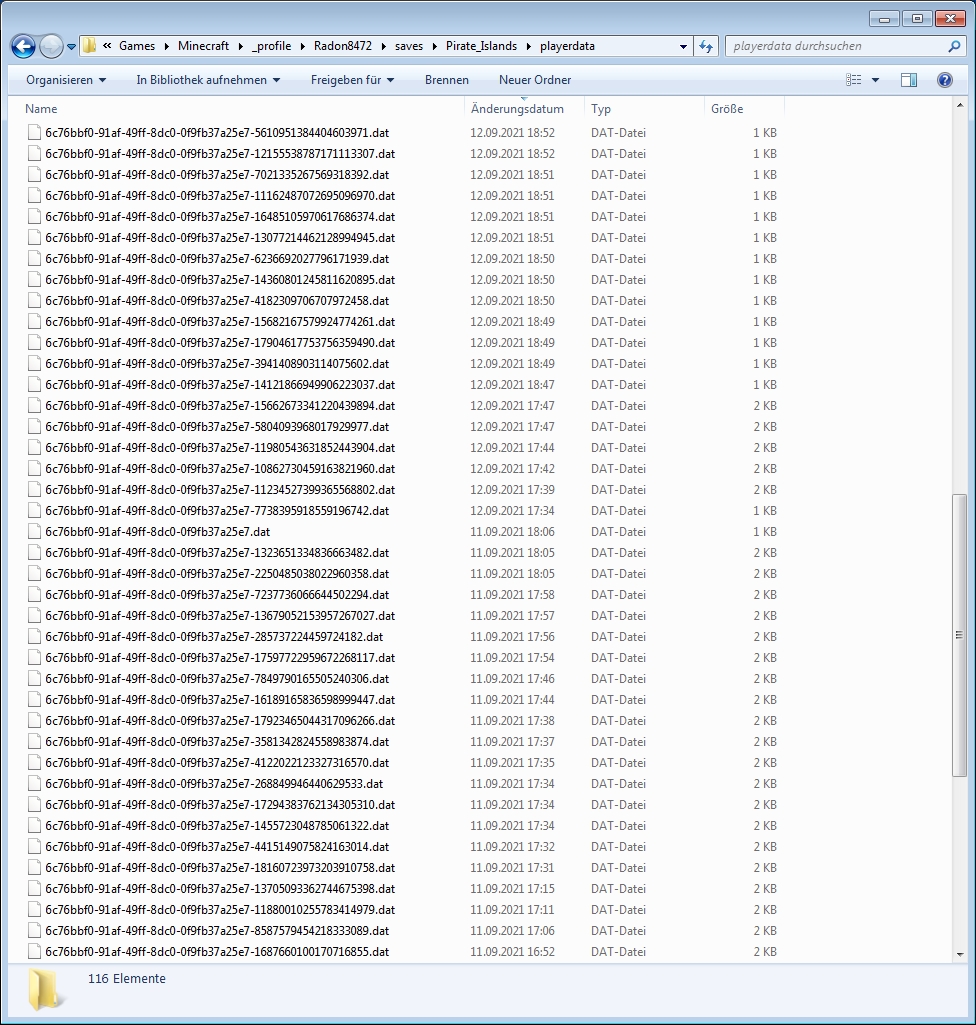
After upgrading my world to version 1.17.1 I noticed that it creates incredible many files below the "playerdata"-folder (more than one file per player).
The new files are similar to tha basic playerdata-saves that are named by "[player-id}.dat", but the new files are named "[player-id}-13153799585470461216.dat" (I thing the number is a timestamp).
It seems that everytime when I go to the pause-menu a new file is created.
**What I expected to happen was...:**
When playerdata is saved, it should creaty only one playerdata-file per player.
(or at least the additional files with the timestamps should be cleaned from time to time of on game exit)
What actually happened was...:
The game creates more and more files, and spams my save-folder with hundreds of playerdata files.
Steps to Reproduce: (not sure how to reproduce, these steps may not work, will update if able to find a method)
- join a world in version 1.17.1 as singleplayer
- hit Escape to open the pause-menü a few times
- leave the game and check your "yourworld/playerdata" - folder
After upgrading my world to version 1.17.1 I noticed that it creates incredible many files below the "playerdata"-folder (more than one file per player).
The new files are similar to tha basic playerdata-saves that are named by [player-id}.dat, but the new files are named [player-id}-13153799585470461216.dat (I thing the number is a timestamp).
It seems that everytime when I go to the pause-menu a new file is created.
What I expected to happen was...:
When playerdata is saved, it should creaty only one playerdata-file (and maybe one `dat_old)` per player.
(or at least the additional files with the timestamps should be cleaned from time to time of on game exit)
What actually happened was...:
The game creates more and more files, and spams my save-folder with hundreds of playerdata files.
Steps to Reproduce: (not sure how to reproduce, these steps may not work, will update if able to find a method)
- join a world in version 1.17.1 as singleplayer
- hit Escape to open the pause-menü a few times
- leave the game and check your "yourworld/playerdata" - folder
All types of bricks have the same side-texture from all 4 sides, but that looks wrong (see screenshot).
When you see the long-side of a brick on one side, you should see the short site on the corner. So the texture on each secord side of the bricks must be turned upside down (half bricks on top, full brick on bottom) to fix this.
You can see the difference between current texture and the "correct" state in my "brick-compare" drawing.
All types of bricks have the same side-texture from all 4 sides, but that looks wrong (see screenshot).
When you see the long-side of a brick on one side, you should see the short site on the corner. So the texture on each secord side of the bricks must be turned upside down (half bricks on top-side, full brick on bottom-side) to fix this.
You can see the difference between current texture and the "correct" state in my "brick-compare" drawing.
All types of bricks have the same side-texture from all 4 sides, but that looks wrong
(see screenshot).When you see the long-side of a brick on one side, you should see the short site on the corner. So the texture on each secord side of the bricks must be turned upside down (half bricks on top-side, full brick on bottom-side) to fix this.
You can see the difference between current texture and the "correct" state in my "brick-compare" drawing.
All types of bricks have the same side-texture from all 4 sides, but that looks wrong.
When you see the long-side of a brick on one side, you should see the short site on the corner. So the texture on each secord side of the bricks must be turned upside down (half bricks on top-side, full brick on bottom-side) to fix this.
You can see the difference between current texture and the "correct" state in my "brick-compare" drawing.
All types of bricks have the same side-texture from all 4 sides, but that looks wrong.
When you see the long-side of a brick on one side, you should see the short site on the corner. So the texture on each secord side of the bricks must be turned upside down (half bricks on top-side, full brick on bottom-side) to fix this.
You can see the difference between current texture and the "correct" state in my "brick-compare" drawing.
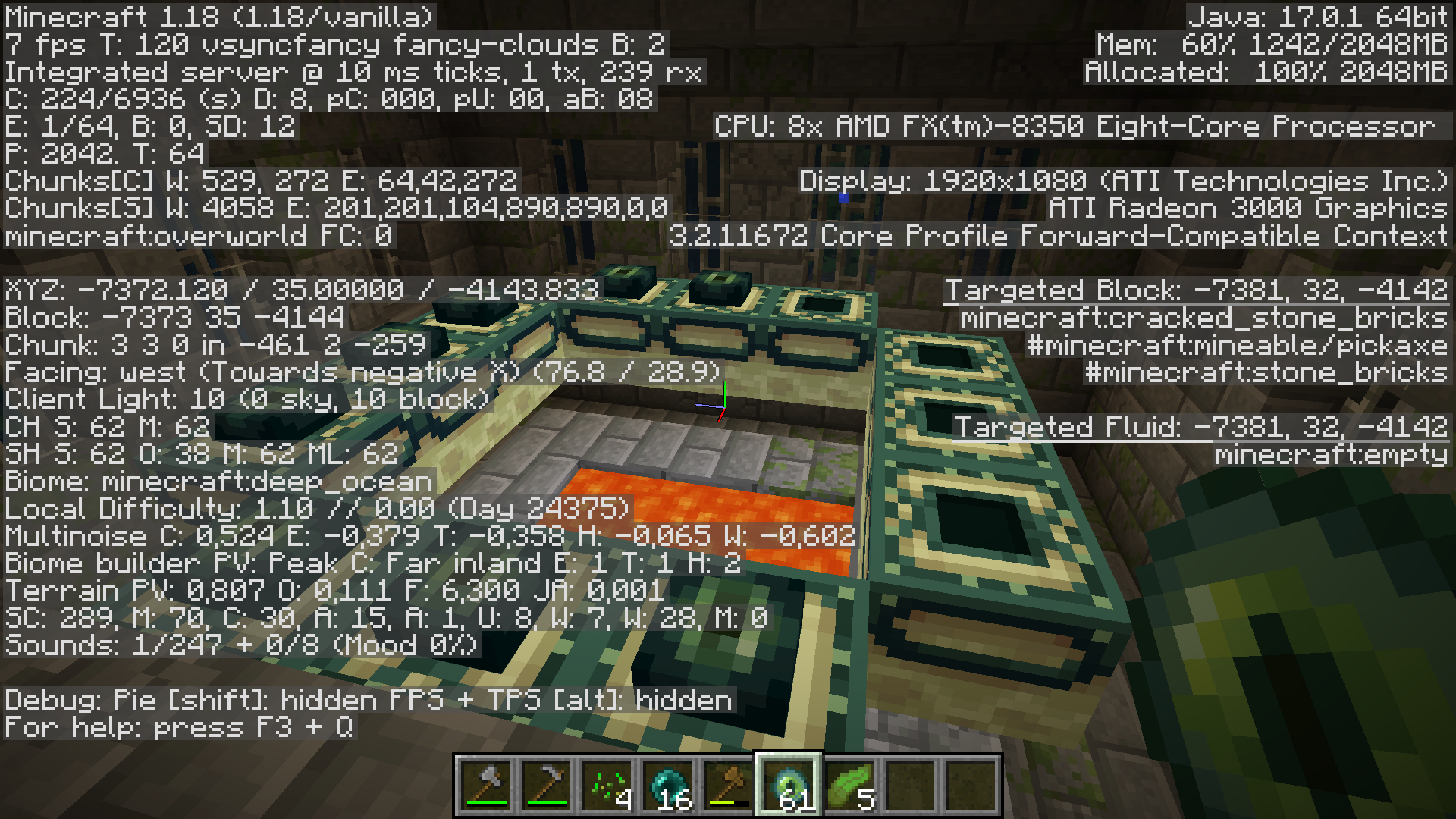
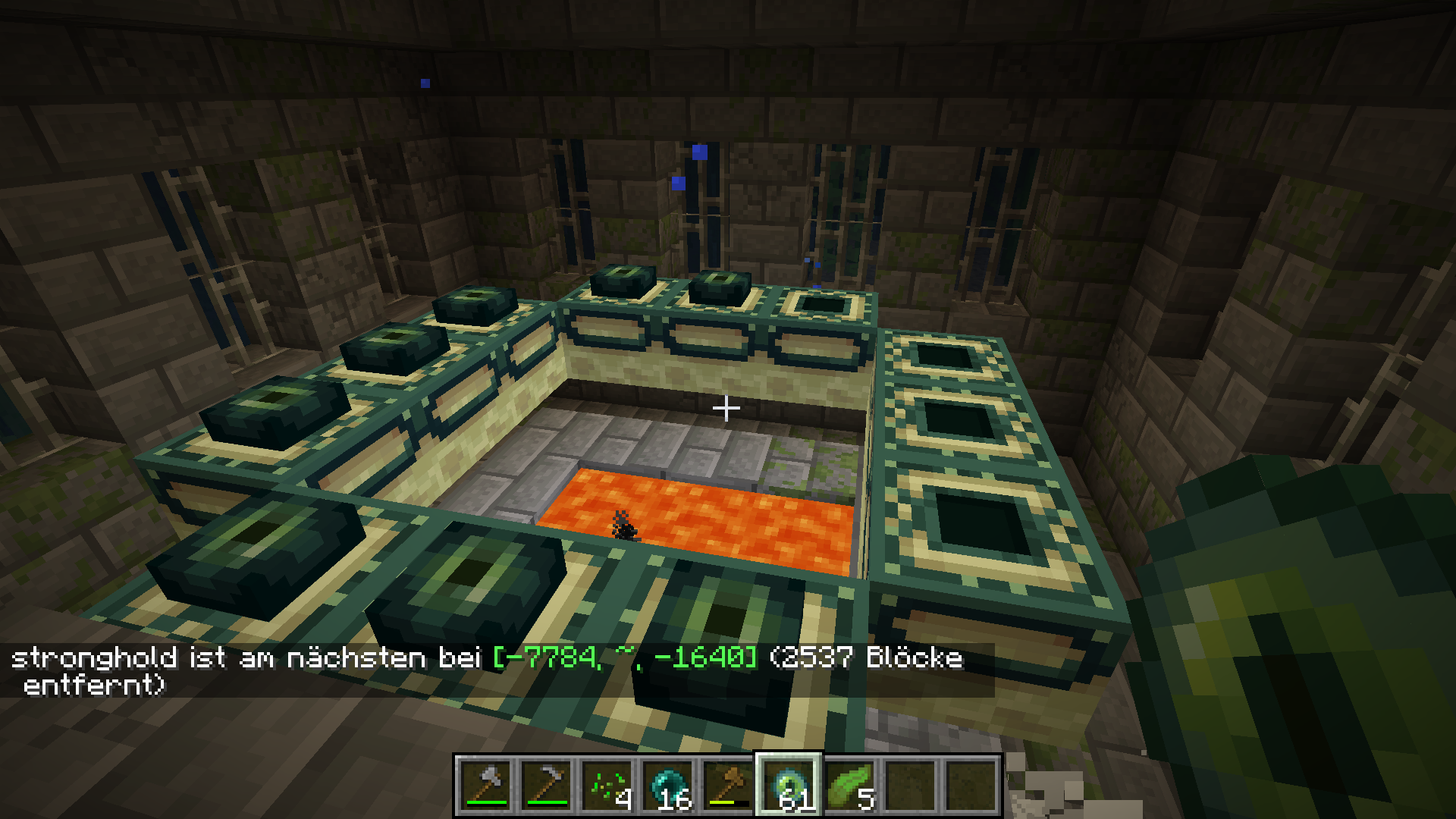
In version 1.18 strongholds in chunks that wher generated in older versions are not detected.
How to reproduce:
- Open the attached reprod-world in 1.17.1 (player location in stronghold at -7362 30 -4147)
- run "/locate stronghold"
- or leave the stronghold and throw ender eyes
- open the world in 1.18
- run again "/locate stronghold"
- or leave the stronghold and throw ender eyes
Expected behavior:
in both versions the locate command (and the ender eyes) should lead to the closest stronghold at -7362 30 -4147.
Actual behavior:
- in 1.17.1 it works correctly: ender eyes and "/locate stronghold" lead to theclosest stronghold at -7362 30 -4147
- in 1.18 ender eyes lead to a stronghold at -7784 ~ -1640 (about 2537 blocks away)
In version 1.18 strongholds in chunks that wher generated in older versions are not detected.
How to reproduce:
- Open the attached reprod-world in 1.17.1 (player location in stronghold at -7362 30 -4147)
- run "/locate stronghold"
- or leave the stronghold and throw ender eyes
- open the world in 1.18
- run again "/locate stronghold"
- or leave the stronghold and throw ender eyes
Expected behavior:
in both versions the locate command (and the ender eyes) should lead to the closest stronghold at -7362 30 -4147.
Actual behavior:
- in 1.17.1 it works correctly: ender eyes and "/locate stronghold" lead to theclosest stronghold at -7362 30 -4147
- in 1.18 ender eyes lead to a stronghold at -7784 ~ -1640 (about 2537 blocks away)
Windows 10
In version 1.18 strongholds in chunks that whe
rgenerated in older versions are not detected.
How to reproduce:
- Open the attached reprod-world in 1.17.1 (player location in stronghold at -7362 30 -4147)
- run "/locate stronghold"
- or leave the stronghold and throw ender eyes
- open the world in 1.18
- run again "/locate stronghold"
- or leave the stronghold and throw ender eyes
Expected behavior:
in both versions the locate command (and the ender eyes) should lead to the closest stronghold at -7362 30 -4147.
Actual behavior:
- in 1.17.1 it works correctly: ender eyes and "/locate stronghold" lead to theclosest stronghold at -7362 30 -4147
- in 1.18 ender eyes lead to a stronghold at -7784 ~ -1640 (about 2537 blocks away)
In version 1.18 strongholds in chunks that when generated in older versions are not detected.
How to reproduce:
- Open the attached reprod-world in 1.17.1 (player location in stronghold at -7362 30 -4147)
- run "/locate stronghold"
- or leave the stronghold and throw ender eyes
- open the world in 1.18
- run again "/locate stronghold"
- or leave the stronghold and throw ender eyes
Expected behavior:
in both versions the locate command (and the ender eyes) should lead to the closest stronghold at -7362 30 -4147.
Actual behavior:
- in 1.17.1 it works correctly: ender eyes and "/locate stronghold" lead to theclosest stronghold at -7362 30 -4147
- in 1.18 ender eyes lead to a stronghold at -7784 ~ -1640 (about 2537 blocks away)
In version 1.18 strongholds in chunks that whe
ngenerated in older versions are not detected.
How to reproduce:
- Open the attached reprod-world in 1.17.1 (player location in stronghold at -7362 30 -4147)
- run "/locate stronghold"
- or leave the stronghold and throw ender eyes
- open the world in 1.18
- run again "/locate stronghold"
- or leave the stronghold and throw ender eyes
Expected behavior:
in both versions the locate command (and the ender eyes) should lead to the closest stronghold at -7362 30 -4147.
Actual behavior:
- in 1.17.1 it works correctly: ender eyes and "/locate stronghold" lead to theclosest stronghold at -7362 30 -4147
- in 1.18 ender eyes lead to a stronghold at -7784 ~ -1640 (about 2537 blocks away)
In version 1.18 strongholds in chunks that where generated in older versions are not detected.
How to reproduce:
- Open the attached reprod-world in 1.17.1 (player location in stronghold at -7362 30 -4147)
- run "/locate stronghold"
- or leave the stronghold and throw ender eyes
- open the world in 1.18
- run again "/locate stronghold"
- or leave the stronghold and throw ender eyes
Expected behavior:
in both versions the locate command (and the ender eyes) should lead to the closest stronghold at -7362 30 -4147.
Actual behavior:
- in 1.17.1 it works correctly: ender eyes and "/locate stronghold" lead to theclosest stronghold at -7362 30 -4147
- in 1.18 ender eyes lead to a stronghold at -7784 ~ -1640 (about 2537 blocks away)
Stronghold are not detected (with locate or ender-eye)
In version 1.18 strongholds in chunks that where generated in older versions are not detected.
How to reproduce:
- Open the attached reprod-world in 1.17.1 (player location in stronghold at -7362 30 -4147)
- run "/locate stronghold"
- or leave the stronghold and throw ender eyes
- open the world in 1.18
- run again "/locate stronghold"
- or leave the stronghold and throw ender eyes
Expected behavior:
in both versions the locate command (and the ender eyes) should lead to the closest stronghold at -7362 30 -4147.
Actual behavior:
- in 1.17.1 it works correctly: ender eyes and "/locate stronghold" lead to the closest stronghold at -7362 30 -4147
- in 1.18 ender eyes lead to a stronghold at -7784 ~ -1640 (about 2537 blocks away)
Report/ Ban-system can not be controlled by server adminchat report/ Ban-system can not be controlled by server admin
There is a new option that players can report other players from servers and they (can) get a permanent ban.
Basicly it is a good idea, but currently there is no option for server admin to control this.
That means everyboy could report and ban every player on a server, even the server admin himself.
There should be a way, that FIRST a report is send to the server admin, and only if the server admin agrees
thatthis reported player should be banned, the admin should have thechanceto send this report to mojang/microsoft.There is a new option that players can report other players from servers and they (can) get a permanent ban.
Basicly it is a good idea, but currently there is no option for server admin to control this.
That means everyboy could report and ban every player on a server, even the server admin himself.
There should be a way, that FIRST a report is send to the server admin, and only if the server admin agrees , this reported player should be banned, the admin should have the option to send this report to mojang/microsoft.
The game crashes on random situations without any error message.
Unfortunally I don`t get any crash-report logs when this happens.
Steps to Reproduce:
- Open the Launcher
- Hit the Play Button
- Play in Singleplayer or Multiplayer
Observed Behavior:
I made multiple tests, and observerd 4 szenarios:
- I can open the game, and it crashes directly after showing the splash-screen (with the Multplayer, Singleplayer buttons)
- I can open the game, and can hit Singleplayer. After joining a world the game crashes directly after I see my character inside the world
- I can open the game, and can hit Mutliplayer. After joining a Server the game crashes directly after I see my character inside the world.
- I can open the game, and can hit Mutliplayer. I can succhessful join the server, but game crashes after 1-2 Minutes of walking inside this server world
In all szenarios the game suddenly closes and the PC turns off without any error messages.
All helpfull Infos I could find about this issue:
- I don`t use any mods or datapacks
- Playing in version 1.18.2 (or older) works fine without any errors (so I am sure this bug only occours in 1.19)
- Launcher.log shows
"localization.cpp(45)] No locale matching [de.json] found."So this maybe is a language depending problem
The game crashes on random situations without any error message.
Unfortunally I don`t get any crash-report logs when this happens.
Steps to Reproduce:
- Open the Launcher
- Hit the Play Button
- Play in Singleplayer or Multiplayer
Observed Behavior:
I made multiple tests, and observerd 4 szenarios:
- I can open the game, and it crashes directly after showing the splash-screen (with the Multplayer, Singleplayer buttons)
- I can open the game, and can hit Singleplayer. After joining a world the game crashes directly after I see my character inside the world
- I can open the game, and can hit Mutliplayer. After joining a Server the game crashes directly after I see my character inside the world.
- I can open the game, and can hit Mutliplayer. I can succhessful join the server, but game crashes after 1-2 Minutes of walking inside this server world
In all szenarios the game suddenly closes and the PC turns off without any error messages.
All helpfull Infos I could find about this issue:
- I don`t use any mods or datapacks
- Playing in version 1.18.2 (or older) works fine without any errors (so I am sure this bug only occours in 1.19)
- Launcher.log shows
"localization.cpp(45)] No locale matching [de.json] found."So this maybe is a language depending problem
- I add attached the logfiles from my minecraft launcher and from my minecraft game profile to this ticket
The game crashes on random situations without any error message.
Unfortunally I don`t get any crash-report logs when this happens.
Steps to Reproduce:
- Open the Launcher
- Hit the Play Button
- Play in Singleplayer or Multiplayer
Observed Behavior:
I made multiple tests, and observerd 4 szenarios:
- I can open the game, and it crashes directly after showing the splash-screen (with the Multplayer, Singleplayer buttons)
- I can open the game, and can hit Singleplayer. After joining a world the game crashes directly after I see my character inside the world
- I can open the game, and can hit Mutliplayer. After joining a Server the game crashes directly after I see my character inside the world.
- I can open the game, and can hit Mutliplayer. I can succhessful join the server, but game crashes after 1-2 Minutes of walking inside this server world
In all szenarios the game suddenly closes and the PC turns off without any error messages.
All helpfull Infos I could find about this issue:
- I don`t use any mods or datapacks
- Playing in version 1.18.2 (or older) works fine without any errors (so I am sure this bug only occours in 1.19)
- Launcher.log shows
"localization.cpp(45)] No locale matching [de.json] found."So this maybe is a language depending problem
- I add attached the logfiles from my minecraft launcher and from my minecraft game profile to this ticket
- The same crash happens in latest 1.19.1 snapshot (1.19.1-pre4), and shows an
AuthenticationExceptionin launcher log and logfile in my minecraft saves folder (See logs with "1.19.1-pre4" suffix)
Recipe is unloack when entering the world (inventory_changed is triggered)Recipe is unlocked when entering the world (inventory_changed is triggered)
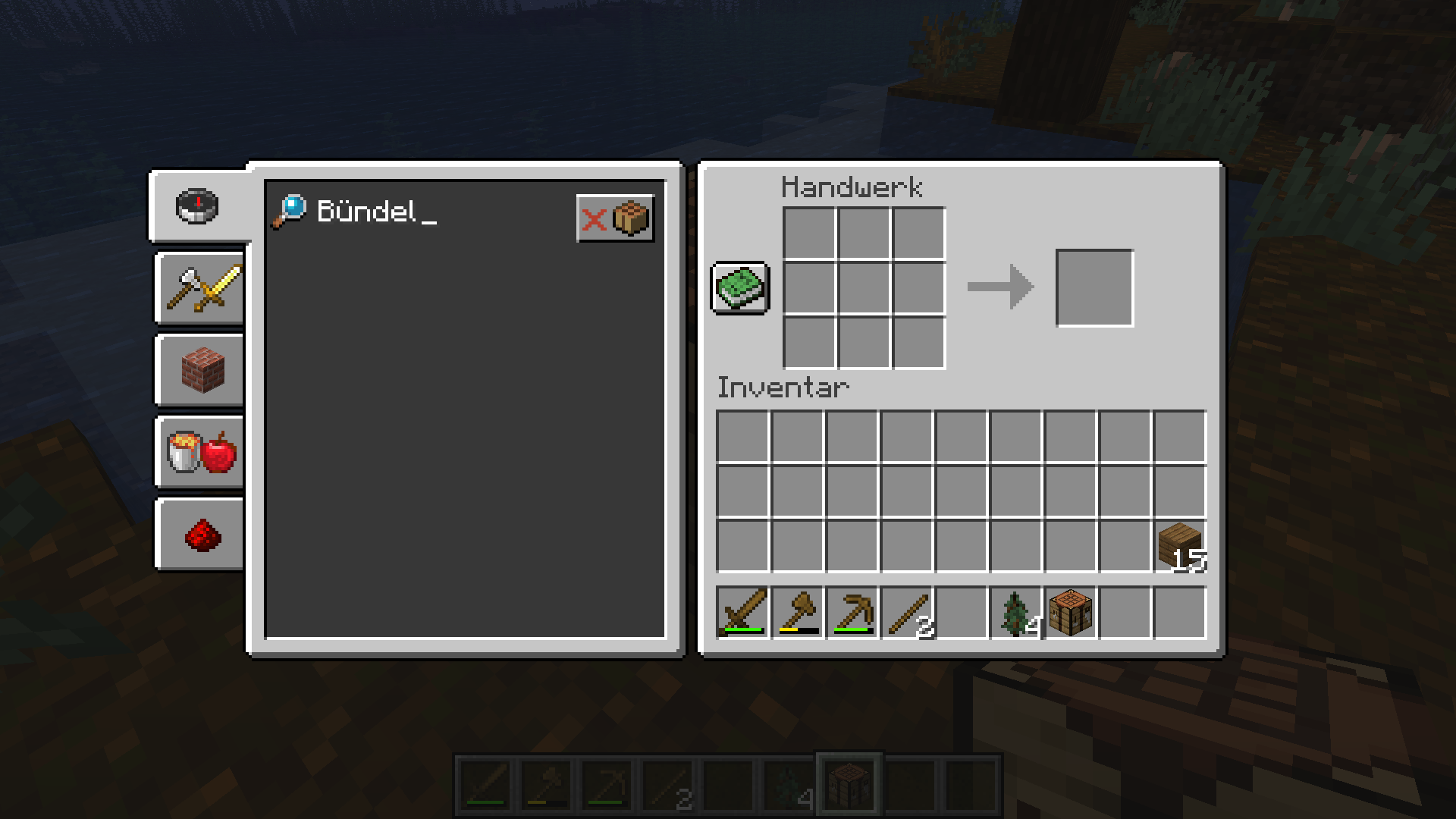
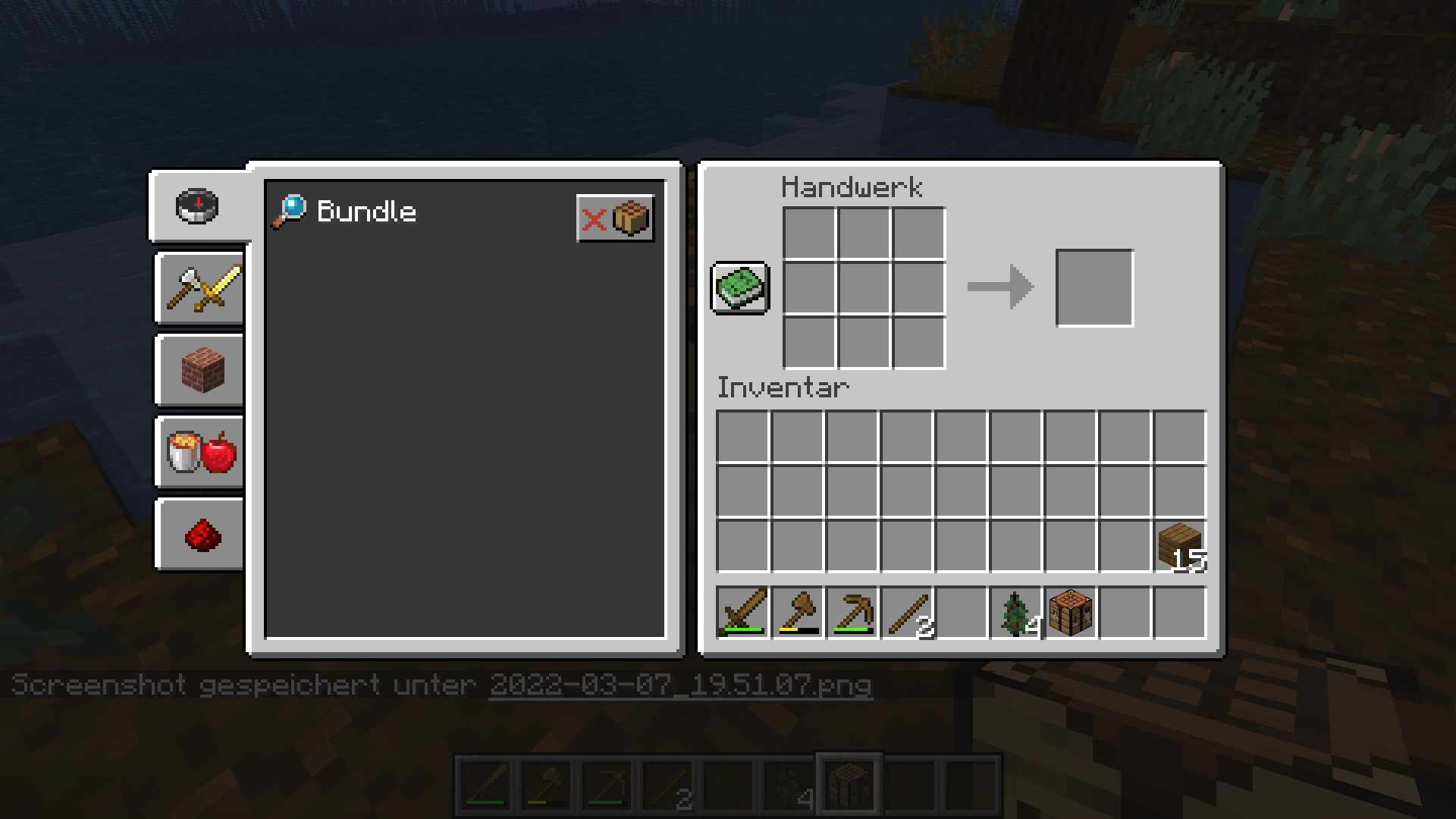
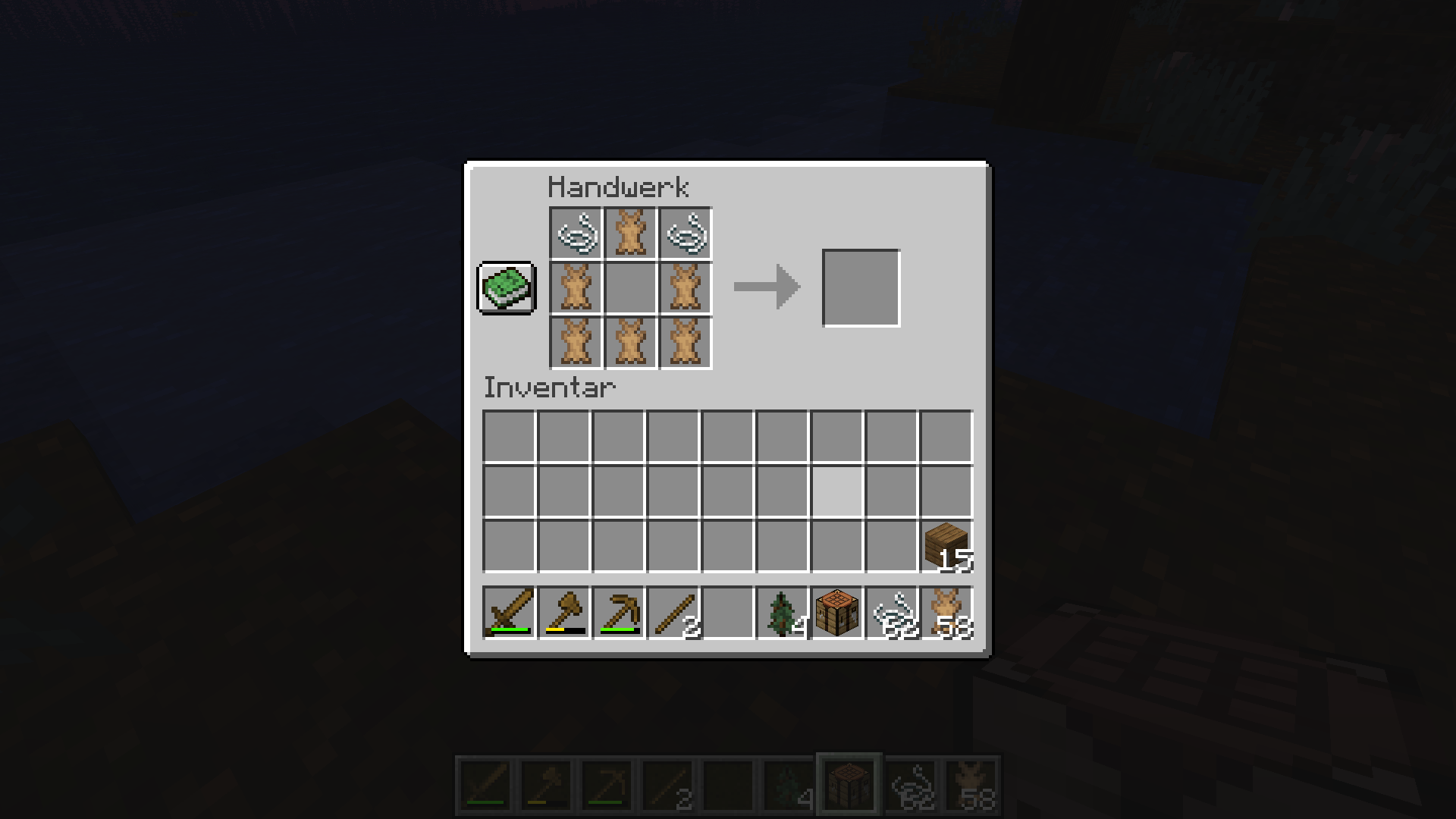
I created a datapack to unloack the bundle recipe using the code from the Caves And Cliffs Preview datapack.
The datapack is basicly working, but the unlock for the recipe acts strange and unlocks the recipe directly when entering the world and not when I find a string.
The advancement file of this player shows this entry
"minecraft:recipes/tools/bundle" : { "criteria" : { "has_string" : "2022-08-07 16:47:34 +0200" }, "done" : true },what means the has_string critery was triggerd, but this should only happen what the player has a string in his inventoy.
The critera is written like this:
    "has_string": {
      "trigger": "minecraft:inventory_changed",
      "conditions": {
        "items": [
          {
            "item": "minecraft:string"
          }
        ]
      }
Expected behavior:
- Player should NOT have the recipe in the recipe book
- when the player takes a string in his inventory, the recipe should be unlocked
Actual behavoir:
- the recipe is instandly unlocked when the player enters the world (even when he has NO string in his inventory)
How to reproduce:
- Add the datapack in the datapack folder of your world
- Open the world in single player (with a player that has NO string in his inventory)
I created a datapack to unloack the bundle recipe using the code from the Caves And Cliffs Preview datapack.
The datapack is basicly working, but the unlock for the recipe acts strange and unlocks the recipe directly when entering the world and not when I find a string.
The advancement file of this player shows this entry
"minecraft:recipes/tools/bundle" : { "criteria" : { "has_string" : "2022-08-07 16:47:34 +0200" }, "done" : true },what means the has_string critery was triggerd, but this should only happen what the player has a string in his inventoy.
The critera is written like this:
    "has_string": {
      "trigger": "minecraft:inventory_changed",
      "conditions": {
        "items": [
          {
            "item": "minecraft:string"
          }
        ]
      }
Expected behavior:
- Player should NOT have the recipe in the recipe book
- when the player takes a string in his inventory, the recipe should be unlocked
Actual behavoir:
- the recipe is instandly unlocked when the player enters the world (even when he has NO string in his inventory)
How to reproduce:
- Add the datapack in the datapack folder of your world
- Open the world in single player (with a player that has NO string in his inventory)
I created a datapack to unloack the bundle recipe using the code from the Caves And Cliffs Preview datapack.
The datapack is basicly working, but the unlock for the recipe acts strange and unlocks the recipe directly when entering the world and not when I find a string.
The advancement file of this player shows this entry
"minecraft:recipes/tools/bundle" : { "criteria" : { "has_string" : "2022-08-07 16:47:34 +0200" }, "done" : true },what means the has_string critery was triggerd, but this should only happen what the player has a string in his inventoy.
The critera is written like this:
    "has_string": {
      "trigger": "minecraft:inventory_changed",
      "conditions": {
        "items": [
          {
            "item": "minecraft:string"
          }
        ]
      }
Expected behavior:
- Player should NOT have the recipe in the recipe book
- when the player takes a string in his inventory, the recipe should be unlocked
Actual behavoir:
- the recipe is instandly unlocked when the player enters the world (even when he has NO string in his inventory)
How to reproduce:
- Add the datapack in the datapack folder of your world
- Open the world in single player (with a player that has NO string in his inventory)
Maybe, but I tested this syntax, and when I use the Syntax from [Mod] tryashtar the recipe is never unlocked, no matter how much string you have in your inventory.
By the way, I had the same issues even the old versions directly followed by the snapshot, so I dont thing that changed syntax is the problem.
![[Mod] Anthony Cicinelli](../../../data/avatars/users/10122.svg)
![[Helper] ZeNico13](../../../data/avatars/users/31913.png)
This should be fixed back to the old state.
If you are in a mine its importand that you can repair tools by combining without needing any special block like the grundstone.
Thats not helpfull.
When you are mining in a deep cave you need a way to repair used tools in inventory without using a special block like grindstone.
having this functionallity in grindstone is not usefull.
You still need a way to repair tools when you are in a deep cave and dont carry any special blocks like grindstone
I hat similar issues often when I opened my singleplayer world for networt connections.
Did you already check if you have any firewalls runnning between the server and the client ?
I have a similar issue in my world created in version 1.9.2,
the issue was still existing in 1.11.2.
last time i tested this in version 1.12.2 and the problem still existed.
I Tried it with different portal locations, and its always the same result:
You go from overworld into a Portal and it connects successfull to an existing portal in the nether.
When you return, in creates a new portal in overworld near to the matching location in overworld (Nethercoordinats / 8).
Exspected behavoir:
When returning from nether a 1024 block area arround the matchin overworld location should be checked for existing portals.
For me it looks like existing Overworld portal within the 1024 blocks range are not found when returning, what results in creating e new portal.
Looks like this is a dublicate of
MC-150011I think this is related to (or dublicated to)
MC-149705Steps to reproduce
expected result:
Arriving in Portal at "o1"
actuall result:
a new portal is created
I tested this steps in versions:
I could successfull reproduce the bug in all of this versions.
Look at
MC-149705I think thats the same issueBug still exists in version 1.14.1
I think something is very wrong with the nether portal linking.
Maybe you issue is related to
MC-149705After some testing it look to me, like the area where existing overworld portals are detected is to small.
Usually when leaving nether it should devide nether coordinates by 8 and check a 1024 blocks area arround coordinates in overworld if already active portals are there.
Possibly the detecting area is much smaller than 1024 for some unknown reason what results in creating new portals, cause the existing portals are not found.
I made some tests, and I can still reproduce thiss bug in the latest release version.
So the bug still exists in version 1.14.2
I discovered one new effect in this Version, some portals are generated in a differnt rotation than the portal in the nether.
I am not sure if something was changed or if it is yust the result of other inactiv portal-frames which block the space at the exit location.
@ Jim Brown
You are right, for me it happens everytime when I come back to overworld.
But I think, if you have a similar issue what only occoures somethmes I still thing the reason for this is similar.
@ ootisg I understand what you try to tell, but I think its still a wrong behavoir.
Because in my world ALL Portals in Overworld in a 1024 Blocks area arround the first portal are linked to the same target portal in the nether.
So it would be logic that the nether portals should search in this 1024 area for portals and link to the closest.
What I see as bug is, that Overworld Portal successfully find its partner portal in the nether, but the netherworld portal is not finding any partner portal.
@TorteShui I cannot see any situation where a changing of the search radius to 1024 in overworld would break anything.
If somebody likes to be linked to a portal in a 128 range this would still work like now, cause if multple portals are in range, the closest matching portal is choosen as link partner.
So the only thing what would be changed, that no useless portals are created.
Your said it yourself, nether distances must be multiplied by 8 do get the correct overworld values.
So it would be logical that portal search radius in nether is 128 and search radius in overworld should be 1024 (128 multiplied by 8)
This bug still exists in version 1.14.3
The issue still exists in version 1.14.3
Can you ask the person which was hosting, if there are any new files in the playerdata/ folder of this world ?
For me your issue sounds like you are connected with 2 different playerIDs what results in creating a complete new player.dat on the server world.
I had a similar issue with my server world, when switching between online and offline mode.
But thats no bug, basicly the "online-player-id" is a other "player" than the offline player-id
Did you check if your gamemode is adventure or survival ?
In adventure you cant break blocks.
Please write a more detailed information why you cant play.
Write what you tried to do, and on what step it was not working.
Here is a short "how todo" list, what must do to play with friends.
Yust check this list what you did and tell on which step you had a differnt hevaoir
.
e.g. in a LAN Only Game without Internet "192.168.0.2:59341"
` using the same address like in your Added Minecraft server)
Phoenix616 you could be right.
But if that is the only problem, they could add a new segment to the region-datfiles.
E.g. instead of checking all chunks block by block, they could store the portal locations in a separate array, and update this everytime when a new portal is activated or disabled.
With that behavoir searching for portals would be very fast, maybe it would even improve the current performance.
The issue still exists in version 1.14.4
That is no bug, that always was an existing behavoir.
If you like tu push a watersource, place e.g. a fence, make it water_loggen (fill water with a bucket in this block) and then you can move the fence including the water source.
hmm... i thing this behavoir is normal... .
Basicly you are right that you can cover lava blocks, but the "heat" of lava and fire goes further than one block.
I never heard anything from blocks with heat protecting ability.
Can you explain more detaild whats wrong ?
e.g. add Expected behavoir... , and Actuall behavoir to your report.
Can it be a Duplicate of
MC-2545?Can you please check if you have a crash report in your game profile ?
H4wkG4ming can you add the locations of your Portals in your world ?
Maybe this happend when you never changed your name.
I mean the time what is displayed there seems to be the beginn of the unixtime.
I thing the variable with the time is either 0 or NULL, so sombody should yust add a check similar like this:
I still have this strange messages in the server console, but I dont use any teleport commands.
This messages happen on server start even when no player is logged in.
And I dont use any functions of datapacks. So why I get these warnings on server start ?
@tryashtar I know that this messages are for teleport commands.
But the point is, in my world I have no teleport commands.
I dont use Commandblocks, and I dont have any datapacks what are using teleport commands, so why still get this message??
It is very confusing to get a bunch of warnings on each serverstart without the chance to fix this.
@FVbico I know that the commands still exists, I follow the changelogs on each update.
The real question is, what can I do to avoid these warnings when I start my server ?
Sounds like this bug could be related to this
MC-149705which happens in my worldI discovered a report (see
MC-164368) about a very similar bug, where the coordinates not seem to have this 128 to 1024 block problem, but it generates new portals too.So maybe this 128 block therory issnt fully correct
Maybe this is a dublicate. Please check
MC-149705if that is the same like your issue.So or so, it would be a bug if it is realy implemented in the code like this.
The game logic says overworld coordinates are Nethercoordinates multiplied by 8. what means the overworld lookup distance should be 1024.
By the way, how can you be sure how the code is implemented ?
Do you have a decompiled version of minecraft ?
I agree, we should stay in the correct topic.
But I thing, If they would currently plan to change anything, this tickout would be assigned to a Developer and/or to a fix_version.
I think we can agree that this is a confirmed bug, because you noticed that the wrong detection distance is part of the current sourcecode.
But I saw in a video of the minecon, that the MC-developers thing that the portal locig a realy complicated piece of code.
So I think they stay away from this Ticket until more players vote for this.
And I see some other tickets with a similar problems, so I realy hope more players will vote for this thicket in the next time.
Tested and Confirmed for versions
I can`t see any change in the behavior of the portals during my tests.
p.s. sombody should update the affected versions for this ticket
@[Mod] violine1101 why do you change the ticket status to resolved ??
Multiple people confirm that this problem is NOT resolved
@Alan Pickstock duplicate means there is already an issue that handles your problem.
You can follow (and vote) now the main issue and share helpfull informations until the problem is solved.
Up to version 1.16.1 the bug behavior is not changed.
Since Version 1.16.2 the Bug even got worse.
Now even when entering the nether new portals useless are created (in my world new portals are created at N 22 79 15 instead of connecting to the existing portal at N 127 72 34)
This breaks all long distance travel routes.
And leaving the nether via the correct portal at N 127 72 34 still creates useless portals in the overworld.
It seems that the Portal connect distance in the neather is decreased instead of increasing the search distances in the overworld.
This affects Versions 1.16.2 and 1.16.3
Why is the status of this ticket changed to fixed ??
It is not fixed, it is even worse in 1.16.3.
So please FIX this issue.
To bring some more infos into the nature of this bug; I gather the Known infos:
The reason for this bug seems to be the area in that portals in "the other side" are detected when you switch from nether to overworld or from OW to nether.
The Expected logic is
The BUG-Behavoir in versions up to 1.16.1 was:
Search-Range in Nether: 128
Search-Range in Overworld: 128
The correct Bugfix would be to increase the overworld search-range to 1024
The BUG-Behavoir in versions 1.16.2 is:
Search-Range in Nether: much smaller than 128
Search-Range in Overworld: 128
So the it seems that in 1.16.2 they tried to fix the bug, bug they changed the wrong of both values.
And this make this bug even worse, because this would BREAK all long distance portal networks.
[Mod] Anthony Cicinelli that exactly is the problem, this ticket is changed to "Works as Intended".
But it cant be the final answer, that they yust make changes that break all ways to create and use long range nether portal travel ways.
It seems that the support is not considering the new problems since version 1.16.2 / 1.16.3 as part of the same bug, I created a new issue
MC-203285for the new problem.I akready know about the ticket
MC-197538in my report I was specially telling, that the bug I am reporting here IS NOT RESOLVED.To be exact, this bug was already caused, by the changes made for
MC-197538.And linke I was writing in my report, this is NO duplecate, because I write about another problem.
So you should reopen this ticket, until the bug is realy resolved.
[Mod] violine1101 please reopen this issue until the detection ranges are fixed to the well known behavior.
Jeffrey Black you are right that both problems are caused from a wrong portal detection range.
But
MC-197538. is caused, because portals in the overworld are not searched in a range of 128 blocks instead of 1024, what would be correct.This Bug is caused because the portals in the nether are not detected in a 128 blocks range.
Both effects destroy existing portal gateways.
It is clear that it works NOT as intended The well known and documentated fakt is, that range in overworld should be 1024 and range in nether 128.
Yust look at the wiki:
https://minecraft.gamepedia.com/File:OverworldToNetherPortal.png
And when you have an idea to fix long rang travel route, that please share your knowledge in a comment here.
For me and the players of my server it would be a real big problem if we can no longer use nether portals travel to far away places.
It is clear that it works NOT as intended The well known and documentated fakt is, that range in overworld should be 1024 and range in nether 128.
Yust look at the wiki:
https://minecraft.gamepedia.com/File:OverworldToNetherPortal.png
Dmitry Konev the wiki is written by players, and it reflects the opinion of the majority of players, how the the game currently should work.
Its true that the wiki is not telling what the intention of the develors is.
But many people playing that game have existing worlds, and they trust in the well know behavior and game updates should not destroy existing features in the game without offering an alternative to keep existing worlds.
Maybe a good middleway to either keep behavoir in existing worlds and to reduce the distance too, would be to make the "portal detection range" changeable in the world config.
So players with existing worlds could keep the portal detection range at 1024 (and 128 in Nether) and other players could have the 1.16.2 behavoir with a range of 128 (and 16 in nether).
I think we go away from the core topic.
The point is, that the reduced detection range will break all existing nether portal networks. And I am quite sure that this can not be the intention behind a bugfix, so the changes from 1.16.2 must be reworked.
Either the range should be changed back to 1024 in overworld and 128 in nether, or there should be a changeable value in the world config, that each server admin can choose if he likes the old range, or the new range that breaks long range nether networks.
The infos in
MC-197538, are very great, they explain on what places in the code the wrong distance is written.But when you read correctly, [Mojang] Grum (Erik Broes) yust said "non-scaled radius" is fixed.
That means, it was wrong that in BOTH worlds the detection range is the same. Its tells nothing against a 1024 (OW) and 128 (nether) range.
Its try, maybe they "intended to reduce the range", but the point is that it breaks all existing portal gateways, and I think that is not intended.
And for sure I can tell you, that the 1024 blocks range is at least a fixed part of the game since 1.11.2 or before, because in that version my server was created and the long range portals where used since that version.
I dont realy unterstand what you mean with "turning 3 blocks into 1024".
Thank you for sharing your Idea of an alternative way to travel, but For me it is no real solution to replace a portal travel agains walking 128 Blocks for each part of the route. (And I think the most players would aggree)
And Farming thausends of ice blocks only to repair already working portal routes would take a gigantic effort in a big world.
I aggree that the non-scaled radius was wrong.
But I think one lin in the posted code is still wrong.
It think it must be
int radius = inNether ? 128 : 1024;otherwise it would break existing portal routes that are based on the well know ranges explained in this graphic:
https://minecraft.gamepedia.com/File:OverworldToNetherPortal.png
@Dmitry Konev When existing features are suddenly broken, it is not a feature request.
The Idea to but it in the config is yust an idea how the old behavoir could be kept, AND the strange new behavoir could be applied to.
I think you missunderstood the comment from [Mojang] Grum (Erik Broes) .
He yust said yust said "non-scaled radius" is fixed.
That means it is intended that the radius in nether must be "scaled" (overworld radius divided by 8).
This issue here handled exactly the problem that for nether and overworld the same radius was used (non-scaled).
But grum did not tell anything about which nether radius is correct.
To make that clear on the code from
MC-197538:Before 1.16.2 it was something like:
int radius = 128;That was wrong because it created useles portals because it did not detect liked portals in overworld in a range between 128 and 1024.
The problem was that the radius in overwodl was to small.
Since 1.16.2 the code is:
int radius = inNether ? 16 : 128;Here the scaling is correct, but I say the changed the wrong value, because that causes that portals in nether between a range of 16 and 128 are not linked.
The problem now is that radius in both worlds is to small.
So I think the correct code should be:
int radius = inNether ? 128 : 1024;Because it fixes the bug and all portals will be linked like they where linked before the bug.
@kittycatkenobi the problem you wrote in your first comment was
MC-149705- that is the "unscaled" behavoir Grum was talking about (It created useless portals in overworld, when you return from nether).I waited a very long time that this would be fixed, and I realy hoped it would be done in the nether update.
But it seems that it was fixed in the wrong way.
Instead of increasing the range in overworld, the reduced the range in nether, what destroys all long rang teleport gateways like you can read at
MC-203285When I enter my world, no portal connects anymore and I get always new portals in the nether when I enter a portal in the overworld that is part of a long range route, created before 1.16.2.
I agree, it is truely a problem what make custom recipeis useless
I have this issue in my server world since I upgraded to 1.14.4, but for me it only happens with "air" I get messages like this for multiple coordinates in my world:
I dont know if it has something todo with that message, but I noticed to that my baby lamas always despawn about one minecraft day after breeding, right before they can grow up, to be tamed.
And I dont ever hat a wither in my world, so this bug is not fixed to the wither.
Realy mad bug.
I could reproduce thus problem with a bow in version 1.15.2.
The bow was charging while i was trading, and after closing the trade, the bow fired and killed my villager (with mending, feather falling III and infinity trades )
)
I discovered exactly the same issue in my Server at version 1.15.2
I have exactly the same on my 1.14.4 map.
I discovered this in multiple ships.
It seems that there is an issue qhen createing the trasure map. Because even when you are able to open the chest,m the trasure map is missing, but It should have a 100% dropchance.
We discovered, that you can prevent server crash when setting
We discovered, that you can prevent server crash (in Shipwrecks) when setting (but in this thime the chest will not have a trasure map)
I discoved what causes this problem:
It only happens, when you try to get a trasure map in an area where most chunks arround you are already generated in a older version.
Seems that the game tries to find an burried trasure for the map, but it can find a burried trassure, because there are not enough unloaded chunks arround.
Mojang should yust check "if there is not area close, where a burried trassure could be place --> Skip generatting of trasure map" this would fix the problem
Sounds like you maybe have problems with out internet connection, what results in problems resolving your online player id and makes your server using an offline-id.
Please look at
MC-190930there is an attached image [^logs_snipp.JPG] check your logs if you have similarmessages in your logfiles
[Mod] tryashtar
I added more details ro reproduce the issue.
I could reproduce it from
> 1.18rc3I attached the scoreboard file from 1.12 and my version where I manually renamed the objectives to 1.13.
To make it clear, what the game should to on each world convert:
When any stats are renamed (e.g. because monsters or items are renamed) the game should check the scoreboard if it contains objectives with the names of the stats from the old version and rename them to the name of the new version.
e.g. in when converting 1.12 (or older) -> 1.13 (or newer)
rename objective CriteriaName
to
when converting 1.15 (or older) -> 1.16 (or newer)
rename objective CriteriaName
to
Repro World is in 1.17.1 to test behavior in new and old version
Brent this issue is NO duplicate of
MC-135996maybe related, still different.Because this issue does NOT exists since version 1.18.
In e.g. 1.17.1 the stronghold where correct detected by ender eye AND the Locate-command.
So whatever caused this problem must be anything that was changed from 1.17.1 to 1.18
I discovered, this happened because a other program on my pc had reading access to the minecraft world files.
After I found and closed the program, this issue never happened again.
but when empty bundles in other bundles should stack up to 16, they should show up as stacked item inside the bundle, currently they are displayed as 16 single items.
OKay, but they forgot to re-add it in the final version, so it is missing now
Can anybody show pictures of the sorter you are using ?
Would like to compare this with my sorters (wich currently work without any know problems)
For using this it would be better to make the outputs:
Not-Lit: Power 0-4
Lit: Power: 5-8
But I dont know what you mean with the "signal fire"-Flag
I can confirm in 1.18.2
This function, without a way for the server admins to controll this, kills the game.
Check youtube, lots of players agree that this update can not work in this way
No, thats the problem.
I get no error dialog, I get no file below the "crash-reports" folder, the game yust stops and I have a black screen
No I cant, because the whole PC shuts down when this crash happens.
And I can not find and reason in the windows protokoll files why this happens.
but it happens only when I play 1.19 or one of the 1.19.1 snapshots.
I can play any older version without these problems
Because game crashes from
MC-252702where fixed in the latest snapshot I tried the pre5-snapshot too.But unfortunally version 1.19.1-pre5 still keeps crashing for me.
I add the launcher and userprofile logs from the pre5 test to my issue above
More Test Informations
I now fully re-installed minecraft, and started the launcher with
to ensure that my old profile in %AppData%\.minecraft does not affect the test.
Result: It Crashes again, durectly after a world is loaded to 100%.
So I am quite sure that I can be sure any of my settings in my profile are not the reason for this problem.
This is no dublicate of MCL-20059 because MCL-20059 talks about the MISSING workDir option in WindowsStore Launcher, but this issue handles the existing workDir Option in the Java-Lauchner, that lost the abbility to handly relative directories.
p.s. this issue still exists in Launcher core version: 2.3.280 (420153dd4d97cde894c594c99c4dbaaee5da3470).
In my case the Launcher opens, but when using a relative path it shows "non existent" error when you hit the play button.
I made multiple tests with the snapshots...
Both versions (22w15a and 22w16a) are always crashing.
But I before the snapshot tests, I started 1.19 again today.
My Launcher was loading someting new, and I way able to play 1.19 several minutes WITHOUT a crash.
I hoped you already added anything that fixes this issue, but after testing the Snapshot versions, 1.19 was crashing again.
I could not find out whats the difference, I attach my logfiles from my tests here, and hope you can discover more helpfull informations than me.
Thank you for your help.
After your suggestion with the 2 Snapshots for the LWJGL test, I planned myself to test all snapshots of 1.19 until I find the first version where this problem starts.
But I think this will maybe take a few days.
By the way ... I tried to run 1.19 with the same java version that was used for 1.18 and it still crashes, So I think The increased Java Version is allegedly not the reason.
After a lot of tests I noticed that I sometimes could play 1.19 and sometimes it crashes...
It seems to be a problem with my pc when it becomes to warm in my room.
The only strange thing was, that it only was crashing on version 1.19, but not in older versions.
But now I am quite sure that it was not problem with minecraft.
Sorry about for the false report
Are you sure ??
I took this advancement from the official Cave And Cliffs Preview Datapack in minecraft-snapshot-21w19a and all recipes unlock advancements are written like this.