 Shnupbups
- shnupbups100
- shnupbups100
- Australia/Sydney
- Yes
- No
 MC-5226
![[Mojang] Cory Scheviak](../../../data/avatars/users/92893.png)
![[Mojang] Gnembon](../../../data/avatars/users/93709.png)
![[Mojang] Timur Nazarov](../../../data/avatars/users/18945.svg)
![[Mojang] slicedlime](../../../data/assets/gravatar/slicedlime.jpeg)
![[Mojang] hawkan](../../../data/avatars/users/18941.svg)
 Normal
 Low
Low


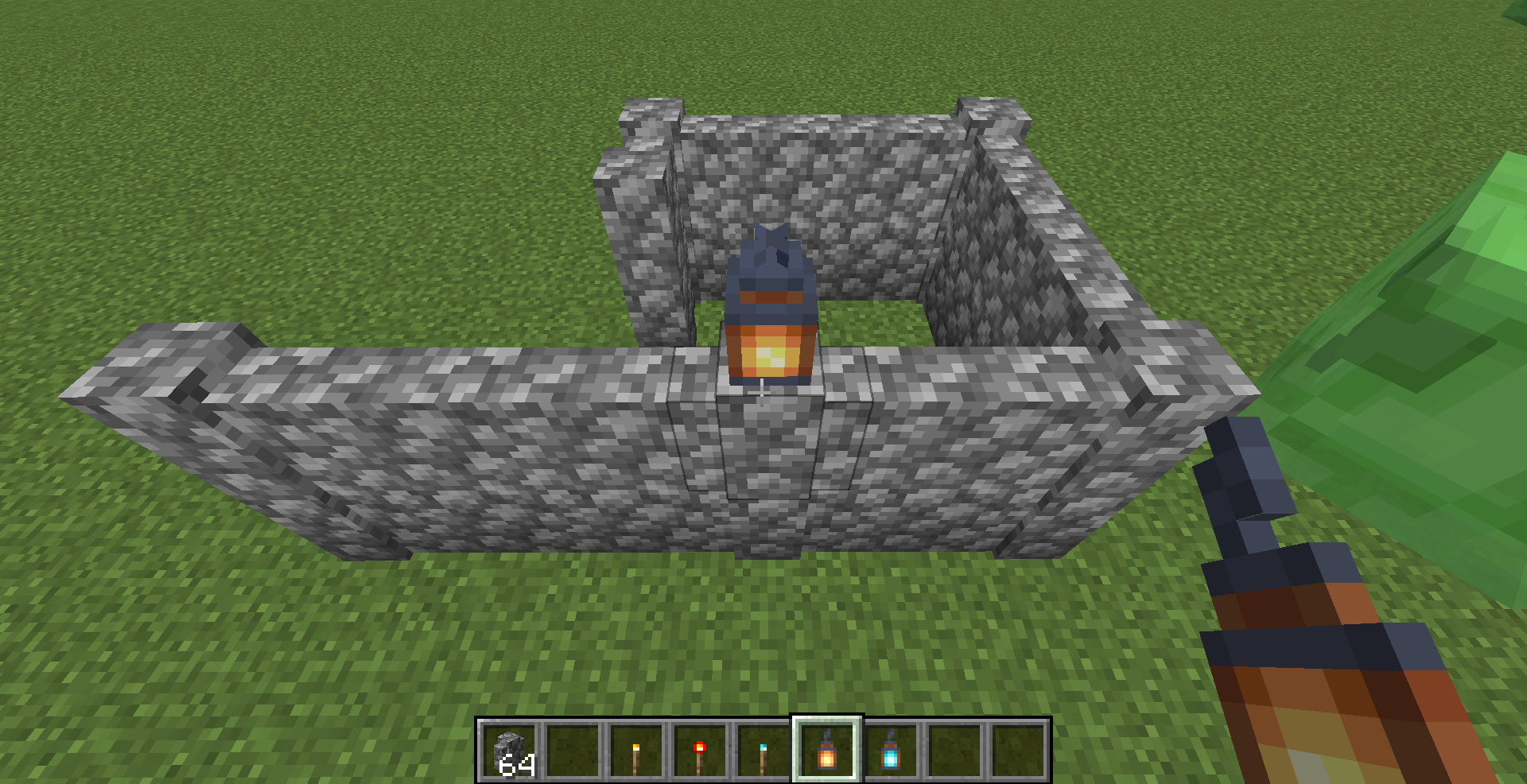
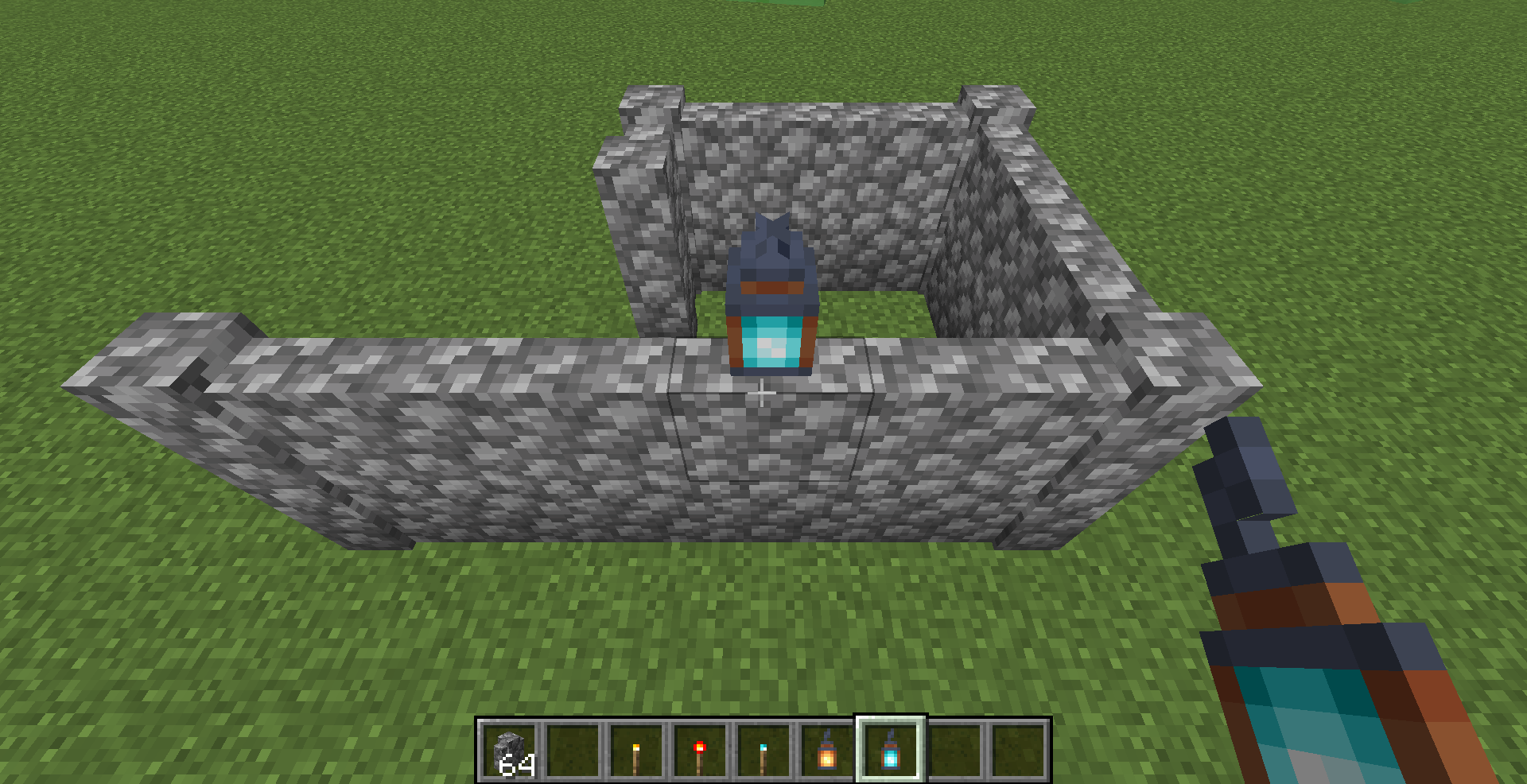





On my snapshot world, I built a sugar cane farm controlled with redstone. I got a bit suspicious when nothing went into the hoppers or the chest, but let it slide. Over and over the sugar cane would grow and get pushed by the pistons but not drop anything, so I switched to survival and tried breaking it by hand and it didn't drop anything. DOES NOT CRASH!!!
When attempting to place a block at the height limit, a message is displayed in chat saying '
The height limit for building is 256 blocks.'
The message is displayed twice when the block trying to be placed is in the off-hand slot. A very minor bug, but a bug nonetheless.The screenshot attached was taken after right clicking on the top face of the block in front of me ONCE with a previously empty chat.
When attempting to place a block at the height limit, a message is displayed in chat saying 'Height limit for building is 256 blocks'
The message is displayed twice when the block trying to be placed is in the off-hand slot. It does not matter what is in your main hand, or what your gamemode is. A very minor bug, but a bug nonetheless.The screenshot attached was taken after right clicking on the top face of the block in front of me ONCE with a previously empty chat.
When attempting to place a block at the height limit, a message is displayed in chat saying 'Height limit for building is 256 blocks'
The message is displayed twice when the block trying to be placed is in the off-hand slot. It does not matter what is in your main hand, or what your gamemode is. A very minor bug, but a bug nonetheless.The screenshot attached was taken after right clicking on the top face of the block in front of me ONCE with a previously empty chat.
When attempting to place a block at the height limit, a message is displayed in chat saying 'Height limit for building is 256 blocks'
The message is displayed twice when the block trying to be placed is in the off-hand slot. It does not matter what is in your main hand as long as does not have a right click function. It also does not matter or what your gamemode is, or which block is in your off-hand. A very minor bug, but a bug nonetheless.The screenshot attached was taken after right clicking on the top face of the block in front of me ONCE with a previously empty chat.
As of 19w36a, Bee Hives are missing a texture for their top face when filled with honey. Previously they used the same
toptexture regardless of honey level.As of 19w36a, Bee Hives are missing a texture for their top and bottom faces when filled with honey. Previously they used the same texture regardless of honey level.
These textures should be named bee_hive_top.png and bee_hive_bottom.png according to the log output.
Bee Hives filled with honey are missing their top and bottom texture
As of 19w36a, Bee Hives are missing a texture for their top and bottom faces when filled with honey. Previously they used the same texture regardless of honey level.
These textures should be named bee_hive_top.png and bee_hive_bottom.png according to the log output. The texture used for these faces with any other honey level is bee_hive_end.png .
New directories in data packs arenamedinconsistentlywith others
The new dimension and dimension_type directories in datapacks are named with singular names. All other directories (advancements, functions, loot_tables, predicates, recipes, structures, tags) have plural names.
The new dimension and dimension_type directories in datapacks are named with singular names. All other directories (advancements, functions, loot_tables, predicates, recipes, structures, tags) have plural names.
In addition, they only function within the minecraft namespace, with the dimensions registered instead taking their namespace from a folder within the dimension directory. This means where any other data type would be registered as custom:my_dimension if placed in data/custom/dimension/my_dimension.json, instead one has to put it in data/minecraft/dimension/custom/my_dimension.json .
New dimension directories in data packs are inconsistent with others
The new dimension and dimension_type directories in datapacks are named with singular names. All other directories (advancements, functions, loot_tables, predicates, recipes, structures, tags) have plural names.
In addition, they only function within the minecraft namespace, with the dimensions registered instead taking their namespace from a folder within the dimension directory. This means where any other data type would be registered as custom:my_dimension if placed in data/custom/dimension/my_dimension.json, instead one has to put it in data/minecraft/dimension/custom/my_dimension.json.
NOTE: Despite being marked as a feature request, this issue was half fixed in 1.16.2 Pre-Release 1. The directories are now in the right spot, but are still named with singular names.
Contrary to the 'Affects Versions' tag, this is for the Experimental Snapshots. They aren't listed on the list of versions.
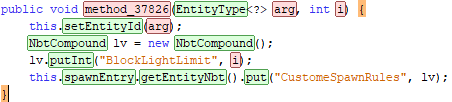
What should be CustomSpawnRules is misspelt as CustomeSpawnRules in the MobSpawnerLogic }}class{{.
Using Yarn mappings names here, not the official names. Apologies, but as a contributor to Yarn I am not allowed to look at the official maps.
Several blocks in Java Edition cannot be waterlogged despite being able to be waterlogged in Bedrock Edition.
Such blocks include:
- Anvils
- Azaleas
- Banners
- Barriers
- Beacons
- Beds
- Be
lls- Brewing Stands
- Cacti
- C
akes- Cauldrons
Composters- D
aylight Detectors- Doors
Dragon Eggs- En
chanting TablesEnd Portal FramesFence Gates- Flowering Azaleas
GrindstonesHoppers- Leaves
- Lecterns
- Pistons
- Pressure Plates
- Shulker Boxes
- Spawners
- Structure Blocks
- Stonecutters
- Turtle Eggs
- Buttons
- Carpets
- Cobwebs
- Dead Bushes
- End Rods
- Flower Pots
- Levers
- Heads
- Redstone Comparators
- Redstone Repeaters
- Tripwires
- Tripwire Hooks
- Vines
While this issue relates to
MC-125351, it is a separate issue as it relates to parity.This list was created with the help of the Waterlogging page on the Minecraft Wiki.
Several blocks in Java Edition cannot be waterlogged despite being able to be waterlogged in Bedrock Edition.
Such blocks include:
- Anvils (Regular, Chipped, and Damaged)
- Azaleas (Regular and Flowering)
- Banners (All 16 Colours)
- Barriers
- Beacons
- Beds (All 16 Colours)
- Bells
- Brewing Stands
- Cacti
- Cakes (Without Candles, and With All 16 Colours of Candle)
- Cauldrons (Empty, Water, Lava, and Powder Snow)
- Composters
- Daylight Detectors (Regular and Inverted)
- Doors (All 8 Wood Types)
- Dragon Eggs
- Enchanting Tables
- End Portal Frames
- Fence Gates (All 8 Wood Types)
- Grindstones
- Hoppers
- Leaves (All 6 Overworld Wood Types)
- Lecterns
- Pistons (Regular and Sticky)
- Pressure Plates (All 12 Types)
- Shulker Boxes (Regular and All 16 Colours)
- Spawners
- Structure Blocks
- Stonecutters
- Turtle Eggs
- Buttons (All 10 Types)
- Carpets (All 16 Colours)
- Cobwebs
- Dead Bushes
- End Rods
- Flower Pots (Empty and With All Plants)
- Levers
- Heads (All 6 Types)
- Redstone Comparators
- Redstone Repeaters
- Tripwires
- Tripwire Hooks
- Vines
While this issue relates to
MC-125351, it is a separate issue as it relates to parity.This list was created with the help of the Waterlogging page on the Minecraft Wiki.
Due to Bamboo Rafts and Bamboo Rafts With Chest using the same entity IDs as Boats and Boats with Chest, you can use commands to summon a Bamboo Raft or Bamboo Raft With Chest even when 1.20 is disabled.
The entity can then be used, and can even be obtained as an item by either breaking it (in survival mode) or using pick block (in creative mode).
Steps to reproduce:
Method A - direct summoning
- Open a world with 1.20 content disabled
- Run /summon boat ~ ~ ~ {Type: "bamboo"} to summon a Bamboo Raft
{{{}
{}}}Note the same works for chest_boatMethod B - transformation
- Open a world with 1.20 content disabled
- Ensure there are no existing boats in the world
- Place down a boat
- Run /data merge entity @e[type=boat,limit=1] {Type: "bamboo"} to turn it into a Bamboo Raft
Note the same works for type=chest_boatMethod C - spawn egg
- Open a world with 1.20 content disabled
- Run /give @s bee_spawn_egg{EntityTag: {id:"boat", Type: "bamboo"}} to receive a spawn egg
Note the same works with any spawn egg, and with id:"chest_boat"- Place the spawn egg to get a Bamboo Raft
Due to Bamboo Rafts and Bamboo Rafts With Chest using the same entity IDs as Boats and Boats with Chest, you can use commands to summon a Bamboo Raft or Bamboo Raft With Chest even when 1.20 is disabled.
The entity can then be used, and can even be obtained as an item by either breaking it (in survival mode) or using pick block (in creative mode).
Steps to reproduce:
Method A - direct summoning
- Open a world with 1.20 content disabled
- Run /summon boat ~ ~ ~ {Type: "bamboo"} to summon a Bamboo Raft
Note the same works for chest_boat to summon a Bamboo Raft with ChestMethod B - transformation
- Open a world with 1.20 content disabled
- Ensure there are no existing boats in the world
- Place down a boat
- Run /data merge entity @e[type=boat,limit=1] {Type: "bamboo"} to turn it into a Bamboo Raft
Note the same works for type=chest_boat to turn it into a Bamboo Raft with ChestMethod C - spawn egg
- Open a world with 1.20 content disabled
- Run /give @s bee_spawn_egg{EntityTag: {id:"boat", Type: "bamboo"}} to receive a spawn egg
Note the same works with any spawn egg, and with id:"chest_boat" to spawn a Bamboo Raft with Chest- Place the spawn egg to get a Bamboo Raft
Monsters Hunted advancement requires killing a Breeze even when they're disabled
The Wolf Armor recipe exists even when 1.21 experimental pack isn't enabled.
This is because `wolf_armor.json` is in the vanilla pack and not the 1.21 pack.
The Wolf Armor recipe exists even when 1.21 experimental pack isn't enabled.
This is because wolf_armor.json is in the vanilla pack and not the 1.21 pack.
Apparently Wolf Armor is not experimental. Apologies for the invalid issue report.
[INVALID] Wolf Armor recipe exists even when 1.21 isn't enabled
When attempting to unlock a Vault with a Trial Key that has NBT data
(for example if it's been renamed in an Anvil)it does not work.When attempting to unlock a Vault with a Trial Key that has NBT data it does not work.
This can lead Trial Keys to become completely useless if they have, for example, been renamed in an Anvil.
The
newly addedcodec for BrushableBlockin 23w40amisspells the word 'completed' as 'comleted' in the field `brush_comleted_sound`. The field should be named `brush_completed_sound`.
Once these codecs become used, this will cause that same misspelling to occur in its serialized JSON output.Attached is a screenshot taken from a mapping tool, showcasing this misspelling in the code.
The codec for BrushableBlock misspells the word 'completed' as 'comleted' in the field `brush_comleted_sound`. The field should be named `brush_completed_sound`.
This can be seen in the `blocks.json` datagen report, under Suspicious Sand and Suspicious Gravel.
Attached is a screenshot taken from a mapping tool, showcasing this misspelling in the code, as well as a screenshot of this misspelling in the datagen report.
Piglin Head blocks cannot be waterlogged
[INVALID] Two by Two advancement requires breeding Armadillos even when they're disabled
I think there may be another solution: For you to shut up and GTFO!
The item use statistic for Shears is hardcoded to only increase upon breaking certain blocks.
This causes it to increase even when a custom tool component is used making those blocks inefficient for mining with the shears, and more importantly causes it to not increase for blocks other than the hardcoded ones.
This can even be seen with the default tool component, as Glow Lichen is listed in the default tool component of Shears and has a speed boost, but is not part of the hardcoded blocks that increment item use.
Steps to reproduce:
- Obtain regular Shears
- Break a Glow Lichen block
- Observe that the Item Use statistic for Shears does not increase despite the tool component indicating Glow Lichen is an efficient use of the item
Alternate steps to reproduce:
- Use a command to obtain Shears with a custom tool component that does not include White Wool (e.g. {{{}/give @s shears[minecraft:tool={default_mining_speed:2.0,damage_per_block:1,rules:[ {blocks:"minecraft:obsidian",speed:50}
]}]{}}})
- Break a block that the custom tool component includes (e.g. Obsidian)
- Observe that the Item Use statistic for Shears does not increase despite the tool component indicating that block is an efficient use of the item
- Break a White Wool block
- Observe that the Item use statistic for Shears does increase despite the tool component indicating that White Wool is not an efficient use of the item
This behaviour is inconsistent with other items and is unintuitive.
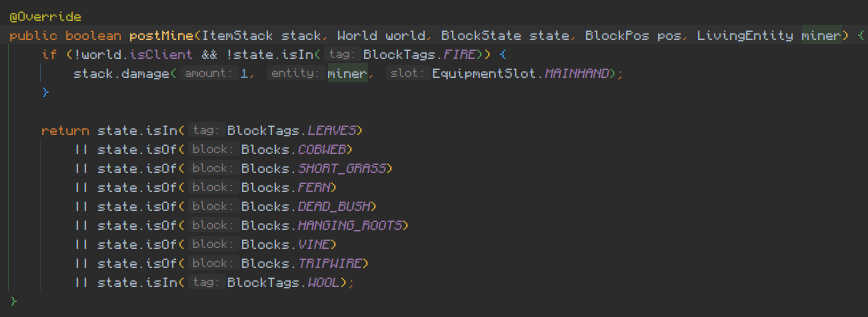
This is caused by the blocks that increment the statistic being hardcoded in the `ShearsItem#mineBlock` method. An image is attached showing this method (albeit in Yarn mappings where it is named `postMine`).
(Furthermore it shows that the minecraft:fire block tag is used to determine which blocks cause the shears to take durability damage, which also seems unintuitive and should probably be a separate tag that contains the fire tag, but that's probably a separate issue...)
The item use statistic for Shears is hardcoded to only increase upon breaking certain blocks.
This causes it to increase even when a custom tool component is used making those blocks inefficient for mining with the shears, and more importantly causes it to not increase for blocks other than the hardcoded ones.
This can even be seen with the default tool component, as Glow Lichen is listed in the default tool component of Shears and has a speed boost, but is not part of the hardcoded blocks that increment item use.
Steps to reproduce:
- Obtain regular Shears
- Break a Glow Lichen block
- Observe that the Item Use statistic for Shears does not increase despite the tool component indicating Glow Lichen is an efficient use of the item
Alternate steps to reproduce:
- Use a command to obtain Shears with a custom tool component that does not include White Wool (e.g. `/give @s shears[minecraft:tool={default_mining_speed:2.0,damage_per_block:1,rules:[ {blocks:"minecraft:obsidian",speed:50}
]}]`)
- Break a block that the custom tool component includes (e.g. Obsidian)
- Observe that the Item Use statistic for Shears does not increase despite the tool component indicating that block is an efficient use of the item
- Break a White Wool block
- Observe that the Item use statistic for Shears does increase despite the tool component indicating that White Wool is not an efficient use of the item
This behaviour is inconsistent with other items and is unintuitive.
This is caused by the blocks that increment the statistic being hardcoded in the `ShearsItem#mineBlock` method. An image is attached showing this method (albeit in Yarn mappings where it is named `postMine`).
(Furthermore it shows that the minecraft:fire block tag is used to determine which blocks cause the shears to take durability damage, which also seems unintuitive and should probably be a separate tag that contains the fire tag, but that's probably a separate issue...)
The item use statistic for Shears is hardcoded to only increase upon breaking certain blocks.
This causes it to increase even when a custom tool component is used making those blocks inefficient for mining with the shears, and more importantly causes it to not increase for blocks other than the hardcoded ones.
This can even be seen with the default tool component, as Glow Lichen is listed in the default tool component of Shears and has a speed boost, but is not part of the hardcoded blocks that increment item use.
Steps to reproduce:
- Obtain regular Shears
- Break a Glow Lichen block
- Observe that the Item Use statistic for Shears does not increase despite the tool component indicating Glow Lichen is an efficient use of the item
Alternate steps to reproduce:
- Use a command to obtain Shears with a custom tool component that does not include White Wool (e.g. `/give @s shears[minecraft:tool={default_mining_speed:2.0,damage_per_block:1,rules:[ {blocks:"minecraft:obsidian",speed:50}
]}]`)
- Break a block that the custom tool component includes (e.g. Obsidian)
- Observe that the Item Use statistic for Shears does not increase despite the tool component indicating that block is an efficient use of the item
- Break a White Wool block
- Observe that the Item use statistic for Shears does increase despite the tool component indicating that White Wool is not an efficient use of the item
This behaviour is inconsistent with other items and is unintuitive.
This is caused by the blocks that increment the statistic being hardcoded in the `ShearsItem#mineBlock` method. An image is attached showing this method (albeit in Yarn mappings where it is named `postMine`).
(Furthermore it shows that the minecraft:fire block tag is used to determine which blocks cause the shears to take durability damage, which also seems unintuitive and should probably be a separate tag that contains the fire tag, but that's probably a separate issue...)
The item use statistic for Shears is hardcoded to only increase upon breaking certain blocks.
This causes it to increase even when a custom tool component is used making those blocks inefficient for mining with the shears, and more importantly causes it to not increase for blocks other than the hardcoded ones.
This can even be seen with the default tool component, as Glow Lichen is listed in the default tool component of Shears and has a speed boost, but is not part of the hardcoded blocks that increment item use.
Steps to reproduce:
- Obtain regular Shears
- Break a Glow Lichen block
- Observe that the Item Use statistic for Shears does not increase despite the tool component indicating Glow Lichen is an efficient use of the item
Alternate steps to reproduce:
- Use a command to obtain Shears with a custom tool component that does not include White Wool (e.g. /give @s shears[minecraft:tool={default_mining_speed:2.0,damage_per_block:1,rules:[ {blocks:"minecraft:obsidian",speed:50}
]}] )
- Break a block that the custom tool component includes (e.g. Obsidian)
- Observe that the Item Use statistic for Shears does not increase despite the tool component indicating that block is an efficient use of the item
- Break a White Wool block
- Observe that the Item use statistic for Shears does increase despite the tool component indicating that White Wool is not an efficient use of the item
This behaviour is inconsistent with other items and is unintuitive.
This is caused by the blocks that increment the statistic being hardcoded in the `ShearsItem#mineBlock` method. An image is attached showing this method (albeit in Yarn mappings where it is named `postMine`).
(Furthermore it shows that the minecraft:fire block tag is used to determine which blocks cause the shears to take durability damage, which also seems unintuitive and should probably be a separate tag that contains the fire tag, but that's probably a separate issue...)
The item use statistic for Shears is hardcoded to only increase upon breaking certain blocks.
This causes it to increase even when a custom tool component is used making those blocks inefficient for mining with the shears, and more importantly causes it to not increase for blocks other than the hardcoded ones.
This can even be seen with the default tool component, as Glow Lichen is listed in the default tool component of Shears and has a speed boost, but is not part of the hardcoded blocks that increment item use.
Steps to reproduce:
- Obtain regular Shears
- Break a Glow Lichen block
- Observe that the Item Use statistic for Shears does not increase despite the tool component indicating Glow Lichen is an efficient use of the item
Alternate steps to reproduce:
- Use a command to obtain Shears with a custom tool component that does not include White Wool (e.g. /give @s shears[minecraft:tool={default_mining_speed:2.0,damage_per_block:1,rules:[ {blocks:"minecraft:obsidian",speed:50}
]}] )
- Break a block that the custom tool component includes (e.g. Obsidian)
- Observe that the Item Use statistic for Shears does not increase despite the tool component indicating that block is an efficient use of the item
- Break a White Wool block
- Observe that the Item use statistic for Shears does increase despite the tool component indicating that White Wool is not an efficient use of the item
This behaviour is inconsistent with other items and is unintuitive.
This is caused by the blocks that increment the statistic being hardcoded in the `ShearsItem#mineBlock` method. An image is attached showing this method (albeit in Yarn mappings where it is named `postMine`).
(Furthermore it shows that the minecraft:fire block tag is used to determine which blocks cause the shears to take durability damage, which also seems unintuitive and should probably be a separate tag that contains the fire tag, but that's probably a separate issue...)
The item use statistic for Shears is hardcoded to only increase upon breaking certain blocks.
This causes it to increase even when a custom tool component is used making those blocks inefficient for mining with the shears, and more importantly causes it to not increase for blocks other than the hardcoded ones.
This can even be seen with the default tool component, as Glow Lichen is listed in the default tool component of Shears and has a speed boost, but is not part of the hardcoded blocks that increment item use.
Steps to reproduce:
- Obtain regular Shears
- Break a Glow Lichen block
- Observe that the Item Use statistic for Shears does not increase despite the tool component indicating Glow Lichen is an efficient use of the item
Alternate steps to reproduce:
- Use a command to obtain Shears with a custom tool component that does not include White Wool (e.g. {{/give @s shears[minecraft:tool={default_mining_speed:2.0,damage_per_block:1,rules:[ {blocks:"minecraft:obsidian",speed:50}
}}
]}] )
- Break a block that the custom tool component includes (e.g. Obsidian)
- Observe that the Item Use statistic for Shears does not increase despite the tool component indicating that block is an efficient use of the item
- Break a White Wool block
- Observe that the Item use statistic for Shears does increase despite the tool component indicating that White Wool is not an efficient use of the item
This behaviour is inconsistent with other items and is unintuitive.
This is caused by the blocks that increment the statistic being hardcoded in the `ShearsItem#mineBlock` method. An image is attached showing this method (albeit in Yarn mappings where it is named `postMine`).
(Furthermore it shows that the minecraft:fire block tag is used to determine which blocks cause the shears to take durability damage, which also seems unintuitive and should probably be a separate tag that contains the fire tag, but that's probably a separate issue...)
The item use statistic for Shears is hardcoded to only increase upon breaking certain blocks.
This causes it to increase even when a custom tool component is used making those blocks inefficient for mining with the shears, and more importantly causes it to not increase for blocks other than the hardcoded ones.
This can even be seen with the default tool component, as Glow Lichen is listed in the default tool component of Shears and has a speed boost, but is not part of the hardcoded blocks that increment item use.
Steps to reproduce:
- Obtain regular Shears
- Break a Glow Lichen block
- Observe that the Item Use statistic for Shears does not increase despite the tool component indicating Glow Lichen is an efficient use of the item
Alternate steps to reproduce:
- Use a command to obtain Shears with a custom tool component that does not include White Wool (e.g. {{/give @s shears[minecraft:tool={default_mining_speed:2.0,damage_per_block:1,rules:[ {blocks:"minecraft:obsidian",speed:50}
}}
]}] )
- Break a block that the custom tool component includes (e.g. Obsidian)
- Observe that the Item Use statistic for Shears does not increase despite the tool component indicating that block is an efficient use of the item
- Break a White Wool block
- Observe that the Item use statistic for Shears does increase despite the tool component indicating that White Wool is not an efficient use of the item
This behaviour is inconsistent with other items and is unintuitive.
This is caused by the blocks that increment the statistic being hardcoded in the `ShearsItem#mineBlock` method. An image is attached showing this method (albeit in Yarn mappings where it is named `postMine`).
(Furthermore it shows that the minecraft:fire block tag is used to determine which blocks cause the shears to take durability damage, which also seems unintuitive and should probably be a separate tag that contains the fire tag, but that's probably a separate issue...)
The item use statistic for Shears is hardcoded to only increase upon breaking certain blocks.
This causes it to increase even when a custom tool component is used making those blocks inefficient for mining with the shears, and more importantly causes it to not increase for blocks other than the hardcoded ones.
This can even be seen with the default tool component, as Glow Lichen is listed in the default tool component of Shears and has a speed boost, but is not part of the hardcoded blocks that increment item use.
Steps to reproduce:
- Obtain regular Shears
- Break a Glow Lichen block
- Observe that the Item Use statistic for Shears does not increase despite the tool component indicating Glow Lichen is an efficient use of the item
Alternate steps to reproduce:
- Use a command to obtain Shears with a custom tool component that does not include White Wool, for example
/give @s shears[minecraft:tool={default_mining_speed:2.0,damage_per_block:1,rules:[{blocks:"minecraft:obsidian",speed:50}]}]
- Break a block that the custom tool component includes (e.g. Obsidian)
- Observe that the Item Use statistic for Shears does not increase despite the tool component indicating that block is an efficient use of the item
- Break a White Wool block
- Observe that the Item use statistic for Shears does increase despite the tool component indicating that White Wool is not an efficient use of the item
This behaviour is inconsistent with other items and is unintuitive.
This is caused by the blocks that increment the statistic being hardcoded in the `ShearsItem#mineBlock` method. An image is attached showing this method (albeit in Yarn mappings where it is named `postMine`).
(Furthermore it shows that the minecraft:fire block tag is used to determine which blocks cause the shears to take durability damage, which also seems unintuitive and should probably be a separate tag that contains the fire tag, but that's probably a separate issue...)
The item use statistic for Shears is hardcoded to only increase upon breaking certain blocks.
This causes it to increase even when a custom tool component is used making those blocks inefficient for mining with the shears, and more importantly causes it to not increase for blocks other than the hardcoded ones.
This can even be seen with the default tool component, as Glow Lichen is listed in the default tool component of Shears and has a speed boost, but is not part of the hardcoded blocks that increment item use.
Steps to reproduce:
- Obtain regular Shears
- Break a Glow Lichen block
- Observe that the Item Use statistic for Shears does not increase despite the tool component indicating Glow Lichen is an efficient use of the item
Alternate steps to reproduce:
- Use a command to obtain Shears with a custom tool component that does not include White Wool, for example
/give @s shears[minecraft:tool={default_mining_speed:2.0,damage_per_block:1,rules:[{blocks:"minecraft:obsidian",speed:50}]}]
- Break a block that the custom tool component includes
(e.g. Obsidian)- Observe that the Item Use statistic for Shears does not increase despite the tool component indicating that block is an efficient use of the item
- Break a White Wool block
- Observe that the Item use statistic for Shears does increase despite the tool component indicating that White Wool is not an efficient use of the item
This behaviour is inconsistent with other items and is unintuitive.
This is caused by the blocks that increment the statistic being hardcoded in the `ShearsItem#mineBlock` method. An image is attached showing this method (albeit in Yarn mappings where it is named `postMine`).
(Furthermore it shows that the minecraft:fire block tag is used to determine which blocks cause the shears to take durability damage, which also seems unintuitive and should probably be a separate tag that contains the fire tag, but that's probably a separate issue...)
The item use statistic for Shears is hardcoded to only increase upon breaking certain blocks.
This causes it to increase even when a custom tool component is used making those blocks inefficient for mining with the shears, and more importantly causes it to not increase for blocks other than the hardcoded ones.
This can even be seen with the default tool component, as Glow Lichen is listed in the default tool component of Shears and has a speed boost, but is not part of the hardcoded blocks that increment item use.
Steps to reproduce:
- Obtain regular Shears
- Break a Glow Lichen block
- Observe that the Item Use statistic for Shears does not increase despite the tool component indicating Glow Lichen is an efficient use of the item
Alternate steps to reproduce:
- Use a command to obtain Shears with a custom tool component that does not include White Wool, for example
/give @s shears[minecraft:tool={default_mining_speed:2.0,damage_per_block:1,rules:[{blocks:"minecraft:obsidian",speed:50}]}]
- Break a block that the custom tool component includes, for example Obsidian when using the command above
- Observe that the Item Use statistic for Shears does not increase despite the tool component indicating that block is an efficient use of the item
- Break a White Wool block
- Observe that the Item use statistic for Shears does increase despite the tool component indicating that White Wool is not an efficient use of the item
This behaviour is inconsistent with other items and is unintuitive.
This is caused by the blocks that increment the statistic being hardcoded in the `ShearsItem#mineBlock` method. An image is attached showing this method (albeit in Yarn mappings where it is named `postMine`).
(Furthermore it shows that the minecraft:fire block tag is used to determine which blocks cause the shears to take durability damage, which also seems unintuitive and should probably be a separate tag that contains the fire tag, but that's probably a separate issue...)
![[Mod] turbo](../../../data/avatars/users/92867.png)
As mentioned earlier, we only accept bugs that affect gameplay. If you can't identify how this impacts vanilla gameplay, it won't be considered a valid issue.
Shnupbups: Let's keep the bug tracker a friendly and respectful place for everyone. We appreciate your contributions and value each member's input. Remember, user-f2760 is a long-term member and former moderator, which means he's well-acquainted with the rules and guidelines.


One of the zombie skins in Sphax PureBDCraft has a skeleton head. This is not a bug. This is your texture pack.
Whoops, actually a bug with a mod. Sorry for wasting your time.
No, it isn't. It doesn't crash, just the item doesn't drop.
I get this crash whenever I open a map in the newest snapshot. (Something to do with the new colours?)
NOTE: It was one a superflat map that I've been using for snapshot testing since 1.3.
This happens whenever any typo is made in an Identifier. The fact that this not only happens, but that there is absolutely no warning in the console about it is awful for debugging datapacks.
Still happens in 1.14.1 release.
What? This isn't a feature request at all, it's a report of a blatant inconsistency, something which has time and time and again been considered a valid issue on this JIRA.
What the original issue
MC-86007neglects to mention, and what this issue does mention, is how the Glass Bottle is dropped in-world if there are multiple Dragon's Breath items in the input slot, but not if there is only one. This inconsistent behaviour, and a code analysis, makes it very clear that this is a bug and certainly should not be marked as Works as Intended like that original issue was.It's worth mentioning that the code analysis indicates the intended behaviour is that a Glass Bottle would be retained in the input slot of the Brewing Stand in this scenario. The reason it doesn't is because the method call to get the stack's recipe remainder is done after the stack is already made empty, thereby essentially getting the recipe remainder of Air. This is clearly the cause of this bug.
A potential reason why that seemingly intended behaviour might not be desirable is that it might break automatic brewing systems, as Hoppers cannot pull items from the input slot of a Brewing Stand. A solution that would fix the issue whilst avoiding said undesirable breakages is to simply always drop the recipe remainder in the world, rather than ever trying to insert it into the input slot.
Not a duplicate of
MC-260093, that one concerned the particles moving the wrong way when held in the offhand, this one concerns the particles moving the wrong way when the main hand is set to the left. Similar, but distinct, issues.This will have an impact on datapacks in the coming weeks when these are further developed. I am reporting ahead of time to ensure that doesn't happen!
Please try to know what you're talking about before saying this issue is invalid.
So you want me to wait until this codec is used to generate a JSON file with the typo before reporting the issue, despite having the ability to prevent the issue now?
If someone saw your fusebox sparking and emitting smoke, and reported it to you, would you say "sorry mate but it hsan't actually caught fire and exploded yet, so I don't care"?
Okay, that was an overly ridiculous analogy, but my point is this isn't just a typo in the code, but a typo that will be visible in the JSON files of datapacks in the very near future.
And I think instead of minimodding this issue, perhaps you should leave it to the actual moderators and Mojang themselves to decide the validity of the issue.
If they deem it invalid, then I guess I'll just... wait until the JSON file is generated and submit an issue saying the typo exists in that JSON file... which is exactly the same issue as this.
Same for the 'A Furious Cocktail' advancement, which should contain the new effects that can be brewed as potions.
That issue was marked as invalid due to covering blocks added prior to 1.15. The Piglin Head block was added after 1.15, and as such any parity issues related to it are valid.
How is this a feature request or suggestion? This is as much of an issue as any other data being lost when an entity is bucketed. MC-271252, MC-279904 and MC-279905 are all valid. It's not even a matter of it only being possibly seen through commands, as MC-271252's behavior is only seen with commands.