 Sphax
Sphax
 MC-1185



The "diamond" (or
it is the representation ofthe Nether starmaybe) is not a cube inside the Beacon block: it is too high (1 pixel more on height for sides)It should be a cube (top
= sides).The "diamond" (or the Nether star) is not a cube inside the Beacon block: it is too high (1 pixel more on height for sides)
It should be a cube (top face = sides faces).
Some Mobs disappear after save&quit and reload or after unloading/loading the chunk they are in
Bad Clock and Compassare
It's an OLD bug but I want to report it.
Clock and compass are badly rendered in the "items.png" spritesheet of HD texturepacks. Instead of beeing rendered in their correct HD slot coordinates in "items.png", they are still rendered in their SD slot coordinates leading to display a clock and a compass inside some other items (like armors).
Those core dynamic items should be rendered in the correct slot of HD texturepacks (it will prevent the display of core animations inside other blocks).
I know, MCPatcher and Optifine are doing this very well but, it should be Minecraft which should have a "basic" support for HD texturepacks (MCPatcher and Optifine will still have a lot of benefits like custom animations).
It's an OLD bug but I want to report it.
Clock and compass are badly rendered in the "items.png" spritesheet of HD texturepacks. Instead of beeing rendered in their correct HD slot coordinates in "items.png", they are still rendered in their SD slot coordinates leading to display a clock and a compass inside some other items (like armors).
Those core dynamic items should be rendered in the correct slot of HD texturepacks (it will prevent the display of core animations inside other blocks).
I know, MCPatcher and Optifine are doing this very well but, it should be Minecraft which should have a "basic" support for HD texturepacks (MCPatcher and Optifine will still have a lot of benefits like custom animations).
It's an OLD bug but I want to report it.
Clock and compass are badly rendered in the "items.png" spritesheet of HD texturepacks. Instead of beeing rendered in their correct HD slot coordinates in "items.png", they are still rendered in their SD slot coordinates leading to display a clock and a compass inside some other items (like armors).
Those core dynamic items should be rendered in the correct slot of HD texturepacks (it will prevent the display of core animations inside other blocks).
I know, MCPatcher and Optifine are doing this very well but, it should be Minecraft which should have a "basic" support for HD texturepacks (MCPatcher and Optifine will still have a lot of benefits like custom animations).
It's an OLD bug but I want to report it.
Clock and compass are badly rendered in the "items.png" spritesheet of HD texturepacks.
(HD = above default resolution of 16x16)Instead of beeing rendered in their correct HD slot coordinates in "items.png", they are still rendered in their SD slot coordinates leading to display a clock and a compass inside some other items (like armors).
Those core dynamic items should be rendered in the correct slot of HD texturepacks (it will prevent the display of core animations inside other blocks).
I know, MCPatcher and Optifine are doing this very well but, it should be Minecraft which should have a "basic" support for HD texturepacks (MCPatcher and Optifine will still have a lot of benefits like custom animations).
It's a way OLD bug but I want to report it.
The thickness for items in hand is badly displayed for HD texturepacks (HD = above default resolution of 16x16).
I'll add a screenshot if necessary.
It's a way OLD bug but I want to report it.
The thickness for items in hand is badly displayed for HD texturepacks (HD = above default resolution of 16x16).
I'll add a screenshot if necessary.
It's an OLD bug but I want to report it.
All the core animations of Minecraft are badly rendered in the "terrain.png" spritesheet of HD texturepacks.Instead of beeing rendered in their correct HD slot coordinates in "terrain.png", they are still rendered in their SD slot coordinates leading to display the animations inside some other blocks.Those core animations should be rendered in the correct slot of HD texturepacks (it will prevent the display of core animations inside other blocks).
I know, MCPatcher and Optifine are doing this very well but, it should be Minecraft which should have a "basic" support for HD texturepacks (MCPatcher and Optifine will still have a lot of benefits like custom animations).
It's an OLD bug but I want to report it.
All the core animations of Minecraft are badly rendered in the "terrain.png" spritesheet of HD texturepacks.
(HD = above default resolution of 16x16)Instead of beeing rendered in their correct HD slot coordinates in "terrain.png", they are still rendered in their SD slot coordinates leading to display the animations inside some other blocks.
Those core animations should be rendered in the correct slot of HD texturepacks (it will prevent the display of core animations inside other blocks).
I know, MCPatcher and Optifine are doing this very well but, it should be Minecraft which should have a "basic" support for HD texturepacks (MCPatcher and Optifine will still have a lot of benefits like custom animations).
Windows7 x64, Java7
Windows7 x64, Java7 64-bit
When changing textures of banners located in "assets\minecraft\textures\entity\banner" of a Resourcepack, the textures do not work if their size is not exactly the same as Vanilla ones preventing HD textures.
If changing texture for Banners to new HD textures (with correct scale), no texture at all will be displayed in game leaving the banner the default color it was made off.
If changing texture for Banners to new textures of the same size, everything works as intended.
What I expected to happen was:
custom HD textures for Banners displayed ingameWhat actually happened was:
custom HD textures for Banners invisible ingame (not displayed or not used)
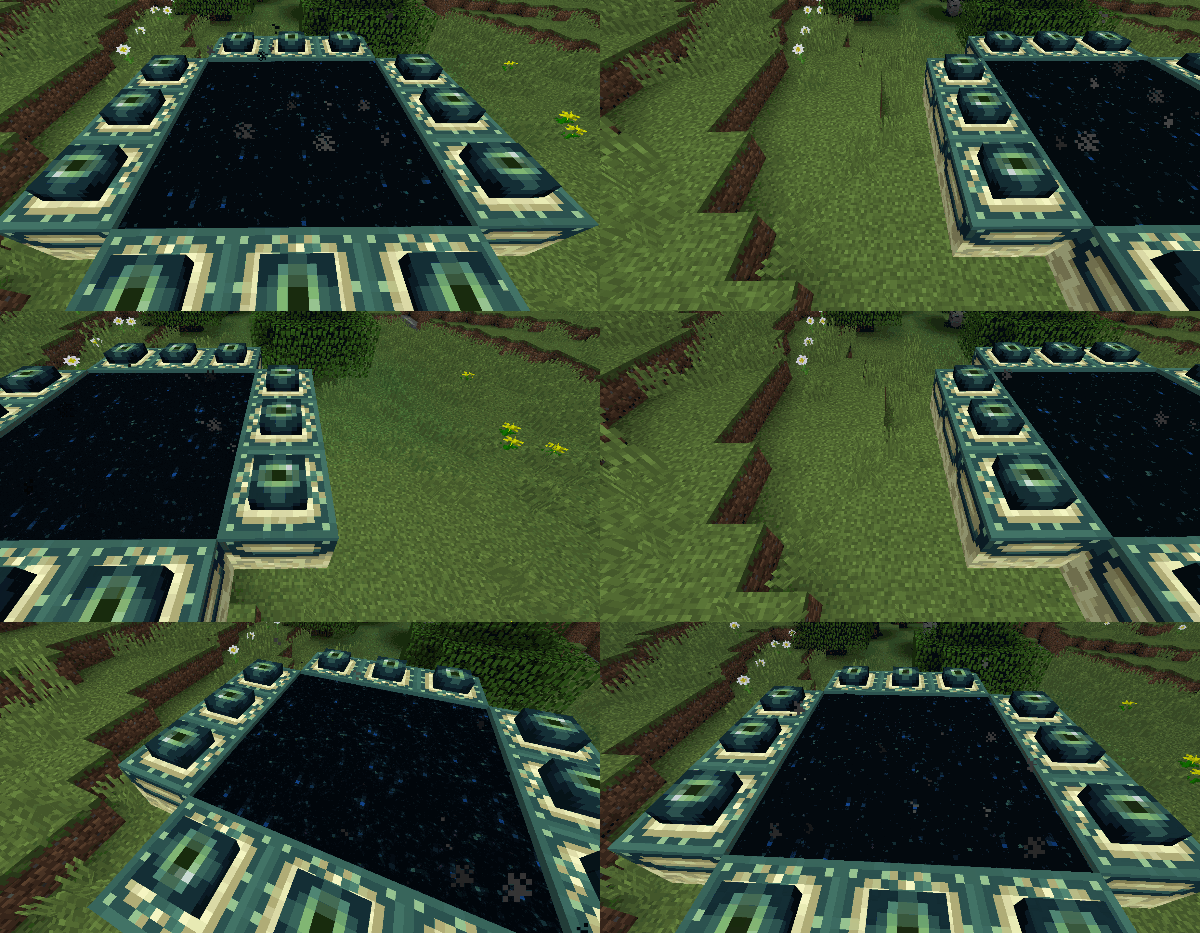
In 1.10.x and previous versions, the End Portal effect was using a nice parallax effect which gave sensation of another world.
Since 1.11.x, the End Portal effect is using a broke parallax effect, making weird sensation, especially when cursor is visible.
See the 2 GIF trying to show the difference between the two. Not sure this change is intended knowing the parallax is wrong and the stars are now animated (they were static before).
> 1.10- effect = Parallax effect
withmultiple layers> 1.11+ effect = No Parallax
, nomultiple layersIn 1.10.x and previous versions, the End Portal effect was using a nice parallax effect which gave sensation of another world.
Since 1.11.x, the End Portal effect is using a broke parallax effect, making weird sensation, especially when cursor is visible.
See the 2 GIF trying to show the difference between the two. Not sure this change is intended knowing the parallax is wrong and the stars are now animated (they were static before).
> 1.10- effect = Parallax effect on multiple layers (with different offsets)
> 1.11+ effect = No Parallax on multiple layers (same offsets)
![[Mod] violine1101](../../../data/avatars/users/92858.png)
@ziqi nubz: Knowing the result is glitchy, I think it is a bug (functionnal and graphical)...
I second this issue. The chests opening should check what is the above block (if not transparent = no open, if transparent a finest check should be done).
Huuu... O_O'
Minecraft supports by default any texturepack.
Considering that texturepacks support is a feature of Minecraft, HD texturepacks should be supported.
The bad thickness in Minecraft Vanilla with HD texturepack is an issue of Minecraft Vanilla!
I disagree with the "resolved" state.
Minecraft supports by default any texturepack.
Considering that texturepacks support is a feature of Minecraft, HD texturepacks should be supported as well!
This issue IS a Minecraft Vanilla issue (with HD texturepack)!
I disagree with the "resolved" state.
Minecraft supports by default any texturepack.
Considering that texturepacks support is a feature of Minecraft, HD texturepacks should be supported as well!
This issue IS a Minecraft Vanilla issue (with HD texturepack)!
I disagree with the "resolved" state.
Not really a bug but a design fault.
If they are aware why not reporting the bugs related to bad HD texturepacks support then?
If they are aware why not reporting the bugs related to bad HD texturepacks support then?
@Pahimar: You are wrong. Minecraft supports very well any resolution of texturepacks without any Mod or patch installed. But it is buggy, so Vanilla Minecraft with HD texturepack works but the result is Buggy, that's why I reported bugs related to HD TP.
@Selbram: If they are aware why not reporting the bugs related to bad HD texturepacks support then?
And it's not planned? Or it will never be planned?
But OK. Close this issue then.
What is the fix of this (not really) issue?
It is ridiculous to consider the bugs with HD texturepacks on Vanilla Minecraft as invalid bugs knowing that the HD texturepacks will be supported in Minecraft in the future...
I vote for something more realistic and without graphic bug/glitch. The chests should not open the lid if something is blocking it above...
I also vote for a new storage openable from the front like closets (even though it would be more expensive).
Glad to know this bug is finally considered as a bug in Minecraft 1.5.
This has finally been solved in Minecraft 1.5
Anon Ymus : Slabs are non solid blocks for technical reasons not for gamedesign reasons.
Before the animated chest lid, this "bug" wasn't graphically glitched.
Now that the chests have an animated lid, everybody agree with the fact that the result IS glitched.
That means, this is a bug.
Also, it can be considered as a bug because the fact that a block above the chest is preventing the chest to open means that any block which is directly above the chest should also prevent the opening...
However, the solution can be anything that Mojang decides of course.
Glad to know this issue will be fixed. My report
MC-1186wasn't useless.I vote for this issue to be solved.
That was a pain to texture the chest while knowing a part of those will overlap. And even knowing they overlaps, the lid and the body of the chest 3D model are not properly aligned and the 1pixel (in 16x) still produces graphical glitches.
It still happens for me with last snapshot but the lag spikes seems to be shorter...
The problem happens a lot more when using HD texturepacks (128x for example). Have a look to my report for more details:
MC-8598May be related to
MC-2176(andMC-8598)OK
My computer have 4GB RAM and I have lag spikes. It seems a bit better with last snapshot but they are still there and happens every ~30 seconds and takes ~10 seconds... However, the lag spikes in Minecraft 1.4 were "smaller"...
I have a Nvidia graphic card but nothing on the tweaks mentionned above have resolved the problem... The snapshot 13w04a is better in performance than the previous version but I still gets Lag spikes.
Tails: Yes and it's not the same bug as MC-1794
Please, stop speaking about how the game is made technically...
Ask this questions to you:
What is in the cauldron? Water
What water does on entities on fire? It extinguishes it
What water filled cauldrons do on entities on fire? Nothing = This is a functional bug (but not a technical bug)
If a new player looks at a cauldron, he can see water in it. It's not that important to know that what he see is not technically a water block... What is important is that the water he looks at doesn't extinguishes fire... That's an inconsistent behavior which can be called a "functional bug".
Functional bug = A feature which works well technically but has an inconsistent behavior vs other features (like a furnace which would not be able to use charcoal when he can use coal as fuel)
Technical bug = A feature which doesn't work well technically (like a memory leak or a missing polygon in a 3D model)
This report IS a functional bug but is not a technical bug. Then it's up to Mojang team to decide on what they do with it.
Gabriel: Minecraft has some illogical features by gamedesign...
Ok for me as soon as the Z-fighting is fixed...
This bug is due to alpha transparency on textures. However, it's still a bug because we don't know if Minecraft is actually supporting alpha transparency on textures or not... Some textures need to be semi-transparent (water, ice, rain, firework flash...), however some others are creating glitches (grass, vines, leaves...).
I don't know if it's a bug or WAD because I remember that Notch said ALL mobs will be persistent in the future... Currently, I understand only some of them are persistent...
I agree with Jomik, it totally 2 different problems.
This one is related to alpha transparency AND fog. The result is "white" pixels in textures".
The other one is not related to alpha transparency NOR fog... The result is "white" lines like between polygons.
Kumasasa: This issue is due to mipmapping when it is activated (forced) in the graphiccard settings. Minecraft 3D engine seems to not be able to manage it well. It's solved when forcing mipmapping disabled.
You should read this tweet of Dinnerbone about this lag issue in MC1.5.1 (and also in snapshot 13w16a) : https://twitter.com/Dinnerbone/status/325166727098941440
The only thing I said is that the lid collisionning hardly with other things is a graphic bug... You can't say "no, it's not" when the result is graphically ugly and not intended... I think this should be fixed. One solution would be to transform chests with blocks above them to closets for example.
As said on Twitter:
That works well for Mobs, Minecart, Signs, Chest, etc... And Minecraft is "intended" to support ResourcePacks in other sizes than 16x isn't it? :s
And that since months now that Minecraft officially supports ResourcePacks in SD or HD...
Splash potions have a blue texture instead of the colored one in 14w30b
Confirmed in 14w30b
You're right John. Infact it works if ALL textures of the banners are resized to the exact same size. Thanks for helping
Sill a bug in 1.11
Reordering elements in 3D models JSON files is not a good way to fix the issue, it just hides the problem.
Looks like the bed issue has been fixed by editing the model itself (in
MC-115838the black dot is a bed foot which should be hidden)That bug is back underwater in Snapshot 18w15a (see screenshot 2018-04-12 13.28.12)
Related (old) bug:
MC-9188Duplicate of
MC-128234Related to that same bug:
MC-128341Related report:
MC-128243I agree this is a bad decision to say it "Works as intended"... The effect since 1.11 is very ugly and frustrating (because the image basically follows the cursor) while it was a nice Parallax effect before with depth sensation.
The new FX is like a 2D texture following the cursor... And a 2D texture following the cursor while world does not is very frustrating...
Related Reddit thread: https://www.reddit.com/r/Minecraft/comments/59y3nf/til_since_16w40a_end_portals_rendering_has_changed/
That new bug is looking exactly like what it was in good ol' days when HD font were not supported.
Please fix that (again)!
I added an example of the TTF font, rendered with aliasing border, like on a black background and without alpha transparency support... Please, if TTF is the only way now to customize the font for Resourcepacks, make an option somewhere to select its resolution and allow alpha transparency.
Also, with TTF, please use true bold and italic, not the current trick (as shown in attachments).
@Bemoty: The server is not modified, it's a true issue with any HD textures on Minecraft Bedrock and I've also reported it to Microsoft/Mojang team! Please re-open this issue because it is valid and not fixed yet.
That impacts ALL HD resource packson Bedrock!
Still happen on 1.13