 Yoann Petremann
- ypetremann
- ypetremann
- Europe/Stockholm
- Yes
- No
 MC-190
![[Mojang] Jeb (Jens Bergensten)](../../../data/assets/gravatar/jeb.jpeg)
![[Mojang] Grum (Erik Broes)](../../../data/assets/gravatar/grum.png)
![[Mojang] Searge (Michael Stoyke)](../../../data/assets/gravatar/searge.png)
![[Mojang] Cory Scheviak](../../../data/avatars/users/92893.png)


![[Mojang] SystemInvecklare](../../../data/avatars/users/83597.png)














Steps:
1) Use minecraft 1.4.2 or before
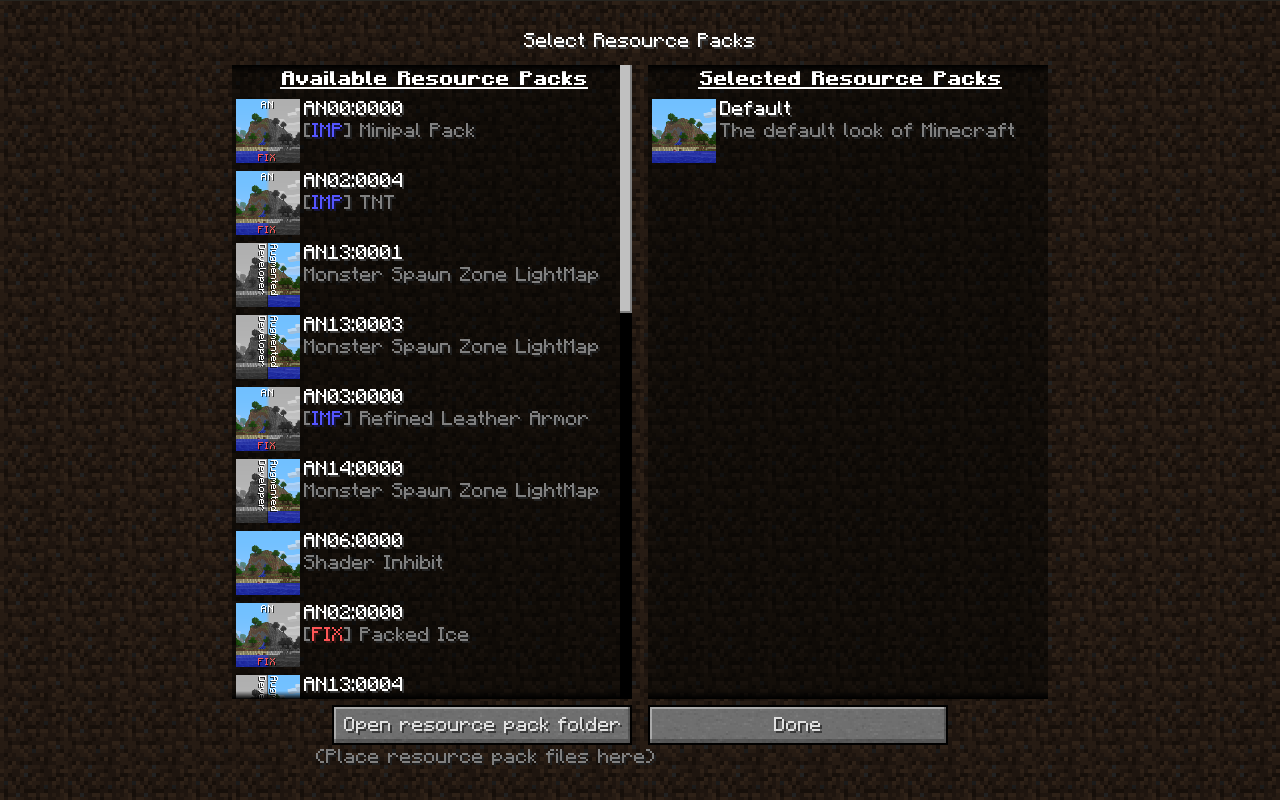
2) Launch minecraft, click on texturepacks and after on open folder
2) Put test.zip (below) in the opened folder
3) Set test.zip as texturepack and join a game
4) place somes wooden or netherbrick fences or mossy cobblestone or cobblestone walls like on the images below.
Description:Texture on fences and walls sides seem to be misaligned and not the same everywhere.
We can ignore the top face since it is correctly aligned to blocks.
Fence 2.png, Fence 4.png, Wall 2.png and Wall 4.png are there to help find your way.
terrain.png is for you to see the changes on terrain.png.
test.zip is a texture pack for you to test, don't need any mods.
Expected:Having side texture correctly "connected" and aligned like in Wall 1.png and Fence 1.png but on all sides
Actual:Textures are not correctly aligned and don't correctly connect like in
Wall 3.png and Fence 3.pngSteps:
1) Use minecraft 1.4.2 or before
2) Launch minecraft, click on texturepacks and after on open folder
2) Put test.zip (below) in the opened folder
3) Set test.zip as texturepack and join a game
4) place somes wooden or netherbrick fences or mossy cobblestone or cobblestone walls like on the images below.
Description:Texture on fences and walls sides seem to be misaligned and not the same everywhere.
We can ignore the top face since it is correctly aligned to blocks.
Fence 2.png, Fence 4.png, Wall 2.png and Wall 4.png are there to help find your way.
terrain.png is for you to see the changes on terrain.png.
test.zip is a texture pack for you to test, don't need any mods.
Expected:Having side texture correctly "connected" and aligned like in Wall 1.png and Fence 1.png but on all sides
Actual:Textures are not correctly aligned and don't correctly connect like in Wall 3.png and Fence 3.png
[VISUAL][VISUAL] Fence and Wall misaligned textures
_terrain.png
Steps:
1) Use minecraft 1.4.2 or before
2) Launch minecraft, click on texturepacks and after on open folder
2) Put test.zip (below) in the opened folder
3) Set test.zip as texturepack and join a game
4) place somes wooden or netherbrick fences or mossy cobblestone or cobblestone walls like on the images below.
Description:Texture on fences and walls sides seem to be misaligned and not the same everywhere.
We can ignore the top face since it is correctly aligned to blocks.
Fence 2.png, Fence 4.png, Wall 2.png and Wall 4.pngare there to help find your way.te
rrain.pngisfor you to see the changes on terrain.png.test.zip
is a texture pack for you to test, don't need any mods.
Expected:Having side texture correctly "connected" and aligned like in Wall 1.png and Fence 1.png but on all sides
Actual:Textures are not correctly aligned and don't correctly connect like in Wall 3.png and Fence 3.png
Steps:
1) Use minecraft 1.4.2 or before
2) Launch minecraft, click on texturepacks and after on open folder
2) Put test.zip (below) in the opened folder ( or install misa texture pack, need to patch minecraft with mcpatcher)
3) Set test.zip ( or misa texture pack ) as texturepack and join a game
4) place somes wooden or netherbrick fences or mossy cobblestone or cobblestone walls like on the images below.
Description:Texture on fences and walls sides seem to be misaligned and not the same everywhere.
We can ignore the top face since it is correctly aligned to blocks.
terrain.png is for you to see the changes on terrain.png.
test.zip is a texture pack for you to test, don't need any mods.
The misa images show the problem with a texture pack that have done the same thing as me.
On misa bad images, you can see a "glitch" at the connection of the two fence or wall blocks
Expected:Having side texture correctly "connected" and aligned like in Wall 1.png and Fence 1.png but on all sides
Actual:Textures are not correctly aligned and don't correctly connect like in Wall 3.png and Fence 3.png
Steps:
1) Use minecraft 1.4.
2or before
2) Launch minecraft, click on texturepacks and after on open folder
2) Put test.zip (below) in the opened folder ( or install misa texture pack, need to patch minecraft with mcpatcher)
3) Set test.zip ( or misa texture pack ) as texturepack and join a game
4) place somes wooden or netherbrick fences or mossy cobblestone or cobblestone walls like on the images below.
Description:Texture on fences and walls sides seem to be misaligned and not the same everywhere.
We can ignore the top face since it is correctly aligned to blocks.
terrain.png is for you to see the changes on terrain.png.
test.zip is a texture pack for you to test, don't need any mods.
The misa images show the problem with a texture pack that have done the same thing as me.
On misa bad images, you can see a "glitch" at the connection of the two fence or wall blocks
Expected:Having side texture correctly "connected" and aligned like in Wall 1.png and Fence 1.png but on all sides
Actual:Textures are not correctly aligned and don't correctly connect like in Wall 3.png and Fence 3.png
Steps:
1) Use minecraft 1.4.7, 13w01b or before ( if you use a version 12w02a or above use test2.zip instead of test.zip )
2) Launch minecraft, click on texturepacks and after on open folder
2) Put test.zip (below) in the opened folder ( or install misa texture pack, need to patch minecraft with mcpatcher)
3) Set test.zip ( or misa texture pack ) as texturepack and join a game
4) place somes wooden or netherbrick fences or mossy cobblestone or cobblestone walls like on the images below.
Description:Texture on fences and walls sides seem to be misaligned and not the same everywhere.
We can ignore the top face since it is correctly aligned to blocks.
terrain.png is for you to see the changes on terrain.png.
test.zip is a texture pack for you to test, don't need any mods.
The misa images show the problem with a texture pack that have done the same thing as me.
On misa bad images, you can see a "glitch" at the connection of the two fence or wall blocks
Expected:Having side texture correctly "connected" and aligned like in Wall 1.png and Fence 1.png but on all sides
Actual:Textures are not correctly aligned and don't correctly connect like in Wall 3.png and Fence 3.png
Steps:
1) Use minecraft 1.4.7, 13w01b or before ( if you use a version 12w02a or above use test2.zip instead of test.zip )
2) Launch minecraft, click on texturepacks and after on open folder
2) Put test.zip (below) in the opened folder ( or install misa texture pack, need to patch minecraft with mcpatcher)
3) Set test.zip ( or misa texture pack ) as texturepack and join a game
4) place somes wooden or netherbrick fences or mossy cobblestone or cobblestone walls like on the images below.
Description:Texture on fences and walls sides seem to be misaligned and not the same everywhere.
We can ignore the top face since it is correctly aligned to blocks.
terrain.png is for you to see the changes on terrain.png.
test.zip is a texture pack for you to test, don't need any mods.
The misa images show the problem with a texture pack that have done the same thing as me.
On misa bad images, you can see a "glitch" at the connection of the two fence or wall blocks
Expected:Having side texture correctly "connected" and aligned like in Wall 1.png and Fence 1.png but on all sides
Actual:Textures are not correctly aligned and don't correctly connect like in Wall 3.png and Fence 3.png
Steps:
1) Use minecraft 1.4.7, 13w01b or before ( if you use a version 12w02a or above use test2.zip instead of test.zip, you can test )
2) Launch minecraft, click on texturepacks and after on open folder
2) Put test.zip (below) in the opened folder ( or install misa texture pack, need to patch minecraft with mcpatcher ( not availlable at the moment))
3) Set test.zip ( or misa texture pack ) as texturepack and join a game
4) place somes wooden or netherbrick fences or mossy cobblestone or cobblestone walls like on the images below.
Description:Texture on fences and walls sides seem to be misaligned and not the same everywhere.
We can ignore the top face since it is correctly aligned to blocks.
terrain.png is for you to see the changes on terrain.png.
test.zip is a texture pack for you to test, don't need any mods.
The misa images show the problem with a texture pack that have done the same thing as me.
On misa bad images, you can see a "glitch" at the connection of the two fence or wall blocks
Expected:Having side texture correctly "connected" and aligned like in Wall 1.png and Fence 1.png but on all sides
Actual:Textures are not correctly aligned and don't correctly connect like in Wall 3.png and Fence 3.png
Steps:
1) Use minecraft 1.4.7, 13w01b or before ( if you use a version 12w02a or above use test2.zip instead of test.zip, you can test )
2) Launch minecraft, click on texturepacks and after on open folder
2) Put test.zip (below) in the opened folder ( or install misa texture pack, need to patch minecraft with mcpatcher ( not availlable at the moment))
3) Set test.zip ( or misa texture pack ) as texturepack and join a game
4) place somes wooden or netherbrick fences or mossy cobblestone or cobblestone walls like on the images below.
Description:Texture on fences and walls sides seem to be misaligned and not the same everywhere.
We can ignore the top face since it is correctly aligned to blocks.
terrain.png is for you to see the changes on terrain.png.
test.zip is a texture pack for you to test, don't need any mods.
The misa images show the problem with a texture pack that have done the same thing as me.
On misa bad images, you can see a "glitch" at the connection of the two fence or wall blocks
Expected:Having side texture correctly "connected" and aligned like in Wall 1.png and Fence 1.png but on all sides
Actual:Textures are not correctly aligned and don't correctly connect like in Wall 3.png and Fence 3.png
*Solution:
Old New
Steps:
1) Use minecraft 1.4.7, 13w01b or before ( if you use a version 12w02a or above use test2.zip instead of test.zip, you can test )
2) Launch minecraft, click on texturepacks and after on open folder
2) Put test.zip (below) in the opened folder ( or install misa texture pack, need to patch minecraft with mcpatcher ( not availlable at the moment))
3) Set test.zip ( or misa texture pack ) as texturepack and join a game
4) place somes wooden or netherbrick fences or mossy cobblestone or cobblestone walls like on the images below.
Description:Texture on fences and walls sides seem to be misaligned and not the same everywhere.
We can ignore the top face since it is correctly aligned to blocks.
terrain.png is for you to see the changes on terrain.png.
test.zip is a texture pack for you to test, don't need any mods.
The misa images show the problem with a texture pack that have done the same thing as me.
On misa bad images, you can see a "glitch" at the connection of the two fence or wall blocks
Expected:Having side texture correctly "connected" and aligned like in Wall 1.png and Fence 1.png but on all sides
Actual:Textures are not correctly aligned and don't correctly connect like in Wall 3.png and Fence 3.png
*Solution:
Old New Steps:
1) Use minecraft 1.4.7, 13w01b or before ( if you use a version 12w02a or above use test2.zip instead of test.zip, you can test )
2) Launch minecraft, click on texturepacks and after on open folder
2) Put test.zip (below) in the opened folder ( or install misa texture pack, need to patch minecraft with mcpatcher ( not availlable at the moment))
3) Set test.zip ( or misa texture pack ) as texturepack and join a game
4) place somes wooden or netherbrick fences or mossy cobblestone or cobblestone walls like on the images below.
Description:Texture on fences and walls sides seem to be misaligned and not the same everywhere.
We can ignore the top face since it is correctly aligned to blocks.
terrain.png is for you to see the changes on terrain.png.
test.zip is a texture pack for you to test, don't need any mods.
The misa images show the problem with a texture pack that have done the same thing as me.
On misa bad images, you can see a "glitch" at the connection of the two fence or wall blocks
Expected:Having side texture correctly "connected" and aligned like in Wall 1.png and Fence 1.png but on all sides
Actual:Textures are not correctly aligned and don't correctly connect like in Wall 3.png and Fence 3.png
*Solution:RenderBlocks.javapublic class RenderBlocks extends RenderBlocksOld { public void renderEastFace(Block par1Block, double par2, double par4, double par6, Icon texture) { Tessellator tessellator = Tessellator.instance; if (this.hasOverrideBlockTexture()) { texture = this.overrideBlockTexture; } /* BEFORE * double var10 = (double)texture.getInterpolatedU(this.renderMinX * 16.0D); double var12 = (double)texture.getInterpolatedU(this.renderMaxX * 16.0D); /* END BEFORE */ /* AFTER : */ double var10 = (double)texture.getInterpolatedU(16.0D - this.renderMaxX * 16.0D); double var12 = (double)texture.getInterpolatedU(16.0D - this.renderMinX * 16.0D); /* END AFTER */ double var14 = (double)texture.getInterpolatedV(16.0D - this.renderMaxY * 16.0D); double var16 = (double)texture.getInterpolatedV(16.0D - this.renderMinY * 16.0D); /* ... */ } public void renderSouthFace(Block par1Block, double par2, double par4, double par6, Icon texture) { Tessellator tessellator = Tessellator.instance; if (this.hasOverrideBlockTexture()) { texture = this.overrideBlockTexture; } /* BEFORE * double var10 = (double)texture.getInterpolatedU(this.renderMinZ * 16.0D); double var12 = (double)texture.getInterpolatedU(this.renderMaxZ * 16.0D); /* END BEFORE */ /* AFTER : */ double var10 = (double)texture.getInterpolatedU(16.0D - this.renderMaxZ * 16.0D); double var12 = (double)texture.getInterpolatedU(16.0D - this.renderMinZ * 16.0D); /* END AFTER */ double var14 = (double)texture.getInterpolatedV(16.0D - this.renderMaxY * 16.0D); double var16 = (double)texture.getInterpolatedV(16.0D - this.renderMinY * 16.0D); /* ... */ } }
[VISUAL]Fence and Wall misaligned textures[VISUAL] Misaligned textures on south and east faces for non-full blocks
Steps:1) Use minecraft 1.4.7, 13w01b or before ( if you use a version 12w02a or above use test2.zip instead of test.zip, you can test )
2) Launch minecraft, click on texturepacks and after on open folder
2) Put test.zip (below) in the opened folder ( or install misa texture pack, need to patch minecraft with mcpatcher ( not availlable at the moment))
3) Set test.zip ( or misa texture pack ) as texturepack and join a game
4) place somes wooden or netherbrick fences or mossy cobblestone or cobblestone walls like on the images below.
Description:T
exture on fences and walls sides seem to be misaligned and not the same everywhere.
We can ignore the top face since it is correctly aligned to blocks.terrain.png is for you to see the changes on terrain.png.
test.zip is a texture pack for you to test, don't need any mods.
The misa images show the problem with a texture pack that have done the same thing as me.
On misa bad images, you can see a "glitch" at the connection of the two fence or wall blocks
Expected:Having
sidetexture correctly"connected" and aligned like inWall 1.png and Fence 1.png but on all sides
Actual:Textures are
not correctly aligned and don't correctly connect like inWall 3.png and Fence 3.png
*Solution:RenderBlocks.javapublic class RenderBlocks extends RenderBlocksOld { public void renderEastFace(Block par1Block, double par2, double par4, double par6, Icon texture) { Tessellator tessellator = Tessellator.instance; if (this.hasOverrideBlockTexture()) { texture = this.overrideBlockTexture; } /* BEFORE * double var10 = (double)texture.getInterpolatedU(this.renderMinX * 16.0D); double var12 = (double)texture.getInterpolatedU(this.renderMaxX * 16.0D); /* END BEFORE */ /* AFTER : */ double var10 = (double)texture.getInterpolatedU(16.0D - this.renderMaxX * 16.0D); double var12 = (double)texture.getInterpolatedU(16.0D - this.renderMinX * 16.0D); /* END AFTER */ double var14 = (double)texture.getInterpolatedV(16.0D - this.renderMaxY * 16.0D); double var16 = (double)texture.getInterpolatedV(16.0D - this.renderMinY * 16.0D); /* ... */ } public void renderSouthFace(Block par1Block, double par2, double par4, double par6, Icon texture) { Tessellator tessellator = Tessellator.instance; if (this.hasOverrideBlockTexture()) { texture = this.overrideBlockTexture; } /* BEFORE * double var10 = (double)texture.getInterpolatedU(this.renderMinZ * 16.0D); double var12 = (double)texture.getInterpolatedU(this.renderMaxZ * 16.0D); /* END BEFORE */ /* AFTER : */ double var10 = (double)texture.getInterpolatedU(16.0D - this.renderMaxZ * 16.0D); double var12 = (double)texture.getInterpolatedU(16.0D - this.renderMinZ * 16.0D); /* END AFTER */ double var14 = (double)texture.getInterpolatedV(16.0D - this.renderMaxY * 16.0D); double var16 = (double)texture.getInterpolatedV(16.0D - this.renderMinY * 16.0D); /* ... */ } }Description:
Texture on somes non-full width blocks on somes sides are misaligned and non-symetrical, like :
- Door
- trapdoor
- Fences
- Fencegates
- Wall
- Buttons
- Levers
- Pressure Plates
- Stairs
- hopper
- Tripwire hook
This does not apply on cake for example, because Xstart and 16-Xend of the texture are equal.
This does not affect somes blocks like cocoa, because they are exceptions
With that bug, it's very difficult to make HD texture pack since these details are near invisible with 16x packs but not on 64x packs for example.
Expected:
Having textures correctly aligned.
Actual:
Textures are misaligned
*Solution:RenderBlocks.javapublic class RenderBlocks extends RenderBlocksOld { public void renderEastFace(Block par1Block, double par2, double par4, double par6, Icon texture) { Tessellator tessellator = Tessellator.instance; if (this.hasOverrideBlockTexture()) { texture = this.overrideBlockTexture; } /* BEFORE * double var10 = (double)texture.getInterpolatedU(this.renderMinX * 16.0D); double var12 = (double)texture.getInterpolatedU(this.renderMaxX * 16.0D); /* END BEFORE */ /* AFTER : */ double var10 = (double)texture.getInterpolatedU(16.0D - this.renderMaxX * 16.0D); double var12 = (double)texture.getInterpolatedU(16.0D - this.renderMinX * 16.0D); /* END AFTER */ double var14 = (double)texture.getInterpolatedV(16.0D - this.renderMaxY * 16.0D); double var16 = (double)texture.getInterpolatedV(16.0D - this.renderMinY * 16.0D); /* ... */ } public void renderSouthFace(Block par1Block, double par2, double par4, double par6, Icon texture) { Tessellator tessellator = Tessellator.instance; if (this.hasOverrideBlockTexture()) { texture = this.overrideBlockTexture; } /* BEFORE * double var10 = (double)texture.getInterpolatedU(this.renderMinZ * 16.0D); double var12 = (double)texture.getInterpolatedU(this.renderMaxZ * 16.0D); /* END BEFORE */ /* AFTER : */ double var10 = (double)texture.getInterpolatedU(16.0D - this.renderMaxZ * 16.0D); double var12 = (double)texture.getInterpolatedU(16.0D - this.renderMinZ * 16.0D); /* END AFTER */ double var14 = (double)texture.getInterpolatedV(16.0D - this.renderMaxY * 16.0D); double var16 = (double)texture.getInterpolatedV(16.0D - this.renderMinY * 16.0D); /* ... */ } }
Description:
Texture on somes non-full width blocks on somes sides are misaligned and non-symetrical, like :
- Door
- trapdoor
- Fences
- Fencegates
- Wall
- Buttons
- Levers
- Pressure Plates
- Stairs
- hopper
- Tripwire hook
This does not apply on cake for example, because Xstart and 16-Xend of the texture are equal.
This does not affect somes blocks like cocoa, because they are exceptions
With that bug, it's very difficult to make HD texture pack since these details are near invisible with 16x packs but not on 64x packs for example.
Expected:
Having textures correctly aligned.
Actual:
Textures are misaligned
*Solution:RenderBlocks.javapublic class RenderBlocks extends RenderBlocksOld { public void renderEastFace(Block par1Block, double par2, double par4, double par6, Icon texture) { Tessellator tessellator = Tessellator.instance; if (this.hasOverrideBlockTexture()) { texture = this.overrideBlockTexture; } /* BEFORE * double var10 = (double)texture.getInterpolatedU(this.renderMinX * 16.0D); double var12 = (double)texture.getInterpolatedU(this.renderMaxX * 16.0D); /* END BEFORE */ /* AFTER : */ double var10 = (double)texture.getInterpolatedU(16.0D - this.renderMaxX * 16.0D); double var12 = (double)texture.getInterpolatedU(16.0D - this.renderMinX * 16.0D); /* END AFTER */ double var14 = (double)texture.getInterpolatedV(16.0D - this.renderMaxY * 16.0D); double var16 = (double)texture.getInterpolatedV(16.0D - this.renderMinY * 16.0D); /* ... */ } public void renderSouthFace(Block par1Block, double par2, double par4, double par6, Icon texture) { Tessellator tessellator = Tessellator.instance; if (this.hasOverrideBlockTexture()) { texture = this.overrideBlockTexture; } /* BEFORE * double var10 = (double)texture.getInterpolatedU(this.renderMinZ * 16.0D); double var12 = (double)texture.getInterpolatedU(this.renderMaxZ * 16.0D); /* END BEFORE */ /* AFTER : */ double var10 = (double)texture.getInterpolatedU(16.0D - this.renderMaxZ * 16.0D); double var12 = (double)texture.getInterpolatedU(16.0D - this.renderMinZ * 16.0D); /* END AFTER */ double var14 = (double)texture.getInterpolatedV(16.0D - this.renderMaxY * 16.0D); double var16 = (double)texture.getInterpolatedV(16.0D - this.renderMinY * 16.0D); /* ... */ } }Description:
Texture on somes non-full width blocks on somes sides are misaligned and non-symetrical, like :
- Door
- trapdoor
- Fences
- Fencegates
- Wall
- Buttons
- Levers
- Pressure Plates
- Stairs
- hopper
- Tripwire hook
This does not apply on cake for example, because Xstart and 16-Xend of the texture are equal.
This does not affect somes blocks like cocoa, because they are exceptions
With that bug, it's very difficult to make HD texture pack since these details are near invisible with 16x packs but not on 64x packs for example.
Expected:Having textures correctly aligned.
Actual:Textures are misaligned
*Solution:RenderBlocks.javapublic class RenderBlocks extends RenderBlocksOld { public void renderEastFace(Block par1Block, double par2, double par4, double par6, Icon texture) { Tessellator tessellator = Tessellator.instance; if (this.hasOverrideBlockTexture()) { texture = this.overrideBlockTexture; } /* BEFORE * double var10 = (double)texture.getInterpolatedU(this.renderMinX * 16.0D); double var12 = (double)texture.getInterpolatedU(this.renderMaxX * 16.0D); /* END BEFORE */ /* AFTER : */ double var10 = (double)texture.getInterpolatedU(16.0D - this.renderMaxX * 16.0D); double var12 = (double)texture.getInterpolatedU(16.0D - this.renderMinX * 16.0D); /* END AFTER */ double var14 = (double)texture.getInterpolatedV(16.0D - this.renderMaxY * 16.0D); double var16 = (double)texture.getInterpolatedV(16.0D - this.renderMinY * 16.0D); /* ... */ } public void renderSouthFace(Block par1Block, double par2, double par4, double par6, Icon texture) { Tessellator tessellator = Tessellator.instance; if (this.hasOverrideBlockTexture()) { texture = this.overrideBlockTexture; } /* BEFORE * double var10 = (double)texture.getInterpolatedU(this.renderMinZ * 16.0D); double var12 = (double)texture.getInterpolatedU(this.renderMaxZ * 16.0D); /* END BEFORE */ /* AFTER : */ double var10 = (double)texture.getInterpolatedU(16.0D - this.renderMaxZ * 16.0D); double var12 = (double)texture.getInterpolatedU(16.0D - this.renderMinZ * 16.0D); /* END AFTER */ double var14 = (double)texture.getInterpolatedV(16.0D - this.renderMaxY * 16.0D); double var16 = (double)texture.getInterpolatedV(16.0D - this.renderMinY * 16.0D); /* ... */ } }
Description:
Texture on somes non-full width blocks on somes sides are misaligned and non-symetrical, like :
- Door
- trapdoor
- Fences
- Fencegates
- Wall
- Buttons
- Levers
- Pressure Plates
- Stairs
- hopper
- Tripwire hook
This does not apply on cake for example, because Xstart and 16-Xend of the texture are equal.
This does not affect somes blocks like cocoa, because they are exceptions
With that bug, it's very difficult to make HD texture pack since these details are near invisible with 16x packs but not on 64x packs for example.
Expected:Having textures correctly aligned.
Actual:Textures are misaligned
*Solution:RenderBlocks.javapublic class RenderBlocks extends RenderBlocksOld { public void renderEastFace(Block par1Block, double par2, double par4, double par6, Icon texture) { Tessellator tessellator = Tessellator.instance; if (this.hasOverrideBlockTexture()) { texture = this.overrideBlockTexture; } /* BEFORE * double var10 = (double)texture.getInterpolatedU(this.renderMinX * 16.0D); double var12 = (double)texture.getInterpolatedU(this.renderMaxX * 16.0D); /* END BEFORE */ /* AFTER : */ double var10 = (double)texture.getInterpolatedU(16.0D - this.renderMaxX * 16.0D); double var12 = (double)texture.getInterpolatedU(16.0D - this.renderMinX * 16.0D); /* END AFTER */ double var14 = (double)texture.getInterpolatedV(16.0D - this.renderMaxY * 16.0D); double var16 = (double)texture.getInterpolatedV(16.0D - this.renderMinY * 16.0D); /* ... */ } public void renderSouthFace(Block par1Block, double par2, double par4, double par6, Icon texture) { Tessellator tessellator = Tessellator.instance; if (this.hasOverrideBlockTexture()) { texture = this.overrideBlockTexture; } /* BEFORE * double var10 = (double)texture.getInterpolatedU(this.renderMinZ * 16.0D); double var12 = (double)texture.getInterpolatedU(this.renderMaxZ * 16.0D); /* END BEFORE */ /* AFTER : */ double var10 = (double)texture.getInterpolatedU(16.0D - this.renderMaxZ * 16.0D); double var12 = (double)texture.getInterpolatedU(16.0D - this.renderMinZ * 16.0D); /* END AFTER */ double var14 = (double)texture.getInterpolatedV(16.0D - this.renderMaxY * 16.0D); double var16 = (double)texture.getInterpolatedV(16.0D - this.renderMinY * 16.0D); /* ... */ } }Description:
Texture on somes non-full width blocks on somes sides are misaligned and non-symetrical, like :
- Door
- trapdoor
- Fences
- Fencegates
- Wall
- Buttons
- Levers
- Pressure Plates
- Stairs
- hopper
- Tripwire hook
This does not apply on cake for example, because Xstart and 16-Xend of the texture are equal.
This does not affect somes blocks like cocoa, because they are exceptions
With that bug, it's very difficult to make HD texture pack since these details are near invisible with 16x packs but not on 64x packs for example.
Expected:Having textures correctly aligned.
Actual:Textures are misaligned
Solution:RenderBlocks.javapublic class RenderBlocks extends RenderBlocksOld { public void renderEastFace(Block par1Block, double par2, double par4, double par6, Icon texture) { Tessellator tessellator = Tessellator.instance; if (this.hasOverrideBlockTexture()) { texture = this.overrideBlockTexture; } /* BEFORE * double var10 = (double)texture.getInterpolatedU(this.renderMinX * 16.0D); double var12 = (double)texture.getInterpolatedU(this.renderMaxX * 16.0D); /* END BEFORE */ /* AFTER : */ double var10 = (double)texture.getInterpolatedU(16.0D - this.renderMaxX * 16.0D); double var12 = (double)texture.getInterpolatedU(16.0D - this.renderMinX * 16.0D); /* END AFTER */ double var14 = (double)texture.getInterpolatedV(16.0D - this.renderMaxY * 16.0D); double var16 = (double)texture.getInterpolatedV(16.0D - this.renderMinY * 16.0D); /* ... */ } public void renderSouthFace(Block par1Block, double par2, double par4, double par6, Icon texture) { Tessellator tessellator = Tessellator.instance; if (this.hasOverrideBlockTexture()) { texture = this.overrideBlockTexture; } /* BEFORE * double var10 = (double)texture.getInterpolatedU(this.renderMinZ * 16.0D); double var12 = (double)texture.getInterpolatedU(this.renderMaxZ * 16.0D); /* END BEFORE */ /* AFTER : */ double var10 = (double)texture.getInterpolatedU(16.0D - this.renderMaxZ * 16.0D); double var12 = (double)texture.getInterpolatedU(16.0D - this.renderMinZ * 16.0D); /* END AFTER */ double var14 = (double)texture.getInterpolatedV(16.0D - this.renderMaxY * 16.0D); double var16 = (double)texture.getInterpolatedV(16.0D - this.renderMinY * 16.0D); /* ... */ } }
Description:
Texture on
somesnon-full widthblocks on somessides are misalignedand non-symetrical, like :
- Door
- trapdoor
- Fences
- Fencegates
- Wall
- Buttons
- Levers
- Pressure Plates
- Stairs
- hopper
- Tripwire hook
This does not a
pply on cake for example, because Xstart and 16-Xend of the texture are equal.
This does not affect somes blocks like cocoa, because they are exceptionsWith that bug, it's very difficult to make HD texture pack since these details are near invisible with 16x packs but not on 64x packs for example.
Expected:Having textures correctly aligned.
Actual:Textures are misaligned
Solution:RenderBlocks.javapublic class RenderBlocks extends RenderBlocksOld { public void renderEastFace(Block par1Block, double par2, double par4, double par6, Icon texture) { Tessellator tessellator = Tessellator.instance; if (this.hasOverrideBlockTexture()) { texture = this.overrideBlockTexture; } /*BEFORE * double var10 = (double)texture.getInterpolatedU(this.renderMinX * 16.0D); double var12 = (double)texture.getInterpolatedU(this.renderMaxX * 16.0D); /*END BEFORE *//* AFTER : */double var10 = (double)texture.getInterpolatedU(16.0D - this.renderMaxX * 16.0D); double var12 = (double)texture.getInterpolatedU(16.0D - this.renderMinX * 16.0D); /* ENDAFTER*/ double var14 = (double)texture.getInterpolatedV(16.0D - this.renderMaxY * 16.0D); double var16 = (double)texture.getInterpolatedV(16.0D - this.renderMinY * 16.0D); /* ... */ } public void renderSouthFace(Block par1Block, double par2, double par4, double par6, Icon texture) { Tessellator tessellator = Tessellator.instance; if (this.hasOverrideBlockTexture()) { texture = this.overrideBlockTexture; } /*BEFORE * double var10 = (double)texture.getInterpolatedU(this.renderMinZ * 16.0D); double var12 = (double)texture.getInterpolatedU(this.renderMaxZ * 16.0D);/* END BEFORE *//*AFTER :*/ double var10 = (double)texture.getInterpolatedU(16.0D - this.renderMaxZ * 16.0D); double var12 = (double)texture.getInterpolatedU(16.0D - this.renderMinZ * 16.0D); /* ENDAFTER*/ double var14 = (double)texture.getInterpolatedV(16.0D - this.renderMaxY * 16.0D); double var16 = (double)texture.getInterpolatedV(16.0D - this.renderMinY * 16.0D); /* ... */ } }Description:
Texture on all non-full width non-symmetrical blocks on south and east sides are misaligned, like :
- Door
- trapdoor
- Fences
- Fencegates
- Wall
- Buttons
- Levers
- Pressure Plates
- Stairs
- hopper
- Tripwire hook
This does not affect some blocks like cocoa, because they don't use the standard block method.
With that bug, it's very difficult to make HD texture pack since these details are near invisible with 16x packs but not on 64x packs for example.
Expected:Having textures correctly aligned.
Actual:Textures are misaligned
Solution:RenderBlocks.javapublic class RenderBlocks extends RenderBlocksOld { public void renderEastFace(Block par1Block, double par2, double par4, double par6, Icon texture) { Tessellator tessellator = Tessellator.instance; if (this.hasOverrideBlockTexture()) { texture = this.overrideBlockTexture; } /* START OF OLD CODE * double var10 = (double)texture.getInterpolatedU(this.renderMinX * 16.0D); double var12 = (double)texture.getInterpolatedU(this.renderMaxX * 16.0D); * END OF OLD CODE */ /* START OF NEW CODE */ double var10 = (double)texture.getInterpolatedU(16.0D - this.renderMaxX * 16.0D); double var12 = (double)texture.getInterpolatedU(16.0D - this.renderMinX * 16.0D); /* END OF NEW CODE */ double var14 = (double)texture.getInterpolatedV(16.0D - this.renderMaxY * 16.0D); double var16 = (double)texture.getInterpolatedV(16.0D - this.renderMinY * 16.0D); /* ... */ } public void renderSouthFace(Block par1Block, double par2, double par4, double par6, Icon texture) { Tessellator tessellator = Tessellator.instance; if (this.hasOverrideBlockTexture()) { texture = this.overrideBlockTexture; } /* START OF OLD CODE * double var10 = (double)texture.getInterpolatedU(this.renderMinZ * 16.0D); double var12 = (double)texture.getInterpolatedU(this.renderMaxZ * 16.0D); * END OF OLD CODE */ /* START OF NEW CODE */ double var10 = (double)texture.getInterpolatedU(16.0D - this.renderMaxZ * 16.0D); double var12 = (double)texture.getInterpolatedU(16.0D - this.renderMinZ * 16.0D); /* END OF NEW CODE */ double var14 = (double)texture.getInterpolatedV(16.0D - this.renderMaxY * 16.0D); double var16 = (double)texture.getInterpolatedV(16.0D - this.renderMinY * 16.0D); /* ... */ } }
Description:
Texture on all non-full width non-symmetrical blocks on south and east sides are misaligned, like :
- Door
- trapdoor
- Fences
- Fencegates
- Wall
- Buttons
- Levers
Pressure Plates- Stairs
- hopper
- Tripwire hook
This does not affect some blocks like cocoa, because they don't use the standard block method.
With that bug, it's very difficult to make HD texture pack since these details are near invisible with 16x packs but not on 64x packs for example.
Expected:Having textures correctly aligned.
Actual:Textures are misaligned
Solution:RenderBlocks.javapublic class RenderBlocks extends RenderBlocksOld { public void renderEastFace(Block par1Block, double par2, double par4, double par6, Icon texture) { Tessellator tessellator = Tessellator.instance; if (this.hasOverrideBlockTexture()) { texture = this.overrideBlockTexture; } /* START OF OLD CODE * double var10 = (double)texture.getInterpolatedU(this.renderMinX * 16.0D); double var12 = (double)texture.getInterpolatedU(this.renderMaxX * 16.0D); * END OF OLD CODE */ /* START OF NEW CODE */ double var10 = (double)texture.getInterpolatedU(16.0D - this.renderMaxX * 16.0D); double var12 = (double)texture.getInterpolatedU(16.0D - this.renderMinX * 16.0D); /* END OF NEW CODE */ double var14 = (double)texture.getInterpolatedV(16.0D - this.renderMaxY * 16.0D); double var16 = (double)texture.getInterpolatedV(16.0D - this.renderMinY * 16.0D); /* ... */ } public void renderSouthFace(Block par1Block, double par2, double par4, double par6, Icon texture) { Tessellator tessellator = Tessellator.instance; if (this.hasOverrideBlockTexture()) { texture = this.overrideBlockTexture; } /* START OF OLD CODE * double var10 = (double)texture.getInterpolatedU(this.renderMinZ * 16.0D); double var12 = (double)texture.getInterpolatedU(this.renderMaxZ * 16.0D); * END OF OLD CODE */ /* START OF NEW CODE */ double var10 = (double)texture.getInterpolatedU(16.0D - this.renderMaxZ * 16.0D); double var12 = (double)texture.getInterpolatedU(16.0D - this.renderMinZ * 16.0D); /* END OF NEW CODE */ double var14 = (double)texture.getInterpolatedV(16.0D - this.renderMaxY * 16.0D); double var16 = (double)texture.getInterpolatedV(16.0D - this.renderMinY * 16.0D); /* ... */ } }Description:
Texture on all non-full width non-symmetrical blocks on south and east sides are misaligned, like :
- Door
- trapdoor
- Fences
- Fencegates
- Wall
- Buttons
- Levers
- Stairs
- hopper
- Tripwire hook
This does not affect some blocks like cocoa, because they don't use the standard block method.
With that bug, it's very difficult to make HD texture pack since these details are near invisible with 16x packs but not on 64x packs for example.
Expected:Having textures correctly aligned.
Actual:Textures are misaligned
Solution:RenderBlocks.javapublic class RenderBlocks extends RenderBlocksOld { public void renderEastFace(Block par1Block, double par2, double par4, double par6, Icon texture) { Tessellator tessellator = Tessellator.instance; if (this.hasOverrideBlockTexture()) { texture = this.overrideBlockTexture; } /* START OF OLD CODE * double var10 = (double)texture.getInterpolatedU(this.renderMinX * 16.0D); double var12 = (double)texture.getInterpolatedU(this.renderMaxX * 16.0D); * END OF OLD CODE */ /* START OF NEW CODE */ double var10 = (double)texture.getInterpolatedU(16.0D - this.renderMaxX * 16.0D); double var12 = (double)texture.getInterpolatedU(16.0D - this.renderMinX * 16.0D); /* END OF NEW CODE */ double var14 = (double)texture.getInterpolatedV(16.0D - this.renderMaxY * 16.0D); double var16 = (double)texture.getInterpolatedV(16.0D - this.renderMinY * 16.0D); /* ... */ } public void renderSouthFace(Block par1Block, double par2, double par4, double par6, Icon texture) { Tessellator tessellator = Tessellator.instance; if (this.hasOverrideBlockTexture()) { texture = this.overrideBlockTexture; } /* START OF OLD CODE * double var10 = (double)texture.getInterpolatedU(this.renderMinZ * 16.0D); double var12 = (double)texture.getInterpolatedU(this.renderMaxZ * 16.0D); * END OF OLD CODE */ /* START OF NEW CODE */ double var10 = (double)texture.getInterpolatedU(16.0D - this.renderMaxZ * 16.0D); double var12 = (double)texture.getInterpolatedU(16.0D - this.renderMinZ * 16.0D); /* END OF NEW CODE */ double var14 = (double)texture.getInterpolatedV(16.0D - this.renderMaxY * 16.0D); double var16 = (double)texture.getInterpolatedV(16.0D - this.renderMinY * 16.0D); /* ... */ } }
Description:
Texture on all non-full width non-symmetrical blocks on south and east sides are misaligned, like :
- Door
- trapdoor
- Fences
- Fencegates
- Wall
- Buttons
- Levers
- Stairs
- hopper
- Tripwire hook
This does not affect some blocks like cocoa, because they don't use the standard block method.
With that bug, it's very difficult to make HD texture pack since these details are near invisible with 16x packs but not on 64x packs for example.
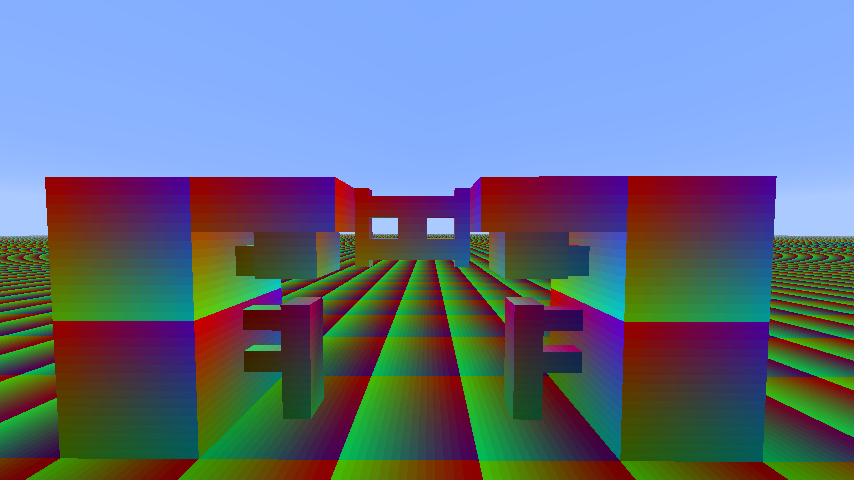
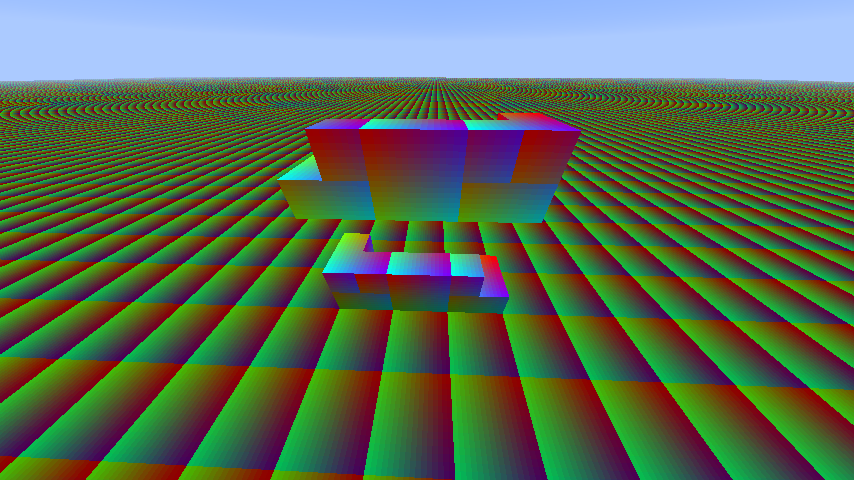
Expected:Having textures correctly aligned, like on Ax.png screenshots.
Actual:Textures are misaligned, like on Bx.png screenshots.
Solution:RenderBlocks.javapublic class RenderBlocks extends RenderBlocksOld { public void renderEastFace(Block par1Block, double par2, double par4, double par6, Icon texture) { Tessellator tessellator = Tessellator.instance; if (this.hasOverrideBlockTexture()) { texture = this.overrideBlockTexture; } /* START OF OLD CODE * double var10 = (double)texture.getInterpolatedU(this.renderMinX * 16.0D); double var12 = (double)texture.getInterpolatedU(this.renderMaxX * 16.0D); * END OF OLD CODE */ /* START OF NEW CODE */ double var10 = (double)texture.getInterpolatedU(16.0D - this.renderMaxX * 16.0D); double var12 = (double)texture.getInterpolatedU(16.0D - this.renderMinX * 16.0D); /* END OF NEW CODE */ double var14 = (double)texture.getInterpolatedV(16.0D - this.renderMaxY * 16.0D); double var16 = (double)texture.getInterpolatedV(16.0D - this.renderMinY * 16.0D); /* ... */ } public void renderSouthFace(Block par1Block, double par2, double par4, double par6, Icon texture) { Tessellator tessellator = Tessellator.instance; if (this.hasOverrideBlockTexture()) { texture = this.overrideBlockTexture; } /* START OF OLD CODE * double var10 = (double)texture.getInterpolatedU(this.renderMinZ * 16.0D); double var12 = (double)texture.getInterpolatedU(this.renderMaxZ * 16.0D); * END OF OLD CODE */ /* START OF NEW CODE */ double var10 = (double)texture.getInterpolatedU(16.0D - this.renderMaxZ * 16.0D); double var12 = (double)texture.getInterpolatedU(16.0D - this.renderMinZ * 16.0D); /* END OF NEW CODE */ double var14 = (double)texture.getInterpolatedV(16.0D - this.renderMaxY * 16.0D); double var16 = (double)texture.getInterpolatedV(16.0D - this.renderMinY * 16.0D); /* ... */ } }
Description:
Texture on all non-full width non-symmetrical blocks on south and east sides are misaligned, like :
- Door
- trapdoor
- Fences
- Fencegates
- Wall
- Buttons
- Levers
- Stairs
- hopper
- Tripwire hook
This does not affect some blocks like cocoa, because they don't use the standard block method.
With that bug, it's very difficult to make HD texture pack since these details are near invisible with 16x packs but not on 64x packs for example.
Expected:Having textures correctly aligned, like on Ax.png screenshots.
Actual:Textures are misaligned, like on Bx.png screenshots.
Solution:RenderBlocks.javapublic class RenderBlocksextendsRenderBlocksOld {publicvoid renderEastFace(Block par1Block, double par2, double par4, double par6, Icon texture) { Tessellator tessellator = Tessellator.instance; if (this.hasOverrideBlockTexture()) { texture = this.overrideBlockTexture; } /* START OF OLD CODE * double var10 = (double)texture.getInterpolatedU(this.renderMinX * 16.0D); double var12 = (double)texture.getInterpolatedU(this.renderMaxX * 16.0D); * END OF OLD CODE */ /* START OF NEW CODE */ double var10 = (double)texture.getInterpolatedU(16.0D - this.renderMaxX * 16.0D); double var12 = (double)texture.getInterpolatedU(16.0D - this.renderMinX * 16.0D); /* END OF NEW CODE */ double var14 = (double)texture.getInterpolatedV(16.0D - this.renderMaxY * 16.0D); double var16 = (double)texture.getInterpolatedV(16.0D - this.renderMinY * 16.0D); /* ... */ } public void renderSouthFace(Block par1Block, double par2, double par4, double par6, Icon texture) { Tessellator tessellator = Tessellator.instance; if (this.hasOverrideBlockTexture()) { texture = this.overrideBlockTexture; } /* START OF OLD CODE * double var10 = (double)texture.getInterpolatedU(this.renderMinZ * 16.0D); double var12 = (double)texture.getInterpolatedU(this.renderMaxZ * 16.0D); * END OF OLD CODE */ /* START OF NEW CODE */ double var10 = (double)texture.getInterpolatedU(16.0D - this.renderMaxZ * 16.0D); double var12 = (double)texture.getInterpolatedU(16.0D - this.renderMinZ * 16.0D); /* END OF NEW CODE */ double var14 = (double)texture.getInterpolatedV(16.0D - this.renderMaxY * 16.0D); double var16 = (double)texture.getInterpolatedV(16.0D - this.renderMinY * 16.0D); /* ... */ } }Description:
Texture on all non-full width non-symmetrical blocks on south and east sides are misaligned, like :
- Door
- trapdoor
- Fences
- Fencegates
- Wall
- Buttons
- Levers
- Stairs
- hopper
- Tripwire hook
This does not affect some blocks like cocoa, because they don't use the standard block method.
With that bug, it's very difficult to make HD texture pack since these details are near invisible with 16x packs but not on 64x packs for example.
Expected:Having textures correctly aligned, like on Ax.png screenshots.
Actual:Textures are misaligned, like on Bx.png screenshots.
Solution:RenderBlocks.javapublic class RenderBlocks { public void renderEastFace(Block par1Block, double par2, double par4, double par6, Icon texture) { Tessellator tessellator = Tessellator.instance; if (this.hasOverrideBlockTexture()) { texture = this.overrideBlockTexture; } /* START OF OLD CODE * double var10 = (double)texture.getInterpolatedU(this.renderMinX * 16.0D); double var12 = (double)texture.getInterpolatedU(this.renderMaxX * 16.0D); * END OF OLD CODE */ /* START OF NEW CODE */ double var10 = (double)texture.getInterpolatedU(16.0D - this.renderMaxX * 16.0D); double var12 = (double)texture.getInterpolatedU(16.0D - this.renderMinX * 16.0D); /* END OF NEW CODE */ double var14 = (double)texture.getInterpolatedV(16.0D - this.renderMaxY * 16.0D); double var16 = (double)texture.getInterpolatedV(16.0D - this.renderMinY * 16.0D); /* ... */ } public void renderSouthFace(Block par1Block, double par2, double par4, double par6, Icon texture) { Tessellator tessellator = Tessellator.instance; if (this.hasOverrideBlockTexture()) { texture = this.overrideBlockTexture; } /* START OF OLD CODE * double var10 = (double)texture.getInterpolatedU(this.renderMinZ * 16.0D); double var12 = (double)texture.getInterpolatedU(this.renderMaxZ * 16.0D); * END OF OLD CODE */ /* START OF NEW CODE */ double var10 = (double)texture.getInterpolatedU(16.0D - this.renderMaxZ * 16.0D); double var12 = (double)texture.getInterpolatedU(16.0D - this.renderMinZ * 16.0D); /* END OF NEW CODE */ double var14 = (double)texture.getInterpolatedV(16.0D - this.renderMaxY * 16.0D); double var16 = (double)texture.getInterpolatedV(16.0D - this.renderMinY * 16.0D); /* ... */ } }
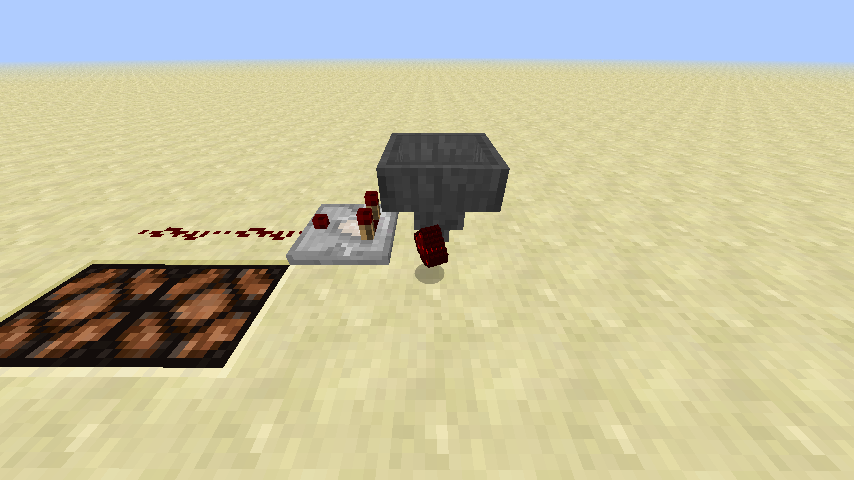
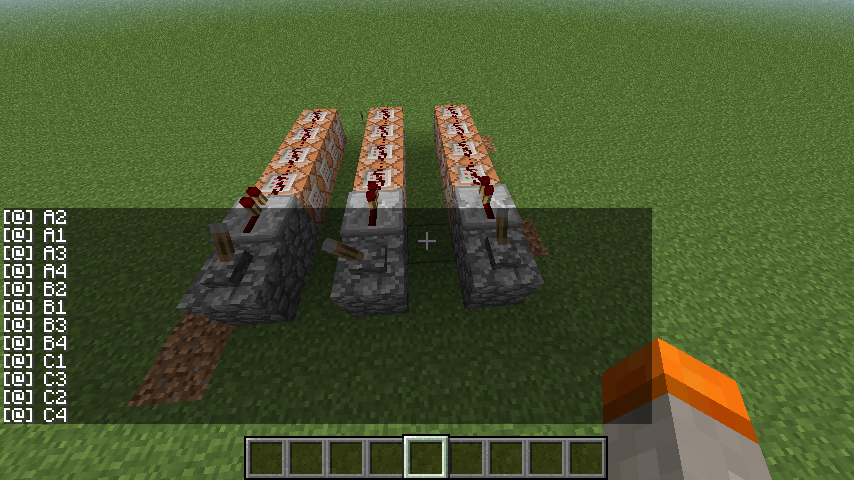
When you throw a
fullstack of items in a hopperthat can't accept the full stack but only a part of it, the hopper don't update the comparator, even if there is sufficientelement togo into the hopper to change the redstone signal.When you throw a stack of items in a hopper, the hopper don't always update the comparator, even if there is sufficient items that goes into the hopper to change the redstone comparator signal.
Description :
With new HD font support, we can change these files :
/font/alternate.png
/font/default.png
/font/glyph_00.png
...
/font/glyph_FF.pngBut we can't change :
/font/glyph_sizes.bin
Since this file is related to unicode glyph size I think it must be possible to change it.
Testing protocol :
1) Download a fresh Minecraft 13w09a/b
2) Download and install as a texture pack the zip file below
3) Start Minecraft
4) Set "Native Unicode" as your texture pack
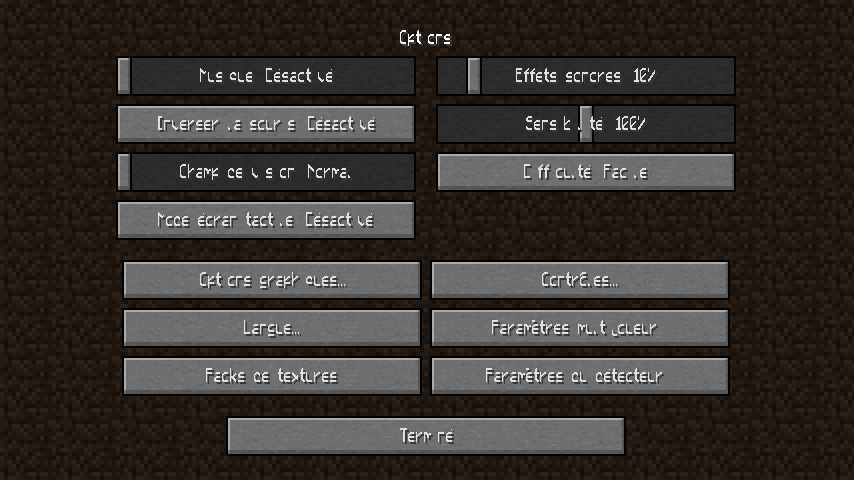
5) Set "French" as your language (it need unicode for somes silly things likes "...")You should have the same result as Fail.png
6) Close Your Minecraft
7) Put the content of the texture pack into bin/Minecraft.jar and delete META-INF
8) Restart your MinecraftYou should have the same result as Good.png
Text is misplaced on buttons, but depend of another bug report.Description :
With new HD font support, we can change these files :
/font/alternate.png
/font/default.png
/font/glyph_00.png
...
/font/glyph_FF.pngBut we can't change :
/font/glyph_sizes.bin
Since this file is related to unicode glyph size I think it must be possible to change it.
Testing protocol :
1) Download a fresh Minecraft 13w09a/b
2) Download and install as a texture pack the zip file below
3) Start Minecraft
4) Set "Native Unicode" as your texture pack
5) Set "French" as your language (it need unicode for somes silly things likes "...")You should have the same result as Fail.png
6) Close Your Minecraft
7) Put the content of the texture pack into bin/Minecraft.jar and delete META-INF
8) Restart your MinecraftYou should have the same result as Good.png
9) Set "English (UK)" as your language (it don't need unicode and return to default)
You should have the same result as Fail2.png
Text is misplaced on buttons, but depend of another bug report.
Description :
With new HD font support, we can change these files :
/font/alternate.png
/font/default.png
/font/glyph_00.png
...
/font/glyph_FF.pngBut we can't change :
/font/glyph_sizes.bin
Since this file is related to unicode glyph size I think it must be possible to change it.
Testing protocol :
1) Download a fresh Minecraft 13w09a/b
2) Download and install as a texture pack the zip file below
3) Start Minecraft
4) Set "Native Unicode" as your texture pack
5) Set "French" as your language (it need unicode for somes silly things likes "...")You should have the same result as Fail.png
6) Close Your Minecraft
7) Put the content of the texture pack into bin/Minecraft.jar and delete META-INF
8) Restart your MinecraftYou should have the same result as Good.png
9) Set "English (UK)" as your language (it don't need unicode and return to default)
You should have the same result as Fail2.png
Text is misplaced on buttons, but depend of another bug report.
Description :
With new HD font support, we can change these files :
/font/alternate.png
/font/default.png
/font/glyph_00.png
...
/font/glyph_FF.pngBut we can't change :
/font/glyph_sizes.bin
Since this file is related to unicode glyph size I think it must be possible to change it.
Testing protocol :
- Download a fresh Minecraft 13w09a/b
- Download and install as a texture pack the zip file below
- Start Minecraft
- Set "Native Unicode" as your texture pack
- Set "French" as your language (it need unicode for somes silly things likes "...")
You should have the same result as Fail.png
- Close Your Minecraft
- Put the content of the texture pack into bin/Minecraft.jar and delete META-INF
- Restart your Minecraft
You should have the same result as Good.png
- Set "English (UK)" as your language (it don't need unicode and return to default)
You should have the same result as Fail2.png
Text is misplaced on buttons, but depend of another bug report.
Description :
With new HD font support, we can change these files :
/font/alternate.png
/font/default.png
/font/glyph_00.png
...
/font/glyph_FF.pngBut we can't change :
/font/glyph_sizes.bin
Since this file is related to unicode glyph size I think it must be possible to change it.
Testing protocol :
- Download a fresh Minecraft 13w09a/b
- Download and install as a texture pack the zip file below
- Start Minecraft
- Set "Native Unicode" as your texture pack
- Set "French" as your language (it need unicode for somes silly things likes "...")
You should have the same result as Fail.png
- Close Your Minecraft
- Put the content of the texture pack into bin/Minecraft.jar and delete META-INF
- Restart your Minecraft
You should have the same result as Good.png
- Set "English (UK)" as your language (it don't need unicode and return to default)
You should have the same result as Fail2.png
Text is misplaced on buttons, but depend of another bug report.
Description :
With new HD font support, we can change these files :
/font/alternate.png
/font/default.png
/font/glyph_00.png
...
/font/glyph_FF.pngBut we can't change :
/font/glyph_sizes.bin
Since this file is related to unicode glyph size I think it must be possible to change it.
Testing protocol :
- Download a fresh Minecraft 13w09a/b
- Download and install as a texture pack the zip file below
- Start Minecraft
- Set "Native Unicode" as your texture pack
- Set "French" as your language (it need unicode for somes silly things likes "...")
#*You should have the same result as Fail.png- Close Your Minecraft
- Put the content of the texture pack into bin/Minecraft.jar and delete META-INF
- Restart your Minecraft
#*You should have the same result as Good.png- Set "English (UK)" as your language (it don't need unicode and return to default)
#*You should have the same result as Fail2.pngText is misplaced on buttons, but depend of another bug report.
Description :
With new HD font support, we can change these files :
/font/alternate.png
/font/default.png
/font/glyph_00.png
...
/font/glyph_FF.pngBut we can't change :
/font/glyph_sizes.bin
Since this file is related to unicode glyph size I think it must be possible to change it.
Testing protocol :
- Download a fresh Minecraft 13w09a/b
- Download and install as a texture pack the zip file below
- Start Minecraft
- Set "Native Unicode" as your texture pack
- Set "French" as your language (it need unicode for somes silly things likes "...")
#*You should have the same result as Fail.png- Close Your Minecraft
- Put the content of the texture pack into bin/Minecraft.jar and delete META-INF
- Restart your Minecraft
#*You should have the same result as Good.png- Set "English (UK)" as your language (it don't need unicode and return to default)
#*You should have the same result as Fail2.pngText is misplaced on buttons, but depend of another bug report.
Description :
With new HD font support, we can change these files :
/font/alternate.png
/font/default.png
/font/glyph_00.png
...
/font/glyph_FF.pngBut we can't change :
/font/glyph_sizes.bin
Since this file is related to unicode glyph size I think it must be possible to change it.
Testing protocol :
- Download a fresh Minecraft 13w09a/b
- Download and install as a texture pack the zip file below
- Start Minecraft
- Set "Native Unicode" as your texture pack
- Set "French" as your language (it need unicode for somes silly things likes "...")
You should have the same result as Fail.png- Close Your Minecraft
- Put the content of the texture pack into bin/Minecraft.jar and delete META-INF
- Restart your Minecraft
You should have the same result as Good.png- Set "English (UK)" as your language (it don't need unicode and return to default)
You should have the same result as Fail2.pngText is misplaced on buttons, but depend of another bug report.
Description :
With new HD font support, we can change these files :
/font/alternate.png
/font/default.png
/font/glyph_00.png
...
/font/glyph_FF.pngBut we can't change :
/font/glyph_sizes.bin
Since this file is related to unicode glyph size I think it must be possible to change it.
Testing protocol :
- Download a fresh Minecraft 13w09a/b
- Download and install as a texture pack the zip file below
- Start Minecraft
- Set "Native Unicode" as your texture pack
- Set "French" as your language (it need unicode for somes silly things likes "...")
You should have the same result as Fail.png
- Close Your Minecraft
- Put the content of the texture pack into bin/Minecraft.jar and delete META-INF
- Restart your Minecraft
You should have the same result as Good.png
- Set "English (UK)" as your language (it don't need unicode and return to default)
You should have the same result as Fail2.png
Text is misplaced on buttons, but depend of another bug report.
Description :
With new HD font support, we can change these files :
/font/alternate.png
/font/default.png
/font/glyph_00.png
...
/font/glyph_FF.pngBut we can't change :
/font/glyph_sizes.bin
Since this file is related to unicode glyph size I think it must be possible to change it.
Testing protocol :
- Download a fresh Minecraft 13w09a/b
- Download and install as a texture pack the zip file below
- Start Minecraft
- Set "Native Unicode" as your texture pack
- Set "French" as your language (it need unicode for somes silly things likes "...")
You should have the same result as Fail.png
- Close Your Minecraft
- Put the content of the texture pack into bin/Minecraft.jar and delete META-INF
- Restart your Minecraft
You should have the same result as Good.png
- Set "English (UK)" as your language (it don't need unicode and return to default)
You should have the same result as Fail2.png
Text is misplaced on buttons, but depend of another bug report.
Description :
With new HD font support, we can change these files :
/font/alternate.png
/font/default.png
/font/glyph_00.png
...
/font/glyph_FF.pngBut we can't change :
/font/glyph_sizes.bin
Since this file is related to unicode glyph size I think it must be possible to change it.
Testing protocol :
- Download a fresh Minecraft 13w09a/b
- Download and install as a texture pack the zip file below
- Start Minecraft
- Set "Native Unicode" as your texture pack
- Set "French" as your language (it need unicode for somes silly things likes "...")
You should have the same result as Fail.png
- Close Your Minecraft
- Put the content of the texture pack into bin/Minecraft.jar and delete META-INF
- Restart your Minecraft
You should have the same result as Good.png
- Set "English (UK)" as your language (it don't need unicode and return to default)
You should have the same result as Fail2.png
Text is misplaced on buttons, but depend of another bug report.
Description :
With new HD font support, we can change these files :
/font/alternate.png
/font/default.png
/font/glyph_00.png
...
/font/glyph_FF.pngBut we can't change :
/font/glyph_sizes.bin
Since this file is related to unicode glyph size I think it must be possible to change it.
Testing protocol :
- Download a fresh Minecraft 13w09a/b
- Download a
nd install as a texture pack the zip file below- Start Minecraft
- Set "Native Unicode" as your texture pack
- Set "French" as your language (it need unicode for somes silly things likes "...")
You should have the same result as Fail.png
- Close Your Minecraft
- Put the content of the texture pack into bin/Minecraft.jar and delete META-INF
- Restart your Minecraft
You should have the same result as Good.png
- Set "English (UK)" as your language (it don't need unicode and return to default)
You should have the same result as Fail2.png
Text is misplaced on buttons, but depend of another bug report.
Description :
With new HD font support, we can change these files :
/font/alternate.png
/font/default.png
/font/glyph_00.png
...
/font/glyph_FF.pngBut we can't change :
/font/glyph_sizes.bin
Since this file is related to unicode glyph size I think it must be possible to change it.
When forcing the use of a custom glyph_sizes.bin file, the default font is dysfunctional.Testing protocol :
- Download a fresh Minecraft 13w09a/b
- Download and install as a texture pack the zip file below
- Start Minecraft
- Set "Native Unicode" as your texture pack
- Set "French" as your language (it need unicode for somes silly things likes "...")
You should have the same result as Fail.png
- Close Your Minecraft
- Put the content of the texture pack into bin/Minecraft.jar and delete META-INF
- Restart your Minecraft
You should have the same result as Good.png
Text is misplaced on buttons, but depend of another bug report.
- Set "English (UK)" as your language (it don't need unicode and return to default)
You should have the same result as Fail2.png
Description :
With new HD font support, we can change these files :
/font/alternate.png
/font/default.png
/font/glyph_00.png
...
/font/glyph_FF.pngBut we can't change :
/font/glyph_sizes.bin
Since this file is related to unicode glyph size I think it must be possible to change it.
When forcing the use of a custom glyph_sizes.bin file, the default font is dysfunctional.Testing protocol :
- Download a fresh Minecraft 13w09a/b
- Download and install as a texture pack the zip file below
- Start Minecraft
- Set "Native Unicode" as your texture pack
- Set "French" as your language (it need unicode for somes silly things likes "...")
You should have the same result as Fail.png
- Close Your Minecraft
- Put the content of the texture pack into bin/Minecraft.jar and delete META-INF
- Restart your Minecraft
You should have the same result as Good.png
Text is misplaced on buttons, but depend of another bug report.
- Set "English (UK)" as your language (it don't need unicode and return to default)
You should have the same result as Fail2.png
Description :
With new HD font support, we can change these files :
/font/alternate.png
/font/default.png
/font/glyph_00.png
...
/font/glyph_FF.pngBut we can't change :
/font/glyph_sizes.bin
Since this file is related to unicode glyph size I think it must be possible to change it.
When forcing the use of a custom glyph_sizes.bin file, the default font is dysfunctional.Testing protocol :
- Download a fresh Minecraft 13w09a/b
- Download and install as a texture pack the zip file below
- Start Minecraft
- Set "Native Unicode" as your texture pack
- Set "French" as your language (it need unicode for somes silly things likes "...")
You should have the same result as Fail.png
- Close Your Minecraft
- Put the content of the texture pack into bin/Minecraft.jar and delete META-INF
- Restart your Minecraft
You should have the same result as Good.png
Text is misplaced on buttons, but depend of another bug report.- Set "English (UK)" as your language (it don't need unicode and return to default)
You should have the same result as Fail2.png
Steps:
- Start a server and join it as op in creative
- Type these commands:
/scoreboard objectives add Test dummy /scoreboard objectives setdisplay sidebar Test 0
So your scoreboard is prepared- Type these commands:
/scoreboard players set <yourPlayerName> Test 0 /scoreboard players set <friendPlayerName> Test 0 /scoreboard players set <non-existantPlayerName> Test 0You are the only tracked player
- Type these commands:
/scoreboard players set @a Test 1This only change your score
- Let a friend join the server
- Type these commands:
/scoreboard players set <friendPlayerName> Test 1Your friend is tracked
- Type these commands:
/scoreboard players set @a Test 2Your friend score and yours is set to 2
- Tell your friend to leave the server
- Type these commands:
/scoreboard players set <friendPlayerName> Test 1You can't change his score when he's offline, whenever he's tracked
- Type these commands:
/scoreboard players set @a Test 0You can only change the score of online players, whenever other are tracked
Description:It's only possible to change score for online tracked players.
Expected:
- Having the possibility to change the score an already tracked players.
- Having @a selectors to change the score of all tracked players of the specified objective, additionaly to connected players
- Having the possibility to add an offline player to the list of tracked player for one objective, if their names is given explicitly.
Actual:
- Since a player is tracked for a scoreboard and he's not on the server,
it's not possible to change his score, when we use his name explicitly or with selectors such as @a.- It's not possible to set a name for a player that's not on the server or non-existant player.
Steps:
- Start a server and join it as op in creative
- Type these commands:
/scoreboard objectives add Test dummy /scoreboard objectives setdisplay sidebar Test 0So your scoreboard is prepared
- Type these commands:
/scoreboard players set <yourPlayerName> Test 0 /scoreboard players set <friendPlayerName> Test 0 /scoreboard players set <non-existantPlayerName> Test 0You are the only tracked player
- Type these commands:
/scoreboard players set @a Test 1This only change your score
- Let a friend join the server
- Type these commands:
/scoreboard players set <friendPlayerName> Test 1Your friend is tracked
- Type these commands:
/scoreboard players set @a Test 2Your friend score and yours is set to 2
- Tell your friend to leave the server
- Type these commands:
/scoreboard players set <friendPlayerName> Test 1You can't change his score when he's offline, whenever he's tracked
- Type these commands:
/scoreboard players set @a Test 0You can only change the score of online players, whenever other are tracked
Description:It's only possible to change score for online tracked players.
Expected:
- Having the possibility to change the score an already tracked players.
- Having @a selectors to change the score of all tracked players of the specified objective, additionaly to connected players
- Having the possibility to add an offline player to the list of tracked player for one objective, if their names is given explicitly.
Actual:
- Since a player is tracked for a scoreboard and he's not on the server,
it's not possible to change his score, when we use his name explicitly or with selectors such as @a.- It's not possible to set a name for a player that's not on the server or non-existant player.
Steps:
- Start a server and join it as op in creative
- Type these commands:
/scoreboard objectives add Test dummy /scoreboard objectives setdisplay sidebar Test 0So your scoreboard is prepared
- Type these commands:
/scoreboard players set <yourPlayerName> Test 0 /scoreboard players set <friendPlayerName> Test 0 /scoreboard players set <non-existantPlayerName> Test 0You are the only tracked player
- Type these commands:
/scoreboard players set @a Test 1This only change your score
- Let a friend join the server
- Type these commands:
/scoreboard players set <friendPlayerName> Test 1Your friend is tracked
- Type these commands:
/scoreboard players set @a Test 2Your friend score and yours is set to 2
- Tell your friend to leave the server
- Type these commands:
/scoreboard players set <friendPlayerName> Test 1You can't change his score when he's offline, whenever he's tracked
- Type these commands:
/scoreboard players set @a Test 0You can only change the score of online players, whenever other are tracked
Description:It's only possible to change score for online tracked players.
Expected:
- Having the possibility to change the score an already tracked players.
- Having @a selectors to change the score of all tracked players of the specified objective, additionaly to connected players
- Having the possibility to add an offline player to the list of tracked player for one objective, if their names is given explicitly.
Actual:
- Since a player is tracked for a scoreboard and he's not on the server,
it's not possible to change his score, when we use his name explicitly or with selectors such as @a.- It's not possible to set a name for a player that's not on the server or non-existant player.
Steps:
- Start a server and join it as op in creative
- Type these commands:
/scoreboard objectives add Test dummy /scoreboard objectives setdisplay sidebar Test 0So your scoreboard is prepared
- Type these commands:
/scoreboard players set <yourPlayerName> Test 0 /scoreboard players set <friendPlayerName> Test 0 /scoreboard players set <non-existantPlayerName> Test 0You are the only tracked player
- Type these commands:
/scoreboard players set @a Test 1This only change your score
- Let a friend join the server
- Type these commands:
/scoreboard players set <friendPlayerName> Test 1Your friend is tracked
- Type these commands:
/scoreboard players set @a Test 2Your friend score and yours is set to 2
- Tell your friend to leave the server
- Type these commands:
/scoreboard players set <friendPlayerName> Test 1You can't change his score when he's offline, whenever he's tracked
- Type these commands:
You can only change the score of online players, whenever other are tracked
Description:It's only possible to change score for online tracked players.
Expected:
- Having the possibility to change the score an already tracked players.
- Having @a selectors to change the score of all tracked players of the specified objective, additionaly to connected players
- Having the possibility to add an offline player to the list of tracked player for one objective, if their names is given explicitly.
Actual:
- Since a player is tracked for a scoreboard and he's not on the server,
it's not possible to change his score, when we use his name explicitly or with selectors such as @a.- It's not possible to set a name for a player that's not on the server or non-existant player.
Steps:
- Start a server and join it as op in creative
- Type these commands: (So your scoreboard is prepared)
/scoreboard objectives add Test dummy /scoreboard objectives setdisplay sidebar Test 0- Type these commands: (You are the only tracked player)
/scoreboard players set <yourPlayerName> Test 0 /scoreboard players set <friendPlayerName> Test 0 /scoreboard players set <non-existantPlayerName> Test 0- Type these commands: (This only change your score)
/scoreboard players set @a Test 1- Let a friend join the server
- Type these commands: (Your friend is tracked)
/scoreboard players set <friendPlayerName> Test 1- Type these commands: (Your friend score and yours is set to 2)
/scoreboard players set @a Test 2- Tell your friend to leave the server
- Type these commands: (You can't change his score when he's offline, whenever he's tracked)
/scoreboard players set <friendPlayerName> Test 1- Type these commands: (You can only change the score of online players, whenever other are tracked)
/scoreboard players set @a Test 0
Description:It's only possible to change score for online tracked players.
Expected:
- Having the possibility to change the score an already tracked players.
- Having @a selectors to change the score of all tracked players of the specified objective, additionaly to connected players
- Having the possibility to add an offline player to the list of tracked player for one objective, if their names is given explicitly.
Actual:
- Since a player is tracked for a scoreboard and he's not on the server,
it's not possible to change his score, when we use his name explicitly or with selectors such as @a.- It's not possible to set a name for a player that's not on the server or non-existant player.
Steps:
- Start a server and join it as op in creative
- Type these commands:
(So your scoreboard is prepared)/scoreboard objectives add Test dummy /scoreboard objectives setdisplay sidebar Test 0- Type these commands:
(You are the only tracked player)/scoreboard players set <yourPlayerName> Test 0 /scoreboard players set <friendPlayerName> Test 0 /scoreboard players set <non-existantPlayerName> Test 0- Type these commands:
(This only change your score)/scoreboard players set @a Test 1- Let a friend join the server
- Type these commands:
(Your friend is tracked)/scoreboard players set <friendPlayerName> Test 1- Type these commands:
(Your friend score and yours is set to 2)/scoreboard players set @a Test 2- Tell your friend to leave the server
- Type these commands:
(You can't change his score when he's offline, whenever he's tracked)/scoreboard players set <friendPlayerName> Test 1- Type these commands:
(You can only change the score of online players, whenever other are tracked)/scoreboard players set @a Test 0
Description:It's only possible to change score for online tracked players.
Expected:
- Having the possibility to change the score an already tracked players.
- Having @a selectors to change the score of all tracked players of the specified objective, additionaly to connected players
- Having the possibility to add an offline player to the list of tracked player for one objective, if their names is given explicitly.
Actual:
- Since a player is tracked for a scoreboard and he's not on the server,
it's not possible to change his score, when we use his name explicitly or with selectors such as @a.- It's not possible to set a name for a player that's not on the server or non-existant player.
Steps:
- Start a server and join it as op in creative
- Type these commands: (So your scoreboard is prepared)
/scoreboard objectives add Test dummy /scoreboard objectives setdisplay sidebar Test 0- Type these commands: (You are the only tracked player)
/scoreboard players set <yourPlayerName> Test 0 /scoreboard players set <friendPlayerName> Test 0 /scoreboard players set <non-existantPlayerName> Test 0- Type these commands: (This only change your score)
/scoreboard players set @a Test 1- Let a friend join the server
- Type these commands: (Your friend is tracked)
/scoreboard players set <friendPlayerName> Test 1- Type these commands: (Your friend score and yours is set to 2)
/scoreboard players set @a Test 2- Tell your friend to leave the server
- Type these commands: (You can't change his score when he's offline, whenever he's tracked)
/scoreboard players set <friendPlayerName> Test 1- Type these commands: (You can only change the score of online players, whenever other are tracked)
/scoreboard players set @a Test 0
Description:It's only possible to change score for online tracked players.
Expected:
- Having the possibility to change the score an already tracked players.
- Having @a selectors to change the score of all tracked players of the specified objective, additionaly to connected players
- Having the possibility to add an offline player to the list of tracked player for one objective, if their names is given explicitly.
Actual:
- Since a player is tracked for a scoreboard and he's not on the server,
it's not possible to change his score, when we use his name explicitly or with selectors such as @a.- It's not possible to set a name for a player that's not on the server or non-existant player.
Steps:
- Start a server and join it as op in creative
- Type these commands: (So your scoreboard is prepared)
/scoreboard objectives add Test dummy /scoreboard objectives setdisplay sidebar Test 0- Type these commands: (You are the only tracked player)
/scoreboard players set <yourPlayerName> Test 0 /scoreboard players set <friendPlayerName> Test 0 /scoreboard players set <non-existantPlayerName> Test 0- Type these commands: (This only change your score)
/scoreboard players set @a Test 1- Let a friend join the server
- Type these commands: (Your friend is tracked)
/scoreboard players set <friendPlayerName> Test 1- Type these commands: (Your friend score and yours is set to 2)
/scoreboard players set @a Test 2- Tell your friend to leave the server
- Type these commands: (You can't change his score when he's offline, whenever he's tracked)
/scoreboard players set <friendPlayerName> Test 1- Type these commands: (You can only change the score of online players, whenever other are tracked)
/scoreboard players set @a Test 0
Description:It's only possible to change score for online tracked players.
Expected:
- Having the possibility to change the score an already tracked players.
- Having @a selectors to change the score of all tracked players of the specified objective, additionaly to connected players
- Having the possibility to add an offline player to the list of tracked player for one objective, if their names is given explicitly.
Actual:
- Since a player is tracked for a scoreboard and he's not on the server,
it's not possible to change his score, when we use his name explicitly or with selectors such as @a.- It's not possible to set a name for a player that's not on the server or non-existant player.
Steps:
- Start a server and join it as op in creative
- Type these commands: (So your scoreboard is prepared)
/scoreboard objectives add Test dummy /scoreboard objectives setdisplay sidebar Test 0- Type these commands: (You are the only tracked player)
/scoreboard players set <yourPlayerName> Test 0 /scoreboard players set <friendPlayerName> Test 0 /scoreboard players set <non-existantPlayerName> Test 0- Type these commands: (This only change your score)
/scoreboard players set @a Test 1- Let a friend join the server
- Type these commands: (Your friend is tracked)
/scoreboard players set <friendPlayerName> Test 1- Type these commands: (Your friend score and yours is set to 2)
/scoreboard players set @a Test 2- Tell your friend to leave the server
- Type these commands: (You can't change his score when he's offline, whenever he's tracked)
/scoreboard players set <friendPlayerName> Test 1- Type these commands: (You can only change the score of online players, whenever other are tracked)
/scoreboard players set @a Test 0
Description:It's only possible to change score for online tracked players.
Expected:
- Having the possibility to change the score an already tracked players.
- Having @a selectors to change the score of all tracked players of the specified objective, additionaly to connected players
- Having the possibility to add an offline player to the list of tracked player for one objective, if their names is given explicitly.
Actual:
- Since a player is tracked for a scoreboard and he's not on the server,
- It's not possible to change his score, when we use his name explicitly or with selectors such as @a.
- It's not possible to set a name for a player that's not on the server or non-existant player.
Steps:
- Start a server and join it as op in creative
- Type these commands: (So your scoreboard is prepared)
/scoreboard objectives add Test dummy /scoreboard objectives setdisplay sidebar Test 0- Type these commands: (You are the only tracked player)
/scoreboard players set <yourPlayerName> Test 0 /scoreboard players set <friendPlayerName> Test 0 /scoreboard players set <non-existantPlayerName> Test 0- Type these commands: (This only change your score)
/scoreboard players set @a Test 1- Let a friend join the server
- Type these commands: (Your friend is tracked)
/scoreboard players set <friendPlayerName> Test 1- Type these commands: (Your friend score and yours is set to 2)
/scoreboard players set @a Test 2- Tell your friend to leave the server
- Type these commands: (You can't change his score when he's offline, whenever he's tracked)
/scoreboard players set <friendPlayerName> Test 1- Type these commands: (You can only change the score of online players, whenever other are tracked)
/scoreboard players set @a Test 0
Description:It's only possible to change score for online tracked players.
Expected:
- Having the possibility to change the score an already tracked players.
- Having @a selectors to change the score of all tracked players of the specified objective, additionaly to connected players
- Having the possibility to add an offline player to the list of tracked player for one objective, if their names is given explicitly.
Actual:
- Since a player is tracked for a scoreboard and he's not on the server,
- It's not possible to change his score, when we use his name explicitly or with selectors such as @a.
- It's not possible to set a name for a player that's not on the server or non-existant player.
Steps:
- Start a server and join it as op in creative
- Type these commands: (So your scoreboard is prepared)
/scoreboard objectives add Test dummy /scoreboard objectives setdisplay sidebar Test 0- Type these commands: (You are the only tracked player)
/scoreboard players set <yourPlayerName> Test 0 /scoreboard players set <friendPlayerName> Test 0 /scoreboard players set <non-existantPlayerName> Test 0- Type these commands: (This only change your score)
/scoreboard players set @a Test 1- Let a friend join the server
- Type these commands: (Your friend is tracked)
/scoreboard players set <friendPlayerName> Test 1- Type these commands: (Your friend score and yours is set to 2)
/scoreboard players set @a Test 2- Tell your friend to leave the server
- Type these commands: (You can't change his score when he's offline, whenever he's tracked)
/scoreboard players set <friendPlayerName> Test 1- Type these commands: (You can only change the score of online players, whenever other are tracked)
/scoreboard players set @a Test 0
Description:It's only possible to change score for online tracked players.
Expected:
- Having the possibility to change the score an already tracked players.
- Having @a selectors to change the score of all tracked players of the specified objective, additionaly to connected players
- Having the possibility to add an offline player to the list of tracked player for one objective, if their names is given explicitly.
Actual:
- Since a player is tracked for a scoreboard and he's not on the server,
- It's not possible to change his score, when we use his name explicitly or with selectors such as @a.
- It's not possible to set a name for a player that's not on the server or non-existant player.
Steps:
*Description :
- Start a server and join it as op in creative
- Type these commands: (So your scoreboard is prepared)
/scoreboard objectives add Test dummy /scoreboard objectives setdisplay sidebar Test 0- Type these commands: (You are the only tracked player)
/scoreboard players set <yourPlayerName> Test 0 /scoreboard players set <friendPlayerName> Test 0 /scoreboard players set <non-existantPlayerName> Test 0- Type these commands: (This only change your score)
/scoreboard players set @a Test 1- Let a friend join the server
- Type these commands: (Your friend is tracked)
/scoreboard players set <friendPlayerName> Test 1- Type these commands: (Your friend score and yours is set to 2)
/scoreboard players set @a Test 2- Tell your friend to leave the server
- Type these commands: (You can't change his score when he's offline, whenever he's tracked)
/scoreboard players set <friendPlayerName> Test 1- Type these commands: (You can only change the score of online players, whenever other are tracked)
/scoreboard players set @a Test 0Expected :It's only possible to change score for online tracked players.
Actual*:
- Having the possibility to change the score an already tracked players.
- Having @a selectors to change the score of all tracked players of the specified objective, additionaly to connected players
- Having the possibility to add an offline player to the list of tracked player for one objective, if their names is given explicitly.
- Since a player is tracked for a scoreboard and he's not on the server,
- It's not possible to change his score, when we use his name explicitly or with selectors such as @a.
- It's not possible to set a name for a player that's not on the server or non-existant player.
Steps :
* Description :
- Start a server and join it as op in creative
- Type these commands: (So your scoreboard is prepared)
/scoreboard objectives add Test dummy /scoreboard objectives setdisplay sidebar Test 0- Type these commands: (You are the only tracked player)
/scoreboard players set <yourPlayerName> Test 0 /scoreboard players set <friendPlayerName> Test 0 /scoreboard players set <non-existantPlayerName> Test 0- Type these commands: (This only change your score)
/scoreboard players set @a Test 1- Let a friend join the server
- Type these commands: (Your friend is tracked)
/scoreboard players set <friendPlayerName> Test 1- Type these commands: (Your friend score and yours is set to 2)
/scoreboard players set @a Test 2- Tell your friend to leave the server
- Type these commands: (You can't change his score when he's offline, whenever he's tracked)
/scoreboard players set <friendPlayerName> Test 1- Type these commands: (You can only change the score of online players, whenever other are tracked)
/scoreboard players set @a Test 0Expected :It's only possible to change score for online tracked players.
Actual
- Having the possibility to change the score an already tracked players.
- Having @a selectors to change the score of all tracked players of the specified objective, additionaly to connected players
- Having the possibility to add an offline player to the list of tracked player for one objective, if their names is given explicitly.
*:
- Since a player is tracked for a scoreboard and he's not on the server,
- It's not possible to change his score, when we use his name explicitly or with selectors such as @a.
- It's not possible to set a name for a player that's not on the server or non-existant player.
Steps :
- Start a server and join it as op in creative
- Type these commands: (So your scoreboard is prepared)
/scoreboard objectives add Test dummy /scoreboard objectives setdisplay sidebar Test 0- Type these commands: (You are the only tracked player)
/scoreboard players set <yourPlayerName> Test 0 /scoreboard players set <friendPlayerName> Test 0 /scoreboard players set <non-existantPlayerName> Test 0- Type these commands: (This only change your score)
/scoreboard players set @a Test 1- Let a friend join the server
- Type these commands: (Your friend is tracked)
/scoreboard players set <friendPlayerName> Test 1- Type these commands: (Your friend score and yours is set to 2)
/scoreboard players set @a Test 2- Tell your friend to leave the server
- Type these commands: (You can't change his score when he's offline, whenever he's tracked)
/scoreboard players set <friendPlayerName> Test 1- Type these commands: (You can only change the score of online players, whenever other are tracked)
/scoreboard players set @a Test 0
Description :It's only possible to change score for online tracked players.
Expected :
- Having the possibility to change the score an already tracked players.
- Having @a selectors to change the score of all tracked players of the specified objective, additionaly to connected players
- Having the possibility to add an offline player to the list of tracked player for one objective, if their names is given explicitly.
Actual :
- Since a player is tracked for a scoreboard and he's not on the server,
- It's not possible to change his score, when we use his name explicitly or with selectors such as @a.
- It's not possible to set a name for a player that's not on the server or non-existant player.
In relation to MC-19201, marked as invalid because of sugestion.
Sometimes, when exploring regions, your minecraft get very laggy, but chunks are generated as you walk forward, but at somes moment you need to stop walking because there are chunks not already loaded, at those moment, we want to restart Minecraft, if we return to the main menu, wait and quit or restart the game, we have high chance to have a rollback because it's not saved !!!
So now it's not a suggestion to add save-all command to be disable on lan world, but a bug report for the world and player not saving since world generation seem to continue (so the server seems to not have crashed)...
How can we be sure that the server has completely saved world and player informations if when we are at the main menu, the world and player is not actualy saved ?
Two of the solution I can propose :
1) To not return to the main menu until the world is not completely succesfully saved with a screen similar to the loading screen.
2) To have access to the save-all command, so we can be sure by chat message that the server has done the save work it don't do if we simply return to menu in that condition.
In relation to MC-19201, marked as invalid because of sugestion.
Sometimes, when exploring regions, your minecraft get very laggy, but chunks are generated as you walk forward, but at somes moment you need to stop walking because there are chunks not already loaded, at those moment, we want to restart Minecraft, pressing escape, waiting for the saving message in the lower left corner and then click on the "Save and quit to title" to the main menu, wait and quit or reload the world, we have high chance to have a rollback because it's not actually saved !!!
As I've seen, there is no more saving message in the lower left corner and dev console messages says "Saving chunks for level 'New World'/Overworld" and not "Saved chunks for level 'New World'/Overworld"
So now it's not a suggestion to add save-all command to be disable on lan world, but a bug report for the world and player not saving since world generation seem to continue (so the server seems to not have crashed)...
How can we be sure that the server has completely saved world and player informations if we don't have any saving message in the pause menu, the world and player is not actualy saved ?
How can we be sure that the server has completely saved world and player informations if when we are at the main menu, the world and player is not actualy saved ?
Two of the solution I can propose :
1) To not return to the main menu until the world is not completely succesfully saved with a screen similar to the loading screen. Or to change from "Save and quit to title" to "Quit to title" if clicking that button don't save the world and we must wait for the world to be saved.
2) To have access to the save-all command, so we can be sure by chat message that the server has done the save work it don't do if we simply return to menu in that condition. or possibility to handle it with a button in the pause menu.
If you place a boat ingame, then change invulnerable nbt tag to 1, the boat is not destroyed by lava, but when you travel at high speed, the boat broke if a block or a mob is hit. It should instead stop moving without breaking the boat.
Ejecting the player of the boat is not concerned by that bug, so it could (or not) still eject him when a wall or a mob is hit ...
Description:
If a boat has the invulnerable tag set to 1, the boat is not destroyed by lava, but when you travel at high speed, the boat broke if a block or a mob is hit. It should instead stop moving without breaking the boat.
Steps:
- Place a boat ingame.
- With a nbt editor, change the invulnerable nbt tag to 1 for the boat.
- Ingame, go in boat and go to a wall or a mob at full speed.
Actual:
- The boat broke if a block or a mob is hit.
Expected:
- The boat should stop moving without breaking the boat.
- The player could still be ejected from the boat.
Description:
Summoning slimes (Normal & Lava) with custom maxHealth attributes don't works
.summonZombie ~ ~1 ~ {Health:1000,HealF:1000.0f,Attributes:[{Name:"generic.maxHealth",Base:1000.0d}]}summon LavaSlime ~ ~1 ~ {Health:1000,HealF:1000.0f,Attributes:[{Name:"generic.maxHealth",Base:1000.0d}]}
Actual:Summoned slimes use default value of maxHealth instead of the one given.
Expected:Should use maxHealth from summon command instead of default.
Description:
Summoning slimes (Normal & Lava) with custom maxHealth attributes don't works:
summon LavaSlime ~ ~1 ~ {Health:1000,HealF:1000.0f,Attributes:[{Name:"generic.maxHealth",Base:1000.0d}]} But this (with Zombie) works:summon Zombie ~ ~1 ~ {Health:1000,HealF:1000.0f,Attributes:[
Unknown macro: {Name}]}
Actual:Summoned slimes use default value of maxHealth instead of the one given.
Expected:Should use maxHealth from summon command instead of default.
Description:
Summoning slimes (Normal & Lava) with custom maxHealth attributes don't works:
summon LavaSlime ~ ~1 ~ {Health:1000,HealF:1000.0f,Attributes:[{Name:"generic.maxHealth",Base:1000.0d}]}Butthis (with Zombie) works:summon Zombie ~ ~1 ~ {Health:1000,HealF:1000.0f,Attributes:[
Unknown macro: {Name}]}
Actual:Summoned slimes use default value of maxHealth instead of the one given.
Expected:Should use maxHealth from summon command instead of default.
Description:
Summoning slimes (Normal & Lava) with custom maxHealth attributes don't works:
summon LavaSlime ~ ~1 ~ {Health:1000,HealF:1000.0f,Attributes:[{Name:"generic.maxHealth",Base:1000.0d}]}But this (with Zombie) works:
summon Zombie ~ ~1 ~ {Health:1000,HealF:1000.0f,Attributes:[{Name:"generic.maxHealth",Base:1000.0d}]}
Actual:Summoned slimes use default value of maxHealth instead of the one given.
Expected:Should use maxHealth from summon command instead of default.
Description:
Summoning slimes (Normal & Lava) with custom maxHealth attributes don't works:
summon LavaSlime ~ ~1 ~ {Health:1000,HealF:1000.0f,Attributes:[{Name:"generic.maxHealth",Base:1000.0d}]}But this (with Zombie) works:
summon Zombie ~ ~1 ~ {Health:1000,HealF:1000.0f,Attributes:[{Name:"generic.maxHealth",Base:1000.0d}]}
Actual:Summoned slimes use default value of maxHealth instead of the one given.
Expected:Should use maxHealth from summon command instead of default.
Description:
When choosing resource packs, it's a bit long to read each resources pack to find the one we want, in a alphabetical order, it would be easier.
Actual:Available Resource Packs list is unorganised.
Expected:Having Available Resource Packs list alphabeticaly ordered.
Solution:GuiScreenTemporaryResourcePackSelectSelectionList.javapackage net.minecraft.src; import com.google.common.collect.ImmutableList; import com.google.common.collect.Lists; import java.io.File; import java.io.FileFilter; import java.util.ArrayList; import java.util.Arrays; import java.util.Collections; import java.util.Comparator; import java.util.Iterator; import java.util.List; public class ResourcePackRepository { public void updateRepositoryEntriesAll() { ArrayList var1 = Lists.newArrayList(); Iterator var2 = this.getResourcePackFiles().iterator(); while (var2.hasNext()) { File var3 = (File)var2.next(); ResourcePackRepositoryEntry var4 = new ResourcePackRepositoryEntry(this, var3, (ResourcePackRepositoryFilter)null); if (!this.repositoryEntriesAll.contains(var4)) { try { var4.updateResourcePack(); var1.add(var4); } catch (Exception var6) { var1.remove(var4); } } else { var1.add(this.repositoryEntriesAll.get(this.repositoryEntriesAll.indexOf(var4))); } } this.repositoryEntriesAll.removeAll(var1); var2 = this.repositoryEntriesAll.iterator(); while (var2.hasNext()){ ResourcePackRepositoryEntry var7 = (ResourcePackRepositoryEntry)var2.next(); var7.closeResourcePack(); } Collections.sort(var1, new Comparator<ResourcePackRepositoryEntry>(){ public int compare(ResourcePackRepositoryEntry a, ResourcePackRepositoryEntry b) { return a.getResourcePackName().compareTo(b.getResourcePackName()); } }); this.repositoryEntriesAll = var1; } }
Description:
When choosing resource packs, it's a bit long to read each resources pack to find the one we want, in a alphabetical order, it would be easier.
Actual:Available Resource Packs list is unorganised.
Expected:Having Available Resource Packs list alphabeticaly ordered.
Solution:GuiScreenTemporaryResourcePackSelectSelectionList.javapackage net.minecraft.src; import com.google.common.collect.ImmutableList; import com.google.common.collect.Lists; import java.io.File; import java.io.FileFilter; import java.util.ArrayList; import java.util.Arrays; import java.util.Collections; import java.util.Comparator; import java.util.Iterator; import java.util.List; public class ResourcePackRepository { public void updateRepositoryEntriesAll() { ArrayList var1 = Lists.newArrayList(); Iterator var2 = this.getResourcePackFiles().iterator(); while (var2.hasNext()) { File var3 = (File)var2.next(); ResourcePackRepositoryEntry var4 = new ResourcePackRepositoryEntry(this, var3, (ResourcePackRepositoryFilter)null); if (!this.repositoryEntriesAll.contains(var4)) { try { var4.updateResourcePack(); var1.add(var4); } catch (Exception var6) { var1.remove(var4); } } else { var1.add(this.repositoryEntriesAll.get(this.repositoryEntriesAll.indexOf(var4))); } } this.repositoryEntriesAll.removeAll(var1); var2 = this.repositoryEntriesAll.iterator(); while (var2.hasNext()){ ResourcePackRepositoryEntry var7 = (ResourcePackRepositoryEntry)var2.next(); var7.closeResourcePack(); }Collections.sort(var1,newComparator<ResourcePackRepositoryEntry>(){publicintcompare(ResourcePackRepositoryEntry a, ResourcePackRepositoryEntry b) { return a.getResourcePackName().compareTo(b.getResourcePackName()); } }); this.repositoryEntriesAll = var1; } }Description:
When choosing resource packs, it's a bit long to read each resources pack to find the one we want, in a alphabetical order, it would be easier.
Actual:Available Resource Packs list is unorganised.
Expected:Having Available Resource Packs list alphabeticaly ordered.
Solution:GuiScreenTemporaryResourcePackSelectSelectionList.javapackage net.minecraft.src; import com.google.common.collect.ImmutableList; import com.google.common.collect.Lists; import java.io.File; import java.io.FileFilter; import java.util.ArrayList; import java.util.Arrays; import java.util.Collections; import java.util.Comparator; import java.util.Iterator; import java.util.List; public class ResourcePackRepository { public void updateRepositoryEntriesAll() { ArrayList var1 = Lists.newArrayList(); Iterator var2 = this.getResourcePackFiles().iterator(); while (var2.hasNext()) { File var3 = (File)var2.next(); ResourcePackRepositoryEntry var4 = new ResourcePackRepositoryEntry(this, var3, (ResourcePackRepositoryFilter)null); if (!this.repositoryEntriesAll.contains(var4)) { try { var4.updateResourcePack(); var1.add(var4); } catch (Exception var6) { var1.remove(var4); } } else { var1.add(this.repositoryEntriesAll.get(this.repositoryEntriesAll.indexOf(var4))); } } this.repositoryEntriesAll.removeAll(var1); var2 = this.repositoryEntriesAll.iterator(); while (var2.hasNext()){ ResourcePackRepositoryEntry var7 = (ResourcePackRepositoryEntry)var2.next(); var7.closeResourcePack(); } /* START OF NEW CODE */ Collections.sort(var1, new Comparator<ResourcePackRepositoryEntry>(){ public int compare(ResourcePackRepositoryEntry a, ResourcePackRepositoryEntry b) { return a.getResourcePackName().compareTo(b.getResourcePackName()); } }); /* END OF NEW CODE */ this.repositoryEntriesAll = var1; } }
Description:
When choosing resource packs, it's a bit long to read each resources pack to find the one we want, in a alphabetical order, it would be easier.
Actual:Available Resource Packs list is unorganised.
Expected:Having Available Resource Packs list alphabeticaly ordered.
Solution:GuiScreenTemporaryResourcePackSelectSelectionList.javapackage net.minecraft.src; import com.google.common.collect.ImmutableList; import com.google.common.collect.Lists; import java.io.File; import java.io.FileFilter; import java.util.ArrayList; import java.util.Arrays; import java.util.Collections; import java.util.Comparator; import java.util.Iterator; import java.util.List; public class ResourcePackRepository { public void updateRepositoryEntriesAll() { ArrayList var1 = Lists.newArrayList(); Iterator var2 = this.getResourcePackFiles().iterator(); while (var2.hasNext()) { File var3 = (File)var2.next(); ResourcePackRepositoryEntry var4 = new ResourcePackRepositoryEntry(this, var3, (ResourcePackRepositoryFilter)null); if (!this.repositoryEntriesAll.contains(var4)) { try { var4.updateResourcePack(); var1.add(var4); } catch (Exception var6) { var1.remove(var4); } } else { var1.add(this.repositoryEntriesAll.get(this.repositoryEntriesAll.indexOf(var4))); } } this.repositoryEntriesAll.removeAll(var1); var2 = this.repositoryEntriesAll.iterator(); while (var2.hasNext()){ ResourcePackRepositoryEntry var7 = (ResourcePackRepositoryEntry)var2.next(); var7.closeResourcePack(); } /* START OF NEW CODE */ Collections.sort(var1, new Comparator<ResourcePackRepositoryEntry>(){ public int compare(ResourcePackRepositoryEntry a, ResourcePackRepositoryEntry b) { return a.getResourcePackName().compareTo(b.getResourcePackName()); } }); /* END OF NEW CODE */ this.repositoryEntriesAll = var1; } }Description:
When choosing resource packs, it's a bit long to read each resources pack to find the one we want, in a alphabetical order, it would be easier.
Justification:It's a bug and not a sugestion not because it's to add a functionnaility but because it's incoherent, simply because java.io.File.listFiles is incoherent by it's order.
Actual:Available Resource Packs list is unorganised.
Expected:Having Available Resource Packs list alphabeticaly ordered.
Solution:GuiScreenTemporaryResourcePackSelectSelectionList.javapackage net.minecraft.src; import com.google.common.collect.ImmutableList; import com.google.common.collect.Lists; import java.io.File; import java.io.FileFilter; import java.util.ArrayList; import java.util.Arrays; import java.util.Collections; import java.util.Comparator; import java.util.Iterator; import java.util.List; public class ResourcePackRepository { public void updateRepositoryEntriesAll() { ArrayList var1 = Lists.newArrayList(); Iterator var2 = this.getResourcePackFiles().iterator(); while (var2.hasNext()) { File var3 = (File)var2.next(); ResourcePackRepositoryEntry var4 = new ResourcePackRepositoryEntry(this, var3, (ResourcePackRepositoryFilter)null); if (!this.repositoryEntriesAll.contains(var4)) { try { var4.updateResourcePack(); var1.add(var4); } catch (Exception var6) { var1.remove(var4); } } else { var1.add(this.repositoryEntriesAll.get(this.repositoryEntriesAll.indexOf(var4))); } } this.repositoryEntriesAll.removeAll(var1); var2 = this.repositoryEntriesAll.iterator(); while (var2.hasNext()){ ResourcePackRepositoryEntry var7 = (ResourcePackRepositoryEntry)var2.next(); var7.closeResourcePack(); } /* START OF NEW CODE */ Collections.sort(var1, new Comparator<ResourcePackRepositoryEntry>(){ public int compare(ResourcePackRepositoryEntry a, ResourcePackRepositoryEntry b) { return a.getResourcePackName().compareTo(b.getResourcePackName()); } }); /* END OF NEW CODE */ this.repositoryEntriesAll = var1; } }
@Nathan Workman : as a bug report can contain details for missing non-programming features ( such as support, social, econommy, art ... ) to make the program experience better, this can be considered as a bug report.
This occur on French keyboard on linux too.
In this case it is needed to do SHIFT-(hotbar key)
For french keyboard I suspect that it is because we need to press shift for accessing numbers for the hotbar, Since on english keyboard, these are in lowercase
And I don't see any bugs here, can you put in your original thread ; steps to have your bug, what did you expect, what it does.
The new repeater feature was maked to lock the repeater to it's latest unlocked state ( it's the way I have understand it, used it and explain to somes peoples that don't understand ...)
I don't know if there is such system, but I think minecraft must have a better block destroy recursion :
for now it seem that your piston is like broken by natural reasons since you broke it in creative.
so I think the extended part of the piston must destroy the base by giving the "reason" when it is broken.
This has the same functioning with paintings.
When you place a painting on the same block as a lever, you can trigger the lever after.
When you place a painting on the same block as a button, you can't trigger the lever after.
The problem is still present in 13w02b, I have created a version of the texture pack for version 13w02a and above
Texture Pack for version > 13w02a
Concern 13w05b and before.
Same bug on Cobblestone wall
Why not having the hopper to put in the enderchest or get from it only when somebody looks in, if somebody looks when another, it could transfer only to the first player that opened it and is currently looks in.
Seems to be fixed with 13w10a.
Still in 13w10a
Confirmed in 13w10a
Concern 13w10a ...
Please mark as "Work as intended"
I agree to Alexander Ryan sugestion. I think having obsidian with nether portal or end platform is a bit cheated.
Bram EnderBolt, since I play minecraft B1.4 and I have discovered that, I have always know the feature of having obsidian by placing a redstone dust below flowing lava and in front of flowing water. It's done with vanilla Minecraft, since it has never been changed but said by notch that is a bug, I think that now a feature.
So I think it's needed to add a special selector that read into the "scoreboard player list" instead of "online player list" ... It's possible now to set a score for non-existant or offline player ... Why not the possibility to test if a tracked player is in a scoreboard.
Beacons blocks don't need a redstone clock to reactivate a potion effect if removed by milk since command blocks with /effect does ...
I think that simply diferent way to obtain things that looks the same ... but they affect the player in diferent way ...
Nicholas Braden ... You're absolutely right, Mojang created unused potion properties for that, why don't they use it ... ?
Still concern latest 13w18c and 1.5.2 versions ...
I've posted a valid and tested solution for that problem, it does not seem to cause new glitches and it seems to fixes a common problem with all blocks that contain part that not 1 block width :
...
You really should make velocity dependent fall damage.
Pfaeff makes a proposition here :
http://www.minecraftforum.net/topic/193506-fall-damage-calculation-with-solution/
It would be realistic and water could really serve to the same thing, making our velocity lower, and get less damage (or none)
For me, I think that normal to use 1 lead for each animal + one for the knot on the fence, but why can't we use the last lead (for making the knot attaching all lead), it should be removed. And after can't we have the lead back on us by right click on the knot, no it simply destroy the lead and the knot.
To the pros and cons, I think that a properties file is a bit "heavy" and the way /font/glyph_sizes.bin work seem to be "perfect", so why not use a default_sizes.bin and alternate_sizes.bin to let us customize font size (so accepted in texture packs) (2kb with properties files, 256b with default_sizes.bin) and easy to edit with an HEX editor (notepad++ has one integrated)
Texture pack to fully test texture alignement.
Remplaced old screenshot with new ones
Added screenshot for stairs
Affect 13w22a
Affect 13w22a
On linux it was never possible, before I've seen a friend doing a right click on list in the profile list, I don't think that was implemented and only here to see development informations, my right click button works fine in other applications and in Minecraft itself when playing
$ java -version java version "1.7.0_21" Java(TM) SE Runtime Environment (build 1.7.0_21-b11) Java HotSpot(TM) Server VM (build 23.21-b01, mixed mode)teleporting at deathcount change is not a good solution, it's better to put a spawnpoint above a trigger (pressure plate, tripwire or command blocks selectors on a specific area) and then teleport them when you want, depending to their scoreboards
Affect 13w24b
David Kowis : Can you put information about your environment. ?
For me I'm running Ubuntu 13.04 with Unity and Oracle Java 7 (as above)
Still not resolved since the solution is explained ...
For what I've seen, if you have set an /effect @p 21 10 4 when have regeneration, your scoreboard is updated, but when the effect disapear, it's not updated. and you have more points than what you can have.
But absorptions hearts regenerate every 30 seconds, so why not showing these aditionnal hearths, it's not like if they disapear forever.
Confirmed for 13w26a !
Okay, so firstly I have no message in the pause menu in the lower left corner like there was in previous version. ( But it says it's saving in the dev console ).
Secondly, when it saves it says in the dev console "Saving chunks for level 'New World'/Overworld" but it don't says anything like "Saved chunks for level 'New World'/Overworld" which is diferent ...
Finaly, the button to return to the main menu is named "Save and quit to title", so it's suposed to save before let us doing something else in the main menu.
With all of that element, it's not evident for everyone to wait an undeterminate amount of time until it "should" have saved everything before click on "Save and quit to title"
I add these element to OP
Also in 1.6 !!!
Confirmed in 1.6.2 !
This crash report has been manually triggered, not triggered at the same time the screenshot was taken, but the same world, position and condition has been reproduced.
I've looked at the code and seen that the problem (and the solution) is a careless mistakes
If you look at var10, var11 and var12 lines, each line uses this.renderMaxY or this.renderMinY, not both, same for this.renderMaxX or this.renderMinX.
the var9 line uses three this.renderMaxY and one this.renderMinY, I've tried to change that to use only this.renderMaxY on that line, and it solved the problem.
This thing with
MC-190solve the corner stair problem.Concern 1.6.2 !
Jesper the End, that true.
I've thinked about that and found that it is really useful ...
For a lot of system I put death, health and dummy scoreboards to make somes actions like showing player in respawn screen in grey, doing something when the player is killed only one time for each death, doing something when they respawn, doing something when they first join the game or when they join the game another time.
Using the health scoreboard permit to make thing better than I expected ...
I think that a @offline (maybe o or f) with the name argument could let us track all player tacked by scoreboard or their respective dat files
Concern 13w37b !!!
@Torabi : No, the way CB and Piston update is very diferent from repeaters, If CB could acte as repeaters it would be a real step for this problem.
Affect 13w38a !
This is the same bug for stairs.
With that bug, we know where are stairs.
Affect 13w38c !
Confirmed for 13w39a !
Still in 1.6.4 and 13w39a !
Confirmed in 13w39b !
It's a bug and not a sugestion not because it's to add a functionnaility but because it's incoherent, simply because java.io.File.listFiles is incoherent by it's order.
I've posted a workaround to fix that.
As I've seen, in the old way, the resource pack list get verified and remade every seconds, with the latest versions, when we send from activated resource pack to availlable, They appear at the top of the list, (think it's like they would like), but if the list get refreshed each seconds, it would be remade each times.
But for me, at least, it would be refreshed each times we open the resource pack list.
Confirmed in 13w41a !
Ezekiel : This still concern the latest Minecraft version 13w42b, and supect that it would concern Minecraft version 1.7 because neither dinnerbone or jeb or anyone at Mojang is able to apply the proposed functionning solution. They know about the bug because dinnerbone have answer me on twitter but they thing they are not able to fix the problem, but I've already fixed the problem.
bkw.class is a bugfix modification for Minecraft 13w42b for
MC-15189andMC-190Please make a custom 13w42b version and install that file in the jar file
bkw.class is a bugfix modification for Minecraft 13w42b for
MC-15189andMC-190Please make a custom 13w42b version and install that file in the jar file
Concern 13w43a !
Concern 1.7.1 !
I don't see why my solution is wrong, please show me by screenshots .
My patcher said that the bug has not been fixed.
I fact we don't see it anymore because you has inverted all textures for these faces, but your solution cause all textures to be inverted like beds sides ...
In all cases, for me the bug is not fixed because your fix cause another bug.
Related to
MC-190:After Grum fixed that one in another way than proposed, that created that mess.
Related to
MC-190:After Grum fixed that one in another way than proposed, that created that mess.
The thing is that Grum have not followed the proposed fix for
MC-190.And finally Grum, Since for 6 month I used to play with my fixed version of minecraft, I've not seen any bugs depending to this problem after fixing.
On obfuscated class, my patch apply on the methods c(Lxxx;DDDLyyy;)V and f(Lxxx;DDDLyyy;)V, so respectively the third and last renderFace methods.
I agree with you anomitee, having the possibility to have a @t (I've proposed o or f as offline) would let something better.
I think that purely a social bug, since they disabled twitch support for linux, and somes other systems.
They have said that "Currently this is only supported on Windows (XP and higher) and Mac OS X Lion (10.7) and higher. If you cannot start broadcasting ingame, go to the options screen and it will tell you why."
But the point is that functionnalitys that dont works on majority of systems should not be integrated on final versions.
The reason of lack of support is simple, that not Mojang but Twitch that is guilty. They have made Unity, IOS, Mac and Windows support (and not a support for every case), but no Linux and Android (that a linux too ...), for my case I beleive Mojang would speed up the multiplaform support of Twitch.
Please reopen since it has returned with the fix for
MC-37106(which was an effect to the fix of this).I managed to count how much music I could have at the same time, and my record was 5 music at the same time.
Can't wait for the snapshot to see, thanks in advance ...
As I think, in reality, you can't extinguish fire by hand, but more by putting a bucket of water on it ... and ... in adventure mode,It seems ... it works ...
I agree for all of these things, for somes I don't know how it could be done but this is my propositions :
Silverfish : Pickaxe, since they are basically stone.
Piston : Pickaxe , since they are made by 6/9 Pickaxe based items and only 3/9 Axe based items
Bed : Axe since it's made of wood and wool, and in reality when you unmount a bed, the major part you unmount is the bed frame, not the mattress.
Fire : nothing, using a water bucket like you should in reality ... and it seems to already working (so the nether would be harder).
Sponge : Don't know, don't generate naturaly.
TNT : Any tool
Cactus : Anything or sword, like vines, crops, pumpkins or melons.
At least, I think that teleport should simply return an error with a message "Can't teleport dead players".
@Skylinerw: This is really interesing because this part is and is not related to that bug.
The part related is about dead players, but the difference is that you relate to a teleportation to a dead and unrespawned player, not of a dead and unrespawned player.
For the part that concern us here, I've haven't tested, but the point here is what did return this command when dead ?
/say @p
This is not the same bug as
MC-44468since he's targeting at a villager and not at a player.