 MC-190
Misaligned textures on south and east faces for non-full blocks
Description:
Texture on all non-full width non-symmetrical blocks on south and east sides are misaligned, like :
- Door
- trapdoor
- Fences
- Fencegates
- Wall
- Buttons
- Levers
- Stairs
- hopper
- Tripwire hook
This does not affect some blocks like cocoa, because they don't use the standard block method.
With that bug, it's very difficult to make HD texture pack since these details are near invisible with 16x packs but not on 64x packs for example.
Expected:
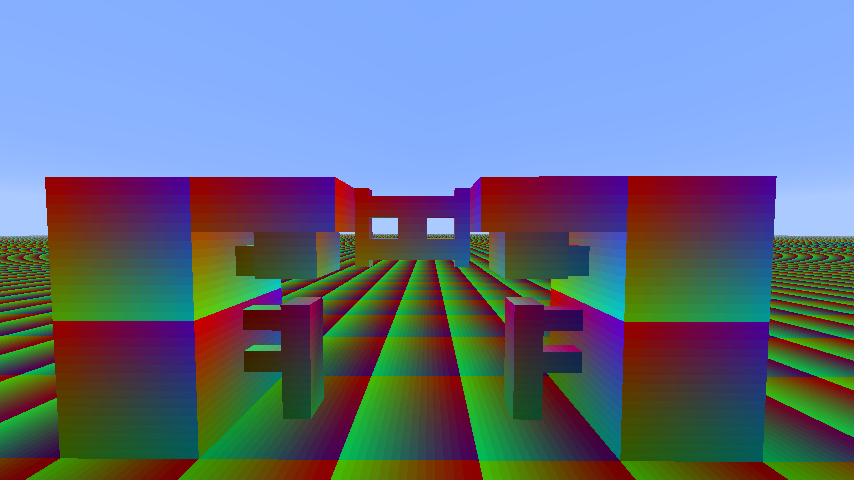
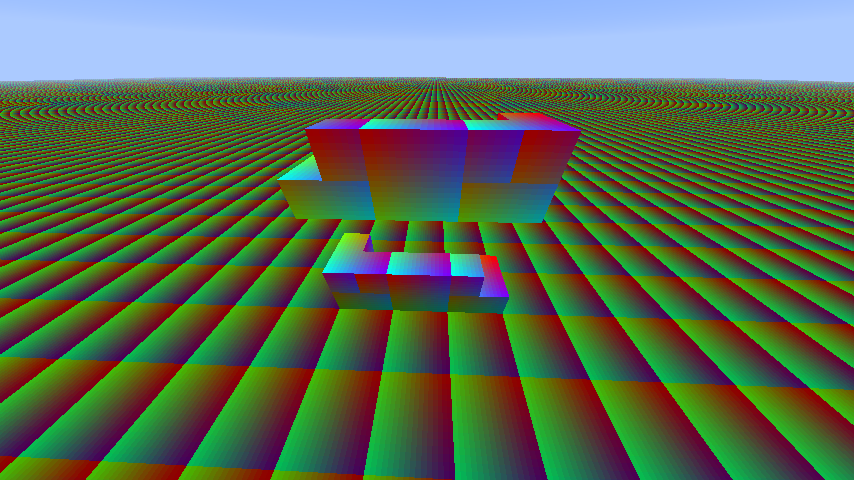
Having textures correctly aligned, like on Ax.png screenshots.
Actual:
Textures are misaligned, like on Bx.png screenshots.
Solution:
RenderBlocks.javapublic class RenderBlocks { public void renderEastFace(Block par1Block, double par2, double par4, double par6, Icon texture) { Tessellator tessellator = Tessellator.instance; if (this.hasOverrideBlockTexture()) { texture = this.overrideBlockTexture; } /* START OF OLD CODE * double var10 = (double)texture.getInterpolatedU(this.renderMinX * 16.0D); double var12 = (double)texture.getInterpolatedU(this.renderMaxX * 16.0D); * END OF OLD CODE */ /* START OF NEW CODE */ double var10 = (double)texture.getInterpolatedU(16.0D - this.renderMaxX * 16.0D); double var12 = (double)texture.getInterpolatedU(16.0D - this.renderMinX * 16.0D); /* END OF NEW CODE */ double var14 = (double)texture.getInterpolatedV(16.0D - this.renderMaxY * 16.0D); double var16 = (double)texture.getInterpolatedV(16.0D - this.renderMinY * 16.0D); /* ... */ } public void renderSouthFace(Block par1Block, double par2, double par4, double par6, Icon texture) { Tessellator tessellator = Tessellator.instance; if (this.hasOverrideBlockTexture()) { texture = this.overrideBlockTexture; } /* START OF OLD CODE * double var10 = (double)texture.getInterpolatedU(this.renderMinZ * 16.0D); double var12 = (double)texture.getInterpolatedU(this.renderMaxZ * 16.0D); * END OF OLD CODE */ /* START OF NEW CODE */ double var10 = (double)texture.getInterpolatedU(16.0D - this.renderMaxZ * 16.0D); double var12 = (double)texture.getInterpolatedU(16.0D - this.renderMinZ * 16.0D); /* END OF NEW CODE */ double var14 = (double)texture.getInterpolatedV(16.0D - this.renderMaxY * 16.0D); double var16 = (double)texture.getInterpolatedV(16.0D - this.renderMinY * 16.0D); /* ... */ } }
Linked Issues




Created Issue:
[VISUAL]
Steps:
1) Use minecraft 1.4.2 or before
2) Launch minecraft, click on texturepacks and after on open folder
2) Put test.zip (below) in the opened folder
3) Set test.zip as texturepack and join a game
4) place somes wooden or netherbrick fences or mossy cobblestone or cobblestone walls like on the images below.
Description:Texture on fences and walls sides seem to be misaligned and not the same everywhere.
We can ignore the top face since it is correctly aligned to blocks.
Fence 2.png, Fence 4.png, Wall 2.png and Wall 4.png are there to help find your way.
terrain.png is for you to see the changes on terrain.png.
test.zip is a texture pack for you to test, don't need any mods.
Expected:Having side texture correctly "connected" and aligned like in Wall 1.png and Fence 1.png but on all sides
Actual:Textures are not correctly aligned and don't correctly connect like in
Wall 3.png and Fence 3.png
Attachments10
Fence 3.png
Steps:
1) Use minecraft 1.4.2 or before
2) Launch minecraft, click on texturepacks and after on open folder
2) Put test.zip (below) in the opened folder
3) Set test.zip as texturepack and join a game
4) place somes wooden or netherbrick fences or mossy cobblestone or cobblestone walls like on the images below.
Description:Texture on fences and walls sides seem to be misaligned and not the same everywhere.
We can ignore the top face since it is correctly aligned to blocks.
Fence 2.png, Fence 4.png, Wall 2.png and Wall 4.png are there to help find your way.
terrain.png is for you to see the changes on terrain.png.
test.zip is a texture pack for you to test, don't need any mods.
Expected:Having side texture correctly "connected" and aligned like in Wall 1.png and Fence 1.png but on all sides
Actual:Textures are not correctly aligned and don't correctly connect like in
Wall 3.png and Fence 3.pngSteps:
1) Use minecraft 1.4.2 or before
2) Launch minecraft, click on texturepacks and after on open folder
2) Put test.zip (below) in the opened folder
3) Set test.zip as texturepack and join a game
4) place somes wooden or netherbrick fences or mossy cobblestone or cobblestone walls like on the images below.
Description:Texture on fences and walls sides seem to be misaligned and not the same everywhere.
We can ignore the top face since it is correctly aligned to blocks.
Fence 2.png, Fence 4.png, Wall 2.png and Wall 4.png are there to help find your way.
terrain.png is for you to see the changes on terrain.png.
test.zip is a texture pack for you to test, don't need any mods.
Expected:Having side texture correctly "connected" and aligned like in Wall 1.png and Fence 1.png but on all sides
Actual:Textures are not correctly aligned and don't correctly connect like in Wall 3.png and Fence 3.png
[VISUAL][VISUAL] Fence and Wall misaligned textures
Steps:
1) Use minecraft 1.4.2 or before
2) Launch minecraft, click on texturepacks and after on open folder
2) Put test.zip (below) in the opened folder
3) Set test.zip as texturepack and join a game
4) place somes wooden or netherbrick fences or mossy cobblestone or cobblestone walls like on the images below.
Description:Texture on fences and walls sides seem to be misaligned and not the same everywhere.
We can ignore the top face since it is correctly aligned to blocks.
Fence 2.png, Fence 4.png, Wall 2.png and Wall 4.pngare there to help find your way.te
rrain.pngisfor you to see the changes on terrain.png.test.zip
is a texture pack for you to test, don't need any mods.
Expected:Having side texture correctly "connected" and aligned like in Wall 1.png and Fence 1.png but on all sides
Actual:Textures are not correctly aligned and don't correctly connect like in Wall 3.png and Fence 3.png
Steps:
1) Use minecraft 1.4.2 or before
2) Launch minecraft, click on texturepacks and after on open folder
2) Put test.zip (below) in the opened folder ( or install misa texture pack, need to patch minecraft with mcpatcher)
3) Set test.zip ( or misa texture pack ) as texturepack and join a game
4) place somes wooden or netherbrick fences or mossy cobblestone or cobblestone walls like on the images below.
Description:Texture on fences and walls sides seem to be misaligned and not the same everywhere.
We can ignore the top face since it is correctly aligned to blocks.
terrain.png is for you to see the changes on terrain.png.
test.zip is a texture pack for you to test, don't need any mods.
The misa images show the problem with a texture pack that have done the same thing as me.
On misa bad images, you can see a "glitch" at the connection of the two fence or wall blocks
Expected:Having side texture correctly "connected" and aligned like in Wall 1.png and Fence 1.png but on all sides
Actual:Textures are not correctly aligned and don't correctly connect like in Wall 3.png and Fence 3.png

Steps:
1) Use minecraft 1.4.
2or before
2) Launch minecraft, click on texturepacks and after on open folder
2) Put test.zip (below) in the opened folder ( or install misa texture pack, need to patch minecraft with mcpatcher)
3) Set test.zip ( or misa texture pack ) as texturepack and join a game
4) place somes wooden or netherbrick fences or mossy cobblestone or cobblestone walls like on the images below.
Description:Texture on fences and walls sides seem to be misaligned and not the same everywhere.
We can ignore the top face since it is correctly aligned to blocks.
terrain.png is for you to see the changes on terrain.png.
test.zip is a texture pack for you to test, don't need any mods.
The misa images show the problem with a texture pack that have done the same thing as me.
On misa bad images, you can see a "glitch" at the connection of the two fence or wall blocks
Expected:Having side texture correctly "connected" and aligned like in Wall 1.png and Fence 1.png but on all sides
Actual:Textures are not correctly aligned and don't correctly connect like in Wall 3.png and Fence 3.png
Steps:
1) Use minecraft 1.4.7, 13w01b or before ( if you use a version 12w02a or above use test2.zip instead of test.zip )
2) Launch minecraft, click on texturepacks and after on open folder
2) Put test.zip (below) in the opened folder ( or install misa texture pack, need to patch minecraft with mcpatcher)
3) Set test.zip ( or misa texture pack ) as texturepack and join a game
4) place somes wooden or netherbrick fences or mossy cobblestone or cobblestone walls like on the images below.
Description:Texture on fences and walls sides seem to be misaligned and not the same everywhere.
We can ignore the top face since it is correctly aligned to blocks.
terrain.png is for you to see the changes on terrain.png.
test.zip is a texture pack for you to test, don't need any mods.
The misa images show the problem with a texture pack that have done the same thing as me.
On misa bad images, you can see a "glitch" at the connection of the two fence or wall blocks
Expected:Having side texture correctly "connected" and aligned like in Wall 1.png and Fence 1.png but on all sides
Actual:Textures are not correctly aligned and don't correctly connect like in Wall 3.png and Fence 3.png
Steps:
1) Use minecraft 1.4.7, 13w01b or before ( if you use a version 12w02a or above use test2.zip instead of test.zip )
2) Launch minecraft, click on texturepacks and after on open folder
2) Put test.zip (below) in the opened folder ( or install misa texture pack, need to patch minecraft with mcpatcher)
3) Set test.zip ( or misa texture pack ) as texturepack and join a game
4) place somes wooden or netherbrick fences or mossy cobblestone or cobblestone walls like on the images below.
Description:Texture on fences and walls sides seem to be misaligned and not the same everywhere.
We can ignore the top face since it is correctly aligned to blocks.
terrain.png is for you to see the changes on terrain.png.
test.zip is a texture pack for you to test, don't need any mods.
The misa images show the problem with a texture pack that have done the same thing as me.
On misa bad images, you can see a "glitch" at the connection of the two fence or wall blocks
Expected:Having side texture correctly "connected" and aligned like in Wall 1.png and Fence 1.png but on all sides
Actual:Textures are not correctly aligned and don't correctly connect like in Wall 3.png and Fence 3.png
Steps:
1) Use minecraft 1.4.7, 13w01b or before ( if you use a version 12w02a or above use test2.zip instead of test.zip, you can test )
2) Launch minecraft, click on texturepacks and after on open folder
2) Put test.zip (below) in the opened folder ( or install misa texture pack, need to patch minecraft with mcpatcher ( not availlable at the moment))
3) Set test.zip ( or misa texture pack ) as texturepack and join a game
4) place somes wooden or netherbrick fences or mossy cobblestone or cobblestone walls like on the images below.
Description:Texture on fences and walls sides seem to be misaligned and not the same everywhere.
We can ignore the top face since it is correctly aligned to blocks.
terrain.png is for you to see the changes on terrain.png.
test.zip is a texture pack for you to test, don't need any mods.
The misa images show the problem with a texture pack that have done the same thing as me.
On misa bad images, you can see a "glitch" at the connection of the two fence or wall blocks
Expected:Having side texture correctly "connected" and aligned like in Wall 1.png and Fence 1.png but on all sides
Actual:Textures are not correctly aligned and don't correctly connect like in Wall 3.png and Fence 3.png


is duplicated by
Steps:
1) Use minecraft 1.4.7, 13w01b or before ( if you use a version 12w02a or above use test2.zip instead of test.zip, you can test )
2) Launch minecraft, click on texturepacks and after on open folder
2) Put test.zip (below) in the opened folder ( or install misa texture pack, need to patch minecraft with mcpatcher ( not availlable at the moment))
3) Set test.zip ( or misa texture pack ) as texturepack and join a game
4) place somes wooden or netherbrick fences or mossy cobblestone or cobblestone walls like on the images below.
Description:Texture on fences and walls sides seem to be misaligned and not the same everywhere.
We can ignore the top face since it is correctly aligned to blocks.
terrain.png is for you to see the changes on terrain.png.
test.zip is a texture pack for you to test, don't need any mods.
The misa images show the problem with a texture pack that have done the same thing as me.
On misa bad images, you can see a "glitch" at the connection of the two fence or wall blocks
Expected:Having side texture correctly "connected" and aligned like in Wall 1.png and Fence 1.png but on all sides
Actual:Textures are not correctly aligned and don't correctly connect like in Wall 3.png and Fence 3.png
*Solution:
Old New
Steps:
1) Use minecraft 1.4.7, 13w01b or before ( if you use a version 12w02a or above use test2.zip instead of test.zip, you can test )
2) Launch minecraft, click on texturepacks and after on open folder
2) Put test.zip (below) in the opened folder ( or install misa texture pack, need to patch minecraft with mcpatcher ( not availlable at the moment))
3) Set test.zip ( or misa texture pack ) as texturepack and join a game
4) place somes wooden or netherbrick fences or mossy cobblestone or cobblestone walls like on the images below.
Description:Texture on fences and walls sides seem to be misaligned and not the same everywhere.
We can ignore the top face since it is correctly aligned to blocks.
terrain.png is for you to see the changes on terrain.png.
test.zip is a texture pack for you to test, don't need any mods.
The misa images show the problem with a texture pack that have done the same thing as me.
On misa bad images, you can see a "glitch" at the connection of the two fence or wall blocks
Expected:Having side texture correctly "connected" and aligned like in Wall 1.png and Fence 1.png but on all sides
Actual:Textures are not correctly aligned and don't correctly connect like in Wall 3.png and Fence 3.png
*Solution:
Old New Steps:
1) Use minecraft 1.4.7, 13w01b or before ( if you use a version 12w02a or above use test2.zip instead of test.zip, you can test )
2) Launch minecraft, click on texturepacks and after on open folder
2) Put test.zip (below) in the opened folder ( or install misa texture pack, need to patch minecraft with mcpatcher ( not availlable at the moment))
3) Set test.zip ( or misa texture pack ) as texturepack and join a game
4) place somes wooden or netherbrick fences or mossy cobblestone or cobblestone walls like on the images below.
Description:Texture on fences and walls sides seem to be misaligned and not the same everywhere.
We can ignore the top face since it is correctly aligned to blocks.
terrain.png is for you to see the changes on terrain.png.
test.zip is a texture pack for you to test, don't need any mods.
The misa images show the problem with a texture pack that have done the same thing as me.
On misa bad images, you can see a "glitch" at the connection of the two fence or wall blocks
Expected:Having side texture correctly "connected" and aligned like in Wall 1.png and Fence 1.png but on all sides
Actual:Textures are not correctly aligned and don't correctly connect like in Wall 3.png and Fence 3.png
*Solution:RenderBlocks.javapublic class RenderBlocks extends RenderBlocksOld { public void renderEastFace(Block par1Block, double par2, double par4, double par6, Icon texture) { Tessellator tessellator = Tessellator.instance; if (this.hasOverrideBlockTexture()) { texture = this.overrideBlockTexture; } /* BEFORE * double var10 = (double)texture.getInterpolatedU(this.renderMinX * 16.0D); double var12 = (double)texture.getInterpolatedU(this.renderMaxX * 16.0D); /* END BEFORE */ /* AFTER : */ double var10 = (double)texture.getInterpolatedU(16.0D - this.renderMaxX * 16.0D); double var12 = (double)texture.getInterpolatedU(16.0D - this.renderMinX * 16.0D); /* END AFTER */ double var14 = (double)texture.getInterpolatedV(16.0D - this.renderMaxY * 16.0D); double var16 = (double)texture.getInterpolatedV(16.0D - this.renderMinY * 16.0D); /* ... */ } public void renderSouthFace(Block par1Block, double par2, double par4, double par6, Icon texture) { Tessellator tessellator = Tessellator.instance; if (this.hasOverrideBlockTexture()) { texture = this.overrideBlockTexture; } /* BEFORE * double var10 = (double)texture.getInterpolatedU(this.renderMinZ * 16.0D); double var12 = (double)texture.getInterpolatedU(this.renderMaxZ * 16.0D); /* END BEFORE */ /* AFTER : */ double var10 = (double)texture.getInterpolatedU(16.0D - this.renderMaxZ * 16.0D); double var12 = (double)texture.getInterpolatedU(16.0D - this.renderMinZ * 16.0D); /* END AFTER */ double var14 = (double)texture.getInterpolatedV(16.0D - this.renderMaxY * 16.0D); double var16 = (double)texture.getInterpolatedV(16.0D - this.renderMinY * 16.0D); /* ... */ } }
[VISUAL]Fence and Wall misaligned textures[VISUAL] Misaligned textures on south and east faces for non-full blocks
Steps:1) Use minecraft 1.4.7, 13w01b or before ( if you use a version 12w02a or above use test2.zip instead of test.zip, you can test )
2) Launch minecraft, click on texturepacks and after on open folder
2) Put test.zip (below) in the opened folder ( or install misa texture pack, need to patch minecraft with mcpatcher ( not availlable at the moment))
3) Set test.zip ( or misa texture pack ) as texturepack and join a game
4) place somes wooden or netherbrick fences or mossy cobblestone or cobblestone walls like on the images below.
Description:T
exture on fences and walls sides seem to be misaligned and not the same everywhere.
We can ignore the top face since it is correctly aligned to blocks.terrain.png is for you to see the changes on terrain.png.
test.zip is a texture pack for you to test, don't need any mods.
The misa images show the problem with a texture pack that have done the same thing as me.
On misa bad images, you can see a "glitch" at the connection of the two fence or wall blocks
Expected:Having
sidetexture correctly"connected" and aligned like inWall 1.png and Fence 1.png but on all sides
Actual:Textures are
not correctly aligned and don't correctly connect like inWall 3.png and Fence 3.png
*Solution:RenderBlocks.javapublic class RenderBlocks extends RenderBlocksOld { public void renderEastFace(Block par1Block, double par2, double par4, double par6, Icon texture) { Tessellator tessellator = Tessellator.instance; if (this.hasOverrideBlockTexture()) { texture = this.overrideBlockTexture; } /* BEFORE * double var10 = (double)texture.getInterpolatedU(this.renderMinX * 16.0D); double var12 = (double)texture.getInterpolatedU(this.renderMaxX * 16.0D); /* END BEFORE */ /* AFTER : */ double var10 = (double)texture.getInterpolatedU(16.0D - this.renderMaxX * 16.0D); double var12 = (double)texture.getInterpolatedU(16.0D - this.renderMinX * 16.0D); /* END AFTER */ double var14 = (double)texture.getInterpolatedV(16.0D - this.renderMaxY * 16.0D); double var16 = (double)texture.getInterpolatedV(16.0D - this.renderMinY * 16.0D); /* ... */ } public void renderSouthFace(Block par1Block, double par2, double par4, double par6, Icon texture) { Tessellator tessellator = Tessellator.instance; if (this.hasOverrideBlockTexture()) { texture = this.overrideBlockTexture; } /* BEFORE * double var10 = (double)texture.getInterpolatedU(this.renderMinZ * 16.0D); double var12 = (double)texture.getInterpolatedU(this.renderMaxZ * 16.0D); /* END BEFORE */ /* AFTER : */ double var10 = (double)texture.getInterpolatedU(16.0D - this.renderMaxZ * 16.0D); double var12 = (double)texture.getInterpolatedU(16.0D - this.renderMinZ * 16.0D); /* END AFTER */ double var14 = (double)texture.getInterpolatedV(16.0D - this.renderMaxY * 16.0D); double var16 = (double)texture.getInterpolatedV(16.0D - this.renderMinY * 16.0D); /* ... */ } }Description:
Texture on somes non-full width blocks on somes sides are misaligned and non-symetrical, like :
- Door
- trapdoor
- Fences
- Fencegates
- Wall
- Buttons
- Levers
- Pressure Plates
- Stairs
- hopper
- Tripwire hook
This does not apply on cake for example, because Xstart and 16-Xend of the texture are equal.
This does not affect somes blocks like cocoa, because they are exceptions
With that bug, it's very difficult to make HD texture pack since these details are near invisible with 16x packs but not on 64x packs for example.
Expected:
Having textures correctly aligned.
Actual:
Textures are misaligned
*Solution:RenderBlocks.javapublic class RenderBlocks extends RenderBlocksOld { public void renderEastFace(Block par1Block, double par2, double par4, double par6, Icon texture) { Tessellator tessellator = Tessellator.instance; if (this.hasOverrideBlockTexture()) { texture = this.overrideBlockTexture; } /* BEFORE * double var10 = (double)texture.getInterpolatedU(this.renderMinX * 16.0D); double var12 = (double)texture.getInterpolatedU(this.renderMaxX * 16.0D); /* END BEFORE */ /* AFTER : */ double var10 = (double)texture.getInterpolatedU(16.0D - this.renderMaxX * 16.0D); double var12 = (double)texture.getInterpolatedU(16.0D - this.renderMinX * 16.0D); /* END AFTER */ double var14 = (double)texture.getInterpolatedV(16.0D - this.renderMaxY * 16.0D); double var16 = (double)texture.getInterpolatedV(16.0D - this.renderMinY * 16.0D); /* ... */ } public void renderSouthFace(Block par1Block, double par2, double par4, double par6, Icon texture) { Tessellator tessellator = Tessellator.instance; if (this.hasOverrideBlockTexture()) { texture = this.overrideBlockTexture; } /* BEFORE * double var10 = (double)texture.getInterpolatedU(this.renderMinZ * 16.0D); double var12 = (double)texture.getInterpolatedU(this.renderMaxZ * 16.0D); /* END BEFORE */ /* AFTER : */ double var10 = (double)texture.getInterpolatedU(16.0D - this.renderMaxZ * 16.0D); double var12 = (double)texture.getInterpolatedU(16.0D - this.renderMinZ * 16.0D); /* END AFTER */ double var14 = (double)texture.getInterpolatedV(16.0D - this.renderMaxY * 16.0D); double var16 = (double)texture.getInterpolatedV(16.0D - this.renderMinY * 16.0D); /* ... */ } }
Description:
Texture on somes non-full width blocks on somes sides are misaligned and non-symetrical, like :
- Door
- trapdoor
- Fences
- Fencegates
- Wall
- Buttons
- Levers
- Pressure Plates
- Stairs
- hopper
- Tripwire hook
This does not apply on cake for example, because Xstart and 16-Xend of the texture are equal.
This does not affect somes blocks like cocoa, because they are exceptions
With that bug, it's very difficult to make HD texture pack since these details are near invisible with 16x packs but not on 64x packs for example.
Expected:
Having textures correctly aligned.
Actual:
Textures are misaligned
*Solution:RenderBlocks.javapublic class RenderBlocks extends RenderBlocksOld { public void renderEastFace(Block par1Block, double par2, double par4, double par6, Icon texture) { Tessellator tessellator = Tessellator.instance; if (this.hasOverrideBlockTexture()) { texture = this.overrideBlockTexture; } /* BEFORE * double var10 = (double)texture.getInterpolatedU(this.renderMinX * 16.0D); double var12 = (double)texture.getInterpolatedU(this.renderMaxX * 16.0D); /* END BEFORE */ /* AFTER : */ double var10 = (double)texture.getInterpolatedU(16.0D - this.renderMaxX * 16.0D); double var12 = (double)texture.getInterpolatedU(16.0D - this.renderMinX * 16.0D); /* END AFTER */ double var14 = (double)texture.getInterpolatedV(16.0D - this.renderMaxY * 16.0D); double var16 = (double)texture.getInterpolatedV(16.0D - this.renderMinY * 16.0D); /* ... */ } public void renderSouthFace(Block par1Block, double par2, double par4, double par6, Icon texture) { Tessellator tessellator = Tessellator.instance; if (this.hasOverrideBlockTexture()) { texture = this.overrideBlockTexture; } /* BEFORE * double var10 = (double)texture.getInterpolatedU(this.renderMinZ * 16.0D); double var12 = (double)texture.getInterpolatedU(this.renderMaxZ * 16.0D); /* END BEFORE */ /* AFTER : */ double var10 = (double)texture.getInterpolatedU(16.0D - this.renderMaxZ * 16.0D); double var12 = (double)texture.getInterpolatedU(16.0D - this.renderMinZ * 16.0D); /* END AFTER */ double var14 = (double)texture.getInterpolatedV(16.0D - this.renderMaxY * 16.0D); double var16 = (double)texture.getInterpolatedV(16.0D - this.renderMinY * 16.0D); /* ... */ } }Description:
Texture on somes non-full width blocks on somes sides are misaligned and non-symetrical, like :
- Door
- trapdoor
- Fences
- Fencegates
- Wall
- Buttons
- Levers
- Pressure Plates
- Stairs
- hopper
- Tripwire hook
This does not apply on cake for example, because Xstart and 16-Xend of the texture are equal.
This does not affect somes blocks like cocoa, because they are exceptions
With that bug, it's very difficult to make HD texture pack since these details are near invisible with 16x packs but not on 64x packs for example.
Expected:Having textures correctly aligned.
Actual:Textures are misaligned
*Solution:RenderBlocks.javapublic class RenderBlocks extends RenderBlocksOld { public void renderEastFace(Block par1Block, double par2, double par4, double par6, Icon texture) { Tessellator tessellator = Tessellator.instance; if (this.hasOverrideBlockTexture()) { texture = this.overrideBlockTexture; } /* BEFORE * double var10 = (double)texture.getInterpolatedU(this.renderMinX * 16.0D); double var12 = (double)texture.getInterpolatedU(this.renderMaxX * 16.0D); /* END BEFORE */ /* AFTER : */ double var10 = (double)texture.getInterpolatedU(16.0D - this.renderMaxX * 16.0D); double var12 = (double)texture.getInterpolatedU(16.0D - this.renderMinX * 16.0D); /* END AFTER */ double var14 = (double)texture.getInterpolatedV(16.0D - this.renderMaxY * 16.0D); double var16 = (double)texture.getInterpolatedV(16.0D - this.renderMinY * 16.0D); /* ... */ } public void renderSouthFace(Block par1Block, double par2, double par4, double par6, Icon texture) { Tessellator tessellator = Tessellator.instance; if (this.hasOverrideBlockTexture()) { texture = this.overrideBlockTexture; } /* BEFORE * double var10 = (double)texture.getInterpolatedU(this.renderMinZ * 16.0D); double var12 = (double)texture.getInterpolatedU(this.renderMaxZ * 16.0D); /* END BEFORE */ /* AFTER : */ double var10 = (double)texture.getInterpolatedU(16.0D - this.renderMaxZ * 16.0D); double var12 = (double)texture.getInterpolatedU(16.0D - this.renderMinZ * 16.0D); /* END AFTER */ double var14 = (double)texture.getInterpolatedV(16.0D - this.renderMaxY * 16.0D); double var16 = (double)texture.getInterpolatedV(16.0D - this.renderMinY * 16.0D); /* ... */ } }
Description:
Texture on somes non-full width blocks on somes sides are misaligned and non-symetrical, like :
- Door
- trapdoor
- Fences
- Fencegates
- Wall
- Buttons
- Levers
- Pressure Plates
- Stairs
- hopper
- Tripwire hook
This does not apply on cake for example, because Xstart and 16-Xend of the texture are equal.
This does not affect somes blocks like cocoa, because they are exceptions
With that bug, it's very difficult to make HD texture pack since these details are near invisible with 16x packs but not on 64x packs for example.
Expected:Having textures correctly aligned.
Actual:Textures are misaligned
*Solution:RenderBlocks.javapublic class RenderBlocks extends RenderBlocksOld { public void renderEastFace(Block par1Block, double par2, double par4, double par6, Icon texture) { Tessellator tessellator = Tessellator.instance; if (this.hasOverrideBlockTexture()) { texture = this.overrideBlockTexture; } /* BEFORE * double var10 = (double)texture.getInterpolatedU(this.renderMinX * 16.0D); double var12 = (double)texture.getInterpolatedU(this.renderMaxX * 16.0D); /* END BEFORE */ /* AFTER : */ double var10 = (double)texture.getInterpolatedU(16.0D - this.renderMaxX * 16.0D); double var12 = (double)texture.getInterpolatedU(16.0D - this.renderMinX * 16.0D); /* END AFTER */ double var14 = (double)texture.getInterpolatedV(16.0D - this.renderMaxY * 16.0D); double var16 = (double)texture.getInterpolatedV(16.0D - this.renderMinY * 16.0D); /* ... */ } public void renderSouthFace(Block par1Block, double par2, double par4, double par6, Icon texture) { Tessellator tessellator = Tessellator.instance; if (this.hasOverrideBlockTexture()) { texture = this.overrideBlockTexture; } /* BEFORE * double var10 = (double)texture.getInterpolatedU(this.renderMinZ * 16.0D); double var12 = (double)texture.getInterpolatedU(this.renderMaxZ * 16.0D); /* END BEFORE */ /* AFTER : */ double var10 = (double)texture.getInterpolatedU(16.0D - this.renderMaxZ * 16.0D); double var12 = (double)texture.getInterpolatedU(16.0D - this.renderMinZ * 16.0D); /* END AFTER */ double var14 = (double)texture.getInterpolatedV(16.0D - this.renderMaxY * 16.0D); double var16 = (double)texture.getInterpolatedV(16.0D - this.renderMinY * 16.0D); /* ... */ } }Description:
Texture on somes non-full width blocks on somes sides are misaligned and non-symetrical, like :
- Door
- trapdoor
- Fences
- Fencegates
- Wall
- Buttons
- Levers
- Pressure Plates
- Stairs
- hopper
- Tripwire hook
This does not apply on cake for example, because Xstart and 16-Xend of the texture are equal.
This does not affect somes blocks like cocoa, because they are exceptions
With that bug, it's very difficult to make HD texture pack since these details are near invisible with 16x packs but not on 64x packs for example.
Expected:Having textures correctly aligned.
Actual:Textures are misaligned
Solution:RenderBlocks.javapublic class RenderBlocks extends RenderBlocksOld { public void renderEastFace(Block par1Block, double par2, double par4, double par6, Icon texture) { Tessellator tessellator = Tessellator.instance; if (this.hasOverrideBlockTexture()) { texture = this.overrideBlockTexture; } /* BEFORE * double var10 = (double)texture.getInterpolatedU(this.renderMinX * 16.0D); double var12 = (double)texture.getInterpolatedU(this.renderMaxX * 16.0D); /* END BEFORE */ /* AFTER : */ double var10 = (double)texture.getInterpolatedU(16.0D - this.renderMaxX * 16.0D); double var12 = (double)texture.getInterpolatedU(16.0D - this.renderMinX * 16.0D); /* END AFTER */ double var14 = (double)texture.getInterpolatedV(16.0D - this.renderMaxY * 16.0D); double var16 = (double)texture.getInterpolatedV(16.0D - this.renderMinY * 16.0D); /* ... */ } public void renderSouthFace(Block par1Block, double par2, double par4, double par6, Icon texture) { Tessellator tessellator = Tessellator.instance; if (this.hasOverrideBlockTexture()) { texture = this.overrideBlockTexture; } /* BEFORE * double var10 = (double)texture.getInterpolatedU(this.renderMinZ * 16.0D); double var12 = (double)texture.getInterpolatedU(this.renderMaxZ * 16.0D); /* END BEFORE */ /* AFTER : */ double var10 = (double)texture.getInterpolatedU(16.0D - this.renderMaxZ * 16.0D); double var12 = (double)texture.getInterpolatedU(16.0D - this.renderMinZ * 16.0D); /* END AFTER */ double var14 = (double)texture.getInterpolatedV(16.0D - this.renderMaxY * 16.0D); double var16 = (double)texture.getInterpolatedV(16.0D - this.renderMinY * 16.0D); /* ... */ } }
Description:
Texture on
somesnon-full widthblocks on somessides are misalignedand non-symetrical, like :
- Door
- trapdoor
- Fences
- Fencegates
- Wall
- Buttons
- Levers
- Pressure Plates
- Stairs
- hopper
- Tripwire hook
This does not a
pply on cake for example, because Xstart and 16-Xend of the texture are equal.
This does not affect somes blocks like cocoa, because they are exceptionsWith that bug, it's very difficult to make HD texture pack since these details are near invisible with 16x packs but not on 64x packs for example.
Expected:Having textures correctly aligned.
Actual:Textures are misaligned
Solution:RenderBlocks.javapublic class RenderBlocks extends RenderBlocksOld { public void renderEastFace(Block par1Block, double par2, double par4, double par6, Icon texture) { Tessellator tessellator = Tessellator.instance; if (this.hasOverrideBlockTexture()) { texture = this.overrideBlockTexture; } /*BEFORE * double var10 = (double)texture.getInterpolatedU(this.renderMinX * 16.0D); double var12 = (double)texture.getInterpolatedU(this.renderMaxX * 16.0D); /*END BEFORE *//* AFTER : */double var10 = (double)texture.getInterpolatedU(16.0D - this.renderMaxX * 16.0D); double var12 = (double)texture.getInterpolatedU(16.0D - this.renderMinX * 16.0D); /* ENDAFTER*/ double var14 = (double)texture.getInterpolatedV(16.0D - this.renderMaxY * 16.0D); double var16 = (double)texture.getInterpolatedV(16.0D - this.renderMinY * 16.0D); /* ... */ } public void renderSouthFace(Block par1Block, double par2, double par4, double par6, Icon texture) { Tessellator tessellator = Tessellator.instance; if (this.hasOverrideBlockTexture()) { texture = this.overrideBlockTexture; } /*BEFORE * double var10 = (double)texture.getInterpolatedU(this.renderMinZ * 16.0D); double var12 = (double)texture.getInterpolatedU(this.renderMaxZ * 16.0D);/* END BEFORE *//*AFTER :*/ double var10 = (double)texture.getInterpolatedU(16.0D - this.renderMaxZ * 16.0D); double var12 = (double)texture.getInterpolatedU(16.0D - this.renderMinZ * 16.0D); /* ENDAFTER*/ double var14 = (double)texture.getInterpolatedV(16.0D - this.renderMaxY * 16.0D); double var16 = (double)texture.getInterpolatedV(16.0D - this.renderMinY * 16.0D); /* ... */ } }Description:
Texture on all non-full width non-symmetrical blocks on south and east sides are misaligned, like :
- Door
- trapdoor
- Fences
- Fencegates
- Wall
- Buttons
- Levers
- Pressure Plates
- Stairs
- hopper
- Tripwire hook
This does not affect some blocks like cocoa, because they don't use the standard block method.
With that bug, it's very difficult to make HD texture pack since these details are near invisible with 16x packs but not on 64x packs for example.
Expected:Having textures correctly aligned.
Actual:Textures are misaligned
Solution:RenderBlocks.javapublic class RenderBlocks extends RenderBlocksOld { public void renderEastFace(Block par1Block, double par2, double par4, double par6, Icon texture) { Tessellator tessellator = Tessellator.instance; if (this.hasOverrideBlockTexture()) { texture = this.overrideBlockTexture; } /* START OF OLD CODE * double var10 = (double)texture.getInterpolatedU(this.renderMinX * 16.0D); double var12 = (double)texture.getInterpolatedU(this.renderMaxX * 16.0D); * END OF OLD CODE */ /* START OF NEW CODE */ double var10 = (double)texture.getInterpolatedU(16.0D - this.renderMaxX * 16.0D); double var12 = (double)texture.getInterpolatedU(16.0D - this.renderMinX * 16.0D); /* END OF NEW CODE */ double var14 = (double)texture.getInterpolatedV(16.0D - this.renderMaxY * 16.0D); double var16 = (double)texture.getInterpolatedV(16.0D - this.renderMinY * 16.0D); /* ... */ } public void renderSouthFace(Block par1Block, double par2, double par4, double par6, Icon texture) { Tessellator tessellator = Tessellator.instance; if (this.hasOverrideBlockTexture()) { texture = this.overrideBlockTexture; } /* START OF OLD CODE * double var10 = (double)texture.getInterpolatedU(this.renderMinZ * 16.0D); double var12 = (double)texture.getInterpolatedU(this.renderMaxZ * 16.0D); * END OF OLD CODE */ /* START OF NEW CODE */ double var10 = (double)texture.getInterpolatedU(16.0D - this.renderMaxZ * 16.0D); double var12 = (double)texture.getInterpolatedU(16.0D - this.renderMinZ * 16.0D); /* END OF NEW CODE */ double var14 = (double)texture.getInterpolatedV(16.0D - this.renderMaxY * 16.0D); double var16 = (double)texture.getInterpolatedV(16.0D - this.renderMinY * 16.0D); /* ... */ } }
Description:
Texture on all non-full width non-symmetrical blocks on south and east sides are misaligned, like :
- Door
- trapdoor
- Fences
- Fencegates
- Wall
- Buttons
- Levers
Pressure Plates- Stairs
- hopper
- Tripwire hook
This does not affect some blocks like cocoa, because they don't use the standard block method.
With that bug, it's very difficult to make HD texture pack since these details are near invisible with 16x packs but not on 64x packs for example.
Expected:Having textures correctly aligned.
Actual:Textures are misaligned
Solution:RenderBlocks.javapublic class RenderBlocks extends RenderBlocksOld { public void renderEastFace(Block par1Block, double par2, double par4, double par6, Icon texture) { Tessellator tessellator = Tessellator.instance; if (this.hasOverrideBlockTexture()) { texture = this.overrideBlockTexture; } /* START OF OLD CODE * double var10 = (double)texture.getInterpolatedU(this.renderMinX * 16.0D); double var12 = (double)texture.getInterpolatedU(this.renderMaxX * 16.0D); * END OF OLD CODE */ /* START OF NEW CODE */ double var10 = (double)texture.getInterpolatedU(16.0D - this.renderMaxX * 16.0D); double var12 = (double)texture.getInterpolatedU(16.0D - this.renderMinX * 16.0D); /* END OF NEW CODE */ double var14 = (double)texture.getInterpolatedV(16.0D - this.renderMaxY * 16.0D); double var16 = (double)texture.getInterpolatedV(16.0D - this.renderMinY * 16.0D); /* ... */ } public void renderSouthFace(Block par1Block, double par2, double par4, double par6, Icon texture) { Tessellator tessellator = Tessellator.instance; if (this.hasOverrideBlockTexture()) { texture = this.overrideBlockTexture; } /* START OF OLD CODE * double var10 = (double)texture.getInterpolatedU(this.renderMinZ * 16.0D); double var12 = (double)texture.getInterpolatedU(this.renderMaxZ * 16.0D); * END OF OLD CODE */ /* START OF NEW CODE */ double var10 = (double)texture.getInterpolatedU(16.0D - this.renderMaxZ * 16.0D); double var12 = (double)texture.getInterpolatedU(16.0D - this.renderMinZ * 16.0D); /* END OF NEW CODE */ double var14 = (double)texture.getInterpolatedV(16.0D - this.renderMaxY * 16.0D); double var16 = (double)texture.getInterpolatedV(16.0D - this.renderMinY * 16.0D); /* ... */ } }Description:
Texture on all non-full width non-symmetrical blocks on south and east sides are misaligned, like :
- Door
- trapdoor
- Fences
- Fencegates
- Wall
- Buttons
- Levers
- Stairs
- hopper
- Tripwire hook
This does not affect some blocks like cocoa, because they don't use the standard block method.
With that bug, it's very difficult to make HD texture pack since these details are near invisible with 16x packs but not on 64x packs for example.
Expected:Having textures correctly aligned.
Actual:Textures are misaligned
Solution:RenderBlocks.javapublic class RenderBlocks extends RenderBlocksOld { public void renderEastFace(Block par1Block, double par2, double par4, double par6, Icon texture) { Tessellator tessellator = Tessellator.instance; if (this.hasOverrideBlockTexture()) { texture = this.overrideBlockTexture; } /* START OF OLD CODE * double var10 = (double)texture.getInterpolatedU(this.renderMinX * 16.0D); double var12 = (double)texture.getInterpolatedU(this.renderMaxX * 16.0D); * END OF OLD CODE */ /* START OF NEW CODE */ double var10 = (double)texture.getInterpolatedU(16.0D - this.renderMaxX * 16.0D); double var12 = (double)texture.getInterpolatedU(16.0D - this.renderMinX * 16.0D); /* END OF NEW CODE */ double var14 = (double)texture.getInterpolatedV(16.0D - this.renderMaxY * 16.0D); double var16 = (double)texture.getInterpolatedV(16.0D - this.renderMinY * 16.0D); /* ... */ } public void renderSouthFace(Block par1Block, double par2, double par4, double par6, Icon texture) { Tessellator tessellator = Tessellator.instance; if (this.hasOverrideBlockTexture()) { texture = this.overrideBlockTexture; } /* START OF OLD CODE * double var10 = (double)texture.getInterpolatedU(this.renderMinZ * 16.0D); double var12 = (double)texture.getInterpolatedU(this.renderMaxZ * 16.0D); * END OF OLD CODE */ /* START OF NEW CODE */ double var10 = (double)texture.getInterpolatedU(16.0D - this.renderMaxZ * 16.0D); double var12 = (double)texture.getInterpolatedU(16.0D - this.renderMinZ * 16.0D); /* END OF NEW CODE */ double var14 = (double)texture.getInterpolatedV(16.0D - this.renderMaxY * 16.0D); double var16 = (double)texture.getInterpolatedV(16.0D - this.renderMinY * 16.0D); /* ... */ } }
Description:
Texture on all non-full width non-symmetrical blocks on south and east sides are misaligned, like :
- Door
- trapdoor
- Fences
- Fencegates
- Wall
- Buttons
- Levers
- Stairs
- hopper
- Tripwire hook
This does not affect some blocks like cocoa, because they don't use the standard block method.
With that bug, it's very difficult to make HD texture pack since these details are near invisible with 16x packs but not on 64x packs for example.
Expected:Having textures correctly aligned, like on Ax.png screenshots.
Actual:Textures are misaligned, like on Bx.png screenshots.
Solution:RenderBlocks.javapublic class RenderBlocks extends RenderBlocksOld { public void renderEastFace(Block par1Block, double par2, double par4, double par6, Icon texture) { Tessellator tessellator = Tessellator.instance; if (this.hasOverrideBlockTexture()) { texture = this.overrideBlockTexture; } /* START OF OLD CODE * double var10 = (double)texture.getInterpolatedU(this.renderMinX * 16.0D); double var12 = (double)texture.getInterpolatedU(this.renderMaxX * 16.0D); * END OF OLD CODE */ /* START OF NEW CODE */ double var10 = (double)texture.getInterpolatedU(16.0D - this.renderMaxX * 16.0D); double var12 = (double)texture.getInterpolatedU(16.0D - this.renderMinX * 16.0D); /* END OF NEW CODE */ double var14 = (double)texture.getInterpolatedV(16.0D - this.renderMaxY * 16.0D); double var16 = (double)texture.getInterpolatedV(16.0D - this.renderMinY * 16.0D); /* ... */ } public void renderSouthFace(Block par1Block, double par2, double par4, double par6, Icon texture) { Tessellator tessellator = Tessellator.instance; if (this.hasOverrideBlockTexture()) { texture = this.overrideBlockTexture; } /* START OF OLD CODE * double var10 = (double)texture.getInterpolatedU(this.renderMinZ * 16.0D); double var12 = (double)texture.getInterpolatedU(this.renderMaxZ * 16.0D); * END OF OLD CODE */ /* START OF NEW CODE */ double var10 = (double)texture.getInterpolatedU(16.0D - this.renderMaxZ * 16.0D); double var12 = (double)texture.getInterpolatedU(16.0D - this.renderMinZ * 16.0D); /* END OF NEW CODE */ double var14 = (double)texture.getInterpolatedV(16.0D - this.renderMaxY * 16.0D); double var16 = (double)texture.getInterpolatedV(16.0D - this.renderMinY * 16.0D); /* ... */ } }
Description:
Texture on all non-full width non-symmetrical blocks on south and east sides are misaligned, like :
- Door
- trapdoor
- Fences
- Fencegates
- Wall
- Buttons
- Levers
- Stairs
- hopper
- Tripwire hook
This does not affect some blocks like cocoa, because they don't use the standard block method.
With that bug, it's very difficult to make HD texture pack since these details are near invisible with 16x packs but not on 64x packs for example.
Expected:Having textures correctly aligned, like on Ax.png screenshots.
Actual:Textures are misaligned, like on Bx.png screenshots.
Solution:RenderBlocks.javapublic class RenderBlocksextendsRenderBlocksOld {publicvoid renderEastFace(Block par1Block, double par2, double par4, double par6, Icon texture) { Tessellator tessellator = Tessellator.instance; if (this.hasOverrideBlockTexture()) { texture = this.overrideBlockTexture; } /* START OF OLD CODE * double var10 = (double)texture.getInterpolatedU(this.renderMinX * 16.0D); double var12 = (double)texture.getInterpolatedU(this.renderMaxX * 16.0D); * END OF OLD CODE */ /* START OF NEW CODE */ double var10 = (double)texture.getInterpolatedU(16.0D - this.renderMaxX * 16.0D); double var12 = (double)texture.getInterpolatedU(16.0D - this.renderMinX * 16.0D); /* END OF NEW CODE */ double var14 = (double)texture.getInterpolatedV(16.0D - this.renderMaxY * 16.0D); double var16 = (double)texture.getInterpolatedV(16.0D - this.renderMinY * 16.0D); /* ... */ } public void renderSouthFace(Block par1Block, double par2, double par4, double par6, Icon texture) { Tessellator tessellator = Tessellator.instance; if (this.hasOverrideBlockTexture()) { texture = this.overrideBlockTexture; } /* START OF OLD CODE * double var10 = (double)texture.getInterpolatedU(this.renderMinZ * 16.0D); double var12 = (double)texture.getInterpolatedU(this.renderMaxZ * 16.0D); * END OF OLD CODE */ /* START OF NEW CODE */ double var10 = (double)texture.getInterpolatedU(16.0D - this.renderMaxZ * 16.0D); double var12 = (double)texture.getInterpolatedU(16.0D - this.renderMinZ * 16.0D); /* END OF NEW CODE */ double var14 = (double)texture.getInterpolatedV(16.0D - this.renderMaxY * 16.0D); double var16 = (double)texture.getInterpolatedV(16.0D - this.renderMinY * 16.0D); /* ... */ } }Description:
Texture on all non-full width non-symmetrical blocks on south and east sides are misaligned, like :
- Door
- trapdoor
- Fences
- Fencegates
- Wall
- Buttons
- Levers
- Stairs
- hopper
- Tripwire hook
This does not affect some blocks like cocoa, because they don't use the standard block method.
With that bug, it's very difficult to make HD texture pack since these details are near invisible with 16x packs but not on 64x packs for example.
Expected:Having textures correctly aligned, like on Ax.png screenshots.
Actual:Textures are misaligned, like on Bx.png screenshots.
Solution:RenderBlocks.javapublic class RenderBlocks { public void renderEastFace(Block par1Block, double par2, double par4, double par6, Icon texture) { Tessellator tessellator = Tessellator.instance; if (this.hasOverrideBlockTexture()) { texture = this.overrideBlockTexture; } /* START OF OLD CODE * double var10 = (double)texture.getInterpolatedU(this.renderMinX * 16.0D); double var12 = (double)texture.getInterpolatedU(this.renderMaxX * 16.0D); * END OF OLD CODE */ /* START OF NEW CODE */ double var10 = (double)texture.getInterpolatedU(16.0D - this.renderMaxX * 16.0D); double var12 = (double)texture.getInterpolatedU(16.0D - this.renderMinX * 16.0D); /* END OF NEW CODE */ double var14 = (double)texture.getInterpolatedV(16.0D - this.renderMaxY * 16.0D); double var16 = (double)texture.getInterpolatedV(16.0D - this.renderMinY * 16.0D); /* ... */ } public void renderSouthFace(Block par1Block, double par2, double par4, double par6, Icon texture) { Tessellator tessellator = Tessellator.instance; if (this.hasOverrideBlockTexture()) { texture = this.overrideBlockTexture; } /* START OF OLD CODE * double var10 = (double)texture.getInterpolatedU(this.renderMinZ * 16.0D); double var12 = (double)texture.getInterpolatedU(this.renderMaxZ * 16.0D); * END OF OLD CODE */ /* START OF NEW CODE */ double var10 = (double)texture.getInterpolatedU(16.0D - this.renderMaxZ * 16.0D); double var12 = (double)texture.getInterpolatedU(16.0D - this.renderMinZ * 16.0D); /* END OF NEW CODE */ double var14 = (double)texture.getInterpolatedV(16.0D - this.renderMaxY * 16.0D); double var16 = (double)texture.getInterpolatedV(16.0D - this.renderMinY * 16.0D); /* ... */ } }
![[Mojang] Grum (Erik Broes)](../../../data/assets/gravatar/grum.png) [Mojang] Grum (Erik Broes)
[Mojang] Grum (Erik Broes)relates to

relates to
relates to

Duplicate of MC-190, please use the search function to see if your bug has already been submitted. Currently over 51% of tickets are being closed as duplicate.

@Grum:
Thanks for fixing that 
Yep, that "pile of tickets" still contains a lot of old issues with textures/graphics/rendering. MC-9553 for example is one of the most annoying ones (and about to reach the top 10 of the popular issues list), another one which bothers me is MC-7486 (not really visible with default textures, but indeed visible in many texturepacks). MC-190 was even community-fixed, so this one shouldn't be a lot of work.
I've looked at the code and seen that the problem (and the solution) is a careless mistakes
//  package net.minecraft.src;
//  ...
//  public class RenderBlocks {
//    ...
//    public boolean renderBlockWithAmbientOcclusion(Block par1Block, int par2, int par3, int par4, float par5, float par6, float par7) {
//      ...
//      if (this.renderAllFaces || par1Block.shouldSideBeRendered(this.blockAccess, par2, par3, par4 - 1, 2)) {
//        ...
          /* START OF OLD CODE *
          var9 = (float)((double)var22 * this.renderMaxY * (1.0D - this.renderMinX) + (double)var23 * this.renderMinY * this.renderMinX + (double)var24 * (1.0D - this.renderMaxY) * this.renderMinX + (double)var25 * (1.0D - this.renderMaxY) * (1.0D - this.renderMinX));
          * END OF OLD CODE */
          /* START OF NEW CODE *
          var9 = (float)((double)var22 * this.renderMaxY * (1.0D - this.renderMinX) + (double)var23 * this.renderMaxY * this.renderMinX + (double)var24 * (1.0D - this.renderMaxY) * this.renderMinX + (double)var25 * (1.0D - this.renderMaxY) * (1.0D - this.renderMinX));
          /* END OF NEW CODE */
          var10 = (float)((double)var22 * this.renderMaxY * (1.0D - this.renderMaxX) + (double)var23 * this.renderMaxY * this.renderMaxX + (double)var24 * (1.0D - this.renderMaxY) * this.renderMaxX + (double)var25 * (1.0D - this.renderMaxY) * (1.0D - this.renderMaxX));
          var11 = (float)((double)var22 * this.renderMinY * (1.0D - this.renderMaxX) + (double)var23 * this.renderMinY * this.renderMaxX + (double)var24 * (1.0D - this.renderMinY) * this.renderMaxX + (double)var25 * (1.0D - this.renderMinY) * (1.0D - this.renderMaxX));
          var12 = (float)((double)var22 * this.renderMinY * (1.0D - this.renderMinX) + (double)var23 * this.renderMinY * this.renderMinX + (double)var24 * (1.0D - this.renderMinY) * this.renderMinX + (double)var25 * (1.0D - this.renderMinY) * (1.0D - this.renderMinX));
//        ...
//      }
//      ...
//    }
//    ...
//  }
If you look at var10, var11 and var12 lines, each line uses this.renderMaxY or this.renderMinY, not both, same for this.renderMaxX or this.renderMinX.
the var9 line uses three this.renderMaxY and one this.renderMinY, I've tried to change that to use only this.renderMaxY on that line, and it solved the problem.
This thing with MC-190 solve the corner stair problem.
Concern 1.6.2 !
EDIT: Found out, all the textures are mirrored, not only the door texture.
EDIT 2 : This bug relates to: MC-190
Old error:
The doors texture in release 1.7.2 is flipped sideways, but doors still function normally, as they're supposed.
Seems that the fix of MC-190 has some side effects, Grum
Definitely caused by the fix of MC-190, can anyone please add a "relates to" link and update the description?
Louis, what I mean is, it seems like whoever fixed it (seems like Grum) would have realized that they were changing how ALL blocks were rendered, and checked if they weren't sure.
It's funny because in MC-190 we can clearly see in the screenshots it being fixed, and offering a solution, and Grum says "The solution is actually wrong, but I've fixed the issue nevertheless" and now here we are again......
This reminds me of MC-34649 where the issue was about someone not liking stained glass not having backface culling, and then everything in the game was given backface culling..... water is still broken 
Related to MC-190 :
After Grum fixed that one in another way than proposed, that created that mess.
Fixing this didn't unfix MC-190 though, right? An overall fix was applied?
The fix for this partially broke the fix for MC-190.
Fences in 13w47c now have the old rendering issue where the north/east sides render incorrectly on the outermost pieces. On the west/south sides they render fine.
Please re-open.
I was seeing if MC-190 was actually fixed in 13w48a (the door looks the same as the one in 13w47e), but there was a new bug in 13w47e and 13w48a, I don't remember when it started, but door handles appear where the hinges should be. The first picture is what it looks like when it's closed, and the second is what it is when the door is open. This bug happens on only two sides, the third looks perfectly normal when it's open and closed, the last looks like the opposite, with the handle on the side.
This is only noticeable when using a model that does not specify uv coordinates. That is, one that uses the game's default parametric projections (NOT uv-lock). This is also NOT a model error.
Summary:
Projections on the north, east, and down faces are taken from the south, west, and up faces; they are not taken independently. In 1.9 snapshots the errors form on the east and west faces instead.
Details:
The spruce door in the screenshot uses the custom model (argon_door_generic) attached to this report. The front of the door is the west face and the side of the door is the north face. The north face (side) does not specify uv coords, so the texture should be taken from a projection, logically [13,0,16,16]. Instead, the face uses the coords [0,0,3,16].
As you can also see in the fences, the faces are using the same uv for opposite faces which are in different positions.
Lastly, the altered cube.json splits the cube model into eight small cubes, showing the exact error in the projection. The uv for the north, east, and down faces is the same as the uv for the south, west, and up faces.
The bug affects the north, east, and down faces (east and west faces in 1.9). This is the same bug as MC-45375 , MC-2053 , and MC-190 . This also relates to MC-37106 , the result of (improperly) fixing the bug.
Whats wrong
Is this still a concern in the current Minecraft version? If so, please update the affected versions in order to best aid Mojang ensuring bugs are still valid in the latest releases/pre-releases.
The problem is still present in 13w02b, I have created a version of the texture pack for version 13w02a and above
Texture Pack for version > 13w02a
Concern 13w10a ...
Still concern latest 13w18c and 1.5.2 versions ...
I've posted a valid and tested solution for that problem, it does not seem to cause new glitches and it seems to fixes a common problem with all blocks that contain part that not 1 block width :
...
Would be nice to have this fixed. As you already mentioned, it's not very conspicuous in most 16x16 packs, but HD packs really would profit of better aligned textures on fences, etc. ...
Texture pack to fully test texture alignement.
Remplaced old screenshot with new ones
Added screenshot for stairs
@Yoann
Good job, thank you very much.
Still not resolved since the solution is explained ...
Confirmed for 13w26a !
With that bug, we know where are stairs.
Is this still a concern in the latest Minecraft version 13w42b? If so, please update the affected versions in order to best aid Mojang ensuring bugs are still valid in the latest releases/pre-releases.
Ezekiel : This still concern the latest Minecraft version 13w42b, and supect that it would concern Minecraft version 1.7 because neither dinnerbone or jeb or anyone at Mojang is able to apply the proposed functionning solution. They know about the bug because dinnerbone have answer me on twitter but they thing they are not able to fix the problem, but I've already fixed the problem.
bkw.class is a bugfix modification for Minecraft 13w42b for
MC-15189andMC-190Please make a custom 13w42b version and install that file in the jar file
The solution is actually wrong, but I've fixed the issue nevertheless
Thanks for fixing this, Grum
I don't see why my solution is wrong, please show me by screenshots .
My patcher said that the bug has not been fixed.
I fact we don't see it anymore because you has inverted all textures for these faces, but your solution cause all textures to be inverted like beds sides ...
In all cases, for me the bug is not fixed because your fix cause another bug.
And finally Grum, Since for 6 month I used to play with my fixed version of minecraft, I've not seen any bugs depending to this problem after fixing.
On obfuscated class, my patch apply on the methods c(Lxxx;DDDLyyy;)V and f(Lxxx;DDDLyyy;)V, so respectively the third and last renderFace methods.
Please reopen since it has returned with the fix for
MC-37106(which was an effect to the fix of this).Fixed properly for 1.7.3
Can't wait for the snapshot to see, thanks in advance ...