Server ignores default-player-permission after world gen
[1.7.0.13] Server ignores the default-player-permission-level property in the server.properties file and sets players to "member" even when set at "visitor". Please fix this ASAP!
What I expected to happen?
When changing the default player permissions, new players would join with those permissions
What actually happens?
Players join with the default-player-permission-level set at world generation regardless of changes to server.properties afterwards.
Steps to reproduce
- Create a new BDS Server with default server.properties file
- Start the server, wait for it to finish initial start, and stop the server gracefully
- Change the default-player-permission-level value to visitor
- Start the BDS instance again
- Connect with a Minecraft client and note that your permissions are set to member despite the default level being changed to visitor.
Linked Issues
is duplicated by5
 BDS-2691.7.1 When default permission level is at "visitor" all new players are "members"DuplicateBDS-3266server.properties (default-player-permission-level) don't work.DuplicateBDS-6178My default game permission is stuck on visitor even though it's on member DuplicateBDS-6180Game permission stuck on visitor DuplicateBDS-15574Unable to change default Member level after initial map creation. Duplicate




Created Issue:
[1.7.0.13] Server ignoring default-player-permission property.
[1.7.0.13] Server ignores the default-player-permission-level property in the server.properties file and sets players to "member" even when set at "visitor". Please fix this ASAP!
![[MCPE Mod] Celesian](../../../data/avatars/users/81635.png)
is duplicated by
[1.7.0.13] Server ignores the default-player-permission-level property in the server.properties file and sets players to "member" even when set at "visitor". Please fix this ASAP!
What I expected to happen?
When changing the default player permissions, new players would join with those permissionsWhat actually happens?
Players join with the default-player-permission-level set at world generation regardless of changes to server.properties afterwards.Steps to reproduce
- Create a new BDS Server with default server.properties file
- Start the server, wait for it to finish initial start, and stop the server gracefully
- Change the default-player-permission-level value to visitor
- Start the BDS instance again
- Connect with a Minecraft client and note that your permissions are set to member despite the default level being changed to visitor.
[1.7.0.13] Server ignores the default-player-permission-level property in the server.properties file and sets players to "member" even when set at "visitor". Please fix this ASAP!
What I expected to happen?
When changing the default player permissions, new players would join with those permissionsWhat actually happens?
Players join with the default-player-permission-level set at world generation regardless of changes to server.properties afterwards.Steps to reproduce
- Create a new BDS Server with default server.properties file
- Start the server, wait for it to finish initial start, and stop the server gracefully
- Change the default-player-permission-level value to visitor
- Start the BDS instance again
- Connect with a Minecraft client and note that your permissions are set to member despite the default level being changed to visitor.
[1.7.0.13] Server ignores the default-player-permission-level property in the server.properties file and sets players to "member" even when set at "visitor". Please fix this ASAP!
What I expected to happen?
When changing the default player permissions, new players would join with those permissionsWhat actually happens?
Players join with the default-player-permission-level set at world generation regardless of changes to server.properties afterwards.Steps to reproduce
- Create a new BDS Server with default server.properties file
- Start the server, wait for it to finish initial start, and stop the server gracefully
- Change the default-player-permission-level value to visitor
- Start the BDS instance again
- Connect with a Minecraft client and note that your permissions are set to member despite the default level being changed to visitor.
![[Mojang] Mega_Spud (Jay Wells)](../../../data/avatars/users/92696.png)
![[Mod] OcelotOnesie](../../../data/avatars/users/43220.png)
is duplicated by
[1.7.0.13]Server ignoringdefault-player-permissionproperty.Server ignores default-player-permission after world gen
is duplicated by
relates to
is duplicated by
![[Bot] Arisa](../../../data/avatars/users/43007.png)
![[Mod] Greymagic27](../../../data/avatars/users/92875.png)
Thank you for your report!
We're actually already tracking this issue at BDS-271.
If you would like to add a vote and any extra information to the main ticket it would be appreciated.
If you haven't already, you might like to make use of the search feature to see if the issue has already been mentioned.
Quick Links:
📓 Issue Guidelines – 💬 Community Support – 📧 Customer Support – 📖 BDS Wiki – 📖 FAQs
Hi Jake,
I've condensed the issues with the default permissions into BDS-271 (was raised just after yours but had more information and votes.
If you wouldn't mind heading over to that ticket and upvoting it we'll use that one for tracking this issue.
Ionic
We're tracking this issue as BDS-271, so this ticket is being resolved and linked as a duplicate.
If you aren't already, please don't forget to use the search feature, the less time volunteers spend linking duplicates the more time we have to update new reports.
Voting on an existing report has a greater impact on getting the bugs most important to you fixed!
Quick Links:
📓 Issue Guidelines – 💬 Community Support – 📧 Customer Support – ✍️ Feedback and Suggestions – 📖 BDS Wiki – 📖 FAQs
We're tracking this issue as BDS-271, so this ticket is being resolved and linked as a duplicate.
If you aren't already, please don't forget to use the search feature, the less time volunteers spend linking duplicates the more time we have to update new reports.
Voting on an existing report has a greater impact on getting the bugs most important to you fixed!
Quick Links:
📓 Issue Guidelines – 💬 Community Support – 📧 Customer Support – ✍️ Feedback and Suggestions – 📖 BDS Wiki – 📖 FAQs
Thank you for your report!
We're tracking this issue in BDS-271, so this ticket is being resolved and linked as a duplicate.
If you would like to add a vote and any extra information to the main ticket it would be appreciated.
If you haven't already, you might like to make use of the search feature to see if the issue has already been mentioned.
Quick Links:
📓 Bug Tracker Guidelines – 📧 Mojang Support
📓 Project Summary – ✍️ Feedback and Suggestions – 📖 BDS Wiki – 📖 FAQs
This relates to
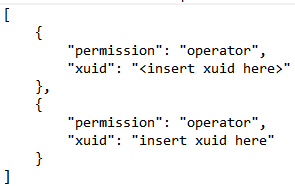
BDS-43andMCPE-26842However, you can manually set this.
Make a .txt file named permissions and save is as a .json. Use the format above to manually set ops, visitors, or members. The xuid of a player is shown in the console when they join. Hope this helps.
Edit: Format must be the exact same. This is the only way that this will work. The server isn't ignoring it, it just doesn't have a place to store it.
Using permissions.json doesn't really help here. I'd like to leave my server open to anyone (no whitelist), but not allow them to break anything. So, I need a way to set the "default" permission to visitor, which is what the default-player-permission-level setting is supposed to do. Unfortunately, it doesn't work, so all visitors are granted member permissions, which forces me to restrict access using a whitelist.
Got the same issue here on 1.14.21.1 and need to set the default player permission to visitor. I run a small server for my kids and their friends to play on but yesterday someone joined the server whilst no one was around and messed up some stuff and left messages on a load of signs outside their house. Need to be able to secure this and can’t see another way currently. Please get this fixed as it has been out there for some time now.
Is anyone able to help narrow this one down. I've just built a new BDS instance tonight and cannot replicate. I set the default permissions to visitor and when I connected I was a visitor. Have had this in place on my own server for ages now.
Have attached a screenshot from the test as proof.
Edit: I've just had a thought that its likely the world is generated with a specific default permission and any changes post creation don't work. Will investigate this tomorrow.
For those affected, knowing whether you created your world file before or after the change would be immensely helpful.
It looks like the default-player-permission setting within server.properties is written to the world file on first launch and then on subsequent launches is not used (and the original values written to the world are used instead).
As a workaround you can open the world in one of the data viewers around and change the values under "abilities" in the world settings. The easiest way to get the settings that correspond to your desired permissions is to create a blank world with the default permissions you want and compare the two.
Hey IonicEcko, let me ask you something.
What has changed in 1.14.32.1?
I am still having this issue in 1.14.60. My setup is backwards, I originally created my server with default permissions as visitor, but I would like them to be members. The line in server.properties is still being ignored on existing worlds.
What is a good data viewer to use since it's a real pain to have to wait for each player to get on the server and then assign the proper permission. And, it must be done with every update since it all clears and starts over.
I was able to use https://github.com/tryashtar/nbt-studio/ to view the contents of the level.dat on 2 worlds I created, one with `default-player-permission-level=member` and one with `default-player-permission-level=visitor`.
Here's the relevant difference:
This issue is still relevant on the most recent update. 1.18.31
This appears to be resolved in 1.19.2
Still appears for me in 1.19.51.01
Changing default-player-permission-level in server.permissions after World already generated doesn't seem to work for me.