ops.json and whitelist.json missing
The files whitelist.json and ops.json are not included in the download of BDS. Thus, all opped & whitelisted players are no longer remembered by the server as soon as it is restarted.
Environment
Windows 10
Linked Issues
is duplicated by9
 BDS-69Can't save op settingDuplicateBDS-73No Log File and Error OpeningDuplicateBDS-76BDS does not generate a ops.json fileDuplicateBDS-94whitelist.json and op.json not included with download.DuplicateBDS-117operator issue on linux bedrock deticated server/missing fileDuplicateBDS-123OPs file Does Not GenerateDuplicateBDS-136ops.json does not create itself on server start or when using the command op <playername>DuplicateBDS-216no log file - error opening whitelist / ops .jsonDuplicateBDS-251Permission aren't saved in ops.json / permissions.jsonDuplicate
 MCPE-26842
Created Issue:
Server forgets ops
When the server is restarted, players who were opped are no longer opped
Environment
Windows 10
- Unresolved
- Open
- 1.6.0.14
![[Mod] tryashtar](../../../data/avatars/users/41963.png)
relates to
![[Mod] bemoty](../../../data/avatars/users/50554.png)
relates to
duplicates
is duplicated by
duplicates
duplicates
relates to
is duplicated by
relates to
is duplicated by
duplicates
When the server is restarted, players who were opped are no longer oppedThe files whitelist.json and ops.json are not included in the download of BDS. Thus, all opped & whitelisted players are no longer remembered by the server as soon as it is restarted.
Server forgets opsops.json and whitelist.json missing
is duplicated by
relates to
is duplicated by

![[Mod] OcelotOnesie](../../../data/avatars/users/43220.png)
Related to BDS-43

On startup, I get the following message. I have created ops.json, whitelist.json, and log files (-> BDS-43 & BDS-56).
I have also imported a new world into it to try, but it's still not working. Any ideas?
setting up server logging...
[2018-10-31 06:00:33 INFO] Starting Server
[2018-10-31 06:00:33 INFO] Version 1.7.0.13
[2018-10-31 06:00:33 INFO] Level Name: world
[2018-10-31 06:00:33 INFO] Game mode: 0 Survival
[2018-10-31 06:00:33 INFO] Difficulty: 1 EASY
[2018-10-31 06:00:33 ERROR] Fatal error when loading level data, stopping server...
Quit correctly

This relates to BDS-43 and MCPE-26842
However, you can manually set this.
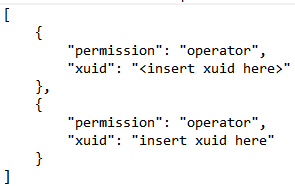
Make a .txt file named permissions and save is as a .json. Use the format above to manually set ops, visitors, or members. The xuid of a player is shown in the console when they join. Hope this helps.
Edit: Format must be the exact same. This is the only way that this will work. The server isn't ignoring it, it just doesn't have a place to store it.

![[Bot] Arisa](../../../data/avatars/users/43007.png)
Probably same bug as https://bugs.mojang.com/browse/MCPE-26842
Relates to
BDS-45this can be temporarily fixed using the syntax:
[
{ "permission": "operator", "xuid": "xxxxx" },
{ "permission": "opterator", "xuid": "xxxxx" }]
in a file called ops.json in the same directory as the .exe
but changes made in the console wont update the .json
I have the ops.json and the permissions.json, both with that same format, but it doesn't seem to affect the player with typical op permissions.
I doubt with "op" you are going to get true op with a world with No Cheats and achievements on. It would be crazy if you could.
Also having this problem with ops not "sticking". Currently have an ops.json which looks like this:
[
{
"uuid": "UUID - got from online based on XBox username",
"name": "username",
"level": 4
}
]
Obviously, that's different from the format above which specifies permissions. So I'm confused as to which format it is - also, is the xuid above the username or the uuid?
Duplicate? Of what?
Earthcomputer uhm, sorry, accidentally forward resolved this. let me fix this real quick
Please vote up this issue and follow it at MCPE-26842
I just tested this with the latest BDS release and both ops.json and whitelist.json are included in the download now.