 MC-100016
Singleplayer world selection screen is shown incorrectly when light_dirt_background.png and/or options_background.png are transparent
The bug
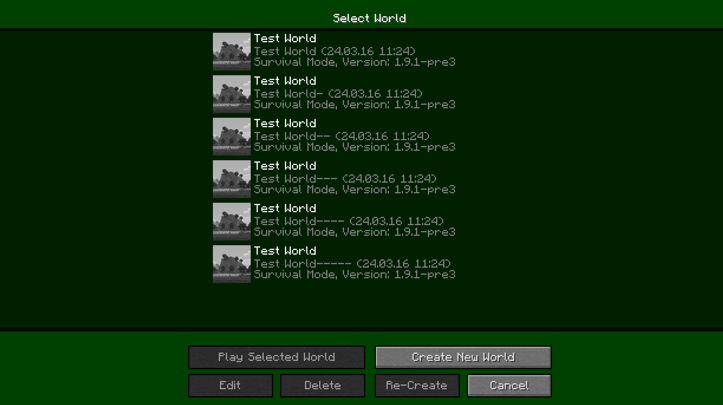
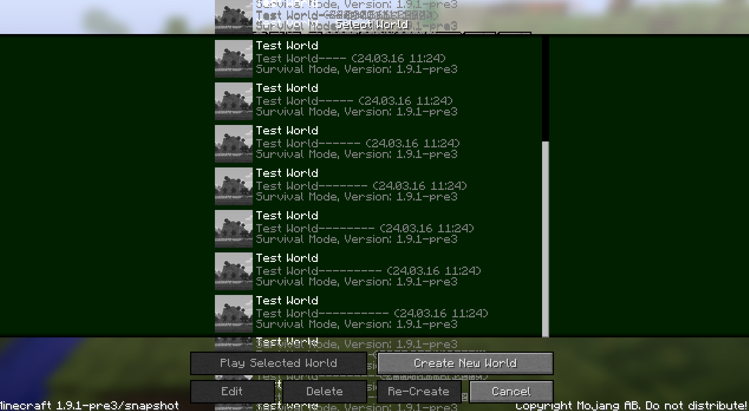
When using light_dirt_background.png and options_background.png are transparent in a resource pack, the world selection in singleplayer is not shown correctly. When there are more enough worlds to extend further down,
scrolling up and down will make the text will stack on top of itself. Any menus opened on top of the world selection will become very visually cluttered as the previous screen is not removed.
How to reproduce
- Download the attached resource pack
transparency.zip
- Enable it



![[Mod] Jiingy](../../../data/avatars/users/91802.png)
Created Issue:
Singleplayer world selection not rendering correct
When using Transparent background Texture in Resource Pack the World Selection in Singleplayer is not shown right.
When not many world are shown , the upper und bottom bar are sometimes opaque.(Picture 1)
When there are more worlds the bars are transparent.(Picture 2)
And If there are so many worlds that some are under the bar and then scrolling allound will overlap the Text. (Picture 3)Environment
Windows 7
Attachments4
Windows 7,Windows 10
When using Transparent background Texture in Resource Pack the World Selection in Singleplayer is not shown right.
When not many world are shown , the upper und bottom bar are sometimes opaque.(Picture 1)
When there are more worlds the bars are transparent.(Picture 2)
And If there are so many worlds that some are under the bar and thenscrolling allound will overlapthe Text. (Picture 3)When using Transparent background Texture in Resource Pack the World Selection in Singleplayer is not shown right.
When not many world are shown , the upper und bottom bar are sometimes opaque.(Picture 1)
When there are more worlds the bars are transparent.(Picture 2)
And If there are so too many worlds to fit on the Screen at once and scrolling arround the text will overlap. (Picture 3)
![[Mod] Michael Wobst](../../../data/avatars/users/37868.png)
Is this still an issue in the most recent versions (currently that is 1.10.2, or 16w43a) of Minecraft? If so, please update the affected versions and help us keeping this ticket updated from time to time. If you are the owner/reporter of this ticket, you can modify the affected version(s) yourself.
Windows 7,Windows 10
When using Transparent background Texture in Resource Pack the World Selection in Singleplayer is not shown right.
When not many world are shown, the upperund bottom bar are sometimes opaque.(Picture 1)
When there are more worlds the bars are transparent.(Picture 2)
And If there aresotoo many worlds to fit on theScreen at once and scrolling arround the text will overlap.(Picture 3)When using transparent background texture in resource pack, the world selection in singleplayer is not shown right.
When not many worlds are shown, the upper and bottom bar are sometimes opaque. 1.PNG
When there are more worlds the bars are transparent. 2.PNG
And If there are too many worlds to fit on the screen at once and scrolling around the text will overlap. 3.PNG

2018-09-12_19.06.38.png
![[Mojang] Nathan Adams](../../../data/assets/gravatar/dinnerbone.png)
![[Mod] NeunEinser](../../../data/avatars/users/39263.png)
When using transparent background texture in resource pack, the world selection in singleplayer is not shown right.
When not many worlds are shown, the upper and bottom bar are sometimes opaque. 1.PNG
When there are more worlds the bars are transparent. 2.PNG
And If there are too many worlds to fit on the screen at once and scrolling around the text will overlap. 3.PNGThe bug
When using transparent background texture in a resource pack, the world selection in singleplayer is not shown correctly. When not many worlds are shown, the upper and bottom bar are sometimes opaque. When there are more worlds the bars are transparent, and If there are too many worlds to fit on the screen at once and scrolling around the text will stack. See screenshots for more information.
How to reproduce
- Use this
- Go into singleplayer menu.
Singleplayer world selection notrenderingcorrectSingleplayer world selection is not shown correctly

![[Mod] ampolive](../../../data/avatars/users/18949.svg)
Singleplayer world selectionis notshown correctlySingleplayer world selection screen is shown incorrectly when using a transparent background texture
Singleplayer world selection screen is shown incorrectly whenusing a transparent background textureSingleplayer world selection screen is shown incorrectly when light_dirt_background.png and/or options_background.png are transparent
The bug
When using transparent background texture in a resource pack, the world selection in singleplayer is not shown correctly. When not many worlds are shown, the upper and bottom bar are sometimes opaque. When there are more worlds the bars are transparent, and If there are too many worlds to fit on the screen at once and scrolling around the text will stack. See screenshots for more information.
How to reproduce
- Use this
texture pack.- Go into singleplayer menu.
The bug
When using light_dirt_background.png and options_background.png are transparent in a resource pack, the world selection in singleplayer is not shown correctly. When there are more enough worlds to extend further down,
scrolling up and down will make the text will stack on top of itself. Any menus opened on top of the world selection will become very visually cluttered as the previous screen is not removed.How to reproduce
- Download the attached resource pack
transparency.zip- Enable it
![[Mod] turbo](../../../data/avatars/users/92867.png)
If the player uses a resource pack that modifies light_dirt_background.png and options_background.png to use transparency, most of the screens in the game that use these textures will appear very cluttered and messy.
Steps to Reproduce:
- Download the attached resource pack
transparency.zip - Enable it
Observed Results:
Most menus will appear distorted, and previously opened menus or elements will stack on top of one-another. Text will also not be cleared when scrolling with the scroll bar, which causes a mess of color to spread on the screen.
Expected Results:
The screen would not become visually cluttered, and the player would still be able to navigate all the menus without the mess.
Screenshots/Videos:
2023-10-07_14-48-54.mp4
2023-10-07_14-49-18.mp4
Notes:
- One screen that noteably does not suffer as harshly from this issue, is the Realms screen, which will simply fill in the background with gray or black. It still will stack previously opened menus.
- This issuse relates directly to
MC-100016. I have opted to create this new issue rather than evolving that one, as this issue is very big.
Confirmed for 1.13.1.
Requesting ownership of this issue as the original poster has been inactive, and the issue has evolved since 1,15.2 (it's last marked affected version) but not updated to reflect that.