 MC-121759
Item particle command doesn't work with shields
The bug
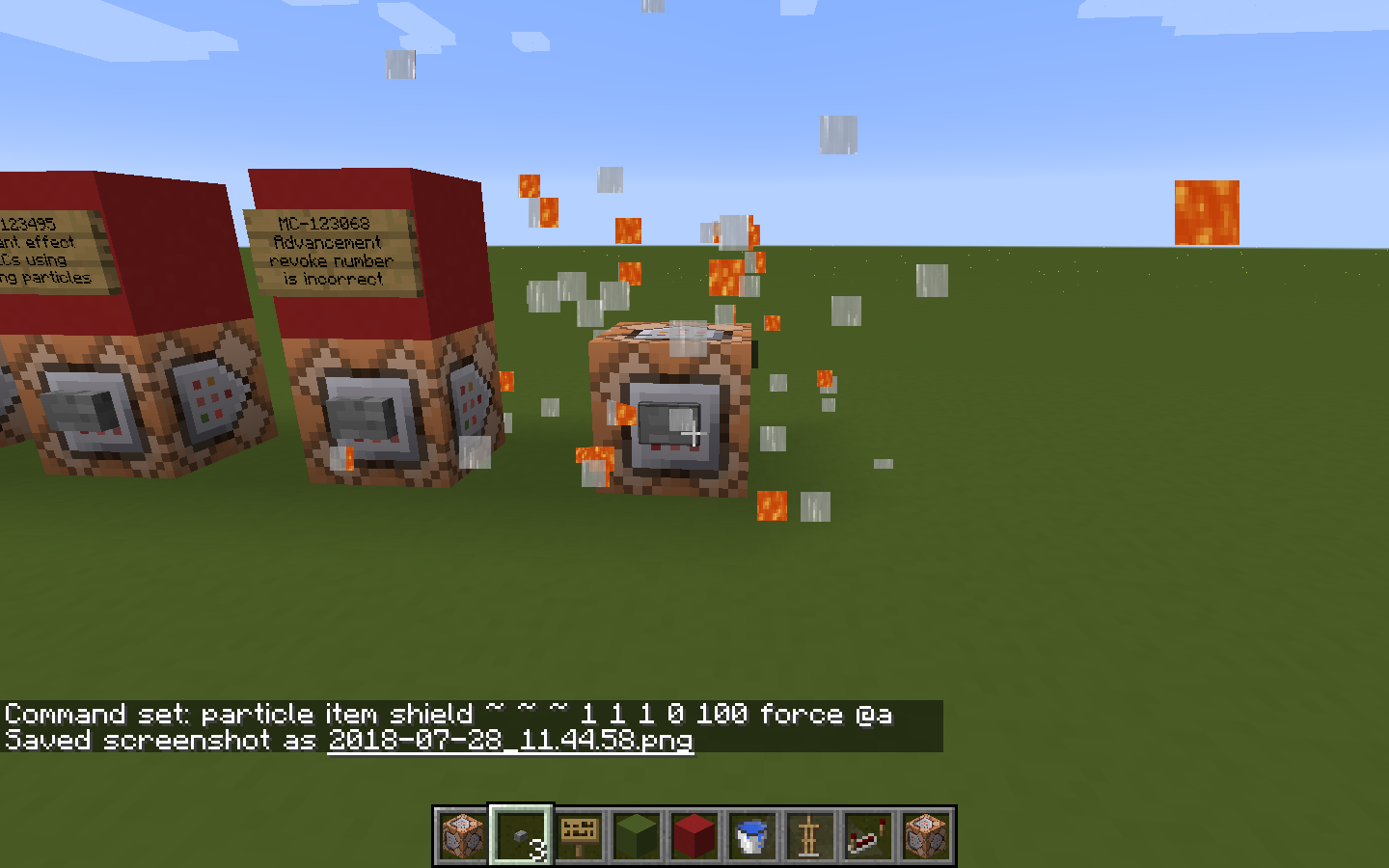
When you attempt to make iconcrack particles of a shield, particles of water and lava are shown, instead of the shield particles.
How to reproduce
Type the following command into a command block and activate it:
particle item shield ~ ~ ~ 1 1 1 0 100 force @a
-> See that lava and water particles are produced.
Linked Issues


- Fixed
 CreeperMagnet_
 ![[Mojang] Nathan Adams](../../../data/assets/gravatar/dinnerbone.png) [Mojang] Nathan Adams
[Mojang] Nathan Adams- 9
- 6
- Confirmed
- /particle
17w45a - 18w45a
17w45a 17w45b 17w46a 17w47a 17w47b 17w48a 17w49a 17w49b 17w50a 18w02a 18w03b 18w05a 18w07b 18w08b 18w09a 18w10a 18w10c 18w10d 18w11a 18w14a 18w14b 18w16a 18w20a 18w21a 18w22c 1.13-pre1 1.13-pre2 1.13-pre4 1.13-pre5 1.13-pre6 1.13-pre7 1.13-pre8 1.13-pre10 1.13 18w30b 18w31a 18w32a 1.13.1-pre1 1.13.1-pre2 1.13.1 1.13.2 18w43b 18w43c 18w44a 18w45a- 18w01a 18w47a
Created Issue:
The iconcrack particle command doesn't work with blocks or items that derive their models from entity textures.
When you attempt to make iconcrack particles of any block or item that derives its textures or model from an entity model, (chests, trapped chests, shields, shulker boxes, skulls) it fails, showing an odd assortment of lava, water, anvil, and beetroot seed textures.
To reproduce:
Type the following command into a command block and activate it:
particle iconcrack trapped_chest ~ ~ ~ 1 1 1 0 100 force @aWhat was expected: Particles of a trapped chest.
What actually occurred: Random particles of lava, water, anvils, and beetroot seeds.
Image of the odd particles is attached.
Attachments1
2017-11-09_17.52.10.png

When you attempt to make iconcrack particles of any block or item that derives its textures or model from an entity model, (chests, trapped chests, shields, shulker boxes, skulls) it fails, showing an odd assortment of lava, water
, anvil, and beetroot seedtextures.To reproduce:
Type the following command into a command block and activate it:
particle iconcracktrapped_chest ~ ~ ~ 1 1 1 0 100 force @aWhat was expected: Particles of a trapped chest.
What actually occurred: Random particles of lava
, water, anvils, and beetroot seeds.Image of the odd particles is attached.
When you attempt to make iconcrack particles of any block or item that derives its textures or model from an entity model, (chests, trapped chests, shields, shulker boxes, skulls) it fails, showing an odd assortment of lava, and water textures.
To reproduce:
Type the following command into a command block and activate it:
particle item trapped_chest ~ ~ ~ 1 1 1 0 100 force @aWhat was expected: Particles of a trapped chest.
What actually occurred: Random particles of lava and water.
Image of the odd particles is attached.
EDIT: This still affects 17w48a, but now the particles are only lava and water, not beetroots, anvils, and lava & water.
![[Mod] tryashtar](../../../data/avatars/users/41963.png)
The iconcrackparticle command doesn't work with blocks or items that derive their models from entity textures.The item particle command doesn't work with blocks or items that derive their models from entity textures.
The item particle command doesn't work with blocks or items that derive their models from entity textures.Item particle command doesn't work with blocks or items that derive their models from entity textures.

![[Mojang] Georgii Gavrichev](../../../data/avatars/users/22428.png) [Mojang] Georgii Gavrichev
[Mojang] Georgii GavrichevWhen you attempt to make iconcrack particles of a
ny block or item that derives its textures or model from an entity model, (chests, trapped chests, shields, shulker boxes, skulls)it fails, showing an odd assortment of lava,and water textures.To reproduce:
Type the following command into a command block and activate it:
particle itemtrapped_chest~ ~ ~ 1 1 1 0 100 force @aWhat was expected: Particles of a
trapped chest.What actually occurred: Random particles of lava and water.
Image of the odd particles is attached.
EDIT: This still affects 17w48a, but now the particles are only lava and water, not beetroots, anvils, and lava & water.
When you attempt to make iconcrack particles of a shield, it fails, showing an odd assortment of lava and water textures.
To reproduce:
Type the following command into a command block and activate it:
particle item shield ~ ~ ~ 1 1 1 0 100 force @aWhat was expected: Particles of a shield.
What actually occurred: Random particles of lava and water.
Image of the odd particles is attached.
Item particle command doesn't work withblocks or items that derive their models from entity textures.Item particle command doesn't work with shields.
![[Mod] redstonehelper](../../../data/avatars/users/10122.svg)
![[Mod] Michael Wobst](../../../data/avatars/users/37868.png)
When you attempt to make iconcrack particles of a shield, it fails, showing an odd assortment of lava and water textures.
To reproduce:
Type the following command into a command block and activate it:
particle item shield ~ ~ ~ 1 1 1 0 100 force @aWhat was expected: Particles of a shield.
What actually occurred: Random particles of lava and water.
Image of the odd particles is attached.
![[Mod] Neko](../../../data/avatars/users/92901.png)
Item particle command doesn't work with shields.
The bug
When you attempt to make iconcrack particles of a shield, particles of water and lava are shown, instead of the shield particles.
How to reproduce
Type the following command into a command block and activate it:
particle item shield ~ ~ ~ 1 1 1 0 100 force @a-> See that lava and water particles are produced.
The bug
When you attempt to make iconcrack particles of a shield, particles of water, activator rails, acacia leaves and doors, alliums, and lava are shown, instead of the shield particles.
How to reproduce
Type the following command into a command block and activate it:
particle item shield ~ ~ ~ 1 1 1 0 100 force @a-> See that lava, activator rails, acacia leaves and doors, alliums, and water particles are produced.
The bug
When you attempt to make iconcrack particles of a shield, particles of water
, activator rails, acacia leaves and doors, alliums,and lava are shown, instead of the shield particles.How to reproduce
Type the following command into a command block and activate it:
particle item shield ~ ~ ~ 1 1 1 0 100 force @a-> See that lava
, activator rails, acacia leaves and doors, alliums,and water particles are produced.
relates to
![[Mod] Pokechu22](../../../data/avatars/users/92931.png)
This issue relates to MC-121759, which also involves items showing lava/water particles when they shouldn't.
The bug
In 1.15 snapshot 19w38a (judging by the significant size increase in the atlas according to the game's output), the game's textures-atlas started to gain a lot more textures than it had previously. What originally only stored the textures for blocks, items and fluids would gain the textures of chests, beds, banner patterns, shield patterns, shulkers and signs in 19w38a and the following snapshots.
In the first 1.15 pre-release, the textures-atlas saw a major split to remove a lot of these textures as to relegate them to new, dedicated atlases, presumably to reduce its size. Signs got moved to the new signs.png-atlas, chests to chest.png-atlas and so on.
However, despite this, some textures still remain in the blocks and items atlas in current versions that were added in 1.15 and were not removed in the aforementioned split, even though they should have been due to being outwith the scope of said atlas. The following textures are present, all at the top left with the exception of the last two:
- /entities/banner_base.png
- /entities/shield_base.png
- /entities/shield_base_nopattern.png
- /entities/conduit/base.png
- /entities/conduit/cage.png
- /entities/conduit/wind.png
- /entities/conduit/wind_vertical.png
- /entities/enchanting_table_book.png
- /entities/bell/bell_body.png
- /entities/conduit/closed_eye.png
- /entities/conduit/open_eye.png
None of these textures should be present on the atlas - they weren't present before despite the textures still existing in the game, and the reason why they're there is due to being left over from the aforementioned move in 1.15-pre1.
How to reproduce
Note: this reproduction method relies on MC-236285 to display certain parts of the atlas. If said bug is fixed, there may not be a way to reproduce this in vanilla, even if the issue is still present. If fixed, it may be advisable to add a way to intentionally display or export atlases for debugging purposes, for example a /printatlas command.
- Download and apply the attached resource pack (I will try to attach a version of the resource pack for each release should the atlas change enough to warrant it.) The resource pack only changes one model and so should not interfere with how the atlas is constructed. This and the default resource pack are the only ones that should be applied - others may interfere.
- Place a lantern on the ground
Resource pack downloads
- 1.17.1 / 21w44a: texture-atlas-section-viewer-1.17.1-v1.0.zip

Expected results
The textures at the top left corner would be flowing water and flowing lava, since these are the largest textures in the textures/block/ directory. (This is what has been the case since 1.6, as could be seen via bugs such as MC-17132, MC-47105, MC-121759 and MC-138797, in which the attempted generation of undefined particles would result in the very top left section of the atlas being used, which is where flowing lava was.)
Actual results
The textures listed in the introduction can be seen at the top left of the atlas, despite seeing no use whatsoever in (non-entity-rendered) block models, item models or fluids.
How to fix
Either these textures could just be removed from atlases entirely, or they could be collectively split off into a new atlas: minecraft:textures/atlas/block_entities.png-atlas (which could possibly gain more textures, such as tridents). The block breaking textures could also be moved there due to not being associated with any models (see also MC-200944).
This is mostly fixed in 18w01a, however, shields are still affected. They solved the block issue by making them instead use their breaking particles, not their item textures, which is
MC-123824.Can someone re-open this? It still affects 18w02a with shields.
This issue seems to have been fixed in 18w47a. Its status should be changed accordingly. Added screenshot for proof of fix, using panda as an example.
Yep, this is fixed! Somebody mark the issue accordingly.
Is it also fixed in 46a?
It was fixed in 18w47a with the fix of
MC-138797. It wasn't fixed in 18w46a.Thanks. Marked as fixed for 18w47a.