 CreeperMagnet_
- CreeperMagnet_
- creepermagnet_
- Europe/Stockholm
- Yes
- No
![[Mojang] Grum (Erik Broes)](../../../data/assets/gravatar/grum.png)
![[Mojang] Nathan Adams](../../../data/assets/gravatar/dinnerbone.png)

 Low
Low![[Mojang] Bartosz Bok](../../../data/avatars/users/10122.svg)
 MC-123070
 MC-123824MC-123948




The "weight" option in resource packs no longer works: it just gives an error.
The error follows:
------------------------------------------------------------
Unable to load definition minecraft:tall_grass
java.lang.RuntimeException: Encountered an exception when loading model definition of 'minecraft:tall_grass' from: 'minecraft:blockstates/tall_grass.json' in resourcepack: 'Blocks Pack V1.0'
at cfj.a(SourceFile:308)
at cfj.a(SourceFile:293)
at cfj.a(SourceFile:282)
at cfj.b(SourceFile:206)
at cfj.a(SourceFile:182)
at cfk.a(SourceFile:23)
at ced.c(SourceFile:105)
at ced.a(SourceFile:93)
at bhh.f(SourceFile:720)
at bhh.c(SourceFile:1852)
at bhh.aB(SourceFile:1735)
at bhh.t(SourceFile:1621)
at bhh.ax(SourceFile:964)
at bhh.a(SourceFile:404)
at net.minecraft.client.main.Main.main(SourceFile:123)
Caused by: com.google.gson.JsonSyntaxException: com.google.gson.stream.MalformedJsonException: Use JsonReader.setLenient(true) to accept malformed JSON at line 3 column 55 path $.variants.normal [0] .weight
at com.google.gson.internal.Streams.parse(Streams.java:60)
at com.google.gson.internal.bind.TreeTypeAdapter.read(TreeTypeAdapter.java:65)
at qm.a(SourceFile:492)
at qm.a(SourceFile:532)
at bvd.a(SourceFile:39)
at cfj.a(SourceFile:306)
... 14 more
Caused by: com.google.gson.stream.MalformedJsonException: Use JsonReader.setLenient(true) to accept malformed JSON at line 3 column 55 path $.variants.normal [0] .weight
at com.google.gson.stream.JsonReader.syntaxError(JsonReader.java:1559)
at com.google.gson.stream.JsonReader.checkLenient(JsonReader.java:1401)
at com.google.gson.stream.JsonReader.doPeek(JsonReader.java:524)
at com.google.gson.stream.JsonReader.peek(JsonReader.java:425)
at com.google.gson.internal.bind.TypeAdapters$29.read(TypeAdapters.java:716)
at com.google.gson.internal.bind.TypeAdapters$29.read(TypeAdapters.java:739)
at com.google.gson.internal.bind.TypeAdapters$29.read(TypeAdapters.java:731)
at com.google.gson.internal.bind.TypeAdapters$29.read(TypeAdapters.java:739)
at com.google.gson.internal.bind.TypeAdapters$29.read(TypeAdapters.java:739)
at com.google.gson.internal.bind.TypeAdapters$29.read(TypeAdapters.java:714)
at com.google.gson.internal.Streams.parse(Streams.java:48)
... 19 moreThe "weight" option in resource packs no longer works: it just gives an error.
Steps to reproduce:
1. Download a randomized blocks resource pack. I used Vaderman27's.
2. Open up a world, and place down a few of the blocks that had been randomized in the pack. They should show up as missing texture cubes.
The error follows:
------------------------------------------------------------
Unable to load definition minecraft:tall_grass
java.lang.RuntimeException: Encountered an exception when loading model definition of 'minecraft:tall_grass' from: 'minecraft:blockstates/tall_grass.json' in resourcepack: 'Blocks Pack V1.0'
at cfj.a(SourceFile:308)
at cfj.a(SourceFile:293)
at cfj.a(SourceFile:282)
at cfj.b(SourceFile:206)
at cfj.a(SourceFile:182)
at cfk.a(SourceFile:23)
at ced.c(SourceFile:105)
at ced.a(SourceFile:93)
at bhh.f(SourceFile:720)
at bhh.c(SourceFile:1852)
at bhh.aB(SourceFile:1735)
at bhh.t(SourceFile:1621)
at bhh.ax(SourceFile:964)
at bhh.a(SourceFile:404)
at net.minecraft.client.main.Main.main(SourceFile:123)
Caused by: com.google.gson.JsonSyntaxException: com.google.gson.stream.MalformedJsonException: Use JsonReader.setLenient(true) to accept malformed JSON at line 3 column 55 path $.variants.normal [0] .weight
at com.google.gson.internal.Streams.parse(Streams.java:60)
at com.google.gson.internal.bind.TreeTypeAdapter.read(TreeTypeAdapter.java:65)
at qm.a(SourceFile:492)
at qm.a(SourceFile:532)
at bvd.a(SourceFile:39)
at cfj.a(SourceFile:306)
... 14 more
Caused by: com.google.gson.stream.MalformedJsonException: Use JsonReader.setLenient(true) to accept malformed JSON at line 3 column 55 path $.variants.normal [0] .weight
at com.google.gson.stream.JsonReader.syntaxError(JsonReader.java:1559)
at com.google.gson.stream.JsonReader.checkLenient(JsonReader.java:1401)
at com.google.gson.stream.JsonReader.doPeek(JsonReader.java:524)
at com.google.gson.stream.JsonReader.peek(JsonReader.java:425)
at com.google.gson.internal.bind.TypeAdapters$29.read(TypeAdapters.java:716)
at com.google.gson.internal.bind.TypeAdapters$29.read(TypeAdapters.java:739)
at com.google.gson.internal.bind.TypeAdapters$29.read(TypeAdapters.java:731)
at com.google.gson.internal.bind.TypeAdapters$29.read(TypeAdapters.java:739)
at com.google.gson.internal.bind.TypeAdapters$29.read(TypeAdapters.java:739)
at com.google.gson.internal.bind.TypeAdapters$29.read(TypeAdapters.java:714)
at com.google.gson.internal.Streams.parse(Streams.java:48)
... 19 more
When attempting to load ANY files in data packs, such as advancements, functions, or loot tables, they immediately fail, not opening the world, and giving out the following console error:
Couldn't read loot table minecraft:entities/sheep/.ds_ from minecraft:loot_tables/entities/sheep/.ds_store
java.io.FileNotFoundException: minecraft:loot_tables/entities/sheep/.ds_store
	at qa.a(SourceFile:61)
	at qf.a(SourceFile:59)
	at bgy.a(SourceFile:54)
	at qf.a(SourceFile:116)
	at bgy.<init>(SourceFile:40)
	at oo.b(SourceFile:163)
	at chw.a(SourceFile:101)
	at chw.j(SourceFile:133)
	at net.minecraft.server.MinecraftServer.run(SourceFile:467)
at java.lang.Thread.run(Thread.java:745)It seems to have something to do with the .ds_store. The game is ignoring the underscore, and attempting to
load the file without the underscore, and then failing.Then, after the game has done this a few times, it eventually crashes, saying:
Encountered an unexpected exception
java.lang.StringIndexOutOfBoundsException: String index out of range: -2
	at java.lang.String.substring(String.java:1967)
	at nt.a(SourceFile:141)
	at qf.a(SourceFile:116)
	at nt.<init>(SourceFile:61)
	at oo.b(SourceFile:165)
	at chw.a(SourceFile:101)
	at chw.j(SourceFile:133)
	at net.minecraft.server.MinecraftServer.run(SourceFile:467)
at java.lang.Thread.run(Thread.java:745)The crash report is attached, along with an example of each type of file.
bug_pack.zip contains an example of trying to replace the abandoned mineshaft loot table, along with examples of custom functions and advancements, along with a custom loot table. All of these fail with their own errors.
When attempting to load ANY files in data packs, such as advancements, functions, or loot tables, they immediately fail, not opening the world, and giving out the following console error:
Couldn't read loot table minecraft:entities/sheep/.ds_ from minecraft:loot_tables/entities/sheep/.ds_store
java.io.FileNotFoundException: minecraft:loot_tables/entities/sheep/.ds_store
	at qa.a(SourceFile:61)
	at qf.a(SourceFile:59)
	at bgy.a(SourceFile:54)
	at qf.a(SourceFile:116)
	at bgy.<init>(SourceFile:40)
	at oo.b(SourceFile:163)
	at chw.a(SourceFile:101)
	at chw.j(SourceFile:133)
	at net.minecraft.server.MinecraftServer.run(SourceFile:467)
at java.lang.Thread.run(Thread.java:745)It seems to have something to do with the .ds_store. The game is ignoring the text past the underscore, and attempting to find the file with that text, and then failing.
Then, after the game has done this a few times, it eventually crashes, saying:
Encountered an unexpected exception
java.lang.StringIndexOutOfBoundsException: String index out of range: -2
	at java.lang.String.substring(String.java:1967)
	at nt.a(SourceFile:141)
	at qf.a(SourceFile:116)
	at nt.<init>(SourceFile:61)
	at oo.b(SourceFile:165)
	at chw.a(SourceFile:101)
	at chw.j(SourceFile:133)
	at net.minecraft.server.MinecraftServer.run(SourceFile:467)
at java.lang.Thread.run(Thread.java:745)The crash report is attached, along with an example of each type of file.
bug_pack.zip contains an example of trying to replace the abandoned mineshaft loot table, along with examples of custom functions and advancements, along with a custom loot table. All of these fail with their own errors.
When attempting to load ANY files in data packs on a Mac (or any apple computer), such as advancements, functions, or loot tables, they immediately fail, not opening the world, and giving out the following console error:
Couldn't read loot table minecraft:entities/sheep/.ds_ from minecraft:loot_tables/entities/sheep/.ds_store java.io.FileNotFoundException: minecraft:loot_tables/entities/sheep/.ds_store at qa.a(SourceFile:61) at qf.a(SourceFile:59) at bgy.a(SourceFile:54) at qf.a(SourceFile:116) at bgy.<init>(SourceFile:40) at oo.b(SourceFile:163) at chw.a(SourceFile:101) at chw.j(SourceFile:133) at net.minecraft.server.MinecraftServer.run(SourceFile:467) at java.lang.Thread.run(Thread.java:745)It seems to have something to do with the .ds_store. .DS_Store is how Apple stores folder information, and their users can't get rid of it without quite a bit of hassle. It's a hidden folder, and it causes this bug. The game is ignoring the text past the underscore, and attempting to find the file with that texat, and then failing.
Then, after the game has done this a few times, it eventually crashes, saying:
Encountered an unexpected exception java.lang.StringIndexOutOfBoundsException: String index out of range: -2 at java.lang.String.substring(String.java:1967) at nt.a(SourceFile:141) at qf.a(SourceFile:116) at nt.<init>(SourceFile:61) at oo.b(SourceFile:165) at chw.a(SourceFile:101) at chw.j(SourceFile:133) at net.minecraft.server.MinecraftServer.run(SourceFile:467) at java.lang.Thread.run(Thread.java:745)The crash report is attached, along with an example of each type of file.
bug_pack.zip
contains an example of trying to replace the abandoned mineshaft loot table, along with examples of custom functions and advancements, along with a custom loot table. All of these fail with their own errors.
When attempting to load ANY files in data packs on a Mac (or any apple computer), such as advancements, functions, or loot tables, they immediately fail, not opening the world, and giving out the following console error:
Couldn't read loot table minecraft:entities/sheep/.ds_ from minecraft:loot_tables/entities/sheep/.ds_store java.io.FileNotFoundException: minecraft:loot_tables/entities/sheep/.ds_store at qa.a(SourceFile:61) at qf.a(SourceFile:59) at bgy.a(SourceFile:54) at qf.a(SourceFile:116) at bgy.<init>(SourceFile:40) at oo.b(SourceFile:163) at chw.a(SourceFile:101) at chw.j(SourceFile:133) at net.minecraft.server.MinecraftServer.run(SourceFile:467) at java.lang.Thread.run(Thread.java:745)It seems to have something to do with the .ds_store. .DS_Store is how Apple stores folder information, and their users can't get rid of it without quite a bit of hassle. It's a hidden folder, and it causes this bug. The game is ignoring the text past the underscore, and attempting to find the file with that texat, and then failing.
Then, after the game has done this a few times, it eventually crashes, saying:
Encountered an unexpected exception java.lang.StringIndexOutOfBoundsException: String index out of range: -2 at java.lang.String.substring(String.java:1967) at nt.a(SourceFile:141) at qf.a(SourceFile:116) at nt.<init>(SourceFile:61) at oo.b(SourceFile:165) at chw.a(SourceFile:101) at chw.j(SourceFile:133) at net.minecraft.server.MinecraftServer.run(SourceFile:467) at java.lang.Thread.run(Thread.java:745)The crash report is attached, along with an example of each type of file.
bug_pack.zip
This may be related to
MC-121379. Perhaps the game is attempting to load the file as a function, when it really isn't.
When you attempt to make iconcrack particles of any block or item that derives its textures or model from an entity model, (chests, trapped chests, shields, shulker boxes, skulls) it fails, showing an odd assortment of lava, water
, anvil, and beetroot seedtextures.To reproduce:
Type the following command into a command block and activate it:
particle iconcracktrapped_chest ~ ~ ~ 1 1 1 0 100 force @aWhat was expected: Particles of a trapped chest.
What actually occurred: Random particles of lava
, water, anvils, and beetroot seeds.Image of the odd particles is attached.
When you attempt to make iconcrack particles of any block or item that derives its textures or model from an entity model, (chests, trapped chests, shields, shulker boxes, skulls) it fails, showing an odd assortment of lava, and water textures.
To reproduce:
Type the following command into a command block and activate it:
particle item trapped_chest ~ ~ ~ 1 1 1 0 100 force @aWhat was expected: Particles of a trapped chest.
What actually occurred: Random particles of lava and water.
Image of the odd particles is attached.
EDIT: This still affects 17w48a, but now the particles are only lava and water, not beetroots, anvils, and lava & water.
The iconcrackparticle command doesn't work with blocks or items that derive their models from entity textures.The item particle command doesn't work with blocks or items that derive their models from entity textures.
The item particle command doesn't work with blocks or items that derive their models from entity textures.Item particle command doesn't work with blocks or items that derive their models from entity textures.
When you attempt to make iconcrack particles of a
ny block or item that derives its textures or model from an entity model, (chests, trapped chests, shields, shulker boxes, skulls)it fails, showing an odd assortment of lava,and water textures.To reproduce:
Type the following command into a command block and activate it:
particle itemtrapped_chest~ ~ ~ 1 1 1 0 100 force @aWhat was expected: Particles of a
trapped chest.What actually occurred: Random particles of lava and water.
Image of the odd particles is attached.
EDIT: This still affects 17w48a, but now the particles are only lava and water, not beetroots, anvils, and lava & water.
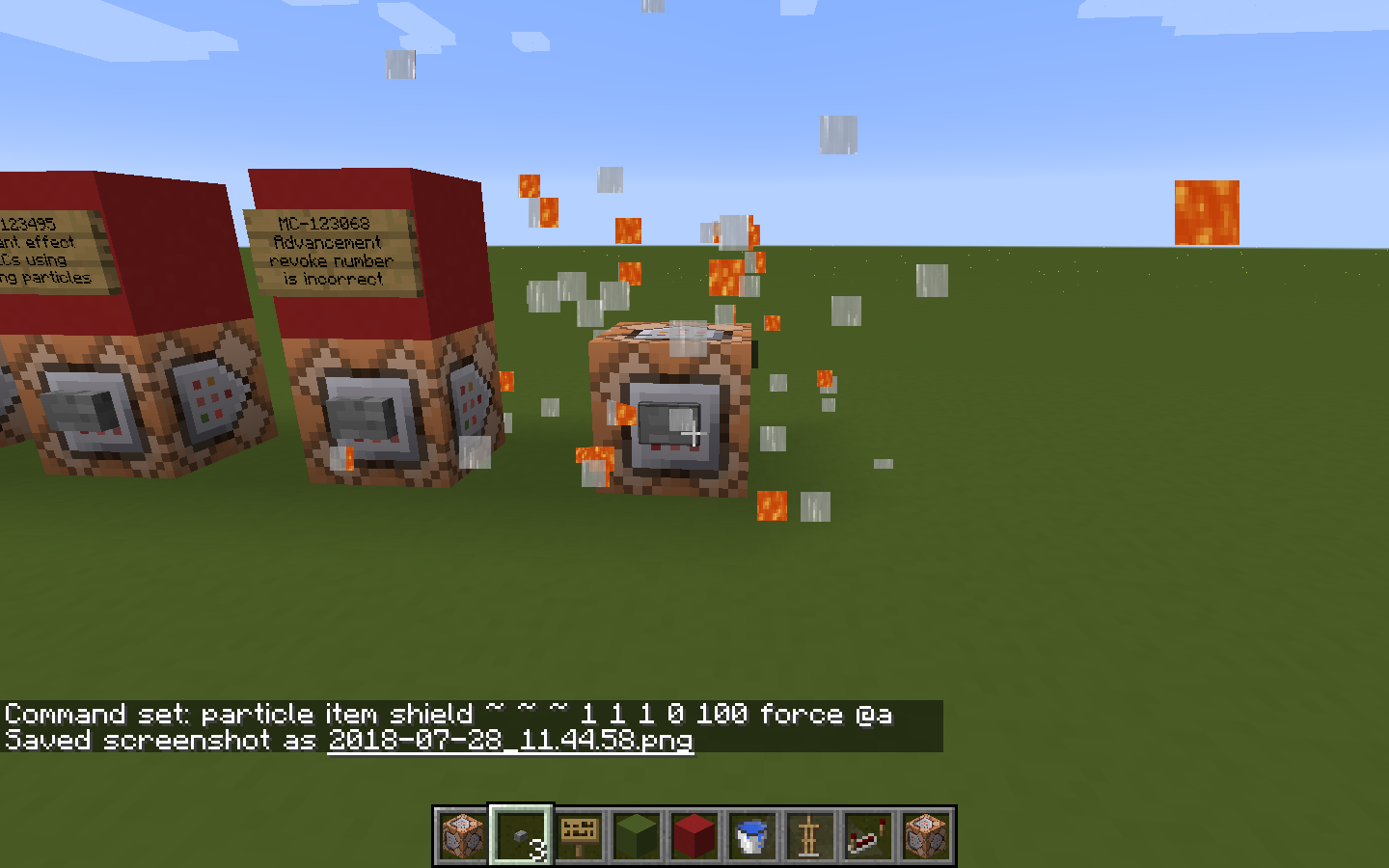
When you attempt to make iconcrack particles of a shield, it fails, showing an odd assortment of lava and water textures.
To reproduce:
Type the following command into a command block and activate it:
particle item shield ~ ~ ~ 1 1 1 0 100 force @aWhat was expected: Particles of a shield.
What actually occurred: Random particles of lava and water.
Image of the odd particles is attached.
Item particle command doesn't work withblocks or items that derive their models from entity textures.Item particle command doesn't work with shields.
The bug
When you attempt to make iconcrack particles of a shield, particles of water and lava are shown, instead of the shield particles.
How to reproduce
Type the following command into a command block and activate it:
particle item shield ~ ~ ~ 1 1 1 0 100 force @a-> See that lava and water particles are produced.
The bug
When you attempt to make iconcrack particles of a shield, particles of water, activator rails, acacia leaves and doors, alliums, and lava are shown, instead of the shield particles.
How to reproduce
Type the following command into a command block and activate it:
particle item shield ~ ~ ~ 1 1 1 0 100 force @a-> See that lava, activator rails, acacia leaves and doors, alliums, and water particles are produced.
2018-06-26_13.02.01.png
The bug
When you attempt to make iconcrack particles of a shield, particles of water
, activator rails, acacia leaves and doors, alliums,and lava are shown, instead of the shield particles.How to reproduce
Type the following command into a command block and activate it:
particle item shield ~ ~ ~ 1 1 1 0 100 force @a-> See that lava
, activator rails, acacia leaves and doors, alliums,and water particles are produced.
When attempting to use items with NBT in the iconcrack particle command, it fails and shows the particle of the default item without nbt.
To find this, simply place a command block, and activate it with the following command inside:
particle iconcrack spawn_egg{EntityTag:{id:"minecraft:blaze"}} ~ ~ ~ 1 1 1 0 100 force @aThis should produce particles of
a blaze spawn egg, however, it doesn't. It just shows particles ofa plain white spawn egg.When attempting to use items with NBT in the iconcrack particle command, it fails and shows the particle of the default item without nbt.
To find this, simply place a command block, and activate it with the following command inside:
particle item minecraft:player_head{SkullOwner:"CreeperMagnet_"} ~ ~ ~ 1 1 1 0 100 force @aThis should produce particles of my player skull, however, it doesn't. It just shows particles of random lava particles.
This probably relates to
MC-121759, as skulls use entity textures.
Iconcrackparticle command doesn't use the new item format. (It doesn't allow NBT.)Item particle command doesn't use the new item format. (It doesn't allow NBT.)
When attempting to use items with NBT in the iconcrack particle command, it fails and shows the particle of the default item without nbt.
To find this, simply place a command block, and activate it with the following command inside:
particle item minecraft:player_head{SkullOwner:"CreeperMagnet_"} ~ ~ ~ 1 1 1 0 100 force @aThis should produce particles of my player skull, however, it doesn't. It just shows
particles of random lavaparticles.This probably relates to
MC-12, as skulls1759use entity textures.When attempting to use items with NBT in the iconcrack particle command, it fails and shows the particle of the default item without nbt.
To find this, simply place a command block, and activate it with the following command inside:
particle item minecraft:player_head{SkullOwner:"CreeperMagnet_"} ~ ~ ~ 1 1 1 0 100 force @aThis should produce particles of my player skull, however, it doesn't. It just shows soul sand particles.
This probably relates to
MC-123824, as skulls are blocks.
When attempting to use items with NBT in the iconcrack particle command, it fails and shows the particle of the default item without nbt.
To find this, simply place a command block, and activate it with the following command inside:
particle item minecraft:player_head{SkullOwner:"CreeperMagnet_"} ~ ~ ~ 1 1 1 0 100 force @aThis should produce particles of
my player skull, however, it doesn't. It just showssoul sand particles.This probably relates to
MC-123824, as skulls are blocks.When attempting to use items with NBT in the iconcrack particle command, it fails and shows the particle of the default item without nbt.
To find this, simply place a command block, and activate it with the following command inside:
/particle item minecraft:leather_chestplate{display:{color:11546150}} ~ ~ ~ 1 1 1 0 100 force @aThis should produce particles of a red leather chest plate breaking, however, it doesn't. It just shows a white leather chest plate breaking. This is true for any color value inputted.
When attempting to use items with NBT in the iconcrack particle command, it
fails andshows the particle of the default item withoutnbt.To find this, simply place a command block, and activate it with the following command inside:
/particle item minecraft:leather_chestplate{display:{color:11546150}} ~ ~ ~ 1 1 1 0 100 force @aThis should produce particles of a red leather chest plate breaking, however, it doesn't. It just shows a white leather chest plate breaking. This is true for any color value inputted.
When attempting to use items with NBT in the iconcrack particle command, it shows the particle of the default item without NBT, which is incorrect.
To find this, simply place a command block, and activate it with the following command inside:
/particle item minecraft:leather_chestplate{display:{color:11546150}} ~ ~ ~ 1 1 1 0 100 force @aThis should produce particles of a red leather chest plate breaking, however, it doesn't. It just shows a white leather chest plate breaking. This is true for any color value inputted.
Item particle command doesn'tuse the new item format (It doesn't allow NBT)Item particle command doesn't allow NBT on certain items.
The bug
When attempting to use items with NBT in the iconcrack particle command, it shows the particle of the default item without NBT, which is incorrect.
To find this, simply place a command block, and activate it with the following command inside:
/particle item minecraft:leather_chestplate{display:{color:11546150}} ~ ~ ~ 1 1 1 0 100 force @aThis should produce particles of a red leather chest plate breaking, however, it doesn't. It just shows a white leather chest plate breaking. This is true for any color value inputted.
EDIT as of 19w05a: This does not affect CustomModelData, as that works fine. The only nbt-changeable texture that is still affect is leather armor, as shown in the example.
The bug
When attempting to use items with NBT in the iconcrack particle command, it shows the particle of the default item without NBT, which is incorrect.
To find this, simply place a command block, and activate it with the following command inside:
/particle item minecraft:leather_chestplate{display:{color:11546150}} ~ ~ ~ 1 1 1 0 100 force @aThis should produce particles of a red leather chest plate breaking, however, it doesn't. It just shows a white leather chest plate breaking. This is true for any color value inputted.
EDIT as of 19w05a: This does not affect CustomModelData, as that works fine. The only nbt-changeable texture that is still affect is leather armor, as shown in the example.
Item particle command doesn'tallow NBT oncertain itemsItem particle command doesn't properly display certain item NBT
The bug
When attempting to use items with NBT in the i
concrackparticle command, it shows the particle of the default item without NBT, which is incorrect.To find this, simply place a command block, and activate it with the following command inside:
/particle item minecraft:leather_chestplate{display:{color:11546150}} ~ ~ ~ 1 1 1 0 100 force @aThis should produce particles of a red leather chest plate breaking, however, it doesn't. It just shows a white leather chest plate breaking. This is true for any color value inputted.
The bug
When attempting to use items with NBT in the item particle command, it shows the particle of the default item without NBT, which is incorrect.
To find this, simply place a command block, and activate it with the following command inside:
/particle item minecraft:leather_chestplate{display:{color:11546150}} ~ ~ ~ 1 1 1 0 100 force @aThis should produce particles of a red leather chest plate breaking, however, it doesn't. It just shows a white leather chest plate breaking. This is true for any color value inputted.
When attempting to replace vanilla assets, by placing advancements or loot tables in the world/datapacks/my_pack/data/minecraft folder, the game crashes, giving you the following error:
Couldn't execute command for CreeperMagnet_: reload java.lang.IllegalArgumentException: Non [a-z0-9/._-] character in path at mp.<init>(SourceFile:31) at mp.<init>(SourceFile:44) at rf.a(SourceFile:112) at rf.a(SourceFile:97) at rx.a(SourceFile:137) at sc.a(SourceFile:84) at bjl.a(SourceFile:52) at sc.c(SourceFile:132) at sc.a(SourceFile:115) at net.minecraft.server.MinecraftServer.a(SourceFile:1297) at net.minecraft.server.MinecraftServer.aF(SourceFile:1280) at op.a(SourceFile:16) at com.mojang.brigadier.CommandDispatcher.execute(CommandDispatcher.java:119) at com.mojang.brigadier.CommandDispatcher.execute(CommandDispatcher.java:76) at bl.a(SourceFile:184) at qx.c(SourceFile:864) at qx.a(SourceFile:851) at ki.a(SourceFile:37) at ki.a(SourceFile:9) at hc$1.run(SourceFile:13) at java.util.concurrent.Executors$RunnableAdapter.call(Executors.java:511) at java.util.concurrent.FutureTask.run(FutureTask.java:266) at h.a(SourceFile:123) at net.minecraft.server.MinecraftServer.w(SourceFile:628) at net.minecraft.server.MinecraftServer.v(SourceFile:584) at cku.v(SourceFile:152) at net.minecraft.server.MinecraftServer.run(SourceFile:489) at java.lang.Thread.run(Thread.java:745)This says there is a non- a-z0-9/-._ character, when there is clearly not.
Attached is a data pack (bug_pack.zip) that demonstrates this by trying to replace the abandoned mineshaft loot table with one that makes it give only golden apples.This doesn't affect adding custom loot tables, as also demonstrated in the other data pack. (stick_pack)
You can see this by using stick_pack, and giving yourself a chest using/give @s chest{BlockEntityTag:{LootTable:"stick_pack:stick"}}This clearly gives you a custom loot table chest, with only a stick inside.
EDIT:
This error, as of 17w47b, we now know is caused only on Apple computers, because of Apple's folder info storage data, the .DS_Store file. This name has capital letters, and the game attempts to read it as a loot table for some reason, bringing out an error, as capital letters aren't supported. This only seems to occur when trying to replace vanilla assets.
To reproduce:
Get some wooden planks in your inventory.
Click any available crafting recipe in the recipe book, and see that the ingredients are placed.
Type /reload.
Click any available crafting recipe, and see that the ingredients are not placed, but the sound still plays.
This
effects the world no matter if there is a data pack installed or not.To reproduce:
Get some wooden planks in your inventory.
Click any available crafting recipe in the recipe book, and see that the ingredients are placed.
Type /reload.
Click any available crafting recipe, and see that the ingredients are not placed, but the sound still plays.
This affects the world no matter if there is a data pack installed or not.
EDIT: This bug is actually caused by the player forgetting all recipes on reload. They still, however, appear in the recipe book.
The bug
After executing the /reload command, clicking on recipe book recipes does not work.
Additionally if you had the recipe book open before it will not show the category tabs until you close and reopen it again.How to reproduce
- Get some wooden planks in your inventory
- Click any available crafting recipe in the recipe book, and see that the ingredients are placed
- Type /reload
- Click any available crafting recipe, and see that the ingredients are not placed, but the sound still plays
Notes
This affects the world no matter if there is a data pack installed or not.
This bug is actually caused by the player forgetting all recipes on reload. They still, however, appear in the recipe book.This affects furnace recipes as well.
What I expected:
- Titles of recipes are consistent with items they create
What I got:
- The cobblestone stair recipe is not named cobblestone_stairs, and is named stone_stairs.
Title pretty much says it all.
Is this hinting at something, Mojang? Cause stone stairs would be cool.EDIT:
Please disregard this issue. It was fixed in 17w49b, I was using 49a.
To reproduce:
1. Place an item frame on the floor, or on the ceiling.
2. Place any block in the frame.----> Observe that:
For ceiling frames:
- The bottom face of the item is lit up, even though it should be in shadow.
- One of the side faces is brighter than the rest, which is also incorrect.
For ground frames:
- The top face of the item is darkened, even though it should be lit up.
- One of the side faces is brighter than the rest, which is also incorrect.
This is most likely caused by the game rendering the item's lighting in the item frame as if it was horizontally positioned, while it isn't.
Notes:
This does NOT only occur when you rotate the item, as I know the shading doesn't change on horizontal item frames when they are rotated.
This is completely different, and affects the item when the frame is in default rotation.
To reproduce:
- 1. Place an item frame on the floor, or on the ceiling.
- 2. Place any block in the frame.
----> Observe that:
For ceiling frames:
- The bottom face of the item is lit up, even though it should be in shadow.
- One of the side faces is brighter than the rest, which is also incorrect.
For ground frames:
- The top face of the item is darkened, even though it should be lit up.
- One of the side faces is brighter than the rest, which is also incorrect.
This is most likely caused by the game rendering the item's lighting in the item frame as if it was horizontally positioned, while it isn't.
Notes:
This does NOT only occur when you rotate the item, as I know the shading doesn't change on horizontal item frames when they are rotated.
This is completely different, and affects the item when the frame is in default rotation.
To reproduce:
1.Place an item frame on the floor, or on the ceiling.2.Place any block in the frame.----> Observe that:
For ceiling frames:
- The bottom face of the item is lit up, even though it should be in shadow.
- One of the side faces is brighter than the rest, which is also incorrect.
For ground frames:
- The top face of the item is darkened, even though it should be lit up.
- One of the side faces is brighter than the rest, which is also incorrect.
This is most likely caused by the game rendering the item's lighting in the item frame as if it was horizontally positioned, while it isn't.
Notes:
This does NOT only occur when you rotate the item, as I know the shading doesn't change on horizontal item frames when they are rotated.
This is completely different, and affects the item when the frame is in default rotation.
To reproduce:
- Place an item frame on the floor, or on the ceiling.
- Place any block in the frame.
----> Observe that:
For ceiling frames:
- The bottom face of the item is lit up, even though it should be in shadow.
- One of the side faces is brighter than the rest, which is also incorrect.
For ground frames:
- The top face of the item is darkened, even though it should be lit up.
- One of the side faces is brighter than the rest, which is also incorrect.
This is most likely caused by the game rendering the item's lighting in the item frame as if it was horizontally positioned, while it isn't.
Notes:
This does NOT only occur when you rotate the item, as I know the shading doesn't change on horizontal item frames when they are rotated.
This is completely different, and affects the item when the frame is in default rotation.
To reproduce:
- Place an item frame on the floor, or on the ceiling.
- Place any block in the frame.
----> Observe that:
For ceiling frames:
- The bottom face of the item is lit up, even though it should be in shadow.
- One of the side faces is brighter than the rest, which is also incorrect.
For ground frames:
- The top face of the item is darkened, even though it should be lit up.
- One of the side faces is brighter than the rest, which is also incorrect.
This is most likely caused by the game rendering the item's lighting in the item frame as if it was horizontally positioned, while it isn't.
Notes:
This does NOT only occur when you rotate the item, as I know the shading doesn't change on horizontal item frames when they are rotated.
This is completely different, and affects the item when the frame is in default rotation.
To reproduce:
- Place an item frame on the floor, or on the ceiling.
- Place any block in the frame.
----> Observe that:
For ceiling frames:
- The bottom face of the item is lit up, even though it should be in shadow.
- One of the side faces is brighter than the rest, which is also incorrect.
For ground frames:
- The top face of the item is darkened, even though it should be lit up.
- One of the side faces is brighter than the rest, which is also incorrect.
This is most likely caused by the game rendering the item's lighting in the item frame as if it was horizontally positioned, while it isn't.
Notes:
This does NOT only occur when you rotate the item, as I know the shading doesn't change on horizontal item frames when they are rotated.
This is completely different, and affects the item when the frame is in default rotation.
To reproduce:
- Place an item frame on the floor, or on the ceiling.
- Place any block in the frame.
----> Observe that:
For ceiling frames:
- The bottom face of the item is lit up, even though it should be in shadow.
- One of the side faces is brighter than the rest, which is also incorrect.
For ground frames:
- The top face of the item is darkened, even though it should be lit up.
- One of the side faces is brighter than the rest, which is also incorrect.
This is most likely caused by the game rendering the item's lighting in the item frame as if it was horizontally positioned, while it isn't.
Notes:
This does NOT only occur when you rotate the item, as I know the shading doesn't change on horizontal item frames when they are rotated.
This is completely different, and affects the item when the frame is in default rotation.
The issue:
Area effect cloud and tipped arrow particles are inconsistent with splash potion particles, when working with instant effects.
As you can see with the below screenshots, splash instant potions show the "instant_effect" particle, while their lingering and tipped arrow counterparts show the default swirls instead of the instant effect particle.
The Instant Damage and Instant Health lingering potion area effect clouds and tipped arrows use the incorrect particles.

CreeperMagnet_ actually, it can make them connect properly as previously, you couldn’t place 3 of the same chest types next to each other.
![[Mod] violine1101](../../../data/avatars/users/92858.png)
I've generalized this ticket; player markers generally don't appear on maps in frames, the fact that banners generate player markers at all is covered by MC-126815.
As CreeperMagnet_ said, it's very likely that it's actually intended that player markers aren't shown on maps in frames; as far as I know, there's code that specifically prevents exactly that.

CreeperMagnet_ Source?
![[Mod] Neko](../../../data/avatars/users/92901.png)
CreeperMagnet_ : Please create a new ticket.

CreeperMagnet_ Thanks a lot 
Tested some font files, they actually work! That means this issue is not valid for the unicode font, but it IS certainly a problem with the SGA font, which still appears to use a texture. Changed the title and description accordingly.
CreeperMagnet_ It was always cleared on server, but client was not informed about it. So fix was to trigger update.
CreeperMagnet_ , that sounds like a separate issue. If we don't have one already, please create a new ticket for that.
![[Mod] CubeTheThird](../../../data/assets/gravatar/cubethethird.jpeg)
CreeperMagnet_ , please create a new report for this.
![[Mod] turbo](../../../data/avatars/users/92867.png)
The bug
When in the Search Items tab in the Creative mode inventory, pressing a number while hovering over an item gives a stack of that item to the player in the corresponding hot bar slot instead of entering the number. It also happens while holding Shift since some symbols such as # require a number to be pressed.
Credits
Special thanks to CreeperMagnet_ in this comment for discovering half of the bug.
How to reproduce
- Press E to open the inventory while in Creative mode, and then click on the Search Items tab.
- Hover over any item in the tab, and then attempt to enter a # by typing Shift + 3 or a number without holding Shift.
→ A stack of that item is given to the player in the third hot bar slot instead of the symbol being entered.
Added resource pack files!
Oh, alright. I thought it might've had something to do with that. Thanks for the help!
It does support shift-clicking. Just hold shift while you select the correct recipe you want.
This may relate to
MC-121379.Please update this to the correct versions- this still affects 17w45b, and prevents all mac users from using functions at all.
This seems to not apply to the new snapshot. Seems like they've indirectly fixed it.
EDIT: They only fixed this problem for functions. Loot tables, and advancements are still affected.
This issue should be closed, as it was caused by the .DS_store bug, along with the game attempting to load non-json files.
Can confirm. This bug is currently driving me up the wall. First it was
MC-121379, and now this. Darn. I'm never gonna be able to get my function pack to 1.13.@tryashtar Is that right? That seems rather odd, and probably something they should fix. I really hate it when they don't allow us to customize things, or we can't because of bugs/complexity. Like villager trade tables. Ugh.
Please disregard this issue. It was fixed in 17w49b, I was using 49a.
@FVBico
This is completely valid. The game is trying to read a file, .DS_store, which it shouldn't be, and which apple users can't edit, which is causing this error.
Can confirm for 17w50a. Please update the affected versions for said version.
This is mostly fixed in 18w01a, however, shields are still affected. They solved the block issue by making them instead use their breaking particles, not their item textures, which is
MC-123824.I'm pretty sure this issue is invalid, as @Dinnerbone added a "sort=random" criterion to selectors. This does what you want, and @r is meant to select players.
It even says "Use "@r" to target random player".
You can also use sort=random in conjunction with limit=1 to reproduce what @r would be with a non-player type selected.
Try the same commands in 1.12. It makes particles of all the block's sides, and skulls would make their own particles, not soul sand.
Still present in 18w01a, please update affected versions.
Yep. Sorry, just forgot to add that to the steps.
@redstonehelper
How is that intuitive in any way at all? That seems like a bug to me.
OMG! Thank you. I thought "last" meant "last in loading order", and it was on the bottom. Thank you for clearing this up for me.
I was attempting to replace vanilla recipes. I'm not a silly willy! I use my own namespaces for everything. EVERYTHING.
*satanic laughter can be heard from all around me*
Can someone re-open this? It still affects 18w02a with shields.
This still affects 18w02a. Please update.
@Marcono1234
@Pokechu22
MC-82703is the actual error.The crash is probably caused by
MC-123363.They seem to be oddly related, as whenever you place a shulker box in the same area, it probably thinks it's still a chest, and therefore doesn't have the state of up. That's why it works with shulker box -> chest, and not chest -> shulker box. Might need some more testing though. The two are definitely related though.
@AgentTobelrone
Nope, as that is a different error entirely. That is with completely custom functions/advancements/etc, while this is with vanilla data, and it failing to load in the right order/recognize custom data.
Please close this error, it was indirectly resolved in 18w03a.
Still affects 18w03a, sadly.
Still affects 18w03a/b. Please update!
Why should that change anything? That should only change the position from which the local coordinates run, not the recursion. Seems odd. I'll do some more investigating.
Is this related to
MC-124140?@tryashtar Read my comments, forgot to tag you.
I'm still pretty sure this is a valid issue, please take a look at my comments. I'm not even entirely sure this is caused by /execute positioned.
This still affects 18w05a. And you'd probably want to update the description, and this is a result of anchored simply not working with positioned, similarly to
MC-124381, which I found. I have no idea why this is occurring, I've been testing a bunch, to no avail.I'm pretty sure this is either a duplicate of or directly related to
MC-124140. Could someone please update this correctly?Still affects 18w05a. Please update!
Does this still affect 18w05a?
Still affects 18w05a, please update.
Still affects 17w08a.
Still affects 18w05a.
Still affects 18w05a, please update!
Still affects 18w05a, please update!
Still affects 18w05a, please update!
Still affects 18w05a, please update!
Still affects 18w05a, please update!
Still affects 18w05a, please update!
Still affects 18w05a, please update!
Still affects 18w05a, please update!
Still affects 18w05a, please update!
Still affects 18w05a, please update!
Still affects 18w05a, please update!
Still affects 18w05a, please update!
Still affects 18w05a, please update!
Still affects 18w05a, please update!
THANK YOU! You are the best, Tryashtar. This solves some of my issues.
Thanks for updating all of those other issues to 18w05a, by the way. @tryashtar
Invalid. Falling block NBT was changed.
Not sure what it is now, something like ‘BlockState:{}’
I’ll see when I have access to a computer running 18w06a.
This is most likely works as intended, as that’s the purpose of the riptide enchantment; it launches you out of water.
This is likely caused by tridents not storing the uuid of their owner. This can lead to other issues, like not being able to pick up your own trident.
This is a duplicate of
MC-124140.Still affects 18w07b.
Works as intended.
Can someone test this with both worlds from before 18w08b, and worlds before? I seem to be getting mixed results with data packs enabled and data packs disabled. It's quite odd and can't seem to get any conclusive result.
Yes, that does seem to solve this issue. Thanks!
Probably want to mark this as another duplicate of that, and maybe add this crash report to it.
Still affects 18w08b.
Rotation could also be added to this list, as structure blocks are the only block-modifying one on this list that has a rotation option.
Anyone? Still getting mixed results and have no idea why, it might be my machine or world seed or something
Sorry for the late reply, [Mod] Pokechu22, I just reread your post. Yes, I mean the command is not working correctly, as it is not displaying NBT, and that is an issue for leather armor, as I updated the post.
Seems more like a feature suggestion - but you have a point. This is sort-of valid. But unless Mojang decides to give each coral a different texture, like concrete power, it shouldn't be an issue.
This is likely WAI, as chests didn't have a way to store if they were double or not pre-1.13, so the generator/upgrader or whatever couldn't check for that.
Can confirm.
Ninja edit: They also generate on magma blocks, preventing them from properly pulling you down.
This is WAI, that's just your computer failing to keep up with where you are.
Cannot confirm. Works completely fine for me.
Likely related to
MC-125254in some way.WHYYYY
This damn bug still affects 18w09a.
Confirmed for 18w09a.
Affects 18w09a.
Affects 18w09a.
Affects 18w09a.
Still affects 18w09a.
Still affects 18w09a.
Still affects 18w09a.
Still affects 18w09a.
Still affects 18w09a.
Still affects 18w09a.
Still affects 18w09a.
Still affects 18w09a.
Still affects 18w09a.
Still affects 18w09a. I don't see any new ones, other than the structure id for the underwater ruins, Ocean_Ruins.
Still affects 18w09a.
Still affects 18w09a.
Still affects 18w09a.
@Nope.
Definitely not WAI, as you can't see the item. That's an issue. If it's way too low, and you can't tell what it is, it is an error.
Duplicate of my issue,
MC-122940Most likely valid, but under different circumstances.
Arrows shot by skeletons' sounds should be played under hostile, while arrows shot by players should be under the player category.
(I assume that's what you're trying to get at, Ktoś Ktosiowski.)
This is already cataloged by the game, under the
{pickup:2b}tag, so it should be easy enough.
Warths, that is completely incorrect.
is still a command, is it not? It's completely reliable too.
Can confirm.
As Aaron Rhodes said, this is caused by structures not being able to be located.
This also affects explorer maps, and is still present in 18w10a.
Someone might want to update the description and title, or create an entirely new issue.
Mad Cat Wait, what? I haven't seen any evidence of that. I think it's dolphins you're thinking of.
Can someone confirm this issue?
Nevermind my last comment! This issue is fixed as of 18w10a. Please mark as resolved!
_zombiehunter, they don't have specific names. They're all grouped under "tropical fish".
This is currently WAI, as the water is visual-only for now. Perhaps in the next snapshot we will get some better water mechanics.
This is working as intended, as those are unused, and player markers. Player markers aren't intended to show up in item frames on maps.
Still affects 18w10b, I'm not sure why the affected versions were edited. It's still unresolved and open, so I assume it's [Mod] violine1101's mistake.
This is WAI. You can't zoom in or out on the new advancements, that was an old feature of achievements.
Anyone going to mark this as resolved?
WAI. Fish can be black and white.
Works as intended. Disabling the vanilla data pack will disable gameplay that is not specifically in the pack, like leaf decay, and this.
WAI. This looks completely intentional.
WAI
Confirmed for 18w10d.
Affects up to 18w10d.
Confirmed for up to 18w10d.
Confirmed for 18w11a.
Confirmed for 18w11a.
Confirmed for 18w11a.
Yep, [Mod] Neko, you're right. I'm just crazy, lol. Thought it wasn't working, must've not seen the notification.
Still affects 18w11a.
Still affects 18w11a.
Still affects 18w11a. Please fix, kind mister [Mojang] Nathan Adams
Cannot reproduce.
They actually will grow, but only when they're on coral, and only inside water. Might want to add that to the issue, as bone meal shouldn't be able to be used outside of those conditions.
EDIT: They can also be grown inside flowing water, which is probably also a bug.
Works as intended- They're only supposed to work inside water. The lighting effect isn't any different from anything else anyways, the red lighting is a side effect of a light source being underwater- it works with sea lanterns too.
Works as intended, it just is preventing the effect of the water dragging you down.
Can confirm.
The same works for sea pickles and coral.
This is invalid - completely works for me, and as [Mod] tryashtar said, it's likely flowing water.
Affects 18w14b.
Duplicate of MC-125007.
Works totally as intended. I don't know why you think this is a bug.
Works as intended. Mojang is reworking world generation, they just haven't added custom worlds back.
Likely works as intended. You can't execute off of dead players unless you're using the @a selector. Any other selector doesn't work.
Works as intended. They simply haven't added them in yet. This was stated in one of the snapshot articles.
Can confirm.
This is working as intended. Kelp and bubble blocks are supposed to always be submerged.
If the developers want something to be overpowered, it can be overpowered. They'll likely nerf it later.
This is working as intended- Lights aren't supposed to brighten once you get underwater - your vision simply brightens.
Can confirm. It's just a rendering issue, not the item being thrown out or anything. The description is a bit unclear.
skylord_wars, the report is fine. He's basically trying to say that rain can fall through waterlogged blocks, such as coral fans, if they're at the surface of the water.
No idea what you're trying to say. This is likely WAI, as it sounds like you're using a modded version.
"shifter", "trunk"
This is working as intended. Dolphins need to surface for air after a while, and they can't do that when you give them NoAI.
Duplicate of
MC-127045, which is fixed.Duplicate of
MC-128233Cannot confirm.
Invalid. No bug is attached.
Still an issue in 18w15a. and other 1.13 snapshots.
Related to
MC-127924Relates to MC-84661.
Boats, minecarts, etc. are intended to float. Throwables are not intended to. Invalid issue.
Works as intended. Dolphins need air to survive. They can drown, and die in and outside water.
This is WAI. This is how arrays work, wether you like it or not. You can use different methods to test if slots exist, then use that info, but unless [Mojang] Nathan Adams wants to change this, then I doubt that’ll change.
Works as intended. Blue ice is a solid block, so snow layers can be placed atop it, while packed ice isn’t.
Can confirm.
I’m pretty sure this is intended. You’re supposed to excavate the wreck, to get the treasure. Plus, it’s a wreck, so no wonder it’s full of sand.
That’s because drowned ignore you when it’s not night and they’re not in water. That might be a separate bug.
They are a tiny bit faster, try with a longer distance. It should be a bigger amount, though, so this is valid.
Ahh! I thought you were talking about normal water, not bubble columns! Might want to update the issue to reflect that.
Still affects 18w15a. Right now, the highest numbers I've gotten are up to 180% on a super flat world, and up to 220% on a normal world.
Can confirm. Happened in my world as well.
Please mark this issue as fixed. It was simply too many functions, and my computer was intermittently running out of memory.
Seems as if this issue is fixed as of 18w16a. Please mark this issue as such!
Yes, GodRage Aonwa, that's because changing resource packs is also considered a "reload".
Can confirm for 18w16a.
Confirmed for 18w16a, and it seems it's going to be fixed! Thanks, mysterious new bug-fixing Rikard Herlitz!
That's how it works with right-clicking too. This is WAI.
WAI. This is how ender pearls and chunk-loading are intended to work, it doesn't matter how you use them. So teleport away! I doubt this is an actual problem.
This is probably WAI, unless Mojang decides to make cauldrons function as actual water- IE preventing fall damage, you lose air bubbles in it, etc, as at the moment, fish drown while in cauldrons.
user-f2760, check the other examples. I'd like to know if this is actually not an issue anymore- or if it may be still an issue.
Try
/execute as @s[nbt={SelectedItem:{id:"minecraft:diamond"}}] run say Success!while holding a diamond.
Thanks!
Please attach a crash report so we can further diagnose your issue.EDIT: I'm stupid, nevermind that last bit. Please attach the latest LOG file.
Invalid. As Aaron Rhodes stated, they removed the Customized world setting in an eariler snapshot, and they intend to add it back later once all the world generation changes are done.
Can confirm. Water is simply ignored for its "sinking" mechanic, and you can no longer swim inside it. This is only for servers.
Are you playing on a multiplayer server?I can confirm for multiplayer.Disregard. Was experiencing lag.
Invalid. You need to give it to yourself like this:
/give @s chest{BlockEntityTag:{Lock:"conduitShop"}}Invalid. Entity names were updated to include textcomponents/json formatting.
/summon pig ~ ~ ~ {CustomName:"{\"text\":\"Name\"}"}Duplicate of
MC-129409. Go withMC-129409, as it contains more detail than this issue.Are you on a singleplayer world, or on a multiplayer one?
If you're on multiplayer, then this is a duplicate of
MC-129409, as that's an issue stating that water acts like air in multiplayer.Fixed in 18w20a. Please mark this issue accordingly!
This issue is invalid, sorry. Item names were just updated in 18w20a, and my datapack changed the recipe using the old "kelp_top" id, making it invalid.
It comes back again, Agnes. At least that was the way it was in 19b. You need to do it every time you launch your game.
Can confirm.
Seems to be fixed as of 18w20!
As [Mojang] Jeb (Jens Bergensten) said, the tridents now drop into items when you can't pick them up- i.e. when you die when it's coming back, it drops into an item. Also, same thing for when you throw it then go into spectator mode.
Affects 20c.
Invalid. They're proper names, as he said.
Invalid, as you usually can't get there. But in creative you can, so it's up to mojang to decide.
That is true. Valid, then. I'd be interested to how they fix this issue.
The description is currently invalid, as the "ench:" tag was renamed to the "Enchantments" tag. Also, can confirm that the enchantment part of this bug is fixed.
Can confirm for 18w21a.
You didn't delete the
"I executed this command:
/give @p minecraft:diamond_boots{ench:[{id:"minecraft:feather_falling",lvl:10s}]}What I expected to happen: Enchantment Feather Falling X
What did happen: Enchantment Protection X
Since this is the first snapshot in which you can get enchantments by name, I tried to do this with names instead of id's. But didn't work."
part. It's invalid, as the reporter used "ench" instead of "Enchantments" in the latest snapshot.
No, OP changed the description- they're saying they tested the command in the most recent snapshot,
, and it didn't work. But this didn't work because the example was using "ench" instead of "enchantments". It's a separate, invalid issue, different than the original.
Huh, that's odd. It makes it sound like they're talking about the most recent snapshot. I wonder why they put that in there in the first place, because you could never get them by name.
If any of the more-technical oriented mods would like to take a look at this, it'd be great. I have no idea what's causing this, just HOW to cause it.
[Mod] tryashtar?
Can confirm for 18w22c.
Can confirm for 18w22c.
Probably relates to MC-123068 in some way. I think that bug is caused by the same issue.
Can confirm for 22c.
Does this affect 18w22c?
Can confirm. Also the case for some mob spawners created with spawn eggs.
Affects 1.13-pre1, and I think this is more an issue that positioned with local coordinates doesn't reposition the eye level when working with local coordinates.
ie.
/execute anchored eyes positioned ^ ^ ^1 positioned ^ ^ ^1 run setblock ~ ~ ~ stone
will execute off the eyes, but the reposition where the feet are, to one block from the eyes, and then since the feet are repositioned, it thinks the eyes are up there too, and then repositions it again to where the eyes are, making it so the stone ends up two blocks from where you're looking, and two player eye heights up.
This should really reposition where the eyes are if the command is already anchored to the eyes, so the stone would appear 2 blocks from the player's eyes.
Works as intended. They can spawn ‘marooned’ on beaches.
Cannot confirm. Works fine for me.
Can confirm.
Can sadly confirm. Models are fine in 1.13-pre2, but not in 1.13-pre3.