 MC-13526
Command selector search radius offset by 0.5 in Y
When using a search selector such as "@p[ x,y,z,r]" (substitute x, y, z, and r for their values), the game does not search for players in the correct location. Although the game properly does floor(x ) and floor(z), for some reason, it does round(y ). The result is that the search area is a voxelized sphere, but it is offset from Minecraft's grid by 0.5 - this is very cumbersome to work around.
The expected results would be achieved if the game did floor(y ), consistent with its handling of the x and z coordinates. Because it does not, unexpected behavior can occur: walking up variable-height layers of snow can put you out of the radius, as can standing on slabs. Furthermore, it's counter-intuitive to have the search area physically offset by 0.5 blocks from Minecraft's grid - it's made of blocks, but the blocks do not correspond to blocks in the game.
Steps to reproduce:
- Look at your coordinates in F3 - the integer coordinates in parentheses for x and z are floor(x ) and floor(z).
- Use the command "/say @a[ floor(x ),floor(y ),floor(z),1]", substituting in the according numbers.
- Observe that it says your name.
- Jump up and place a whole block under yourself, standing on it. Use the command again.
- Observe that it still says your name: you are 0.5 away from the offset search center.
- Place a layer of snow, and repeat. Do this several times, and observe that once you are 1.5 blocks above your initial position, the command no longer works: you are 1.0 away from the offset search center.
- Dig downwards, and observe that the command will work until you are 1.5 below your initial position.
Putting these facts together, observe that the search is centered at your feet from your initial position, rather than the center of the block. Also observe, as you play with your horizontal position, that it is centered around the middle of the block on the horizontal axes. Therefore, the search is centered around the middle of the block on x and z, but the bottom of the block on y: the detection area itself can be seen as a set of block-sized voxels which are offset by 0.5 on y from Minecraft's grid.
Linked Issues
Attachments1

Created Issue:
Command selector search radius offset by 0.5 in Y
When using a search selector such as "@p[x,y,z,r]" (substitute x, y, z, and r for their values), the game does not search for players in the correct location. Although the game properly does floor
and floor(z), for some reason, it does round
. The result is that the search area is a voxelized sphere, but it is offset from Minecraft's grid by 0.5 - this is very cumbersome to work around.
The expected results would be achieved if the game did floor
Steps to reproduce:
- Look at your coordinates in F3 - the integer coordinates in parentheses for x and z are floor
- Use the command "/say @a[floor(x),floor(y),floor(z),1]", substituting in the according numbers.
- Observe that it says your name.
- Jump up and place a whole block under yourself, standing on it. Use the command again.
- Observe that it still says your name: you are 0.5 away from the offset search center.
- Place a layer of snow, and repeat. Do this several times, and observe that once you are 1.5 blocks above your initial position, the command no longer works: you are 1.0 away from the offset search center.
- Dig downwards, and observe that the command will work until you are 1.5 below your initial position.
Putting these facts together, observe that the search is centered at your feet from your initial position, rather than the center of the block. Also observe, as you play with your horizontal position, that it is centered around the middle of the block on the horizontal axes. Therefore, the search is centered around the middle of the block on x and z, but the bottom of the block on y: the detection area itself can be seen as a set of block-sized voxels which are offset by 0.5 on y from Minecraft's grid.
- Unresolved
- Open
- Unconfirmed
- command commandblock detect detector inconsistent offset radius search y
- 1.5.1
When using a search selector such as "@p[x,y,z,r]" (substitute x, y, z, and r for their values), the game does not search for players in the correct location. Although the game properly does floor
The expected results would be achieved if the game did floor
Steps to reproduce:
- Look at your coordinates in F3 - the integer coordinates in parentheses for x and z are floor
- Use the command "/say @a[floor(x),floor(y),floor(z),1]", substituting in the according numbers.
- Observe that it says your name.
- Jump up and place a whole block under yourself, standing on it. Use the command again.
- Observe that it still says your name: you are 0.5 away from the offset search center.
- Place a layer of snow, and repeat. Do this several times, and observe that once you are 1.5 blocks above your initial position, the command no longer works: you are 1.0 away from the offset search center.
- Dig downwards, and observe that the command will work until you are 1.5 below your initial position.
Putting these facts together, observe that the search is centered at your feet from your initial position, rather than the center of the block. Also observe, as you play with your horizontal position, that it is centered around the middle of the block on the horizontal axes. Therefore, the search is centered around the middle of the block on x and z, but the bottom of the block on y: the detection area itself can be seen as a set of block-sized voxels which are offset by 0.5 on y from Minecraft's grid.
When using a search selector such as "@p[x,y,z,r]" (substitute x, y, z, and r for their values), the game does not search for players in the correct location. Although the game properly does floor(x ) and floor(z), for some reason, it does round
The expected results would be achieved if the game did floor
Steps to reproduce:
- Look at your coordinates in F3 - the integer coordinates in parentheses for x and z are floor(x ) and floor(z).
- Use the command "/say @a[floor(x),floor(y),floor(z),1]", substituting in the according numbers.
- Observe that it says your name.
- Jump up and place a whole block under yourself, standing on it. Use the command again.
- Observe that it still says your name: you are 0.5 away from the offset search center.
- Place a layer of snow, and repeat. Do this several times, and observe that once you are 1.5 blocks above your initial position, the command no longer works: you are 1.0 away from the offset search center.
- Dig downwards, and observe that the command will work until you are 1.5 below your initial position.
Putting these facts together, observe that the search is centered at your feet from your initial position, rather than the center of the block. Also observe, as you play with your horizontal position, that it is centered around the middle of the block on the horizontal axes. Therefore, the search is centered around the middle of the block on x and z, but the bottom of the block on y: the detection area itself can be seen as a set of block-sized voxels which are offset by 0.5 on y from Minecraft's grid.
When using a search selector such as "@p[x,y,z,r]" (substitute x, y, z, and r for their values), the game does not search for players in the correct location. Although the game properly does floor(x ) and floor(z), for some reason, it does round
The expected results would be achieved if the game did floor
Steps to reproduce:
- Look at your coordinates in F3 - the integer coordinates in parentheses for x and z are floor(x ) and floor(z).
- Use the command "/say @a[floor(x),floor(y),floor(z),1]", substituting in the according numbers.
- Observe that it says your name.
- Jump up and place a whole block under yourself, standing on it. Use the command again.
- Observe that it still says your name: you are 0.5 away from the offset search center.
- Place a layer of snow, and repeat. Do this several times, and observe that once you are 1.5 blocks above your initial position, the command no longer works: you are 1.0 away from the offset search center.
- Dig downwards, and observe that the command will work until you are 1.5 below your initial position.
Putting these facts together, observe that the search is centered at your feet from your initial position, rather than the center of the block. Also observe, as you play with your horizontal position, that it is centered around the middle of the block on the horizontal axes. Therefore, the search is centered around the middle of the block on x and z, but the bottom of the block on y: the detection area itself can be seen as a set of block-sized voxels which are offset by 0.5 on y from Minecraft's grid.
When using a search selector such as "@p[ x,y,z,r]" (substitute x, y, z, and r for their values), the game does not search for players in the correct location. Although the game properly does floor(x ) and floor(z), for some reason, it does round
The expected results would be achieved if the game did floor
Steps to reproduce:
- Look at your coordinates in F3 - the integer coordinates in parentheses for x and z are floor(x ) and floor(z).
- Use the command "/say @a[ floor
- Observe that it says your name.
- Jump up and place a whole block under yourself, standing on it. Use the command again.
- Observe that it still says your name: you are 0.5 away from the offset search center.
- Place a layer of snow, and repeat. Do this several times, and observe that once you are 1.5 blocks above your initial position, the command no longer works: you are 1.0 away from the offset search center.
- Dig downwards, and observe that the command will work until you are 1.5 below your initial position.
Putting these facts together, observe that the search is centered at your feet from your initial position, rather than the center of the block. Also observe, as you play with your horizontal position, that it is centered around the middle of the block on the horizontal axes. Therefore, the search is centered around the middle of the block on x and z, but the bottom of the block on y: the detection area itself can be seen as a set of block-sized voxels which are offset by 0.5 on y from Minecraft's grid.
When using a search selector such as "@p[ x,y,z,r]" (substitute x, y, z, and r for their values), the game does not search for players in the correct location. Although the game properly does floor(x ) and floor(z), for some reason, it does round. The result is that the search area is a voxelized sphere, but it is offset from Minecraft's grid by 0.5 - this is very cumbersome to work around.
The expected results would be achieved if the game did floor
Steps to reproduce:
- Look at your coordinates in F3 - the integer coordinates in parentheses for x and z are floor(x ) and floor(z).
- Use the command "/say @a
[ floor,floor(z),1]", substituting in the according numbers.- Observe that it says your name.
- Jump up and place a whole block under yourself, standing on it. Use the command again.
- Observe that it still says your name: you are 0.5 away from the offset search center.
- Place a layer of snow, and repeat. Do this several times, and observe that once you are 1.5 blocks above your initial position, the command no longer works: you are 1.0 away from the offset search center.
- Dig downwards, and observe that the command will work until you are 1.5 below your initial position.
Putting these facts together, observe that the search is centered at your feet from your initial position, rather than the center of the block. Also observe, as you play with your horizontal position, that it is centered around the middle of the block on the horizontal axes. Therefore, the search is centered around the middle of the block on x and z, but the bottom of the block on y: the detection area itself can be seen as a set of block-sized voxels which are offset by 0.5 on y from Minecraft's grid.
When using a search selector such as "@p[x,y,z,r ]" (substitute x, y, z, and r for their values), the game does not search for players in the correct location. Although the game properly does floor(x ) and floor(z), for some reason, it does round(y ). The result is that the search area is a voxelized sphere, but it is offset from Minecraft's grid by 0.5 - this is very cumbersome to work around.
The expected results would be achieved if the game did floor
Steps to reproduce:
- Look at your coordinates in F3 - the integer coordinates in parentheses for x and z are floor(x ) and floor(z).
- Use the command "/say @a[floor(x ),floor(y ),floor(z),1 ]", substituting in the according numbers.
- Observe that it says your name.
- Jump up and place a whole block under yourself, standing on it. Use the command again.
- Observe that it still says your name: you are 0.5 away from the offset search center.
- Place a layer of snow, and repeat. Do this several times, and observe that once you are 1.5 blocks above your initial position, the command no longer works: you are 1.0 away from the offset search center.
- Dig downwards, and observe that the command will work until you are 1.5 below your initial position.
Putting these facts together, observe that the search is centered at your feet from your initial position, rather than the center of the block. Also observe, as you play with your horizontal position, that it is centered around the middle of the block on the horizontal axes. Therefore, the search is centered around the middle of the block on x and z, but the bottom of the block on y: the detection area itself can be seen as a set of block-sized voxels which are offset by 0.5 on y from Minecraft's grid.
When using a search selector such as "@p[x,y,z,r ]" (substitute x, y, z, and r for their values), the game does not search for players in the correct location. Although the game properly does floor(x ) and floor(z), for some reason, it does round(y ). The result is that the search area is a voxelized sphere, but it is offset from Minecraft's grid by 0.5 - this is very cumbersome to work around.
The expected results would be achieved if the game did floor
Steps to reproduce:
- Look at your coordinates in F3 - the integer coordinates in parentheses for x and z are floor(x ) and floor(z).
- Use the command "/say @a[floor(x ),floor(y ),floor(z),1 ]", substituting in the according numbers.
- Observe that it says your name.
- Jump up and place a whole block under yourself, standing on it. Use the command again.
- Observe that it still says your name: you are 0.5 away from the offset search center.
- Place a layer of snow, and repeat. Do this several times, and observe that once you are 1.5 blocks above your initial position, the command no longer works: you are 1.0 away from the offset search center.
- Dig downwards, and observe that the command will work until you are 1.5 below your initial position.
Putting these facts together, observe that the search is centered at your feet from your initial position, rather than the center of the block. Also observe, as you play with your horizontal position, that it is centered around the middle of the block on the horizontal axes. Therefore, the search is centered around the middle of the block on x and z, but the bottom of the block on y: the detection area itself can be seen as a set of block-sized voxels which are offset by 0.5 on y from Minecraft's grid.
When using a search selector such as "@p[x,y,z,r ]" (substitute x, y, z, and r for their values), the game does not search for players in the correct location. Although the game properly does floor(x ) and floor(z), for some reason, it does round(y ). The result is that the search area is a voxelized sphere, but it is offset from Minecraft's grid by 0.5 - this is very cumbersome to work around.
The expected results would be achieved if the game did floor(y ), consistent with its handling of the x and z coordinates. Because it does not, unexpected behavior can occur: walking up variable-height layers of snow can put you out of the radius, as can standing on slabs. Furthermore, it's counter-intuitive to have the search area physically offset by 0.5 blocks from Minecraft's grid - it's made of blocks, but the blocks do not correspond to blocks in the game.
Steps to reproduce:
- Look at your coordinates in F3 - the integer coordinates in parentheses for x and z are floor(x ) and floor(z).
- Use the command "/say @a[floor(x ),floor(y ),floor(z),1 ]", substituting in the according numbers.
- Observe that it says your name.
- Jump up and place a whole block under yourself, standing on it. Use the command again.
- Observe that it still says your name: you are 0.5 away from the offset search center.
- Place a layer of snow, and repeat. Do this several times, and observe that once you are 1.5 blocks above your initial position, the command no longer works: you are 1.0 away from the offset search center.
- Dig downwards, and observe that the command will work until you are 1.5 below your initial position.
Putting these facts together, observe that the search is centered at your feet from your initial position, rather than the center of the block. Also observe, as you play with your horizontal position, that it is centered around the middle of the block on the horizontal axes. Therefore, the search is centered around the middle of the block on x and z, but the bottom of the block on y: the detection area itself can be seen as a set of block-sized voxels which are offset by 0.5 on y from Minecraft's grid.
When using a search selector such as "@p[x,y,z,r ]" (substitute x, y, z, and r for their values), the game does not search for players in the correct location. Although the game properly does floor(x ) and floor(z), for some reason, it does round(y ). The result is that the search area is a voxelized sphere, but it is offset from Minecraft's grid by 0.5 - this is very cumbersome to work around.
The expected results would be achieved if the game did floor(y ), consistent with its handling of the x and z coordinates. Because it does not, unexpected behavior can occur: walking up variable-height layers of snow can put you out of the radius, as can standing on slabs. Furthermore, it's counter-intuitive to have the search area physically offset by 0.5 blocks from Minecraft's grid - it's made of blocks, but the blocks do not correspond to blocks in the game.
Steps to reproduce:
- Look at your coordinates in F3 - the integer coordinates in parentheses for x and z are floor(x ) and floor(z).
- Use the command "/say @a[floor(x ),floor(y ),floor(z),1 ]", substituting in the according numbers.
- Observe that it says your name.
- Jump up and place a whole block under yourself, standing on it. Use the command again.
- Observe that it still says your name: you are 0.5 away from the offset search center.
- Place a layer of snow, and repeat. Do this several times, and observe that once you are 1.5 blocks above your initial position, the command no longer works: you are 1.0 away from the offset search center.
- Dig downwards, and observe that the command will work until you are 1.5 below your initial position.
Putting these facts together, observe that the search is centered at your feet from your initial position, rather than the center of the block. Also observe, as you play with your horizontal position, that it is centered around the middle of the block on the horizontal axes. Therefore, the search is centered around the middle of the block on x and z, but the bottom of the block on y: the detection area itself can be seen as a set of block-sized voxels which are offset by 0.5 on y from Minecraft's grid.
When using a search selector such as "@p[ x,y,z,r ]" (substitute x, y, z, and r for their values), the game does not search for players in the correct location. Although the game properly does floor(x ) and floor(z), for some reason, it does round(y ). The result is that the search area is a voxelized sphere, but it is offset from Minecraft's grid by 0.5 - this is very cumbersome to work around.
The expected results would be achieved if the game did floor(y ), consistent with its handling of the x and z coordinates. Because it does not, unexpected behavior can occur: walking up variable-height layers of snow can put you out of the radius, as can standing on slabs. Furthermore, it's counter-intuitive to have the search area physically offset by 0.5 blocks from Minecraft's grid - it's made of blocks, but the blocks do not correspond to blocks in the game.
Steps to reproduce:
- Look at your coordinates in F3 - the integer coordinates in parentheses for x and z are floor(x ) and floor(z).
- Use the command "/say @a[ floor(x ),floor(y ),floor(z),1 ]", substituting in the according numbers.
- Observe that it says your name.
- Jump up and place a whole block under yourself, standing on it. Use the command again.
- Observe that it still says your name: you are 0.5 away from the offset search center.
- Place a layer of snow, and repeat. Do this several times, and observe that once you are 1.5 blocks above your initial position, the command no longer works: you are 1.0 away from the offset search center.
- Dig downwards, and observe that the command will work until you are 1.5 below your initial position.
Putting these facts together, observe that the search is centered at your feet from your initial position, rather than the center of the block. Also observe, as you play with your horizontal position, that it is centered around the middle of the block on the horizontal axes. Therefore, the search is centered around the middle of the block on x and z, but the bottom of the block on y: the detection area itself can be seen as a set of block-sized voxels which are offset by 0.5 on y from Minecraft's grid.
When using a search selector such as "@p[ x,y,z,r
]" (substitute x, y, z, and r for their values), the game does not search for players in the correct location. Although the game properly does floor(x ) and floor(z), for some reason, it does round(y ). The result is that the search area is a voxelized sphere, but it is offset from Minecraft's grid by 0.5 - this is very cumbersome to work around.The expected results would be achieved if the game did floor(y ), consistent with its handling of the x and z coordinates. Because it does not, unexpected behavior can occur: walking up variable-height layers of snow can put you out of the radius, as can standing on slabs. Furthermore, it's counter-intuitive to have the search area physically offset by 0.5 blocks from Minecraft's grid - it's made of blocks, but the blocks do not correspond to blocks in the game.
Steps to reproduce:
- Look at your coordinates in F3 - the integer coordinates in parentheses for x and z are floor(x ) and floor(z).
- Use the command "/say @a[ floor(x ),floor(y ),floor(z),1
]", substituting in the according numbers.- Observe that it says your name.
- Jump up and place a whole block under yourself, standing on it. Use the command again.
- Observe that it still says your name: you are 0.5 away from the offset search center.
- Place a layer of snow, and repeat. Do this several times, and observe that once you are 1.5 blocks above your initial position, the command no longer works: you are 1.0 away from the offset search center.
- Dig downwards, and observe that the command will work until you are 1.5 below your initial position.
Putting these facts together, observe that the search is centered at your feet from your initial position, rather than the center of the block. Also observe, as you play with your horizontal position, that it is centered around the middle of the block on the horizontal axes. Therefore, the search is centered around the middle of the block on x and z, but the bottom of the block on y: the detection area itself can be seen as a set of block-sized voxels which are offset by 0.5 on y from Minecraft's grid.


I've noticed it too, it is an extremely annoying bug.

is duplicated by

is duplicated by

![[Mod] Torabi](../../../data/assets/gravatar/torabi.png)
Isn't this just a duplicate of MC-12239?
Anthony Jemmer: Short solution: r=1. Not perfect, because that's a cross-shape (one block away from the specified block), but it should solve your specific problem.
There's a reason for the current behavior: generating lists of players, ordered by their proximity to the specified coordinate. For example: @a[x=10,y=40,z=10,c=5] will produce the closest 5 players to that point, regardless of distance. If the default distance (no r argument) was only the specified block, this command wouldn't work. What should you specify for an r value if you want infinite search distance?
I'm not sure there's any difference between @p and @a once you specify a value for c. @p just implies c=1, while @a implies c=0 or infinite.
Ideally, there would be a way to specify any distance, from a single block, to infinite distance. Currently, omitting the r argument, or setting r=0, means infinite, and there's no way to specify a single block distance, since r=1 means every block within one block of the specified coordinates. Possible solutions are to use r=-1 for infinite, and r=0 for a single block, or shift it all down, leaving r=0 for infinite, and have r=1 mean a single block, r=2 mean a cross-section (like r=1 means now), etc.
Another solution would be to allow fractional coordinates/radius in the command (MC-9074), so you could specify r=0.5, which, since it offsets the coordinates by 0.5 to make it centered on blocks, rather than intersections (MC-13526), r=0.5 would specify a single block, and achieve the desired behavior).
![[Mod] Skylinerw](../../../data/assets/gravatar/skylinerw.png)
Duplicate of MC-13526.
As a side-note, you'll find issues regardless. When the player runs a command via a clickEvent in a book (and from /tellraw), they are running the command as if they have typed it in the chat themselves. This means they are subject to standard chat limits, being a 100-character limit, required "/" to run commands, and most importantly the requirement of being OP'd to run OP-only commands (being /scoreboard).
You should use a command like /trigger instead, which allows non-OP's to use the book and also circumvents your issue as it can only target the player running /trigger, and thus no radius issues are present.
You should also not be using /execute in that manner. Firstly, you should only use it when the sender or origin needs to be changed. Since /scoreboard has a target selector, you should use that target selector instead. You can have multiple score parameters if they're checking different objectives.
Secondly, you should not mix an executor of @a with a nested @p. @a is the only selector that can target dead players (as long as radius is not defined). If a player dies, the /execute command will still cause them to run /scoreboard, but they will target the nearest-living player to their body instead of themselves. r=0 is only a band-aid fix because it will still target players that are standing at the same location.
The fix is to use similar selectors and sender bias. If c=1 is used (in situations where player bias does not apply, which does happen to be with /scoreboard), the entity running the command will always target themselves so long as they match the other parameters. Use @a as the executor and @a[c=1] as the nested selector, or @e[type=Player] as the executor and @p as the nested selector. r=0 is not needed. For entities, player bias can be circumvented by removing players from selection (@e[type=!Player] with @e[type=!Player,c=1]).
The nested selector fix is not needed though since /execute can be removed entirely:
/scoreboard players remove @a[score_mana_min=2,score_CAST_min=1] mana 2
This is working as intended, commands testfor on the middle of the block (coordinates adjusted by 0.5) instead of the corner.
It's not working as intended - read the last paragraph. It is centered around the middle of the block for x and z, but is centered around the bottom of the block for y. When I said it does round(y ), I meant it's rounding the player's coordinates instead of flooring it. If it were consistent, it would handle y the same way it handles x and z.
If it were centered around the middle (adjusted by 0.5) on all axes, then standing on slabs would not put you outside a selection boundary.
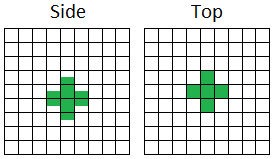
I've attached an image representing how the selection boundaries work. It's clearly not consistent with regards to the y axis.
Mod Talven81, or any other mod - can this please be reopened? The actual behavior in-game is not the same as the behavior you said is "intended", so by definition, it's not working as intended.
Your description is really confusing, partially because it's not clear whether you're using the term "grid" to refer to blocks, or to the actual coordinate system, which is not centered on blocks, but on the corners of the blocks. (0,0,0) is actually the corner of a block, not the center, on any axis. I'm inclined to believe the game doesn't actually do any rounding or flooring in the search algorithm anyway.
However, because this is counter-intuitive to players, most commands deliberately offset x and z coordinates given to them by 0.5, but not the y coordinate, so that they appear to operate on the center of the top face of a block, rather than the corners. or the center of the block. The numbers displayed on the debug screen aren't meant for player use, but for the developers.
So yes, the y coordinate is treated differently from the x and z coordinates. However, this is done deliberately to match the expectations of the average player. Your expectations may be different, but that does not mean the current behavior is unintended.
Alright, I can see what you're saying, but I don't think this matches the average player's expectations. It results in players being inside a selection boundary until they stand on a slab, but not a cake, daylight detector, or similarly nearly-slab-sized object. It creates an imaginary ball of cubes which don't line up evenly with the world's own blocks.
Anyways, I was going by Mod Talven's own description of what behavior is intended. Either you're right and Talven's description is wrong (and Talven's closing was thus correct), or you're wrong about the intended behavior and Talven described the intentions correctly, in which case this should be reopened because the game does not exhibit that behavior (I suppose there's also the third option where everyone's wrong, but that would still mean the game's not exhibiting intended behavior). Both behaviors can't be intended, after all.
As of the 1.8 snapshots, the behavior has changed. It's hard to tell, but apparently it now selects a sphere (non-voxelized) around the block. Not the corner, but the block itself - it no longer treats y differently from x and z.
This behaviour was changed in 14w03a see comment in
MC-44785[Mojang] Searge (Michael Stoyke)
Ah, that would explain it.