 Zeb
Zeb
- SuperGeniusZeb
- zebulanstanphill@gmail.com
- America/Chicago
- Yes
- No
 MCPE-17208
 MC-107749
![[Mojang] Grum (Erik Broes)](../../../data/assets/gravatar/grum.png) MCPE-17354MCPE-17389MCPE-17439MCPE-17497MCPE-17759MCPE-18008MCPE-18129MCPE-18130MCPE-19347MCPE-19832MCPE-20146MCPE-20147
MCPE-17354MCPE-17389MCPE-17439MCPE-17497MCPE-17759MCPE-18008MCPE-18129MCPE-18130MCPE-19347MCPE-19832MCPE-20146MCPE-20147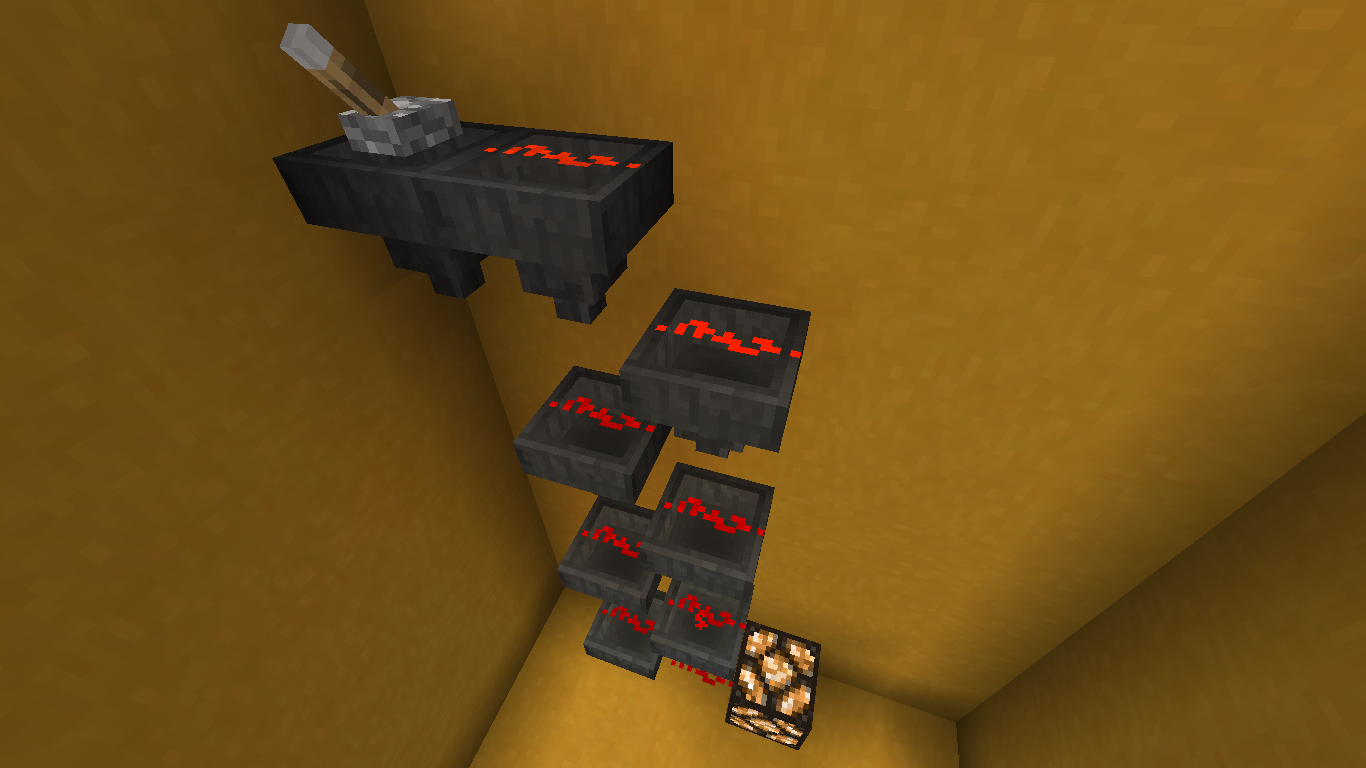


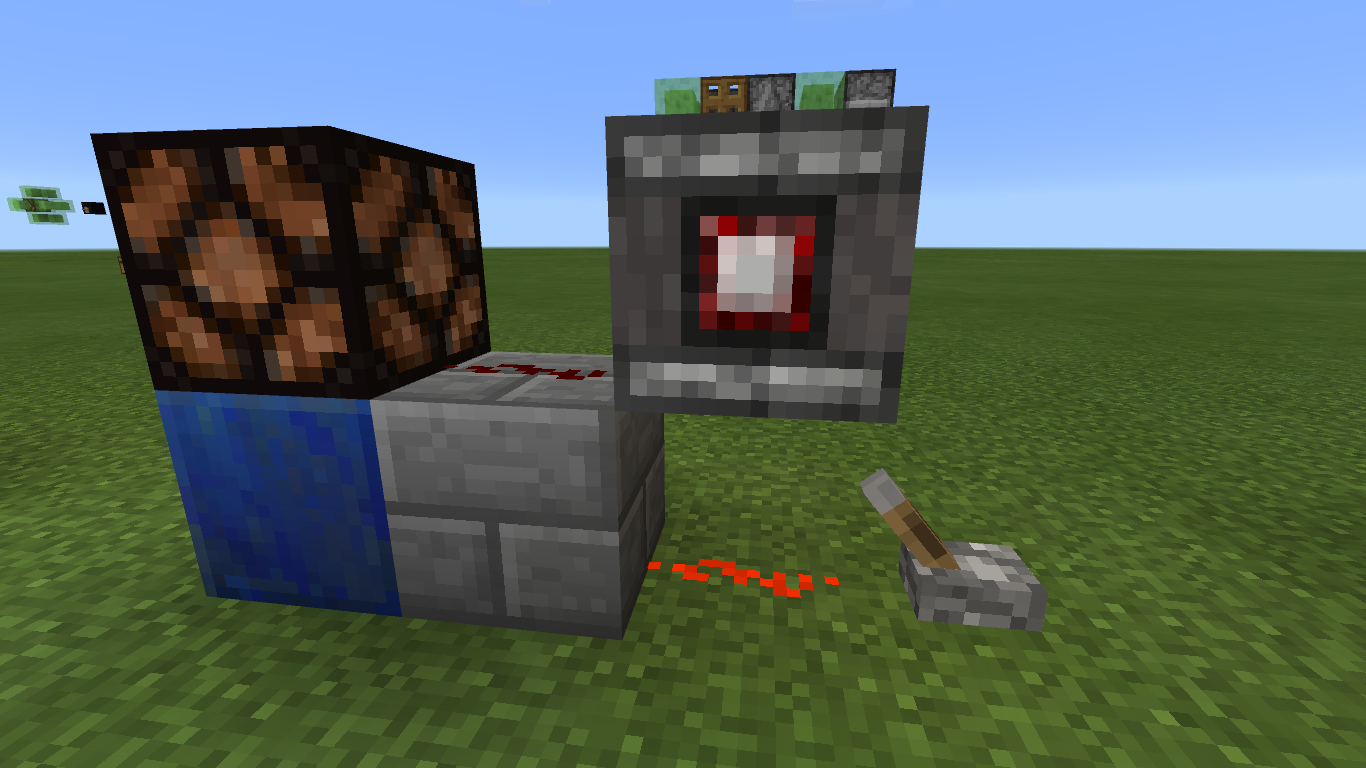

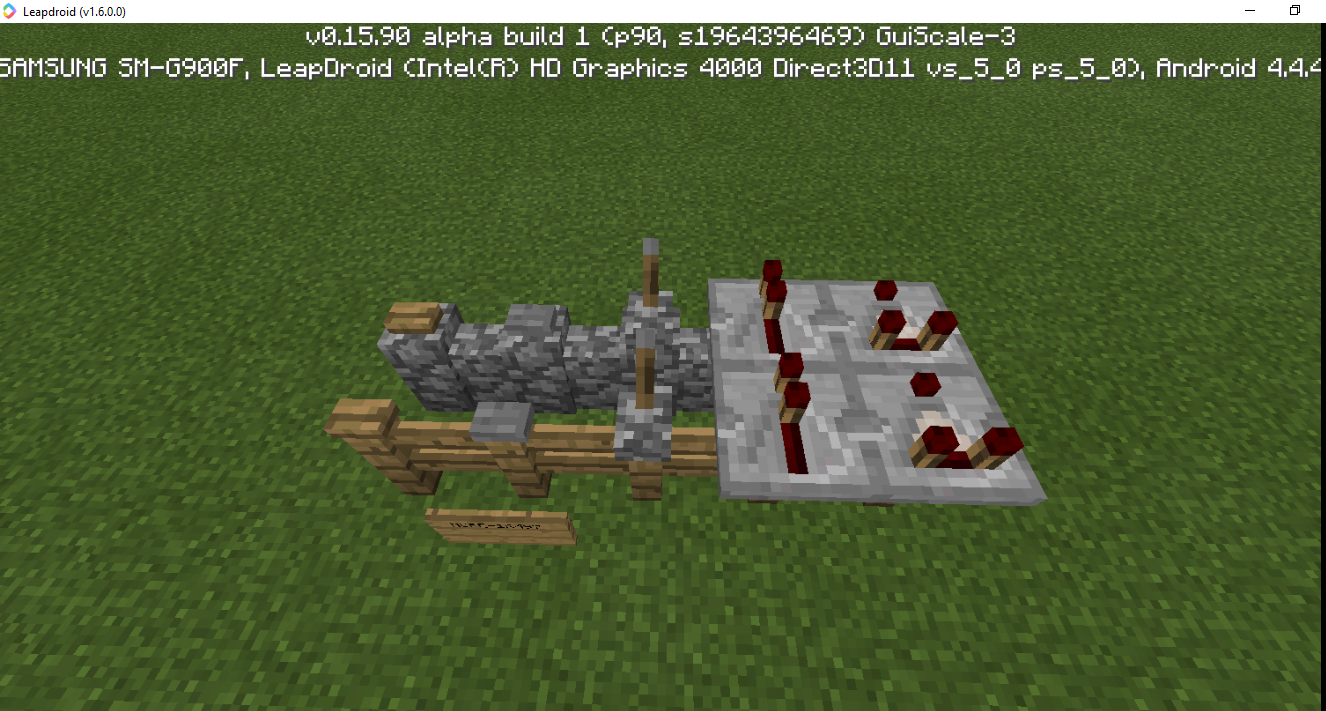
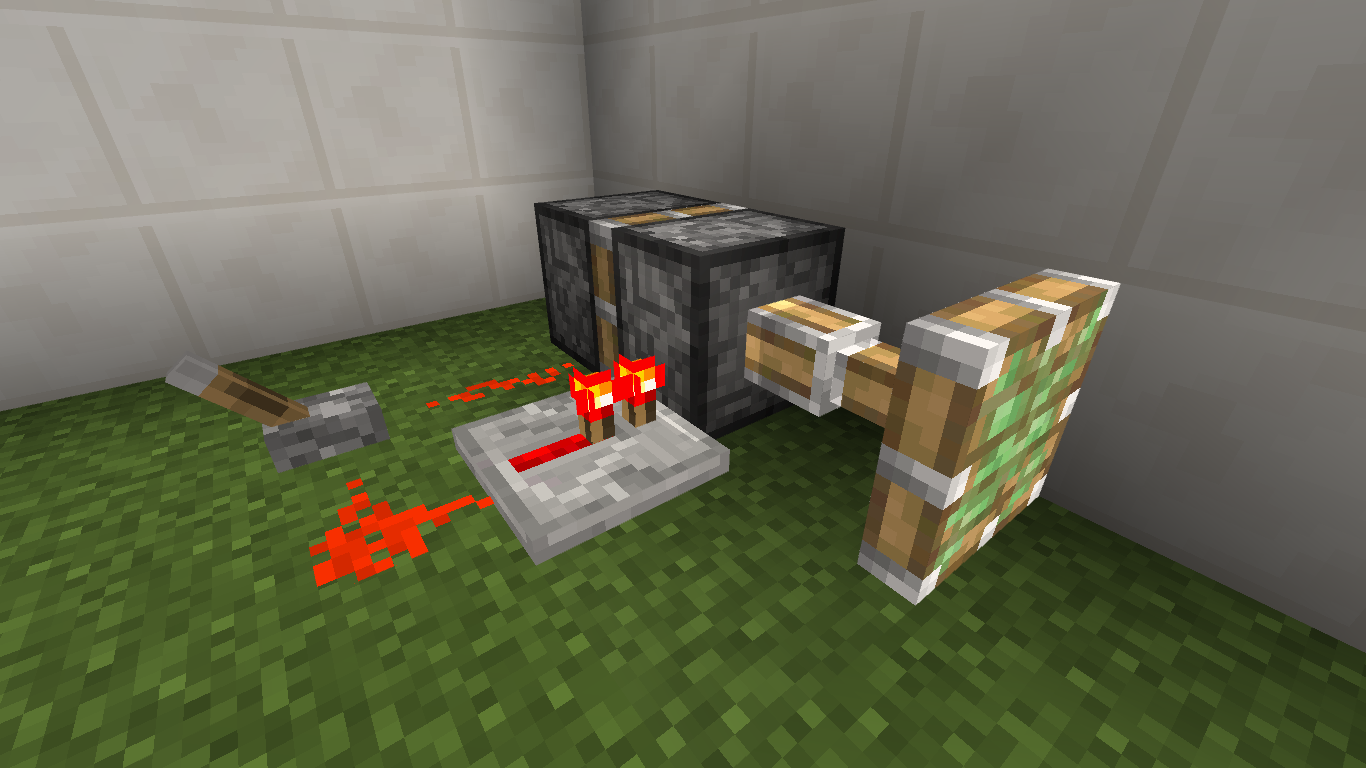
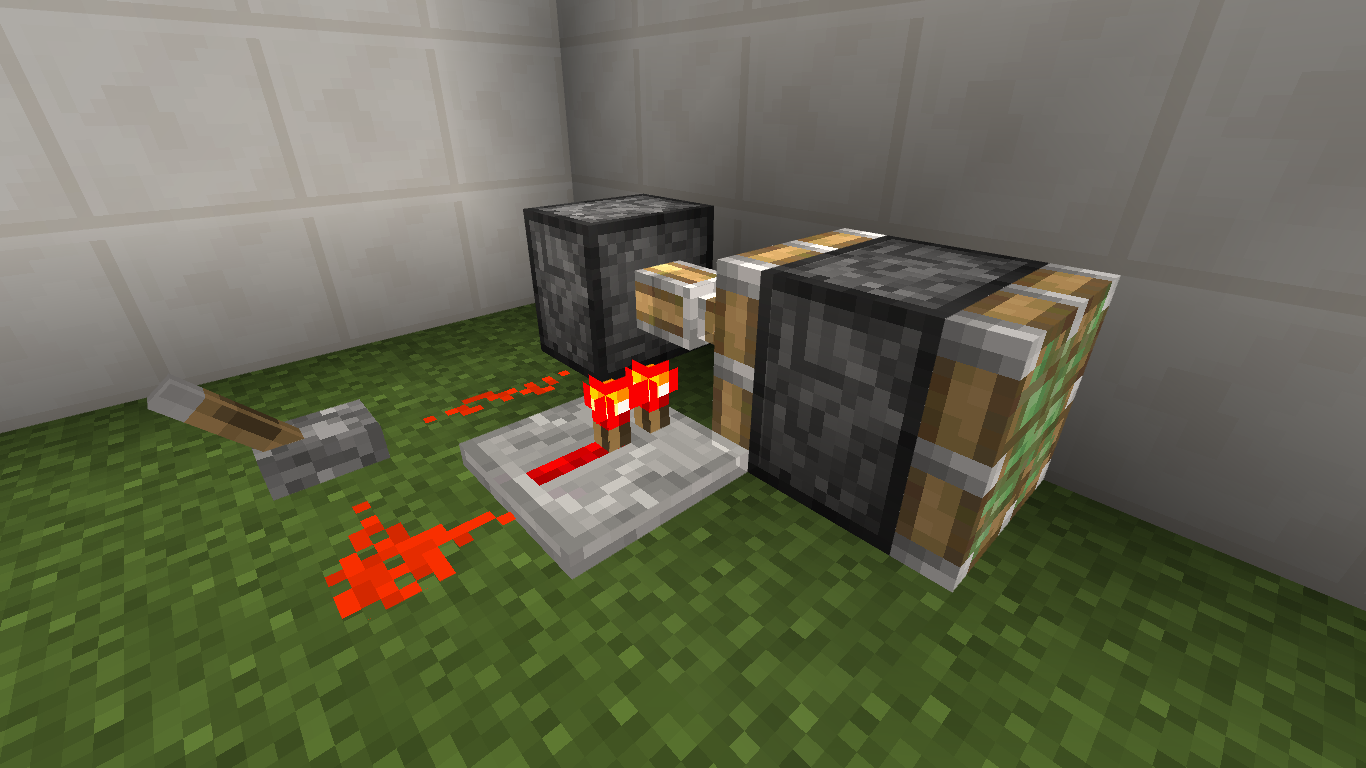
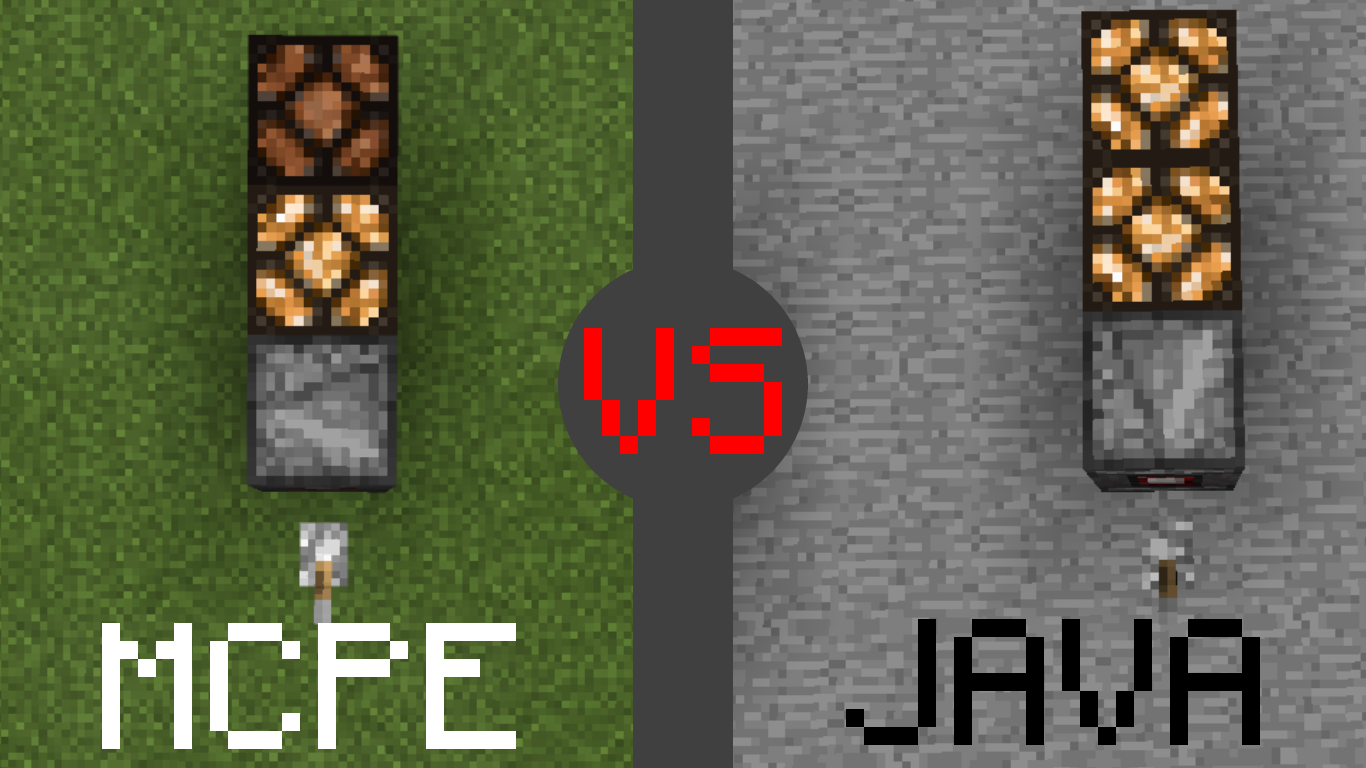
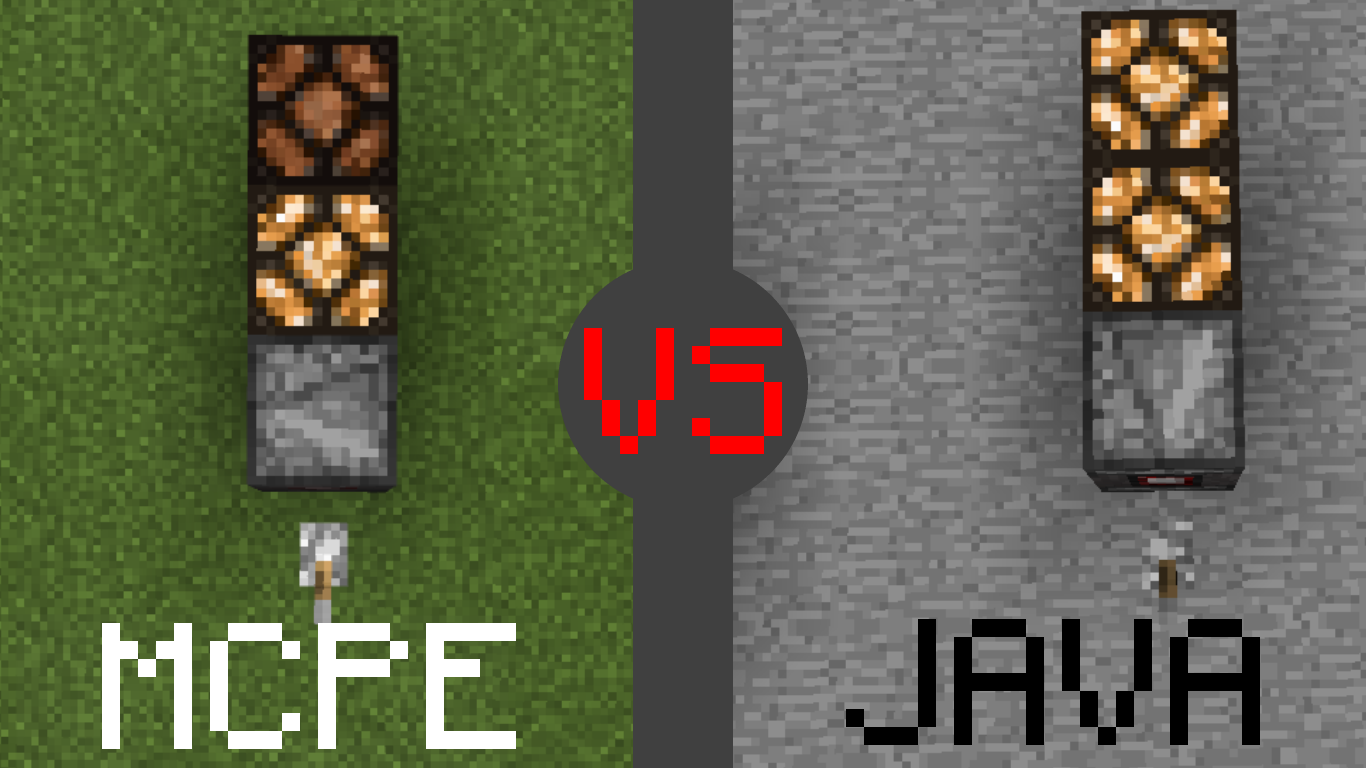
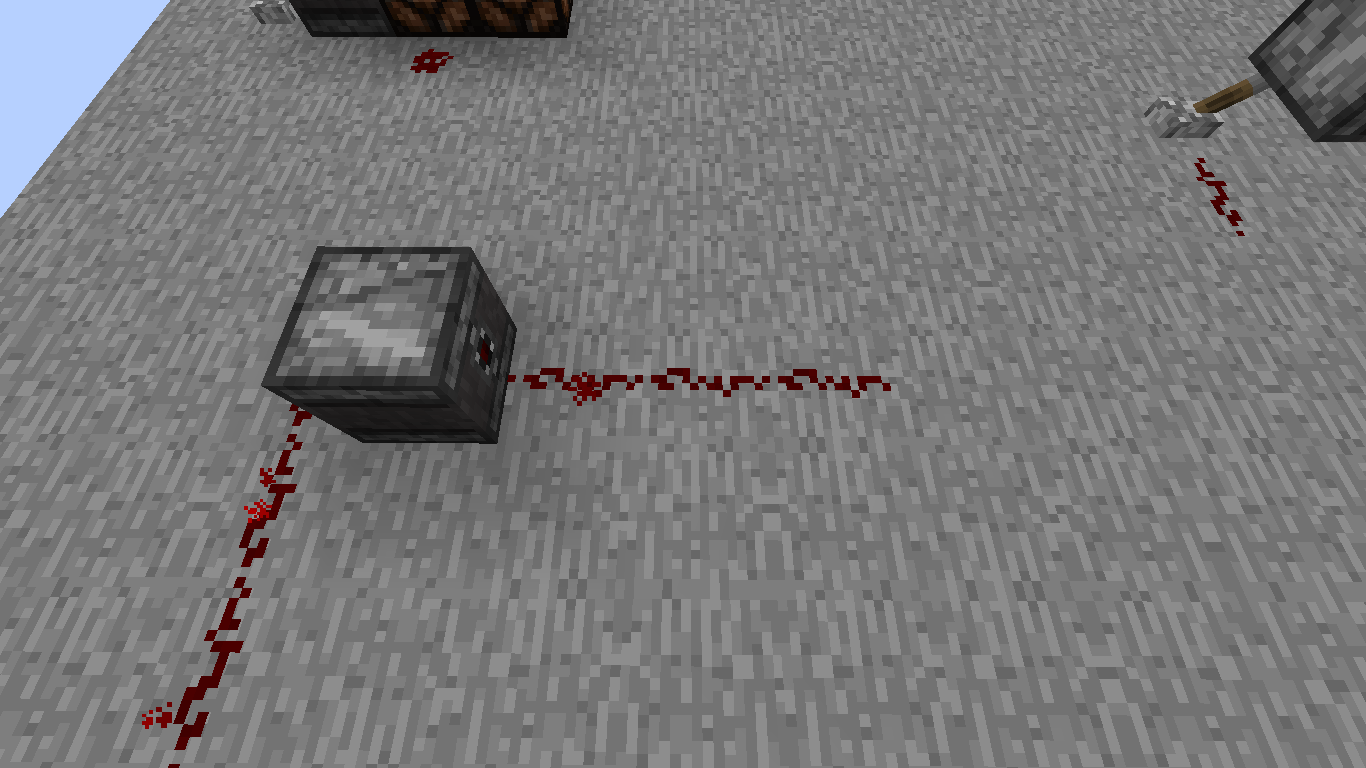
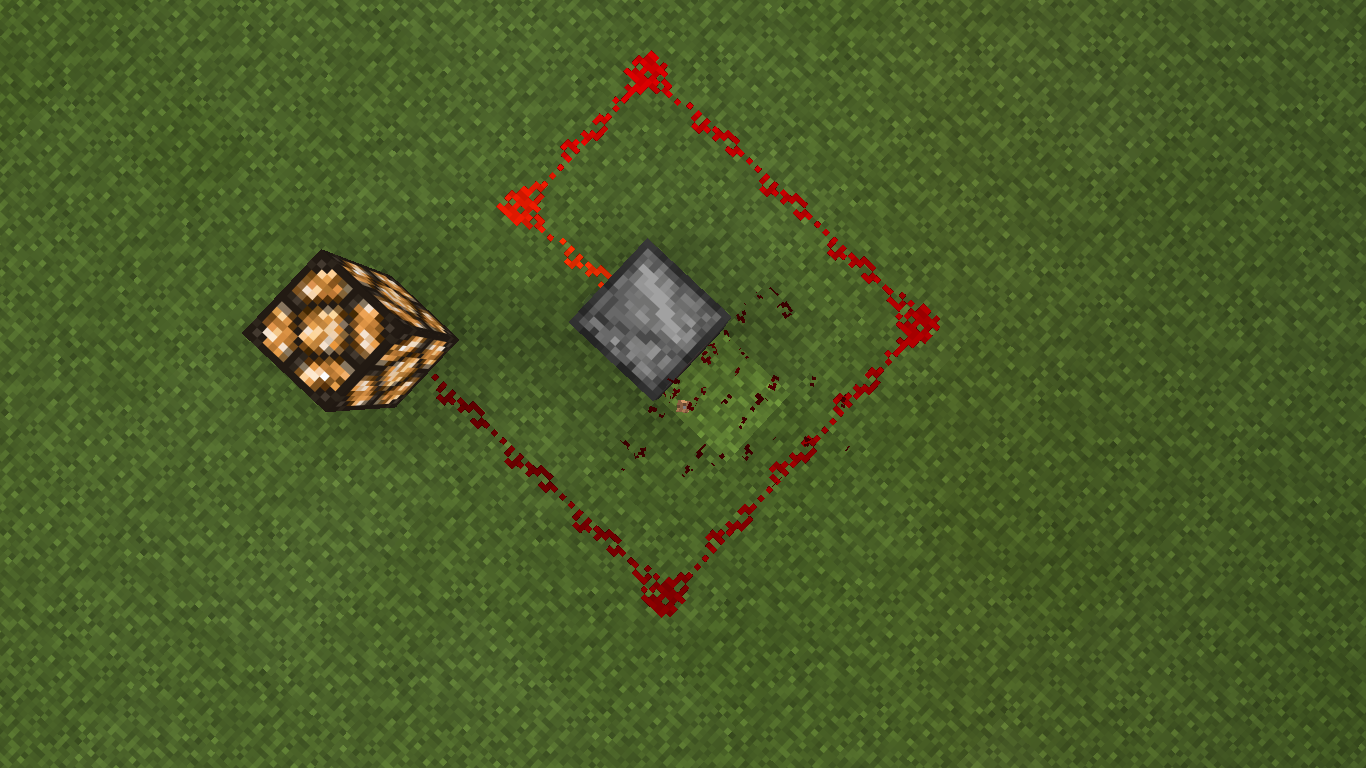
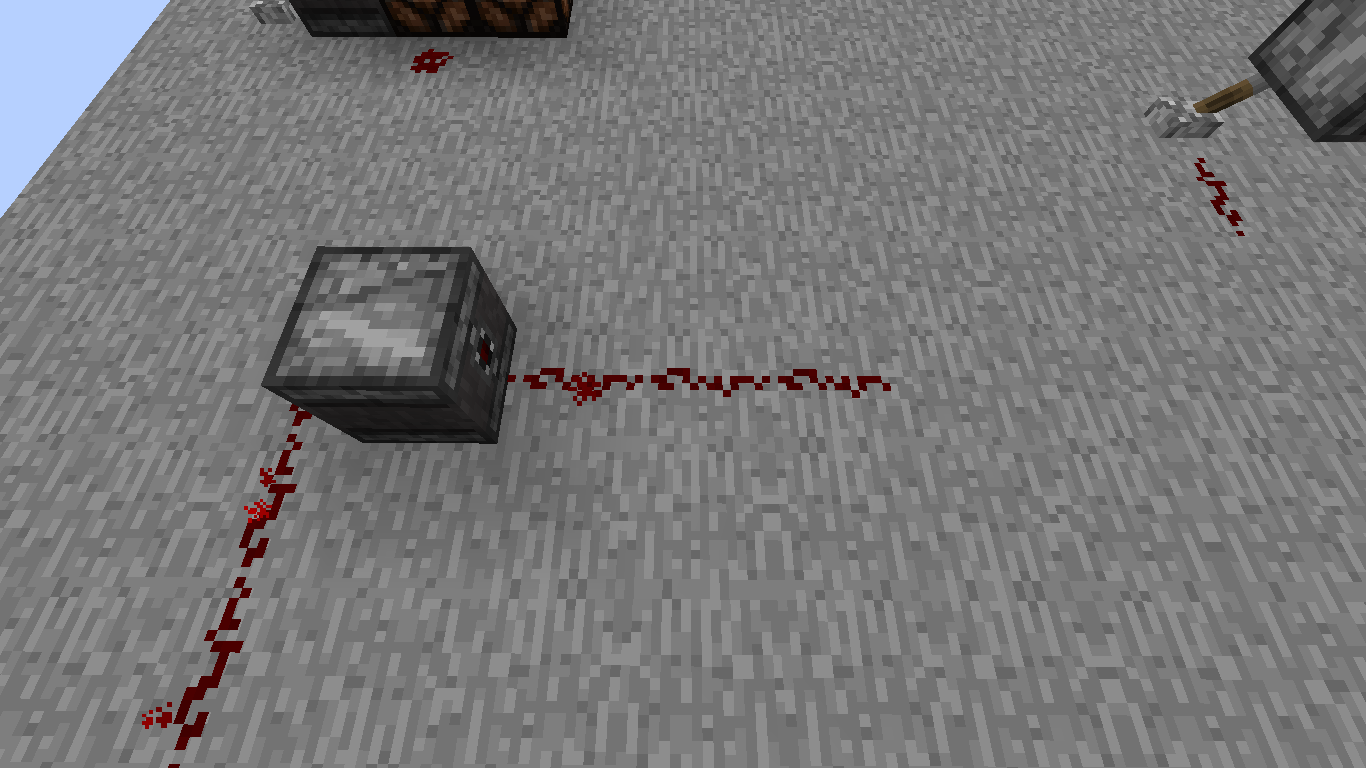










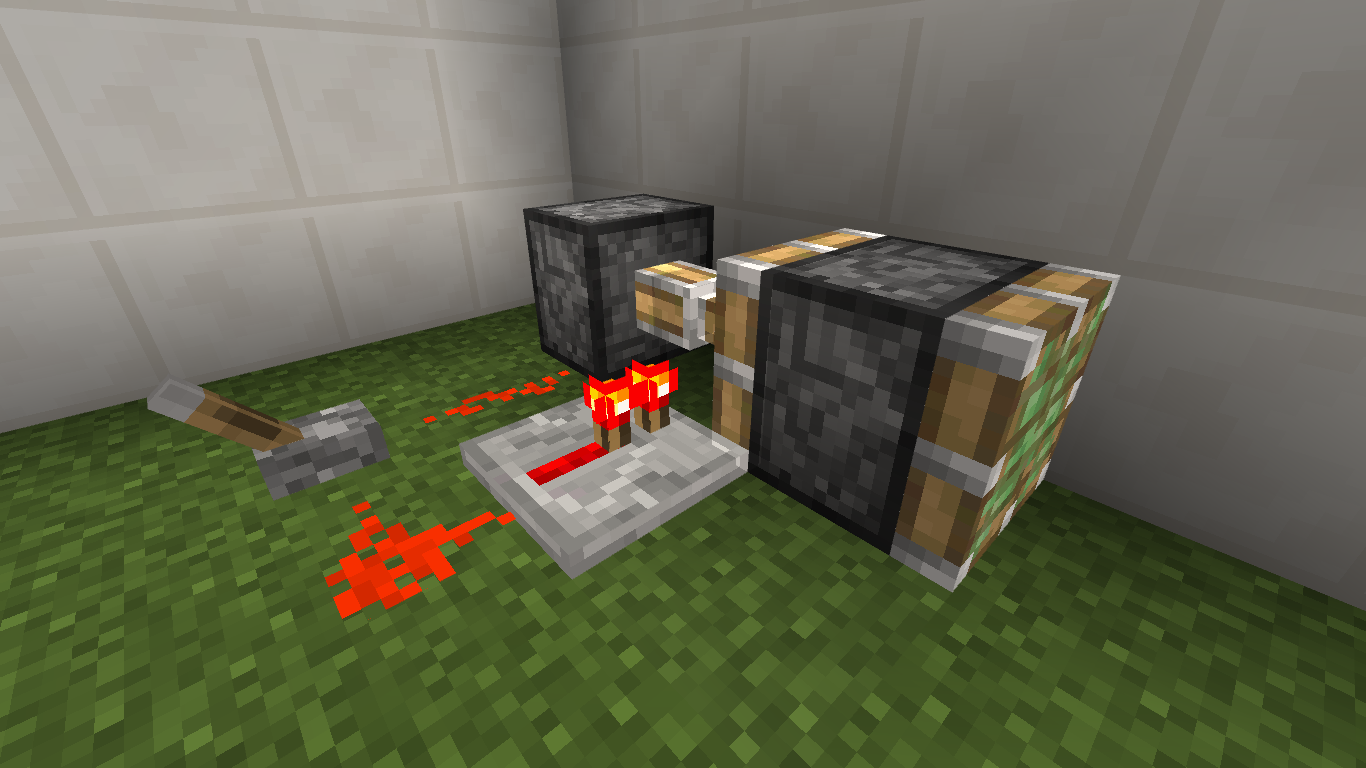

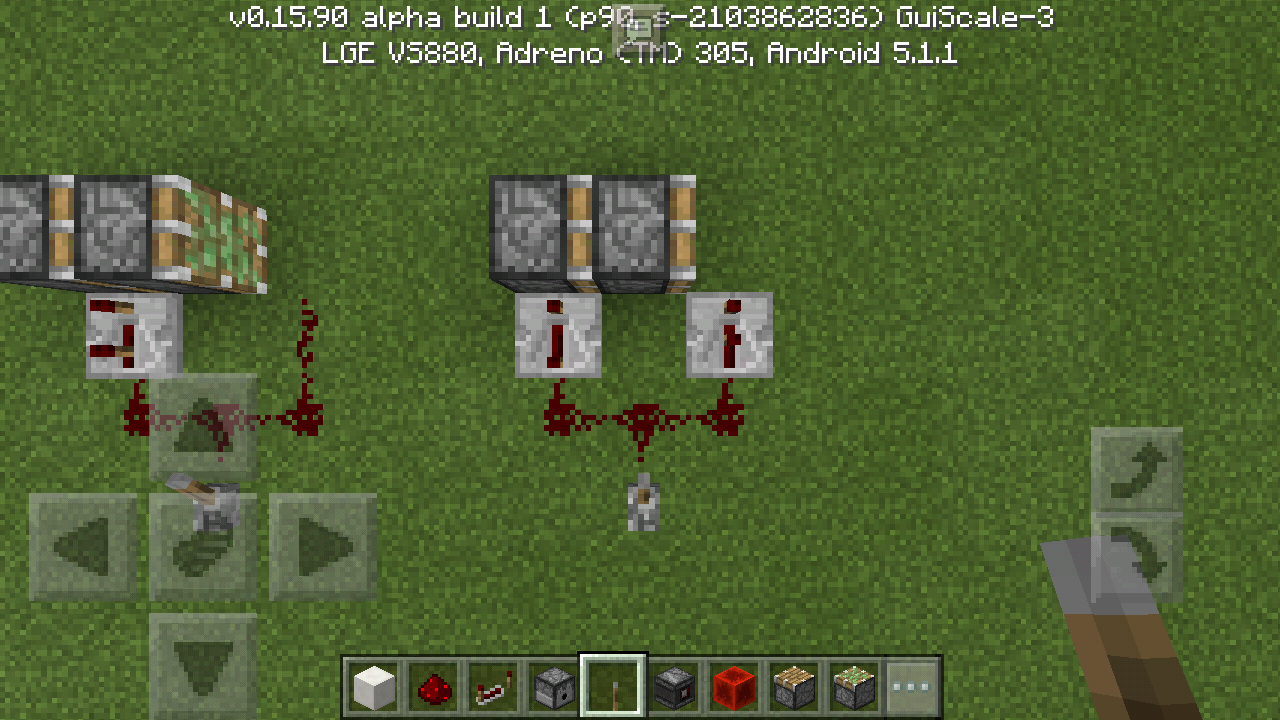




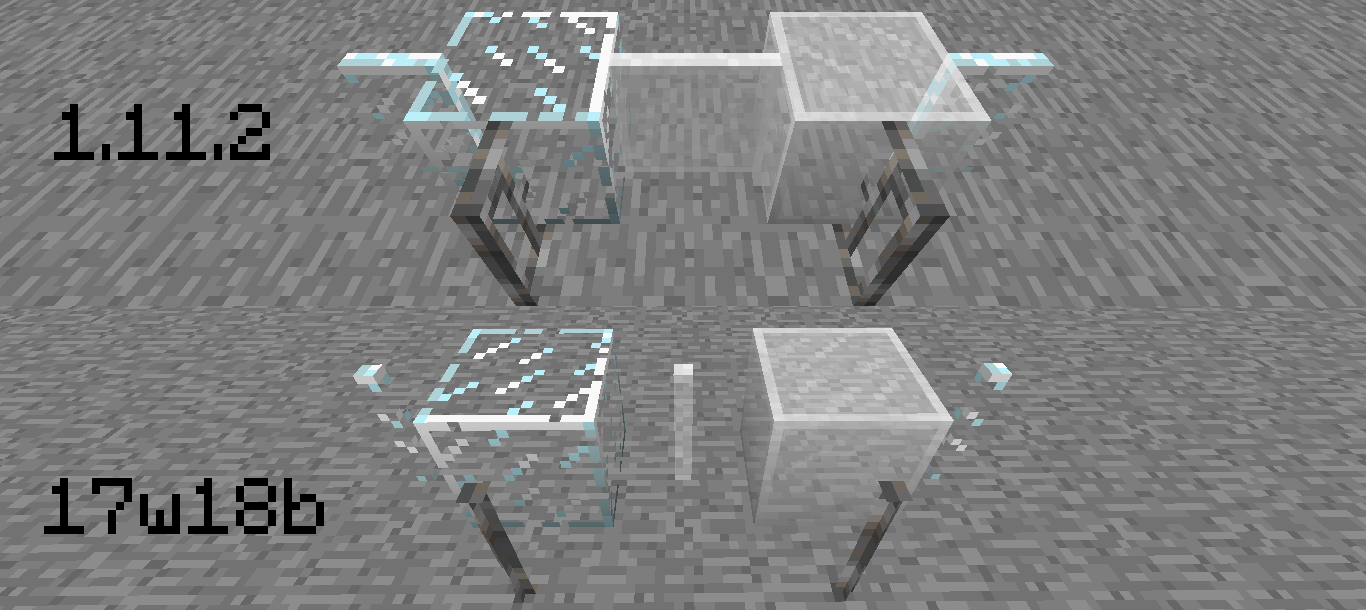
Redstone wire can travel upwards on hoppers, like slabs and stairs, which is normal and just like on the Java edition. However, a redstone signal can also be sent downwards from a hopper to another block, unlike slabs and stairs and unlike its behavior in the Java edition. Possibly caused by the fix of
MCPE-14199for hoppers. I am not sure if this is intentional behavior or not.See this video for a good demonstration/example:
https://youtu.be/rC0zbhGJsLwRedstone wire can travel upwards on hoppers, like slabs and stairs, which is normal and just like on the Java edition. However, a redstone signal can also be sent downwards from a hopper to another block, unlike slabs and stairs and unlike its behavior in the Java edition. Possibly caused by the fix of
MCPE-14199for hoppers.See this video for a good demonstration/example:
https://youtu.be/rC0zbhGJsLwEDIT: As of 0.15.90.8, all redstone components can be placed on glass on any side, and glass allows for vertical redstone both up and down, like the hoppers in this issue. I suggest that hoppers be changed to act like upside-down slabs & stairs, and glass, glowstone, sea lanterns, and other transparent, full-cube-shaped blocks act like glass does in 0.15.90.8.
Redstone wire can travel upwards on hoppers, like slabs and stairs, which is normal and just like on the Java edition. However, a redstone signal can also be sent downwards from a hopper to another block, unlike slabs and stairs and unlike its behavior in the Java edition. Possibly caused by the fix of
MCPE-14199for hoppers.See this video for a good demonstration/example:
https://youtu.be/rC0zbhGJsLwEDIT: As of 0.15.90.8, all redstone components can be placed on glass on any side, and glass allows for vertical redstone both up and down, like the hoppers in this issue. I suggest that hoppers be changed to act like upside-down slabs & stairs, and glass, glowstone, sea lanterns, and other transparent, full-cube-shaped blocks act like glass does in 0.15.90.8. See
MCPE-16872.
Redstone wire can travel upwards on hoppers, like slabs and stairs, which is normal and just like on the Java edition. However, a redstone signal can also be sent downwards from a hopper to another block, unlike slabs and stairs and unlike its behavior in the Java edition. Possibly caused by the fix of
MCPE-14199for hoppers.See this video for a good demonstration/example:
https://youtu.be/rC0zbhGJsLwEDIT: As of 0.15.90.8, all redstone components can be placed on glass on any side, and glass allows for vertical redstone both up and down, like the hoppers in this issue. I suggest that hoppers be changed to act like upside-down slabs & stairs, and glass, glowstone, sea lanterns, and other transparent, full-cube-shaped blocks act like glass does in 0.1
5.90.8. SeeMCPE-16872.Redstone wire can travel upwards on hoppers, like slabs and stairs, which is normal and just like on the Java edition. However, a redstone signal can also be sent downwards from a hopper to another block, unlike slabs and stairs and unlike its behavior in the Java edition. Possibly caused by the fix of
MCPE-14199for hoppers.See this video for a good demonstration/example:
https://youtu.be/rC0zbhGJsLwEDIT: As of 0.15.90.8, all redstone components can be placed on glass on any side, and glass allows for vertical redstone both up and down, like the hoppers in this issue. I suggest that hoppers be changed to act like upside-down slabs & stairs, and glass, glowstone, sea lanterns, and other transparent, full-cube-shaped blocks act like glass does in 0.16.1. See
MCPE-16872.
See the second half of this video for a demonstration/explanation:
https://youtu.be/tLeW3lhMn_0The behavior of Observers in regard to their opacity is inconsistent. (I am referring to their functional opacity - whether or not they cut off redstone wire, can they have torches placed on their sides, etc., NOT their visual opacity.) You may expect them to act like opaque blocks, and they DO cut off redstone wire, but in every other aspect they act like upside-down slabs/stairs, in that they act like transparent blocks, with the exception of being able to place redstone/buttons/levers/etc. on their top side, but not any other sides.
I didn't realize it when I made the video, but making Observers opaque would cause them to be able to weakly power adjacent blocks, which would interfere with their functionality and make them a lot less useful in my opinion. Therefore, I think the best way to resolve this would be to make them act like slabs/stairs. So basically, they would act just like they do now, but would not cut off redstone wire.
However, if the devs decide that Observers, due to being rather unique, belong to their own unique set of opacity rules, then I think Observers should act like opaque blocks (levers/torches could be placed on their side), minus the ability to be strongly powered, so as to prevent them from transferring redstone signals to any adjacent blocks and interfering with their functionality. This would actually make them just like MCPE pistons currently are in regard to how they behave when it comes to being transparent or opaque. Perhaps they could be in their own new category of blocks that are transparent except they can have blocks attached to any of their sides (rather than only their top sides like slabs/stairs) and they also cut off redstone. Maybe they would be considered opaque, but non-redstone-conductive? Not entirely sure what the terminology would be.
As of 16w44a, observers in the Java edition act like any other transparent block in that edition: you can't attach stuff on its sides and it doesn't cut off redstone wire.
relates to
See this video for a demonstration/explanation:
https://youtu.be/tLeW3lhMn_0Observers redirect redstone (like a repeater/comparator/adjcent dust), which makes no sense. In a future update redstone dust will automatically connect to adjacent components with inputs, but this doesn't apply in this instance, because the Observer only takes input from one side, and as you can see in the picture and video, it's redirecting no matter which side is adjacent to the dust. To make it even more confusing, the redirection doesn't appear visually, so the redstone dust still looks like it is in the shape it would be otherwise. A proper fix would be to make the Observer only redirect redstone when the input side is adjacent to the dust, and make the dust change shape visually, as with other blocks.
EDIT: I think this bug may be related to
MCPE-11871.
See this video for a demonstration/explanation:
https://youtu.be/tLeW3lhMn_0Observers redirect redstone (like a repeater/comparator/adjcent dust), which makes no sense. In a future update redstone dust will automatically connect to adjacent components with inputs, but this doesn't apply in this instance, because the Observer only takes input from one side, and as you can see in the picture and video, it's redirecting no matter which side is adjacent to the dust. To make it even more confusing, the redirection doesn't appear visually, so the redstone dust still looks like it is in the shape it would be otherwise. A proper fix would be to make the Observer only redirect redstone when the input side is adjacent to the dust, and make the dust change shape visually, as with other blocks.
EDIT: I think this bug may be related to
MCPE-11871.
EDIT2: This bug may also be related toMCPE-16170.
Confirmed for 0.15.90.2. (Tested using Pocket Edition.)
See this video for a demonstration/explanation:
https://youtu.be/tLeW3lhMn_0Observers redirect redstone (like a repeater/comparator/adjcent dust), which makes no sense. In a future update redstone dust will automatically connect to adjacent components with inputs, but this doesn't apply in this instance, because the Observer only takes input from one side, and as you can see in the picture and video, it's redirecting no matter which side is adjacent to the dust. To make it even more confusing, the redirection doesn't appear visually, so the redstone dust still looks like it is in the shape it would be otherwise. A proper fix would be to make the Observer only redirect redstone when the input side is adjacent to the dust, and make the dust change shape visually, as with other blocks.
EDIT:I think this bug may be related toMCPE-11871.
EDIT2: This bug may also be related toMCPE-16170.Sort of the MCPE-equivalent of
MC-107795.See this video for a demonstration/explanation:
https://youtu.be/tLeW3lhMn_0Observers redirect redstone (like a repeater/comparator/adjcent dust), which makes no sense. In a future update redstone dust will automatically connect to adjacent components with inputs, but this doesn't apply in this instance, because the Observer only takes input from one side, and as you can see in the picture and video, it's redirecting no matter which side is adjacent to the dust. To make it even more confusing, the redirection doesn't appear visually, so the redstone dust still looks like it is in the shape it would be otherwise. A proper fix would be to make the Observer only redirect redstone when the input side is adjacent to the dust, and make the dust change shape visually, as with other blocks.
I think this bug may be related to
MCPE-11871andMCPE-16170.
Sort of the MCPE-equivalent of
MC-107795.See this video for a demonstration/explanation:
https://youtu.be/tLeW3lhMn_0Observers redirect redstone (like a repeater/comparator/adjacent dust), which makes no sense. In a future update redstone dust will automatically connect to adjacent components with inputs, but this doesn't apply in this instance, because the Observer only takes input from one side, and as you can see in the picture and video, it's redirecting no matter which side is adjacent to the dust. To make it even more confusing, the redirection doesn't appear visually, so the redstone dust still looks like it is in the shape it would be otherwise. A proper fix would be to make the Observer only redirect redstone when the input side is adjacent to the dust, and make the dust change shape visually, as with other blocks.
I think this bug may be related to
MCPE-11871andMCPE-16170.
Sort of the MCPE-equivalent of
MC-107795.See this video for a demonstration/explanation:
https://youtu.be/tLeW3lhMn_0Observers redirect redstone (like a repeater/comparator/adjacent dust), which makes no sense. In a future update redstone dust will automatically connect to adjacent components with inputs, but this doesn't apply in this instance, because the Observer only takes input from one side, and as you can see in the picture and video, it's redirecting no matter which side is adjacent to the dust. To make it even more confusing, the redirection doesn't appear visually, so the redstone dust still looks like it is in the shape it would be otherwise. A proper fix would be to make the Observer only redirect redstone when the input side is adjacent to the dust, and make the dust change shape visually, as with other blocks.
I think this bug may be related to
MCPE-11871andMCPE-16170.Sort of the MCPE-equivalent of
MC-107795, which was fixed in 16w41a.See this video for a demonstration/explanation:
https://youtu.be/tLeW3lhMn_0Observers redirect redstone (like a repeater/comparator/adjacent dust), which makes no sense. In a future update redstone dust will automatically connect to adjacent components with inputs, but this doesn't apply in this instance, because the Observer only takes input from one side, and as you can see in the picture and video, it's redirecting no matter which side is adjacent to the dust. To make it even more confusing, the redirection doesn't appear visually, so the redstone dust still looks like it is in the shape it would be otherwise. A proper fix would be to make the Observer only redirect redstone when the input side is adjacent to the dust, and make the dust change shape visually, as with other blocks.
I think this bug may be related to
MCPE-11871andMCPE-16170.
Sort of the MCPE-equivalent of
MC-107795, which was fixed in 16w41a.See this video for a demonstration/explanation:
https://youtu.be/tLeW3lhMn_0Observers redirect redstone (like a repeater/comparator/adjacent dust), which makes no sense. In a future update redstone dust will automatically connect to adjacent components with inputs, but this doesn't apply in this instance, because the Observer only takes input from one side, and as you can see in the picture and video, it's redirecting no matter which side is adjacent to the dust. To make it even more confusing, the redirection doesn't appear visually, so the redstone dust still looks like it is in the shape it would be otherwise. A proper fix would be to make the Observer only redirect redstone
when the input side is adjacent to the dust, and make the dust change shape visually, as with other blocks.I think this bug may be related to
MCPE-11871andMCPE-16170.Sort of the MCPE-equivalent of
MC-107795, which was fixed in 16w41a.See this video for a demonstration/explanation:
https://youtu.be/tLeW3lhMn_0Observers redirect redstone (like a repeater/comparator/adjacent dust), which makes no sense. In a future update redstone dust will automatically connect to adjacent components with inputs, but this doesn't apply in this instance, because the Observer only takes input from one side, and as you can see in the picture and video, it's redirecting no matter which side is adjacent to the dust. To make it even more confusing, the redirection doesn't appear visually, so the redstone dust still looks like it is in the shape it would be otherwise. A proper fix would be to make the Observer only redirect redstone on its output side. This is how it works in the Java edition.
I think this bug may be related to
MCPE-11871andMCPE-16170.
Observers redirect Redstone Dust (but not visually).
relates to
Blocks still affected in 0.16.0 build 3.png
relates to
Observerdoesn't power blocks when hooked up to redstoneObservers powering redstone dust below do not power components adjacent to the dust
I am building a hidden stair case and when attempting to use the observer to power my t-flip flop i realized the pulse dose not effect the t-flip flop.
After some testing I realized that its pulse doesn't power any block next to it yet when 2 dust away it will.
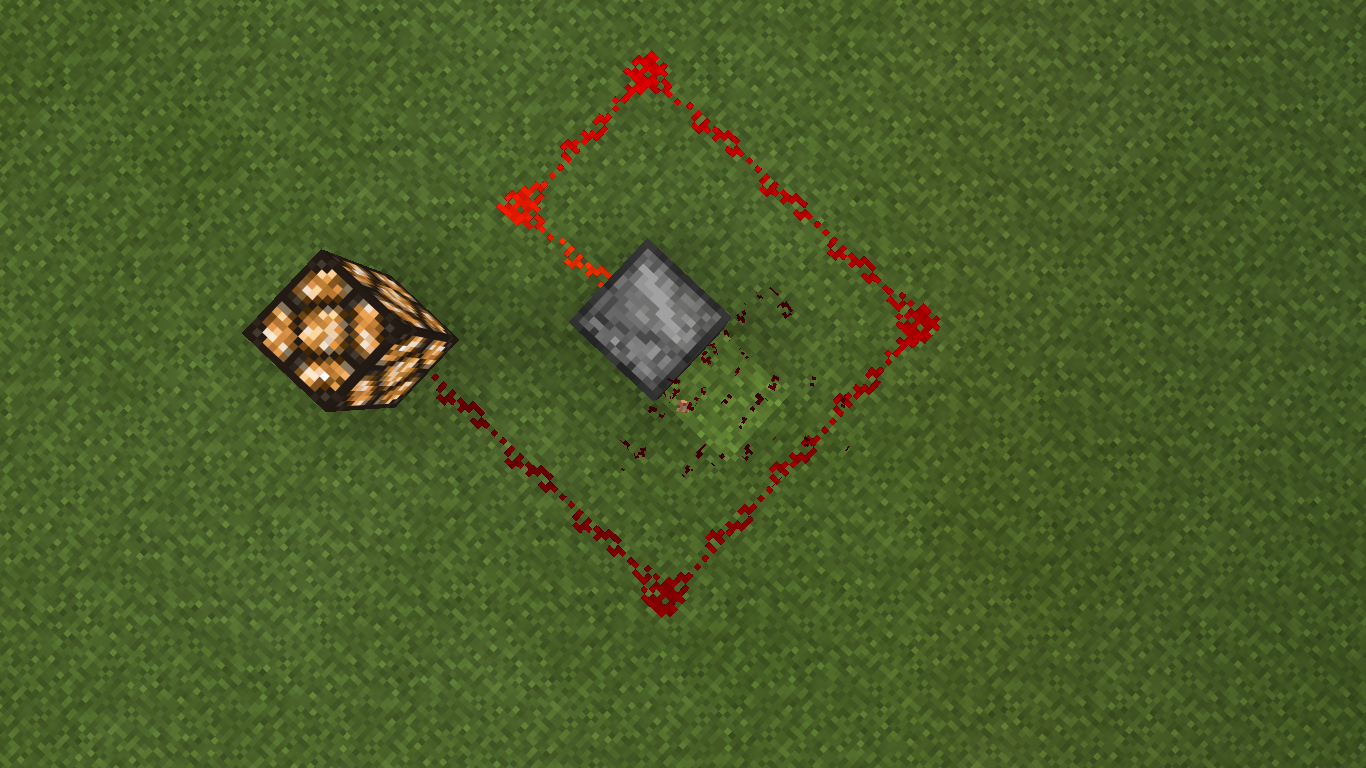
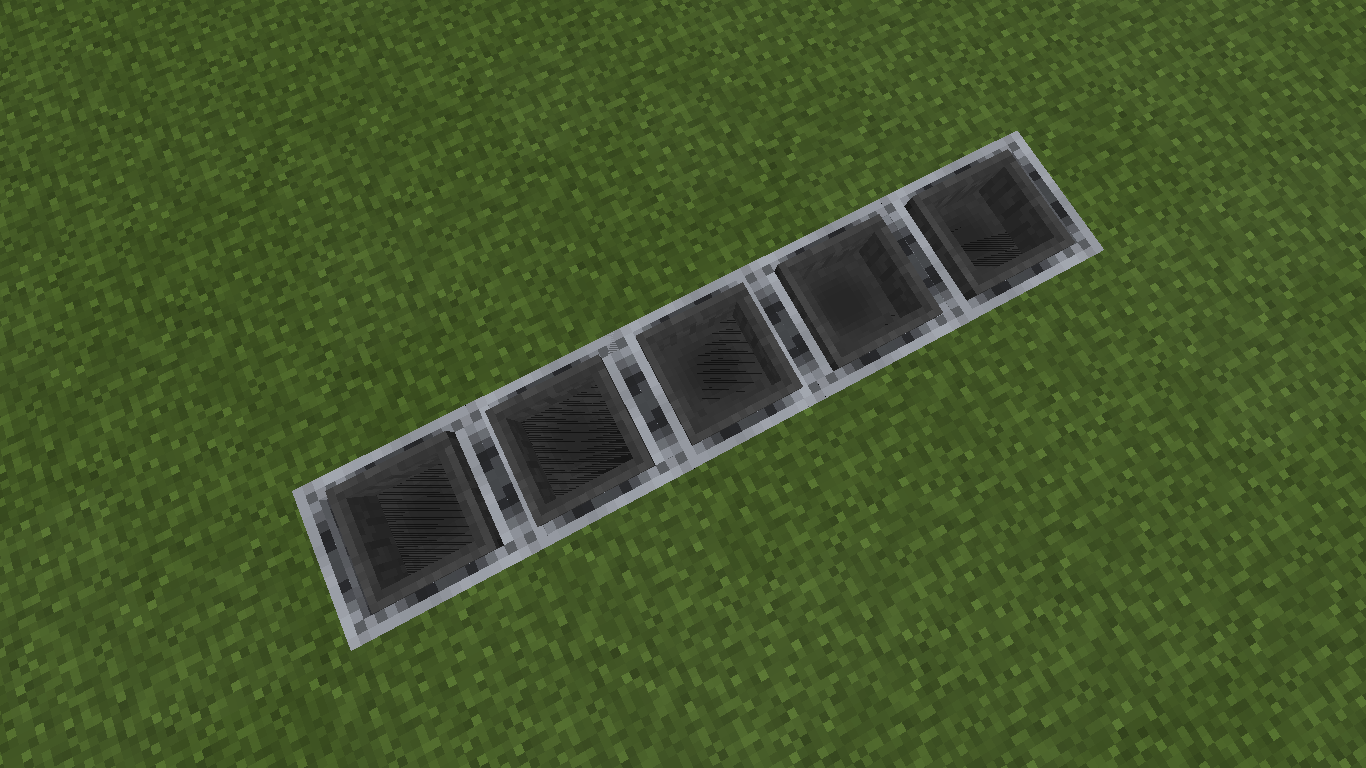
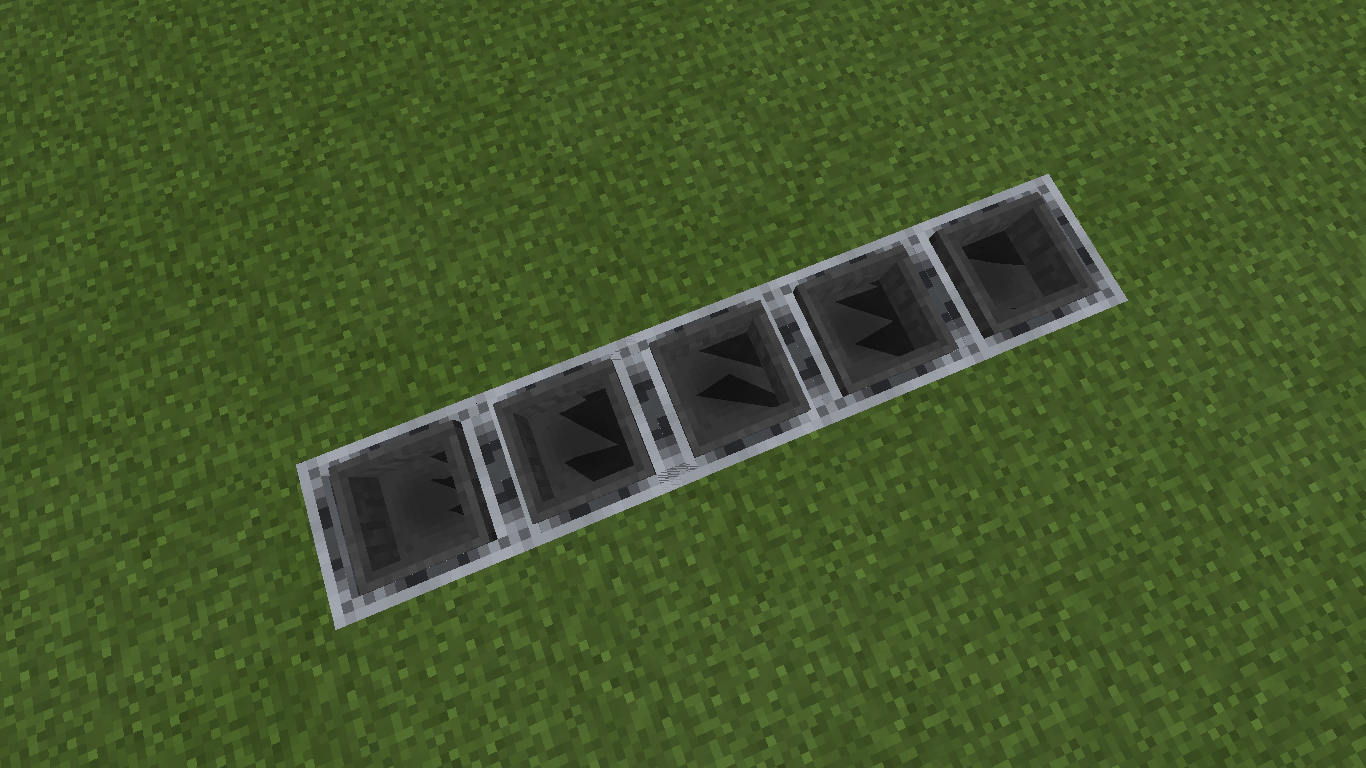
The first and second picture show how it doesn't power any type of block, lamp piston and my own problem, the dropper, it doesn't work. The third demonstrates how it dose power the farther piston yet not the close one. This i assume would work with any other block that can be powered (dropper, lamp, etc)
How to create (its a 1 wide bug so pictures should be better at explaining it)
1: place a redstone dust
2: place an observer so it can power the redstone dust
3: place a lever (or any block that can easily toggle the observer) on top of the observer
4: place a piston connected to the redstone (horizontal to the observer)
5: place another redstone dust so the first one points to the first piston
6: place another piston at the end of the second redstone dustEdit by Zeb: Note that pistons are exempt from this bug since they redirect redstone dust.
relates to
Pistons are activated one redstone tick earlier than they should be.Repeaters have no delay compared to redstone dust
Pistons will sometimes be activated one tick earlierthan they should be. See video and pictures for example:
https://youtu.be/z5BXgd2fbP8This means that pistons have to activated AT LEAST 2 redstone ticks apart to ensure they are not activated simultaneously. I am not sure if this is a bug with pistons, a bug with repeaters, or just a bug with redstone timing and ticks in general, but I don't think this was happening pre-0.15.3. In that version, pistons seemed to work flawlessly and their timings appeared to be just fine. In 0.15.3, several piston bugs were fixed, but their fixes, along with possibly the change to make pistons redirect redstone dust, seem to have caused all sorts of new timing issues that have rendered many contraptions broken due to a complete non-determinism in which piston will activate first, even when it is blatantly clear that they should be separated by one redstone tick.
In the Java edition, piston timings are always the same when on is hooked up to a repeater and the other isn't. This MAY be due to the faster pistons in Java Minecraft (and that's a whole other topic that already has a bug report for determining whether the pistons in MCPE should be sped up or not), but again, I'm pretty sure this wasn't happening before 0.15.3.
I'm not sure whether or not the cause of this bug is the same as or different from
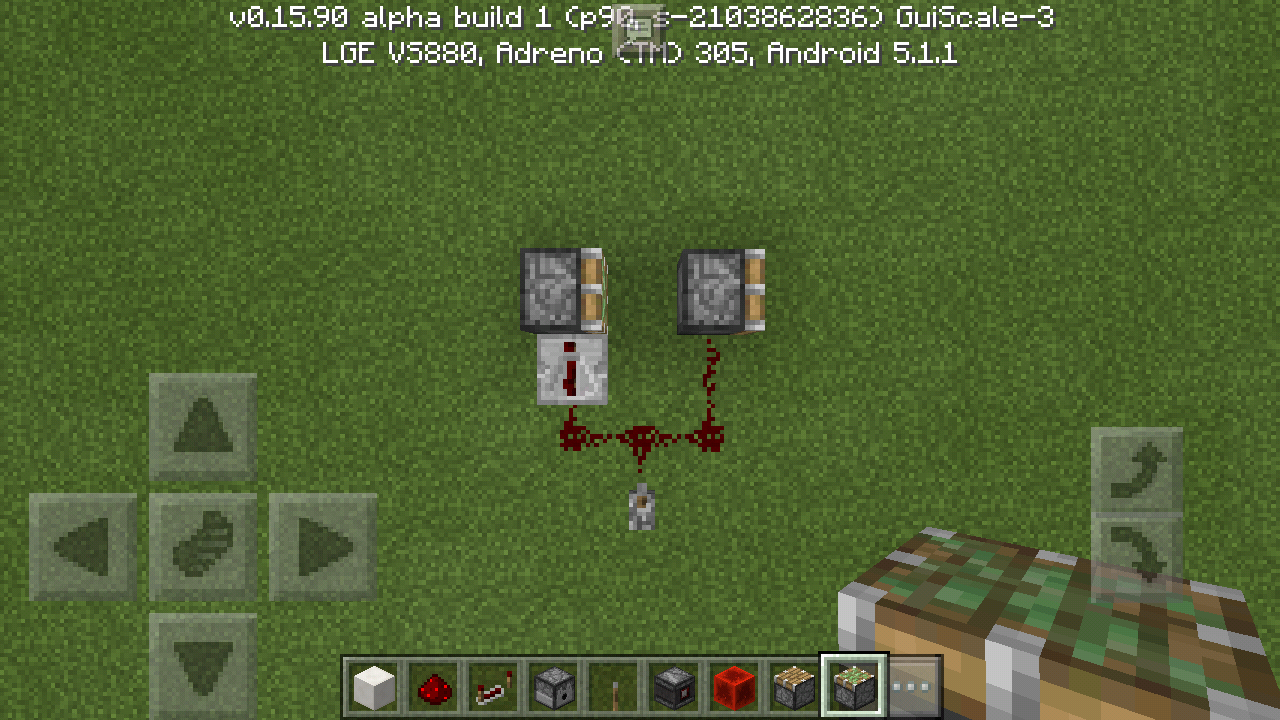
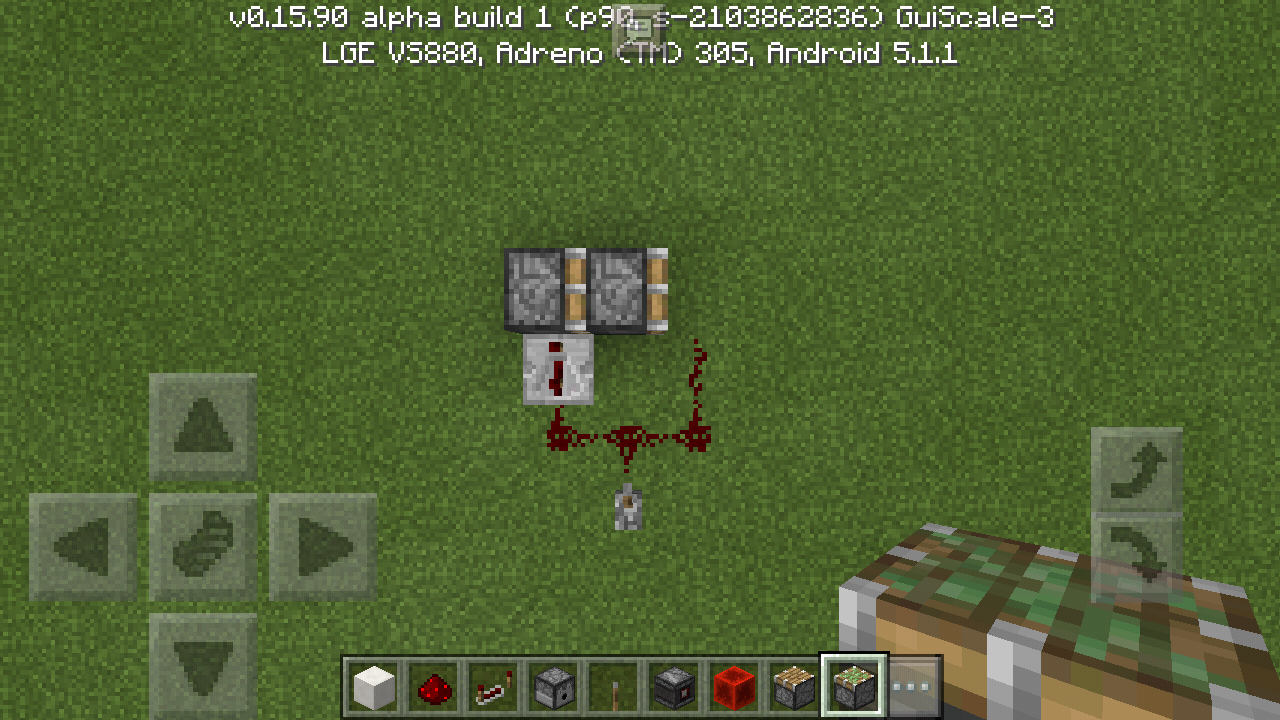
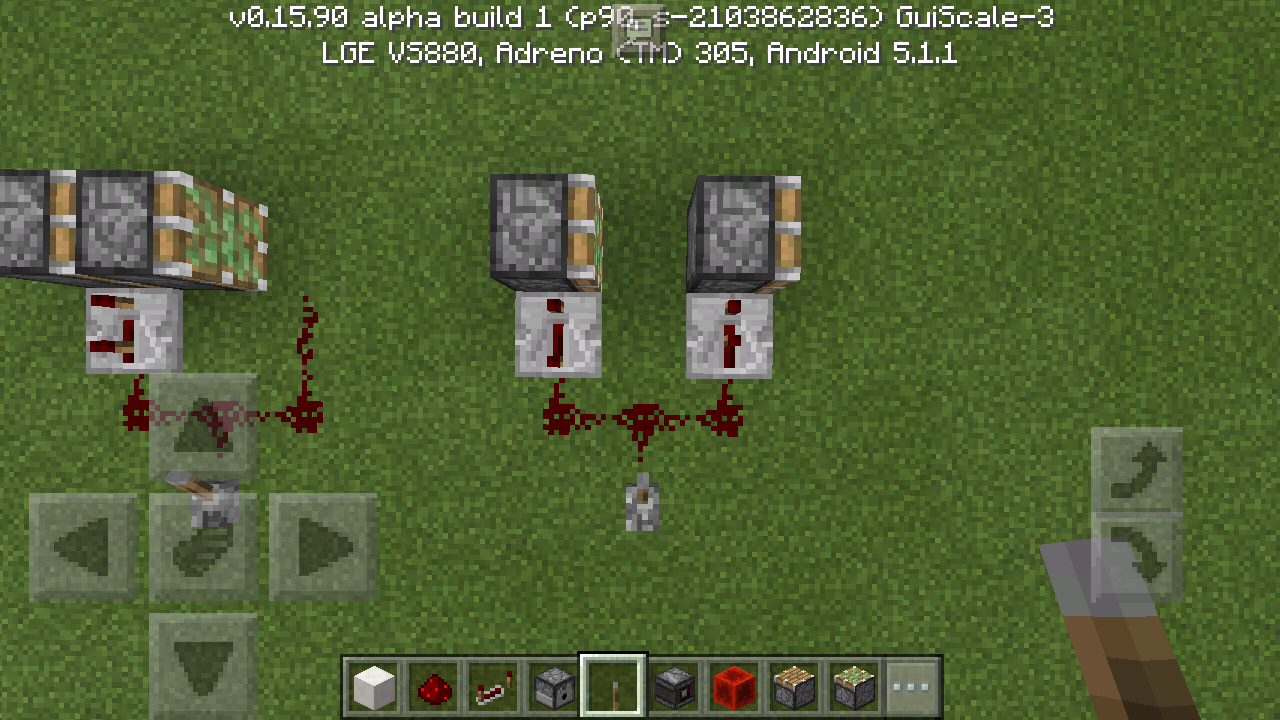
MCPE-16371, but whatever the case, this is almost DEFINTELY not WAI, because the piston not hooked up via repeater should definitely go first. Maybe if pistons could be strongly powered, you could argue that both pistons were being simultaneously powered by the redstone dust, but pistons cannot weakly power adjacent blocks in both MCPE and the Java edition. So this is most definitely a bug.When you hook up 2 redstone components and power one directly with redstone dust, and the other with a repeater set to a 1-tick delay, Both will be activated at the same time, as if the repeater has no delay (or perhaps the redstone dust has too much delay?). This leads to non-deterministic outcomes, wherein the component that will be powered first is pretty much random. See video and pictures for example:
Note that at the time of recording, I thought the bug was with pistons, and didn't realize it also applied to redstone lamps and other blocks, too. I now believe this bug is either caused by repeaters, by redstone dust, or by just incorrect redstone timings in general.
Original description from when I thought this was a piston bug:
This means that pistons have to activated AT LEAST 2 redstone ticks apart to ensure they are not activated simultaneously. I am not sure if this is a bug with pistons, a bug with repeaters, or just a bug with redstone timing and ticks in general, but I don't think this was happening pre-0.15.3. In that version, pistons seemed to work flawlessly and their timings appeared to be just fine. In 0.15.3, several piston bugs were fixed, but their fixes, along with possibly the change to make pistons redirect redstone dust, seem to have caused all sorts of new timing issues that have rendered many contraptions broken due to a complete non-determinism in which piston will activate first, even when it is blatantly clear that they should be separated by one redstone tick.
In the Java edition, piston timings are always the same when on is hooked up to a repeater and the other isn't. This MAY be due to the faster pistons in Java Minecraft (and that's a whole other topic that already has a bug report for determining whether the pistons in MCPE should be sped up or not), but again, I'm pretty sure this wasn't happening before 0.15.3.
I'm not sure whether or not the cause of this bug is the same as or different from
MCPE-16371, but whatever the case, this is almost DEFINTELY not WAI, because the piston not hooked up via repeater should definitely go first. Maybe if pistons could be strongly powered, you could argue that both pistons were being simultaneously powered by the redstone dust, but pistons cannot weakly power adjacent blocks in both MCPE and the Java edition. So this is most definitely a bug.
When you hook up 2 redstone components and power one directly with redstone dust, and the other with a repeater set to a 1-tick delay, Both will be activated at the same time, as if the repeater has no delay (or perhaps the redstone dust has too much delay?). This leads to non-deterministic outcomes, wherein the component that will be powered first is pretty much random. See video and pictures for example:
Note that at the time of recording, I thought the bug was with pistons, and didn't realize it also applied to redstone lamps and other blocks, too. I now believe this bug is either caused by repeaters, by redstone dust, or by just incorrect redstone timings in general.
Original description from when I thought this was a piston bug:
This means that pistons have to activated AT LEAST 2 redstone ticks apart to ensure they are not activated simultaneously. I am not sure if this is a bug with pistons, a bug with repeaters, or just a bug with redstone timing and ticks in general, but I don't think this was happening pre-0.15.3. In that version, pistons seemed to work flawlessly and their timings appeared to be just fine. In 0.15.3, several piston bugs were fixed, but their fixes, along with possibly the change to make pistons redirect redstone dust, seem to have caused all sorts of new timing issues that have rendered many contraptions broken due to a complete non-determinism in which piston will activate first, even when it is blatantly clear that they should be separated by one redstone tick.
In the Java edition, piston timings are always the same when on is hooked up to a repeater and the other isn't. This MAY be due to the faster pistons in Java Minecraft (and that's a whole other topic that already has a bug report for determining whether the pistons in MCPE should be sped up or not), but again, I'm pretty sure this wasn't happening before 0.15.3.
I'm not sure whether or not the cause of this bug is the same as or different from
MCPE-16371, but whatever the case, this is almost DEFINTELY not WAI, because the piston not hooked up via repeater should definitely go first. Maybe if pistons could be strongly powered, you could argue that both pistons were being simultaneously powered by the redstone dust, but pistons cannot weakly power adjacent blocks in both MCPE and the Java edition. So this is most definitely a bug.When you hook up 2 redstone components and power one directly with redstone dust, and the other with a repeater set to a 1-tick delay, Both will be activated at the same time, as if the repeater has no delay (or perhaps the redstone dust has too much delay?). This leads to non-deterministic outcomes, wherein the component that will be powered first is pretty much random. See video and pictures for example:
Note that at the time of recording, I thought the bug was with pistons, and didn't realize it also applied to redstone lamps and other blocks, too. I now believe this bug is either caused by repeaters, by redstone dust, or by just incorrect redstone timings in general.
List of blocks this bug affects:
Original description from when I thought this was a piston bug:
This means that pistons have to activated AT LEAST 2 redstone ticks apart to ensure they are not activated simultaneously. I am not sure if this is a bug with pistons, a bug with repeaters, or just a bug with redstone timing and ticks in general, but I don't think this was happening pre-0.15.3. In that version, pistons seemed to work flawlessly and their timings appeared to be just fine. In 0.15.3, several piston bugs were fixed, but their fixes, along with possibly the change to make pistons redirect redstone dust, seem to have caused all sorts of new timing issues that have rendered many contraptions broken due to a complete non-determinism in which piston will activate first, even when it is blatantly clear that they should be separated by one redstone tick.
In the Java edition, piston timings are always the same when on is hooked up to a repeater and the other isn't. This MAY be due to the faster pistons in Java Minecraft (and that's a whole other topic that already has a bug report for determining whether the pistons in MCPE should be sped up or not), but again, I'm pretty sure this wasn't happening before 0.15.3.
I'm not sure whether or not the cause of this bug is the same as or different from
MCPE-16371, but whatever the case, this is almost DEFINTELY not WAI, because the piston not hooked up via repeater should definitely go first. Maybe if pistons could be strongly powered, you could argue that both pistons were being simultaneously powered by the redstone dust, but pistons cannot weakly power adjacent blocks in both MCPE and the Java edition. So this is most definitely a bug.
When you hook up 2 redstone components and power one directly with redstone dust, and the other with a repeater set to a 1-tick delay, Both will be activated at the same time, as if the repeater has no delay (or perhaps the redstone dust has too much delay?). This leads to non-deterministic outcomes, wherein the component that will be powered first is pretty much random. See video and pictures for example:
Note that at the time of recording, I thought the bug was with pistons, and didn't realize it also applied to redstone lamps and other blocks, too. I now believe this bug is either caused by repeaters, by redstone dust, or by just incorrect redstone timings in general.
List of blocks this bug affects:
- pistons
- dispensers
- redstone lamps
List of blocks this bug doesn't seem to affect:
- repeaters
- comparators
Original description from when I thought this was a piston bug:
This means that pistons have to activated AT LEAST 2 redstone ticks apart to ensure they are not activated simultaneously. I am not sure if this is a bug with pistons, a bug with repeaters, or just a bug with redstone timing and ticks in general, but I don't think this was happening pre-0.15.3. In that version, pistons seemed to work flawlessly and their timings appeared to be just fine. In 0.15.3, several piston bugs were fixed, but their fixes, along with possibly the change to make pistons redirect redstone dust, seem to have caused all sorts of new timing issues that have rendered many contraptions broken due to a complete non-determinism in which piston will activate first, even when it is blatantly clear that they should be separated by one redstone tick.
In the Java edition, piston timings are always the same when on is hooked up to a repeater and the other isn't. This MAY be due to the faster pistons in Java Minecraft (and that's a whole other topic that already has a bug report for determining whether the pistons in MCPE should be sped up or not), but again, I'm pretty sure this wasn't happening before 0.15.3.
I'm not sure whether or not the cause of this bug is the same as or different from
MCPE-16371, but whatever the case, this is almost DEFINTELY not WAI, because the piston not hooked up via repeater should definitely go first. Maybe if pistons could be strongly powered, you could argue that both pistons were being simultaneously powered by the redstone dust, but pistons cannot weakly power adjacent blocks in both MCPE and the Java edition. So this is most definitely a bug.
When you hook up 2 redstone components and power one directly with redstone dust, and the other with a repeater set to a 1-tick delay, Both will be activated at the same time, as if the repeater has no delay (or perhaps the redstone dust has too much delay?). This leads to non-deterministic outcomes, wherein the component that will be powered first is pretty much random. See video and pictures for example:
Note that at the time of recording, I thought the bug was with pistons, and didn't realize it also applied to redstone lamps and other blocks, too. I now believe this bug is either caused by repeaters, by redstone dust, or by just incorrect redstone timings in general.
List of blocks this bug affects:
- pistons
dispensersredstone lampsList of blocks this bug doesn't seem to affect:
- repeaters
- comparators
Original description from when I thought this was a piston bug:
This means that pistons have to activated AT LEAST 2 redstone ticks apart to ensure they are not activated simultaneously. I am not sure if this is a bug with pistons, a bug with repeaters, or just a bug with redstone timing and ticks in general, but I don't think this was happening pre-0.15.3. In that version, pistons seemed to work flawlessly and their timings appeared to be just fine. In 0.15.3, several piston bugs were fixed, but their fixes, along with possibly the change to make pistons redirect redstone dust, seem to have caused all sorts of new timing issues that have rendered many contraptions broken due to a complete non-determinism in which piston will activate first, even when it is blatantly clear that they should be separated by one redstone tick.
In the Java edition, piston timings are always the same when on is hooked up to a repeater and the other isn't. This MAY be due to the faster pistons in Java Minecraft (and that's a whole other topic that already has a bug report for determining whether the pistons in MCPE should be sped up or not), but again, I'm pretty sure this wasn't happening before 0.15.3.
I'm not sure whether or not the cause of this bug is the same as or different from
MCPE-16371, but whatever the case, this is almost DEFINTELY not WAI, because the piston not hooked up via repeater should definitely go first. Maybe if pistons could be strongly powered, you could argue that both pistons were being simultaneously powered by the redstone dust, but pistons cannot weakly power adjacent blocks in both MCPE and the Java edition. So this is most definitely a bug.When you hook up 2 redstone components and power one directly with redstone dust, and the other with a repeater set to a 1-tick delay, Both will be activated at the same time, as if the repeater has no delay (or perhaps the redstone dust has too much delay?). This leads to non-deterministic outcomes, wherein the component that will be powered first is pretty much random. See video and pictures for example:
Note that at the time of recording, I thought the bug was with pistons, and didn't realize it also applied to redstone lamps and other blocks, too. I now believe this bug is either caused by repeaters, by redstone dust, or by just incorrect redstone timings in general.
List of blocks this bug affects:
- pistons
- sticky pistons
- dispensers
- droppers
- redstone lamps
List of blocks this bug doesn't seem to affect:
- repeaters
- comparators
Original description from when I thought this was a piston bug:
This means that pistons have to activated AT LEAST 2 redstone ticks apart to ensure they are not activated simultaneously. I am not sure if this is a bug with pistons, a bug with repeaters, or just a bug with redstone timing and ticks in general, but I don't think this was happening pre-0.15.3. In that version, pistons seemed to work flawlessly and their timings appeared to be just fine. In 0.15.3, several piston bugs were fixed, but their fixes, along with possibly the change to make pistons redirect redstone dust, seem to have caused all sorts of new timing issues that have rendered many contraptions broken due to a complete non-determinism in which piston will activate first, even when it is blatantly clear that they should be separated by one redstone tick.
In the Java edition, piston timings are always the same when on is hooked up to a repeater and the other isn't. This MAY be due to the faster pistons in Java Minecraft (and that's a whole other topic that already has a bug report for determining whether the pistons in MCPE should be sped up or not), but again, I'm pretty sure this wasn't happening before 0.15.3.
I'm not sure whether or not the cause of this bug is the same as or different from
MCPE-16371, but whatever the case, this is almost DEFINTELY not WAI, because the piston not hooked up via repeater should definitely go first. Maybe if pistons could be strongly powered, you could argue that both pistons were being simultaneously powered by the redstone dust, but pistons cannot weakly power adjacent blocks in both MCPE and the Java edition. So this is most definitely a bug.
When you hook up 2 redstone components and power one directly with redstone dust, and the other with a repeater set to a 1-tick delay, Both will be activated at the same time, as if the repeater has no delay (or perhaps the redstone dust has too much delay?). This leads to non-deterministic outcomes, wherein the component that will be powered first is pretty much random. See video and pictures for example:
Note that at the time of recording, I thought the bug was with pistons, and didn't realize it also applied to redstone lamps and other blocks, too. I now believe this bug is either caused by repeaters, by redstone dust, or by just incorrect redstone timings in general.
List of blocks this bug affects:
- pistons
- sticky pistons
- dispensers
- droppers
- redstone lamps
- observers
List of blocks this bug doesn't seem to affect:
- repeaters
- comparators
Original description from when I thought this was a piston bug:
This means that pistons have to activated AT LEAST 2 redstone ticks apart to ensure they are not activated simultaneously. I am not sure if this is a bug with pistons, a bug with repeaters, or just a bug with redstone timing and ticks in general, but I don't think this was happening pre-0.15.3. In that version, pistons seemed to work flawlessly and their timings appeared to be just fine. In 0.15.3, several piston bugs were fixed, but their fixes, along with possibly the change to make pistons redirect redstone dust, seem to have caused all sorts of new timing issues that have rendered many contraptions broken due to a complete non-determinism in which piston will activate first, even when it is blatantly clear that they should be separated by one redstone tick.
In the Java edition, piston timings are always the same when on is hooked up to a repeater and the other isn't. This MAY be due to the faster pistons in Java Minecraft (and that's a whole other topic that already has a bug report for determining whether the pistons in MCPE should be sped up or not), but again, I'm pretty sure this wasn't happening before 0.15.3.
I'm not sure whether or not the cause of this bug is the same as or different from
MCPE-16371, but whatever the case, this is almost DEFINTELY not WAI, because the piston not hooked up via repeater should definitely go first. Maybe if pistons could be strongly powered, you could argue that both pistons were being simultaneously powered by the redstone dust, but pistons cannot weakly power adjacent blocks in both MCPE and the Java edition. So this is most definitely a bug.
When you hook up 2 redstone components and power one directly with redstone dust, and the other with a repeater set to a 1-tick delay, Both will be activated at the same time, as if the repeater has no delay (or perhaps the redstone dust has too much delay?). This leads to non-deterministic outcomes, wherein the component that will be powered first is pretty much random. See video and pictures for example:
Note that at the time of recording, I thought the bug was with pistons, and didn't realize it also applied to redstone lamps and other blocks, too. I now believe this bug is either caused by repeaters, by redstone dust, or by just incorrect redstone timings in general.
List of blocks this bug affects (not a complete list):
- pistons
- sticky pistons
- dispensers
- droppers
- redstone lamps
- observers
- note blocks
List of blocks this bug doesn't seem to affect (not a complete list, either):
- repeaters
- comparators
Original description from when I thought this was a piston bug:
This means that pistons have to activated AT LEAST 2 redstone ticks apart to ensure they are not activated simultaneously. I am not sure if this is a bug with pistons, a bug with repeaters, or just a bug with redstone timing and ticks in general, but I don't think this was happening pre-0.15.3. In that version, pistons seemed to work flawlessly and their timings appeared to be just fine. In 0.15.3, several piston bugs were fixed, but their fixes, along with possibly the change to make pistons redirect redstone dust, seem to have caused all sorts of new timing issues that have rendered many contraptions broken due to a complete non-determinism in which piston will activate first, even when it is blatantly clear that they should be separated by one redstone tick.
In the Java edition, piston timings are always the same when on is hooked up to a repeater and the other isn't. This MAY be due to the faster pistons in Java Minecraft (and that's a whole other topic that already has a bug report for determining whether the pistons in MCPE should be sped up or not), but again, I'm pretty sure this wasn't happening before 0.15.3.
I'm not sure whether or not the cause of this bug is the same as or different from
MCPE-16371, but whatever the case, this is almost DEFINTELY not WAI, because the piston not hooked up via repeater should definitely go first. Maybe if pistons could be strongly powered, you could argue that both pistons were being simultaneously powered by the redstone dust, but pistons cannot weakly power adjacent blocks in both MCPE and the Java edition. So this is most definitely a bug.
When you hook up 2 redstone components and power one directly with redstone dust, and the other with a repeater set to a 1-tick delay, Both will be activated at the same time, as if the repeater has no delay (or perhaps the redstone dust has too much delay?). This leads to non-deterministic outcomes, wherein the component that will be powered first is pretty much random. See video and pictures for example:
Note that at the time of recording, I thought the bug was with pistons, and didn't realize it also applied to redstone lamps and other blocks, too. I now believe this bug is either caused by repeaters, by redstone dust, or by just incorrect redstone timings in general.
List of blocks this bug affects (not a complete list):
- pistons
- sticky pistons
- dispensers
- droppers
- redstone lamps
- observers
- note blocks
List of blocks this bug doesn't seem to affect (not a complete list, either):
- repeaters
- comparators
- redstone torches (by sending the dust/repeaters into blocks to invert the torches)
Original description from when I thought this was a piston bug:
This means that pistons have to activated AT LEAST 2 redstone ticks apart to ensure they are not activated simultaneously. I am not sure if this is a bug with pistons, a bug with repeaters, or just a bug with redstone timing and ticks in general, but I don't think this was happening pre-0.15.3. In that version, pistons seemed to work flawlessly and their timings appeared to be just fine. In 0.15.3, several piston bugs were fixed, but their fixes, along with possibly the change to make pistons redirect redstone dust, seem to have caused all sorts of new timing issues that have rendered many contraptions broken due to a complete non-determinism in which piston will activate first, even when it is blatantly clear that they should be separated by one redstone tick.
In the Java edition, piston timings are always the same when on is hooked up to a repeater and the other isn't. This MAY be due to the faster pistons in Java Minecraft (and that's a whole other topic that already has a bug report for determining whether the pistons in MCPE should be sped up or not), but again, I'm pretty sure this wasn't happening before 0.15.3.
I'm not sure whether or not the cause of this bug is the same as or different from
MCPE-16371, but whatever the case, this is almost DEFINTELY not WAI, because the piston not hooked up via repeater should definitely go first. Maybe if pistons could be strongly powered, you could argue that both pistons were being simultaneously powered by the redstone dust, but pistons cannot weakly power adjacent blocks in both MCPE and the Java edition. So this is most definitely a bug.
Repeaters have no delay compared to redstone dust, when they should have a 1-redstone-tick delay
When you hook up 2 redstone components and power one directly with redstone dust, and the other with a repeater set to a 1-tick delay, Both will be activated at the same time, as if the repeater has no delay (or perhaps the redstone dust has too much delay?). This leads to non-deterministic outcomes, wherein the component that will be powered first is pretty much random. See video and pictures for example:
Note that at the time of recording, I thought the bug was with pistons, and didn't realize it also applied to redstone lamps and other blocks, too. I now believe this bug is either caused by repeaters, by redstone dust, or by just incorrect redstone timings in general.
List of blocks this bug affects (not a complete list):
- pistons
- sticky pistons
- dispensers
- droppers
- redstone lamps
observers- note blocks
List of blocks this bug doesn't seem to affect (not a complete list, either):
- repeaters
- comparators
- redstone torches (by sending the dust/repeaters into blocks to invert the torches)
Original description from when I thought this was a piston bug:
This means that pistons have to activated AT LEAST 2 redstone ticks apart to ensure they are not activated simultaneously. I am not sure if this is a bug with pistons, a bug with repeaters, or just a bug with redstone timing and ticks in general, but I don't think this was happening pre-0.15.3. In that version, pistons seemed to work flawlessly and their timings appeared to be just fine. In 0.15.3, several piston bugs were fixed, but their fixes, along with possibly the change to make pistons redirect redstone dust, seem to have caused all sorts of new timing issues that have rendered many contraptions broken due to a complete non-determinism in which piston will activate first, even when it is blatantly clear that they should be separated by one redstone tick.
In the Java edition, piston timings are always the same when on is hooked up to a repeater and the other isn't. This MAY be due to the faster pistons in Java Minecraft (and that's a whole other topic that already has a bug report for determining whether the pistons in MCPE should be sped up or not), but again, I'm pretty sure this wasn't happening before 0.15.3.
I'm not sure whether or not the cause of this bug is the same as or different fromMCPE-16371, but whatever the case, this is almost DEFINTELY not WAI, because the piston not hooked up via repeater should definitely go first. Maybe if pistons could be strongly powered, you could argue that both pistons were being simultaneously powered by the redstone dust, but pistons cannotweakly power adjacent blocks in both MCPE and the Java edition. Sothisismost definitely a bug.When you hook up 2 redstone components and power one directly with redstone dust, and the other with a repeater set to a 1-tick delay, Both will be activated at the same time, as if the repeater has no delay (or perhaps the redstone dust has too much delay?). This leads to non-deterministic outcomes, wherein the component that will be powered first is pretty much random. See video and pictures for example:
Note that at the time of recording, I thought the bug was with pistons, and didn't realize it also applied to redstone lamps and other blocks, too. I now believe this bug is either caused by repeaters, by redstone dust, or by just incorrect redstone timings in general.
List of blocks this bug affects (not a complete list):
- pistons
- sticky pistons
- dispensers
- droppers
- redstone lamps
- observers (placing redstone dust on the input of one and a repeater on the other and activating both simultaneously will cause both observers to be activated at the same time)
- note blocks
List of blocks this bug doesn't seem to affect (not a complete list, either):
- repeaters
- comparators
- redstone torches (by sending the dust/repeaters into blocks to invert the torches)
This bug does not occur on the Java edition, as repeaters set to a 1-tick delay always add a 1 redstone tick delay no matter what they're hooked up to. I'm not sure how long this bug has been in the game, but it has been there since at least 0.15.3. This bug causes various redstone contraptions to act as if they were being affected by
MCPE-16371, since there's no distinction between a repeater powering something and redstone dust powering something in many cases.
When you hook up 2 redstone components and power one directly with redstone dust, and the other with a repeater set to a 1-tick delay, Both will be activated at the same time, as if the repeater has no delay (or perhaps the redstone dust has too much delay?). This leads to non-deterministic outcomes, wherein the component that will be powered first is pretty much random. See video and pictures for example:
Note that at the time of recording, I thought the bug was with pistons, and didn't realize it also applied to redstone lamps and other blocks, too. I now believe this bug is either caused by repeaters, by redstone dust, or by just incorrect redstone timings in general.
List of blocks this bug affects (not a complete list):
- pistons
- sticky pistons
- dispensers
- droppers
- redstone lamps
- observers (placing redstone dust on the input of one and a repeater on the other and activating both simultaneously will cause both observers to be activated at the same time)
- note blocks
List of blocks this bug doesn't seem to affect (not a complete list, either):
- repeaters
- comparators
- redstone torches (by sending the dust/repeaters into blocks to invert the torches)
This bug does not occur on the Java edition, as repeaters set to a 1-tick delay always add a 1 redstone tick delay no matter what they're hooked up to. I'm not sure how long this bug has been in the game, but it has been there since at least 0.15.3. This bug causes various redstone contraptions to act as if they were being affected by
MCPE-16371, since there's no distinction between a repeater powering something and redstone dust powering something in many cases, causing several things to be powered at the same time, which results in random/unpredictable behavior.
Repeaters have no delay compared to redstone dust, when they should have a 1-redstone-tick delayRepeaters set to 1-redstone-tick have no delay compared to redstone dust
When you hook up 2 redstone components and power one directly with redstone dust, and the other with a repeater set to a 1-tick delay, Both will be activated at the same time, as if the repeater has no delay
(or perhaps the redstone dust has too much delay?). This leads to non-deterministic outcomes, wherein the component that will be powered first is pretty much random. See video and pictures for example:Note that at the time of recording, I thought the bug was with pistons, and didn't realize it also applied to redstone lamps and other blocks, too. I now believe this bug is either caused by repeaters, by redstone dust, or by just incorrect redstone timings in general.
List of blocks this bug affects (not a complete list):
- pistons
- sticky pistons
- dispensers
- droppers
- redstone lamps
- observers (placing redstone dust on the input of one and a repeater on the other and activating both simultaneously will cause both observers to be activated at the same time)
- note blocks
List of blocks this bug doesn't seem to affect (not a complete list, either):
- repeaters
- comparators
- redstone torches (by sending the dust/repeaters into blocks to invert the torches)
This bug does not occur on the Java edition, as repeaters set to a 1-tick delay always add a 1 redstone tick delay no matter what they're hooked up to. I'm not sure how long this bug has been in the game, but it has been there since at least 0.15.3. This bug causes various redstone contraptions to act as if they were being affected by
MCPE-16371, since there's no distinction between a repeater powering something and redstone dust powering something in many cases, causing several things to be powered at the same time, which results in random/unpredictable behavior.When you hook up 2 redstone components and power one directly with redstone dust, and the other with a repeater set to a 1-tick delay, Both will be activated at the same time, as if the repeater has no delay. This leads to non-deterministic outcomes, wherein the component that will be powered first is pretty much random. See video and pictures for example:
Note that at the time of recording, I thought the bug was with pistons, and didn't realize it also applied to redstone lamps and other blocks, too. I now believe this bug is either caused by repeaters, by redstone dust, or by just incorrect redstone timings in general.
List of blocks this bug affects (not a complete list):
- pistons
- sticky pistons
- dispensers
- droppers
- redstone lamps
- observers (placing redstone dust on the input of one and a repeater on the other and activating both simultaneously will cause both observers to be activated at the same time)
- note blocks
List of blocks this bug doesn't seem to affect (not a complete list, either):
- repeaters (the proper delay will be applied to repeaters being powered by other repeaters or redstone dust coming from other repeaters)
- comparators (same as with repeaters)
- redstone torches (by sending the dust/repeaters into blocks to invert the torches)
This bug does not occur on the Java edition, as repeaters set to a 1-tick delay always add a 1 redstone tick delay no matter what they're hooked up to. I'm not sure how long this bug has been in the game, but it has been there since at least 0.15.3. This bug causes various redstone contraptions to act as if they were being affected by
MCPE-16371, since there's no distinction between a repeater powering something and redstone dust powering something in many cases, causing several things to be powered at the same time, which results in random/unpredictable behavior.
Repeaters set to 1-redstone-tick & comparators have no delay compared to redstone dust
When you hook up 2 redstone components and power one directly with redstone dust, and the other with a repeater set to a 1-tick delay, Both will be activated at the same time, as if the repeater has no delay. This leads to non-deterministic outcomes, wherein the component that will be powered first is pretty much random. See video and pictures for example:
Note that at the time of recording, I thought the bug was with pistons, and didn't realize it also applied to redstone lamps and other blocks, too. I now believe this bug is either caused by repeaters, by redstone dust, or by just incorrect redstone timings in general.
List of blocks this bug affects
(not a complete list):
- pistons
- sticky pistons
- dispensers
- droppers
- redstone lamps
- observers (placing redstone dust on the input of one and a repeater on the other and activating both simultaneously will cause both observers to be activated at the same time)
- note blocks
List of blocks this bug doesn't seem to affect
(not a complete list, either):
- repeaters (the proper delay will be applied to repeaters being powered by other repeaters or redstone dust coming from other repeaters)
comparators (same as with repeaters)- redstone
torches (by sending the dust/repeaters into blocks to invert the torches)This bug does not occur on the Java edition, as repeaters set to a 1-tick delay always add a 1 redstone tick delay no matter what they're hooked up to. I'm not sure how long this bug has been in the game, but it has been there since at least 0.15.3. This bug causes various redstone contraptions to act as if they were being affected by
MCPE-16371, since there's no distinction between a repeater powering something and redstone dust powering something in many cases, causing several things to be powered at the same time, which results in random/unpredictable behavior.When you hook up 2 redstone components and power one directly with redstone dust, and the other with a repeater set to a 1-tick delay, Both will be activated at the same time, as if the repeater has no delay. This leads to non-deterministic outcomes, wherein the component that will be powered first is pretty much random. See video and pictures for example:
Note that at the time of recording, I thought the bug was with pistons, and didn't realize it also applied to redstone lamps and other blocks, too. I now believe this bug is either caused by repeaters/comparators, by redstone dust, or by just incorrect redstone timings in general. I've also noticed that repeaters, comparators, redstone torches, and redstone dust are powered with the correct timing delay when repeaters are powering them, either directly or with redstone dust in-between, but the affected components listed below will still be powered as though there were no dust between them and the repeater (meaning that you can power a line with dust -> repeater -> 2nd dust -> redstone lamp, and the redstone lamp will come on at the same time as the 1st dust and repeater, and actually 1 redstone tick before the 2nd dust that's supposed to be powering it! This bug almost certainly has something to do with the way that redstone components are powered in MCPE ignoring certain factors (this bug is another example:
MCPE-11871).List of blocks this bug affects:
- pistons
- sticky pistons
- dispensers
- droppers
- redstone lamps
- observers (placing redstone dust on the input of one and a repeater on the other and activating both simultaneously will cause both observers to be activated at the same time)
- note blocks
List of blocks this bug doesn't seem to affect:
- repeaters (the proper delay will be applied to repeaters being powered by other repeaters or redstone dust coming from other repeaters)
- comparators (same as with repeaters)
- redstone torches (by sending the dust/repeaters into blocks to invert the torches)
- redstone dust (but components hooked up like repeater -> dust -> piston will actually be powered 1 redstone tick before the dust and in the same tick as the repeater is powered)
This bug does not occur on the Java edition, as repeaters set to a 1-tick delay always add a 1 redstone tick delay no matter what they're hooked up to. I'm not sure how long this bug has been in the game, but it has been there since at least 0.15.3. This bug causes various redstone contraptions to act as if they were being affected by
MCPE-16371, since there's no distinction between a repeater powering something and redstone dust powering something in many cases, causing several things to be powered at the same time, which results in random/unpredictable behavior.
relates to
duplicates
duplicates
relates to
Observers emit strong power instead of weak power (as in MCPE)Observers emit strong power instead of weak power (MCPE ones emit weak power)
Observers emit strong power instead ofweakpower(MCPE ones emit weak power)Observers emit strong power instead of activation power like MCPE observers
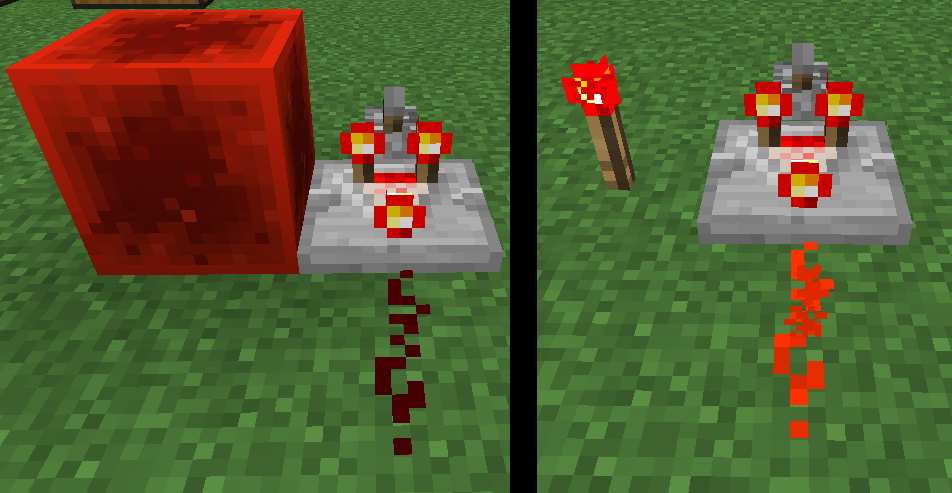
Observers output strong power in the Java edition. In MCPE, observers output weak power. See the attached image. I have no idea which beahvior is intended, and both have their advantages and disadvantages. I wish we could have 2 different observers: a weak-power-emitting one and a strong-power-emitting one.
EDIT: Changed title/description to match official terminology for redstone power. See also the newly-created counterpart for this issue:
MCPE-17389.Observers output strong power in the Java edition. In MCPE, observers only output activation power. See the attached image. I have no idea which behavior is intended, and both have their advantages and disadvantages. I wish we could have 2 different observers: an activation-power-emitting one and a strong-power-emitting one.
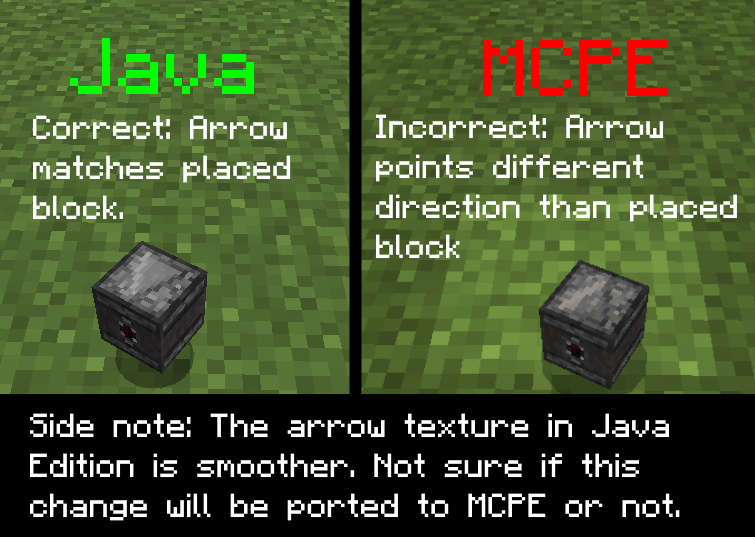
Placing an observer block in the Java edition places it with the observing side, or the input, facing you. In MCPE, placing an observer places it with the output side facing you. I'm not sure whether this is a Java edition bug or an MCPE bug. Since repeaters and comparators are placed with their inputs facing you, I think this may be WAI, in which case it is MCPE that needs to change.
The MC Java edition counterpart of
MCPE-17321. Placing an observer block in the Java edition places it with the observing side, or the input, facing you. In MCPE, placing an observer places it with the output side facing you. I'm not sure whether this is a Java edition bug or an MCPE bug. Since repeaters and comparators are placed with their inputs facing you, I think this may be WAI, in which case it is MCPE that needs to change.
EDIT: Apparently this also affects droppers/dispensers as well. See: https://redd.it/55pbt1
So I tried to activate a random sticky piston in my world and it just wouldn't activate, even after giving it block updates, breaking the block above the piston that it was supposed to push, breaking and moving the lever that was supposed to power it, placing a redstone block next to it, and trying all sorts of ways to power it. After relogging, the piston started working again. I have no idea what caused this bug or how to reproduce it, but luckily I was smart enough to start recording when the bug happened. It happened again later on to the same piston, but I could never reproduce it consistently or with any other pistons in my world. Note that I never broke the piston that was behaving weirdly.
I'm sorry that this bug report is so vague, but I honestly have no idea why this happened or how to reproduce it. If anyone has any idea why this might have happened, please let me know... I haven't got a clue as to what would cause this to happen, other than improper world-loading, in which case this might be related to
MCPE-13608and/orMCPE-14233.
PistonStops Extending/Accepting Power For No Apparent ReasonPiston / Dispenser / Dropper Becomes Stuck in On or Off State
EDIT 2: I just tested, and when pistons get stuck, they act like solid/opaque blocks, meaning you can send a pulse through them and have a repeater pick up the signal on the other end, which doesn't normally happen! this means that this bug is actually the same thing as
MCPE-17304! I think the mods should merge the 2 issues, since they are one and the same.EDIT: Apparently this also affects droppers/dispensers as well. See: https://redd.it/55pbt1
So I tried to activate a random sticky piston in my world and it just wouldn't activate, even after giving it block updates, breaking the block above the piston that it was supposed to push, breaking and moving the lever that was supposed to power it, placing a redstone block next to it, and trying all sorts of ways to power it. After relogging, the piston started working again. I have no idea what caused this bug or how to reproduce it, but luckily I was smart enough to start recording when the bug happened. It happened again later on to the same piston, but I could never reproduce it consistently or with any other pistons in my world. Note that I never broke the piston that was behaving weirdly.
I'm sorry that this bug report is so vague, but I honestly have no idea why this happened or how to reproduce it. If anyone has any idea why this might have happened, please let me know... I haven't got a clue as to what would cause this to happen, other than improper world-loading, in which case this might be related to
MCPE-13608and/orMCPE-14233.
Piston / Dispenser / Dropper Becomes Stuck in On or Off State & Acts Like Solid/Opaque Block
The MCPE counterpart of
MC-107749, which was marked as WAI. MCPE observers, in order to be consistent with the Java edition, should strongly power blocks, instead of only activating the blocks immediately in front of them. See attached picture for comparison.The MCPE counterpart of
MC-107749,which was marked as WAI. MCPE observers, in order to be consistent with the Java edition, should strongly power blocks, instead of only activating the blocks immediately in front of them. See attached picture for comparison.
The MCPE counterpart of
MC-107749,which was marked as WAI. MCPE observers, in order to be consistent with the Java edition, should strongly power blocks, instead of only activating the blocks immediately in front of them. See attached picture for comparison.The MCPE counterpart of
MC-107749, which was marked as WAI. MCPE observers, in order to be consistent with the Java edition, should strongly power blocks, instead of only activating the blocks immediately in front of them. See attached picture for comparison.
The MCPE counterpart of
MC-107749, which was marked as WAI. (And then reverted to not WAI, and then later made WAI again.) MCPE observers, in order to be consistent with the Java edition, should strongly power blocks, instead of only activating the blocks immediately in front of them. See attached picture for comparison.
The MCPE counterpart of
MC-107749, which was marked as WAI. (And then reverted to not WAI, and then later made WAI again due to community feedback. It remains the intended behavior as of 16w44a.) MCPE observers, in order to be consistent with the Java edition, should strongly power blocks, instead of only activating the blocks immediately in front of them. See attached picture for comparison.
The MCPE counterpart of
MC-107749, which was marked as WAI. (And then reverted to not WAI, and then later made WAI again due to community feedback. It remains the intended behavior as of 16w44a.) MCPE observers, in order to be consistent with the Java edition, should strongly power blocks, instead of only activating the blocks immediately in front of them. See attached picture for comparison.Interestingly, observers already act as if they powered pistons through blocks because of
MCPE-16286. So changing MCPE observers actually wouldn't break most flying machines. The community also seems to be in favor of changing observers as well, so I don't think there would be any backlash against a change to strong power.
relates to
Picking up water orlavain creative gives you a bucket of that liquidPicking up water or potions from a cauldron in creative gives you a bucket/empty bottle of that liquid
UPDATE by [MCPE Mod] SuperGeniusZeb: Still affects cauldrons as of 0.17.0.2. (Also occurs with potions and water bottles.) Fixed for just picking up water/lava in the world, though.
It's like the reverse of
MCPE-13798. (This is NOT a duplicate of that bug.) When picking up lava/water with an empty bucket in creative mode, you will be given a lava/water bucket in your inventory, which shouldn't happen. This is not happening on Win10 Edition 0.15.10, so I'm not sure if this is a Pocket-exclusive bug or new in the 0.16.0 beta versions. Tested this in an Android emulator, though I would assume that has nothing to do with this kind of bug.
UPDATE by [MCPE Mod]
SuperGeniusZeb: Still affects cauldrons as of 0.17.0.2. (Also occurs with potions and water bottles.) Fixed for just picking up water/lava in the world, though.It's like the reverse of
MCPE-13798. (This is NOT a duplicate of that bug.) When picking up lava/water with an empty bucket in creative mode, you will be given a lava/water bucket in your inventory, which shouldn't happen. This is not happening on Win10 Edition 0.15.10, so I'm not sure if this is a Pocket-exclusive bug or new in the 0.16.0 beta versions. Tested this in an Android emulator, though I would assume that has nothing to do with this kind of bug.UPDATE by Zeb: Still affects cauldrons as of 0.17.0.2. (Also occurs with potions and water bottles.) Fixed for just picking up water/lava in the world, though.
It's like the reverse of
MCPE-13798. (This is NOT a duplicate of that bug.) When picking up lava/water with an empty bucket in creative mode, you will be given a lava/water bucket in your inventory, which shouldn't happen. This is not happening on Win10 Edition 0.15.10, so I'm not sure if this is a Pocket-exclusive bug or new in the 0.16.0 beta versions. Tested this in an Android emulator, though I would assume that has nothing to do with this kind of bug.
Picking up water orpotions from a cauldronin creative gives you a bucket/empty bottleof that liquidPicking up water or lava in creative gives you a bucket of that liquid
UPDATE by Zeb: Still affects cauldrons as of 0.17.0.2. (Also occurs with potions and water bottles.)
Fixed for just picking up water/lava in the world, though.It's like the reverse of
MCPE-13798. (This is NOT a duplicate of that bug.) When picking up lava/water with an empty bucket in creative mode, you will be given a lava/water bucket in your inventory, which shouldn't happen. This is not happening on Win10 Edition 0.15.10, so I'm not sure if this is a Pocket-exclusive bug or new in the 0.16.0 beta versions. Tested this in an Android emulator, though I would assume that has nothing to do with this kind of bug.UPDATE by Zeb: Still affects cauldrons as of 0.17.0.2. (Also occurs with potions and water bottles.) Created a separate ticket for that problem:
MCPE-19347.It's like the reverse of
MCPE-13798. (This is NOT a duplicate of that bug.) When picking up lava/water with an empty bucket in creative mode, you will be given a lava/water bucket in your inventory, which shouldn't happen. This is not happening on Win10 Edition 0.15.10, so I'm not sure if this is a Pocket-exclusive bug or new in the 0.16.0 beta versions. Tested this in an Android emulator, though I would assume that has nothing to do with this kind of bug.
relates to
The MCPE counterpart to
MC-107783, which was marked as WAI.Observers in the Java edition only output a signal strength of 1, whereas MCPE observers output a signal strength of 15. I personally think that a signal strength of 15 would be more useful, but whatever turns out to be the intended behavior, this is definitely an inconsistency that could easily be resolved.
Will MCPE observers be changed to output a signal strength of 1 like the Java edition observers, or was the "WAI" label on the aforementioned Java edition issue a mistake like with?
The MCPE counterpart to
MC-107783, which was marked as WAI.Observers in the Java edition only output a signal strength of 1, whereas MCPE observers output a signal strength of 15. I personally think that a signal strength of 15 would be more useful, but whatever turns out to be the intended behavior, this is definitely an inconsistency that could easily be resolved.
Will MCPE observers be changed to output a signal strength of 1 like the Java edition observers, or was the "WAI" label on the aforementioned Java edition issue a mistake like with?
The MCPE counterpart to
MC-107783, which was marked as WAI.Observers in the Java edition only output a signal strength of 1, whereas MCPE observers output a signal strength of 15. I personally think that a signal strength of 15 would be more useful, but whatever turns out to be the intended behavior, this is definitely an inconsistency that could easily be resolved.
Will MCPE observers be changed to output a signal strength of 1 like the Java edition observers, or was the "WAI" label on the aforementioned Java edition issue a mistake like with
MC-107749? (See:
The MCPE counterpart to
MC-107783, which was marked as WAI.Observers in the Java edition only output a signal strength of 1, whereas MCPE observers output a signal strength of 15. I personally think that a signal strength of 15 would be more useful, but whatever turns out to be the intended behavior, this is definitely an inconsistency that could easily be resolved.
Will MCPE observers be changed to output a signal strength of 1 like the Java edition observers, or was the "WAI" label on the aforementioned Java edition issue a mistake like with
MC-107749?(See:The MCPE counterpart to
MC-107783, which was marked as WAI.Observers in the Java edition only output a signal strength of 1, whereas MCPE observers output a signal strength of 15. I personally think that a signal strength of 15 would be more useful, but whatever turns out to be the intended behavior, this is definitely an inconsistency that could easily be resolved.
Will MCPE observers be changed to output a signal strength of 1 like the Java edition observers, or was the "WAI" label on the aforementioned Java edition issue a mistake like with
MC-107749? (See this comment)
When a zombie converts a baby villager, it turns into an adult zombie villager, instead of a baby zombie villager. Does
When a zombie converts a baby villager, it turns into an adult zombie villager, instead of a baby zombie villager. Does not occur in 0.15.10.
relates to
Items renamed in anvil don'talways stay namedBlocks with block entities renamed in anvil don't keep name when broken

Update by Zeb on 26/Apr/2017: This bug has been fixed in 1.0.5.0. If you are still having issues with entities apparently disappearing, see the separate issues MCPE-1982 (Mobs and NPCs Can Escape Enclosures) and MCPE-21416 (Entities can despawn when entering/exiting the Nether (multiplayer)). Also, keep in mind that entities that have never been interacted with are SUPPOSED to despawn. When testing either of the aforementioned 2 bugs, please make sure to interact with the entities you're observing first. If the entity ever sets you as its target, follows you, or gets fed/bred/punched/etc. by you, that counts as an interaction.
Original description:
First pic is of the cow-farm; every powered rail had a cow in a minecart...somehow two whole rows disappeared completely, without a trace of the minecarts or cows.
Next two are pictures of the underground villiage where despawning villiagers were supposed to go.
The rest after that would be some of the villiagers' holding cells where they are staying until the villiage is done and the villiagers are capable of door-opening and breeding and wont just stand right at a door while zombies smack them through it. You can see where some of the villiager cells clearly weren't wrecked by me releasing them, yet there is no villiager...and no way that a zombie could've reached it. There was only ever 19 villiagers, so it isn't like somehow a siege happened and zombies spawned right next to them.
Also, random sheep that are individually fenced off and within a larger structure, despawned randomly for no apparent reason as well. Same goes for another animal farm that was just a bunch of chickens and cows and pigs in a room underground.
Villagers also dissapears after visiting the nether. (From MCPE-9662)
Villagers dissapear while away in easyest difficult (From MCPE-9690)
Villagers dissapear when flying too high (From MCPE-10219)
Update by [Mojang] MissMarzenia (Aleksandra Zajac) on 03/Dec/2015
Thank you for all the comments. We reported this bug for further testing and hopefully it will be resolved in the future.
This is a VERY complex issue, we have been looking into for quite some time. It is not easy to reproduce and easily fix. It is also very inconsistent and therefore we are unable to fix it right away.
Just a reminder - We are currently using internal tool to test and assign bugs, so we do not assign bugs to developers in JIRA, it doesn't mean we are ignoring them.
List of blocks that cause this bug: daylight sensor, pressure plate, cake, snow layer, carpet, and button
They hide a glass and leaf block's texture side. See photos attached.
In contrast, placing other partial block layers (rplatham tested a slab, some stairs, carpet or snow) does not cause the glass block's side texture to disappear.
Device: Samsung Galaxy S3 for Korea - SKTelecom (3G) (SHW-M440S)
0.16.1 Edit by Zeb:
Still affects as of 0.16.1:
- Cake
- Daylight Sensor
No longer affected:
- Carpet (All colors)
- Buttons
- All Pressure Plates
- Snow Layers
When you break a 2 block tall flower in survival you get 2 of that item.
edit: This bug allows infinite generation of 2 tall flowers.
Affects double tall grass and ferns as of 0.15.0.
Update by Zeb: The fortune bug has been reported separately as MCPE-18880, and this bug has been marked fixed, as the original issue this bug was about has been resolved.
You get 64 of items when you just tap them in the creative inventory. You should only get 64 if you tap and hold.
Update by Zeb:
This occurs on both Windows 10 Edition AND Pocket Edition. It is more obvious when using the Classic (PC) UI instead of the Pocket UI.

UPDATE by Zeb: Still affects cauldrons as of 0.17.0.2. (Also occurs with potions and water bottles.) Fixed for just placing water/lava in the world, though.
Whenever you place water or lava in creative, the water/lava bucket you use is not consumed (as expected) but an empty bucket is returned and eventually fills up your inventory.
Steps to reproduce:
- Discard any empty buckets you already have.
- Put water somewhere.
- Now you have 1 water bucket and 1 empty bucket.
- Put another water somewhere.
- Now you have 1 water bucket and 2 empty buckets.
What I expected:
No empty buckets are returned in creative.
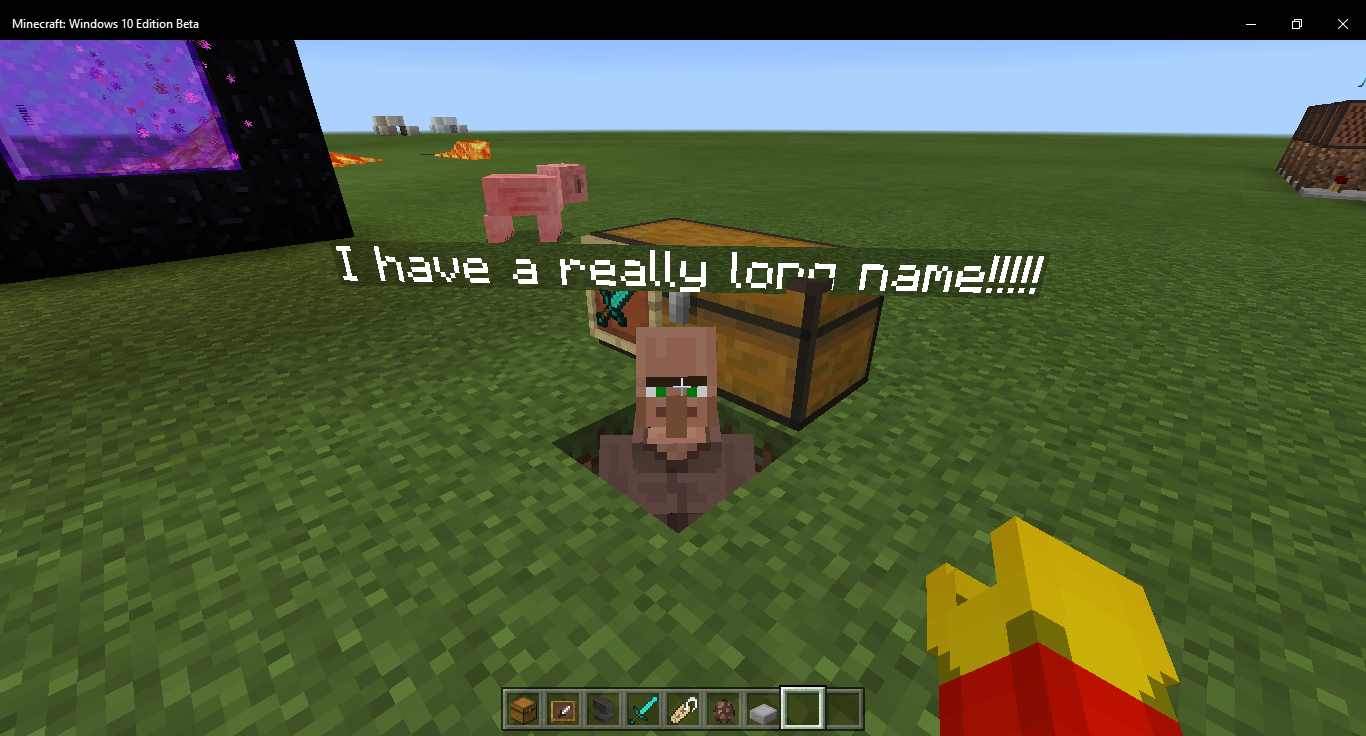
If you name an item, put it into an item frame, and have the item frame on a chest, and then move your crosshairs or finger onto the item frame to display its name, you will notice the chest is invisible. Try moving around a lot. This may take a few tries!
EDIT by Zeb: This occurs with named entities, too. (Any entity name tag is affected by this.)
Edit by Zeb: The bug seems to be either that the arrows are spawning ahead of the entity, such that the arrows never actually hit it... OR that the arrow never actually penetrates the entity until after it goes past the point where it collides with the block behind the entity... it seems like removing the block that the arrows get stuck on causes the entity to get hit, at least in my testing.
Original Description:
I tried to build a witch farm with a tripwire hook at the bottom and a two-tick pulse generator hooked up to some arrow filled dispensers. The witch triggered the dispensers however did not take any damage from the arrows!? I am very confused. I will test this with other entities. This could be the witch drinking an overpowered potion or a problem with the arrows registering under a pulse. Please help me as this farm is really necessary!!!
![[Mojang] Mega_Spud (Jay Wells)](../../../data/avatars/users/92696.png)
When killing the smallest magma cubes, they will still inflict damage the player after they have died if you walk over them during their death animation.
Edit by Zeb: This bug occurs with all magma cube sizes, as well as all sizes of slimes, except for the smallest size, since the smallest slimes don't inflict any damage anyway. The damage caused by the magma cubes/slimes is likely due to the unique way in which slimes/magma cubes deal damage to the player. In the Java edition, slimes deal damage whenever the player's hitbox collides with their own... if MCPE slimes & magma cubes are coded similarly, then this behavior is probably related to this bug.
Redstone repeaters faceing into a redstone dust dont redirect the dust serverside, only graphically. (LG G Vista)
Edit by Zeb: This affects repeaters, but NOT comparators.
We all know that when redstone ore is being mine, step on or just being touch it start glowing which is a block update but the observer block doesn't read this block update which means that the observer doesn't give off a redstone signal and yes i do know how the observer block work. But it does work with other block update but not when the redstone ore block is being updated so it can glow. My phone is a samsung galaxy s4.
EDIT by Zeb: This bug is not with the observer, which is working fine. The bug is actually with all of the blocks/events listed below, because they actually don't cause block updates at all.
List of things not detected by Observer (Keep updated):
- Redstone ore glowing
- Fence Gates activated by redstone.
- Change the daylight sensor.
- Redstone torches changing state
- Growing Cocoa Pods
- Lighting Nether Portal
- Powering Activator Rails
- Placing Redstone Dust
- Piston activating (the body, not the head)
- Snow Layer Created by Snow Golem
- Water/lava flowing (referring to the liquid that is already there not receiving a block update when it spreads)
Update by [Mojang] Adrian Östergård
This bug has been reported to our internal bug tracker for further testing and a fix. It is scheduled to be fixed in one of the future updates (no specific date can be provided).
Please avoid duplicated comments. Post only NEW information regarding this bug.
![[MCPE Helper] Dylan K. Taylor](../../../data/avatars/users/19075.png)
When turning off power to a redstone lamp, there is a delay of a fraction of a second before the lamp actually goes dark.
This is most noticeable in clock circuits involving redstone lamps, which no longer work correctly.
The attached video demonstrates the issue. The piston in the video demonstrates that the clock circuit is indeed working correctly, however the redstone lamp does not turn off quickly enough to produce the expected flashing effect.
I'm also experiencing frequent crashes when I open a world and look at a clock circuit containing a redstone lamp like the one in the video.
Edit by Zeb: By using observers, you can clearly see that this behavior is in fact a functional delay, and not just a visual one. Hook up an observer to a redstone wire, and have that wire hooked up to a redstone lamp. Make another observer observe that lamp, and power the wire. Both observers will output a signal simultaneously. Now unpower the wire. Notice how the observer that is observing the redstone wire activates before the observer observing the lamp does.
Also, I can't repro the crash mentioned in the original description, so I assume that was a separate bug that has long since been fixed.

I am building a hidden stair case and when attempting to use the observer to power my t-flip flop i realized the pulse dose not effect the t-flip flop.
After some testing I realized that its pulse doesn't power any block next to it yet when 2 dust away it will.
The first and second picture show how it doesn't power any type of block, lamp piston and my own problem, the dropper, it doesn't work. The third demonstrates how it dose power the farther piston yet not the close one. This i assume would work with any other block that can be powered (dropper, lamp, etc)
How to create (its a 1 wide bug so pictures should be better at explaining it)
1: place a redstone dust
2: place an observer so it can power the redstone dust
3: place a lever (or any block that can easily toggle the observer) on top of the observer
4: place a piston connected to the redstone (horizontal to the observer)
5: place another redstone dust so the first one points to the first piston
6: place another piston at the end of the second redstone dust
Edit by Zeb: Note that pistons are exempt from this bug since they redirect redstone dust.

The water in a cauldron that is pushed by a piston will change color just briefly. I came across this when attempting to reproduce the crash caused in MCPE-14805
Steps to reproduce
First of all make sure you're testing this in creative.
- Place down piston or sticky piston.
- Place cauldron in front of piston.
- Fill cauldron with water or potion.
- Place redstone dust and add a lever to power it. (See photo attached.)
The water in the cauldron will change color just briefly. If that doesn't happen then the game will just crash (seeMCPE-14805)
Edit by Zeb: Fixed in 1.1.0.8. Pushing a cauldron filled with water will always look like it should.
However, now there is a new bug: pushing a cauldron filled with any liquid will cause the liquid to look like water while it is being pushed.
Zeb These white lines become more obvious on higher resolution screens.
1st BUD Placing a comparitor with a block behind it. Then an unpowered repeater going into the block anywhere. Placing a torch on any other side of the block. At this point placing a block on or to the one side left of the original block placed will cause the comparitor to update. break the block, place it again to cause the update to happen again.
2nd is place a block, place a lever on 1 side on the block. Place another lever next to block. Place dust from the back of the 2nd lever and connect it to the other lever. the dust will connect to the back and side of the second lever and run next to the first torch.
The 2nd lever needs to be on. place a comparator in front of the block. now anything that is placed next to dust that connects the levers will cause the comparator to update.
Edit by Zeb: Here is a video demonstrating the bug: https://youtu.be/y1Lza7M0RO0
![[MCPE Helper] Aspergerian](../../../data/avatars/users/64928.png)
After spawning in a Zombie Horse and a Skeleton Horse, both seem to die randomly after some time has passed. Neither of them were damaged by any means.
Edit by Zeb: After some testing, it looks like the skeleton/zombie horses slowly lose health over time for no apparent reason, before finally dying. They make NO death sound when they die and drop no items. The cause of this bug is that horses gradually regenerate health over time, through the "healing" effect. But since zombie horses & skeleton horses are undead mobs, this healing effect actually damages them.
EDIT by Zeb: Updated to be accurate as of 1.1.0.4.
rplatham Sept 28, 2016 I've hijacked this ticket and generalized for all things that incorrectly give the stone sound when being broken:
item framesall wood stairs
Other things with incorrect or missing sound (from duplicate MCPE-18716)
- wither boss sounds (HAVEN'T TESTED)
- lead sounds (no sounds as of 1.1.0.4)
- some shulker sounds (NOT SURE)
Original report:
Item frames make the wrong sound when you break them (stone sound). In PC they make the same sound as paintings when broken.
Original description:
Xperia Z5
Standing on an updating slime block that is connected to a sticky piston that's powered by a repeating redstone comparator circuit causes the player to bounce then gets stuck in the slime block in the second bounce instead of bouncing continuously. It also shows the update block particles instead of the slime block ones.
Edit by Zeb: Entities don't bounce off slime blocks that are currently being moved by a piston. During this time, the slime blocks are technically piston extension blocks, so fixing this bug would require making the piston extension block capable of using the bouncy property of slime blocks.
Still an issue in 0.15.10 and 0.15.90.7 (tested on Windows 10 PC and Android tablet respectively)
You can see the texture still does not wrap correctly, leaving protruding edges. For comparison, look at the regular torch block model.

Title updated as per Zeb's suggestion
UPDATE by Zeb: Still affects cauldrons as of 0.17.0.2. (Also occurs with potions and water bottles.) Created a separate ticket for that problem: MCPE-19347.
It's like the reverse of MCPE-13798. (This is NOT a duplicate of that bug.) When picking up lava/water with an empty bucket in creative mode, you will be given a lava/water bucket in your inventory, which shouldn't happen. This is not happening on Win10 Edition 0.15.10, so I'm not sure if this is a Pocket-exclusive bug or new in the 0.16.0 beta versions. Tested this in an Android emulator, though I would assume that has nothing to do with this kind of bug.
Baby villagers do not grow up but they have the sounds of an adult villager.
Edit by Zeb: As of 0.16.1, it looks like baby villagers now continue to use the baby sounds after 20 minutes, but still act like adult villagers.
Start of by placing a block with redstone on it. Then place another block diagonally (left one block, up one block/right one block, up one block) and place redstone on it. Finally, place a piston on top of the first redstone you just placed. You will see that the texture of the connection of the two redstone is shifted some pixels away.
EDIT by Zeb: It should be noted that functionally/server-side, the piston cuts off the wire, and the dust below the piston will power adjacent components like a normal plus-shaped dust (you can verify this by placing a redstone torch underneath the block the dust-that's-under-the-piston is placed on). The bug is that visually, the connected-upwards side texture appears, even though the dust isn't actually connected to anything. Also note that the piston cutting off redstone wire is intended - see MCPE-14910.
End Crystals that generate in the end have strange looking bedrock texture that's larger than the actual block it's placed on.
EDIT by Zeb: The end crystal should spawn so that it is partially in the fire, and the bedrock base of the entity is touching the obsidian of the pillar. See appearance in Java edition.

Original Description: Dispenser doesn't place a skull down if there is a block at diagonal bottom of dispenser is facing or equip it automatically to player head slot.
Edit by Zeb:
Dispensers do not automatically equip players with skulls or heads when activated. This is in contrast to Java Edition behavior, in which dispensers will equip the head armor slot of players with heads/skulls when a player is standing next to them when activated.
Steps to Reproduce:
- Put any head or skull type into a dispenser.
- Stand in front of the dispenser, so that when powered, you will be standing directly in front of the dispenser's output.
- Activate the dispenser.
- Notice how, if it is a wither skeleton skull, nothing will be ejected from the dispenser; and if it is any other skull/head type, it will just be thrown out as an item and picked up by the player, and NOT automatically equipped to the head armor slot.
Over world mobs are being born in The End
Edit by Zeb:
It would appear that this bug is caused by ocean biomes generating in The End. This would explain why only some chunks seem to be affected. Some chunks have the correct biome, but others have the ocean biome, which spawns overworld mobs. A more in-depth technical analysis would be nice, if anyone can provide one.
Edit by Zeb:
This might be WAI, but whatever the case, it definitely isn't Java Edition behavior. In Bedrock Codebase, when you bounce off a slime block after falling from a high distance, there won't be any landing particles. I think this kind of makes sense, but I've reported it here to make sure. It should be noted that, if you hold shift to prevent bouncing, there ARE particles, just like any other block.
Steps to reproduce:
- Place a slime block.
- Teleport/fly high enough above the slime block so that when you fall there would normally be landing particles with any other block.
- Notice that when you hit the slime block and bounce, there are no particles produced.
- Now fall again, but this time make sure you are sneaking.
- Notice that this time there are landing particles.
Original Description:
Xperia Z5
When I fall on slime blocks they don't produce particles like the other blocks.
The ender dragon when killed drops only 20-25 levels. While in PC it drops 70+ levels
EDIT by Zeb: To clarify, the Ender Dragon is supposed to drop less xp after the first time you fight it. To quote the wiki:
"Once defeated, the Ender dragon will appear to have beams of light spontaneously erupting from its body. It will then explode, dropping enough experience to bring a player from no experience to level 78 (12000 - 10 drops of 1000 experience, one drop of 2000 experience). Subsequent ender dragons (ones re-spawned via the Ender crystals) only drop 500 experience."
However, in MCPE, the Ender Dragon (when defeated for the first time) drops only enough XP to increase your levels to 68 from 0. (About 10 levels less than in the Java edition.) When defeated every time afterwards, it drops enough to get you to about 18 and a half levels from 0.
Xperia Z5
Slimes and magma cubes don't make sound when they move/jump. The only sound they make is when they get hit.
EDIT by Zeb: This bug occurs with all slimes/magma cubes except the smallest sizes. The smallest slimes & magma cubes both have their proper jumping/landing sounds.
| 1. Place a piston down. (Regular or sticky) 2. Power the piston so that it is extended. 3. Replace the machine part of the piston (Not the piston arm) with a beacon. 4. After this, the piston arm will disappear. It will not be highlighted when hovered over. But, if you break the block where the piston arm was, block breaking particles will appear. Edit by Zeb: When using /setblock to replace an extended piston's base, the piston head will usually just be removed. But when placing certain blocks that have block entities, the piston head remains, but becomes invisible. So far, I can confirm this bug occurs when you /setblock the following blocks:
|
Xperia Z5
I don't know if it's normal but the wither plays the spawn sound many times when it's spawned and plays the death sound so many times when it dies.
Edit by Zeb: When the Wither is spawned, the spawning sound is played multiple times, overlapping each other and creating a sort of reverb/echo effect. The same thing happens with the death sound when the Wither is dying and is about to explode.
Steps to reproduce:
- /summon wither
- Listen carefully to the spawning sound. Notice that it has a sort of reverb/echo effect that shouldn't be there. This is because the sound is playing multiple times and overlapping with the previous instances.
- /kill @e[type=wither]
- Listen carefully again. Notice that the same effect occurs.
Phone - Android - Samsung J3,
Also confirmed on HTC One M8.
In creative mode when an endermite is spawned using a spawn egg, periodically the endermite spins around for a couple of seconds.
Steps to recreate:
In a creative world.
1. Spawn an endermite.
2. Observe it stopping and spinning around for a few seconds every now and then.
Bug found and vidcapped JackTheMoveBoy10 
Not tested on a clean survival mode world.
Edit by Zeb:
This bug occurs when endermites use the "minecraft:behavior.look_at_player" or "minecraft:behavior.random_look_around" components. I believe it happens because the endermite is constantly in an idle animation, and using these behaviors causes it to try and do 2 different animations simultaneously. This bug can be fixed by simply removing these behaviors from the endermite.json file in the vanilla behavior pack.

The texture of the shulker shell does not change in any of the official texture packs except for Candy Textures.
Edit by Zeb: This may or may not affect the Fallout Mash-Up Pack & Chinese Mythology Mash-Up Pack. If someone could test this in 1.0.7.0/1.1.0.9 or later, please do so.
I know there was a change to stop wild horses following you while holding wheat. However, tame horses only follow on the flat e.g. When crossing a river the horse used to follow you to dry land but now they remain in the water and will not take a step up to dry land. Will not follow you on dry land either. Cows and sheep will follow you up and down dale but horses no - they remain on the same level. You have to ride them to make them change level therefore as in river scenario you have to mount them in water.
Edit by Zeb:
Tamed horses, donkeys, & mules WILL follow you when you are holding food, but they will not walk or jump up blocks when following you. This is both different from the behavior of farm animals, and different from Java edition behavior. The tamed horses/donkeys/mules should walk up 1-block-tall heights without any problem, especially since they can scale that distance without even jumping, and do so when wandering.
Zeb Where does it state this information? I have not been informed.
Original Description:
No matter what I cannot change the attack damage or health max for ocelots. My json changes work on virtually all other mobs, but not for this one. Very annoying.
Please look into this. Thanks.
Edit by Zeb:
This bug is caused by the fact that ocelots attack using the "minecraft:behavior.ocelotattack" component, which does not respect the attack damage values set by the "minecraft:attack" component.
The vanilla ocelot.json also contains a typo with its "minecraft:attack" component, but fixing it does NOT fix this bug. (But this typo still needs to be fixed as well, obviously.):
"minecraft:attack_damage": {
	"value": 4
},
This snippet should be:
"minecraft:attack": {
	"damage": 4
},
When I create a behavior pack for one world with loot table modifications, it applies some of them to all my worlds. For example, if I make zombies hold diamond hoes in a certain behavior pack, then some (not all) worlds will have zombies running around with diamond hoes. Another example is if I modify the spider drops for a certain add-on to be iron. In some of my worlds (not all) the spider will drop iron. It does not matter what mode they are in.
Edit by Zeb: The problem seems to be that loot tables are not refreshed properly when switching behavior packs. Reloading the game will refresh the loot tables. Additionally, sometimes you need to restart the game for a behavior pack to take effect.
Steps to Reproduce:
- Create a new world in Creative mode and apply the attached behavior pack to the world.
- In the world, spawn a pig and kill it. Notice that it drops carrots instead of porkchops. This is what the attached behavior pack changes: the pig's drops.
- Exit the world and open up another world or create a new Creative world WITHOUT the behavior pack applied.
- In this world, kill a pig. Notice that it still drops carrots, even though the world you are in should be using the vanilla loot tables.

All villager professions farm crops when only the farmer profession should farm.
Steps to reproduce:
1. Creat a world with a village in it (the seed "Evanescence" has a village at spawn)
2. Watch all villagers farm crops (use bonemeal to fully grow crops if needed)
EDIT by Zeb: Note that, as far as I can tell, this only affects villagers that spawned naturally in 1.0.4.0. Villagers that spawned naturally in 1.0.3 or villagers spawned using spawn eggs or the /summon command are NOT affected by this bug.
Standing in a tnt thats about to explode crashes game if you have an addon that removes explosions
https://youtu.be/lwKpFvljbsw
EDIT by Zeb: The crash happens when an entity explodes, and that entity's "minecraft:explode" component has a "power" parameter set to 0. If it is set above or below that number, it will not crash.

Brown-coated villagers with sufficient food that are in proximity of hungry villagers, will initially pull out food to share, however if a harvestable crop is also within range, the brown-coated villager will not share the food before harvesting crop. This behavior breaks automatic farms larger than 14 x 14 blocks in that if there are enough crops, the villager will eventually never share any food because the crops are constantly maturing and becoming harvestable.
Edit by Zeb: This can be fixed by simply changing the priority of the behavior components of villager.json in the vanilla behavior pack.
We are tracking an issue with all or nearly all mobs in the area around the player vanishing when the world is reloaded in versions 1.17.30 through 1.18.2 Hotfix at MCPE-144208. Please do not comment here if that describes your experience.
Please limit comments to New information about the issue. A short list of what is most helpful and what is not is listed below. Please take the time to read this brief list before commenting.
A list of mobs you have lost is not helpful information. We know this bug can impact any mob, we know that leashed mobs that despawn will leave behind a leash knot, and we know that when villagers despawn their beds and workstations remain linked to the missing villager until you break them or 20 minutes pass. What might be helpful are details about things like
- what you were doing leading up to the mobs disappearing
- single vs. multiplayer, local vs server/realm
- how far you traveled
- how long the current or previous play session lasted
- whether the despawns were near a player spawn point or if you had changed your player spawn point during the session,
- if you experienced lag or anything else abnormal.
Some cases of persistent mobs despawning can be traced to them crossing chunk borders between saves, so one way to guard against randomly losing mobs is to prevent them from crossing chunk borders (you can read about finding chunk borders on the wiki). However, this is not a guarantee or a fix. Positioning mobs away from chunk borders does not mean you will never lose a persistent mob again. Many cases of mobs randomly despawning remain unexplained by the tracker staff and player community.
Updated description by [Mod] GoldenHelmet July 22, 2020
This ticket is used as parent for all otherwise unexplained mob disappearances. It covers mobs disappearing related to nether portal travel, long distance single-dimension travel, crashes, realm lag, and any other circumstance, except for the specific circumstances covered by MCPE-88322, MCPE-66818, MCPE-51837, MCPE-16863, and MCPE-108568, MCPE-141539, and MCPE-144208.
Some random mob despawns can be explained by the mobs crossing chunk borders between auto-saves. Other random mob despawns are reported for mobs that were unable to cross chunk borders.
I have attached a test world that can be used to reproduce despawning on chunk borders due to a crash with the following steps to reproduce:
- Load [EX] Chunk border despawn demo.mcworld
 .
. - Press the button to spawn a villager.
- Save & quit, then reload, to confirm that the the villager is kept in the world save.
- Open the world, flip the lever, and start a stopwatch.
- After about 10-15 seconds, close Minecraft without exiting the world (for example, in Windows 10 press alt-F4).
- Reopen Minecraft and reopen the test world.
Expected result
The villager is still present.
Actual result
Sometimes the villager will be gone. I estimate this occurs about once out of 20 attempts. You can see the entire sequence in Chunk border despawn demo.mp4.
What happens when the villager disappears is that sometime between flipping the lever and force-closing the game, the chunk in which the player is located gets auto-saved and the chunk to the right does not. You can verify this by observing that a honey block is also missing--the fact it was pushed out of the left chunk by the piston is saved, but the fact it was pushed into the right chunk is not.
Original description
When I go to Nether and I went back my horses an my animal that I feed is disappear
Edit by Zeb: When playing on multiplayer, entities can despawn when you travel to the Nether and back to the Overworld.
Keep in mind that naturally-spawned monsters and animals that have never been interacted with are SUPPOSED to despawn. When testing this bug, please make sure to interact with monsters or animals you're observing first, by tempting them with food, breeding, or name-tagging them. This is not necessary for villagers or iron golems.

When you put an Iron Trapdoor beside or in front of a Redstone Block or Redstone Torch, it does not closes or gets up. Screenshot attached.
Edit by Zeb: This occurs with both wooden & iron trapdoors. See also
Steps to reproduce:
- Place a redstone block.
- Place a wooden or iron trapdoor adjacent to the redstone block.
- Notice that the trapdoor does not open like it should since it is being powered.
Giving the trapdoor a block update will not cause it to open, due to the way redstone works in Bedrock Codebase. Not even powering it with another power source will work, since it is already technically powered. You have to disable/remove the redstone block and then place it again to make the trapdoor open. This is especially a problem with iron trapdoors, which can't be opened/closed by hand.
@Zeb Why were all labels removed from this issue, if I may ask?

Create a repeating command block and set to always on. Put in any command. Clone the command block and the clone will not be on until you change the setting to needs redstone, close out of the command block gui, then go back in and change the setting to always on again.
Edit by Zeb: This behavior also occurs when placing CTRL+Pick-Block'd repeating command blocks set to "Always Active".
![[Mod] GoldenHelmet](../../../data/avatars/users/18951.svg)
Resolving as "fixed" based on previous comment corroborated to me by Zeb. We are not sure in which version the behavior actually changed.
Confirmed for 1.9 Prerelease 3.
Confirmed for 1.9 Prerelease 4.
Confirmed for 1.9-pre4
This is intended behavior, as breaking an anvil (as well as a lot of various other blocks) will not drop an item if you break it with your fists or while holding something other than a wooden (or better) pickaxe. So it's not a bug, it's just a penalty for using the wrong tool to break the block.
Confirmed for 16w15b.
Cannot reproduce in Windows 10 Edition 0.15.0. Possibly fixed?
Confirmed for 0.15.0 official release. (Tested on Windows 10 Edition.)
EDIT: Also confirmed for 0.15.0 on Android.
Confirmed for 0.15.0 official release. (Tested on Windows 10 Edition.)
Confirmed for 0.15.0 official release. (Tested on Windows 10 Edition.)
Confirmed for 0.15.0 official release. (Tested on Windows 10 Edition.)
Confirmed for 0.15.0 on Windows 10 Edition.
Having watched the video, I can confirm this is intended behavior. Slimeblocks are supposed to stick to each other and to other blocks when pushed by pistons. (Up to a limit of 12 blocks.) So yeah, this issue can be closed.
This is definitely working as intended. Half slabs, glowstone, etc. have always been able to transfer redstone upwards, but not downwards. It is this way on both Java and Console editions.
Confirmed for 0.15.0 official release on Windows 10 Edition.
Also, some additional notes:
1. Redstone torches changing state don't affect the Observer at all. It's not just burned-out torches, it's any redstone torch changing state. Could it be possible that redstone torches do not use blockstates like the Java edition, and instead only use block entities? It may be works-as-intended for redstone torches. It could also be that redstone torches don't cause block updates at all when changing states, which could be the cause of several other redstone-related bugs as well...
2. Fence gates do not make any sound when powered by redstone... possibly related to the problem?
Confirmed for 0.15.0 on Windows 10 Edition.
Cannot reproduce in Windows 10 Edition 0.15.0.
Confirmed for 0.15.0 on Windows 10 Edition.
EDIT: Also affects cake.
EDIT2: Also affects hoppers, cauldrons, & glass.
Confirmed for 0.15.0 on Windows 10 Edition.
Confirmed for 0.15.0 on Windows 10 Edition. Also affects upside-down stairs.
Cannot reproduce on 0.15.0 on Windows 10.
Confirmed for 0.15.0 on Windows 10.
Still affects Zombie Pigmen on 0.15.0 on Windows 10.
Confirmed for 0.15.0 on Windows 10.
Cannot reproduce in 0.15.0 on Windows 10.
Confirmed for 0.15.0 on Windows 10.
I'm not experiencing any frozen maps or compasses while in boats, but as for the maps and compasses being based off of where the player is looking and not the direction of the boat... isn't that how it should work? The original issue description doesn't seem to be a bug to me. Using 0.15.0 on Windows 10.
Confirmed for full release version of 0.15.0 on Windows 10.
Confirmed for 0.15.0 on Windows 10. It appears that it has to be a 5x5 space, otherwise the mob will move normally.
Confirmed for 0.15.0 on Windows 10. Happens every time you switch windows and switch back to the game. Punching, right-clicking, & switching items all make the mouse cursor disappear, so it isn't too much of an issue.
Confirmed for 0.15.0 on Windows 10. Affects all blocks with GUIs.
To clarify for those confused, in the Java edition you can name a chest, dropper, etc. in an anvil, and when placed, the block will keep it's name in the GUI in place of the default "Chest" or "Dropper" name normally shown. Breaking the blocks will cause them to lose their name, however.
Of course, I'm not sure if this feature was ever even added to PE/Win10, so the reason it doesn't work may be due to the fact that it may never have been added in the first place.
Confirmed for 0.15.0 on Windows 10.
Confirmed for 0.15.0 on Windows 10. I know exactly why the observers aren't activating:
The stem will change appearance depending on whether or not a melon is adjacent to it, but this is handled in the "extended blockstate", not the basic blockstate which is saved to file. Other blocks like fences, walls, & stairs use the extended blockstates for things like changing their models & hitboxes when another fence is adjacent to them and other properties dependent on adjacent blocks. Changing the extended states of any of these blocks does not cause the observer to update, perhaps because changing the extended state of a block doesn't cause a block update. (Which would actually make sense... after all, can you think of any reasons why a block update would need to be triggered for a change in an extended state?)
Therefore, the first part of this issue is probably works as intended.
As for melons stems not producing melons when there is a solid block directly above them, I'm going to go test that and update this post when I find results.
EDIT: In the Java edition, melons and pumpkin stems do not grow melons/pumpkins when there is a solid block directly above them. Therefore, I believe this behavior is also works as intended, and this issue can probably be closed.
Cannot reproduce in 1.10. I created a superflat world, built a small 4x4 fenced area, spawned at least 100 chickens, and then flew back and forth to unload and reload the chunks, and also closed and reopened the world multiple times, but I couldn't get any of the chickens to escape. Perhaps this bug is finally fixed?
Unable to reproduce on 0.15.0 Windows 10. I tried both shift-clicking and manually moving the armor multiple times, but was unable to get it to disappear.
I think this probably isn't even a bug. You can't just take a world in .zip format and then change its extension to .mcworld. Tried exporting and importing maps on Windows 10 on 0.15.0 and everything appears to be working fine, so I'd say this issue can be closed. You can only import maps that use the .mcworld format, and world saves in .zip format cannot be imported or changed to .mcworld files without exporting them from in-game.
Confirmed for 0.15.0 on Windows 10. I wouldn't mind this staying as a feature, though. It would give more flexibility when trying to use up leftover materials, as you could turn excess smooth sandstone and chiseled sandstone into slabs and stairs.
Confirmed on Windows 10 0.15.0. Hope this bug gets fixed soon, because it gets in the way a lot when making slimestone contraptions.
As I said on
MCPE-13706:You can only import maps that use the .mcworld format, and world saves in .zip format cannot be imported or changed to .mcworld files without exporting them from in-game.
I've tested the export/import functions in 0.15.0 and they appear to be working entirely as intended, so I think this issue can be closed.
Cannot reproduce in 0.15.0. (Using Windows 10.)
Confirmed for 0.15.0 on Windows 10. Can be reproduced by standing with your back at a fence and 2-block-tall lava in front of you.
Confirmed for 0.15.0. (Using Windows 10.) I have observed that the problem seems to only occur in places where there is nothing below the soul sand. Perhaps the soul sand not being a full-block-tall is messing up their pathfinding?
Confirmed for 0.15.0 on Windows 10.
Confirmed for 0.15.0 on Windows 10. Right-clicking any one-block-tall flower (except dandelions) with bonemeal will cause several poppies to generate, and/or occasionally dandelions. Bonemealing dandelions causes predominantly dandelions to generate, with occasional poppies. But that's it. It's always poppies and dandelions that generate when you bonemeal one-tall plants. Bonemealing grass blocks, tall grass, double tall plants, and mushrooms all seem to work fine, though.
Confirmed for 0.15.0. (Using Windows 10.)
Confirmed for 0.15.0 on Windows 10. Affects daylight sensors, pressure plates, cakes, snow layers, carpets, and buttons. Does not affect trapdoors. Interestingly, all the affected blocks have fully-opaque textures, and perhaps that is why trapdoors are unaffected... their textures have transparent sections.
Confirmed for 0.15.0. (Using Windows 10.)
Cannot reproduce on 0.15.0 on Windows 10.
It's possible that the world was corrupted at some point in an earlier version, in which case it probably isn't a bug with the current version that's causing your problem. Are you still unable to open the world in 0.15.0?
Could you provide a world download? I'm curious as to what conditions cause this bug. And also, do you tend to experience lag on your world? it might only happen when there's lag. Also, are you using any mods whatsoever like Optifine? Performance mods like that are known for making alterations to the math and loading calculations in the game, so it could be a mod problem, not a vanilla one.
Yes, I was using the exact same seed.
Experiencing this problem on Windows 10 Edition. When the GUI scale is set to the biggest option and the game is not in fullscreen, the "Quit to Title" button is too close to the bottom of the screen, and when in fullscreen, everything becomes so big that the button goes off the screen entirely, pretty close to what it looks like in "GuiScale 4.jpeg".
Basically, GUI Scale 2 + fullscreen is as big as GUI Scale 3 is in windowed mode, and GUI Scale 3 in fullscreen is too big.
Are you sure you're trying to get the achievements in a survival world that has always been in survival mode and has never been switched to creative and back at any point?
Confirmed for 0.15.0 on Windows 10 Edition. The bug only seems to happen in Survival Mode, and never in Creative Mode, from what I have tested. The bug is annoyingly inconsistent when testing in Survival Mode, though. Some times it would crash when you tried to push the cauldron, sometimes it would crash when you tried to pull it, sometimes it worked, sometimes it didn't. It's pretty weird...
The Windows Phone 8.1 SDK doesn't support Xbox Live, and it is therefore impossible to have Xbox Live on Windows Phone 8.1. See official dev comment here:
https://www.reddit.com/r/MCPE/comments/4mteac/015_xbox_live_achievements_on_windows_phone/d3yh03y
So unfortunately, this is not a bug.
Confirmed for 0.15.0. (Tested on Windows 10.)
I guess this can be marked as not a bug, then.
Confirmed for 0.15.0. (Tested using Windows 10.)
Confirmed for 0.15.0. (Tested on Windows 10.)
Confirmed for 0.15.0. (Tested using Windows 10.)
Confirmed for 0.15.0. (Tested on Windows 10.)
EDIT: Also, the wolves will also attack you if you damage yourself with potions, so it's not arrow-specific, but rather a problem with wolves detecting projectile hits in general.
Confirmed for 0.15.0. (Tested on Windows 10.) I think this might be intentional?
Confirmed for 0.15.0 on Windows 10 Edition. This also affects item held in-hand and in the inventory, but not as an item entity. It's actually slightly worse than that: not only is there a row of extra pixels on the bottom, but the top is missing a row a pixels, which happen to be the ones added on the bottom. It looks like the texture is being displayed slightly offset, with the top row of the texture wrapping around back to the bottom when rendered. All that needs to be done to fix this is simply remove the offset.
Confirmed on seed 1745 on version 0.15.0. (Tested on Windows 10.)
Confirmed for 0.15.0.
Confirmed for 0.15.0. (Tested on Windows 10.)
Confirmed for 0.15.0. (Tested on Windows 10.)
Confirmed for 0.15.0. (Tested on Windows 10.) I think that blocks with tile/block entities should maintain their name when placed and broken. (The Tile/Block Entity could store the name of the block while it is in block form and when broken it would transfer the name to the item dropped.) I don't think this would be possible with blocks like crafting tables or cobblestone, which don't use block entities.
Confirmed for 0.15.0. (Tested on Windows 10.) I'm not sure if this is intentional or not. In the Java edition, every size of snow layer has a different hitbox depending on its size.
Appears to be fixed in 0.15.0. (Tested in Android & Windows 10.)
Confirmed for 0.15.0. (Tested on Windows 10.)
Cannot reproduce in 0.15.0. (Tested on Windows 10.)
Cannot reproduce on 0.15.0. (Testing on Windows 10.)
Confirmed for 0.15.0. (Tested on Windows 10.)
Confirmed for 0.15.0. (Tested on Windows 10.)
Confirmed for 0.15.0. (Tested on Windows 10.)
Confirmed for 0.15.0. (Tested using Windows 10.)
Confirmed for 0.15.0. (Tested on Windows 10.)
Just a theory: Perhaps the same reason it doesn't play a sound is the same reason opening fence gates with redstone circuits will not trigger an Observer? (See discussion on
MCPE-14710) It could be that the fence gates don't trigger a block update when powered by redstone, though I'm not sure if its sounds are tied to that or not.Unfortunately I haven't done anything to get an achievement in a long time, since I've been playing in Creative worlds for the most part, so I'm afraid not.
Confirmed for 0.15.0. (Tested on Windows 10.) Also, some interesting notes:
1. In hand and as an item-entity, the chests look correct, but not as an item in the inventory/hotbar.
2. The trapped chest in all cases uses the same texture as the regular chest, and so therefore is missing the slight red tinge around the latch when it is in inventory-item and dropped-item form.
Confirmed for 0.15.0. (Tested using Windows 10.)
Confirmed for 0.15.0. (Tested using Windows 10.)
No, this is intended behavior. In PE, they fixed the bug that caused pistons to be powered from 3 blocks away. (Redstone can strongly power the stone bricks which will weakly power the piston causing it to extend, but the piston below should not activate because there is no strong power adjacent to it.) Weakly powered blocks should not power other blocks, and this bug, commonly known as quasi-connectivity, should have been fixed a long time ago in the Java edition, but wasn't because people complained that "all our favorite contraptions exploit this bug". Luckily they have decided to keep the PE/Win10 free of this "bug feature" nonsense and try to make redstone follow logical rules in this edition. So this issue can be closed.
I'm not sure how to feel about this one. Since pistons act opaque in some aspects, you can place redstone components like levers, buttons, and dust on top of them, something that wouldn't be possible if they were fully transparent. If they were fully opaque, you could point a repeater into a piston and power both that piston and the ones above and below, since the middle piston would be strongly powered and would weakly power the others. At the same time, though, pistons being transparent has the advantages of them NOT transferring power to adjacent blocks and not cutting off redstone dust.
There seems to be advantages to both, and I suddenly wish we could have both somehow, like dispensers & droppers or pressure plates. Transparent pistons that act like the Java ones (plus maybe the ability to place levers, dust, and etc. on them, and without the quasi-connectivity bug of course), and opaque ones that can power adjacent pistons, allowing for piston walls that are potentially much easier. What does everyone else think?
EDIT: Made a reddit post to discuss it... https://redd.it/4okfnp
EDIT2: Made a video about it too... https://youtu.be/EFXCX3to7YA
This a bugtracker, NOT a forum. Please ask questions on the Minecraft Forums or /r/MCPE sub-reddit. Please don't waste the moderators' time. They already have to deal with tons of duplicate issues, and they don't need to deal with things that aren't even bug reports.
And as far as I'm aware, I don't recall the devs ever saying ender pearls would come in 0.15.0. I think they intend to add them when they add The End.
Either this duplicates
MCPE-15607orMCPE-15607duplicates this. I'm personally in favor of keeping 15607, as it is more descriptive of the bug.@Liam Last: "Be sure to perform a search before creating a new report."
Except that this bug report was created first (15601 comes before 15607), so that statement doesn't really apply here, but oh well.
Yeah, I think placing redstone dust should be detected. It do wonder, though, if most of these problems are with the observer, or i they're actually caused by the other blocks. Maybe redstone dust doesn't cause a block update when its placed, and perhaps the same thing for redstone ore glowing, cocoa beans growing, and other things like that. This could be technically a bug with lots of blocks, but not actually the observer itself... if anyone has the ability to read the MCPE code, it would be interesting to know how the observer block detects updates and how block updates are caused. That could help in diagnosing the cause of this bug.
@trg: Wait, I thought it was intentional that moving your mouse to the top and bottom would bring up the window bar and taskbar respectively. I think all UWP (Universal Windows Platform) apps do this.
@Mega_Spud: As stated in earlier comments, I don't think changing the type of mob spawner should work with observers because it is an NBT change which doesn't cause a block update.
@trg: Oh, I see. The taskbar and title bar are appearing WHILE you're playing and the cursor is supposed to be locked in the middle. That's definitely a bug. I thought that only happened when you were on a menu screen/inventory. Ok then. I've never experienced that bug before. I wonder what we're doing different, because I can't seem to reproduce that bug in particular...
Are you using resource packs specifically made for MCPE 0.15.0? BlockLauncher and Java edition resource packs will not work.
Confirmed in 0.15.0. (Tested in Windows 10.) Very strange indeed...
EDIT: I think this behavior may be related to
MCPE-14204.Can confirm this occurs on 0.15.0. (Tested on Windows 10.) You can reproduce by creating a resource pack that changes a food item to give you a potion effect with a negative amplifier when eaten. The effect from the food will work as intended until relogging, at which point the effect amplifier is changed to a positive value.
Yes you can. Just use a resource pack that changes the items.json. (Support for those was added in 0.15.0. Resource packs count as vanilla, right?)
EDIT: Nevermind, I can see that you're not accepting bugs for custom resource packs until Mojang adds an official import button.
Fixed in 0.15.0. (Tested in Windows 10.) Well, sort of. Hoppers no longer cut off redstone wire, and you can now have redstone wire travelling upwards easily using hoppers (like slabs/stairs) AND you can make it go downwards too, which is different from slabs, stairs, & Java edition hoppers, which just act like slabs/stairs. Probably unintentional.
https://youtu.be/rC0zbhGJsLw
Not sure if a new bug should be opened or if this one should stay open or if the new hopper mechanic is intentional.
@Azelef: Isn't it possible that placing redstone dust simply doesn't cause a block update? Of course, that would still be a bug, but the bug would be with the redstone dust, and not the observer. I'm not sure how an Observer actually works, but if all it does is check for block updates on the observing end of the block, then most problems it has detecting certain changes would be the fault of the other blocks, rather than the Observer itself. I could be wrong, though.
Can confirm it happens on 0.15.0. (Tested on Windows 10.)
The mob spawner in MCPE currently acts like a top-opaque block (like slabs/stairs) for the most part. So it allows redstone, levers, torches, etc. to be placed on top, but not on the sides. If it continued to follow the same logic as slabs/stairs for all its behaviors, it would not cut off redstone wire or be able to weakly power blocks. However, it DOES cut off redstone wire and it also can transfer power and weakly power blocks like an opaque block, so this is inconsistent.
In the Java edition, mob spawners act like opaque blocks, so this is indeed an unintentional bug.
Confirmed for 0.15.0. (Tested on Windows 10.)
Confirmed for 0.15.0. (Tested on Windows 10.)
Fixed in 0.15.0 (Tested in Windows 10.) None of these blocks cause grass to turn into dirt. However, they still prevent it from growing there if the block was already dirt. See
MCPE-7848, which covers grass not growing under blocks.Confirmed for 0.15.0. (Tested on Windows 10 Edition.)
Confirmed for 0.15.0. (Tested on Windows 10.)
I don't see why this should be considered a bug, though. I see no reason why using silk touch SHOULDN'T allow you to obtain grass path blocks. If anything, it's very helpful when building, just like silk-touching grass blocks is helpful. I would think that being unable to obtain grass path blocks in the Java edition is a bug.
Also, just to clarify in case anyone is wondering, you can also use a silk touch shovel to obtain the grass path. It doesn't have to be a pickaxe.
@Mega_Spud: Created a bug report.
MCPE-15742.EDIT:
Also, I can confirm that all the blocks shown in Screenshot_2016-06-20-19-22-24.png are affected by this bug in 0.15.0, though it is fixed for hoppers. (Tested on Windows 10.)
Guys, just because the wiki states how it currently works does NOT mean that it is intentional! The wiki is not maintained by Mojang, but by various Minecraft fans who just update it according to how things currently work. There is currently no official confirmation on whether or not this behavior is intended. I think this is WAI, but basing your argument off of what the wiki says, when all the wiki says is how it works, not whether that behavior is intended or not, is silly.
Can confirm for 0.15.0. (Tested on Windows 10.) Happened while I was playing with a quasi-connectivity-less Jeb door. The door failed to work because the repeaters became instant instead of delaying the signal. Breaking and placing the repeaters fixed it.
Can confirm for 0.15.0. (Tested on Windows 10.) I tried spawning tons and tons of zombies and threw tons of items into a small area, but I could never get a zombie to pick up an item.
I believe this bug may actually be the cause for
MCPE-14083.Looks like intended behavior to me. The piston merely pushed one of the sand entities so it fell further away and destroyed the others which got pushed into the already-now-blocks-again sand. I think this issue can be closed.
Hey mods? I think this issue can be closed now, since it is WAI.
Confirmed for 0.15.0. (Tested on Windows 10.)
Affects 0.15.0. (Tested on Windows 10.)
Confirmed for 0.15.0. (Tested on Windows 10.)
The torch powering the piston is actually a bug. See
MCPE-15195. Would be helpful to have a world download or more screenshots to understand more of what is going on.Confirmed on 0.15.0 on Windows 10.
I was able to reproduce every situation in the pictures except the one in another-pattern-of-redstone-glitch.png. Powering from strong power below seems to be fixed, but horizontal strong power is still buggy.
Confirmed for 0.15.0. (Tested on Windows 10.)
Confirmed for 0.15.0. (Tested on Windows 10.)
Confirmed for 0.15.0. (Tested on Windows 10.)
Confirmed for 0.15.0. (Tested in Windows 10.)
In the Java edition, only cats can sit on chests and prevent you from opening them. I'm not sure if the PE devs think that the same should apply to all mobs or not.
Confirmed for 0.15.0. (Tested on Windows 10.) Depending on how you time it, you can also delete blocks by pushing the snow layer into them before it finishes falling. If a sticky piston with a block in the same spot as its head tries to retract and pull another block, the game crashes.
Confirmed for 0.15.0. (Tested on Windows 10.) This has made Creepers seem so much scarier. (They already seem to run faster than in the Java edition, but when you can't even hear the sound of them being hurt they feel invincible. :O)
Affects 0.15.0. (Tested on Windows 10.) A Creeper ignited and blew up when I got within a 5-block radius of him. Makes it extremely difficult to fight Creepers without a bow.
Affects 0.15.0. (Tested on Windows 10.)
Affects 0.15.0. (Tested on Windows 10.)
This bug still occurs in 0.15.0, although a bit differently. (Tested on Windows 10.) When a wolf is angered and you run a fair distance away from him, he becomes passive again, unlike in this bug's original description which says the wolf would still appear to be hostile. Endermen also become passive when you run away from them quick enough after angering them.
Fixed in 0.15.0. (Tested in Windows 10.)
That toggle-flip-flop design uses quasi-connectivity, which is a bug in every edition except MCPE. This has already been brought up before on the bugtracker and the MCPE devs have decided not to implement this bug because it is not intuitive and breaks exisiting redstone logic rules. So this issue can be closed because it is works as intended. (And honestly, it was foolish of Mojang to not fix the bug on the Java edition last time they considered it. That time they sacrificed consistency and logic within redstone in order to please the community at the time. But not this time. This time, the MCPE devs are keeping the code clean and intuitive.)
Affects 0.15.1 (Tested on Windows 10.)
Affects 0.15.1 (Tested on Windows 10.)
Affects 0.15.1 (Tested on Windows 10.)
Affects 0.15.1 (Tested on Windows 10.)
Affects 0.15.1 (Tested on Windows 10.)
Affects 0.15.1 (Tested on Windows 10.)
Affects 0.15.1 (Tested on Windows 10.)
Affects 0.15.1 (Tested on Windows 10.)
Affects 0.15.1 (Tested on Windows 10.)
Affects 0.15.1 (Tested on Windows 10.)
Affects 0.15.1 (Tested on Windows 10.)
Cannot reproduce in 0.15.1. (Tested on Windows 10.)
Confirmed on 0.15.1. (Tested on Windows 10.)
Confirmed for 0.15.1. (Tested on Windows 10.)
Affects 0.15.1. (Tested on Windows 10.)
Affects 0.15.1. (Tested on Windows 10.)
Affects 0.15.1. (Tested on Windows 10.)
Ah, I see. Okay, this is not using quasi-connectivity, but what it is using is the faster piston timing in the Java edition. MCPE pistons take a slightly longer time to extend/retract, and therefore sticky pistons are unable to leave blocks behind like in the Java edition. I am not entirely sure whether or not the different piston timings are intended or not. This would be up to the MCPE devs to decide.
Fixed for buttons in 0.15.1, but not pressure plates. (Tested on Windows 10.)
Confirmed for 0.15.0 & 0.15.1. (Tested in Windows 10.)
Confirmed for 0.15.1. (Tested on Windows 10.)
Affects 0.15.1. (Tested on Windows 10.)
Affects 0.15.4. (Tested on Windows 10.)
Confirmed for 0.15.4. (Tested on Windows 10.)
Confirmed for 0.15.4. (Tested on Windows 10.)
Cannot reproduce in 0.15.4. (Tested on Windows 10.)
Confirmed for 0.15.4. (Tested on Windows 10.)
Confirmed for 0.15.4. (Tested on Windows 10.)
Confirmed for 0.15.4. (Tested on Windows 10.)
Confirmed for 0.15.4. (Tested on Windows 10.)
Confirmed for 0.15.4. (Tested on Windows 10.)
Confirmed for 0.15.4. (Tested on Windows 10.)
Confirmed for 0.15.4. (Tested on Windows 10.) Same behavior as in my previous comment.
Confirmed for 0.15.4. (Tested on Windows 10.) Same behavior as in my previous comment.
Confirmed for 0.15.4. (Tested on Windows 10.)
Confirmed for 0.15.4. (Tested on Windows 10.)
Confirmed for 0.15.4. (Tested on Windows 10.)
In 0.15.4, pumpkin/melon stems now cause block updates, thus triggering Observers. This issue can now be closed.
Confirmed for 0.15.4. (Tested on Windows 10.)
This issue should be renamed to reflect the fact that hoppers are not affected by this bug, but the other blocks in the picture still are.
Confirmed for 0.15.4. (Tested on Windows 10.)
I think this bug may be related to
MCPE-11871due to their similarities.Confirmed for 0.15.4. (Tested on Windows 10.)
Confirmed for 0.15.4. (Tested on Windows 10.)
Confirmed for 0.15.4. (Tested on Windows 10.)
Confirmed for 0.15.4. (Tested on Windows 10.)
Confirmed for 0.15.4. (Tested on Windows 10.)
Confirmed for 0.15.4. (Tested on Windows 10.)
Confirmed for 0.15.4. (Tested on Windows 10.)
Confirmed for 0.15.4. (Tested on Windows 10.)
Confirmed for 0.15.4. (Tested on Windows 10.)
Confirmed for 0.15.4. (Tested on Windows 10.)
Unable to reproduce in 0.15.4. (Tested in Windows 10.)
Confirmed for 0.15.4. (Tested on Windows 10.)
Confirmed for 0.15.4. (Tested on Windows 10.)
The behavior is different now, however. Previously the torches would simply power the piston. Now they blink rapidly, powering the piston, and then burn out, unpowering the piston. (As if they were in a torch-burnout-clock-circuit.)
Cannot reproduce in 0.15.4. (Tested in Windows 10.) It seems to have been fixed, as Nils de Loijer said.
Confirmed for 0.15.4. (Tested on Windows 10.)
Confirmed for 0.15.4. (Tested on Windows 10.) Why is this marked as "Won't Fix"?
Confirmed for 0.15.4 (Tested on Windows 10.) Auto-jump should not activate when going from a slab to a slab with a carpet on top, and you should be able to walk from a slab to a slab and a carpet without jumping, as in the Java edition.
Confirmed for 0.15.4. (Tested on Windows 10.)
THIS BUG IS NOT INVALID. This is a bug where clouds are rendered on top of blocks, meaning clouds that are far away will still render on top of blocks right in front of you. This is not how it works on the Java edition.
This bug only occurs at a very specific height, when you're standing on a block at level 125. Otherwise clouds seem to render fine. I have attached a screenshot showing a cloud in 0.15.4 rendering on top of a block despite being far away.
Please reopen this issue.
Can confirm this occurs in 0.15.4. (Tested in Windows 10.) You don't have to use slimeblocks, though. You can use any normal block on top of a piston. Just place a piston (preferrably sticky) facing upwards and place a block on top of it. Then shoot some arrows at it and then activate the piston and retract the piston (or remove the block directly underneath the arrows. The arrows will remain floating in the air. Breaking the block 2 blocks below the arrows will cause them to fall.
I believe the cause of this bug is that, when pushed, the arrows still think that they are located 1 block lower than they actually are.
Duplicate of
MCPE-14829.Can confirm for 0.15.6. (Tested on Windows 10.)
Could you provide some screenshots or a video? It could be useful in reproducing the bug.
Duplicate of
MCPE-15195. (That bug report should be updated with the new burnout behavior that was introduced in either 0.15.3 or 0.15.4.)Confirmed for 0.15.6 (Tested on Windows 10.) See above comment. The bug report's description should be updated to reflect the change in behavior since either 0.15.3 or 0.15.4.
While this is a pretty goofy bug for most redstone components, I actually like buttons being able to be placed on fences because they give them a neat look. (See the attached screenshot I added.) Perhaps an exception could be made for buttons, just because it actually kind of makes sense and looks cool? (unlike the redstone dust and other components which kind of look like they're floating.)
Confirmed for 0.15.6. (Tested on Windows 10.)
Confirmed for 0.15.6. (Tested on Windows 10.)
Confirmed for 0.15.6. (Tested on Windows 10.)
Confirmed for 0.15.6. (Tested on Windows 10.)
Confirmed for 0.15.6. (Tested on Windows 10.)
Confirmed for 0.15.6. (Tested on Windows 10.)