 WolfieMario
- wolfiemario
- wolfiemario
- America/New_York
- Yes
- No
![[Mojang] Grum (Erik Broes)](../../../data/assets/gravatar/grum.png)
![[Mojang] Searge (Michael Stoyke)](../../../data/assets/gravatar/searge.png)
![[Mojang] Nathan Adams](../../../data/assets/gravatar/dinnerbone.png)
 MC-3370







 MCL-420
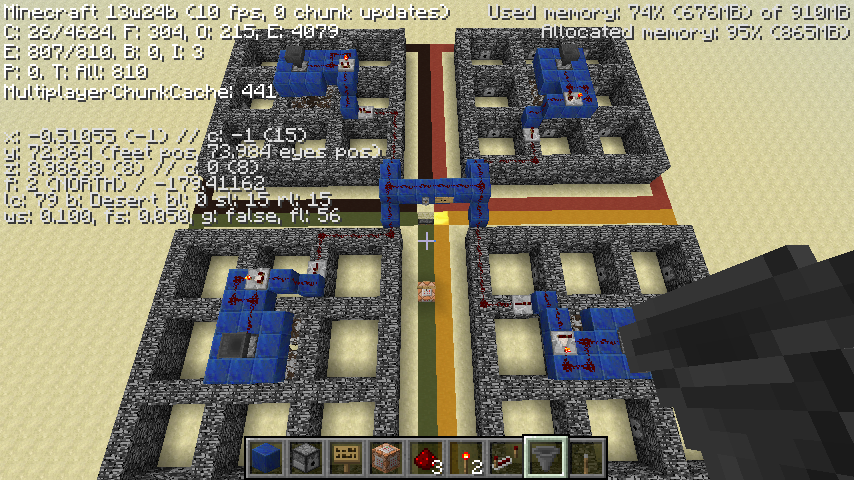
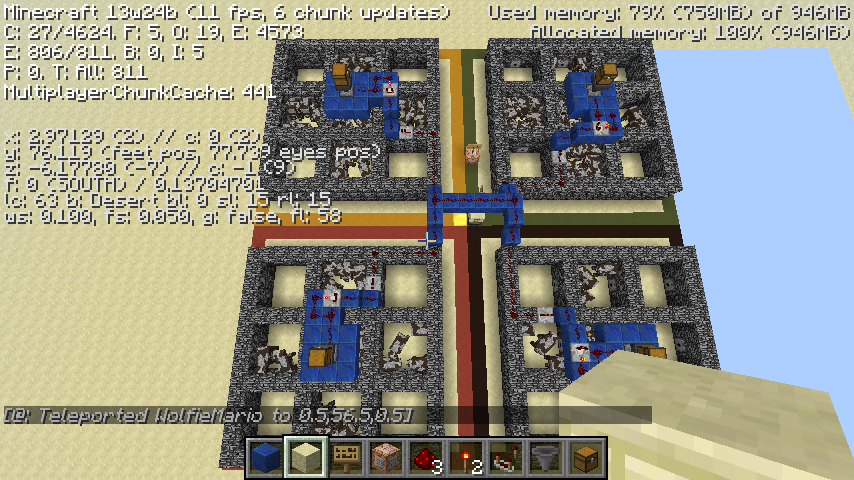
In an adventure map in SMP, I was experiencing strange issues where the locations of other players seemed to be offset. This would occur mainly in cramped places (on the map in question, in the dungeon at the top of the mountain).
I would notice players passing through walls, and sometimes floating or "swimming" in the ground. At some times, the offset seemed to be so bad that players would be rendered several blocks away from their true locations.
Logging out and back in would sometimes correct this issue, but it would frequently return.
I noticed this issue with:
*Players who were far away and made a long journey
*Players who were teleported to me
*Players who I was with during a long journey (namely, up the mountain in the map)I was running the server on my own computer, and I was connected via localhost. The other players were connected from various places in different states. As my computer is not very good, I noticed a few "[Playername] moved wrongly!" in the console. This may be related, but I did not notice any direct connection between the messages and the phenomenon.
This issue has occurred before, on the 1.4.0 prerelease, as well, and is not an isolated incident.
In an adventure map in SMP, I was experiencing strange issues where the locations of other players seemed to be offset. This would occur mainly in cramped places (on the map in question, in the dungeon at the top of the mountain).
I would notice players passing through walls, and sometimes floating or "swimming" in the ground. At some times, the offset seemed to be so bad that players would be rendered several blocks away from their true locations.
Logging out and back in would sometimes correct this issue, but it would frequently return.
I noticed this issue with:
*Players who were far away and made a long journey
*Players who were teleported to me
*Players who I was with during a long journey (namely, up the mountain in the map)I was running the server on my own computer, and I was connected via localhost. The other players were connected from various places in different states. As my computer is not very good, I noticed a few "[Playername] moved wrongly!" in the console. This may be related, but I did not notice any direct connection between the messages and the phenomenon.
This issue has occurred before, on the 1.4.0 prerelease, as well, and is not an isolated incident.
In an adventure map in SMP, I was experiencing strange issues where the locations of other players seemed to be offset. This would occur mainly in cramped places (on the map in question, in the dungeon at the top of the mountain).
I would notice players passing through walls, and sometimes floating or "swimming" in the ground. At some times, the offset seemed to be so bad that players would be rendered several blocks away from their true locations.
Logging out and back in would sometimes correct this issue, but it would frequently return.
I noticed this issue with:
*Players who were far away and made a long journey
*Players who were teleported to me
*Players who I was with during a long journey (namely, up the mountain in the map)
- a
- bulleted
- with
- nested
- numbered
- list
I was running the server on my own computer, and I was connected via localhost. The other players were connected from various places in different states. As my computer is not very good, I noticed a few "[Playername] moved wrongly!" in the console. This may be related, but I did not notice any direct connection between the messages and the phenomenon.
This issue has occurred before, on the 1.4.0 prerelease, as well, and is not an isolated incident.
In an adventure map in SMP, I was experiencing strange issues where the locations of other players seemed to be offset. This would occur mainly in cramped places (on the map in question, in the dungeon at the top of the mountain).
I would notice players passing through walls, and sometimes floating or "swimming" in the ground. At some times, the offset seemed to be so bad that players would be rendered several blocks away from their true locations.
Logging out and back in would sometimes correct this issue, but it would frequently return.
I noticed this issue with:
*Players who were far away and made a long journey
*Players who were teleported to me
*Players who I was with during a long journey (namely, up the mountain in the map)
- a
- bulleted
- with
- nested
- numbered
- list
I was running the server on my own computer, and I was connected via localhost. The other players were connected from various places in different states. As my computer is not very good, I noticed a few "[Playername] moved wrongly!" in the console. This may be related, but I did not notice any direct connection between the messages and the phenomenon.
This issue has occurred before, on the 1.4.0 prerelease, as well, and is not an isolated incident.
In an adventure map in SMP, I was experiencing strange issues where the locations of other players seemed to be offset. This would occur mainly in cramped places (on the map in question, in the dungeon at the top of the mountain).
I would notice players passing through walls, and sometimes floating or "swimming" in the ground. At some times, the offset seemed to be so bad that players would be rendered several blocks away from their true locations.
Logging out and back in would sometimes correct this issue, but it would frequently return.
I noticed this issue with:
*Players who were far away and made a long journey
*Players who were teleported to me
*Players who I was with during a long journey (namely, up the mountain in the map)I was running the server on my own computer, and I was connected via localhost. The other players were connected from various places in different states. As my computer is not very good, I noticed a few "[Playername] moved wrongly!" in the console. This may be related, but I did not notice any direct connection between the messages and the phenomenon.
This issue has occurred before, on the 1.4.0 prerelease, as well, and is not an isolated incident.
In an adventure map in SMP, I was experiencing strange issues where the locations of other players seemed to be offset. This would occur mainly in cramped places (on the map in question, in the dungeon at the top of the mountain).
I would notice players passing through walls, and sometimes floating or "swimming" in the ground. At some times, the offset seemed to be so bad that players would be rendered several blocks away from their true locations.
Logging out and back in would sometimes correct this issue, but it would frequently return.
I noticed this issue with:
*Players who were far away and made a long journey
*Players who were teleported to me
*Players who I was with during a long journey (namely, up the mountain in the map)I was running the server on my own computer, and I was connected via localhost. The other players were connected from various places in different states. As my computer is not very good, I noticed a few "[Playername] moved wrongly!" in the console. This may be related, but I did not notice any direct connection between the messages and the phenomenon.
This issue has occurred before, on the 1.4.0 prerelease, as well, and is not an isolated incident.
In an adventure map in SMP, I was experiencing strange issues where the locations of other players seemed to be offset. This would occur mainly in cramped places (on the map in question, in the dungeon at the top of the mountain).
I would notice players passing through walls, and sometimes floating or "swimming" in the ground. At some times, the offset seemed to be so bad that players would be rendered several blocks away from their true locations.
Logging out and back in would sometimes correct this issue, but it would frequently return.
I noticed this issue with:
- Players who were far away and made a long journey
- Players who were teleported to me
- Players who I was with during a long journey (namely, up the mountain in the map)
I was running the server on my own computer, and I was connected via localhost. The other players were connected from various places in different states. As my computer is not very good, I noticed a few "[Playername] moved wrongly!" in the console. This may be related, but I did not notice any direct connection between the messages and the phenomenon.
This issue has occurred before, on the 1.4.0 prerelease, as well, and is not an isolated incident.
In an adventure map in SMP, I was experiencing strange issues where the locations of other players seemed to be offset. This would occur mainly in cramped places (on the map in question, in the dungeon at the top of the mountain).
I would notice players passing through walls, and sometimes floating or "swimming" in the ground. At some times, the offset seemed to be so bad that players would be rendered several blocks away from their true locations.
Logging out and back in would sometimes correct this issue, but it would frequently return.
I noticed this issue with:
- Players who were far away and made a long journey
- Players who were teleported to me
- Players who I was with during a long journey (namely, up the mountain in the map)
I was running the server on my own computer, and I was connected via localhost. The other players were connected from various places in different states. As my computer is not very good, I noticed a few "[Playername] moved wrongly!" in the console. This may be related, but I did not notice any direct connection between the messages and the phenomenon.
This issue has occurred before, on the 1.4.0 prerelease, as well, and is not an isolated incident.
In an adventure map in SMP, I was experiencing strange issues where the locations of other players seemed to be offset. This would occur mainly in cramped places (on the map in question, in the dungeon at the top of the mountain).
I would notice players passing through walls, and sometimes floating or "swimming" in the ground. At some times, the offset seemed to be so bad that players would be rendered several blocks away from their true locations.
Logging out and back in would sometimes correct this issue, but it would frequently return.
I noticed this issue with:
- Players who were far away and made a long journey
- Players who were teleported to me
- Players who I was with during a long journey (namely, up the mountain in the map)
I was running the server on my own computer, and I was connected via localhost. The other players were connected from various places in different states. As my computer is not very good, I noticed a few "<Playername> moved wrongly!" in the console. This may be related, but I did not notice any direct connection between the messages and the phenomenon.
This issue has occurred before, on the 1.4.0 prerelease, as well, and is not an isolated incident.
In an adventure map in SMP, I was experiencing strange issues where the locations of other players seemed to be offset. This would occur mainly in cramped places (on the map in question, in the dungeon at the top of the mountain).
I would notice players passing through walls, and sometimes floating or "swimming" in the ground. At some times, the offset seemed to be so bad that players would be rendered several blocks away from their true locations.
Logging out and back in would sometimes correct this issue, but it would frequently return.
I noticed this issue with:
- Players who were far away and made a long journey
- Players who were teleported to me
- Players who I was with during a long journey (namely, up the mountain in the map)
I was running the server on my own computer, and I was connected via localhost. The other players were connected from various places in different states. As my computer is not very good, I noticed a few "<Playername> moved wrongly!" messages in the console. This may be related, but I did not notice any direct connection between the messages and the phenomenon.
This issue has occurred before, on the 1.4.0 prerelease, as well, and is not an isolated incident.
In an adventure map in SMP, I was experiencing strange issues where the locations of other players seemed to be offset. This would occur mainly in cramped places (on the map in question, in the dungeon at the top of the mountain).
I would notice players passing through walls, and sometimes floating or "swimming" in the ground. At some times, the offset seemed to be so bad that players would be rendered several blocks away from their true locations.
Logging out and back in would sometimes correct this issue, but it would frequently return.
I noticed this issue with:
- Players who were far away and made a long journey
- Players who were teleported to me
- Players who I was with during a long journey (namely, up the mountain in the map)
I was running the server on my own computer, and I was connected via localhost. The other players were connected from various places in different states. As my computer is not very good, I noticed a few "<Playername> moved wrongly!" messages in the console. This may be related, but I did not notice any direct connection between the messages and the phenomenon.
This issue has occurred before, on the 1.4.0 prerelease, as well, and is not an isolated incident.
I should also note that this never happens to me on Bukkit servers, whether or not I am the host. A server host I spoke with said he has noticed this extensively and exclusively on vanilla servers when he hosts them.
EDIT: Video footage can be seen in (this Sethbling livestream)http://www.twitch.tv/sethbling/b/355261121, starting after a series of teleports at 1:38:10. Note that frequent complaints of players in the wrong position (or "invisible") have occurred throughout the video. This server is vanilla 1.4.6 (or possibly 1.4.7, but the two are interchangeable as only one class differs between the two). Sethbling may or may not be the server host; I'm sure Marc Watson of Mojang can clarify (he was present).
In an adventure map in SMP, I was experiencing strange issues where the locations of other players seemed to be offset. This would occur mainly in cramped places (on the map in question, in the dungeon at the top of the mountain).
I would notice players passing through walls, and sometimes floating or "swimming" in the ground. At some times, the offset seemed to be so bad that players would be rendered several blocks away from their true locations.
Logging out and back in would sometimes correct this issue, but it would frequently return.
I noticed this issue with:
- Players who were far away and made a long journey
- Players who were teleported to me
- Players who I was with during a long journey (namely, up the mountain in the map)
I was running the server on my own computer, and I was connected via localhost. The other players were connected from various places in different states. As my computer is not very good, I noticed a few "<Playername> moved wrongly!" messages in the console. This may be related, but I did not notice any direct connection between the messages and the phenomenon.
This issue has occurred before, on the 1.4.0 prerelease, as well, and is not an isolated incident.
I should also note that this never happens to me on Bukkit servers, whether or not I am the host. A server host I spoke with said he has noticed this extensively and exclusively on vanilla servers when he hosts them.
EDIT: Video footage can be seen in
(this Sethbling livestream)http://www.twitch.tv/sethbling/b/355261121, starting after a series of teleports at 1:38:10. Note that frequent complaints of players in the wrong position (or "invisible") have occurred throughout the video. This server is vanilla 1.4.6 (or possibly 1.4.7, but the two are interchangeable as only one class differs between the two). Sethbling may or may not be the server host; I'm sure Marc Watson of Mojang can clarify (he was present).In an adventure map in SMP, I was experiencing strange issues where the locations of other players seemed to be offset. This would occur mainly in cramped places (on the map in question, in the dungeon at the top of the mountain).
I would notice players passing through walls, and sometimes floating or "swimming" in the ground. At some times, the offset seemed to be so bad that players would be rendered several blocks away from their true locations.
Logging out and back in would sometimes correct this issue, but it would frequently return.
I noticed this issue with:
- Players who were far away and made a long journey
- Players who were teleported to me
- Players who I was with during a long journey (namely, up the mountain in the map)
I was running the server on my own computer, and I was connected via localhost. The other players were connected from various places in different states. As my computer is not very good, I noticed a few "<Playername> moved wrongly!" messages in the console. This may be related, but I did not notice any direct connection between the messages and the phenomenon.
This issue has occurred before, on the 1.4.0 prerelease, as well, and is not an isolated incident.
I should also note that this never happens to me on Bukkit servers, whether or not I am the host. A server host I spoke with said he has noticed this extensively and exclusively on vanilla servers when he hosts them.
EDIT: Video footage can be seen in [this Sethbling livestream](http://www.twitch.tv/sethbling/b/355261121), starting after a series of teleports at 1:38:10. Note that frequent complaints of players in the wrong position (or "invisible") have occurred throughout the video. This server is vanilla 1.4.6 (or possibly 1.4.7, but the two are interchangeable as only one class differs between the two). Sethbling may or may not be the server host; I'm sure Marc Watson of Mojang can clarify (he was present).
In an adventure map in SMP, I was experiencing strange issues where the locations of other players seemed to be offset. This would occur mainly in cramped places (on the map in question, in the dungeon at the top of the mountain).
I would notice players passing through walls, and sometimes floating or "swimming" in the ground. At some times, the offset seemed to be so bad that players would be rendered several blocks away from their true locations.
Logging out and back in would sometimes correct this issue, but it would frequently return.
I noticed this issue with:
- Players who were far away and made a long journey
- Players who were teleported to me
- Players who I was with during a long journey (namely, up the mountain in the map)
I was running the server on my own computer, and I was connected via localhost. The other players were connected from various places in different states. As my computer is not very good, I noticed a few "<Playername> moved wrongly!" messages in the console. This may be related, but I did not notice any direct connection between the messages and the phenomenon.
This issue has occurred before, on the 1.4.0 prerelease, as well, and is not an isolated incident.
I should also note that this never happens to me on Bukkit servers, whether or not I am the host. A server host I spoke with said he has noticed this extensively and exclusively on vanilla servers when he hosts them.
EDIT: Video footage can be seen in [this Sethbling livestream](http://www.twitch.tv/sethbling/b/355261121
), starting after a series of teleports at 1:38:10. Note that frequent complaints of players in the wrong position (or "invisible") have occurred throughout the video. This server is vanilla 1.4.6 (or possibly 1.4.7, but the two are interchangeable as only one class differs between the two). Sethbling may or may not be the server host; I'm sure Marc Watson of Mojang can clarify (he was present).In an adventure map in SMP, I was experiencing strange issues where the locations of other players seemed to be offset. This would occur mainly in cramped places (on the map in question, in the dungeon at the top of the mountain).
I would notice players passing through walls, and sometimes floating or "swimming" in the ground. At some times, the offset seemed to be so bad that players would be rendered several blocks away from their true locations.
Logging out and back in would sometimes correct this issue, but it would frequently return.
I noticed this issue with:
- Players who were far away and made a long journey
- Players who were teleported to me
- Players who I was with during a long journey (namely, up the mountain in the map)
I was running the server on my own computer, and I was connected via localhost. The other players were connected from various places in different states. As my computer is not very good, I noticed a few "<Playername> moved wrongly!" messages in the console. This may be related, but I did not notice any direct connection between the messages and the phenomenon.
This issue has occurred before, on the 1.4.0 prerelease, as well, and is not an isolated incident.
I should also note that this never happens to me on Bukkit servers, whether or not I am the host. A server host I spoke with said he has noticed this extensively and exclusively on vanilla servers when he hosts them.
EDIT: Video footage can be seen in [http://www.twitch.tv/sethbling/b/355261121|this Sethbling livestream], starting after a series of teleports at 1:38:10. Note that frequent complaints of players in the wrong position (or "invisible") have occurred throughout the video. This server is vanilla 1.4.6 (or possibly 1.4.7, but the two are interchangeable as only one class differs between the two). Sethbling may or may not be the server host; I'm sure Marc Watson of Mojang can clarify (he was present).
In an adventure map in SMP, I was experiencing strange issues where the locations of other players seemed to be offset. This would occur mainly in cramped places (on the map in question, in the dungeon at the top of the mountain).
I would notice players passing through walls, and sometimes floating or "swimming" in the ground. At some times, the offset seemed to be so bad that players would be rendered several blocks away from their true locations.
Logging out and back in would sometimes correct this issue, but it would frequently return.
I noticed this issue with:
- Players who were far away and made a long journey
- Players who were teleported to me
- Players who I was with during a long journey (namely, up the mountain in the map)
I was running the server on my own computer, and I was connected via localhost. The other players were connected from various places in different states. As my computer is not very good, I noticed a few "<Playername> moved wrongly!" messages in the console. This may be related, but I did not notice any direct connection between the messages and the phenomenon.
This issue has occurred before, on the 1.4.0 prerelease, as well, and is not an isolated incident.
I should also note that this never happens to me on Bukkit servers, whether or not I am the host. A server host I spoke with said he has noticed this extensively and exclusively on vanilla servers when he hosts them.
EDIT: Video footage can be seen in
[http://www.twitch.tv/sethbling/b/355261121|this Sethbling livestream], starting after a series of teleports at 1:38:10. Note that frequent complaints of players in the wrong position (or "invisible") have occurred throughout the video. This server is vanilla 1.4.6 (or possibly 1.4.7, but the two are interchangeable as only one class differs between the two). Sethbling may or may not be the server host; I'm sure Marc Watson of Mojang can clarify (he was present).
In an adventure map in SMP, I was experiencing strange issues where the locations of other players seemed to be offset. This would occur mainly in cramped places (on the map in question, in the dungeon at the top of the mountain).
I would notice players passing through walls, and sometimes floating or "swimming" in the ground. At some times, the offset seemed to be so bad that players would be rendered several blocks away from their true locations.
Logging out and back in would sometimes correct this issue, but it would frequently return.
I noticed this issue with:
- Players who were far away and made a long journey
- Players who were teleported to me
- Players who I was with during a long journey (namely, up the mountain in the map)
I was running the server on my own computer, and I was connected via localhost. The other players were connected from various places in different states. As my computer is not very good, I noticed a few "<Playername> moved wrongly!" messages in the console. This may be related, but I did not notice any direct connection between the messages and the phenomenon.
This issue has occurred before, on the 1.4.0 prerelease, as well, and is not an isolated incident.
I should also note that this never happens to me on Bukkit servers, whether or not I am the host. A server host I spoke with said he has noticed this extensively and exclusively on vanilla servers when he hosts them.
EDIT:Video footage can be seen in this Sethbling livestream, starting after a series of teleports at 1:38:10. Note that frequent complaints of players in the wrong position (or "invisible") have occurred throughout the video. This server is vanilla 1.4.6 (or possibly 1.4.7, but the two are interchangeable as only one class differs between the two). Sethbling may or may not be the server host; I'm sure Marc Watson of Mojang can clarify (he was present).In an adventure map in SMP, I was experiencing strange issues where the locations of other players seemed to be offset. This would occur mainly in cramped places (on the map in question, in the dungeon at the top of the mountain).
I would notice players passing through walls, and sometimes floating or "swimming" in the ground. At some times, the offset seemed to be so bad that players would be rendered several blocks away from their true locations.
Logging out and back in would sometimes correct this issue, but it would frequently return.
I noticed this issue with:
- Players who were far away and made a long journey
- Players who were teleported to me
- Players who I was with during a long journey (namely, up the mountain in the map)
I was running the server on my own computer, and I was connected via localhost. The other players were connected from various places in different states. As my computer is not very good, I noticed a few "<Playername> moved wrongly!" messages in the console. This may be related, but I did not notice any direct connection between the messages and the phenomenon.
This issue has occurred before, on the 1.4.0 prerelease, as well, and is not an isolated incident.
EDIT: I should also note that this never happens to me on Bukkit servers, whether or not I am the host. A server host I spoke with said he has noticed this extensively and exclusively on vanilla servers when he hosts them.
Video footage can be seen in this Sethbling livestream, starting after a series of teleports at 1:38:10. Note that frequent complaints of players in the wrong position (or "invisible") have occurred throughout the video. This server is vanilla 1.4.6 (or possibly 1.4.7, but the two are interchangeable as only one class differs between the two). Sethbling may or may not be the server host; I'm sure Marc Watson of Mojang can clarify (he was present).
Positions ofother players become offset to clients in SMPPositions of entities become offset to clients in SMP
In an adventure map in SMP, I was experiencing strange issues where the locations of other players seemed to be offset. This would occur mainly in cramped places (on the map in question, in the dungeon at the top of the mountain).
I would notice players passing through walls, and sometimes floating or "swimming" in the ground. At some times, the offset seemed to be so bad that players would be rendered several blocks away from their true locations.
Logging out and back in would sometimes correct this issue, but it would frequently return.
I noticed this issue with:
- Players who were far away and made a long journey
- Players who were teleported to me
- Players who I was with during a long journey (namely, up the mountain in the map)
I was running the server on my own computer, and I was connected via localhost. The other players were connected from various places in different states. As my computer is not very good, I noticed a few "<Playername> moved wrongly!" messages in the console. This may be related, but I did not notice any direct connection between the messages and the phenomenon.
This issue has occurred before, on the 1.4.0 prerelease, as well, and is not an isolated incident.
EDIT: I should also note that this never happens to me on Bukkit servers, whether or not I am the host. A server host I spoke with said he has noticed this extensively and exclusively on vanilla servers when he hosts them.
Video footage can be seen in this Sethbling livestream, starting after a series of teleports at 1:38:10. Note that frequent complaints of players in the wrong position (or "invisible") have occurred throughout the video. This server is vanilla 1.4.6 (or possibly 1.4.7, but the two are interchangeable as only one class differs between the two). Sethbling may or may not be the server host; I'm sure Marc Watson of Mojang can clarify (he was present).
EDIT: Since then, I have realized this effect can be reproduced reliably on minecart entities. Steps to reproduce:
- Run your own server
- Set up a minecart rail loop with powered rails and a two block drop
- Add a minecart, and make sure it goes around the loop
- Observe that, after some time (this seems random), the minecart gets misaligned: although it tracks the same path, it may appear floating or offset by several blocks.
In my experience, lag on my system makes this effect more likely, as does moving around.
Villagers will only check an item's ID, not its damage value or any other data, in determining whether they will accept it. This leads to interesting situations where a priest will fully restore an item's durability when enchanting it, and a modified villager requesting bonemeal will just as easily accept ink sacs.
This bug also prevents map makers from designating custom items for villager trade (e.g. a piece of glowstone with a custom name and enchantment will be treated the same as an ordinary piece of glowstone).
What I expected to happen was...:
The villager would only accept the item if it was the same as the item they request - not if it merely shared the same data value.What actually happened was...:
Priests would accept damaged tools and fully restore them when enchanting them. Modified wool-buyers were colorblind. Names and enchantments on items were ignored.Steps to Reproduce:
1. Find a priest with an offer to enchant an item. Enchantment offers are rarer than other offers, so this can take some time/spawning.
2. Attempt to enchant a badly damaged tool using this priest.
3. Observe that the item has been enchanted.3b. If you attempt to enchant a previously enchanted item with this priest, you will observe that the old enchantment is ignored and the new one is placed. However, normally it is not possible to unenchant an item, and even anvils will charge extra for overwritten enchantments, so this behavior is not consistent.
Caveat to fixing:
Although making trades strict would fix the issues outlined above, it would cause other issues. Farmers would then only accept white wool, and it would be impossible to fulfill a librarian's request for a Written Book.Instead, it may be preferable (if anything is done about this issue at all) to add a new tag to an offer, determining whether it is to be considered strict. Thus, among vanilla Minecraft offers, the priest's enchantment offers would be marked 'strict', requiring unenchanted items at full durability. As this would be an NBT tag, map-makers would also be able to make use of it to prevent the aforementioned issues in custom traders.
Villagers will only check an item's ID, not its damage value or any other data, in determining whether they will accept it. This leads to interesting situations where a priest will fully restore an item's durability when enchanting it, and a modified villager requesting bonemeal will just as easily accept ink sacs.
This bug also prevents map makers from designating custom items for villager trade (e.g. a piece of glowstone with a custom name and enchantment will be treated the same as an ordinary piece of glowstone).
What I expected to happen was...:
The villager would only accept the item if it was the same as the item they request - not if it merely shared the same data value.What actually happened was...:
Priests would accept damaged tools and fully restore them when enchanting them. Modified wool-buyers were colorblind. Names and enchantments on items were ignored.Steps to Reproduce:
1. Find a priest with an offer to enchant an item. Enchantment offers are rarer than other offers, so this can take some time/spawning.
2. Attempt to enchant a badly damaged tool using this priest.
3. Observe that the item has been enchanted, and has also been restored to its maximum durability.3b. If you attempt to enchant a previously enchanted item with this priest, you will observe that the old enchantment is ignored and the new one is placed. However, normally it is not possible to unenchant an item, and even anvils will charge extra for overwritten enchantments, so this behavior is not consistent.
Caveat to fixing:
Although making trades strict would fix the issues outlined above, it would cause other issues. Farmers would then only accept white wool, and it would be impossible to fulfill a librarian's request for a Written Book.Instead, it may be preferable (if anything is done about this issue at all) to add a new tag to an offer, determining whether it is to be considered strict. Thus, among vanilla Minecraft offers, the priest's enchantment offers would be marked 'strict', requiring unenchanted items at full durability. As this would be an NBT tag, map-makers would also be able to make use of it to prevent the aforementioned issues in custom traders.
Villagers ignoredamage values anditem tags in trading
Hello, and sorry, I realize this is not the correct place to be posting this. The problem is, there is /no/ correct place to be posting this - but I still feel it needs to be posted.
The Minecraft Wiki bug report page, though cumbersome in many regards, had an important feature which this new system critically lacks. There is no proper place to report annoyances. Issues in translations or textures are not bugs, and thus there is no place to report them. Issues in game balance, such as those caused by new additions to the game, cannot be properly pointed out to Mojang. And just plain annoying things, such as bat noises, also have no valid category in this system.
I have seen numerous users complain in comments on this system that they don't want to try passing off annoyances as bugs, but are forced to do so anyhow, or otherwise leave them unreported. This system could be great for organizing the workflow of Minecraft development - but the lack of an Annoyance category means actual issues are either left unreported or reported in the wrong format/place - neither of which is particularly helpful to the reporters, the maintainers of this system, or Mojang themselves.
If there is a better place to open this discussion, please direct me to it before you close this issue. Thank you for reading, and I hope we can improve upon this rather promising new system.
Just for the heck of it:
What I expected to happen was:
There would be an Issue Type of "Annoyance", "Improvement", or anything similar.What actually happened was:
The only Issue Type allowed for Minecraft was "Bug", which is ridiculously restrictive considering our previous system.Steps to reproduce:
1. Sign in to your account here.
2. Click "Create Issue" button near the top.
3. Choose to report an issue in the project "Minecraft".
4. Try to choose any Issue Type other than "Bug". Observe no such option exists.Hello, and sorry, I realize this is not the correct place to be posting this. The problem is, there is no correct place to be posting this - but I still feel it needs to be posted.
The Minecraft Wiki bug report page, though cumbersome in many regards, had an important feature which this new system critically lacks. There is no proper place to report annoyances. Issues in translations or textures are not bugs, and thus there is no place to report them. Issues in game balance, such as those caused by new additions to the game, cannot be properly pointed out to Mojang. And just plain annoying things, such as bat noises, also have no valid category in this system.
I have seen numerous users complain in comments on this system that they don't want to try passing off annoyances as bugs, but are forced to do so anyhow, or otherwise leave them unreported. This system could be great for organizing the workflow of Minecraft development - but the lack of an Annoyance category means actual issues are either left unreported or reported in the wrong format/place - neither of which is particularly helpful to the reporters, the maintainers of this system, or Mojang themselves.
If there is a better place to open this discussion, please direct me to it before you close this issue. Thank you for reading, and I hope we can improve upon this rather promising new system.
Just for the heck of it:
What I expected to happen was:
There would be an Issue Type of "Annoyance", "Improvement", or anything similar.What actually happened was:
The only Issue Type allowed for Minecraft was "Bug", which is ridiculously restrictive considering our previous system.Steps to reproduce:
1. Sign in to your account here.
2. Click "Create Issue" button near the top.
3. Choose to report an issue in the project "Minecraft".
4. Try to choose any Issue Type other than "Bug". Observe no such option exists.
First, allow me to start by saying that I understand this is intended behavior. However, the behavior is not proper considering Adventure Mode's original behavior and its intended purpose. You might call this an annoyance rather than a bug - see MC-2302 for why I feel this is a valid issue to post here.
What I expected to happen was:
Players would not be able to place or remove blocks in a map if they were in Adventure mode.What actually happened was:
Players in Adventure mode could place blocks freely, and remove them if they had the proper tools.Steps to reproduce:
1. In Survival or Creative mode, get some blocks and their corresponding tools into your inventory.
2. Change your game mode to Adventure (/gamemode 2).
3. Observe that you can place blocks.
4. Observe that you can remove blocks, as long as you attempt to use the correct tool.In its original inception, Adventure mode did not allow the player to place or remove any blocks whatsoever. This change contradicts Adventure mode's purpose on many maps, as "you may not place or remove any blocks" is a much more common rule in adventure maps than "you may place any block you have, and remove any block you can get the correct tool for".
Some people may suggest the map maker must simply prevent players from acquiring tools and blocks, and the problem is solved. However, it is not simple to do this at all. Spiders, a common hostile mob, drop string, which may be used to craft wool which can then be used to cheat in parkour or escape the map's boundaries. Maps which allow the player to craft weapons must inadvertently also give them the power to create tools which can break the map. Thus, there is no way to escape having to put the "you may not place or remove any blocks" rule in such a map, and such a map is doomed to fail on larger SMP servers unless plugins which specifically prevent block removal/placement are used.
The ability to place blocks in Adventure mode also comes as an annoyance to players in some maps. I have seen a few videos where a player accidentally places a wool block they wanted to trade to a villager, and the block cannot be removed without acquiring shears or using commands.
While the new Adventure mode has its uses in maps which do not bear the "you may not place or remove any blocks" rule, the old Adventure mode supported its own massive share of maps (if anybody is willing to do a breakdown of the percentage of maps with this rule, feel free to post it in the comments). Furthermore, it supported modless multiplayer adventure maps, where a large amount of players can safely be allowed to play, whether or not they could be trusted not to cheat, because it literally prevented cheating.
Thus, although I agree the new version of Adventure mode should not be removed, I earnestly feel the old version should be reinstated somehow. Whether it be as a new gamemode, or whether gamemode permissions can be made configurable, it would be a boon to map-makers and server owners whose maps go by one of the most common rules to be seen in Minecraft adventure maps.
First, allow me to start by saying that I understand this is intended behavior. However, the behavior is not proper considering Adventure Mode's original behavior and its intended purpose. You might call this an annoyance rather than a bug - see MC-2302 for why I feel this is a valid issue to post here.
What I expected to happen was:
Players would not be able to place or remove blocks in a map if they were in Adventure mode.What actually happened was:
Players in Adventure mode could place blocks freely, and remove them if they had the proper tools.Steps to reproduce:
1. In Survival or Creative mode, get some blocks and their corresponding tools into your inventory.
2. Change your game mode to Adventure (/gamemode 2).
3. Observe that you can place blocks.
4. Observe that you can remove blocks, as long as you attempt to use the correct tool.In its original inception, Adventure mode did not allow the player to place or remove any blocks whatsoever. This change contradicts Adventure mode's purpose on many maps, as "you may not place or remove any blocks" is a much more common rule in adventure maps than "you may place any block you have, and remove any block you can get the correct tool for".
Some people may suggest the map maker must simply prevent players from acquiring tools and blocks, and the problem is solved. However, it is not simple to do this at all. Spiders, a common hostile mob, drop string, which may be used to craft wool which can then be used to cheat in parkour or escape the map's boundaries. Maps which allow the player to craft weapons must inadvertently also give them the power to create tools which can break the map. Thus, there is no way to escape having to put the "you may not place or remove any blocks" rule in such a map, and such a map is doomed to fail on larger SMP servers unless plugins which specifically prevent block removal/placement are used.
The ability to place blocks in Adventure mode also comes as an annoyance to players in some maps. I have seen a few videos where a player accidentally places a wool block they wanted to trade to a villager, and the block cannot be removed without acquiring shears or using commands.
While the new Adventure mode has its uses in maps which do not bear the "you may not place or remove any blocks" rule, the old Adventure mode supported its own massive share of maps (if anybody is willing to do a breakdown of the percentage of maps with this rule, feel free to post it in the comments). Furthermore, it supported modless multiplayer adventure maps, where a large amount of players can safely be allowed to play, whether or not they could be trusted not to cheat, because it literally prevented cheating.
Thus, although I agree the new version of Adventure mode should not be removed, I earnestly feel the old version should be reinstated somehow. Whether it be as a new gamemode, or whether gamemode permissions can be made configurable, it would be a boon to map-makers and server owners whose maps go by one of the most common rules to be seen in Minecraft adventure maps.
First, allow me to start by saying that I understand this is intended behavior. However, the behavior is not proper considering Adventure Mode's original behavior and its intended purpose. You might call this an annoyance rather than a bug - see MC-2302 for why I feel this is a valid issue to post here.
What I expected to happen was:
Players would not be able to place or remove blocks in a map if they were in Adventure mode.What actually happened was:
Players in Adventure mode could place blocks freely, and remove them if they had the proper tools.Steps to reproduce:
1. In Survival or Creative mode, get some blocks and their corresponding tools into your inventory.
2. Change your game mode to Adventure (/gamemode 2).
3. Observe that you can place blocks.
4. Observe that you can remove blocks, as long as you attempt to use the correct tool.In its original inception, Adventure mode did not allow the player to place or remove any blocks whatsoever. This change contradicts Adventure mode's purpose on many maps, as "you may not place or remove any blocks" is a much more common rule in adventure maps than "you may place any block you have, and remove any block you can get the correct tool for".
Some people may suggest the map maker must simply prevent players from acquiring tools and blocks, and the problem is solved. However, it is not simple to do this at all. Spiders, a common hostile mob, drop string, which may be used to craft wool which can then be used to cheat in parkour or escape the map's boundaries. Maps which allow the player to craft weapons must inadvertently also give them the power to create tools which can break the map. Thus, there is no way to escape having to put the "you may not place or remove any blocks" rule in such a map, and such a map is doomed to fail on larger SMP servers unless plugins which specifically prevent block removal/placement are used.
The ability to place blocks in Adventure mode also comes as an annoyance to players in some maps. I have seen a few videos where a player accidentally places a wool block they wanted to trade to a villager, and the block cannot be removed without acquiring shears or using commands.
While the new Adventure mode has its uses in maps which do not bear the "you may not place or remove any blocks" rule, the old Adventure mode supported its own massive share of maps (if anybody is willing to do a breakdown of the percentage of maps with this rule, feel free to post it in the comments). Furthermore, it supported modless multiplayer adventure maps, where a large amount of players can safely be allowed to play, whether or not they could be trusted not to cheat, because it literally prevented cheating.
Thus, although I agree the new version of Adventure mode should not be removed, I earnestly feel the old version should be reinstated somehow. Whether it be as a new gamemode, or whether gamemode permissions can be made configurable, it would be a boon to map-makers and server owners alike whose maps go by one of the most common rules to be seen in Minecraft adventure maps.
Players can place and remove arbitrary blocks in Adventure mode, breaking pre-1.4.2 maps
First, allow me to start by saying that I understand this is intended behavior. However, the behavior is not proper considering Adventure Mode's original behavior and its intended purpose. The changes made to Adventure mode break existing maps made prior to 1.4.2. You might call this an annoyance rather than a bug - see MC-2302 for why I feel this is a valid issue to post here.
What I expected to happen was:
Players would not be able to place or remove blocks in a map if they were in Adventure mode.What actually happened was:
Players in Adventure mode could place blocks freely, and remove them if they had the proper tools.Steps to reproduce:
1. In Survival or Creative mode, get some blocks and their corresponding tools into your inventory.
2. Change your game mode to Adventure (/gamemode 2).
3. Observe that you can place blocks.
4. Observe that you can remove blocks, as long as you attempt to use the correct tool.In its original inception, Adventure mode did not allow the player to place or remove any blocks whatsoever. This change contradicts Adventure mode's purpose on many maps, as "you may not place or remove any blocks" is a much more common rule in adventure maps than "you may place any block you have, and remove any block you can get the correct tool for". Many maps in 1.3.1 had this more common rule, and the changes in 1.4.2 break those maps by allowing players to cheat.
Some people may suggest the map maker must simply prevent players from acquiring tools and blocks, and the problem is solved. However, it is not simple to do this at all. Spiders, a common hostile mob, drop string, which may be used to craft wool which can then be used to cheat in parkour or escape the map's boundaries. Maps which allow the player to craft weapons must inadvertently also give them the power to create tools which can break the map. In fact, even swords can be used to break a variety of blocks. Thus, there is no way to escape having to put the "you may not place or remove any blocks" rule in such a map, and such a map is doomed to fail on larger SMP servers unless plugins which specifically prevent block removal/placement are used.
The ability to place blocks in Adventure mode also comes as an annoyance to players in some maps. I have seen a few videos where a player accidentally places a wool block they wanted to trade to a villager, and the block cannot be removed without acquiring shears or using commands.
While the new Adventure mode has its uses in maps which do not bear the "you may not place or remove any blocks" rule, the old Adventure mode supported its own massive share of maps (if anybody is willing to do a breakdown of the percentage of maps with this rule, feel free to post it in the comments). Furthermore, it supported modless multiplayer adventure maps, where a large amount of players can safely be allowed to play, whether or not they could be trusted not to cheat, because it literally prevented cheating. With these changes, such servers are broken and must get protection plugins to prevent cheating.
Thus, although I agree the new version of Adventure mode should not be removed, I earnestly feel the old version should be reinstated somehow. Whether it be as a new gamemode, or whether gamemode permissions can be made configurable, it would be a boon to map-makers and server owners alike whose maps go by one of the most common rules to be seen in Minecraft adventure maps.
Mobs spawned with enchanted armor do not receive any benefits from said enchantments. This is subtler with naturally-spawned mobs, but mobs which steal powerful armor or are spawned with it (via custom spawner) also receive no benefit from the enchantments.
What I expected to happen was
Zombies with feather falling gear could survive high falls, and zombies with full-strength protection armor would be difficult to kill.What actually happened was
Sorry, no dice. Just as weak as normal zombies, pretty much.After observing this with normal items, I tried items which were forced to have enchantments at excessive levels (e.g. level 10), and the armor still had no effect. I did some testing, and no, it's not just that protection enchants have inherent randomness or that there's a cap to EPF (enchantment protection factor), as the armor allowed me to survive in situations where the mobs didn't. This may be related to the fact that Respiration doesn't work on squid, but I've yet to test that on zombies.
At any rate, while the issue is subtler in normal gameplay (although it's a shame a zombie that stole your best armor is still as easy to down with a bow as any other zombie), it's a major problem for adventure maps that rely on custom mobs which are meant to actually be difficult to kill (or survive high falls, for that matter).
Mobs spawned with enchanted armor do not receive any benefits from said enchantments. This is subtler with naturally-spawned mobs, but mobs which steal powerful armor or are spawned with it (via custom spawner) also receive no benefit from the enchantments.
What I expected to happen was
Zombies with feather falling gear could survive high falls, and zombies with full-strength protection armor would be difficult to kill.What actually happened was
Sorry, no dice. Just as weak as normal zombies, pretty much.After observing this with normal items, I tried items which were forced to have enchantments at excessive levels (e.g. level 10), and the armor still had no effect. I did some testing, and no, it's not just that protection enchants have inherent randomness or that there's a cap to EPF (enchantment protection factor), as the armor allowed me to survive in situations where the mobs didn't. This may be related to the fact that Respiration doesn't work on squid, but I've yet to test that on zombies.
At any rate, while the issue is subtler in normal gameplay (although it's a shame a zombie that stole your best armor is still as easy to down with a bow as any other zombie), it's a major problem for adventure maps that rely on custom mobs which are meant to actually be difficult to kill (or survive high falls, for that matter).
EDIT: Observation: The new Thorns enchantment will work on mobs. Protection, Feather Falling, and others will not. Dinnerbone has told me that all armor enchants work on mobs, but I am afraid he may just be mistaken because one armor enchant does work. Skeletons with Protection X armor can be downed in four hits of an iron sword in hard mode, just like normal skeletons. Feather Falling still fails to reduce fall damage to mobs, putting a damper on Vechs' ideas of leaping horrors. This still has not been fixed, and is even present in the most recent snapshots.
It should also be noted that weapon enchantments seem to work correctly on mobs, even skeletons who deal 1.5 hearts melee damage on hard mode regardless of what material their sword is made of.
Mobs spawned with enchanted armor do not receive any benefits from said enchantments. This is subtler with naturally-spawned mobs, but mobs which steal powerful armor or are spawned with it (via custom spawner) also receive no benefit from the enchantments.
What I expected to happen was
Zombies with feather falling gear could survive high falls, and zombies with full-strength protection armor would be difficult to kill.What actually happened was
Sorry, no dice. Just as weak as normal zombies, pretty much.Steps to reproduce:
1. Prepare a pair of Feather Falling IV diamond boots viaAfter observing this with normal items, I tried items which were forced to have enchantments at excessive levels (e.g. level 10), and the armor still had no effect. I did some testing, and no, it's not just that protection enchants have inherent randomness or that there's a cap to EPF (enchantment protection factor), as the armor allowed me to survive in situations where the mobs didn't. This may be related to the fact that Respiration doesn't work on squid, but I've yet to test that on zombies.
At any rate, while the issue is subtler in normal gameplay (although it's a shame a zombie that stole your best armor is still as easy to down with a bow as any other zombie), it's a major problem for adventure maps that rely on custom mobs which are meant to actually be difficult to kill (or survive high falls, for that matter).
EDIT: Observation: The new Thorns enchantment will work on mobs. Protection, Feather Falling, and others will not. Dinnerbone has told me that all armor enchants work on mobs, but I am afraid he may just be mistaken because one armor enchant does work. Skeletons with Protection X armor can be downed in four hits of an iron sword in hard mode, just like normal skeletons. Feather Falling still fails to reduce fall damage to mobs, putting a damper on Vechs' ideas of leaping horrors. This still has not been fixed, and is even present in the most recent snapshots.
It should also be noted that weapon enchantments seem to work correctly on mobs, even skeletons who deal 1.5 hearts melee damage on hard mode regardless of what material their sword is made of.
Mobs spawned with enchanted armor do not receive any benefits from said enchantments. This is subtler with naturally-spawned mobs, but mobs which steal powerful armor or are spawned with it (via custom spawner) also receive no benefit from the enchantments.
What I expected to happen was
Zombies with feather falling gear could survive high falls, and zombies with full-strength protection armor would be difficult to kill.What actually happened was
Sorry, no dice. Just as weak as normal zombies, pretty much.Steps to reproduce:
1. Prepare a pair of Feather Falling IV diamond boots via an anvil and an enchanted book, if you do not already have a pair.
2. Build a 24-block tall tower.
3. Drop a copy of the boots on the top of the tower. You can make copies with the Pick Block button on the item in your inventory.
4. Spawn skeletons or zombies until one picks up the boots. You should be on Hard difficulty, and the gamerule mobGriefing should be true, in order for this to work.
5. Push the mob off (do not punch it).
6. Observe that it dies upon impact.
7. Wear the boots yourself, switch to survival mode, and jump off.
8. Observe that you take roughly 5 hearts of damage. You survive.
9. Acknowledge that skeletons and zombies have 10 hearts. If the enchantment had acted on them, they should have survived as well.After observing this with normal items, I tried items which were forced to have enchantments at excessive levels (e.g. level 10), and the armor still had no effect. I did some testing, and no, it's not just that protection enchants have inherent randomness or that there's a cap to EPF (enchantment protection factor), as the armor allowed me to survive in situations where the mobs didn't. This may be related to the fact that Respiration doesn't work on squid, but I've yet to test that on zombies.
At any rate, while the issue is subtler in normal gameplay (although it's a shame a zombie that stole your best armor is still as easy to down with a bow as any other zombie), it's a major problem for adventure maps that rely on custom mobs which are meant to actually be difficult to kill (or survive high falls, for that matter).
EDIT: Observation: The new Thorns enchantment will work on mobs. Protection, Feather Falling, and others will not. Dinnerbone has told me that all armor enchants work on mobs, but I am afraid he may just be mistaken because one armor enchant does work. Skeletons with Protection X armor can be downed in four hits of an iron sword in hard mode, just like normal skeletons. Feather Falling still fails to reduce fall damage to mobs, putting a damper on Vechs' ideas of leaping horrors. This still has not been fixed, and is even present in the most recent snapshots.
It should also be noted that weapon enchantments seem to work correctly on mobs, even skeletons who deal 1.5 hearts melee damage on hard mode regardless of what material their sword is made of.
Armor enchantments (besides Thorns) have no effect on mobs
Mobs spawned with enchanted armor do not receive any benefits from said enchantments. This is subtler with naturally-spawned mobs, but mobs which steal powerful armor or are spawned with it (via custom spawner) also receive no benefit from the enchantments.
What I expected to happen was
Zombies with feather falling gear could survive high falls, and zombies with full-strength protection armor would be difficult to kill.What actually happened was
Sorry, no dice. Just as weak as normal zombies, pretty much.Steps to reproduce:
1. Prepare a pair of Feather Falling IV diamond boots via an anvil and an enchanted book, if you do not already have a pair.
2. Build a 24-block tall tower.
3. Drop a copy of the boots on the top of the tower. You can make copies with the Pick Block button on the item in your inventory.
4. Spawn skeletons or zombies until one picks up the boots. You should be on Hard difficulty, and the gamerule mobGriefing should be true, in order for this to work.
5. Push the mob off (do not punch it).
6. Observe that it dies upon impact.
7. Wear the boots yourself, switch to survival mode, and jump off.
8. Observe that you take roughly 5 hearts of damage. You survive.
9. Acknowledge that skeletons and zombies have 10 hearts. If the enchantment had acted on them, they should have survived as well.After observing this with normal items, I tried items which were forced to have enchantments at excessive levels (e.g. level 10), and the armor still had no effect. I did some testing, and no, it's not just that protection enchants have inherent randomness or that there's a cap to EPF (enchantment protection factor), as the armor allowed me to survive in situations where the mobs didn't. This may be related to the fact that Respiration doesn't work on squid, but I've yet to test that on zombies.
At any rate, while the issue is subtler in normal gameplay (although it's a shame a zombie that stole your best armor is still as easy to down with a bow as any other zombie), it's a major problem for adventure maps that rely on custom mobs which are meant to actually be difficult to kill (or survive high falls, for that matter).
EDIT: Observation: The new Thorns enchantment will work on mobs. Protection, Feather Falling, and others will not. Dinnerbone has told me that all armor enchants work on mobs, but I am afraid he may just be mistaken because one armor enchant does work. Skeletons with Protection X armor can be downed in four hits of an iron sword in hard mode, just like normal skeletons. Feather Falling still fails to reduce fall damage to mobs, putting a damper on Vechs' ideas of leaping horrors. This still has not been fixed, and is even present in the most recent snapshots.
It should also be noted that weapon enchantments seem to work correctly on mobs, even skeletons who deal 1.5 hearts melee damage on hard mode regardless of what material their sword is made of.
EDIT 2: I have done more testing. Feather Falling and other Protection-class enchantments do not work on mobs; their EPF is entirely ignored. Thorns and Respiration do work on mobs, as these enchantments do not function via EPF.
Mobsno longerpick up items, and custom spawners can't force them toMobs cannot pick up items if mobGriefing is false, and custom spawners can't force them to
What I expected to happen was
Mobs with CanPickUpLoot=1 would pick up dropped items.
Mob spawners with CanPickUpLoot=1 in the SpawnData would be able to spawn mobs with CanPickUpLoot=1.What actually happened was
No mob could pick up items, regardless of the state of CanPickUpLoot.
Custom spawners could not even spawn mobs with CanPickUpLoot=1.Steps to reproduce, without external editors:
1. Make sure you are in Hard mode and Creative mode.
2. Make a small pit, and spawn a massive number of zombies, skeletons, and/or pigmen in it.
3. Drop some items, weapons, and/or armor into the pit
4. Chances are you can't tell if anything's been picked up... Fly or teleport yourself about 200 blocks above the pit.
5. Fall back down to the pit.
6. Observe that all mobs have despawned, and all items remain where you dropped them.Had any mob picked up an item, it would not have despawned, and the item would not remain on the ground.
Steps to reproduce, the faster and less ambiguous way:
1. Spawn a zombie, pigman, or skeleton.
2. Save and quit your world.
3. Open the world in MCedit.
4. Find the mob, select the area it is in, and export to a schematic.
5. With NBTedit, set its CanPickUpLoot to 1.
6. Import the schematic back with MCedit.
7. Save the world, and return to the world in Minecraft.
8. Observe that the mob does not pick up any items you throw at it.I've attached a schematic of a CanPickUpLoot=1 zombie and a spawner which is meant to spawn such mobs (but for some reason, they still spawn with CanPickUpLoot=0, which is not how they worked prior to 1.4.4).
What I expected to happen was
Mobs with CanPickUpLoot=1 would pick up dropped items.
Mob spawners with CanPickUpLoot=1 in the SpawnData would be able to spawn mobs with CanPickUpLoot=1.What actually happened was
No mob could pick up items, regardless of the state of CanPickUpLoot.
Custom spawners could not even spawn mobs with CanPickUpLoot=1.Steps to reproduce, without external editors:
1. Make sure you are in Hard mode and Creative mode, with the gamerule mobGriefing set to false.
2. Make a small pit, and spawn a massive number of zombies, skeletons, and/or pigmen in it.
3. Drop some items, weapons, and/or armor into the pit
4. Chances are you can't tell if anything's been picked up... Fly or teleport yourself about 200 blocks above the pit.
5. Fall back down to the pit.
6. Observe that all mobs have despawned, and all items remain where you dropped them.Had any mob picked up an item, it would not have despawned, and the item would not remain on the ground.
Steps to reproduce, the faster and less ambiguous way:
1. Spawn a zombie, pigman, or skeleton.
2. Save and quit your world.
3. Open the world in MCedit.
4. Find the mob, select the area it is in, and export to a schematic.
5. With NBTedit, set its CanPickUpLoot to 1.
6. Import the schematic back with MCedit.
7. Save the world, and return to the world in Minecraft.
8. Observe that the mob does not pick up any items you throw at it.I've attached a schematic of a CanPickUpLoot=1 zombie and a spawner which is meant to spawn such mobs (but for some reason, they still spawn with CanPickUpLoot=0, which is rather redundant considering CanPickUpLoot=1 doesn't make a difference). Make sure you have mobGriefing set to false before trying this.
The Respiration enchantment has no effect on water mobs, even though they are now capable of suffocating.
What I expected to happen was
A squid equipped with a Respiration helmet would survive longer on land.What actually happened was
Said squid suffocated in the normal amount of time.To the mods who closed my report on Water Breathing as "works as intended", note that Respiration does not make any implications on what is being breathed.
Although I wouldn't be surprised if you'd close this one as "feature request" or something since squid don't normally spawn with respiration helmets. I'm personally not a fan of the "if it requires an external editor, it's not a bug" attitude, considering Mojang added the custom NBT tags for players to use in their maps. Back when we were using the wiki, Mojang did indeed address bug reports regarding their NBT features - just keep that in mind, please.
The Respiration enchantment has no effect on water mobs, even though they are now capable of suffocating.
Steps to Reproduce:
- Execute the following commands simultaneously (e.g. via command blocks):
summon Squid ~ ~2 ~ {Air:300,Equipment:[{},{},{},{},{id:310,Damage:0,Count:1,tag:{ench:[{id:5,lvl:10}]}}],DropChances:[1.0f,1.0f,1.0f,1.0f,1.0f]}summon Squid ~ ~2 ~ {Air:300}- Observe that both squid suffocate at the same rate, despite one having Respiration X.
What I expected to happen was
A squid equipped with a Respiration helmet would survive longer on land.What actually happened was
Said squid suffocated in the normal amount of time.To the mods who closed my report on Water Breathing as "works as intended", note that Respiration does not make any implications on what is being breathed.
Although I wouldn't be surprised if you'd close this one as "feature request" or something since squid don't normally spawn with respiration helmets. I'm personally not a fan of the "if it requires an external editor, it's not a bug" attitude, considering Mojang added the custom NBT tags for players to use in their maps. Back when we were using the wiki, Mojang did indeed address bug reports regarding their NBT features - just keep that in mind, please.
In Snapshot 13w02a, when I checked, it would output 0 for empty and 1 for at least one item, but it would output 15 even if the container wasn't completely full. That's changed.
What I expected to happen was:
If a team was set to have "friendlyfire" false, it would stay false even after the server is restarted.What actually happened was:
The "friendlyfire" option reset to true, and players on the team were again able to attack each other.Steps to reproduce:
1. Create a team to test with - "/scoreboard teams add test"
2. Set that team's friendlyfire option to false - "/scoreboard teams option test friendlyfire false"
3. Observe that players on this team cannot harm each other with attacks. You can add them with "/scoreboard teams joinadd<player>"
4. Restart the server.
5. Observe that, although the players are still on this team, they can now harm each other.This is rather problematic, as it may not always be possible to use commands to change the friendlyfire option (e.g. when recovering from a server crash), and in general it is a hassle, and I can imagine many people wouldn't know about this bug because the option seems to work when first tested.
This issue is not specific to SMP, although the option has no purpose outside SMP. It is caused by a lack of serialization of the friendlyfire option when the scoreboard.dat NBT data is written.
What I expected to happen was:
If a team was set to have "friendlyfire" false, it would stay false even after the server is restarted.What actually happened was:
The "friendlyfire" option reset to true, and players on the team were again able to attack each other.Steps to reproduce:
1. Create a team to test with - "/scoreboard teams add test"
2. Set that team's friendlyfire option to false - "/scoreboard teams option test friendlyfire false"
3. Observe that players on this team cannot harm each other with attacks. You can add them with "/scoreboard teams join test <player>"
4. Restart the server.
5. Observe that, although the players are still on this team, they can now harm each other.This is rather problematic, as it may not always be possible to use commands to change the friendlyfire option (e.g. when recovering from a server crash), and in general it is a hassle, and I can imagine many people wouldn't know about this bug because the option seems to work when first tested.
This issue is not specific to SMP, although the option has no purpose outside SMP. It is caused by a lack of serialization of the friendlyfire option when the scoreboard.dat NBT data is written.
What I expected to happen was:
If a team was set to have "friendlyfire" false, it would stay false even after the server is restarted.What actually happened was:
The "friendlyfire" option reset to true, and players on the team were again able to attack each other.Steps to reproduce:
1. Create a team to test with - "/scoreboard teams add test"
2. Set that team's friendlyfire option to false - "/scoreboard teams option test friendlyfire false"
3. Observe that players on this team cannot harm each other with attacks. You can add them with "/scoreboard teams join test <player>"
4. Restart the server.
5. Observe that, although the players are still on this team, they can now harm each other.This is rather problematic, as it may not always be possible to use commandblocks to change the friendlyfire option (e.g. when recovering from a server crash), and in general it is a hassle, and I can imagine many people wouldn't know about this bug because the option seems to work when first tested.
This issue is not specific to SMP, although the option has no purpose outside SMP. It is caused by a lack of serialization of the friendlyfire option when the scoreboard.dat NBT data is written.
What (Sethbling and) I expected to happen was:
If a player's name is formatted by their team in the scoreboard system, it would be displayed formatted when command blocks use the /say command with @p/@a/@r.What actually happened was:
As seen in http://www.twitch.tv/sethbling/b/364067137Sethbling's livestream at 2:40:00, the /say command does not display players' team colors/prefixes/suffixes: it just displays their name without any formatting.The name is formatted in player chat, overhead, in the player list, and on scoreboards - specifiers in the /say command seem to be the only exception.
Steps to reproduce:
1. Create a team with "/scoreboard teams add test"
2. Change its color with "/scoreboard teams option test color green"
3. Add yourself with "/scoreboard teams join test"
4. Say something in chat (don't use the /say command), and observe that your name is green.
5. "/say @p", and observe that your name is not green.Potential issue:
While I feel this bug is an oversight due to how @p/@a/@r is substituted for actual player names (as far as I know), fixing it may require a special case (e.g. only apply to the /say command, and for any argument after the first one in the /tell command), as it would ordinarily prevent command blocks from working on players who are on teams.What (Sethbling and) I expected to happen was:
If a player's name is formatted by their team in the scoreboard system, it would be displayed formatted when command blocks use the /say command with @p/@a/@r.What actually happened was:
As seen in [http://www.twitch.tv/sethbling/b/364067137|Sethbling's livestream at 2:40:00], the /say command does not display players' team colors/prefixes/suffixes: it just displays their name without any formatting.The name is formatted in player chat, overhead, in the player list, and on scoreboards - specifiers in the /say command seem to be the only exception.
Steps to reproduce:
1. Create a team with "/scoreboard teams add test"
2. Change its color with "/scoreboard teams option test color green"
3. Add yourself with "/scoreboard teams join test"
4. Say something in chat (don't use the /say command), and observe that your name is green.
5. "/say @p", and observe that your name is not green.Potential issue:
While I feel this bug is an oversight due to how @p/@a/@r is substituted for actual player names (as far as I know), fixing it may require a special case (e.g. only apply to the /say command, and for any argument after the first one in the /tell command), as it would ordinarily prevent command blocks from working on players who are on teams.
What (Sethbling and) I expected to happen was:
If a player's name is formatted by their team in the scoreboard system, it would be displayed formatted when command blocks use the /say command with @p/@a/@r.What actually happened was:
As seen in[http://www.twitch.tv/sethbling/b/364067137|Sethbling's livestream at 2:40:00], the /say command does not display players' team colors/prefixes/suffixes: it just displays their name without any formatting.The name is formatted in player chat, overhead, in the player list, and on scoreboards - specifiers in the /say command seem to be the only exception.
Steps to reproduce:
1. Create a team with "/scoreboard teams add test"
2. Change its color with "/scoreboard teams option test color green"
3. Add yourself with "/scoreboard teams join test"
4. Say something in chat (don't use the /say command), and observe that your name is green.
5. "/say @p", and observe that your name is not green.Potential issue:
While I feel this bug is an oversight due to how @p/@a/@r is substituted for actual player names (as far as I know), fixing it may require a special case (e.g. only apply to the /say command, and for any argument after the first one in the /tell command), as it would ordinarily prevent command blocks from working on players who are on teams.
Steps to Reproduce:
1. Place a record in a jukebox. Observe that you can hear it play.
2. Log out or quit.
3. Return to the world. Observe that the record is no longer playing.The cause
if this bug is that Jukeboxes don't serialize playing state. In fact, from what I've heard, the playing data is actually stored to the player for that session: this is why you can place a record in a jukebox, teleport far away, and return, and it will still be playing.Also, I can't test it on the snapshot, but on servers, if a player inserts a record in a jukebox far away from you, and you then go to that location (e.g. your client never witnessed the record's insertion), you will not hear the music even though the other person will.
Steps to Reproduce:
1. Place a record in a jukebox. Observe that you can hear it play.
2. Log out or quit.
3. Return to the world. Observe that the record is no longer playing.The cause of this bug is that Jukeboxes don't serialize playing state. In fact, from what I've heard, the playing data is actually stored to the player for that session: this is why you can place a record in a jukebox, teleport far away, and return, and it will still be playing.
Also, I can't test it on the snapshot, but on servers, if a player inserts a record in a jukebox far away from you, and you then go to that location (e.g. your client never witnessed the record's insertion), you will not hear the music even though the other person will.
Steps to Reproduce:
1. Place a record in a jukebox. Observe that you can hear it play.
2. Log out or quit.
3. Return to the world. Observe that the record is no longer playing.The cause of this bug is the fact that Jukeboxes don't serialize playing state. In fact, from what I've heard, the playing data is actually stored to the player for that session: this is why you can place a record in a jukebox, teleport far away, and return, and it will still be playing.
Also, I can't test it on the snapshot, but on servers, if a player inserts a record in a jukebox far away from you, and you then go to that location (e.g. your client never witnessed the record's insertion), you will not hear the music even though the other person will.
Changing or reloading your texture pack, in any situation, causes an absurd delay where the client is entirely unresponsive. This applies to:
*Changing texturepacks via the main menu, under Options
*Changing texturepacks ingame via the menu
*Server textures activating when you join a server
*Server textures deactivating when you leave a server
*Refreshing textures when pressing F3+TThe delay ranges anywhere between 7 and 15 seconds for me. The lower end of that range (viz. around 7 seconds) appears when activating a texturepack, even if it only modifies a single texture. The delay tends to be almost twice as long (viz. up to 15 seconds) when switching back to the default texture pack.
This is disruptive, if not altogether deadly, when joining a server with custom textures: the client is unresponsive for at least 7 seconds, during which time any number of bad things can happen (especially if you logged off in the middle of danger).
I should note that, in the past, texturepack changes have not caused client freezing in excess of 3 seconds for me (often as little as about 1.5 seconds), which is understandable.
Changing or reloading your texture pack, in any situation, causes an absurd delay where the client is entirely unresponsive. This applies to:
- Changing texturepacks via the main menu, under Options
- Changing texturepacks ingame via the menu
- Server textures activating when you join a server
- Server textures deactivating when you leave a server
- Refreshing textures when pressing F3+T
The delay ranges anywhere between 7 and 15 seconds for me. The lower end of that range (viz. around 7 seconds) appears when activating a texturepack, even if it only modifies a single texture. The delay tends to be almost twice as long (viz. up to 15 seconds) when switching back to the default texture pack.
This is disruptive, if not altogether deadly, when joining a server with custom textures: the client is unresponsive for at least 7 seconds, during which time any number of bad things can happen (especially if you logged off in the middle of danger).
I should note that, in the past, texturepack changes have not caused client freezing in excess of 3 seconds for me (often as little as about 1.5 seconds), which is understandable.
Changing or reloading y
ourtexture pack, in any situation, causes an absurd delay where the client is entirely unresponsive. This applies to:
- Changing texturepacks via the main menu, under Options
- Changing texturepacks ingame via the menu
- Server textures activating when you join a server
- Server textures deactivating when you leave a server
- Refreshing textures when pressing F3+T
The delay ranges anywhere between 7 and 15 seconds for me. The lower end of that range (viz. around 7 seconds) appears when activating a texturepack, even if it only modifies a single texture. The delay tends to be almost twice as long (viz. up to 15 seconds) when switching back to the default texture pack.
This is disruptive, if not altogether deadly, when joining a server with custom textures: the client is unresponsive for at least 7 seconds, during which time any number of bad things can happen (especially if you logged off in the middle of danger).
I should note that, in the past, texturepack changes have not caused client freezing in excess of 3 seconds for me (often as little as about 1.5 seconds), which is understandable.
Changing or reloading my texture pack, in any situation, causes an absurd delay where the client is entirely unresponsive. This applies to:
- Changing texturepacks via the main menu, under Options
- Changing texturepacks ingame via the menu
- Server textures activating when you join a server
- Server textures deactivating when you leave a server
- Refreshing textures when pressing F3+T
The delay ranges anywhere between 7 and 15 seconds for me. The lower end of that range (viz. around 7 seconds) appears when activating a texturepack, even if it only modifies a single texture. The delay tends to be almost twice as long (viz. up to 15 seconds) when switching back to the default texture pack.
This is disruptive, if not altogether deadly, when joining a server with custom textures: the client is unresponsive for at least 7 seconds, during which time any number of bad things can happen (especially if you logged off in the middle of danger).
I should note that, in the past, texturepack changes have not caused client freezing in excess of 3 seconds for me (often as little as about 1.5 seconds), which is understandable.
Changing or reloading
mytexture pack, in any situation, causes an absurd delay where the client is entirely unresponsive. This applies to:
- Changing texturepacks via the main menu, under Options
- Changing texturepacks ingame via the menu
- Server textures activating when you join a server
- Server textures deactivating when you leave a server
- Refreshing textures when pressing F3+T
The delay ranges anywhere between 7 and 15 seconds for me. The lower end of that range (viz. around 7 seconds) appears when activating a texturepack, even if it only modifies a single texture. The delay tends to be almost twice as long (viz. up to 15 seconds) when switching back to the default texture pack.
This is disruptive, if not altogether deadly, when joining a server with custom textures: the client is unresponsive for at least 7 seconds, during which time any number of bad things can happen (especially if you logged off in the middle of danger).
I should note that, in the past, texturepack changes have not caused client freezing in excess of 3 seconds for me (often as little as about 1.5 seconds), which is understandable.
Changing or reloading Minecraft's texture pack, in any situation, causes an absurd delay where the client is entirely unresponsive. This applies to:
- Changing texturepacks via the main menu, under Options
- Changing texturepacks ingame via the menu
- Server textures activating when you join a server
- Server textures deactivating when you leave a server
- Refreshing textures when pressing F3+T
The delay ranges anywhere between 7 and 15 seconds for me. The lower end of that range (viz. around 7 seconds) appears when activating a texturepack, even if it only modifies a single texture. The delay tends to be almost twice as long (viz. up to 15 seconds) when switching back to the default texture pack.
This is disruptive, if not altogether deadly, when joining a server with custom textures: the client is unresponsive for at least 7 seconds, during which time any number of bad things can happen (especially if you logged off in the middle of danger).
I should note that, in the past, texturepack changes have not caused client freezing in excess of 3 seconds for me (often as little as about 1.5 seconds), which is understandable.
mp.class
When using a search selector such as "@p[x,y,z,r]" (substitute x, y, z, and r for their values), the game does not search for players in the correct location. Although the game properly does floor
and floor(z), for some reason, it does round. The result is that the search area is a voxelized sphere, but it is offset from Minecraft's grid by 0.5 - this is very cumbersome to work around.
The expected results would be achieved if the game did floor
Steps to reproduce:
- Look at your coordinates in F3 - the integer coordinates in parentheses for x and z are floor
and floor(z).
- Use the command "/say @a[floor(x),floor(y),floor(z),1]", substituting in the according numbers.
- Observe that it says your name.
- Jump up and place a whole block under yourself, standing on it. Use the command again.
- Observe that it still says your name: you are 0.5 away from the offset search center.
- Place a layer of snow, and repeat. Do this several times, and observe that once you are 1.5 blocks above your initial position, the command no longer works: you are 1.0 away from the offset search center.
- Dig downwards, and observe that the command will work until you are 1.5 below your initial position.
Putting these facts together, observe that the search is centered at your feet from your initial position, rather than the center of the block. Also observe, as you play with your horizontal position, that it is centered around the middle of the block on the horizontal axes. Therefore, the search is centered around the middle of the block on x and z, but the bottom of the block on y: the detection area itself can be seen as a set of block-sized voxels which are offset by 0.5 on y from Minecraft's grid.
When using a search selector such as "@p[x,y,z,r]" (substitute x, y, z, and r for their values), the game does not search for players in the correct location. Although the game properly does floor(x ) and floor(z), for some reason, it does round
The expected results would be achieved if the game did floor
Steps to reproduce:
- Look at your coordinates in F3 - the integer coordinates in parentheses for x and z are floor(x ) and floor(z).
- Use the command "/say @a[floor(x),floor(y),floor(z),1]", substituting in the according numbers.
- Observe that it says your name.
- Jump up and place a whole block under yourself, standing on it. Use the command again.
- Observe that it still says your name: you are 0.5 away from the offset search center.
- Place a layer of snow, and repeat. Do this several times, and observe that once you are 1.5 blocks above your initial position, the command no longer works: you are 1.0 away from the offset search center.
- Dig downwards, and observe that the command will work until you are 1.5 below your initial position.
Putting these facts together, observe that the search is centered at your feet from your initial position, rather than the center of the block. Also observe, as you play with your horizontal position, that it is centered around the middle of the block on the horizontal axes. Therefore, the search is centered around the middle of the block on x and z, but the bottom of the block on y: the detection area itself can be seen as a set of block-sized voxels which are offset by 0.5 on y from Minecraft's grid.
When using a search selector such as "@p[x,y,z,r]" (substitute x, y, z, and r for their values), the game does not search for players in the correct location. Although the game properly does floor(x ) and floor(z), for some reason, it does round
The expected results would be achieved if the game did floor
Steps to reproduce:
- Look at your coordinates in F3 - the integer coordinates in parentheses for x and z are floor(x ) and floor(z).
- Use the command "/say @a[floor(x),floor(y),floor(z),1]", substituting in the according numbers.
- Observe that it says your name.
- Jump up and place a whole block under yourself, standing on it. Use the command again.
- Observe that it still says your name: you are 0.5 away from the offset search center.
- Place a layer of snow, and repeat. Do this several times, and observe that once you are 1.5 blocks above your initial position, the command no longer works: you are 1.0 away from the offset search center.
- Dig downwards, and observe that the command will work until you are 1.5 below your initial position.
Putting these facts together, observe that the search is centered at your feet from your initial position, rather than the center of the block. Also observe, as you play with your horizontal position, that it is centered around the middle of the block on the horizontal axes. Therefore, the search is centered around the middle of the block on x and z, but the bottom of the block on y: the detection area itself can be seen as a set of block-sized voxels which are offset by 0.5 on y from Minecraft's grid.
When using a search selector such as "@p[ x,y,z,r]" (substitute x, y, z, and r for their values), the game does not search for players in the correct location. Although the game properly does floor(x ) and floor(z), for some reason, it does round
The expected results would be achieved if the game did floor
Steps to reproduce:
- Look at your coordinates in F3 - the integer coordinates in parentheses for x and z are floor(x ) and floor(z).
- Use the command "/say @a[ floor
- Observe that it says your name.
- Jump up and place a whole block under yourself, standing on it. Use the command again.
- Observe that it still says your name: you are 0.5 away from the offset search center.
- Place a layer of snow, and repeat. Do this several times, and observe that once you are 1.5 blocks above your initial position, the command no longer works: you are 1.0 away from the offset search center.
- Dig downwards, and observe that the command will work until you are 1.5 below your initial position.
Putting these facts together, observe that the search is centered at your feet from your initial position, rather than the center of the block. Also observe, as you play with your horizontal position, that it is centered around the middle of the block on the horizontal axes. Therefore, the search is centered around the middle of the block on x and z, but the bottom of the block on y: the detection area itself can be seen as a set of block-sized voxels which are offset by 0.5 on y from Minecraft's grid.
When using a search selector such as "@p[ x,y,z,r]" (substitute x, y, z, and r for their values), the game does not search for players in the correct location. Although the game properly does floor(x ) and floor(z), for some reason, it does round. The result is that the search area is a voxelized sphere, but it is offset from Minecraft's grid by 0.5 - this is very cumbersome to work around.
The expected results would be achieved if the game did floor
Steps to reproduce:
- Look at your coordinates in F3 - the integer coordinates in parentheses for x and z are floor(x ) and floor(z).
- Use the command "/say @a
[ floor,floor(z),1]", substituting in the according numbers.- Observe that it says your name.
- Jump up and place a whole block under yourself, standing on it. Use the command again.
- Observe that it still says your name: you are 0.5 away from the offset search center.
- Place a layer of snow, and repeat. Do this several times, and observe that once you are 1.5 blocks above your initial position, the command no longer works: you are 1.0 away from the offset search center.
- Dig downwards, and observe that the command will work until you are 1.5 below your initial position.
Putting these facts together, observe that the search is centered at your feet from your initial position, rather than the center of the block. Also observe, as you play with your horizontal position, that it is centered around the middle of the block on the horizontal axes. Therefore, the search is centered around the middle of the block on x and z, but the bottom of the block on y: the detection area itself can be seen as a set of block-sized voxels which are offset by 0.5 on y from Minecraft's grid.
When using a search selector such as "@p[x,y,z,r ]" (substitute x, y, z, and r for their values), the game does not search for players in the correct location. Although the game properly does floor(x ) and floor(z), for some reason, it does round(y ). The result is that the search area is a voxelized sphere, but it is offset from Minecraft's grid by 0.5 - this is very cumbersome to work around.
The expected results would be achieved if the game did floor
Steps to reproduce:
- Look at your coordinates in F3 - the integer coordinates in parentheses for x and z are floor(x ) and floor(z).
- Use the command "/say @a[floor(x ),floor(y ),floor(z),1 ]", substituting in the according numbers.
- Observe that it says your name.
- Jump up and place a whole block under yourself, standing on it. Use the command again.
- Observe that it still says your name: you are 0.5 away from the offset search center.
- Place a layer of snow, and repeat. Do this several times, and observe that once you are 1.5 blocks above your initial position, the command no longer works: you are 1.0 away from the offset search center.
- Dig downwards, and observe that the command will work until you are 1.5 below your initial position.
Putting these facts together, observe that the search is centered at your feet from your initial position, rather than the center of the block. Also observe, as you play with your horizontal position, that it is centered around the middle of the block on the horizontal axes. Therefore, the search is centered around the middle of the block on x and z, but the bottom of the block on y: the detection area itself can be seen as a set of block-sized voxels which are offset by 0.5 on y from Minecraft's grid.
When using a search selector such as "@p[x,y,z,r ]" (substitute x, y, z, and r for their values), the game does not search for players in the correct location. Although the game properly does floor(x ) and floor(z), for some reason, it does round(y ). The result is that the search area is a voxelized sphere, but it is offset from Minecraft's grid by 0.5 - this is very cumbersome to work around.
The expected results would be achieved if the game did floor
Steps to reproduce:
- Look at your coordinates in F3 - the integer coordinates in parentheses for x and z are floor(x ) and floor(z).
- Use the command "/say @a[floor(x ),floor(y ),floor(z),1 ]", substituting in the according numbers.
- Observe that it says your name.
- Jump up and place a whole block under yourself, standing on it. Use the command again.
- Observe that it still says your name: you are 0.5 away from the offset search center.
- Place a layer of snow, and repeat. Do this several times, and observe that once you are 1.5 blocks above your initial position, the command no longer works: you are 1.0 away from the offset search center.
- Dig downwards, and observe that the command will work until you are 1.5 below your initial position.
Putting these facts together, observe that the search is centered at your feet from your initial position, rather than the center of the block. Also observe, as you play with your horizontal position, that it is centered around the middle of the block on the horizontal axes. Therefore, the search is centered around the middle of the block on x and z, but the bottom of the block on y: the detection area itself can be seen as a set of block-sized voxels which are offset by 0.5 on y from Minecraft's grid.
When using a search selector such as "@p[x,y,z,r ]" (substitute x, y, z, and r for their values), the game does not search for players in the correct location. Although the game properly does floor(x ) and floor(z), for some reason, it does round(y ). The result is that the search area is a voxelized sphere, but it is offset from Minecraft's grid by 0.5 - this is very cumbersome to work around.
The expected results would be achieved if the game did floor(y ), consistent with its handling of the x and z coordinates. Because it does not, unexpected behavior can occur: walking up variable-height layers of snow can put you out of the radius, as can standing on slabs. Furthermore, it's counter-intuitive to have the search area physically offset by 0.5 blocks from Minecraft's grid - it's made of blocks, but the blocks do not correspond to blocks in the game.
Steps to reproduce:
- Look at your coordinates in F3 - the integer coordinates in parentheses for x and z are floor(x ) and floor(z).
- Use the command "/say @a[floor(x ),floor(y ),floor(z),1 ]", substituting in the according numbers.
- Observe that it says your name.
- Jump up and place a whole block under yourself, standing on it. Use the command again.
- Observe that it still says your name: you are 0.5 away from the offset search center.
- Place a layer of snow, and repeat. Do this several times, and observe that once you are 1.5 blocks above your initial position, the command no longer works: you are 1.0 away from the offset search center.
- Dig downwards, and observe that the command will work until you are 1.5 below your initial position.
Putting these facts together, observe that the search is centered at your feet from your initial position, rather than the center of the block. Also observe, as you play with your horizontal position, that it is centered around the middle of the block on the horizontal axes. Therefore, the search is centered around the middle of the block on x and z, but the bottom of the block on y: the detection area itself can be seen as a set of block-sized voxels which are offset by 0.5 on y from Minecraft's grid.
When using a search selector such as "@p[x,y,z,r ]" (substitute x, y, z, and r for their values), the game does not search for players in the correct location. Although the game properly does floor(x ) and floor(z), for some reason, it does round(y ). The result is that the search area is a voxelized sphere, but it is offset from Minecraft's grid by 0.5 - this is very cumbersome to work around.
The expected results would be achieved if the game did floor(y ), consistent with its handling of the x and z coordinates. Because it does not, unexpected behavior can occur: walking up variable-height layers of snow can put you out of the radius, as can standing on slabs. Furthermore, it's counter-intuitive to have the search area physically offset by 0.5 blocks from Minecraft's grid - it's made of blocks, but the blocks do not correspond to blocks in the game.
Steps to reproduce:
- Look at your coordinates in F3 - the integer coordinates in parentheses for x and z are floor(x ) and floor(z).
- Use the command "/say @a[floor(x ),floor(y ),floor(z),1 ]", substituting in the according numbers.
- Observe that it says your name.
- Jump up and place a whole block under yourself, standing on it. Use the command again.
- Observe that it still says your name: you are 0.5 away from the offset search center.
- Place a layer of snow, and repeat. Do this several times, and observe that once you are 1.5 blocks above your initial position, the command no longer works: you are 1.0 away from the offset search center.
- Dig downwards, and observe that the command will work until you are 1.5 below your initial position.
Putting these facts together, observe that the search is centered at your feet from your initial position, rather than the center of the block. Also observe, as you play with your horizontal position, that it is centered around the middle of the block on the horizontal axes. Therefore, the search is centered around the middle of the block on x and z, but the bottom of the block on y: the detection area itself can be seen as a set of block-sized voxels which are offset by 0.5 on y from Minecraft's grid.
When using a search selector such as "@p[ x,y,z,r ]" (substitute x, y, z, and r for their values), the game does not search for players in the correct location. Although the game properly does floor(x ) and floor(z), for some reason, it does round(y ). The result is that the search area is a voxelized sphere, but it is offset from Minecraft's grid by 0.5 - this is very cumbersome to work around.
The expected results would be achieved if the game did floor(y ), consistent with its handling of the x and z coordinates. Because it does not, unexpected behavior can occur: walking up variable-height layers of snow can put you out of the radius, as can standing on slabs. Furthermore, it's counter-intuitive to have the search area physically offset by 0.5 blocks from Minecraft's grid - it's made of blocks, but the blocks do not correspond to blocks in the game.
Steps to reproduce:
- Look at your coordinates in F3 - the integer coordinates in parentheses for x and z are floor(x ) and floor(z).
- Use the command "/say @a[ floor(x ),floor(y ),floor(z),1 ]", substituting in the according numbers.
- Observe that it says your name.
- Jump up and place a whole block under yourself, standing on it. Use the command again.
- Observe that it still says your name: you are 0.5 away from the offset search center.
- Place a layer of snow, and repeat. Do this several times, and observe that once you are 1.5 blocks above your initial position, the command no longer works: you are 1.0 away from the offset search center.
- Dig downwards, and observe that the command will work until you are 1.5 below your initial position.
Putting these facts together, observe that the search is centered at your feet from your initial position, rather than the center of the block. Also observe, as you play with your horizontal position, that it is centered around the middle of the block on the horizontal axes. Therefore, the search is centered around the middle of the block on x and z, but the bottom of the block on y: the detection area itself can be seen as a set of block-sized voxels which are offset by 0.5 on y from Minecraft's grid.
When using a search selector such as "@p[ x,y,z,r
]" (substitute x, y, z, and r for their values), the game does not search for players in the correct location. Although the game properly does floor(x ) and floor(z), for some reason, it does round(y ). The result is that the search area is a voxelized sphere, but it is offset from Minecraft's grid by 0.5 - this is very cumbersome to work around.The expected results would be achieved if the game did floor(y ), consistent with its handling of the x and z coordinates. Because it does not, unexpected behavior can occur: walking up variable-height layers of snow can put you out of the radius, as can standing on slabs. Furthermore, it's counter-intuitive to have the search area physically offset by 0.5 blocks from Minecraft's grid - it's made of blocks, but the blocks do not correspond to blocks in the game.
Steps to reproduce:
- Look at your coordinates in F3 - the integer coordinates in parentheses for x and z are floor(x ) and floor(z).
- Use the command "/say @a[ floor(x ),floor(y ),floor(z),1
]", substituting in the according numbers.- Observe that it says your name.
- Jump up and place a whole block under yourself, standing on it. Use the command again.
- Observe that it still says your name: you are 0.5 away from the offset search center.
- Place a layer of snow, and repeat. Do this several times, and observe that once you are 1.5 blocks above your initial position, the command no longer works: you are 1.0 away from the offset search center.
- Dig downwards, and observe that the command will work until you are 1.5 below your initial position.
Putting these facts together, observe that the search is centered at your feet from your initial position, rather than the center of the block. Also observe, as you play with your horizontal position, that it is centered around the middle of the block on the horizontal axes. Therefore, the search is centered around the middle of the block on x and z, but the bottom of the block on y: the detection area itself can be seen as a set of block-sized voxels which are offset by 0.5 on y from Minecraft's grid.
Despite the resolution, this still isn't fixed. I just got it in 13w017a, singleplayer. This isn't even a matter of phantom unpopulated terrain that returns on world reload - the blocks are literally missing. I even observed a fissure in ice gradually repair itself.
This can be a rather problematic bug, as it means chunks like this are also devoid of ores. Over time, snow will fall, ice will re-form, and endermen will proliferate cacti - on a server, a player may spend hours stripmining and encounter no ores whatsoever in one of these regions, even after it seems to be natural terrain aboveground.
First, I would like to mention one thing: the proper acknowledged behavior of a Comparator's output from a Command Block is the number of successes of the last executed command. This isn't only derived from observations - the actual NBT tag name describing the value comparators output is "SuccessCount".
This comes to the heart of the issue: the game has several commands which report "success" even when, ostensibly, they have failed. As a result, command block comparators will not output a reasonable expected value for these commands, and in fact, can output completely counter-intuitive values. This breaks various designs in command block circuits, as the comparator's output is simply incorrect for certain commands.
The technical cause of this bug appears to be the messages returned when using a command: if a command returns an error message (typically formatted in red text in chat, when used by a player or console, but obviously never witnessed by anybody when used by a command block), comparators will not consider it successful. Otherwise, it is counted as a success.
*TL;DR* The bug is that commands determine success/failure based on the messages they would send human users, and certain commands can fail while still being interpreted as successful, while others can succeed while being interpreted as failures, because of bugs in these messages. This breaks these commands' use in command block comparator output, and can also make the commands unintuitive for human users. The rest of this report is a list of commands which exhibit these bugs.
I have created two lists of commands which are effected by (or cause, depending on your interpretation) this bug. This first list contains the "true bug" commands, where the behavior is clearly incorrect and should likely be fixed.
- effect: This command reports success even if an effect was not successfully given. If a player has an effect at a higher level or duration than the command attempts to apply, the effect will not be applied (as is expected by standard status effect behavior), and yet the command will report its success (which is not expected; after all, it reports an error when it fails to remove an effect).
- enchant: This command will report its failure only if it cannot find a player, the enchantment ID is nonexistent, or the enchantment level is invalid for this enchantment and the enchantment is valid for this item and this item does not have conflicting enchantments. It's unusual, but this command will report success when attempting to enchant an item which does not support the given enchantment - even if the given enchantment also does not support the specified level! This behavior is rather counter-intuitive: if you specify an enchantment with an invalid level, it returns a failure if the player is holding an item which otherwise can accept this enchantment, and it returns a success if the player is holding an item which cannot accept it. Also, in case you missed it in my first sentence, yes, the command will also "succeed" if there is a conflicting enchantment and thus the enchantment could not be applied. This is likely the most "backwards" command in this entire report.
- gamerule: The little engine that couldn't fail. You can pass this command nonexistent gamerules. You can pass it values other than true and false. Regardless of your parameters, it always succeeds. It will actually even store these invalid values in the level.dat if your gamerule is valid - the resulting behavior, however, isn't defined. Needless to say, it also succeeds if you set a gamerule to its current value, despite the fact that this results in no change - shame, as it means you can't test for the value of a gamerule, but that's probably the least of this command's problems.
- weather: I'm sure many a player is disappointed to see that, although "/weather snow", "/weather tornado 10000", etc. succeed, nothing actually happens. That's right; this command actually doesn't give the user any message whatsoever when a nonexistent weather condition is used - and thus, it is considered successful. Amusingly enough, it also accepts extra parameters after after the time is specified, so commands of the form "/weather clear 1000000 dammit, I hate rain" actually execute and report success.
- scoreboard objectives add: Some commands erronously report failure when they've succeeded, and this is one of them. If you give the command a Display Name that's longer than 32 characters, the game will give an error and act like the objective was not created. Nevertheless, the objective is created, and its Display Name is its internal name instead. This certainly goes beyond just command block comparator output; it's unintuitive when typing the command in chat as well.
- scoreboard teams add: See above; this command is plagued by exactly the same behavior.
- scoreboard teams leave: This command won't settle for anything less than 100%. If at least one player it attempts to remove is not on a team, it will output 0, as though it completely failed, rather than outputting the number of players which it did successfully remove. Even if it doesn't fail to remove anybody, the highest it will output is 1 success regardless of the actual number of players removed.
This second list contains cases where it's debatable whether or not there is any bug (essentially, the ones where my idea of "correct behavior" may just be some else's idea of "feature request"). I'm fine with moving this second list down to the comments if this becomes an issue to anybody - I just figured this was the best place to list them if they indeed are also part of this bug. I suppose moderators (and myself) can also move items between these two lists.
- help: Counter-intuitively fails if commandname is a valid command. Also fails if commandname is not valid, but that would be proper behavior. The only reason I am including this command in the second list is because its use with comparators would be limited: at most, you could determine which commands are available if this is fixed. If we ignore mods, plugins, and other non-vanilla content, this is only helpful in determining what game version a map is running on (e.g. to tell the player they need to upgrade to a version with the desired command), or whether or not the map is running on a server (and server-specific commands themselves offer an alternate way to do this anyhow).
- give: Far from the biggest issue, but it seems that the command won't give an error when invalid damage values are used, even if the resulting items ignore these damage values. For example, it won't complain about negative armor damage; it merely spawns the item with zero damage instead.
- deop: I always found it funny that deop works on non-ops. This barely applies to this bug, as command blocks can't use the command anyhow, which is why I put it in the second list.
- pardon: See above, it works on non-banned players.
- pardon-ip: See above, it works on non-banned IPs.
- whitelist remove: See above, players don't have to be on the whitelist to be removed.
- save-off and save-on: Again, not a big deal, but I find it strange that you can disable world saving when it's already disabled, and enable it when it's already enabled. OPs could tell if this setting has been changed, if the command would give an error when using it has no effect. Once again, I realize this command can't be used in command blocks, hence its inclusion in the second list.
- whitelist on/off: See above; the command succeeds even when it has no effect because the whitelist is already on/off.
- scoreboard objectives setdisplay: I find it odd that there's no complaint when clearing an empty display slot, or setting it to an objective that's already displayed in that slot, as neither of these have an effect.
- scoreboard players reset: This one has a little more merit: it succeeds even in the player has no tracked scores. If that weren't the case, you could tell who hasn't been tracked by the scoreboard system at all.
- scoreboard teams join: I won't complain about the fact that you can add players who aren't online (and may not exist), as that's actually useful. However, I find it strange that you can add a player to a team even if they're already on it.
*TL;DR* If you were looking for a TL;DR, it's the 4th paragraph from the top

First, I would like to mention one thing: the proper acknowledged behavior of a Comparator's output from a Command Block is the number of successes of the last executed command. This isn't only derived from observations - the actual NBT tag name describing the value comparators output is "SuccessCount".
This comes to the heart of the issue: the game has several commands which report "success" even when, ostensibly, they have failed. As a result, command block comparators will not output a reasonable expected value for these commands, and in fact, can output completely counter-intuitive values. This breaks various designs in command block circuits, as the comparator's output is simply incorrect for certain commands.
The technical cause of this bug appears to be the messages returned when using a command: if a command returns an error message (typically formatted in red text in chat, when used by a player or console, but obviously never witnessed by anybody when used by a command block), comparators will not consider it successful. Otherwise, it is counted as a success.
*TL;DR* The bug is that commands determine success/failure based on the messages they would send human users, and certain commands can fail while still being interpreted as successful, while others can succeed while being interpreted as failures, because of bugs in these messages. This breaks these commands' use in command block comparator output, and can also make the commands unintuitive for human users. The rest of this report is a list of commands which exhibit these bugs.
I have created two lists of commands which are effected by (or cause, depending on your interpretation) this bug. This first list contains the "true bug" commands, where the behavior is clearly incorrect and should likely be fixed.
- effect: This command reports success even if an effect was not successfully given. If a player has an effect at a higher level or duration than the command attempts to apply, the effect will not be applied (as is expected by standard status effect behavior), and yet the command will report its success (which is not expected; after all, it reports an error when it fails to remove an effect).
- enchant: This command will report its failure only if it cannot find a player, the enchantment ID is nonexistent, or the enchantment level is invalid for this enchantment and the enchantment is valid for this item and this item does not have conflicting enchantments. It's unusual, but this command will report success when attempting to enchant an item which does not support the given enchantment - even if the given enchantment also does not support the specified level! This behavior is rather counter-intuitive: if you specify an enchantment with an invalid level, it returns a failure if the player is holding an item which otherwise can accept this enchantment, and it returns a success if the player is holding an item which cannot accept it. Also, in case you missed it in my first sentence, yes, the command will also "succeed" if there is a conflicting enchantment and thus the enchantment could not be applied. This is likely the most "backwards" command in this entire report.
- gamerule: The little engine that couldn't fail. You can pass this command nonexistent gamerules. You can pass it values other than true and false. Regardless of your parameters, it always succeeds. It will actually even store these invalid values in the level.dat if your gamerule is valid - the resulting behavior, however, isn't defined. Needless to say, it also succeeds if you set a gamerule to its current value, despite the fact that this results in no change - shame, as it means you can't test for the value of a gamerule, but that's probably the least of this command's problems.
- weather: I'm sure many a player is disappointed to see that, although "/weather snow", "/weather tornado 10000", etc. succeed, nothing actually happens. That's right; this command actually doesn't give the user any message whatsoever when a nonexistent weather condition is used - and thus, it is considered successful. Amusingly enough, it also accepts extra parameters after after the time is specified, so commands of the form "/weather clear 1000000 dammit, I hate rain" actually execute and report success.
- scoreboard objectives add: Some commands erronously report failure when they've succeeded, and this is one of them. If you give the command a Display Name that's longer than 32 characters, the game will give an error and act like the objective was not created. Nevertheless, the objective is created, and its Display Name is set to its internal name instead. This certainly goes beyond just command block comparator output; it's unintuitive when typing the command in chat as well.
- scoreboard teams add: See above; this command is plagued by exactly the same behavior.
- scoreboard teams leave: This command won't settle for anything less than 100%. If at least one player it attempts to remove is not on a team, it will output 0, as though it completely failed, rather than outputting the number of players which it did successfully remove. Even if it doesn't fail to remove anybody, the highest it will output is 1 success regardless of the actual number of players removed.
This second list contains cases where it's debatable whether or not there is any bug (essentially, the ones where my idea of "correct behavior" may just be some else's idea of "feature request"). I'm fine with moving this second list down to the comments if this becomes an issue to anybody - I just figured this was the best place to list them if they indeed are also part of this bug. I suppose moderators (and myself) can also move items between these two lists.
- help: Counter-intuitively fails if commandname is a valid command. Also fails if commandname is not valid, but that would be proper behavior. The only reason I am including this command in the second list is because its use with comparators would be limited: at most, you could determine which commands are available if this is fixed. If we ignore mods, plugins, and other non-vanilla content, this is only helpful in determining what game version a map is running on (e.g. to tell the player they need to upgrade to a version with the desired command), or whether or not the map is running on a server (and server-specific commands themselves offer an alternate way to do this anyhow).
- give: Far from the biggest issue, but it seems that the command won't give an error when invalid damage values are used, even if the resulting items ignore these damage values. For example, it won't complain about negative armor damage; it merely spawns the item with zero damage instead.
- deop: I always found it funny that deop works on non-ops. This barely applies to this bug, as command blocks can't use the command anyhow, which is why I put it in the second list.
- pardon: See above, it works on non-banned players.
- pardon-ip: See above, it works on non-banned IPs.
- whitelist remove: See above, players don't have to be on the whitelist to be removed.
- save-off and save-on: Again, not a big deal, but I find it strange that you can disable world saving when it's already disabled, and enable it when it's already enabled. OPs could tell if this setting has been changed, if the command would give an error when using it has no effect. Once again, I realize this command can't be used in command blocks, hence its inclusion in the second list.
- whitelist on/off: See above; the command succeeds even when it has no effect because the whitelist is already on/off.
- scoreboard objectives setdisplay: I find it odd that there's no complaint when clearing an empty display slot, or setting it to an objective that's already displayed in that slot, as neither of these have an effect.
- scoreboard players reset: This one has a little more merit: it succeeds even in the player has no tracked scores. If that weren't the case, you could tell who hasn't been tracked by the scoreboard system at all.
- scoreboard teams join: I won't complain about the fact that you can add players who aren't online (and may not exist), as that's actually useful. However, I find it strange that you can add a player to a team even if they're already on it.
*TL;DR* If you were looking for a TL;DR, it's the 4th paragraph from the top
First, I would like to mention one thing: the proper acknowledged behavior of a Comparator's output from a Command Block is the number of successes of the last executed command. This isn't only derived from observations - the actual NBT tag name describing the value comparators output is "SuccessCount".
This comes to the heart of the issue: the game has several commands which report "success" even when, ostensibly, they have failed. As a result, command block comparators will not output a reasonable expected value for these commands, and in fact, can output completely counter-intuitive values. This breaks various designs in command block circuits, as the comparator's output is simply incorrect for certain commands.
The technical cause of this bug appears to be the messages returned when using a command: if a command returns an error message (typically formatted in red text in chat, when used by a player or console, but obviously never witnessed by anybody when used by a command block), comparators will not consider it successful. Otherwise, it is counted as a success.
*TL;DR* The bug is that commands determine success/failure based on the messages they would send human users, and certain commands can fail while still being interpreted as successful, while others can succeed while being interpreted as failures, because of bugs in these messages. This breaks these commands' use in command block comparator output, and can also make the commands unintuitive for human users. The rest of this report is a list of commands which exhibit these bugs.
I have created two lists of commands which are effected by (or cause, depending on your interpretation) this bug. This first list contains the "true bug" commands, where the behavior is clearly incorrect and should likely be fixed.
- effect: This command reports success even if an effect was not successfully given. If a player has an effect at a higher level or duration than the command attempts to apply, the effect will not be applied (as is expected by standard status effect behavior), and yet the command will report its success (which is not expected; after all, it reports an error when it fails to remove an effect).
- enchant: This command will report its failure only if it cannot find a player, the enchantment ID is nonexistent, or the enchantment level is invalid for this enchantment and the enchantment is valid for this item and this item does not have conflicting enchantments. It's unusual, but this command will report success when attempting to enchant an item which does not support the given enchantment - even if the given enchantment also does not support the specified level! This behavior is rather counter-intuitive: if you specify an enchantment with an invalid level, it returns a failure if the player is holding an item which otherwise can accept this enchantment, and it returns a success if the player is holding an item which cannot accept it. Also, in case you missed it in my first sentence, yes, the command will also "succeed" if there is a conflicting enchantment and thus the enchantment could not be applied. This is likely the most "backwards" command in this entire report.
- gamerule: The little engine that couldn't fail. You can pass this command nonexistent gamerules. You can pass it values other than true and false. Regardless of your parameters, it always succeeds. It will actually even store these invalid values in the level.dat if your gamerule is valid - the resulting behavior, however, isn't defined. Needless to say, it also succeeds if you set a gamerule to its current value, despite the fact that this results in no change - shame, as it means you can't test for the value of a gamerule, but that's probably the least of this command's problems.
- weather: I'm sure many a player is disappointed to see that, although "/weather snow", "/weather tornado 10000", etc. succeed, nothing actually happens. That's right; this command actually doesn't give the user any message whatsoever when a nonexistent weather condition is used - and thus, it is considered successful. Amusingly enough, it also accepts extra parameters after after the time is specified, so commands of the form "/weather clear 1000000 dammit, I hate rain" actually execute and report success.
- scoreboard objectives add: Some commands erronously report failure when they've succeeded, and this is one of them. If you give the command a Display Name that's longer than 32 characters, the game will give an error and act like the objective was not created. Nevertheless, the objective is created, and its Display Name is set to its internal name instead. This certainly goes beyond just command block comparator output; it's unintuitive when typing the command in chat as well.
- scoreboard teams add: See above; this command is plagued by exactly the same behavior.
- scoreboard teams leave: This command won't settle for anything less than 100%. If at least one player it attempts to remove is not on a team, it will output 0, as though it completely failed, rather than outputting the number of players which it did successfully remove. Even if it doesn't fail to remove anybody, the highest it will output is 1 success regardless of the actual number of players removed.
This second list contains cases where it's debatable whether or not there is any bug (essentially, the ones where my idea of "correct behavior" may just be some else's idea of "feature request"). I'm fine with moving this second list down to the comments if this becomes an issue to anybody - I just figured this was the best place to list them if they indeed are also part of this bug. I suppose moderators (and myself) can also move items between these two lists.
- help: Counter-intuitively fails if commandname is a valid command. Also fails if commandname is not valid, but that would be proper behavior. The only reason I am including this command in the second list is because its use with comparators would be limited: at most, you could determine which commands are available if this is fixed. If we ignore mods, plugins, and other non-vanilla content, this is only helpful in determining what game version a map is running on (e.g. to tell the player they need to upgrade to a version with the desired command), or whether or not the map is running on a server (and server-specific command
s themselvesoffer an alternate way to do this anyhow).
- give: Far from the biggest issue, but it seems that the command won't give an error when invalid damage values are used, even if the resulting items ignore these damage values. For example, it won't complain about negative armor damage; it merely spawns the item with zero damage instead.
- deop: I always found it funny that deop works on non-ops. This barely applies to this bug, as command blocks can't use the command anyhow, which is why I put it in the second list.
- pardon: See above, it works on non-banned players.
- pardon-ip: See above, it works on non-banned IPs.
- whitelist remove: See above, players don't have to be on the whitelist to be removed.
- save-off and save-on: Again, not a big deal, but I find it strange that you can disable world saving when it's already disabled, and enable it when it's already enabled. OPs could tell if this setting has been changed, if the command would give an error when using it has no effect. Once again, I realize this command can't be used in command blocks, hence its inclusion in the second list.
- whitelist on/off: See above; the command succeeds even when it has no effect because the whitelist is already on/off.
- scoreboard objectives setdisplay: I find it odd that there's no complaint when clearing an empty display slot, or setting it to an objective that's already displayed in that slot, as neither of these have an effect.
- scoreboard players reset: This one has a little more merit: it succeeds even i
nthe player has no tracked scores. If that weren't the case, you could tell who hasn't been tracked by the scoreboard system at all.
- scoreboard teams join: I won't complain about the fact that you can add players who aren't online (and may not exist), as that's actually useful. However, I find it strange that you can add a player to a team even if they're already on it.
*TL;DR* If you were looking for a TL;DR, it's the 4th paragraph from the top
First, I would like to mention one thing: the proper acknowledged behavior of a Comparator's output from a Command Block is the number of successes of the last executed command. This isn't only derived from observations - the actual NBT tag name describing the value comparators output is "SuccessCount".
This comes to the heart of the issue: the game has several commands which report "success" even when, ostensibly, they have failed. As a result, command block comparators will not output a reasonable expected value for these commands, and in fact, can output completely counter-intuitive values. This breaks various designs in command block circuits, as the comparator's output is simply incorrect for certain commands.
The technical cause of this bug appears to be the messages returned when using a command: if a command returns an error message (typically formatted in red text in chat, when used by a player or console, but obviously never witnessed by anybody when used by a command block), comparators will not consider it successful. Otherwise, it is counted as a success.
*TL;DR* The bug is that commands determine success/failure based on the messages they would send human users, and certain commands can fail while still being interpreted as successful, while others can succeed while being interpreted as failures, because of bugs in these messages. This breaks these commands' use in command block comparator output, and can also make the commands unintuitive for human users. The rest of this report is a list of commands which exhibit these bugs.
I have created two lists of commands which are effected by (or cause, depending on your interpretation) this bug. This first list contains the "true bug" commands, where the behavior is clearly incorrect and should likely be fixed.
- effect: This command reports success even if an effect was not successfully given. If a player has an effect at a higher level or duration than the command attempts to apply, the effect will not be applied (as is expected by standard status effect behavior), and yet the command will report its success (which is not expected; after all, it reports an error when it fails to remove an effect).
- enchant: This command will report its failure only if it cannot find a player, the enchantment ID is nonexistent, or the enchantment level is invalid for this enchantment and the enchantment is valid for this item and this item does not have conflicting enchantments. It's unusual, but this command will report success when attempting to enchant an item which does not support the given enchantment - even if the given enchantment also does not support the specified level! This behavior is rather counter-intuitive: if you specify an enchantment with an invalid level, it returns a failure if the player is holding an item which otherwise can accept this enchantment, and it returns a success if the player is holding an item which cannot accept it. Also, in case you missed it in my first sentence, yes, the command will also "succeed" if there is a conflicting enchantment and thus the enchantment could not be applied. This is likely the most "backwards" command in this entire report.
- gamerule: The little engine that couldn't fail. You can pass this command nonexistent gamerules. You can pass it values other than true and false. Regardless of your parameters, it always succeeds. It will actually even store these invalid values in the level.dat if your gamerule is valid - the resulting behavior, however, isn't defined. Needless to say, it also succeeds if you set a gamerule to its current value, despite the fact that this results in no change - shame, as it means you can't test for the value of a gamerule, but that's probably the least of this command's problems.
- weather: I'm sure many a player is disappointed to see that, although "/weather snow", "/weather tornado 10000", etc. succeed, nothing actually happens. That's right; this command actually doesn't give the user any message whatsoever when a nonexistent weather condition is used - and thus, it is considered successful. Amusingly enough, it also accepts extra parameters after after the time is specified, so commands of the form "/weather clear 1000000 dammit, I hate rain" actually execute and report success.
- scoreboard objectives add: Some commands erronously report failure when they've succeeded, and this is one of them. If you give the command a Display Name that's longer than 32 characters, the game will give an error and act like the objective was not created. Nevertheless, the objective is created, and its Display Name is set to its internal name instead. This certainly goes beyond just command block comparator output; it's unintuitive when typing the command in chat as well.
- scoreboard teams add: See above; this command is plagued by exactly the same behavior.
- scoreboard teams leave: This command won't settle for anything less than 100%. If at least one player it attempts to remove is not on a team, it will output 0, as though it completely failed, rather than outputting the number of players which it did successfully remove. Even if it doesn't fail to remove anybody, the highest it will output is 1 success regardless of the actual number of players removed.
This second list contains cases where it's debatable whether or not there is any bug (essentially, the ones where my idea of "correct behavior" may just be someone else's idea of "feature request" or "nitpicking"). I'm fine with moving this second list down to the comments if this becomes an issue to anybody - I just figured this was the best place to list them if they indeed are also part of this bug. I suppose moderators (and myself) can also move items between these two lists.
- help: Counter-intuitively fails if commandname is a valid command. Also fails if commandname is not valid, but that would be proper behavior. The only reason I am including this command in the second list is because its use with comparators would be limited: at most, you could determine which commands are available if this is fixed. If we ignore mods, plugins, and other non-vanilla content, this is only helpful in determining what game version a map is running on (e.g. to tell the player they need to upgrade to a version with the desired command), or whether or not the map is running on a server (and the server-specific /list command itself offers an alternate way to do this anyhow).
- give: Far from the biggest issue, but it seems that the command won't give an error when invalid damage values are used, even if the resulting items ignore these damage values. For example, it won't complain about negative armor damage; it merely spawns the item with zero damage instead.
- deop: I always found it funny that deop works on non-ops. This barely applies to this bug, as command blocks can't use the command anyhow, which is why I put it in the second list.
- pardon: See above, it works on non-banned players.
- pardon-ip: See above, it works on non-banned IPs.
- whitelist remove: See above, players don't have to be on the whitelist to be removed.
- save-off and save-on: Again, not a big deal, but I find it strange that you can disable world saving when it's already disabled, and enable it when it's already enabled. OPs could tell if this setting has been changed, if the command would give an error when using it has no effect. Once again, I realize this command can't be used in command blocks, hence its inclusion in the second list.
- whitelist on/off: See above; the command succeeds even when it has no effect because the whitelist is already on/off.
- scoreboard objectives setdisplay: I find it odd that there's no complaint when clearing an empty display slot, or setting it to an objective that's already displayed in that slot, as neither of these have an effect.
- scoreboard players reset: This one has a little more merit: it succeeds even if the player has no tracked scores. If that weren't the case, you could tell who hasn't been tracked by the scoreboard system at all.
- scoreboard teams join: I won't complain about the fact that you can add players who aren't online (and may not exist), as that's actually useful. However, I find it strange that you can add a player to a team even if they're already on it.
*TL;DR* If you were looking for a TL;DR, it's the 4th paragraph from the top
First, I would like to mention one thing: the proper acknowledged behavior of a Comparator's output from a Command Block is
the number of successes of the last executed command. This isn't only derived from observations - the actual NBT tag name describing the value comparators output is "SuccessCount".This comes to the heart of the issue: the game has several commands which report "success" even when, ostensibly, they have failed. As a result, command block comparators will not output a reasonable expected value for these commands, and in fact, can output completely counter-intuitive values. This breaks various designs in command block circuits, as the comparator's output is simply incorrect for certain commands.
The technical cause of this bug appears to be the messages returned when using a command: if a command returns an error message (typically formatted in red text in chat, when used by a player or console, but obviously never witnessed by anybody when used by a command block), comparators will not consider it successful. Otherwise, it is counted as a success.
*TL;DR* The bug is that commands determine success/failure based on the messages they would send human users, and certain commands can fail while still being interpreted as successful, while others can succeed while being interpreted as failures, because of bugs in these messages. This breaks these commands' use in command block comparator output, and can also make the commands unintuitive for human users. The rest of this report is a list of commands which exhibit these bugs.
I have created two lists of commands which are effected by (or cause, depending on your interpretation) this bug. This first list contains the "true bug" commands, where the behavior is clearly incorrect and should likely be fixed.
- effect: This command reports success even if an effect was not successfully given. If a player has an effect at a higher level or duration than the command attempts to apply, the effect will not be applied (as is expected by standard status effect behavior), and yet the command will report its success (which is not expected; after all, it reports an error when it fails to remove an effect).
- enchant: This command will report its failure only if it cannot find a player, the enchantment ID is nonexistent, or the enchantment level is invalid for this enchantment and the enchantment is valid for this item and this item does not have conflicting enchantments. It's unusual, but this command will report success when attempting to enchant an item which does not support the given enchantment - even if the given enchantment also does not support the specified level! This behavior is rather counter-intuitive: if you specify an enchantment with an invalid level, it returns a failure if the player is holding an item which otherwise can accept this enchantment, and it returns a success if the player is holding an item which cannot accept it. Also, in case you missed it in my first sentence, yes, the command will also "succeed" if there is a conflicting enchantment and thus the enchantment could not be applied. This is likely the most "backwards" command in this entire report.
- gamerule: The little engine that couldn't fail. You can pass this command nonexistent gamerules. You can pass it values other than true and false. Regardless of your parameters, it always succeeds. It will actually even store these invalid values in the level.dat if your gamerule is valid - the resulting behavior, however, isn't defined. Needless to say, it also succeeds if you set a gamerule to its current value, despite the fact that this results in no change - shame, as it means you can't test for the value of a gamerule, but that's probably the least of this command's problems.
- weather: I'm sure many a player is disappointed to see that, although "/weather snow", "/weather tornado 10000", etc. succeed, nothing actually happens. That's right; this command actually doesn't give the user any message whatsoever when a nonexistent weather condition is used - and thus, it is considered successful. Amusingly enough, it also accepts extra parameters after after the time is specified, so commands of the form "/weather clear 1000000 dammit, I hate rain" actually execute and report success.
- scoreboard objectives add: Some commands erronously report failure when they've succeeded, and this is one of them. If you give the command a Display Name that's longer than 32 characters, the game will give an error and act like the objective was not created. Nevertheless, the objective is created, and its Display Name is set to its internal name instead. This certainly goes beyond just command block comparator output; it's unintuitive when typing the command in chat as well.
- scoreboard teams add: See above; this command is plagued by exactly the same behavior.
- scoreboard teams leave: This command won't settle for anything less than 100%. If at least one player it attempts to remove is not on a team, it will output 0, as though it completely failed, rather than outputting the number of players which it did successfully remove. Even if it doesn't fail to remove anybody, the highest it will output is 1 success regardless of the actual number of players removed.
This second list contains cases where it's debatable whether or not there is any bug (essentially, the ones where my idea of "correct behavior" may just be someone else's idea of "feature request" or "nitpicking"). I'm fine with moving this second list down to the comments if this becomes an issue to anybody - I just figured this was the best place to list them if they indeed are also part of this bug. I suppose moderators (and myself) can also move items between these two lists.
- help: Counter-intuitively fails if commandname is a valid command. Also fails if commandname is not valid, but that would be proper behavior. The only reason I am including this command in the second list is because its use with comparators would be limited: at most, you could determine which commands are available if this is fixed. If we ignore mods, plugins, and other non-vanilla content, this is only helpful in determining what game version a map is running on (e.g. to tell the player they need to upgrade to a version with the desired command), or whether or not the map is running on a server (and the server-specific /list command itself offers an alternate way to do this anyhow).
- give: Far from the biggest issue, but it seems that the command won't give an error when invalid damage values are used, even if the resulting items ignore these damage values. For example, it won't complain about negative armor damage; it merely spawns the item with zero damage instead.
- deop: I always found it funny that deop works on non-ops. This barely applies to this bug, as command blocks can't use the command anyhow, which is why I put it in the second list.
- pardon: See above, it works on non-banned players.
- pardon-ip: See above, it works on non-banned IPs.
- whitelist remove: See above, players don't have to be on the whitelist to be removed.
- save-off and save-on: Again, not a big deal, but I find it strange that you can disable world saving when it's already disabled, and enable it when it's already enabled. OPs could tell if this setting has been changed, if the command would give an error when using it has no effect. Once again, I realize this command can't be used in command blocks, hence its inclusion in the second list.
- whitelist on/off: See above; the command succeeds even when it has no effect because the whitelist is already on/off.
- scoreboard objectives setdisplay: I find it odd that there's no complaint when clearing an empty display slot, or setting it to an objective that's already displayed in that slot, as neither of these have an effect.
- scoreboard players reset: This one has a little more merit: it succeeds even if the player has no tracked scores. If that weren't the case, you could tell who hasn't been tracked by the scoreboard system at all.
- scoreboard teams join: I won't complain about the fact that you can add players who aren't online (and may not exist), as that's actually useful. However, I find it strange that you can add a player to a team even if they're already on it.
*TL;DR* If you were looking for a TL;DR, it's the 4th paragraph from the top
EDIT: I have added a testing world for conveniently testing various instances of this bug. SMP commands not included.
First, I would like to mention one thing: the proper acknowledged behavior of a Comparator's output from a Command Block is the number of successes of the last executed command. This isn't only derived from observations - the actual NBT tag name describing the value comparators output is "SuccessCount".
This comes to the heart of the issue: the game has several commands which report "success" even when, ostensibly, they have failed. As a result, command block comparators will not output a reasonable expected value for these commands, and in fact, can output completely counter-intuitive values. This breaks various designs in command block circuits, as the comparator's output is simply incorrect for certain commands.
The technical cause of this bug appears to be the messages returned when using a command: if a command returns an error message (typically formatted in red text in chat, when used by a player or console, but obviously never witnessed by anybody when used by a command block), comparators will not consider it successful. Otherwise, it is counted as a success.
*TL;DR* The bug is that commands determine success/failure based on the messages they would send human users, and certain commands can fail while still being interpreted as successful, while others can succeed while being interpreted as failures, because of bugs in these messages. This breaks these commands' use in command block comparator output, and can also make the commands unintuitive for human users. The rest of this report is a list of commands which exhibit these bugs.
I have created two lists of commands which are effected by (or cause, depending on your interpretation) this bug. This first list contains the "true bug" commands, where the behavior is clearly incorrect and should likely be fixed.
- effect: This command reports success even if an effect was not successfully given. If a player has an effect at a higher level or duration than the command attempts to apply, the effect will not be applied (as is expected by standard status effect behavior), and yet the command will report its success (which is not expected; after all, it reports an error when it fails to remove an effect).
- enchant: This command will report its failure only if it cannot find a player, the enchantment ID is nonexistent, or the enchantment level is invalid for this enchantment and the enchantment is valid for this item and this item does not have conflicting enchantments. It's unusual, but this command will report success when attempting to enchant an item which does not support the given enchantment - even if the given enchantment also does not support the specified level! This behavior is rather counter-intuitive: if you specify an enchantment with an invalid level, it returns a failure if the player is holding an item which otherwise can accept this enchantment, and it returns a success if the player is holding an item which cannot accept it. Also, in case you missed it in my first sentence, yes, the command will also "succeed" if there is a conflicting enchantment and thus the enchantment could not be applied. This is likely the most "backwards" command in this entire report.
- gamerule: The little engine that couldn't fail. You can pass this command nonexistent gamerules. You can pass it values other than true and false. Regardless of your parameters, it always succeeds. It will actually even store these invalid values in the level.dat if your gamerule is valid - the resulting behavior, however, isn't defined. Needless to say, it also succeeds if you set a gamerule to its current value, despite the fact that this results in no change - shame, as it means you can't test for the value of a gamerule, but that's probably the least of this command's problems.
- weather: I'm sure many a player is disappointed to see that, although "/weather snow", "/weather tornado 10000", etc. succeed, nothing actually happens. That's right; this command actually doesn't give the user any message whatsoever when a nonexistent weather condition is used - and thus, it is considered successful. Amusingly enough, it also accepts extra parameters after after the time is specified, so commands of the form "/weather clear 1000000 dammit, I hate rain" actually execute and report success.
- scoreboard objectives add: Some commands erronously report failure when they've succeeded, and this is one of them. If you give the command a Display Name that's longer than 32 characters, the game will give an error and act like the objective was not created. Nevertheless, the objective is created, and its Display Name is set to its internal name instead. This certainly goes beyond just command block comparator output; it's unintuitive when typing the command in chat as well.
- scoreboard teams add: See above; this command is plagued by exactly the same behavior.
- scoreboard teams leave: This command won't settle for anything less than 100%. If at least one player it attempts to remove is not on a team, it will output 0, as though it completely failed, rather than outputting the number of players which it did successfully remove. Even if it doesn't fail to remove anybody, the highest it will output is 1 success regardless of the actual number of players removed.
This second list contains cases where it's debatable whether or not there is any bug (essentially, the ones where my idea of "correct behavior" may just be someone else's idea of "feature request" or "nitpicking"). I'm fine with moving this second list down to the comments if this becomes an issue to anybody - I just figured this was the best place to list them if they indeed are also part of this bug. I suppose moderators (and myself) can also move items between these two lists.
- help: Counter-intuitively fails if commandname is a valid command. Also fails if commandname is not valid, but that would be proper behavior. The only reason I am including this command in the second list is because its use with comparators would be limited: at most, you could determine which commands are available if this is fixed. If we ignore mods, plugins, and other non-vanilla content, this is only helpful in determining what game version a map is running on (e.g. to tell the player they need to upgrade to a version with the desired command), or whether or not the map is running on a server (and the server-specific /list command itself offers an alternate way to do this anyhow).
- give: Far from the biggest issue, but it seems that the command won't give an error when invalid damage values are used, even if the resulting items ignore these damage values. For example, it won't complain about negative armor damage; it merely spawns the item with zero damage instead.
- deop: I always found it funny that deop works on non-ops. This barely applies to this bug, as command blocks can't use the command anyhow, which is why I put it in the second list.
- pardon: See above, it works on non-banned players.
- pardon-ip: See above, it works on non-banned IPs.
- whitelist remove: See above, players don't have to be on the whitelist to be removed.
- save-off and save-on: Again, not a big deal, but I find it strange that you can disable world saving when it's already disabled, and enable it when it's already enabled. OPs could tell if this setting has been changed, if the command would give an error when using it has no effect. Once again, I realize this command can't be used in command blocks, hence its inclusion in the second list.
- whitelist on/off: See above; the command succeeds even when it has no effect because the whitelist is already on/off.
- scoreboard objectives setdisplay: I find it odd that there's no complaint when clearing an empty display slot, or setting it to an objective that's already displayed in that slot, as neither of these have an effect.
- scoreboard players reset: This one has a little more merit: it succeeds even if the player has no tracked scores. If that weren't the case, you could tell who hasn't been tracked by the scoreboard system at all.
- scoreboard teams join: I won't complain about the fact that you can add players who aren't online (and may not exist), as that's actually useful. However, I find it strange that you can add a player to a team even if they're already on it.
*TL;DR* If you were looking for a TL;DR, it's the 4th paragraph from the top
EDIT: I have added a testing world for conveniently testing various instances of this bug. SMP commands not included.
First, I would like to mention one thing: the proper acknowledged behavior of a Comparator's output from a Command Block is the number of successes of the last executed command. This isn't only derived from observations - the actual NBT tag name describing the value comparators output is "SuccessCount".
This comes to the heart of the issue: the game has several commands which report "success" even when, ostensibly, they have failed. As a result, command block comparators will not output a reasonable expected value for these commands, and in fact, can output completely counter-intuitive values. This breaks various designs in command block circuits, as the comparator's output is simply incorrect for certain commands.
The technical cause of this bug appears to be the messages returned when using a command: if a command returns an error message (typically formatted in red text in chat, when used by a player or console, but obviously never witnessed by anybody when used by a command block), comparators will not consider it successful. Otherwise, it is counted as a success.
*TL;DR* The bug is that commands determine success/failure based on the messages they would send human users, and certain commands can fail while still being interpreted as successful, while others can succeed while being interpreted as failures, because of bugs in these messages. This breaks these commands' use in command block comparator output, and can also make the commands unintuitive for human users. The rest of this report is a list of commands which exhibit these bugs.
I have created two lists of commands which are effected by (or cause, depending on your interpretation) this bug. This first list contains the "true bug" commands, where the behavior is clearly incorrect and should likely be fixed.
- effect: This command reports success even if an effect was not successfully given. If a player has an effect at a higher level or duration than the command attempts to apply, the effect will not be applied (as is expected by standard status effect behavior), and yet the command will report its success (which is not expected; after all, it reports an error when it fails to remove an effect).
- enchant: This command will report its failure only if it cannot find a player, the enchantment ID is nonexistent, or the enchantment level is invalid for this enchantment and the enchantment is valid for this item and this item does not have conflicting enchantments. It's unusual, but this command will report success when attempting to enchant an item which does not support the given enchantment - even if the given enchantment also does not support the specified level! This behavior is rather counter-intuitive: if you specify an enchantment with an invalid level, it returns a failure if the player is holding an item which otherwise can accept this enchantment, and it returns a success if the player is holding an item which cannot accept it. Also, in case you missed it in my first sentence, yes, the command will also "succeed" if there is a conflicting enchantment and thus the enchantment could not be applied. This is likely the most "backwards" command in this entire report.
- gamerule: The little engine that couldn't fail. You can pass this command nonexistent gamerules. You can pass it values other than true and false. Regardless of your parameters, it always succeeds. It will actually even store these invalid values in the level.dat if your gamerule is valid - the resulting behavior, however, isn't defined. Needless to say, it also succeeds if you set a gamerule to its current value, despite the fact that this results in no change - shame, as it means you can't test for the value of a gamerule, but that's probably the least of this command's problems.
- weather: I'm sure many a player is disappointed to see that, although "/weather snow", "/weather tornado 10000", etc. succeed, nothing actually happens. That's right; this command actually doesn't give the user any message whatsoever when a nonexistent weather condition is used - and thus, it is considered successful. Amusingly enough, it also accepts extra parameters after after the time is specified, so commands of the form "/weather clear 1000000 dammit, I hate rain" actually execute and report success.
- scoreboard objectives add: Some commands erronously report failure when they've succeeded, and this is one of them. If you give the command a Display Name that's longer than 32 characters, the game will give an error and act like the objective was not created. Nevertheless, the objective is created, and its Display Name is set to its internal name instead. This certainly goes beyond just command block comparator output; it's unintuitive when typing the command in chat as well.
- scoreboard teams add: See above; this command is plagued by exactly the same behavior.
- scoreboard teams leave: This command won't settle for anything less than 100%. If at least one player it attempts to remove is not on a team, it will output 0, as though it completely failed, rather than outputting the number of players which it did successfully remove. Even if it doesn't fail to remove anybody, the highest it will output is 1 success regardless of the actual number of players removed.
This second list contains cases where it's debatable whether or not there is any bug (essentially, the ones where my idea of "correct behavior" may just be someone else's idea of "feature request" or "nitpicking"). I'm fine with moving this second list down to the comments if this becomes an issue to anybody - I just figured this was the best place to list them if they indeed are also part of this bug. I suppose moderators (and myself) can also move items between these two lists.
- help: Counter-intuitively fails if commandname is a valid command. Also fails if commandname is not valid, but that would be proper behavior. The only reason I am including this command in the second list is because its use with comparators would be limited: at most, you could determine which commands are available if this is fixed. If we ignore mods, plugins, and other non-vanilla content, this is only helpful in determining what game version a map is running on (e.g. to tell the player they need to upgrade to a version with the desired command), or whether or not the map is running on a server (and the server-specific /list command itself offers an alternate way to do this anyhow).
- give: Far from the biggest issue, but it seems that the command won't give an error when invalid damage values are used, even if the resulting items ignore these damage values. For example, it won't complain about negative armor damage; it merely spawns the item with zero damage instead.
- deop: I always found it funny that deop works on non-ops. This barely applies to this bug, as command blocks can't use the command anyhow, which is why I put it in the second list.
- pardon: See above, it works on non-banned players.
- pardon-ip: See above, it works on non-banned IPs.
- whitelist remove: See above, players don't have to be on the whitelist to be removed.
- save-off and save-on: Again, not a big deal, but I find it strange that you can disable world saving when it's already disabled, and enable it when it's already enabled. OPs could tell if this setting has been changed, if the command would give an error when using it has no effect. Once again, I realize this command can't be used in command blocks, hence its inclusion in the second list.
- whitelist on/off: See above; the command succeeds even when it has no effect because the whitelist is already on/off.
- scoreboard objectives setdisplay: I find it odd that there's no complaint when clearing an empty display slot, or setting it to an objective that's already displayed in that slot, as neither of these have an effect.
- scoreboard players reset: This one has a little more merit: it succeeds even if the player has no tracked scores. If that weren't the case, you could tell who hasn't been tracked by the scoreboard system at all.
- scoreboard teams join: I won't complain about the fact that you can add players who aren't online (and may not exist), as that's actually useful. However, I find it strange that you can add a player to a team even if they're already on it.
*TL;DR* If you were looking for a TL;DR, it's the 4th paragraph from the top
EDIT: I have added a testing world for conveniently testing various instances of this bug. SMP commands not included.
First, I would like to mention one thing: the proper acknowledged behavior of a Comparator's output from a Command Block is the number of successes of the last executed command. This isn't only derived from observations - the actual NBT tag name describing the value comparators output is "SuccessCount".
This comes to the heart of the issue: the game has several commands which report "success" even when, ostensibly, they have failed. As a result, command block comparators will not output a reasonable expected value for these commands, and in fact, can output completely counter-intuitive values. This breaks various designs in command block circuits, as the comparator's output is simply incorrect for certain commands.
The technical cause of this bug appears to be the messages returned when using a command: if a command returns an error message (typically formatted in red text in chat, when used by a player or console, but obviously never witnessed by anybody when used by a command block), comparators will not consider it successful. Otherwise, it is counted as a success.
*TL;DR* The bug is that commands determine success/failure based on the messages they would send human users, and certain commands can fail while still being interpreted as successful, while others can succeed while being interpreted as failures, because of bugs in these messages. This breaks these commands' use in command block comparator output, and can also make the commands unintuitive for human users. The rest of this report is a list of commands which exhibit these bugs.
I have created two lists of commands which are effected by (or cause, depending on your interpretation) this bug. This first list contains the "true bug" commands, where the behavior is clearly incorrect and should likely be fixed.
- effect: This command reports success even if an effect was not successfully given. If a player has an effect at a higher level or duration than the command attempts to apply, the effect will not be applied (as is expected by standard status effect behavior), and yet the command will report its success (which is not expected; after all, it reports an error when it fails to remove an effect).
- gamerule: The little engine that couldn't fail. You can pass this command nonexistent gamerules. You can pass it values other than true and false. Regardless of your parameters, it always succeeds. It will actually even store these invalid values in the level.dat if your gamerule is valid - the resulting behavior, however, isn't defined. Needless to say, it also succeeds if you set a gamerule to its current value, despite the fact that this results in no change - shame, as it means you can't test for the value of a gamerule, but that's probably the least of this command's problems.
- scoreboard teams leave: This command won't settle for anything less than 100%. If at least one player it attempts to remove is not on a team, it will output 0, as though it completely failed, rather than outputting the number of players which it did successfully remove. Even if it doesn't fail to remove anybody, the highest it will output is 1 success regardless of the actual number of players removed.
This second list contains cases where it's debatable whether or not there is any bug (essentially, the ones where my idea of "correct behavior" may just be someone else's idea of "feature request" or "nitpicking"). I'm fine with moving this second list down to the comments if this becomes an issue to anybody - I just figured this was the best place to list them if they indeed are also part of this bug. I suppose moderators (and myself) can also move items between these two lists.
- help: Counter-intuitively fails if commandname is a valid command. Also fails if commandname is not valid, but that would be proper behavior. The only reason I am including this command in the second list is because its use with comparators would be limited: at most, you could determine which commands are available if this is fixed. If we ignore mods, plugins, and other non-vanilla content, this is only helpful in determining what game version a map is running on (e.g. to tell the player they need to upgrade to a version with the desired command), or whether or not the map is running on a server (and the server-specific /list command itself offers an alternate way to do this anyhow).
- give: Far from the biggest issue, but it seems that the command won't give an error when invalid damage values are used, even if the resulting items ignore these damage values. For example, it won't complain about negative armor damage; it merely spawns the item with zero damage instead.
- deop: I always found it funny that deop works on non-ops. This barely applies to this bug, as command blocks can't use the command anyhow, which is why I put it in the second list.
- pardon: See above, it works on non-banned players.
- pardon-ip: See above, it works on non-banned IPs.
- whitelist remove: See above, players don't have to be on the whitelist to be removed.
- save-off and save-on: Again, not a big deal, but I find it strange that you can disable world saving when it's already disabled, and enable it when it's already enabled. OPs could tell if this setting has been changed, if the command would give an error when using it has no effect. Once again, I realize this command can't be used in command blocks, hence its inclusion in the second list.
- whitelist on/off: See above; the command succeeds even when it has no effect because the whitelist is already on/off.
- scoreboard objectives setdisplay: I find it odd that there's no complaint when clearing an empty display slot, or setting it to an objective that's already displayed in that slot, as neither of these have an effect.
- scoreboard players reset: This one has a little more merit: it succeeds even if the player has no tracked scores. If that weren't the case, you could tell who hasn't been tracked by the scoreboard system at all.
- scoreboard teams join: I won't complain about the fact that you can add players who aren't online (and may not exist), as that's actually useful. However, I find it strange that you can add a player to a team even if they're already on it.
The following have already been fixed:
- enchant: This command will report its failure only if it cannot find a player, the enchantment ID is nonexistent, or the enchantment level is invalid for this enchantment and the enchantment is valid for this item and this item does not have conflicting enchantments. It's unusual, but this command will report success when attempting to enchant an item which does not support the given enchantment - even if the given enchantment also does not support the specified level! This behavior is rather counter-intuitive: if you specify an enchantment with an invalid level, it returns a failure if the player is holding an item which otherwise can accept this enchantment, and it returns a success if the player is holding an item which cannot accept it. Also, in case you missed it in my first sentence, yes, the command will also "succeed" if there is a conflicting enchantment and thus the enchantment could not be applied. This is likely the most "backwards" command in this entire report.
- weather: I'm sure many a player is disappointed to see that, although "/weather snow", "/weather tornado 10000", etc. succeed, nothing actually happens. That's right; this command actually doesn't give the user any message whatsoever when a nonexistent weather condition is used - and thus, it is considered successful. Amusingly enough, it also accepts extra parameters after after the time is specified, so commands of the form "/weather clear 1000000 dammit, I hate rain" actually execute and report success.
- scoreboard objectives add: Some commands erronously report failure when they've succeeded, and this is one of them. If you give the command a Display Name that's longer than 32 characters, the game will give an error and act like the objective was not created. Nevertheless, the objective is created, and its Display Name is set to its internal name instead. This certainly goes beyond just command block comparator output; it's unintuitive when typing the command in chat as well.
- scoreboard teams add: See above; this command is plagued by exactly the same behavior.
*TL;DR* If you were looking for a TL;DR, it's the 4th paragraph from the top
Thrown Eggs are no longer savedand aredeleted when world is reloadedThrown Eggs are no longer saved; deleted when world is reloaded
Mob spawners which worked in previous versions now crash the game when loaded. The crash is only caused if the ActiveEffects tag is present in a mob's SpawnData. This tag apply status effects to mobs, and the recent changes with the Attributes system have broken the loading of ActiveEffects.
*Steps to Reproduce:*
1. Import the below schematic into a world
2. Load that world in 13w22a
3. Observe that the game crashes, producing the below crash report.
4. Observe that on earlier versions, such as 1.5.2, the game does not crash.Note that the NBT is formatted exactly as it should be - even the code does not suggest that anything is malformatted. Attributes and ActiveEffects are both meant to be optional, as the code will explicitly not attempt to read them if it cannot find them.
This may be related to
MC-16290, as I have a feeling it's happening thanks to Attributes. However, the code causing the crash is the part that loads ActiveEffects for a mob, and the crash is a NullPointerException with an entirely different cause thanMC-16290's UnsupportedOperationException.
Mob spawners which worked in previous versions now crash the game when loaded. The crash is only caused if the ActiveEffects tag is present in a mob's SpawnData. This tag apply status effects to mobs, and the recent changes with the Attributes system have broken the loading of ActiveEffects.
Steps to Reproduce:
1. Import the below schematic into a world
2. Load that world in 13w22a
3. Observe that the game crashes, producing the below crash report.
4. Observe that on earlier versions, such as 1.5.2, the game does not crash.Note that the NBT is formatted exactly as it should be - even the code does not suggest that anything is malformatted. Attributes and ActiveEffects are both meant to be optional, as the code will explicitly not attempt to read them if it cannot find them.
This may be related to
MC-16290, as I have a feeling it's happening thanks to Attributes. However, the code causing the crash is the part that loads ActiveEffects for a mob, and the crash is a NullPointerException with an entirely different cause thanMC-16290's UnsupportedOperationException.Mob spawners which worked in previous versions now crash the game when loaded. The crash is only caused if the ActiveEffects tag is present in a mob's SpawnData. This tag apply status effects to mobs, and the recent changes with the Attributes system have broken the loading of ActiveEffects.
Steps to Reproduce:
- Import the below schematic into a world
- Load that world in 13w22a
- Observe that the game crashes, producing the below crash report.
- Observe that on earlier versions, such as 1.5.2, the game does not crash.
Note that the NBT is formatted exactly as it should be - even the code does not suggest that anything is malformatted. Attributes and ActiveEffects are both meant to be optional, as the code will explicitly not attempt to read them if it cannot find them.
This may be related to
MC-16290, as I have a feeling it's happening thanks to Attributes. However, the code causing the crash is the part that loads ActiveEffects for a mob, and the crash is a NullPointerException with an entirely different cause thanMC-16290's UnsupportedOperationException.
Mob spawners which worked in previous versions now crash the game when loaded. The crash is only caused if the ActiveEffects tag is present in a mob's SpawnData. This tag applys status effects to mobs, and the recent changes with the Attributes system have broken the loading of ActiveEffects.
Steps to Reproduce:
- Import the below schematic into a world
- Load that world in 13w22a
- Observe that the game crashes, producing the below crash report.
- Observe that on earlier versions, such as 1.5.2, the game does not crash.
Note that the NBT is formatted exactly as it should be - even the code does not suggest that anything is malformatted. Attributes and ActiveEffects are both meant to be optional, as the code will explicitly not attempt to read them if it cannot find them.
This may be related to
MC-16290, as I have a feeling it's happening thanks to Attributes. However, the code causing the crash is the part that loads ActiveEffects for a mob, and the crash is a NullPointerException with an entirely different cause thanMC-16290's UnsupportedOperationException.
Confirmed for 1.5.2 and 13w23b.
Also, this applies to equipped armor when you view your inventory. If you take damage, only the front face of the armor will turn red, but all faces of your actual body will turn red. This only seems to apply to your character in the inventory screen, not in third-person or multiplayer, however.

all wooden logs, wooden fences, chests, enchantment tables, red stone, pistons, sticky pistons, crops, doors, bookcases, stone blocks, stone half slabs have disappeared..... in fact all that is left is cobblestone and wooden planks. the environment seems to be fine with all mobs present and correct. worst thing is i have no back up......
annoyed.
what has happened?
https://mojang.com/2014/06/minecraft-snapshot-14w26a/
If you are updating from 14w26a or 14w26b, your saved world has corrupted blocks and it will be heavily damaged once you open it in 14w26c. Please use a world backup that was saved with a pre-14w26 version.
Never use snapshots without first making backups of your saved worlds.
WolfieMario managed to make an MCEdit filter called "Uncorrupt14w26a+b" which fixes the corrupted data from the worlds corrupted in 14w26a/b: http://np.reddit.com/r/Minecraft/comments/29551r/if_you_corrupted_a_large_project_or_lost_a_large/cihnyjq
Thanks to Dlawso the Really Lucky Rabbit for digging this out
Tested in 14w29b and is still present.
Like WolfieMario said, the reason tellraw and books require OP for executing commands is security. Those two examples use the same JSON formatting that signs are capable of using, yet only signs are not checked if the player can issue said command(s).
As far as I know, all events are passed to the server for processing and the server determines if the player can issue said commands(as proven by trying to issue commands via books outside spawn protection). It makes no sense to only check commands that are inside signs when the activating player is also inside spawn protection.
Yes, like QwertyuiopThePie said, it's more of a convenience issue and players creating these signs shouldn't leave them out and about but it happens and, sometimes, it's easier to do just that.
Fixed/resolved already?! Wow, that was really quick!
Thank you, Grum
Cheers!
Wither skeletons only spawn in nether fortresses, like blazes. Not a bug.
Yes, this is why I suggested the fix should only apply to priest's enchantments, and to whatever custom offers a map maker chooses to add the property to. I explicitly said that it would be an issue if farmers distinguished wool color
Why would you prevent it? This makes the assumption that all blocks will eventually be placed. You may as well prevent renaming food, under the assumption that it will eventually be eaten. I personally like how it is right now, where any item can be renamed.
I still don't see why you should remove block renamability just because the behavior isn't obvious. Perhaps a warning in the GUI may be good.
There is no way to keep a block's name after it is placed, but as I said, removing the feature simply on that pretense implies that the user is eventually going to place their renamed block. Do you expect your names/enchantments to vanish when you repair tools without an anvil? No, but at the very least there is a preview that this will happen. If the user were aware that a block's name is lost upon placement, then this issue would be resolved just as easily as removing block renaming would - with the added benefit that a fun feature does not get removed.
Wait, does this fix mean we'll be able to break glass in any situation in adventure mode? With more of these changes, we seriously need a mode where the player can not break the map!
Alright, I suppose that makes sense. But the fact that the wiki had a broader scope, and its issue tracking has been decommissioned, does fragment issue tracking. I'm not too happy about the idea of "take it to the forums" for certain complaints which are not bugs but are issues - I can think of several Annoyances which Mojang staff have addressed on the wiki, which would likely not be considered valid here (e.g. the new food items' inconsistency in appearance were a subjective annoyance, yet Mojang addressed it anyhow). Remember, Mojang staff actually spent a considerable amount of time looking at the wiki's bug page - with its decommissioning, this new system inherits that attention. Anything valid there, but not valid here, has thus lost that chance of being seen by employees of Mojang and thus addressed - it's a lot harder to bring a big issue to Mojang staff attention in a cluttered forum.
At any rate, I hope this will not be too much of a problem for legitimate complaints. Perhaps the guidelines could be clarified to acknowledge that not all valid bugs are programming bugs? If an item texture has stray pixels outside it which clearly do not belong, that isn't a coding issue, but is most certainly a bug (this is just a hypothetical example). I have seen people post "this isn't really a bug, more of an annoyance" around here, although thankfully issues haven't been closed purely on that basis. It does, however, make it feel awkward to report things which aren't considered "true bugs".
Hopefully this tracker, in the future, does expand to accommodate a broader scope of issues without awkward miscategorization. I hope the flood of activity doesn't discourage you guys, and diminishes in the forseeable future (remember, the Mojang guys have been posting links to this place from heavily-trafficked areas such as their Twitters - knowing the internet, the bug-reporting craze will likely wane eventually and level off to somewhere around the rate the wiki previously had). Most of us here understand Mojang can't handle every possible issue in the game - but that doesn't mean all the effort needs to be focused on only the highest priority of issue at all times (this can especially be an unsettling strategy considering those handfuls of minor issues which have very easy fixes).
Anyways, thank you for taking your time to respond.
Not all zombies pick up items - this is an ability each mob may or may not have.
Also, you need to use a splash potion of weakness before rightclicking a zombie with a golden apple has any effect. You don't literally give them the apple.
I don't think the unloaded chunks cause the swarm of mobs - I think it's the other way around. When the local singleplayer server is stressed, it will fail to load chunks for the client.
I was playing an adventure map, and at some point the game ceased to respond correctly. It was as if the singleplayer local server were lagging badly, and I saw my CPU was at 100%. I quit and restarted a few times, but to no avail. MCedit revealed that a good 200 or so bats had spawned some distance away. I have no indication that any feature of the map itself would do this, and seeing as Hypixel's maps are rather popular, I'm certain there would have been more complaints if it had anything to do with that. Rather, there's some seriously wrong entity bug going on here...
Turning off mobLoot isn't the right fix - what if your map wants players to be able to gather mob drops, e.g. for food? Furthermore, you can't even let the player have a sword, because that is considered the proper tool for many plants and cobwebs.
And this is not a feature request - the feature had already existed in the game, and its removal is an annoyance. See this discussion; while the changes to adventure mode were intended, I doubt breaking many maps was an intentional consequence.
For the record, the old adventure mode had existed for nearly three months in terms of snapshots, and had existed for the majority of players in the nearly four-month period between 1.3.1 and 1.4.2. This isn't just something they added in one snapshot and changed in the next - it has been around for an entire full release cycle, and has featured in many maps.
I can understand calling this a feature request if the old adventure mode wasn't even intended to be seen by the majority of players and was still heavily in development. But it was actually put out in a public release, and many players decided to use it for their maps. Thus, the changes made quite a few maps from these past four months cheatable - which is honestly not something I imagine Mojang intended.
Please re-read that. The feature was released in 1.3.1 and then changed in 1.4.2. It was fully released, to the general public, for nearly four months. It's not just something they added in the snapshots and then changed before the full release. Like most features, it was added in a snapshot... But actually made it to the full release without change. It was not changed until the next full release.
And Mojang has changed their "intentions" in past issue reports. Dinnerbone intended for anvils to be expensive, but players complained that it wasn't quite worth it, and so he tweaked it. Mojang likely intended for bats to make noticeable squeaking noises, but did not intend for it to be so bad that it gave players headaches. And while Mojang intended their adjustments to adventure mode, we have yet to see any evidence that they intended to break maps as a result. If Mojang made intentional changes to redstone, would it be a feature request to complain that those changes broke a majority of complicated redstone contraptions? No, because in all probability breaking things isn't what they intended.
The key question isn't just whether the current behavior is intended or not. It's whether the consequences are intended - and as you said, only Mojang can answer that question. The fact that only Mojang can tell us does not mean this issue should be removed from Mojang's sight before they even have a chance to get to it.
It's because there's nothing to save an entity riding another entity. For example, animals in minecarts will exit upon reloading the chunk, and spider jockeys will un-jockey.
I'd like to mention that the stripped-down remains of the wiki's bug report pages are meant for archival purposes, and tags for Mojang employees (such as the fixes section) have been removed. The admins themselves have stated that there is no expectation of Mojang employees visiting the pages anymore - hence, reporting things to the wiki isn't much more helpful than posting about them on YouTube. We're told to report things to here, not the wiki.
So we're only really left with the forums, not the forums and the wiki. Just a note to fellow reporters.
EDIT: Actually, as a suggestion to the admins here, perhaps the clarifications you've provided could be posted somewhere more noticeable, such as the tutorial for this JIRA? I.e. let the majority of users know that most non-bug annoyances belong on the forums, and language issues belong at crowdin.net
That's a lot more user-friendly than waiting a week or so and learning your issue was closed and you need to repost it in the correct location.
I suppose, since this is a suggestion, I should post it on the forums? ;p
My last sentence was actually referring to the suggestion targeted at the people here (the one that starts with the "EDIT"). There's no forum for this JIRA, so in the future if I would like to open a discussion regarding this place, where should I do it?
Anyways, thanks for the responses.
Thank you.
I figured the water breathing one would be contested; I decided to post it anyhow since the game mechanics of squid-on-land are still based on them having an air meter. From the programming perspective, Water Breathing is actually just "keep this mob's air meter full", and squid suffocate on land because their air meters are drained slowly outside water. Since Squid are a subclass of EntityWaterMob rather than EntityLiving, they don't inherit many properties that most mobs have, which is why neither Water Breathing nor Respiration work (and in truth, having them work was not needed prior to the latest update).
At any rate, it's good to know a work-around for having land-squid once again may come sometime in the future. The only current workaround I found is having Regeneration counteract the suffocation damage, but that makes them harder to kill... Which, believe it or not, actually manages to be an issue in a map I'm working on
It also works if a mob is killed by a normal arrow (no flame effect) and you switch to a looting sword fast enough, and even works on deflected ghast fireballs (you can even deflect the fireball directly with the sword). It happens because the game checks the item you are holding at the time the mob dies, rather thank the item you killed the mob with.
On further analysis (including trying again in a new world), I figured out that the mobGriefing gamerule was causing all of these issues. If set to false, mobs cannot steal items, and mobs created by spawner always have CanPickUpLoot set to 0 (which is rather redundant in my opinion, but that's just me).
I'll update the issue; seeing as this is not documented anywhere it may still be a bug (considering mobs which steal items are now guaranteed to not despawn, it doesn't exactly qualify as 'griefing' on the same level that explosions do).
Or, alternatively, let the mapmaker choose what blocks can be broken in adventure mode. Throwing more blocks on the breakables list is really unhelpful; each time this happens, more maps can be cheated. It was already bad enough letting the player craft shovel/picks can lead to massive griefing.
It's already closed, bro
Can the thread title be updated to reflect that all mobs leave minecarts upon reload? This breaks redstone contraptions too; it may better get Mojang's attention if you changed the title.
Ah, thanks. Although, I just noticed, the wording is really awkward: "Player and Mobs falls out out boat upon reload"?
Perhaps "Players and Mobs fall off vehicles and other ridden entities upon world reload, glitching through blocks"? That's more concise and less confusing, I think.
Whether the breaking of glowstone, beacons, etc. by hand was intentional, it is still a game-breaking change. If the redstone update makes it impossible to construct even the most basic logic gates, whether or not the changes therein may be intended, the consequences are not necessarily intentional. Thus, this report is still valid, as far as I can see.
Also, breaking stuff by hand in adventure mode was not possible back when breaking things via tools was first released. This seems to be a side-effect of attempting to let players break glass in adventure mode.
EDIT: By the way, Skylinerw, item frames and paintings are entities, not blocks. They could be broken prior to this update as well. Fortunately, as entities, you can give them the Invulnerable property via an NBT editor (I was actually working on an MCedit filter to help streamline this and remove the need for NBT editing), and players will not be able to break them. However, they will still be able to break blocks behind them, causing them to drop.
That has the downside of making players's attack animations ridiculously slow, and also, what if you want the player to be able to sleep in beds to set spawn?
Also, you can't let your player obtain milk in the map (which means either no hostile mob spawning, so they can't get iron for a bucket, or no passive mob spawning, so they can't get a cow/mooshroom). Milk would cure them of the mining fatigue status, however long its duration.
If a player sleeps in a bed, their spawn will no longer be the potioning area. Then they can just suicide and cheat on their merry way.
Ain't it lovely?
I think I'd rather just have back the version of Adventure Mode that didn't let players place/remove blocks. As a new gamemode, I suppose, because the new Adventure Mode has its own uses. These 'workarounds' are hardly preferable.
Eh, all I'm asking for is to have back what we once had. The original adventure mode existed as it was up until the Pretty Scary Update, which gave plenty of time for plenty of map-makers to rely on its ability to prevent cheating. Then, it was basically removed and replaced with 'you can place anything, and remove anything you have the tool for'. The ability to break transparent blocks by hand is another nail in the coffin for the anti-cheat use of Adventure Mode, but that purpose was already pretty much ruined at the dawn of 1.4.
While it would be an amazing thing if Mojang could make all map makers happy, able to fine-tune whatever the player can/can't do, I'll have to agree with you that it would be too much effort, considering their current focus is the redstone update and preparations for the API. Having an NBT whitelist/blacklist of blocks which can be placed/removed in Adventure Mode may be more manageable and easier to implement, but again, I don't see Mojang taking that much time away from the next major update.
Still, I'll have to agree with Sethbling and suggest, "gamemode 3 please?"
Items only render in 3D if you are in Fancy graphics. Are you?
I'd personally say the useless star should be removed, and replaced with the firework. The default firework which was previously there could be used as a noisemaker, if nothing else. The star, conversely, does absolutely nothing.
Wouldn't 'Invalid' be the correct label here? 'Works As Intended' would imply, to anyone who doesn't read the comments, that creepers are meant to explode instantly :s
This isn't a duplicate, it's a related report. Breaking transparent blocks started in 1.4.4, while the other report's issue started in 1.4.2 (and actually dates back to snapshots from a month earlier than that). It's possible some people want an adventure mode where tools can be used to break blocks, but your hands can't (I don't personally fall in that category, however - I'd rather see both issues eventually be addressed).
The water actually isn't clear, it's just that the light level becomes the maximum, even under water. That means you're seeing the water as it would look if light were not dimmed by it.
Personally I like it this way; I often use night vision potions to see underwater areas better.
Agreed, this is the same as bows not taking damage from melee or mining. I don't think it should be fixed, as it would be more of an annoyance.
If you argue that it should take damage simply because it has a durability bar, then fishing rods, carrots on sticks, flint and steel, and armor ought to take contact damage too. Heck, maybe even make weaker items such as sticks and torches get instantly destroyed when used on mobs or blocks. As I said, fixing this would serve as annoying, and nothing more.
How is this a duplicate of that? The End and beacons are entirely unrelated. "java.lang.IllegalStateException: Entity is already tracked!" doesn't automatically mean it has the same cause - at that rate, you may as well consider all NullPointerExceptions the same bug.
Blocks in the inventory can still keep that data, so there's no reason they shouldn't be able to glow in your hand.
That isn't necessarily the case. Many crashes like these are error checking in Minecraft - in this case an IllegalStateException. There may be a level loading issue causing the illegal state in the End, while an entity rendering issue may cause the issue here. When the cause of one bug is different than another, it's highly unlikely for both to be fixed with a single change.
The reason the stack trace is the same is because the system has entered an illegal state in both situations - the underlying cause is not always present in a stacktrace.
Blocks render as 3D in your inventory and in your hand. However, they only glow in your inventory. Items render in 2D in your inventory, and 3D in your hand and on the ground, and glow in all situations. Armor also glows in its 3D render when equipped, as do blocks worn on the head. I think the block-in-hand thing is just an oversight, considering an enchanted block on a monster's head will glow just as well as it will in your inventory.
And where's the fun in blocking enchantments and renames? It's not even possible to enchant them without creative mode or external editors - it doesn't do any harm to a player in survival, and it can be put to great use in adventure maps.
I'm not sure what's with this trend of people wanting to remove features from the game just because they aren't perfect. As I said above, just give the player a warning such as "Warning: this block will lose its custom name if it is placed on the ground."
It's an even greater waste of experience to learn that your level 30 diamond sword has lost all of its enchantments because you repaired it on a crafting table instead of an anvil. This behavior is also not immediately obvious if you don't already know anvils exist or don't know their purpose. However, the loss is mitigated by the fact that you can actually see the enchantment will disappear, if you look at the crafting table's output.
Thus, a if a warning is sufficient for a potential 30 level loss, it should be equally sufficient for a potential 5 level loss. I like being able to name blocks in survival for various reasons; I don't see why there needs to be the automatic assumption that I will someday place that block and despair that my block has lost its name. I'll be careful with my blocks, just as I am careful with my enchanted items.
EDIT: An alternative may be to have a warning pop up (similar to the 'Are you sure you want to navigate to this link?' warning), so if a player attempts to place a renamed (and, for adventure maps, enchanted) block, it will warn them that the special properties will be lost. This warning would also have a "Never show this warning again" button, just like the link navigation warning. Such a warning would be better-placed, as it's possible to obtain a renamed block without renaming it yourself.
Blocks in the head slot do not use the armor mesh. Equip an anvil as a hat and you'll see how wrong that statement is.
Also, it turns out I was wrong as well: blocks as headgear don't render their enchantment.
I realize the rendering of the inventory, the rendering of 3D items, the rendering of armor, and the rendering of blocks are different matters in the code. That still does not make it prohibitive, in any way whatsoever, to make blocks capable of rendering their enchantments in all situations in which items render enchantments. If you look at enchanted items in your hand, on the ground, and in item frames, they render their enchantments perfectly fine. I fail to see how the code rendering the enchantment on this 3D model would be impossible to apply, within reasonable feasibility, to the simpler models which most blocks use.
Your initial recommendation is off-topic here: this issue report has nothing to do with placing blocks on the ground, which obviously cannot feasibly be made to retain enchantment data. And your recommendation even says to make an exception for creative mode - thus, as it already is right now, it would still be possible to produce enchanted blocks in-game. You haven't really made any case for why a block which does have an enchantment should only render its enchantment in certain situations. This really does not strike me as something which is impractical to implement, but rather an oversight considering enchantments on blocks were not even possible until recently.
In the scheme of renaming items, the freedom lost isn't that tiny. It would exclude renaming of any item which can be placed, including buckets, redstone, levers, saplings, etc. This is roughly 178 of the 304 items and blocks with unique IDs - in other words, a very clear majority. The feature being removed is the ability to rename placeable items (and, simultaneously, the fact that you have the ability to rename any item in the first place).
If you really want to avoid any form of warning whatsoever, it could also be possible to simply prevent the placement of a renamed block. Of course, this would clash with potential uses for renamed blocks in adventure maps.
There are many things about this game which are not immediately intuitive - for example, that gold is terrible for armor and tools in terms of its durability, despite likely being the next best material you acquire after iron. Sure, you can apply real-world logic and say "gold is soft", but by that measure you wouldn't have needed a stronger pickaxe to mine it in the first place. The fact that ore blocks do not drop experience is also not immediately intuitive to players - and yet, it is necessary thanks to the player being able to place and re-harvest said blocks. Many quirky mechanics, such as pistons being incapable of pushing tileEntities and water interacting oddly with various blocks, are also not quite intuitive and owe their existence to the game's implementation.
Why am I bringing all that up? I've seen players wonder why their gold sword isn't doing much damage - why they can't get experience from iron - why they can't push note blocks with pistons and now have to rethink their design. Players will learn from mistakes all the same. If you're convinced that such a minority of players want to rename blocks in the first place, then that means only a small amount of players has to learn a non-intuitive lesson - and I'm certain a decent percent would rather learn blocks don't retain their names when placed, than learn blocks can't be renamed at all.
Also, of course, it's not literally infeasible to make it possible for items to retain names when placed. A generic tileEntity could be created for the purpose, and assigned to any named block when placed. This would not add the generic tileEntity to any other blocks - only the renamed instance - and it could thus be recovered with its data intact. Existing tileEntities could also be expanded to allow for the same 'tag' compound, so your chests, etc. can retain their names too. And to top it off as a feature rather than a bugfix, renamed blocks could have their name rendered above them, in a manner similar to players. Inb4 somebody complains that they can't use pistons to make Wilson drop as an item
Of course, all of that is perhaps too mod-esque and Grum has already stated that this will never happen. Never happen != completely infeasible.
EDIT: You know what? How's this for a friendly solution: if a renamed block is placed, it will drop the experience which renaming it cost. Now, the experience cost would vary, so a new tag such as 'storedExperience' would have to be added to ensure a player doesn't get five levels per block when they renamed 64 of a block for 39 levels. This has some powerful added benefits: aside from compensating the player's loss, it could be used as a practical means of safely storing and/or sharing experience, and in adventure maps can give the player a very special bonus. Even though it may not be very intuitive that placing a renamed item sheds its name (and enchantments, for that matter... Battlesigns, anybody?) and drops that magic as experience, it's still arguably better than players finding their experience wasted.
It's actually possible to wear blocks on your head with level editors or hacked NBT data. You may encounter mobs with blocks on their heads in various adventure maps, or see players on servers wearing them (usually by the actions of an administrator). Also, you can equip pumpkins and mob heads, which are blocks.
I agree removing the ability to place named blocks is pretty terrible (to me, not as bad as not being able to name them at all, but that's a matter of opinion), though I suppose the player could spend another 5 levels (7, actually, since the rename cost gets bumped up) to change it back to the original name, which the game could detect as 'not renamed' and allow placement of. Though, it's still an idea I'd never root for - I'd also prefer a warning to it.
"You can't miss what you didn't have" only applies to players who learn about item renaming after the change. There are hundreds of thousands of premium MC players right now who probably know about it, so they would likely miss renaming placeable items. In addition, it's not exactly intuitive that you wouldn't be able to name, say, a piece of string, even after reading on the wiki that placeable items cannot be renamed. I could easily see a player deciding they wish to rename a given item, spending a bit of time to get 5 levels, and then realizing they can't rename said item. Thus, it is still possible to be disappointed in learning you can't rename an item, especially given that roughly half of the game's items will be renameable and roughly half won't. It might not be readily apparent to the player that all items in the latter group are placeable, and that placeability is somehow what's preventing these items from being renamed - there may even be erroneous bug reports regarding these misunderstandings.
And I am a programmer, and I am aware that TileEntities are not efficient for use in situations when they can be avoided (in fact, I'm a bit worried about the upcoming modding API's recommendation to use TileEntities for blocks that need extra data in lieu of Tile metadata (which is being removed), unless of course the performance of TileEntities is somehow improved before then). This is why I said the solution is rather mod-esque: it's a hack, and would not bode well in cases such as players renaming entire stacks of items to build with (or worse, server admins deciding to get cute and sell loads of renamed building materials - lag city, anyone?), and I can see reasons against implementing it. It's not implementation feasibility that's the issue, however, it's the performance of the implementation (there is, of course, no feasible implementation without these issues). I'd just like to make that clear, since it's often that somebody will make a mod and say "see? Mojang said it would be too hard to add - but there, I did it!" - and even if the modder themself does not have such an attitude, the users of their mod will, and those players will badger Mojang to incorporate an inefficient mod which they never will (colored lighting and other mods come to mind).
Anyways, I'm glad you agree with my last idea (it really was a last-minute thing after I wrote all that - had I come up with it sooner, I'd have written significantly less). It's definitely better than any of my other ideas, and would be pretty fun too. It's also good because the solution is not divorced from the problem: placing named items is the issue, not naming placeable items.
This bug isn't a security issue. Also, it's already in videos - setting it to private would just lead to duplicate reports.
Agreed with Oliver. Changing gamerules already requires the use of cheats - there's no sense in going half way about it, since a player capable of "/gamerule mobGriefing false" is equally capable of "/gamemode 1". This is, in all probability, a bug, as it prevents map makers from safely including ender dragon bosses (unless you include it in the end, and make your end entirely out of end stone and obsidian, the dragon will destroy your map. You can't even have redstone in the same world as the ender dragon, which is very crippling to mapmaking).
Also, there wouldn't be issues in Enderdragon behavior if mobGriefing worked on it: it would pass through any block as it does end stone and obsidian, without deleting the blocks (the Enderdragon simply does not collide with blocks, whether or not the blocks in question are deleted).
Relog, that sounds like a client-side issue. Also, that would be an entirely separate bug: the client not being updated about the non-summoning of a wither.
Further, make sure that's happening to you on vanilla. I've only witnessed it on a Bukkit server set to block their spawns.
This seems to be a rendering bug; it looks like several layers of the end portal texture (it's multi-layer) are rendering in the wrong location: your actual portal is clearly missing these layers.
It may help Mojang if you provide some graphics card information (I'm not sure; I've seen Dinnerbone ask players for their snooper info before - that may help if you're willing to post it). All I know is I've never seen this bug myself, so it may be graphics-related.
I was playing a map by Hypixel, when suddenly a good several hundred bats spawned in the dark space under the map (out of bounds for gameplay purposes; this isn't something Hypixel would do on purpose). Nobody else has said it happened to them, and I have found no evidence of bat spawners in the entire map. Also, the event did not repeat when starting from a fresh copy of the map, even when repeating my actions practically the same way. The map in question is Herobrine's Mansion, but that should largely be irrelevant: I've heard on the wiki of hundreds of bats spawning this way in singleplayer.
Even if, by some unlikely chance, this bat issue is "not a bug", in the same way that squid spawn in massive packs in new chunks, it should still be addressed by putting a cap on how many can spawn at once; at first my Minecraft crashed and I had to use MCedit to determine that there were hundreds of bats in one area.
But I think it's more likely that my issues with the bats are related to everyone else's sudden excessive mob explosions. I should mention that I was playing in singleplayer when this happened, but it seems unlikely for a bug of this nature to be limited to SMP anyhow, considering SSP is a local server (SMP-specific bugs usually rely on issues between the client and the server - but the sheep in this report are actual entities, else there wouldn't be any server crashes).
Trond, try to get MCedit and open the world with it. You will probably see hundreds of red or yellow (I forget which color) cubes. These are the mobs. Select them in a big box, and press the "Delete Entities" button. Save, and quit before starting up Minecraft. This may allow you to play your world again.
It's ordinary for sticky pistons to do this when powered for a single tick, and is in fact crucial to many designs (I think Mojang has stated that this is considered a feature). You can achieve the same results by placing an ordinary block in that location, and using another repeater and a torch to push power into it.
How is this a feature request? If comparators did not provide light, would that be a feature request as well?
The fuel section can already have any item inserted into it anyhow. The only issue is that the hopper can stick stuff in the output slot.
You know, I have a feeling a mod here will be tempted to close this as "Invalid". I've seen this happen many times. At the very least, if you're going to close this, have the courtesy to acknowledge that it's a bug report, not a feature request. Thus, if you feel this behavior is intended, mark it "Works as Intended", not "Invalid". It would also be nice to see evidence it's intended (Hi Dinnerbone! ), not the opinions of somebody who does not actually work at Mojang.
The heart of the report is "comparators don't give an output if their input container has at least one item". There is no way to interpret that as a 'feature request'; it is a factual statement, which is either intentional or unintentional. If you must close this, close it based on the issue I am reporting, not based on the fact that I suggested a fix.
Of course, if you don't think this is intentional, then there's no need to close it. I'm not asking for it to be closed; I'm just saying that if you are closing it, don't cop-out and say it was never a bug report to begin with.
@Anon The current setup is already not all that precise - you can't even tell if you're under or above 50%, one of which the revised version would allow. As I said, is 6.666...% all that different from 7.142857...%? Sure, one's less pretty (I should note that both are still rational numbers; the latter is 100/14, or 50/7), but generally you'd do rounding anyhow. And you can just round that one down to 7% without much inaccuracy. You'd get the benefit of being able to tell a container is completely empty, 50% or less empty, and completely full. Right now you can just tell that it's completely full.
And this was just the second snapshot of 1.5; with that logic we couldn't change the behavior of any item now, because it would break builds. I think the idea is to get redstone working right before releasing 1.5; the breaking of builds which are running in testing versions should be entirely inconsequential to the improvement of redstone.
Also, that device will likely be outmoded if/when Dinnerbone adds filters (he has stated that he has acknowledged Sethbling and Docm's works do not remove the need for a filter, as neither work on non-stackable items. In fact, neither present anything that new to the game; stack-based sorting has been possible as early as eight months ago). Even if filters are not added, the worst that will happen is the device loses compactness. All you need to do is set the comparator to only output a signal if the strength is at least two ticks of strength, and add one item to each detection hopper.
Thus, fixing this would make things possible, without making anything else impossible.
Updated version info, it's still not fixed.
Can a mod please confirm this one? I came up with some handy instructions now that enchanted books make it quicker to test.
On Twitter, Dinnerbone has stated armor enchantments have worked properly on mobs ever since they've had armor. However, this simply is not true; Thorns is the only armor enchantment which appears to work on them. This is a real issue to map makers who want custom bosses; the most you can do is give a mob more health, not better defense (well, the Resistance potion effect works, but only in increments of 20% damage reduction). And even that doesn't pan out well: mobs forced to have greater than their max health will be reduced to their max health by various stimuli, such as splash potions which heal them. A 10-heart boss with no defense is no fun.
I got annoyed by this as well. If you're a mapmaker, a workaround is to give their swords the Sharpness enchantment, but bear in mind after a fix you'll have skeletons stronger than you intended
If it weren't like this, zombie pigmen and wither skeletons would be extremely weak. Rather, they hit high because they have a high base damage. Remember, they aren't human (anymore?), so they may simply be more powerful than you, and thus able to deal more severe blows with their weapons. If a human with stronger muscles wielded a sword, logically, they would be able to swing it harder than a weaker human - it shouldn't be any different for monsters which are already inherently stronger than the player.
Incidentally, I don't think the bug with skeletons doing fist damage with swords has anything to do with this behavior. If it did, skeletons would do their fist damage plus sword damage. Skeletons seem to be an anomaly; zombies, wither skeletons, and zombie pigmen all deal more damage with more powerful weapons.
N.B. if the game worked the way you proposed, and you gave a zombie a wooden sword on normal, they would not get stronger. If you gave it to them on hard, they would get weaker. Really, I think the way it is now is intended.
Confirmed even in the 1.5 snapshots. This is quite a bad bug, considering baby zombies already:
1. Are as powerful as adults
2. Move faster than the player can without potions
3. Do not burn in sunlight
4. Destroy items when brought back to life
5. Do not grow up, preventing any workaround to this issue
The fact that they destroy your items is a bit over-the-top. It is not pointless to kill them; they can steal your possessions and pose a threat to you. Healing them will equally destroy your possessions.
I can understand the anti-baby-killing measures "so PETA doesn't get mad" when it comes to bred animals. But zombies aren't even living humans anymore; they're out to kill you, and they can kill other villagers. At that point, I think they should drop experience too. It's not like players will farm these things; it's harder to get baby villagers infected than adults, anyhow.
Confirmed; this applies to any baby zombie, zombie villager, or zombie pigman, regardless of how it was created. This can be achieved in survival by throwing a wither skeleton skull at certain baby zombified villagers (not all have the ability to pick it up).
Confirmed; zombification of baby villagers causes cranial expanding. I'd be amused if Dinnerbone came up with a sci-fi-esque explanation for this.
It should be noted that this seems to happen more often with mobs which have weaker attacks (note that spiders have a higher attack rate than most mobs, but are also weaker) - it might be due to rounding error making Thorns less effective against weaker mobs - and entirely ineffective against silverfish, which deal only half a heart of damage.
@Jonathan actually, the enderdragon and silverfish will also ignore the mobGriefing gamerule.
Well, at its core, this is a bug report - namely, that comparators don't let us check whether a container is empty or has one item. If we said this is a feature request, I'm afraid a mod would have to come and close it
I hope the mods don't mind us proposing ideas to fix this bug, and remember that feature requests to fix bugs don't make the bug itself a feature request?
I mean, I can move my suggestion in the report itself down to the comments, if that's needed.
Anyhow, yes, your proposed formula evaluates the same as mine - it's just easier to read. I don't think the exact formula matters (Mojang might opt for something more on the order of "(contents / capacity * 14) + (contents > 0 ? 1 : 0)", as that's both valid Java, and not hilariously inefficient like my more mathematically-clear version); all that's important is that the problem is solved - namely, that we be able to determine if a container is exactly empty or exactly full.
Thanks Dinnerbone! The only problem I see is, does it let us check if a chest is 100% full, to prevent overflow? If I'm calculating this correctly, the average fullness of slots for a chest missing a single item is 0.999421296...%, and a chest with 26 of 27 slots consumed is 0.962%. Where does that ceiling occur? Would those situations output 15, or will 15 be reserved for a completely full container?
Also, I could be doing my math wrong, as I landed on the exact same numbers for "average fullness of the whole container" as I did "average fullness of all slots". Not surprising, what with all the numerators and denominators cancelling, making the equations literally the same. But I don't quite understand what difference the two situations imply.
Anyways, thanks again!
Agreed, I think the redstone conversion is where the issue happens. One of my suggestions above, restated here (as the above was actually flawed, go figure) as "(int)(percent * 14) + (total > 0 ? 1 : 0)", would seem to accomplish it.
Agreed, I'm sure many people expected Block of Quartz to act as a storage block, regardless of its aesthetic appeal. The aesthetics argument can be used on any other mineral block; I've seen people build with those as well. Also, this would give a way of reverting chiseled and pillar quartz to their original block form, aside from using double slabs (which actually do not look the same as Block of Quartz anyhow)
Oh, sorry, I had forgotten about this, as it's been a while since I've dealt with vanilla servers (I will note that I haven't experienced it in Bukkit whatsoever).
However, I recently saw Sethbling livestreaming on a vanilla 1.4.6 server: http://www.twitch.tv/sethbling/b/355261121
At 1:38:10, you can clearly observe that, after a series of teleports, players appear in the wrong positions for Sethbling (including the blaze-suit player sinking into the ground at 1:38:30, and the flying cactus-suit player just before that). Sethbling and other players were also complaining about "invisible" players, and frequent relogs were needed to correct the issue.
So, can this be reopened?
You can't uncraft snow or clay blocks, but you can still retrieve 100% of the resources by breaking it on the ground. For glowstone, of course, you'll need Fortune III, but it can still be done.
The use for uncrafting bricks is limited - until recently, bricks had no purpose besides brick blocks. The use of decrafting sandstone is limited considering how abundant sand is. The same can be said of nether bricks, which have no worth outside being crafted to a block, and come from an abundant material.
Jeb purported that quartz blocks will be a mineral storage block. They do act as storage for the mineral, in as much as glowstone blocks act as storage for glowstone dust (and I've seen people use it for this purpose). However, the stored mineral cannot be retrieved.
Quartz is not as common as netherrack or sand - it is a mineral which comes from an ore scattered in veins in the nether, not a primary biome constituent. You can't just harvest a load of it by continuously digging nonstop. The block itself is named "Block of Quartz", following the naming convention unique to Block of Iron, Gold, Diamond, Emerald, Lapis, and Redstone. The material comes from an explicitly-declared Ore block placed in the world by the standard Ore generator.
Redstone blocks are different among storage blocks in that they have a function in redstone. Why can't Block of Quartz still be a storage block, just because its crafting recipe is 2x2 instead of 3x3? A single stack of blocks may not accommodate an entire row of quartz from an inventory, but the fact remains that you save on a significant amount of space with it. There aren't any game balance issues by allowing us to revert a Block of Quartz to its mineral. People could just as easily grief your quartz citadel because they wanted to build with quartz, you know.
To anybody still wondering, as of snapshot 12w03a (possibly earlier), Dinnerbone has apparently implemented things in exactly the way we suggested above (one item is enough for 1 tick of signal, and a container must be completely full for an output of 15. You get an output of 8 once it is exactly 50% or more full).
Many thanks again, Dinnerbone!
Bricks craft Brick blocks and flower pots, both of which are decorative (and the latter is a recent item). Quartz crafts daylight detectors, comparators, and Blocks of Quartz. It has three distinct purposes so far, and we can expect more as more redstone components roll out.
While it may be nice to be able to retrieve bricks from brick blocks for flower pots, redstone components have many more uses, and quartz can be a pain to get on a server once people have gone on a mining spree in the nether (the same reason glowstone's worth inflates so badly). Clay can be found in any river, ocean, lake, or swamp, and isn't nearly as sought-after.
Thanks, Dinnerbone!
Nope, confirmed to still exist in 13w04a.
There are six people who say it should be revertible, and five (four without Arthur) who say this works as intended. How is "works as intended" decided on this website - has Mojang given any input?
I have noticed this happen in vanilla servers (the "repeater freezing bug", which was supposedly fixed in 1.4.1, happens to me on vanilla servers occasionally when teleporting, but I have been unable to reproduce it in singleplayer. It seems the "fix" only drastically reduced the rate of this bug for repeaters (I don't know about other redstone components), as this used to happen a lot more frequently in both SMP and SSP before the "fix").
I should also mention that this bug seems to be tied to computer performance: The number of redstone components which freeze seems to vary; when my computer isn't under stress a repeater clock will usually not be effected at all. With a decent amount of stress (and it's hard to get the vanilla server to run without this being the case), there's a slight chance of the leading or trailing repeater in a loop becoming frozen, which can be observed by a repeater clock's pulse being shortened to a single active repeater or lengthened until the pulse is almost the size of the clock itself, respectively. When there's a lot of strain on my computer, a leading freeze becomes more likely, and it's possible to get both edges of the pulse to freeze (thus freezing the clock entirely).
I have a feeling the reason this seems performance-related is because the bug occurs when a tileTicks is not saved as a chunk is unloading. I'm not sure why, but it seems the game misses out on certain tileTicks it was meant to write, as though it's more in a hurry to unload the chunk than it is to make sure everything's written to it first.
And João, if you walk far away enough until the chunks are unloaded, then the clock cannot keep time because its chunks are unloaded and thus the redstone is not being processed. This is true both with and without this bug. With the existence of this bug, your clock is likely to eventually freeze and break down, requiring you to manually look over the redstone and find where the components have frozen (even uglier is the fact that this bug can cause major desynchronization, because it doesn't freeze all components all the time). If this bug is fixed, then yes, your clock would continue from 18:27 operating normally. If you want it to continue from 18:30, you would be forced to build the entire clock within the spawn chunk, which never gets unloaded: only then will it be constantly running and keeping time (incidentally, as it would never be unloaded, this glitch shouldn't ever effect it, unless it also happens during a server restart).
That would be a very bad idea, as it would defeat the purpose of chunk loading on large redstone-heavy maps. Chunks are unloaded so your computer doesn't have to handle billions of blocks and thousands of entities at one time. If every chunk with redstone were loaded at all times, a map with a large amount of redstone would lag a lot, and consume excessive amounts of RAM. This also means a larger-than-normal amount of chunks must be loaded when starting up a map.
However, I think it would be nice for map makers and server operators to choose for a chunk to be persistent: that is, force the chunk to be treated like the spawn chunk, and thus be active at all times. There are many neat things you can do by sticking certain redstone mechanics in the spawn chunk as it is, but these do not work in singleplayer (as far as I know). Either way, letting ops and map makers make chunks persistent wouldn't be a fix to this bug, it would be a different feature altogether, and would only be a workaround to this bug.
Making persistence mandatory for redstone chunks, on the other hand, would indeed "fix" this bug, but it would only be a band-aid fix, and with horrible repercussions (also, chunks have to be unloaded when your server or world is stopped, so this bug could still occur when restarting your server or world).
I'm not sure "only the redstone of the chunk would be forced to load" makes sense in the context of how Minecraft works. The only way for the game to tell where redstone exists in a chunk is to look at the blocks in the chunk, which would require loading the chunk. The only reason the game can choose what chunks to load is because it knows where to find each chunk - unless you created an "index" of what blocks in a chunk are redstone, there'd be no way to "partially load" the chunk. And even if you did, this wouldn't cover special cases, such as pistons which can push ordinary blocks, which would in turn create their own block updates (consider an automatic cobblestone generator). I don't think it's possible to implement a "load only the redstone", as redstone's very interconnected with the rest of the world - you'd be bound to find dozens of bugs, which would be a major headache to fix.
I think, if they let map makers force certain chunks to be loaded, it should apply to the whole chunk. This would also allow things such as minecarts to run, entities to age, items to despawn, etc. Regardless, letting mapmakers force certain chunks to always be loaded is not a fix to this bug. It is only a workaround, only works for mapmakers and server ops, and it's still possible that this bug would effect such chunks when closing and reopening the world/server (can somebody confirm whether this bug applies to the spawn chunk of your server during a restart?). The only actual purpose of letting mapmakers force chunks to stay loaded is for specific things you might want to build, such as a clock that's always running - such a feature should never be considered a solution to this bug.
As far as actually fixing this bug, I think the proper move is to ensure that redstone devices always save their Tile Ticks when their chunk is unloaded. Tile Ticks tell the game when a block or redstone update is supposed to happen in the future (or should have happened in the past and is overdue) once a chunk has been loaded: they are meant to save activity in a chunk, so things such as flowing water don't freeze just because a chunk got unloaded before the water flowed all the way. This bug appears to be happening because redstone Tile Ticks aren't always saved - particularly during periods of lag. If that can be corrected, this bug should finally be fixed.
Yeah, forcing updates to all redstone elements in a chunk upon loading would be a bad idea. For one, Tile Ticks can be scheduled: e.g., a repeater with a delay isn't meant to cause a redstone update until after its delay time is up. If you sent redstone updates to everything at once, this would still desynchronize timing-sensitive systems upon chunk loading: even if redstone would no longer freeze, complicated machines would still be damaged.
Lag would also be an issue, as Raphael said: redstone updates actually propagate to about two blocks away from the block that's being updated - I'm not entirely sure, but if everything updated at once, several objects may be updated multiple times in the process, due to an overlap in that 5x5x5 update cube - whether this would have worse consequences than lag, I do not know. At any rate, it would certainly be wasteful; if you have a long line of active repeaters, the ones in the middle do not need any updating - only the ones at the ends do.
That wouldn't quite work in a setup where you want the player to be able to obtain mob drops (e.g. for bosses and such, or even just in general). Zombies occasionally carry shovels, which they can drop (not to mention, their swords can also cut through leaves).
And honestly, I find maps where crafting is actually needed are fun. In this case, you can't really stop the player from making a shovel or pick instead of a sword.
At this point, I've more or less given up on a fix for this anytime soon, so I'm relying on recommending people play the map on a Bukkit server with WorldGuard.
EDIT: To tell the truth, I always imagined Adventure Mode would come with a configurable list of blocks players can place/break, to suit those maps which say "you can only break clay", etc. Even if it required NBT editing, I'd love that.
Confirmed in singleplayer; I was confused as to why I was displayed twice and could no longer properly track my score.
James, please upvote the issue if you confirm it. The upvote is for issues you confirm; the system does not check comments to determine how many people confirm a bug.
It seems the display of lists is, sadly, private. This is a shame, as you could also do "scoreboard players list @p" to list all the scores of the nearest player, but the display is only "shown" to the command block, thus nobody ever sees it. Perhaps, while the list should be private when executed by an op, it should be public when executed by the console/commandblocks?
EDIT: Also, the Environment field means your OS, computer specs, etc., which are pretty much irrelevant to this bug as it's the command's Java implementation that's causing it.
Confirmed for 13w05b.
Added a schematic of vertical and horizontal hopper sorters. Both are effected by this bug, and the behavior is very inconsistent. This is problematic, as I wanted to make a multi-item detector with hoppers to replace my old ice-based one - hoppers would have allowed for faster rates (important for the system I'm working on), but this would entirely fail to detect items at random - and worse, depending on unknown chunk loading factors, some items will be impossible to detect until the chunk is reloaded. Thus, the behavior is very inconsistent to say the least.
A possible fix would be to give higher precedence to sucking items from a container than pushing items to the next one: in this way, a horizontal sorter would function as intended, because all items would have a chance to be sucked out before they are pushed on to the next hopper.
EDIT: A workaround for sorting items is to use Droppers, which work like the Allocator: when powered, they stick their contents into the next container. Chain droppers above a line of hoppers, and activate the dropper after a little delay if it has any contents (use a comparator, and feed the wire back to the dropper).
The downside to this is that it fails if more than one item travels through at a time, so it'd be slow at sorting, but still faster than an ice-based system for item detection (I believe forcing the dropper to dispense into the next dropper in the chain after a delay allows this to be faster than an ordinary hopper pipe: two ticks of redstone delay is less than the natural 3.5 ticks offered by hoppers. Thus, if an item is not the target, it will move along quicker than normal. I think you'll be forced to only have every other block a dropper, and the rest hoppers which feed into the next dropper, in order to avoid crossing wires when activating the dropper. Regardless, a width of two is faster than a width of five for an ice detection scheme: the ice scheme transports items at twice the rate of a hopper pipe (a normal ice pipe will transport items at four times the rate), but the distance is more than halved and the delay is reduced even more by each dropper, thus improving performance overall).
Regardless, this workaround is very expensive for a survival setup, and far less compact (as I said above, to avoid crossing wires, you'll need a line of droppers/hoppers twice as long as normal).
I found a more elegant and compact workaround to this bug: you can manually control priority by powering hoppers you want to be lower priority, and depowering them with a comparator output from the hopper: This gives the "higher priority" hopper a better chance of grabbing the item if it can. Note, however, that this inconsistent timing bug is still present: you can make it less likely by increasing the delay before depowering the hopper, but it still can rarely happen (this really shouldn't be possible once more than 3.5 redstone ticks of delay have passed).
Here's a screenshot: http://i.imgur.com/cBDxnCI.png
I've also added a schematic above.
EDIT: Oh, and this version also has the issue of only being able to handle one item at a time.
Yeah, that can't be it, because sometimes components freeze altogether - they never get updated. Also, tile ticks are scheduled events - they have a timer indicating when they should be activated; not every tick is meant to activate the moment a chunk loads (slow things such as max-delay repeaters and flowing lava come to mind).
While your theory seems plausible in some cases, it doesn't match everything I've observed: I have seen a very large repeater loop, with a very large pulse (consuming almost the entire loop) get shortened to a two-repeater pulse, because the leading edge froze and the trailing edge went through the loop until it caused a redstone update to the leading edge. This is not simply a matter of asynchronous loading; the leading edge does not begin to move until it gets a redstone update from the trailing edge.
Related: the 'objectives list', 'players list', and 'players list <playername>' commands are the same. That last one lets you output all scores of the specified player, but again, does not work in a command block.
Perhaps the description/title can be edited to acknowledge this applies to all list commands?
Yeah, that's what I think too. I'm not entirely sure it's coordinate-related, but then again, it very well could be (my testing clocks had many different repeaters; I can't be sure whether any one did freeze on one test but didn't on another).
At any rate, it still seems performance related for me - What happens if you lag your computer by running several instances of Minecraft? Does it make the bug more likely for you too? What about the rate on a server compared to the rate in singleplayer?
Heh, at first I thought hoppers did this when powered, to indicate that they aren't accepting items. Then I realized it was just unfortunately a bug.
Last week. The system doesn't let you report an issue for a specific (nonexistent) future snapshot - it would just say "Future Version - 1.5".
Kumasasa, these are two different bugs: that bug is about the front torch when it is toggled, while this is about the rear torches which occur when the comparator receives power.
In fact, this bug has an interesting trait: give yourself 149 and 150, and place both. Both are comparators, but 150 emits light and has its rear torches on. If 150 loses power, it becomes an ordinary comparator. It seems the game is not using 150 for the lit state, despite its existence.
In fact, 150 has a unique graphic as opposed to 149, which merely has the ordinary comparator graphic with lit torches. So, even if the lighting is intentional to reduce lighting updates, it does not seem intentional to leave one of the comparator textures unused, after updating its appearance.
I'm not sure the front torch is meant to give off light, but it seems the rear torches certainly are meant to (no clue why that bug was locked; it wasn't a duplicate): give yourself 149 and 150, and place both. Both are comparators, but 150 emits light and has its rear torches on. If 150 loses power, it becomes an ordinary comparator. It seems the game is not using 150 for the lit state, despite its existence. Note that the front torch has no bearing on lighting for either state, and no light-producing comparator with only the front torch on exists.
In fact, 150 has a unique graphic as opposed to 149, which merely has the ordinary comparator graphic with lit torches. So, even if the lighting is intentional to reduce lighting updates, it does not seem intentional to leave one of the comparator textures unused, after updating its appearance.
Note that they also fail to produce light. Spawn 150 and place it, and you have a "correct" powered comparator, which uses the right texture and produces light. This state of comparator does not occur in survival.
Tails, as that bug makes no mention of light levels (only textures), perhaps edit it to include info about light, if you're closing this?
Well, I'm just saying it may be a good idea to add relevant info like that to the bug's title or description. A search for "comparators don't emit light" did not bring up that thread; it seems the comments aren't indexed for searches here (hence, if the report we're on right now did not exist, I would be the one posting a duplicate, as I would not have seen that thread even though I used the search function). Also, it would probably be more helpful for Mojang if the most pertinent info about a bug existed in the ticket itself, rather than down in the comments.
@Draven: Well, until this bug is fixed, you can preview it by giving yourself 150 ("/give yourname 150") and placing it. It's the currently unused, proper lit comparator.
You scared me for a second, but when I tried, I couldn't reproduce. Are you sure the tags are exact? What tags are you using?
Note that if you anvil an item a different amount of times, it has a different internal anvil cost, meaning its NBT tags aren't the same.
I tried enchanting and renaming a sapling, and it stacked fine, in my inventory and on the ground.
Stanimir, you can spawn the records in vanilla via commands, and even receive them from a command block, in stacked form.
Can somebody please update the version information? Mojang probably won't look at this if it's supposedly not in the current snapshots - and this is a very bad bug to have for the 1.5 (pre)release tommorow.
I can confirm this for a server on 13w09b, although it took a few tries. Yes, the server is vanilla.
EDIT: Also, can the title be changed? It's misleading. In 13w09b, I managed to get a repeater clock to fully depower from teleports.
I think this is probably intended, as the word chosen is explicitly "amplifier" and not "level". I'm not happy about it (it's always been at least a little tedious to work with when NBT editing, especially since it's inconsistent with enchantments), but I think it's intended as it's too late to change the potion effect format (you would ruin backwards and forwards compatibility for any custom map features, or even for players/entities saved to disk with a potion effect).
The strange thing is, enchantment IDs start at 0, while potion IDs start at 1. Enchantment levels start at 1, while potion levels start at 0. It really is just inconsistent implementation - presumably, the shift operators used by Instant Health, Instant Harm, Strength, and Weakness were simply easier to code if the default potions were 'level' 0, while enchantments (which do not rely on shift operators for their calculations) were easier to code with 1 as the default.
You don't have to; on Hard mode some will spawn with the ability to do so naturally. Also, I think OP said he was playing Survival, so I don't think NBT editing is a proper suggestion.
You know what's curious? Anvils can render damage state, but only when spawned with commands. For example, "/give <name> 145 1 4" appears as a slightly damaged anvil, and "/give <name> 145 1 8" appears very damaged. It seems the game's offsetting the render type by the higher order pair of bits, instead of the lower order pair of bits, and hence using the wrong render.
Oh yeah, and confirmed for 13w09c.
I actually think the problem is caused because falling entities use the item render, in the case of the anvil. That render is always that of an unbroken anvil, for all three states obtainable without commands.
Have you been able to try this on a computer under severe strain, or a fairly low-performance computer? I've noticed I only get the bug when I try to force my computer to its limits (to the point that "Server can't keep up! Did the system time change?" messages are being spammed) - I have yet to witness it when there was no lag. The problem is, it becomes more and more likely the more people are on my server (I'll try hosting Super Craft Brothers again in 1.5, as I've noticed it happen quite a bit there; the repeaters don't fully discharge at the end of a match before everyone dies, and they stay frozen active once we return to that map, breaking it).
Jason, you may want to upload a zip of your world for Jeb to test, in the event that it actually does turn out to be reproducible at specific coordinates.
The.Modificator, you sir are a gentleman and a scholar. I can reproduce your behavior completely on my computer; I see I was wrong to figure it had anything to do with lag (perhaps the fact that I was using circular repeater/comparator clocks caused the apparently "random" behavior because the repeaters would only freeze at certain locations, and the fact that I was teleporting pretty much continuously back and forth meant the chunks did not always unload). Your world download has a 100% reproduction rate for me - this will almost certainly help Jeb fix the bug, as you've sequestered it and analyzed its mechanics.
I should note, however, that the pure redstone wire test does not trigger all command blocks, as you said it did - the fourteenth never triggered. Fortunately, this is the same for me as it is for you - the bug's consistent.
I'd like to mention two things which worsen this bug:
1. Anvils now allow you to abuse the enchantment offers like never before. The enchantment offer not only restores the durability - it also restores repair cost! At this point, you can buy something like Sharpness III on your 1-use-left dozen-times-repaired diamond sword, and use an anvil with a Sharpness III book to upgrade it to something respectable - at a very small fraction of the cost!
2. On the Plugin API JIRA, Mojang's Grumm has revealed that Mojang plans to do away with block metadata altogether. This means each wool will have a different value - and thus, farmers will only buy white wool after this change. So, the main good reason to have this bug will be removed in the future, leaving nothing but an exploitable bug and a headache to mapmakers.
Yes. Sorry, it's a bit of a pain to test
Now, hang on a second.
"Lava flows faster in the nether. This is an intentional change. Why did it change? Because we felt that it should."
I can respect that change, but this report also applies to lava flowing quickly in the End. Dinnerbone, is that intentional too?
This seems to be true for all blocks without proper tools, unless I am mistaken. It's kinda like how you weren't able to destroy tool-less blocks in Adventure until that was fixed. It seems rather silly that no amount of efficiency allows you to break blocks such as glass and glowstone faster - they're meant to be fragile in the first place.
Does this mean you no longer get invulnerability upon login? Because the 2-5 seconds it takes to load a server texture would become brutal. I hope this fix only applies to fall damage.
I had this issue, and corrected it by making sure there was a ".txt" file for all textures which have animations, including the clock and compass. This file is now required; missing it will cause the animated block to instead display "missing texture", and the chunks surrounding you will be glitched like above.
Pressing F3+A can also fix it temporarily.
I've managed to get this now in 1.5 on minecarts, so it's not limited to players. Which is pretty bad, to be honest, but at least it makes it easier to test.
Confirmed for 1.5
Confirmed for 1.5; this is rather annoying in texture packs which make the trapped chest look like an elegant/decorative chest.
Why is this closed as invalid? I'm able to reproduce it, sans the crashes. As item spawners are a vanilla feature, they should not be spamming the console like this.
EDIT: I should note, OP's crash report seems to indicate a mod item, "CrimTopaz", outside the ordinary item ID range.
On the other hand, I am getting messages of the form
with legitimate, vanilla-supported item spawners. The number just keeps incrementing; I've had it climb into the millions before. It makes traversing the server.log tedious. It also makes it difficult to communicate with players via the console; their chat and your own quickly get shunted off the screen.
I've added a new schematic in case OP's schematic did not work.
Steps to reproduce:
where # is a number which continuously increments.
Can the title be changed to make it clear that this bug causes crashes?
I added some images of villagers which have managed to become trapped inside walls. This is roughly the third or fourth time it has happened; fortunately the villagers themselves are Invulnerable and thus do not suffocate.
Ignore the spawner and custom textures; it's an adventure map, but everything is vanilla. Note the slab floor; this may be related.
Yes, that looks good. Mojang tends to put crash bugs on higher priority (as they should), so I figure this will help.
I edited the villagers to be Invulnerable for the purposes of the adventure map - they can't be harmed by anything. That's a vanilla feature and has no bearing on them phasing through solid walls.
This might be fixable if ambient effects did not cancel non-ambient effects, but merely 'disabled' them (so the player does not get the stacked benefit of Speed and Speed II, but the Speed is still stored on the player and its timer ticks down as normal). However, this disabling should only apply if an ambient effect (currently only beacons) is to override a non-ambient effect. Drinking a Speed II potion should still delete your Speed I status as normal (mapmakers use this trick to remove status effects from mobs - for example, it is possible to create a "splash potion of milk" which cancels effects on mobs (and players) by giving them a high-level effect for a very brief moment. I personally use the effect to give players a "splash potion of visibility", which lets players render invisible mobs visible. So basically, I hope any fix to this bug does not break splash milk potions, as there is no need for it to do so).
Confirmed for Minecraft 1.5.1; there's now also a painful Z-fighting resulting from this.
Another option is to use world time, but modulo one day (so animationTick = time % 24000), if the animation loops like that. Actually, the ideal solution would be to figure out how many ticks it takes before the animation loops, n, and make animationTick = time % n.
Can you please show their code? I haven't seen the exact code they're using. Also, I think it's safe to say no integer will ever divide by pi, meaning any fix must be an approximation. In fact, does Minecraft even use explicit calls to sin/cos? Last I checked, they're using an approximate lookup table, built at the game's startup, to speed up calculations.
Now, I might be able to explain my solution better if I knew what measurements were used here. But hypothetically, if it takes 80 gameticks (4 seconds) for the beacon to complete its spin, the rotation would be (2*pi)/80 radians per tick. Now, obviously, you can't safely increment the rotation angle by (2*pi)/80 every tick; the rounding error would add up. But if you recalculated the angle, as (2*pi*tick)/80, you'd end up with a value as close to 2*pi as you'd ever get: Java uses an intermediate 80-bit floating point format when doing calculations on most machines, even on floats. Thus, there would be no broken record effect: if the animation takes 80 gameticks, doing time % 80 would allow you to retrieve the correct rotation angle.
If they're relying on sin/cos for its "modulo effect", then of course it's not working: the larger the angle becomes, as a floating point value, the less precise it gets. The pitfall of floating point values is that, at large numbers, the gap between successive representable values increases. ((2*pi*time)/80) % (2*pi) is not equivalent to (2*pi*(time % 80))/80, even with the internal extended floating point format used during calculations. You want to make the integer as small as you can before switching to the realm of floating points.
If the animation is meant to take a non-integral number of ticks, however, this solution wouldn't be possible by definition. But I'm not sure why they would do that - then again, I'm also really not sure why they would make beacon animation tied to server time in the first place!
I think, seeing as the correct lit form of comparators exists as ID 150, and Jeb said the on state is metadata rather than switching to this block, it's likely intended. When comparators first came out, didn't they produce light? I'd imagine this was disabled due to the lag caused by comparator clocks - for the same reason redstone blocks do not produce light.
From my observations, this bug effects trapped chests and anvils in:
All of these situations use the Item Render of the block - making the Item Render display it correctly should fix this bug in all situations.
"Pistons do(and always did) get powered from 2 blocks above"
This fails to hold true for dispensers, but suddenly that's how it works now.
I already had to replace about 226 dispenser-utilizing devices (that's the number of individual devices, scattered throughout a 113-room dungeon) after the dispenser powering bug was fixed - now, I'll accept that, as the change made was a fix to a bug, making redstone more consistent. However, this change does not make any sense, and I'm afraid I have no trivial way to work around it until it is fixed - either it won't work now, or it won't work once this bug is fixed (if ever).
I'd personally rather that Mojang remove this nonsensical behavior altogether, and make pistons, droppers, and dispensers behave the same as any other redstone component would - with no spooky action from a distance. As far as BUDs, I'm sure most of the community will agree that an actual, bug-free BUD block is the best option, rather than keeping bugs like this in the game for backwards-compatibility and letting them grow even less stable.
I should mention that this bug is not fixed in Bukkit, and many people like to play maps in Bukkit (one of the more appealing features, ahem, is preventing cheating).
Stephen, are you in Bukkit, a vanilla server, or singleplayer? If it's not Bukkit, it may be worth Mojang's (and everyone's) time for you to create a world download containing some of the redstone. You can prune a copy of your world down to the effected chunks in MCedit if you don't want to share your whole world - just be sure there is a sample of frozen redstone in there.
FireHunterX,
Strong and weak power has been in the game ever since redstone was added - even since before the repeater was added. It's not an unreliable or inconsistent concept at all. Blocks can be strongly or weakly powered, and this is based solely on what is powering them. Redstone wire only weakly powers blocks, while redstone torches, repeaters, comparators, buttons, pressure plates, etc. strongly power them. The only difference between strong and weak power is that a weakly-powered block will not power redstone wire: it still powers all other redstone devices.
If the distinction between strong and weak power did not exist, then you could alternate blocks and wire indefinitely for a zero-delay wire which never loses power. You also would be unable to isolate wires in most situations. Consider the following design:
#_
_#
That's a cross-section of a simple setup to have two wires run in parallel in a 2x2 space. # represents blocks while _ represents redstone wire. Right now (and ever since redstone was first created), this works: the wires do not touch and do not interfere. Under your proposal, the wire on the top-right would power the blocks below it (as it does right now), and these blocks would propagate that power to the lower line of wire: the wires are not isolated.
I don't honestly see why you're complaining here. All mechanisms, with the exception of redstone wire, do accept both strong and weak power, and treat them in the exact same way. Redstone wire accepts only weak power, else countless issues would be caused (difficulty in isolating wires, crash-inducing zero-tick loops from self-sustaining wire, etc.). No device only accepts strong power and not weak power - literally the only difference between strong and weak is that strong can power wires in addition to everything weak can power. All redstone components capable of outputting power will output strong power, with the exception of redstone wire and blocks, which output weak power (note that this does not make wires/blocks weakly powered themselves, as they can both still power wires. The strong/weak rule only applies to blocks being powered). The rules are very consistent and exist for good reasons; remove the concept altogether and you'll break far more redstone than any Minecraft update ever has.
The change log was erronous; try it yourself. This bug has not been fixed in Minecraft 2.0, red, blue, or purple flavors. In fact, it also fails to spawn redstone bugs, which is itself a bug.
Can you give an example where you have to purposely make your power weak or strong for a machine to activate? Redstone wire is not a machine, and it is the only thing that cares whether your power is weak or strong.
Can you come up with a solution that doesn't get rid of strong/weak power, but somehow still manages to make it so the player never has to worry about its existence?
Wait, have you been talking about the redstone's signal strength this whole time? Because strong/weak is something completely different, as opposed to the signal strength conveyed by the brigthness of a wire.
If you mean signal strength, that actually ranges from 0 to 15, not 0 to 16. Most mechanisms don't care what exact strength it's being powered with: 0 means not powered, anything else means powered. The only exception to this is the comparator, and special reactions to different signal strengths are kind of its entire purpose.
In your example, the power cuts out at the 16th block. If the 16th block is a repeater, it can take the (very weak) signal at the 15th block, and output a refreshed signal. If the 16th block is a mechanism, such as a door, dispenser, or piston, it will still be powered.
It already is basically how you suggested: you just have to remember to restrengthen your signal every 16 blocks. Hint: if the wire isn't producing particles, that means its signal strength is 0 - make sure your wires aren't longer than 15 without repeaters. If there are particles, it has at least 1, which is enough to power things.
@Megan At the top-right, click "Stop watching this issue".
Dinnerbone has told two people to post this on the tracker. I'm not sure he's aware of the resolution; it's possible he intends to fix it even if Grum does not.
Source:
https://twitter.com/Dinnerbone/status/319471227586621440
https://twitter.com/Dinnerbone/status/319470202444206081
Dinnerbone himself has requested for people to post this here. I think he is unaware of Grum's resolution and considers it a bug, not a suggestion. I wouldn't call it a suggestion either, personally - illegible/malformatted text is a bug, and Arabic is one of the most popular non-Latin-glyph languages.
Source:
https://twitter.com/Dinnerbone/status/319471227586621440
https://twitter.com/Dinnerbone/status/319470202444206081
Confirmed for 1.5.1 Vanilla Singleplayer - this bug is not actually fixed. I'll upload a demonstration world shortly, but I am unable to devise a pattern in the bug's occurrence - it seems more likely at chunk borders, but can occur anywhere within a chunk as well.
It's not as detailed as The.Modificator's test, but it shows the bug. Use the command block to teleport far away, and then back, and you'll find a seemingly random number of clocks have frozen. The clocks which freeze varies each time you try.
This time, all clocks freeze in powered state: there are no clocks which freeze to an unpowered state.
MCedit indicates that the clocks are frozen once the chunks are unloaded, rather than upon reload: teleporting, and then saving and quitting, and opening the world in MCedit shows a sight identical to what you would see upon teleporting back.
It should be noted that tileticks do not get saved properly for the clocks which freeze. All healthy clocks have at least one tiletick per repeater - some, strangely, can have two tileticks on a single repeater. A clock with only a single repeater bearing tileticks, or none at all, will be frozen, and MCedit will already render all its redstone as active. My record appears to be five tileticks in a single clock (one repeater has two, the other has three), and this clock is healthy and runs a half-tick pulse.
Why so many tileticks are saved for some blocks, and none at all for others, I do not know. Apparently tiletick saving is asynchronous? Perhaps, when a chunk is to be unloaded, all activity in that chunk should stop before attempting to save any tileticks? I.e. does it stop processing ticks in the chunk altogether before attempting to save it to disk?
Confirmed; this prevents testing whether or not an item actually was enchanted, and refunding the player.
This is because you have to specify SpawnData in addition to SpawnPotentials. The wiki's been having a bit of an edit war about these - I'm not sure whether it's a bug, but if you specify SpawnPotentials and not SpawnData, SpawnData is not initialized until the first spawn: the first spawn will use the default properties.
I've made redstone-triggered boss spawners before. You have a few options:
Note that the first two methods above (assuming you do them correctly) will spawn the desired mob every time - there will be no "oh, this time it just spawned a normal skeleton".
All of this is due to the meaning of SpawnData and EntityId. They are not deprecated or unused. They determine the next monster to spawn. They are what determine the monster you see spinning in the cage, also. Mojang can't just remove them, or it would break spawner consistency.
And yet, adding this feature broke a lot of custom maps such as Hypixel & SethBling's Team Fortress 2 map. Its preceding feature, the ability to place and break blocks in Adventure at all, broke thousands of more maps.
They really should add new gamemodes with the old behaviors, so these maps can be fixed, or add a gamerule to determine the behavior of Adventure mode.
Despite the resolution, this still isn't fixed. I just got it in 13w017a, singleplayer. This isn't even a matter of phantom unpopulated terrain that returns on world reload - the blocks are literally missing. I even observed a fissure in ice gradually repair itself.
This can be a rather problematic bug, as it means chunks like this are also devoid of ores. Over time, snow will fall, ice will re-form, and endermen will proliferate cacti - on a server, a player may spend hours stripmining and encounter no ores whatsoever in one of these regions, even after it seems to be natural terrain aboveground.
My seed is -3848194589049324680, at -213, -362
Ah, I figured it wouldn't be something as straightforward as a seed-based bug. I posted my own screenshots; I'm not sure how to make it reproducible if seed is irrelevant. It could be related to the fact that I exited my world (normal save and quit) and reloaded it before further exploring - who knows; those chunks may have been at the edge of my explored terrain, and got marked as Populated before the populator ran. However, I've had this bug in the past without the need for world reloads, just by flying around aimlessly in Creative, so that likely isn't it either.
Just a note to people who still feel like defending this bug's existence because of their use in compact BUDs: There are several very compact piston BUD designs which don't even rely on this bug. I personally will be using these until an official BUD block is created (oh, and here's an idea: an official BUD block could be able to output 15 unique signals for different types of block updates, going with 1.5's theme of analogue output).
There's no excuse for leaving this bug in the game except "it will break pre-existing builds". That wasn't enough to keep Mojang from eventually fixing the dispenser powering bug, and I had to replace roughly 226 mechanisms relying on the bug in an adventure map. It shouldn't be a valid excuse here if it wasn't there. Fixing this bug won't make any Minecraftian problems impossible to solve - at most, it'll change your solution a bit here and there, and I'm sure we'll see revised compact piston door designs well within a week of the snapshot that fixes it.
That's an unrelated bug - it has nothing to do with renaming, and this report has nothing to do with scoreboard commands. This isn't a duplicate.
I should mention that you don't hit the limit even with 30 characters if you use narrow ones such as i. Rather than reducing the maximum length of name, perhaps the same width calculation books perform could be used to determine what is or is not too long?
This is similar to the bug with ~ on signs, and I doubt anybody would ask them to reduce the maximum amount of characters that can go on a sign.
Can the description be updated and this be reopened? It's a real bug. Unless nobody else can reproduce it? I've had it on several servers on different computers.
I can confirm it for 1.5.2, but haven't had a chance to test it on snapshots yet.
I found a video where the bug is extensively demonstrated and tested . Also, note at the end the client-side offset arrows. Considering this bug pertains to entity offset in SMP, it may be related, but probably isn't. But all of the teleportation bugs are textbook demonstrations of this bug.
I am unable to reproduce this in 13w19a singleplayer.
MC-12693describes a similar bug which is supposedly multiplayer-exclusive; I have not tested it however.Agreeing with Kwin here; I think you're typing it with spaces in the command block, which is incorrect.
I cannot reproduce this in 13w19a, so even if it was a bug at some point, it's fixed now. But I doubt this bug ever existed to begin with.
Cannot reproduce, 13w19a. The minimum score detection works perfectly for positive and negative numbers.
With the new launcher, I was able to catch a glimpse of what exactly the game is doing during this burst of freezing.
That's the output when switching to Default. I should mention that it's possible time is being spent on other stuff too (I haven't got a profiler that I can use on Minecraft), but it would make sense that animation construction would be a bottleneck, particularly when considering the number of frames used by clocks and compasses.
With the new texture loading system, thankfully, the freezing period appears to have been cut in half.
I'm not sure what, if anything, could be done to alleviate this issue, as logically all rendering must be put on a halt if textures are being changed. One possibility could be to take inspiration from the concept of double-buffering, and load the texture data in an alternate texture buffer and swap all textures when ready - so the rendering, and thus client interactivity, never has to skip a beat. However, if the bottleneck occurs in the texture swapping, this would be pointless.
I think
MC-13236should either be added as a related bug to this, or perhaps closed as a duplicate (it wouldn't be the first time an earlier report was closed as a duplicate of a later one).This report is intended to cover the general bug of "command uses non-error-message to display failure, or uses error-message even if no failure occured", as that's the heart of the bug. While it's true that any fix to this bug (including redefining success to be independent of error messages) would require changes in several places in the code, I feel they should all be grouped together as a single report because they are all instances of the same bug.
Hmm, I'm curious, does the JIRA software support transferring votes when a report is marked as a duplicate? It doesn't really matter in this case, but I'm certain many bugs that get reported hundreds of times would have a drastically higher number of votes otherwise.
This may not be relevant, but confirmed for versions dating as far back as 1.3.2 - I've had the bug in the past, but figured it was just a one-time quirk. Yes, I re-loaded the world as I was flying around (inevitably generating chunks just as I reloaded), and the glitch was permanent (whereas
MC-5737is apparently client-side with unglitched server-side terrain?).I even observed the chunks back then, curious as to why they hadn't populated - in MCedit, they were not marked for population, indicating that the game unmarked them without actually populating them. I've never heard of half-populated chunks, but the screenshots seem to contain doubly-populated chunks - it seems "unmark chunk for population" and "populate chunk" aren't atomic actions with regards to saving chunks, but "populate chunk" on its own is atomic with regards to chunk saving? I find it odd that both "accidentally leave unpopulated" and "accidentally populate twice" are possible, although that may not quite be what's happening in the screenshots.
Able to reproduce in 13w19a with the file you attached.
However, your schematic has some severe malformatting. It seems inconsequential here, but your last item has an empty riding tag, and your first item has tags which belong to a FallingSand.
More importantly, you're making the critical mistake of setting the Pos tag of the highest entity in a stack. In the NBT format, when an entity has a "Riding" tag, it is riding on top of another entity. In the game, it is illegal for an entity to assume its own position when it is riding on another entity - this is why endermen cannot teleport out of minecarts. The phantom bug occurs because the game is attempting to set the Pos of the top entity, when the actual position is determined by the bottom entity. This bug could perhaps remain open as phantoms should not be generated in any case, malformatted NBT or not, but it has no bearing on a map maker's ability to spawn stacked entities.
I have attached a schematic with correct formatting - you'll notice that the Pos tag is in the bottom-most entity, which also has no Riding tag. I am unable to reproduce the bug with this setup - please correct me if I'm wrong, but from what I can see it behaves exactly as it should.
I find it incredibly strange that the base spawner would even attempt to spawn items at all - clientside or otherwise - when it's merely meant to spawn a spawnercart which spawns said items. How does one even go about testing that?
As for why it's incorrect to specify Pos in the top entity of a stack when dealing with spawners, you have to consider that spawners do not actually spawn the entity in with all the tags we specify in SpawnData/Properties. Instead, the entity is spawned as a default entity, and the properties are subsequently applied. There's no guarantee that the Pos property is applied before the Riding property. The sequence of events spawning a stack of entities with Pos tags may well be the following:
The alternative:
Unfortunately, what may work for entities serialized in the world doesn't necessarily work for entities created by a spawner - I'd imagine that although it's correct for the top entity to have Pos during serialization, as the game is programmed to handle this formatting correctly at deserialization time, the same does not necessarily apply when entities are created by spawners. If so, it would be nice if Mojang could change the behavior to be more consistent, and you're right in saying the current phantom behavior remains a bug.
One thing I don't want them to do, of course, is to change the current behavior of "apply properties after spawning", as this would prevent mapmakers from doing things such as having a spawner in a dark room create a capped number of monsters in a light room.
EBWOP: I wrote this before your most recent post.
I did a lot of testing, and I'm afraid I'm wrong - my workaround doesn't actually work. It seems the top entity is the proper one to get the Pos tag. If the bottom one gets it, the Pos tag has no effect.
Interestingly, the results I get when modifying your spawner setup seem to indicate that it's alright to have SpawnPotentials in the spawnercart with Pos and Riding tags - no phantoms are created in this case. However, regardless of what entityID you use, if SpawnData contains Riding entity information (regardless of whether or not Pos is present!) the phantoms are generated. Furthermore, the same happens if the spawner directly attempts to spawn Riding entities - in this case, since it'll eventually get sent to SpawnData, using only SpawnPotentials is not a workaround. Another very important thing to note - the set of phantom entities actually omits the topmost entity.
I think your theory that these phantoms are generated for the spinning caged entity are right on the mark. If you omit the Pos tag, phantoms are still generated, at 0,0,0. If you have a spawner spawn a spawnercart which spawns a spawnercart which has SpawnData containing a stacked entity, phantoms are still generated! You'll notice that the cage contains, peculiarly, a spinning miniature of a spawnercart, and within that is another, smaller spawnercart, and within that is the topmost entity of the stack. Regardless of how many layers you nest, this bug will occur.
This bug afflicts every form of stacked entity spawner, whether or not Pos tags or spawner minecarts are involved - and the only workaround is to use a spawnercart and involve absolutely zero spawner blocks, as spawnercarts do not attempt to render a specific entity inside themselves - just a pig, regardless of what is spawned. So there is a workaround, but it's an annoying one, particularly since a spawnercart which spawns spawnercarts will detect itself when checking MaxNearbyEntities.
There are two bugs at hand here - The major one is that the spawnerblock is attempting to render stacked entities, but ends up generating phantoms because it does not properly connect the ridden entities. The ideal fix would likely be to just render the topmost entity and not attempt to generate the remaining ones whatsoever - after all, it'd be hard to hide a stacked entity spawner if a gigantic pillar of entities would jut out of it! The second, lesser bug is that a spawnerblock which spawns spawnercarts will actually render what entities those spawnercarts would spawn, rather than rendering a pig, which better reflects the cart's actual appearance. Both of these bugs are wasteful of CPU.
Either way, update your ticket to specify that this bug indeed exists in 13w19a. Further, I'd recommend changing the title to something Mojang may consider a priority. Perhaps something like "Stacked/riding entity spawners generate countless duplicate ghost entities due to attempting to render entities spinning in spawnercage".
This is anything but a minor bug, because this only works if you are spawning spawnercarts. Many people (Hypixel and Vechs aren't the only ones) spawn stacked entities directly, and there are no display tile functions which fix this for them. Furthermore, I just found out that the phantoms are as permanent as ever - I watched a phantom zombie train fall to extremely negative coordinates, and they simply will not disappear. As the spawner continues going, the client's performance continuously drops until they relog.
I have prepared some screenshots and a comprehensive test world of this bug; I'll upload them shortly.
Also, could you please update Versions to include 13w19a? I'd imagine Mojang is more likely to look for bugs confirmed in the latest version when considering things to fix.
Nevertheless, thank you for this elegant workaround!
The test world I have attached provides a more-or-less comprehensive demonstration of the bug.
The stacked skeleton-on-zombie spawner, without a Pos tag, spawns a stack of phantoms at 0,0,0, which proceed to fall to negative infinity and are never deleted.
The spawnercart spawns the same entity set, with a Pos tag, in a small cage - this one causes no bugs.
The rightmost spawner is an example of the minor rendering issue: it's a spawnercart spawner, but it shows what the spawnercarts spawn (recursively!) rather than merely showing a pig-in-spawnercart as the spawned entity would appear.
You can press the "Permanent Peace of Mind" button to switch to peaceful - note that the phantoms are still generated on Peaceful but not at daytime. This is because the phantoms regenerate any time the spawner references/refreshes its SpawnData.
You can also take a ride down into the bowels of the void - just let yourself fall after you press the button, and you'll fall faster than the phantoms and eventually pass them. Note that they exist no matter how far down you go.
Thankfully, of course, this is an entirely client-side bug and the phantoms vanish upon relogging. If you do not relog, however, you may notice a significant performance drop over time.
What Mod Tails was saying is, go to wherever your Minecraft.exe launcher is, and use Notepad (or a similar program) to create a new file - name it "minecraft.bat" and paste this into it:
Note that you have to create the file "minecraft.bat", not "minecraft.bat.txt". Once you have done this, doubleclick minecraft.bat to run it and start the game. Then do as Tails said, and attach the files after you quit Minecraft.
Can the title/description be edited to acknowledge that this also applies to 'objectives list', 'players list', and 'players list <playername>' as well? Or do we have separate tickets for these?
Agreed, it follows the recipes of other storage blocks, and it doesn't make sense that you can't unbind 9 wheat from each other. It also seems to contradict the real-life purpose of hay bales, which is storage (not that real-life arguments apply well to Minecraft).
I wouldn't say it's a bug for Minecraft to not interact correctly with MCedit, considering MCedit's a third-party tool. Does the same happen when creating a villager with any tool? If so, that would imply something changed in the NBT format or the game isn't loading the villagers correctly - either case would also mean that bug applies to vanilla villagers, and if you have evidence of that, then file a report about it. I personally haven't noticed villagers reverting to "1 Emerald for 8 Gold", although I haven't tested villagers on the snapshots - what version do you get this issue in?
At any rate, how do you directly create a villager in MCedit? If you're importing a schematic, the villager will have the trades it has in that schematic - edit the NBT if you want something different. If the villager has no trades, vanilla will generate offers based on the villager's profession. If the profession is 5 (unused), the only offer that villager has is 8 gold ingots for 1 emerald, regardless of how many times you trade it. Vanilla has never had an offer of "1 Emerald for 8 Gold", so if it's not MCedit's fault then it's a very strange bug indeed.
I agree with that; it should honestly be fixed - I suppose I should clarify that my last post was addressed to Marcono1234 (which is describing a different, seemingly unrelated bug which I've yet to actually witness).
Have you looked at the default texture? The Trapped chest in the vanilla texturepack has a distinct red marking around the latch when placed, but not when in the inventory.
Are you going to say that cracked anvils are meant to have the same texture as undamaged ones, because they looked the same in the inventory? It's the other way around, and they fixed the bug for anvils - I don't see why they shouldn't fix it here.
EDIT: Also, I should mention that not all trapped chests are for traps (there are plenty of legitimate non-trap uses for them), and not all non-trapped chests are safe (thanks to comparators, any and every chest can be trapped).
Note, however, that the difference is very noticeable when you put a trapped chest in an item frame. If the intention was for trapped chests to look identical in all situations, Mojang would not have created two new textures with a unique appearance, and an entire new folder, for them. And minor issue is not equivalent to non-issue; minor issues like these still have some reason to be fixed.
Torches are also easier, cheaper, and faster to make than redstone lamps, and cobblestone is the same when compared with netherbrick. That doesn't stop me from making redstone lamp-lit bases with netherbrick walls. I have a friend who uses lava for lighting and aesthetics (and in fact has used it like this in the End too). There's absolutely nothing wrong or strange about that.
http://www.wikihow.com/images/5/5c/PushButton-Step-2.jpg
Confirmed for 13w21a.
This also applies to the Slowness effect.
They've already removed several BUD features (e.g. fencegates, doors, cauldron contents, etc. no longer work with BUDs). They said if the BUD gets completely removed, they'll make a dedicated replacement - one that won't gradually decay into uselessness with every single bugfix. Would you honestly have the BUD in its current, stripped form, or would you rather have a BUD that Mojang openly calls a feature and doesn't break more and more of with every update?
And can you please tell me how it's even remotely useful to have this bug apply to dispensers and droppers? I've yet to see any compact BUDs or other practical things make use of that - it mostly just causes problems.
Also, there are plenty of BUD designs that don't rely on this bug, and they're very compact and significantly less bug-like in appearance as well.
Confirmed for 1.5.2; haven't tested on the snapshots.
William Pearson, BUD does not necessarily need to be the name or even the functionality. A number of other concepts could explain a very similar set of behavior - for example, a Motion Sensitive block of some sorts. Such a block need not accommodate invisible block updates such as sapling maturity state, but could accommodate the majority of practical uses (block removal/placement/motion, door opening/closing, etc.). This would not be unnecessary, as it would implement a block with the feature of this sort of behavior, rather than relying on a number of implementation side-effects which keep changing (see
MC-5898).And even if integrating BUD behavior into pistons "worked well" and actually made sense, why leave this bug for Dispensers and Droppers? I've had to redesign countless circuits thanks to interference in signals because Dispensers and Droppers exhibit the same behavior.
This bug isn't limited to fences, and no block can wall off any mob forever. Unless you check on them every time you're in the area, they will either escape or suffocate, regardless of what blocks you use.
EDIT: For clarification, this is just referring to using any block to wall in your animals/villagers/whatever. Obviously, 7-long flowing water pushing mobs back towards the center of the pen will stop escapes/suffocation in most cases.
It should be noted that this bug is slightly different for Eggs than it is for other entities - Ender Pearls and Eye of Ender still have Entity IDs and Network IDs, "ThrownEnderpearl" 14, and "EyeOfEnderSignal" 15, respectively. However, Egg's Entity ID of "Egg" and its Network ID (I don't know what it was; the wiki didn't start tracking Network IDs until after Blaze Fireballs, Potions, etc., which may in fact have taken Egg's Network ID) have been removed from the game altogether.
The difference to note is: Ender Pearls and Eye of Ender are serializable, which is why they only sometimes vanish upon reload (I've managed to get Eye of Ender and its particles to reappear for a moment when reloading the world; not sure why they're so prone to vanishing). Eggs, on the other hand, are not serializable at all, and thus never re-appear when reloading the world. This also means that although it's possible to create Ender Pearl and Eye of Ender spawners, an Egg spawner will crash the game.
Upon further experimentation, it seems that there's an issue when deserializing Eye of Ender: it always loads, but immediately despawns, meaning you rarely actually see it. Similar results can be seen in an Eye of Ender spawner - the eyes do spawn, and even have a chance to create particles, but vanish right away and never actually move.
I've yet to experience vanishing ender pearls - there's a strong indication that all three of these bugs have completely different causes (to the point that their fixes would be unrelated). Is this grounds for splitting the ticket apart, or no? I suppose keeping them together will keep the votes together too.
Oh, awesome. Thanks, Dinnerbone!
From everything I can tell, this bug is
MC-14757, not just related to it. But, I suppose we can wait for the snapshot and confirm that it's been fixed.You mean, mobs without any sort of behavior, which cannot be destroyed?
You can sort of approximate it using Attributes - if a mob has a FollowRange of 0 and MovementSpeed of 0, they won't aggro against players (except possibly if the player comes in direct contact with the mob) and also will not move on their own. If they still have a walking animation, Slowness 8 will stop that too (have it set to Ambient to make the particles barely visible). The Invulnerable property will make them indestructable, and also make it so no interactions with them produce knockbacks or particles.
EDIT: and as an added benefit since you're using real mobs, it's possible to get rid of them by changing the difficulty to Peaceful or having them ride invisible entities riding minecart rails (and thus you can move them out of a player's sight). Also, since this bug is fixed, your map won't gradually overload your players' RAM if they don't relog
Well, if you don't want your ghosts to despawn when the player wanders far, make sure you set PersistenceRequired to 1. It won't stop Peaceful from deleting Hostiles, however.
As for trading with villagers, you could edit their available trade offers - I personally use some offer slots to communicate with the player, by creating an offer which is fully expired (red X on the trading arrow), where the villager's dialogue is on a renamed/loretext'd sign in the output slot, and the player's dialogue is on a similar sign in the input slot. If either participant has no dialogue, I instead make their item a Cauldron (Block ID, not Item ID), which just looks like an empty black square, similar to an empty item slot.
Also, since you're using real entities, you could also have custom names over their heads if you wanted.
This is not a duplicate of that report.
The spawners work perfectly fine in Vanilla Minecraft for versions prior to this. This bug occurs for any Effect ID.
Dinnerbone, are you sure? My friends and I have been getting this crash for any Effect ID - including ones that the code says are still correct. It seems changes thanks to the Attributes system have broken spawners' ability to apply any effects to mobs. I've attached a schematic with Invisibility, a vanilla effect ID, which still causes crashes in the snapshots. This spawner causes no issues in 1.5.2.
Mod Tails, can you please re-open this? I have attached a test world which works perfectly fine with Minecraft versions up to and including 13w19a. When used on 13w21a+, the game immediately crashes with the above report. Note that 13w21a was the version where several potion effects were adjusted to interact with the Attribute system.
At least 13 other peoples' valid reports have been closed as duplicates of this report, and this report has erroneously been marked as "Invalid". There are at least 16 people, myself included, actively effected by this bug, and it can't be fixed if every single report about it gets closed like this. This bug has been by no means "resolved", and whether or not this particular ticket is "Invalid", at least 14 other tickets on this bug are valid and have been marked as duplicates of an Invalid ticket.
I'd like to make this clear, as it's evident that there has been some sort of misunderstanding here:
Spawners with the ability to spawn mobs with potion effects are a vanilla Minecraft feature which have been around ever since SpawnData was first introduced. They have not caused crashes until 13w21a created a dependency between Potion Effects and Attributes. No changes were made to the NBT format, and for all intents and purposes, a spawner which functioned correctly should not have been broken by 13w21a. However, the game makes the assumption that a mob has all of its Attributes intialized before de-serializing ActiveEffects NBT data. As this assumption is incorrect for mobs produced by spawners, a NullPointerException occurs. This makes it impossible for spawners to apply potion effects to the mobs they spawn, breaking countless adventure maps, among other things, and removing a powerful feature from Vanilla Minecraft. The correct way to achieve this effect has not been changed: it has been broken by a bug. None of this has anything to do with using invalid potion effect IDs.
Steps to Reproduce:
I find it funny this was closed as a duplicate, when it should've been closed as Invalid. Instead, the other ticket, which is vanilla and valid, got closed as Invalid. "Burbator" isn't a vanilla entity, and "/effect add 21 10 10" isn't vanilla syntax - there's no add parameter, and 21 isn't a legal effect ID in vanilla.
This problem is not related to UUIDLeast/Most - in the test world, these properties are not defined in SpawnData at all, and SpawnPotentials are not defined at all either.
Also, if you remove the Properties tag from SpawnPotentials, the mob cannot have custom properties at all - the game will generate a blank Properties, which will overwrite SpawnData and blank it after your first spawn. If you do this, you won't have potion effects, or anything at all, after your first spawn. If you do not have SpawnPotentials at all, the game will automatically create SpawnPotentials from the existing SpawnData, meaning that doesn't work either.
If you wanted to avoid crashing, you could just as easily remove ActiveEffects, which is the actual cause of the crash. The problem is, once again, this workaround removes the potion effects on your mobs - none of these workarounds lets you keep your worlds compatible with the future snapshots and still have potion effects on spawned mobs.
EDIT: I have attached the schematic used in my test world. You can observe that it does not have any of the tags you told me to remove, and still causes crashes on 13w21a+.
In my attached test world, it's a zombie with Fire Resistance. However, it's happened for zombies with Invisibility, Strength, and other effects as well.
I've attached a schematic if you want to take a closer look.
EDIT: You only get
MC-16290, even on my attached test world? Other users have gotten a NullPointerException (as the attached crash report shows) for it. What version are you running, and have you added/modified any other spawners in the world?Like many tags, Leashed isn't required in spawners because SpawnData/Properties are actually applied to a mob after it is created and added to the world, and Leashed is initialized to 0 by default.
For clarification however, my test world gives you a java.lang.UnsupportedOperationException, rather than java.lang.NullPointerException? From what I can tell, there's actually no reason for that to even be possible - the spawner in my test world has no Attributes tag, and the game explicitly checks for its presence before attempting to load Attributes. If the Attributes tag does not exist, it makes no attempt to modify any Attributes, read-only or otherwise. The
MC-16290crash doesn't happen for me unless I give the SpawnData Attributes - which are optional, as I said.As for "fixing" my world, you have to remove "ActiveEffects" from both SpawnData and SpawnPotentials. SpawnData is the next mob to be spawned, and because you left it intact, the game still tried processing ActiveEffects. Removing ActiveEffects altogether should "fix" the world, but the zombies will no longer spawn with Fire Resistance on any version.
EDIT: As a reminder, if you try my test world on 13w19a or earlier, there will not be any crash, and the zombies will spawn with Fire Resistance. Removing ActiveEffects will stop the crash on later versions, but also remove the potion effects on earlier versions, meaning this "workaround" isn't actually a workaround at all - it would still break any adventure map which relies on any sort of status effects spawned on mobs.
That's odd. Is it possible that your test world has another spawner in it, unrelated to mine? If so, the crash could be caused by that spawner instead.
If you created a spawner using a filter on a zombie in any version beyond 13w_16_a, it will automatically have an Attributes tag, which is what causes
MC-16290. In this case, this world would getMC-16290's crash on any version beyond 13w21a, which (as far as I remember from looking at the code) is the version which added the concept of read-only Attributes.If you create your mob-with-status-effect spawner using a filter on a mob in a version such as 1.5.2, and then attempt to load the world on 13w21a+, you should be getting the crash seen here.
From what I can tell:
13w16a - the version which first added Attributes. Mobs in this version or higher will have Attributes tags.
13w19a - the last version in which spawners with "Attributes" or "ActiveEffects" tags do not crash the game.
13w21a - the version which added the concept of read-only Attributes (causing
MC-16290, as spawners first create the mob and subsequently attempt to modify its Attribute tree, which contains some (or perhaps only) read-only Attributes, if the "Attributes" tag exists. Essentially, this bug is caused because spawners are not allowed to modify an existing entity's Attributes, and said entity will always exist before it attempts to attach the Attributes to it). In this version, Status Effects have also gained a dependency on the Attributes system (causing this crash, because apparently when loading SpawnData into an existing mob, the spawner seems to create a 'virtual entity' without Attributes (as SpawnData with Attributes causes an unrelated crash), assumes those Attributes exist anyhow, and then tries to dereference said nonexistent Attribute data in order to apply ActiveEffects. This bug is separate from the other one, and is caused by a quirk in trying to load ActiveEffects).EDIT: So, I've misunderstood the cause of
MC-16290, as Dinnerbone pointed out - the issue is that spawners are currently attempting to register modifiers (which already exist?), when it shouldn't do that. Chances are I've misunderstood the immediate cause of this crash, too, apart from the general "spawner defines ActiveEffects and not Attributes". Sorry for jumping to conclusions; I'm still a noob to exactly how the Attribute/Modifier registry system works.From what I can tell, this is an unfortunate consequence of attempting to make (at least some) Attributes read-only.
Spawner behavior has an interesting implementation: first, an entity is spawned in the world with vanilla spawning properties and location. After this, SpawnData is read as an entity, and the properties of that entity get applied to the spawned entity. This has many useful consequences, for Mojang and mapmakers alike. It allows spawners to retain their natural behavior with regards to spawning conditions, and it makes many important concepts, such as redstone-controlled spawners, possible for mapmakers.
For example, a mapmaker can hide a spawner in the walls outside of a room, and have it surrounded by light - when the lights are turned off, monsters are spawned. If the SpawnData contains a Pos tag, said monsters are "teleported" instantly to that location - the location, for example, could be within the room. In this manner, monsters which normally require darkness to spawn can instead be spawned within a fully-lit room, and the player cannot do something silly, such as placing torches, to stop a wave - instead, the redstone will determine when the wave ends. There are countless other applications for this concept, but I won't bother going into detail here.
Anyways, the cause of this crash is the fact that a spawner with an Attributes tag in its SpawnData is actually attempting to modify existing Attributes on the spawned mob. As some (or all) Attributes are now read-only, this has been rendered an "unsupported operation" in 13w21a+.
I'm not sure why we need read-only Attributes (perhaps it's for the Plugin API?), but an exception should either be made for SpawnData, or Attributes should be read from SpawnData before the mob is created. Either way, I hope Mojang does not elect to make SpawnData be read and applied before a mob is spawned (if this concept would even be possible), at least for the Pos tag, because this would break a great number of contraptions and even entire adventure maps. Although there are other ways to have redstone-controlled spawners, there are many other things which would fail to be possible if the mob's Pos tag actually caused its spawning restrictions to be observed at the specified position instead of the spawner's random spawning range.
Ah, that makes sense. I'll admit I still haven't fully figured out how the modifier/attribute registry system works out; obfuscated code can be a pain and I usually only bother figuring out enough to document the useful-to-mapmakers info on the wiki. Sorry for jumping to conclusions - I'm glad to see the apply-SpawnData-after-spawn behavior doesn't have to be changed to fix this.
@DiEvAl: No, whenever there's a fix before a snapshot, it says "Future Version - ", followed by the next major version number. When the next snapshot/prerelease is released, that text will be replaced by the actual version name. I mean, it's possible 13w22a was our last snapshot, but that text doesn't actually imply it.
It means it's already fixed, but the version with the fix hasn't been publicly released yet. In the next snapshot or pre-release, the bug is fixed.
Forget farms, it's impossible to set up any enclosed area with any sort of moving mob, without them escaping or suffocating in walls.
Well, even though that report didn't exist when you created yours, it would have still been a "duplicate" of
MC-16191, the first known report with that crash, along with its other 23 "duplicates".Generally, the JIRA uses the term "duplicate" loosely - a less descriptive report will often be closed in favor of a more descriptive one, although not always.
Confirmed for 1.5.2 and 13w23b.
Also, this applies to equipped armor when you view your inventory. If you take damage, only the front face of the armor will turn red, but all faces of your actual body will turn red. This only seems to apply to your character in the inventory screen, not in third-person or multiplayer, however.
Confirmed for Windows 7, 64-bit, with JRE 7 64-bit. I even tried deleting versions, natives, the launcher, and eventually deleted .minecraft altogether and let it reinstall. No version of the game will launch anymore on the new launcher.
I'll attach my console output (English version) too.
The problem is, most blocks don't have tile entities. You'd have to create a generic tile entity for blocks that don't, and tile entities don't exactly have the best performance. It would be a bad idea to use Tile Entities for something like this.
Grum said in the API plans that there will be some sort of block metadata, similar to NBT, which wouldn't do all the things that make tile entities slow. It seems that this would be a better way to implement the name data, as it in no way effects the block's rendering, nor does it require regular Tile Entity Updates. Of course, this concept of non-TileEntity block NBT metadata has yet to be implemented.
Actually, UUIDMost and UUIDLeast are combined to form the full UUID, so 0, 0 is different from 0, 1.
Either way, I can confirm that Attribute Modifiers do work so long as no modifier has the same UUID as another one on the same item.
9001 damage is not a vanilla weapon.
I have given a zombie a diamond sword on 13w24b, and it is still only dealing 1.5 hearts of damage per hit. I have no mods, no armor, no Attribute Modifiers on myself, and no status effects. Note that I gave the item to the zombie in-game, without the use of any editors.
I'll attach a GIF and a testing world where this occurs. Perhaps the bug was fixed for non-vanilla modifiers, but a zombie with a diamond sword should not be dealing 1.5 hearts of damage to an unarmored player.
This is a separate and unrelated bug. Attributes, Potion Effects, and Enchantments are all different things.
However, I cannot reproduce in 13w24b; the zombie sets the villager on fire even if the zombie has a helmet and is not burning.
MC-16279, on the other hand, was not fixed.