Max item stack amount can be skipped using new villager trades menu
Items with max stack amount can be stacked up to 64 in the new villager trades menu.
- Summon any Villager that can buy non-stackable item or item with a max stack amount less than 64 (e.g. minecraft:oak_boat)
/summon villager ~ ~1 ~ {NoAI:1,Offers:{Recipes:[{buy:{id:oak_boat,Count:1},sell:{id:emerald,Count:1}}]}} - Give yourself more than one oak_boat.
- Open trade menu, click on the trade which you modified before.
- You can see there is more than one boat in the first trade item slot. Now take this item stack and place it in your inventory. It kept its amount.
You can also summon a Fisherman, upgrade him to a Master level and - if you got a trade which takes a boat - you can get item stacks over their max amount, but limited to 64.
How it should work:
It should place only max amount of this item in a trade slot instead of 64,
AND ONE OF:
After clicking an item stack with amount > max amount you should get only its max amount on cursor,
OR
After placing such item stack in any inventory it should place in that inventory only max amount of that item.
Linked Issues
is duplicated by8
 MC-149408Stacking Buckets DuplicateMC-149439Stackable BoatsDuplicateMC-149451You can stack items in villager tradingDuplicateMC-149849Les villageois pêcheurs stackent les bateaux DuplicateMC-149925I found a bug when I was trading to the villager.DuplicateMC-150379Stacked Items In Villager TradesDuplicateMC-150618Stacking unstackable items in tradesDuplicateMC-150775Lava Trading BugDuplicate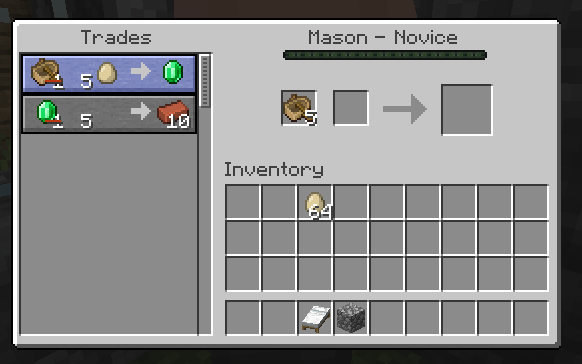


Created Issue:
Max item stack amount can be skipped using new villager trades menu
- Summon any Villager who has some trades (you can also set his NoAI to 1b to make reproduction easier)
- Modify his 1st trade to make him buy a non-stackable item (e.g. minecraft:oak_boat):
/data modify entity @e[type=villager,sort=nearest,limit=1] Offers.Recipes[0].buy set value {id:"minecraft:oak_boat",Count:1b}- Give yourself more than one oak_boat.
- Open trade menu, click on the trade which you modified before.
- You can see there is more than one boat in the first trade item slot. Take this item stack and place it in your inventory.
You can also summon a Fisherman, upgrade him to a Master level and - if you got a trade which takes a boat - you can get item stacks over their max amount, but limited to 64.
Attachments1
- Summon any Villager who has some trades (you can also set his NoAI to 1b to make reproduction easier)
- Modify his 1st trade to make him buy a non-stackable item (e.g. minecraft:oak_boat):
/data modify entity @e[type=villager,sort=nearest,limit=1] Offers.Recipes[0].buy set value {id:"minecraft:oak_boat",Count:1b}
- Give yourself more than one oak_boat.
- Open trade menu, click on the trade which you modified before.
- You can see there is more than one boat in the first trade item slot.
Take this item stack and place it in your inventory.You can also summon a Fisherman, upgrade him to a Master level and - if you got a trade which takes a boat - you can get item stacks over their max amount, but limited to 64.
Items with max stack amount can be stacked up to 64 in the new villager trades menu.
- Summon any Villager which has some trades (you can also set his NoAI to 1b to make reproduction easier)
- Modify his 1st trade to make him buy a non-stackable item or item with a max stack amount less than 64 (e.g. minecraft:oak_boat):
{{/data modify entity @e[type=villager,sort=nearest,limit=1] Offers.Recipes[0].buy set value {id:"minecraft:oak_boat",Count:1b}}}
- Give yourself more than one oak_boat.
- Open trade menu, click on the trade which you modified before.
- You can see there is more than one boat in the first trade item slot. Now take this item stack and place it in your inventory. It kept its amount.
You can also summon a Fisherman, upgrade him to a Master level and - if you got a trade which takes a boat - you can get item stacks over their max amount, but limited to 64.
How it should work:
It should place only max amount of this item in a trade slot instead of 64,
AND ONE OF:
After clicking an item stack with amount > max amount you should get only its max amount on cursor,
OR
After placing such item stack in any inventory it should place in that inventory only max amount of that item.
![[Mod] tryashtar](../../../data/avatars/users/41963.png)
duplicates
Items with max stack amount can be stacked up to 64 in the new villager trades menu.
- Summon any Villager which has some trades (you can also set his NoAI to 1b to make reproduction easier)
- Modify his 1st trade to make him buy a non-stackable item or item with a max stack amount less than 64 (e.g. minecraft:oak_boat):
{{/data modify entity @e[type=villager,sort=nearest,limit=1] Offers.Recipes[0].buy set value {id:"minecraft:oak_boat",Count:1b}}}
- Give yourself more than one oak_boat.
- Open trade menu, click on the trade which you modified before.
- You can see there is more than one boat in the first trade item slot. Now take this item stack and place it in your inventory. It kept its amount.
You can also summon a Fisherman, upgrade him to a Master level and - if you got a trade which takes a boat - you can get item stacks over their max amount, but limited to 64.
How it should work:
It should place only max amount of this item in a trade slot instead of 64,
AND ONE OF:
After clicking an item stack with amount > max amount you should get only its max amount on cursor,
OR
After placing such item stack in any inventory it should place in that inventory only max amount of that item.Items with max stack amount can be stacked up to 64 in the new villager trades menu.
- Summon any Villager which has some trades (you can also set his NoAI to 1b to make reproduction easier)
- Modify his 1st trade to make him buy a non-stackable item or item with a max stack amount less than 64 (e.g. minecraft:oak_boat):
/data modify entity @e[type=villager,sort=nearest,limit=1] Offers.Recipes[0].buy set value {id:"minecraft:oak_boat",Count:1b}
- Give yourself more than one oak_boat.
- Open trade menu, click on the trade which you modified before.
- You can see there is more than one boat in the first trade item slot. Now take this item stack and place it in your inventory. It kept its amount.
You can also summon a Fisherman, upgrade him to a Master level and - if you got a trade which takes a boat - you can get item stacks over their max amount, but limited to 64.
How it should work:
It should place only max amount of this item in a trade slot instead of 64,
AND ONE OF:
After clicking an item stack with amount > max amount you should get only its max amount on cursor,
OR
After placing such item stack in any inventory it should place in that inventory only max amount of that item.
Items with max stack amount can be stacked up to 64 in the new villager trades menu.
- Summon any Villager which has some trades (you can also set his NoAI to 1b to make reproduction easier)
- Modify his 1st trade to make him buy a non-stackable item or item with a max stack amount less than 64 (e.g. minecraft:oak_boat):
/data modify entity @e[type=villager,sort=nearest,limit=1] Offers.Recipes[0].buy set value {id:"minecraft:oak_boat",Count:1b}
- Give yourself more than one oak_boat.
- Open trade menu, click on the trade which you modified before.
- You can see there is more than one boat in the first trade item slot. Now take this item stack and place it in your inventory. It kept its amount.
You can also summon a Fisherman, upgrade him to a Master level and - if you got a trade which takes a boat - you can get item stacks over their max amount, but limited to 64.
How it should work:
It should place only max amount of this item in a trade slot instead of 64,
AND ONE OF:
After clicking an item stack with amount > max amount you should get only its max amount on cursor,
OR
After placing such item stack in any inventory it should place in that inventory only max amount of that item.Items with max stack amount can be stacked up to 64 in the new villager trades menu.
- Summon any Villager which has some trades (you can also set his NoAI to 1b to make reproduction easier)
- Modify his 1st trade to make him buy a non-stackable item or item with a max stack amount less than 64 (e.g. minecraft:oak_boat):
/data modify entity @e[type=villager,sort=nearest,limit=1] Offers.Recipes[0].buy set value {id:"minecraft:oak_boat",Count:1b}
- Give yourself more than one oak_boat.
- Open trade menu, click on the trade which you modified before.
- You can see there is more than one boat in the first trade item slot. Now take this item stack and place it in your inventory. It kept its amount.
You can also summon a Fisherman, upgrade him to a Master level and - if you got a trade which takes a boat - you can get item stacks over their max amount, but limited to 64.
How it should work:
It should place only max amount of this item in a trade slot instead of 64,
AND ONE OF:
After clicking an item stack with amount > max amount you should get only its max amount on cursor,
OR
After placing such item stack in any inventory it should place in that inventory only max amount of that item.
Items with max stack amount can be stacked up to 64 in the new villager trades menu.
- Summon any Villager which has some trades (you can also set his NoAI to 1b to make reproduction easier)
- Modify his 1st trade to make him buy a non-stackable item or item with a max stack amount less than 64 (e.g. minecraft:oak_boat):
/data modify entity @e[type=villager,sort=nearest,limit=1] Offers.Recipes[0].buy set value {id:"minecraft:oak_boat",Count:1b}
- Give yourself more than one oak_boat.
- Open trade menu, click on the trade which you modified before.
- You can see there is more than one boat in the first trade item slot. Now take this item stack and place it in your inventory. It kept its amount.
You can also summon a Fisherman, upgrade him to a Master level and - if you got a trade which takes a boat - you can get item stacks over their max amount, but limited to 64.
How it should work:
It should place only max amount of this item in a trade slot instead of 64,
AND ONE OF:
After clicking an item stack with amount > max amount you should get only its max amount on cursor,
OR
After placing such item stack in any inventory it should place in that inventory only max amount of that item.Items with max stack amount can be stacked up to 64 in the new villager trades menu.
- Summon any Villager which has some trades (you can also set his NoAI to 1b to make reproduction easier)
- Modify his 1st trade to make him buy a non-stackable item or item with a max stack amount less than 64 (e.g. minecraft:oak_boat): /data modify entity @e[type=villager,sort=nearest,limit=1] Offers.Recipes[0].buy set value {id:"minecraft:oak_boat",Count:1b}
- Give yourself more than one oak_boat.
- Open trade menu, click on the trade which you modified before.
- You can see there is more than one boat in the first trade item slot. Now take this item stack and place it in your inventory. It kept its amount.
You can also summon a Fisherman, upgrade him to a Master level and - if you got a trade which takes a boat - you can get item stacks over their max amount, but limited to 64.
How it should work:
It should place only max amount of this item in a trade slot instead of 64,
AND ONE OF:
After clicking an item stack with amount > max amount you should get only its max amount on cursor,
OR
After placing such item stack in any inventory it should place in that inventory only max amount of that item.
Hey, it's not a duplicate.
MC-146800is about unstackable items' invalid discounts, but my issue is about making unstackable items stackable using trade menus. The topics of those two issues are different.@tryashtar
![[Helper] Jack McKalling](../../../data/avatars/users/92859.png)
![[Mod] violine1101](../../../data/avatars/users/92858.png)
![[Mod] Urielsalis](../../../data/assets/gravatar/urielsalis.jpeg)
![[Mod] Asteraoth](../../../data/avatars/users/92886.png)
Items with max stack amount can be stacked up to 64 in the new villager trades menu.
- Summon any Villager which has some trades (you can also set his NoAI to 1b to make reproduction easier)
Modify his 1st trade to make him buy a non-stackable item or item with a max stack amount less than 64 (e.g. minecraft:oak_boat): /data modify entity @e[type=villager,sort=nearest,limit=1] Offers.Recipes[0].buy set value {id:"minecraft:oak_boat",Count:1b}- Give yourself more than one oak_boat.
- Open trade menu, click on the trade which you modified before.
- You can see there is more than one boat in the first trade item slot. Now take this item stack and place it in your inventory. It kept its amount.
You can also summon a Fisherman, upgrade him to a Master level and - if you got a trade which takes a boat - you can get item stacks over their max amount, but limited to 64.
How it should work:
It should place only max amount of this item in a trade slot instead of 64,
AND ONE OF:
After clicking an item stack with amount > max amount you should get only its max amount on cursor,
OR
After placing such item stack in any inventory it should place in that inventory only max amount of that item.Items with max stack amount can be stacked up to 64 in the new villager trades menu.
- Summon any Villager that can buy non-stackable item or item with a max stack amount less than 64 (e.g. minecraft:oak_boat)
/summon villager ~ ~1 ~ {NoAI:1,Offers:{Recipes:[{buy:{id:oak_boat,Count:1},sell:{id:emerald,Count:1}}]}}- Give yourself more than one oak_boat.
- Open trade menu, click on the trade which you modified before.
- You can see there is more than one boat in the first trade item slot. Now take this item stack and place it in your inventory. It kept its amount.
You can also summon a Fisherman, upgrade him to a Master level and - if you got a trade which takes a boat - you can get item stacks over their max amount, but limited to 64.
How it should work:
It should place only max amount of this item in a trade slot instead of 64,
AND ONE OF:
After clicking an item stack with amount > max amount you should get only its max amount on cursor,
OR
After placing such item stack in any inventory it should place in that inventory only max amount of that item.
is duplicated by
relates to
is duplicated by
is duplicated by
is duplicated by
is duplicated by
is duplicated by
is duplicated by
is duplicated by
 Maria Lemón
![[Bot] Piston](../../../data/avatars/users/31202.png)
Duplicate of MC-147431
Thank you for your report!
We're actually already tracking this issue at MC-147431, so we will resolve and link this ticket as a duplicate.
If you would like to add a vote and any extra information to the main ticket it would be appreciated.
If you haven't already, you might like to make use of the search feature to see if the issue has already been mentioned.
Duplicate of MC-147431
Thank you for your report!
We're actually already tracking this issue at MC-147431, so we will resolve and link this ticket as a duplicate.
If you would like to add a vote and any extra information to the main ticket it would be appreciated.
If you haven't already, you might like to make use of the search feature to see if the issue has already been mentioned.
Duplicate of MC-147431
Duplicate of MC-147431
(readded my comment)
Hey, it's not a duplicate.
MC-146800is about unstackable items' invalid discounts, but my issue is about making unstackable items stackable using trade menus. The topics of those two issues are different, because after clicking the trade in the list it moves up to 64 required items to the trade item slots even when the trade is not on discount. Please change the status to Open.@tryashtar
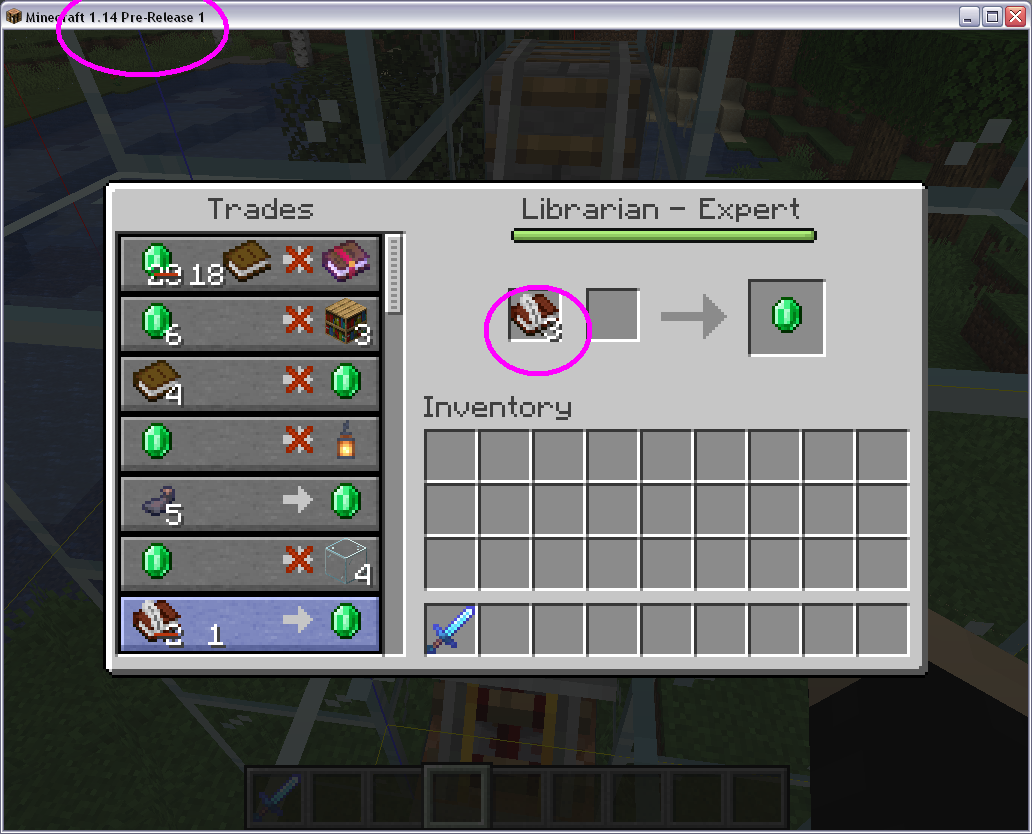
I confirm, this is not a duplicate. I have an unmodified Librarian who offers a 2x Book and Quill for 1 emerald trade, which is discounted to 1x Book and Quill, but these cannot stack to begin with and will if you click the trade option.
Although the discount exceeding the max stack was apparently fixed in 1.14 pre1, clicking a trade offer for non-stackable items was not. Non-stackables still stack in the trade window. See image:
Reopened.
Confirmed for 1.14 pre-2
Imho this can be WAI. It's for sales that require more than one non-stackable item to get single emerald.
Although it is true that it offers convenience with sales that require more than one non-stackable item, being able to take out items from input slots is also intended. And you should not be able to have a stack of non-stackable items.
Surely it'll be harder to make non-stackable item stacks not be able to be taken out all at once in one stack, than it is to prevent them from forming in the first place.
@Michał No, this is not WAI. Of course, I agree with you, but the point is that these non-stackable items can be easily stacked in a single slot in your inventory, and then you can store them in this way. They just simply need to disallow placing item stacks with quantity of more than max stack size, and problem solved.
Confirmed for 1.14 pre-3
Confirmed for 1.14 pre-4
Confirmed for 1.14 pre-5
Confirmed for 1.14
Confirmed for 1.14.1 pre-1
Confirmed for 1.14.1 pre-2
Confirmed for 1.14.1
Can also confirm in 1.14.1 Release
I can confirm that the bug has been patched!