![[Helper] Jack McKalling](../../../data/avatars/users/92859.png) [Helper] Jack McKalling
[Helper] Jack McKalling
- Jack_McKalling
- jack_mckalling
- Europe/Amsterdam
- Yes
- No
 MC-116379
 Low
Low WEB-911
![[Mojang] Web Team](../../../data/avatars/users/10122.svg)

![[Mojang] slicedlime](../../../data/assets/gravatar/slicedlime.jpeg)
![[Mojang] Felix Jones](../../../data/avatars/users/40484.png)
![[Mojang] eowyn36](../../../data/avatars/users/18935.svg)


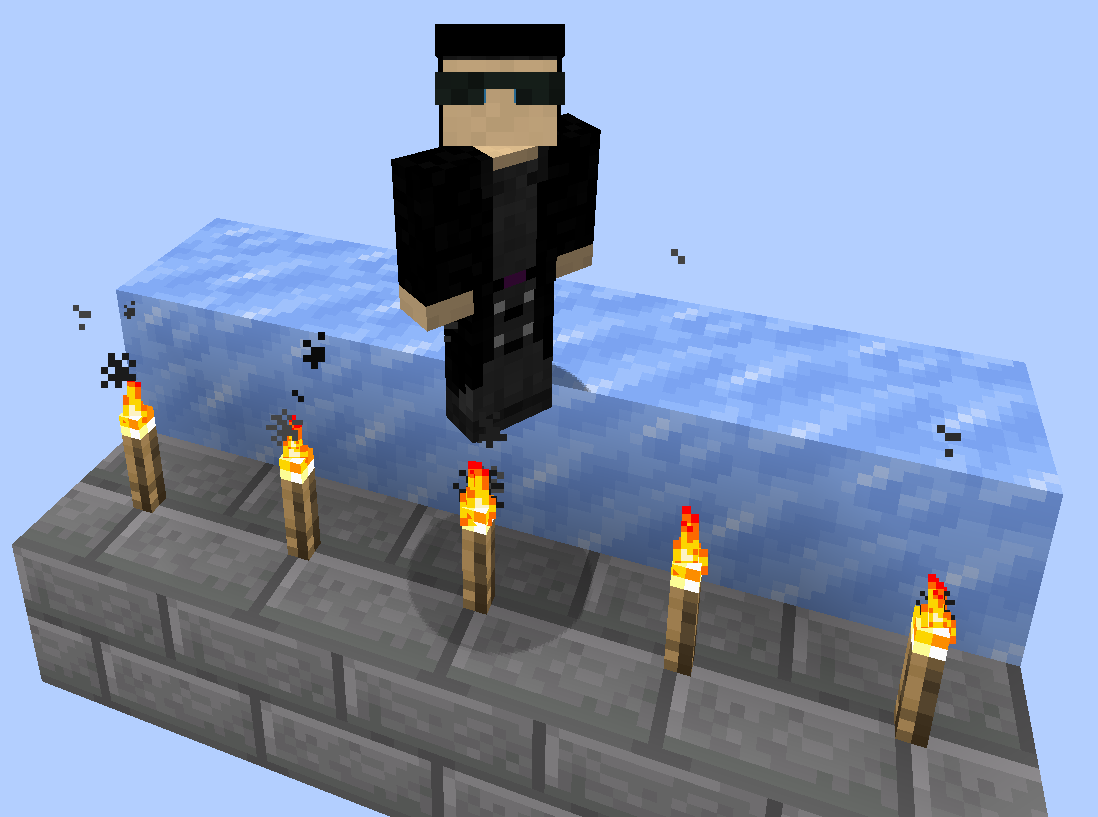



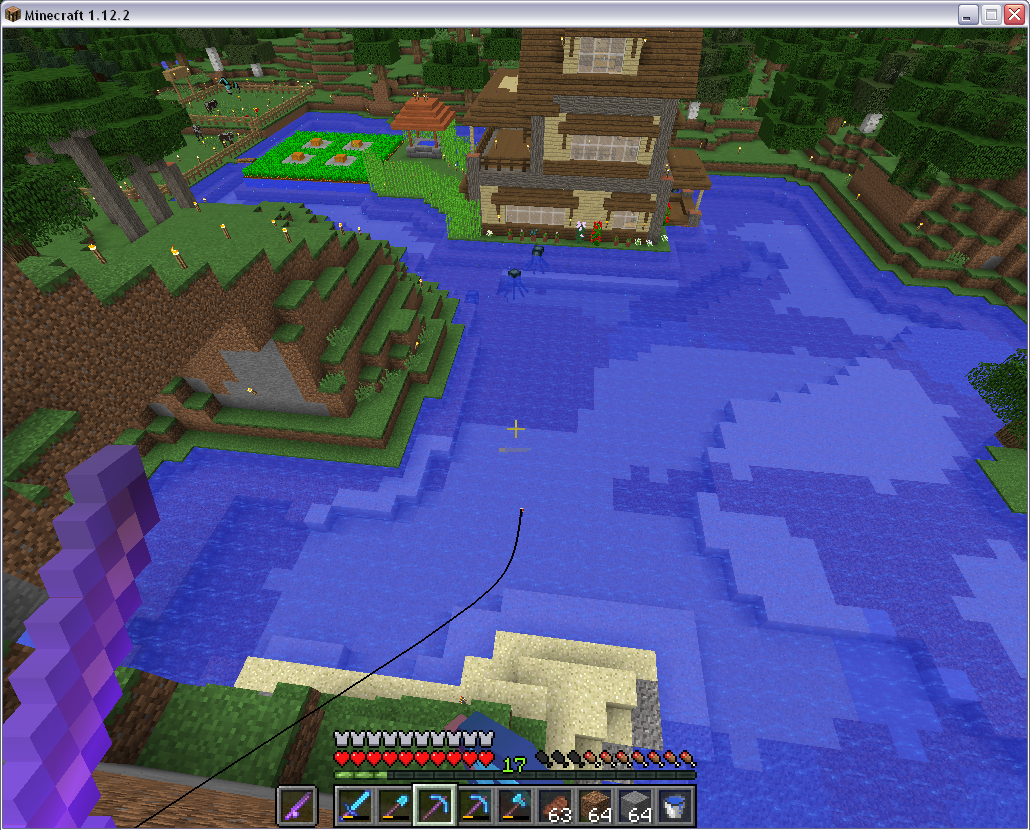





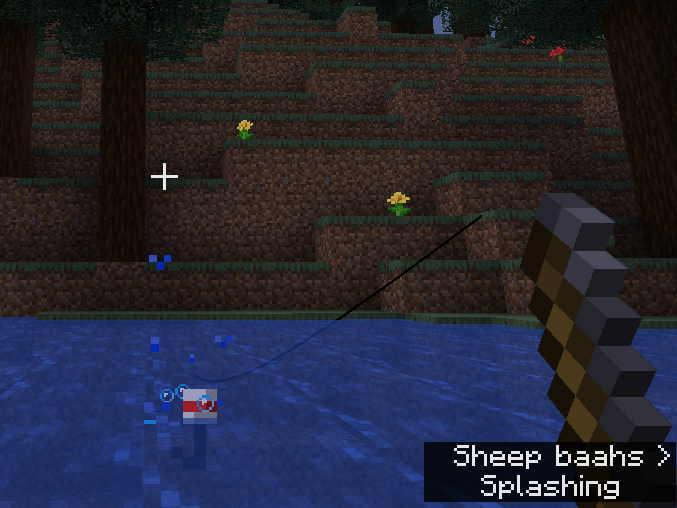






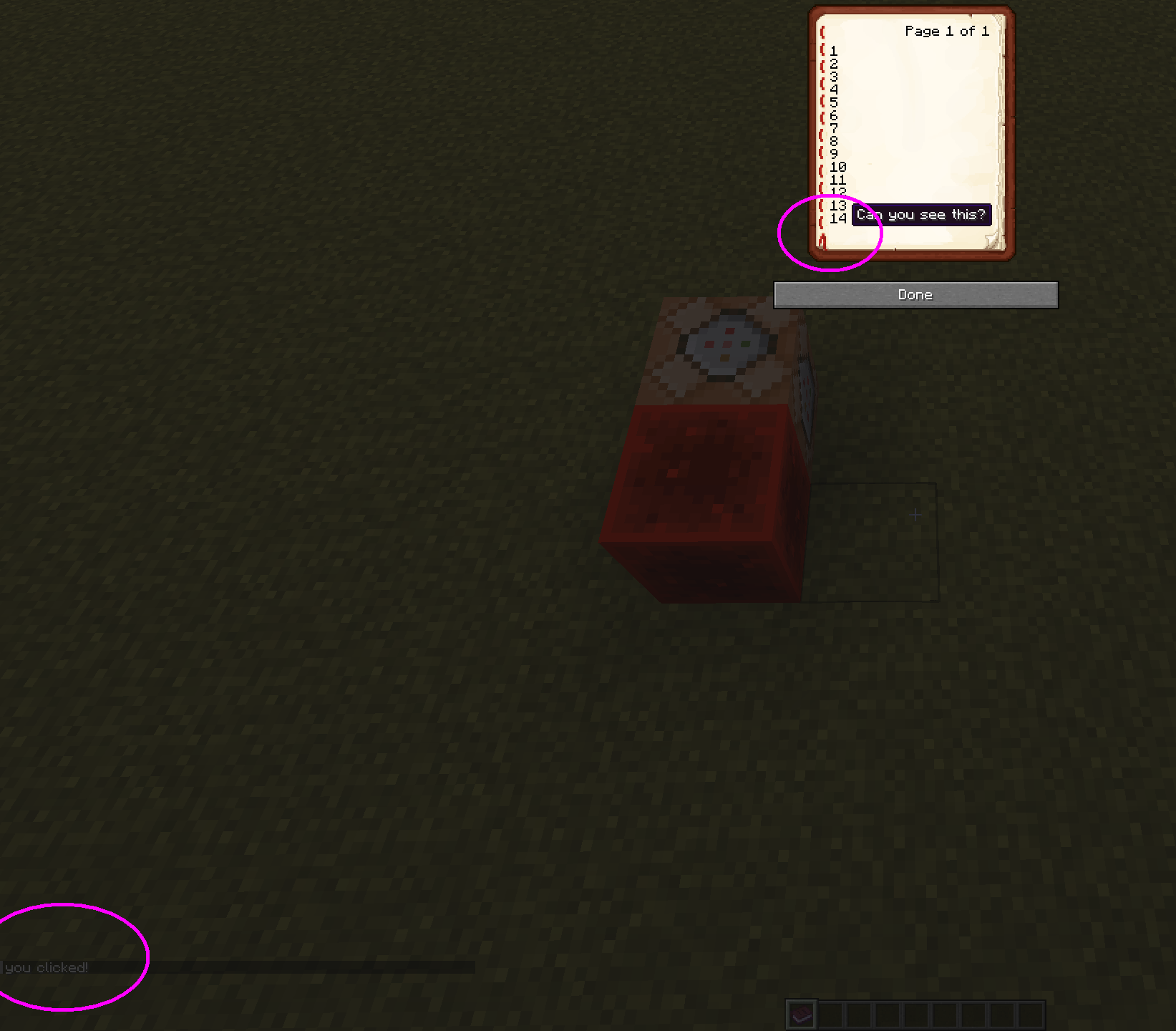
Punching with fishing rod in off-hand makes a cast fishing line react as if the rod wasin main-handPunching with fishing rod in off-hand makes a cast fishing line react as if the rod was being used to punch
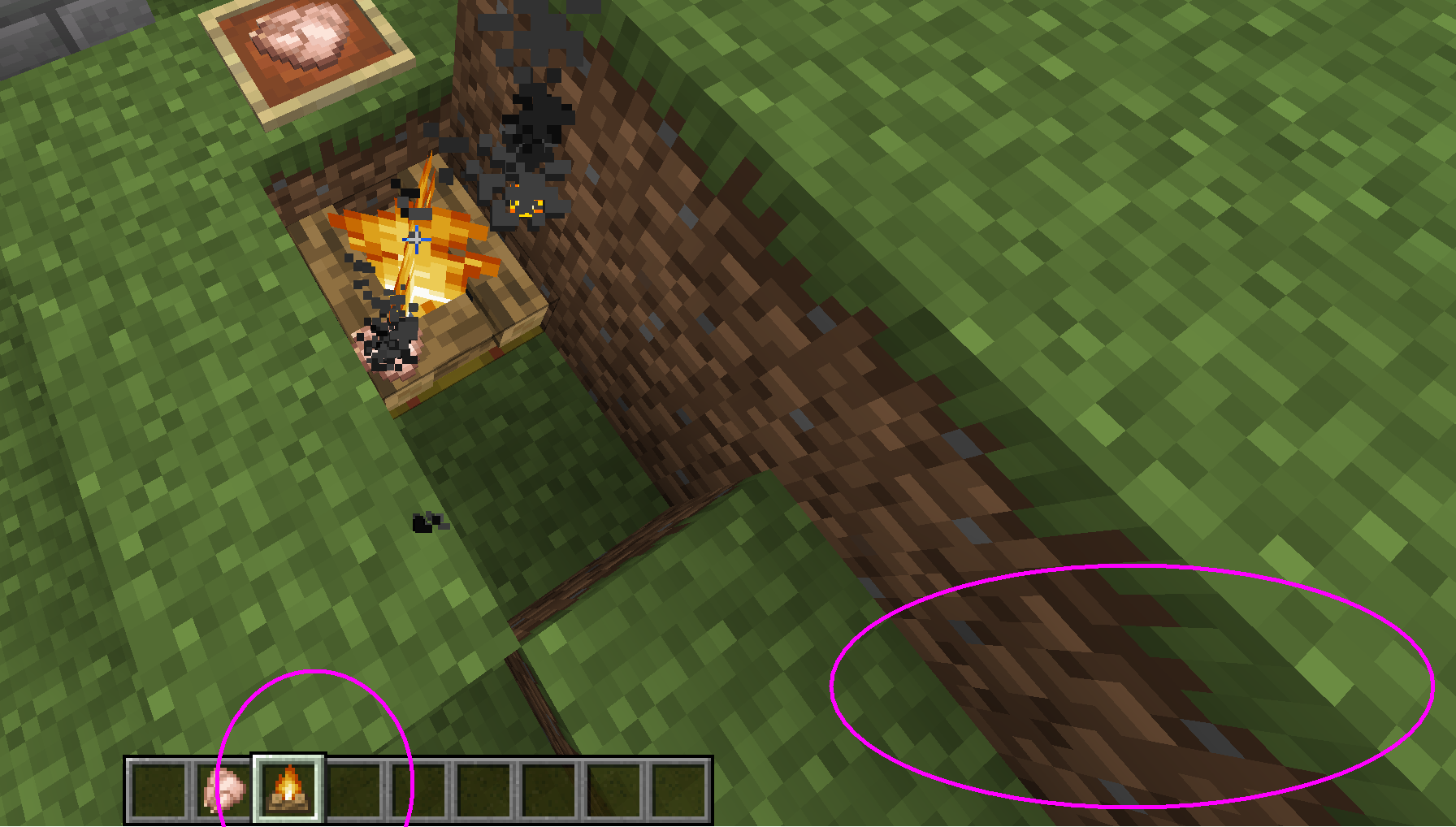
When you punch the air with an item in the main hand and a cast fishing rod in the off-hand, the main hand (item) makes a punch animation as expected, but the off-hand (item) shoulnd't move. As the rod itself remains still as expected, the cast fishing line of the rod in the off-hand moves strangely up and down the length of the rod.
It appears as if the fishing line thinks its rod is being used to punch, but it isn't as it is in the off-hand. The fishing line makes
the exactmovementit would have madeif the rod were indeed in the punching hand. In the attached image you can see the the fishing line has moved down the rod while my main hand is punching something (and is at this point because of that just outside my view).When you punch the air with an item in the main hand and a cast fishing rod in the off-hand, the main hand (item) makes a punch animation as expected, but the off-hand (item) shoulnd't move. As the rod itself remains still as expected, the cast fishing line of the rod in the off-hand moves strangely up and down the length of the rod.
It appears as if the fishing line thinks its rod is being used to punch, but it isn't as it is in the off-hand. The fishing line makes a similar movement to as if the rod were indeed in the punching hand. In the attached image you can see the the fishing line has moved down the rod while my main hand is punching something (and is at this point because of that just outside my view).
Windows XP Service Pack 3,
standalone Java buildversion 1.8.0_131-b11Windows XP Service Pack 3, installed Java version 1.8.0_141-b15
Fishing rod bug.png
Punchingwith fishing rod in off-hand makes a cast fishing line react as if the rod was being used to punchPunching makes a cast fishing line detach from rod when in the off-hand
When you punch the air with an item in the main hand and a cast fishing rod in the off-hand, the main hand (item) makes a punch animation as expected, but the off-hand (item) shouldn't move. As the rod itself remains still as expected, the cast fishing line of the rod in the off-hand moves strangely up and down the length of the rod.
It appears as if the fishing line thinks its rod is being used to punch, but it isn't as it is in the off-hand. The fishing line makes a similar movement to as if the rod were indeed in the punching hand. In the attached image you can see the the fishing line has moved down the rod while my main hand is punching something (and is at this point because of that just outside my view).
Steps to reproduce:
1) Put any fishing rod in the off-hand
2) Right-click to cast the line
3) Left-click to punch in the air
- notice how the off-hand and the rod in it don't animate, but its fishing line does
Punchingmakesa cast fishingline detach from rod when in the off-handPunching with a cast fishing rod in the off-hand detaches fishing line from rod
When you punch the air with an item in the main hand and a cast fishing rod in the off-hand, the main hand (item) makes a punch animation as expected, but the off-hand (item) shouldn't move. As the rod itself remains still as expected, the cast fishing line of the rod in the off-hand moves strangely up and down the length of the rod.
It appears as if the fishing line thinks its rod is being used to punch, but it isn't as it is in the off-hand. The fishing line makes a similar movement to as if the rod were indeed in the punching hand. In the attached image you can see the the fishing line has moved down the rod while my main hand is punching something (and is at this point because of that just outside my view).
Steps to reproduce:
1) Put any fishing rod in the off-hand
2) Right-click to cast the line
3) Left-click to punch in the air
- notice how the off-hand and the rod in it don't animate, but its fishing line doesThe bug
When you punch the air with an item in the main hand and a cast fishing rod in the off-hand, the main hand (item) makes a punch animation as expected, but the off-hand (item) shouldn't move. As the rod itself remains still as expected, the cast fishing line of the rod in the off-hand moves strangely up and down the length of the rod.
It appears as if the fishing line thinks its rod is being used to punch, but it isn't as it is in the off-hand. The fishing line makes a similar movement to as if the rod were indeed in the punching hand. In the attached image you can see the the fishing line has moved down the rod while my main hand is punching something (and is at this point because of that just outside my view).
How to reproduce:
- Put any fishing rod in the off-hand
- Right-click to cast the line
- Left-click to punch in the air
notice how the off-hand and the rod in it don't animate, but its fishing line does
Also confirmed for Java Edition
In the second to last paragraph, 4th sentence of the Dutch EULA, there is a minor spelling mistake.
It currently says:
Als u de Game bijvoorbeeld alleen gebruik in de single-player modusThe word "gebruik" is not correct, it should be:
Als u de Game bijvoorbeeld alleen gebruikt in de single-player modusBecause the "u" pronoun here modifies the verb to use "verb+t".
In the second to last paragraph, 4th sentence of the Dutch EULA, there is a minor spelling mistake.
It currently says:
Als u de Game bijvoorbeeld alleen gebruik in de single-player modusThe word "gebruik" is not correct, it should be:
Als u de Game bijvoorbeeld alleen gebruikt in de single-player modusBecause the "u" pronoun here modifies the verb to use "verb+t".
Trying to login to the feedback site (https://feedback.minecraft.net) does not appear to work. After successfully having gone through the login form, the site still shows asthough I were logged out.
I'm using an old Microsoft Live account that otherwise still works. Logging into www.microsoft.com using the same credentials works fine and shows my gravatar at the top right. (same as on this site)
This issue is
notrelated toWEB-850, where an error occurred after trying to login, which does not happen for me anymore.Trying to login to the feedback site (https://feedback.minecraft.net) does not appear to work. After successfully having gone through the login form, the site still shows asthough I were logged out.
I'm using an old Microsoft Live account that otherwise still works. Logging into www.microsoft.com using the same credentials works fine and shows my gravatar at the top right. (same as on this site)
This issue is related to but not the same as
WEB-850, where an error occurred after trying to login, which does not happen for me anymore.
Trying to login to the feedback site (https://feedback.minecraft.net) does not appear to work. After successfully having gone through the login form, the site still shows asthough I were logged out.
I'm using an old Microsoft Live account that otherwise still works. Logging into www.microsoft.com using the same credentials works fine and shows my gravatar at the top right
.(same as on this site)This issue is related to but not the same as
WEB-850, where an error occurred after trying to login, which does not happen for me anymore.Trying to login to the feedback site (https://feedback.minecraft.net) does not appear to work. After successfully having gone through the login form, the site still shows asthough I were logged out.
I'm using an old Microsoft Live account that otherwise still works. Logging into www.microsoft.com using the same credentials works fine and shows my gravatar at the top right (same as on this site).
This issue is related to but not the same as
WEB-850, where an error occurred after trying to login, which does not happen for me anymore.

[Helper] Jack McKalling, this ticket is for 1.12.2 and older but MC-125615 was for the 1.13 snapshot, so I don't see a relation.
![[Mojang] Mega_Spud (Jay Wells)](../../../data/avatars/users/92696.png)
Hey [Helper] Jack McKalling - We're already working on achieving parity across versions where possible, and we're very keen to hear your requests or suggestions, so we'd encourage you to make a post at https://feedback.minecraft.net, or upvote an existing topic there.
If you're not sure whether your issue is a parity request or a bug, hopefully this article will help explain further: Parity Request Guide
![[Mod] violine1101](../../../data/avatars/users/92858.png)
As [Helper] Jack McKalling already said, we've found a workaround, which I've now added to the description of this ticket. If you need support with installing a version manually, please post a comment in the Reddit thread that I created for support with this issue.

@Anonymous Turtle and Zach Wolf, thank you for providing the workaround. However, I have removed your attachments from this ticket because they might be irritating since they don't actually showed the bug and additionally had generic names such as 2020-07-....
I have updated the report and included the workaround, so I hope this change is alright for you.
As [Helper] Jack McKalling pointed out, the issue that the items do not stack is a different bug (tracked as MC-125046).
[Helper] Jack McKalling can you explain why you added it?
![[Mod] Avoma](../../../data/avatars/users/86198.png)
[Helper] Jack McKalling, I believe that issue is MC-118980.

[Helper] Jack McKalling haven't been able to figure it out even tried using Burp Suite to replace all instances of "en-us" in the request or response body with "nl-nl" and making Chrome browser language and GUI Dutch with no traces of English but nothing seems to work, like the site works, no redirects to English, the issue is that the Dutch EULA for me is just plain English. Thanks anyway since you confirmed that the text still has a grammar mistake.
Confirmed for 1.10.2, Java version.
I noticed this too, the only way I could find to temp fix it is to quit the game back to the launcher and restart.
Confirmed for 1.12.1.
When I placed a transparent block in the head slot of an armor stand, which was partially standing inside a solid block, the non-transparent edges of the head block that are closest to you were being rendered behind the edges that are the furthest from you. Although I was using a resource pack to find such a block, I noticed the effect wasn't related to it. In addition to this, some transparent blocks behind the armor stand were also rendered in front of its head block.
I retried to do the same thing with the solid block the armor stand was standing in replaced by another transparent block, and now only the head blocks own edges were in wrong render order, the blocks behind it rendered correctly through it. Still, some strange things going on here.
I understand this isn't a bug, as a sheep's colour is apparent in their "armour" layer, and their (white) skin texture has nothing to do with it. So sheared sheep are simply technically expected to always appear white. However, seeing players have multiple skin layers as well, it should be possible for instance to have sheep show an intermediate layer underneath their armour, specifically for showing their dyed colour when the armour is sheared.
But important to note, as far as the player is concerned, this is a bug. The technical implementation of how a sheep's colours are rendered I believe should not affect that percepton. If from technical perspective this issue is to be more of a content suggestion, I'd personally would like to suggest that. I sadly can't select that Issue Type however.
Why is the feature of getting zombie villagers from spawners not reintroduced in some way, after the IDs split? Was there a reason or decision specifically? And will it be possible zombie villagers (can) get reintroduced by spawners at some point? It's rather strange they got removed for technical reasons and then not put back in some way, unless for balancing reasons or something.
Confirmed for 1.12.1.
This bug appears to be back again, if you hold the name tag in your off-hand.
The name tag does work in the off-hand, but not for saddled pigs (maybe same also counts for villagers, not tested) in minecraft 1.12.1. I took the name tag off and put it in my main hand, and then it did work.
I assume the fix for naming saddled pigs (and villagers?) might internally only function on the main hand.
Also, when I tested the renaming the saddled pig, I was holding just an axe in the main hand, or another random item, which seemed not to affect the thing in any way.
Same in 1.12.2
Confirmed for 1.12.2
Replaced screenshot with new one without resource pack, my apologies. Screenshot taken in 1.12.2.
Confirmed in 1.12.2.
Confirmed in 1.12.2
Still present in 1.12.2. Markers work fine until you logout and reload the world.
The map normally fills in a circular area around your current position. Any markers of cloned maps placed in item freames outside that area, will not show up upon relog. Markers only correctly show up again when visited.
Applies to both the Overworld as well as the End dimension.
Confirmed in 1.12.2. The crafting result of zooming out a map shows the same zoom level as the current map.
Only after taking out the result and placing it in a slot, the tooltip updates.
This happened to me as well, I found an End City, End Ship and even an Elytra, cleared all shulkers in the area and placed/broken blocks etc, all brand new in 1.12.2 in my SSP world, and I got the elytra advancement, but not the End City one. Eventhough it is its parent. I have defeated the Ender Dragon only once since 1.12.
My setup is Windows XP sp3 in 32bit, Java build 1.8.0_141-b15, but I don't think that is relevant.
I know, but that's a different subject and not discussable here. I'm working on it.
Confirmed for 1.12.2 on 32bit XP, with launcher 1.6.84. The problem happens consistently on every launch for me, but it never happened with launcher version 1.6.73, which I used before today.
To me now as well. First I needed to go through the change password process so that I can login again (forgot password), and now I can't because of this issue, "An error has occurred".
Before I got the reported error, it allowed me to login normally but I had forgotten my password. So I changed it using the "I forgot my password" mechanism, succesfully changed my microsoft Live account password using the window given. Afterwards I got redirected back to the logging in page and I tried again, and it gave the error that the system detected too many attempts and I should try again later. closing the window and then clicking the login button again gave the reported error above.
I don't have an Xbox account, but an older microsoft live account. Maybe that's got something to do with it, but after logging in I still can't access the page. I get a repeated attempts error upon logging in, and retrying to visit after that still gives me the XML error.
Bug
MC-125615"Some end cities don't generate completely", might be related to this issue. When I confirmed my case above, I had noticed the End City in question was actually only partially generated. As by this comment, maybe the generator freezes at some point during generation of the structure, which could interfere with the trigger for this advancement. Wild guess.Because I realize
MC-125615should have been reported to be affected by 1.12.2 as well. When I posted my message about this bug, I did not realize I was experiencingMC-125615as well.I know this issue has been marked as fixed by now, but I want to add that I believe this issue may have existed earlier than 18w07b. I've tried to reproduce it with failed results, but in my (originally 1.7.10) homeworld I have a clipped end city too, which I generated way back in 1.12.2. I've never realised it until I saw this bug report. I've modified the structure since then and I don't have an early screenshot for this reason to prove it. But my end city structure is DEFINITELY matching the description of this report. Clipped at the quarter chunk border, complete with open 4th wall rooms. Ship on the other end of the structure is in tact.
That is up to Mojang to decide. Unless someone looks into the source code and can tell these different cases are not the same issue, only they can tell. Maybe they've just not fixed this for so long because it is difficult to do. I'd recommend not to split, as right now, it would only increase the amount of places Mojang needs to keep track of.
It is not possible for me to login, as after doing so the website shows I'm still logged out and then immediately clicking the "post new feedback" button redirects back again to the login page.
No errors show up anymore for me though.
@Fabian Röling actually they are. their wings are partially transparent, and IIRC the only mob to have this.
If I still cannot login but no errors show up, should I open a new ticket?
I think the fix was added to different forks of the codebase at once, hence why two fixes were set. Because they were already working on 1.14 before they made this change to the 1.13 branch
I experienced this too, when I opened my world to lan, and later opened it under their account. From the description I understand this really is a bug, I imagined it might just be intended how the world is saved between single/multiplayer. I hope this gets fixed somehow sometime!
Confirmed for 1.13.2
Confirmed for 1.13.2.
NOT the same as
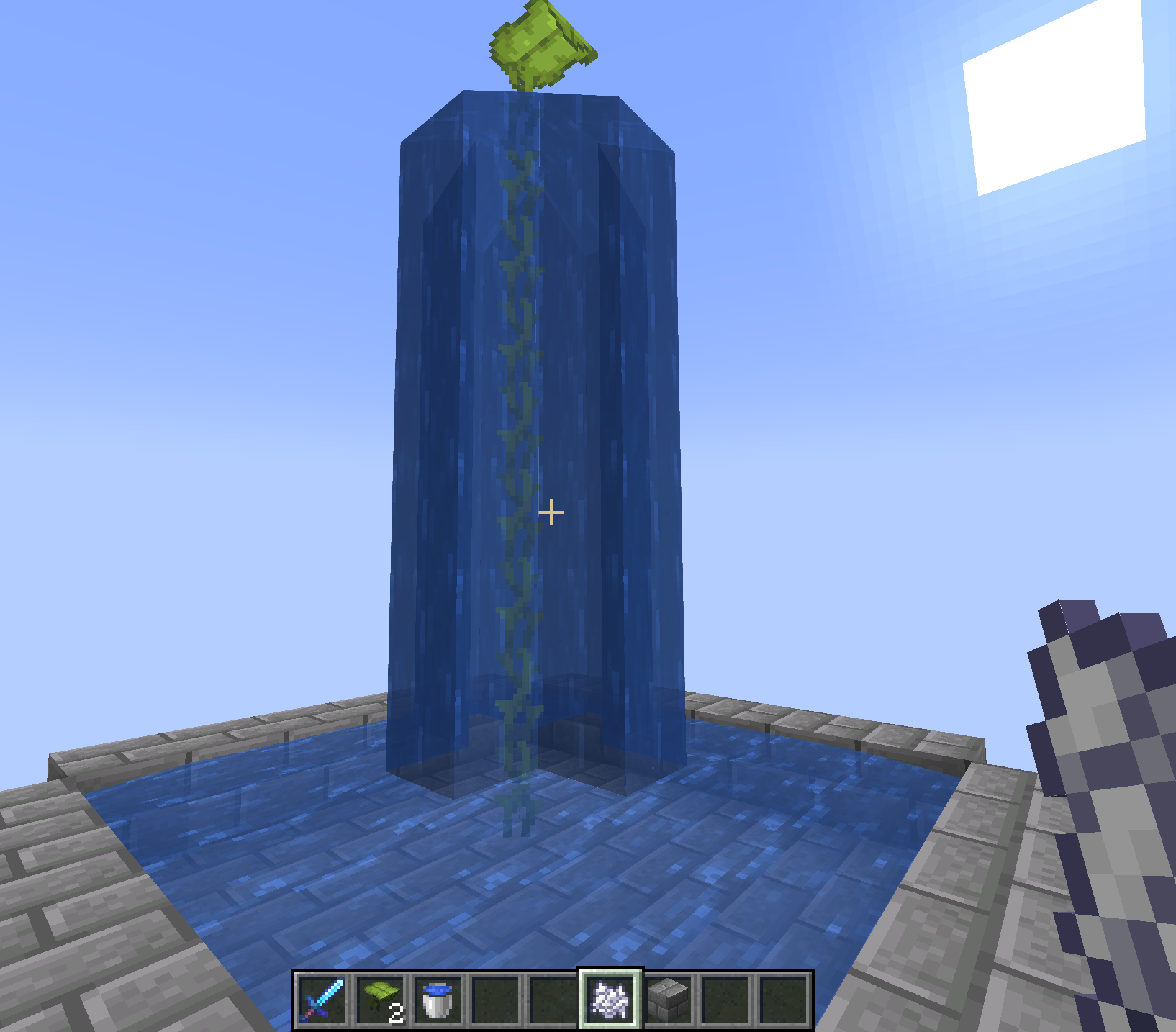
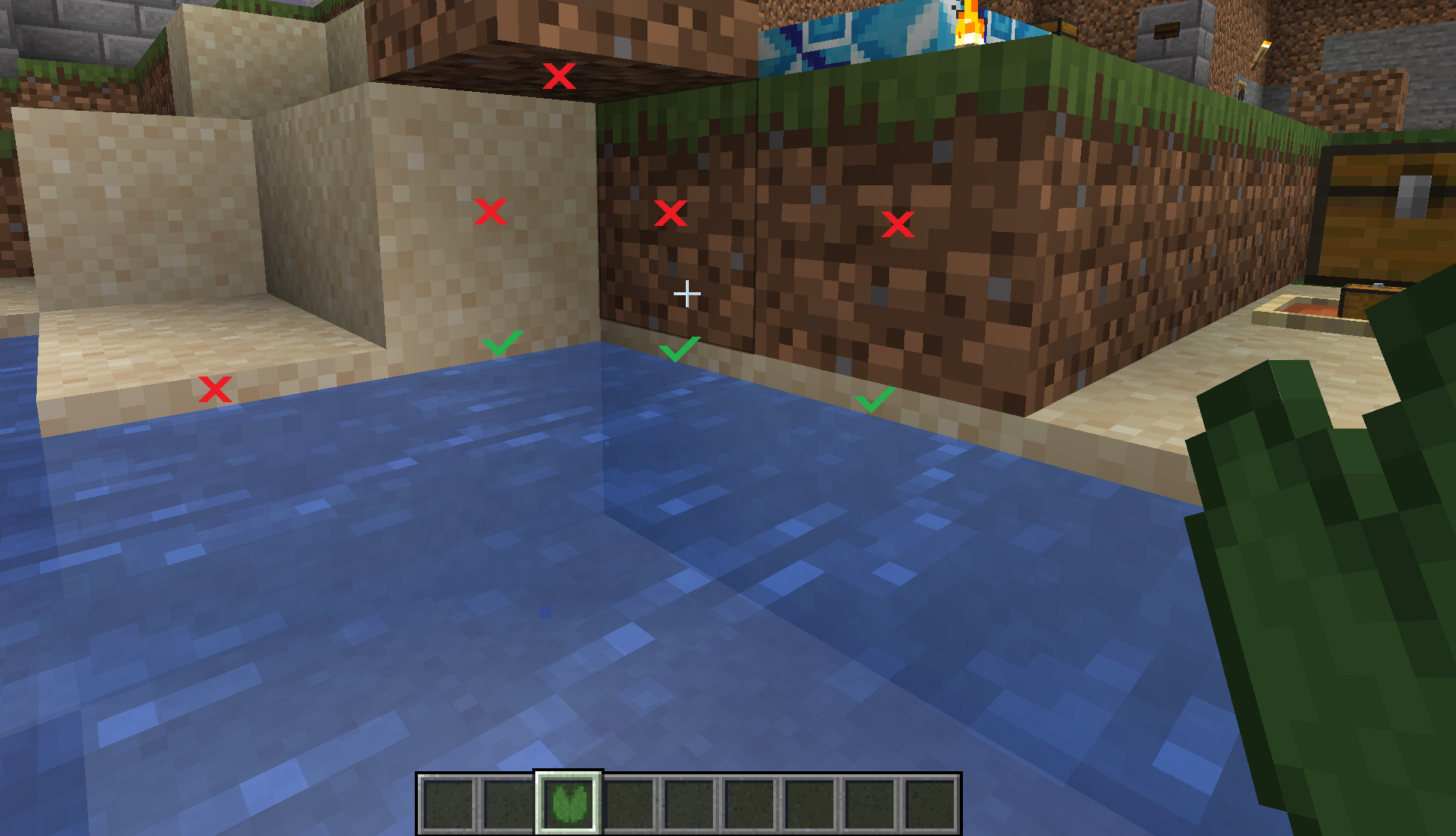
MC-126906, where it concerns emptying buckets adjacent to the waterlogged blocks, as opposed to in its actual space.Confirmed in 1.13.2.
I don't believe items should break turtle eggs, but it may indeed be intended.
Confirmed for 1.13.2.
Eventhough you can turn wood into stripped wood by using an axe on it, crafting stripped logs into stripped wood would be more convenient in large numbers.
Just like how you can craft logs into wood, this should also be the case for the stripped variant. Currently you have to place wood first to be able to get the stripped wood. This is not convenient.
Confirmed in 1.13.2 for all the items mentioned in the description.
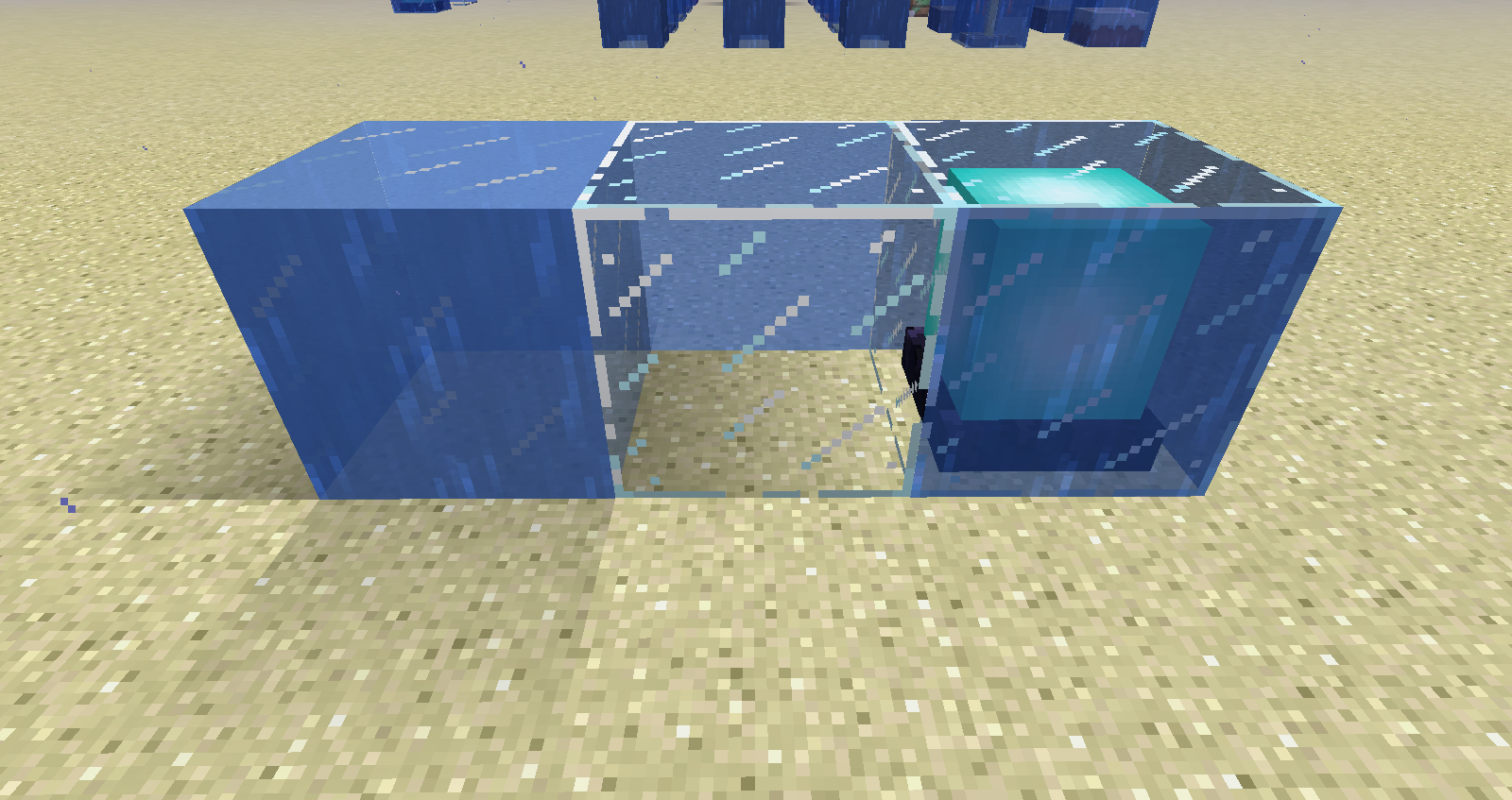
Note that glass blocks only render the adjacent water faces on the sides of the glass block that are on the other side (i.e. rendered through the front).
Note that ice (packed and blue ice both are not affected by this issue), although similarly transparent like glass blocks, show water faces on all sides, and not just the ones on the other side.
Confirmed for 1.13.2
Can't reproduce in 1.13.2.
I got the achievement, first time in a new world, but I don't know if this means it's fixed.
Confirmed in 1.13.2.
Still present in 1.13.2
Confirmed in 1.13.2
Confirmed for 1.13.2
Confirmed in 1.13.2
Confirmed in 1.13.2
Also note that blocks from the following subselection automatically pop off when placed in water anyway, so don't necessarily need to be able to get waterlogged:
Also add carpets to the list in the description. Because minecarts also pass through carpets when snapping to the rail below.
Although I really like this behaviour.
Confirmed for 1.13.2.
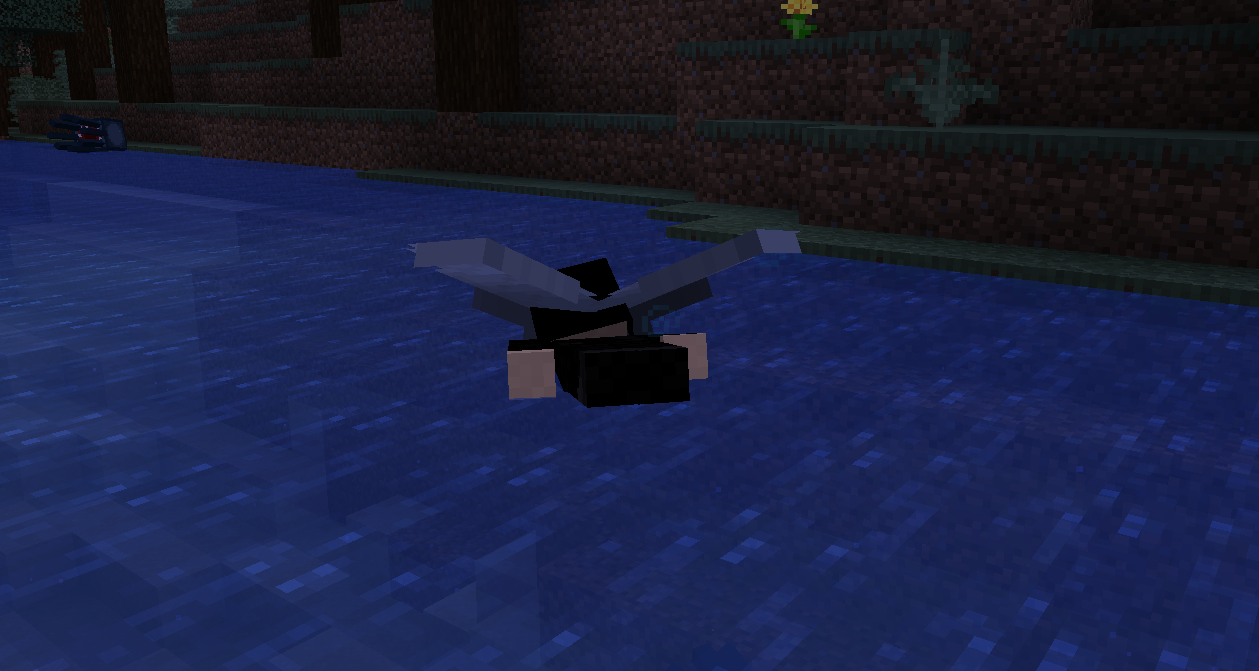
When you enter a body of water from an elytra flight, you will stay in some kind of semi-flight mode during swimming. You will be swimming, making swimming motions etc., but also flying. This is made apparent by two things;
-Your elytra wings remain in a spread out position as if you were flying, which would not be the case if you were swimming normally;
-When you reach the surface of the water, you will not be able to return to an upright position, as you would when swimming normally. You will stay horizontal and only unequiping the elytra or touching land will make you go upright.
If you touch land at any point, this semi-flight mode will finally be cancelled and everything returns to normal. But if you're just trying to surface from the water in the middle of an ocean, you will be forced in a horizontal position because there wouldn't be any land to cancel flight on.
One potential alternate solution to this (other than changing the above mentioned code), could be to cancel flight when swimming upwards using the Space key. This would make sense, because that key is used for swimming only, and when trying to swim, you shouldn't be flying anymore.
Might be related to
WEB-850but different. Logging in appears to be successful but without actual success, errors or failure messages.Confirmed for 18w47a
Confirmed for 18w47a
Confirmed for 18w47a
Confirmed for 18w47a
Confirmed for 18w47a
Confirmed on horses for 18w47a
Confirmed for 18w47a
Confirmed for 18w47a
Confirmed for 18w48a
Confirmed for 18w48a
Confirmed for 18w48a
Confirmed for 18w48a
Confirmed for 18w48a
Confirmed for 18w48a.
Some slabs are grouped, but not in several separate groups. and only some stairs are grouped. Lots of improvement still possible.
Does not appear to happen anymore in 18w48a. Might have been fixed earlier.
Confirmed for 18w48a
Confirmed for 18w48a
Confirmed for 18w48a
Confirmed for 18w48a
Confirmed for 18w48a
Confirmed for 18w48a
Confirmed for 18w48a
Confirmed for 18w48a
Confirmed for 18w48a
The game did not crash / not relevant.
(for others: I accidentally created this report with the text in the "Environment" field)
Confirmed for 18w48a
Confirmed for 18w48a
Confirmed "durability" / hardness issue with end stone bricks, for 18w48a.
Not tested ender dragon's ability to break the block.
Confirmed for 18w48a
Confirmed for 18w48a
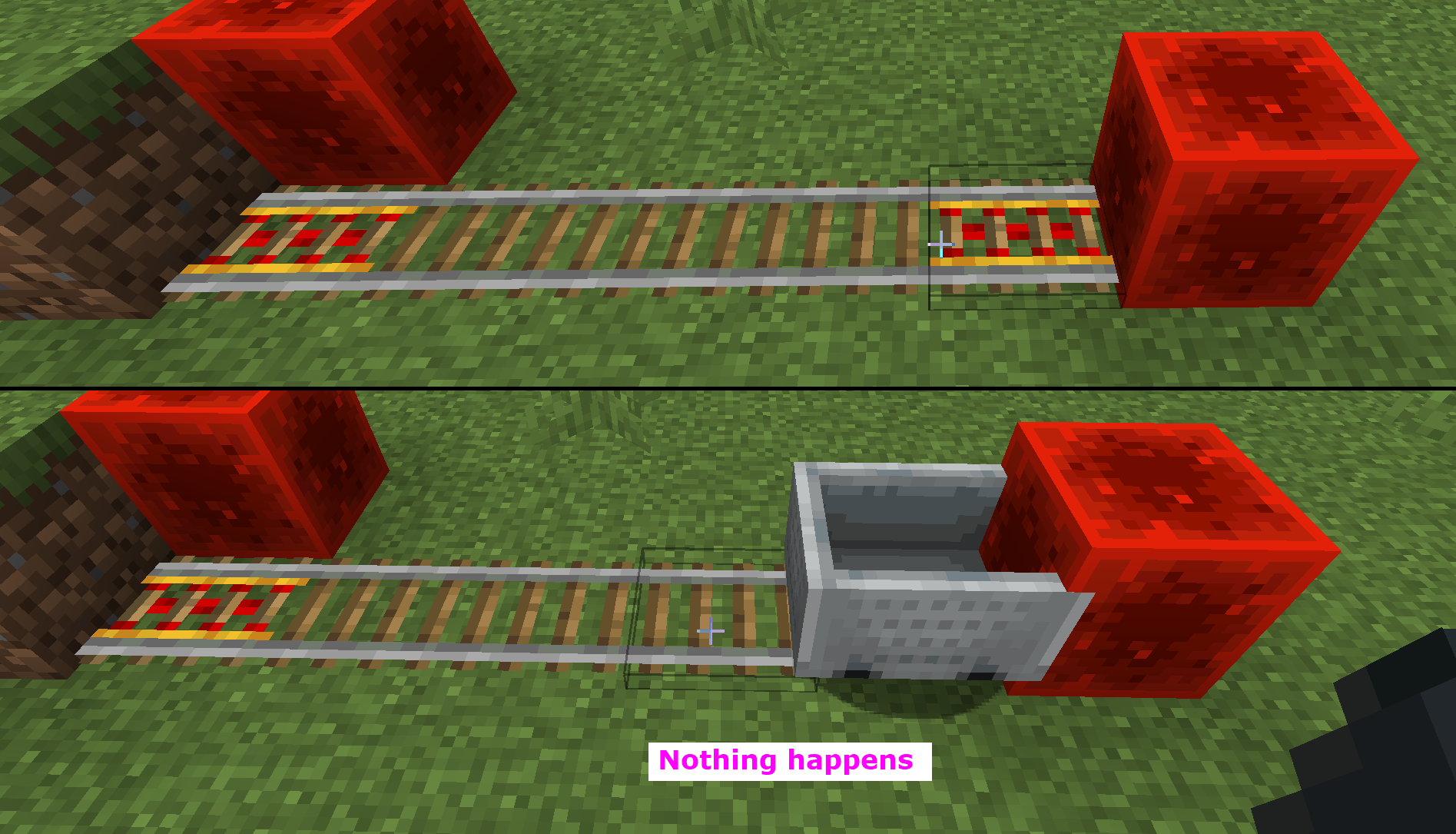
Pushed both the rails plus the block that supports it, yes.
Confirmed for 18w48a.
All blocks of the OP were re-tested, and all are still affected.
Exceptions:
How to reproduce (copied from now duplicate
MC-140266):1) Place a door with a roof block adjacent & above it to make it a house
2) Spawn a villager in the area and wait a few seconds for him to detect the door
3) Open its GUI (notice this works as expected)
4) Place or push another block on the other side of the door to make it invalid again
5) Open the villager's GUI after a few seconds (still works)
6) Replace the door
7) Open the villager's GUI after a few seconds (nothing happens)
Confirmed for 18w48a.
Not the carved pumpkin, but the uncarved pumpkin can be enchanted in an anvil.
Neither can be enchanted in an enchanting table as expected.
Confirmed for 18w48a
Confirmed for 18w48a
Confirmed for 18w48a
Confirmed for 18w48a.
Placed turtle eggs break by both throwing items with the throw-item key, as well as falling items that were pushed off a ledge by piston. (so both types of motion if these are different)
Confirmed for 18w48a
The mechanic works similar to the anvil, with a "main" input slot and a "sacrifice" one. Any enchantments or curses on the sacrifice will be lost regardless of the main item, as enchantments are not passed on through the grindstone. So if the sacrifice has a curse and the main item does not, the output will not be cursed. But if the main item has a curse, the output will have as well.
Initially I didn't think this was a bug, but maybe it is unintended result behaviour.
Confirmed for 18w48b
Confirmed for 18w48b
Confirmed for 18w48b
Confirmed for 18w48b
Confirmed for 18w48b
Confirmed for 18w48b
Confirmed for 18w48b
Confirmed for 18w48b
Confirmed for 18w48b
Confirmed for 18w48b
Confirmed for 18w48b
Confirmed for 18w48b
Confirmed for 18w48b
Confirmed for 18w48b
Confirmed for 18w48b
Confirmed for 18w48b
Confirmed for 18w48b
Confirmed for 18w48b, exactly the same as above
Confirmed for 18w48b
Confirmed for 18w48b
Confirmed for 18w48b
Confirmed for 18w48b
Confirmed for 18w48b, exactly the same as above
Confirmed for 18w48b
Confirmed for 18w48b
Confirmed for 18w48b
Confirmed for 18w48b
Confirmed for 18w48b
Confirmed for 18w48b
Please show picture of what you're doing where it drops the rail, as I cannot reproduce.
I've tried all orientations and positioning I could think of that would follow the rule "rail and the block it is attached to". The only way my rails drops is when I push the block below it but not the rail itself.
Confirmed for 18w48b.
When the careerlevel is specified and greater than zero, it will specifically unlock only the trade(s) at that career progression level. The CareerLevel property is not used to specify all trades, only to spedify which trades should be added to the previous career level.
When not specified or at zero or less, the career level has the effect of randomizing the career (as documented), however this also happens when you specifically specify a career.
The purpose of this operation appears to be evenly splitting items of a stack across the dragged-over slots, apparent from the limit of slots the items can be dragged over. Seeing 5 items cannot be split over 6 or more slots.
But it is re-used (now that we have the left-click drag for that), for the purpose of creative filling slots instead. In survival the effect is that the items cannot be duplicated and ghost items will temporarily appear during the drag.
Also, confirmed for 18w48b
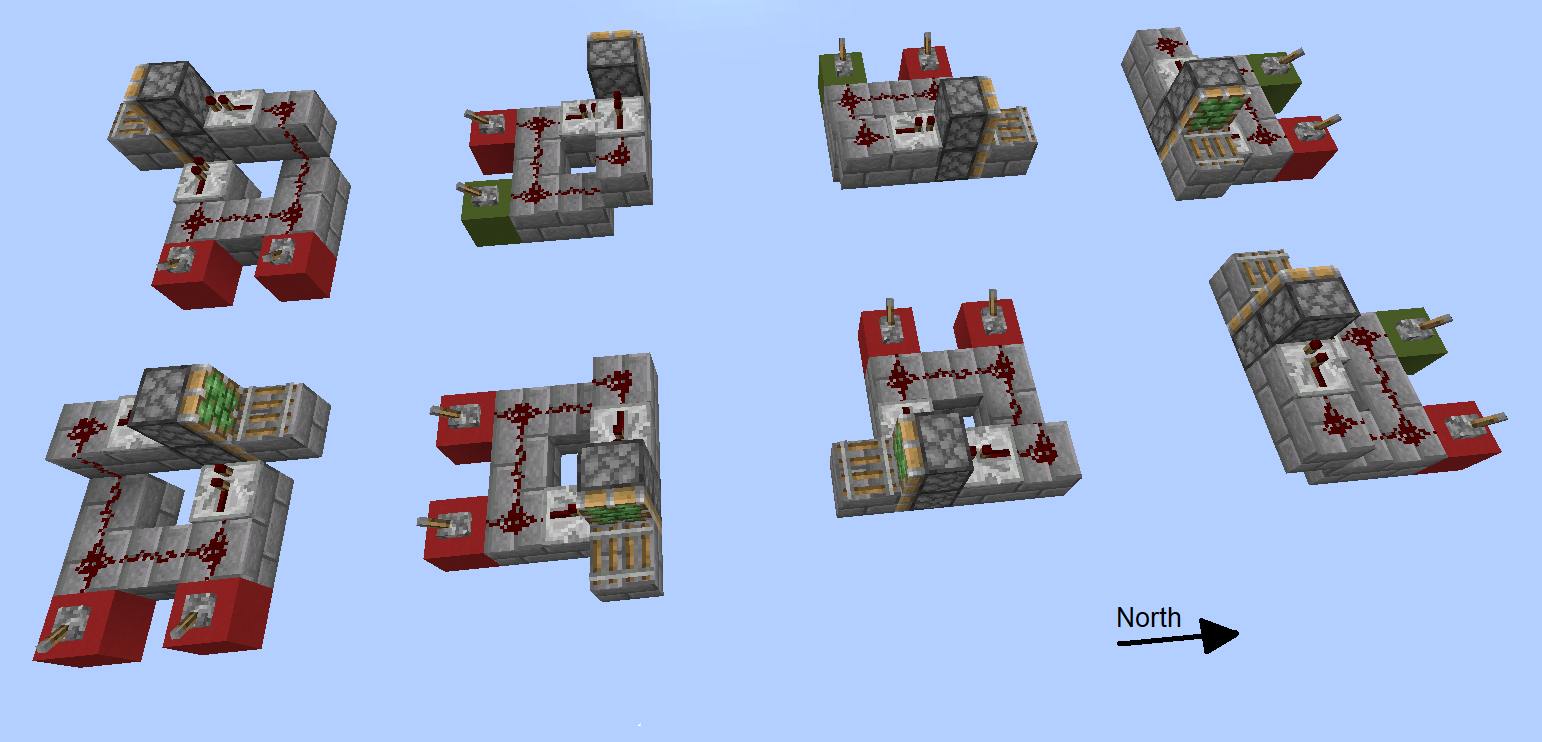
Thanks. I've summarized your and my findings in one hopefully more convenient screenshot. (as of screenshot, in 18w48b)
Could the description be modified please, to state that not "Pistons" but "Extended pistons" are affected?
I think the problem is more complicated or incomplete from above observations.
I tested the same configuration in four different mirrored orientations (more exist even!), and the problem doesn't happen consistently. Observe the piston orientations and each lever. Red blocks lead to dropped rails, green ones don't.
pistons bug2.png
Confirmed for 18w49a
Confirmed for 18w49a
Confirmed for 18w49a
Confirmed for 18w49a
Confirmed for 18w49a
Confirmed for 18w49a, the above conclusions still apply
Confirmed for 18w49a
Confirmed for 18w49a
Confirmed for 18w49a
Confirmed for 18w49a
Confirmed for 18w49a
Confirmed for 18w49a
Confirmed for 18w49a
Confirmed for 18w49a
Confirmed for 18w49a
Confirmed for 18w49a
Confirmed for 18w49a
Confirmed for 18w49a
Confirmed for 18w49a
Confirmed for 18w49a
Confirmed for 18w49a
Confirmed for 18w49a
Confirmed for 18w49a
Confirmed for 18w49a
Confirmed for 18w49a
Confirmed for 18w49a
Confirmed for 18w49a
Confirmed for 18w49a
Confirmed for 18w49a
Confirmed for 18w49a
Confirmed for 18w49a
Cannot reproduce in 18w49a. Trade window still opens after no doors are present.
Confirmed for 18w49a
Please reopen this ticket, as the sheep appear differently between Java and Bedrock edition. In bedrock they actually do show their dyed colours when sheared.
If this ticket would be too old, please reopen my new ticket
MC-120541Confirmed for 18w49a
Confirmed for 18w50a
Confirmed for 18w50a
Confirmed for 18w50a
Confirmed for 18w50a
Confirmed for 18w50a
Confirmed for 18w50a
Confirmed for 18w50a, as above
Confirmed for 18w50a
Confirmed for 18w50a
Confirmed for 18w50a
Confirmed for 18w50a
Confirmed for 18w50a
Confirmed for 18w50a
Confirmed for 18w50a
Confirmed for 18w50a
Confirmed for 18w50a
Confirmed for 18w50a
Confirmed for 18w50a
Confirmed for 18w50a
Confirmed for 18w50a
Confirmed for 18w50a
Confirmed for 18w50a
Cannot reproduce in 18w50a. Might have been fixed
Confirmed for 18w50a
Confirmed for 18w50a
Confirmed for 18w50a
Confirmed for 18w50a
Confirmed for 18w50a
Confirmed for 18w50a
Confirmed for 18w50a
Confirmed for 18w50a
Confirmed for 18w50a
Confirmed for 18w50a
Confirmed for 18w50a
Confirmed for 18w50a
Confirmed for 18w50a
Confirmed for 18w50a
Cannot reproduce in 18w50a.
Worsened in fact, cannot summon villager with specified profession even. Professions are randomized now as well, regardless of CareerLevel value (omited or non-negative). The "Profession", "Career" or "CareerLevel" nbt values might have been changed/renamed. I'm not sure how to test this anymore.
Retested with now updated NBT property names, and still affects 18w50a.
It is now possible to reliably summon villagers with any trade tier unlocked, however they would only include trades of that tier (and above when they get unlocked by trading manually).
So it is not possible to summon a villager with for instance the first two tiers unlocked, as
will skip level 1 and start trades at 2.
To summon a villager correctly now in 18w50a:
/summon minecraft:villager ~ ~.5 ~ {VillagerData: {level: 1, profession: "minecraft:librarian", type: "minecraft:plains"}}From above comments and other discussions I understand this type of villager is intended to exist, so I modified the description. It still is a bug that this type can randomly be summoned, so I refocused the description on that.
I can confirm this. Please tweak title to "Cleric villager's collar texture z-fighting", as I was not able to find this.
Also duplicated by
MC-141234.Thanks, I was not able to find that ticket due to its title. This ticket may be closed now.