 MC-187812
The buttons are not selected in the right order using Tab in the new datapacks and resource packs menus
The bug
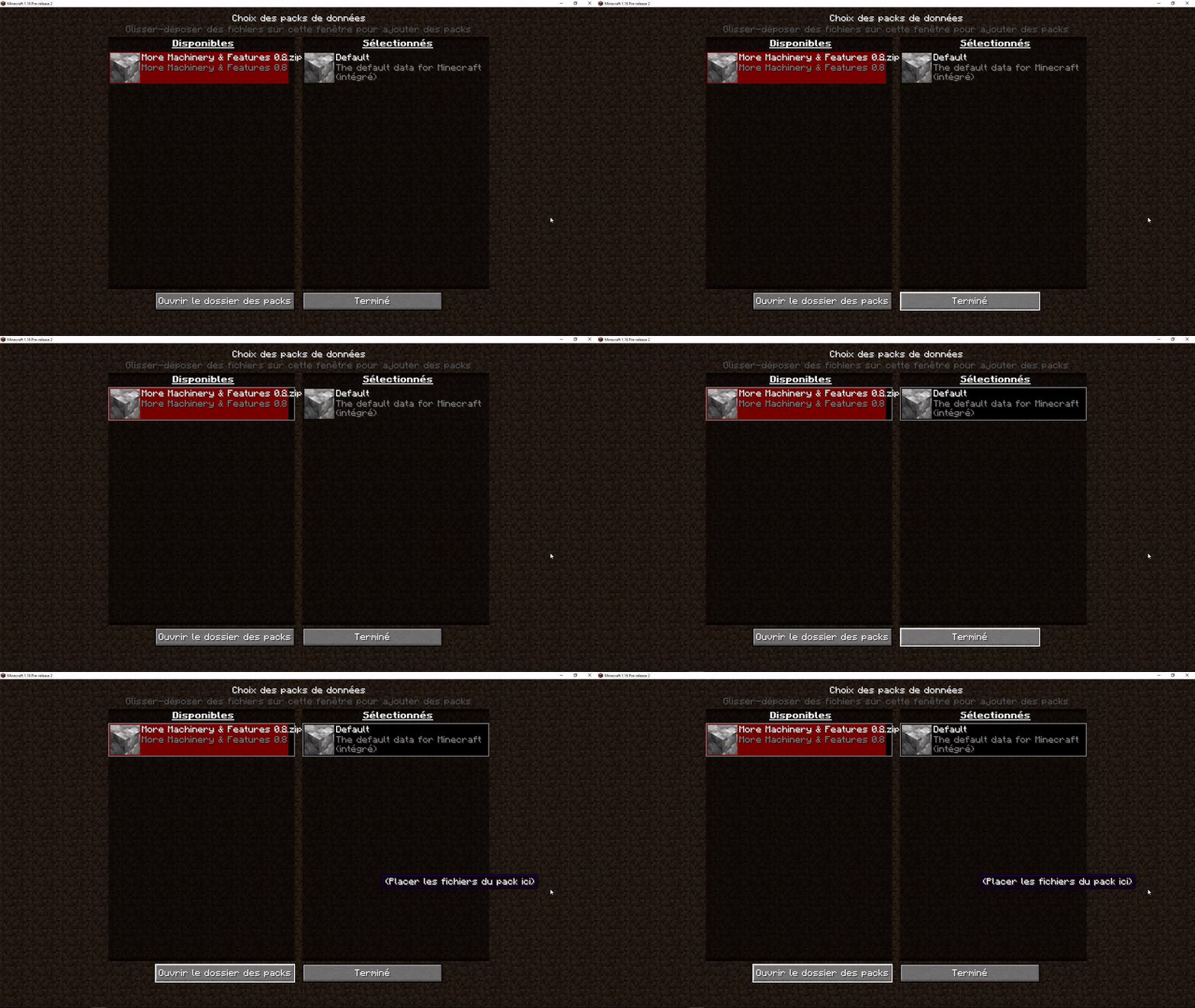
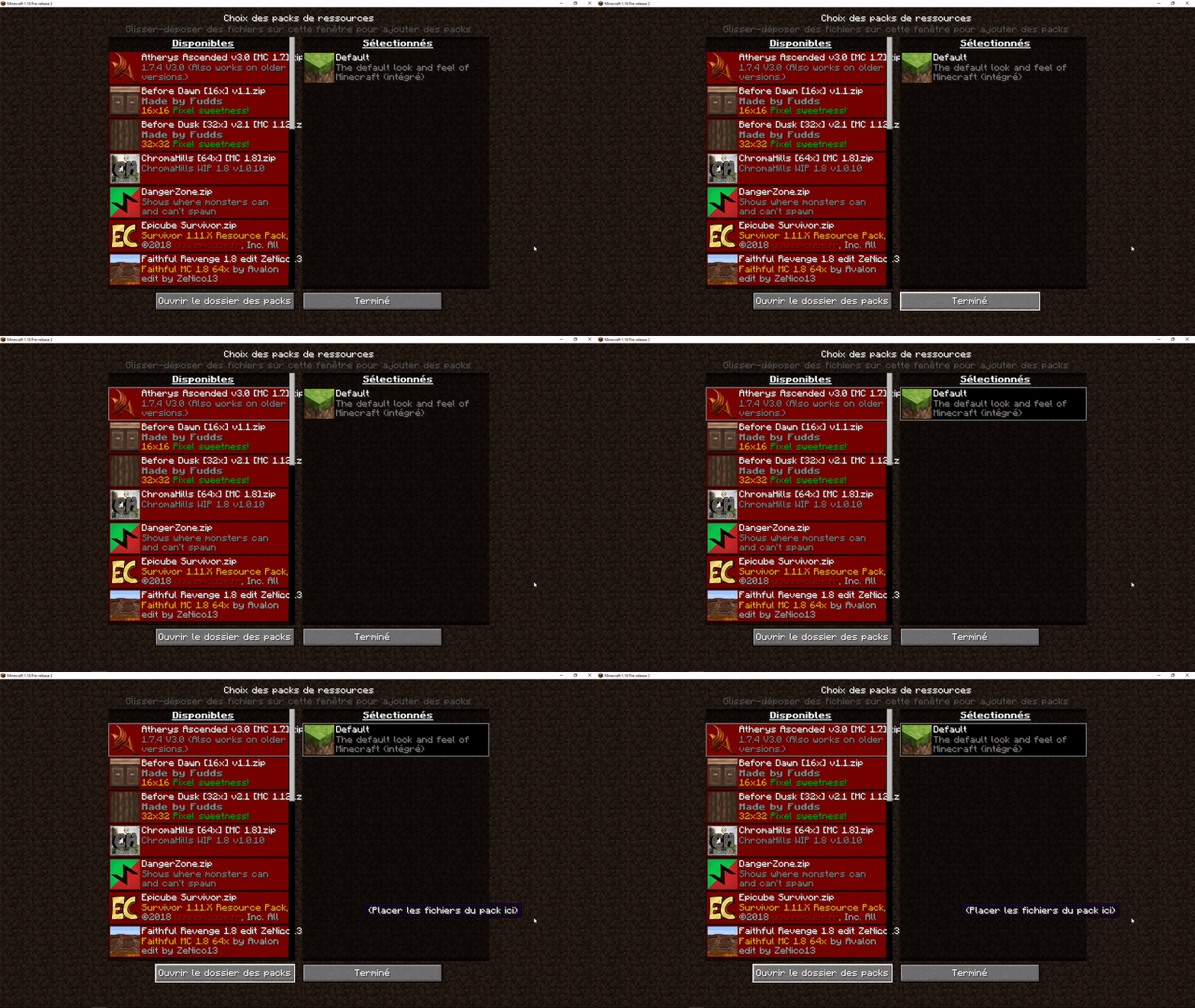
The buttons are not selected in the right order using Tab in the new datapacks and resource packs menus.
We can note that:
- Unlike all other menus, the "Done" and "Cancel" buttons are selected from right to left in the "Datapacks" and "Resource Packs" pages, instead of being selected from left to right
- When you get to the page, the first buttons selected are the "Done" and "Open Pack Folder" buttons, instead of the two lists
How to reproduce
Press the Tab key several times while in the Datapacks and/or Resource Packs menu.
Examples
Linked Issues
![[Mod] Avoma](../../../data/avatars/users/86198.png)
- Fixed
![[Helper] ZeNico13](../../../data/avatars/users/31913.png) [Helper] ZeNico13
[Helper] ZeNico13![[Mojang] eowyn36](../../../data/avatars/users/18935.svg) [Mojang] eowyn36
[Mojang] eowyn36- 6
- 4
- Confirmed
 Normal
- Accessibility UI
- accessibility buttons datapacks menu resource-pack tab ui
1.16-pre2 - 1.19.2
1.16-pre2 1.16-pre3 1.16-pre5 1.16-pre6 1.16-pre7 1.16-pre8 1.16-rc1 1.16 1.16.1 20w27a 20w28a 20w29a 20w30a 1.16.2-pre1 1.16.2-rc1 1.16.2-rc2 1.16.2 1.16.3-rc1 1.16.3 1.16.4-pre1 1.16.4-pre2 1.16.4-rc1 1.16.4 20w46a 20w48a 20w51a 21w03a 1.16.5 21w05a 21w05b 21w06a 21w07a 21w11a 1.17-pre2 1.17.1 1.18.1-pre1 1.18.1 1.18.2 1.19 22w24a 1.19.2- 1.19.3-rc1
Created Issue:
The buttons are not selected in the right order using Tab in the new datapacks menu
The bug
The buttons are not selected in the right order using Tab in the new datapacks menu.
Effectively, unlike all other menus, the "Done" and "Cancel" buttons are selected from right to left in the "Datapacks" page, instead of being selected from left to right.
How to reproduce
Press the Tab key several times while in the Gamerules edit menu to move down.
Example
Attachments1
The buttons are not selected in the right order using Tab in the new datapacks and ressource packs menus
The bug
The buttons are not selected in the right order using Tab in the new datapacks and ressource packs menus.
Effectively, unlike all other menus, the "Done" and "Cancel" buttons are selected from right to left in the "Datapacks" and "Ressource Packs" pages, instead of being selected from left to right.
How to reproduce
Press the Tab key several times while in the Gamerules edit menu to move down.
Examples

The bug
The buttons are not selected in the right order using Tab in the new datapacks and ressource packs menus.
Effectively, unlike all other menus, the "Done" and "Cancel" buttons are selected from right to left in the "Datapacks" and "Ressource Packs" pages, instead of being selected from left to right.
How to reproduce
Press the Tab key several times while in the
Gamerules editmenu to move down.Examples
The bug
The buttons are not selected in the right order using Tab in the new datapacks and ressource packs menus.
Effectively, unlike all other menus, the "Done" and "Cancel" buttons are selected from right to left in the "Datapacks" and "Ressource Packs" pages, instead of being selected from left to right.
How to reproduce
Press the Tab key several times while in the Datapack and/or Ressource Packs menu to move down.
Examples
The bug
The buttons are not selected in the right order using Tab in the new datapacks and ressource packs menus.
Effectively, unlike all other menus, the "Done" and "Cancel" buttons are selected from right to left in the "Datapacks" and "Ressource Packs" pages, instead of being selected from left to right.
How to reproduce
Press the Tab key several times while in the Datapacks and/or Ressource Packs menu to move down.
Examples
The bug
The buttons are not selected in the right order using Tab in the new datapacks and ressource packs menus.
Effectively, unlike all other menus, the "Done" and "Cancel" buttons are selected from right to left in the "Datapacks" and "Ressource Packs" pages, instead of being selected from left to right.
How to reproduce
Press the Tab key several times while in the Datapacks and/or Ressource Packs menu
to move down.Examples
Tab Buttons Ressource Packs Menu.gif
The bug
The buttons are not selected in the right order using Tab in the new datapacks and ressource packs menus.
Effectively, unlike all other menus, the "Done" and "Cancel" buttons are selected from right to left in the "Datapacks" and "Ressource Packs" pages, instead of being selected from left to right.
How to reproduce
Press the Tab key several times while in the Datapacks and/or Ressource Packs menu.
Examples
The bug
The buttons are not selected in the right order using Tab in the new datapacks and ressource packs menus.
We can note that:
- Unlike all other menus, the "Done" and "Cancel" buttons are selected from right to left in the "Datapacks" and "Ressource Packs" pages, instead of being selected from left to right
- When you get to the page, the first buttons selected are the "Done" and "Open Pack Folder" buttons, instead of the two lists
How to reproduce
Press the Tab key several times while in the Datapacks and/or Ressource Packs menu.
Examples
The buttons are not selected in the right order using Tab in the new datapacks and ressource packs menus
The bug
The buttons are not selected in the right order using Tab in the new datapacks and res
source packs menus.We can note that:
- Unlike all other menus, the "Done" and "Cancel" buttons are selected from right to left in the "Datapacks" and "Res
source Packs" pages, instead of being selected from left to right- When you get to the page, the first buttons selected are the "Done" and "Open Pack Folder" buttons, instead of the two lists
How to reproduce
Press the Tab key several times while in the Datapacks and/or Res
source Packs menu.Examples
The bug
The buttons are not selected in the right order using Tab in the new datapacks and resource packs menus.
We can note that:
- Unlike all other menus, the "Done" and "Cancel" buttons are selected from right to left in the "Datapacks" and "Resource Packs" pages, instead of being selected from left to right
- When you get to the page, the first buttons selected are the "Done" and "Open Pack Folder" buttons, instead of the two lists
How to reproduce
Press the Tab key several times while in the Datapacks and/or Resource Packs menu.
Examples

![[Mojang] Adrian Östergård](../../../data/assets/gravatar/nighter.jpeg) Normal
Normal![[Mod] violine1101](../../../data/avatars/users/92858.png)
![[Mod] NeunEinser](../../../data/avatars/users/39263.png)
is duplicated by
![[Bot] Arisa](../../../data/avatars/users/43007.png)

![[Helper] Johnibur](../../../data/avatars/users/28381.png)
![[Mod] Michael Wobst](../../../data/avatars/users/37868.png)
![[Mod] ampolive](../../../data/avatars/users/18949.svg) [Mojang] eowyn36
[Mojang] eowyn36![[Mod] j_p_smith](../../../data/avatars/users/92851.png)
Duplicate of MC-187812.
Can confirm in 1.17.1.
Relates to
MC-233967.Can confirm in 1.18 pre release 1
Can confirm in 1.18.1.
Can confirm in 1.18.2.
Can confirm in 1.19 and 22w24a.
Can confirm in 1.19.2.