 MC-238573
Custom block models are incorrectly lit at low light levels
When using custom models for blocks (such as dripstone) the game will sometimes incorrectly render some faces of the model fully bright.
It happens when the block is on the edge between 1 and 0 block/sky light.


I don't think this should be classified as invalid because even tough it's only visible on non-vanilla block models this is a problem with the rendering engine itself rather than the texturepack.
Steps To Reproduce
- Download and enable this resource pack bright_kelp.zip

- Go into the ocean
- Find kelp
- Observe the kelp becoming bright on the transition from 1 to 0 skylight
Alternatively
- Download and enable the resource pack Enhanced Dripstone v1.1.zip
- Place down a torch
- Dig a 13 block long tunnel away from the torch (as shown in attachment below)
- Place a barrier block on the 12th block and a dripstone on top of it
- Observe the bug
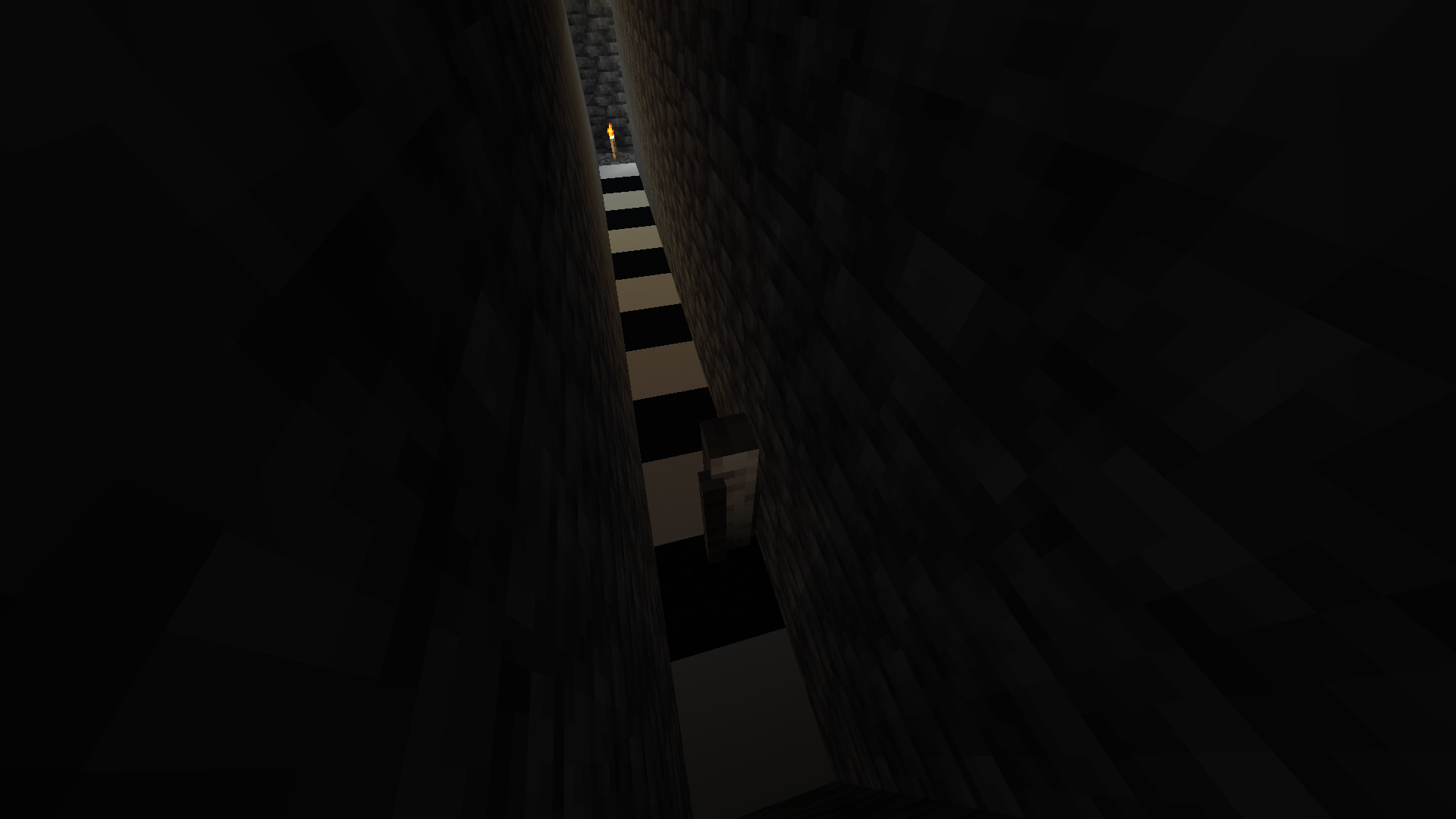
Expected Behavior
These blocks wouldn't be fully lit at very low light levels
Observed Behavior
They are.
Linked Issues


 Normal
Created Issue:
Rendering engine creates weird fullbright spots on dripstone with custom texturepacks
When using custom texturepacks for dripstone in very specific proximities to a light source white lines render on pointed dripstone.
I don't think this should be classified as invalid because even tough it only happens to pointed dripstone in custom texturepacks this is a problem with the rendering engine rather than the texturepack itself
Attachments3
![[Mod] markderickson](../../../data/avatars/users/18946.svg)
![[Mod] SPGoding](../../../data/avatars/users/44622.png)
When using custom texturepacks for dripstone in very specific proximities to a light source white lines render on pointed dripstone.
I don't think this should be classified as invalid because even tough it only happens to pointed dripstone in custom texturepacks this is a problem with the rendering engine rather than the texturepack itselfTo Reproduce
- Download and enable the resource pack Enhanced Dripstone v1.1.zip
- Create a single biome Dripstone Caves world with seed -5389372281672104669
- /execute in minecraft:overworld run tp @s 19.79 0.00 -62.66 231.36 11.17
Expected Behavior
The side of the pointed dripstone should not be fully bright.
Observed Behavior
It is.
When using custom texturepacks for dripstone in very specific proximities to a light source white lines render on pointed dripstone.
I don't think this should be classified as invalid because even tough it only happens to pointed dripstone in custom texturepacks this is a problem with the rendering engine rather than the texturepack itselfTo Reproduce
- Download and enable the resource pack Enhanced Dripstone v1.1.zip
- Create a single biome Dripstone Caves world with seed -5389372281672104669
- /execute in minecraft:overworld run tp @s 19.79 0.00 -62.66 231.36 11.17
Expected Behavior
The side of the pointed dripstone should not be fully bright.
Observed Behavior
It is.
When using custom texturepacks for dripstone in very specific proximities to a light source white lines render on pointed dripstone.
I don't think this should be classified as invalid because even tough it only happens to pointed dripstone in custom texturepacks this is a problem with the rendering engine rather than the texturepack itselfTo Reproduce
- Download and enable the resource pack Enhanced Dripstone v1.1.zip
Expected Behavior
The side of the pointed dripstone should not be fully bright.
Observed Behavior
It is.
When using custom texturepacks for dripstone in very specific proximities to a light source white lines render on pointed dripstone.
I don't think this should be classified as invalid because even tough it only happens to pointed dripstone in custom texturepacks this is a problem with the rendering engine rather than the texturepack itselfTo Reproduce
- Download and enable the resource pack Enhanced Dripstone v1.1.zip
Expected Behavior
The side of the pointed dripstone should not be fully bright.
Observed Behavior
It is.
When using custom texturepacks for dripstone in very specific proximities to a light source white lines render on pointed dripstone.
I don't think this should be classified as invalid because even tough it only happens to pointed dripstone in custom texturepacks this is a problem with the rendering engine rather than the texturepack itselfTo Reproduce
- Download and enable the resource pack Enhanced Dripstone v1.1.zip
Expected Behavior
The side of the pointed dripstone should not be fully bright.
Observed Behavior
It is.
![[Mojang] Moesh](../../../data/avatars/users/10122.svg)
![[Helper] Johnibur](../../../data/avatars/users/28381.png)
![[Mojang] slicedlime](../../../data/assets/gravatar/slicedlime.jpeg)
![[Mod] ampolive](../../../data/avatars/users/18949.svg)
Rendering engine createsweirdfullbright spots ondripstone with custom texturepacksRendering engine creates fullbright spots on custom block models at low light levels
When using custom texturepacks for dripstone in very specific proximities to a light source white lines render on pointed dripstone.
I don't think this should be classified as invalid because even tough it only happens to pointed dripstone in custom texturepacks this is a problem with the rendering engine rather than the texturepack itselfTo Reproduce
- Download and enable the resource pack Enhanced Dripstone v1.1.zip
Expected Behavior
The side of the pointed dripstone should not be fully bright.
Observed Behavior
It is.
When using custom models for blocks (such as dripstone) the game will incorrectly render some faces of the model fully bright.
I don't think this should be classified as invalid because even tough it's only visible on non-vanilla block models this is a problem with the rendering engine itself rather than the texturepack
To Reproduce
- Download and enable the resource pack Enhanced Dripstone v1.1.zip
- Place down a torch
- Dig a 13 block long tunnel away from the torch
- Place a barrier on the 12th block and a dripstone on top
- Observe the bug
Expected Behavior
The side of the pointed dripstone should not be fully bright.
Observed Behavior
It is.
When using custom models for blocks (such as dripstone) the game will incorrectly render some faces of the model fully bright.
I don't think this should be classified as invalid because even tough it's only visible on non-vanilla block models this is a problem with the rendering engine itself rather than the texturepack
To Reproduce
- Download and enable the resource pack Enhanced Dripstone v1.1.zip
- Place down a torch
- Dig a 13 block long tunnel away from the torch
- Place a barrier on the 12th block and a dripstone on top
- Observe the bug
Expected Behavior
The side of the pointed dripstone should not be fully bright.
Observed Behavior
It is.
When using custom models for blocks (such as dripstone) the game will sometimes incorrectly render some faces of the model fully bright.
It happens when the block is on the edge between 1 and 0 block light.
I don't think this should be classified as invalid because even tough it's only visible on non-vanilla block models this is a problem with the rendering engine itself rather than the texturepack.
To Reproduce
- Download and enable the resource pack Enhanced Dripstone v1.1.zip
- Place down a torch
- Dig a 13 block long tunnel away from the torch (as shown in attachment below)
- Place a barrier block on the 12th block and a dripstone on top of it
- Observe the bug
Expected Behavior
The side of the pointed dripstone should not be fully bright.
Observed Behavior
It is.
![[Mojang] TommyWallberg](../../../data/avatars/users/18941.svg)
relates to
![[Mod] turbo](../../../data/avatars/users/92867.png)
is duplicated by
![[Bot] Arisa](../../../data/avatars/users/43007.png)
relates to
Rendering engine creates fullbright spots on custom block modelsat low light levelsCustom block models are incorrectly lit at low light levels
When using custom models for blocks (such as dripstone) the game will sometimes incorrectly render some faces of the model fully bright.
It happens when the block is on the edge between 1 and 0 block light.
I don't think this should be classified as invalid because even tough it's only visible on non-vanilla block models this is a problem with the rendering engine itself rather than the texturepack.
To Reproduce
- Download and enable the resource pack Enhanced Dripstone v1.1.zip
- Place down a torch
- Dig a 13 block long tunnel away from the torch (as shown in attachment below)
- Place a barrier block on the 12th block and a dripstone on top of it
- Observe the bug
Expected Behavior
The
side of the pointed dripstone shouldnot be fullybright.Observed Behavior
It is.
When using custom models for blocks (such as dripstone) the game will sometimes incorrectly render some faces of the model fully bright.
It happens when the block is on the edge between 1 and 0 block light.
I don't think this should be classified as invalid because even tough it's only visible on non-vanilla block models this is a problem with the rendering engine itself rather than the texturepack.
Steps To Reproduce
- Download and enable this resource pack bright_kelp.zip
- Go into the ocean
- Find kelp
- Observe the kelp becoming bright on the transition from 1 to 0 skylight
Alternatively
- Download and enable the resource pack Enhanced Dripstone v1.1.zip
- Place down a torch
- Dig a 13 block long tunnel away from the torch (as shown in attachment below)
- Place a barrier block on the 12th block and a dripstone on top of it
- Observe the bug
Expected Behavior
These blocks wouldn't be fully lit at very low light levels
Observed Behavior
They are.
When using custom models for blocks (such as dripstone) the game will sometimes incorrectly render some faces of the model fully bright.
It happens when the block is on the edge between 1 and 0 block/sky light.
I don't think this should be classified as invalid because even tough it's only visible on non-vanilla block models this is a problem with the rendering engine itself rather than the texturepack.
Steps To Reproduce
- Download and enable this resource pack bright_kelp.zip
- Go into the ocean
- Find kelp
- Observe the kelp becoming bright on the transition from 1 to 0 skylight
Alternatively
- Download and enable the resource pack Enhanced Dripstone v1.1.zip
- Place down a torch
- Dig a 13 block long tunnel away from the torch (as shown in attachment below)
- Place a barrier block on the 12th block and a dripstone on top of it
- Observe the bug
Expected Behavior
These blocks wouldn't be fully lit at very low light levels
Observed Behavior
They are.
This is a duplicate of MC-238573
The bright spots appear exclusively when light level goes between 1 and 0 which is consistent with that issue.
The report summary and decription is just wrong. It has nothing to do with y levels or powers of 16. You can easily see it by just changing the water depth.
Minecraft 2024.12.21 - 07.50.12.11.mp4
As I previously stated this is an exact duplicate of MC-238573
Thank you for your report!
We're tracking this issue in MC-238573, so this ticket is being resolved and linked as a duplicate.
If you would like to add a vote and any extra information to the main ticket it would be appreciated.
If you haven't already, you might like to make use of the search feature to see if the issue has already been mentioned.
Quick Links:
📓 Bug Tracker Guidelines – 💬 Community Support – 📧 Mojang Support (Technical Issues) – 📧 Microsoft Support (Account Issues)
📓 Project Summary – ✍️ Feedback and Suggestions – 📖 Game Wiki
– I am a bot. This action was performed automatically! The ticket was resolved by one of our moderators, and I left this message to give more information to you.
I can confirm but this is invalid (modified game)
Turn off the resource pack. If the issue persists, I suggest recreating the issue without the resource pack. If its the pack, its probably broken or designed that way.