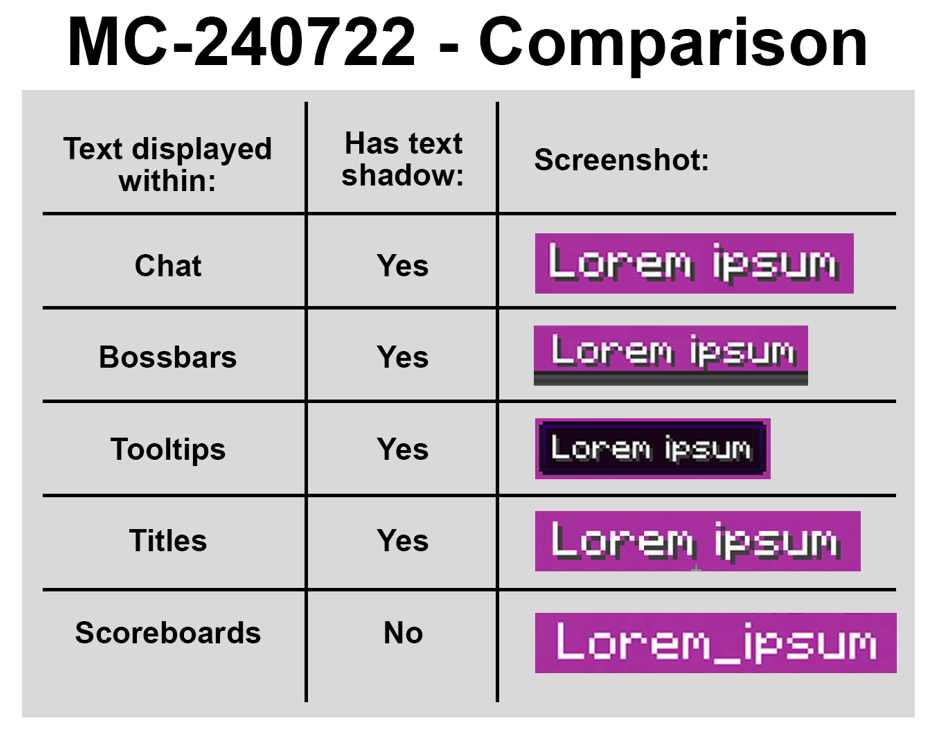
There are no shadows on text displayed within the scoreboard overlay
The Bug:
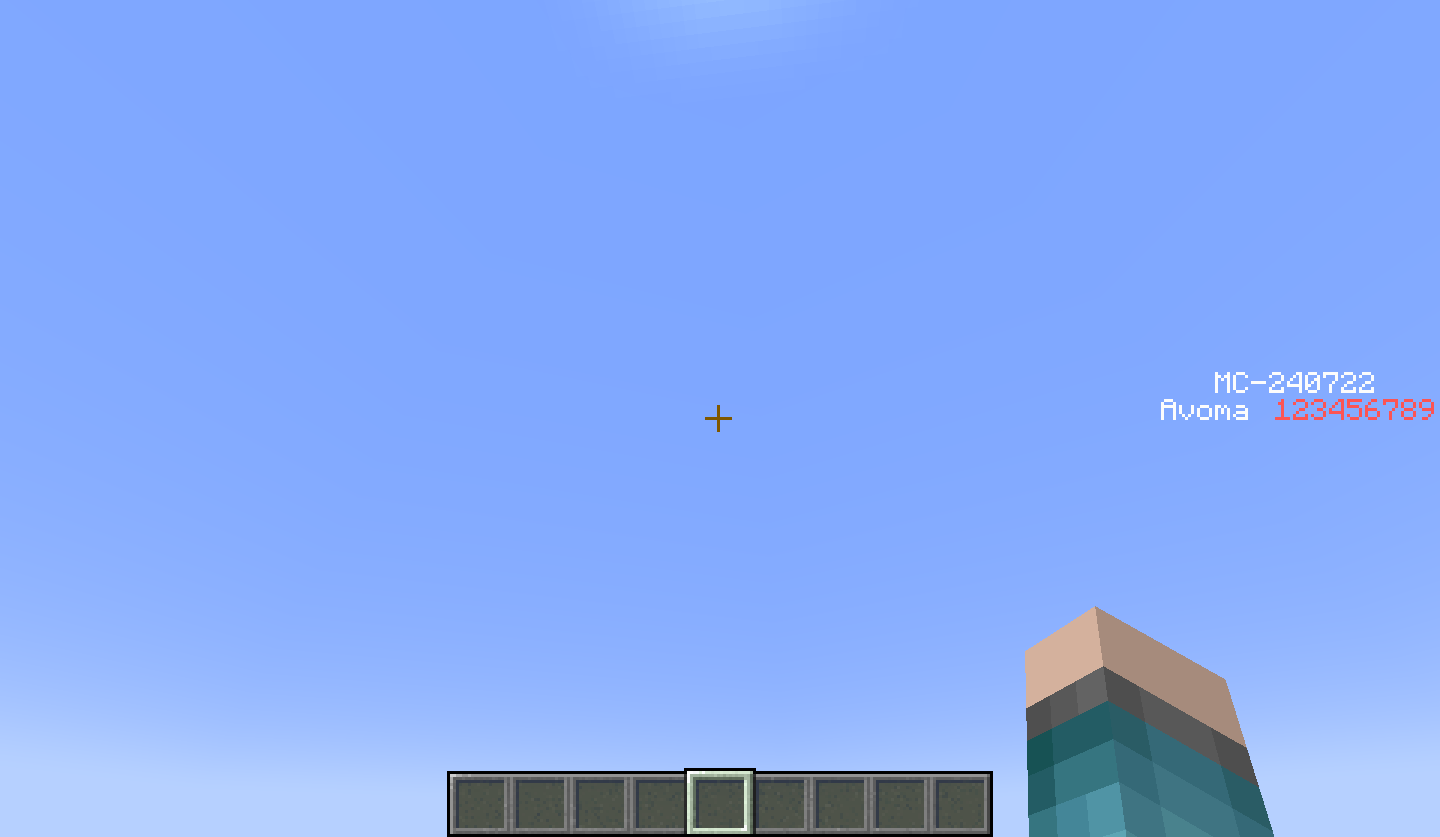
There are no shadows on text displayed within the scoreboard overlay.
This is an issue because when the "Text Background Opacity" slider is set to "0%", the text can be quite difficult to read, so having a shadow displayed on all text within the scoreboard overlay would resolve this problem.
Steps to Reproduce:
- Navigate to your accessibility settings menu and set the "Text Background Opacity" slider to "0%" and the "Text Background" button to "Everywhere".
- Display some text on the scoreboard by using the commands provided below.
/scoreboard objectives add MC-240722 dummy
/scoreboard objectives setdisplay sidebar MC-240722
/scoreboard players set @s MC-240722 123456789
- Look closely at the text displayed within the scoreboard.
- Take note as to whether or not there are any shadows on text displayed within the scoreboard overlay.
Observed Behavior:
There are no shadows on text displayed within the scoreboard overlay.
Expected Behavior:
There would be shadows on text displayed within the scoreboard overlay.
Linked Issues
relates to12
 MC-72687There are no shadows on text displayed within the action barFixedMC-240724There are no shadows on text displayed within the subtitles overlayFixedMC-276796There are no shadows on text displayed within inventories or interactable blocksWorks As IntendedMC-276797There are no shadows on text displayed within the written and writable book interfacesWorks As IntendedMC-276798There are no shadows on text displayed within signs or sign interfacesWorks As IntendedMC-277695The text cursor between characters has no shadow, but the cursor at the end doesConfirmedMC-241520There are no shadows on text displayed within entity namesWorks As IntendedMC-241537There are no shadows on text displayed within a variety of UIsInvalidMC-268822There are no shadows on text displayed within the singleplayer, multiplayer, and realms list menusFixedMC-276794There are no shadows on text displayed within the social interactions list menuFixedMC-276795There are no shadows on text displayed within toastsWorks As IntendedMC-276799There are no shadows on text displayed within the superflat customization or preset listsFixed
![[Mod] Avoma](../../../data/avatars/users/86198.png)

Created Issue:
There are no shadows on text displayed within the scoreboard overlay
The Bug:
There are no shadows on text displayed within the scoreboard overlay.
Steps to Reproduce:
- Display some text on the scoreboard.
- Navigate to your accessibility settings menu and set the "Text Background Opacity" slider to "0%" and the "Text Background" button to "Everywhere".
- Look closely at the text displayed within the scoreboard.
- Take note as to whether or not there are any shadows on text displayed within the scoreboard overlay.
Observed Behavior:
There are no shadows on text displayed within the scoreboard overlay.
Expected Behavior:
There would be shadows on text displayed within the scoreboard overlay.
The Bug:
There are no shadows on text displayed within the scoreboard overlay.
Steps to Reproduce:
- Display some text on the scoreboard.
testdummy /scoreboard objectives setdisplay sidebartest/scoreboard players set @stest123456789
- Navigate to your accessibility settings menu and set the "Text Background Opacity" slider to "0%" and the "Text Background" button to "Everywhere".
- Look closely at the text displayed within the scoreboard.
- Take note as to whether or not there are any shadows on text displayed within the scoreboard overlay.
Observed Behavior:
There are no shadows on text displayed within the scoreboard overlay.
Expected Behavior:
There would be shadows on text displayed within the scoreboard overlay.
The Bug:
There are no shadows on text displayed within the scoreboard overlay.
Steps to Reproduce:
- Display some text on the scoreboard.
- Navigate to your accessibility settings menu and set the "Text Background Opacity" slider to "0%" and the "Text Background" button to "Everywhere".
- Look closely at the text displayed within the scoreboard.
- Take note as to whether or not there are any shadows on text displayed within the scoreboard overlay.
Observed Behavior:
There are no shadows on text displayed within the scoreboard overlay.
Expected Behavior:
There would be shadows on text displayed within the scoreboard overlay.
The Bug:
There are no shadows on text displayed within the scoreboard overlay.
This is an issue because when the "Text Background Opacity" slider is set to "0%", the text can be quite difficult to read, so having a shadow displayed on all text within the scoreboard overlay would resolve this problem.
Steps to Reproduce:
- Display some text on the scoreboard.
- Navigate to your accessibility settings menu and set the "Text Background Opacity" slider to "0%" and the "Text Background" button to "Everywhere".
- Look closely at the text displayed within the scoreboard.
- Take note as to whether or not there are any shadows on text displayed within the scoreboard overlay.
Observed Behavior:
There are no shadows on text displayed within the scoreboard overlay.
Expected Behavior:
There would be shadows on text displayed within the scoreboard overlay.
![[Mod] CubeTheThird](../../../data/assets/gravatar/cubethethird.jpeg)
relates to
![[Mod] Michael Wobst](../../../data/avatars/users/37868.png)
![[Mojang] Moesh](../../../data/avatars/users/10122.svg)
 Normal
The Bug:
There are no shadows on text displayed within the scoreboard overlay.
This is an issue because when the "Text Background Opacity" slider is set to "0%", the text can be quite difficult to read, so having a shadow displayed on all text within the scoreboard overlay would resolve this problem.
Steps to Reproduce:
- Display some text on the scoreboard.
- Navigate to your accessibility settings menu and set the "Text Background Opacity" slider to "0%" and the "Text Background" button to "Everywhere".
- Look closely at the text displayed within the scoreboard.
- Take note as to whether or not there are any shadows on text displayed within the scoreboard overlay.
Observed Behavior:
There are no shadows on text displayed within the scoreboard overlay.
Expected Behavior:
There would be shadows on text displayed within the scoreboard overlay.
The Bug:
There are no shadows on text displayed within the scoreboard overlay.
This is an issue because when the "Text Background Opacity" slider is set to "0%", the text can be quite difficult to read, so having a shadow displayed on all text within the scoreboard overlay would resolve this problem.
Steps to Reproduce:
- Navigate to your accessibility settings menu and set the "Text Background Opacity" slider to "0%" and the "Text Background" button to "Everywhere".
- Display some text on the scoreboard.
- Look closely at the text displayed within the scoreboard.
- Take note as to whether or not there are any shadows on text displayed within the scoreboard overlay.
Observed Behavior:
There are no shadows on text displayed within the scoreboard overlay.
Expected Behavior:
There would be shadows on text displayed within the scoreboard overlay.
The Bug:
There are no shadows on text displayed within the scoreboard overlay.
This is an issue because when the "Text Background Opacity" slider is set to "0%", the text can be quite difficult to read, so having a shadow displayed on all text within the scoreboard overlay would resolve this problem.
Steps to Reproduce:
- Navigate to your accessibility settings menu and set the "Text Background Opacity" slider to "0%" and the "Text Background" button to "Everywhere".
- Display some text on the scoreboard.
- Look closely at the text displayed within the scoreboard.
- Take note as to whether or not there are any shadows on text displayed within the scoreboard overlay.
Observed Behavior:
There are no shadows on text displayed within the scoreboard overlay.
Expected Behavior:
There would be shadows on text displayed within the scoreboard overlay.
The Bug:
There are no shadows on text displayed within the scoreboard overlay.
This is an issue because when the "Text Background Opacity" slider is set to "0%", the text can be quite difficult to read, so having a shadow displayed on all text within the scoreboard overlay would resolve this problem.
Steps to Reproduce:
- Navigate to your accessibility settings menu and set the "Text Background Opacity" slider to "0%" and the "Text Background" button to "Everywhere".
- Display some text on the scoreboard.
- Look closely at the text displayed within the scoreboard.
- Take note as to whether or not there are any shadows on text displayed within the scoreboard overlay.
Observed Behavior:
There are no shadows on text displayed within the scoreboard overlay.
Expected Behavior:
There would be shadows on text displayed within the scoreboard overlay.
![[Mod] ampolive](../../../data/avatars/users/18949.svg)
relates to
![[Mojang] eowyn36](../../../data/avatars/users/18935.svg) [Mojang] eowyn36[Mojang] eowyn36
[Mojang] eowyn36[Mojang] eowyn36The Bug:
There are no shadows on text displayed within the scoreboard overlay.
This is an issue because when the "Text Background Opacity" slider is set to "0%", the text can be quite difficult to read, so having a shadow displayed on all text within the scoreboard overlay would resolve this problem.
Steps to Reproduce:
- Navigate to your accessibility settings menu and set the "Text Background Opacity" slider to "0%" and the "Text Background" button to "Everywhere".
- Display some text on the scoreboard.
/scoreboard objectives setdisplay sidebar MC-240722 /scoreboard players set @s MC-240722 123456789
- Look closely at the text displayed within the scoreboard.
- Take note as to whether or not there are any shadows on text displayed within the scoreboard overlay.
Observed Behavior:
There are no shadows on text displayed within the scoreboard overlay.
Expected Behavior:
There would be shadows on text displayed within the scoreboard overlay.
The Bug:
There are no shadows on text displayed within the scoreboard overlay.
This is an issue because when the "Text Background Opacity" slider is set to "0%", the text can be quite difficult to read, so having a shadow displayed on all text within the scoreboard overlay would resolve this problem.
Steps to Reproduce:
- Navigate to your accessibility settings menu and set the "Text Background Opacity" slider to "0%" and the "Text Background" button to "Everywhere".
- Display some text on the scoreboard by using the commands provided below.
/scoreboard objectives add MC-240722 dummy/scoreboard objectives setdisplay sidebar MC-240722/scoreboard players set @s MC-240722 123456789- Look closely at the text displayed within the scoreboard.
- Take note as to whether or not there are any shadows on text displayed within the scoreboard overlay.
Observed Behavior:
There are no shadows on text displayed within the scoreboard overlay.
Expected Behavior:
There would be shadows on text displayed within the scoreboard overlay.
![[Mojang] slicedlime](../../../data/assets/gravatar/slicedlime.jpeg)
relates to
![[Mojang] Maxime Lebrot](../../../data/avatars/users/18941.svg) [Mojang] Maxime Lebrot
[Mojang] Maxime Lebrotrelates to
![[Mojang] Triage Team](../../../data/avatars/users/89842.png)
Relates to: MC-72687 MC-240722 MC-240724 MC-241520 MC-268822 MC-276389 MC-276794 MC-276795 MC-276796 MC-276797 MC-276798 MC-276799 MC-277373 MC-277374 MC-277408 MC-277440 MC-277441 MC-277442 MC-277443 MC-277444 MC-277477 MC-277479 MC-277480
The bug
The text cursor displayed if there is a character after it does not have a shadow, but the text cursor displayed at the end of a string does have a shadow.
Expected results
Both would have shadows, or neither would.
Actual results
This inconsistency.
This ticket relates to
MC-72687andMC-240724.This ticket also relates to
MC-241520Thank you for your report!
After consideration, the issue is being closed as Won't Fix.
Please note that this is not the same as Working as Intended, as this bug report correctly describes behavior in the game that might not be the intended or desirable behavior, but it will not be fixed right now. Sometimes, this is because the issue reported is minor and/or impossible to change without large architectural changes to the code base.
Quick Links:
📓 Bug Tracker Guidelines – 💬 Community Support – 📧 Mojang Support (Technical Issues) – 📧 Microsoft Support (Account Issues)
📓 Project Summary – ✍️ Feedback and Suggestions – 📖 Game Wiki