 MC-256807
Hanging sign GUIs don't always reflect their models accordingly
The Bug:
Hanging sign GUIs don't always reflect their models accordingly.
This isn't a problem for signs, wall signs, or wall hanging signs, but is a problem for hanging signs and hanging signs with their "attached" block state set to "true". I understand that it may be difficult to understand the issue here so I've attached a comparison analysis image which can be found below that will hopefully help in clearing up any confusion.
MC-256807 - Comparison Analysis.png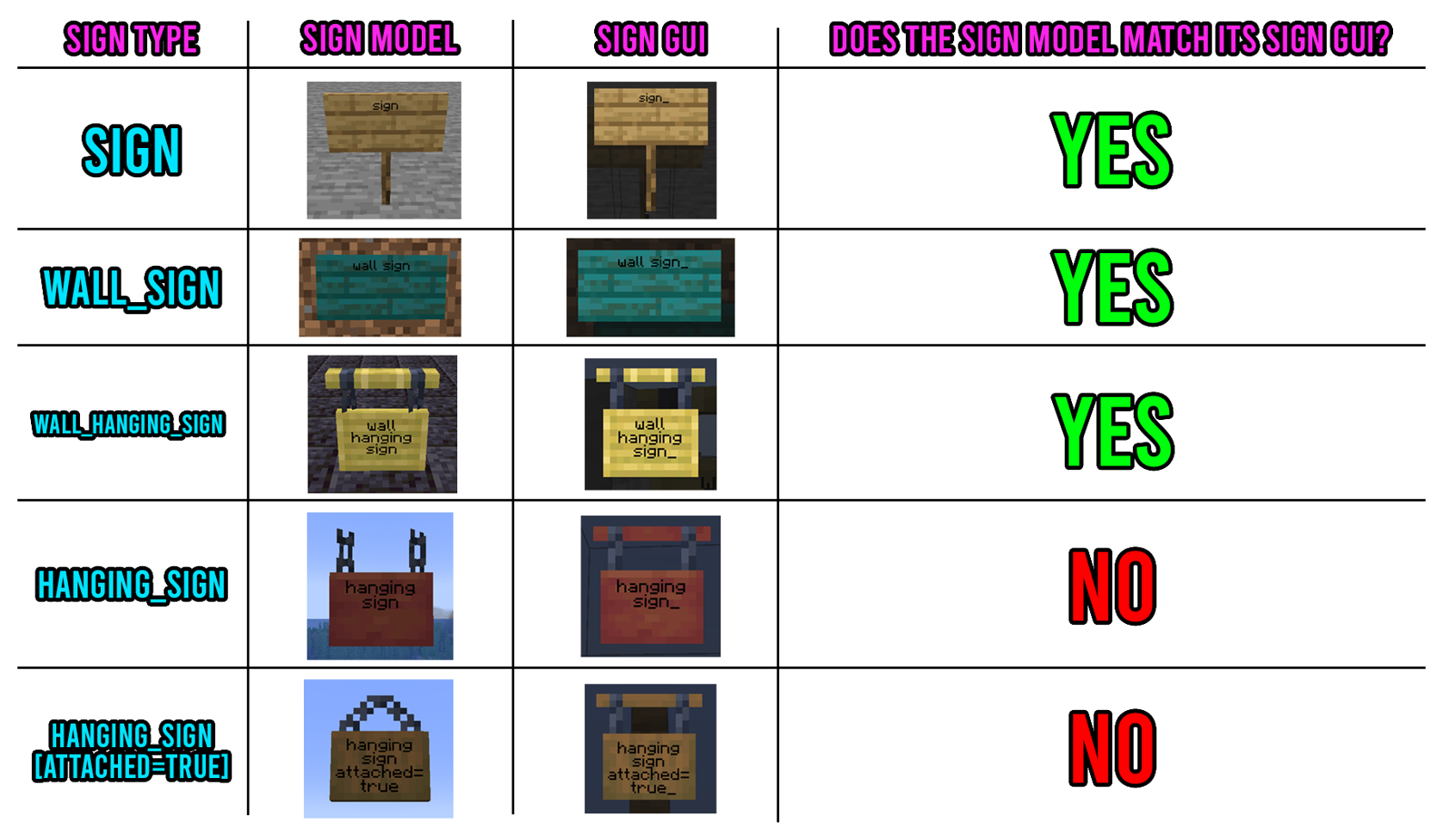
Steps to Reproduce:
- Place down a hanging sign or a hanging sign with its "attached" block state set to "true".
- Look closely at the texture of the hanging sign within its GUI.
- Press the "Done" button and look at the model of the given hanging sign.
- Take note as to whether or not hanging sign GUIs don't always reflect their models accordingly.
Observed Behavior:
Hanging sign GUIs don't always reflect their models accordingly.
Expected Behavior:
Hanging sign GUIs would reflect their models accordingly.
Linked Issues
Attachments1
![[Mod] Avoma](../../../data/avatars/users/86198.png)
Created Issue:
Hanging sign GUIs doesn't always reflect their models accordingly
The Bug:
Hanging sign GUIs doesn't always reflect their models accordingly.
This isn't a problem for signs, wall signs, or wall hanging signs, but is a problem for hanging signs and hanging signs with their "attached" block state set to "true". I understand it may be difficult to understand the issue here so I've attached a comparison image which will hopefully help in clearing up any confusion here.
Steps to Reproduce:
- Place down a hanging sign or a hanging sign with its "attached" block state set to "true".
- Look closely at the texture of the hanging sign within its GUI.
- Press the "Done" button and look at the model of the given hanging sign.
- Take note as to whether or not hanging sign GUIs doesn't always reflect their models accordingly.
Observed Behavior:
Hanging sign GUIs doesn't always reflect their models accordingly.
Expected Behavior:
Hanging sign GUIs would reflect their models accordingly.
The Bug:
Hanging sign GUIs doesn't always reflect their models accordingly.
This isn't a problem for signs, wall signs, or wall hanging signs, but is a problem for hanging signs and hanging signs with their "attached" block state set to "true". I understand it may be difficult to understand the issue here so I've attached a comparison image which will hopefully help in clearing up any confusion
here.
Steps to Reproduce:
- Place down a hanging sign or a hanging sign with its "attached" block state set to "true".
- Look closely at the texture of the hanging sign within its GUI.
- Press the "Done" button and look at the model of the given hanging sign.
- Take note as to whether or not hanging sign GUIs doesn't always reflect their models accordingly.
Observed Behavior:
Hanging sign GUIs doesn't always reflect their models accordingly.
Expected Behavior:
Hanging sign GUIs would reflect their models accordingly.
The Bug:
Hanging sign GUIs doesn't always reflect their models accordingly.
This isn't a problem for signs, wall signs, or wall hanging signs, but is a problem for hanging signs and hanging signs with their "attached" block state set to "true". I understand that it may be difficult to understand the issue here so I've attached a comparison analysis image which can be found below that will hopefully help in clearing up any confusion.
MC-256807 - Comparison Analysis.png
Steps to Reproduce:
- Place down a hanging sign or a hanging sign with its "attached" block state set to "true".
- Look closely at the texture of the hanging sign within its GUI.
- Press the "Done" button and look at the model of the given hanging sign.
- Take note as to whether or not hanging sign GUIs doesn't always reflect their models accordingly.
Observed Behavior:
Hanging sign GUIs doesn't always reflect their models accordingly.
Expected Behavior:
Hanging sign GUIs would reflect their models accordingly.
MC-256807 - Comparison Analysis.png
The Bug:
Hanging sign GUIs do
esn't always reflect their models accordingly.This isn't a problem for signs, wall signs, or wall hanging signs, but is a problem for hanging signs and hanging signs with their "attached" block state set to "true". I understand that it may be difficult to understand the issue here so I've attached a comparison analysis image which can be found below that will hopefully help in clearing up any confusion.
MC-256807 - Comparison Analysis.png
Steps to Reproduce:
- Place down a hanging sign or a hanging sign with its "attached" block state set to "true".
- Look closely at the texture of the hanging sign within its GUI.
- Press the "Done" button and look at the model of the given hanging sign.
- Take note as to whether or not hanging sign GUIs do
esn't always reflect their models accordingly.Observed Behavior:
Hanging sign GUIs do
esn't always reflect their models accordingly.Expected Behavior:
Hanging sign GUIs would reflect their models accordingly.
Hanging sign GUIs doesn't always reflect their models accordingly
![[Mod] ampolive](../../../data/avatars/users/18949.svg)
![[Mojang] Moesh](../../../data/avatars/users/10122.svg)
 Low
LowThe Bug:
Hanging sign GUIs don't always reflect their models accordingly.
This isn't a problem for signs, wall signs, or wall hanging signs, but is a problem for hanging signs and hanging signs with their "attached" block state set to "true". I understand that it may be difficult to understand the issue here so I've attached a comparison analysis image which can be found below that will hopefully help in clearing up any confusion.
MC-256807 - Comparison Analysis.png
Steps to Reproduce:
- Place down a hanging sign or a hanging sign with its "attached" block state set to "true".
- Look closely at the texture of the hanging sign within its GUI.
- Press the "Done" button and look at the model of the given hanging sign.
- Take note as to whether or not hanging sign GUIs don't always reflect their models accordingly.
Observed Behavior:
Hanging sign GUIs don't always reflect their models accordingly.
Expected Behavior:
Hanging sign GUIs would reflect their models accordingly.
![[Mod] markderickson](../../../data/avatars/users/18946.svg)
is duplicated by
![[Mod] turbo](../../../data/avatars/users/92867.png)
relates to
![[Mojang] slicedlime](../../../data/assets/gravatar/slicedlime.jpeg)
relates to
Thank you for your report!
We're tracking this issue as MC-256807, so this ticket is being resolved and linked as a duplicate.
That ticket has already been resolved as Won't Fix, which means this is considered a bug but won't be fixed. The description of that ticket or the comments might explain the rationale. Please do not leave a comment on the linked ticket.
If you haven't already, you might like to make use of the search feature to see if the issue has already been mentioned.
Quick Links:
📓 Bug Tracker Guidelines – 💬 Community Support – 📧 Mojang Support
📓 Project Summary – ✍️ Feedback and Suggestions – 📖 Game Wiki

Relates to MC-256807, BTW.
I can confirm this behavior.
Wall hanging sign is actually not accurate when you look at the chain portion of the gui.
May relate to MC-264571