 MC-262462
Cauldrons do not use the "cutout" render type
Relates to MC-164001 and MC-163153.
The bug
Cauldrons, water cauldrons, lava cauldrons and powder snow cauldrons render as solid blocks, rather than rendering as "cutout" blocks. This is a problem for two reasons:
- cauldrons did render as "cutout" upon their first implementation
- hoppers, a visually and structurally very similar block, do use cutout rendering
As a result, any transparent pixels which are in a texture that a cauldron block uses will be rendered completely opaque.
How to reproduce
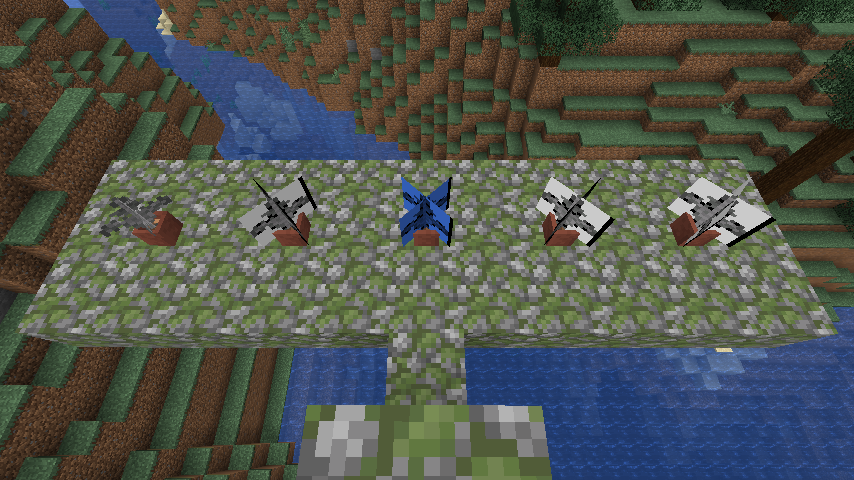
A resource pack is attached to this ticket which replaces the "blockstates" files for cauldrons (including water_cauldron, lava_cauldron and powder_snow_cauldron) and hoppers with the potted fern. Place one of each cauldron type (including empty) and a hopper in close proximity, and apply the resource pack.
Expected results
All of the ferns would appear fern-shaped.
Actual results
The ferns which represent the cauldrons have a solid white rectangle behind them. The hopper correctly does not have this background.
How to fix
All cauldrons should be changed to use the "cutout" render type (with the exception of water cauldrons, which should use the "translucent" render type instead to fix MC-13187).
Linked Issues
 Low
Low


Created Issue:
Cauldrons do not use the "cutout" render type
Relates to
MC-127313.The bug
Cauldrons, water cauldrons, lava cauldrons and powder snow cauldrons render as solid blocks, rather than rendering as "cutout" blocks. This is a problem for two reasons:
- cauldrons did render as "cutout" upon their first implementation
- hoppers, a visually and structurally very similar block, do use cutout rendering
As a result, any transparent pixels which are in a texture that a cauldron block uses will be rendered completely opaque.
How to reproduce
A resource pack is attached to this ticket which replaces the "blockstates" files for cauldrons (including water_cauldron, lava_cauldron and powder_snow_cauldron) and hoppers with the potted fern. Place one of each cauldron type (including empty) and a hopper in close proximity, and apply the resource pack.
Expected results
All of the ferns would appear fern-shaped.
Actual results
The ferns which represent the cauldrons have a solid white rectangle behind them. The hopper correctly does not have this background.
How to fix
All cauldrons should be changed to use the "cutout" render type (with the exception of water cauldrons, which should use the "translucent" render type instead to fix MC-13187).
Attachments3
![[Mod] Michael Wobst](../../../data/avatars/users/37868.png)
relates to
Relates to
MC-127313.The bug
Cauldrons, water cauldrons, lava cauldrons and powder snow cauldrons render as solid blocks, rather than rendering as "cutout" blocks. This is a problem for two reasons:
- cauldrons did render as "cutout" upon their first implementation
- hoppers, a visually and structurally very similar block, do use cutout rendering
As a result, any transparent pixels which are in a texture that a cauldron block uses will be rendered completely opaque.
How to reproduce
A resource pack is attached to this ticket which replaces the "blockstates" files for cauldrons (including water_cauldron, lava_cauldron and powder_snow_cauldron) and hoppers with the potted fern. Place one of each cauldron type (including empty) and a hopper in close proximity, and apply the resource pack.
Expected results
All of the ferns would appear fern-shaped.
Actual results
The ferns which represent the cauldrons have a solid white rectangle behind them. The hopper correctly does not have this background.
How to fix
All cauldrons should be changed to use the "cutout" render type (with the exception of water cauldrons, which should use the "translucent" render type instead to fix MC-13187).
Relates to MC-164001.
The bug
Cauldrons, water cauldrons, lava cauldrons and powder snow cauldrons render as solid blocks, rather than rendering as "cutout" blocks. This is a problem for two reasons:
- cauldrons did render as "cutout" upon their first implementation
- hoppers, a visually and structurally very similar block, do use cutout rendering
As a result, any transparent pixels which are in a texture that a cauldron block uses will be rendered completely opaque.
How to reproduce
A resource pack is attached to this ticket which replaces the "blockstates" files for cauldrons (including water_cauldron, lava_cauldron and powder_snow_cauldron) and hoppers with the potted fern. Place one of each cauldron type (including empty) and a hopper in close proximity, and apply the resource pack.
Expected results
All of the ferns would appear fern-shaped.
Actual results
The ferns which represent the cauldrons have a solid white rectangle behind them. The hopper correctly does not have this background.
How to fix
All cauldrons should be changed to use the "cutout" render type (with the exception of water cauldrons, which should use the "translucent" render type instead to fix MC-13187).
Relates to MC-164001
.The bug
Cauldrons, water cauldrons, lava cauldrons and powder snow cauldrons render as solid blocks, rather than rendering as "cutout" blocks. This is a problem for two reasons:
- cauldrons did render as "cutout" upon their first implementation
- hoppers, a visually and structurally very similar block, do use cutout rendering
As a result, any transparent pixels which are in a texture that a cauldron block uses will be rendered completely opaque.
How to reproduce
A resource pack is attached to this ticket which replaces the "blockstates" files for cauldrons (including water_cauldron, lava_cauldron and powder_snow_cauldron) and hoppers with the potted fern. Place one of each cauldron type (including empty) and a hopper in close proximity, and apply the resource pack.
Expected results
All of the ferns would appear fern-shaped.
Actual results
The ferns which represent the cauldrons have a solid white rectangle behind them. The hopper correctly does not have this background.
How to fix
All cauldrons should be changed to use the "cutout" render type (with the exception of water cauldrons, which should use the "translucent" render type instead to fix MC-13187).
Relates to MC-164001 and MC-163153.
The bug
Cauldrons, water cauldrons, lava cauldrons and powder snow cauldrons render as solid blocks, rather than rendering as "cutout" blocks. This is a problem for two reasons:
- cauldrons did render as "cutout" upon their first implementation
- hoppers, a visually and structurally very similar block, do use cutout rendering
As a result, any transparent pixels which are in a texture that a cauldron block uses will be rendered completely opaque.
How to reproduce
A resource pack is attached to this ticket which replaces the "blockstates" files for cauldrons (including water_cauldron, lava_cauldron and powder_snow_cauldron) and hoppers with the potted fern. Place one of each cauldron type (including empty) and a hopper in close proximity, and apply the resource pack.
Expected results
All of the ferns would appear fern-shaped.
Actual results
The ferns which represent the cauldrons have a solid white rectangle behind them. The hopper correctly does not have this background.
How to fix
All cauldrons should be changed to use the "cutout" render type (with the exception of water cauldrons, which should use the "translucent" render type instead to fix MC-13187).
![[Mod] Les3awe](../../../data/avatars/users/79847.png)
relates to
The bug
Cauldrons are perhaps one of the most complex block models in vanilla Minecraft, using 58 texture planes. We can therefore expect pretty much any situation which uses a lot of cauldrons, such as an automatic dripstone lava farm, to cause quite a significant amount of rendering lag due to having to render several tens of planes per cauldron. We, however, can do better.
Attached to this ticket is a resource pack which perfectly recreates the vanilla cauldron (and I've thoroughly tested this to be sure; there are no visual differences unless you clip inside of the cauldron) using just 46 texture planes instead, cutting out 12 unneccessary texture planes. This resource pack also fixes the three cauldrons containing a fluid level (adding in one extra plane to fix MC-205095).
It would be possible to optimize cauldrons even further using an approach described in MC-262427 and also utilized in MC-262452. However, due to MC-262462, this cannot currently be done.
How to reproduce
Refer to MC-262427, MC-262452 and/or MC-262461 and extrapolate.
How to fix
Replace the "cauldron.json", "template_cauldron_level1.json", "template_cauldron_level2.json" and "template_cauldron_full.json" files currently in Minecraft with the model files in the resource pack. Mojang have my full permission to use these optimized model files. Optimization is always a good thing.
Almost all blocks supported cutout rendering until the x-ray patch implementation. That cauldrons don't anymore is because nothing does except blocks that have transparency in vanilla.
I'd rather say the fact hoppers use cutout is the bug, not that cauldrons don't.
Going to have to disagree. MC-13187 is triaged, and the fix for that would result in water cauldrons using the translucent render type, which by extension would allow for it to support "cutout" textures. If the other cauldrons aren't updated to at least use the cutout renderer, that would make water cauldrons inconsistent and models that use cutout textures that work fine with water cauldrons would mysteriously look ugly if applied to any other cauldron. It'd end up being pretty much the same problem as
MC-171683, but inconsistent between cauldron contents rather than door types.