 MC-60
MC-60Joining a server, and leaving it, then trying to connect to ANY server crashes the game.
Ever since 1.3.1, if I leave a server, and join, after one or two times of this, it can't reach servers and crashes if I try to load one. Closing the game leaves the process running, and when I try to end it, it doesn't go away. No errors given. When trying to connect to the server, as stated, it crashes. However, it stays responding, but nothing can be done, and it's unresponsive, even though windows thinks it's okay.
When it crashes, the RAM usage spikes, and so does the CPU usage.
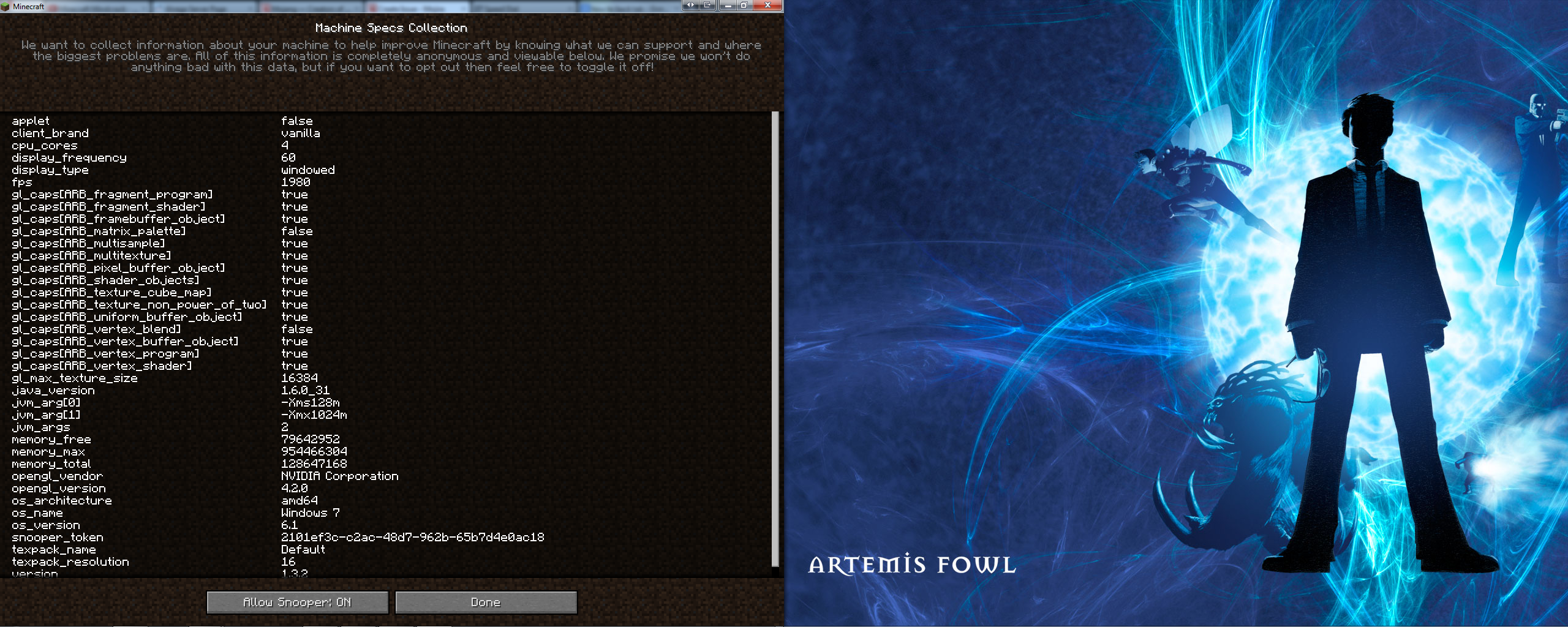
I enclose my snooper settings screenshot for you to view.
I hope to get some information on this, thank you.
Proof : https://www.youtube.com/watch?v=TopvTSRU9UE
Note : Ignore the right of the screenshot. Accidentally screenshotted the other monitor too.
Environment
Win 7 64Bit Ultimate
Java Version 6 Update 31/Java 7 Update 9
GPU nVidia GTX 560Ti 1GB vRAM
CPU Intel i3 3.3GHz
Linked Issues


Created Issue:
Joining a server, and leaving it, then trying to connect to ANY server crashes the game.
Ever since 1.3.1, if I leave a server, and join, after one or two times of this, it can't reach servers and crashes if I try to load one. Closing the game leaves the process running, and when I try to end it, it doesn't go away. No errors given. When trying to connect to the server, as stated, it crashes. However, it stays responding, but nothing can be done, and it's unresponsive, even though windows thinks it's okay.
When it crashes, the RAM usage spikes, and so does the CPU usage.
I enclose my snooper settings screenshot for you to view.
I hope to get some information on this, thank you.Environment
Win 7 64Bit Ultimate
Java Version 6 Update 31
Linked Issues
is duplicated by1
TRASH-297
Attachments1
Ever since 1.3.1, if I leave a server, and join, after one or two times of this, it can't reach servers and crashes if I try to load one. Closing the game leaves the process running, and when I try to end it, it doesn't go away. No errors given. When trying to connect to the server, as stated, it crashes. However, it stays responding, but nothing can be done, and it's unresponsive, even though windows thinks it's okay.
When it crashes, the RAM usage spikes, and so does the CPU usage.
I enclose my snooper settings screenshot for you to view.
I hope to get some information on this, thank you.
Note : Ignore the right of the screenshot. Accidentaly screenshotted the other monitor too.
![[Mojang] Nathan Adams](../../../data/assets/gravatar/dinnerbone.png)
Here it is.
Win 7 64Bit Ultimate
Java Version 6 Update 31/Java 7 Update 9
GPU nVidia GTX 560Ti 1GB vRAM
CPU Intel i3 3.3GHz

clones

is duplicated by
clones
Ever since 1.3.1, if I leave a server, and join, after one or two times of this, it can't reach servers and crashes if I try to load one. Closing the game leaves the process running, and when I try to end it, it doesn't go away. No errors given. When trying to connect to the server, as stated, it crashes. However, it stays responding, but nothing can be done, and it's unresponsive, even though windows thinks it's okay.
When it crashes, the RAM usage spikes, and so does the CPU usage.
I enclose my snooper settings screenshot for you to view.
I hope to get some information on this, thank you.
Proof : http://www.youtube.com/watch?v=e5Lf5gTy450
Note : Ignore the right of the screenshot. Accidentally screenshotted the other monitor too.
Ever since 1.3.1, if I leave a server, and join, after one or two times of this, it can't reach servers and crashes if I try to load one. Closing the game leaves the process running, and when I try to end it, it doesn't go away. No errors given. When trying to connect to the server, as stated, it crashes. However, it stays responding, but nothing can be done, and it's unresponsive, even though windows thinks it's okay.
When it crashes, the RAM usage spikes, and so does the CPU usage.
I enclose my snooper settings screenshot for you to view.
I hope to get some information on this, thank you.
Proof : http://www.youtube.com/watch?v=e5Lf5gTy450
Note : Ignore the right of the screenshot. Accidentally screenshotted the other monitor too.Ever since 1.3.1, if I leave a server, and join, after one or two times of this, it can't reach servers and crashes if I try to load one. Closing the game leaves the process running, and when I try to end it, it doesn't go away. No errors given. When trying to connect to the server, as stated, it crashes. However, it stays responding, but nothing can be done, and it's unresponsive, even though windows thinks it's okay.
When it crashes, the RAM usage spikes, and so does the CPU usage.
I enclose my snooper settings screenshot for you to view.
I hope to get some information on this, thank you.
Proof : http://www.youtube.com/watch?v=TopvTSRU9UE
Note : Ignore the right of the screenshot. Accidentally screenshotted the other monitor too.

is duplicated by
![[Mojang] Grum (Erik Broes)](../../../data/assets/gravatar/grum.png)
is duplicated by
![[Mod] Urielsalis](../../../data/assets/gravatar/urielsalis.jpeg)
Ever since 1.3.1, if I leave a server, and join, after one or two times of this, it can't reach servers and crashes if I try to load one. Closing the game leaves the process running, and when I try to end it, it doesn't go away. No errors given. When trying to connect to the server, as stated, it crashes. However, it stays responding, but nothing can be done, and it's unresponsive, even though windows thinks it's okay.
When it crashes, the RAM usage spikes, and so does the CPU usage.
I enclose my snooper settings screenshot for you to view.
I hope to get some information on this, thank you.
Proof : https://www.youtube.com/watch?v=TopvTSRU9UE
Note : Ignore the right of the screenshot. Accidentally screenshotted the other monitor too.
There is a possible relation to MC-60 , since this issue was fixed in Minecraft 1.4.7 , can you please retest this issue.
I tested with 1.4.7 and I'm still getting the same freeze. I would have thought "Fixed long timeout when checking SRV records" was the fix for this, but I guess not. To be sure, I used Wireshark to look at the the network trace and it's definitely the SRV requests that are timing out.
I looked at MC-60 but those symptoms seem different than mine. I'm not experiencing crashes and there's no difference after joining and leaving a server.
I think you are going to have to upload a crash report.
Jesper, how do I go about doing this?
click the start button type %appdata% then click roaming (I assume you're on vista/7) then go to the .minecraft folder and then there should be some folder like crash reports or something. Search for that.
No crash report, we can't help you.
another tip. you are not using the current version of java. the current verion is version 7 update 9. upgrade your java.
Sorry. Had family issues, which is why it took me a while to attach crash reports. As for Java 7, I can't go on servers when I use it, on any of my 3 computers. I have now attached the crash report.
Note : the latest is 30th October, but I have crashed numerous times since then, so I'm attaching a .rar with every crash I've gotten with it so far.
Okay, managed to get Java 7 working. Does not rectify this issue.
This ticket is invalid as it relates to a modded or 3rd party client/server.
This is NOT a modded jar. I get the issue with a force update. When it crashes, it just freezes. Doesn't USUALLY give a crash report.
I will do a video on this and upload it when I can.
Crash report:
Non-modded Minecraft always gives "probably not". Do you have ANYTHING that doesn't come with vanilla? (TMI, Optifine, etc.)
I have force updated, it is NOT modded. As I said, it rarely gives me a crash report. I will do a video later, upload it, and link it here.
I am reuploading. Video had problems.
http://www.youtube.com/watch?v=TopvTSRU9UE&feature=youtu.be Here it is.
Can this be re-opened please? There's proof right there.
Ok.
Thank you very much.
What is going to become of this now?
I've confirmed it in my video, and I know others who have the same issue.
Now you say its not modded, yet every single crash report you've posted seems to indicate otherwise. Also note that using a special/HD texture pack counts as modding.
In the video I show it isn't modded, and I show that I am using the regular texture pack.
Not meaning to come of as rude, but have you actually watched the video?
You have to wait for a mod I guess...
Seems so. I can't believe I had to actually provide video evidence to show the bug.
The reason it annoys me is because I know a lot of computers cannot record, or people do not have recording software.
https://mojang.atlassian.net/browse/MC-1408
https://mojang.atlassian.net/browse/MC-2824
This IS happening to other people.
This is not a minor issue. I have to restart my computer many times a day due to memory issues caused by the game crashing and not fully closing.
Can confirm this exact issue.
I ask that sometimes mods need to be more open-minded about these sort of Java-crashing bugs. In my case I can't take a bug report without it crashing my System 32 for some reason (that itself is a reason this bug should be taken seriously - how much rubbish is it throwing through the console that it crashes the OS itself on older computers?!), so perhaps not everything has an obvious answer in the crash log.
Thanks for the confirmation there.
It's stupid that this issue is ignored, even though I have made a video which seems to have been ignored.
Also the clear denial of the bug even though there are over 3 reports of the same bug on this website.
I don't think it is ignored, it just hasn't got enough votes
It's a bug report that's been around a long time, since the day this tracker was made I believe. Votes shouldn't stop it receiving attention at all.
you've got my vote
Cheers mate
Hopefully this issue soon gets fixed. I'm about to test it on my linux machine and see if the same issues occur.
http://www.minecraftforum.net/topic/1405977-minecrafts-java-process-will-not-die-on-closure-or-at-all-for-that-matter/
http://www.minecraftforum.net/topic/1405977-minecrafts-java-process-will-not-die-on-closure-or-at-all-for-that-matter/page__st__40
On the second link, the OP said
"Same here. I use NVidia.
I'm still getting this issue. I'm only getting this on 1.3.1. I'm running vanilla minecraft 1.3.1. No mods. 64-bit java (latest) and Windows 7 64-bit.
Sorry for the bump, but this is getting very annoying. Also I'm getting a strange bug on my end when trying to load the multiplayer list. If I try to use the multiplayer feature, on occasion, clicking "refresh" will cause the client to freeze.
Thanks,
Dragos "
Exact issue I have.
The process doesn't end either, as stated in description of this bug report.
I have found a mod which fixes the issue.
http://www.minecraftforum.net/topic/1461783-fixing-lag-and-freezing-when-joining-a-mp-server/
It is annoying as I have to use someone elses code to fix your game, and when the next update happens, this won't always be up to date! The person could just give up updating it at any time.
Well there you go Mojang - if you need to know what's wrong so you can fix it just go and look at what that mod alters.
Thank you Mojang, for finally understanding that this issue exists, and I cannot wait to see it fixed in vanilla.
yay