 MC-7363
Very prone to rendering cracks between blocks
Update: The cracks between 16x16x16 sections have existed for a long time, and still do. Crack theory has been, is, and will still be applicable. The lines that started to appear in between every block in the 1.5 snapshots and should be fixed in 1.5.1 were caused by texture coordinates overflowing their tile slightly in the rasterizer.
Crack theory
Cracks occur in rasterizers like OpenGL when edges that should align don't match exactly. This can happen if an inexact calculation is used, and vertices that should be the same end up in slightly different places. The errors may seem minuscule, but they invariably result in severe flickering along the cracks. The rasterizer will miss a few pixels and fill others twice. Using different OpenGL transformations to move different vertices to the same place counts as inexact:
glRectf(0, 0, 1, 1);
glRectf(1, 0, 2, 1);
glRectf(0, 0, 1, 1);
glTranslatef(0, 0, 1);
glRectf(0, 0, 1, 1);
The former will always, unquestionably align. The latter will have a crack. While associativity would tell us that both examples are the same, rounding error does not succumb to associativity. 32-bit floats are exact for integers in [-2^24, 2^24], scaled by a power of two. 64-bit doubles reach a whopping 2^53. If both operands of an addition are round enough (in binary), the result will be exact. This would be typical for code like the first example. Rolling the same addition into a transformation matrix will almost certainly be inexact, because the matrix is polluted by everything else in it. Really the only way to get it right is to perform a separate addition before the matrix.
If you perform the addition in a vertex shader, keep it separate and it should be okay, save for the hypothetical implementation that optimizes both into a matrix (if they're still technically allowed to optimize willy-nilly nowadays):
Edit: Uniform state is slow to change, so an attribute used like a uniform would likely be faster than a uniform.
uniform vec3 translation;
void main() {
    vec4 vertex = gl_Vertex;
    vertex.xyz += translation;
    gl_Position = gl_ModelViewProjectionMatrix * vertex;
}
What's cool about this is that even if you're very far from the world origin, you can still keep everything that matters exact. It also doesn't have a stepping or distortion problem in the Far Lands. The CPU code should do something like this:
dvec3 camera;
dvec3 roundedCamera = camera.roundToMultipleOf(16); // Assuming your world transformations are normally a multiple of 16. Can be demoted to float if you stay within 16 * 2^24 blocks. This is half of the magic, by reducing the translation fed into OpenGL to almost nothing.
dvec3 difference = offset - rounded; // Not critical and rather small; can be demoted to float, and will be when fed to OpenGL.
// Substitute difference for camera when calculating the camera transformation.
Then, before drawing each batch:
dvec3 translationOfBatch; // Can be float if roundedCamera can be.
dvec3 translation = translationOfBatch - roundedCamera; // This is the other half of the magic. Two potentially huge numbers are reduced to a small, exact multiple of 16. Can certainly be demoted to float, and will be.
// Load the uniform.
I hope this is enough theory to help you understand and fix cracks. Now, on to the actual problem description:
Description
Previously, cracks would only appear in between 16x16x16 sections. Not as it should be either, but hardly worth reporting. In the latest snapshots, however, they appear in between every single block. That is too much.
The screenshot shows a superflat world with preset "2;7,62x0,49;2", viewed from below. It should be viewed at its full 1920x1200 size to see the speckles. Incidentally, Minecraft thinks it should light the underside of the obsidian when I get close to it.
Addendum: textures?
After noticing the directionality of the cracks, I realized it's crossing over into adjacent tiles on the texture. That could explain some or all of this bug. I will upload a second screenshot demonstrating that. It's of a similar superflat world, but using purple wool (35:10) instead of obsidian.
What you see is a close-up of the vertex joining four blocks. You can see some yellow seeping through one edge, and blue through the other. Indeed, those are wool blocks adjacent to the right and below, respectively, in stitched_terrain.png generated by an older snapshot. There is also some sky showing through next to the blue wool (I know it's the sky because it becomes black at night). I'd expect it to be orange wool as that is located above it in stitched_terrain.png, but then that file is probably outdated. It may well be that the adjacent texture is transparent. Indeed, green wool doesn't have this 'crack'. Texture coordinates should be the only difference between wool colors, therefore this should be responsible.
Older versions of Minecraft used to move their texture coordinates inward just a tiny amount to avoid this issue. Was that tweak removed when the rendering engine was overhauled?
Environment
Mac OS X 10.6.8
Linked Issues
 Low
Low


Created Issue:
Very prone to rendering cracks between blocks
Cracks occur in rasterizers like OpenGL when edges that should align don't match exactly. This can happen if an inexact calculation is used, and vertices that should be the same end up in slightly different places. The errors may seem minuscule, but they invariably result in severe flickering along the cracks. The rasterizer will miss a few pixels and fill others twice. Using different OpenGL transformations to move different vertices to the same place counts as inexact:
glRectf(0, 0, 1, 1);
glRectf(1, 0, 2, 1);glRectf(0, 0, 1, 1);
glTranslatef(0, 0, 1);
glRectf(0, 0, 1, 1);The former will always, unquestionably align. The latter will have a crack. While associativity would tell us that both examples are the same, rounding error does not succumb to associativity. 32-bit floats are exact for integers in [-2^24, 2^24], scaled by a power of two. 64-bit doubles reach a whopping 2^53. If both operands to an addition are round enough (in binary), the result will be exact. This would be typical for code like the first example. Rolling the same addition into a transformation matrix will almost certainly be inexact, because the matrix is polluted by everything else in it. Really the only way to get it right is to perform a separate addition before the matrix.
If you perform the addition in a vertex shader, keep it separate and it should be okay, save for the hypothetical implementation that optimizes both into a matrix (if they're still technically allowed to optimize willy-nilly nowadays):
uniform vec3 translation;
void main() {
    vec4 vertex = gl_Vertex;
    vertex.xyz += translation;
    gl_Position = gl_ModelViewProjectionMatrix * vertex;
}What's cool about this is that even if you're very far from the world origin, you can still keep everything that matters exact. It also doesn't have a stepping or distortion problem in the Far Lands. The CPU code should do something like this:
dvec3 camera;
dvec3 roundedCamera = camera.roundToMultipleOf(16); // Assuming your world transformations are normally a multiple of 16. Can be demoted to float if you stay within 16 * 2^24 blocks. This is half of the magic, by reducing the translation fed into OpenGL to almost nothing.
dvec3 difference = offset - rounded; // Not critical and rather small; can be demoted to float, and will be when fed to OpenGL.
// Substitute difference for camera in calculating the camera transformation.Then, before drawing each batch:
dvec3 translationOfBatch; // Can be float if roundedCamera can be.
dvec3 translation = translationOfBatch - roundedCamera; // This is the other half of the magic. Two potentially huge numbers are reduced to a small, exact multiple of 16. Can certainly be demoted to float, and will be.
// Load the uniform.I hope this is enough theory to help you understand and fix cracks. Now, on to the actual problem description:
Previously, cracks would only appear in between 16x16x16 sections. Not as it should be either, but hardly worth reporting. In the latest snapshots, however, they appear in between every single block. That is too much.
The screenshot shows a superflat world with preset "2;7,62x0,49;2", viewed from below. Incidentally, Minecraft thinks it should light the underside of the obsidian when I get close to it.
Environment
Mac OS X 10.6.8
Attachments1
Cracks occur in rasterizers like OpenGL when edges that should align don't match exactly. This can happen if an inexact calculation is used, and vertices that should be the same end up in slightly different places. The errors may seem minuscule, but they invariably result in severe flickering along the cracks. The rasterizer will miss a few pixels and fill others twice. Using different OpenGL transformations to move different vertices to the same place counts as inexact:
glRectf(0, 0, 1, 1);
glRectf(1, 0, 2, 1);glRectf(0, 0, 1, 1);
glTranslatef(0, 0, 1);
glRectf(0, 0, 1, 1);The former will always, unquestionably align. The latter will have a crack. While associativity would tell us that both examples are the same, rounding error does not succumb to associativity. 32-bit floats are exact for integers in [-2^24, 2^24], scaled by a power of two. 64-bit doubles reach a whopping 2^53. If both operands
to an addition are round enough (in binary), the result will be exact. This would be typical for code like the first example. Rolling the same addition into a transformation matrix will almost certainly be inexact, because the matrix is polluted by everything else in it. Really the only way to get it right is to perform a separate addition before the matrix.If you perform the addition in a vertex shader, keep it separate and it should be okay, save for the hypothetical implementation that optimizes both into a matrix (if they're still technically allowed to optimize willy-nilly nowadays):
uniform vec3 translation;
void main() {
vec4 vertex = gl_Vertex;
vertex.xyz += translation;
gl_Position = gl_ModelViewProjectionMatrix * vertex;
}What's cool about this is that even if you're very far from the world origin, you can still keep everything that matters exact. It also doesn't have a stepping or distortion problem in the Far Lands. The CPU code should do something like this:
dvec3 camera;
dvec3 roundedCamera = camera.roundToMultipleOf(16); // Assuming your world transformations are normally a multiple of 16. Can be demoted to float if you stay within 16 * 2^24 blocks. This is half of the magic, by reducing the translation fed into OpenGL to almost nothing.
dvec3 difference = offset - rounded; // Not critical and rather small; can be demoted to float, and will be when fed to OpenGL.
// Substitute difference for camera in calculating the camera transformation.Then, before drawing each batch:
dvec3 translationOfBatch; // Can be float if roundedCamera can be.
dvec3 translation = translationOfBatch - roundedCamera; // This is the other half of the magic. Two potentially huge numbers are reduced to a small, exact multiple of 16. Can certainly be demoted to float, and will be.
// Load the uniform.I hope this is enough theory to help you understand and fix cracks. Now, on to the actual problem description:
Previously, cracks would only appear in between 16x16x16 sections. Not as it should be either, but hardly worth reporting. In the latest snapshots, however, they appear in between every single block. That is too much.
The screenshot shows a superflat world with preset "2;7,62x0,49;2", viewed from below. Incidentally, Minecraft thinks it should light the underside of the obsidian when I get close to it.
Cracks occur in rasterizers like OpenGL when edges that should align don't match exactly. This can happen if an inexact calculation is used, and vertices that should be the same end up in slightly different places. The errors may seem minuscule, but they invariably result in severe flickering along the cracks. The rasterizer will miss a few pixels and fill others twice. Using different OpenGL transformations to move different vertices to the same place counts as inexact:
glRectf(0, 0, 1, 1); glRectf(1, 0, 2, 1);glRectf(0, 0, 1, 1); glTranslatef(0, 0, 1); glRectf(0, 0, 1, 1);The former will always, unquestionably align. The latter will have a crack. While associativity would tell us that both examples are the same, rounding error does not succumb to associativity. 32-bit floats are exact for integers in [-2^24, 2^24], scaled by a power of two. 64-bit doubles reach a whopping 2^53. If both operands of an addition are round enough (in binary), the result will be exact. This would be typical for code like the first example. Rolling the same addition into a transformation matrix will almost certainly be inexact, because the matrix is polluted by everything else in it. Really the only way to get it right is to perform a separate addition before the matrix.
If you perform the addition in a vertex shader, keep it separate and it should be okay, save for the hypothetical implementation that optimizes both into a matrix (if they're still technically allowed to optimize willy-nilly nowadays):
uniform vec3 translation; void main() { vec4 vertex = gl_Vertex; vertex.xyz += translation; gl_Position = gl_ModelViewProjectionMatrix * vertex; }What's cool about this is that even if you're very far from the world origin, you can still keep everything that matters exact. It also doesn't have a stepping or distortion problem in the Far Lands. The CPU code should do something like this:
dvec3 camera; dvec3 roundedCamera = camera.roundToMultipleOf(16); // Assuming your world transformations are normally a multiple of 16. Can be demoted to float if you stay within 16 * 2^24 blocks. This is half of the magic, by reducing the translation fed into OpenGL to almost nothing. dvec3 difference = offset - rounded; // Not critical and rather small; can be demoted to float, and will be when fed to OpenGL. // Substitute difference for camera when calculating the camera transformation.Then, before drawing each batch:
dvec3 translationOfBatch; // Can be float if roundedCamera can be. dvec3 translation = translationOfBatch - roundedCamera; // This is the other half of the magic. Two potentially huge numbers are reduced to a small, exact multiple of 16. Can certainly be demoted to float, and will be. // Load the uniform.I hope this is enough theory to help you understand and fix cracks. Now, on to the actual problem description:
Previously, cracks would only appear in between 16x16x16 sections. Not as it should be either, but hardly worth reporting. In the latest snapshots, however, they appear in between every single block. That is too much.
The screenshot shows a superflat world with preset "2;7,62x0,49;2", viewed from below. Incidentally, Minecraft thinks it should light the underside of the obsidian when I get close to it.
Cracks occur in rasterizers like OpenGL when edges that should align don't match exactly. This can happen if an inexact calculation is used, and vertices that should be the same end up in slightly different places. The errors may seem minuscule, but they invariably result in severe flickering along the cracks. The rasterizer will miss a few pixels and fill others twice. Using different OpenGL transformations to move different vertices to the same place counts as inexact:
glRectf(0, 0, 1, 1); glRectf(1, 0, 2, 1);glRectf(0, 0, 1, 1); glTranslatef(0, 0, 1); glRectf(0, 0, 1, 1);The former will always, unquestionably align. The latter will have a crack. While associativity would tell us that both examples are the same, rounding error does not succumb to associativity. 32-bit floats are exact for integers in [-2^24, 2^24], scaled by a power of two. 64-bit doubles reach a whopping 2^53. If both operands of an addition are round enough (in binary), the result will be exact. This would be typical for code like the first example. Rolling the same addition into a transformation matrix will almost certainly be inexact, because the matrix is polluted by everything else in it. Really the only way to get it right is to perform a separate addition before the matrix.
If you perform the addition in a vertex shader, keep it separate and it should be okay, save for the hypothetical implementation that optimizes both into a matrix (if they're still technically allowed to optimize willy-nilly nowadays):
uniform vec3 translation; void main() { vec4 vertex = gl_Vertex; vertex.xyz += translation; gl_Position = gl_ModelViewProjectionMatrix * vertex; }What's cool about this is that even if you're very far from the world origin, you can still keep everything that matters exact. It also doesn't have a stepping or distortion problem in the Far Lands. The CPU code should do something like this:
dvec3 camera; dvec3 roundedCamera = camera.roundToMultipleOf(16); // Assuming your world transformations are normally a multiple of 16. Can be demoted to float if you stay within 16 * 2^24 blocks. This is half of the magic, by reducing the translation fed into OpenGL to almost nothing. dvec3 difference = offset - rounded; // Not critical and rather small; can be demoted to float, and will be when fed to OpenGL. // Substitute difference for camera when calculating the camera transformation.Then, before drawing each batch:
dvec3 translationOfBatch; // Can be float if roundedCamera can be. dvec3 translation = translationOfBatch - roundedCamera; // This is the other half of the magic. Two potentially huge numbers are reduced to a small, exact multiple of 16. Can certainly be demoted to float, and will be. // Load the uniform.I hope this is enough theory to help you understand and fix cracks. Now, on to the actual problem description:
Previously, cracks would only appear in between 16x16x16 sections. Not as it should be either, but hardly worth reporting. In the latest snapshots, however, they appear in between every single block. That is too much.
The screenshot shows a superflat world with preset "2;7,62x0,49;2", viewed from below. It should be viewed at its full 1920x1200 size to see the speckles. Incidentally, Minecraft thinks it should light the underside of the obsidian when I get close to it.

Cracks occur in rasterizers like OpenGL when edges that should align don't match exactly. This can happen if an inexact calculation is used, and vertices that should be the same end up in slightly different places. The errors may seem minuscule, but they invariably result in severe flickering along the cracks. The rasterizer will miss a few pixels and fill others twice. Using different OpenGL transformations to move different vertices to the same place counts as inexact:
glRectf(0, 0, 1, 1); glRectf(1, 0, 2, 1);glRectf(0, 0, 1, 1); glTranslatef(0, 0, 1); glRectf(0, 0, 1, 1);The former will always, unquestionably align. The latter will have a crack. While associativity would tell us that both examples are the same, rounding error does not succumb to associativity. 32-bit floats are exact for integers in [-2^24, 2^24], scaled by a power of two. 64-bit doubles reach a whopping 2^53. If both operands of an addition are round enough (in binary), the result will be exact. This would be typical for code like the first example. Rolling the same addition into a transformation matrix will almost certainly be inexact, because the matrix is polluted by everything else in it. Really the only way to get it right is to perform a separate addition before the matrix.
If you perform the addition in a vertex shader, keep it separate and it should be okay, save for the hypothetical implementation that optimizes both into a matrix (if they're still technically allowed to optimize willy-nilly nowadays):
uniform vec3 translation; void main() { vec4 vertex = gl_Vertex; vertex.xyz += translation; gl_Position = gl_ModelViewProjectionMatrix * vertex; }What's cool about this is that even if you're very far from the world origin, you can still keep everything that matters exact. It also doesn't have a stepping or distortion problem in the Far Lands. The CPU code should do something like this:
dvec3 camera; dvec3 roundedCamera = camera.roundToMultipleOf(16); // Assuming your world transformations are normally a multiple of 16. Can be demoted to float if you stay within 16 * 2^24 blocks. This is half of the magic, by reducing the translation fed into OpenGL to almost nothing. dvec3 difference = offset - rounded; // Not critical and rather small; can be demoted to float, and will be when fed to OpenGL. // Substitute difference for camera when calculating the camera transformation.Then, before drawing each batch:
dvec3 translationOfBatch; // Can be float if roundedCamera can be. dvec3 translation = translationOfBatch - roundedCamera; // This is the other half of the magic. Two potentially huge numbers are reduced to a small, exact multiple of 16. Can certainly be demoted to float, and will be. // Load the uniform.I hope this is enough theory to help you understand and fix cracks. Now, on to the actual problem description:
Previously, cracks would only appear in between 16x16x16 sections. Not as it should be either, but hardly worth reporting. In the latest snapshots, however, they appear in between every single block. That is too much.
The screenshot shows a superflat world with preset "2;7,62x0,49;2", viewed from below. It should be viewed at its full 1920x1200 size to see the speckles. Incidentally, Minecraft thinks it should lighttheunderside of the obsidian when I get close to it.Crack theory
Cracks occur in rasterizers like OpenGL when edges that should align don't match exactly. This can happen if an inexact calculation is used, and vertices that should be the same end up in slightly different places. The errors may seem minuscule, but they invariably result in severe flickering along the cracks. The rasterizer will miss a few pixels and fill others twice. Using different OpenGL transformations to move different vertices to the same place counts as inexact:
glRectf(0, 0, 1, 1); glRectf(1, 0, 2, 1);glRectf(0, 0, 1, 1); glTranslatef(0, 0, 1); glRectf(0, 0, 1, 1);The former will always, unquestionably align. The latter will have a crack. While associativity would tell us that both examples are the same, rounding error does not succumb to associativity. 32-bit floats are exact for integers in [-2^24, 2^24], scaled by a power of two. 64-bit doubles reach a whopping 2^53. If both operands of an addition are round enough (in binary), the result will be exact. This would be typical for code like the first example. Rolling the same addition into a transformation matrix will almost certainly be inexact, because the matrix is polluted by everything else in it. Really the only way to get it right is to perform a separate addition before the matrix.
If you perform the addition in a vertex shader, keep it separate and it should be okay, save for the hypothetical implementation that optimizes both into a matrix (if they're still technically allowed to optimize willy-nilly nowadays):
uniform vec3 translation; void main() { vec4 vertex = gl_Vertex; vertex.xyz += translation; gl_Position = gl_ModelViewProjectionMatrix * vertex; }What's cool about this is that even if you're very far from the world origin, you can still keep everything that matters exact. It also doesn't have a stepping or distortion problem in the Far Lands. The CPU code should do something like this:
dvec3 camera; dvec3 roundedCamera = camera.roundToMultipleOf(16); // Assuming your world transformations are normally a multiple of 16. Can be demoted to float if you stay within 16 * 2^24 blocks. This is half of the magic, by reducing the translation fed into OpenGL to almost nothing. dvec3 difference = offset - rounded; // Not critical and rather small; can be demoted to float, and will be when fed to OpenGL. // Substitute difference for camera when calculating the camera transformation.Then, before drawing each batch:
dvec3 translationOfBatch; // Can be float if roundedCamera can be. dvec3 translation = translationOfBatch - roundedCamera; // This is the other half of the magic. Two potentially huge numbers are reduced to a small, exact multiple of 16. Can certainly be demoted to float, and will be. // Load the uniform.I hope this is enough theory to help you understand and fix cracks. Now, on to the actual problem description:
Description
Previously, cracks would only appear in between 16x16x16 sections. Not as it should be either, but hardly worth reporting. In the latest snapshots, however, they appear in between every single block. That is too much.
The screenshot shows a superflat world with preset "2;7,62x0,49;2", viewed from below. It should be viewed at its full 1920x1200 size to see the speckles. Incidentally, Minecraft thinks it should light the underside of the obsidian when I get close to it.
Addendum: textures?
After noticing the directionality of the cracks, I realized it's crossing over into adjacent tiles on the texture. That could explain some or all of this bug. I will upload a second screenshot demonstrating that. It's of a similar superflat world, but using purple wool (35:10) instead of obsidian. What you see is a close-up of the vertex joining four blocks. You can see some yellow seeping through one edge, and blue through the other. Indeed, those are wool blocks adjacent to the right and below, respectively, in stitched_terrain.png generated by an older snapshot. There is also some sky showing through next to the blue wool (I know it's the sky because it becomes black at night). I'd expect it to be orange wool as that is located above it in stitched_terrain.png, but then that file is probably outdated. It may well be that the adjacent texture is transparent. Indeed, green wool doesn't have this 'crack'.
Older versions of Minecraft used to move their texture coordinates inward just a tiny amount to avoid this issue. Was that tweak removed when the rendering engine was overhauled?
Crack theory
Cracks occur in rasterizers like OpenGL when edges that should align don't match exactly. This can happen if an inexact calculation is used, and vertices that should be the same end up in slightly different places. The errors may seem minuscule, but they invariably result in severe flickering along the cracks. The rasterizer will miss a few pixels and fill others twice. Using different OpenGL transformations to move different vertices to the same place counts as inexact:
glRectf(0, 0, 1, 1); glRectf(1, 0, 2, 1);glRectf(0, 0, 1, 1); glTranslatef(0, 0, 1); glRectf(0, 0, 1, 1);The former will always, unquestionably align. The latter will have a crack. While associativity would tell us that both examples are the same, rounding error does not succumb to associativity. 32-bit floats are exact for integers in [-2^24, 2^24], scaled by a power of two. 64-bit doubles reach a whopping 2^53. If both operands of an addition are round enough (in binary), the result will be exact. This would be typical for code like the first example. Rolling the same addition into a transformation matrix will almost certainly be inexact, because the matrix is polluted by everything else in it. Really the only way to get it right is to perform a separate addition before the matrix.
If you perform the addition in a vertex shader, keep it separate and it should be okay, save for the hypothetical implementation that optimizes both into a matrix (if they're still technically allowed to optimize willy-nilly nowadays):
uniform vec3 translation; void main() { vec4 vertex = gl_Vertex; vertex.xyz += translation; gl_Position = gl_ModelViewProjectionMatrix * vertex; }What's cool about this is that even if you're very far from the world origin, you can still keep everything that matters exact. It also doesn't have a stepping or distortion problem in the Far Lands. The CPU code should do something like this:
dvec3 camera; dvec3 roundedCamera = camera.roundToMultipleOf(16); // Assuming your world transformations are normally a multiple of 16. Can be demoted to float if you stay within 16 * 2^24 blocks. This is half of the magic, by reducing the translation fed into OpenGL to almost nothing. dvec3 difference = offset - rounded; // Not critical and rather small; can be demoted to float, and will be when fed to OpenGL. // Substitute difference for camera when calculating the camera transformation.Then, before drawing each batch:
dvec3 translationOfBatch; // Can be float if roundedCamera can be. dvec3 translation = translationOfBatch - roundedCamera; // This is the other half of the magic. Two potentially huge numbers are reduced to a small, exact multiple of 16. Can certainly be demoted to float, and will be. // Load the uniform.I hope this is enough theory to help you understand and fix cracks. Now, on to the actual problem description:
Description
Previously, cracks would only appear in between 16x16x16 sections. Not as it should be either, but hardly worth reporting. In the latest snapshots, however, they appear in between every single block. That is too much.
The screenshot shows a superflat world with preset "2;7,62x0,49;2", viewed from below. It should be viewed at its full 1920x1200 size to see the speckles. Incidentally, Minecraft thinks it should light the underside of the obsidian when I get close to it.
Addendum: textures?
After noticing the directionality of the cracks, I realized it's crossing over into adjacent tiles on the texture. That could explain some or all of this bug. I will upload a second screenshot demonstrating that. It's of a similar superflat world, but using purple wool (35:10) instead of obsidian.What you see is a close-up of the vertex joining four blocks. You can see some yellow seeping through one edge, and blue through the other. Indeed, those are wool blocks adjacent to the right and below, respectively, in stitched_terrain.png generated by an older snapshot. There is also some sky showing through next to the blue wool (I know it's the sky because it becomes black at night). I'd expect it to be orange wool as that is located above it in stitched_terrain.png, but then that file is probably outdated. It may well be that the adjacent texture is transparent. Indeed, green wool doesn't have this 'crack'.Older versions of Minecraft used to move their texture coordinates inward just a tiny amount to avoid this issue. Was that tweak removed when the rendering engine was overhauled?
Crack theory
Cracks occur in rasterizers like OpenGL when edges that should align don't match exactly. This can happen if an inexact calculation is used, and vertices that should be the same end up in slightly different places. The errors may seem minuscule, but they invariably result in severe flickering along the cracks. The rasterizer will miss a few pixels and fill others twice. Using different OpenGL transformations to move different vertices to the same place counts as inexact:
glRectf(0, 0, 1, 1); glRectf(1, 0, 2, 1);glRectf(0, 0, 1, 1); glTranslatef(0, 0, 1); glRectf(0, 0, 1, 1);The former will always, unquestionably align. The latter will have a crack. While associativity would tell us that both examples are the same, rounding error does not succumb to associativity. 32-bit floats are exact for integers in [-2^24, 2^24], scaled by a power of two. 64-bit doubles reach a whopping 2^53. If both operands of an addition are round enough (in binary), the result will be exact. This would be typical for code like the first example. Rolling the same addition into a transformation matrix will almost certainly be inexact, because the matrix is polluted by everything else in it. Really the only way to get it right is to perform a separate addition before the matrix.
If you perform the addition in a vertex shader, keep it separate and it should be okay, save for the hypothetical implementation that optimizes both into a matrix (if they're still technically allowed to optimize willy-nilly nowadays):
uniform vec3 translation; void main() { vec4 vertex = gl_Vertex; vertex.xyz += translation; gl_Position = gl_ModelViewProjectionMatrix * vertex; }What's cool about this is that even if you're very far from the world origin, you can still keep everything that matters exact. It also doesn't have a stepping or distortion problem in the Far Lands. The CPU code should do something like this:
dvec3 camera; dvec3 roundedCamera = camera.roundToMultipleOf(16); // Assuming your world transformations are normally a multiple of 16. Can be demoted to float if you stay within 16 * 2^24 blocks. This is half of the magic, by reducing the translation fed into OpenGL to almost nothing. dvec3 difference = offset - rounded; // Not critical and rather small; can be demoted to float, and will be when fed to OpenGL. // Substitute difference for camera when calculating the camera transformation.Then, before drawing each batch:
dvec3 translationOfBatch; // Can be float if roundedCamera can be. dvec3 translation = translationOfBatch - roundedCamera; // This is the other half of the magic. Two potentially huge numbers are reduced to a small, exact multiple of 16. Can certainly be demoted to float, and will be. // Load the uniform.I hope this is enough theory to help you understand and fix cracks. Now, on to the actual problem description:
Description
Previously, cracks would only appear in between 16x16x16 sections. Not as it should be either, but hardly worth reporting. In the latest snapshots, however, they appear in between every single block. That is too much.
The screenshot shows a superflat world with preset "2;7,62x0,49;2", viewed from below. It should be viewed at its full 1920x1200 size to see the speckles. Incidentally, Minecraft thinks it should light the underside of the obsidian when I get close to it.
Addendum: textures?
After noticing the directionality of the cracks, I realized it's crossing over into adjacent tiles on the texture. That could explain some or all of this bug. I will upload a second screenshot demonstrating that. It's of a similar superflat world, but using purple wool (35:10) instead of obsidian.
What you see is a close-up of the vertex joining four blocks. You can see some yellow seeping through one edge, and blue through the other. Indeed, those are wool blocks adjacent to the right and below, respectively, in stitched_terrain.png generated by an older snapshot. There is also some sky showing through next to the blue wool (I know it's the sky because it becomes black at night). I'd expect it to be orange wool as that is located above it in stitched_terrain.png, but then that file is probably outdated. It may well be that the adjacent texture is transparent. Indeed, green wool doesn't have this 'crack'. Texture coordinates should be the only difference between wool colors, therefore this should be responsible.
Older versions of Minecraft used to move their texture coordinates inward just a tiny amount to avoid this issue. Was that tweak removed when the rendering engine was overhauled?

duplicates
Crack theory
Cracks occur in rasterizers like OpenGL when edges that should align don't match exactly. This can happen if an inexact calculation is used, and vertices that should be the same end up in slightly different places. The errors may seem minuscule, but they invariably result in severe flickering along the cracks. The rasterizer will miss a few pixels and fill others twice. Using different OpenGL transformations to move different vertices to the same place counts as inexact:
glRectf(0, 0, 1, 1); glRectf(1, 0, 2, 1);glRectf(0, 0, 1, 1); glTranslatef(0, 0, 1); glRectf(0, 0, 1, 1);The former will always, unquestionably align. The latter will have a crack. While associativity would tell us that both examples are the same, rounding error does not succumb to associativity. 32-bit floats are exact for integers in [-2^24, 2^24], scaled by a power of two. 64-bit doubles reach a whopping 2^53. If both operands of an addition are round enough (in binary), the result will be exact. This would be typical for code like the first example. Rolling the same addition into a transformation matrix will almost certainly be inexact, because the matrix is polluted by everything else in it. Really the only way to get it right is to perform a separate addition before the matrix.
If you perform the addition in a vertex shader, keep it separate and it should be okay, save for the hypothetical implementation that optimizes both into a matrix (if they're still technically allowed to optimize willy-nilly nowadays):
uniform vec3 translation; void main() { vec4 vertex = gl_Vertex; vertex.xyz += translation; gl_Position = gl_ModelViewProjectionMatrix * vertex; }What's cool about this is that even if you're very far from the world origin, you can still keep everything that matters exact. It also doesn't have a stepping or distortion problem in the Far Lands. The CPU code should do something like this:
dvec3 camera; dvec3 roundedCamera = camera.roundToMultipleOf(16); // Assuming your world transformations are normally a multiple of 16. Can be demoted to float if you stay within 16 * 2^24 blocks. This is half of the magic, by reducing the translation fed into OpenGL to almost nothing. dvec3 difference = offset - rounded; // Not critical and rather small; can be demoted to float, and will be when fed to OpenGL. // Substitute difference for camera when calculating the camera transformation.Then, before drawing each batch:
dvec3 translationOfBatch; // Can be float if roundedCamera can be. dvec3 translation = translationOfBatch - roundedCamera; // This is the other half of the magic. Two potentially huge numbers are reduced to a small, exact multiple of 16. Can certainly be demoted to float, and will be. // Load the uniform.I hope this is enough theory to help you understand and fix cracks. Now, on to the actual problem description:
Description
Previously, cracks would only appear in between 16x16x16 sections. Not as it should be either, but hardly worth reporting. In the latest snapshots, however, they appear in between every single block. That is too much.
The screenshot shows a superflat world with preset "2;7,62x0,49;2", viewed from below. It should be viewed at its full 1920x1200 size to see the speckles. Incidentally, Minecraft thinks it should light the underside of the obsidian when I get close to it.
Addendum: textures?
After noticing the directionality of the cracks, I realized it's crossing over into adjacent tiles on the texture. That could explain some or all of this bug. I will upload a second screenshot demonstrating that. It's of a similar superflat world, but using purple wool (35:10) instead of obsidian.
What you see is a close-up of the vertex joining four blocks. You can see some yellow seeping through one edge, and blue through the other. Indeed, those are wool blocks adjacent to the right and below, respectively, in stitched_terrain.png generated by an older snapshot. There is also some sky showing through next to the blue wool (I know it's the sky because it becomes black at night). I'd expect it to be orange wool as that is located above it in stitched_terrain.png, but then that file is probably outdated. It may well be that the adjacent texture is transparent. Indeed, green wool doesn't have this 'crack'. Texture coordinates should be the only difference between wool colors, therefore this should be responsible.
Older versions of Minecraft used to move their texture coordinates inward just a tiny amount to avoid this issue. Was that tweak removed when the rendering engine was overhauled?
Update: The cracks between 16x16x16 sections have existed for a long time, and still do. Crack theory has been, is, and will still be applicable. The lines that started to appear in between every block in the 1.5 snapshots and should be fixed in 1.5.1 were caused by texture coordinates overflowing their tile slightly in the rasterizer.
Crack theory
Cracks occur in rasterizers like OpenGL when edges that should align don't match exactly. This can happen if an inexact calculation is used, and vertices that should be the same end up in slightly different places. The errors may seem minuscule, but they invariably result in severe flickering along the cracks. The rasterizer will miss a few pixels and fill others twice. Using different OpenGL transformations to move different vertices to the same place counts as inexact:
glRectf(0, 0, 1, 1); glRectf(1, 0, 2, 1);glRectf(0, 0, 1, 1); glTranslatef(0, 0, 1); glRectf(0, 0, 1, 1);The former will always, unquestionably align. The latter will have a crack. While associativity would tell us that both examples are the same, rounding error does not succumb to associativity. 32-bit floats are exact for integers in [-2^24, 2^24], scaled by a power of two. 64-bit doubles reach a whopping 2^53. If both operands of an addition are round enough (in binary), the result will be exact. This would be typical for code like the first example. Rolling the same addition into a transformation matrix will almost certainly be inexact, because the matrix is polluted by everything else in it. Really the only way to get it right is to perform a separate addition before the matrix.
If you perform the addition in a vertex shader, keep it separate and it should be okay, save for the hypothetical implementation that optimizes both into a matrix (if they're still technically allowed to optimize willy-nilly nowadays):
Edit: Uniform state is slow to change, so an attribute used like a uniform would likely be faster than a uniform.uniform vec3 translation; void main() { vec4 vertex = gl_Vertex; vertex.xyz += translation; gl_Position = gl_ModelViewProjectionMatrix * vertex; }What's cool about this is that even if you're very far from the world origin, you can still keep everything that matters exact. It also doesn't have a stepping or distortion problem in the Far Lands. The CPU code should do something like this:
dvec3 camera; dvec3 roundedCamera = camera.roundToMultipleOf(16); // Assuming your world transformations are normally a multiple of 16. Can be demoted to float if you stay within 16 * 2^24 blocks. This is half of the magic, by reducing the translation fed into OpenGL to almost nothing. dvec3 difference = offset - rounded; // Not critical and rather small; can be demoted to float, and will be when fed to OpenGL. // Substitute difference for camera when calculating the camera transformation.Then, before drawing each batch:
dvec3 translationOfBatch; // Can be float if roundedCamera can be. dvec3 translation = translationOfBatch - roundedCamera; // This is the other half of the magic. Two potentially huge numbers are reduced to a small, exact multiple of 16. Can certainly be demoted to float, and will be. // Load the uniform.I hope this is enough theory to help you understand and fix cracks. Now, on to the actual problem description:
Description
Previously, cracks would only appear in between 16x16x16 sections. Not as it should be either, but hardly worth reporting. In the latest snapshots, however, they appear in between every single block. That is too much.
The screenshot shows a superflat world with preset "2;7,62x0,49;2", viewed from below. It should be viewed at its full 1920x1200 size to see the speckles. Incidentally, Minecraft thinks it should light the underside of the obsidian when I get close to it.
Addendum: textures?
After noticing the directionality of the cracks, I realized it's crossing over into adjacent tiles on the texture. That could explain some or all of this bug. I will upload a second screenshot demonstrating that. It's of a similar superflat world, but using purple wool (35:10) instead of obsidian.
What you see is a close-up of the vertex joining four blocks. You can see some yellow seeping through one edge, and blue through the other. Indeed, those are wool blocks adjacent to the right and below, respectively, in stitched_terrain.png generated by an older snapshot. There is also some sky showing through next to the blue wool (I know it's the sky because it becomes black at night). I'd expect it to be orange wool as that is located above it in stitched_terrain.png, but then that file is probably outdated. It may well be that the adjacent texture is transparent. Indeed, green wool doesn't have this 'crack'. Texture coordinates should be the only difference between wool colors, therefore this should be responsible.
Older versions of Minecraft used to move their texture coordinates inward just a tiny amount to avoid this issue. Was that tweak removed when the rendering engine was overhauled?
![[Mod] Ezekiel (ezfe)](../../../data/assets/gravatar/ezekielelin.jpeg)
The issue did exist before, but it wasn't quite as severe. If you ever saw bright pixels in dark caves, along section boundaries, that is it. Probably because each section has its own coordinate system, and is transformed inexactly. Ever since one of the 1.5 snapshots something like it started to appear at every single edge, sometimes even across a face. I believe texturing is at least partially responsible, because the stray pixels often seem to come from an adjacent image in the texture atlas.
My duplicate (I did search using a few technical terms, but apparently not what everyone else had used to describe it), MC-7363, contains some technical info that may be helpful.
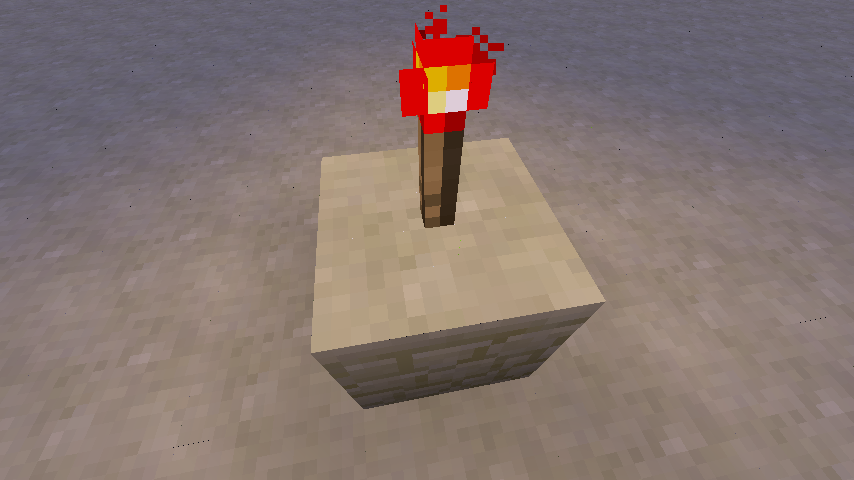
Yup, Sir TLUL. I also hinted at that possibility in MC-7363. I know at least previous versions used a slightly smaller region from the texture. I should note that neither of these things explains the whole story, though. Say, if you place a torch on a block, the face it's standing on will have cracks in it, and so will the air around the torch! I have no clue what it's smoking there, but it isn't your standard geometry or texture issue.
You also really shouldn't grow geometry. If you handle it a little more carefully, perfect geometry will be perfect.
Markku & alexnder: No. The issue is that each section is rendered using its own local coordinates, using a transformation matrix to move it in place. The math is sound as you can tell by sections being where they should be. But using this approach there will be rounding errors, so adjacent 16x16x16 sections (you can tell that's where the cracks are) won't line up exactly. They just won't, no matter how tiny you imagine the error to be.
A possible fix would be to keep all vertices in one huge global coordinate system. But that causes single-precision floating point to run out of precision too quickly for a vast world like Minecraft's. Moving the origin once in a while—for every section at the same time—could fix that, but at the cost of a huge computational spike because all chunks have to be recomputed. It's possible to spread it out over time, at the cost of possibly lower performance for a minute, during which artifacts will momentarily appear.
I had proposed a shader-based solution in MC-7363. (Beware of discredited hypotheses about 1.5's textures. The part about 1.4 is still valid.) It works by altering the vertex transformation to make it exact. It's such a basic shader that there's no reason not to use it; unlike all of Minecraft (shaderless as it may be at the moment), it's a negligible load even on decade-old machines.
We've had shaders for a while, you know. GPUs are pure shader processors nowadays. The fixed-function pipeline is implemented through shaders. It's more efficient to write a shader that does exactly what you want, skipping redundant fixed-function computations that couldn't be optimized away, and saving the driver the headache of creating optimized shaders for each state. You don't have to do it for teh shiny. All you'll lose is your retro OpenGL 1.2 or whatever it is nowadays, but the fact is that any computer that can reasonably run Minecraft has a much more modern feature set.

Please include the description of MC-7363 or at least link to it in the description as it is very detailed
![[Mod] Michael Wobst](../../../data/avatars/users/37868.png)
Confirmed.
Has been an issue for me for a long time. I think Optifine does improve (if not completely remove) this glitch.
Close-up of a vertex joining four purple wool blocks, viewed from below.
The cracks also appear on a block supporting a torch, bordering the torch. I doubt those are caused by textures. If it's an attempt to make closed geometry, it failed.
Duplicate of MC-1794, please use the search function to see if your bug has already been submitted. Currently over 45% of tickets are being closed as duplicate.