 jonathan2520
- jonathan2520
- jonathan2520
- Europe/Stockholm
- Yes
- No
 MC-59134
![[Mojang] Grum (Erik Broes)](../../../data/assets/gravatar/grum.png)
![[Mojang] Searge (Michael Stoyke)](../../../data/assets/gravatar/searge.png)
 Low
Low![[Mojang] Nathan Adams](../../../data/assets/gravatar/dinnerbone.png)
 Normal


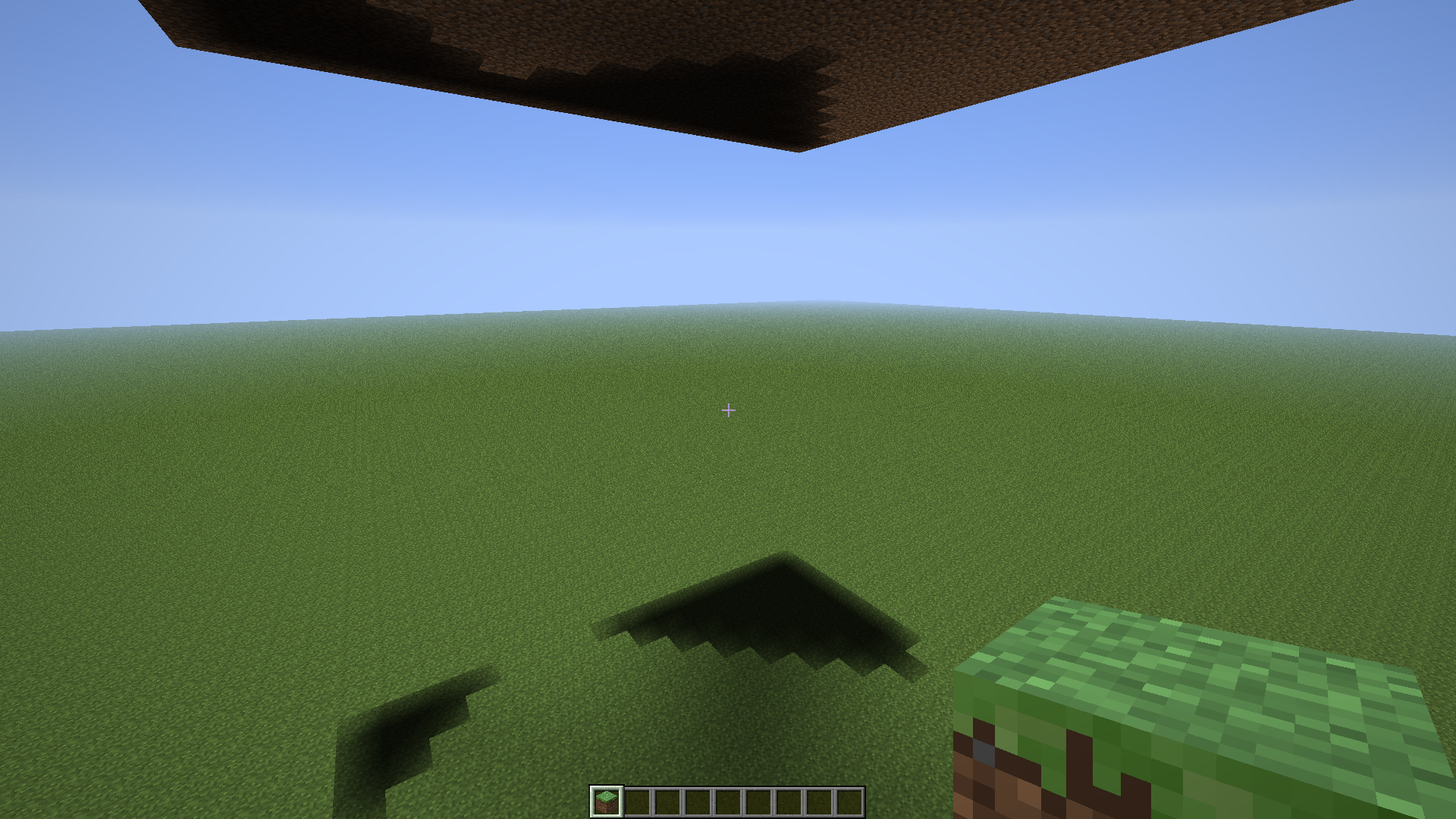


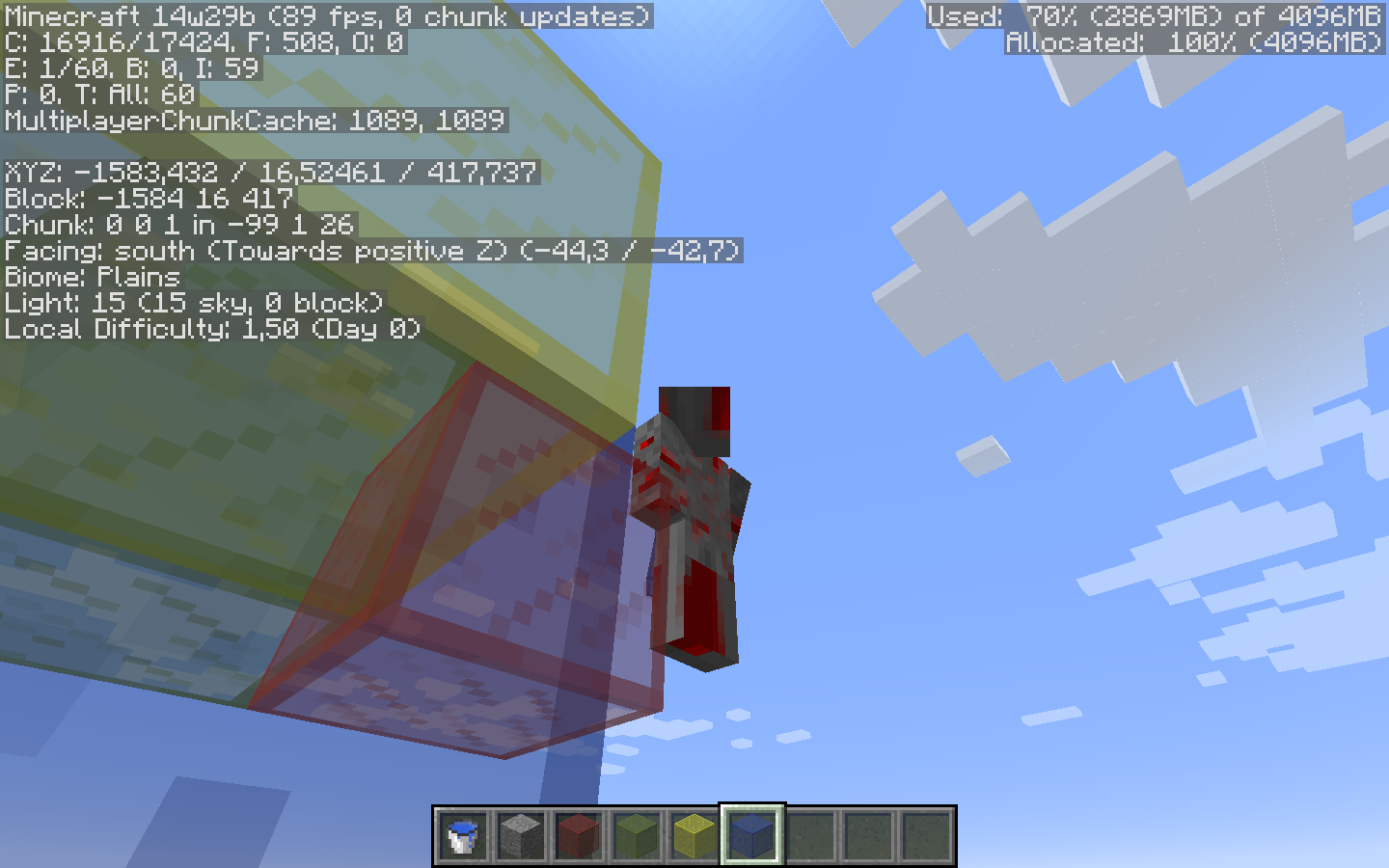





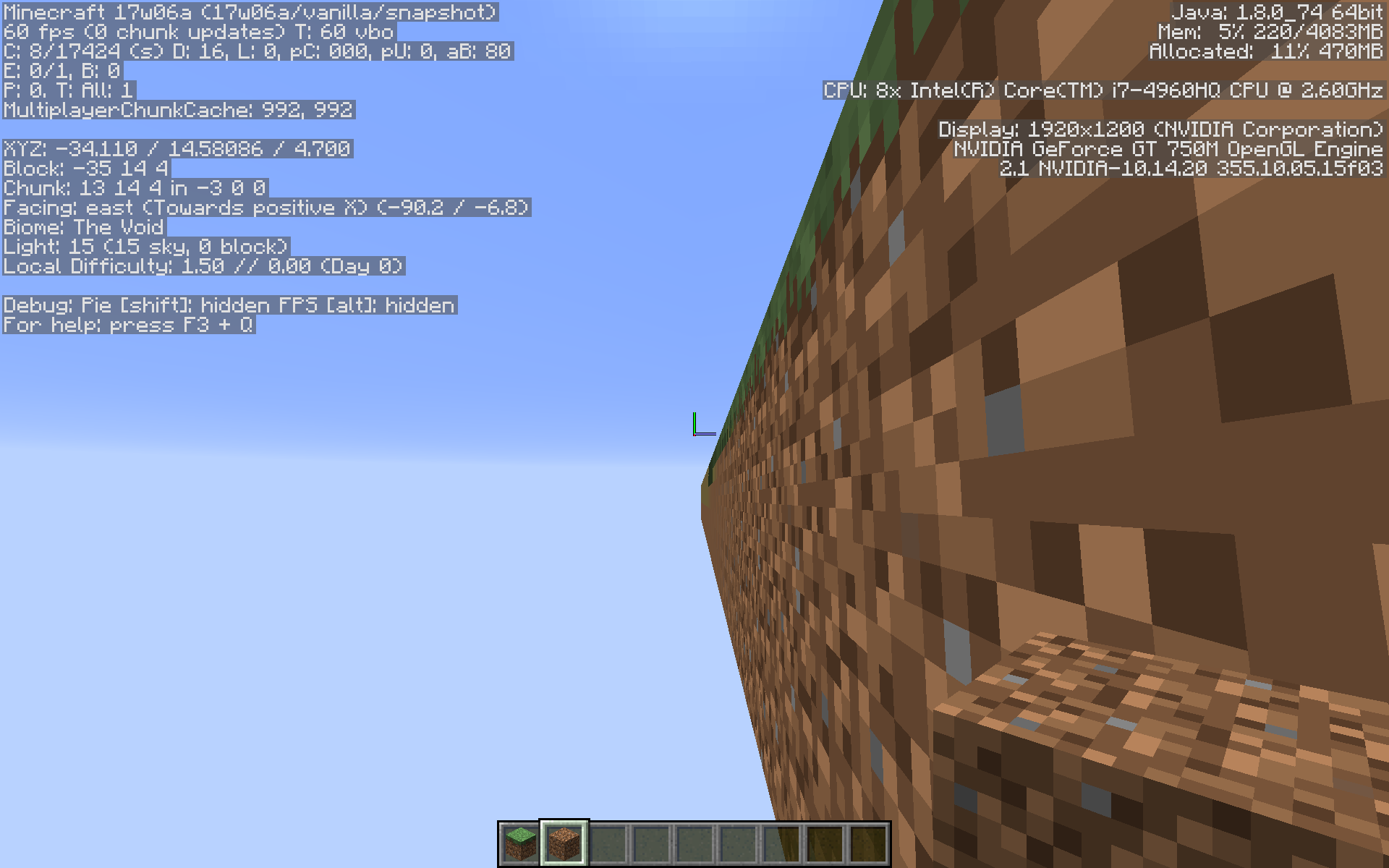

Cracks occur in rasterizers like OpenGL when edges that should align don't match exactly. This can happen if an inexact calculation is used, and vertices that should be the same end up in slightly different places. The errors may seem minuscule, but they invariably result in severe flickering along the cracks. The rasterizer will miss a few pixels and fill others twice. Using different OpenGL transformations to move different vertices to the same place counts as inexact:
glRectf(0, 0, 1, 1);
glRectf(1, 0, 2, 1);glRectf(0, 0, 1, 1);
glTranslatef(0, 0, 1);
glRectf(0, 0, 1, 1);The former will always, unquestionably align. The latter will have a crack. While associativity would tell us that both examples are the same, rounding error does not succumb to associativity. 32-bit floats are exact for integers in [-2^24, 2^24], scaled by a power of two. 64-bit doubles reach a whopping 2^53. If both operands
to an addition are round enough (in binary), the result will be exact. This would be typical for code like the first example. Rolling the same addition into a transformation matrix will almost certainly be inexact, because the matrix is polluted by everything else in it. Really the only way to get it right is to perform a separate addition before the matrix.If you perform the addition in a vertex shader, keep it separate and it should be okay, save for the hypothetical implementation that optimizes both into a matrix (if they're still technically allowed to optimize willy-nilly nowadays):
uniform vec3 translation;
void main() {
vec4 vertex = gl_Vertex;
vertex.xyz += translation;
gl_Position = gl_ModelViewProjectionMatrix * vertex;
}What's cool about this is that even if you're very far from the world origin, you can still keep everything that matters exact. It also doesn't have a stepping or distortion problem in the Far Lands. The CPU code should do something like this:
dvec3 camera;
dvec3 roundedCamera = camera.roundToMultipleOf(16); // Assuming your world transformations are normally a multiple of 16. Can be demoted to float if you stay within 16 * 2^24 blocks. This is half of the magic, by reducing the translation fed into OpenGL to almost nothing.
dvec3 difference = offset - rounded; // Not critical and rather small; can be demoted to float, and will be when fed to OpenGL.
// Substitute difference for camera in calculating the camera transformation.Then, before drawing each batch:
dvec3 translationOfBatch; // Can be float if roundedCamera can be.
dvec3 translation = translationOfBatch - roundedCamera; // This is the other half of the magic. Two potentially huge numbers are reduced to a small, exact multiple of 16. Can certainly be demoted to float, and will be.
// Load the uniform.I hope this is enough theory to help you understand and fix cracks. Now, on to the actual problem description:
Previously, cracks would only appear in between 16x16x16 sections. Not as it should be either, but hardly worth reporting. In the latest snapshots, however, they appear in between every single block. That is too much.
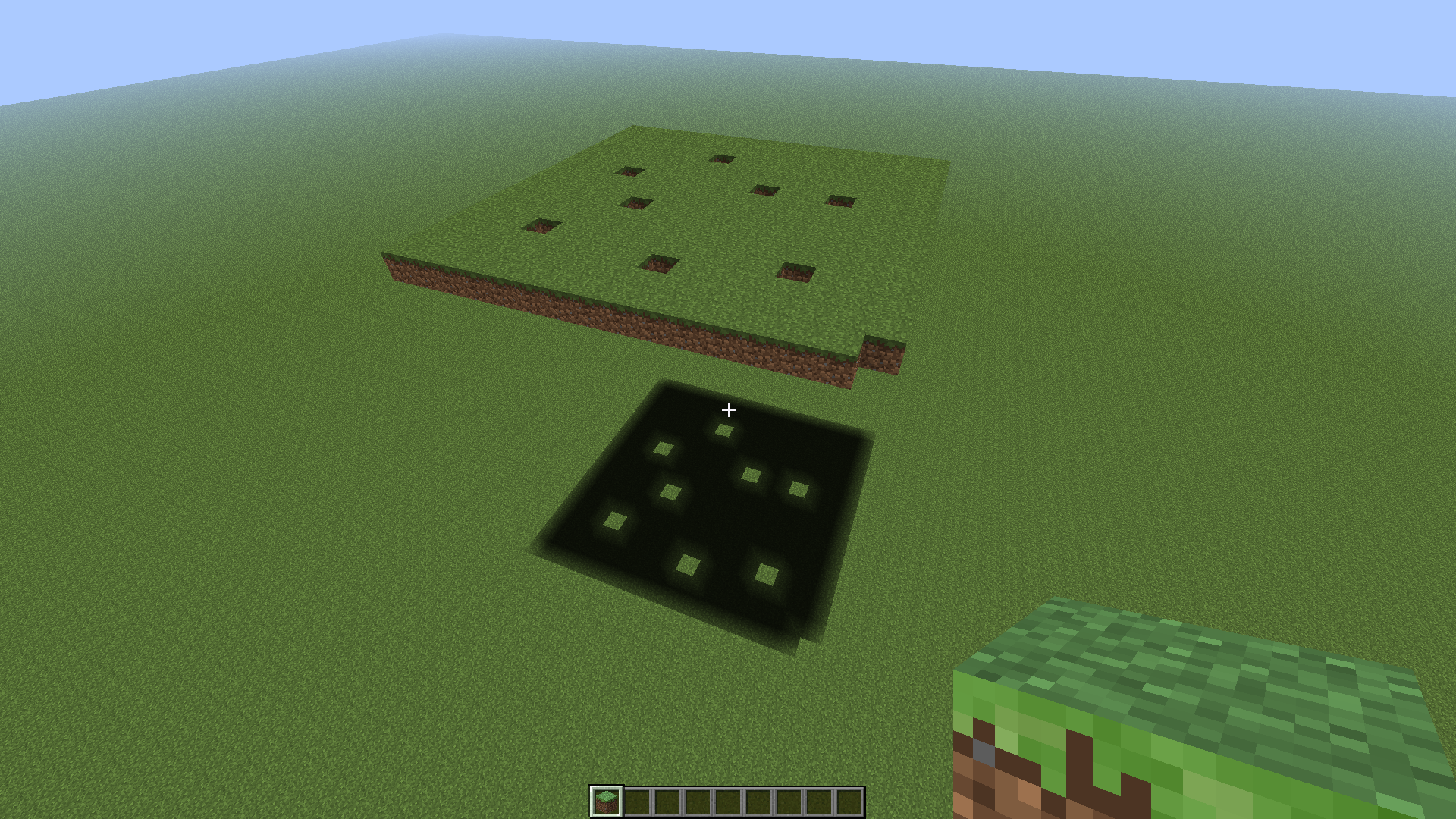
The screenshot shows a superflat world with preset "2;7,62x0,49;2", viewed from below. Incidentally, Minecraft thinks it should light the underside of the obsidian when I get close to it.
Cracks occur in rasterizers like OpenGL when edges that should align don't match exactly. This can happen if an inexact calculation is used, and vertices that should be the same end up in slightly different places. The errors may seem minuscule, but they invariably result in severe flickering along the cracks. The rasterizer will miss a few pixels and fill others twice. Using different OpenGL transformations to move different vertices to the same place counts as inexact:
glRectf(0, 0, 1, 1); glRectf(1, 0, 2, 1);glRectf(0, 0, 1, 1); glTranslatef(0, 0, 1); glRectf(0, 0, 1, 1);The former will always, unquestionably align. The latter will have a crack. While associativity would tell us that both examples are the same, rounding error does not succumb to associativity. 32-bit floats are exact for integers in [-2^24, 2^24], scaled by a power of two. 64-bit doubles reach a whopping 2^53. If both operands of an addition are round enough (in binary), the result will be exact. This would be typical for code like the first example. Rolling the same addition into a transformation matrix will almost certainly be inexact, because the matrix is polluted by everything else in it. Really the only way to get it right is to perform a separate addition before the matrix.
If you perform the addition in a vertex shader, keep it separate and it should be okay, save for the hypothetical implementation that optimizes both into a matrix (if they're still technically allowed to optimize willy-nilly nowadays):
uniform vec3 translation; void main() { vec4 vertex = gl_Vertex; vertex.xyz += translation; gl_Position = gl_ModelViewProjectionMatrix * vertex; }What's cool about this is that even if you're very far from the world origin, you can still keep everything that matters exact. It also doesn't have a stepping or distortion problem in the Far Lands. The CPU code should do something like this:
dvec3 camera; dvec3 roundedCamera = camera.roundToMultipleOf(16); // Assuming your world transformations are normally a multiple of 16. Can be demoted to float if you stay within 16 * 2^24 blocks. This is half of the magic, by reducing the translation fed into OpenGL to almost nothing. dvec3 difference = offset - rounded; // Not critical and rather small; can be demoted to float, and will be when fed to OpenGL. // Substitute difference for camera when calculating the camera transformation.Then, before drawing each batch:
dvec3 translationOfBatch; // Can be float if roundedCamera can be. dvec3 translation = translationOfBatch - roundedCamera; // This is the other half of the magic. Two potentially huge numbers are reduced to a small, exact multiple of 16. Can certainly be demoted to float, and will be. // Load the uniform.I hope this is enough theory to help you understand and fix cracks. Now, on to the actual problem description:
Previously, cracks would only appear in between 16x16x16 sections. Not as it should be either, but hardly worth reporting. In the latest snapshots, however, they appear in between every single block. That is too much.
The screenshot shows a superflat world with preset "2;7,62x0,49;2", viewed from below. Incidentally, Minecraft thinks it should light the underside of the obsidian when I get close to it.
Cracks occur in rasterizers like OpenGL when edges that should align don't match exactly. This can happen if an inexact calculation is used, and vertices that should be the same end up in slightly different places. The errors may seem minuscule, but they invariably result in severe flickering along the cracks. The rasterizer will miss a few pixels and fill others twice. Using different OpenGL transformations to move different vertices to the same place counts as inexact:
glRectf(0, 0, 1, 1); glRectf(1, 0, 2, 1);glRectf(0, 0, 1, 1); glTranslatef(0, 0, 1); glRectf(0, 0, 1, 1);The former will always, unquestionably align. The latter will have a crack. While associativity would tell us that both examples are the same, rounding error does not succumb to associativity. 32-bit floats are exact for integers in [-2^24, 2^24], scaled by a power of two. 64-bit doubles reach a whopping 2^53. If both operands of an addition are round enough (in binary), the result will be exact. This would be typical for code like the first example. Rolling the same addition into a transformation matrix will almost certainly be inexact, because the matrix is polluted by everything else in it. Really the only way to get it right is to perform a separate addition before the matrix.
If you perform the addition in a vertex shader, keep it separate and it should be okay, save for the hypothetical implementation that optimizes both into a matrix (if they're still technically allowed to optimize willy-nilly nowadays):
uniform vec3 translation; void main() { vec4 vertex = gl_Vertex; vertex.xyz += translation; gl_Position = gl_ModelViewProjectionMatrix * vertex; }What's cool about this is that even if you're very far from the world origin, you can still keep everything that matters exact. It also doesn't have a stepping or distortion problem in the Far Lands. The CPU code should do something like this:
dvec3 camera; dvec3 roundedCamera = camera.roundToMultipleOf(16); // Assuming your world transformations are normally a multiple of 16. Can be demoted to float if you stay within 16 * 2^24 blocks. This is half of the magic, by reducing the translation fed into OpenGL to almost nothing. dvec3 difference = offset - rounded; // Not critical and rather small; can be demoted to float, and will be when fed to OpenGL. // Substitute difference for camera when calculating the camera transformation.Then, before drawing each batch:
dvec3 translationOfBatch; // Can be float if roundedCamera can be. dvec3 translation = translationOfBatch - roundedCamera; // This is the other half of the magic. Two potentially huge numbers are reduced to a small, exact multiple of 16. Can certainly be demoted to float, and will be. // Load the uniform.I hope this is enough theory to help you understand and fix cracks. Now, on to the actual problem description:
Previously, cracks would only appear in between 16x16x16 sections. Not as it should be either, but hardly worth reporting. In the latest snapshots, however, they appear in between every single block. That is too much.
The screenshot shows a superflat world with preset "2;7,62x0,49;2", viewed from below. It should be viewed at its full 1920x1200 size to see the speckles. Incidentally, Minecraft thinks it should light the underside of the obsidian when I get close to it.
Cracks occur in rasterizers like OpenGL when edges that should align don't match exactly. This can happen if an inexact calculation is used, and vertices that should be the same end up in slightly different places. The errors may seem minuscule, but they invariably result in severe flickering along the cracks. The rasterizer will miss a few pixels and fill others twice. Using different OpenGL transformations to move different vertices to the same place counts as inexact:
glRectf(0, 0, 1, 1); glRectf(1, 0, 2, 1);glRectf(0, 0, 1, 1); glTranslatef(0, 0, 1); glRectf(0, 0, 1, 1);The former will always, unquestionably align. The latter will have a crack. While associativity would tell us that both examples are the same, rounding error does not succumb to associativity. 32-bit floats are exact for integers in [-2^24, 2^24], scaled by a power of two. 64-bit doubles reach a whopping 2^53. If both operands of an addition are round enough (in binary), the result will be exact. This would be typical for code like the first example. Rolling the same addition into a transformation matrix will almost certainly be inexact, because the matrix is polluted by everything else in it. Really the only way to get it right is to perform a separate addition before the matrix.
If you perform the addition in a vertex shader, keep it separate and it should be okay, save for the hypothetical implementation that optimizes both into a matrix (if they're still technically allowed to optimize willy-nilly nowadays):
uniform vec3 translation; void main() { vec4 vertex = gl_Vertex; vertex.xyz += translation; gl_Position = gl_ModelViewProjectionMatrix * vertex; }What's cool about this is that even if you're very far from the world origin, you can still keep everything that matters exact. It also doesn't have a stepping or distortion problem in the Far Lands. The CPU code should do something like this:
dvec3 camera; dvec3 roundedCamera = camera.roundToMultipleOf(16); // Assuming your world transformations are normally a multiple of 16. Can be demoted to float if you stay within 16 * 2^24 blocks. This is half of the magic, by reducing the translation fed into OpenGL to almost nothing. dvec3 difference = offset - rounded; // Not critical and rather small; can be demoted to float, and will be when fed to OpenGL. // Substitute difference for camera when calculating the camera transformation.Then, before drawing each batch:
dvec3 translationOfBatch; // Can be float if roundedCamera can be. dvec3 translation = translationOfBatch - roundedCamera; // This is the other half of the magic. Two potentially huge numbers are reduced to a small, exact multiple of 16. Can certainly be demoted to float, and will be. // Load the uniform.I hope this is enough theory to help you understand and fix cracks. Now, on to the actual problem description:
Previously, cracks would only appear in between 16x16x16 sections. Not as it should be either, but hardly worth reporting. In the latest snapshots, however, they appear in between every single block. That is too much.
The screenshot shows a superflat world with preset "2;7,62x0,49;2", viewed from below. It should be viewed at its full 1920x1200 size to see the speckles. Incidentally, Minecraft thinks it should lighttheunderside of the obsidian when I get close to it.Crack theory
Cracks occur in rasterizers like OpenGL when edges that should align don't match exactly. This can happen if an inexact calculation is used, and vertices that should be the same end up in slightly different places. The errors may seem minuscule, but they invariably result in severe flickering along the cracks. The rasterizer will miss a few pixels and fill others twice. Using different OpenGL transformations to move different vertices to the same place counts as inexact:
glRectf(0, 0, 1, 1); glRectf(1, 0, 2, 1);glRectf(0, 0, 1, 1); glTranslatef(0, 0, 1); glRectf(0, 0, 1, 1);The former will always, unquestionably align. The latter will have a crack. While associativity would tell us that both examples are the same, rounding error does not succumb to associativity. 32-bit floats are exact for integers in [-2^24, 2^24], scaled by a power of two. 64-bit doubles reach a whopping 2^53. If both operands of an addition are round enough (in binary), the result will be exact. This would be typical for code like the first example. Rolling the same addition into a transformation matrix will almost certainly be inexact, because the matrix is polluted by everything else in it. Really the only way to get it right is to perform a separate addition before the matrix.
If you perform the addition in a vertex shader, keep it separate and it should be okay, save for the hypothetical implementation that optimizes both into a matrix (if they're still technically allowed to optimize willy-nilly nowadays):
uniform vec3 translation; void main() { vec4 vertex = gl_Vertex; vertex.xyz += translation; gl_Position = gl_ModelViewProjectionMatrix * vertex; }What's cool about this is that even if you're very far from the world origin, you can still keep everything that matters exact. It also doesn't have a stepping or distortion problem in the Far Lands. The CPU code should do something like this:
dvec3 camera; dvec3 roundedCamera = camera.roundToMultipleOf(16); // Assuming your world transformations are normally a multiple of 16. Can be demoted to float if you stay within 16 * 2^24 blocks. This is half of the magic, by reducing the translation fed into OpenGL to almost nothing. dvec3 difference = offset - rounded; // Not critical and rather small; can be demoted to float, and will be when fed to OpenGL. // Substitute difference for camera when calculating the camera transformation.Then, before drawing each batch:
dvec3 translationOfBatch; // Can be float if roundedCamera can be. dvec3 translation = translationOfBatch - roundedCamera; // This is the other half of the magic. Two potentially huge numbers are reduced to a small, exact multiple of 16. Can certainly be demoted to float, and will be. // Load the uniform.I hope this is enough theory to help you understand and fix cracks. Now, on to the actual problem description:
Description
Previously, cracks would only appear in between 16x16x16 sections. Not as it should be either, but hardly worth reporting. In the latest snapshots, however, they appear in between every single block. That is too much.
The screenshot shows a superflat world with preset "2;7,62x0,49;2", viewed from below. It should be viewed at its full 1920x1200 size to see the speckles. Incidentally, Minecraft thinks it should light the underside of the obsidian when I get close to it.
Addendum: textures?
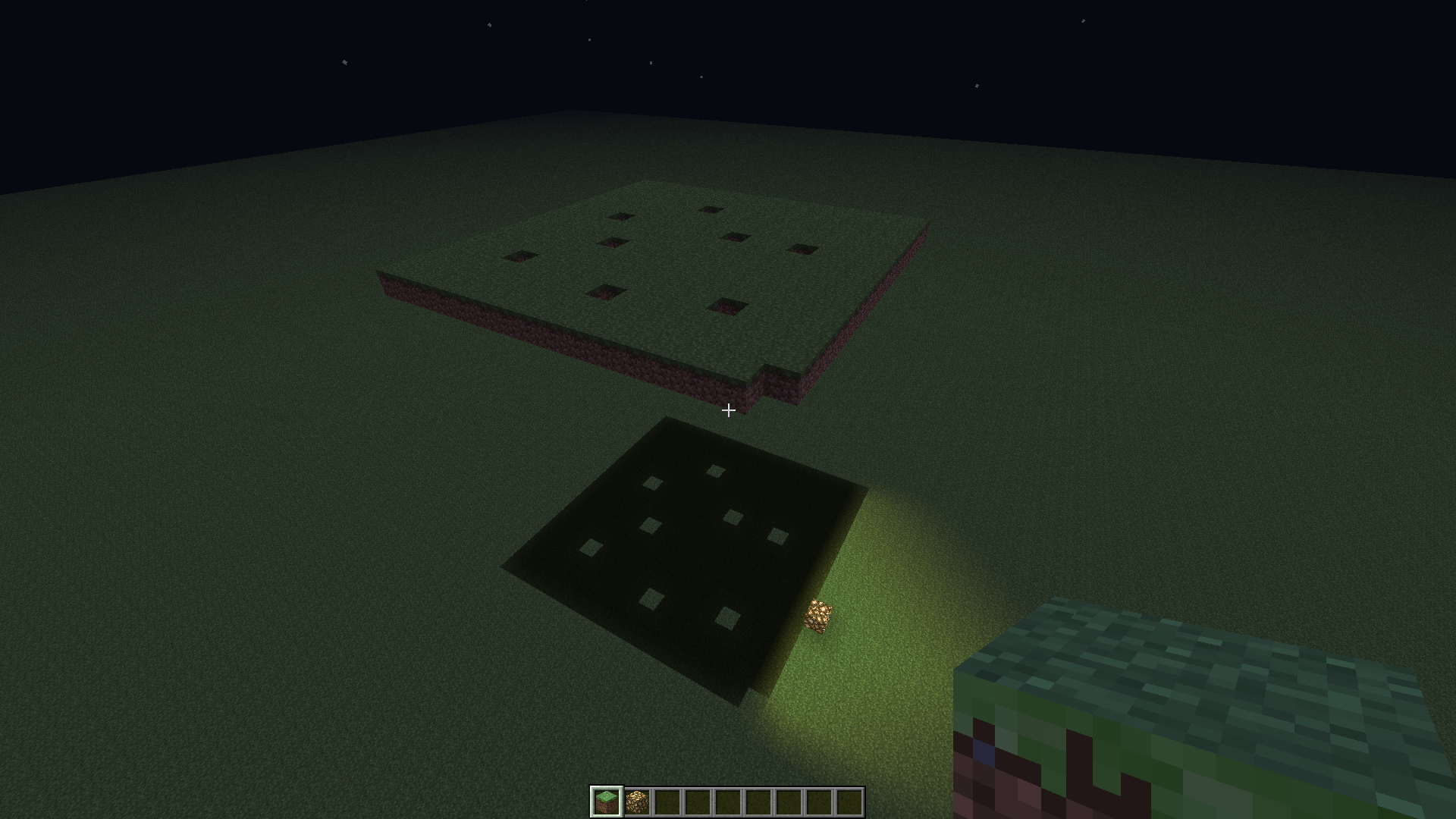
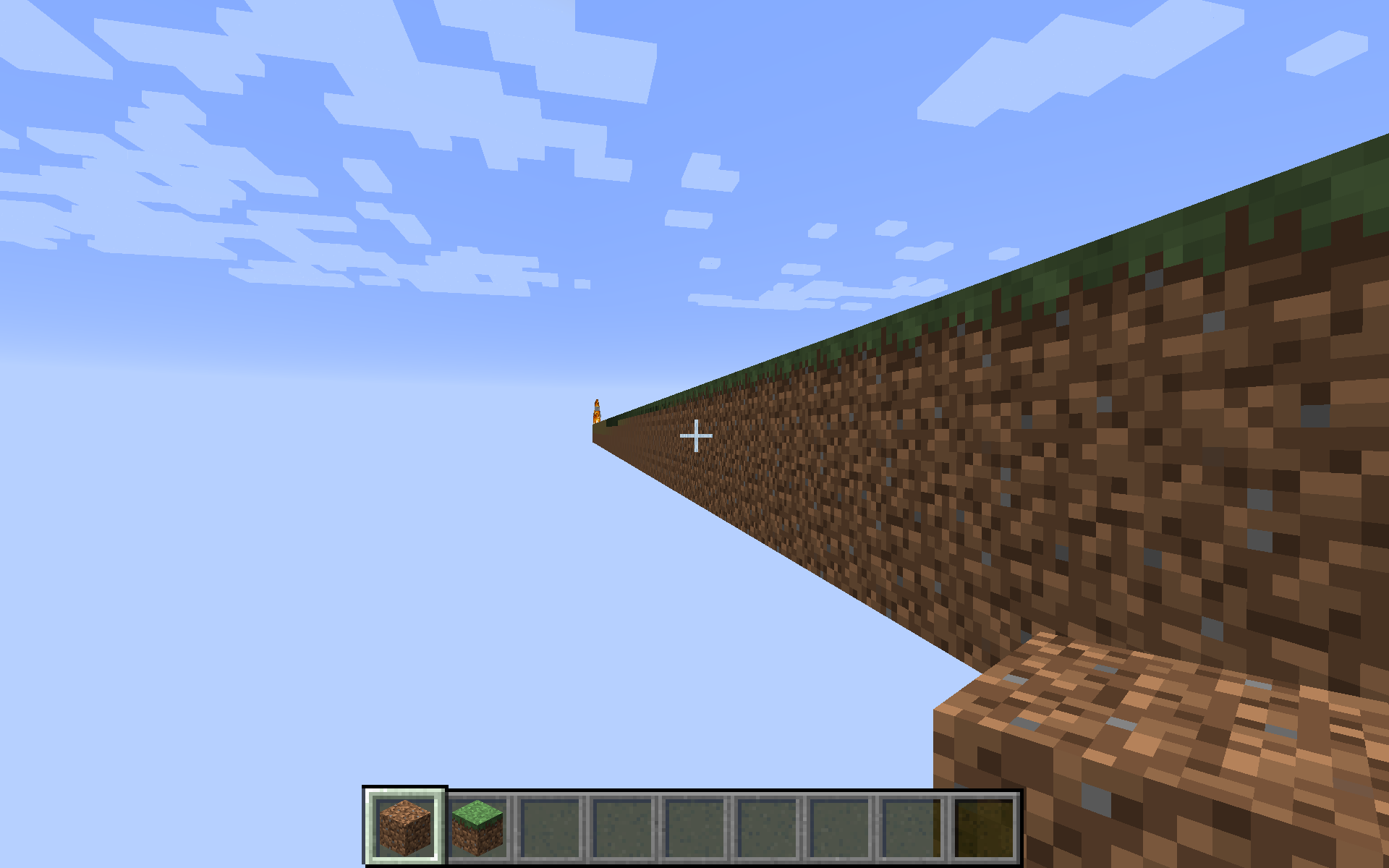
After noticing the directionality of the cracks, I realized it's crossing over into adjacent tiles on the texture. That could explain some or all of this bug. I will upload a second screenshot demonstrating that. It's of a similar superflat world, but using purple wool (35:10) instead of obsidian. What you see is a close-up of the vertex joining four blocks. You can see some yellow seeping through one edge, and blue through the other. Indeed, those are wool blocks adjacent to the right and below, respectively, in stitched_terrain.png generated by an older snapshot. There is also some sky showing through next to the blue wool (I know it's the sky because it becomes black at night). I'd expect it to be orange wool as that is located above it in stitched_terrain.png, but then that file is probably outdated. It may well be that the adjacent texture is transparent. Indeed, green wool doesn't have this 'crack'.
Older versions of Minecraft used to move their texture coordinates inward just a tiny amount to avoid this issue. Was that tweak removed when the rendering engine was overhauled?
Crack theory
Cracks occur in rasterizers like OpenGL when edges that should align don't match exactly. This can happen if an inexact calculation is used, and vertices that should be the same end up in slightly different places. The errors may seem minuscule, but they invariably result in severe flickering along the cracks. The rasterizer will miss a few pixels and fill others twice. Using different OpenGL transformations to move different vertices to the same place counts as inexact:
glRectf(0, 0, 1, 1); glRectf(1, 0, 2, 1);glRectf(0, 0, 1, 1); glTranslatef(0, 0, 1); glRectf(0, 0, 1, 1);The former will always, unquestionably align. The latter will have a crack. While associativity would tell us that both examples are the same, rounding error does not succumb to associativity. 32-bit floats are exact for integers in [-2^24, 2^24], scaled by a power of two. 64-bit doubles reach a whopping 2^53. If both operands of an addition are round enough (in binary), the result will be exact. This would be typical for code like the first example. Rolling the same addition into a transformation matrix will almost certainly be inexact, because the matrix is polluted by everything else in it. Really the only way to get it right is to perform a separate addition before the matrix.
If you perform the addition in a vertex shader, keep it separate and it should be okay, save for the hypothetical implementation that optimizes both into a matrix (if they're still technically allowed to optimize willy-nilly nowadays):
uniform vec3 translation; void main() { vec4 vertex = gl_Vertex; vertex.xyz += translation; gl_Position = gl_ModelViewProjectionMatrix * vertex; }What's cool about this is that even if you're very far from the world origin, you can still keep everything that matters exact. It also doesn't have a stepping or distortion problem in the Far Lands. The CPU code should do something like this:
dvec3 camera; dvec3 roundedCamera = camera.roundToMultipleOf(16); // Assuming your world transformations are normally a multiple of 16. Can be demoted to float if you stay within 16 * 2^24 blocks. This is half of the magic, by reducing the translation fed into OpenGL to almost nothing. dvec3 difference = offset - rounded; // Not critical and rather small; can be demoted to float, and will be when fed to OpenGL. // Substitute difference for camera when calculating the camera transformation.Then, before drawing each batch:
dvec3 translationOfBatch; // Can be float if roundedCamera can be. dvec3 translation = translationOfBatch - roundedCamera; // This is the other half of the magic. Two potentially huge numbers are reduced to a small, exact multiple of 16. Can certainly be demoted to float, and will be. // Load the uniform.I hope this is enough theory to help you understand and fix cracks. Now, on to the actual problem description:
Description
Previously, cracks would only appear in between 16x16x16 sections. Not as it should be either, but hardly worth reporting. In the latest snapshots, however, they appear in between every single block. That is too much.
The screenshot shows a superflat world with preset "2;7,62x0,49;2", viewed from below. It should be viewed at its full 1920x1200 size to see the speckles. Incidentally, Minecraft thinks it should light the underside of the obsidian when I get close to it.
Addendum: textures?
After noticing the directionality of the cracks, I realized it's crossing over into adjacent tiles on the texture. That could explain some or all of this bug. I will upload a second screenshot demonstrating that. It's of a similar superflat world, but using purple wool (35:10) instead of obsidian.What you see is a close-up of the vertex joining four blocks. You can see some yellow seeping through one edge, and blue through the other. Indeed, those are wool blocks adjacent to the right and below, respectively, in stitched_terrain.png generated by an older snapshot. There is also some sky showing through next to the blue wool (I know it's the sky because it becomes black at night). I'd expect it to be orange wool as that is located above it in stitched_terrain.png, but then that file is probably outdated. It may well be that the adjacent texture is transparent. Indeed, green wool doesn't have this 'crack'.Older versions of Minecraft used to move their texture coordinates inward just a tiny amount to avoid this issue. Was that tweak removed when the rendering engine was overhauled?
Crack theory
Cracks occur in rasterizers like OpenGL when edges that should align don't match exactly. This can happen if an inexact calculation is used, and vertices that should be the same end up in slightly different places. The errors may seem minuscule, but they invariably result in severe flickering along the cracks. The rasterizer will miss a few pixels and fill others twice. Using different OpenGL transformations to move different vertices to the same place counts as inexact:
glRectf(0, 0, 1, 1); glRectf(1, 0, 2, 1);glRectf(0, 0, 1, 1); glTranslatef(0, 0, 1); glRectf(0, 0, 1, 1);The former will always, unquestionably align. The latter will have a crack. While associativity would tell us that both examples are the same, rounding error does not succumb to associativity. 32-bit floats are exact for integers in [-2^24, 2^24], scaled by a power of two. 64-bit doubles reach a whopping 2^53. If both operands of an addition are round enough (in binary), the result will be exact. This would be typical for code like the first example. Rolling the same addition into a transformation matrix will almost certainly be inexact, because the matrix is polluted by everything else in it. Really the only way to get it right is to perform a separate addition before the matrix.
If you perform the addition in a vertex shader, keep it separate and it should be okay, save for the hypothetical implementation that optimizes both into a matrix (if they're still technically allowed to optimize willy-nilly nowadays):
uniform vec3 translation; void main() { vec4 vertex = gl_Vertex; vertex.xyz += translation; gl_Position = gl_ModelViewProjectionMatrix * vertex; }What's cool about this is that even if you're very far from the world origin, you can still keep everything that matters exact. It also doesn't have a stepping or distortion problem in the Far Lands. The CPU code should do something like this:
dvec3 camera; dvec3 roundedCamera = camera.roundToMultipleOf(16); // Assuming your world transformations are normally a multiple of 16. Can be demoted to float if you stay within 16 * 2^24 blocks. This is half of the magic, by reducing the translation fed into OpenGL to almost nothing. dvec3 difference = offset - rounded; // Not critical and rather small; can be demoted to float, and will be when fed to OpenGL. // Substitute difference for camera when calculating the camera transformation.Then, before drawing each batch:
dvec3 translationOfBatch; // Can be float if roundedCamera can be. dvec3 translation = translationOfBatch - roundedCamera; // This is the other half of the magic. Two potentially huge numbers are reduced to a small, exact multiple of 16. Can certainly be demoted to float, and will be. // Load the uniform.I hope this is enough theory to help you understand and fix cracks. Now, on to the actual problem description:
Description
Previously, cracks would only appear in between 16x16x16 sections. Not as it should be either, but hardly worth reporting. In the latest snapshots, however, they appear in between every single block. That is too much.
The screenshot shows a superflat world with preset "2;7,62x0,49;2", viewed from below. It should be viewed at its full 1920x1200 size to see the speckles. Incidentally, Minecraft thinks it should light the underside of the obsidian when I get close to it.
Addendum: textures?
After noticing the directionality of the cracks, I realized it's crossing over into adjacent tiles on the texture. That could explain some or all of this bug. I will upload a second screenshot demonstrating that. It's of a similar superflat world, but using purple wool (35:10) instead of obsidian.
What you see is a close-up of the vertex joining four blocks. You can see some yellow seeping through one edge, and blue through the other. Indeed, those are wool blocks adjacent to the right and below, respectively, in stitched_terrain.png generated by an older snapshot. There is also some sky showing through next to the blue wool (I know it's the sky because it becomes black at night). I'd expect it to be orange wool as that is located above it in stitched_terrain.png, but then that file is probably outdated. It may well be that the adjacent texture is transparent. Indeed, green wool doesn't have this 'crack'. Texture coordinates should be the only difference between wool colors, therefore this should be responsible.
Older versions of Minecraft used to move their texture coordinates inward just a tiny amount to avoid this issue. Was that tweak removed when the rendering engine was overhauled?
Crack theory
Cracks occur in rasterizers like OpenGL when edges that should align don't match exactly. This can happen if an inexact calculation is used, and vertices that should be the same end up in slightly different places. The errors may seem minuscule, but they invariably result in severe flickering along the cracks. The rasterizer will miss a few pixels and fill others twice. Using different OpenGL transformations to move different vertices to the same place counts as inexact:
glRectf(0, 0, 1, 1); glRectf(1, 0, 2, 1);glRectf(0, 0, 1, 1); glTranslatef(0, 0, 1); glRectf(0, 0, 1, 1);The former will always, unquestionably align. The latter will have a crack. While associativity would tell us that both examples are the same, rounding error does not succumb to associativity. 32-bit floats are exact for integers in [-2^24, 2^24], scaled by a power of two. 64-bit doubles reach a whopping 2^53. If both operands of an addition are round enough (in binary), the result will be exact. This would be typical for code like the first example. Rolling the same addition into a transformation matrix will almost certainly be inexact, because the matrix is polluted by everything else in it. Really the only way to get it right is to perform a separate addition before the matrix.
If you perform the addition in a vertex shader, keep it separate and it should be okay, save for the hypothetical implementation that optimizes both into a matrix (if they're still technically allowed to optimize willy-nilly nowadays):
uniform vec3 translation; void main() { vec4 vertex = gl_Vertex; vertex.xyz += translation; gl_Position = gl_ModelViewProjectionMatrix * vertex; }What's cool about this is that even if you're very far from the world origin, you can still keep everything that matters exact. It also doesn't have a stepping or distortion problem in the Far Lands. The CPU code should do something like this:
dvec3 camera; dvec3 roundedCamera = camera.roundToMultipleOf(16); // Assuming your world transformations are normally a multiple of 16. Can be demoted to float if you stay within 16 * 2^24 blocks. This is half of the magic, by reducing the translation fed into OpenGL to almost nothing. dvec3 difference = offset - rounded; // Not critical and rather small; can be demoted to float, and will be when fed to OpenGL. // Substitute difference for camera when calculating the camera transformation.Then, before drawing each batch:
dvec3 translationOfBatch; // Can be float if roundedCamera can be. dvec3 translation = translationOfBatch - roundedCamera; // This is the other half of the magic. Two potentially huge numbers are reduced to a small, exact multiple of 16. Can certainly be demoted to float, and will be. // Load the uniform.I hope this is enough theory to help you understand and fix cracks. Now, on to the actual problem description:
Description
Previously, cracks would only appear in between 16x16x16 sections. Not as it should be either, but hardly worth reporting. In the latest snapshots, however, they appear in between every single block. That is too much.
The screenshot shows a superflat world with preset "2;7,62x0,49;2", viewed from below. It should be viewed at its full 1920x1200 size to see the speckles. Incidentally, Minecraft thinks it should light the underside of the obsidian when I get close to it.
Addendum: textures?
After noticing the directionality of the cracks, I realized it's crossing over into adjacent tiles on the texture. That could explain some or all of this bug. I will upload a second screenshot demonstrating that. It's of a similar superflat world, but using purple wool (35:10) instead of obsidian.
What you see is a close-up of the vertex joining four blocks. You can see some yellow seeping through one edge, and blue through the other. Indeed, those are wool blocks adjacent to the right and below, respectively, in stitched_terrain.png generated by an older snapshot. There is also some sky showing through next to the blue wool (I know it's the sky because it becomes black at night). I'd expect it to be orange wool as that is located above it in stitched_terrain.png, but then that file is probably outdated. It may well be that the adjacent texture is transparent. Indeed, green wool doesn't have this 'crack'. Texture coordinates should be the only difference between wool colors, therefore this should be responsible.
Older versions of Minecraft used to move their texture coordinates inward just a tiny amount to avoid this issue. Was that tweak removed when the rendering engine was overhauled?
Update: The cracks between 16x16x16 sections have existed for a long time, and still do. Crack theory has been, is, and will still be applicable. The lines that started to appear in between every block in the 1.5 snapshots and should be fixed in 1.5.1 were caused by texture coordinates overflowing their tile slightly in the rasterizer.
Crack theory
Cracks occur in rasterizers like OpenGL when edges that should align don't match exactly. This can happen if an inexact calculation is used, and vertices that should be the same end up in slightly different places. The errors may seem minuscule, but they invariably result in severe flickering along the cracks. The rasterizer will miss a few pixels and fill others twice. Using different OpenGL transformations to move different vertices to the same place counts as inexact:
glRectf(0, 0, 1, 1); glRectf(1, 0, 2, 1);glRectf(0, 0, 1, 1); glTranslatef(0, 0, 1); glRectf(0, 0, 1, 1);The former will always, unquestionably align. The latter will have a crack. While associativity would tell us that both examples are the same, rounding error does not succumb to associativity. 32-bit floats are exact for integers in [-2^24, 2^24], scaled by a power of two. 64-bit doubles reach a whopping 2^53. If both operands of an addition are round enough (in binary), the result will be exact. This would be typical for code like the first example. Rolling the same addition into a transformation matrix will almost certainly be inexact, because the matrix is polluted by everything else in it. Really the only way to get it right is to perform a separate addition before the matrix.
If you perform the addition in a vertex shader, keep it separate and it should be okay, save for the hypothetical implementation that optimizes both into a matrix (if they're still technically allowed to optimize willy-nilly nowadays):
Edit: Uniform state is slow to change, so an attribute used like a uniform would likely be faster than a uniform.uniform vec3 translation; void main() { vec4 vertex = gl_Vertex; vertex.xyz += translation; gl_Position = gl_ModelViewProjectionMatrix * vertex; }What's cool about this is that even if you're very far from the world origin, you can still keep everything that matters exact. It also doesn't have a stepping or distortion problem in the Far Lands. The CPU code should do something like this:
dvec3 camera; dvec3 roundedCamera = camera.roundToMultipleOf(16); // Assuming your world transformations are normally a multiple of 16. Can be demoted to float if you stay within 16 * 2^24 blocks. This is half of the magic, by reducing the translation fed into OpenGL to almost nothing. dvec3 difference = offset - rounded; // Not critical and rather small; can be demoted to float, and will be when fed to OpenGL. // Substitute difference for camera when calculating the camera transformation.Then, before drawing each batch:
dvec3 translationOfBatch; // Can be float if roundedCamera can be. dvec3 translation = translationOfBatch - roundedCamera; // This is the other half of the magic. Two potentially huge numbers are reduced to a small, exact multiple of 16. Can certainly be demoted to float, and will be. // Load the uniform.I hope this is enough theory to help you understand and fix cracks. Now, on to the actual problem description:
Description
Previously, cracks would only appear in between 16x16x16 sections. Not as it should be either, but hardly worth reporting. In the latest snapshots, however, they appear in between every single block. That is too much.
The screenshot shows a superflat world with preset "2;7,62x0,49;2", viewed from below. It should be viewed at its full 1920x1200 size to see the speckles. Incidentally, Minecraft thinks it should light the underside of the obsidian when I get close to it.
Addendum: textures?
After noticing the directionality of the cracks, I realized it's crossing over into adjacent tiles on the texture. That could explain some or all of this bug. I will upload a second screenshot demonstrating that. It's of a similar superflat world, but using purple wool (35:10) instead of obsidian.
What you see is a close-up of the vertex joining four blocks. You can see some yellow seeping through one edge, and blue through the other. Indeed, those are wool blocks adjacent to the right and below, respectively, in stitched_terrain.png generated by an older snapshot. There is also some sky showing through next to the blue wool (I know it's the sky because it becomes black at night). I'd expect it to be orange wool as that is located above it in stitched_terrain.png, but then that file is probably outdated. It may well be that the adjacent texture is transparent. Indeed, green wool doesn't have this 'crack'. Texture coordinates should be the only difference between wool colors, therefore this should be responsible.
Older versions of Minecraft used to move their texture coordinates inward just a tiny amount to avoid this issue. Was that tweak removed when the rendering engine was overhauled?
1.4.7.png
First of all, you should be using a dedicated server for one variant of the bug. Probably best to try when no one else is using the server. Read on to find a way to reproduce it in singleplayer.
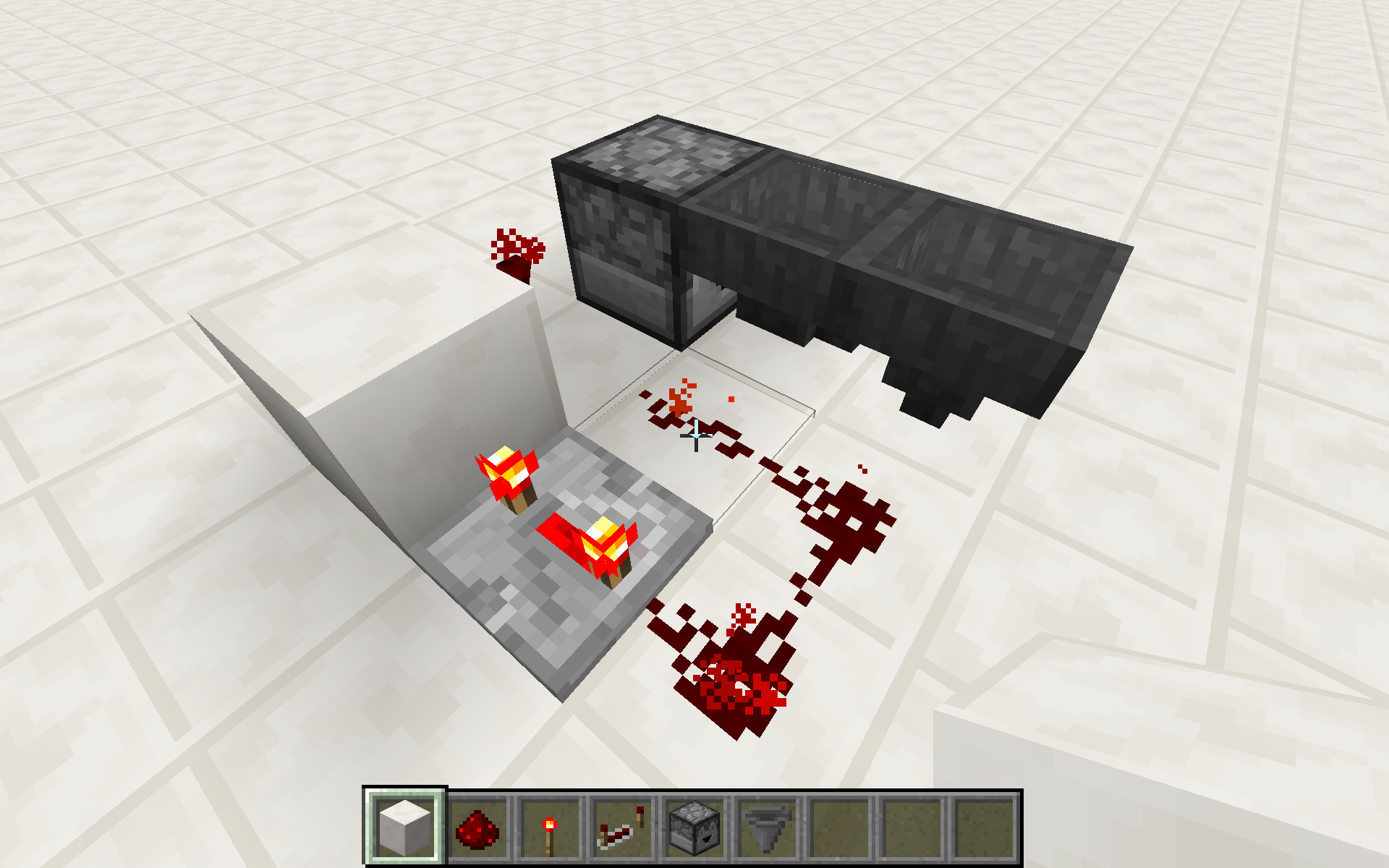
Build a basic item transporter mockup within a few chunks of the world spawn (these are the spawn chunks, which generally remain loaded even if no one is there). Build a dropper pointing into a hopper pointing into anything with a decent inventory like another dropper, hopper, chest, etc. Fill the dropper to the brim with stacks of 64 for testing purposes, then hook it up to a clock (a period of about a second works well). Observe how with each tick of the clock, an item is put in the hopper, which will subsequently pass it on.
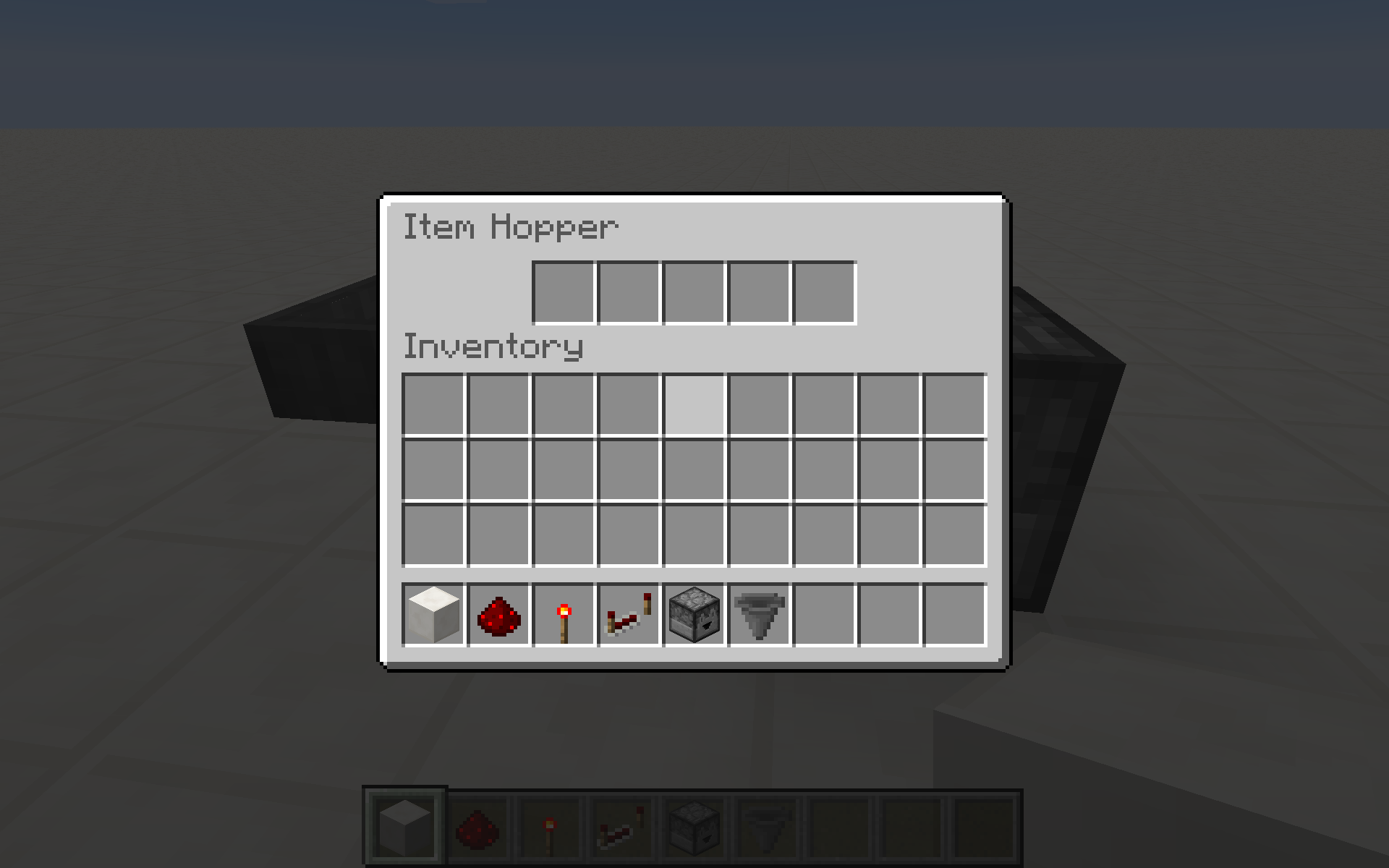
Now leave the game. Wait for a few minutes, then rejoin. Inspect the inventory of the hopper that receives items from the dropper. Instead of alternating between being empty and containing a single item, it will be filled with a multitude of items depending on how long you waited. The hopper is active again at that point, working hard to get rid of the items. The redstone clock and dropper continued to function the whole time, whereas the hopper simply stopped a short time after disconnecting.
If you've emptied the destination inventory immediately before leaving and checked it immediately after returning, you'll find as many items as would transfer in a minute plus a few to account for the time you've wasted, suggesting the hopper cuts out after one minute.
Going to the Nether (and probably the End as well) for a few minutes has the same effect. This also works using the integrated server (i.e. singleplayer). Moving far away from the spawn but staying in the Overworld, so the setup would be unloaded if it weren't for being in the spawn chunks, doesn't trigger the bug.
Edit: I read up on spawn chunks. According to the wiki, they do unload one minute after the last player enters another dimension (it says nothing about disconnecting). But that can't be true because the redstone and dropper are still active. It also says something about certain events not being processed in spawn chunks when nobody is in range. Why would hoppers specifically pause when all the other redstone keeps working? Not that I'm all that happy with some of the other things purported to pause, but this is even of the same category as things that don't pause. The wiki claims that hoppers are processed normally, by the way, but what does it know.
I tested 1.7.9 both ways. I only tested 1.7.10-pre4 and 14w26b in singleplayer.
I used two hoppers in the build shown on my screenshots. The hopper pointing down can be anything else. I used a chest when I tested singleplayer. Doesn't really matter, as long as its inventory is large enough not to fill up in an instant. The redstone dust adjacent to the hoppers doesn't affect them. Obviously, if it did, you'd expect problems before and after disconnecting, too! Just to confirm I also built it with a rotated clock so only the dropper has any kind of contact, which didn't change anything.
First of all, you should be using a dedicated server for one variant of the bug. Probably best to try when no one else is using the server. Read on to find a way to reproduce it in singleplayer.
Build a basic item transporter mockup within a few chunks of the world spawn (these are the spawn chunks, which generally remain loaded even if no one is there). Build a dropper pointing into a hopper pointing into anything with a decent inventory like another dropper, hopper, chest, etc. Fill the dropper to the brim with stacks of 64 for testing purposes, then hook it up to a clock (a period of about a second works well). Observe how with each tick of the clock, an item is put in the hopper, which will subsequently pass it on.
Now leave the game. Wait for a few minutes, then rejoin. Inspect the inventory of the hopper that receives items from the dropper. Instead of alternating between being empty and containing a single item, it will be filled with a multitude of items depending on how long you waited. The hopper is active again at that point, working hard to get rid of the items. The redstone clock and dropper continued to function the whole time, whereas the hopper simply stopped a short time after disconnecting.
If you've emptied the destination inventory immediately before leaving and checked it immediately after returning, you'll find as many items as would transfer in a minute plus a few to account for the time you've wasted, suggesting the hopper cuts out after one minute.
Going to the Nether (and probably the End as well) for a few minutes has the same effect. This also works using the integrated server (i.e. singleplayer). Moving far away from the spawn but staying in the Overworld, so the setup would be unloaded if it weren't for being in the spawn chunks, doesn't trigger the bug.
Edit: I read up on spawn chunks. According to the wiki, they do unload one minute after the last player enters another dimension (it says nothing about disconnecting). But that can't be true because the redstone and dropper are still active. It also says something about certain events not being processed in spawn chunks when nobody is in range. Why would hoppers specifically pause when all the other redstone keeps working? Not that I'm all that happy with some of the other things purported to pause, but this is even of the same category as things that don't pause. The wiki claims that hoppers are processed normally, by the way, but what does it know.
I tested 1.7.9 both ways. I only tested 1.7.10-pre4 and 14w26b (and now the newer versions that I have added) in singleplayer.
I used two hoppers in the build shown on my screenshots. The hopper pointing down can be anything else. I used a chest when I tested singleplayer. Doesn't really matter, as long as its inventory is large enough not to fill up in an instant. The redstone dust adjacent to the hoppers doesn't affect them. Obviously, if it did, you'd expect problems before and after disconnecting, too! Just to confirm I also built it with a rotated clock so only the dropper has any kind of contact, which didn't change anything.
Look at the screenshot. When my feet are below y=16 but my head is above it, the draw order of the water (as well as a whole lot of other transparent stuff) gets messed up.
14w30c is an improvement but not a true fix. Read the comments for details.
Mac OS X 10.9.4, Oracle Java 1.8.0_05 & _11, GeForce 750M GT
Mac OS X 10.9.3, Apple Java 1.6.0_65, Radeon 5870
Draw order of sectionsshould be based on camera Y, not foot YDraw order of sections based on incorrect head position
Draw order ofsections based on incorrect head positionDraw order of blocks based on incorrect head position
No hit even though crosshair is fixated on mob (plain mouse lag)
No hit even though crosshair is fixated on mob (plain mouse lag)Mouse click position always lags a few frames behind the crosshair
I created a flat world using the custom preset 2;7,8,111;1 (you will spawn under the bedrock use creative) when you use a boat you get stuck on some lilypads and sometimes even break the boat (some cornercase but may happen in less extreme environment) also as i get stuck the "breaking" of the lilypads get faster than me and desyncs(see screenshot in attachment) when the boat breakin this kind of desync the wood drop where the lilypads break while i will be dropped on the position i was.Boats have synced badly for a long time now.
To begin with, each boat has a flag telling whether the local player is controlling the boat. This is only updated upon entering, but not exiting the boat. Until the boat is reloaded, it will always think the local player is controlling it. The server sends packets of the form [player attached to boat] upon entering and [player attached to null] upon exiting. It seems the code interpreting the packets expects [something that is not the player attached to boat] instead of [player attached to null].
That flag is used by the client to pretend to have complete control over the boat. It stops responding to position updates sent by the server (1.8 changes this slightly). The updates set some internal variables, but those are never used to actually update the boat's position. Due to this lack of updates, the client's position quickly diverges from the server's. This leads to boats hitting things and possibly breaking in what appears to be open water. In extreme cases you could (before 1.8) run off of the edge of the world on the client, because the position was off by all of the render distance.
The client runs full server code on boats it believes it's controlling. This includes breaking lily pads and snow layers in the boat's way. This is another source of desync because it updates the local view of the world without the server's consent. In the lily pad test case you can see two trails of broken lily pads, one of them due to a hallucinating client (not visible on the attached screenshot, which is of an older version).
Since 1.8, boats do respond to forced teleports, which generally occur every 20 seconds or so. They will instantly jerk to the reported position and set their velocity to zero. Makes for a very jerky ride that actually creates some desync as I'll detail in a moment.
A good test case is/used to be a superflat world with preset 2;7,8,111;1 (bedrock, water, lily pad). Place a boat and gently move around (so that the boat breaks lily pads, not the other way around). The desync should soon become apparent when the server breaks lily pads that don't appear to be near you. If you manage to break the boat, the resulting planks and sticks will drop where the boat really was, whereas your character remains where the client thinks it was. 1.8 still wreaks havoc even though it kind of fixes itself periodically.
Yet another issue is the mishmash of client and server control that was the intended result. The client predicts the boat's movement by reacting instantly when you press a key or move your mouse. You can't conflate the position reported by the server a round trip ago with the current predicted position. If you do, a few moments after accelerating you will jerk backward. After stopping, you'll jerk forward. After turning 90 degrees, you'll jerk sideways. That's what 1.8 does periodically now.
So many things are broken. Every attempted fix only makes things more convoluted without truly fixing anything. I stand by my suggestion (which I left in the comments over half a year ago, before I got to own this report) to leave everything to the server. My point that you don't know what you're doing has only become more solid. So keep it simple. Boats react very slowly anyway, so a little bit of network latency is hardly noticeable. Horses are much more sensitive, yet the client doesn't predict them .
Don't forget to set the static variables!
![[Mod] Torabi](../../../data/assets/gravatar/torabi.png)
Thanks for the investigation, jonathan2520. I'm a little surprised that there's still some ugly bits of the old pre-client/server-separation logic floating around in the code, but as far as I know, they're planning on moving that all to the server as part of the preparation for the plugin API. Hopefully that will be enough to fix this issue completely.
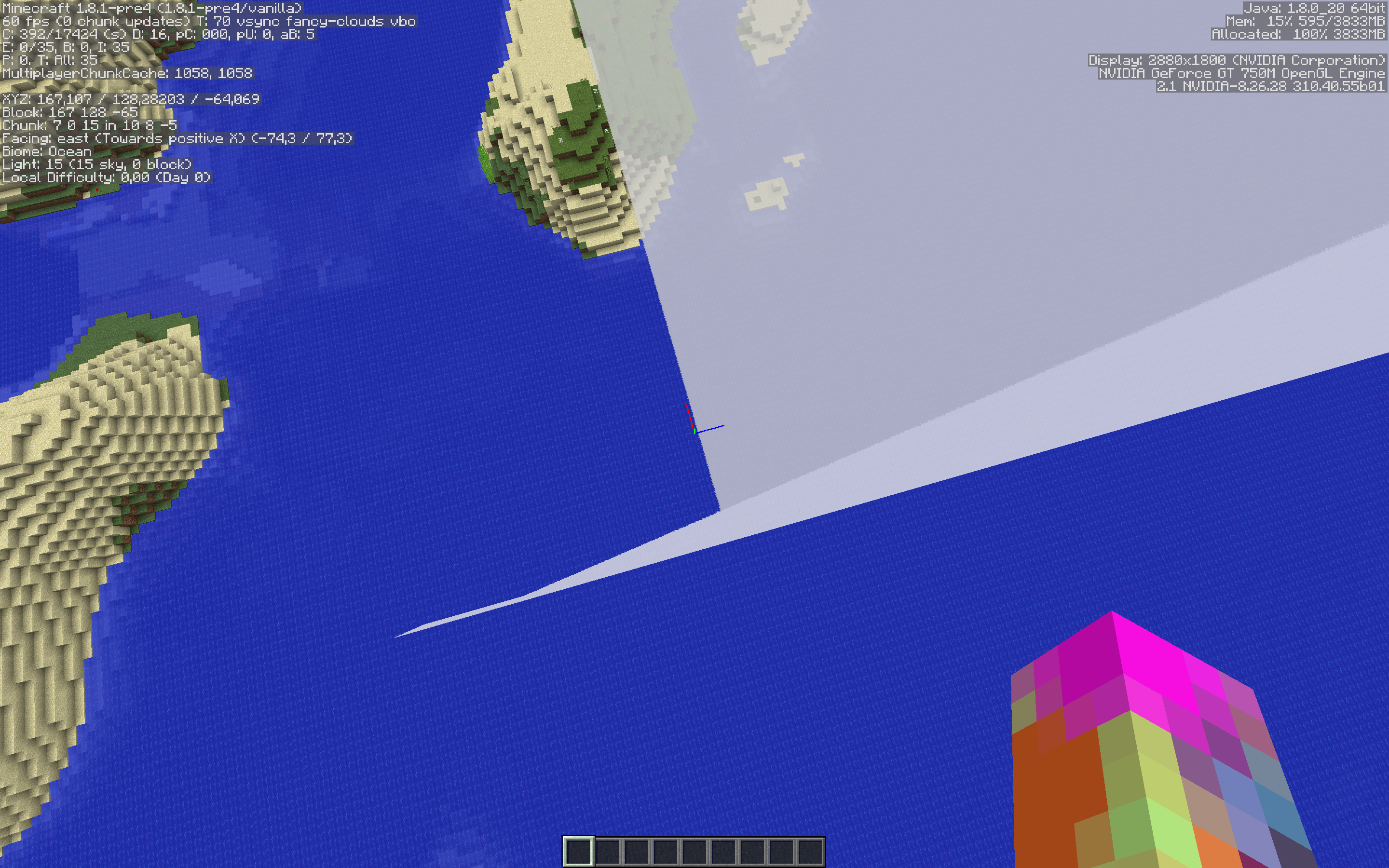
This is made easier to see when viewing terrain that reaches above cloud level (the seed "14w29b" has savanna M near spawn).
Look at where the terrain intersects with the clouds. Then, fly up and down. The clouds move up and down as well. The clouds also move to the side when the player moves to the side.
(Partial) code analysis by jonathan2520 can be found in this comment.
Reopened due to jonathan2520's comment in MC-60772.
Lately I've been noticing some odd mouse lag, where the game registers clicks where the crosshair was aimed a few frames ago. You can actually see the selection box lagging behind the crosshair by a few frames (this lag was introduced between 14w21b and 14w25b). I believe the responsiveness of the crosshair itself hasn't changed.
It's hard to account for all the different factors leading to an experience of a certain type of lag, so I devised a simple test: circle around mobs and try to hit them. If you keep the crosshair continuously centered and the game is consistent, this should always hit. In ≥14w25b you can do this for a while to no avail; you need to lead by a few frames to hit reliably. ≤14w21b is much better, perhaps off by one frame.
To reproduce most effectively, circle around tiny slimes at full speed creative flight and try to hit them. This is to reduce the temporal size of the target, making timing issues more apparent. The problem seems to be limited to mouse movements, which circling takes care of.
My videos were recorded at 60 fps in 14w33c. The fps limit was set to 120 fps. My machine actually hits 120 fps under these circumstances.
See:
Code analysis by jonathan2520
Secondary code analysis by caucow (prefer jonathan2520's, though)
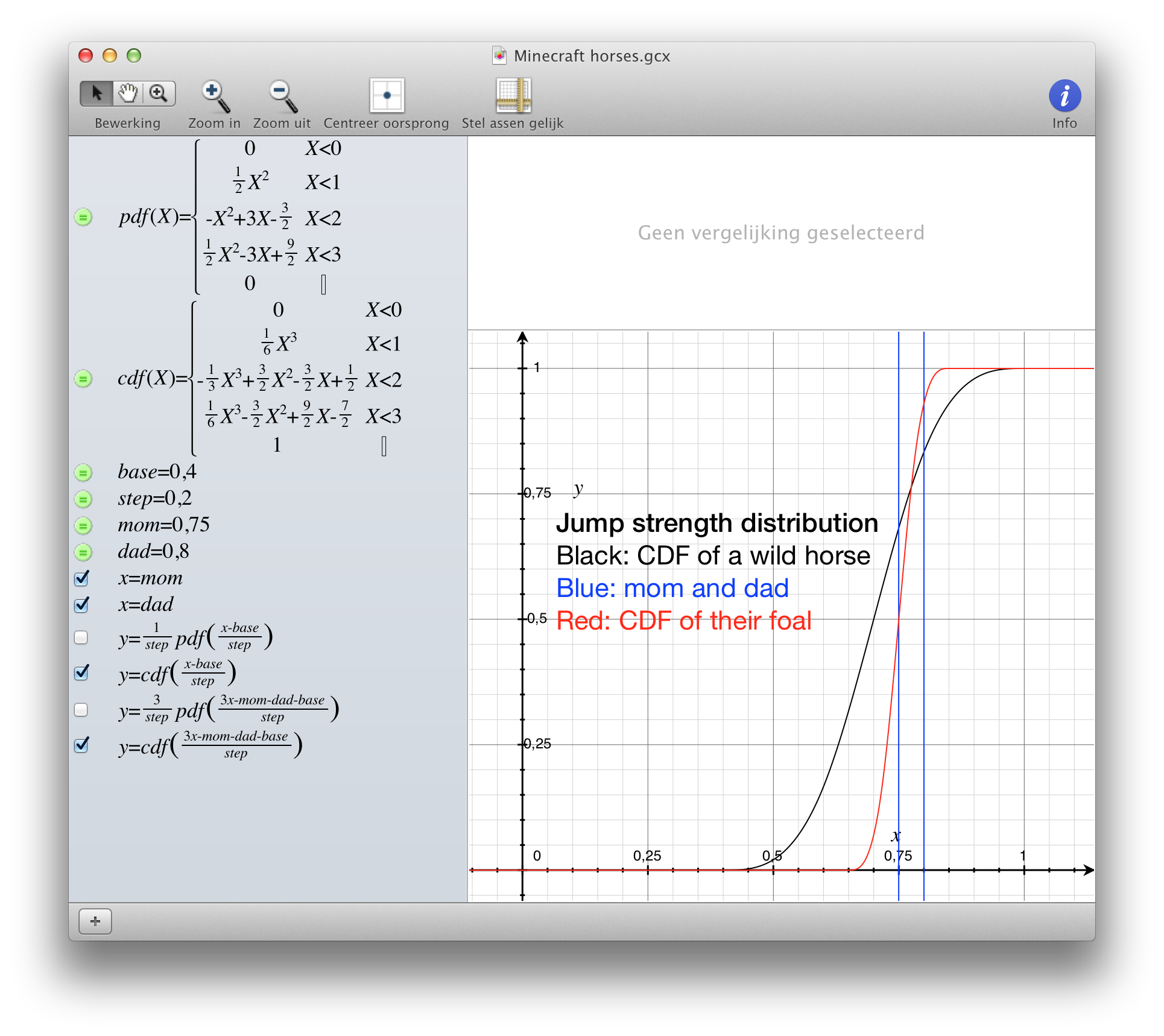
Erik Skau: Me too. I wrote my suggestion earlier in the thread too, but I'd prefer using just one of the parents for each stat, adding normally distributed noise (magicNumberStandardDeviation*Random.nextGaussian()) to it and capping it to the limits. It follows the pattern that is used for the colours too, that the foal clearly "looks like" one of its parents. Will the horse be strong like it's father and quick like his mother, or will he be dealt a bad hand in the gene lottery. On average it's the same as using the average, but it's more variable this way. One horse in 64 gets all stats from the better parent and get noise that improves those, and one horse in 64 will be worse than its parents in all aspects.
jonathan2520: Your example is quite hard to follow without diving further into the mathematics. Would this random walk be able to improve a stat that is already good and what would be the odds?
jonathan2520 Your method seems like a very elegant mathematical solution (didn't actually run through the algorithm, but I think I got the intuition), but probably not very appealing from a programming perspective, as well as it is not as readable as code. I think I would prefer something simpler such as:
offspringStat = min( max( (Pa+Pb)/2+random, minimumHorseStat), maximumHorseStat); //random comes from some distribution with expected value of 0. Probably Gaussian-ish.
Your idea nicely addresses and fixes the problems that occur with this method when both parent horses are an extreme case. But I think that practically either one would suffice and that very few players would be able to distinguish between the two, especially not until they had very good horses anyway, which is when the differences between the two methods would manifest themselves. I could be wrong about this, I think the easiest way to find out would be just to implement both and test them seeing if there is any real difference from the players perspective.
Altti Tammi I also thought about your method, and I would be quite satisfied with it as well. My only complaint with it would be that it does not necessarily mean good game progression, but this is really just my preference. To demonstrate this let me give an example.
ParentA is good at running/jumping but has crappy health. ParentB has good health but really bad at running/jumping. The offspring could either be perfect, or flawed in one or more aspects.
In the case of perfect, then the player has achieved the ideal horse after 1 breeding instance, not very rewarding in my mind.
In the case of flawed, the horse will be really bad at one or more of those things, in my mind making the horse not fun, and not really a step up from either parent.
If on the other hand things were averaged, the first case of a perfect offspring is not possible, and the second case would be a more well rounded horse rather than a horse extremely flawed in one or more aspects, which I think makes better for game progression.
But again, I like your method too, and would be quite happy if it was implemented.
Any word from anyone on the Mojang team about this? Is this all moot because they are already working on some fix?
jonathan2520: I think I understand what you are getting at in your example and I think the logistic function and its reverse (logit function) fit perfectly for the capping, compressing the gains near the maximum while still having equal chance for raising or lowering the value. Here's my revised suggestion / pseudocode
private double stddev = 0.088; //magic number that decides how fast value change private double maxStat, minStat; private double statDiff = maxStat - minStat; private double logit(double val){ return (-log(1.0/val-1.0)); } private double logistic(double val){ return (1.0/(exp(-val)+1.0)); } double breed(Horse parent_a, Horse parent_b) { Horse chosenparent = nextBoolean() ? parent_a : parent_b; //Choose one parent as a starting value and normalize it for the transform function double normalizedStat = (chosenParent.getStat() - minStat) / statDiff; double normalCappedStat = max(0.0, min(normalizedStat, 1.0)); double newStat = logistic(stddev * nextGaussian() + logit(normalCappedStat)); //Transform, apply randomness and undo the transform return newStat * statDiff + minStat; //Undo normalization }
jonathan2520: Fixed. I don't think approaching the maximum faster is necessary a bad thing, it's more fun that way. Even the error function might be a natural choice, but it's obviously not a good idea. At least the formula of the logistic function feels natural. The logistic function also has a benefit, at least compared to your first alternative: log and exp behave properly with infinitys, so the transformation works properly at the limits. x/sqrt(x*x+1) and its reverse have a division by zero, giving a NaN.
Could someone mark this for 1.8-pre1?
Graphs are great.
Here is a graph showing how fast one can get the average stats of the best horse to increase to a certain level (notice the logarithmic scale) with the current breeding formula: 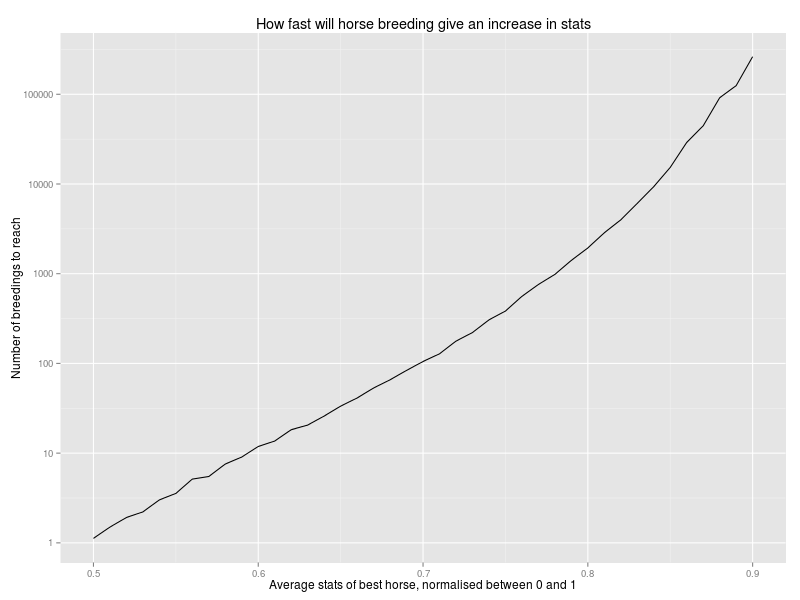
Here is another fun graph (about the current formula): inspired by jonathan2520's last comment about maintaining the distribution - results of a simulated life of a group of horses, breeding random horses and killing the oldest to maintain size.

The standard deviation of the average stat of the bred horses drops by 62% compared to the wild horses.
jonathan2520: It was done using the current thirdHorseAverage generation method, so it's the same numbers you posted here, but considering all stats instead of one.
jonathan2520
I personally strongly believe the '32 chunks renderdistance' shouldn't be in the game. The server has big problems trying to provide load or generate enough chunks and send them to the client causing delays on everything.
This would mean the server takes excessive time processing the 'opening of the door' and thus reply very late with the correct data to open it. This in itself might cause a delay in rendering it properly, or it might even flip back and forth as the client does do some prediction.
My recommendation, unless you are running on a supercomputer, do not use 32 chunks render distance.
jonathan2520: I think I may have found the source of the confusion - I mistakenly spoke about percentiles, even though I meant stat values normalised to the range [0,1].
Also I experimented with different strategies and always taking the two horses with the best average (normalised) stats seems to be faster (albeit a bit different) than taking the two with highest minimum stats, which is faster than optimising one stat at a time.
jonathan2520: I especially like how it still encourages exploring and finding new horses, as once you get the best bits of all your horses aligned in a foal, the way to get an increase is a mutation or finding new horses that have good values (not to mention colour). And like your said, even average horses might be a mixture of very good and bad variables.
I have also submitted a formal proof of the current formula being awful in case someone still gets it into their heads that there's nothing wrong.

Victor Baker: Previously generated horses can be given a default U-value of 0.5 if backwards compability isn't needed, given three equal U values corresponding to their stat or creating new correct values what is what the algorithm jonathan2520 posted today does and is what we have discussed today. Here I have dwelled on the issue of why it's more relevant to look what the formula does on an arbitrary horse rather than check one set of known parents. I just wanted to show the limit but what matters more is the drop from generation 0 to generation 1. The limit is what you get if your horses have regular accidents.
The graph shows that using one random variable loses variance. I can mention that it would work if the one random variable was given a multiplier of 2.5 and the parents 1 both. But this would mean that bred horses are essentially completely generated anew, which would discourage exploration and make foals look a lot less their parents.
I'll just add that if we look at just a fixed breeding, that variance doesn't really matter - it's always the same since it comes from the fixed random part. What matters there is the expected value that is dependent on the chosen parents and whether it is too bad or too good. The problem is that you can't easily tell what that expected value should be because it depends on the chosen parents. Variance is just a mathematical tool that tells the expected (squared) difference from the mean and it's simple to calculate. If the variance after the breeding doesn't match with the variance before the breeding, we can tell that the formula overall gives values that are too near to or far from the mean.
jonathan2520: I took the time to add your formula to add backwards compatibility to the proof of concept mod implementing the suggested changes.
Btw, any idea on how to incorporate donkeys too to make donkey breeding make more sense than it does now?
RimaNari: Proposals for a fix are always welcome, otherwise there wouldn't be anything in these comments. The /r/Mojira thread was created because the discussions turned into a is a bug / is not a bug fight.
jonathan2520: Your suggestion might be too complicated since most of the combinations of expansion directions wouldn't be useful. It would also cause slightly more work for the map wall crowd. I do like the intuitiveness and flexibility of your suggestion. Having varying expansions by half maps and full maps might complicate things a bit?
You know what the difference between boats and horses is? Notch implemented boats. The current development team has three options for dealing with problems like this: bandage, ugly hack, and complete rewrite. It appears they haven't chosen the best bandage, which would probably be disabling the line where the client takes control of the boat, as jonathan2520 suggested in this comment. Yes, trying to be clever with someone else's too-clever-for-its-own-good code is almost certain to result in disaster.
But the current dev team really doesn't want to waste time patching up the current code. They've been overhauling huge portions of the code, and have fixed a lot of issues that way. I imagine they'll use tommo's pocket edition implementation, much like they backported his cave culling algorithm for the PC version. Waiting for a full rewrite can be frustrating, but it's the most efficient use of their time. Any time they spend bandaging or hacking on this issue seems wasteful, when they're just going to replace the code anyway. They could use that time and energy more productively, and they have to prioritize. They're adults, you're not going to shame them into fixing the issue by "pointing out their inadequacy".
Regardless, the new description is a significant improvement over the old one, though the superflat preset won't work due to MC-59696. Here's a working preset string: "3;minecraft:bedrock,2*minecraft:water,minecraft:waterlily;24;oceanmonument,biome_1". It quickly and clearly illustrates the problem. A small amount of lag, such as when generating new chunks, will cause a second path of broken lily pads to appear. The player and boat will teleport to the server location after some time, and leaving and rejoining the world shows that client-generated path of broken lily pads didn't really happen.
jonathan2520, it's already possible to float in mid-air, sneaking just makes it easier to get there. As shown in my screenshot, no part of my body is actually touching the stairs, and yet I'm considered standing on them. If you sneak straight towards the edge of the stairs, you cannot fall. The world is already "permeated by invisible barriers".
KingSupernova, your opinion has been noted, and there's no need to repeat it. If someone at Mojang directs us to close it, then we will. Or they can do it themselves. Or they can leave it open, or they can change the behavior. It's their decision to make, not yours.
@[Mojang] Grum (Erik Broes): Under MC-72390, I have a PoC script that is tested and, via Rcon, will crash a server with a ConcurrentModificationException; though I'm not sure if that bug is caused by this one. They're almost certainly related, however.
@jonathan2520: do you have further details about how this issue relates to MC-72390?

jonathan2520: I've made you the reporter of this ticket, feel free to edit the ticket's description appropriately.

jonathan2520 I definitely had this bug in 1.10.2, but not with one of your two presets.
The bug
This has been an issue for a while. It's especially noticeable at level 3 of the side of grass. See the screenshots, where I placed a row of grass on a row of dirt. With mipmaps, half of the grass block is practically black at the 'optimal' distance where the 2x2 mipmap or further is used.
How to reproduce
Open this world World.zip with these settings options.txt and look straight ahead without moving.
 Observe the dark patches with the side of the grass.
Proposed solution
Using Yarn mappings for 1.14.4, replace this method:
private static int blendPixels(int int_1, int int_2, int int_3, int int_4) { return SRGBAverager.average(int_1, int_2, int_3, int_4); }
using these classes provided by jonathan2520: SRGBAverager.java SRGBCalculator.java SRGBTable.java
Original analysis
I've looked it up in MCP 9.30/9.31 (corresponding to Minecraft 1.10.2). In net.minecraft.client.renderer.texture.TextureUtil, generateMipmapData is responsible for mipmap generation. It turns out not to use proper weighting by the alpha channel. Anything that isn't fully transparent is given the full weight, and anything that is is treated as black. That's where the darkness comes from.
The correct model is most natural when using colors premultiplied by alpha: just average everything. If you don't use premultiplied colors, you must multiply colors by alpha before averaging and divide the resulting color by the resulting alpha afterward.
Premultiplied also has the advantage that any blending steps you don't control directly work correctly, like texture filtering and frame buffer blending. Minecraft won't really experience either the advantages or the disadvantages, but it's the cleaner model that would've prevented problems like this bug from the start. That's something to consider.
Adding to the problem is that Minecraft tries to apply gamma correction to the alpha channel. That blows up the opacity, only emphasizing exactly those texels that are too dark. Gamma correction of the alpha channel doesn't make sense anyway because colors can deviate either way depending on what's blended with what. The general standard—which is also what you'll get natively if you enable frame buffer and texture sRGB—is to use sRGB (which is a little more involved than x^2.2) for colors and keep the alpha channel linear.

I made a fabric mod for 1.16.5 that uses jonathan2520's classes and a very simple mixin. The mod works really well, however before uploading it anywhere I want to ask jonathan2520 for permission to do so. I'll make sure to credit him since 90% of the mod is literally his code.
To summarize: This affects features added on top of the base terrain, for newly-generated chunks. Most likely the server fails to send the proper updates to the client (this includes the server and client parts of singleplayer).
The client doesn't show any awareness of the blocks at all: it doesn't render them; no selection box shows up when aiming at them; changing neighboring blocks doesn't fix the problem; and it lets you walk into them.
The server, however, will warp you back shortly after attempting to walk into a phantom block. It will also send the correct block if you attempt to place a block inside the phantom block (but only that one block).
Reloading the client fixes everything, at least until more fresh chunks are generated.
The sensor works by multiplying the current skylight value with a wave that is more or less positive at day, negative at night. The crux is that the current skylight level of an encased sensor can drop as low as -11 at night: 0 because no daylight can reach it, minus 11 because it's night. Two negatives make a positive, and so you see an output up to 9 at night. In fact, if the skylight is something between 1 and 10 (making -10 to -1 at night), the sensor will produce some output both at day and at night.
I'd say it's definitely a bug: it's called a daylight sensor after all. Not that I would mind if it's redefined to intentional quirk, but if it's kept I'd clean it up a little to make its behavior better-defined.
13w02b: Not fixed for 13w02b/OS X 10.6.8. Fullscreen just uses the would-be center of the last window size, which is fortunately pretty close if you maximized the window before going fullscreen.
Wouldn't it be nice if Minecraft remembered the last pointer position? When doing a lot of inventory work it feels pretty awkward to have it reset to the same place every time, even if that place is the center. Better to place it where it was when I last closed an inventory (or menu or the like), I'd say. If I leave the pointer somewhere, I want it to stay there as in any other application.
I have analyzed the problem a little more. I noticed it's always the half of the chunk closest to you (neighboring already-loaded chunks) that is filled correctly. It also appears to be possible for only a quarter of a chunk to fill in a corner. I suspect 16x16 update groups are offset from chunks, which would cause problems when they overlap any unloaded area.
I have now also seen a vertical instance where trees were cut off above Y=80. It's curious that it's a multiple of 16 rather than a multiple of 16 plus 8. But it's probably about as reproducible as pink sheep, so let's focus on the mass of stripes first.
Close-up of a vertex joining four purple wool blocks, viewed from below.
I don't agree entirely with Sam. The current behavior is pretty useful for timekeeping purposes, in that the time slots corresponding to each output level are distributed fairly evenly over the day. The light level only rises and drops sharply around sunrise and sunset, respectively. I'm not sure what I could do with that, that I couldn't do nearly as well with the current behavior. Sure, if you know the actual light level you can predict mob spawns exactly. But you can already know when e.g. light level 8 is passed to within a few seconds.
To be clear, given the current behavior and the behavior of just passing on the current light level, I'm pretty ambivalent. I believe something like the current behavior is useful, but as it is now it's just too quirky.
Anon Ymus, the light sensor is a transparent block that can simply read its own light level.
The cracks also appear on a block supporting a torch, bordering the torch. I doubt those are caused by textures. If it's an attempt to make closed geometry, it failed.
The issue did exist before, but it wasn't quite as severe. If you ever saw bright pixels in dark caves, along section boundaries, that is it. Probably because each section has its own coordinate system, and is transformed inexactly. Ever since one of the 1.5 snapshots something like it started to appear at every single edge, sometimes even across a face. I believe texturing is at least partially responsible, because the stray pixels often seem to come from an adjacent image in the texture atlas.
My duplicate (I did search using a few technical terms, but apparently not what everyone else had used to describe it),
MC-7363, contains some technical info that may be helpful.This screenshot (1.4.7.png) shows how bad it gets in 1.4.7, using the same test case that the snapshots: a "2;7,62x0,49;2" superflat world, viewing the obsidian from below. It's hard to light up more than the occasional pixel for a screenshot, although in motion they pop up all the time.
Another screenshot (1.4.something more severe.png) shows a pre-snapshot version - probably 1.4.5 - being more pathological. It wasn't just a single-frame fluke either. Edit: confirmed it's the same in 1.4.7 (1.4.7 more severe.png).
I don't use any filtering hacks. No FSAA, and Minecraft can just use its "nearest" texture filter.
So, yes, older versions were affected. In fact, the issue has existed for a long time. It just wasn't nearly as bad as it is now.
I should add that the problem can be more or less severe depending on the GPU. But if you use robust geometry, these cracks will never appear. And if you don't, you'll always be susceptible.
I have just tried it on two machines: one Nvidia (9600M GT), the other ATI (5870), both running Mac OS X 10.8.2. On neither machine I could notice a difference between the experimental and normal snapshots. Indeed Nvidia is much more robust, but it still has at least several bad pixels poking through each frame.
Yup, Sir TLUL. I also hinted at that possibility in
MC-7363. I know at least previous versions used a slightly smaller region from the texture. I should note that neither of these things explains the whole story, though. Say, if you place a torch on a block, the face it's standing on will have cracks in it, and so will the air around the torch! I have no clue what it's smoking there, but it isn't your standard geometry or texture issue.You also really shouldn't grow geometry. If you handle it a little more carefully, perfect geometry will be perfect.
@Rafael: Those settings can certainly create a problem like this, or make an existing problem worse. Here is definitely an existing problem. It was relatively mild up to 1.4, to the point that many people haven't recognized it. In recent snapshots it or something like it has become much more severe, all still without any AA or AF. Similar symptoms, but critically a different cause. This report is about the bug that manifests itself without any 'help' from AA or AF.
Mac OS X doesn't override anything in the first place. There was once this ATI Displays thing that would have to be downloaded and consciously activated, which is as bad as it gets. And once again, while AA and AF cause lines to appear, that's separate from the bug.
Hey, wow. Apparently LWJGL has had all the plumbing in place for a few years. Apply Uku's fix right nao!
CubeTheThird: I think this is a bug for practical purposes. Its supposed status as feature of some sort is contested, at least.
George, do you realize they want to release 1.5 soon? Quite likely with this bug. Then it won't be just a dodgy snapshot, but a dodgy release.
There have been varying causes. The original pre-1.5 bug was caused by misaligned geometry, leading to holes. I'm not sure I understand the 1.5 bug (I haven't even played in a while), but textures seem to play an important role. The contents of said textures can be anything, including empty/transparent.
The reason it's usually called white is that artifacts like these are most apparent when they're brighter than their surroundings, and when they are they look whitish to us.
Markku understands the issue pretty well. Indeed 1.4.7 could also produce such lines, but at least they were rarer and didn't appear up close. The issue you see with AA or AF is basically the same thing, except those step over the edge deliberately, not due to lack of precision.
The OpenGL wrap mode (such as clamp or repeat) applies to the entire texture, so it isn't of much use to an atlas.
If you want to be truly correct, I'd guess the "lines" appear when the derivative (in terms of screen pixels) of texture coordinates is too large relative to the margin of error. In layman's terms, the texture is shrunk too much as it appears on screen. Both distance and angle can cause it without the other, but of course a combination of the two only makes it worse.
"Dots" and "lines" are slightly different expressions of thin lines. Stray "dots" are simply an expression of thinner lines, while more solid "lines" are thicker or just happen to line up with pixels. I'd be very careful about postulating causes based on prior experience (such as assuming "dots" and "lines" are still the same thing), because the very nature has changed.
I will now shut up until I perform a proper analysis, or even just play the game again.
I just tried 1.4.7 again for comparison's sake and found that Markku's "lines" are even harder to reproduce than I remembered. I need to set up the camera in a very specific way to get a few small lines. That's probably the reason I hadn't thought of those "lines" for 1.4.7; they're not a problem for me. Double-check that you are not forcing AA or AF on Minecraft.
I also investigated 1.5-pre's code. It's a pain to interpret decompiled code without MCP's help. I did find a new abstraction that handles tiles. 0.01 is gone, but it does subtract 2^-149 (the smallest positive float) somewhere around there in the replacement. Quite obviously someone doesn't understand floating point! I could only change the abstraction itself because the class using it wouldn't recompile cleanly, hampering experimentation. Tweaking the constant causes textures to shift, not grow, interestingly by a different amount on each axis. Edit: The constant is probably subtracted from normalized texture coordinates. Perhaps the texture isn't square.
There seem to be many typo-like inconsistencies as well. I couldn't possibly investigate all of that, however, with this non-compiling behemoth of cryptic identifiers. I'm done for now.
Markku: Heh. I don't think AF has such a limit. Normally, when it's used with mipmaps, the distance between samples shouldn't be much larger than a pixel at that particular mipmap level. But if there are no mipmaps, I can see many implementations sampling the same spots of a higher-resolution mipmap level. Whatever real implementations actually do, I don't think you should assume it works like that on every GPU.
Interesting about the chunk expansion factor. I hadn't seen that bit before. Unfortunately it's just a bandage that has its own set of problems. There is a distance/angle where cracks ("dots") will appear again, even though you have grown the chunks so they 'should' overlap. It's still best to align chunks perfectly, but that requires some actual thought and understanding. I'm not sure I can expect that from someone who 'cleverly' uses 0x1p-149.
I take back my judgment that torches act weirdly. It turns out they're drawn at full width, even though only a few pixels in the center are filled in. That explains the lines that cut across adjacent blocks. I'm now certain this problem, as it started to appear in the snapshots, is caused only by textures.
You're welcome. I wouldn't say it's entirely resolved, however, because the original bug (the reason this was originally reported for 1.4.1, and could've been reported much, much earlier) is still there. It's hard to capture a convincing still, but dots are still popping up willy-nilly along section boundaries.
Markku & alexnder: No. The issue is that each section is rendered using its own local coordinates, using a transformation matrix to move it in place. The math is sound as you can tell by sections being where they should be. But using this approach there will be rounding errors, so adjacent 16x16x16 sections (you can tell that's where the cracks are) won't line up exactly. They just won't, no matter how tiny you imagine the error to be.
A possible fix would be to keep all vertices in one huge global coordinate system. But that causes single-precision floating point to run out of precision too quickly for a vast world like Minecraft's. Moving the origin once in a while—for every section at the same time—could fix that, but at the cost of a huge computational spike because all chunks have to be recomputed. It's possible to spread it out over time, at the cost of possibly lower performance for a minute, during which artifacts will momentarily appear.
I had proposed a shader-based solution in
MC-7363. (Beware of discredited hypotheses about 1.5's textures. The part about 1.4 is still valid.) It works by altering the vertex transformation to make it exact. It's such a basic shader that there's no reason not to use it; unlike all of Minecraft (shaderless as it may be at the moment), it's a negligible load even on decade-old machines.We've had shaders for a while, you know. GPUs are pure shader processors nowadays. The fixed-function pipeline is implemented through shaders. It's more efficient to write a shader that does exactly what you want, skipping redundant fixed-function computations that couldn't be optimized away, and saving the driver the headache of creating optimized shaders for each state. You don't have to do it for teh shiny. All you'll lose is your retro OpenGL 1.2 or whatever it is nowadays, but the fact is that any computer that can reasonably run Minecraft has a much more modern feature set.
Markku: But the texture problem you experienced in 1.4.7 was due to forcing AF on Minecraft, right? It would be nice if that didn't happen, but that isn't a bug. Also, textures don't care about section boundaries. The block boundaries that happen to run along them have no special status. Yet the cracks only appear along section boundaries.
The thing about cracks is that they form whenever vertices don't line up exactly. It doesn't matter if they're very, very close. If they aren't exactly equal, cracks will form. Cracks magnify errors, really. If you've ever done OpenGL or the like, you'll know that they will form exactly as they do in Minecraft when you try to line things up using matrix transformations, exactly as Minecraft does.
Increasing the expansion factor would only 'fix' the issue from certain perspectives. I would be okay with it as a temporary bandage, but it's not that hard to do right.
I think texturing is pretty much okay now. The 0.01-pixel tweak is a kludge indeed, but it seems robust enough. It's hard to do much better with those über-finicky texture atlases. Array textures spring to mind, if you're willing to rely on that feature and make all tiles the same size again. You could also pass on some extra information to a complex pixel shader which would then try to sort it out. Without really helping texture filtering, I should add, unless you implement much or all of the texture filter in the shader.
I suspect the people who still have problems either
Until someone shows competence and the ability to control those factors, and yet has the problem, I won't change my mind. It's the same reason astronomers rarely see UFOs, even though they look at the sky all the time; they know what they're looking at. If anyone wants to contest me, demonstrate that you know what you're looking at.
George: I agree with Markku on that.
Markku: I think I'm starting to lose track of what's what exactly. Good thing I don't have much to add anymore.
Intra-section geometry is mostly correct, yes. I wasn't too clear on that. The main issue is T-intersections between things like blocks of different height. But that isn't nearly as noticeable as the other stuff.
You're never going to get the texture coordinates completely right. They can be perfect when you feed them to the rasterizer, at which point the rasterizer will destroy anything that may have been. There are going to be errors in the initial projection. There are going to be errors in interpolation. There are going to be errors in the edges of the polygons themselves. The best you can do is to clamp to the desired range afterwards. Of which extending tiles is one form, yes, which may be viable for some purposes. Need much of it to support AF, however (if that even works on all GPUs), and don't even think about mipmaps.
alexnder: Sometimes 'round enough' floats can be used to get an exact result. My proposed shader actually takes advantage of that to make vertices line up. All you need is very controlled conditions. Short version: it's not gonna fly.
What does it really accomplish in Minecraft, though? Anything a particular wrap mode might fix at the texture border won't mean a thing for most edges in the atlas. GL_CLAMP is also equivalent to GL_CLAMP_TO_BORDER using nearest filtering, and a really stupid blend using linear filtering. Better to be ignore GL_CLAMP and use either GL_CLAMP_TO_EDGE or GL_CLAMP_TO_BORDER as desired, but I don't see how it would fix much here.
I'm not sure why you're concerned about borders. Minecraft doesn't use them, except by texture accesses accidentally straying over the edge as we've all seen here. And that applies to all edges in the atlas, not just the border of the entire texture. If you ever want to use linear filtering for some reason, switching to the right wrap mode is the least of your problems. I really hope you meant edge texels, by the way, because border texels are an ugly matter that I hope I shouldn't have to explain to those responsible for the game. In short: stay away from those.
That is the bug. Well, the bug as it was before a separate 1.5 bug hijacked this thread, and after that was fixed. It is fixable, but as the fix makes things slightly more complicated they just don't bother. I'm not even sure if they're even qualified to do this, to be honest. Feel free to take that as a challenge, Mojangstas!
This is a rather severe bug. Although I like having my boats intact, I'm okay with my boat breaking if I crash it into something. I'm not okay with the desync, which rapidly makes it impossible to tell where the boat is with any precision.
When I tried boats again after some inactivity (now in 1.6.2), they kept breaking randomly every few minutes on average, but sometimes after just seconds (a narrow canal does that to you). Moving slowly, it's clear the boat is bumping into things that are offset from where Minecraft renders you.
It's even more fun combined with
MC-881, because it may not break the boat but will kill you, also in what looks like empty waters.What's the point of fall distance, anyway? Why not use actual energy (proportional to velocity squared) at the time of impact? That would kill all the bugs like this one that have popped up over time. Is that behavior not what players expect? The only 'good' thing about fall distance seems to be that knockback into the ground won't hurt, although the value of that is debatable.
Fall distance is a good way to calculate impact energy, assuming your trajectory is a perfect parabola segment with well-defined endpoints. It shows.
I have investigated this some more. There are actually two separate bugs being discussed.
One is the odd function used by the daylight sensor, which flares up at night if the sensor has limited access to skylight. This is what I'd had in mind all along. It is not very problematic—even useful—but still wrong.
Another is that blocklight and skylight can sustain each other somehow. In this case the redstone lamp essentially becomes a skylight emitter, keeping the daylight sensor activated. Even though the lamp an opaque block, skylight will enter it when it's turned on. When access to true skylight is removed, it may be that the part of the lighting system that removes skylight skips the inside of the light because it assumes (rightfully) that nothing should be there. This hypothesis is supported by the fact that it doesn't happen with a normal torch, which is transparent. Still relatively benign because the other kind of light will drown it out, but it becomes obvious when blocklight sustains the skylight of a daylight sensor.
This second bug should be reported separately, if it hasn't been already. I'll investigate it some more first, if I can be bothered.
I'm surprised so few people have noticed this. But then I didn't report it for the longest time, either.
It seems the server tries to take into account the render distance, but misinterprets the value. The client sends far=0, normal=1, short=2, tiny=3. The server calculates distance=256>>value, which becomes far=256, normal=128, short=64, tiny=32. So far, so good. But at that point it interprets it as a number of chunks, only applying it if it's in the range (3, 15), i.e. never. So the server always uses 10 chunks, or whatever is in its configuration file. It's odd that there's a setting at all when it should really be irrelevant, had the extant code to use the client's value worked properly. What did Mojang really want to do?
You can work around it by running a dedicated server with view-distance=15. You can still easily see the edges, but at least there are more chunks. The integrated server can't be persuaded without modding it.
Yeah, this is pretty ridiculous. If you have two 85th percentile horses, the probability of the foal being worse is 85%. Doh! When the foal does exceed the 85th percentile, it'll be worse than a wild horse of the same percentile because the distribution has less variance. So much for selective breeding. The only consolation is that you can't jump all the way to the other end of the scale, either. Still, a farm producing mediocre offspring when reusing the same high-percentile parents ad infinitum (with a rare chance of finding just slightly better replacements) is the best you could do with that.
I don't want a re-sync trigger. I just want it to work correctly. Everything should be synced in a way that doesn't cause drift. I think quantized network coordinates might be responsible for entities that fall or shoot away for no apparent reason.
So far I've had my most extreme desyncs while pulling hordes of animals behind my boat. Even while crossing a small strait I managed to leave the loaded area client-side (with view-distance=15), giving me a new perspective of the void. Oh, and don't call PETA.
There have definitely been some changes. As far as I can tell mipmaps are pretty harmless as they align perfectly and the kernel used to generate them has minimal support. YMMV depending on your textures.
Anisotropic filtering will sample outside the intended part of the texture. It appears it wraps around into the same texture, but that doesn't always work well, especially if the texture doesn't wrap cleanly (e.g. side of grass).
Both settings mess up transparency depending on the derivative of texture coordinates. Leaves are a prime suspect (with fancy graphics enabled, of course). Glass is another contender, but I find it's more benign in practice. Yeah, one advantage of not filtering at all is that stochastic behavior is invariant with respect to the function applied to the result, even if it's nonlinear. I'm glad that much of the aliasing has been killed, however.
I'm not sure what else is going on, and don't feel like figuring it out at the moment.
Extreme manifestation of crazyman's problem:
Something about looking at surfaces edge-on goes awry.
Snapshot 13w38a; Mac OS X 10.8.4 (about to update!); Radeon HD 5000 series.
Tested in 1.6.4 and 13w38c. In both versions I created a superflat world with ground level at 16. The preset was "2;7,14x3,2;1". Then I built a section-aligned platform, i.e. leaving 16 air blocks below (I think anything ≥ 16 will do) and aligning the edges of the platform to multiples of 16 (I don't think this matters). You don't need to be quite as exact to reproduce the bug, but that's what I did and how you can reproduce my results exactly.
The result after building it:

After reloading the world the shadow became a black square:

When I move closer, the game tries to relight it:

After punching a few holes and reloading:

Block light is affected similarly (again after reloading):

The lesson here is that you can't cheat on lighting. Don't assume empty sections are full of sky light, as was done initially. Don't assume a primitive model of light propagation will do. No light (except direct sunlight) can pass through an entire section without changing direction. But it does light surrounding sections directly and spread around, which obviously can't be ignored.
13w38c behaved identically. The launcher was 1.2.5.
This is getting ridiculous. Up to 1.2.5 "far" distance worked quite well, with the world almost extending into the fog. Ever since, the integrated server in the client has been stuck at 10 chunks (
MC-5227). At least a dedicated server with view-distance=15 is very close if not identical to 1.2.5 (identical in my test). Now the snapshots leading up to 1.7 won't ever do more than 8?Please just fix this once and for all.
MC-5227is still there in its original form. That is, the integrated server still uses 10 chunks no matter what. The dedicated server can't be configured to use more than 15 chunks (not enough to disappear in "far" or 16-chunk fog). There is no functional communication of the render distance, and the result of the broken attempt is never used anywhere.MC-31622(this one) is that the game will never load anything over 8 chunks or so away. Like the other bug, it appears to be primarily a server-side problem, because chunks will only unload after leaving the server's range. You can check this by walking or flying a few hundred blocks and looking behind you. Once the game has finished updating all chunks, those that were already loaded and are within the server's view-distance will still be there. Interestingly, the area that will load before you move is also mildly affected: view-distance=10 is really 7 (15x15=225 chunks); view-distance=15 is really 9 (19x19=361 chunks, or usually a few more like 363 or 366 in my tests).The client uses a default render distance of 12 chunks instead of 8 if it's 64-bit. That's all the differentiation you'll find.
I have performed some more tests. The client was set to 16 chunks. I used the integrated server, which uses 10 chunks in some sense (view-distance in a dedicated server).
When moving around, 7 chunks ahead of me become visible, whereas 10 chunks behind remain visible (this tracks view-distance beautifully, as I had found out earlier). Spawn chunks have no effect on this. F3+A has no effect; the exact same chunks will show up again.
I also built a minecart track to determine how far out the world is active. This is about 8 chunks ahead, perhaps 8.5 behind (it's deactivated when I cross the middle of a chunk), with the 180-degree turn at the far, northern end of the distant chunk. This means that a small part of the world that you can't see is active, when only 7 chunks are visible. The converse can also happen, if 10 chunks are visible. If I put the far end in the spawn chunks, a much greater range is possible.
What exactly is being loaded and where? Do those 10 chunks that appear on the client even exist on the server, even though that's the server's view-distance?
Definition of number of chunks: when standing in a chunk, how many more chunks are loaded in a particular direction.
P.S. Initially I used redstone instead of minecarts, but that makes the game load chunks on demand. Nice.
@Dan: The only effect of 64-bit is that the default render distance is 12 chunks instead of 8. Of course that only pushes out the fog so you can clearly see the edges of the (still small) loaded area. Very helpful! Can you feel the sarcasm?
@Tobias Rieper: 1.3's problem was that the server uses its own 'render' distance. The integrated server always used 10 chunks, when I'd say it really should've copied the client's setting! The dedicated server was configurable, so you could at least set view-distance=15 and get the 'far' experience (not perfect, but not worse than it used to be, either). Now in 1.7 even that fails to work, although there's still a minimal effect (chunks that were previously loaded remain visible up to the configured distance).
Wouldn't it be helpful if this were more of a wiki where we can document consensus in one place? Right now you need to read the main description as well as all comments to get a sense of things.
Nice that this is now being worked on! I'd have preferred some more urgency but at least it's happening. Thank you, Dinnerbone!
Andre: 15 chunks was actually possible, and seems to be equivalent to 1.2.5 "far".
Talven: Exponential growth with multiple players? It should be roughly players * distance^2 in memory and processing, and player * distance in chunk loading as people move around.
Some notes for Dinnerbone:
Local games have been client-server as well, in versions 1.3 and up. This is definitely a bug in that department, among many others. You'd think they'd have it figured out after a year or two.
Why are boats special? Other entities do mess up on a regular basis. But those don't usually suffer from a total lack of syncing.
@Altti Tammi: I would say your edit doesn't count, because wild horses are equally affected by that distribution. You're as likely to get a foal matching its parents as you were to find one parent in the wild. Don't get me wrong; the breeding system is still a pain for other reasons.
Anisotropic filtering was a strange beast that would sometimes help and sometimes break things. Just a little bit of AF could be beneficial because Minecraft would add significant leeway at the edges. Obey this inequality to avoid the worst problem where you'd be guaranteed to sample well into other textures at certain angles: AF * 2^mipmaps ≤ texsize. I can't guarantee that it'll be perfect because AF is very GPU-dependent and generally somewhat finicky.
Actually mipmaps without AF seem to produce more random speckles than no mipmaps and no AF, I believe mostly on Radeons. Go figure. If there's one thing to learn from this, it's that sampling near discontinuities in a texture atlas is never a good idea. It'll always break one way or another if you do.
Perhaps one day Minecraft will be able to utilize array textures or another clever solution. Shaders are being introduced to Minecraft already. I hope Mojang will realize they can't just be used for special effects, but also to tweak mundane parts of the pipeline. I have suggested this before, I think even on Get Satisfaction.
Got the same thing. It was introduced in 14w28a and still exists in 14w28b. It only affects retina resolutions while in fullscreen as far as I can tell. The main menu is fine (although low-res as always), but submenus like singleplayer mess up big time. An F2 screenshot is 1440x900 (or whatever the display resolution is, not including the retina doubling), showing the lower left quartile of the area that should be showing. The actual screen shows the lower left quartile of that quartile!
I decided to investigate this issue by inspecting the code. One of the problems is that the client pretends to own the boat when you enter it. Another is that it still pretends to own it after you exit it (there's some broken code that attempts to deal with it but is never called in the way it expects). While it thinks it owns it, it's completely unresponsive to position updates by the server. Current versions even have the audacity to break blocks, as in the lily pad test case (leaving two trails of broken lily pads, the one made by the client not existing on the server), leading to even more pernicious desynchronization.
A simple fix is for clients to always use server updates without attempting to apply physics (or ignoring updates off by less than a meter). During my testing on the integrated server it was still a smooth ride. And really, a little bit of delay is infinitely better than this game-ruining bug. My urgent suggestion is to apply this fix immediately. Then you can potentially work on making the client own the boat, and only put it in a release when it doesn't screw up. Heck, even horses run on the server, and with their acceleration and speed they could really be more responsive. Move those to the client if anything.
[Mod] Torabi, there is an attempt at separation, but it fails big time and then some. I doubt the plugin API will automatically make them get things right, although I don't know what it actually does.
A very basic fix for those wanting to mod their current MCP-less client:
1.7.10: xi.class: at 0x1DD9, change 2A 1B B5 00 69 to 00 00 00 00 00.
14w28b: acy.class: at 0x1E3E, change 2A 1B B5 00 58 to 00 00 00 00 00.
This keeps the client from thinking it owns the boat.
For increased responsiveness, also do:
1.7.10: xi.class: at 0xE1B, change 08 to 03.
14w28b: acy.class: at 0xE8C, change 08 to 03.
This makes the boat interpolate to the new position faster, which is potentially jerkier but more responsive. This is as fast as it would interpolate, had the bug not been there. Boats not ridden by you that are 'supposed' to interpolate slowly now also interpolate faster, but that shouldn't be an issue. A more granular fix would be much more elaborate than the change of a single byte, when it may not even be better.
Jim Rees, I often use strings or other constants to find known classes. "Boat" works well, leading to an entity directory where entity classes and names are linked. As long as Mojang didn't make major changes in the vicinity it should look familiar. In 14w21b it's zq.class:
At 0x1E1D, change 2A 1B B5 00 6B to 00 00 00 00 00.
At 0xE75, change 08 to 03.
I forgot to mention that the client does keep track of the position sent to it by the server in separate variables. If the client doesn't pretend to own the boat (which is only until the first time you enter it), it prepares itself to interpolate to the position in some default number of ticks (3) + 5. When the boat subsequently ticks, it does just that. If the client pretends to own the boat, it ignores updates off by less than a meter (bad, but not the main problem here) and prepares for interpolation in 3 ticks otherwise. But when the boat ticks, it just runs server physics without incorporating the update. Just a heads-up in case Mojang devs find this and are confused by it.
You can't predict based on an interpolated position, BTW, so don't even try. Don't do anything at all until you fully understand the implications, or you'll just complicate the problem further. This bug is already an example of that, and will continue to be if you don't put a stop to it by always simply interpolating on the client.
Just one more thing. Excuse all the updates. Something similar is going on with the boat's velocity. It doesn't quite break the game, but it can lead to things like boats sliding across the ground and periodically being put back where they really are. E.g. drop some water on flat ground and place a boat on the next to last water block in any cardinal direction. I don't feel like figuring this one out at the moment. It takes a ton of reverse engineering to work out all the interactions (not having source code (MCP at best) or the bigger picture of the workings that Mojang employees ought to have) and I'm doing it for free, mind you.
You can get one of those resolution changers to use a non-retina resolution (or one of many others). Native 2880x1800 looks nicer, too! I suspect Mojang actually tried to use the full retina resolution but screwed up.
This is really odd. Sometimes it seems to ignore the chunk you're in. Sometimes it doesn't. May have to do with having moved or not. Advanced OpenGL on or off doesn't matter, but it was off. It really shouldn't take that long to fix itself if on, either.
This bug is all over the tracker. So many duplicates. At least I suppose that's community consensus. Try and pick one to use to mark all the others as duplicates.
It (or just one of the performance issues) seems to be
MC-61451, even though it was claimed to be fixed and eagerly closed. Let me quote it:To make it most obvious, disable Advanced OpenGL. Create a new world or load an existing one. Don't move or turn yet. Open the F3 display. Wait for C (or C+O with Advanced OpenGL) to stabilize. Turn around little by little, waiting for C to stabilize again. Notice it's only ever going up. Once you've looked in every direction, apparently the game is drawing everything all around you, not culling sections that are out of view. If Advanced OpenGL is enabled, C is pretty stable, but O is ever increasing, which also slows things down.
Another workaround is to use ⤢ at the corner of the title bar. That makes it technically a window filling the entire screen, which isn't broken. Try not to notice the rounded corners at the bottom. It helps that I mentioned it, didn't it?
Speaking of retina mode, I wonder why they only changed fullscreen. But I really don't mind for now because at least a window is usable at all!
Edit: Ah, I knew I forgot something. 14w29b is affected but wasn't added yet.
It's worth noting that F5 mode really showcases this bug. On my new screenshot I built four stained glass blocks around a section corner, so draw order is exactly reversed for all of them.
Note the C: 16916/17424. At least most sections are empty or very simple on this superflat world, so I have some frame rate to spare. On a normal world that really slows it down. Memory was being allocated at about 1.5 GB per second, which is a little insane but at least didn't seem to hit performance. The garbage collector reduced it to about 900 MB every one or two seconds.
Yeah, turning off VBOs temporarily fixes it. As does turning it back on. As does changing the render distance or one of many other settings. It's the change of a setting making the game re-render the world, not an effect of a particular configuration.
williewillus: net/minecraft/entity/item/EntityBoat.java:
Clear method body of setIsBoatEmpty.
In setPositionAndRotation2, remove the addition of 5.
The client does mostly own the body of its player. It's rare for the server to 'rubber-band' you outside of a few glitchy cases not related to lag, whereas others might see you skipping all over the place or taking a while to react to knockback. Last UHC had some amazing examples. Here's what's probably the most bizarre encounter, where it's evident that players own their own position:
mcgamer's perspective
PauseUnpause's perspective
Really, the fact that lag becomes most obvious when (unpredictable) players interact is very telling.
The client also predicts block placing/breaking, which usually works well. Once you get block lag there's so much lag that it's a miracle anything works at all. Could be better, but also could be so much worse. So there's already some examples where the client predicts (simplistically but pretty much correctly) or downright owns things. This does not cause (permanent) desynchronization. It isn't about predicting or not predicting; it's about doing whatever it is you're doing correctly. If there's a tradeoff, it's about complexity and relatively minor effects (such as entities not controlled by the client not turning smoothly if you make them lead the position sent by the server).
George Hayes: That's
MC-62166, which gets enough flak as it stands. You'd think those 128 duplicates would cover every imaginable search term.Can the title be changed? Something like: OS X: fullscreen on Retina display zooms to bottom left 1/16th. More descriptive and captures the absolute brokenness better. Right now it looks like a minor bug that affects 8 people. But it's totally broken for us, and if it's released in this state the floodgates will open.
[Mod] Ezekiel (ezfe): You can't decide for others what looks best. I even have a hard time deciding for myself. F11 interpolates pixels, ⤢ just doubles them and kills a few pixels in the corners. Both have pros and cons. But for the time being, definitely use the one that isn't broken.
Mason Glaves: Performance is the same for me.
I suspect that as the snapshots settle down, these bugs will all evaporate. We'll see.
Vasil Bochev: Don't force anisotropic filtering on Minecraft.
Large improvement in 14w30c (maybe 30a/30b, too). It sorts based on head height now, but it still doesn't compensate for things like the camera being offset backwards a little (in Minecraft, your eyes are more or less in the back of your head), let alone F5 mode.
Game ticks should be irrelevant (well, if you have enough cores to keep the server from eating into the client's CPU time). Frame rate is the main factor modulating the severity of this problem. Even with the threaded chunk updates, almost none get through if the frame rate drops too low. This is a major flaw in Minecraft's frame rate control. It's like closing your eyes to improve athletic performance by reducing visual processing demand on the brain; it doesn't help because it isn't what's holding you back, and now you've crippled yourself. Chunk updates should get a proportionate portion of frame time, not just the final sliver left by the true bottleneck.
I can't reproduce it in 14w31a. Even if I set up a test world with render distance 32 and put a fast clock in it, when I reload it starts pulsing within a split second. But then this quad-core i7 initially produces 500+ chunk updates per second.
Render distance 32 does have a profoundly negative effect on the server, however. I had to disable random ticks to maintain decent performance. Until chunk generation is finished you can't expect much of anything to work. The performance impact seems way out of proportion. 4 times as many chunks, orders of magnitude slower?
A simulation of the difficulty of getting a horse that has at least a certain jump strength:
0.4 (lowest jump): find 1 horse or breed 0 times.
0.45 (0.3rd percentile): find 1.00263 horses or breed 5.5e-06 times.
0.5 (2nd percentile): find 1.0213 horses or breed 0.0004618 times.
0.55 (7th percentile): find 1.07556 horses or breed 0.0063696 times.
0.6 (17th percentile): find 1.19997 horses or breed 0.0490144 times.
0.65 (32nd percentile): find 1.46555 horses or breed 0.269576 times.
0.7 (50th percentile): find 1.99963 horses or breed 1.13761 times.
0.75 (68th percentile): find 3.14782 horses or breed 4.07908 times.
0.8 (83rd percentile): find 6.00022 horses or breed 13.643 times.
0.85 (93rd percentile): find 14.2217 horses or breed 46.6923 times.
0.9 (98th percentile): find 47.9811 horses or breed 197.556 times.
0.95 (99.7th percentile): find 383.633 horses or breed 1765.68 times.
1 (highest jump): unattainable and not simulated.
It does and should become harder to get ever better horses (or worse ones for that matter; breeding tends to produce average horses). But breeding your best horses is several times less effective than finding a random horse in the wild! That shouldn't be the case.
The average results of 10 million iterations of these algorithms were used:
Finding horses: Find wild horses until one jumps high enough. Return number of horses. There's actually a simple solution to this, but I simulated it anyway.
Breeding horses: Find two wild horses. Breed the highest-jumping two until a horse jumps high enough. Return number of copulations.
Percentiles are based on wild horses (or foals, before their parents are mixed in).
Whoops. I didn't spot [Mod] Torabi's comment somehow. Yes, it is. I figured it may be that way to keep a better view inside small spaces. But regardless of where the game puts its camera, it shouldn't use different positions for different purposes.
Retina mode is really crucial to this.
You don't need Retina hardware, though. You can also use Quartz Debug (install Xcode Graphics Tools) and enable HiDPI modes under the Window → UI Resolution menu. Log out and back in and select one of the HiDPI modes in System Preferences. It's annoying to work with on a non-Retina display (my 23" 1920x1200 monitor only offers 960x600 HiDPI which is rather crammed) but you can use it for testing. I have reproduced it this way on a machine that's otherwise totally non-Retina; only pixel densities that make it sensible are a hardware thing.
Note that Minecraft doesn't seem to keep track of resolution changes very well. To be safe, switch to the desired mode before starting Minecraft.
Reference: Enable High-Resolution Options on a Standard-Resolution Display
ChocolateChip Cookies: Hoppers are tile entities. I suppose similar rules apply to those. But while I'll buy that as an explanation, I won't buy it as an excuse. It's reasonable to expect that if clock-driven droppers continue to function, so should hoppers. (I would extend this to any closely-related mechanisms.) Before I reported this bug I'd built a simple machine based on that premise, only to find it malfunctioning because most of its items ended up in the first hopper. It had some constraints on item rate and the distribution of items which were nicely met as long as it activated and deactivated as a whole, so this was a nasty surprise.
Erik Skau: It's worse than that. The random values are approximately normally distributed (sum of three uniform values for speed and jump strength; only two for health), so outliers are very hard to get but just as easy to reduce toward the average.
I've been thinking how you might do this well. One idea I've had is to perform all stat calculations like a random walk, and use a bijection to warp that space to some desirable shape. To put it more concretely:
wildHorse() = wildAverage + normalRandom(wildSpread)
breedHorses(x, y) = (x + y) / 2 + normalRandom(breedingSpread)
logistic(x) = 1 / (1 + exp(-x))
logisticInverse(x) = -log(1 / x - 1)
statValue(x) = minValue + (maxValue - minValue) * logistic(x)
statValueInverse(x) = logisticInverse((x - minValue) / (maxValue - minValue))
statValueExp(x) = exp(log(minValue) + (log(maxValue) - log(minValue)) * logistic(x))
statValueExpInverse(x) = logisticInverse((log(x) - log(minValue)) / (log(maxValue) - log(minValue)))
To get a stat for a wild horse, use statValue(wildHorse()). To breed, use statValue(breedHorses(statValueInverse(x), statValueInverse(y))). You might mix parents in some other way, e.g. statValue(statValueInverse((x + y) / 2) + normalRandom(breedingSpread)) if you want a mix of average and outlier to be less of an outlier. statValue can be changed to adjust the profile, with statValueExp as an example. Lots of room for tweaking.
Note that this example has a restricted domain that can bite you. If you hack in a horse with a stat below minValue or above maxValue, breeding is undefined or at least complex. If you approach it naturally (which should take at least hundreds of attempts with reasonable parameters, and becomes impossible to do without reading raw values as changes become imperceptibly small) and minValue/maxValue were chosen wisely, not even rounding error can push you over the edge, so only true cheaters are affected. Leave them in their misery with NaN stats or add some protection.
I'm not entirely happy with all properties of this, but honestly it should be pretty good for the purposes of the game. I've also deliberately crafted it so it works with the current stat system. Any better proposals?
P.S. It's impossible to get more than new Random(97128757896197L).nextGaussian() == 7.995084298635286. I analyzed it because I was wondering if it could theoretically produce extreme results as a fluke. Turns out it can't.
Altti Tammi: The mapping is a monotonic function, so changes in both directions are always equally likely, like an ordinary random walk. The magnitude of those changes is just gradually compressed to keep the stat within bounds.
Contrary to what Tobias is saying, boats do not sync at all to clients that have entered them. At best the error remains small enough to have had no significant effect, yet.
williewillus: Up in the comments you can find a simple patch by me that keeps the client responsive to updates. It's so incredibly simple to make boats, well, work! A more comprehensive fix would be possible, but those few bytes are really all you need to make boats more than usable. Unfortunately such a patch needs to be remade for each version, which is why Mojang should fix it.
Erik Skau: There is a significant difference, though. Your method has a hard cut-off with min and max. That means you can breed a bit and simply hit the cap to get a 'perfect' horse. That may be a hoarder's dream, but it doesn't seem quite right.
My method is essentially the same but with a gradual cut-off. Instead of just hitting the cap, you'll only get ever closer (although with an exponential closing rate, eventually you'll be pretty much there). It won't make a huge difference for those casually trying to get a better horse, sure. But it really sets those who take breeding seriously apart.
On the other hand, Minecraft is a game of hard edges and rules that are easy to implement using simple binary logic. But then horses are living things which should perhaps set them apart, and they already have a smooth distribution as a precedent. What would really be best?
Anyway, I'm not the one calling the shots. And so far neither is Mojang. Grrr.
Altti Tammi: That would almost work. Hint:
How would other mappings work? These don't approach the edge as fast:
x/sqrt(x^2+1)/2+1/2 (speed in special relativity)
arctan(x)/pi+1/2 (angle)
Altti Tammi: I did consider the error function. The roundness is nice. But Java doesn't have it, and its inverse is even harder to get.
x/sqrt(x^2+1) would need some special handling of huge numbers, yes. Its problem is not division by zero but division by infinity (awkwardly producing zero) and eventually division of infinity by infinity (producing NaN). Not hard to fix, though. The most natural expression of its inverse (x/sqrt(1-x^2)) only has a division by zero at the edges, producing a correct infinity.
Erik Skau: The problem without some kind of tapering is that the same increment has the same cost at every level, even if horses at that level should be rare. You may want to tweak the standard deviations and all so the casual breeder can get a reasonable improvement at a reasonable cost (time, materials). Then a hardcore breeder only needs to invest a small constant factor more to get a coveted perfect horse. Strong horses should be more valuable than that.
I figure someone at Mojang might eventually read this, if they read as much as they write. This shouldn't be too much math to verify. The complexity is much lower than that of much of the rest of the game, which is somehow only moderately buggy.
Not fixed in 1.8-pre1.
Are you sure you didn't just check the main menu or something? Was the display not in Retina mode? (although you'd think those who change it would know)
Graphs can't hurt.
Mom is slightly above average, 7/12 into the range or at the 68th wild percentile. Dad is a little stronger at 2/3 of the range but already the 83rd percentile. It turns out that to get something better than their average, you need to exceed the percentile of their average, which is about the 77th. If you do get something better, the amount by which it is better is only 1/3 of what it would have been in the wild with the same probability. The converse is that the stat also can't regress as much, but if you're breeding to maximize a stat you'll discard many weaker horses anyway regardless of how much weaker they are. Someone will have to figure out what this means when you're maximizing multiple stats.
Suppose now that we have horses at 3/4 (93rd) and 5/6 (98th). These were
almostcertainly found in the wild. What do we have now? A factory of good horses, sure. An average at the 87th wild percentile doesn't sound so bad. But note that you can get that percentile by collecting on average 8 horses from the wild, when it took 34 to select parents that produce such offspring half of the time. This is just trying to produce horses at a level below that of the parents. It's nigh impossible to remain at the current level, let alone to gain.Would it make sense to presume that a horse population maintains roughly the same distribution as it breeds to sustain itself? Presumably there's some natural selection going on, including sexual selection where strong horses have more mating opportunities. With that being part of the equilibrium, foals should tend to be slightly weak compared to their parents; some bias is really okay! But some selection of any kind (like artificial selection) should easily counter it. In Minecraft there is no such thing as age beyond growing up, though, so it can afford to have a strong bias as parents don't have to be replaced as often. Yet its bias is much stronger than that.
Altti Tammi: How did you make that graph with the logarithmic scale? I just ran a similar simulation and got a much brighter picture. Starting with a pool of 10 wild horses and breeding 550 times (not quite millions!), my average of all percentiles of the best horse exceeds 90%. Starting with 2 horses and breeding 600 times will also do. It confirms my suspicions that maximizing multiple variables is relatively easy. I'm sure my strategy isn't even optimal, but perhaps yours is very suboptimal? I don't think I have a bug; if I use the old univariate strategy in the same framework I get results that agree with everything we've seen so far.
Altti Tammi: Even with a very naïve strategy (one stat at a time, making sure the others don't drop below the goal) it only takes me a few thousand attempts to exceed the 90th percentile in every stat. This is fully simulated breeding based on a live strategy, which is exactly what you'd be doing in the actual game if you were patient enough. No high-level models that might be wrong, no way to rig it. So how did you combine different stats?
I should add that my previous post underestimated the numbers, but only by a few tens. My continuous health percentile based on the discrete version in wild horses was a little biased. Not a big deal.
Sebastian MAlton: I had thought of that concept. The first objection is that it would be hard to make it work with existing horses. You'll also want to make sure you're happy with your phenotype equation, because you can't change it later.
[Mojang] Grum (Erik Broes): I saw delays of 10 to 20 frames when I just tested 1.8-pre1. I maxed everything out and disabled random ticks to get those chunk updates to zero and to make sure the server can take it, but to strain the client. Eventually I was looking at a huge jungle with render distance 32 which dropped me to 7 fps. Depending on where I placed a door opening or closing it produced 1 to 4 chunk updates (I suppose up to 8 if you pick the right spot). The integrated server was fine because the hitbox changed and the sound played instantly. But the visual update would often take one or several seconds. I didn't move and kept my mouse perfectly still. I saw only the occasional spurious chunk update (sheep eating grass or something), so I don't think the chunk update limited mattered.
Oddly, reloading the game got me up to 13 fps. Even when I looked all around me to display every single chunk at least once and turned back to the jungle it remained at 13 fps (if you fly around it does become slower over time but I guess one 65x65 area isn't enough). Well, during the previous run I noticed a sudden frame rate drop which would probably explain the difference if you could figure out why it happened (no RAM pressure; maybe VBOs overloading VRAM?). Updates could still take a second or so, but in slightly offset locations were pretty much instant as you describe, even with 4 chunk updates per click. At least it beats updates being deferred indefinitely. I can't rule it out based on such limited testing under deliberately limited conditions, however.
Why do chunk updates slow to a trickle when the frame rate drops, anyway? Especially at low frame rates they tend not to be the bottleneck; you could probably process at least tens per frame unnoticed. The current limit is a good way to test the limits of the engine, but it's not so good that the world takes unnecessarily long to load if you just want a nice view regardless of frame rate.
Just for completeness:
Graphics: Fancy
Render Distance: 32 chunks
Smooth Lighting: Maximum
Max Framerate: tested both 60 fps and Unlimited; doesn't make much of a difference when you can't hit either
3D Anaglyph: OFF
View Bobbing: OFF
GUI Scale: Auto
Brightness: Moody
Clouds: OFF
Particles: All
Fullscreen: OFF (but I used OS X's rightmost title bar button, which makes a kind of fullscreen window)
Mipmap Levels: OFF
Alternate Blocks: ON
Use VBOs: ON
Noproct: Jitter as in the moment the world changes near you, the game halts for a short amount of time. The effect probably depends on your current bottleneck.
[Mojang] Grum (Erik Broes): Yeah, 32 chunks isn't very workable. Your hypothesis about the cause of the delay is utterly wrong, though. The server was running at full speed after all chunks had been loaded (only one "can't keep up" message skipping three seconds, showing up three seconds after joining). Things like block placement made a noise immediately (these sounds are server-controlled, if you didn't know).
Regardless, this bug is about the disparity between the internal model of the client (which you can probe by bumping into it and aiming at hitboxes) and what it renders. That is what I tested; it wasn't the server causing the textured door to update 20 frames after the hitbox did. It can potentially rubber-band you if you walk into an obstacle only it knows about so far, but that wasn't what happened. Many reports here are detailed enough to say that wasn't what happened there, either.
Also, assertions like "it should be delayed by at most one frame" (I assume there have been no further changes in 1.8-pre1 since you didn't mention any) should be true regardless of whether or not you like the render distance. If you can't explain it, it's plain wrong and you'd better figure it out. If, on the other hand, immediate updates were disabled and we'd have to rely on ordinary chunk updates which are kept artificially low (for example), it may work as expected but still be a design flaw.
One more thing: Of course I don't normally overload the system like this. But should overloading be an invitation for anything other than proportional slowdowns or growth of memory usage? If it is, the system should be more robust. Remember exceptional cases occur all the time; deliberately looking for them only makes them easier to identify so you can reduce their (arguably smaller) impact on 'normal' use, with the added bonus that you can explore the limits if desired.
Marcono1234: Clouds are just the eternal
MC-7882.Ugh. This is getting so annoying. Why do mouse clicks have to register using a mouse position from ages ago? If your mouse control is any good, you'll often move the mouse and then click at the right time in one motion. If you try to do that now, you'll usually hit at a past mouse position.
The one good thing is that the delay roughly counteracts the latency of my system. That means the click will register roughly where the crosshair was physically displayed on the monitor at the time the mouse button was physically clicked. But this property is very rarely helpful when it comes at the huge cost of the loss of coherence. Just don't go there.
Zi-Wen Lin: It's still there in the release. I'm not out of attack range. In fact, if you watch the video where I missed a lot at first, you'll see all misses (except possibly one) were at a smaller distance than the eventual hit. The determining factor that made me hit was that I was leading a little with the crosshair. It's odd that the hitbox is effectively offset by about the width of a slime, no?
Maybe it only stands out when you have shooter skills. If you do, it's quite egregious. If you don't, that's why I made these videos to highlight it. You can frame-step through them if needed. You can also categorize your own footage by lead.
I should emphasize that it applies to all 3D aiming and clicking at about the same time; I've misplaced quite a few blocks due to this. This test is merely the least defendable one, chosen so knee-jerk excuses don't make sense.
Jerry Tom: Your driver is set to force anisotropic filtering. That's the culprit.
Perhaps Minecraft should attempt to detect these problems and warn the user. That might reduce the false positives a little.
Can we limit discussion to the actual bug? It sure sucks when your driver overrides are causing trouble, but that isn't Minecraft's fault. Open your control panel and disable said overrides. Whatever is left after ruling those out may be Minecraft's doing. The problem will likely be much less significant or even absent (on NVIDIA, apparently). Still worth fixing, but the point is to fix your own problems and focus here on what Minecraft itself is doing to cause things.
Jasper van den Berg: You don't happen to be playing on a dedicated server? Because the server decides what to load based on its own view-distance property.
I believe this is more of a fundamentally quirky feature than a bug.
Sneaking only keeps you on top of a block if you're touching it. It also allows you to drop a small distance, which is exactly what you're doing when walking down stairs (or half slabs or the like). During the drop it doesn't do anything for you, so you can fall off at that time.
All of the potential fixes have significant side effects:
The bottom line is that something will have to change in a big way. What do you want to break to fix this? I can't rule it out but it won't be pretty.
This would be working as intended. The issue here is really that one key does many different things:
See also
MC-2404which is closely related.Neko Alexander Perdomo: The most basic extension would put you to a dead stop almost everywhere in mid-air. If you add a special case, the world is now permeated by invisible barriers, dwarfing invisible fence extensions. It plain makes no sense. If you add another special case to only make it work at very low speeds, descending while hiding from other players is still a much bigger pain than it already is. You can't win.
The movement algorithm iteratively checks whether your prospective bounding box has too much empty space below it. If so, it's slowly moved back to your previous position. Whoever coded it looks confused, but it looks like it should work in the end. Interaction with other adjustments might be responsible for those times when sneaking fails.
Indeed. If there's a full block underneath a chest, there's a 1/16 block edge you would land on if you killed your lateral momentum. If you remove that block or substitute a smaller block like a fencepost, a bottom slab, or even another chest, you can't sneak off of the chest. Not to say it isn't worth changing because its behavior is predictable in the end. Unequivocally bad behavior is still bad. It should try harder to stick to invariants it purports to profess, not chicken out of literal edge cases.
In addition to the corners being slightly offset, the planes tend to have frayed edges, sometimes projecting well outside the actual cloud. No change that I know of; I'm just documenting how it's been for me for a long time.
I just noticed my profile was still using Java 8u20. I verified that 7u72 and 8u25 exhibit the same issue. This is on OS X 10.9.5, with some further details in the screenshots (F3).
BoxFigs & Markku: I think the fall distance mechanic should be changed radically. Ideally it'd be abandoned in favor of velocity squared, but that's probably too radical. It's too ingrained and some people rely on the current mechanic. Minecraft could instead save the apex. It's essentially fall damage in a different form, the benefit being that it's less prone to integration mistakes. It's also numerically stable, although I don't believe such instability is significant.
Man, this is such a pain. I've been playing a little again lately. I just can't help clicking as soon as my crosshair is over the mob/block/chest/whatever I want to hit, meaning I'll often hit the thing my crosshair was over a moment before instead. Why can't such a simple thing work?
A note on reproduction: villages.dat often won't save reliably. Sometimes pausing/quitting saves it instantly. Sometimes you have to wait until 900 ticks (45 seconds) have passed since it was last saved. In that case you can punch a villager and quit, and it will not be forgiven but forgotten entirely. At other times it's saved as soon as you pause/quit (you can tell because the "Tick" increment is smaller than 900). Just, what? I'm not going to investigate this right now. Maybe I'd do it more often if I were paid and had access to non-obfuscated source code.
Would you agree that:
If you still think breeding is fine, you must be thinking about a different game. Breeding has a strong bias in favor of average horses. It can't even produce horses at either extreme (only get arbitrarily close with extremely low probability), when they appear quite frequently in the wild. Even ignoring the problems with extremes, it's implied that selection culls tons of average horses. It leaves exceptionally good and exceptionally bad horses alone. It makes no sense.
Quoting ilmango:
Still way too few to enable productive discourse.
You're using linear percentages now, when we've almost exclusively used wild percentiles for comparison. 80% between min and max is around the 97th wild percentile as you even say yourself. That's already nigh on impossible to attain by breeding. I'm not sure why you bring 90% or the >99.5th wild percentile into it. It's too far-fetched to even suggest. Look at the values coming out of breeding.Those world-class horses were still born to parents. Maybe those parents were mediocre and their foal was a lucky accident. Well, that doesn't happen in Minecraft at all. No way to create them even though they are relatively abundant somehow.
Something else I should mention (hi nemesit, who just beat me to it!) is that the player is and should be overpowered in the game. The whole point of the game is to enable the player to change the world as they see fit. You can dig faster with your hands than you can with big machines in real life. You can carry over 2000 cubic meters of material in your pockets, and we still think they fill up too fast. There are only a few things that take an extreme amount of effort, but that are at least doable unlike real life, like building a diamond house. Why should a good horse, of all things, be even more expensive? Sure, make it hard. Just not this impossible and nonsensical grindfest.
I don't think jump strength should be quantized. It's the breeding system itself that needs changing if you need to know stats with that kind of precision, to make significant but very slow gains slightly faster. Not to mention a primitive but reliable does it make it test isn't limited to multiples of 1/8.
FWIW, here's a table of all testable heights I could conceive of and the jump strengths required to reach them:
These values should work as is because I rounded up. There are innumerable ways to test with even more granularity with the same reliability, by the way. Be inventive.
I suggested that a population should reach equilibrium when its individuals procreate and die according to a particular pattern. That doesn't require foals to inherit nothing. It just all needs to add up. When you start meddling as a player, it shouldn't be hard to match and exceed wild horses because it can be assumed that you have a better food supply and all that. Your horses can gain costly traits that are useful to you but would be wasteful in the wild, and vice versa. You can also discard the bottom bracket from your local gene pool.
I'm now really tempted to want something simple. Anything to end this. Anything that's somewhat reasonable and above all empowers the player. Allow the player to reach the upper end of wild horses with reasonable effort. With significant effort you could possibly exceed their max by a small amount. Only near the top should it become devilishly difficult, so racers can gain a small edge that might win a race without making anyone else too jealous.
As for my previous post, I missed a few blocks and obviously didn't include those inventive tricks like two levels of Jump Boost and blocks with unique physical properties. But that isn't important. The point was to show that much more precise measurements are possible.
Most blocks you don't like can be omitted with minimal impact. You start out with 42 testable heights per full block. You'd lose 4 of them if you omitted the end portal and the cactus (because inconvenient blocks are to blame for your breeding experience). That's still close to 200 heights you can test this way, with more jump strength precision at the upper end where you'd likely need it. That's already a quantized extended phenotype much like you suggested earlier, but more granular. Yet you also said a coarser version was a problem because it's too coarse? Also, contrary to your claims, a quantized genotype would only make it approximately impossible to reach the next quantum.
I like Altti Tammi's proof of concept. It's simple indeed, really just the current system broken into pieces. You can more or less transfer between versions, if you fill in plausible genes while loading and keep storing the phenotype while saving. Overall it behaves much better. Horses at extremes will tend to produce similar foals, at the risk of a mutation most likely pulling them toward the average. Still a reasonable chance of improvements. Most average horses become an interesting gene lottery. Intuitive breeding works. If you're observant enough you can infer some information about the genotype and improve your chances. I'd have to playtest it, but it's promising.
A mixture of good and bad is pretty much what it means to be average in a normal-like distribution. It's because there are so many combinations of good and bad that lead to the same thing that the average is common. Is there a law which states that things tend to be more elegant when they cause people to spew truisms?
Nice formal proof. It covers a limited scenario (random breeding), but even so the overall stubbornness of the system is apparent.
Code you might use to retrofit genotypes:
Obviously, pheno = geno[0] + geno[1] + geno[2]. The phenotype is a plane in genotype space. Additionally, all genes are contained within [0, 1]. That clips the plane to a cube, producing various shapes. When pheno = 0 or pheno = 3, it's a point. When 0 < pheno ≤ 1 or 2 ≤ pheno < 3, it's a triangle. When 1 < pheno < 2, it's a hexagon, equal to the intersection of both would-be triangles. Helpfully, the shape is always equal to that intersection.
To find a plausible genotype given a phenotype, you should sample that shape uniformly. I generate a random point on the nearest and smallest triangle, mirroring the space to put it at the side I want. That works for the points and triangles right away. It also almost works for the hexagon, where rejection sampling against the other triangle kicks in to fix it. Because it starts with a point on the smallest triangle, the worst case (pheno = 1.5) is limited to rejecting a third of the time.
It's a little hard to understand but remarkably concise. It'll make old horses fit right in. Worthy, I'd say.
Scratch the thing about the proof. Not worth bickering over. It's nice and simple (important!) when you get a stable population sans selection, and can easily create new members out of thin air. The extreme ineffectiveness of selective breeding in the current system was demonstrated earlier. We can agree on that.
Your code just generates points on a triangle. It doesn't ensure genes are ≤ 1. It could replace the contents of the loop but not the whole thing. You'd effectively change this:
to this:
We both start with a point on the unit square. My version splits it into triangles at a + b = 1, and flips the point over to the other triangle if it's in the wrong one. Your version splits at a = b, and skews either triangle to become the triangle we want. Even though there's no real difference, I prefer yours because of the way it generalizes and spreads the half-open intervals (OCD?).
This isn't complicated at all. The complexity of the system remains about the same. It's like you've never seen code that performs a meaningful task. Don't you think the existing system is complicated, when you see the code that makes it tick? It's unfortunate that some extra code is needed to ease the transition, but that's just a few lines to make it seamless. It doesn't get much better.
Altti Tammi: Nice.
Donkeys are just weird. They spawn with fixed stats but somehow breed normally. Preserve that behavior for now, I guess. For any stat that should be fixed, set the phenotype and run pheno2geno.
Speaking of pheno2geno, here's a generalized version that can work for different numbers of genes (as long as it doesn't end up rejecting too often):
But above all I changed the description. I think it's a little too hard to visualize for most. It didn't help that I didn't describe it very well. I'd do a better job now, but we'd be talking about simplices and such now that it's been generalized. Not helpful to most of you, I presume.
I'll probably be less active for the time being; sensory overload broke me.
So, what do we do about donkeys? In both the current system and the proposed system they start out weaker than most horses, but if you breed to overcome the initial weakness they're equivalent. Eventually, the only difference is that horses can wear armor whereas donkeys can carry cargo.
At that point mules are just sterile donkeys. I guess the mule advantage is that you can get a 'faster donkey' before you get an actual faster donkey. There's no lasting difference once your mules are so good that the donkeys must be equally good.
Shouldn't there be more differentiation? Maybe generate the phenotype differently for each? We need some conscious choices even though this isn't strictly part of the bug. It's such a bizarre thing demanding awkward workarounds.
I don't like to do that, but it's just too blatant. After years of dodgy boats I'm not going to dodge around the issue. If it takes pointing out their inadequacy to get them to step back and solve it in a way they can actually manage, then that's what it takes.
How about allowing the map to be placed anywhere in the crafting recipe, and making the map grow into the paper? It would look like this:
+-------+ P P P | +---+ | P M P -> | | | | P P P | +---+ | +-------+ +-------+ P P P | +---+ P P M -> | | | P P P | +---+ +-------+ +---+---+ M P P | | | P P P -> +---+ | P P P | | +-------+No more automatic universal grid, but now you can line up an edge or corner which is much easier. You can also grow the map from the center (or any way you want) again. Best of both worlds?
The one caveat is that you must grow adjacent maps the same way when you grow from level 0 to level 1. There are four ways because left = right ≠ center and top = bottom ≠ middle. It's best to start from a corner so you can just walk a minimal distance off of the map to make your next one. All subsequent levels don't matter, at least, so if you really want to do this you only have to walk 128±64 blocks even if you're making level 4 maps (as opposed to 1024±64, which is hard to do without the help of F3).
That's what I thought. I did add it to /r/Mojira because why not. If a mod objects now, I guess that'll be my new home.
This isn't very complicated, is it? It's only little bit of flexibility added in a minimal and intuitive way, to keep wall maps feasible and improve mapping in general. Maps have always been very rigid, and I feel this is still rigid. Why must it be so hard to get maps of the area you want? Maps should be less of a one-shot thing (sometimes with no way out, as this bug report shows). Ideally, you'd have an interface to visually position and align multiple maps, although that's hard to fit in the game's atmosphere and takes a lot of dev time. At least this is a good effort to improve things within the constraints of the crafting system.
Map walls would be slightly harder to make again. Slightly. I feel it's a good compromise.
One factor involved in the compromise is that I don't think the game should assign a special status to places at scales as large as 2048 blocks. It is necessary to some degree to make aligned maps feasible, but don't take it to extremes. Such a kludge. If I had my way, I'd probably round maps to 64 blocks instead of 128 (although really for uniformity). It would improve the miserable framing options of level 0 maps, not to mention multiples of 64 blocks are available at other levels.
The implementation might look like this:
5 additions/subtractions (4 with common subexpression elimination) and 2 bit shifts. Decoding the crafting recipe really is the hardest part.
The map center was previously always a multiple of 128. Now level 1+ is congruent to 64 mod 128. My proposal allows level 1+ to be either (0 as well if I had my way). There is no technical reason to enforce either of these; it's all been to aid map alignment. The map code only wants all the blocks that make up a pixel to be part of the same chunk, i.e. multiples of 16 are needed to support level 4 maps.
[Mod] Torabi: That's not really going anywhere. You can pull the entire game apart like that. Why don't you simply fall over, given the way your legs move? Right, because you only fall over when you die, moments before vanishing in a puff of smoke. Not that you'd normally see that in case of your own body because your arm (the only part of your body you can see in first person) disappears. Makes sense.
Simplified bounding volumes are much more reasonable than air barriers where you couldn't possibly grab something at any level. Sneaking basically activates simple AI that helps you not to fall off and shouldn't change physics drastically. So far the only deviation is that it makes you stop faster, at a point where you can usually stop almost as fast.
Okay, enough pedantry. There are relevant arguments up here somewhere. I have nothing to add.
MC-62463is definitely not the same thing. No unloaded chunks or permanently unhittable mobs involved. If you and the mob just stop moving for a second or you manage to lead correctly, hits will register.MC-63986is reportedly 1.7.10. That version didn't suffer from quite as much lag as I reported here. My report also applies to blocks, although I can imagine people misdiagnosing this because they take more time to place blocks; this issue becomes most glaring during faster action.MC-65439is too vague. Who knows what's going on there.There are most likely multiple hit detection issues. They're not all this specific one that I could analyze in some detail.
I'll see if I can update my reports to 1.8.5 soon-ish.
Some javap output for 15w31c:
I don't know why I didn't just decompile it. In case it helps you, that would look like this:
This is exactly the old formula we know and hate. ;-P
I just tested it on a Mac desktop with AMD graphics and a Mac laptop that has both Intel and NVIDIA graphics. Things like white wool and the surface of the ocean are only problematic when mipmaps are enabled, on AMD as well as Intel. It looks like only minified pixels are susceptible: rounding at the texel level may be the culprit, necessitating texture coordinates with a larger inset. When mipmaps are disabled both are mostly fine. NVIDIA is totally flawless, with or without mipmaps. I cross-checked a lot between 1.8.8 and 15w39a but was unable to find a difference.
Snow cover (a single snow layer or 1/8 of a block, but probably others as well) is universally horrible, however. Doesn't matter which version or GPU, or whether mipmaps are enabled. In fact, if you don't move and change the mipmap setting, the dots stay in the same positions.
One reason this is contentious is that daylight sensors aren't a simple on/off thing. They provide multiple gradations, so you can't only tell that there's light at all but also that it's roughly midday or whatever. The same goes for encased sensors at night. To replace this functionality you'd have to build an actual clock, and one that synchronizes with a daylight sensor at that to compensate for the chunk being unloaded. But the game doesn't owe this frankly crazy behavior to you. It also breaks some use cases like coverage detection as insomniac_lemon indicated.
I'm the one who originally documented the power levels on the wiki with any kind of precision, BTW. The wiki is just informal documentation by players, of variable quality. Definitely not a specification. I was also the one that calculated the exact distribution of the old broken dispensers (although I rounded them because they were fractions like 4569647174543/19203609600000, assuming a perfect RNG), before the distribution was made uniform across stacks. The distribution was heavily skewed towards the first items, rarely dispensing the last ones. Should they also have kept that just because it was documented?
@[Mojang] Grum (Erik Broes): I managed to make a quick hack in Java (which I don't normally use a lot, so I'm not going to make a full-fledged client). I'm attaching it. Be sure to set the static variables in the source.
@TerrorBite: This is unrelated to
MC-72390. They're just both more problematic the more you send.This and
MC-2404are really the same thing. Over there you can find more about the merits (or lack thereof) of particular solutions.A single-frame tap makes you move about a fifth of a block, on ground which slows you down more than air. You'd still fall off if you killed air control, but now leaving no way to compensate. Air control is rather important in games, too.
A different threshold can solve some individual cases, but never staircases.
I think an invisible barrier in mid-air is best in the end. Its task should be to make sure that if the game sees something below that allows you to sneak off of something, you will land on it when doing so. It could be made to only work at low momentum, or there could even be a bit of state that tracks when you snuck off that way, to prevent it from stopping you when it really shouldn't.
These two issues are different problematic aspects of the same mechanic, is what I'm saying. You can't ignore the other one. It's best to think about the mechanic and what it should do, to solve it all.
I would describe the current sneaking mechanics as making the rear of your bounding box snag on edges. When I say invisible barrier, I mean you'd snag as though the block underneath you were moved up to your feet, provided you're pretty close (e.g. within a block) and not moving too fast. Perhaps it could be disabled while the player is still moving up, so players won't have an even harder time sneaking down full blocks (to keep their name tag hidden in PvP). If you jump you'll reach over the one-block barrier at the apex anyway, and you're not exactly asking not to fall.
What? You simply wouldn't fall off, exactly as things are now. The suggested mechanic just tries to minimize your final fall damage by constraining horizontal movement. If there's no way to do that (because you started sneaking when it was already too late), you will fall all the way to the void if that's how things are.
What are you trying to say? We've been over that.
Keep in mind that 'statistics functions' tend to be the limit of a simple process. A normal distribution emerges from a random walk, for instance. To pick something more relevant to the problem, alpha blending is a statistical agglomerate of coverage masks, that becomes quite pathological when said coverage masks are correlated. Using this sort of thing as a primitive isn't always a good idea. It's often better to model an underlying process from which desirable behavior emerges. More so when the discrete nature is desirable.
The anniversary of Altti Tammi's cracking an egg of Columbus and my polishing it is coming up. Is anything ever going to happen?
This is so much worse when you haven't played in a while and are no longer used to it. Still there in 1.9.4. How can this remain under the radar?
This is always breaking my command blocks. Hit the up or down arrow by mistake and spend a few ages tracking it down.
These are all the invisible characters I've been able to enter in signs, FWIW:
U+F700 ↑
U+F701 ↓
U+F702 ←
U+F703 →
U+F704 F1
U+F705 F2
U+F706 F3
U+F707 F4
U+F708 F5
U+F709 F6
U+F70A F7
U+F70B F8
U+F70C F9
U+F70D F10
U+F70E F11
U+F70F F12
U+F710 F13
U+F711 F14
U+F712 F15
U+F713 F16
U+F714 F17
U+F715 F18
U+F716 F19
U+F728 delete
U+F729 ↖︎ (home)
U+F72B ↘︎ (end)
U+F72C ⇞ (page up)
U+F72D ⇟ (page down)
U+F739 ⌧ (clear, where num lock would be)
Affects 1.10.
This is not a duplicate of
MC-13695, only related. Can't there be an option to disable right click emulation using ctrl? It's a real pain that all left clicks become right clicks when holding down ctrl to sprint. Still there in 1.10.I am able to type characters that appear in one go, like option-c for ç. If I set my keyboard to German I can type ü just by hitting that key. However, to type ü using my normal Dutch layout I must hit option-u (which puts an umlaut on the next character) followed by u. In Minecraft the first option-u does nothing and the u just types a u. Likewise, the Unicode hex input (where typing four consecutive hex digits, holding down option for each but not necessarily in between, inserts that code point) doesn't work.
In all of this, fullscreen or windowed doesn't appear to matter in the current version.
Create a default superflat world. Run this command:
/fill ~-32 32 ~-32 ~31 32 ~31 stone
Only a few blocks are shadowed on the client. The server does immediately start spawning mobs. Spawning will follow a peculiar pattern along the southern and western edges, but manually placing zombies elsewhere under the roof doesn't make them burn. Apparently this is mostly or entirely a client-side bug.
This is in 1.10, by the way.
[~FaRoGaming]: A modernized incarnation:
I don't think it's that relevant anymore. The whole renderer has been replaced since then. It used to be that the sections didn't line up. The obsidian made that easy to see by being dark against a bright sky. That part has been fixed, however. On my NVIDIA I get one speckle per millions of pixel-frames. Might be worse on Intel and AMD which have been known to be more severely affected by this.
One to test snow layers which are still absolutely horrible even on this machine:
I think this is caused by geometry overlapping very closely, driving the depth buffer beyond its limit. It only really appears in the distance where depth precision is worst. Unlike full blocks, snow layers always draw their side faces even when they're not visible due to an adjacent snow layer. Using a depth function of GL_LEQUAL, the top face of one snow layer might be drawn first. The dark side face of the snow layer behind it might be drawn after it. Because depth precision is so bad, they occasionally end up having the same quantized depth, allowing the dark side face to render over the bright top face. GL_LESS would be the same but with the opposite draw order. Not that different.
Looking north and west, the dark speckles actually only appear in between sections, whereas looking south and east they're in between all blocks. This dependence on draw order supports my hypothesis.
The best solution would be to get rid of all the geometry that isn't supposed to be visible. A general solution would be a huge pain to implement. Short of that, moving the near plane farther out can reduce the severity. Something like a reversed floating-point depth buffer would have precision inversely proportional to distance which is a whole lot better than inversely proportional to distance squared. To do this properly you need OpenGL 4.5 (glClipControl with GL_ZERO_TO_ONE) or trickery with certain extensions (I forgot which), ruling out OS X which is always way behind in this department. Shader hacks to write depth could help but that's another costly can of worms.
Edit: I think the extension was NV_depth_buffer_float with glDepthRangeNV(-1, 1). That should preserve precision. The NV extension is required because it's the lack of clamping we rely on to work around catastrophic cancellation. There's also the more recent ARB_clip_control which has the same functionality as OpenGL 4.5. None of this is present on OS X. Yay.
(Yes, I'm the same guy who wrote the story that was eventually copied to the description of this bug.)
MC-6436is the actual problem I am experiencing. Going by their earlier comments, so is null. We should all head over there. I suspect this bug (MC-20440) as mentioned in the description was fixed a while ago.Yup. My usual dead keys are things like option-u e becoming ë (on Dutch layout, but seems to be a universal Mac thing). In Minecraft the dead key is completely ignored, making just e. If I set it to US International "e becomes e as well (otherwise literally "e).
In normal applications the (option-e/u/i/whatever style) dead key inserts the accent as if on top of a space, highlighted in dark yellow. The next key then inserts that character into the highlighted accent if deemed possible (restricted to Latin 1, it seems, covering most realistic use cases). If not deemed possible, the highlighted accent will remain on the space and the new character is inserted after it, like ´r although Unicode can do ŕ (or résümȩ̊́́́̌.́́́ for that matter). Adding an accent to an accent has the same effect, finalizing the first one on a space and highlighting the new one after it. US International is a little different in that something like " first inserts " rather than ¨, and adding a space will maintain " but something like e becomes ë.
Ideally all of this behavior would be captured but I'd be happy if at least the end result became the same.
This is seed 136 in 1.10.2. At spawn I didn't immediately discern a pattern although many groups were the same. Near a village ALL groups were 2 white + 2 black. The debug screen shows these coordinates: 634, 118, 112. Generating a new world and teleporting there reproduces it.
I also disassembled the game using javap and found the mechanism is still in place. Village generator sets the world's RNG to a particular value. Sheep uses the world's RNG to pick a color. ??? Profit!
[~FaRoGaming]: If you do have a preset (or can at least describe the blocks), please share it. Preferably without resource packs. If it hinges on resource packs, try to use as few as possible and specify exactly which ones are loaded in which order. Then it's easier to test, knowing that it would occur if it could.
I just tested 1.10.2 a variety of hardware again. There's an old Mac Pro with a Radeon 5870, still running OS X 10.10.5. I also have a MacBook Pro with a GeForce 750M as well as an Intel Iris Pro 5200 in it, running OS X 10.11.5. Normally Minecraft uses the GeForce, but I can force it to use the Iris. I could try the GeForce in Windows on the laptop, probably yielding the same results (likely with better performance, though).
The obsidian test is similar on all hardware when mipmaps are disabled. Some speckles. I think the GeForce has fewer of them but it isn't night and day.
With mipmaps things get exciting. The GeForce just doesn't care, yielding the same result but with mipmaps. When set to at least 3 levels, both the Iris and the Radeon start showing many speckles. Setting it to 4 worsens it. This only happens in places where those mipmaps are actually used, i.e. from sufficiently far away or from a sufficiently oblique angle. There doesn't appear to be any other directionality like there is for snow layers.
This suggests rounding in the texture unit at the texel level is the worst factor. As smaller (higher-numbered) mipmaps are used, the texels get larger, as do the effects of rounding at that level. That must be what pushes it over the edge so it samples a part of the texture atlas that's outside the primitive.
Snow layers are absolutely horrid on everything. Dark lines/dots galore, more so toward the south and east. Mipmaps still make it worse on the Radeon and Iris but it's so bad either way that you wouldn't notice by casually looking at it.
Do you guys/gals have anything to add? Can you confirm or deny my observations? Have you noticed other factors? On which system? What does it look like? I've been meaning to update the description (the current one hasn't been applicable since 1.7 or so), and I want it to be inclusive of everyone's experience.
I had another look at it in 1.10.2. It looks like all the quads are translated toward the corner of the box with the smallest XYZ coordinates. So a single cloud has its own quads intersecting each other. All adjacent coplanar quads line up, however. Note that the eastern quad of one box is positioned slightly too far west so there are two distinct quads between two connected boxes. This goes for the other dimensions, too. If you get in that space in just the right way you can make the back face of a cloud disappear. There's some cracking because the mesh is full of T-intersections. The frayed edges are also still there if you get close. It's quite visible from a distance, probably because of the cracking or perhaps the depth buffer.
All quads are always drawn, even inside clouds and in clear sky. It results in this kind of intersection:
/\ two faces facing the camera, camera ----- / \ <---- overlapping from its perspective / \ and meeting at a vertex/edgeThat causes problems with the depth buffer, when fragments from different faces are quantized to the same depth value (which can easily happen because fragments can get arbitrarily close to the vertices and edges where the faces connect). It's just like the speckles on a snow layer grid. I think the draw order may have been tweaked at some point to disambiguate in favor of the face that happens to be correct most of the time. Nevertheless, because the mesh is full of cracks, you can still see funny lines between cloud boxes from a distance, even from the bottom where where things would line up given infinite precision.
The frayed edges depend on where exactly you are in the cloud grid. Even repetitions of the same bit of cloud texture are different. Every repetition (12 blocks per texel * 256 texels = 3072 blocks) in the positive direction gets progressively worse, until it instantly improves again every 8th repetition (24576 blocks). In fact, as you cross the z≡-3.96 (mod 24576) plane, there's a very jarring transition between the best and the worst. x is less predictable because the clouds are constantly moving on that axis.
Anyway, theoretical precision of 32-bit floating point drops down to about 683 units per block. You might expect problems if you got close, but not problems that are that bad. What really pushes it into crazy territory is the effect of perspective. The closer I get to the plane while looking at the horizon, the worse it gets. This applies even to parts that are far away horizontally and so don't get much closer at all as I move vertically. This is exactly the kind of thing that's really hard on rasterizers, when a polygon's depth ranges from very close to very far, all on screen. The line extends across multiple polygons including easier ones, however. I think my GPU sets up interpolation so that it works across the screen without considering the area covered by the polygon. That makes sense given NVIDIA's heritage of clipless rasterizers. Not sure what they do nowadays but vertices do snap to a 256th of a pixel as apparently mandated by D3D10. Not something you'd normally expect a clipless rasterizer to do.
Just for completeness, the flat "fast" clouds act similarly but to a much lesser extent. The texels are a bit smaller at 8 blocks which already helps. In addition, the texture coordinates are reset for every repetition. That makes it 12 times as good. Not great, but it's okay for what it is. "Fancy" clouds could easily have comparable precision without overhauling them in any way.
I got curious enough to check the decompiled source of MCP. The top and bottom faces are drawn in bunches of 8x8 texels per quad. Each of the other four kinds of face is then drawn as 8 8-wide strips in the sandwich. It's no surprise there are cracks, huh? Looking back on when I checked the polygon depth thing, what appeared to be multiple polygons is really one. Indeed, when I find the actual edge of the polygon, the screwy line doesn't extend to the next one. So the GPU really does take the covered area into account. Another thing cleared up.
Edit: To reply more directly, this looks very much like the original report and screenshots. Only the March 2013 screenshot is clearly different. Not that I care about a word-for-word match, but there is one.
I tried it on the Intel Iris Pro 5200 in my laptop. Of course it doesn't fix the garbage in, garbage out of bad geometry. What it does fix relative to the GeForce 750M is the frayed edges. Interesting that NVIDIA is worse in this regard. It's generally best for Minecraft, at least in part because it's all Mojang seems to be using. I booted in Windows to verify the GeForce behaves the same there, which it does. Then again, it only shows when you get close to the plane of a cloud. It isn't unconditionally super-obvious. That might be why Mojang let it slip.
Looks like you've fixed the pitch axis but not the yaw axis.
I must say this is hilarious. See the movie I just attached.
I'd never tried pausing before. I've always done it by looking (and possibly clicking) in real time. Frame by frame analysis is just for more detailed analysis and to convince others. Pausing does show a difference between 1.10.2 and 16w39c. In the snapshot the selection box snaps in place right as the pause menu comes up.
I just did some more checks. It turns out pitch was already/still instant all the way back in the original 1.8 release! (The oldest I can easily test because the launcher doesn't list snapshots of that era.) I could make the same kind of video there or in any intermediate release. I just hadn't noticed all along. And now returning to 16w39c, I do notice the delay is shorter. I hadn't noticed that jumping straight into the snapshot after not playing for a while. Just not quite gone as you can tell.
What's hilarious is that I end up clicking in a position I was never near, not just a position where I was a moment ago. It's just so blatant and incontrovertible. I should've seen that earlier. This is what happens when most movements are horizontal, and you don't have a reason to believe vertical movements are different. Bit of an egg of Columbus once someone notices.
TL;DR: Disregard my previous comment. Check whatever is different between pitch and yaw. Make yaw like pitch. That should fix the brunt of it.
I've been thinking a little about the big picture. One more thing is that mouse clicks and key presses are processed before mouse moves. Another is that clicks and presses are only processed per tick, with no particular synchronization to frames, currently having an opposite effect in the vertical direction. These don't result in such massive visual inconsistencies as described in this bug report, but do affect the overall feedback loop between player and game. If you can't synchronize on a finer level, biasing toward using newer mouse deltas relative to clicks (as with vertical movements at tick level) does seem to work better.
I guess it's because most actions consist of homing in geometrically as per Fitts's law, and clicking as soon as you're 'resting' on the target. Clicking and immediately moving away is less common. And really, in cases where you're trying to click on an object moving unpredictably (as happens in all kinds of games including Minecraft), move-then-click-ASAP is the only workable timing. Anything else artificially increases the reaction time of tracking. Games should adapt their order of operations to optimize this. Again to the extent that it's necessary to quantize: ideally all input devices would report at millisecond-level precision and games would use that information, even if it's in between frames or ticks or whatever.
I've had a look in MCP. The class called EntityLivingBase in MCP has a method called getLook. Before 1.8 it returned a vector based on rotationYaw and rotationPitch (and the prev* variants which I won't mention). In 1.8 there was apparently some refactoring. getLook was moved to the superclass, Entity. EntityLivingBase still implements its own getLook, doing the same thing but using rotationYawHead instead of rotationYaw (but still using rotationPitch). That change to rotationYawHead is the problem.
rotationYawHead appears to be the delayed/smoothed yaw used to draw the head model, running on ticks rather than frames and clearly lagging behind in F5 mode. Interestingly, there is no such thing as rotationPitchHead; rotationPitch is used to draw the head. Indeed the pitch of the head model tracks the crosshair's pitch perfectly, unlike yaw. This was the same before 1.8. The difference is that 1.8 started using that delayed direction to perform actions such as attacking and placing blocks.
Grum said he's already shopping [sic] at a fence. Sounds like he's coded an aimbot to make up for his eye–hand coordination. So cheaty! If you're going to use an aimbot anyway, may I suggest testing it on iron bars or glass panes? Those are even thinner.
Some suggestions:
I've had a closer look at the game loop. Here's a rough outline of relevant parts. This is based on MCP 9.30 (folder called mcp931 for some reason) for Minecraft 1.10 but likely valid for a large range of versions.
repeat for number of ticks (generally 0 or 1, but can be greater at low frame rate) update selection box (without interpolation; this is exactly on a tick so interpolation wouldn't even do anything) read and handle mouse clicks and key presses tick the world (causing players' rotationYawHead to be set to rotationYaw) end repeat read mouse delta and adjust player's direction update selection box (this time with interpolation) draw sceneInterpolation turns out not to do anything for rotationYaw and rotationPitch, because Entity's setAngles updates the prev* variables to be mathematically identical. (With rare and minimal rounding error; don't ask me why it's done the way it's done.) It does affect rotationYawHead. My guess is that Grum disabled interpolation for the final selection box update in 16w36c. That just kills the interpolation delay of the visual selection box. No good at all because it now jerks around on ticks and doesn't match the interpolated camera position. It doesn't do anything for actions (which are deferred until the next tick) at all.
I've had a little look at the use of rotationYawHead. It appears to exist primarily for mobs. That might make 1.8's implementation more correct overall depending on how they use getLook. If you want to fix players without changing mob behavior (for better or worse), you can override setAngles in EntityLivingBase (or one of its descendants used for players) to set rotationYawHead and prevRotationYawHead to the new rotationYaw after calling super.setAngles. setAngles is only ever called to update the direction the player is facing with mouse deltas (on frames!), so it won't affect any other entities.
I was also thinking of further improvements, but this is enough for now. This will bring it back to the former state which was at least acceptable.
In all of this I wonder what everything is called in the actual source rather than MCP. I guess an analysis based on MCP identifiers is still much more helpful than no analysis, haha!
It's not apparent to me that 16w40a is different from 16w39c at all. I also reproduced the video on my first try.
Indeed the chest is no proof. This bug does affect it, but a necessary round trip to the server is added on top, even in singleplayer. That round trip doesn't cause misclicks so it's fine.
I so want this fixed. It's been here for years, actively irritating me all along no matter what I'm doing unlike most other bugs. The one mitigating factor is that I'm not playing regularly. Please just end it.
Here. Comparing all of 5 versions, including two of my suggested fixes. https://www.youtube.com/watch?v=dxr1ypzRLkY First fix: remove EntityLivingBase's getLook implementation. Second fix: override setAngles in EntityLivingBase to also set rotationYawHead and prevRotationYawHead.
The reason I just now only added 16w41a is that redstone as a whole is broken in 16w42a. I didn't feel like adapting my clock. Undoubtedly 16w42a is also affected but strictly speaking I haven't tested it.
If you slow it down, keep the frame rate way up. This is pretty much a frame-perfect slideshow, which doesn't reveal much to the untrained eye. I only suggested 10 fps to make it easier to pick out obviously wrong stills. At a tenth of normal speed there is no need for that; more frames in between the two updates per second will make it more glaring. It's not just a visual problem with the selection box. The box is exactly where the broken block is, just in a slightly different sense than it was before the purported fix.
The screenshot with the leading box is exactly what I described. At high speeds it starts leading overall because interpolation is applied to the player's position but no longer to the player position used to calculate the selection box. Also part of the purported fix.
MC-5024is irrelevant: that just describes how the hot spot of the crosshair is the top left of the intersection of its two lines.That does look like MC-105732.
I'd like it if people still experiencing this bug would step up. Provide some screenshots of recent versions in F3 mode. (F3 so it's easy to spot the version and GPU.) Maybe high-quality videos. State video settings, mipmap levels in particular. I 'own' this report yet I have no idea what it is exactly that people are still experiencing, beyond my stated observations. Did I personally see everything? Are people forcing multisampling or anisotropic filtering and blaming the result on Minecraft? For a while now this report has regularly been bumped to the current version, without affirming with screenshots or precise statements what exactly it is that's still present. For a bug report to go anywhere, it must be clear what it's about.
You can embed attached screenshots with the thumbnail option to maintain a reasonable size:
I've had a closer look at that one. It should affect all systems. Ironically, it's caused by a texture coordinate transformation meant to prevent exactly that kind of problem. It works for faces covered by their entire texture, or at least containing the center. It absolutely kills the kind of geometry appearing in the piston head.
In MCP, look for initSprite in net.minecraft.client.renderer.texture.TextureAtlasSprite. The offsets applied to minU and others are the cause. There is no trivial fix because those offsets are needed elsewhere. Even piston heads really need a different kind of offset. Doing it right would require a revamped rendering architecture not based on false assumptions.
It's interesting that I have now found this, because issues with this (not all strictly Minecraft's fault) are at the root much of this report. Scaling the offsets by a factor of 4 (making them 0.04 texels) sidesteps the mipmap issues on my Intel Iris Pro as predicted, and presumably also on the Radeons. It also makes piston heads 4 times as bad and makes textures perhaps noticeably inaccurate overall.
Confirmed 16w43a myself.
As discussed earlier storage containers aren't a reliable test. There's an additional round trip to the server before the container UI pops up, separate from this bug. You've really moved your crosshair after the click as far as that is concerned. It can't cause misclicks like this bug.
Oh dear. This is a lot to debunk. I'm shortening quotes to keep it manageable. Read the original for full context. I also suggest that people read more of the comments. Everything gets reiterated all the time as soon as it's no longer in the latest 5.
I'm not familiar with the way it slows the clock down. If it's continuous it should be fine. Of course you're going to see high reported frame rates because time as experienced by everything including fps code is slowed down. On my Mac I don't have a ready-made solution to do this kind of thing. Oddly enough, editing all System.currentTimeMillis and System.nanoTime calls (dividing the result by 10) in MCP didn't have any effect. I'm not sure what went wrong.
This bug is to the order of a single tick, the same as containers on the integrated server. The container test has sensitivity but no specificity, making it next to useless.
One.
There's never a moment that it doesn't occur. The effects just show up at a timescale that's slightly short. I'll bet most people who are any good with the mouse can feel the difference, though. What's more difficult is to reason about it and rule out human error. I've done all of it.
I'll have a look at it and its ramifications later. Note that I have already provided some concise fixes, attacking the change in 1.8 snapshots at its core. Your patch seems very fragile.
Entities were wrongly refactored in a way that's orthogonal to the threading. It does appear to be coincident.
I tried applying your fix. Got a compile error because there's no `partialTicks` in `public void mouseMovedRotatePlayer(boolean flag)`. Adding it as an argument and filling in `1.0F` from both call sites didn't have the desired effect, nor did `partialTicks` from `updateCameraAndRender`. The selection box was now lagging in a different way. At least I didn't manage to misplace a block the way I did in my recent demonstrations.
The thing is, this kind of patch is basically litter. It's hard to analyze the effects when you're all over an unfamiliar codebase without explaining the high-level effects (or even knowing?). You've already found side effects yourself. It isn't a full fix, either. For proper coding you have to get down to the core, not massage things until something kind of happens. I appreciate the effort, though.
Go back in the comments a bit for an analysis that actually gets down to the core and elaborates on the surrounding structure.
That's the behavior of Grum's 'fix' which doesn't do anything useful for reasons I gave earlier.
No problems, per se. More of a precaution that mobs can turn their head (rotationYawHead) independently. There would be some side effects there, but then both getLook versions have been in the game for years each. I think the current behavior is generally better, going by the way it's used in the code, making my second or third suggested fix most suitable. (Third is to re-override in EntityPlayer as you have done now, which I had only mentioned in my YouTube video description for some reason.)
This being my report, I could do it myself. I'd just rather convince you than stomp on you. Maybe I'll move some information there.
Affects 16w44a.
Affects 16w44a. In case people are interested, there was some refactoring. The class called xk handles breeding. Subclasses are horse (xm), skeleton horse (xq) and llama (xo).
That's F3+B combined with F5, for the uninitiated. Sounds like a fix. I'm looking forward to testing the next snapshot when it's out and hopefully confirming that it's fixed.
1.11-pre1 (and now the release) is mostly correct! I'm still marking it because disabled interpolation from a previous purported fix is still there. The thing where the selection box tends to lead you when you sprint. In MCP parlance, renderWorld needs getMouseOver(partialTicks), not getMouseOver(1.0F). As I mentioned before, interpolation conveniently doesn't do anything for angles updated by setAngles, so once you're using those it doesn't incur any mouse look delay.
I agree it's fixed in 16w50a. Well, as good as it was before 1.8 when problems weren't so blatant. My remarks about further improvements still stand. But let's call it fixed for now. Thanks for sticking with it, Grum!
Marcono1234: Yes, looks like it! Good catch. If I end up making a proof of concept mod, I'll include a burning mob in the screenshots which should demonstrate it nicely.
Here's a proof of concept based on MCP 9.37/Minecraft 1.11.2. Put the Java files in example/jonathan2520 (next to Start.java) as indicated by the package. In net.minecraft.client.renderer.texture.TextureUtil, change the line
to
Full changes:
Indeed, it fixes the black edges around fire as well.
Both water and stained glass now work on a block by block basis. It seems sections aren't really relevant anymore. Just gotta fix the title then.
Some more observations:
Minecraft uses interpolation between mipmaps (GL_NEAREST_MIPMAP_LINEAR). That's what I remembered but the hard transitions to darkness on the side of grass threw me for a loop. What even causes those? Anyway, that interpolation sans premultiplication can cause further artifacts. The hard pixel art edges in Minecraft's textures make that as bad as it can be. It's also a case where my preservation of invisible colors can reduce the ensuing artifacts, if source images are authored with sensible invisible colors which they generally aren't. I guess it may be better to process the mipmap pyramid in reverse afterward, using the color of the lower-res mipmap to replace invisible colors. That will catch the worst of it regardless of authoring. You could actually do it in the forward pass because you only need to propagate back one level.
I don't know the full pipeline that well. If I did I might've been able to experiment with some more stuff like premultiplication. (Very invasive, requiring adjustments to all blend functions and colors passed to OpenGL. Would also have to check for pure alpha testing without blending which doesn't play nicely with it.) Oh well. Not like it or the work I've done so far is going to accomplish much anyway until Mojang sees it, which could take a while.
The sRGB constant I called alpha is really called a. What's in a name?
I did just try to make Minecraft use premultiplication. Turns out OpenGL is abstracted away enough to get away with a few hooks to adjust colors and blend functions. For the most part things look okay. But there's one major problem: fixed-function fog can't deal with premultiplication. Transparent stuff in the distance (water, clouds, stained glass, …) turns bright white. The general solution is to do the right calculation per fragment, which requires a fragment shader. So probably not going to happen for now.
An observation with my change to mipmap generation (and without the premultiplication stuff from above) is that leaves keep some holes in the distance even with mipmaps enabled. Normally they become darker and entirely opaque with mipmaps, for the same reason the uglier problems with mipmaps occur. Opacification is a side effect of gamma correction of the alpha channel, pushing it over the alpha test reference more easily. I explicitly took that out because it's nonsense.
Although the transparency introduced by my patch would be expected for transparent leaves, I must admit I liked the shimmer-free look of opaque leaves. I've never been able to decide what's better. If you want to, you can reintroduce the opacifying behavior on top of my mipmap generation by sRGB-decoding the reference alpha passed to glAlphaFunc. Where 0.5 is currently passed to render stuff like leaves, you'd pass ((0.5+0.055)/(1+0.055))^2.4 ≈ 0.214. The result will be virtually identical, except all the other problems like darkening and blend opacification will be gone.
I think this will be the final comment for now. Definitely enough analysis. The minimally invasive patch that I posted solves most of the problem with minimal regression potential. I'm putting my money on that.
This image that [Mod] tryashtar just uploaded is of a resource pack. Still, I think it's a fitting demonstration because Minecraft makes it difficult to model that sort of thing. You have to know what robust geometry entails and correct for the piston head problem to get good results.
I happen to have done it 'right' for ladders once. At the time I didn't know the proper corrections to apply, but what I did was good enough to work out. Still, the edges of the ladder don't line up with the dirt texture behind it. One more thing that's made worse by Minecraft's correction, but is also very difficult to solve entirely:
I think we'll have to accept that these interactions won't be solved. But at least individual parts can be made to work.
This is so much worse now that command+digit saves hotbars in 17w06a. It was reported separately as
MC-113915. It is really a duplicate of this one, but it alone is bigger than this used to be. Please expedite fixing.I agree this really is a problem. It's bad design that will be changed sooner or later. No way this will survive the backlash once 1.12 is released. So why not admit it right now?
Actually, what I'm thinking of is MC-113931. I skimmed a little too fast. I don't mind empty saved hotbars, just how easy it is to have problems with any saved hotbars. That report isn't doing any better, though.
LWJGL has been implicated before. I think there's a mention out somewhere else that LWJGL 3 would fix it.
It certainly has nothing to do with the kernel. The kernels aren't even the same. What GNU/Linux and macOS share is a similar command line and POSIX-ish mid-level programming environment. Both higher and lower levels are fundamentally different. The relevant difference is in the UI APIs and how they're (ab)used by Minecraft and its libraries.
Yes, only while running commands. I guess if no players are on the server, entities aren't active, preventing a race condition there. Not that I've tried this recently or extensively. I ran into it when I was trying to load large structures into a live world programmatically. Using commands like setblock and fill in/around water causes a crash very quickly. Must be all the block updates of water trying to flow everywhere while blocks are simultaneously being replaced by rcon.
Minecraft's rcon implementation is nothing but a quick hack. Every shortcut that doesn't prevent it from working at all was taken. You may remember MC-87863 as well. I say they should just rewrite it from scratch. They wouldn't be throwing much away anyway.
I've verified that the threesome routine still exists in 1.12's code. That will be all until it's clear this report isn't just a black hole where our combined efforts disappear.
Confirmed for 1.12.1.
I actually found this while looking around in MCP; I normally disable clouds. The issue is that different parts of the world use a different far plane for their projection matrix. That doesn't just move the clip plane: depth values are scaled to match! Changing this in the middle of a scene is a big no-no. It doesn't have too much of an effect because most depth values are concentrated near the camera, but with geometry at the far end you'll definitely see it. Decrease your render distance to make the effect more pronounced.
The far plane distance is the render distance multiplied by:
Just use 4 for everything if that's what you need. Move it to infinity or beyond. Really only the near plane matters for depth resolution. The nearest possible far plane in Minecraft at 32√2 provides only 0.11% more depth resolution than a far plane at infinity. There's really no benefit.
It seems silly to make a new report just because the manifestation has changed slightly. The corners are in fact not connected. It was never specifically about gaps, even though that can still happen due to rounding in the rasterizer (which you can prevent by supplying it with robust geometry) and those lines might as well be gaps from a distance.
Galaxy_2Alex: This is a distinct problem. It’s a floating-point precision issue. Note that the chest is mostly centered in view, nowhere near the 30 degrees indicated there for a hard pan. Note that the save puts you out at 30 million blocks. This problem does not occur near the origin. 32-bit floats have a precision of 2 blocks at 30 million, which seems about right given the way it sounds and changes in distinct steps as you move around. With all the recent changes in this regard like particles getting proper precision, it’s only natural for audio to follow suit.
Speaking as the person who has contributed a lot to this report in the past and is still the ‘reporter’, I believe this has been largely fixed for a long time. The remaining problems are nothing compared to the problems we used to have. The description and early screenshots and comments are mostly obsolete.
Cases that reveal cracks are pretty contrived in 1.16.1, still on that GeForce GT 750M. (Haven’t tested others right now. It’s possible others still don’t get sufficient compensation for their imprecision.) Even things like snow layers join nicely now. You need a sub-block height difference (or some other imperfect alignment like a fencepost on grass) to get ill-defined geometry, but those differences aren ’t all over your screen, and the seam is masked to a large extent by genuine geometry. Minor intra-block cracking still exists in complex blocks like hoppers and stairs. This is becoming technically harder to fix. If we didn’t have a precedent in this report making us look for cracks everywhere, I think few would report it or really notice at all.
3D extrusion of 2D cutouts (like a sword in your hand or on the ground) is still a big problem. That’s at the original level of this report. Fancy clouds are similar. Definitely worth keeping a report for those.
Other than that, the main cause with the most severe presentation seems to be forcing something like multisampling or anisotropic filtering on Minecraft. There’s little Minecraft can do about that without changing to less flexible and/or efficient rendering. Multisampling can work if you also force centroid sampling. Supersampling should be fine. Post-processing techniques should be fine. I don’t know what Optifine does. It’s possible anisotropic filtering without mipmaps (as if that would look so great) works if it’s like the way Minecraft implemented anisotropic filtering before abandoning it. But none of this is Minecraft’s problem.
What about this report? I guess I’m an expert but I’m not really involved anymore. It’s a mess with its long history of many incarnations of the problem as well as people overriding settings. To keep it manageable, at least mention your GPU and be specific about the problem when you say confirmed for xx. Don’t report if you’re using Optifine or graphical overrides, and the problem doesn’t also show up without those.
I saw the same Reddit post and decided to investigate. I skimmed MCP 1.12 because I still have it lying around and that version is affected.
In what it calls EntityBoat’s updateFallState, if the boat’s status is not ON_LAND, fall damage is nullified. That will be the case when falling from most heights, because the last time the boat’s status was updated was before it hit the ground. There is only a small exception because the boat checks blocks up to a thousandth of a block below it when updating its status. If it ends up just barely above the ground, its status becomes ON_LAND before hitting the ground, allowing fall damage to take effect.
This happens at the given heights because gravity subtracts 0.04F from the boat’s Y velocity. If it were exactly 0.04, the boat would have fallen an integral number of blocks every 2 ticks out of 25: 12, 13; 49, 51; 111, 114; 198, 202; and so on. The boat ends up falling very slightly less than that because 0.04F is rounded down as a 32-bit float, placing it just above the ground and allowing it to become ON_LAND before hitting it.