Minecraft Dungeons doesn't adjust to cropped screen area on TVs
the game does not adapt the gui to my TV in fact in some situations you notice for example the cut button from the screen frame or in the game you only notice half the line of the player level. it doesn't happen to me in other games can you implement a setting to adapt the screen?
I think it's both a bug and an addition to the game
Linked Issues
is duplicated by8
 MCD-1516Unable to adjust display setting DuplicateMCD-1861PS4 screen size/safezoneDuplicateMCD-2454Ps4 Screen SizeDuplicateMCD-2756Screen Size on Adjustment on Xbox oneDuplicateMCD-3333No overscan option.DuplicateMCD-3641Resolution BugDuplicateMCD-3648Overscanning not handled gracefully.DuplicateMCD-7170Screen zoomed in, and resolution cannot be adjustedDuplicate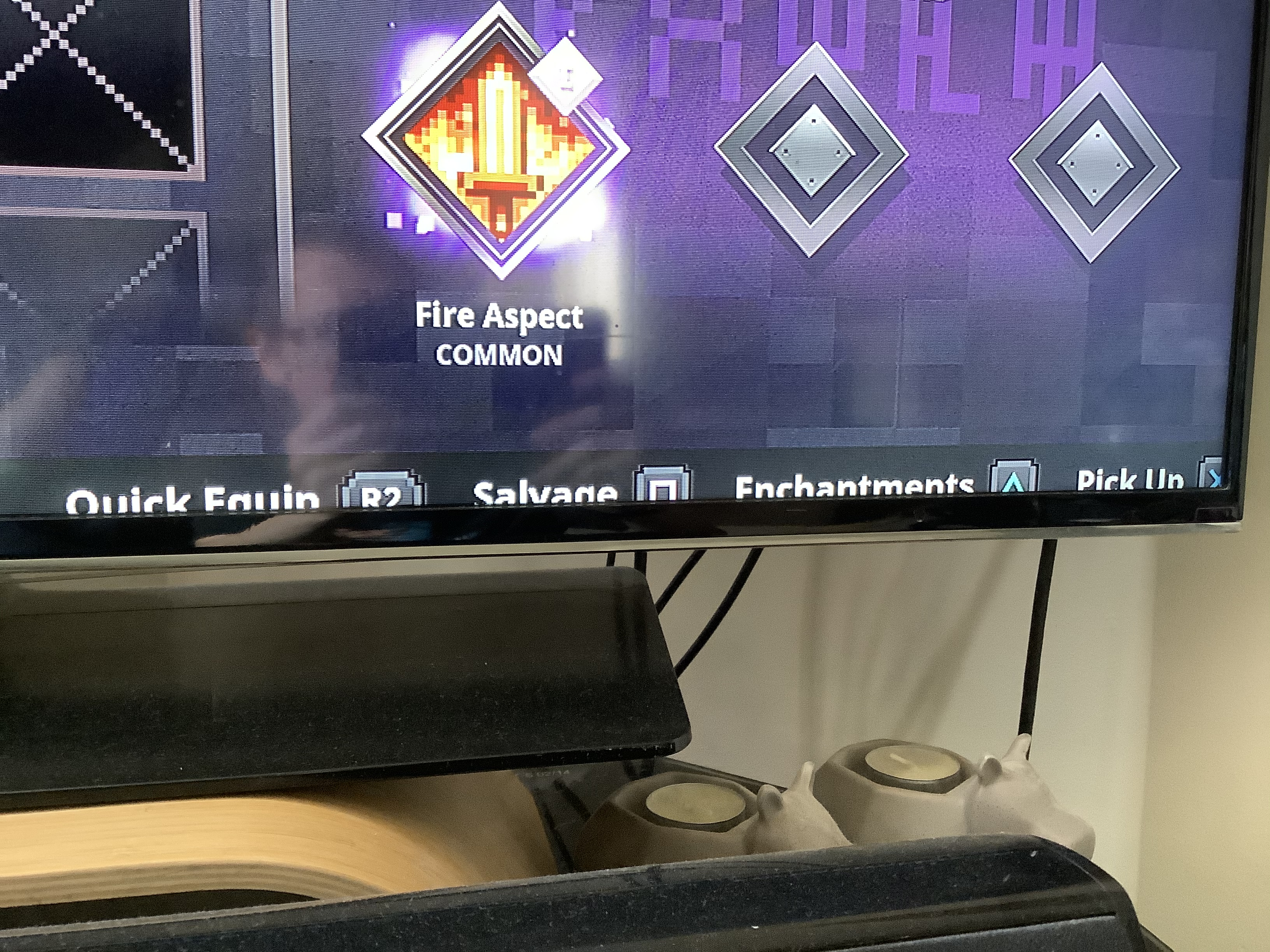



- Awaiting Response
 Saverio
- 9
- 9
- Community Consensus
- 365957
- Multiple
- latest Xbox one update
Created Issue:
adaptation of game gui to TV xbox one
the game does not adapt the gui to my TV in fact in some situations you notice for example the cut button from the screen frame or in the game you only notice half the line of the player level. it doesn't happen to me in other games can you implement a setting to adapt the screen?
I think it's both a bug and an addition to the game
- Unresolved
- Open
- Unconfirmed
- Xbox One
- latest Xbox one update
- Version #19500
![[Mod] violine1101](../../../data/avatars/users/92858.png)
adaptation of game gui to TV xbox oneMinecraft Dungeons doesn't adjust to cropped screen area on TVs
is duplicated by
is duplicated by
is duplicated by

is duplicated by
![[MCPE Mod] Celesian](../../../data/avatars/users/81635.png)
is duplicated by
is duplicated by
![[Mojang] Mega_Spud (Jay Wells)](../../../data/avatars/users/92696.png)
![[Bot] Arisa](../../../data/avatars/users/43007.png)
is duplicated by
Thank you for your report!
We're tracking this issue in MCD-1192, so this ticket is being resolved and linked as a duplicate.
If you would like to add a vote and any extra information to the main ticket it would be appreciated.
If you haven't already, you might like to make use of the search feature in the future to see if the issue has already been reported.
Quick Links:
📓 Issue Guidelines – 💬 Community Support – 📧 Customer Support – ✍️ Feedback and Suggestions – 📖 Game Wiki – 📖 FAQs
Thank you for your report!
We're tracking this issue in MCD-1192, so this ticket is being resolved and linked as a duplicate.
If you would like to add a vote and any extra information to the main ticket it would be appreciated.
If you haven't already, you might like to make use of the search feature in the future to see if the issue has already been reported.
Quick Links:
📓 Issue Guidelines – 💬 Community Support – 📧 Customer Support – ✍️ Feedback and Suggestions – 📖 Game Wiki – 📖 FAQs
Thank you for your report!
We're tracking this issue in MCD-1192, so this ticket is being resolved and linked as a duplicate.
If you would like to add a vote and any extra information to the main ticket it would be appreciated.
If you haven't already, you might like to make use of the search feature in the future to see if the issue has already been reported.
Quick Links:
📓 Issue Guidelines – 💬 Community Support – 📧 Customer Support – ✍️ Feedback and Suggestions – 📖 Game Wiki – 📖 FAQs
Thank you for your report!
We're tracking this issue in MCD-1192, so this ticket is being resolved and linked as a duplicate.
If you would like to add a vote and any extra information to the main ticket it would be appreciated.
If you haven't already, you might like to make use of the search feature in the future to see if the issue has already been reported.
Quick Links:
📓 Issue Guidelines – 💬 Community Support – 📧 Customer Support – ✍️ Feedback and Suggestions – 📖 Game Wiki – 📖 FAQs

Thank you for your report!
We're tracking this issue in MCD-1192, so this ticket is being resolved and linked as a duplicate.
If you would like to add a vote and any extra information to the main ticket it would be appreciated.
If you haven't already, you might like to make use of the search feature to see if the issue has already been mentioned.
Quick Links:
📓 Issue Guidelines – 💬 Community Support – 📧 Customer Support – ✍️ Feedback and Suggestions – 📖 Game Wiki – 📖 FAQs
Thank you for your report!
We're tracking this issue in MCD-1192, so this ticket is being resolved and linked as a duplicate.
If you would like to add a vote and any extra information to the main ticket it would be appreciated.
If you haven't already, you might like to make use of the search feature to see if the issue has already been mentioned.
Quick Links:
📓 Issue Guidelines – 💬 Community Support – 📧 Customer Support – ✍️ Feedback and Suggestions – 📖 Game Wiki – 📖 FAQs
Thank you for your report!
We're tracking this issue in MCD-1192, so this ticket is being resolved and linked as a duplicate.
If you would like to add a vote and any extra information to the main ticket it would be appreciated.
If you haven't already, you might like to make use of the search feature to see if the issue has already been mentioned.
Quick Links:
📓 Issue Guidelines – 💬 Community Support – 📧 Customer Support – ✍️ Feedback and Suggestions – 📖 Game Wiki – 📖 FAQs
Thank you for your report!
We're tracking this issue in MCD-1192, so this ticket is being resolved and linked as a duplicate.
If you would like to add a vote and any extra information to the main ticket it would be appreciated.
If you haven't already, you might like to make use of the search feature to see if the issue has already been mentioned.
Quick Links:
📓 Bug Tracker Guidelines – 💬 Community Support – 📧 Mojang Support
📓 Project Summary – ✍️ Feedback and Suggestions – 📖 Game Wiki – 📖 FAQs
– I am a bot. This action was performed automatically! The ticket was resolved by one of our moderators, and I left this message to give more information to you.
This is happening on my HD LG TV as well with the Xbox One version of the game. My TV does not have this adjustment for overscan and this only occurs on certain games. Several games give you the ability to adjust the overscan, but this one does not.
I have also encountered this problem with an LG hd TV (720p)
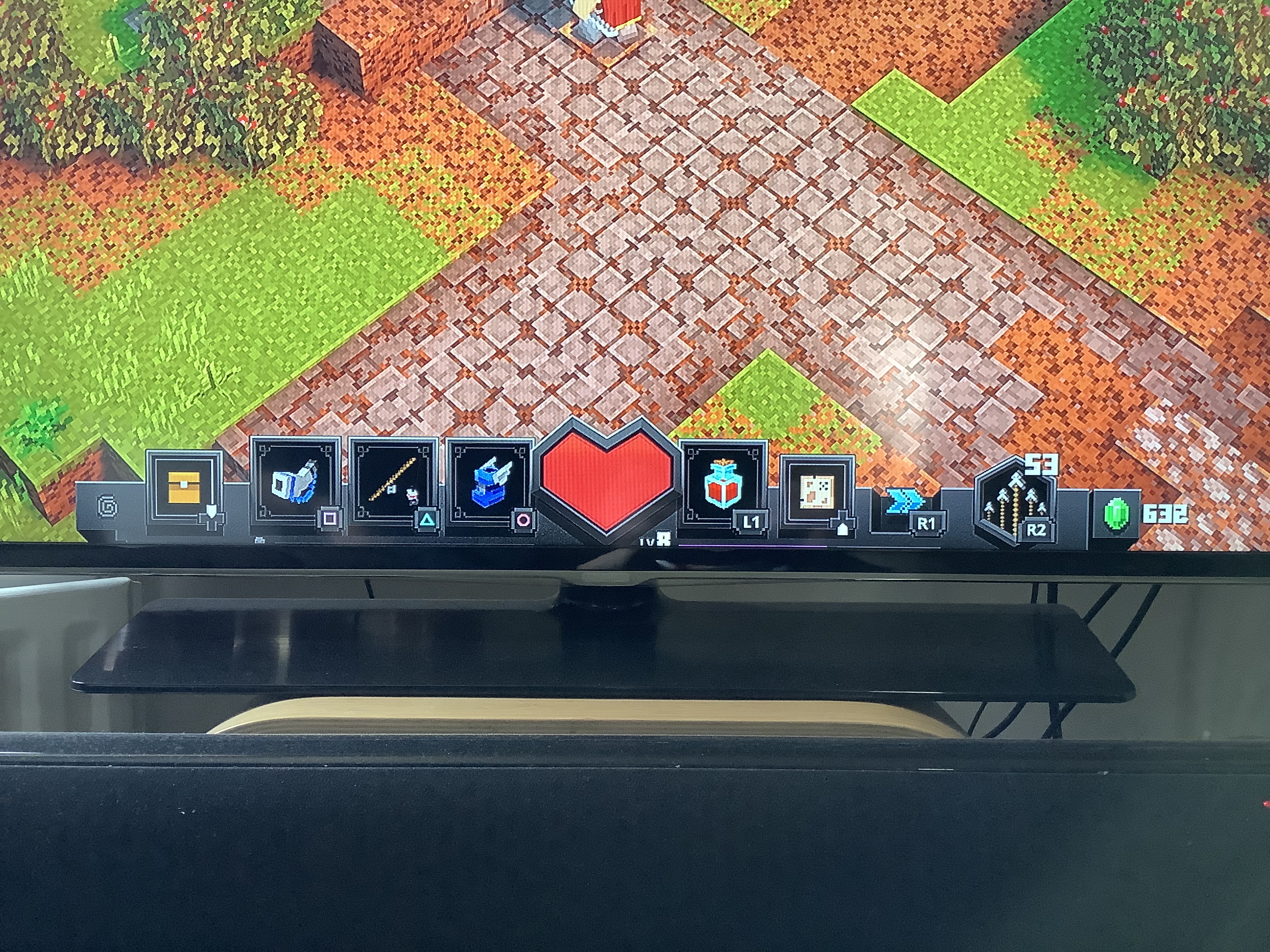
Also occurs for me on Sony HD TV (1080P). On single player adjusting HUD allows partial view of the soul meter/ exp bar but other areas of the screen remain cut off. Co-op mode even more is cut off and there is no viable work around.
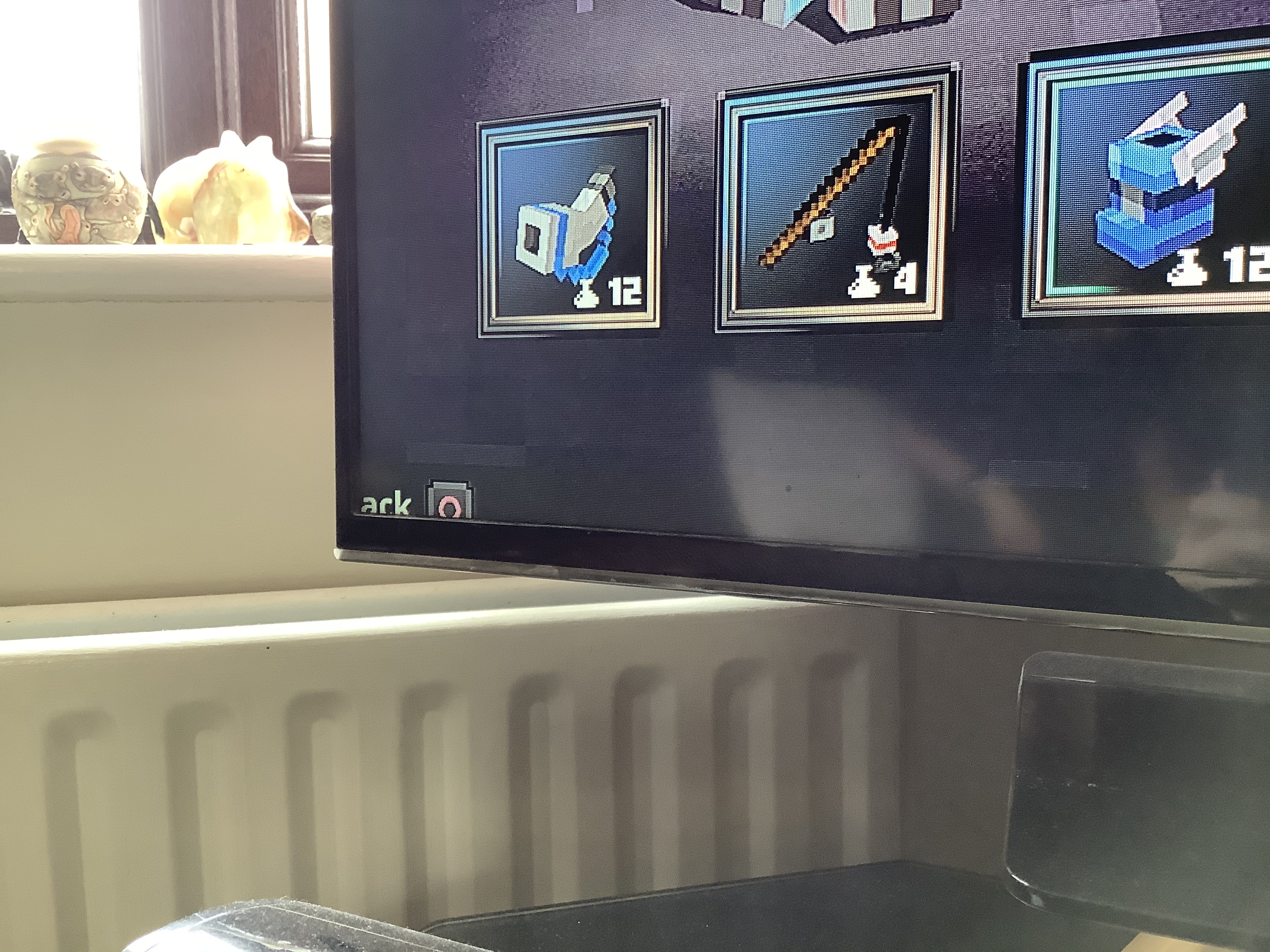
Not sure if this is the same issue or not, but I have added three screenshots to this page. The XP bar, and inventory menu text is cut off at the bottom as shown on the screenshots.
Changing the PS4 display settings does not fix this, and I don’t want to mess too much with TV settings.
Try resizing the screen, (the tv-ratio)
Thank you for your report!
However, this issue has been temporarily closed as Awaiting Response
Is this still an issue in the latest version? If it is, please try and include steps to reproduce the issue of possible:
If your ticket does not look like the example given here, then it's likely to be closed as incomplete.
This ticket will automatically reopen when you reply.
Quick Links:
📓 Issue Guidelines – 💬 Mojang Support – 📧 Suggestions – 📖 Minecraft Wiki
This is issue still occurs on the latest version on the game on Xbox One (1.7.3.0_668) - essential parts of the game HUD such as the soul bar and experience bar cannot be seen on certain TVs, despite attempts to adjust aspect ratios or zoom settings.
Steps to Reproduce:
1. Use Panasonic 720p HD-ready TV (or some other brand as mentioned above)
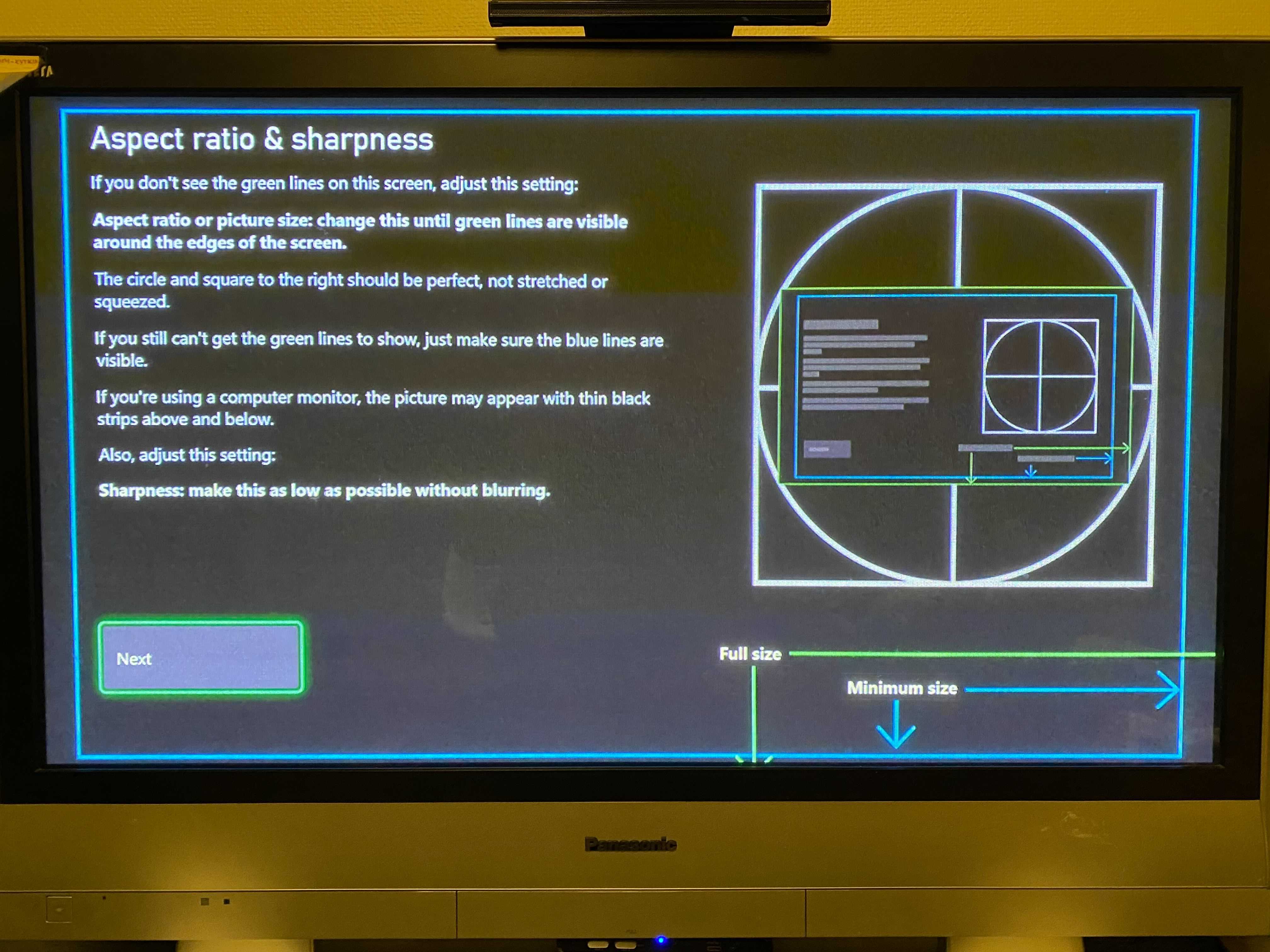
2. Check using the Xbox One TV Calibration option that TV calibration settings are fine, you cannot make the green lines to show but blue lines are visible.
3. Play the game, on game settings set the HUD scale to maximum (150%)
4. Start a level and observe the HUD.
Observed Results:
Essential parts of the game HUD such as the soul bar and experience bar cannot be seen. Also the navigation buttons in multiple in-game screens are not fully visible. See the attached screenshots for samples. This can be somewhat compensated with the HUD Scale option, but not fully.
Expected Results:
Game HUD is fully visible. Would like to see a game option to adjust overscan.


Is this still an issue in the latest version?
This ticket will automatically reopen when you reply.