Play button sometimes flashes on MCPE, MCD and MCLG tabs
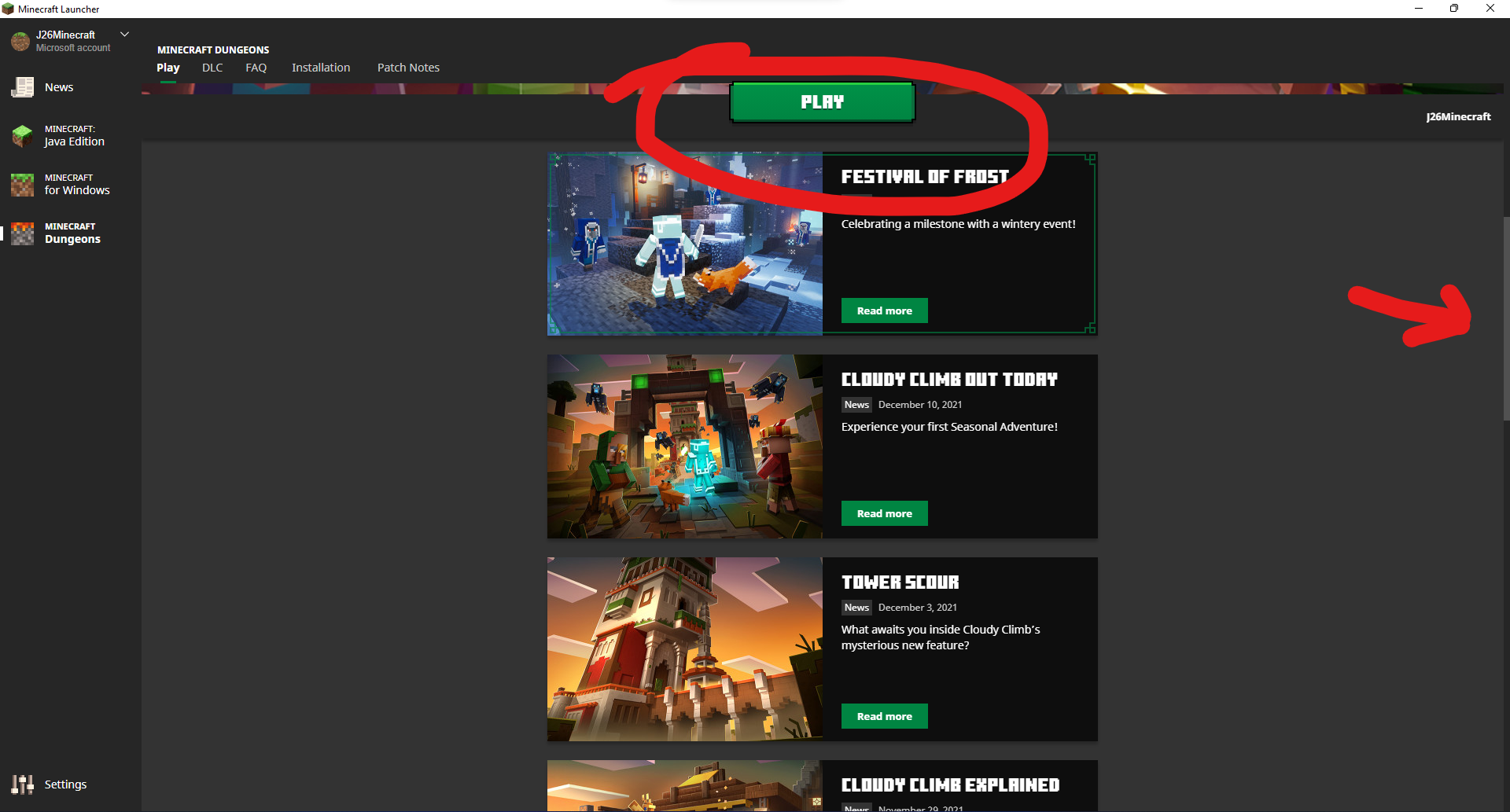
If you drag down on the scroll bar slowly on the Minecraft for Windows, Mincraft Dungeons or Minecraft Legends tabs of the Launcher, when you get to the point, just before the play button moves to the top right hand corner the play button stays flashing on the screen.
Linked Issues
is duplicated by3
relates to3
 MCL-22773"Play" button for Minecraft for Windows, Dungeons and Legends occasionally disappears when scrolling the pageFixedMCL-23101Minecraft for Windows "Play" button glitches out when switching tabs with transition animations enabledFixedMCL-23322Minecraft Legends "Play" button glitches out during Piglin animationFixed
- Fixed
 Joshua Cavell
- 1
- 2
- Confirmed
- 723172
- Minecraft Launcher
2.2.10322 (New Windows App) - 2.4.57 (Win 10/11 App)
2.2.10322 (New Windows App) 2.2.10675 (New Windows App) 2.3.451 (New Windows App) 2.3.462 (Windows) 2.3.462 (New Windows App) 2.3.580 (New Windows App) 2.3.592 (New Windows App) 2.3.619 (New Windows App) 2.3.645 (New Windows App) 2.4.30 (Win 10/11 App) 2.4.36 (Win 10/11 App) 2.4.39 (Win 10/11 App) 2.4.57 (Win 10/11 App)- 2.4.69 (Win 10/11 App) 2.4.69 (Mac) 2.4.69 (Linux) 2.4.69 (Legacy Windows)
Created Issue:
Play button glitches on MCPE and MCD rabs
If you drag down on the scroll bar slowly on the Mincraft Dungeons or Minecraft Windows Tabs of the Launcher, when you get to the point, just before the play button moves to the top right hand corner the play button stays flashing on the screen.
Environment
Windows 11
Attachments1
Play button glitches on MCPE and MCDrabsPlay button glitches on MCPE and MCD tabs
![[Mod] markderickson](../../../data/avatars/users/18946.svg)
Windows 11
![[Mod] Greymagic27](../../../data/avatars/users/92875.png)
is duplicated by
![[Bot] Arisa](../../../data/avatars/users/43007.png)
is duplicated by
![[Mod] EVGENSYPERPRO](../../../data/avatars/users/92853.png)
Play buttonglitches on MCPE and MCD tabsPlay button sometimes flashes on MCPE and MCD tabs
is duplicated by
MCL-22782
![[Mod] turbo](../../../data/avatars/users/92867.png)
is duplicated by
If you drag down on the scroll bar slowly on the Mincraft Dungeons or Minecraft
WindowsTabs of the Launcher, when you get to the point, just before the play button moves to the top right hand corner the play button stays flashing on the screen.If you drag down on the scroll bar slowly on the Minecraft for Windows, Mincraft Dungeons or Minecraft Legends tabs of the Launcher, when you get to the point, just before the play button moves to the top right hand corner the play button stays flashing on the screen.
Play button sometimes flashes on MCPE and MCDtabsPlay button sometimes flashes on MCPE, MCD and MCLG tabs
![[Mod] LateLag](../../../data/avatars/users/92884.png)
relates to
Thank you for your report!
We're tracking this issue in MCL-21137, so this ticket is being resolved and linked as a duplicate.
If you would like to add a vote and any extra information to the main ticket it would be appreciated.
If you haven't already, you might like to make use of the search feature to see if the issue has already been mentioned.
Quick Links:
📓 Bug Tracker Guidelines – 💬 Community Support – 📧 Mojang Support
📓 Project Summary – ✍️ Feedback and Suggestions – 📖 Game Wiki
Thank you for your report!
We're tracking this issue in MCL-21137, so this ticket is being resolved and linked as a duplicate.
If you would like to add a vote and any extra information to the main ticket it would be appreciated.
If you haven't already, you might like to make use of the search feature to see if the issue has already been mentioned.
Quick Links:
📓 Bug Tracker Guidelines – 💬 Community Support – 📧 Mojang Support
📓 Project Summary – ✍️ Feedback and Suggestions – 📖 Game Wiki
– I am a bot. This action was performed automatically! The ticket was resolved by one of our moderators, and I left this message to give more information to you.
Discovered while testing MCL-21137 and MCL-21575.
The Bug:
The "Play" button for Minecraft for Windows, Minecraft Dungeons and Minecraft Legends occasionally disappears when scrolling the page.
Steps to Reproduce:
- Open the Launcher in the version stated.
- Click on the Minecraft for Windows tab.
- Scroll down.
→  The "Play" button for Minecraft for Windows occasionally disappears when scrolling the page.
Observed Behavior:
The "Play" button for Minecraft for Windows and Minecraft Dungeons occasionally disappears when scrolling the page.
Expected Behavior:
The "Play" button for Minecraft for Windows and Minecraft Dungeons doesn't occasionally disappear when scrolling the page.
Discovered while testing MCL-21137 and MCL-22773.
The Bug:
The Minecraft for Windows "Play" button glitches out and flashes when switching tabs with transition animations enabled.
Steps to Reproduce:
- Open the Launcher in the version stated.
- Enable "Animate transitions between pages in the Launcher".
- Click on the Minecraft for Windows tab.
- Switch quickly between the "Play" and "Preview" tabs and observe the "Play" button.
→ The "Play" button for Minecraft for Windows flashes and/or glitches out when switching tabs.
Observed Behavior:
The Minecraft for Windows "Play" button flashes when switching tabs with transition animations enabled.
Expected Behavior:
The Minecraft for Windows "Play" button doesn't flash or glitch out when switching tabs with transition animations enabled.
Thank you for your report!
We're tracking this issue in MCL-21137, so this ticket is being resolved and linked as a duplicate.
If you would like to add a vote and any extra information to the main ticket it would be appreciated.
If you haven't already, you might like to make use of the search feature to see if the issue has already been mentioned.
Quick Links:
📓 Bug Tracker Guidelines – 💬 Community Support – 📧 Mojang Support
📓 Project Summary – ✍️ Feedback and Suggestions – 📖 Game Wiki
– I am a bot. This action was performed automatically! The ticket was resolved by one of our moderators, and I left this message to give more information to you.
Confirmed for Windows 10.0 2.2.10322 MCL-21137.mp4 GTX 1070
I can no longer reproduce this behavior as it has been fixed in launcher version 2.4.69.