Java Installations configuration component prompt pops up in the wrong place
The Bug:
The configuration component prompt on the Java Installations page appears in the wrong location.
Steps to Reproduce:
- Open the launcher and go to the Minecraft: Java Edition tab.
- Go to the Installations page and try to edit an existing installation.
- Take note of where the prompt is placed.
→  The prompt pops up on the edge of the game selector.
Observed Behavior:
The prompt appears on the edge of the game selector, which is inconsistent with the previous behavior.
Expected Behavior:
The prompt appears next to the three-dot icon, as expected.
Linked Issues
is duplicated by6
 MCL-23223Minecraft Launcher version 2.4.4 introduces a regression that causes the […] button to no longer function in the "Installations" screen.DuplicateMCL-23227Flyout appears in the top-left corner.DuplicateMCL-23231The `···`(More) list for Installations appeared in a wrong positionDuplicateMCL-23235the three dots(more options) of the java installations dont workDuplicateMCL-23239An issue on Minecraft Launcher's Installation page (Java Edition)DuplicateMCL-23247Can't edit my instalation settingsDuplicate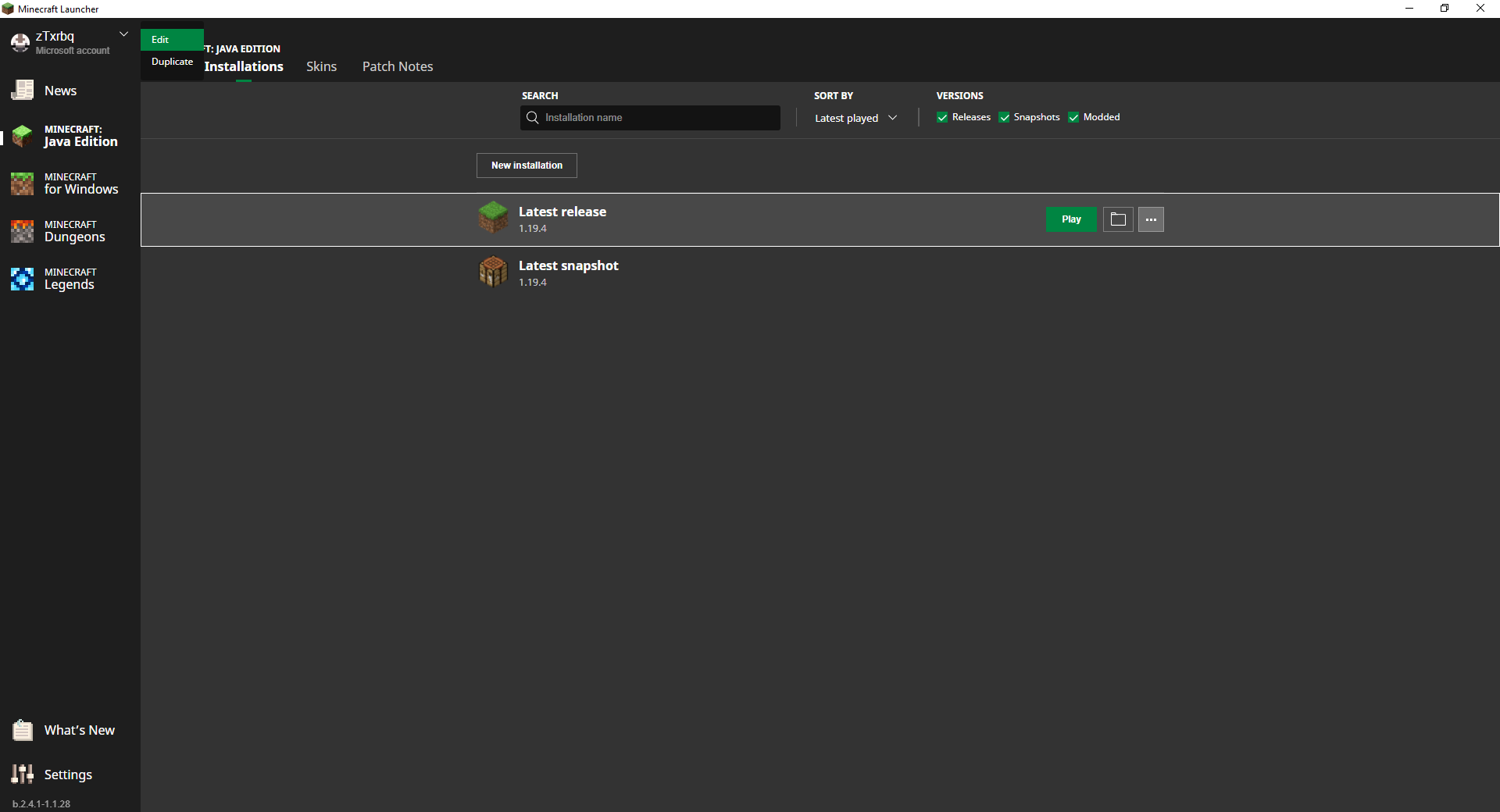
![[Mod] turbo](../../../data/avatars/users/92867.png)


Created Issue:
Java Installations configuration component prompt pops up in the wrong place
This issue affects the latest BETA version b.2.4.1.
The Bug:
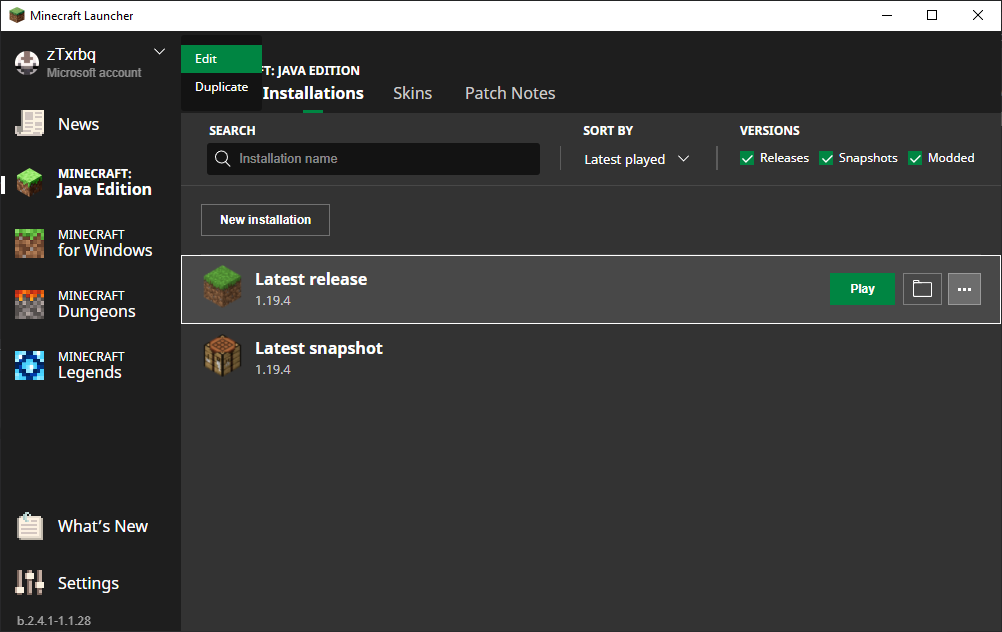
The configuration component prompt on the Java Installations page appears in the wrong location in the latest BETA version b.2.4.1.
Steps to Reproduce:
- Open the launcher and go to the Minecraft: Java Edition tab.
- Go to the Installations page and try to edit an existing installation.
- Take note of where the prompt is placed.
→
Observed Behavior:
The prompt appears on the edge of the game selector, which is inconsistent with the previous behavior.
Expected Behavior:
The prompt appears next to the three-dot icon, as expected.
Attachments4
![[Mod] EVGENSYPERPRO](../../../data/avatars/users/92853.png)
![[MCQA] Zgajak](../../../data/avatars/users/10122.svg)
![[Mod] markderickson](../../../data/avatars/users/18946.svg)
This issue affects the latest BETA version b.2.4.1.
The Bug:
The configuration component prompt on the Java Installations page appears in the wrong location in the latest BETA version b.2.4.1.
Steps to Reproduce:
- Open the launcher and go to the Minecraft: Java Edition tab.
- Go to the Installations page and try to edit an existing installation.
- Take note of where the prompt is placed.
→
Observed Behavior:
The prompt appears on the edge of the game selector, which is inconsistent with the previous behavior.
Expected Behavior:
The prompt appears next to the three-dot icon, as expected.
![[Bot] Arisa](../../../data/avatars/users/43007.png)
The Bug:
The configuration component prompt on the Java Installations page appears in the wrong location
in the latest BETA version b.2.4.1.Steps to Reproduce:
- Open the launcher and go to the Minecraft: Java Edition tab.
- Go to the Installations page and try to edit an existing installation.
- Take note of where the prompt is placed.
→
Observed Behavior:
The prompt appears on the edge of the game selector, which is inconsistent with the previous behavior.
Expected Behavior:
The prompt appears next to the three-dot icon, as expected.
relates to
is duplicated by
is duplicated by
is duplicated by
is duplicated by
is duplicated by
Relates to MCL-23195.
The Bug:
The drop-down in the top left/right corner shows up in the wrong place when changing between languages with different scripts.
For example, changing from English to Arabic (from left-to-right to right-to-left script) will display the drop-down in the top left corner, although it should be displayed in the top right. Only if you reboot the Launcher will the position for the drop-down update and work as expected.
Steps to Reproduce:
- Open the launcher and go to "Settings" > "Languages".
- Select a language with a different script from what is currently selected.
(ex: English → Arabic OR Arabic → English). - Click on the drop-down in the top left/right corner.
→ The drop-down appears on the same side as before changing language even though the UI has been inverted.
Observed Behavior:
The drop-down appears on the opposite side of the UI button when changing between languages with different scripts.
Expected Behavior:
The drop-down always appears on the same side as the UI button, as expected.
Does MCL-23195 describe your issue? It pops up in the wrong place not where expected.
@Jess Edward Ah, yeah that's the core issue. This is indeed a duplicate of MCL-23195.
The only difference is that this is now occuring on the release/production channel.
Thank you for your report!
We're tracking this issue in MCL-23195, so this ticket is being resolved and linked as a duplicate.
If you would like to add a vote and any extra information to the main ticket it would be appreciated.
If you haven't already, you might like to make use of the search feature to see if the issue has already been mentioned.
Quick Links:
📓 Bug Tracker Guidelines – 💬 Community Support – 📧 Mojang Support
📓 Project Summary – ✍️ Feedback and Suggestions – 📖 Game Wiki
Thank you for your report!
We're tracking this issue in MCL-23195, so this ticket is being resolved and linked as a duplicate.
If you would like to add a vote and any extra information to the main ticket it would be appreciated.
If you haven't already, you might like to make use of the search feature to see if the issue has already been mentioned.
Quick Links:
📓 Bug Tracker Guidelines – 💬 Community Support – 📧 Mojang Support
📓 Project Summary – ✍️ Feedback and Suggestions – 📖 Game Wiki
Thank you for your report!
We're tracking this issue in MCL-23195, so this ticket is being resolved and linked as a duplicate.
If you would like to add a vote and any extra information to the main ticket it would be appreciated.
If you haven't already, you might like to make use of the search feature to see if the issue has already been mentioned.
Quick Links:
📓 Bug Tracker Guidelines – 💬 Community Support – 📧 Mojang Support
📓 Project Summary – ✍️ Feedback and Suggestions – 📖 Game Wiki
Thank you for your report!
We're tracking this issue in MCL-23195, so this ticket is being resolved and linked as a duplicate.
If you would like to add a vote and any extra information to the main ticket it would be appreciated.
If you haven't already, you might like to make use of the search feature to see if the issue has already been mentioned.
Quick Links:
📓 Bug Tracker Guidelines – 💬 Community Support – 📧 Mojang Support
📓 Project Summary – ✍️ Feedback and Suggestions – 📖 Game Wiki
Thank you for your report!
We're tracking this issue in MCL-23195, so this ticket is being resolved and linked as a duplicate.
If you would like to add a vote and any extra information to the main ticket it would be appreciated.
If you haven't already, you might like to make use of the search feature to see if the issue has already been mentioned.
Quick Links:
📓 Bug Tracker Guidelines – 💬 Community Support – 📧 Mojang Support
📓 Project Summary – ✍️ Feedback and Suggestions – 📖 Game Wiki
– I am a bot. This action was performed automatically! The ticket was resolved by one of our moderators, and I left this message to give more information to you.
Thank you for your report!
We're tracking this issue in MCL-23195, so this ticket is being resolved and linked as a duplicate.
If you would like to add a vote and any extra information to the main ticket it would be appreciated.
If you haven't already, you might like to make use of the search feature to see if the issue has already been mentioned.
Quick Links:
📓 Bug Tracker Guidelines – 💬 Community Support – 📧 Mojang Support
📓 Project Summary – ✍️ Feedback and Suggestions – 📖 Game Wiki
Can confirm this
Hi! After testing this myself, I discovered that the position of the configuration prompt can be updated by rescaling the application window.
This moves the prompt to the correct location, however, only for the installation selected when the window was rescaled.
See MCL-23195 - Rescaling .mp4
Additionally, the exact position for the prompt seems to vary as it sometimes shows up outside or partly outside of the application window.
See MCL-23195 - Prompt outside.png
Seems to be happening in v2.4.4-1.2.4 as well for the Legacy Windows launcher.
Coming here from
MCL-23223— this is now unfortunately occuring in both release/production and beta channels, since both are currently set to the same version as of this writing. (※ 2.4.4 as reported by .version, or 2.4.4-1.2.4 as reported by the launcher UI)The last version of the Minecraft Launcher that still has a working […] button is 2.3.646.
This issue affects all platforms that the Minecraft Launcher is available on — macOS, Windows, Linux, and Microsoft Store.
A simple way to Edit your Installation is to Left-Click anywhere in the red zone depicted here: Edit_Installation.png
Jess Edward your launcher version (2.3.645) doesn't contain this bug.
This issue appears to be fixed in the latest BETA version b.2.4.22. The behavior is the same as before the bug occurred.
Fix already in release.
Closing the ticket.