 MCPE-159488
Lights are displaced from their source in RTX
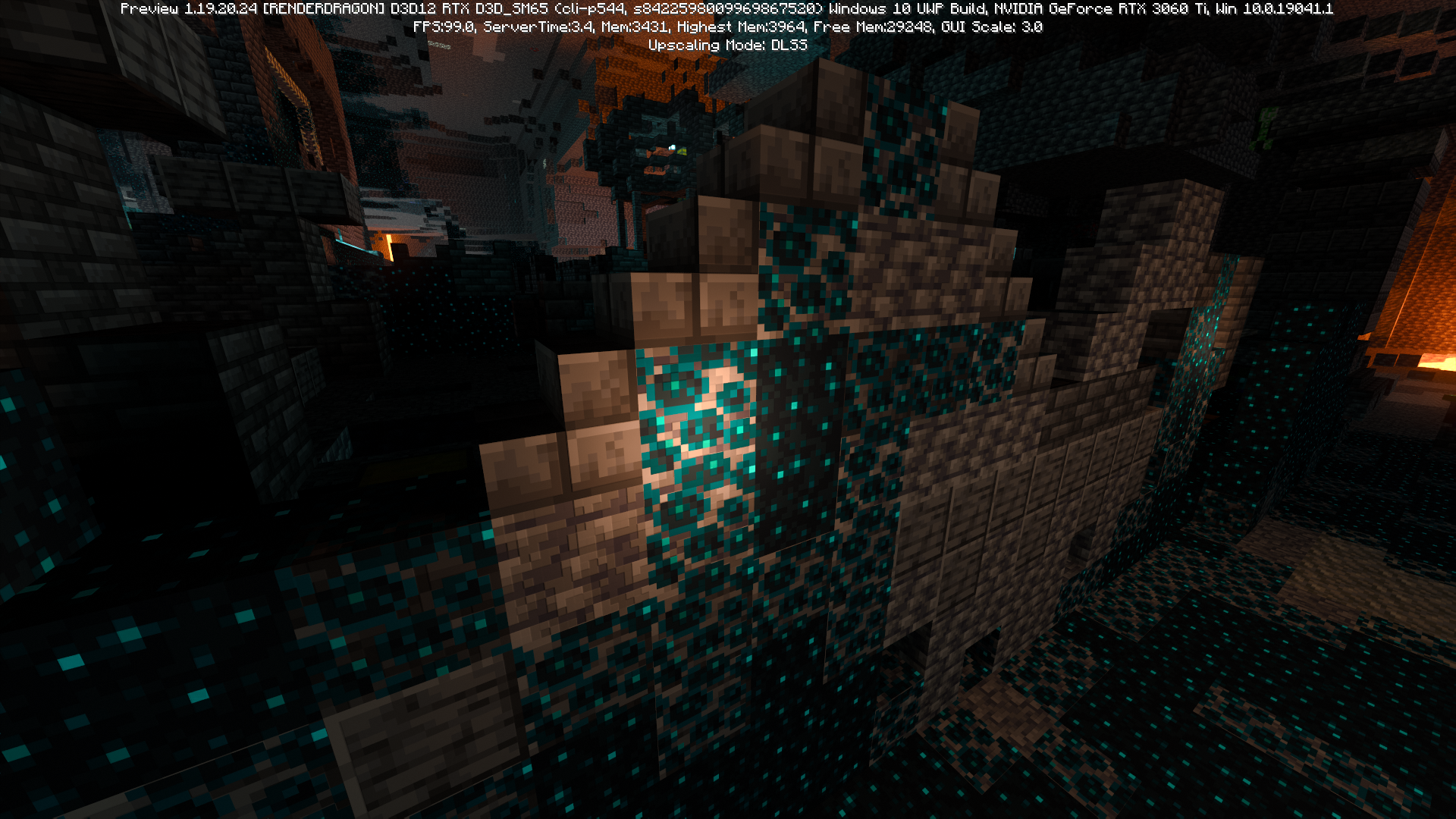
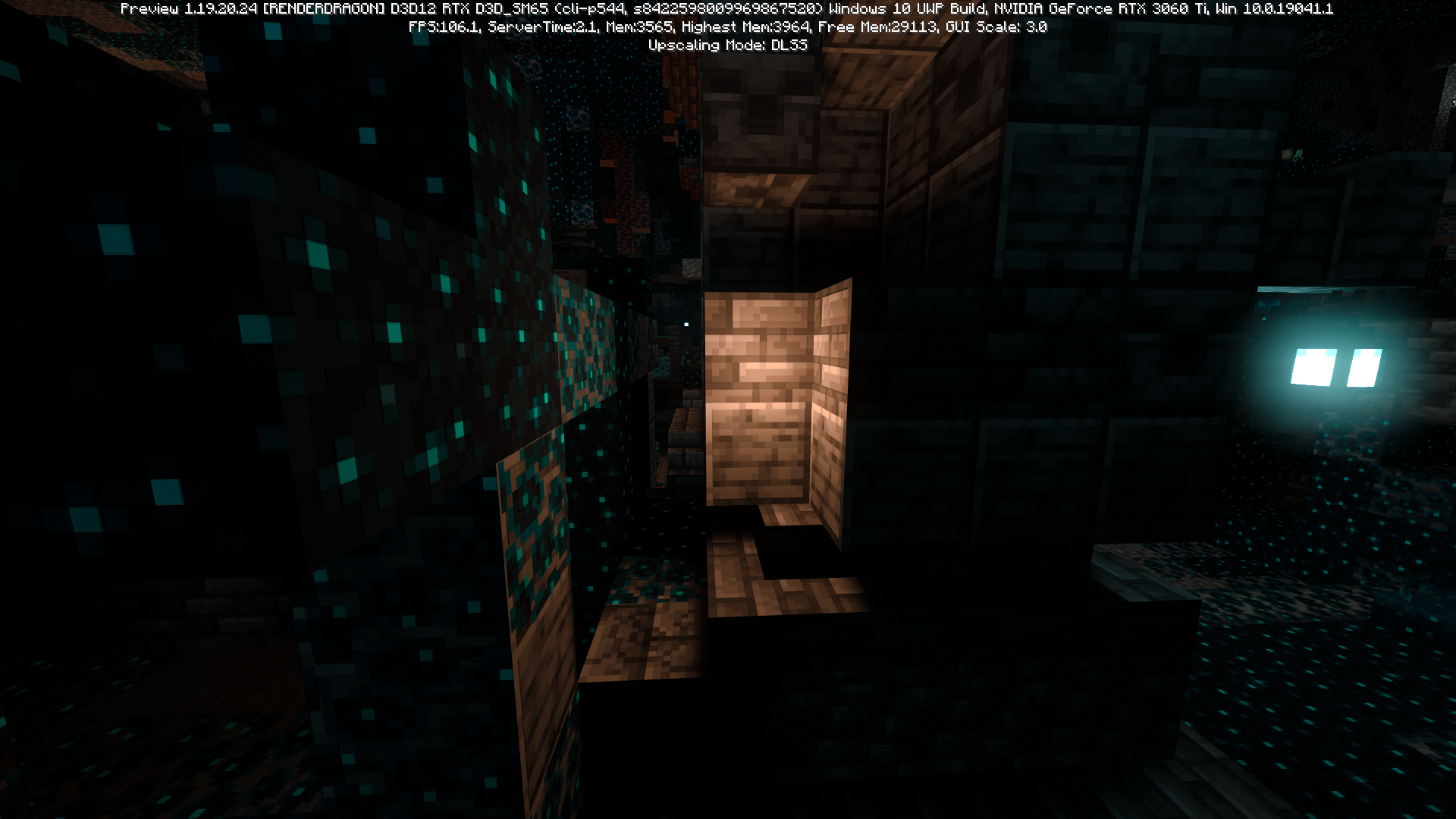
Lanterns (of both soul and normal variant) now distribute randomly placed point lights in the surrounding area of their location. This results in the game appearing to emit light from no visible light source in those positions.
Steps to Reproduce:
- Enter any world with Ray Tracing on
(You can use this pack to test the issue) - Enter any area of the world where lanterns have been placed. An Ancient City is a good example of this.
Observed Results:
Random positions around the lanterns will have a point light placed, making it appear as though light is coming from nothing in those locations.
Expected Results:
Lantern's point lights should only be positioned in the proper place on the block, similar to how they functioned in previous versions of the game. Light should not emit in places where there are no light sources unless a Light Block is placed there.
Bug Analysis:
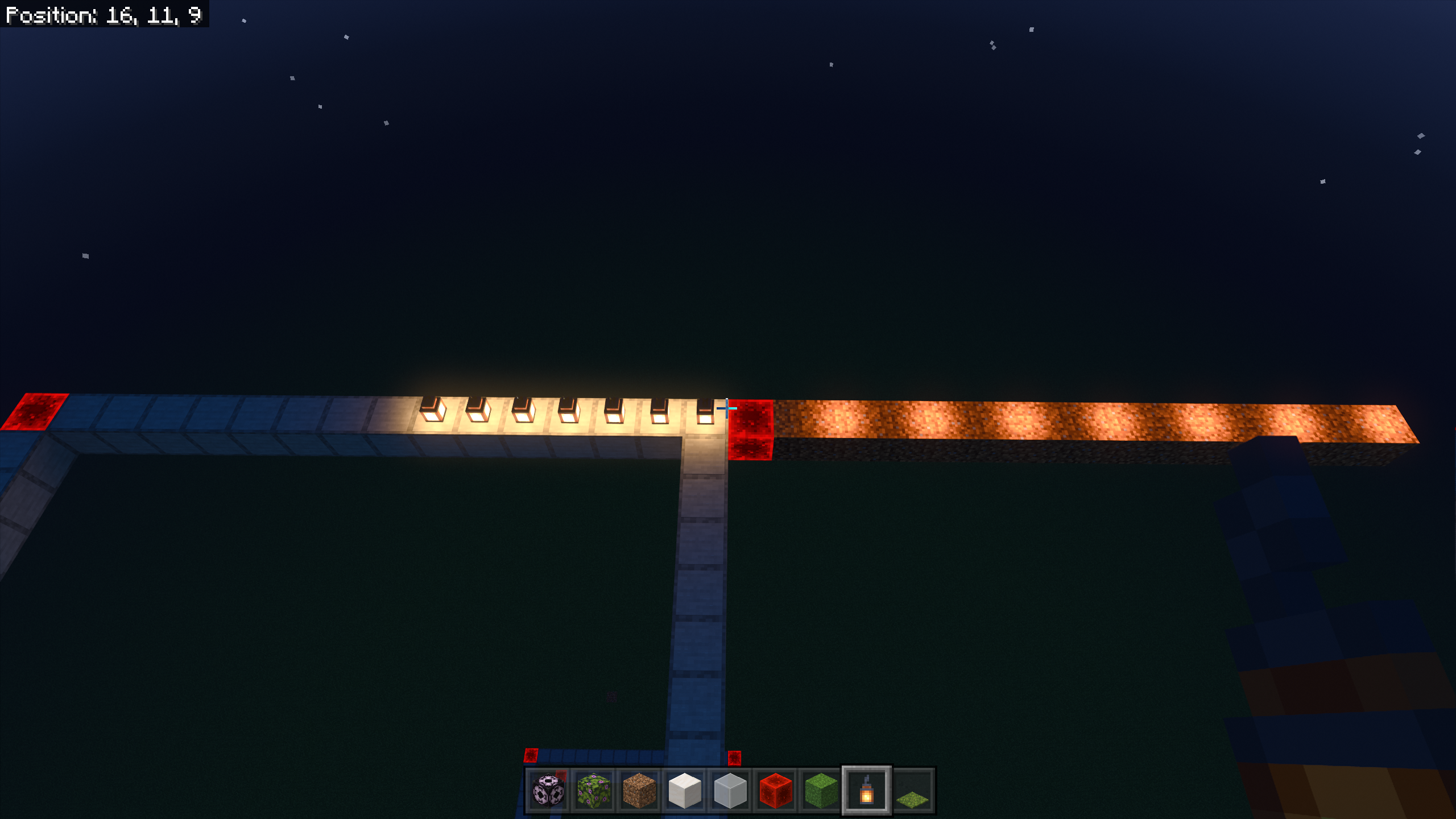
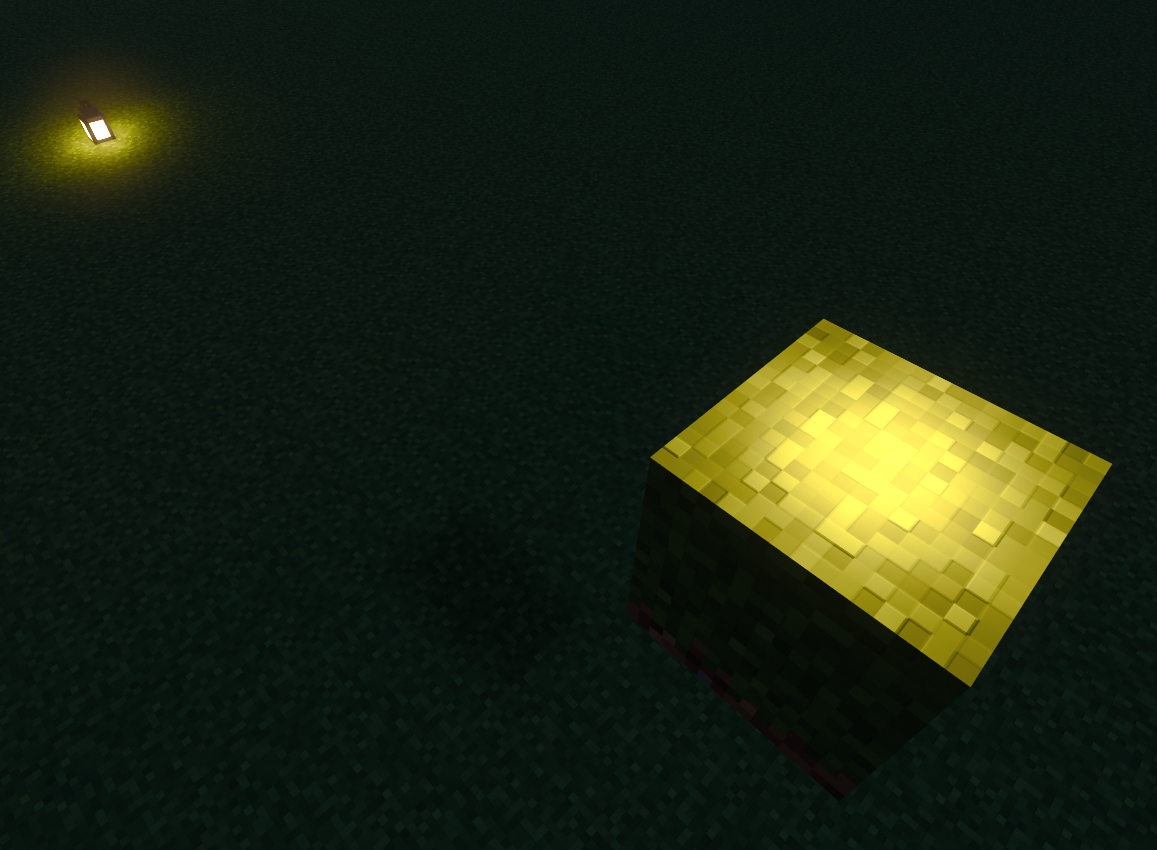
Here you can see how row of lanterns cast a point light every other block in positive direction equal to double the chunk relative X coordinate of each lantern.
Here is a bigger view. The upper left chunk is casting point lights all over the 3 neighboring chunks, with each point light being offset by double the relative coordinates of each lantern.
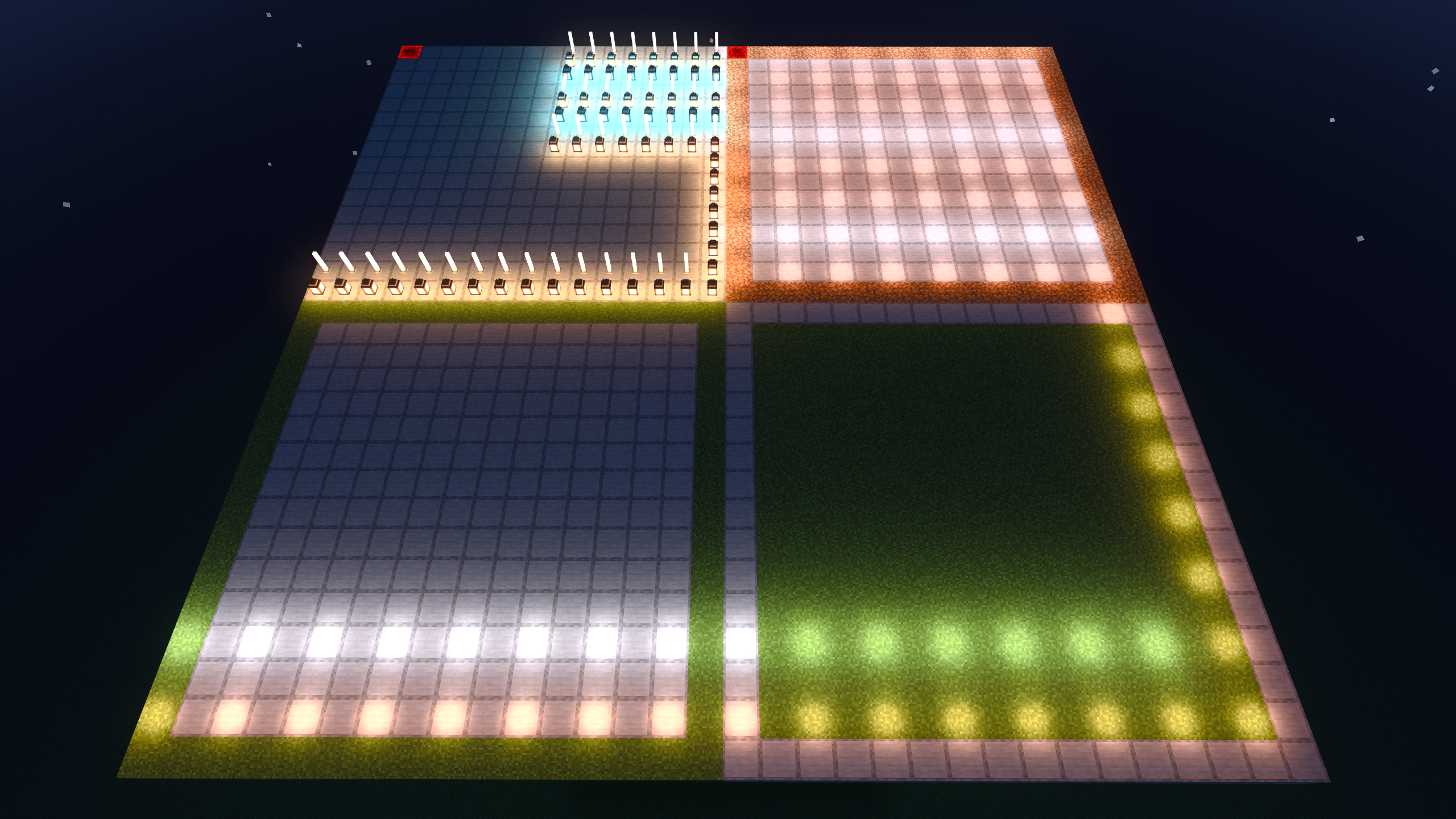
With this information it's likely that this bug is caused by a simple logic error where the point light's location offset from the origin of each chunk a lantern/end rod is in is accidentally doubled.
Linked Issues
Attachments13



- Fixed
 MADLAD3718
- 55
- 18
- Confirmed
- 851030
- Windows
- Windows 10 Pro Build 19044
- RTX lantern point-light raytracing
- 1.19.71
Created Issue:
Ancient Cities have incorrect point lights with Ray Tracing
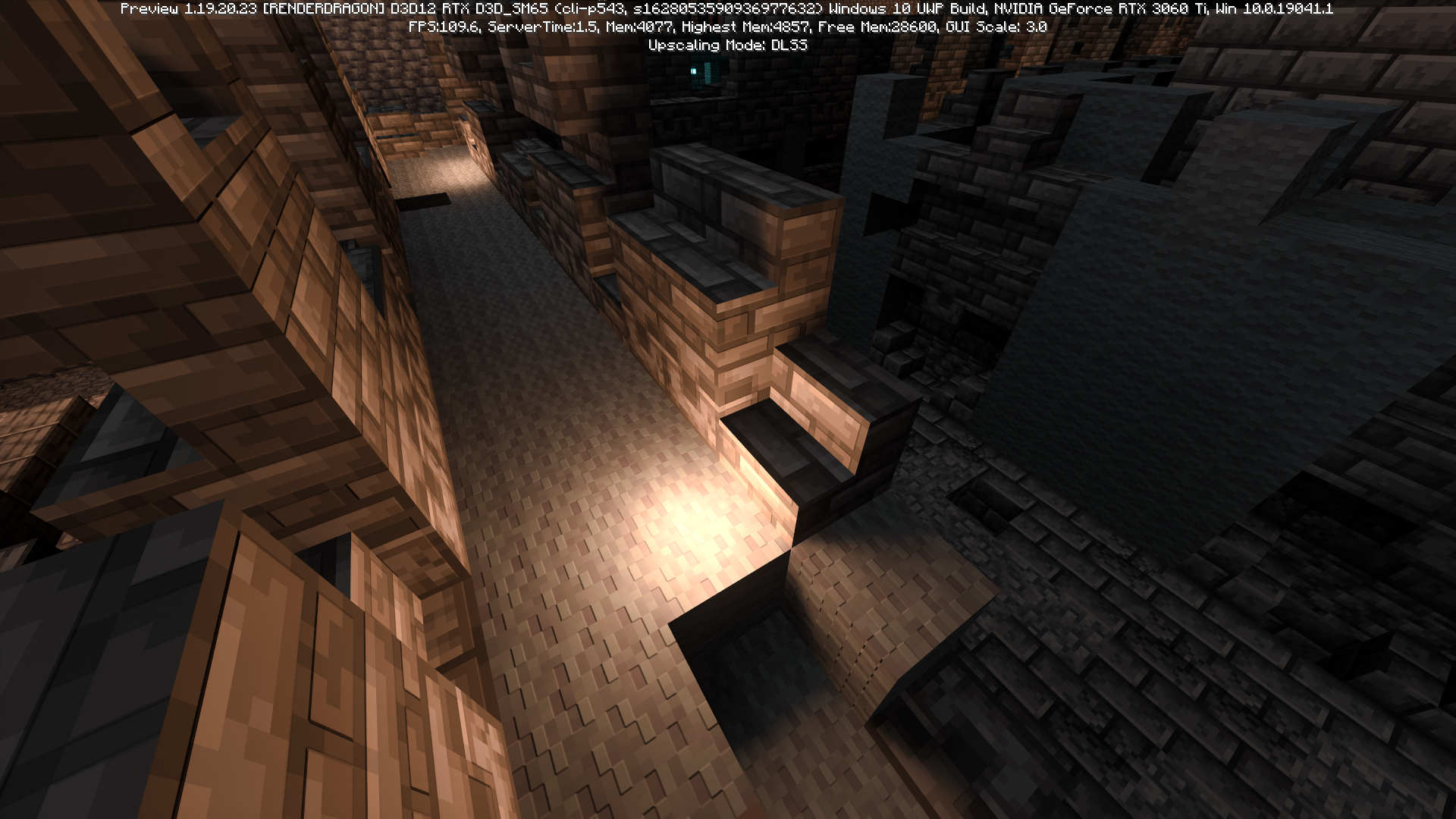
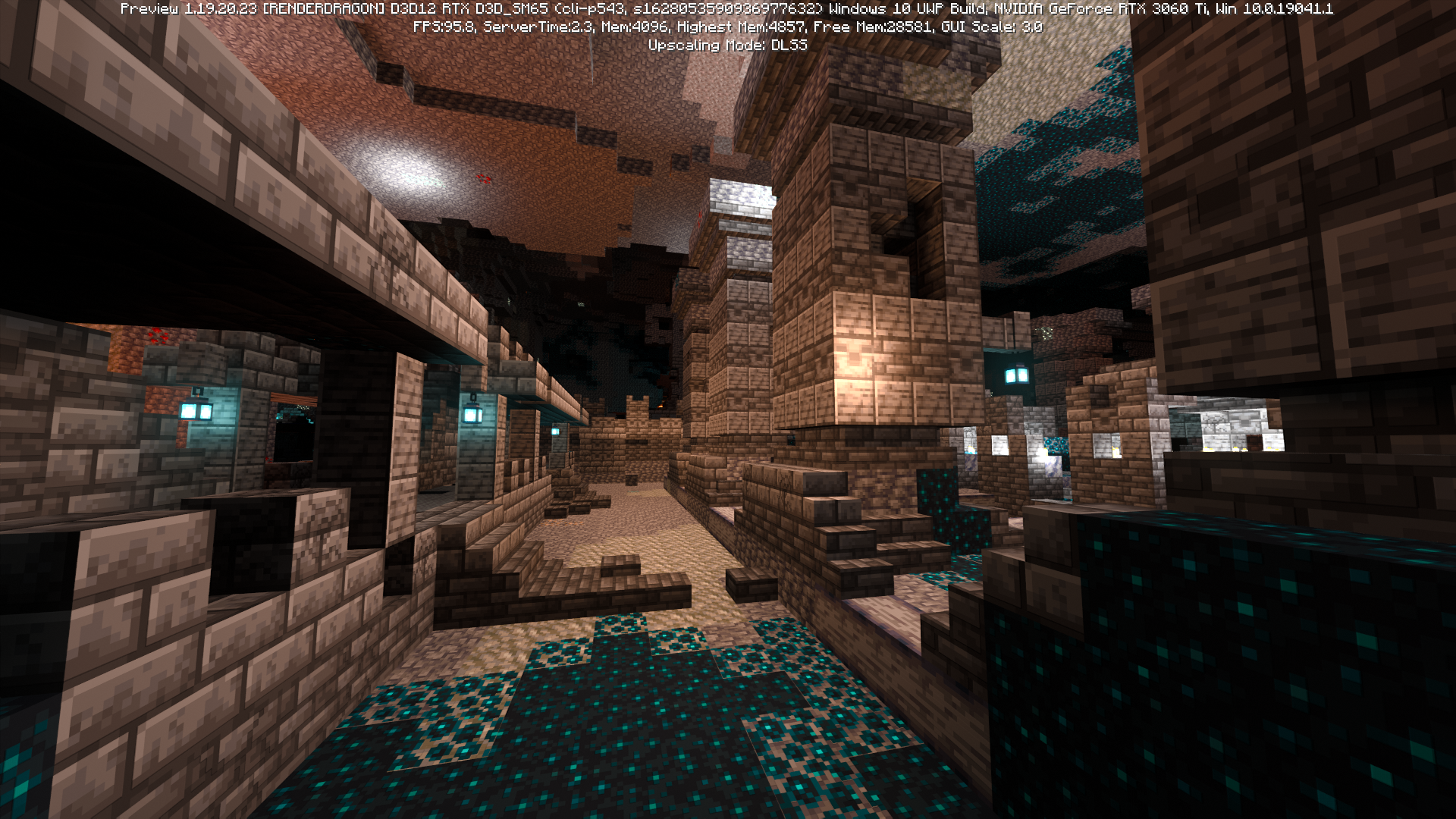
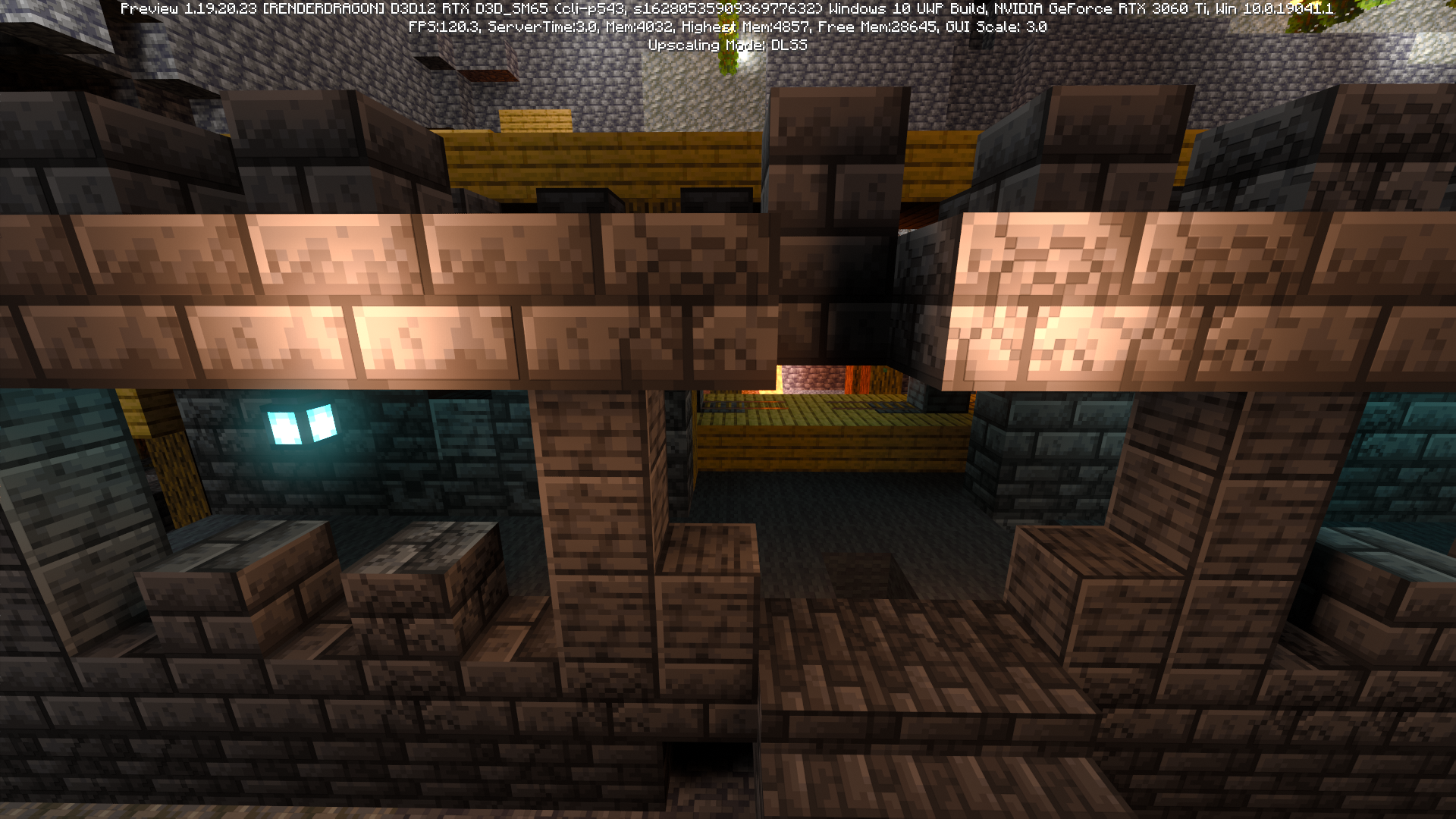
Ancient Cities now have several incorrect point lights randomly placed around the structure. This ruins the look of the strucuture and the theme of the "Deep Dark" by getting rid of any darkness that was previously present in the area.
Steps to Reproduce:
- Enter any world with Ray Tracing on
(You can use this pack to test the issue)- Enter an Ancient City
Observed Results:
Areas in the city which previously worked as intended and were dark in their apropiate placed are no longer that way. There are randomly placed point lights in nearly every location in the structure, ruining the darkness that was previously present.
Expected Results:
These areas in the city should function as previously, having no randomly placed point lights in any location at all. This would match the functionality seen in previous versions of the game, and would retain the intended darkness that was present to exaggerate the atmosphere and experience.
Attachments4
- Unresolved
- Open
- Unconfirmed
- Windows
- Windows 10 Pro Build 19044
- 1.19.20.23 Preview
![[MCQA] v-magwar](../../../data/avatars/users/18935.svg)
![[Bot] Arisa](../../../data/avatars/users/43007.png)
![[Helper] lillybeacon](../../../data/avatars/users/93893.png)
![[Mod] OcelotOnesie](../../../data/avatars/users/43220.png)
![[MCQA] v-weszaj](../../../data/avatars/users/18941.svg)
Ancient Citieshaveincorrect pointlightswith Ray TracingLanterns Have Randomly Positioned Point Lights
Ancient Cities now have several incorrect point lights randomly placed around the structure. This ruins the look of the strucuture and the theme of the "Deep Dark" by getting rid of any darkness that was previously present in the area.
Steps to Reproduce:
- Enter any world with Ray Tracing on
(You can use this pack to test the issue)- Enter an Ancient City
Observed Results:
Areas in the city which previously worked as intended and were dark in their apropiate placed are no longer that way. There are randomly placed point lights in nearly every location in the structure, ruiningthe darkness that was previously present.Expected Results:
These areas in the city should function as previously, having no randomly placed point lights in any location at all. This would match the functionality seen in previous versions of the game, and would retain the intended darkness that was present to exaggerate the atmosphere and experience.
Ancient Cities now have several incorrect point lights randomly placed around the structure. This ruins the look of the strucuture and the theme of the "Deep Dark" by getting rid of any darkness that was previously present in the area.
Steps to Reproduce:
- Enter any world with Ray Tracing on
(You can use this pack to test the issue)- Enter any area of the world where lanterns have been placed. An Ancient City is a good example of this.
Observed Results:
Random positions around the lanterns will have a point light placed, making it appear as though light is coming from nothing in those location.
Expected Results:
Lantern's point lights should only be positioned
Ancient Cities now have several incorrect point lights randomly placed around the structure. This ruins the look of the strucuture and the theme of the "Deep Dark" by getting rid of any darkness that was previously present in the area.Steps to Reproduce:
- Enter any world with Ray Tracing on
(You can use this pack to test the issue)- Enter any area of the world where lanterns have been placed. An Ancient City is a good example of this.
Observed Results:
Random positions around the lanterns will have a point light placed, making it appear as though light is coming from nothing in those location.
Expected Results:
Lantern's point lights should only be positioned
Lanterns now distribute randomly placed point lights in the surrounding area of their location. This results in the game appearing to emit light from no visible light source in those positions.
Steps to Reproduce:
- Enter any world with Ray Tracing on
(You can use this pack to test the issue)- Enter any area of the world where lanterns have been placed. An Ancient City is a good example of this.
Observed Results:
Random positions around the lanterns will have a point light placed, making it appear as though light is coming from nothing in those location.
Expected Results:
Lantern's point lights should only be positioned in the proper place on the block, similar to how they functioned in previous versions of the game. Light should not emit in places where there are no light sources unless a Light Block is placed there.
Lanterns (of both soul and normal variant) now distribute randomly placed point lights in the surrounding area of their location. This results in the game appearing to emit light from no visible light source in those positions.
Steps to Reproduce:
- Enter any world with Ray Tracing on
(You can use this pack to test the issue)- Enter any area of the world where lanterns have been placed. An Ancient City is a good example of this.
Observed Results:
Random positions around the lanterns will have a point light placed, making it appear as though light is coming from nothing in those location.
Expected Results:
Lantern's point lights should only be positioned in the proper place on the block, similar to how they functioned in previous versions of the game. Light should not emit in places where there are no light sources unless a Light Block is placed there.
Lanterns (of both soul and normal variant) now distribute randomly placed point lights in the surrounding area of their location. This results in the game appearing to emit light from no visible light source in those positions.
Steps to Reproduce:
- Enter any world with Ray Tracing on
(You can use this pack to test the issue)- Enter any area of the world where lanterns have been placed. An Ancient City is a good example of this.
Observed Results:
Random positions around the lanterns will have a point light placed, making it appear as though light is coming from nothing in those locations.
Expected Results:
Lantern's point lights should only be positioned in the proper place on the block, similar to how they functioned in previous versions of the game. Light should not emit in places where there are no light sources unless a Light Block is placed there.
Lanterns and End Rods Have Randomly Positioned Point Lights
Lanterns (of both soul and normal variant) now distribute randomly placed point lights in the surrounding area of their location. This results in the game appearing to emit light from no visible light source in those positions.
Steps to Reproduce:
- Enter any world with Ray Tracing on
(You can use this pack to test the issue)- Enter any area of the world where lanterns have been placed. An Ancient City is a good example of this.
Observed Results:
Random positions around the lanterns will have a point light placed, making it appear as though light is coming from nothing in those locations.
Expected Results:
Lantern's point lights should only be positioned in the proper place on the block, similar to how they functioned in previous versions of the game. Light should not emit in places where there are no light sources unless a Light Block is placed there.
Bug Analysis:
Here you can see how row of lanterns cast a point light every other block in positive direction equal to double the chunk relative X coordinate of each lantern.
Here is bigger view. The upper left chunk is casting point lights all over the 3 neighboring chunks, with each point light being offset by double the relative coordinates of each lantern.
With this information it's likely that this bug is caused by a simple logic error where the point light's location offset from the origin of each chunk a lantern/end rod is in is accidentally doubled.
Lanterns (of both soul and normal variant) now distribute randomly placed point lights in the surrounding area of their location. This results in the game appearing to emit light from no visible light source in those positions.
Steps to Reproduce:
- Enter any world with Ray Tracing on
(You can use this pack to test the issue)- Enter any area of the world where lanterns have been placed. An Ancient City is a good example of this.
Observed Results:
Random positions around the lanterns will have a point light placed, making it appear as though light is coming from nothing in those locations.
Expected Results:
Lantern's point lights should only be positioned in the proper place on the block, similar to how they functioned in previous versions of the game. Light should not emit in places where there are no light sources unless a Light Block is placed there.
Bug Analysis:
Here you can see how row of lanterns cast a point light every other block in positive direction equal to double the chunk relative X coordinate of each lantern.
Here is bigger view. The upper left chunk is casting point lights all over the 3 neighboring chunks, with each point light being offset by double the relative coordinates of each lantern.
With this information it's likely that this bug is caused by a simple logic error where the point light's location offset from the origin of each chunk a lantern/end rod is in is accidentally doubled.
Lanterns (of both soul and normal variant) now distribute randomly placed point lights in the surrounding area of their location. This results in the game appearing to emit light from no visible light source in those positions.
Steps to Reproduce:
- Enter any world with Ray Tracing on
(You can use this pack to test the issue)- Enter any area of the world where lanterns have been placed. An Ancient City is a good example of this.
Observed Results:
Random positions around the lanterns will have a point light placed, making it appear as though light is coming from nothing in those locations.
Expected Results:
Lantern's point lights should only be positioned in the proper place on the block, similar to how they functioned in previous versions of the game. Light should not emit in places where there are no light sources unless a Light Block is placed there.
Bug Analysis:
Here you can see how row of lanterns cast a point light every other block in positive direction equal to double the chunk relative X coordinate of each lantern.
Here is a bigger view. The upper left chunk is casting point lights all over the 3 neighboring chunks, with each point light being offset by double the relative coordinates of each lantern.
With this information it's likely that this bug is caused by a simple logic error where the point light's location offset from the origin of each chunk a lantern/end rod is in is accidentally doubled.
![[Mod] Umija5895M](../../../data/avatars/users/10122.svg)
is duplicated by
relates to
Lanterns and End Rods Have Randomly Positioned Point LightsLights are displaced from their source in RTX
is duplicated by
Duplicate of MCPE-159488?
Thank you for your report!
We're tracking this issue in MCPE-159488, so this ticket is being resolved and linked as a duplicate.
If you would like to add a vote and any extra information to the main ticket it would be appreciated.
If you haven't already, you might like to make use of the search feature to see if the issue has already been mentioned.
Quick Links:
📓 Bug Tracker Guidelines – 💬 Community Support – 📧 Mojang Support
📓 Project Summary – ✍️ Feedback and Suggestions – 📖 Game Wiki
– I am a bot. This action was performed automatically! The ticket was resolved by one of our moderators, and I left this message to give more information to you.
Does this only occur on a realm or does the issue happen on a local world?
Are you using RTX and if so, does MCPE-159488 describe your issue?
If not, please attach a screenshot showing the problem.
This report has been temporarily closed as Awaiting Response. It will automatically reopen when you comment with new information. Please be sure to provide all requested information. Reports that do not contain enough information may be closed as Incomplete.
If you update the blocks within the light area, does the light turn itself off?
Updating any nearby blocks does not remove the point light.
Still affects Preview 1.19.20.24. Please do not resolve this issue as it still occurs despite it's listing on the changelog.
Have a look at the Resolution and the comments to see why this ticket has been resolved. If you think this ticket has been resolved erroneously you can contact the Mojira staff on Discord or Reddit.
– I am a bot. This action was performed automatically! If you think it was incorrect, please notify us on Discord or Reddit
It turns out that lanterns were the culprit for the point lights, I've updated this report accordingly.
Seeing this issue in a RTX enabled world (pc) on realms vs ps5 on same realm Up voting to verify. Had torchlights at the end of the room but it didn't emit enough light for the RTX (which hasn't worked well since update) On RTX showed way way to much black in the aisle
Is there any way to solve this in game? After placing lanterns I have random lights scattered all around
Affects 1.19.21
So here is two videos showing some more things I found related to this bug https://youtu.be/UsBx6nVvRh8 https://youtu.be/iOVaJbdXE4k
Still affects recent update 1.19.30.
Seems to be fixed in Preview 1.19.40.24