 MCPE-17104
Tab key types "ō" on iOS devices
TLDR; Pressing the tab key types “ō” instead it's intended tab key function.
What happens:
When using the tab key on an iOS device from any source, it types “ō” instead of it's intended function. This can be done on all places where text can be input. Most notably in chat when attempting to type commands via the auto-complete feature that’s on Java, Windows 10, Console, and Android editions.
How to do:
1. Open any textbox.
2. Press the tab key.
3. View the “ō” symbol.
Attachment Explanations:
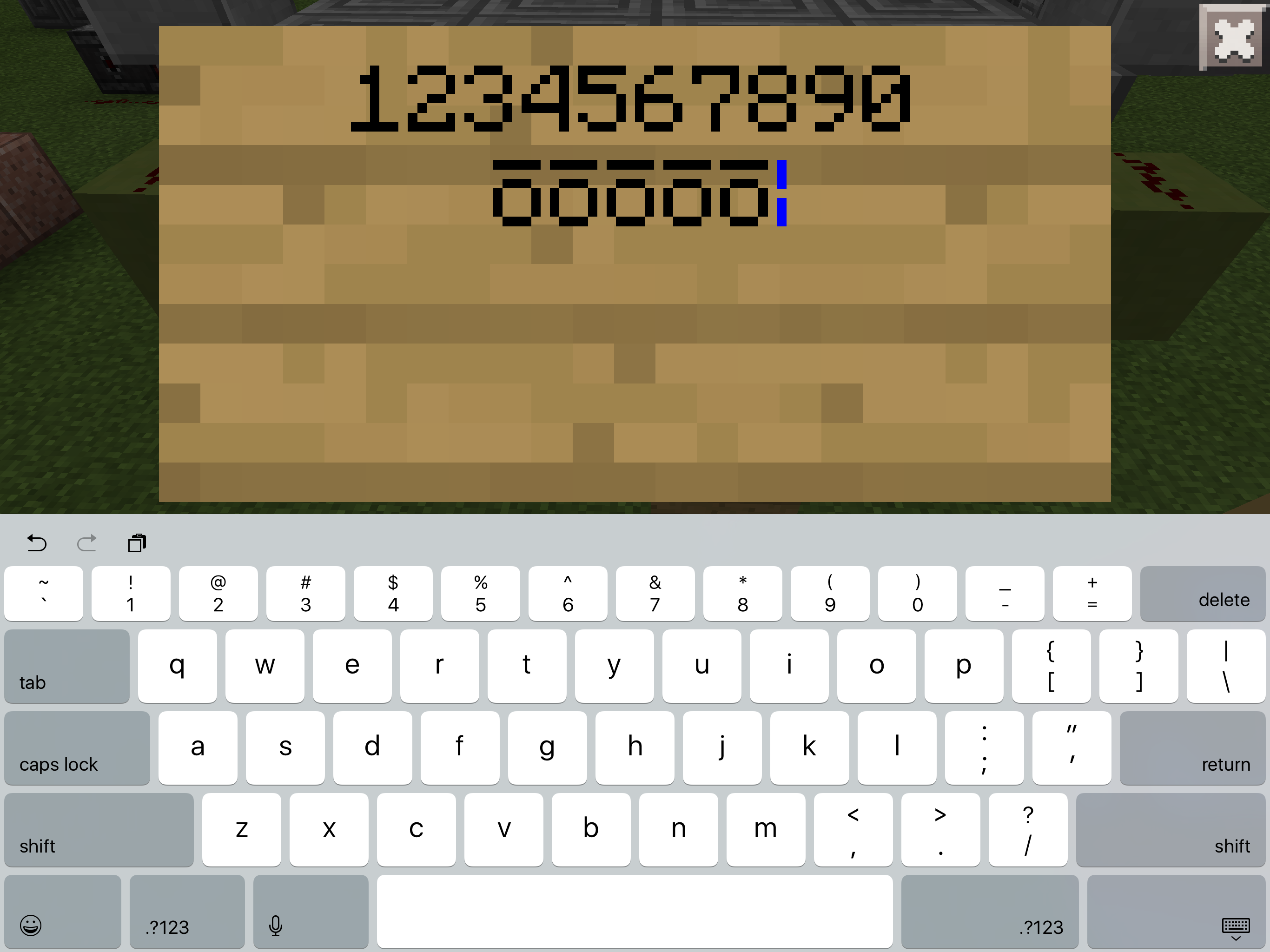
First attachment is an image of a sign showing the character entered from the bug.
Second attachment is a video showing it occurring within the command screen.
Other information:
This issue also occurs when using a bluetooth keyboard, the iPad Magic Keyboard, and the Folio Touch Keyboard, on an iOS/iPadOS device as indicated by MCPE-29364
1.20 Update Changes:
Pressing tab after the / in the beginning of a command causes a “?” to appear after the ō symbol. Pressing tab again causes another to appear, however none more follow if tab is continuously pressed. If you type any other character after the ō the ? will remain.
Linked Issues


- Unresolved
 Amphy2k
- 23
- 8
- Confirmed
- 55507
- iOS
- iPadOS 13/iOS 13
- accessibility ios keyboard textbox
1.17.11 Hotfix - 1.20.31 Hotfix
1.17.11 Hotfix 1.14.20 Hotfix 1.13.3 1.13.2 1.13.1 1.14.1 Hotfix 0.15.8 0.15.90.7 0.16.0 0.16.1 0.16.2 1.0.2 1.2.14.3 1.2.13.54 1.2.15.01 1.2.16.3 1.4.0.5 1.4.2.0 1.5.0.14 1.6.0 1.6.2.0 1.6.1 1.7.0 1.8.0 1.12.1 1.12.0 1.13.0 1.14.0 1.14.30 Hotfix 1.14.60 Hotfix 1.16.0 1.17.40 1.17.41 Hotfix 1.18.0 1.18.2 Hotfix 1.19.51 1.19.60 1.19.73 1.19.83 Hotfix 1.20.1 Hotfix 1.20.10 1.20.30.24 Preview 1.20.31 Hotfix
Created Issue:
Tab Key Doesn't Tab Creates Weird Symbol Instead
Pressing the tab key creates ō instead of "Tabbing" the text.
How to do.
1: Place sign
2: TabThe attached picture is what it looks like when you press tab. There are numbers above it to show that everything else works. (I used numbers to signify that all other keys worked, I was lazy and didn't wanna do every key. After finding this I did check to see if every key worked and it did, so to my knowledge only the tab key is broken.)
Also please not that this bug IS NOT for 0;15.90.7 it is for 0.15.8. 0.15.8 dose not exist in the bug tracker yet so I am using the assumed name of the last version, 0.15.90.7 as a placeholder until 0.15.8 is added. Sorry.
Attachments1
Pressing the tab key creates ō instead of "Tabbing" the text.
How to do.
1: Place sign
2: TabThe attached picture is what it looks like when you press tab. There are numbers above it to show that everything else works. (I used numbers to signify that all other keys worked, I was lazy and didn't wanna do every key. After finding this I did check to see if every key worked and it did, so to my knowledge only the tab key is broken.)
Also please not that this bug IS NOT for 0;15.90.7 it is for 0.15.8. 0.15.8 dose not exist in the bug tracker yet so I am using the assumed name of the last version, 0.15.90.7 as a placeholder until 0.15.8 is added. Sorry.
Pressing the tab key creates ō instead of "Tabbing" the text.
How to do.
1: Place sign
2: TabThe attached picture is what it looks like when you press tab. There are numbers above it to show that everything else works. (I used numbers to signify that all other keys worked, I was lazy and didn't wanna do every key. After finding this I did check to see if every key worked and it did, so to my knowledge only the tab key is broken.)
Edit: 0.15.9 still happens. Also found that if you use the actual ō not the tab key it creates the tiny text, thats not a bug but when you then use the tab key it creates a very glitchy and broken character, so this is like two glitches in one now.
Pressing the tab key creates ō instead of "Tabbing" the text.
How to do.
1: Place sign
2: TabThe attached picture is what it looks like when you press tab. There are numbers above it to show that everything else works. (I used numbers to signify that all other keys worked, I was lazy and didn't wanna do every key. After finding this I did check to see if every key worked and it did, so to my knowledge only the tab key is broken.)
Edit: 0.15.9 still happens. Also found that if you use the actual ō not the tab key it creates the tiny text, thats not a bug but when you then use the tab key it creates a very glitchy and broken character, so this is like two glitches in one now.
Also yet again the bug tracker is broken and wont let me add 0.15.9 so I just put the closest to it until its added then I will fix it.
Pressing the tab key creates ō instead of "Tabbing" the text.
How to do.
1: Place sign
2: TabThe attached picture is what it looks like when you press tab. There are numbers above it to show that everything else works. (I used numbers to signify that all other keys worked, I was lazy and didn't wanna do every key. After finding this I did check to see if every key worked and it did, so to my knowledge only the tab key is broken.)
Edit: 0.15.9 still happens. Also found that if you use the actual ō not the tab key it creates the tiny text, thats not a bug but when you then use the tab key it creates a very glitchy and broken character, so this is like two glitches in one now.
Also yet again the bug tracker is broken and wont let me add 0.15.9 so I just put the closest to it until its added then I will fix it.
Edit: 0.16.0 and it still exists
by the looks of it too nobody has seen this, understandable cuz its such an insignificant bug that only effects 0.3% of all MCPE players...
![[Bot] Arisa](../../../data/assets/gravatar/mustek2.png)
Pressing the tab key creates ō instead of "Tabbing" the text.
How to do.
1: Place sign
2: TabThe attached picture is what it looks like when you press tab. There are numbers above it to show that everything else works. (I used numbers to signify that all other keys worked, I was lazy and didn't wanna do every key. After finding this I did check to see if every key worked and it did, so to my knowledge only the tab key is broken.)
Edit: 0.15.9 still happens. Also found that if you use the actual ō not the tab key it creates the tiny text, thats not a bug but when you then use the tab key it creates a very glitchy and broken character, so this is like two glitches in one now.
Also yet again the bug tracker is broken and wont let me add 0.15.9 so I just put the closest to it until its added then I will fix it.
Edit: 0.16.0 and it still exists
0.16.1 and still happens
Pressing the tab key creates ō instead of "Tabbing" the text.
How to do.
1: Place sign
2: TabThe attached picture is what it looks like when you press tab. There are numbers above it to show that everything else works. (I used numbers to signify that all other keys worked, I was lazy and didn't wanna do every key. After finding this I did check to see if every key worked and it did, so to my knowledge only the tab key is broken.)
Edit: 0.15.9 still happens. Also found that if you use the actual ō not the tab key it creates the tiny text, thats not a bug but when you then use the tab key it creates a very glitchy and broken character, so this is like two glitches in one now.
Also yet again the bug tracker is broken and wont let me add 0.15.9 so I just put the closest to it until its added then I will fix it.
Edit: 0.16.0 and it still exists
0.16.1 and still happens
0.16.2 BANG BANG BANG... Still exists xD I shall never stop updating this page till the day comes where the integrate full iPad Pro support! I am the iPad Pro Powerranger! (Sorry, that was incredibly cringy, im just messing around at this point haha, I know this will likely never be fixed :3 )
![[Mojang] Mega_Spud (Jay Wells)](../../../data/avatars/users/92696.png)

![[Mojang] Adrian Östergård](../../../data/assets/gravatar/nighter.jpeg)
is duplicated by
is duplicated by
Pressing the tab key creates ō insteadof "Tabbing" the text.How to do.
1: Place sign
2: TabThe attached picture is what it looks like when you press tab. There are numbers above it to show that everything else works. (I used numbers to signify that all other keys worked, I was lazy and didn't wanna do every key. After finding this I did check to see if every key worked and it did, so to my knowledge only the tab key is broken.)
Edit: 0.15.9 still happens. Also found that if you use the actual ō not the tab key it creates the tiny text, thats not a bug but when you then use the tab key it creates a very glitchy and broken character, so this is like two glitches in one now.
Also yet again the bug tracker is broken and wont let me add 0.15.9 so I just put the closest to it until its added then I will fix it.
Edit: 0.16.0 and it still exists
0.16.1 and still happens
0.16.2 BANG BANG BANG... Still exists xD I shall never stop updating this page till the day comes where the integrate full iPad Pro support! I am the iPad Pro Powerranger! (Sorry, that was incredibly cringy, im just messing around at this point haha, I know this will likely never be fixed :3 )
This was recently updated to make it more up to
Pressing the tab key creates ō instead of "Tabbing" the text.
How to do.
1: Place sign
2: TabThe attached picture is what it looks like when you press tab. There are numbers above it to show that everything else works. (I used numbers to signify that all other keys worked, I was lazy and didn't wanna do every key. After finding this I did check to see if every key worked and it did, so to my knowledge only the tab key is broken.)
Edit: 0.15.9 still happens. Also found that if you use the actual ō not the tab key it creates the tiny text, thats not a bug but when you then use the tab key it creates a very glitchy and broken character, so this is like two glitches in one now.
Also yet again the bug tracker is broken and wont let me add 0.15.9 so I just put the closest to it until its added then I will fix it.
Edit: 0.16.0 and it still exists
0.16.1 and still happens
0.16.2 BANG BANG BANG... Still exists xD I shall never stop updating this page till the day comes where the integrate full iPad Pro support! I am the iPad Pro Powerranger! (Sorry, that was incredibly cringy, im just messing around at this point haha, I know this will likely never be fixed :3 )
TabKeyDoesn't Tab Creates Weird Symbol InsteadTab key creates ō character on iPad
This was recently updated to make it more up to
Pressing the tab key creates ō instead of "Tabbing" the text.
How to do.
1: Place sign
2: TabThe attached picture is what it looks like when you press tab. There are numbers above it to show that everything else works. (I used numbers to signify that all other keys worked, I was lazy and didn't wanna do every key. After finding this I did check to see if every key worked and it did, so to my knowledge only the tab key is broken.)
Edit: 0.15.9 still happens. Also found that if you use the actual ō not the tab key it creates the tiny text, thats not a bug but when you then use the tab key it creates a very glitchy and broken character, so this is like two glitches in one now.
Also yet again the bug tracker is broken and wont let me add 0.15.9 so I just put the closest to it until its added then I will fix it.
Edit: 0.16.0 and it still exists
0.16.1 and stillhappens0.16.2 BANG BANG BANG... Still exists xD I shall never stop updating this page till the day comes where the integrate full iPad Pro support! I am the iPad Pro Powerranger! (Sorry, that was incredibly cringy, im just messing around at this point haha, I know this will likely never be fixed :3 )
This was recently updated to make it more up-to-date with more detailed and not-so-rude information.
TLDR; Pressing the tab key creates ō instead it's intended action on modern iPads.
What happens: When using the tab key on iPad Pros it creates the ō character instead. This can be done on all places where text can be inputted. This includes Signs, chat, Command Blocks, naming a world, searching in the store, writing in Books, etc..
How to do: Open any of the above mentioned areas where text can be entered. Press the tab key.
Attachment explanations: First image is a sign where the bug occurs. The second attachment is a video showing it occurring within the command screen. Please note that these two attachments are of far different age though the same thing happens today when using the tab key on a sign.
Tab key creates ō character on iPads
This was recently updated to make it more up-to-date
with moredetailed andnot-so-rude information.TLDR; Pressing the tab key creates ō instead it's intended action on modern iPads.
What happens: When using the tab key on iPad Pros it creates the ō character instead. This can be done on all places where text can be inputted. This includes Signs, chat, Command Blocks, naming a world, searching in the store, writing in Books, etc..
How to do: Open any of the above mentioned areas where text can be entered. Press the tab key.
Attachment explanations: First image is a sign where the bug occurs. The second attachment is a video showing it occurring within the command screen. Please note that these two attachments are of far different age though the same thing happens today when using the tab key on a sign.
This bug report was recently updated after many months to make it more up-to-date, detailed, and simpler. Sorry for the confusion.
TLDR; Pressing the tab key creates ō instead it's intended action on modern iPads.
What happens: When using the tab key on iPad Pros it creates the ō character instead. This can be done on all places where text can be inputted. This includes Signs, chat, Command Blocks, naming a world, searching in the store, writing in Books, etc..
How to do: Open any of the above mentioned areas where text can be entered. Press the tab key.
Attachment explanations: First image is a sign where the bug occurs. The second attachment is a video showing it occurring within the command screen. Please note that these two attachments are of far different age though the same thing happens today when using the tab key on a sign.
This bug report was recently updated after many months to make it more up-to-date, detailed, and simpler. Sorry for the confusion.
TLDR; Pressing the tab key creates ō instead it's intended action on modern iPads.
What happens: When using the tab key on iPad Pros it creates the ō character instead. This can be done on all places where text can be inputted. This includes Signs, chat, Command Blocks, naming a world, searching in the store, writing in Books, etc..
How to do: Open any of the above mentioned areas where text can be entered. Press the tab key.
Attachment explanations: First image is a sign where the bug occurs. The second attachment is a video showing it occurring within the command screen. Please note that these two attachments are of far different age though the same thing happens today when using the tab key on a sign.
Other information: empty
This bug report was recently updated after many months to make it more up-to-date, detailed, and simpler. Sorry for the confusion.
TLDR; Pressing the tab key creates ō instead it's intended action on modern iPads.
What happens: When using the tab key on iPad Pros it creates the ō character instead. This can be done on all places where text can be inputted. This includes Signs, chat, Command Blocks, naming a world, searching in the store, writing in Books, etc..
How to do: Open any of the above mentioned areas where text can be entered. Press the tab key.
Attachment explanations: First image is a sign where the bug occurs. The second attachment is a video showing it occurring within the command screen. Please note that these two attachments are of far different age though the same thing happens today when using the tab key on a sign.
Other information: empty
This bug report was recently updated after many months to make it more up-to-date, detailed, and simpler. Sorry for the confusion.
TLDR; Pressing the tab key creates ō instead it's intended action on modern iPads.
What happens: When using the tab key on iPad Pros it creates the ō character instead. This can be done on all places where text can be inputted. This includes Signs, chat, Command Blocks, naming a world, searching in the store, writing in Books, etc..
How to do: Open any of the above mentioned areas where text can be entered. Press the tab key.
Attachment explanations: First image is a sign where the bug occurs. The second attachment is a video showing it occurring within the command screen. Please note that these two attachments are of far different age though the same thing happens today when using the tab key on a sign.
Other information: This issue also occurs when using a bluetooth keyboard as indicated by MCPE-29364. It may be an iOS exclusive bug as shown by some commenters who have attempted this on other non iOS devices.
This bug report was recently updated after many months to make it more up-to-date, detailed, and simpler. Sorry for the confusion.
TLDR; Pressing the tab key creates ō instead it's intended action on modern iPads.
What happens: When using the tab key on iPad Pros it creates the ō character instead. This can be done on all places where text can be inputted. This includes Signs, chat, Command Blocks, naming a world, searching in the store, writing in Books, etc..
How to do: Open any of the above mentioned areas where text can be entered. Press the tab key.
Attachment explanations: First image is a sign where the bug occurs. The second attachment is a video showing it occurring within the command screen. Please note that these two attachments are of far different age though the same thing happens today when using the tab key on a sign.
Other information: This issue also occurs when using a bluetooth keyboard as indicated by
MCPE-29364. It may be an iOS exclusive bug asshownby some commenters who have attempted this on other noniOS devices.This bug report was recently updated after many months to make it more up-to-date, detailed, and simpler. Sorry for the confusion.
TLDR; Pressing the tab key creates ō instead it's intended action on modern iPads.
What happens: When using the tab key on iPad Pros it creates the ō character instead. This can be done on all places where text can be inputted. This includes Signs, chat, Command Blocks, naming a world, searching in the store, writing in Books, etc..
How to do: Open any of the above mentioned areas where text can be entered. Press the tab key.
Attachment explanations: First image is a sign where the bug occurs. The second attachment is a video showing it occurring within the command screen. Please note that these two attachments are of far different age though the same thing happens today when using the tab key on a sign.
Other information: This issue also occurs when using a bluetooth keyboard as indicated by
MCPE-29364. It may be an iOS exclusive bug as explained by some commenters below who have attempted this on other non-iOS devices.
This bug report was recently updated after many months to make it more up-to-date, detailed, and simpler. Sorry for the confusion.
TLDR; Pressing the tab key creates ō instead it's intended action on modern i
Pads.What happens: When using the tab key on iPad Pros it creates the ō character instead. This can be done on all places where text can be inputted. This includes Signs, chat, Command Blocks, naming a world, searching in the store, writing in Books, etc..
How to do: Open any of the above mentioned areas where text can be entered. Press the tab key.
Attachment explanations: First image is a sign where the bug occurs. The second attachment is a video showing it occurring within the command screen. Please note that these two attachments are of far different age though the same thing happens today when using the tab key on a sign.
Other information: This issue also occurs when using a bluetooth keyboard as indicated by
MCPE-29364. It may be an iOS exclusive bug as explained by some commenters below who have attempted this on other non-iOS devices.This bug report was recently updated after many months to make it more up-to-date, detailed, and simpler. Sorry for the confusion.
TLDR; Pressing the tab key creates ō instead it's intended action on modern iOS devices.
What happens: When using the tab key on iPad Pros it creates the ō character instead. This can be done on all places where text can be inputted. This includes Signs, chat, Command Blocks, naming a world, searching in the store, writing in Books, etc..
How to do: Open any of the above mentioned areas where text can be entered. Press the tab key.
Attachment explanations: First image is a sign where the bug occurs. The second attachment is a video showing it occurring within the command screen. Please note that these two attachments are of far different age though the same thing happens today when using the tab key on a sign.
Other information: This issue also occurs when using a bluetooth keyboard as indicated by
MCPE-29364. It may be an iOS exclusive bug as explained by some commenters below who have attempted this on other non-iOS devices.
This bug report was recently updated after many months to make it more up-to-date, detailed, and simpler. Sorry for the confusion.
TLDR; Pressing the tab key
creates ōinstead it's intendedaction on modern iOS devices.What happens: When using the tab key on
iPad Pros it creates the ō character instead. This can be done on all places where text can be inputted. This includes Signs, chat, Command Blocks, naming a world, searching in the store, writing in Books, etc..How to do: Open any of the above mentioned areas where text can be entered. Press the tab key.
Attachment explanations: First image is a sign where the bug occurs. The second attachment is a video showing it occurring within the command screen. Please note that these two attachments are of far different age though the same thing happens today when using the tab key on a sign.
Other information: This issue also occurs when using a bluetooth keyboard as indicated by
MCPE-29364. It may be an iOS exclusive bug as explained by some commenters below who have attempted this on other non-iOS devices.This bug report was recently updated after many months to make it more up-to-date, detailed, and simpler. Sorry for the confusion.
TLDR; Pressing the tab key types "ō" instead it's intended function on modern iOS devices.
What happens: When using the tab key on on a modern iOS device it creates "ō" instead instead of it's intended function. This can be done on all places where text can be inputted. This includes Signs, chat, Command Blocks, naming a world, searching in the store, writing in Books, etc..
How to do: Open any of the above mentioned areas where text can be entered. Press the tab key.
Attachment explanations: First image is a sign where the bug occurs. The second attachment is a video showing it occurring within the command screen. Please note that these two attachments are of far different age though the same thing happens today when using the tab key on a sign.
Other information: This issue also occurs when using a bluetooth keyboard on an iOS device as indicated by
MCPE-29364. It may be an iOS exclusive bug as explained by some commenters below who have attempted this on other non-iOS devices.
Tab keycreates ō character on iPadsTab key types "ō" on iOS devices
This bug report was recently updated after many months to make it more up-to-date, detailed, and simpler. Sorry for
theconfusion.TLDR; Pressing the tab key types "ō" instead it's intended function on modern iOS devices.
What happens: When using the tab key on on a modern iOS device it
creates "ō" instead instead of it's intended function. This can be done on all places where text can be inputted. This includes Signs, chat, Command Blocks, naming a world, searching in the store, writing in Books, etc..How to do: Open any of the above mentioned areas where text can be entered. Press the tab key.
Attachment explanations: First image is a sign where the bug occurs. The second attachment is a video showing it occurring within the command screen. Please note that these two attachments are of far different age though the same thing happens today when using the tab key on a sign.
Other information: This issue also occurs when using a bluetooth keyboard on an iOS device as indicated by
MCPE-29364. It may be an iOS exclusive bug as explained by some commenters below who have attempted this on other non-iOS devices.This bug report was recently updated after many months to make it more up-to-date, detailed, and simpler. Sorry for any confusion.
TLDR; Pressing the tab key types "ō" instead it's intended function on modern iOS devices.
What happens: When using the tab key on on a modern iOS device it types "ō" instead instead of it's intended function. This can be done on all places where text can be inputted. This includes Signs, chat, Command Blocks, naming a world, searching in the store, writing in Books, etc..
How to do: Open any of the above mentioned areas where text can be entered. Press the tab key.
Attachment explanations: First image is a sign where the bug occurs. The second attachment is a video showing it occurring within the command screen. Please note that these two attachments are of far different age though the same thing happens today when using the tab key on a sign.
Other information: This issue also occurs when using a bluetooth keyboard on an iOS device as indicated by
MCPE-29364. It may be an iOS exclusive bug as explained by some commenters below who have attempted this on other non-iOS devices.
This bug report was recently updated after many months to make it more up-to-date, detailed, and simpler. Sorry for any confusion.
TLDR; Pressing the tab key types "ō" instead it's intended function on modern iOS devices.
What happens: When using the tab key on on a modern iOS device it types "ō" instead instead of it's intended function. This can be done on all places where text can be inputted. This includes Signs, chat, Command Blocks, naming a world, searching in the store, writing in Books, etc..
How to do: Open any of the above mentioned areas where text can be entered. Press the tab key.
Attachment explanations: First image is a sign where the bug occurs. The second attachment is a video showing it occurring within the command screen. Please note that these two attachments are of far different age though the same thing happens today when using the tab key on a sign.
Other information: This issue also occurs when using a bluetooth keyboard on an iOS device as indicated by
MCPE-29364. It may be an iOS exclusive bug as explained by some commenters below who have attempted this on other non-iOS devices unsuccessfully.
This bug report was recently updated after many months to make it more up-to-date, detailed, and simpler. Sorry for any confusion.
TLDR; Pressing the tab key types "ō" instead it's intended function on modern iOS devices.
What happens: When using the tab key on on a modern iOS device it types "ō" instead instead of it's intended function. This can be done on all places where text can be input
ted. This includes Signs, chat, Command Blocks, naming a world, searching in the store, writing in Books, etc..How to do: Open any of the above mentioned areas where text can be entered. Press the tab key.
Attachment explanations: First image is a sign
wherethe bugoccurs. The second attachment is a video showing it occurring within the command screen. Please note that these two attachments are of far different age though the same thing happens today when using the tab key on a sign.Other information: This issue also occurs when using a bluetooth keyboard on an iOS device as indicated by
MCPE-29364. It may be an iOS exclusive bug as explained by some commenters below who have attempted this on other non-iOS devices unsuccessfully.This bug report was recently updated after many months of inactivity to make it more up-to-date, detailed, and simpler. Sorry for any confusion.
TLDR; Pressing the tab key types "ō" instead it's intended function on modern iOS devices.
What happens: When using the tab key on on a modern iOS device it types "ō" instead instead of it's intended function. This can be done on all places where text can be input. This includes Signs, chat, Command Blocks, naming a world, searching in the store, writing in Books, etc..
How to do: Open any of the above mentioned areas where text can be entered. Press the tab key.
Attachment explanations: First image is a sign showing the character entered from the bug. The second attachment is a video showing it occurring within the command screen. Please note that these two attachments are of far different age though the same thing happens today when using the tab key on a sign.
Other information: This issue also occurs when using a bluetooth keyboard on an iOS device as indicated by
MCPE-29364. It may be an iOS exclusive bug as explained by some commenters below who have attempted this on other non-iOS devices unsuccessfully.
This bug report was recently updated after many months of inactivity to make it more up-to-date, detailed, and simpler. Sorry for any confusion.
TLDR; Pressing the tab key types "ō" instead it's intended function on modern iOS devices.
What happens: When using the tab key on on a modern iOS device it types "ō" instead instead of it's intended function. This can be done on all places where text can be input. This includes Signs, chat, Command Blocks, naming a world, searching in the store, writing in Books, etc..
How to do: Open any of the above mentioned areas where text can be entered. Press the tab key.
Attachment explanations: First image is a sign showing the character entered from the bug. The second attachment is a video showing it occurring within the command screen. Please note that these two attachments are of far different age though the same thing happens today when using the tab key on a sign.
Other information: This issue also occurs when using a bluetooth keyboard on an iOS device as indicated by
MCPE-29364. It may be an iOS exclusive bug as explained by some commenters below who have attempted this on other non-iOS devices unsuccessfully.This bug report was
recentlyupdated after many months of inactivity to make it more up-to-date, detailed, and simpler. Sorry for any confusion.TLDR; Pressing the tab key types "ō" instead it's intended function on modern iOS devices.
What happens: When using the tab key on on a modern iOS device it types "ō" instead instead of it's intended function. This can be done on all places where text can be input. This includes Signs, chat, Command Blocks, naming a world, searching in the store, writing in Books, etc..
How to do: Open any of the above mentioned areas where text can be entered. Press the tab key.
Attachment explanations: First image is a sign showing the character entered from the bug. The second attachment is a video showing it occurring within the command screen. Please note that these two attachments are of far different age though the same thing happens today when using the tab key on a sign.
Other information: This issue also occurs when using a bluetooth keyboard on an iOS device as indicated by
. It may be an iOS exclusive bug as explained by some commenters below who have attempted this on other non-iOS devices unsuccessfully.MCPE-29364
![[Mojang] MissMarzenia (Aleksandra Zajac)](../../../data/assets/gravatar/missmarzenia.png)
After so so so long of the tab key entering ō, (see previous issue,) that has been fixed. Sadly that dosen’t mean this can be closed as the issue was only half fixed. The entire reason why I posted this bug was because the auto-complete tab feature dosen’t exist in commands, and since we now have commands almost on par with Java, this feature is a extreme must-have.
What happens: Pressing tab in the the command screen dosen’t fill in commands as described how it should work [here|https://www.dummies.com/programming/programming-games/minecraft/autocompleting-commands-on-the-minecraft-chat-menu/.|https://www.dummies.com/programming/programming-games/minecraft/autocompleting-commands-on-the-minecraft-chat-menu/],]
How to do: Press tab after entering some part of a command, for example, /gamemode s.
Explanation: When typing a command it should autocomplete it, in the example above it should go from /gamemode s to /gamemode survival automatically. (Though gamemode isn’t the best example since typing s in Bedrock still changes it to survival anyways, but if that feature is ever stripped away like in Java this example would be an excellent one.)
Previous Issue (pre 1.12.1)
Title: Tab key types "ō" on iOS devices
This bug report was
recentlyupdated after many months of inactivity to make it more up-to-date, detailed, and simpler. Sorry for any confusion.TLDR; Pressing the tab key types "ō" instead it's intended function on modern iOS devices.
What happens: When using the tab key on on a modern iOS device it types "ō" instead instead of it's intended function. This can be done on all places where text can be input. This includes Signs, chat, Command Blocks, naming a world, searching in the store, writing in Books, etc..
How to do: Open any of the above mentioned areas where text can be entered. Press the tab key.
Attachment explanations: First image is a sign showing the character entered from the bug. The second attachment is a video showing it occurring within the command screen. Please note that these two attachments are of far different age though the same thing happens today when using the tab key on a sign.
Other information: This issue also occurs when using a bluetooth keyboard on an iOS device as indicated by
. It may be an iOS exclusive bug as explained by some commenters below who have attempted this on other non-iOS devices unsuccessfully.MCPE-29364
Tab keytypes "ō" on iOS devicesTab key dosen’t have auto-complete functionality
After so so so long of the tab key entering ō, (see previous issue,) that has been fixed. Sadly that dosen’t mean this can be closed as the issue was only half fixed. The entire reason why I posted this bug was because the auto-complete tab feature dosen’t exist in commands, and since we now have commands almost on par with Java, this feature is a extreme must-have.
What happens: Pressing tab in the the command screen dosen’t fill in commands as described how it should work [here|https://www.dummies.com/programming/programming-games/minecraft/autocompleting-commands-on-the-minecraft-chat-menu/.|https://www.dummies.com/programming/programming-games/minecraft/autocompleting-commands-on-the-minecraft-chat-menu/],]
How to do: Press tab after entering some part of a command, for example, /gamemode s.
Explanation: When typing a command it should autocomplete it, in the example above it should go from /gamemode s to /gamemode survival automatically. (Though gamemode isn’t the best example since typing s in Bedrock still changes it to survival anyways, but if that feature is ever stripped away like in Java this example would be an excellent one.)
Previous Issue (pre 1.12.1)
Title: Tab key types "ō" on iOS devices
This bug report was
recentlyupdated after many months of inactivity to make it more up-to-date, detailed, and simpler. Sorry for any confusion.TLDR; Pressing the tab key types "ō" instead it's intended function on modern iOS devices.
What happens: When using the tab key on on a modern iOS device it types "ō" instead instead of it's intended function. This can be done on all places where text can be input. This includes Signs, chat, Command Blocks, naming a world, searching in the store, writing in Books, etc..
How to do: Open any of the above mentioned areas where text can be entered. Press the tab key.
Attachment explanations: First image is a sign showing the character entered from the bug. The second attachment is a video showing it occurring within the command screen. Please note that these two attachments are of far different age though the same thing happens today when using the tab key on a sign.
Other information: This issue also occurs when using a bluetooth keyboard on an iOS device as indicated by
. It may be an iOS exclusive bug as explained by some commenters below who have attempted this on other non-iOS devices unsuccessfully.MCPE-29364Today, (September 23rd, 2019,) is the 1 year anniversary of the last response I got regarding this bug! So to commemorate such a tremendous occasion I have updated this bug report. For the first time in 3 years there has been good news too! The entire report has been updated to now reflect the current state of this bug, the old report still remains at the bottom though for anyone interested in the history of this brutal issue I've tried so hard to get fixed.
After so so so long of the tab key entering ō, (see previous issue,) that has been fixed. Sadly that dosen’t mean this can be closed as the issue was only half fixed. The entire reason why I posted this bug was because the auto-complete tab feature dosen’t exist in commands, and since we now have commands almost on par with Java, this feature is a extreme must-have.
What happens: Pressing tab in the the command screen dosen’t fill in commands as described how it should work [here|https://www.dummies.com/programming/programming-games/minecraft/autocompleting-commands-on-the-minecraft-chat-menu/.|https://www.dummies.com/programming/programming-games/minecraft/autocompleting-commands-on-the-minecraft-chat-menu/],]
How to do: Press tab after entering some part of a command, for example, /gamemode s.
Explanation: When typing a command it should autocomplete it, in the example above it should go from /gamemode s to /gamemode survival automatically. (Though gamemode isn’t the best example since typing s in Bedrock still changes it to survival anyways, but if that feature is ever stripped away like in Java this example would be an excellent one.)
Previous Issue (pre 1.12.1)
Title: Tab key types "ō" on iOS devices
This bug report was
recentlyupdated after many months of inactivity to make it more up-to-date, detailed, and simpler. Sorry for any confusion.TLDR; Pressing the tab key types "ō" instead it's intended function on modern iOS devices.
What happens: When using the tab key on on a modern iOS device it types "ō" instead instead of it's intended function. This can be done on all places where text can be input. This includes Signs, chat, Command Blocks, naming a world, searching in the store, writing in Books, etc..
How to do: Open any of the above mentioned areas where text can be entered. Press the tab key.
Attachment explanations: First image is a sign showing the character entered from the bug. The second attachment is a video showing it occurring within the command screen. Please note that these two attachments are of far different age though the same thing happens today when using the tab key on a sign.
Other information: This issue also occurs when using a bluetooth keyboard on an iOS device as indicated by
. It may be an iOS exclusive bug as explained by some commenters below who have attempted this on other non-iOS devices unsuccessfully.MCPE-29364
Tab key dosen’t have auto-complete functionality on iOS/iPadOS
Today, (September 23rd, 2019,) is the 1 year anniversary of the last response I got regarding this bug! So to commemorate such a tremendous occasion I have updated this bug report. For the first time in 3 years there has been good news too! The entire report has been updated to now reflect the current state of this bug, the old report still remains at the bottom though for anyone interested in the history of this brutal issue I've tried so hard to get fixed.
After so so so long of the tab key entering ō, (see previous issue,) that has been fixed. Sadly that dosen’t mean this can be closed as the issue was only half fixed. The entire reason why I posted this bug was because the auto-complete tab feature dosen’t exist in commands, and since we now have commands almost on par with Java, this feature is a extreme must-have.
What happens: Pressing tab in the the command screen dosen’t fill in commands as described how it should work [here|https://www.dummies.com/programming/programming-games/minecraft/autocompleting-commands-on-the-minecraft-chat-menu/.|https://www.dummies.com/programming/programming-games/minecraft/autocompleting-commands-on-the-minecraft-chat-menu/],]
How to do: Press tab after entering some part of a command, for example, /gamemode s.
Explanation: When typing a command it should autocomplete it, in the example above it should go from /gamemode s to /gamemode survival automatically. (Though gamemode isn’t the best example since typing s in Bedrock still changes it to survival anyways, but if that feature is ever stripped away like in Java this example would be an excellent one.)
Previous Issue (pre 1.12.1)
Title: Tab key types "ō" on iOS devices
This bug report was
recentlyupdated after many months of inactivity to make it more up-to-date, detailed, and simpler. Sorry for any confusion.TLDR; Pressing the tab key types "ō" instead it's intended function on modern iOS devices.
What happens: When using the tab key on on a modern iOS device it types "ō" instead instead of it's intended function. This can be done on all places where text can be input. This includes Signs, chat, Command Blocks, naming a world, searching in the store, writing in Books, etc..
How to do: Open any of the above mentioned areas where text can be entered. Press the tab key.
Attachment explanations: First image is a sign showing the character entered from the bug. The second attachment is a video showing it occurring within the command screen. Please note that these two attachments are of far different age though the same thing happens today when using the tab key on a sign.
Other information: This issue also occurs when using a bluetooth keyboard on an iOS device as indicated by
. It may be an iOS exclusive bug as explained by some commenters below who have attempted this on other non-iOS devices unsuccessfully.MCPE-29364This bug report was
recentlyupdated after many months of inactivity to make it more up-to-date, detailed, and simpler. Sorry for any confusion.TLDR; Pressing the tab key types "ō" instead it's intended function on modern iOS devices.
What happens: When using the tab key on on a modern iOS device it types "ō" instead instead of it's intended function. This can be done on all places where text can be input. This includes Signs, chat, Command Blocks, naming a world, searching in the store, writing in Books, etc..
How to do: Open any of the above mentioned areas where text can be entered. Press the tab key.
Attachment explanations: First image is a sign showing the character entered from the bug. The second attachment is a video showing it occurring within the command screen. Please note that these two attachments are of far different age though the same thing happens today when using the tab key on a sign.
Other information: This issue also occurs when using a bluetooth keyboard on an iOS device as indicated by
. It may be an iOS exclusive bug as explained by some commenters below who have attempted this on other non-iOS devices unsuccessfully.MCPE-29364Well 1.13.0 released and sadly my previous update where I said it was fixed... is gone. It’s back again! So I removed all additional text and brought it back to what it was before. GG. Fixed a bug then broke it again 1 update later.
Tab keydosen’t have auto-complete functionality on iOS/iPadOSTab key types "ō" on iOS devices
This bug report was
recentlyupdated after many months of inactivity to make it more up-to-date, detailed, and simpler. Sorry for any confusion.TLDR; Pressing the tab key types "ō" instead it's intended function on modern iOS devices.
What happens:
When using the tab key onon a modern iOS device it types"ō"insteadinsteadof it's intended function. This can be done on all places where text can be input.This includes Signs, chat, Command Blocks, naming a world, searching in the store, writing in Books, etc..How to do: Open any of the above mentioned areas where text can be entered. Press the tab key.
Attachment explanations: First image is a sign showing the character entered from the bug. The second attachment is a video showing it occurring within the command screen. Please note that these two attachments are of far different age though the same thing happens today when using the tab key on a sign.
Other information:
This issue also occurs when using a bluetooth keyboard on an iOS device as indicated by. ItMCPE-29364maybe an iOS exclusive bug as explained by some commenters below who have attempted this on other non-iOS devices unsuccessfully.Well 1.13.0 released and sadly my previous update where I said it was fixed... is gone. It’s back again! So I removed all additional text and brought it back to what it was before. GG. Fixed a bug then broke it again 1 update later.
TLDR; Pressing the tab key types “ō” instead it's intended tab key function.
What happens:
When using the tab key on an iOS device from any source, it types “ō” instead of it's intended function. This can be done on all places where text can be input. Most notably in chat when attempting to type commands via auto-complete.How to do:
1. Open any textbox.
2. Press the tab key.
3. View the “ō” symbol.Attachment Explanations:
First attachment is an image of a sign showing the character entered from the bug.
Second attachment is a video showing it occurring within the command screen.Other information:
This issue also occurs when using a bluetooth keyboard on an iOS device as indicated by. It is likely to be an iOS exclusive bug as explained by some commenters below who have attempted this on other non-iOS devices unsuccessfully.MCPE-29364

![[Bot] Arisa](../../../data/avatars/users/43007.png)
TLDR; Pressing the tab key types “ō” instead it's intended tab key function.
What happens:
When using the tab key on an iOS device from any source, it types “ō” instead of it's intended function. This can be done on all places where text can be input. Most notably in chat when attempting to type commands via auto-complete.How to do:
1. Open any textbox.
2. Press the tab key.
3. View the “ō” symbol.Attachment Explanations:
First attachment is an image of a sign showing the character entered from the bug.
Second attachment is a video showing it occurring within the command screen.Other information:
This issue also occurs when using a bluetooth keyboard or the new iPad Pro Magic Keyboard on an iOS device as indicated by. It is likely to be an iOS exclusive bug as explained by some commenters below who have attempted this on other non-iOS devices unsuccessfully.MCPE-29364
TLDR; Pressing the tab key types “ō” instead it's intended tab key function.
What happens:
When using the tab key on an iOS device from any source, it types “ō” instead of it's intended function. This can be done on all places where text can be input. Most notably in chat when attempting to type commands via auto-complete.How to do:
1. Open any textbox.
2. Press the tab key.
3. View the “ō” symbol.Attachment Explanations:
First attachment is an image of a sign showing the character entered from the bug.
Second attachment is a video showing it occurring within the command screen.Other information:
This issue also occurs when using a bluetooth keyboardorthenew iPad ProMagic Keyboard on an iOS device as indicated by. It is likely to be an iOS exclusive bug as explained by some commenters below who haveMCPE-29364attempted this on other non-iOS devices unsuccessfully.TLDR; Pressing the tab key types “ō” instead it's intended tab key function.
What happens:
When using the tab key on an iOS device from any source, it types “ō” instead of it's intended function. This can be done on all places where text can be input. Most notably in chat when attempting to type commands via the auto-complete feature that’s on Java, Windows 10, Console, and Android editions.How to do:
1. Open any textbox.
2. Press the tab key.
3. View the “ō” symbol.Attachment Explanations:
First attachment is an image of a sign showing the character entered from the bug.
Second attachment is a video showing it occurring within the command screen.Other information:
This issue also occurs when using a bluetooth keyboard, the iPad Magic Keyboard, and the Folio Touch Keyboard, on an iOS/iPadOS device as indicated by. It is likely to be an iOS/iPadOS exclusive bug as explained by some commenters below who have failed to replicate it on non-iOS/iPadOS devices.MCPE-29364
TLDR; Pressing the tab key types “ō” instead it's intended tab key function.
What happens:
When using the tab key on an iOS device from any source, it types “ō” instead of it's intended function. This can be done on all places where text can be input. Most notably in chat when attempting to type commands via the auto-complete feature that’s on Java, Windows 10, Console, and Android editions.How to do:
1. Open any textbox.
2. Press the tab key.
3. View the “ō” symbol.Attachment Explanations:
First attachment is an image of a sign showing the character entered from the bug.
Second attachment is a video showing it occurring within the command screen.Other information:
This issue also occurs when using a bluetooth keyboard, the iPad Magic Keyboard, and the Folio Touch Keyboard, on an iOS/iPadOS device as indicated by. It is likely to be an iOS/iPadOS exclusive bug as explained by some commenters below who have failed to replicate it on non-iOS/iPadOS devices.MCPE-293641.20 Update Changes:
Pressing tab after the / in the beginning of a command causes a “?” to appear after the ō symbol. Pressing tab again causes another to appear, however none more follow if tab is continuously pressed. If you type any other character after the ō the ? will remain.
is duplicated by
![[Mod] OcelotOnesie](../../../data/avatars/users/43220.png)
is duplicated by
![[Mod] tryashtar](../../../data/avatars/users/41963.png)
Thank you for your report!
However, this issue has been closed as a Duplicate of MCPE-17104.
Your additional information and observations are very useful, so if you can add them to the comments section of the parent issue it would be appreciated.
If you have not, you might like to make use of the search feature before making a new ticket, as it's likely that the issue has been reported already.
Quick Links:
📓 Issue Guidelines – 💬 Community Support – 📧 Feedback – 📖 Game Wiki
Thank you for your report!
However, this issue has been closed as a Duplicate of MCPE-17104.
Your additional information and observations are very useful, so if you can add them to the comments section of the parent issue it would be appreciated.
If you have not, you might like to make use of the search feature before making a new ticket, as it's likely that the issue has been reported already.
Quick Links:
📓 Issue Guidelines – 💬 Community Support – 📧 Feedback – 📖 Game Wiki
This is not a feature. This is a basic missing supported software issue. The EXACT same type as MCPE-17104 where Apple has provided a feature and the game does not support it. This also is then similar to the other iOS exclusive keyboard issues that persist because Apple added a feature that the game dosen’t properly support it such as MCPE-53030 and MCPE-58278.
Unless all of those above bugs are considered features and closed as such. This should be reopened. I will continually update it as such either way as to insure it gets noticed and eventually fixed as any proper bug should.

The tab key is completely glitched in the latest preview. Before I could press tab to autocomplete without any issues, but now it always types a weird character (ō) alongside autocompleting the command. This is not a duplicate of MCPE-17104 or MCPE-158584, this issue only started in 1.20.30.
Since MCPE-17104 mentions the exact same character as you get when typing the tab key, even though the result is slightly different, we are still using that report to track this.
If you have additional information, please add a comment to that report.
Duplicate of MCPE-17104
Thank you for your report!
We're tracking this issue in MCPE-17104, so this ticket is being resolved and linked as a duplicate.
If you would like to add a vote and any extra information to the main ticket it would be appreciated.
If you haven't already, you might like to make use of the search feature to see if the issue has already been mentioned.
Quick Links:
📓 Bug Tracker Guidelines – 💬 Community Support – 📧 Mojang Support
📓 Project Summary – ✍️ Feedback and Suggestions – 📖 Game Wiki
– I am a bot. This action was performed automatically! The ticket was resolved by one of our moderators, and I left this message to give more information to you.
Please do not mark unreleased versions as affected.
You don't have access to them yet.
Please do not mark unreleased versions as affected.
You don't have access to them yet.
Please elaborate what unreleased versions I have selected as effected? 0.16.0 has been out for more than a week (more than 3 weeks on Android and WD10) if that is what you are commenting on then you need to check your sources. If I accidently added another update then that is my bad, didnt catch it, the website is very very bad on mobile and is crazy buggy so if i]I sekected something then I appoligise thats my bad on not double checking, but I dont recall that happening. Please check your sources before double posting incorrect comments
I have te same problem! My default phone keyboard doesn't have tab key, but i downloaded like 3 keyboards from google play store. Every one of them had a tab key, and always when i was trying to complete a command the same strange simbol. Now it is 0.17.0.2 Beta and still it hasn't been patched :/
I cannot reproduce this in 1.0.0 on android or Win10, please reply if it still affects iOS in the latest version.
Yes, nothing has changed, still creates the weird o on some keyboards or just does nothing. I have samsung s5, it don't have tab key by default, but when i tried with keyboards like hacker's keyboard or swiftkey and i even used USB keyboard and still it doesn't work.
Reopening per users comments
I can reproduce it on 1.0.2 with my iPad Smart Keyboard.
Update: 1.2.15 Has been released and did not fix the bug. I have added it to the updated effected. I am also gonna edit some of the text with some new information I have found. Hope this gets fixed soon, the tab key is one of the most useful keys in Minecraft.
Update: 1.2.16 dose not fix this issue. I have added that version and made some small grammar fixes too.
Update: 1.4 dose not fix this issue.
Still exists in 1.4.2
Still exists on 1.6.0. Can’t wait till 1.24.8 in 2035 when this bug is finally fixed. Hopefully this can be pushed to a more important status before tablets and computers are made irrelevant and replaced by holophones and augmented reality.
HEY GUESS WHAT! On the 17th this bug passed 2 years of existing here on the bug tracker! Thats an incredible milestone that should not be celebrated! Lets hope this bug dosen’t get to see it’s 3rd birthday but with 1.6.1 that dosen’t seem too likely. C’mon Mojang I know you can fix it, hire Bob The Builder or something, I’m sure he could fix it in less then 2 years.
This bug is a part of a bigger text editor and entry polish that is already scheduled for near future. I am unable to update you on this specific ticket.
On a side note, there is really no reason to spam this section or random Reddit threads. Thank you for bringing this to our attention however. We are not "ignoring" bugs, but we often do not fix them one by one. Hope it will get a fix soon.
Alright. Since I have gotten a response I guess it’s fair I stop with the pressure to address this. Sorry for the stress. Thank you Mega_Spud and MissMarzenia. I will no longer add a comment every time I update this post with a new version. I seriously hope this does get fixed soon though.
Again I’m sorry for being so abrasive with this bug. I wish all the bug fixed great luck with fixing this one! Thank you.
@MissMarzenia: is there another issue that's tracking "text editor/entry" that I can vote/subscribe to as well? I've noticed this lack for a really long time as well and finally got around to investigating why it wasn't fixed and found this issue.
Also, one thing worth pointing out – iPad OS 13 has a "tab" key on the keyboard by default (this is maybe a new thing?). If so, a lot more users are liable to run into this from now on. Especially since the UI itself specifically tells you to use tab to complete.
The digital keyboard tab key is not a new thing. It used to be exclusive to the largest iPad Pro device (which I use,) but as of recent in iPadOS 13 It has been made available on more iPads, making even more people susceptible.
Thank you for your report!
However, this issue has been temporarily closed as Awaiting Response
Is this still an issue in the latest version? If so, please make sure the ticket description contains the following information:
If your ticket does not look like the example given here, then it's likely to be closed as incomplete.
This ticket will automatically reopen when you reply.
Quick Links:
📓 Issue Guidelines – 💬 Mojang Support – 📧 Suggestions – 📖 Minecraft Wiki
This is still an issue in the latest version 1.18.2
still in 1.19.83 Hotfix too... I used a Bluetooth keyboard to reproduce.
In the upcoming 1.20.30 update, this issue is going to be much worse than before as tab will now always type 'ō' even if you can autocomplete it.