 PHO
PHO
- depressed-pho
- depressed-pho
- Asia/Tokyo
- Yes
- No
 MCPE-13798MCPE-14022MCPE-14199MCPE-15607MCPE-16197MCPE-16863MCPE-19711MCPE-19966MCPE-22836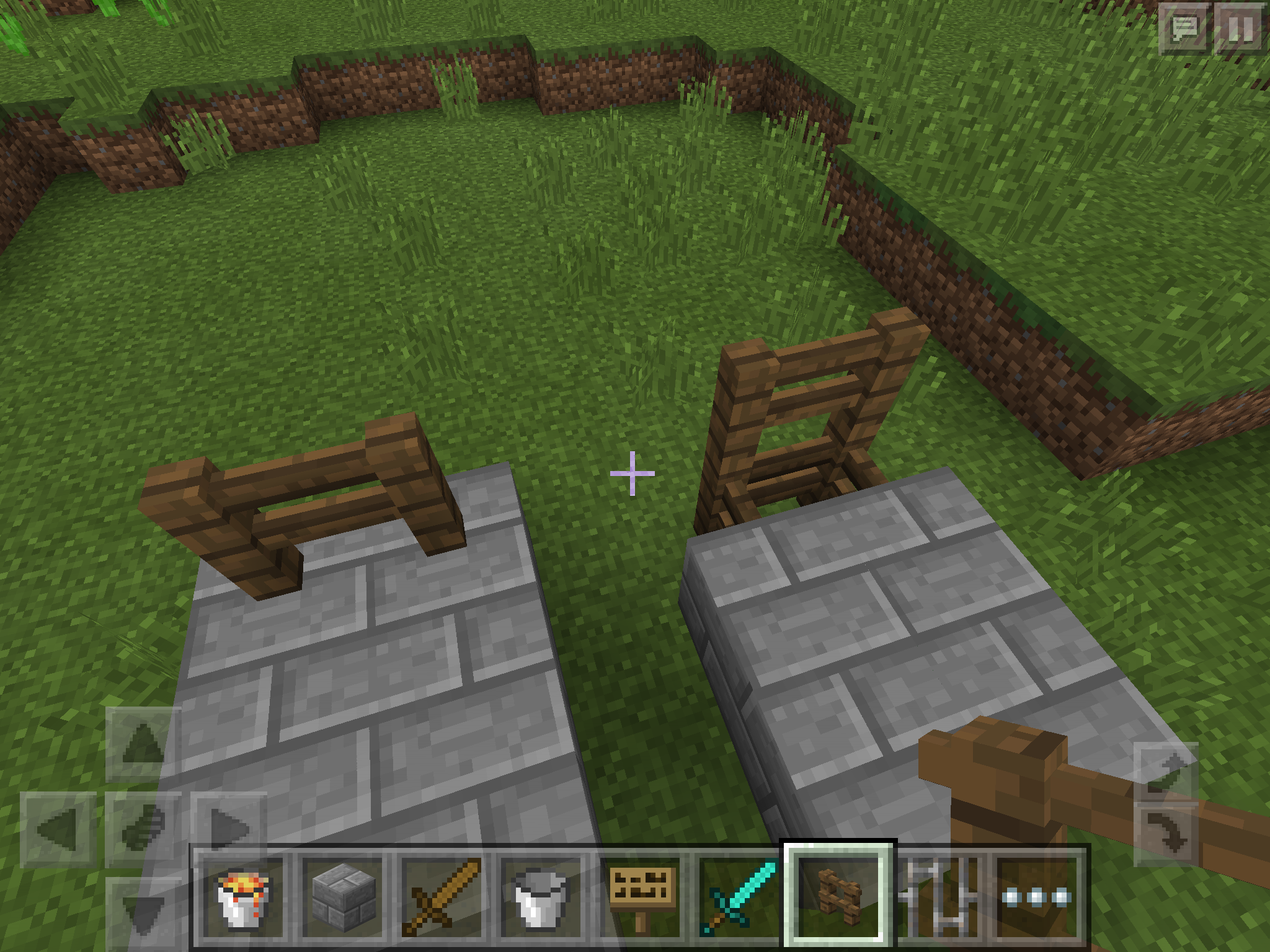



















is duplicated by
relates to
relates to
relates to

is duplicated by
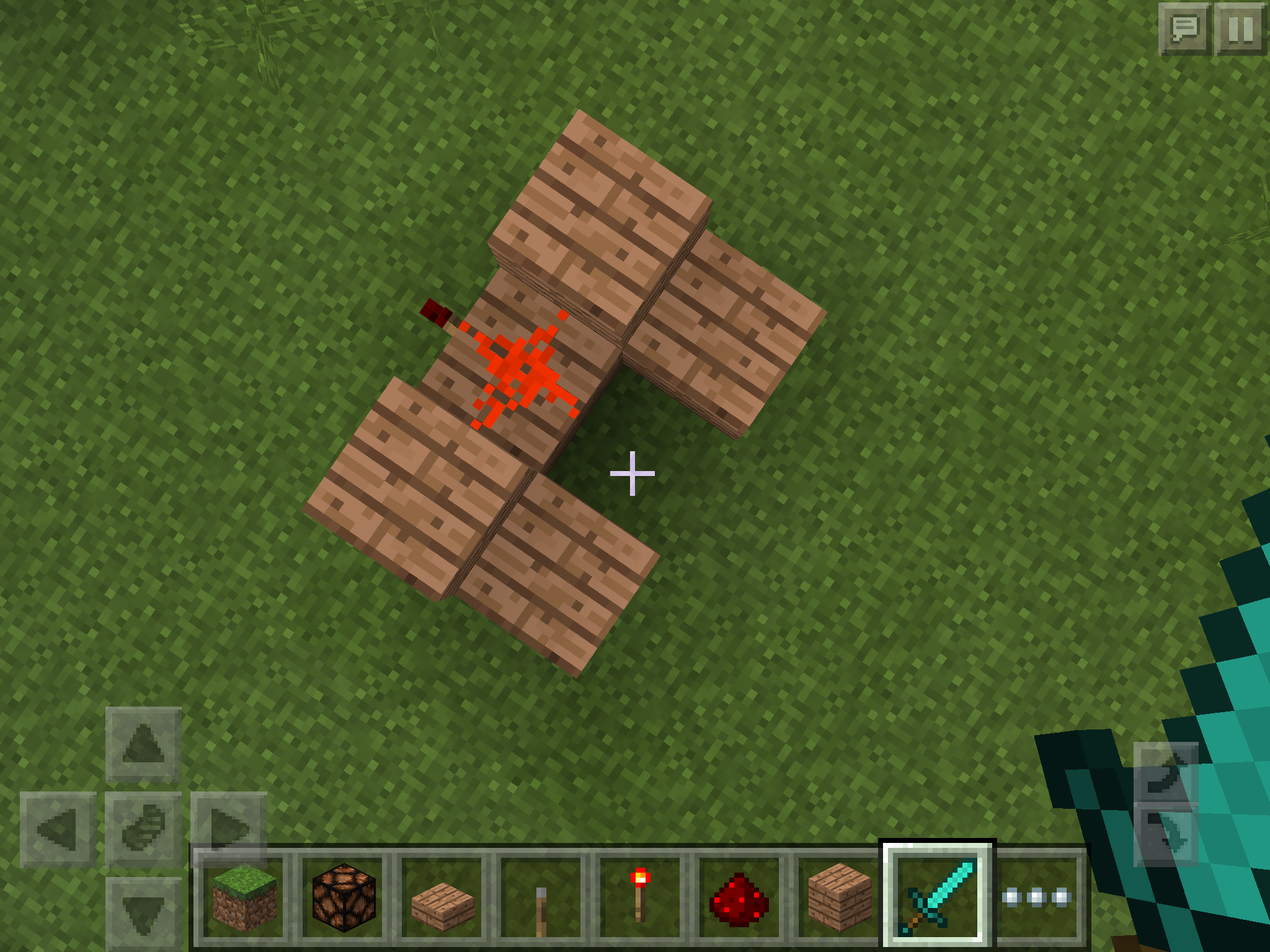
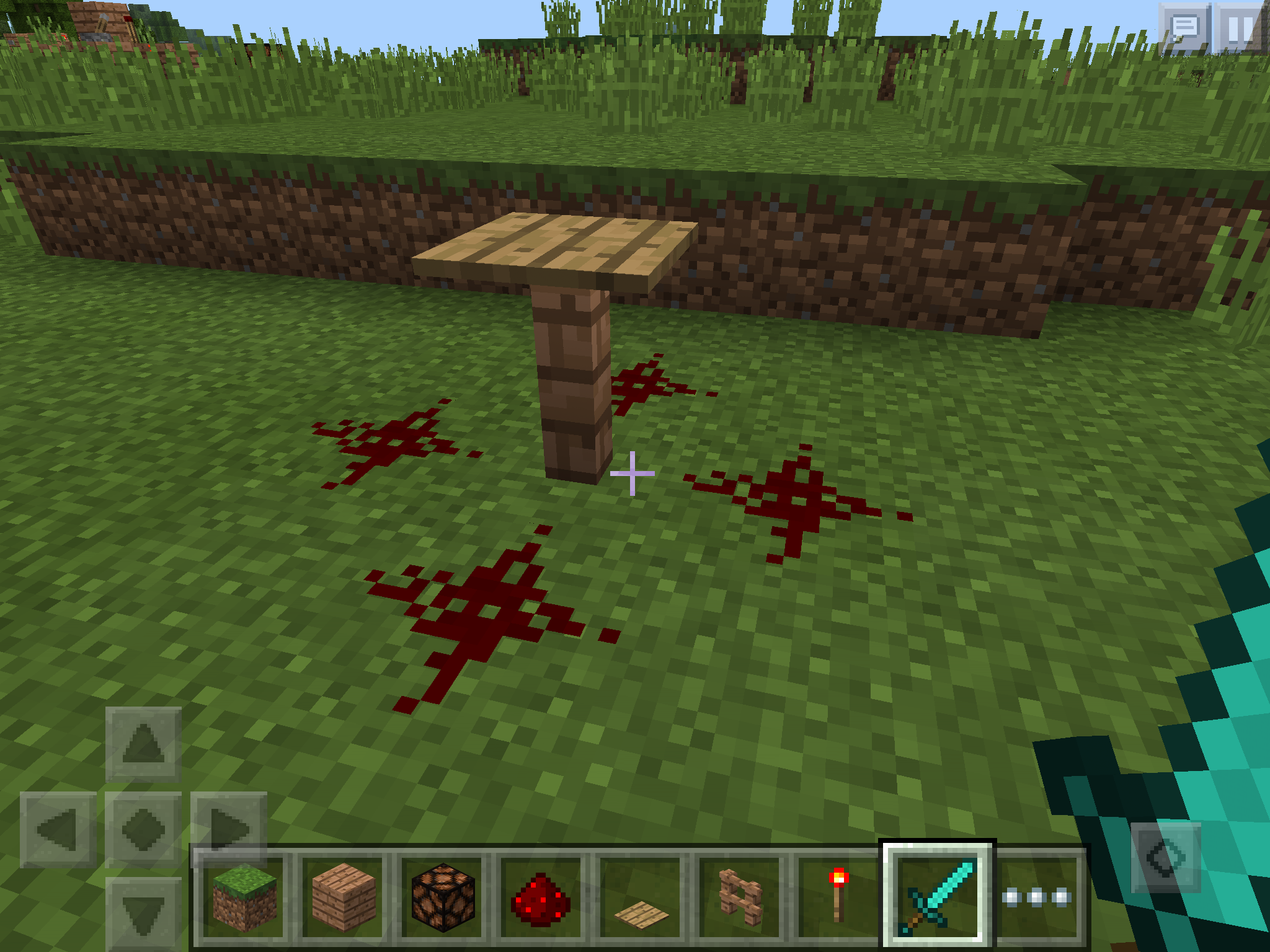
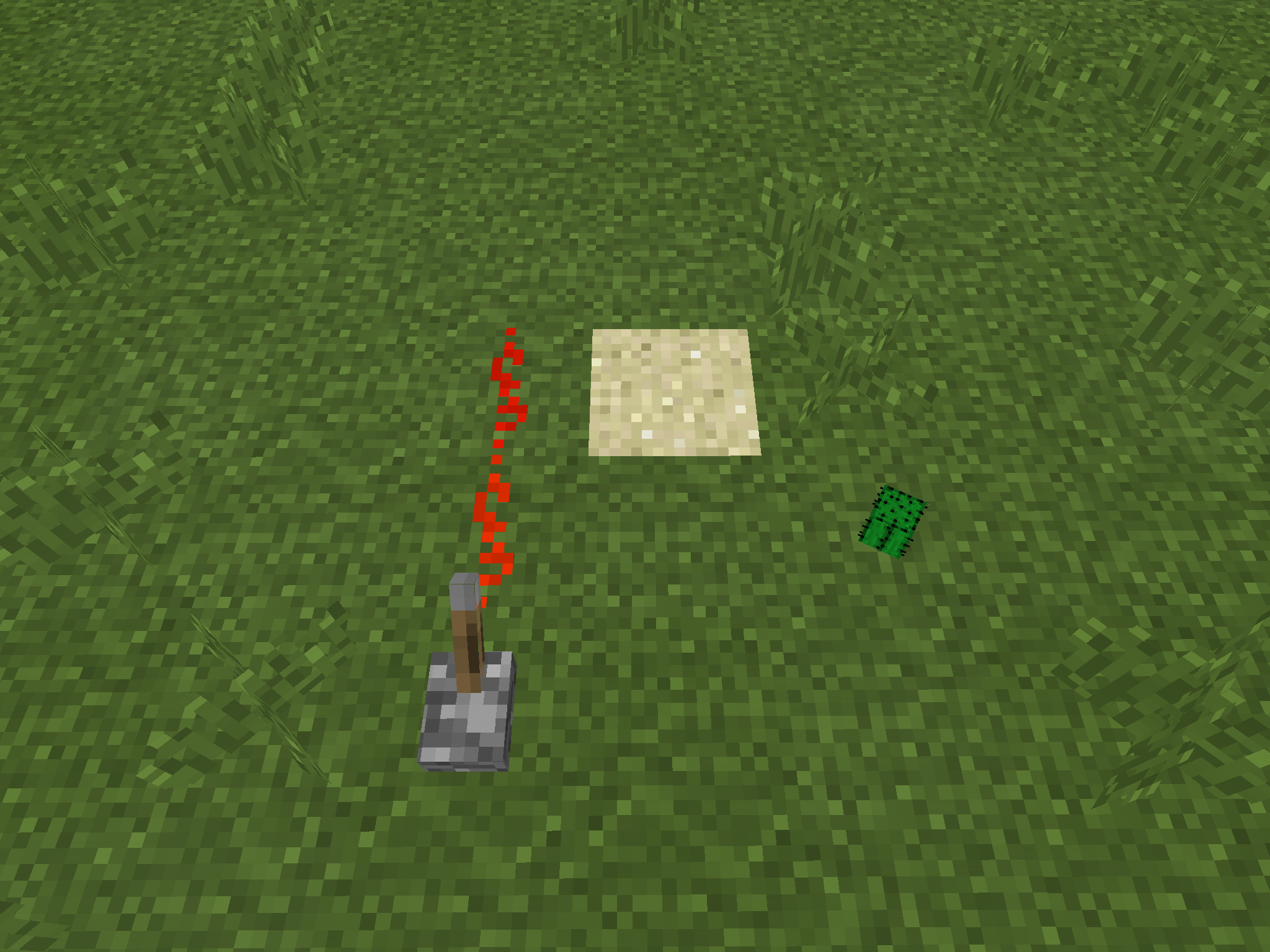
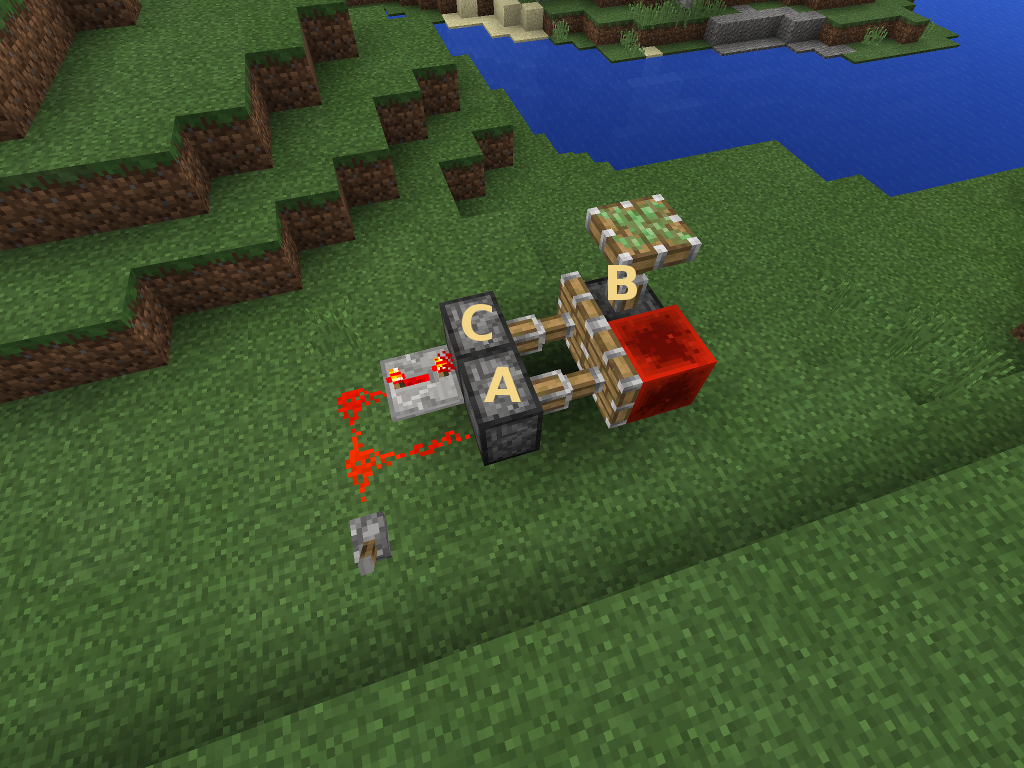
Inactive redstone torches disconnect nearby redstone wire as if they were opaque, while affected wire looks visually connected.
Steps to reproduce:
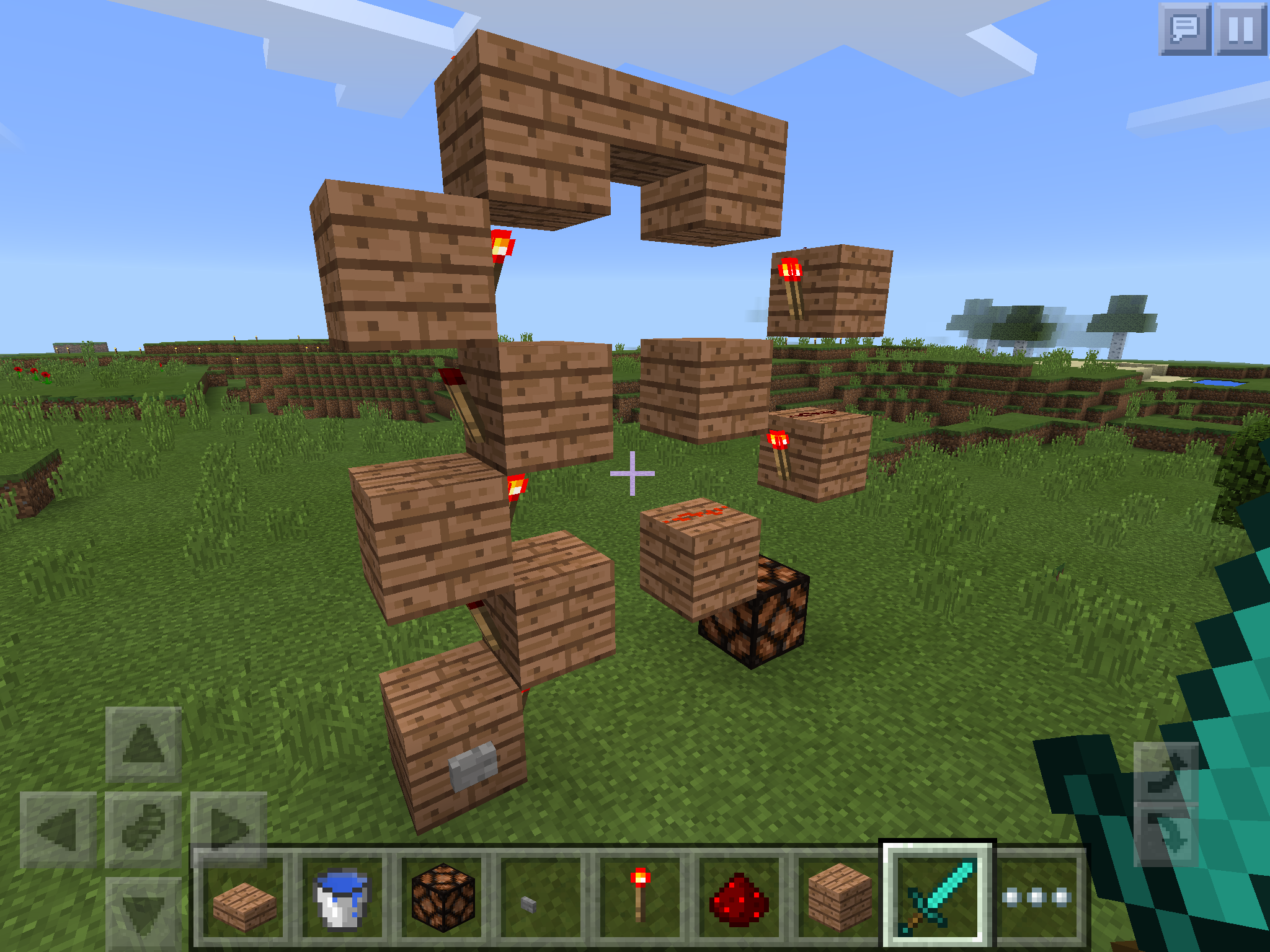
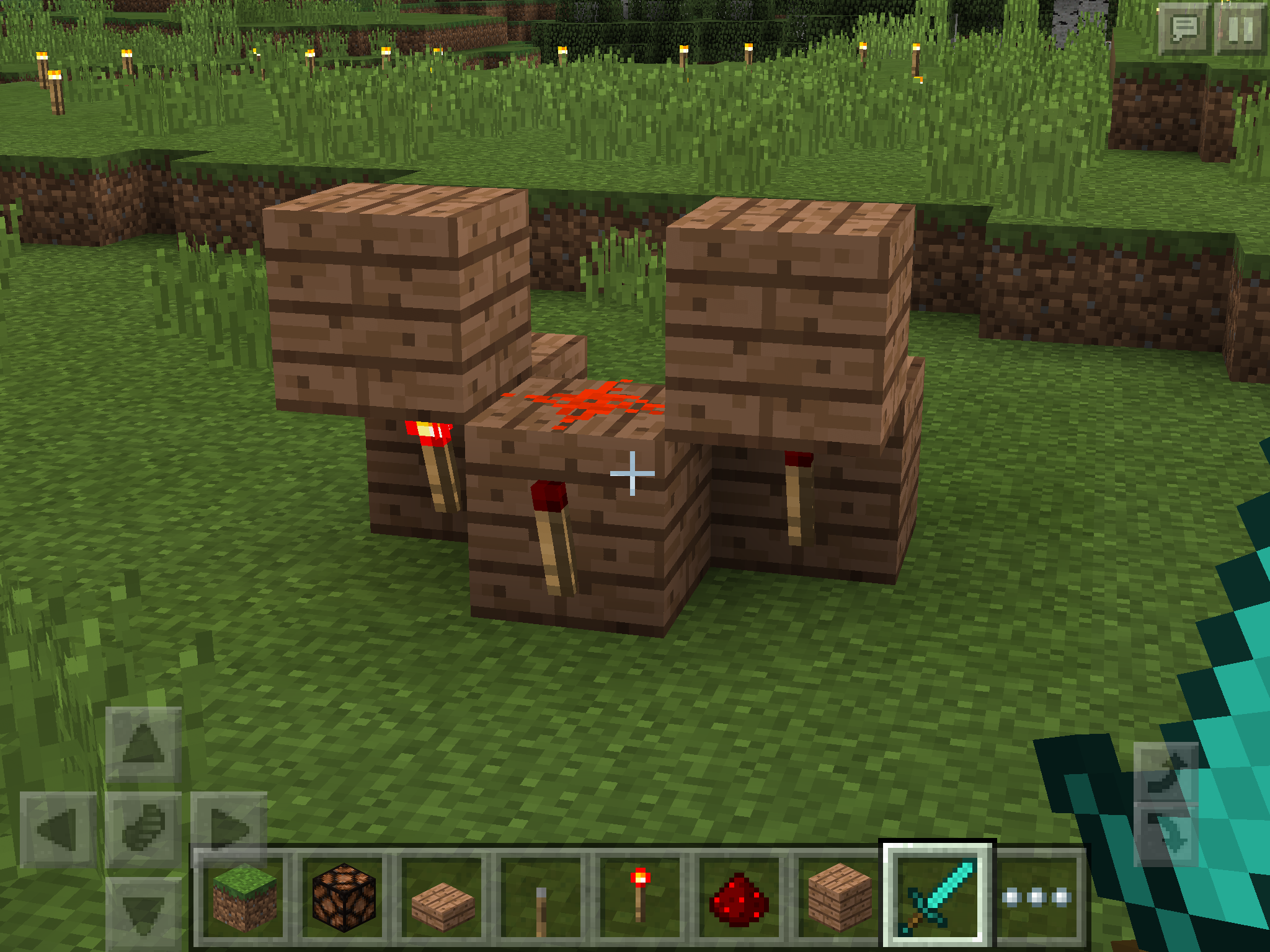
- Build a structure shown in inactive-torch-blocking-signal.png
but without the leftmost torch.
- Put the torch on left.
- The redstone wire on the ground now gets inactivated as if it's no longer connected to the rightmost torch.
The circuit in this state behaves very unnnaturally:
- Remove the torch on the center block. The wire on the ground does not immediately notice that it's no longer blocked.
- Trigger a redstone update
by any means, like placing another dust next to the unlit wire.- The wire now gets activated. It doesn't respond to a block update in general; only to a redstone update so one might call it a redstone-update-detector (RUD).
The glitch was originally discovered by Benjaming Ivanka Bloigu in
MCPE-11855. I'm re-posting it because it's now closed as invalid.Inactive redstone torches disconnect nearby redstone wire as if they were opaque, while affected wire looks visually connected.
Steps to reproduce:
- Build a structure shown in inactive-torch-blocking-signal.png
- Put the torch on left.
- The redstone wire on the ground now gets inactivated as if it's no longer connected to the rightmost torch.
The circuit in this state behaves very unnnaturally:
- Remove the torch on the center block. The wire on the ground does not immediately notice that it's no longer blocked; it stays inactive.
- Trigger a redstone update in some way, like placing another dust next to the unlit wire.
- The wire now gets activated. It doesn't respond to a block update in general; only to a redstone update so one might call it a redstone-update-detector (RUD).
The glitch was originally discovered by Benjaming Ivanka Bloigu in
MCPE-11855. I'm re-posting it because it's now closed as invalid.
Inactive redstone torches disconnect nearby redstone wire as if they were opaque, while affected wire looks visually connected.
Steps to reproduce:
- Build a structure shown in inactive-torch-blocking-signal.png
- Put the torch on left.
- The redstone wire on the ground now gets inactivated as if it's no longer connected to the rightmost torch.
The circuit in this state behaves very unnnaturally:
- Remove the torch on the center block. The wire on the ground does not immediately notice that it's no longer blocked
;it stays inactive.- Trigger a redstone update in some way, like placing another dust next to the unlit wire.
- The wire now gets activated. It doesn't respond to a block update in general; only to a redstone update so one might call it a redstone-update-detector (RUD).
The glitch was originally discovered by Benjaming Ivanka Bloigu in
MCPE-11855. I'm re-posting it because it's now closed as invalid.Inactive redstone torches disconnect nearby redstone wire as if they were opaque, while affected wire looks visually connected.
Steps to reproduce:
- Build a structure shown in inactive-torch-blocking-signal.png
- Put the torch on left.
- The redstone wire on the ground now gets inactivated as if it's no longer connected to the rightmost torch.
The circuit in this state behaves very unnnaturally:
- Remove the torch on the center block. The wire on the ground does not immediately notice that it's no longer blocked, i.e. it stays inactive.
- Trigger a redstone update in some way, like placing another dust next to the unlit wire.
- The wire now gets activated. It doesn't respond to a block update in general; only to a redstone update so one might call it a redstone-update-detector (RUD).
The glitch was originally discovered by Benjaming Ivanka Bloigu in
MCPE-11855. I'm re-posting it because it's now closed as invalid.
is duplicated by
is duplicated by
is duplicated by
In 0.13.1, my screenshot inconsistency.png
canonlybeweakly-powered.In 0.13.1, my screenshot inconsistency.png
The slider for render distance in the configuration screen does not always indicate the current distance actually being used.
Steps to reproduce:
- Open the Game Menu.
- Tap the "Options" button.
- Select the "Graphics" tab.
- Set the Render Distance to the maximum.
- Close the menu.
- Repeat the steps above from the beginning until you see the slider for the Render Distance move
sto the minimum or the middle on its own, while the number of chunks actually rendered stays the same.The slider for render distance in the configuration screen does not always indicate the current distance actually being used.
Steps to reproduce:
- Open the Game Menu.
- Tap the "Options" button.
- Select the "Graphics" tab.
- Set the Render Distance to the maximum.
- Close the menu.
- Repeat the steps above from the beginning until you see the slider for the Render Distance moved to the minimum or the middle on its own, while the number of chunks actually rendered stays the same.
This might have something to do with the amount of free RAM currently available but I'm not sure.
The slider for render distance in the configuration screen does not always indicate the current distance actually being used.
Steps to reproduce:
- Open the Game Menu.
- Tap the "Options" button.
- Select the "Graphics" tab.
- Set the Render Distance to the maximum.
- Close the menu to return to the game.
- Repeat the steps above from the beginning until you see the slider for the Render Distance moved to the minimum or the middle on its own, while the number of chunks actually rendered stays the same.
This might have something to do with the amount of free RAM currently available but I'm not sure.
duplicates
is duplicated by
LockedRepeaterhave some bugActive unpowered locked repeaters stop emitting power after reloading
relates to
Active unpowered locked repeatersstop emitting powerafter reloadingActive unpowered locked repeaters become inactive after reloading
relates to
Comparator BugComparators measuring a non-empty container momenta
Comparators measuring a non-empty container momentarily stops emitting power upon reloading
relates to
Comparators measuring a non-empty container momentarily stopsemitting power upon reloading
Comparator too slowComparators measuring a container take 2 ticks to change its state instead of 1
Comparators measuring a container take 2 ticks to changeitsstate instead of 1Comparators measuring a container take 2 ticks to change their state instead of 1
is duplicated by
Comparators measuring a container take redstone 2 ticks to change their state instead of 1

Hoppers suck item entities floating above them only one at a time.
Steps to reproduce:
- Place a hopper.
- Throw a stack of items onto it.
What I expected to happen:
The hopper sucks the entire stack of item entities all at once.What actually happens:
The hopper sucks item entities one at a time.
relates to
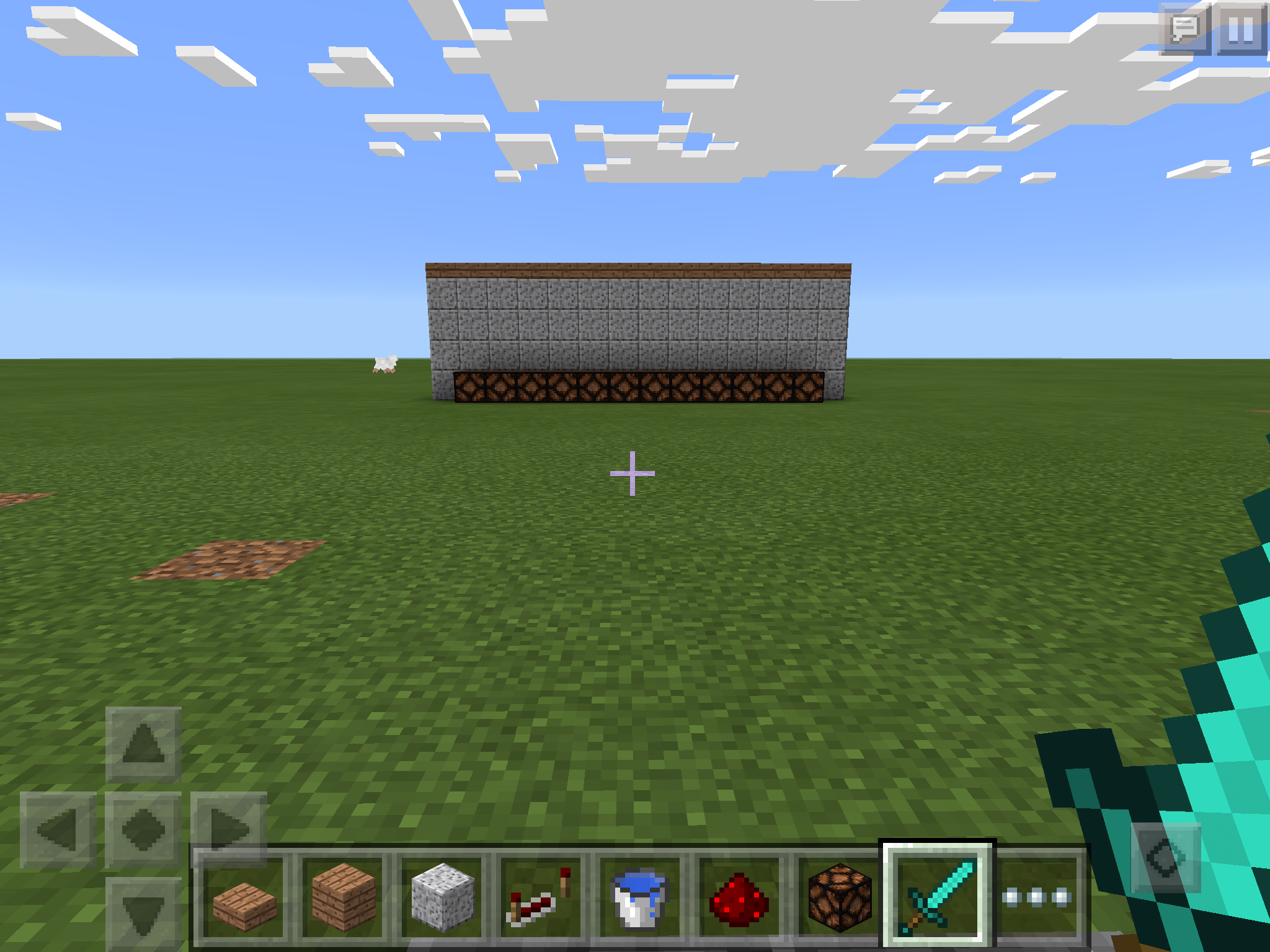
Everyone knows that mobs cannot spawn on top of bottom-half slabs. But in this specific case mobs hardly spawn at all below solid opaque blocks with a bottom-half slab on top of it. This somewhat relates to now-fixed
MCPE-11112but is clearly not the same.Steps to reproduce:
- Build a 12x12x3 spawn chamber out of any kind of solid opaque blocks.
- Optionally place tripwire and redstone lamps to ease observing mobs inside it.
- Take 24 blocks away from it and wait 10 seconds or so.
- Observe that mobs start to spawn in the chamber.

- Now cover the roof of chamber with any kind of bottom-half slabs.
- Take 24 blocks away from it and wait for mobs again.
- Observe that the spawn rate has severely reduced. Now it takes several tens of minutes to spawn even a single mob.
What I expected:
Slabs on the roof do not affect the spawn rate at all.Note that the inner height of spawn chamber needs to be 3 blocks or higher in order to trigger this bug. If it's only 2 blocks high, slabs don't affect the spawn rate as expected.
Everyone knows that mobs cannot spawn on top of bottom-half slabs. But in this specific case mobs hardly spawn at all below solid opaque blocks with a bottom-half slab on top of it. This somewhat relates to now-fixed
MCPE-11112but is clearly not the same.Steps to reproduce:
- Build a 12x12x3 spawn chamber out of any kind of solid opaque blocks.
- Optionally place tripwire and redstone lamps to ease observing mobs inside it.
- Take 24 blocks away from it and wait 10 seconds or so.
- Observe that mobs start to spawn in the chamber.
- Now cover the roof of chamber with any kind of bottom-half slabs.
- Take 24 blocks away from it and wait for mobs again.
- Observe that the spawn rate has severely reduced. Now it takes several tens of minutes to spawn even a single mob.
What I expected:
Slabs on the roof do not affect the spawn rate at all.Note that the inner height of spawn chamber needs to be 3 blocks or higher in order to trigger this bug. If it's only 2 blocks high, slabs don't affect the spawn rate as expected.
Everyone knows that mobs cannot spawn on top of bottom-half slabs. But in this specific case mobs hardly spawn at all below solid opaque blocks with a bottom-half slab on top of it. This somewhat relates to MCPE- now-fixed
MCPE-11112but is clearly not the same.Steps to reproduce:
- Build a 12x12x3 spawn chamber out of any kind of solid opaque blocks.
- Optionally place tripwire and redstone lamps to ease observing mobs inside it.
- Take 24 blocks away from it and wait 10 seconds or so.
- Observe that mobs start to spawn in the chamber.
- Now cover the roof of chamber with any kind of bottom-half slabs.
- Take 24 blocks away from it and wait for mobs again.
- Observe that the spawn rate has severely reduced. Now it takes several tens of minutes to spawn even a single mob.
What I expected:
Slabs on the roof do not affect the spawn rate at all.Note that the inner height of spawn chamber needs to be 3 blocks or higher in order to trigger this bug. If it's only 2 blocks high, slabs don't affect the spawn rate as expected.
Everyone knows that mobs cannot spawn on top of bottom-half slabs. But in this specific case mobs hardly spawn at all below solid opaque blocks with a bottom-half slab on top of it. This somewhat relates to
MCPE- now-fixedMCPE-1but is clearly not the same.1112Steps to reproduce:
- Build a 12x12x3 spawn chamber out of any kind of solid opaque blocks.
- Optionally place tripwire and redstone lamps to ease observing mobs inside it.
- Take 24 blocks away from it and wait 10 seconds or so.
- Observe that mobs start to spawn in the chamber.
- Now cover the roof of chamber with any kind of bottom-half slabs.
- Take 24 blocks away from it and wait for mobs again.
- Observe that the spawn rate has severely reduced. Now it takes several tens of minutes to spawn even a single mob.
What I expected:
Slabs on the roof do not affect the spawn rate at all.Note that the inner height of spawn chamber needs to be 3 blocks or higher in order to trigger this bug. If it's only 2 blocks high, slabs don't affect the spawn rate as expected.
Everyone knows that mobs cannot spawn on top of bottom-half slabs. But in this specific case mobs hardly spawn at all below solid opaque blocks with a bottom-half slab on top of it. This somewhat relates to
MCPE-12422and now-fixedMCPE-11112but is clearly not the same.Steps to reproduce:
- Build a 12x12x3 spawn chamber out of any kind of solid opaque blocks.
- Optionally place tripwire and redstone lamps to ease observing mobs inside it.
- Take 24 blocks away from it and wait 10 seconds or so.
- Observe that mobs start to spawn in the chamber.
- Now cover the roof of chamber with any kind of bottom-half slabs.
- Take 24 blocks away from it and wait for mobs again.
- Observe that the spawn rate has severely reduced. Now it takes several tens of minutes to spawn even a single mob.
What I expected:
Slabs on the roof do not affect the spawn rate at all.Note that the inner height of spawn chamber needs to be 3 blocks or higher in order to trigger this bug. If it's only 2 blocks high, slabs don't affect the spawn rate as expected.
Slabbled-Roof-Glitch.mcworld
relates to
This only appears in 0.14.1 but I can't put "0.14.1" into the "Affects Version".
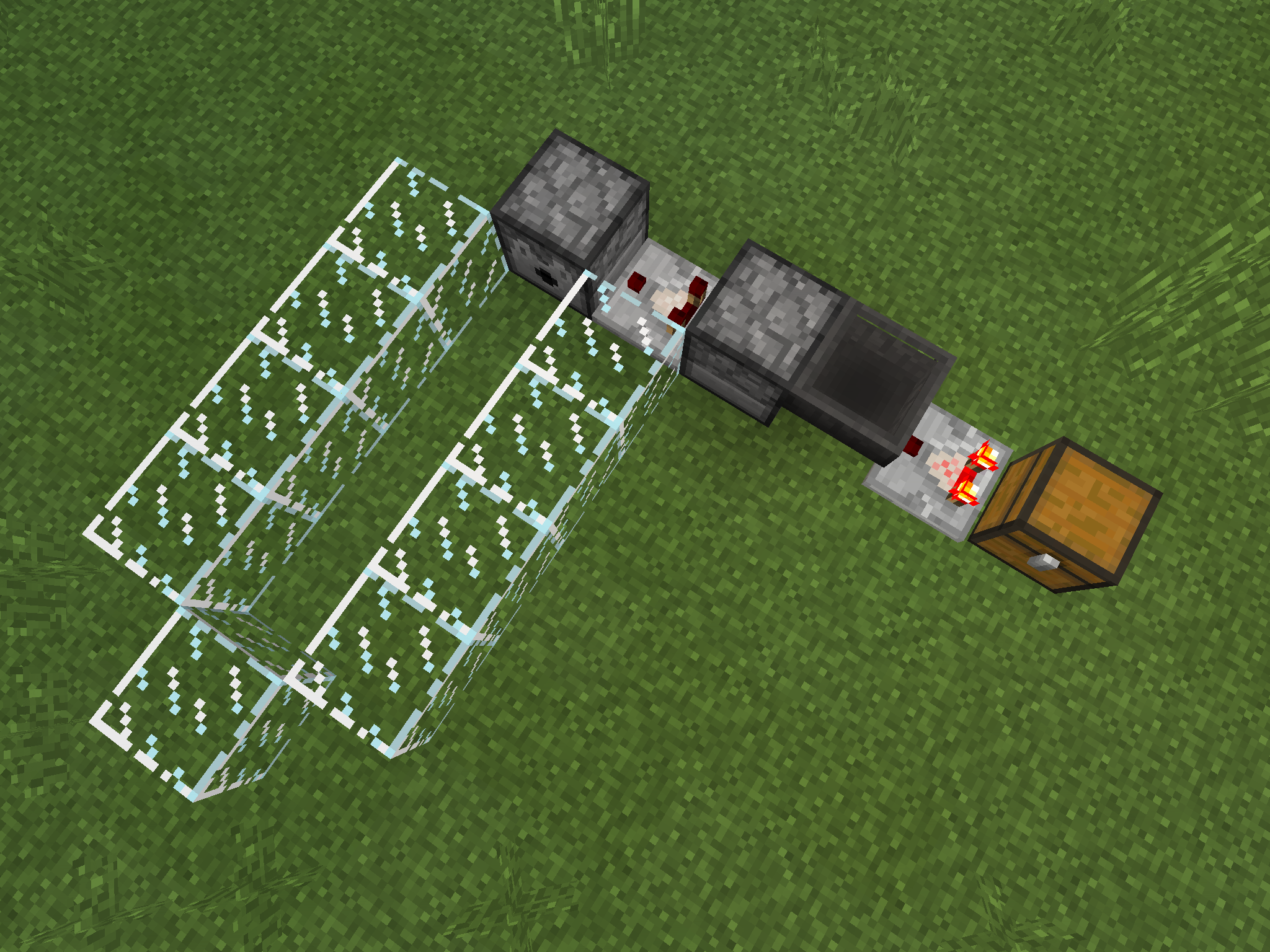
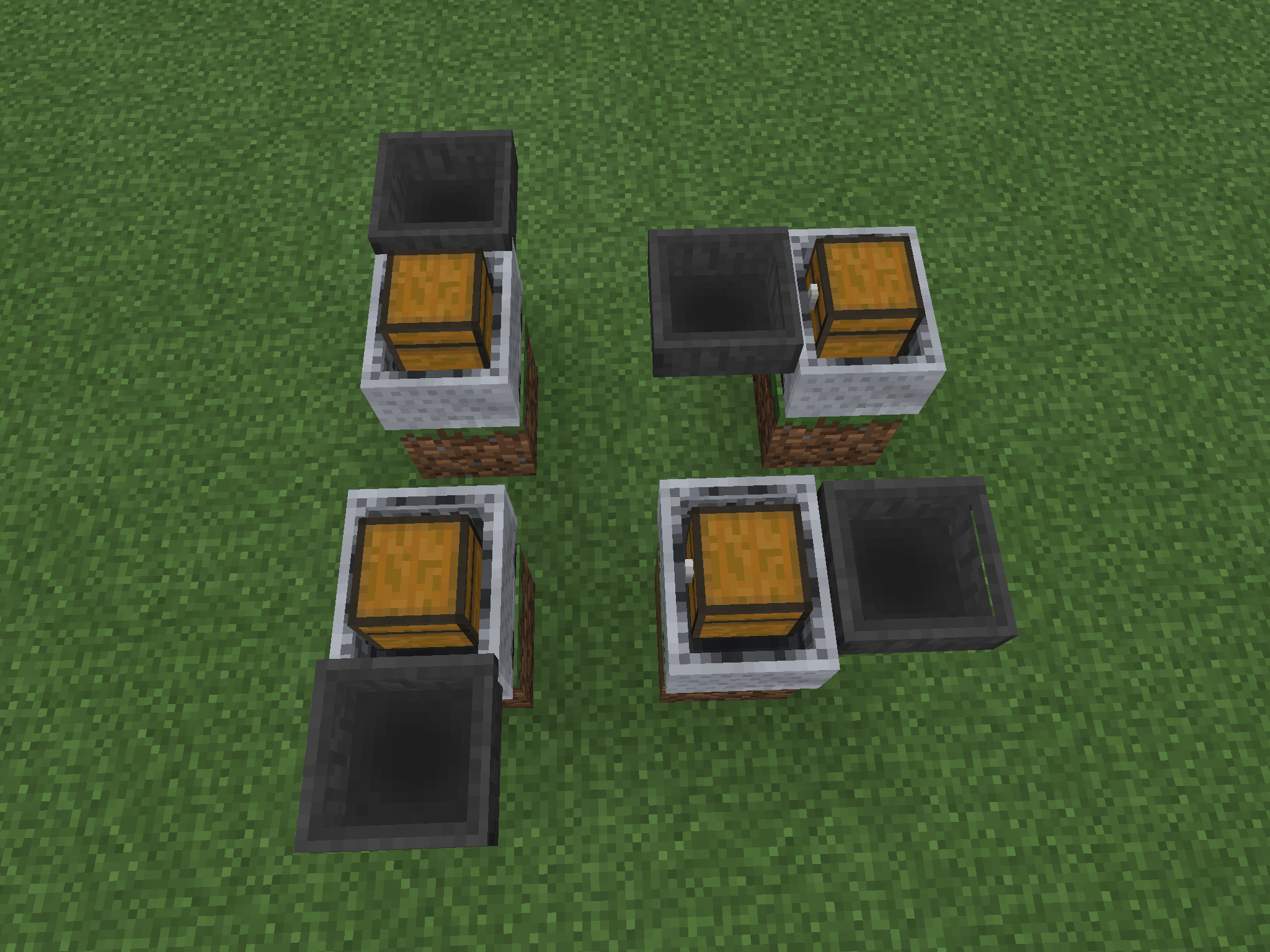
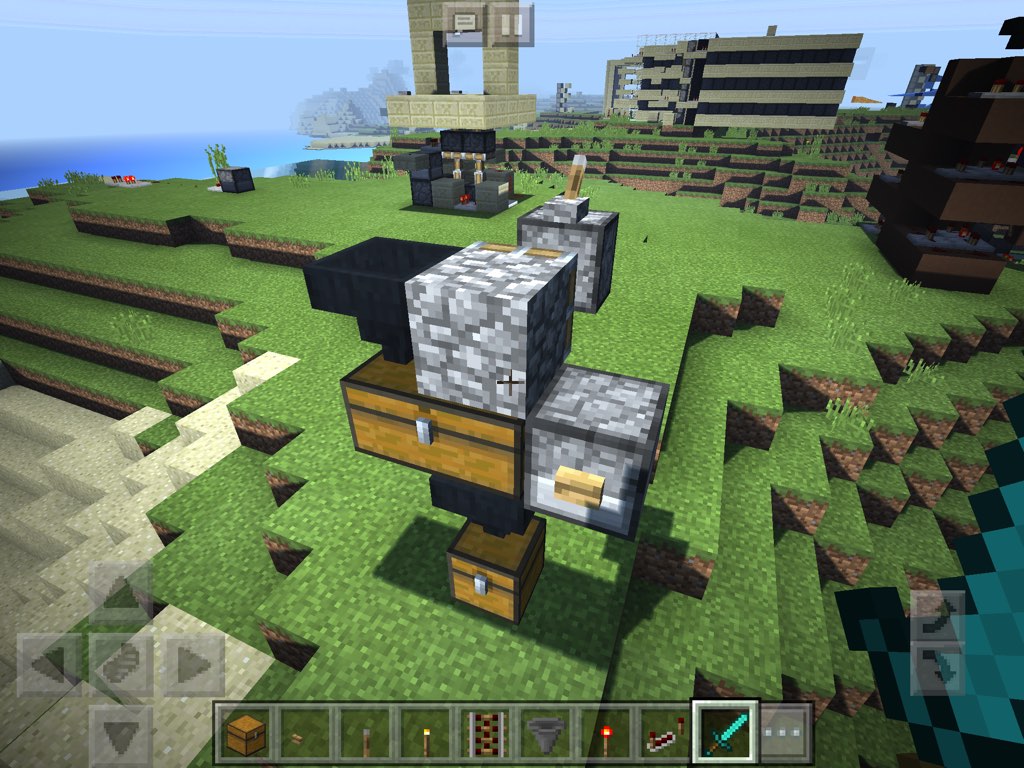
I'm not sure what is really going on but I have to report this anyway. In the screenshot below, when you put a stack of items into the topmost chest, everything should go to the bottommost chest and the middle one should not receive any items. But in 0.14.1 the middle chest does receive some of items, and the number of those items randomly changes every time you try.
However, if you instead put the stack directly into the second hopper (i.e. the one on the left side of the middle chest), all the items go to the bottommost chest as expected. So this has something to do with hoppers' cooldown counter. I mean, it is as if there were a small chance that the second hopper didn't get suspended by the first hopper pushing items into it.
This relates to now-fixed
MCPE-13417.
This only appears in 0.14.1 but I can't put "0.14.1" into the "Affects Version".
I'm not sure what is really going on but I have to report this anyway. In the screenshot below, when you put a stack of items into the topmost chest, everything should go to the bottommost chest and the middle one should not receive any items. But in 0.14.1 the middle chest does receive some of items, and the number of those items randomly changes every time you try.
However, if you instead put the stack directly into the second hopper (i.e. the one on the left side of the middle chest), all the items go to the bottommost chest as expected. So this has something to do with hoppers' cooldown counter. I mean, it is as if there were a relatively small chance that the second hopper didn't get suspended by the first hopper pushing items into it. It's like a nondeterminism of a multithreaded program.
This relates to now-fixed
MCPE-13417.
Horizontal hopper pipes and cooldown counterStrange nondeterminism in horizontal hopper pipes and their cooldown counter
This only appears in 0.14.1 but I can't put "0.14.1" into the "Affects Version".
I'm not sure what is really going on but I have to report this anyway. In the screenshot below, when you put a stack of items into the topmost chest, everything should go to the bottommost chest and the middle one should not receive any items. But in 0.14.1 the middle chest does receive some of items, and the number of those items randomly changes every time you try.
However, if you instead p
utthestackdirectlyintothe second hopper (i.e. the one on the left side of the middle chest), all the items go to the bottommost chest as expected. So this has something to do with hoppers' cooldown counter. I mean, it is as if there were a relatively small chance that the second hopper didn't get suspended by the first hopper pushing items into it. It's like a nondeterminism of a multithreaded program.This relates to now-fixed
MCPE-13417.This only appears in 0.14.1 but I can't put "0.14.1" into the "Affects Version".
I'm not sure what is really going on but I have to report this anyway. In the screenshot below, when you put a stack of items into the topmost chest, everything should go to the bottommost chest and the middle one should not receive any items. But in 0.14.1 the middle chest does receive some of items, and the number of those items randomly changes every time you try.
However, if you instead place the topmost chest directly on top of the second hopper (i.e. the one on the left side of the middle chest), all the items in the chest go to the bottommost chest as expected. So this has something to do with hoppers' cooldown counter. I mean, it is as if there were a relatively small chance that the second hopper didn't get suspended by the first hopper pushing items into it. It's like a nondeterminism of a multithreaded program.
This relates to now-fixed
MCPE-13417.
relates to
is duplicated by
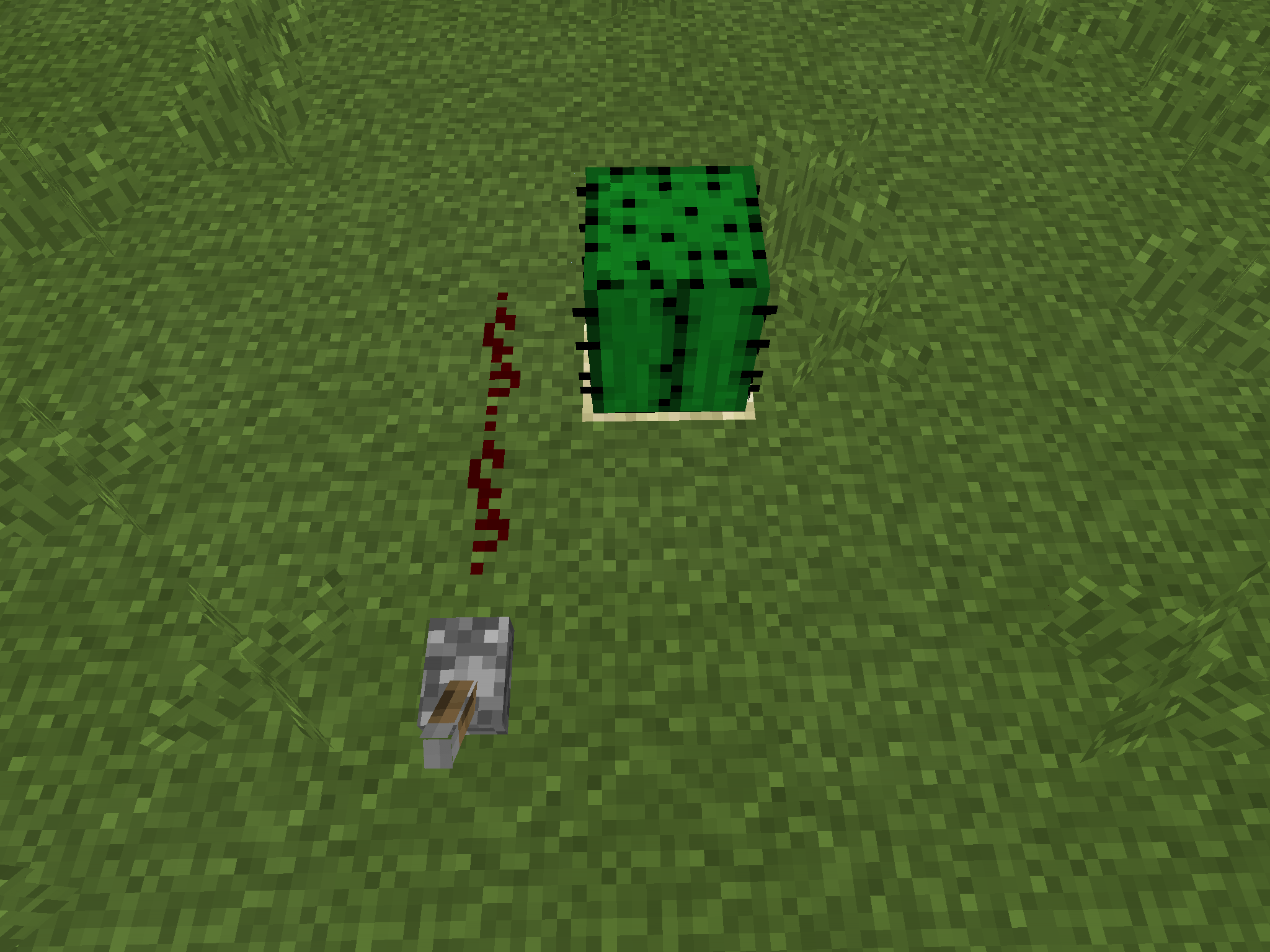
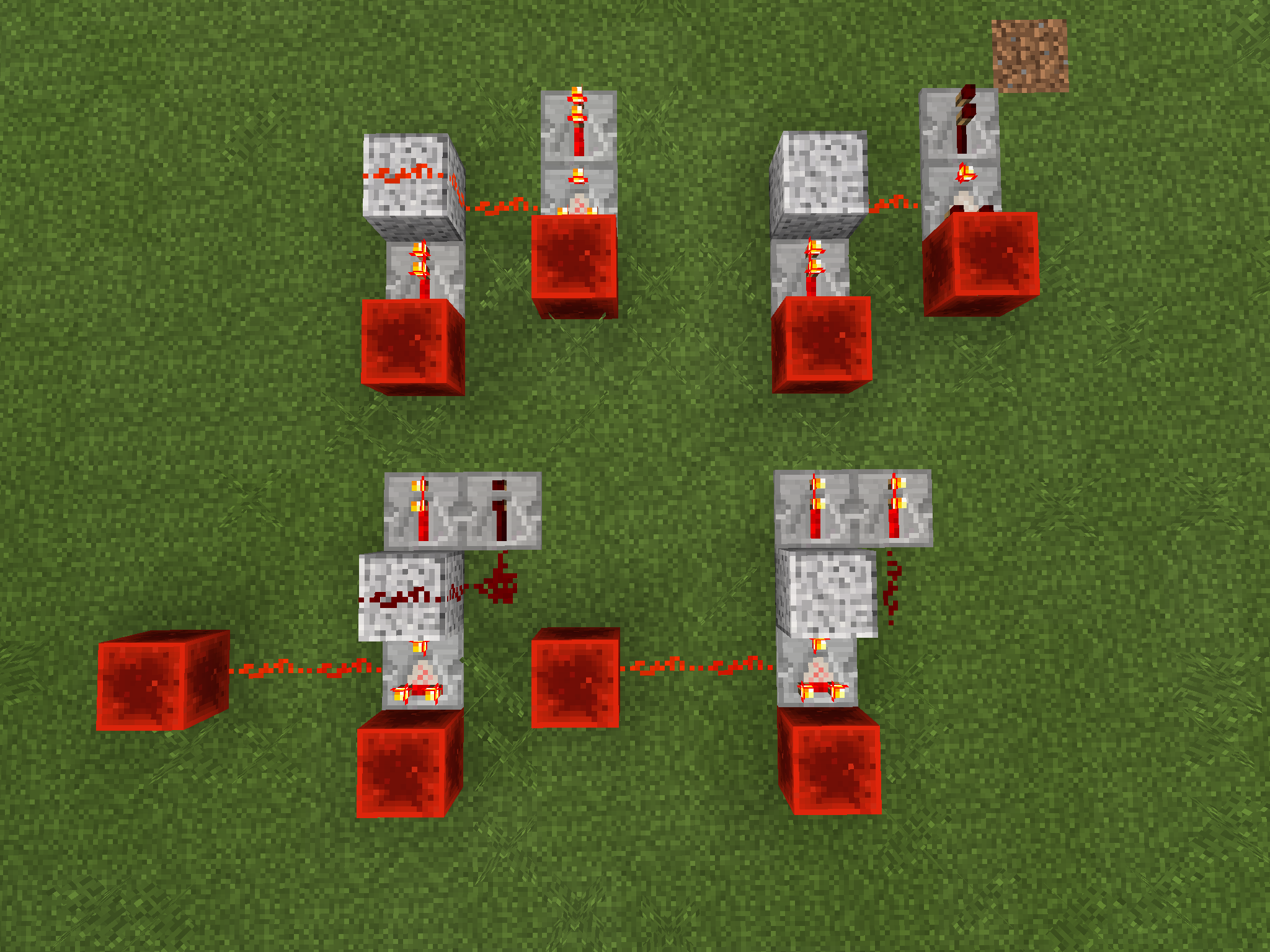
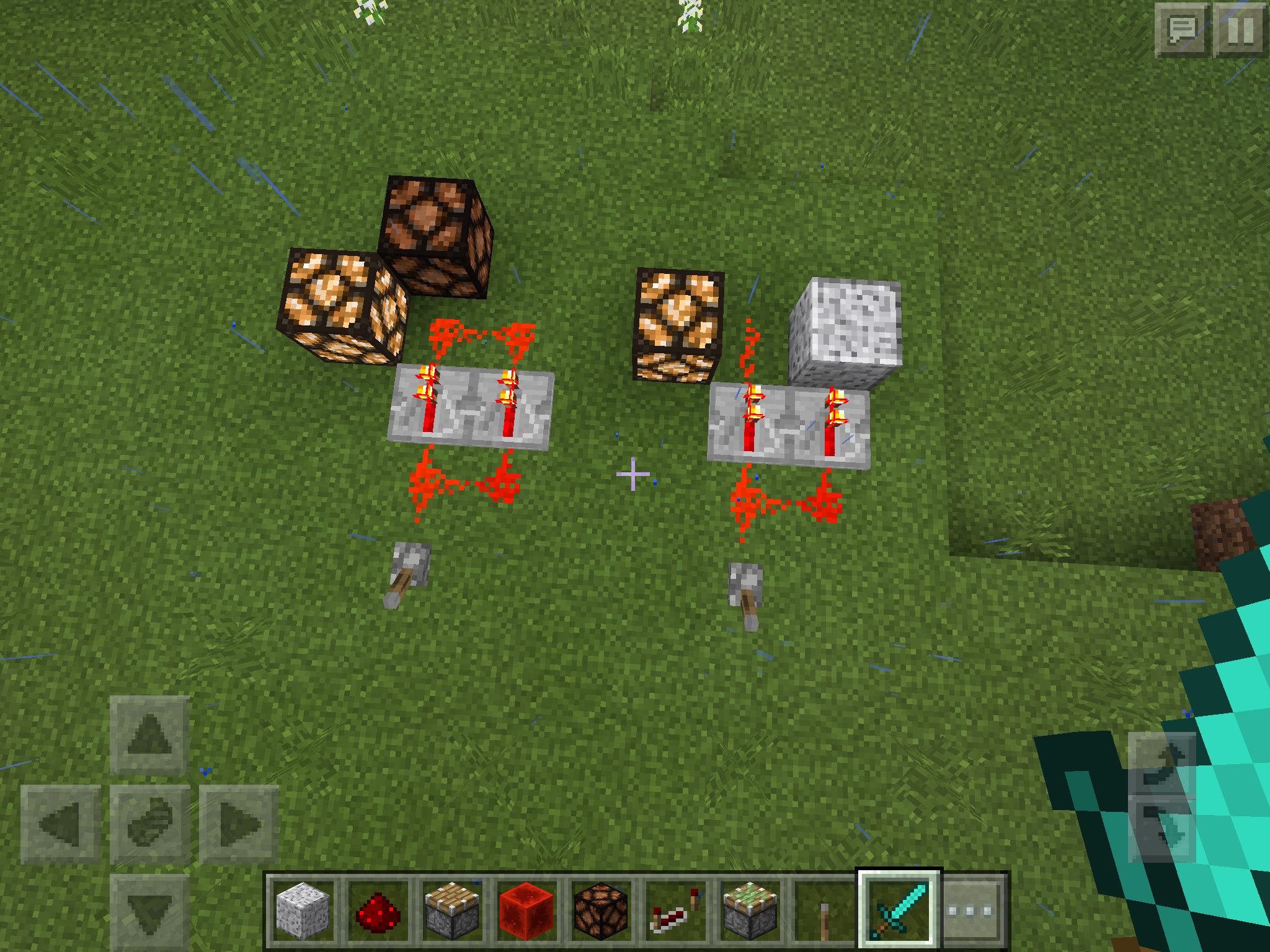
Redstone dust, when powered by an adjacent strongly-powered solid opaque block, can be powered 1 level weaker than the power level of the said opaque block if there is another dust on top of it and they are connected.
It's true that, in the left hand of the screenshot, redstone wire being powered is "travelling" 1 block. But since both of two dust are adjacent to the strongly-powered block, shouldn't they both be powered to the same level?Description of the screenshot:
Top left:
Redstone dust, when powered by an adjacent strongly-powered solid opaque block, can be powered 1 level weaker than the power level of the said opaque block if there is another dust on top of it and they are connected.
It's true that, in the left hand of the screenshot, redstone wire being powered is "travelling" 1 block. But since both of two dust are adjacent to the strongly-powered block, shouldn't they both be powered to the same level?Description of the screenshot:
Top left:Redstone dust, when powered by an adjacent strongly-powered solid opaque block, can be powered 1 level weaker than the power level of the said opaque block if there is another dust on top of it and they are connected.
It's true that, in the left hand of the screenshot, redstone wire being powered is "travelling" 1 block. But since both of two dust are adjacent to the strongly-powered block, shouldn't they both be powered to the same level?Description of the screenshot:
Top right: A repeater is powering a block to level 15. The block powers an adjacent redstone dust which goes to the side of comparator in subtraction mode. The comparator subtracts 15 from 15 so its output is 0.Top left: The comparator is subtracting 14 from 15 for some reason.
Bottom right: A comparator in subtraction mode emits power level 1, so it powers a solid block in front of it to level 1 and thus redstone dust next to it is powered to 1.
Bottom left: The solid block is powered to level 1 but the redstone dust next to it is not powered for some reason.
Redstone dust, when powered by an adjacent strongly-powered solid opaque block, can be powered 1 level weaker than the power level of the said opaque block if there is another dust on top of it and they are connected.
It's true that, in the left hand of the screenshot, redstone wire being powered is "travelling" 1 block. But since both of two dust are adjacent to the strongly-powered block, shouldn't they both be powered to the same level?Description of the screenshot:
Top right: A repeater is powering a block to level 15. The block powers an adjacent redstone dust which goes to the side of comparator in subtraction mode. The comparator subtracts 15 from 15 so its output is 0.Top left: The comparator is subtracting 14 from 15 for some reason.
Bottom right: A comparator in subtraction mode emits power level 1, so it powers a solid block in front of it to level 1 and thus redstone dust next to it is powered to 1.
Bottom left: The solid block is powered to level 1 but the redstone dust next to it is
not poweredfor some reason.Redstone dust, when powered by an adjacent strongly-powered solid opaque block, can be powered 1 level weaker than the power level of the said opaque block if there is another dust on top of it and they are connected.
It's true that, in the left hand of the screenshot, redstone wire being powered is "travelling" 1 block. But since both of two dust are adjacent to the strongly-powered block, shouldn't they both be powered to the same level?Description of the screenshot:
Top right: A repeater is powering a block to level 15. The block powers an adjacent redstone dust which goes to the side of comparator in subtraction mode. The comparator subtracts 15 from 15 so its output is 0.Top left: The comparator is subtracting 14 from 15 for some reason.
Bottom right: A comparator in subtraction mode emits power level 1, so it powers a solid block in front of it to level 1 and thus redstone dust next to it is powered to 1.
Bottom left: The solid block is powered to level 1 but the power level of redstone dust next to it is decreased to 0 for some reason.
Redstone dust, when powered by an adjacent strongly-powered solid opaque block, can be powered 1 level weaker than the power level of the said opaque block if there is another dust on top of it and they are connected.
It's true that, in the left hand of the screenshot, redstone wire being powered is "travelling" 1 block. But since both of two dust are adjacent to the same strongly-powered block, shouldn't they both be powered to the same level?Description of the screenshot:
Top right: A repeater is powering a block to level 15. The block powers an adjacent redstone dust which goes to the side of comparator in subtraction mode. The comparator subtracts 15 from 15 so its output is 0.Top left: The comparator is subtracting 14 from 15 for some reason.
Bottom right: A comparator in subtraction mode emits power level 1, so it powers a solid block in front of it to level 1 and thus redstone dust next to it is powered to 1.
Bottom left: The solid block is powered to level 1 but the power level of redstone dust next to it is decreased to 0 for some reason.
Hoppers cut redstone wire as if they were solid opaqueFence gates, daylight sensors, piston heads, observers, and leaves cut redstone wire as if they were solid opaque
In the screenshot shown below, you can see a line of redstone dust being "functionally" cut by a hopper but "visually" not.
The reason why the lamp behind the hopper is lit would be that the redstone "line" next to it is treated internally as a directionless redstone dot.
Other blocksalsoexhibit similar behaviour, see picture and comments:
In the screenshot shown below, you can see a line of redstone dust being "functionally" cut by a hopper but "visually" not.
The reason why the lamp behind the hopper is lit would be that the redstone "line" next to it is treated internally as a directionless redstone dot.Edit:
Hoppers now works as intended but there are other blocks which still exhibit similar behaviour, see picture and comments:

In the screenshot shown below, you can see a line of redstone dust being "functionally" cut by a hopper but "visually" not.
The reason why the lamp behind the hopper is lit would be that the redstone "line" next to it is treated internally as a directionless redstone dot.Edit:
Hoppers now works as intended but there are other blocks which still exhibit similar behaviour, see picture and comments:
relates to
relates to
duplicates
relates to
Mob "Farm" Not SpawningMobsVertical distance is ignored by the hostile mobs spawning rule
relates to
is duplicated by
relates to
relates to
is duplicated by
duplicates
duplicates
relates to
duplicates
relates to
duplicates
is duplicated by
relates to
duplicates
is duplicated by
Breaking a 2 tall flower drops 2 of that flowerDouble Flower Duplication Bug
duplicates
duplicates
duplicates
is duplicated by
relates to
duplicates
relates to
relates to
is duplicated by
relates to
relates to
duplicates
relates to
relates to
relates to
is duplicated by
relates to
relates to

Thanks PHO, I can confirm your structure creates the bug on Android and Win10 (trying both touch and mouse & keyboard on Win10). When mouse & keyboard are used on Win10, the autojump button can be disabled and when it is disabled, none of the above structures can be jumped over (as expected). Being unable to turn off autojump is another ticket: MCPE-9378.
![[MCPE Mod] Dr.Awesome4333](../../../data/assets/gravatar/drawesome4333.png)
What I expected to happen. When you place a Redstone torch so it connects to the side of a block, it will stay connected even if I leave the chunk the blocks is in but keep the chunk the torch is in.
What happens is the redstone torch drops itself as an item as If i broke the block it was connected to.
To reproduce: Find a chunk boundry and place a block that a redstone torch can be placed on the side of on 1 side ofthe boundry, place the torch on the other side of the boundary so it connect to the other block but is in a different chunk. Fly away some distance so that both chunks become unloaded. Walk back to the place where you had the torch. You will see that the torch has dropped itself as an Item.
Update by kaleb418:
Also affects:
- Lever
- Sign
- Torches
Update by PHO:
There are steps to reproduce this in MCPE-17271.
Moderator note by [MCPE Mod] Dr.Awesome4333:
Please limit comments to only new information regarding the issue.
PHO quite possibly... relating them for now.
It's not quite that simple PHO The dust will power adjacent dust and will power the lower adjacent block (see screenshot 2015-11-27)

Some trees grown at the time of the created world generation will apear cut off at or near chunk borders.
Edit by PHO:
This affects giant mushrooms too. You can easily find those shrooms in swamps because they are more eye-catching than trees.
Steps to reproduce by [MCPE Mod] Dr.Awesome4333:
Steps to reproduce in 1.1.0.0:
Load this Resource Pack that will display chunk boundaries.
Set render distance to 8 chunks.
Create a new infinite creative world with the seed Tree
Once spawned, you should be on a red line. Turn to face the sun (Note this is in 1.1.0.0) and fly up.
Now go towards the sun crossing 6 red lines below you (not counting the one you spawned on).
After passing 6 lines turn 90 deg to the right and pass 6 blue lines.
Turn right 90deg again and cross 6 red lines.
Turn right 90deg again and cross 12 blue lines.
Turn right 90deg once more and cross 11 red lines.
There should now be 2 birch trees to your right that have been cut off at the chunk boundry (shown in blue).
To compare, create a new world with the seed Tree again.
Cross you 11 red lines while facing the sun.
Turn left 90deg and cross 6 blue lines to see the same trees(now a little behind you) not cut off at the border.

PHO Yes, that is correct. So this works as intended.
PHO This is actually the original report, others are duplicates. I think one of the moderators made a mistake when marking this.
In my survival world, I have a lever that controls dispensers on a semi automatic wheat farm. The dispensers fire water buckets. I Have a circuit seen below which activates on the rising and falling action of the lever. When I am in the game, the circuit works as intended but if I relog the game (quit to title and join back) the dispenser will fire the bucket and stay in that state. I assume it is the Redstone torches that do not save state as I leave the game.
From MCPE-14233:
Upon loading a world, redstone components update. The redstone may change based on an unloaded chunk, causing it to turn off when it should be being powered by something in the unloaded chunk next to it. To reproduce: make a long line of redstone with repeaters, power one end, then stand at the other end and lower your render distance. Then reload the world. The redstone will turn off, then turn back on as you load the component powering it. This affects all redstone components that I am aware of, including pistons. It tends to break contraptions as one half may update while the other is unloaded, often sending redstone contraptions into a clock.
Steps to reproduce:
1. Create a flat creative world.
2. Place a lever, turn it on, and then place a long line redstone dust and repeaters extending far out some distance outside of chunk-loading range, and then make the wire do a u-turn and come back to the start. Make sure there are repeaters so that the signal can go all the way.
3. Exit the world and reload it.
4. Wait a little while, and you'll notice that the returning end of the wire will turn off, as the redstone updates and can't find a power source, since the connection between the start and end is unloaded, and also because of MCPE-15779. (Though even if that was fixed there might still be a moment where the dust becomes unpowered while the chunks are still being loaded.)
This effect can also sometimes be seen in cases where a piston is being powered by a source in another chunk, and the chunk with the piston loads first. This is more difficult to reproduce in a world, though.
Edit by PHO:
The second part of the original description is WAI: MCPE-15779.
The first part, redstone components being ticked upon loading chunks, is the real issue. It is probably a leftover from the past behavior: state of redstone components used to be forgotten upon unloading chunks, and in order to recover it the game ticked all of them on the chunk reload. Now their state seems to be correctly saved in the file so they need not to be ticked, and doing so also causes the very problem: components in unloaded chunks affect the entire contraption. To reproduce this,
- Open a world attached to
MCPE-15779. - Load all the chunks where the entire circuit resides in.
- Return to the point where the piston is placed.
- Close the world and open it again.
- Observe that the piston momentarily extends and then retracts. Ideally the piston and the line of dust should stay activated even though the middle part of the dust line is in unloaded chunks, because their last state (active) should be saved in the file and the game only needs to restore it.
iPad pro smart connector keyboards are not recognized by mcpe
Edit by PHO:
iPad Pro Smart Keyboard experiences severe limitation in what you can do with it.
You can:
- Use it in the chat screen to type messages.
- Use it in the chat screen to type commands.
You can't:
- Control the game with it. That is, jumping, moving around, opening your inventory and such like are not possible with the keyboard. Keys you type are simply ignored by the game and don’t move the character
Edit by PHO:
According to MCPE-20685 it also affects Kensington KeyFolio (bluetooth).
Still happening please fix this
PHO Correct.
Also, please mark this issue as fixed. Oops, didn't see the screenshot in the comment.
![[Mojang] Mega_Spud (Jay Wells)](../../../data/avatars/users/92696.png)
Duplicate of MCPE11940
Whoops!
I meant MCPE-11487 
xD PHO
[Mojang] Mega_Spud (Jay Wells) has the right of it, we have no idea what is meant by "Ender Temple" in this ticket.
I (likely incorrectly) presumed End Cities, which are not in MCPE. Strongholds were added in 0.9.0. However, as kaleb418 said, the chunks you are in must have been generated in 0.9.0 or after for there to be any chance they will generate a stronghold. Even still, there is only a chance that a stronghold will generate beneath a village. Not all villages have strongholds under them. PHO is also right that even if you do have a stronghold, it is not guaranteed to be connected to a portal room.
Finally, we have been observing more differences in generation of the same seed in 0.14.2, but they are usually minor.
Long story short, please revise the description to provide more detail or submit a new report if we're all way off.
I think PHO is right. Having looked into this more, the spawner can be disabled with the correct lighting. In a 9x9 room, any lava as light sources would need to spaced as pictured here:

If my taxicab geometry is correct, then this would give a lighting level of >12 in the entire area, as shown here:

The above layout successfully prevented any Blaze mobs from spawning.
After searching in the inventory when it is raining for a little bit, when you go to exit out you will see all the rain particles on the ground then disappear. This may be a tiny bug but it is a big one to people that don't have very good phones, computers, or tablets, and may cause many people to lag. If you could fix this that would be very appreciated, thank you.
Repo steps:
1. Have Pocket UI as the active UI format,
2. Give yourself an effect that lasts at least long enough that this will be testable for (can do the maximum 1000000) and it can be any potency,
3. Open up any Pocket UI interface that takes up the whole screen (Chest, Furnace, your own inventory, etc.),
4. Wait at least 10-20 seconds
5. Close the Pocket UI
Edit by PHO:
According to MCPE-16483, the bug affects not only raindrops but all kinds of particles are accumulated, including runes from an enchantment table and smoke from a nether portal.
A nova interface do jogo nao foi adequada para smartphones com resuluçao menor
Edit by PHO:
The new game interface is not suitable for smartphones with lower resolution. (Google translated with correcting the seemingly mistyped word "resuluçao" to "resoluçao".)
1 Connect the piston taken out of the pulsar signal using the observer block
2 Back and forth while the pressure-sensitive adhesive piston with a block
This is not might be a specification but is inconvenient and can not use a piston type t flip-flop!
Edit by PHO:
Sticky pistons received a 1-tick on-pulse should push a block but shouldn't pull it back. Since an observer block emits a 1-tick pulse, it should be able to cause this phenomenon. However in 0.15.0 beta build 1, sticky pistons do pull a block even when it pushed a block 1 tick before that.

@Railee Seantel M. De Vera No, that is incorrect. If they were ignoring bugs, then MCPE would be past unplayable. Like PHO said, please be patient.
PHO There are definitely slime chunks in MCPE, slime farms set below level 40 work fairly well in the slime chunks.
I think the issue is that in Flat worlds, the Slimes should be spawning much more readily than they do, as the whole world is set just a few blocks above bedrock. Slimes should be spawning in the relevant chunks, and should be easily spotted as they aren't hidden in caves.
One way to find slime chunks in a flat world is to exploit the bug MCPE-8560: By placing lots of slime spawners across a large area spanning several chunks, the slimes should only spawn in the slime chunks. Once the slime chunks have been discovered, they should spawn there without a slime spawner in place. (Hope that makes sense!)

Thanks PHO, I'll update the affected version to both of these issues, when it still occur in future versions.

PHO I think "Use cellular data" only applies for online multiplayer using your local maps (When you invite other xbox users to your map), not for realms.
los aldeanos zombie solo se deberían encontrar en las aldeas
Google translated by PHO:
Zombie villagers should only be found in villages.
If I have sound playing in the background (for example music) when I open Minecraft Pocket Edition on my iPod, the sound pauses. It does it while it is saying, "Mojang".
It has been doing this ever since I installed it. I installed it on my iPod when the game was somewhere in 0.15.
Edit by PHO:
The issue has been worsened in 1.1, that is, when you have a background app playing music, the game no longer plays its own sound. In versions prior to 1.1 it was properly mixing its sound effects and the music played by another app.

PHO This is a Java parity break, though, isn't it?
Cleaning through old issues. Resolving as fixed, as neither I, nor PHO could repro this bug on either Android or iOS.
Yo utilizo la beta 1.1 en mi galaxy s3 mini
Solo en una ocacion me permitio abrir el mundo de forma comun, desde entonces ya no me permite crear ni abrir ningun mundo puesto en infinito.
Aparte los mundos se corrompen al poner bloques nuevos o abrir la interfas de diferentes bloques, como el bloque de comandos, la mesa de crafteo, o las shulkerbox.
Todos los mobs estan muy locos, se mueven de lado, y les tiembla la cabeza.
El dormir causa lag.
Ojala y arreglen todo esto. (Solo puse bugs de mundo, hay mas bugs en la beta 1.1 por arreglar.
Google translated by PHO:
I use beta 1.1 in my galaxy s3 mini
Only in one occasion I allowed to open the world in a common way, since then no longer allows me to create or open any world placed in infinity.
As the worlds get corrupted by putting new blocks or opening the interfaces of different blocks, such as the command block, the crafting table, or the shulkerbox.
All the mobs are very crazy, they move sideways, and their head shakes.
Sleeping causes lag.
Hopefully and fix all this. (I just put bugs in the world, there are more bugs in beta 1.1 to fix.
Water and leaf animations in shaders packs are now frozen. Galaxy s7
Edit by PHO:
Steps to reproduce:
- Install SEUS PE "Ultra" or "1.1 Test".
- Look at water, leaves, grass, or vines.
What I expect to happen:
Those things are rendered with waving animation. Actually on ≦ 1.0.9 the animation was working correctly.
What actually happens:
They don't wave at all, completely still. uniform highp float TIME in renderchunk.fragment seems not to be updated along the time.
See also the comment from Matt S below.
Ok, it seems Llamas suffocate when they are in a 3 high space. I've updated the title, added a screenshot and uploaded a test world. Thanks for the extra information, and thanks to PHO for testing!
Non English characters on delete world dialog will be shown as ?. This only happens when message is English .
How to reproduce:
1. Create/Rename a world with non English characters like Korean, Japanese or Chinese etc with game language set to English . In my case, I'm Korean so I used Korean (You can use a Korean word called 테스트, which means test.) (Use third party applications like Blocktopograph or try in Windows 10 Edition if you can't type them. Maybe PHO can do this without them because he plays Minecraft in English because Japanese translation really sucks along with Korean translation, although he is Japanese.
2. Try to delete that world. The non English characters will be shown as ? in the message.
As PHO pointed out in MCPE-21022, it seems they won't spawn on Jack'o'Lanterns, lighting the another means (torches) doesn't prevent them spawning.
iPad pro smart connector keyboards are not recognized by mcpe
Edit by PHO:
iPad Pro Smart Keyboard experiences severe limitation in what you can do with it.
You can:
- Use it in the chat screen to type messages.
- Use it in the chat screen to type commands.
You can't:
- Control the game with it. That is, jumping, moving around, opening your inventory and such like are not possible with the keyboard. Keys you type are simply ignored by the game and don’t move the character
Edit by PHO:
According to MCPE-20685 it also affects Kensington KeyFolio (bluetooth).
Still happening please fix this
Edit by PHO, updated by [Mod] GoldenHelmet:
Original test world was unreliable because it had the observer looking at lit redstone dust across a chunk border. Test world and description updated to include other blocks on November 2, 2021.
Observers looking at several kinds of blocks emit a pulse on world reloading. The attached test world demonstrates the bug. The following blocks were tested in 1.17.41 Hotfix:
| Block | Triggers observer pulse on relog |
|---|---|
| Lit redstone dust |  |
| unlit redstone dust |  |
| Redstone torch (lit or unlit) | |
| Repeater (powered or unpowered) | |
| Comparator (powered or unpowered) | |
| Empty single chest / barrel | |
| Empty double chest | |
| Chest / barrel with item in it | |
| Dropper (empty or with item) | |
| Item frame | |
| Glow item frame | |
| Tripwire with mob on it | |
| Pressure plate with mob on it | inconsistent |
| Mob head | |
| Campfire | |
| Cauldron | |
Steps to reproduce:
- Open the attached world.
- Close and open it again.
- See what the dispenser does.
Strangely, the pulse is too short (0 ticks maybe?) for dispensers to trigger so you need a repeater to make the pulse a bit longer.
I encountered a similar issue (if not the same) on 0.12.1 alpha / iOS. I had an unenchanted diamond pickaxe and two enchantment books, one having Unbreaking II and another having Silk Touch I. When I combined the pickaxe with the book of Silk Touch in an anvil, the combination itself succeeded but the book of Unbreaking in my inventory somehow transformed into a book of Silk Touch I.
Same for me on 0.12.1 alpha / iOS. A nether fortress had an invisible chest and an empty spawner which was supposed to have blazes in it. The spawner silently disappeared when I tried to reprogram it with a blaze spawn egg.
I can reproduce this on 0.12.1 alpha / iOS, but color of parents need not to be different. Black & black sheep breed a random baby, red & red breed a random one, and so on. This isn't a duplicate of
MCPE-5894because the fancy graphics switch makes no change.Same here on 0.12.1 alpha / iOS. This is apparently a duplicate of
MCPE-5860.Sammy: The feature did exist in MCPE in the past, though I can't remember which was the working version. I had a large black sheep farm to mass-produce black wool.
Though I'm not sure this is exactly the same problem, anvils have a similar issue (
MCPE-10411):I had an unenchanted diamond pickaxe and two enchantment books, one having Unbreaking II and another having Silk Touch I. When I combined the pickaxe with the book of Silk Touch in an anvil, the combination itself succeeded (I mean I got a pickaxe with Silk Touch I) but the book of Unbreaking in my inventory somehow transformed into a book of Silk Touch I as if the anvil mistakenly consumed Unbreaking instead of Silk Touch.
I just tested 0.12.2 alpha / iOS and was no longer able to reproduce. Both enchantment table and anvil were working correctly.
Does anyone still see the bug?
I just tested 0.12.2 alpha / iOS but the problem was staying the same.
I confirmed 0.12.2 alpha / iOS has the same problem.
Seems like it's been fixed on 0.12.3.
It's not just for carpets. Cakes trigger exactly the same glitch.
R.I.P. to my first tamed wolf, which was clearly a carnivorous animal...
Yes, this really bites me. I have lost my items numerous times by accidentally forgetting to evacuate all my stuff into a chest before switching to creative mode.
There is another pattern of fences that triggers the glitch. In 2015-10-29 21.44.01.png you see two platforms made of stone bricks, each having fences on edge. While the left one the fences prevents you from falling off the platform (which is the correct behavior), the right one allows you to auto-jump onto the fences. I confirmed this on 0.12.3 / iOS.
Still exists in 0.12.3, but please, do not fix it because it's extremely handy!
This affects 0.12.3 too.
I second Andrew Sperry's hypothesis. I have 2x2x3 closed chambers built entirely of stone, with lots of villagers in them (to make iron golems spawn artificially). Nothing special happens if I let the game alone for several hours. But if I quit the game and restart, most of the time some of villagers are found outside the jails.
This affects 0.12.3 too.
Yes, this is a long-standing glitch which has been there for years. Water hit-box is apparently leaking out of water block.
It's a duplicate of
MCPE-10974, isn't it?I can confirm this on 0.12.3 / iOS, but iron golems do drop irons unlike any other hostile mobs.
Duplicate of
MCPE-10920?This still appears in 0.12.3. The glitch apparently occurs only when a dropped item is on edge of a block. If the item is on the center, it gets displaced as expected.
Looks like the same bug as
MCPE-10920.I don't know if this is a bug or an intended change either, but I too want it to be fixed. Designing and constructing mob farms is a significant part of the fun of the game.
Enclosure doesn't need to be made of fences to cause this glitch. I have 2x2x3 closed chambers built entirely of stone, with lots of villagers in them (to let iron golems spawn). Nothing special happens if I let the game alone for several hours. But if I quit the game and restart, most of the time some of villagers are found outside the jails.
Yes, it's fixed now. Adios my super-fast water glitch elevator
Yes, that is an interesting part of the glitch. Signs placed on a wall before upgrading to 0.13.0 don't break as long as they don't receive a block update, even if they receive block ticks
While the block breaking / placement lag only rarely occurs in 0.13.0 / iOS, redstone update lag is rather common. In my screenshot cascaded-NOT-gates.png you see cascaded NOT gates with 10 redstone torches. If you press the button, you expect the redstone lamp activates for 15 ticks (1.5 sec) after 10 ticks (1 sec) delay. But in reality, the delay time (caused by 10 torches) and the duration of pulse (generated by the button) randomly changes each time you press the button, and the lamp sometimes does not even emit any light, which means the 15 ticks pulse ends before the lamp gets updated. Note that the game itself isn't laggy at all. Only the block updates like this is laggy.
Duplicate of
MCPE-11699?Someone with a right authority, could you please reopen this issue? It's not really fixed in 0.13.0 as described above. Or should I create a separate issue instead?
Haha, weird! I can confirm all of those oddities.
For the first one, the redstone power coming from above is indeed blocked by an inactive torch. The glitch doesn't occur if the power is coming either from below or a horizontally adjacent wire.
The second one is the funniest. I can see no reason why those torches are getting activated. The reason for flashing is unexplainable of course
The last one is interesting too. If a redstone wire is powered by a torch or a redstone block placed above, the wire looses its ability to activate or power any horizontally adjacent blocks except for redstone powder until it travels at least one block further. You can confirm this by placing another powder next to the one on the ground, and then place a lamp next to the recently placed powder. The lamp now gets activated as expected.
Isn't it the same issue as
MCPE-11287, i.e. the oddity you're seeing is due to laggy graphic update?No, you can actually burn out a torch with the loop circuit shown in 1-tick-torch-pulsar.png . It burns but produces no sound indeed.
The powder needs not be a dot. A line of powder getting power from straight above (not diagonally above) fails to power horizontally adjacent blocks. It's the same as the 3rd bug reported in
MCPE-11855.The last one seems to be a duplicate of
MCPE-11353.Oops, there was already a separate issue
MCPE-11297for my problem. Sorry for the noise.It's not just torches that update slow. Every redstone component is seemingly suffering from laggy update. See the attached screenshot "cascaded-NOT-gates.png" in
MCPE-11287; it's a cascaded NOT gates with 10 redstone torches. If you press the button, you expect the redstone lamp activates for 15 ticks (1.5 sec) after 10 ticks (1 sec) delay. But in reality, the delay time (caused by 10 torches) and the duration of pulse (generated by the button) randomly changes each time you press the button, and the lamp sometimes does not even emit any light, which means the 15 ticks pulse ends before the lamp gets updated.Laughed a lot at the weird object in the background. Roman, what you are seeing is seemingly the same issue as
MCPE-11353.Confirmed in 0.13.0 / iOS.
It seems the first and second one are not reported yet. Benjaming, could you please create issues for them?
Ima homer, didn't you find those villagers wandering out of the chamber? This is what happens to me. They indeed disappear sometimes but they can as well escape from a chamber with no doors, but only when the game is restarted. I'm highly suspecting that this is the same glitch as
MCPE-1982.It's not just about torches. When a line of redstone dust is powered by a strongly-powered adjacent block, it fails to power a horizontally adjacent block while it powers a block below it or another dust placed next to it (See redstone-failing-to-power-a-lamp.png ).
).
The glitch does not occur when the dust in question is a dot, not a line(Correction: the same thing will happen when a dot is powered sideways but not from below). So this is very similar toMCPE-11353but apparently not the same.Hmm... The moment when the torch on the redstone block tries to power the wire and the torch gets activated (and thus turned off) by the redstone block are in exactly the same tick, right? If so, the circuit itself can be considered very unreliable. Even in the PC version the behavior can change between versions I assume...
This is similar to, if not the same as,
MCPE-11871. In your screenshot, the redstone wire placed behind the first NOT gate looks powered by a strongly-powered block below it. When a line of dust (not a dot) is powered that way, it fails to power any horizontally adjacent blocks (the white wool with the first torch attached in your case) except for another dust placed next to it. I guess you can work around the glitch by removing the leftmost dust to turn the dust above the torch into a dot.It turned out that the line needs not to be powered sideways to cause the glitch. The same oddity happens when it's powered by a block below it. See .
.
MCPE-11887and another-pattern-of-redstone-glitch.pngDuplicate of
MCPE-11297?Aha, I had forgotten that 1-tick delay. You are right Cameron, this is indeed a bug.
Duplicate of
MCPE-8842?Confirmed on 0.13.0 / iOS. At first I thought this was just another example of
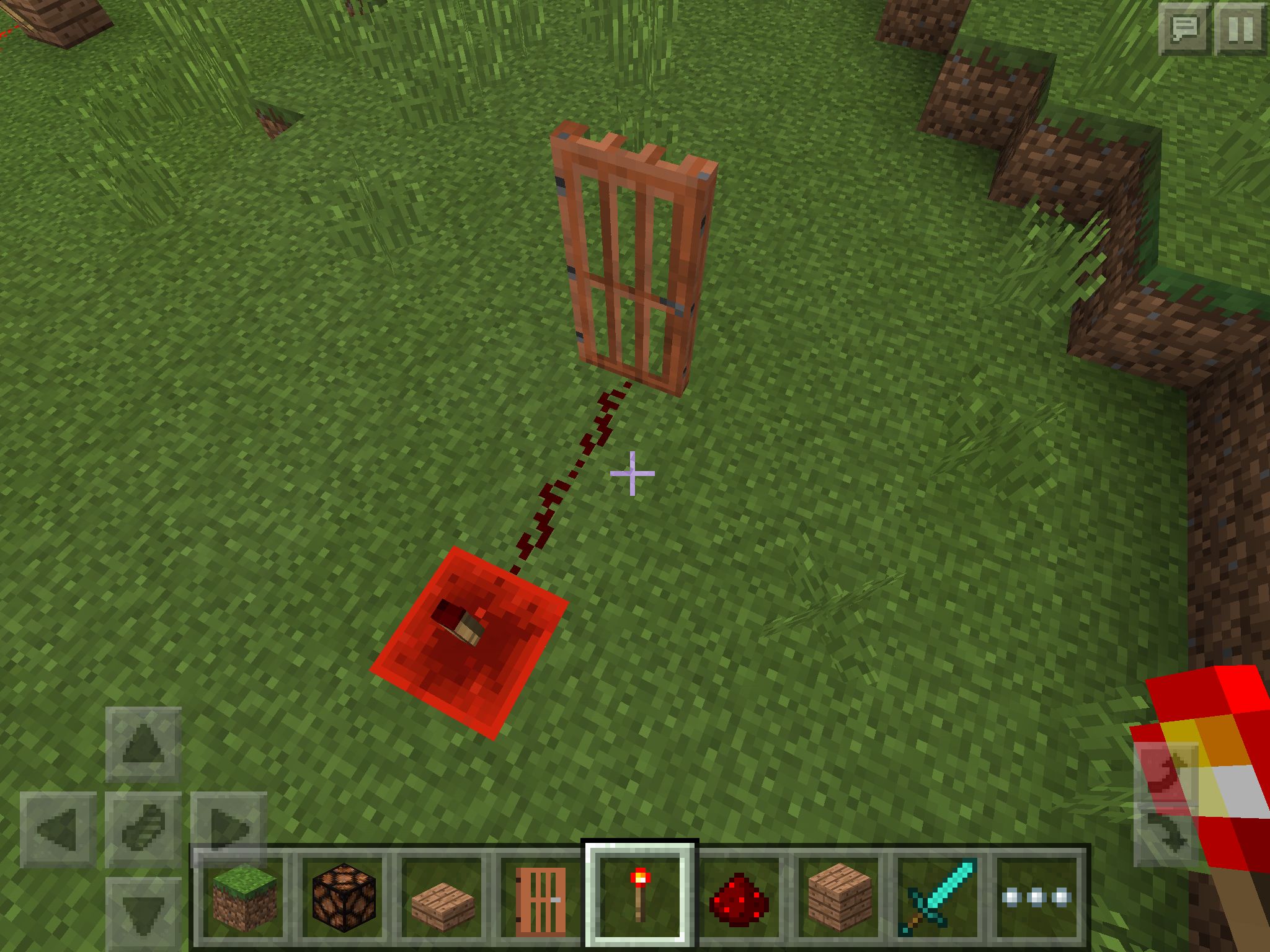
MCPE-11871but soon realized I was wrong. In this setup, torches behave as if they had 1-tick delay for turning off but no delay for turning on. That is,However, this is contrary to(Correction: In my comment toMCPE-11869, which shows that torches have no redstone delay for turning off (despite a visual delay being observable)MCPE-11869I proved that torches have 1 tick delay for turning off). The reason for torches on sides being alternately turned on and off is unexplainable as well, because if my hypothesis above were correct, all of the 4 torches might stay turned on. This may have something to do with the 2nd bug reported inMCPE-11855but I'm not really sure.I investigated this further. First, I wanted to know if the torch put on the redstone block produces any pulse no matter how short it is, so I connected it to a door (shown in pulse-detector-using-a-door.png ) to see if the door produces any sound when the torch is put. To my surprise, the door did produce a sound while it did so without any visible changes. This means the torch emitted a pulse whose length is shorter than 1 tick, otherwise it would initiate the torch clock.
Then I built a circuit shown in torch-taking-1-tick-to-turn-off.png to see if torches take exactly 1 tick to turn off in the general case. It has an AND gate where one of its input is directly connected to a button and another is negated by a torch. When the button is pushed, there will be 1 tick of moment where both inputs being high if and only if the torch takes 1 tick to turn off, producing a 1 tick pulse from the AND gate and thus initiates the clock connected to its output. The result was that the clock did get initiated so the turning-off delay was proven to be 1 tick, at least in this setup.
In my last comment I suspected that torches had no delay to turn on. This was proven to be wrong in the general case by the circuit shown in torch-taking-1-tick-to-turn-on.png . It has a NOR gate where one of its input is directly connected to an activated lever and another is negated by a torch. When the lever is deactivated, there will be 1 tick of moment where both inputs being low if and only if the torch takes 1 tick to turn on, producing a 1 tick pulse from the NOR gate and thus initiates the clock connected to its output. The result was that the clock did get initiated so the turning-on delay was proven to be 1 tick, at least in this setup.
Okay so I created
MCPE-11931andMCPE-11932for the first two glitches as I didn't want them to be forgotten.I investigated this on 0.13.0 / iOS. An activated trapped chest:
This is definitely a bug, but is a duplicate of
MCPE-11353.PEa, PEc1, and PEc2 are duplicates of
MCPE-11871.PEb is a duplicate of
MCPE-11353.This is a duplicate of
MCPE-11931.MCPE-11953might explain why the NOT-AND-clock circuit in MCPE does not work in the Java version. Torches should not respond to pulses shorter than 1.5 ticks in the first place...Great. This may explain issues about weird behavior of torches, e.g.
MCPE-11906.I think it is possible that
MCPE-11953is the source of the glitch.This is a duplicate of
MCPE-11353.This is a duplicate of
MCPE-11353.This issue has been marked as duplicate but duplicates what?
I don't see any open issues in the Issue Links...
A lever on the bottom of a block...?
Could you take a screenshot?
Confirmed on 0.13.0 / iOS. I didn't know levers could be put on the bottom. It turned out that the redstone dust below it was not strictly necessary to cause this glitch. The lever breaks whenever it receives a block update, e.g. placing or breaking anything next to it.
ItsPlantseed, this issue is about compasses suddenly started to point to somewhere not the world spawn. I think it's a bug, not working as intended.
William, I can sense your love for your dog but this is a bug tracker so to get help you need to clarify the following things unambiguously:
From what I understand:
Are these points right?
Fixed in 0.13.1. Thanks.
Fixed in 0.13.1. Thanks.
This issue still affects 0.13.1, but strangely, I can confirm that
MCPE-11871is now fixed. These two issues turned out to be different.Fixed in 0.13.1. Thanks.
Fixed in 0.13.1. Thanks.
Fixed in 0.13.1. Thanks.
Fixed in 0.13.1.
This has been fixed in 0.13.0 or so.
I can't reproduce this in 0.13.1. Has it been fixed?
Can you provide a screenshot of a specific circuit to reproduce the problem? In 0.13.1 they are working correctly for me.
I have found a yet-another-pattern.png of the glitch in 0.13.1. The strangest part of this is that the block powering the dust (the white wool in my screenshot) needs to be powered by a torch. Any other means of strongly-powering the wool, e.g. buttons, levers, or tripwire hooks will not lead to the glitch. And if you replace the block below the erroneously activated torch with a lamp, the lamp gets activated as expected.
Yes, still affects 0.13.1.
The same happens to me in 0.13.1 / iOS:
Isn't it a version exclusive feature mentioned here?
http://minecraft.gamepedia.com/Pocket_Edition_exclusive_features#World_generation
In 0.13.1 squids do spawn in ocean but they are extremely rare. I explored a vast ocean in my world and I found only 3 squids or so.
Yes, still affects 0.13.1 on iOS. I had 3 large chests stacked vertically, and only the topmost one split, so it's very unlikely that chunk boundaries have something to do with this. The glitch is so rare and I don't have any reliable way to reproduce it.
This is a duplicate of
MCPE-11353.Looks like the same glitch as
MCPE-11668.I guess [QA] Janosik mistakenly did that.
It's been fixed in 0.13.1 so you just need to update your copy. See
MCPE-11381Duplicate of
MCPE-11086.This is a duplicate of
MCPE-11353.This relates to
MCPE-11353but is seemingly not the same indeed. This is my comment posted there:Signs are flammable in the pocket edition. Ladders aren't flammable but they are unsuitable for lava blades because they have hitbox unlike signs. See http://minecraft.gamepedia.com/Sign
The reason why signs catch fire only when the lava is removed is that there needs to be air blocks above the signs to be turned into fire blocks.
Hint: Flammable signs don't stop you from making a lava blade suitable for golems. Place 2 iron bars horizontally, 1 block above the ground. Put a lava source somewhere near the bars so that the lava flow stops right above one of the bars. Put another lava source for the other bar.
This is a duplicate of
MCPE-10858. I think the only way to escape there is to switch to creative mode and mine the bedrock. Fortunately (or unfortunately) all of your items in inventory will be lost so it doesn't result in a cheat because you fell into the lava in the first placeOn my iPad 3 the game initially has no lag at all, but it gets slower bit a bit as the duration of time after launching gets longer. I can work around this by quitting and restarting the game so it's not really a problem for me though.
gatharian is not necessarily wrong, because MC 1.9 is not officially released yet. Once it's released, this issue should be reopened as a bug.
[QA] Janosik closed this issue as "Works As Intended" with no explanation why it's intended. I strongly disagree with that because it's certainly behaving differently from the PC version, and since redstone mechanics is a really complicated system, having two different mechanics would not make things better.
[QA] Janosik closed this issue as "Won't Fix" but why? He/she gave us no explanation.
Someone please reopen the issue, or tell us why it's an intended difference. I just can't stand getting it simply ignored and then permanently forgotten.
MCPE-11279is another example which has been dismissed by [QA] Janosik for no apparent reason. There would be no point reporting bugs then.It's probably "Quality Assurance." I hope it's not "Quiet Abandoner"
http://minecraft.gamepedia.com/Daylight_sensor
So if it powers, not only activates, an adjacent redstone lamp in PC then it must be a bug in the PC version.
It's working as intended. An inverted daylight sensor may emit power during the day. See http://minecraft.gamepedia.com/Daylight_detector#Inverted_daylight_detector
There is a similar (if not the same) issue
MCPE-12045.Please reopen this. [QA] Janosik closed it as "Works As Intended" with no explanation why it's intended. Note that there are some other issues (like
MCPE-11953) which has been dismissed that way, rendering the bug report pointless.DanTDM, look at the date in the "Created" field.
MCPE-11679(this one) has been created 1 day beforeMCPE-11713so Owen is right indeedConfirmed on 0.13.1 / iOS. The same thing happens when I replace the top-half slab with a solid opaque block and put a carpet on it. I think this is because carpet has a hitbox of 1/16 of a block, not zero. How does the PC version behave in this situation?
Oh I found the following description in the wiki:
So this is actually a bug in MCPE because 1/2 + 1/16 ≦ 0.6
I just read this page: http://minecraft.gamepedia.com/Carpet
Someone please reopen; this is one of many issues closed by [QA] Janosik for no reason. It's getting harder for me to refrain from saying that what he is doing is something like a vandalism. See this thread for details.
Confirmed on 0.13.1 / iOS. A flower on an unnatural block will turn into an entity when it receives a block update or a random block tick. Why did you try this in the first place? Pretty cool bug.
This is a duplicate of
MCPE-11086, and yes, it affects 0.13.1.Didn't you get affected by a splash potion of weakness during the healing process? If so, it's a consequence of
MCPE-10445.[Mojang] Shoghi Cervantes, I have a favor to ask of you. There are some more issues that have been unnaturally closed by [QA] Janosik and I listed all of them in this thread. I would highly appreciate it if you could check them as well. Thank you for your consideration.
MCPE-9378But wait, the screenshots IMG_1718.PNG and IMG_1720.PNG
 provide something new to
MCPE-11353. Given the fact that apparently duplicatingMCPE-11871turned out to be a different bug, I think it's safer to mark this Related to, not Duplicate ofMCPE-11353.As I commented on this thread, the spawning rule for MCPE seems to be very different from other editions.
That is, it seems hostile mobs don't spawn if there is a player within approx 40 horizontal block distance of a spawning block(correction: it turned out to be wrong. See my comment below). I can't say for certain but vertical distance is seemingly ignored by the rule. This is contrary to the following description in the wiki:I investigated this further and found out that my previous hypothesis only partially applies to the current version, 0.13.1 / iOS (I think things have changed somewhere around 0.12). I built 4 spawn pads of 6x6x2 empty area and measured the spawn rate with various distances from the outer boundary of pads. Render distance set to the maximum, difficulty set to easy, game mode creative, "Always Day" enabled in a flat world:
So vertical distance is indeed ignored (which is a bug) but the horizontal limit seems to be 24 blocks as expected. The reason why the spawn rate decreased when I took far away is probably that some mobs were despawning before I see them getting out of the chamber. So I think despawning rule described in the wiki still applies to MCPE:
You'd better wait for 0.14 update which hopefully comes with hoppers for three reasons:
MCPE-11086for now.Mob caps are supposed to be separately calculated for each type of mobs so the number of nearby villagers should not affect the spawning of hostile mobs. I don't know what actually happens in MCPE though. It's time for you to experiment yourself, and please file a separate issue if you find any oddities
I don't think so. It's a separate glitch
MCPE-11668.Michael Davis, horizontal 55 blocks away is probably too far, at least in the current version. Try 24 blocks as it was the best distance in my experiment.
Confirmed on 0.13.1 / iOS while I'm still not sure whether it's a bug or not. Render distance indeed affects the phenomenon; loaded chunks are rendered darkly (as expected) while unloaded chunks are skipped by the renderer, hence the sky being seen on the horizon. I have a feeling that this isn't really correct because unloaded chunks are rendered this way only when the player is in deep water. If you are just below the water surface, nothing glitchy happens to chunks far away from you.
Duplicate of
MCPE-11086.Duplicate of
MCPE-11362.Works As Intended. Those opaque blocks in your setup are only weakly-powered so they cannot power other redstone dust. See Redstone_circuit#Power
In order to measure those containers, you need to place a comparator in front of a detector rail, and then put those carts on top of the rail. If you did that and still no signal, then that would be a bug.
Attached an image pulser-and-latch.jpg showing a circuit to reproduce the issue without being affected by graphic update lag. The bottom half of it is an RS-NOR latch whose state can be toggled by button "R" and "S". The upper half is a 1-tick pulse generator with button "P".
Steps to reproduce:
What I expected:
The state of RS-NOR latch does not change after pressing the button "P".
What actually happened:
The RS-NOR latch turned into a 1-tick clock, eternally changing its state.
Yes, it affects 0.13.1.
Screenshot attached:
In
MCPE-12534, Nathan said that he encountered this on, apparently, 0.14.0 build 1.That means a lack of quasi-connectivity for those components in MCPE.
Do droppers funnel items in the general case? I mean, what happens if you use a normal chest and an external power source for the dropper?
Sorry for not trying myself; I don't have any Android devices to join the beta test.
No, this is a client issue but is a duplicate of
MCPE-11069.Hmm... There would be five possible consequences when you do that:
I'd like to think that 5 is the sanest. 3 is kinda realistic but would be an overkill. But 1 and 2 are not that weird because they are at least consistent with what happens when you pour a bucket of water into water source. So it is understandable that Mojang chose 1.
What happens if you return to the main menu before closing MCPE?
(Sorry for not testing myself. I don't have any Android devices.)
The same happened to me on 0.12.0 (IIRC). I tried repeatedly opening my world, and at the 5th (or 6th?) attempt it successfully loaded the world without crashing. Since then it no longer crashes.
Shad, the distance Illicidia mentioned is the geographical distance. I mean, when you are far away from your farm, your crops stop growing.
No, that's not true. They are doing their best but they simply don't have unlimited resources. Designing the game, implementing new features, fixing bugs all take time.
Yay. We'll be no longer deadly thirsty and can't resist the temptation of milk
No, AMAN4700. Dispenser in this case should be activated by quasi-connectivity. Though the lack of quasi-connectivity has been in fact already reported as
MCPE-12776."Invalid" for two reasons:
"Works As Intended". A hopper has to be placed on the side of a brewing stand in order to push water bottles. See http://minecraft.gamepedia.com/Hopper
Luis Robles,
MCPE-12562is only slightly related to this. It's not a duplicate.You mean spiders recognize an unloaded chunk as an invisible wall that they can climb on, and when the chunk is loaded the "wall" disappears so they fall down to the ground?
"Duplicate" of
MCPE-12857.Can someone please reopen this? It's mislabeled as Duplicate while it's not, because:
MCPE-12562is about moving items manually from player's inventory to dispenser.Well... pls, didn't you power, not only activate, the dispenser in your setup? Since a dispenser is itself a solid opaque block, it can not only be activated but also powered and thus it can activate a hopper right above it. And if a hopper is activated, it stops transferring items by design.
Relates to
MCPE-12796(but not a duplicate of course).Hmm... If this really were a missing feature, 0.14 creative inventory would still be incomplete. Maybe that's what they are saying, and if so this issue is indeed WAI.
Duplicate of
MCPE-11943, but it's reportedly been fixed in 0.14.0 beta 1. Broken again?"Duplicate" of
MCPE-11405.I have absolutely no idea why, but Jay-Arr Mitante seems to be intentionally duplicating issues:
MCPE-13082duplicatesMCPE-12868.MCPE-13085duplicatesMCPE-12884.MCPE-12395.You are creating extra work for moderators. Just don't do that.
And there are a lot of duplicate issues for exactly the same bug!
Please try to search for existing issues before creating a new one.
Look,
MCPE-13064has been duplicated 14 times already"Duplicate" of
MCPE-9869. Search for "mcpe unresolved painting" before creating a new issue.This somewhat relates to
MCPE-10858but I think it's not the same. Here's my hypothesis:MCPE-10858.This has been marked as "Fixed" in Future Release but it still appears in 0.13.2 / iOS. I don't know about 0.14.0 beta because I have no Android devices.
Thanks for your info. I'm very curious about what was the cause of this strangest bug
I strongly believe that this is "Works As Intended". A chest block in PC edition does not know whether it is forming a large chest with an adjacent one. The game instead considers two adjacent chest blocks as a one large chest. So when there were 3 chest blocks lying alongside, the game would have no idea how to connect them, hence the awkward restriction. On the other hand, chests in MCPE apparently have enough data themselves whether to form a large chest, which is certainly a good improvement.
Interesting. I guess if you did it in Nether, you'd be able to ascend on top of the bedrock layer.
This turned out to be a duplicate of
MCPE-9689. Sorry.I can confirm this on 0.13.2 / iOS.
jp:
en:
"Relates to", but not "Duplicates"
MCPE-12857."Works As Intended". Inverted daylight sensors do emit signal even in the daytime. It just weakens the power of signal depending on the in-game time and weather. See http://minecraft.gamepedia.com/Daylight_Sensor#Inverted_daylight_detector
I don't see any problems here. Signs are indeed flammable in MCPE, but every flammable blocks needs an adjacent air block to catch fire, because there would be no air to be turned into a fire block otherwise.
Clouds should not appear in dry biomes like savannah. What's weird is that it shouldn't rain at all in those biomes.
Beach is a beach biome and is not dry/warm so it can rain there. I assume this is "Works As Intended" then.
蔡珮妤, that's indeed an incorrect behavior. I think it's a duplicate of
MCPE-13417.If I understand correctly, what you are seeing has already been reported as
MCPE-13417.Well... I'm not sure whether this is the case, but it's possible that the concept of willingness has been introduced in 0.14. Did you try giving them some food?
Matt S is right. This is "Works As Intended".
Never mind, that happens often.
Btw this "Relates to"
MCPE-13270andMCPE-13413but it is possible that they are all the same bug."Duplicate" of
MCPE-11381. Search for existing reports before posting a new one.Still affects 0.14.0 / iOS.
This is actually fixed in 0.14.0 / iOS. Thanks.
Fixed in 0.14.0. Thanks.
I can confirm that this is fixed in 0.14.0 / iOS. Thanks.
Yes, this is fixed in 0.14.0 alpha. I think [Mojang] MissMarzenia (Aleksandra Zajac) has mislabeled it.
Cannot reproduce in 0.14.0 alpha. It seems to be fixed.
Confirmed in 0.14.0 alpha.
Can you provide a screenshot? I can't figure out how to reproduce it.
Cannot reproduce in 0.14.0 alpha.
Confirmed in 0.14.0 alpha. An activated, but not powered, locked repeater becomes inactive when the world gets reloaded.

Confirmed in 0.14.0 alpha.
That happened to me just once. I was about to create an issue for this, but when I quit the application and restarted, the glitch somehow went away.
Yes it's inconsistent. I completely agree with 8times9. But since the creative inventory is still a work in progress, it is very likely that devs are aware of this inconsistency and will fix it later.
Yes, 0.14.0 alpha runs noticeably faster than previous versions. Redstone update lag, from which I was sufferring, has almost completely gone. It's really awesome.
Signs have always been flammable, and presumably by design. I personally don't want signs to burn though...
I investigated this further. The glitch doesn't occur when the hoppers are cascaded vertically. And for horizontal hopper pipes, the glitch sometimes occurs and sometimes not. More specifically, a perfectly working horizontal pipe may stop working after reloading the world, and if you reload it again the pipe may start working correctly. So,
Steps to reproduce:
What actually happens:
There should be a moment where all of the three comparators are activated, but sometimes that doesn't happen.
My hypothesis is as follows (TL;DR):
Suppose we had 2 items X and Y in the chest α, and hopper A were to be processed first, then B, then C.
At the game tick t = 0,
At t = 1,
At t = 8,
At t = 9,
At t = 15,
At t = 16,
At t = 24,
At t = 32,
At t = 40,
At t = 48,
"Works As Intended". Comparators do not measure a chest which can not be opened. The same thing would happen if there were a cat on the chest. See http://minecraft.gamepedia.com/Comparator#Containers
"Works As Intended". See http://minecraft.gamepedia.com/Comparator#Containers
Fixed in 0.14.0 alpha. Thanks.
Fixed in 0.14.0 alpha.
Fixed in 0.14.0 alpha.
The glitch came back to 0.14.0 alpha. Please reopen this.
"Duplicate" of
MCPE-13281.@Kabir Oberai only moderators, unfortunately
Not fixed in 0.14.0 alpha.
"Works As Intended". A glowstone block is transparent so it can only transmit power upwards, but not downwards. It's just like a top-half slab.
@[~rcrick4@gmail.com] Oops, I didn't know that. You're right, it indeed works that way. "Fixed" in 0.14.0 alpha.
Just a single report for one bug is enough for them to fix it. Duplicating reports only make matters worse.
I don't think minecarts gone that far are supposed to move because chunks having those carts are unloaded.
"Duplicate" of
MCPE-13644.Confirmed in 0.14.0 alpha. To see it's not a torch that is causing the bug, I experimented with a structure shown in the screenshot below. The result was the same so the bug is definitely in comparators:

There is a water bucket in the dispenser. The hopper and the chest both have some random items. As long as there is at least one item in the chest, it prevents hopper from pushing items to the dropper. But after reloading the world, an item in the hopper somehow moves to the dropper and activates the dispenser, which means the state of comparator (powered or not) is not saved.
Glen Sydenham, that's exactly what I'm seeing, and now it's very clear that it's a "Duplicate" of
MCPE-13417. I've posted a detailed analysis there.The frequency of random crash has significantly grown in 0.14.0 alpha compared to 0.13.x. As a software engineer, I am sorely aware that fixing these kind of bugs is nearly impossible unless a crash dump is available. Mojang, I genuinely recommend that you implement a feature that produces a crash dump (containing at least a stacktrace and contents of registers for each thread) and automatically sends it to your server with possibly a user's permission.
Confirmed in 0.14.0 alpha. Glass and redstone dust prevent growth of grass too. It is possible that all of transparent blocks have the same problem.