Pistons, droppers, dispensers, observers, & redstone lamps become stuck in an on or off-state & act like solid/opaque blocks until world-reload
Sometimes, when you load up a world, a couple random pistons, dispensers, droppers, observers, and/or redstone lamps will be stuck in either their on or off state, and will not change state until broken, pushed, pulled, or upon reloading the world. The blocks also act as if they were just normal non-rs-component solid/opaque blocks. This means that pistons will be able to pass a redstone signal through them via dust & a repeater, and the blocks will not be affected by any redstone-component-specific bugs like MCPE-18114. This bug is difficult to reproduce since it seems to be somewhat random as to when it occurs, but it tends to happen to the same particular blocks when testing.
Linked Issues
is duplicated by6
 MCPE-17354Piston / Dispenser / Dropper Becomes Stuck in On or Off State & Acts Like Solid/Opaque BlockDuplicateMCPE-18712Rail Detector Powers On It Self When Minecarts Are Not ThereDuplicateMCPE-23094Pistons gets stuck and doesn't react to redstone!DuplicateMCPE-28376Pistons stop working after signing offDuplicateMCPE-29169Redstone items cease to work, works after replacingDuplicateMCPE-31287Lever And Buttons BugDuplicate
relates to6
MCPE-38630Powered Rail IssueCannot ReproduceMCPE-48054Redstone dust on chunk borders can lose ability to power block in adjacent chunk, when reloading an areaFixedMCPE-17476Pressure plates not working properlyCannot ReproduceMCPE-18042Failing RepeatersCannot ReproduceMCPE-18570Schrodinger's SteveWorks As IntendedMCPE-19779Observer returns signals and locks buttonFixed


![[Mojang] Mega_Spud (Jay Wells)](../../../data/avatars/users/92696.png)


Created Issue:
Piston thinks that it is a full block sometimes
Sometimes, piston does not extend when it is powered or does not retract when it is unpowered. You may find this situation only when loading into the world, but it may not happen sometimes. When you run a powered redstone dust into the bug piston and take a repeater output from the bug piston, the repeater will turn on for whatever reason, which means that piston actually thinks that it is a full block when the piston is 'Bugged'.
- Unresolved
- Open
- Minecraft - Public
- Unconfirmed
- Tablet - Android - Samsung Galaxy Tab 3
- 0.15.9
![[Mojang] Adrian Östergård](../../../data/assets/gravatar/nighter.jpeg)
is duplicated by

Sometimes, piston does not extend when it is powered or does not retract when it is unpowered. You may find this situation only when loading into the world, but it may not happen sometimes. When you run a powered redstone dust into the bug piston and take a repeater output from the bug piston, the repeater will turn on for whatever reason, which means that piston actually thinks that it is a full block when the piston is 'Bugged'.
This also affects droppers/dispensers as well. See: https://redd.it/55pbt1
Pistons, droppers, dispensers thinks that it is a full block sometimes and does not work
Sometimes, piston does not extend when it is powered or does not retract when it is unpowered. You may find this situation only when loading into the world, but it may not happen sometimes. When you run a powered redstone dust into the bug piston and take a repeater output from the bug piston, the repeater will turn on for whatever reason, which means that piston actually thinks that it is a full block when the piston is 'Bugged'.
This also affects droppers/dispensers as well. See: https://redd.it/55pbt1
For pistons:
Sometimes, piston does not extend when it is powered or does not retract when it is unpowered. You may find this situation only when loading into the world, but it may not happen sometimes. When you run a powered redstone dust into the bug piston and take a repeater output from the bug piston, the repeater will turn on for whatever reason, which means that piston actually thinks that it is a full block when the piston is 'Bugged'.
For droppers and dispensers:
Sometimes, droppers and dispensers does not do anything when it is powered by any redstone compoment, which has an exactly similar feature as the piston bug. Check out more here:https://redd.it/55pbt1This also affects droppers/dispensers as well. See: https://redd.it/55pbt1
For pistons:
Sometimes, piston does not extend when it is powered or does not retract when it is unpowered. You may find this situation only when loading into the world, but it may not happen sometimes. When you run a powered redstone dust into the bug piston and take a repeater output from the bug piston, the repeater will turn on for whatever reason, which means that piston actually thinks that it is a full block when the piston is 'Bugged'.
For droppers and dispensers:
Sometimes, droppers and dispensers does not do anything when it is powered by any redstone compoment, which has an exactly similar feature as the piston bug. Check out more here: https://redd.it/55pbt1This also affects droppers/dispensers as well. See: https://redd.it/55pbt1
For pistons:
Sometimes, piston does not extend when it is powered or does not retract when it is unpowered. You may find this situation only when loading into the world, but it may not happen sometimes. When you run a powered redstone dust into the bug piston and take a repeater output from the bug piston, the repeater will turn on for whatever reason, which means that piston actually thinks that it is a full block when the piston is 'Bugged'.
For droppers and dispensers:
Sometimes, droppers and dispensers does not do anything when it is powered by any redstone compoment, which has an exactly similar feature as the piston bug. Check out more here: https://redd.it/55pbt1
For pistons:
Sometimes, piston does not extend when it is powered or does not retract when it is unpowered. You may find this situation only when loading into the world, but it may not happen sometimes. When you run a powered redstone dust into the bug piston and take a repeater output from the bug piston, the repeater will turn on for whatever reason, which means that piston actually thinks that it is a full block when the piston is 'Bugged'.
For droppers and dispensers:
Sometimes, droppers and dispensers does not do anything when it is powered by any redstone compoment, which has an exactly similar feature as the piston bug. Check out more here: https://redd.it/55pbt1
Pistons, droppers, dispensersthinks that it is a full block sometimes and does not workPistons, droppers, dispensers, & redstone lamps become stuck in an on of off-state until world-reload
Pistons, droppers, dispensers, & redstone lamps become stuck in an on ofoff-state until world-reloadPistons, droppers, dispensers, & redstone lamps become stuck in an on or off-state and act like solid/opaque blocks until world-reload
For pistons:
Sometimes,piston does not extend when it is powered or does not retract when itis unpowered. You may find this situation only whenloadingintothe world.When you run a powered redstone dust into the bug piston and take a repeater output from the bug piston, the repeater will turn on for whatever reason, which means that piston actually thinks that it is a fullblock when the piston is 'Bugged'.
For droppers and dispensers:
Sometimes, droppers and dispensers does not do anything when it is powered by any redstone compoment, which has an exactly similar feature as the piston bug. Check out more here:https://redd.it/55pbt1Sometimes, when you load up a world, a couple random pistons, dispensers, droppers, and/or redstone lamps will be stuck in either their on or off state, and will not change state until broken, pushed, pulled, or upon reloading the world. The blocks also act as if they were just normal non-rs-component solid/opaque blocks. This means that pistons will be able to pass a redstone signal through them via dust & a repeater, and the blocks will not be affected by any redstone-component-specific bugs like
MCPE-18114. This bug is difficult to reproduce since it seems to be somewhat random as to when it occurs, but it tends to happen to the same particular blocks when testing.
relates to
is duplicated by
relates to

Pistons, droppers, dispensers, & redstone lamps become stuck in an on or off-stateandact like solid/opaque blocks until world-reloadPistons, droppers, dispensers, observers, & redstone lamps become stuck in an on or off-state & act like solid/opaque blocks until world-reload
Sometimes, when you load up a world, a couple random pistons, dispensers, droppers, observers, and/or redstone lamps will be stuck in either their on or off state, and will not change state until broken, pushed, pulled, or upon reloading the world. The blocks also act as if they were just normal non-rs-component solid/opaque blocks. This means that pistons will be able to pass a redstone signal through them via dust & a repeater, and the blocks will not be affected by any redstone-component-specific bugs like
MCPE-18114. This bug is difficult to reproduce since it seems to be somewhat random as to when it occurs, but it tends to happen to the same particular blocks when testing.
relates to
relates to
is duplicated by
is duplicated by
relates to
![[Mod] bemoty](../../../data/avatars/users/50554.png)
is duplicated by
is duplicated by
relates to
![[MCPE Mod] Dr.Awesome4333](../../../data/assets/gravatar/drawesome4333.png)
relates to
![[Mod] OcelotOnesie](../../../data/avatars/users/43220.png)
relates to

EDIT 2: I just tested, and when pistons get stuck, they act like solid/opaque blocks, meaning you can send a pulse through them and have a repeater pick up the signal on the other end, which doesn't normally happen! this means that this bug is actually the same thing as MCPE-17304! I think the mods should merge the 2 issues, since they are one and the same.
EDIT: Apparently this also affects droppers/dispensers as well. See: https://redd.it/55pbt1
So I tried to activate a random sticky piston in my world and it just wouldn't activate, even after giving it block updates, breaking the block above the piston that it was supposed to push, breaking and moving the lever that was supposed to power it, placing a redstone block next to it, and trying all sorts of ways to power it. After relogging, the piston started working again. I have no idea what caused this bug or how to reproduce it, but luckily I was smart enough to start recording when the bug happened. It happened again later on to the same piston, but I could never reproduce it consistently or with any other pistons in my world. Note that I never broke the piston that was behaving weirdly.
I'm sorry that this bug report is so vague, but I honestly have no idea why this happened or how to reproduce it. If anyone has any idea why this might have happened, please let me know... I haven't got a clue as to what would cause this to happen, other than improper world-loading, in which case this might be related to MCPE-13608 and/or MCPE-14233.
Other Redstone components becoming 'locked ' is described at MCPE-17304, I've added a link to this ticket.
Thank you for your report!
However, this issue has been closed as a Duplicate of MCPE-17304.
It has been linked to this report. If you have additional information, please add it to that report.
Please search before reporting, as it's likely that one exists already.
Quick Links:
📓 Issue Guidelines – 💬 Community Support – 📧 Feedback – 📖 Game Wiki
Thank you for your report!
However, this issue has been closed as a Duplicate of MCPE-17304.
It has been linked to this report. If you have additional information, please add it to that report.
If you have not, please search before reporting, as it's likely that one exists already.
Quick Links:
📓 Issue Guidelines – 💬 Community Support – 📧 Feedback – 📖 Game Wiki
Related to MCPE-17304, MCPE-29169.
Thank you for your report!
However, this issue has been closed as a Duplicate of MCPE-17304.
Your additional information and observations are very useful, so if you can add them to the comments section of the parent issue it would be appreciated.
If you have not, you might like to make use of the search feature before making a new ticket, as it's likely that the issue has been reported already.
Quick Links:
📓 Issue Guidelines – 💬 Community Support – 📧 Feedback – 📖 Game Wiki
Relates to MCPE-17304.
Duplicate of MCPE-25937.
Thank you for your report!
However, this issue is a Duplicate of MCPE-17304.
If you have additional information, please add it to that report.
Please search before reporting, as it's likely that one exists already.
Quick Links:
📓 Issue Guidelines – 💬 Community Support – 📧 Customer Support – 📖 Game Wiki
Thank you for your report!
However, this issue has been closed as a Duplicate of MCPE-17304.
Your additional information and observations are very useful, so if you can add them to the comments section of the parent issue it would be appreciated.
Quick Links:
📓 Issue Guidelines – 💬 Community Support – 📧 Feedback – 📖 Game Wiki
This likely relates to (if not the same as) MCPE-17304.
![[Mod] GoldenHelmet](../../../data/avatars/users/18951.svg)
The issue with repeaters experienced by the reporter might have been the same issue underlying issue covered by MCPE-17304. I could not reproduce in 1.14.30 with dust going into or out of a repeater using the steps detailed in MCPE-48054 for dust-block connections across chunk borders.
It looks like a similar bug was reported in MCPE-17304 for other redstone components and fixed some time ago.
This sounds like MCPE-17304, which was fixed some time ago. However, there is still a bug with redstone dust pointing into opaque blocks across chunk borders, which is being tracked at MCPE-48054. If this is still an issue, could you upload a picture of your build, or a test world for examination?
I believe 77Tigers is correct. This is the picture he’s provided:
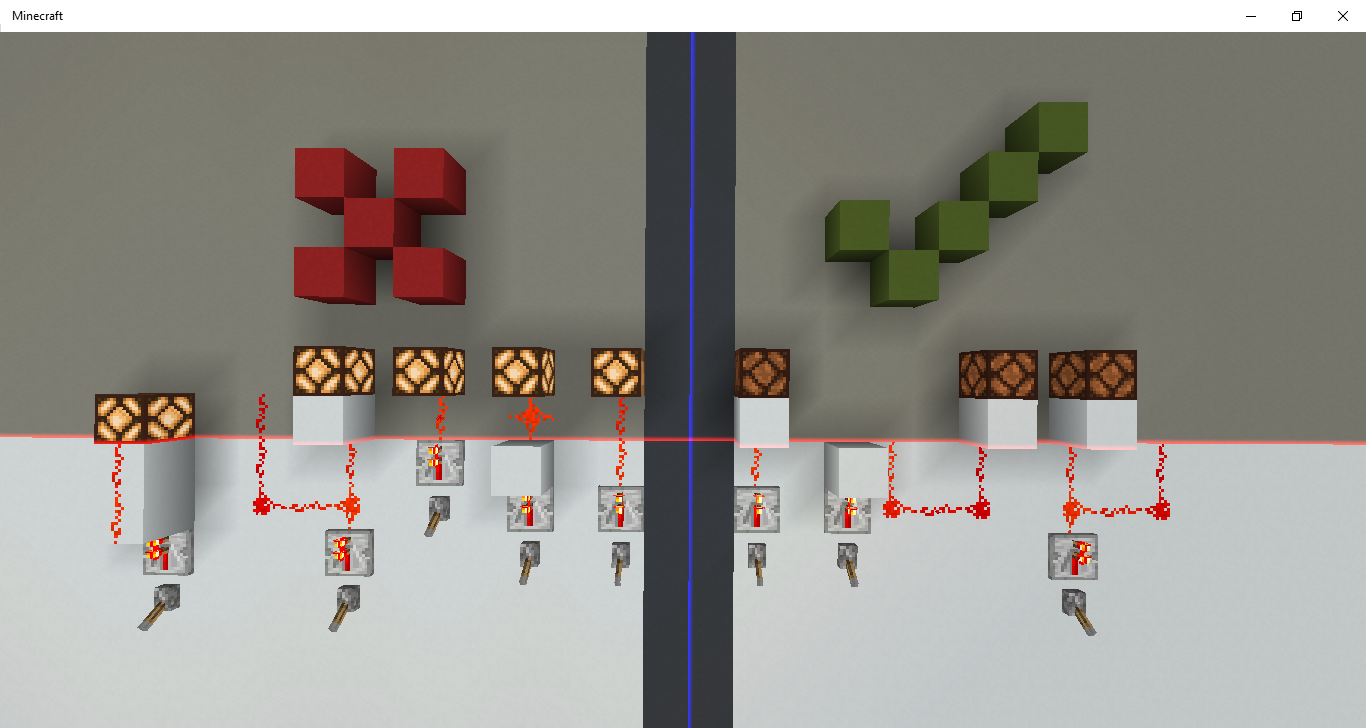
The common factor in the bugged circuits on the right is actually tripartite:
- The dust points across a chunk border into a solid block,
- The chunk with the solid block loads after the chunk with the dust, and
- The power source is not linked to any other redstone component across the chunk border.
The second properly updated circuit from the left of the picture shows the necessity of condition (3) above. In this circuit the redstone dust in the gray chunk apparently triggers remapping of the redstone power connections upon chunk loading as described by 77Tigers.
This also suggests that the cause of the buggy behavior lies in the game failing to treat solid blocks as potential redstone consumers/connectors when it loads the gray chunks. My earlier conclusion that The bug is in the dust not the block.mp4
was based on the fact that updating the dust updated the connection. However, it is now clear that you must Update nearest power source to update connect.mp4 (you can even Update behind nearest power source.mp4 if it powers in that direction). So now it appears that the bug is in the redstone remapping that occurs with chunk loading not taking proper account of solid blocks on chunk borders. Probably the fix for MCPE-17304 remains relevant in that whatever was done to fix that for components failed to include solid blocks. The fixes suggested by 77Tigers seem better though, especially the first–just have adjacent chunks remap redstone connections from their producers after any chunk loads.
I just tested, and this bug is actually the SAME thing as
MCPE-17354! :O (Also, affects 0.15.10.)This bug has been reported to our internal bug tracker for further testing and a fix. It is scheduled to be fixed in one of the future updates (no specific date can be provided).
Thanks for closing my duplicate issue! Please update the description/title to reflect the fact that this bug also affects droppers & dispensers as well!
Also it only affects specific pistons and every time the bug happens, it will apply on the specific pistons ONLY. Kind of weird.
Reloading the world also fix the bug. Or, just simply break the corresponding redstone compoment and replace it back.
Affects 0.17.0.1. Also confirmed to affect redstone lamps. I'm guessing it probably affects note blocks, too, since they are also a redstone component block, but I haven't actually found a case of the bug happening with those yet as I haven't tested for them.
Attached a World save with a piston that becomes 'stuck'.
Open the world and toggle the lever, the top piston remains unresponsive, unless it is broken or replaced, or the obsidian is broken near to it.
While it looks like the same bug, this is actually at least two bugs squashed into a single ticket.
I have just made a fix that fixes: Pressure plate, tripwire, redstone lamp, detector rail, buttons and probably dispensers and droppers as well. What separates these from some others in this ticket is that these would not get fixed by reloading the world. In fact, what was causing this issue was the actual saving of the world. Reloading wouldn't fix it since the saved state is broken.
Pistons however is a completely different chapter.
Observers also.
The bug with pistons still happens in 1.1.2, with more than 20 at the same time
true,I put slime block on sticky piston
Cannot reproduce as of 1.2.5.15
I am having this same sort of problem with pistons on Windows 10 v1.2.5. It also seems to affect redstone torches too.
Torch in its default state:

Button was pushed and torch signal should be inverted, but it is not:

Justin Reschke, could you provide a world download and/or some screenshots showing the surrounding circuitry? Is the issue with that particular redstone torch still occurring or did it start working again after a world reload? Does breaking and placing it fix the problem? Do you know an easy way to reproduce this behavior? Also, did you recently crash the game while playing on that world? Because that could be related to the redstone torch (and other redstone components) getting stuck in a certain state.
It seems when I load into my world it has about a 50% chance that the torch is stuck in that state. It seems to randomly change from a working state to the bugged state and vice versa just by reloading the world. I can also force it to work by breaking & replacing the affected blocks/components. But the next time I load the world there is that chance that it will not be working. It does not seem to be required to crash the game to make the redstone fail, but in case it is relevant, the crash I experience most often is when I play in fullscreen mode and then I switch applications, the game usually crashes when I switch back to Minecraft. So I just try to remember to play in windowed mode
It is probably best that I just include a copy of my world. The link to download it is here
The coordinates for the affected area are in the screenshots below.
The circuit is housed in an elevator I built for Elytra flight, it only goes up.

I have put some signs up on the affected blocks.

In the same circuit I have another block that sometimes seems to have an issue. However, it doesn't seem to happen as often as it does with the torch. The red concrete block that the cursor is over in this screenshot has the issue, although it might be more likely that it is the piston on the other side of it that may be at fault. In order to fix the issue I simply break and replace the block on each level of the elevator. This block may be difficult to test for bugs because I don't seem to be able to reproduce this specific issue very often.

Confirm Justin Reschke's downloaded world exhibits the problem described for the torch and red concrete blocks.
Tested in Windows 10 1.2.5.52.
In a first set of tests, I did a fresh import of the world save file each time. All 10 of these tests exhibited the problem of the redstone torch not turning off. I reimported the world a number of times during later testing and it continued to exhibit the problem. Then, suddenly, on one import everything worked. For me, the imported world seems to have the problem 90% or more of the time.
In a subsequent set of tests, I started with a freshly imported copy of the world. Then I saved and reloaded the world and tested the button. In a majority of these tests (> 80%), the reloaded world also exhibited the problem.
I did a final test against another freshly imported copy, I broke the torch and replaced it. This allowed the activation signal to propagate up the tower. By watching the pistons' behavior, I was able to determine that the problem with the red concrete blocks next to the pistons was still present, and if I fixed the problem for one of these it did not heal the other pistons.
I notice that the torch and its attachment block (which is also the button's attachment block) lie on opposite sides of the Z = -224 chunk boundary plane. The same plane separates the repeaters and the red concrete blocks that power the failing pistons. The direction of activation flow across the boundary is opposite for these two pairs of components. However, the signal that propagates the activation from one level to another also crosses this chunk boundary, and it's impossible to test whether that path is also broken because any method you use to insert a probe signal might heal the problem the same way breaking and replacing the redstone torch does.
The coordinate Z = -224 is also used as the boundary for the ticking area named SlimeFarm. However, removing the ticking area did not seem to make any difference, either immediately or after saving and reloading the world, so this is likely a coincidence.
I tested this in 1.2.10.2 on Windows 10 using the "Stuck Piston.mcworld" file. The piston is indeed stuck in the saved file, but I couldn't get it to get stuck again after saving and reloading about 10 times. However, I did notice that after you flip the toggle lever a couple of times, the top piston is no longer synchronized with the other two in terms of when it extends. This indicates a completely different problem with timing, which might be a different bug.
Unfortunately, the original reporter's world which I had tested before is no longer available at the link he provided, so I couldn't test that.
Thank you for your report!
However, this issue has been temporarily closed as Awaiting Response
Is this still an issue in the latest version?
If so, could you please include a copy of the world that is affected?
This ticket will automatically reopen when you reply.
Quick Links:
📓 Issue Guidelines – 💬 Community Support – 📧 Feedback – 📖 Game Wiki
I am no longer seeing the issue. I re-tested the same world in the latest version 1.2.13 and the redstone worked as it should even after re-loading the world many times.
Resolving the ticket as fixed based on the comments above.