 MCPE-81987
Rails aren't always powered correctly
Rails sometimes aren't powered correctly and large sections of rail can be left unpowered.
Steps to reproduce
- Build this:
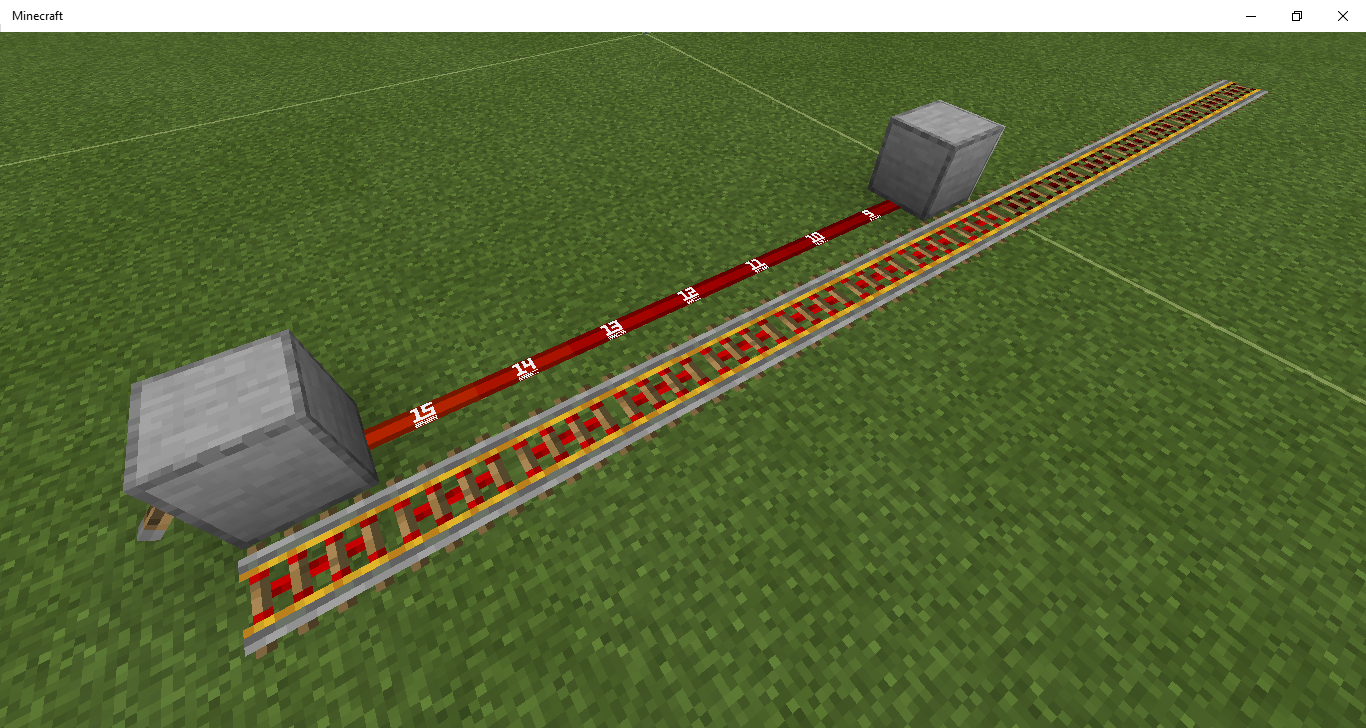
- Be sure to put the lever on the side of the block toward the front of the picture, not on the top of the block.
Expected results
The farther away block in the picture activates 8 more rails beyond it.
Actual results
The blocks beyond the farther away block are not activated. However, if you put the lever on top of the closer block instead, or if you place a rail next where the lever is in the picture, then the farther away block does activate 8 more rails beyond it.
Notes
Related to MCPE-81981
I believe this is a problem with the power sources calculating what they're powering, not the rails, as with 2 power sources it works.
Note that this is not related to chunk borders.
Linked Issues
![[Mod] GoldenHelmet](../../../data/avatars/users/18951.svg)

Created Issue:
Rails aren't always powered correctly
Rails sometimes aren't powered correctly and large sections of rail can be left unpowered.
Attachments1
Rails sometimes aren't powered correctly and large sections of rail can be left unpowered.
Rails sometimes aren't powered correctly and large sections of rail can be left unpowered.
Rails sometimes aren't powered correctly and large sections of rail can be left unpowered.
Related to
MCPE-81981
Rails sometimes aren't powered correctly and large sections of rail can be left unpowered.
Related to
MCPE-81981I believe this is a problem with the power sources calculating what they're powering, not the rails, as with 2 power sources it works.
Rails sometimes aren't powered correctly and large sections of rail can be left unpowered.
Related to
MCPE-81981I believe this is a problem with the power sources calculating what they're powering, not the rails, as with 2 power sources it works.
Note that this is not related to chunk borders.
Powering paradox.mp4
Rails sometimes aren't powered correctly and large sections of rail can be left unpowered.
Related to
MCPE-81981I believe this is a problem with the power sources calculating what they're powering, not the rails, as with 2 power sources it works.
Note that this is not related to chunk borders.
Rails sometimes aren't powered correctly and large sections of rail can be left unpowered.
Steps to reproduce
- Build this:
- Be sure to put the lever on the side of the block toward the front of the picture, not on the top of the block.
Expected results
The farther away block in the picture activates 8 more rails beyond it.
Actual results
The blocks beyond the farther away block are not activated. However, if you put the lever on top of the closer block instead, or if you place a rail next where the lever is in the picture, then the farther away block does activate 8 more rails beyond it.
Notes
Related to
MCPE-81981I believe this is a problem with the power sources calculating what they're powering, not the rails, as with 2 power sources it works.
Note that this is not related to chunk borders.
![[Mod] OcelotOnesie](../../../data/avatars/users/43220.png)
relates to
![[MCQA] Kinga Izdebska](../../../data/avatars/users/18949.svg)

Is it happen in 1.16.1?

relates to
There are some problems with how signal strength is calculated and displayed. Often the signal strength is 1 higher visually or 1 lower in reality. Near the end of the redstone line the signal strength can visually jump from 2 to 0, despite the signal strength being differently mechanically.
This only happens when the redstone line runs past both the block the power source is powering and directly next to the power source itself, and the power source is powering the block from the side. Note that this is very directional and can only decrease the power level by one.
Steps to reproduce:
- Attach a lever to the side of a solid block and power it.
- Run redstone dust underneath the block and the lever.
- Place a comparator next to the dust underneath the solid block
- Note that the signal strength from the comparator is 14, despite that dust visually having a singal strength of 15 (note: I used a resource pack for this).
- Run a redstone line from that dust and note that most of the signal strengths (visually) are one higher than they should be, although it jumps from 2 to 0 at the end.
- Run comparators from that redstone line. You'll find the signal strengths from those comparators go something like this: [14, 13, 12, 11, 10, 9, 8, 7, 6, 5, 4, 3, 2, 1, 1, 0]

You could also use the test world provided (Issues with signal strength.mcworld ). It's probably easier.
Expected results:
I would expect the signal strength to match visually and mechanically, as well as actually being correct.
Actual results:
The signal strength is 1 higher visually and 1 lower mechanically (although if you extend the redstone line the other way that half works fine).
Visually: 15, 15, 14, 13, 12, 11, 10, 9, 8, 7, 6, 5, 4, 3, 2, 0
Mechanically: 14, 13, 12, 11, 10, 9, 8, 7, 6, 5, 4, 3, 2, 1, 1, 0
Notes:
This seems to be related to MCPE-81987
Also, I would highly recommend using a resource pack which numbers the redstone dust based on signal strength while investigating this issue (at least when fixing it visually). There's one in my test world (hopefully).
Possibly caused by the fix to MCPE-81987.
Is it happening next to chunk boarder only?
no, it happens anywhere in the world.
I am not able to reproduce this in 1.14.60. When I build what is shown in the picture, the second block powers 8 more rails beyond its position. I’ve tried several combinations of block placement order and using commands vs regular block placement. Is there a special process you used to set up what is shown in the picture?
I assumed this affected 1.14.60, because 1.14.60 was affected by a similar issue, but perhaps not.
EDIT: just asked someone to test and it does in fact affect 1.14.60
The lever has to be on the side of the block btw. It may well be directional. There's no special process I used to set it up.
Ok I've reproduced it now. I must have had the lever on top of the block.
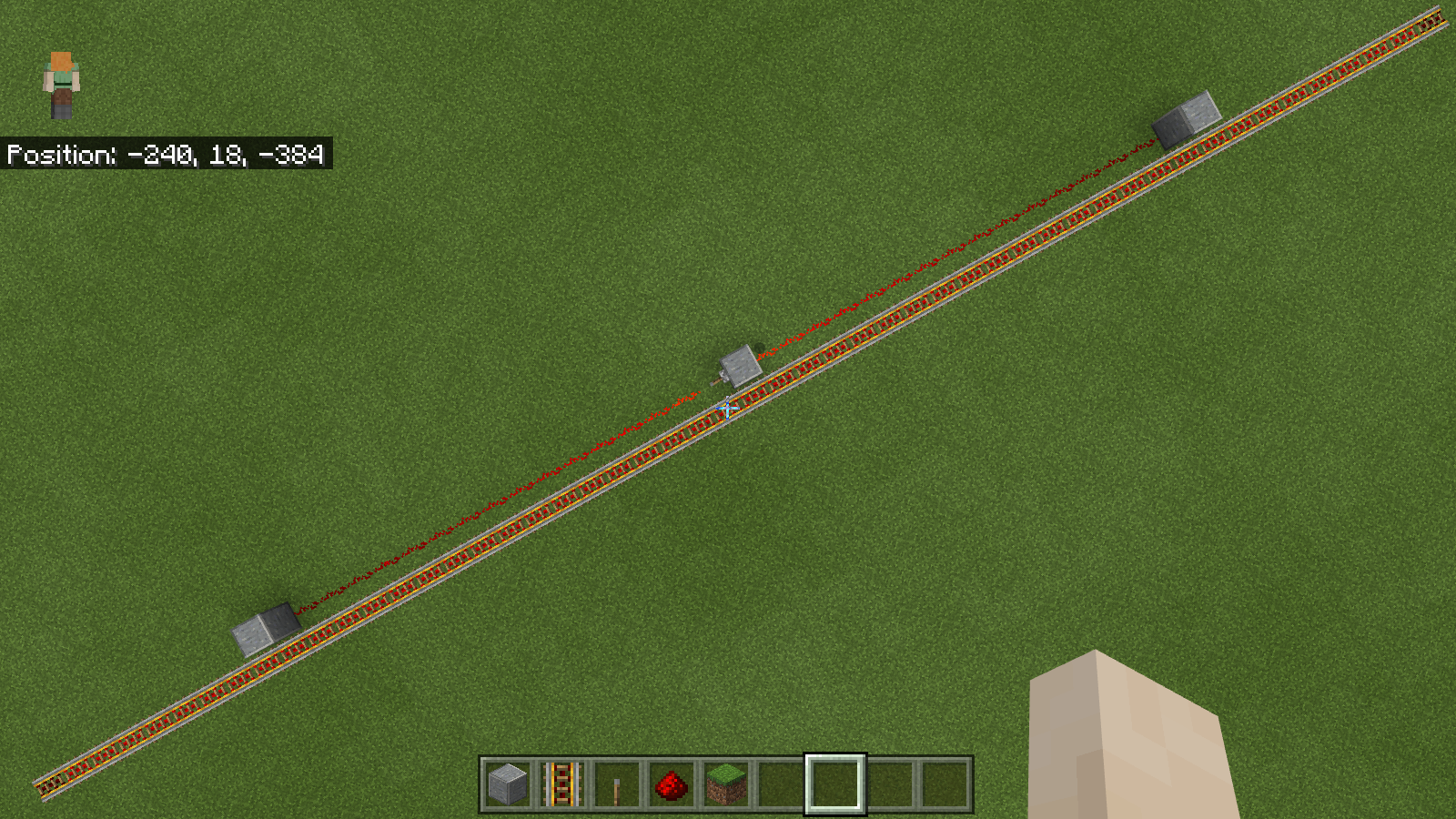
It looks like the game begins power mapping from a producer and then when it finds a connection to a powered rail it activates 8 powered rails in each direction from the powered rail that makes the shortest connection to the producer. That's at least logical and limits each producer to activating a maximum of 17 rails (rather than 44 or so), although it does create some strange behavior, see Apparent powering paradox.mp4 .
.
What I can't explain is why, in the picture you've shared, the lever on the side of the block causes only that block to be treated as a producer for powered rail activation, while putting a lever on top of the block causes the block downstream to be treated as a producer. This is what I'd say is the real bug:

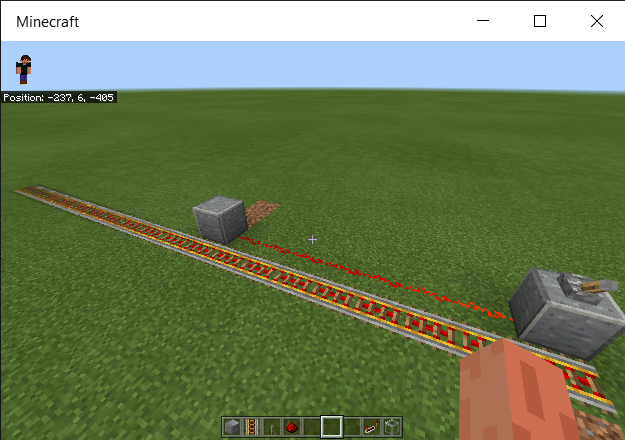
And this is where I see a real paradox:
That is really wierd. It looks like direct contact with the lever from the rails stops this issue from occuring.
Because the issue only occurs when powering a block from the side (as far as I know), I linked it to
MCPE-81981. There are other issues with powering blocks from the side.I would also like to point out that rails are powered slightly differently than usual, because of the fact that you can power multiple rails at once.
I think I see what happened there now. If you power any of the unpowered rails with that same power source then it will still work. Placing a rail there results in one more rail becoming unpowered and powered by the redstone line instead, as seen in this video
I was able to reproduce in east and west directions.
You can power 49 rails with 1 lever:

Amending my earlier finding,
What I think actually happens is
In the original picture shown in the description, the downstream block is at the 8th powered rail from the powered rail activated by the powered block, so it is ignored. When you place a powered rail next to the lever, then the lever activates that powered rail directly (since that's now the shortest path to a powered rail), the powered block is ignored, and the downstream block is then at the 9th powered rail, so it is no longer ignored.
This still doesn't explain why putting a lever on top of the block instead of the side changes things. That may be where
MCPE-81981comes in.I am not able to reproduce this in 1.16.0.67...
Have you tried doing it in different directions? If it is fixed, that would be great.
EDIT: can reproduce in 1.16.0.67
Yes, tried in different directions.
still affects 1.16.20.50
@77Tigers you can, and should, update the affected versions field yourself on your own tickets.
has this been fixed or not?
It is supposed to be fixed in the current beta. The ticket will be resolved when the fix is included in a release version.