 Natthan
- natthan
- natthan
- America/Sao_Paulo
- Yes
- No
 MCPE-66557




















The
villagercartographer is not releasing level 3 trade. and it is also not releasing the maps to find the mansion and the oceanic monumentThe Ravager when walking normally seems to be crawling, but when he is running his paws move normally.
bug villager cartographerthe ravager's legs (?) do not move when he is walking normally
the ravager's legs (?) do not move when he is walking normallyravager legs
Th
e Ravager when walking normally seems to be crawling, but when he is running his paws move normally.What I expected to happen was...:
The ravager should have a natural walking/roaming animationWhat actually happened was...:
Once spawned the ravager wanders but its legs barely move (they move but only slightly) giving the impression its sliding.Steps to Reproduce:
- Start a creative map (so you don't get aggro)
- Spawn a ravager via either the /summon command or a spawn egg
- Notice the incorrect animation
- Switch to survival
- As soon as you get its attention it walks normally
(This error also occurs in the Java version)
The Ravager when walking normally seems to be crawling, but when he is running his paws move normally.
What I expected to happen was...:
The ravager should have a natural walking/roaming animationWhat actually happened was...:
Once spawned the ravager wanders but its legs barely move (they move but only slightly) giving the impression its sliding.Steps to Reproduce:
- Start a creative map (so you don't get aggro)
- Spawn a ravager via either the /summon command or a spawn egg
- Notice the incorrect animation
- Switch to survival
- As soon as you get its attention it walks normally
(This error also occurs in the Java
version)The Ravager when walking normally seems to be crawling, but when he is running his paws move normally.
What I expected to happen was...:
The ravager should have a natural walking/roaming animationWhat actually happened was...:
Once spawned the ravager wanders but its legs barely move (they move but only slightly) giving the impression its sliding.Steps to Reproduce:
- Start a creative map (so you don't get aggro)
- Spawn a ravager via either the /summon command or a spawn egg
- Notice the incorrect animation
- Switch to survival
- As soon as you get its attention it walks normally
(This error also occurs in the Java Edition)
The Ravager when walking normally seems to be crawling, but when he is running his paws move normally.
What I expected to happen was...:
The ravager should have a natural walking/roaming animationWhat actually happened was...:
Once spawned the ravager wanders but its legs barely move (they move but only slightly) giving the impression its sliding.Steps to Reproduce:
- Start a creative map (so you don't get aggro)
- Spawn a ravager via either the /summon command or a spawn egg
- Notice the incorrect animation
- Switch to survival
- As soon as you get its attention it walks normally
(This error also occurs in the Java Edition)
The Ravager when walking normally seems to be crawling, but when he is running his paws move normally.
What I expected to happen was...:
The ravager should have a natural walking/roaming animationWhat actually happened was...:
Once spawned the ravager wanders but its legs barely move (they move but only slightly) giving the impression its sliding.Steps to Reproduce:
- Start a creative map (so you don't get aggro)
- Spawn a ravager via either the /summon command or a spawn egg
- Notice the incorrect animation
- Switch to survival
- As soon as you get its attention it walks normally
(This error also occurs in the Java Edition)
The Ravager when walking normally seems to be crawling, but when he is running his paws move normally.
What I expected to happen was...:
The ravager should have a natural walking/roaming animationWhat actually happened was...:
Once spawned the ravager wanders but its legs barely move (they move but only slightly) giving the impression its sliding.Steps to Reproduce:
- Start a creative map (so you don't get aggro)
- Spawn a ravager via either the /summon command or a spawn egg
- Notice the incorrect animation
- Switch to survival
- As soon as you get its attention it walks normally
(This error also occurs in the Java Edition)
The Ravager when walking normally seems to be crawling, but when he is running his paws move normally.
What I expected to happen was...:
The ravager should have a natural walking/roaming animationWhat actually happened was...:
Once spawned the ravager wanders but its legs barely move (they move but only slightly) giving the impression its sliding.Steps to Reproduce:
- Start a creative map (so you don't get aggro)
- Spawn a ravager via either the /summon command or a spawn egg
- Notice the incorrect animation
- Switch to survival
- As soon as you get its attention it walks normally
(This error also occurs in the Java Edition)
The Ravager when walking normally seems to be crawling, but when he is running his paws move normally.
What I expected to happen
was...:
The ravager should have a natural walking/roaming animationWhat actually happened
was...:
Once spawned the ravager wanders but its legs barely move (they move but only slightly) giving the impression itssliding.Steps to Reproduce:
- Start a creative map (so you don't get aggro)
- Spawn a ravager via either the /summon command or a spawn egg
- Notice the incorrect animation
- Switch to survival
- As soon as you get its attention it walks normally
(This error also occurs in the Java Edition)
The Ravager when walking normally seems to be crawling, but when he is running his paws move normally.
What I expected to happen:
The ravager should have a natural walking/roaming animationWhat actually happened:
Once spawned the ravager wanders but its legs barely move (they move but only slightly) giving the impression its crawling.Steps to Reproduce:
- Start a creative map (so you don't get aggro)
- Spawn a ravager via either the /summon command or a spawn egg
- Notice the incorrect animation
- Switch to survival
- As soon as you get its attention it walks normally
(This error also occurs in the Java Edition)
The Ravager when walking normally seems to be crawling, but when he is running his paws move normally.
What I expected to happen:
The ravager should have a natural walking/roaming animationWhat actually happened:
Once spawned the ravager wanders but its legs barely move (they move but only slightly) giving the impression its crawling.Steps to Reproduce:
- Start a creative map (so you don't get aggro)
- Spawn a ravager via either the /summon command or a spawn egg
- Notice the incorrect animation
- Switch to survival
- As soon as you get its attention
it walksnormally(This error also occurs in the Java Edition)
The Ravager when walking normally seems to be crawling, but when he is running his paws move normally.
What I expected to happen:
The ravager should have a natural walking/roaming animationWhat actually happened:
Once spawned the ravager wanders but its legs barely move (they move but only slightly) giving the impression its crawling.Steps to Reproduce:
- Start a creative map (so you don't get aggro)
- Spawn a ravager via either the /summon command or a spawn egg
- Notice the incorrect animation
- Switch to survival
- As soon as you get its attention, his legs move normally.
(This error also occurs in the Java Edition)
The Ravager when walking normally seems to be crawling, but when he is
runninghis paws move normally.What I expected to happen:
The ravager should have a natural walking/roaming animationWhat actually happened:
Once spawned the ravager wanders but its legs barely move (they move but only slightly) giving the impression its crawling.Steps to Reproduce:
- Start a creative map (so you don't get aggro)
- Spawn a ravager via either the /summon command or a spawn egg
- Notice the incorrect animation
- Switch to survival
- As soon as you get its attention, his
legs move normally.(This error also occurs in the Java Edition)
The Ravager when walking normally seems to be crawling, but when he is angry his paws move normally.
What I expected to happen:
The ravager should have a natural walking/roaming animationWhat actually happened:
Once spawned the ravager wanders but its legs barely move (they move but only slightly) giving the impression its crawling.Steps to Reproduce:
- Start a creative map (so you don't get aggro)
- Spawn a ravager via either the /summon command or a spawn egg
- Notice the incorrect animation
- Switch to survival
- As soon as you get its attention, his paws move normally.
(This error also occurs in the Java Edition)
The Ravager when walking normally seems to be crawling, but when he is angry his
paws move normally.What I expected to happen:
The ravager should have a natural walking/roaming animationWhat actually happened:
Once spawned the ravager wanders but its legs barely move (they move but only slightly) giving the impression its crawling.Steps to Reproduce:
- Start a creative map (so you don't get aggro)
- Spawn a ravager via either the /summon command or a spawn egg
- Notice the incorrect animation
- Switch to survival
- As soon as you get its attention, his
paws move normally.(This error also occurs in the Java Edition)
The Ravager when walking normally seems to be crawling, but when he is angry his legs move normally.
What I expected to happen:
The ravager should have a natural walking/roaming animationWhat actually happened:
Once spawned the ravager wanders but its legs barely move (they move but only slightly) giving the impression its crawling.Steps to Reproduce:
- Start a creative map (so you don't get aggro)
- Spawn a ravager via either the /summon command or a spawn egg
- Notice the incorrect animation
- Switch to survival
- As soon as you get its attention, his legs move normally.
(This error also occurs in the Java Edition)
The Ravager when walking normally seems to be crawling, but when he is angry his legs move normally.
What I expected to happen:
The ravager should have a natural walking/roaminganimationWhat actually happened:
Once spawned the ravager wanders but its legs barely move (they move but only slightly) giving the impression its crawling.Steps to Reproduce:
- Start a creative map (so you don't get aggro)
- Spawn a ravager via either the /summon command or a spawn egg
- Notice the incorrect animation
- Switch to survival
- As soon as you get its attention, his legs move normally.
(This error also occurs in the Java Edition)
The Ravager when walking normally seems to be crawling, but when he is angry his legs move normally.
What I expected to happen:
The ravager should have a natural walking animation.What actually happened:
Once spawned the ravager wanders but its legs barely move (they move but only slightly) giving the impression its crawling.Steps to Reproduce:
- Start a creative map (so you don't get aggro)
- Spawn a ravager via either the /summon command or a spawn egg
- Notice the incorrect animation
- Switch to survival
- As soon as you get its attention, his legs move normally.
(This error also occurs in the Java Edition)
The Ravager when walking normally seems to be crawling, but when he is angry his legs move normally.
What I expected to happen:
The ravager should have a natural walking animation.What actually happened:
Once spawned the ravager wanders but its legs barely move (they move but only slightly) giving the impression its crawling.Steps to Reproduce:
- Start a creative map (so you don't get aggro)
- Spawn a ravager via either the /summon command or a spawn egg
- Notice the incorrect animation
- Switch to survival
- As soon as you get its attention, his legs move normally.
The Ravager when walking normally seems to be crawling, but when he is angry his legs move normally.
What I expected to happen:
The ravager should have a natural walking animation.What actually happened:
Once spawned the ravager wanders but its legs barely move (they move but only slightly) giving the impression its crawling.Steps to Reproduce:
- Start a creative map (so you don't get aggro)
- Spawn a ravager via either the /summon command or a spawn egg
- Notice the incorrect animation
- Switch to survival
- As soon as you get its attention, his legs move normally.
The Ravager when walking normally seems to be crawling, but when he is angry his legs move normally.
What I expected to happen:
The ravager should have a natural walking animation.What actually happened:
Once spawned the ravager wanders but its legs barely move (they move but only slightly) giving the impression its crawling.Steps to Reproduce:
- Start a creative map (so
you don't get aggro)- Spawn a ravager via either the /summon command or a spawn egg
- Notice the incorrect animation
- Switch to survival
- As soon as you get its attention, his legs move normally.
The Ravager when walking normally seems to be crawling, but when he is angry his legs move normally.
What I expected to happen:
The ravager should have a natural walking animation.What actually happened:
Once spawned the ravager wanders but its legs barely move (they move but only slightly) giving the impression its crawling.Steps to Reproduce:
- Start a creative map (so the ravager is not aggressive).
- Spawn a ravager via either the /summon command or a spawn egg.
- Notice the incorrect animation.
- Switch to survival.
- As soon as you get its attention, his legs move normally.
When
wearedrowning in water there is this small and slightly imperceptible texture glitch that quickly makes it look like there is no water (check out the video below)When you are sinking into water, the texture of the water quickly becomes transparent and soon returns to normal.
20200403_124717.mp4
Bugwhen sinking in waterTexture glitch when sinking in water
WATER TEXTURE BUG!Water texture glitch
This bug that I am reporting occurs when weare"sinking"inthewater,I can't explain it very well, it is a simple bug but my perfectionist side says to solve it. The video I provide below gives you a better understanding.When you are sinking into water, the texture of the water quickly becomes transparent and soon returns to normal.
• How to Reproduce:
Stand on top of the water and then slowly sink.
When you are sinking into water, the texture of the water quickly becomes transparent and soon returns to normal.
• How to Reproduce:
Stand on top of the water and then slowly sink.
When you are sinking into water, the texture of the water quickly becomes transparent and soon returns to normal.
• How to Reproduce:
Stand on top of the water and then slowly sink.
When you are sinking into water, the texture of the water quickly becomes transparent and soon returns to normal.
• How to Reproduce:
Stand on top of the water and then slowly sink.
When you are sinking into water, the texture of the water quickly becomes transparent and soon returns to normal.
• How to Reproduce:
Stand on top of the water and then slowly sink (Take a look at the video).
When you are sinking into water, the texture of the water quickly becomes transparent and soon returns to normal.
• How to Reproduce:
Stand on top of the water and then slowly sink (Take a look at the video below).
When you are sinking into water, the texture of the water quickly becomes transparent and soon returns to normal.
• How to Reproduce:
Stand on top of the water and then slowly sink (Take a look at the video below).(See the video below for more details on how to reproduce)
• Steps to Reproduce:
1. Stand on top of the water.
2. Let yourself sink slowly.• Observed Results:
When you are sinking into water, the texture of the water quickly becomes transparent and soon returns to normal.• Expected Results:
The water shouldn't have this texture glitch, but should have a smoother transition.
(See the video below for more details on how to reproduce)
• Steps to Reproduce:
1.Stand on top of the water.2.Let yourself sink slowly.• Observed Results:
When you are sinking into water, the texture of the water quickly becomes transparent and soon returns to normal.• Expected Results:
The water shouldn't have this texture glitch, but should have a smoother transition.(See the video below for more details on how to reproduce)
• Steps to Reproduce:
1. Stand on top of the water.
2. Let yourself sink slowly.• Observed Results:
When you are sinking into water, the texture of the water quickly becomes transparent and soon returns to normal.• Expected Results:
The water shouldn't have this texture glitch, but should have a smoother transition.
WatertextureglitchWater Texture Glitch
@Mega_Spud The report needs to be reopened as it still takes place in 1.17.40.20
(See the video below for more details on how to reproduce)
• Steps to Reproduce:
1. Stand on top of the water.
2. Let yourself sink slowly.• Observed Results:
When you are sinking into water, the texture of the water quickly becomes transparent and soon returns to normal.• Expected Results:
The water shouldn't have this texture glitch, but should have a smoother transition.
Steps to Reproduce:
1. Standontopof the water.
2. Let yourself sink slowly.Observed Results:
When you are sinking into water, the texture of the water quickly becomes transparent and soon returns to normal.Expected Results:
The water shouldn't have this texture glitch, but should have a smoother transition.Steps to Reproduce:
1. Stand in surface of the water
2. Let yourself sink slowly.Observed Results:
When you are sinking into water, the texture of the water quickly becomes transparent and soon returns to normal.Expected Results:
The water shouldn't have this texture glitch, but should have a smoother transition.
This is definitely one of the worst bugs, it is still affecting version 1.16.0.59
Affects 1.16.0.59
It happens to any entity that is on a chunk edge.
This bug occurs in ALL game modes, and reportedly happens when entities are on the edges of chunks.
Affects 1.16.200.51
Affects 1.17.30.25
Affects 1.17.30.25
Okay thank you.
I really find Ravager's legs very ugly, they hardly move.
Duplicate of MCPE-66557
Ravager's legs don't move well, it makes it look like they're crawling. Movement is only normal when he is running after an enemy.
Ravager'sLegs
Duplicate of MCPE-66557
Ravager's legsdon'tmovewell, it makes it look like they're crawling. Movement is only normal when he is running after an enemy.The Ravager's legs don't move naturally, which makes it look like he's crawling.
His legs only move correctly when he is chasing the player or a villager.
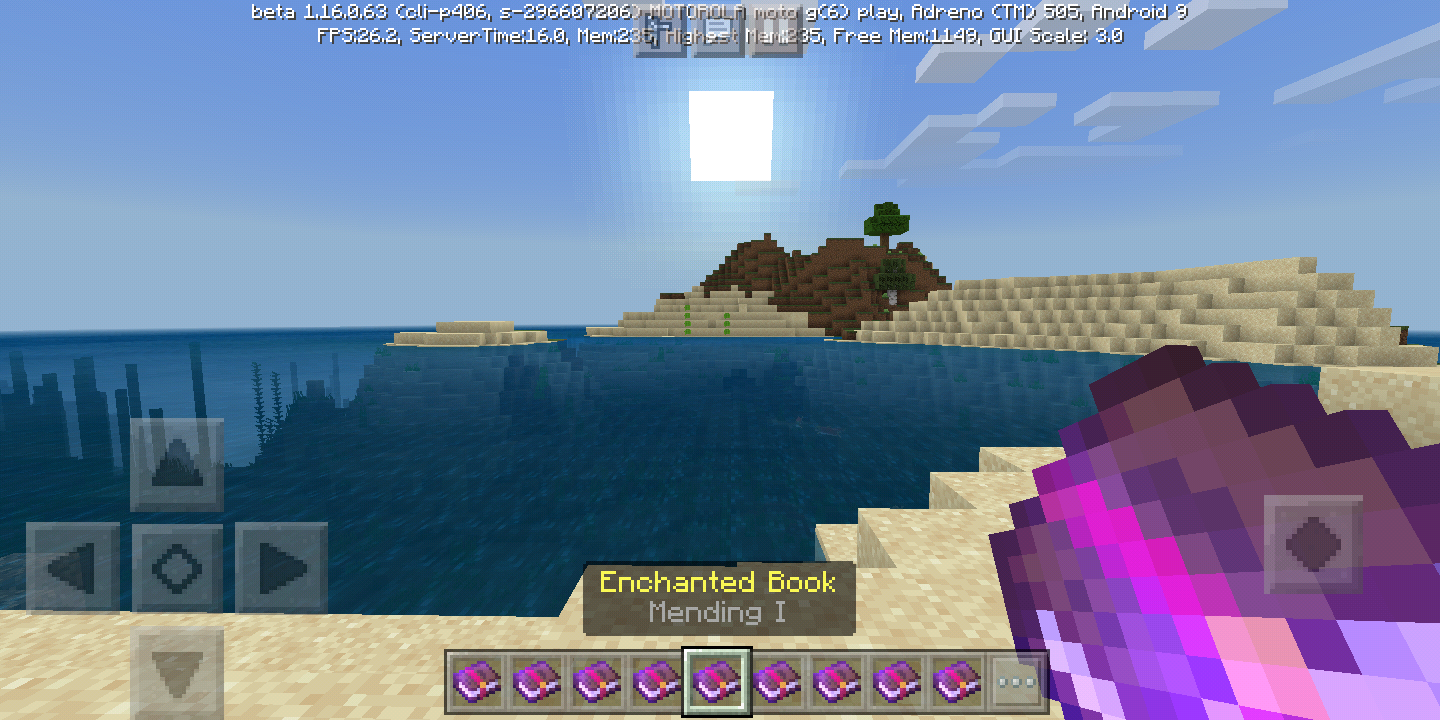
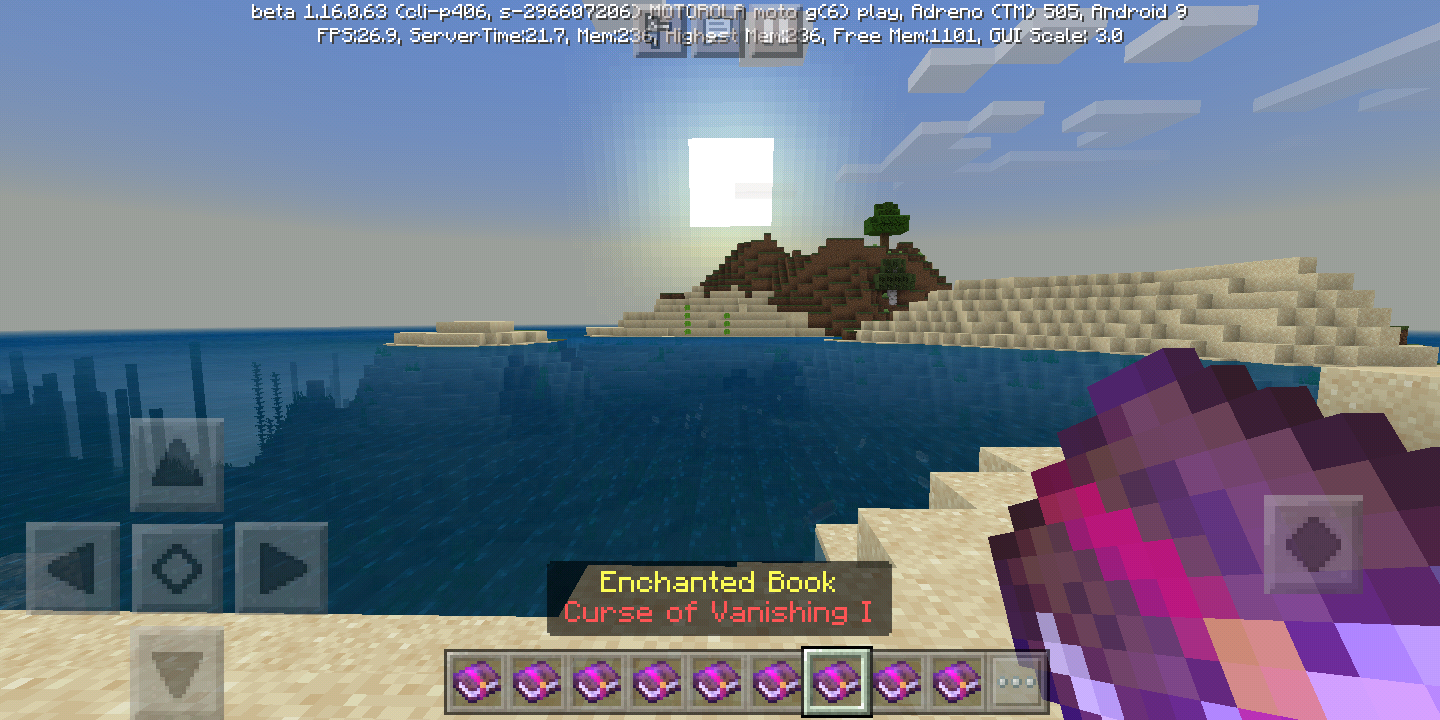
The names of some enchantments have a small error that can confuse players. In Java it is right, so I considered this as a parity.
Enchantments that haveonly 1 levelcome with"I" in the name, and this makesplayersthinkthat thereare more levels. An example of this is Mending, in Minecraft Bedrock it is written as: "Mending I".List of all enchantments with only 1 level but with "I" in the name:
Curse Of Vanishing
Curse of Binding
Aqua Affinity
Infinity
Flame
Channeling
Mending
Multishot
Silk TouchIn Bedrock, books that contain only 1 level (such as Mending) are named with an "I" after the enchantment name, while in Java, enchantments that only have 1 level are named with just the name of the enchantment. In my opinion, Java books are named correctly, as they imply to players that there is only 1 level of enchantment. The naming of the Bedrock books suggests to players that the enchantment has more than 1 level, even though that's not always true.
List of some enchantments with only 1 level, but with "I" in the name:
● Curse Of Vanishing
● Curse of Binding
● Aqua Affinity
● Infinity
● Flame
● Channeling
● Mending
● Multishot
● Silk Touch
Enchantment NameParity: Names of Enchanted Books
In Bedrock, books that contain only 1 level (such as Mending) are named with an "I" after the enchantment name, while in Java, enchantments that only have 1 level are named with just the name of the enchantment. In my opinion, Java books are named correctly, as they imply to players that there is only 1 level of enchantment. The naming of the Bedrock books suggests to players that the enchantment has more than 1 level, even though that's not always true.
List of some enchantments with only 1 level, but with "I" in the name:
● Curse Of Vanishing
● Curse of Binding
● Aqua Affinity
● Infinity
● Flame
● Channeling
● Mending
● Multishot
● Silk Touch
In Bedrock, books that contain only 1 level (such as Mending) are named with an "I" after the enchantment name, while in Java, enchantments that only have 1 level are named with just the name of the enchantment. In my opinion, Java books are named correctly, as they imply to players that there is only 1 level of enchantment. The naming of the Bedrock books suggests to players that the enchantment has more than 1 level, even though that's not always true.
List of some enchantments with only 1 level, but with "I" in the name:
● Curse Of Vanishing
● Curse of Binding
● Aqua Affinity
● Infinity
● Flame
● Channeling
● Mending
● Multishot
● Silk Touch
In Bedrock, books that contain only 1 level (such as Mending) are named with an "I" after the enchantment name, while in Java, enchantments that only have 1 level are named with just the name of the enchantment. In my opinion, Java books are named correctly, as they imply to players that there is only 1 level of enchantment. The naming of the Bedrock books suggests to players that the enchantment has more than 1 level, even though that's not always true.
List of some enchantments with only 1 level, but with "I" in the name:
● Curse Of Vanishing
● Curse of Binding
● Aqua Affinity
● Infinity
● Flame
● Channeling
● Mending
● Multishot
● Silk Touch
In Bedrock, books that contain only 1 level (such as Mending) are named with an "I" after the enchantment name, while in Java, enchantments that only have 1 level are named with just the name of the enchantment. In my opinion, Java books are named correctly, as they imply to players that there is only 1 level of enchantment. The naming of the Bedrock books suggests to players that the enchantment has more than 1 level, even though that's not always true.
List of some enchantments with only 1 level, but with "I" in the name:
● Curse Of Vanishing
● Curse of Binding
● Aqua Affinity
● Infinity
● Flame
● Channeling
● Mending
● Multishot
● Silk Touch
The Villagers that I leave in this place always disappear, after a while I discovered that it is because of the chunk edge that passes right in the middle of the place. Detail: Villagers on the left and right do not disappear. I play on Android 9.0. My world is not multiplayer. I only play alone. Before I went to the Nether the Villagers were already gone.
I already put it in the pacifico to test it and even then the villager of that place disappears, and that made me confirm that it is the fault of the borders of chunks.
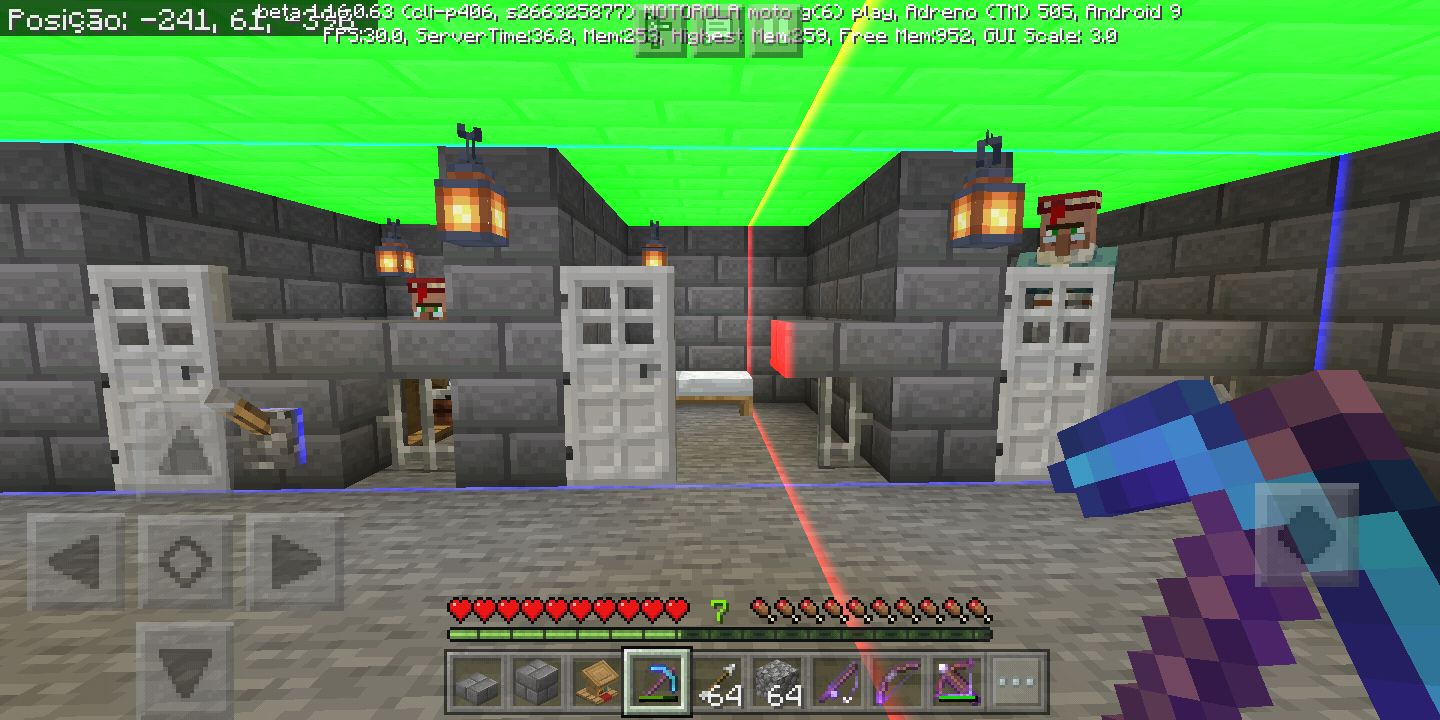
The
VillagersthatI leavein this place always disappear, aftera while I discoveredthat itis because of the chunkedgethatpasses rightinthe middle of the place.Detail: Villagers on the left and rightdo not disappear. I play on Android 9.0. My world is not multiplayer. I only play alone. Before I went to the Nether the Villagers were already gone.
I already putit in the pacificoto testitand eventhenthe villagerof that place disappears, and thatmade me confirm thatit is the fault of the borders of chunks.The villagers I leave here always disappear, after some tests I found out that it's because of the line of chunks that runs right through the middle of the place. Note: the villagers on the left and right never disappeared.
I've already put the difficulty in the pacific to test and even so the villager from that place disappears, and this made me confirm that the blame for this happening is really in the chunks edges.
The villagers I leave here always disappear, after some tests I found out that it's because of the line of chunks that runs right through the middle of the place. Note: the villagers on the left and right never disappeared.
I've already put the difficulty in the pacific to test and even so the villager from that place disappears, and this made me confirm that the blame for this happening is really in the chunks edges.Duplicate of
MCPE-21416
MCPE-21416 Entities and Mobs DespawnVillagers Despawn on Edges of Chunks
VillagersDespawn onEdgesofChunksVillagers despawning on edge of chunks
Villagers despawningon edge of chunksVillagers despawning in edge of chunks
Villagers despawning inedgeof chunksVillagers despawning in borders of chunks
The villagers I leave here always disappear, after some tests I found out that it's because of the line of chunks that runs right through the middle of the place. Note: the villagers on the left and right never disappeared.
I've already put the difficulty in the pacific to test and even so the villager from that place disappears, and this made me confirm that the blame for this happening is really in the chunks edges.Duplicate of
MCPE-21416
The villagers I leave here always disappear, after some tests I found out that it's because of the line of chunks that runs right through the middle of the place. Note: the villagers on the left and right never disappeared.
I've already put the difficulty in the pacific to test and even so the villager from that place disappears, and this made me confirm that the blame for this happening is really in the chunks edges.My villagers who can walk on the borders of chunks always disappear, unlike my other villagers who are not near the borders of chunks.
Affects 1.16.100.51 / 1.16.100.52 / 1.16.100.53
Affects 1.16.30
Minecraft Bedrock Edition*
Affects 1.17.40.20
This bug also occurs in version 1.16.0.59 beta
Affects 1.16.20 and 1.16.40
Affects 1.16.0.63
Please fix thisPillagersbug thatspawnsin cavesand in the mountains, this bug occurs since it launched the Villager and Pillager update.Minecraft Bedrock pillager generation mechanic has been broken since it was added. Pillagers often spawn in caves or underground places in general. This completely spoils the fun of defending a village against attack.
Minecraft Bedrock pillager generation mechanic has been broken since it was added. Pillagers often spawn in caves or underground places in general. This completely spoils the fun of defending a village against a
ttack.Minecraft Bedrock pillager generation mechanic has been broken since it was added. Pillagers often spawn in caves or underground places in general. This completely spoils the fun of defending a village against a raid.
Raidersspawning inCavesRaid spawning in caves
Minecraft Bedrock pillager generation mechanic
has beenbroken since it was added. Pillagers often spawn in caves or underground places in general. This completely spoils the fun of defending a village against a raid.Minecraft Bedrock pillager generation mechanic is broken since it was added. Pillagers often spawn in caves or underground places in general. This completely spoils the fun of defending a village against a raid.
Affects 1.17.40.20
Affects 1.17.34
Affects 1.18.0.20
Affects 1.17.30.25
Affects 1.17.30.22
Affects 1.17.30.25
Affects 1.17.30.25
Affects 1.17.40.20
Confirmed in 1.17.40.20
This bug also occurs with lava
Affects 1.17.30
Affects 1.17.40.20
• Steps to Reproduce:
1. Stand on top of the water.
2. Let yourself sink slowly.• Observed Results:
When you are sinking into water, the texture of the water quickly becomes transparent and soon returns to normal.• Expected Results:
The water should not have this texture flaw, but it should have a smoother transition.(See the video below for more details on how to reproduce)
• Steps to Reproduce:
1. Stand on top of the water.
2. Let yourself sink slowly.• Observed Results:
When you are sinking into water, the texture of the water quickly becomes transparent and soon returns to normal.• Expected Results:
The water should not have this texture flaw, but it should have a smoother transition.(See the video below for more details on how to reproduce)
Related to:
MCPE-9870
• Steps to Reproduce:
1. Standontopof the water.
2. Let yourself sink slowly.• Observed Results:
When you are sinking into water, the texture of the water quickly becomes transparent and soon returns to normal.• Expected Results:
The water should not have this texture flaw, but it should have a smoother transition.(See the video below for more details on how to reproduce)
Related to:
MCPE-9870Steps to Reproduce:
1. Stand in surface of the water.
2. Let yourself sink slowly.Observed Results:
When you are sinking into water, the texture of the water quickly becomes transparent and soon returns to normal.Expected Results:
The water should not have this texture flaw, but it should have a smoother transition.(See the video below for more details on how to reproduce)
Steps to Reproduce:
1. Stand in surface of the water.
2. Let yourself sink slowly.Observed Results:
When you are sinking into water, the texture of the water quickly becomes transparent and soon returns to normal.Expected Results:
The water should not have this texture flaw, but it should have a smoother transition.(See the video below for more details on how to reproduce)
WaterTextureGlitchWater texture glitch
Water textureglitchGlitch in water texture
Affects 1.17.30
Affects 1.17.30
Affects 1.17.40.23
Confirmed in 1.17.40.21
Affects 1.17.30
Affects 1.18.0.20
Affects 1.18.0.21
Affects 1.18.0.23
Affects 1.17.11
Affects 1.17.40.20
Affects 1.17.30.25
Affects 1.17.40.20
Affects 1.17.40.20
Duplicated of
MCPE-101202
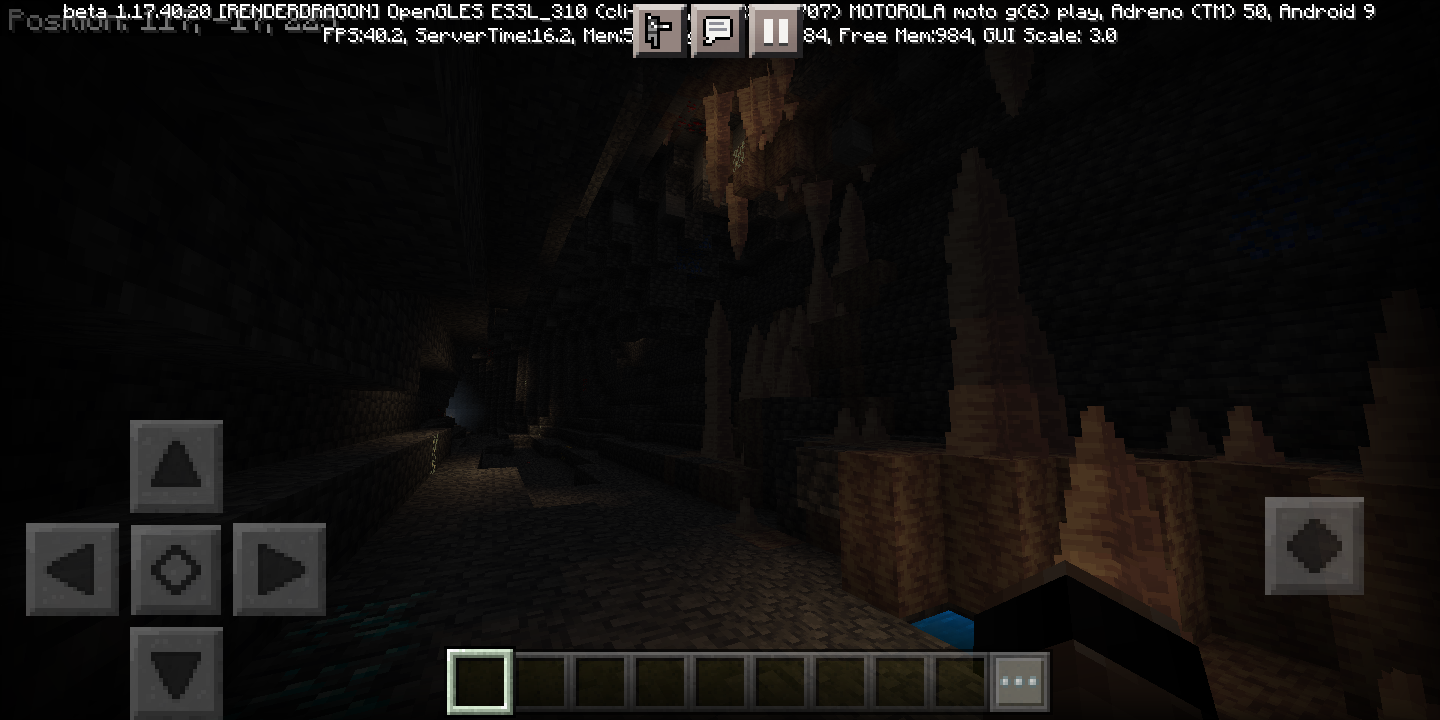
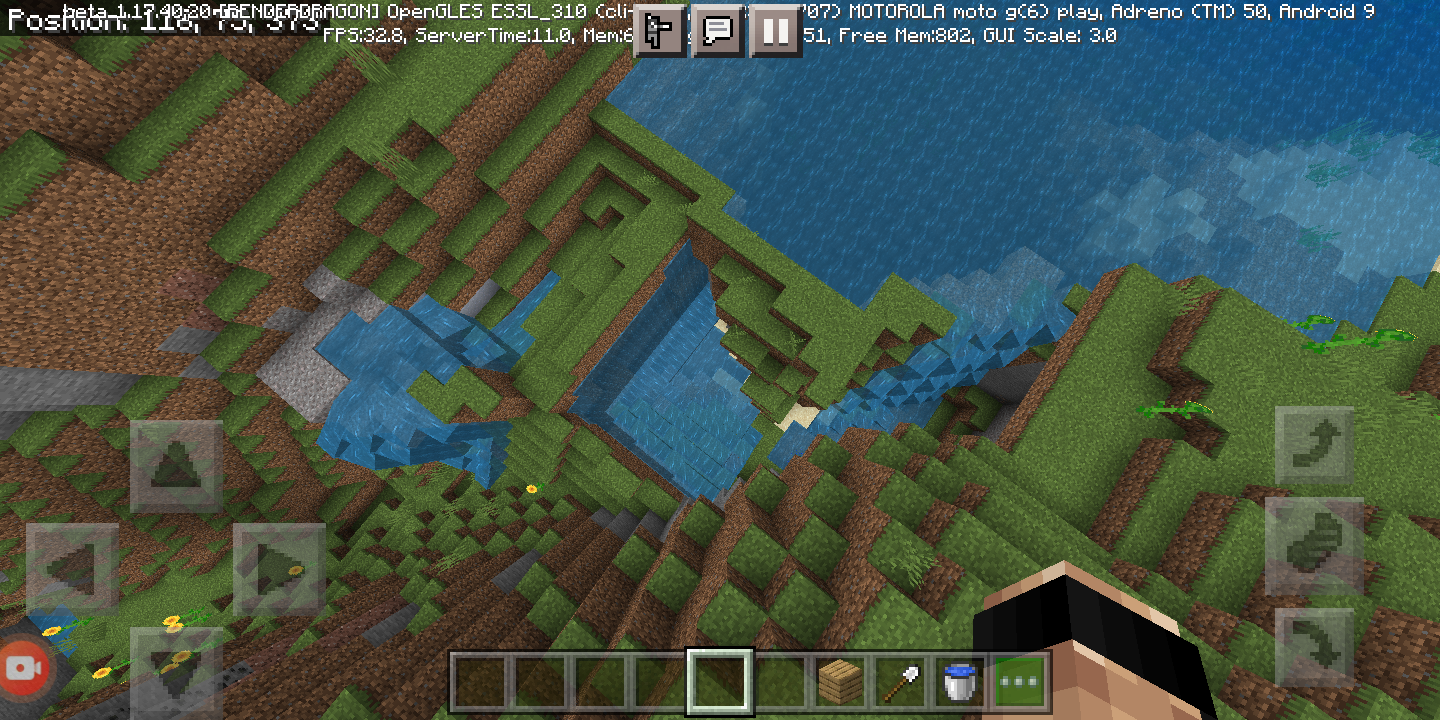
In some cases, caves just leave a hole in the surface that leads nowhere.
Seed: 1609877615
Coordinates: -89, 57, 107
In some cases, caves just leave a hole in the surface that leads nowhere.
Seed: 1609877615
Coordinates: -89, 57, 107
In some cases, caves just leave a hole in the surface that leads nowhere.Many new-gen caves lead nowhere, although Minecon was told that the developers planned to improve the link between caves.
What should happen is a better connection, with several small caverns leading to other larger caverns.
(Experimental)Caves that lead nowhere
Affects 1.17.40.20
Affects 1.17.11
Affects 1.17.40.20
Affects 1.17.40.20
Affects 1.17.11
Affects 1.17.40.20
Affects 1.17.30
Affects 1.17.40.21
Affects 1.17.40.23
Affects 1.18.0.20
Affects 1.18.0.21
Affects 1.17.40
Affects 1.18.0.22
Affects 1.18.0.23
Affects 1.18.0.24
Affects 1.18.0.25
Affects 1.18.0.27
Affects 1.18.10.20
Affects 1.18.0
Affects 1.18.10.21
Affects 1.18.1
Affects 1.18.2 and 1.18.10.22
Affects 1.18.10.24
Affects 1.18.0.26
Affects 1.17.11
Affects 1.17.11
Affects 1.17.30
Affects 1.17.40.20
Affects 1.17.30
Affects 1.17.40.20
Affects 1.17.40.20
Affects 1.17.11
Affects 1.17.40.20
Affects 1.17.30
Affects 1.17.40.20
Affects 1.17.30
Affects 1.17.40.20
Affects 1.17.30
Affects 1.17.40.21
Affects 1.17.40.23
Affects 1.17.40.20
Affects 1.17.40.21
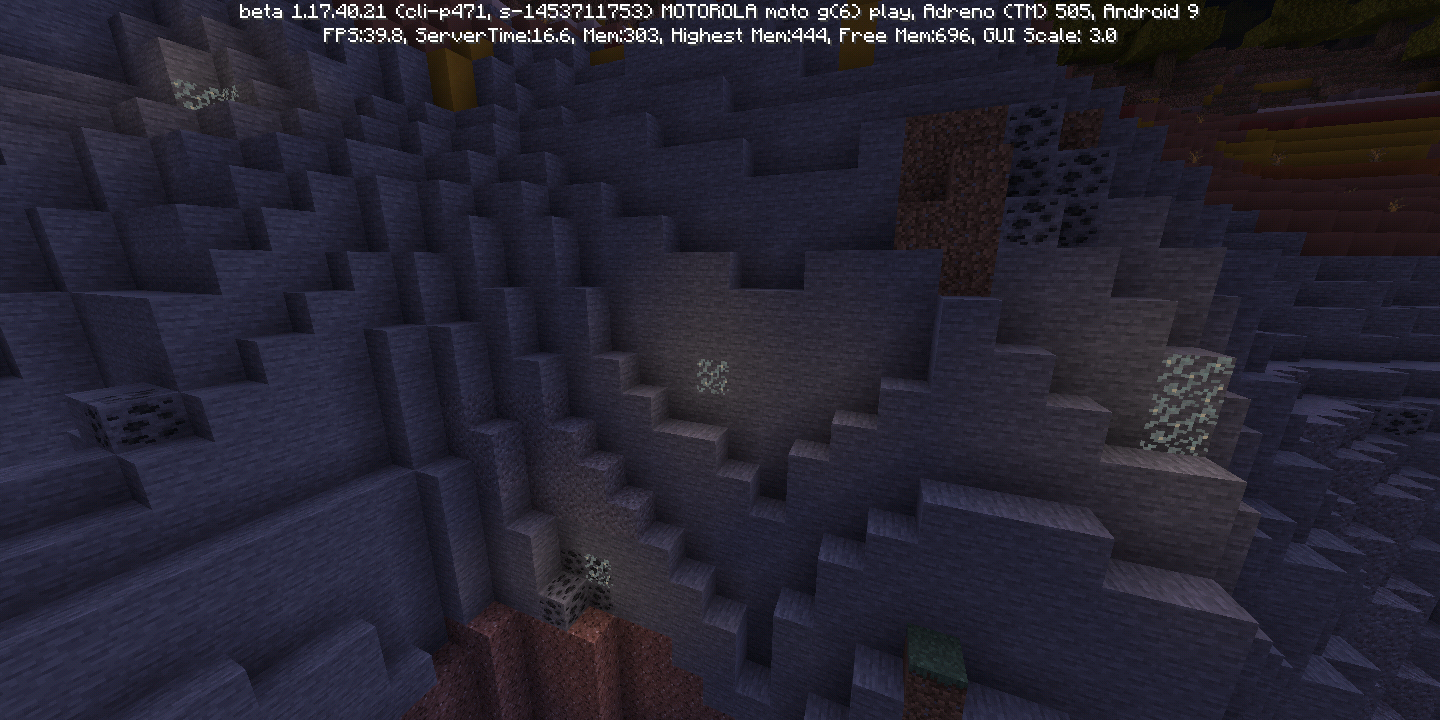
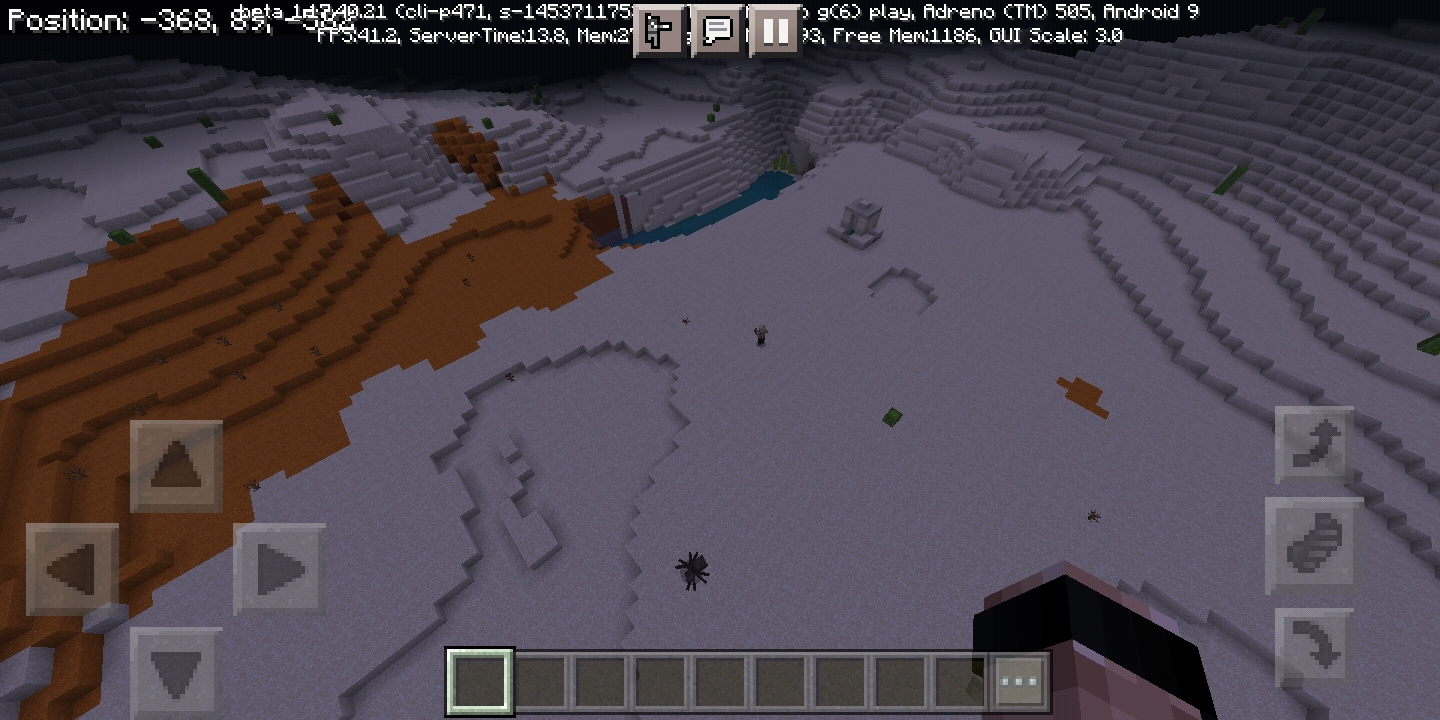
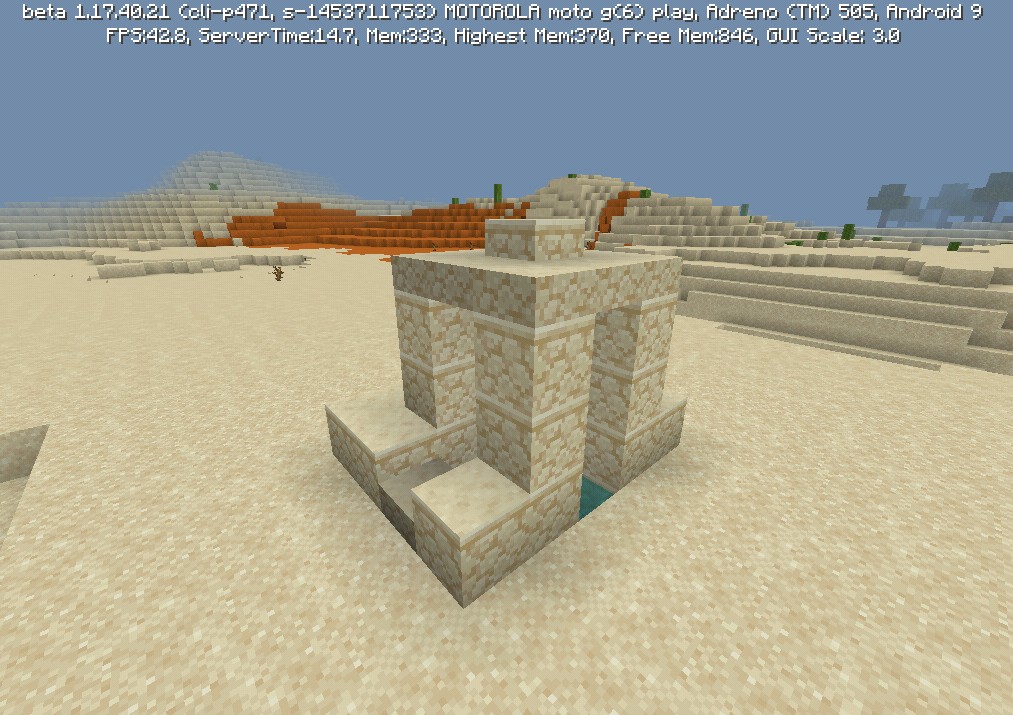
Sometimes the desert pit generates cut.
I don't know if this buggy generation has to do with the edges of chunks, if anyone can test that I would appreciate it.Seed: -1453711753
Coords: -384, 65, -627Sometimes the desert pit generates cut.
I don't know if this buggy generation has to do with the edges of chunks, if anyone can test that I would appreciate it.Seed: -1453711753
Coords: -388, 68, -623
Sometimes the desert pit generates cut.
I don't know if this buggy generation has to do with the edges of chunks, if anyone can test that I would appreciate it.Seed: -1453711753
Coords: -388, 68, -623
Sometimes the desert pit generates cut.
I don't know if this buggy generation has to do with the edges of chunks, if anyone can test that I would appreciate it.Sometimes the desert pit generates wrong, missing some blocks.
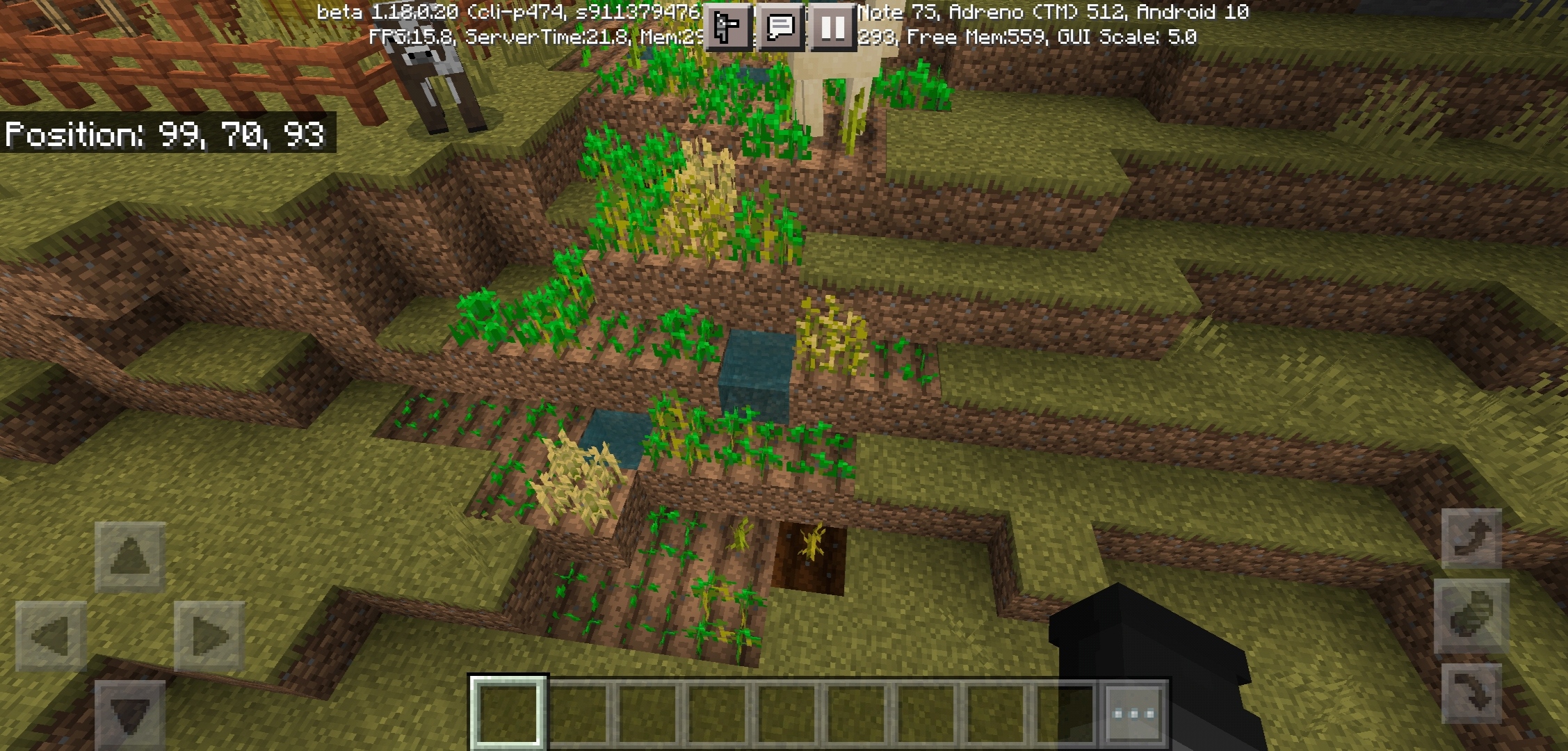
Often the generation of villages in the savanna is very buggy. Water from plantations floods village paths, and plantations generate in places where villagers cannot reach.
Just go to any village in the savanna and you will see that water from the plantations often floods the village paths.
I'll leave this seed and coordinate below as an example:
Seed: -1453711753
Coords: -738, 105, -227
(Experimental)Savanna villages generation
Often the generation of villages in the savanna is very buggy. Water from plantations floods village paths, and plantations generate in places where villagers cannot reach.
Just go to any village in the savanna and you will see that water from the plantations often floods the village paths.
I'll leave this seed and coordinate below as an example:
Seed: -1453711753
Coords: -738, 105, -227
Often the generation of villages in the savanna is very buggy. Water from plantations floods village paths, and plantations generate in places where villagers cannot reach.
Just go to any village in the savanna and you will see that water from the plantations often floods the village paths.
I'll leave this seed and coordinate below as an example:
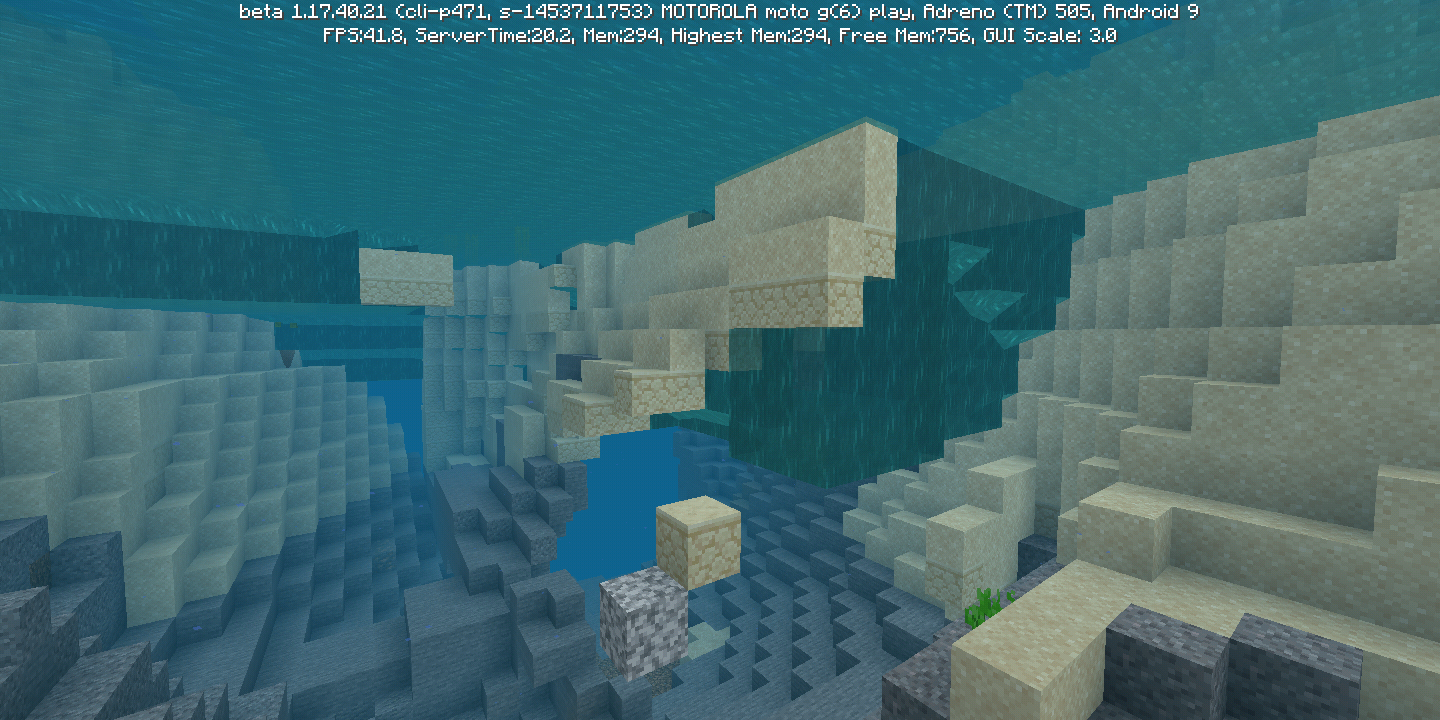
Sometimes stone pillars and grass blocks erroneously generate floating in large caves.
Seed: -1453711753
Coords: -602, 80, -441Sometimes stone pillars and grass blocks erroneously generate floating in large caves.
Seed: -1453711753
Coords: -604, 85, -452
(Experimental)Stone pillars generate floatingStone pillars generate floating sometimes
Stone pillars generate floatingsometimesStone pillars sometimes generate floating
Sometimes stone pillars and grass blocks erroneously generate floating in large caves.
Seed: -1453711753
Coords: -604, 85, -452
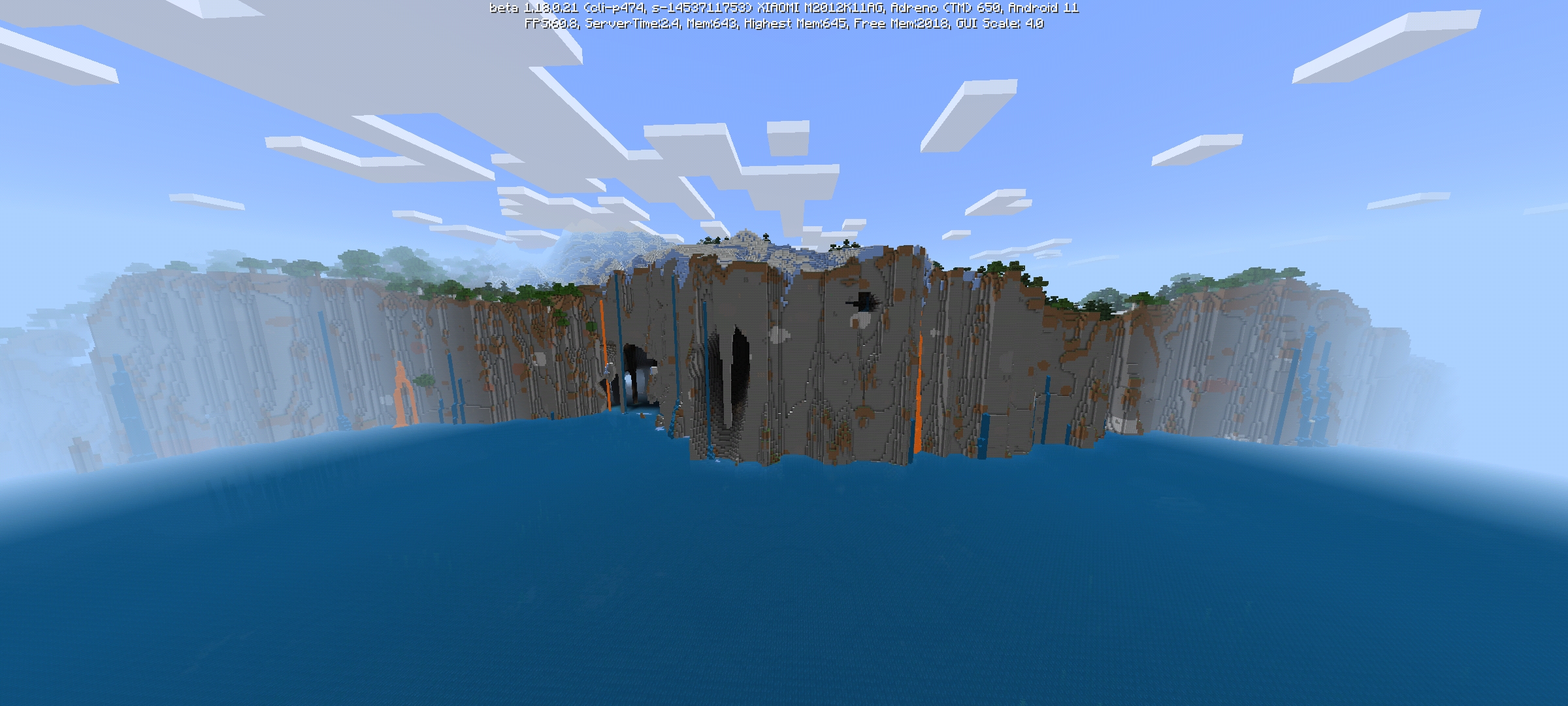
(Experimental)Some screenshots of errors in worldgeneration(Experimental) Many micro-biomes in the new generation
In th
is report I will be providing some errors in world generation in a single seed.Seed: -1453711753
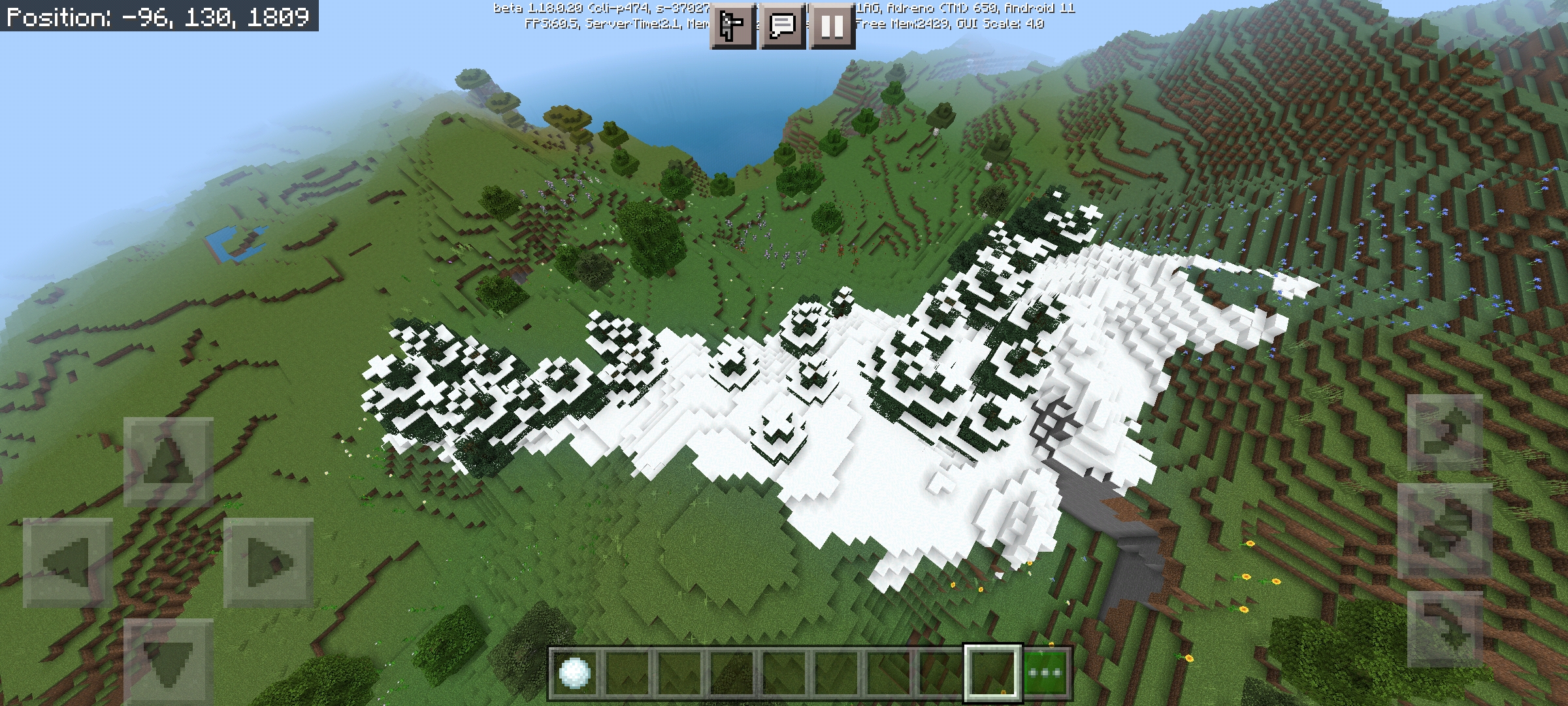
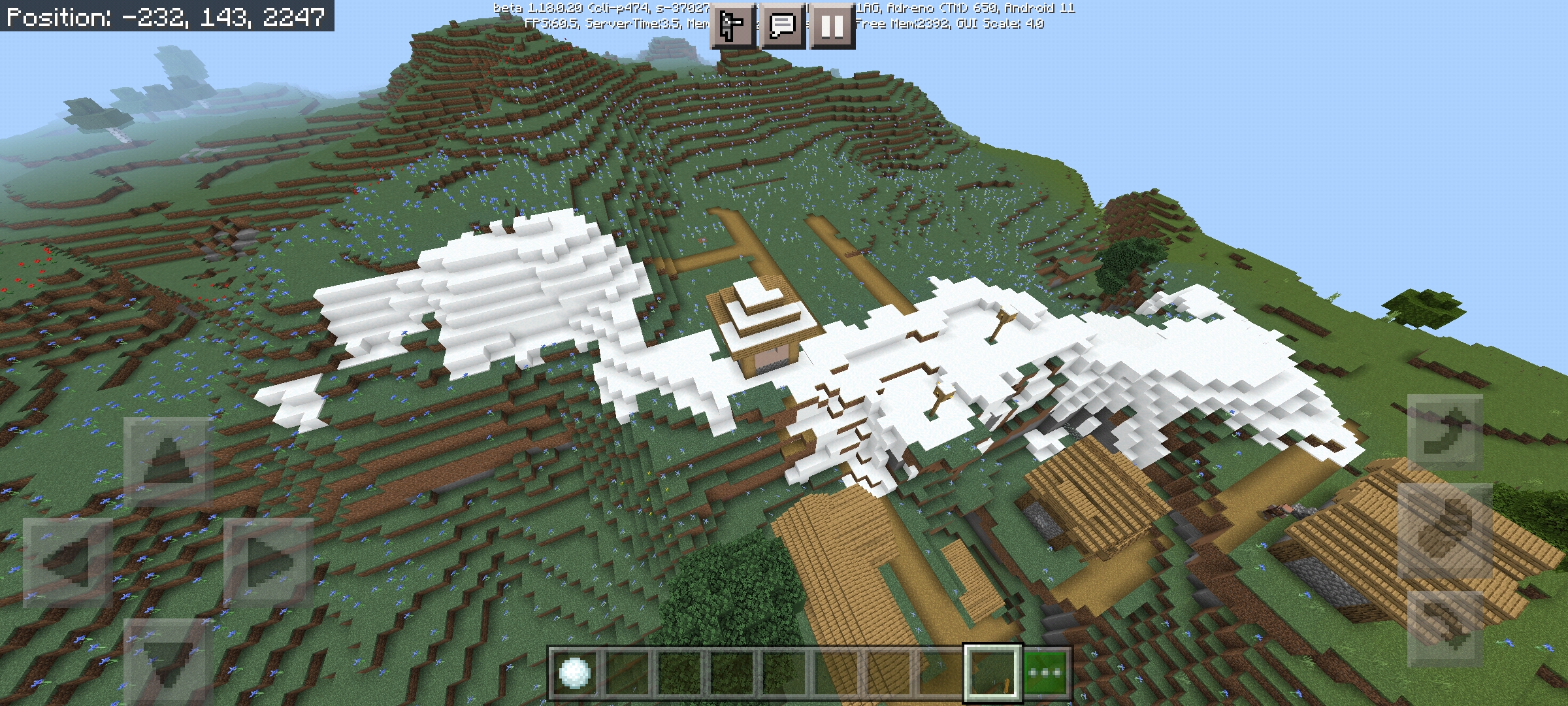
In the new generation of terrain at Cave And Cliffs, I have noticed many micro-biomes. Among these microbiomes, the ones I see most are badlands in deserts and snow layers in random places.
Seed: -1453711753
In the new generation of terrain at Cave And Cliffs, I have noticed many micro-biomes. Among these microbiomes, the ones I see most are badlands in deserts and snow layers in random places.
Seed: -1453711753
ChunksbugChunks Deleted
The bug of the chunks remains in the most recent beta, I hope it will be resolved in the next beta please.Well, I entered my world in version 1.16.0.58 and just too many chunks were deleted.

Natthan I've updated this ticket with the correct format, add any detail you believe is missing.
Please use this format when logging reports in the future.
Natthan: Pillagers pathfinding through water is a completely different issue and requires its own report. If you want to report it, please be sure to search for an existing report before creating a new one, to avoid duplicates.
![[Mod] GoldenHelmet](../../../data/avatars/users/18951.svg)
@Joshua whenever you can get images, they will be helpful.
@Natthan Please do not post the same picture on every lighting bug ticket. Your picture does not look like the description and original pictures on this ticket. I think you are experiencing MCPE-69037.
Thank you for the coordinates and world save.
@Natthan
villages have a timer for each dweller that unlinks the beds and workstations when they have not been “seen” in the village for 20 minutes. Breaking the bed/workstation or killing the villager while it’s in the village unlinks it right away.
I have been able to reproduce the villager despawning in a structure like the one shown in your picture, at those coordinates, by using alt-F4 to close the game after pushing the villager across the chunk border. However, it doesn't always happen, so I'm still testing exact conditions. I'm also testing other locations and it does appear to work on any chunk border.
@Brandon Paulk
It sounds like you're experiencing the version of this bug where entire chunks lose all of their mob entity data at once. I can't reproduce it locally using your world. It probably has some relation to loading lag when you come out of a nether portal on a realm. However, that could depend on the exact nether portal coordinates, so if you could get me those I'd like to test it.
The issue with creating new nether portals is likely not related. It is something that can happen due to how portals work. You mind find some help here: https://minecraft.gamepedia.com/Tutorials/Nether_portals#How_portals_work.
![[Mod] EVGENSYPERPRO](../../../data/avatars/users/92853.png)
Natthan due to the generation change in 1.17.40.20 I cannot confirm the bug in 1.17.40. Please provide the coordinates and seeds of the problem you found at 1.17.40.20, I will be very grateful to you.
(coordinates and seeds indicated in the report are incorrect for 1.17.40)

Natthan, I can't reproduce in 1.17.40.20 Beta. What steps did you use to test this issue?
Natthan, I can't reproduce in 1.17.40.20 Beta. What steps did you use to test this issue?
Probably intentional
1.16.0.58
Affects 1.16.0.58
again this bug appears;-;
I hope it will be resolved in the next beta;-;
Affects 1.16.0.59
Affects 1.16.0.59
1.16.0.59
Affects 1.16.0.59
Affects 1.16.0.59
Affects 1.16.0.59
Affects 1.16.0.59
This bug occurs and also affects beta version 1.16.0.59
Affects 1.16.0.59
Needs to be updated, this bug also occurs in the 1.16.0.59 beta!!
Affects 1.16.0.59
Affects 1.16.0.59
Affects 1.16.0.59
@[Helper] GoldenHelmet I upgraded to the latest beta and it looks like it was really fixed, the only problem now is the AI of the Pillagers, they try to go through the water instead of finding a better and faster way.
Affects 1.16.0.59
Affects 1.16.0.59
Affects 1.16.0.59
Affects 1.16.0.60
Affects 1.16.0.60
Affects 1.16.0.60
Affects 1.16.0.60
I lost a villager because of this bug, it was difficult to make him sell efficiency v, I saw on YouTube that this happens when mobs are on a chunk edge.
Affects 1.16.0.60, this happened to 6 VILLAGERS in my world.
It makes this bug very angry, it is certainly a critical bug in the game, it can even be considered the worst bug in Minecraft, this bug is very old and has not been fixed until today. If Mojang fixes this bug in the next 1.16 betas I will be VERY HAPPY !!!
Villagers disappear even in peaceful mode, and in non-multiplayer worlds.
Affect 1.16.0.60, was definitely not fixed.
Affects 1.16.0.61
@Mega_Spud The Villagers disappear when they are on a chunk border, I downloaded a texture that shows the chunks of the world and the place where the Villagers disappear in my world has a chunk border.
friend of mine also confirmed that they disappear at the edges of chunks, and has several videos on YouTube more or less about it:
https://youtu.be/WzKTbWKY94U
https://youtu.be/wGf0sY98IPM
In my world in the most recent beta version (1.16.0.61) Villagers who are not on the edge of chunks do not disappear. Only those around the edges of chunks disappear, I think this happens with most entities in the game, the Funnel Cart is one of them.
Affects 1.16.0.63
This bug doesn't just happen when we go to the Nether, it also happens when animals and entities in general are on the borders of chunk
It is bad to have to spend an ender's eye to reach stronghold and not have a portal.
This bug is horrible and has been happening in Bedrock for a long time, But in my world the only villagers who disappear are those who are in borders of chunks.
This is true of Villagers as well, especially when they are in borders of chunks.
This bug is old, and is occurring with me in the latest beta version 1.16.0.63
This bug affects version 1.16.0.63
Affects 1.16.0.63
The Villagers that I leave in this place always disappear, after a while I discovered that it is because of the chunk edge that passes right in the middle of the place. Detail: Villagers on the left and right do not disappear. I play on Android 9.0. My world is not multiplayer. I only play alone. Before I went to the Nether the Villagers were already gone.

I already put it in the pacifico to test it and even then the villager of that place disappears, and that made me confirm that it is the fault of the borders of chunks.
I saw that many people said that it happens in Realms, but my world is neither a Realm nor a Multiplayer and even so the entities (mainly villagers) disappear constantly.
Affects 1.16.0.63
Label: Singleplayer
Update the report for Multiple platforms, it doesn't happen only in Win10 but in all Bedrock platforms.
My game doesn't crash, I haven't been to Nether yet and I play alone in my normal world. And with all this, the Villagers still disappear and it is not because of mobs.
Affects 1.16.0.63
Affects 1.16.0.63
Duplicate
MCPE-21416Duplicate
MCPE-21416This report can serve as more information.
My Villagers only despawn in that location. I've even lost count of how many have disappeared.
And in that place there is a chunk border, so that’s the problem.
Villagers when they disappear at the borders of chunks continue to occupy his profession's bed and desk.
@GoldenHelmet
Yes it's true. I also tested these days and apparently the entities despawn on any edge of chunk.
Affects 1.16.0 official.
Resolved in version 1.16.20.50
Affects 1.16.20.50
affects 1.16.20.50
I don't think this bug is related to realms or multiplayer, because it happens in all game modes. I play alone and it still happens.
affects 1.16.1 hotfix
I lost one villager with v efficiency and another with fortune 3 because of that, while Mojang doesn't fix it, I'm not using Villagers anymore.
Hello Shannon, I will give you some information about this:
1. Version: 1.16.1 hotfix.
2. Platform: Android 9.0.
3. Entity that is disappearing: Villagers.
4. Coordinates where it disappears: There is a photo of the coordinates of my world linked in the publication.
5. Can the entity move: Yes, Villager can move through solid blocks, it has a bed and a lectern as well and a space to move.
6. Did the world crash: No, it is very rare for the game to crash.
7. Did you go to the Nether: Yes, but long before going to the Nether the villagers disappeared. So it's probably not the Nether's fault.
8. Do you interact with the entity: Yes, I trade with him. I also name him, but he still disappears. so it's the fault of the borders of chunks
9. Did you "save and exit" or just turn off your device: I always save the world, never turn it off before.
10. Did you move away from the entity and then return (unload the piece): Yes, I do that sometimes.
@Haroldo Magalhães Martins, I recommend putting your text in English to make it easier for developers to read. try using Google Translate.
@unblocked yes, this problem happens even if it doesn't go to Nether, and it happens both in multiplayer and in singleplayer.
Affects 1.16.1
This happens to me on my Android 9.0 phone
Affects 1.16.20.50
Affects 1.16.1
the same thing happened to me on the end.
In my world, the problem is actually the borders of chunks, the only villagers who disappear are those who can cross a border. The first time I noticed this problem was in version 1.14.30
Even though it is technically simple to avoid this problem, I still find it very bad to download a texture to be careful not to place the Villagers on the borders. But when I see this bug it must be very difficult to be corrected for the time that it has existed until now no correction. But I think that this bug must be complicated to solve, considering the date that this bug report was created.
I totally agree with you @shannon !! But I hope that the developers will find a solution to solve this bug and not be like a creeper (which will be part of the game forever). ;-;
I politely ask the developers to resolve this bug. The black borders are really ugly when we touch the items.
Affects 1.16.10.02
@thcrafter06 it is true, the report has been open for some time and continues as "community consensus".
;-;
i may look boring and probably this comment of mine will not help at all. but is it really that hard to fix this bug? if anyone has an answer to that, please answer me.
Affects version 1.16.20
Affects 1.16.100.51
Affects 1.16.20 and 1.16.100.51 Beta
Affects 1.16.100.51
affects beta version 1.16.20.53
and affects 1.16.100.53
Affects 1.16.100.53
Affects 1.16.100.53
Affects 1.16.100.53
Affects 1.16.100.53
Affects 1.16.100.53
has this been fixed or not?
Affects 1.16.40
UPDATE THE REPORT! Affects versions: 1.16.40, 1.16.100.54 and 1.16.20.53
Before the official version 1.16.20 this bug did not happen to me, so it seems that the latest official versions (1.16.20 and 1.16.30) made this bug worse.
I am DEEPLY DISSATISFIED with Xbox Live, it has many flaws and bugs.
MCPE-36190
MCPE-29304
MCPE-45385probably these bugs occur because of microsoft rigidity, i am under age (15y) and i created an account with my real age and xbox live didn’t allow me to play multiplayer, and unfortunately I had to create an account over 20 YEARS, this is really VERY exhausting!!!
Affects 1.16.100.54
Affects 1.16.40
And Affects 1.16.100.54
This occurs on all bedrock edition platforms in general, making it impossible for players to play multiplayer on servers or worlds of friends.
and as the message itself says, this is because Xbox Live has many flaws and is very strict on the subject PLAY ONLINE.
In addition, invitations and notifications of achievements do not appear. in the changelog says that this only occurs on Win10, but also on Android.
Affects versions 1.16.100.54 and 1.16.40
Affects 1.16.0.58, 1.16.0.59, 1.16.20, 1.16.40 and 1.16.100.54
affects 1.16.100.54
Or it got worse in the last two versions of Minecraft, or it has to do with the changes (update) made by Microsoft in the Xbox Live.
~J p Yes, although I have suffered from multiplayer bugs before, it seems that in version 1.16.20 it has aggravated this bug even more, and persists until now in the current 1.16.40
My friend and I played on Android, and after version 1.16.20 I couldn't enter his world anymore, and neither did he in mine. Before 1.16.20 we played normally, but I don't know if the problem is with the version or any changes made on Xbox Live.
Affects 1.16.100.55 beta
Affects 1.16.100.55 beta
I fully agree, I am Brazilian and I ask Mojang to put the original name of Piglin and Hoglin (Porcolino and Javalino are a bit bad translations)
Affects 1.16.100.55 beta
Affects 1.16.100.55
Affects 1.16.100.55
Are developers testing this bug in older versions? If the answer is no, why does the bot keep updating the report with old versions?
This is really an improvement. if the bug happens to me again i will test it.
Affects 1.16.100.56
This bug got worse at 1.16.40, I have two friends who are unable to connect to the xbox live account after restarting the game.
This report is related to
MCPE-21416Affects 1.16.100.57 beta
Me:
Android 9, Minecraft v1.16.40
World size 95mb
Affects 1.16.100.56, 1.16.100.57 and 1.16.100.58
This bug happens sometimes when my friend enters my world, and also when I enter his. He and I think this bug has something to do with Xbox Live.
Another bad translation is that of Piglin and Hoglin, they are called "Porcolino" and "Javalino" respectively.
In my opinion, Minecraft Bedrock translations should be the same as Java.
Affects 1.16.100.58
All of this would be resolved if the BE translation was the same as the JE
Affects 1.16.100.59
Affects 1.16.100.60
Affects 1.16.100.59 and 1.16.100.60
Affects 1.16.100.59 and 1.16.100.60
Affects 1.16.100.60
Affects Versions:
1.16.40
1.16.100.58
1.16.100.59
1.16.100.60
Affects 1.16.100.60
Affects 1.16.100.60
Affects 1.16.100.60
Affects 1.16.100.60
Affects 1.16.100.60
Affects 1.16.100.60
Affects 1.16.100.60
Affects 1.16.100.60
Affects 1.16.100.60
Affects 1.16.100.60
Affects 1.16.100.59
Affects 1.16.100.60
Affects 1.16.100.59
Affects 1.16.100.60
Affects 1.16.100.60
Affects 1.16.100.60
Yeah, affects 1.16.100.60
Affects 1.16.100.60
Affects 1.16.100.59
Affects 1.16.100.60
Affects 1.16.100.60
Affects 1.16.100.60
In addition, villagers still do not use bone meal
Even named with nametag some of my villagers already despawn, this happened in 1.14 and in the first betas of 1.16
Affects 1.16.200.51, 1.16.100.52
In the last snapshot released for Java today, a bug like this was fixed. I hope that in the 1.16.200 betas a correction will come for us too.
Affects 1.16.100
I can log into servers normally but I can't log into a friend's world and he can't log into my world either. This bug only started happening to me after 1.16.
One of the most fun things about Minecraft is playing in a survival world with friends, and I'm not doing it, so please fix this bug.
Edit: I play on an Android device (version 9.0)
This bug happens on my Android Phone when i clear Minecraft data and try to login to xbox account.
Affects the last official version of 1.16 released (version 1.16.221)
This happens on my Android Phone when I delete Minecraft data and cache.
So it's because of this bug that the saturation of Bedrock's golden carrot is much lower compared to Java, I always noticed this, but I thought it was just an impression.
Affects 1.17.11
Affects 1.17.30.22
I don't build in snow biomes because of that, it's interesting that bedrock snow is similar to real life, but I prefer java snow because it makes the biomes prettier and less messy.
Affects 1.17.11
Affects 1.17.30.25
Affects 1.17.11
Affects 1.17.30.25
Affects 1.17.30.25
Affects 1.17.30.25
Affects 1.17.11
Affects 1.17.11
Affects 1.17.11
Affects 1.17.30.25
Affects 1.17.11
Affects 1.17.30.25
Affects 1.17.11
Affects 1.17.11
Affects 1.17.11
Affects 1.17.11
Affects 1.17.11
Affects 1.17.11
Affects 1.17.11
Affects 1.17.11
Affects 1.17.30.25
Affects 1.17.30.25
Affects 1.17.30.25
Affects 1.17.30.25
Affects 1.17.11
Affects 1.17.40.20
Affects 1.17.40.20
Affects 1.17.40.20
Affects 1.17.40.20
Affects 1.17.40.20
Affects 1.17.40.20
Affects 1.17.40.20
Affects 1.17.40.20
Affects 1.17.40.20
Affects 1.17.40.20
Affects 1.17.40.20
Affects 1.17.40.20
Affects 1.17.40.20
Affects 1.17.40.20
Affects 1.17.40.20
I don't build in snow biomes because of that, snow accumulates quickly to the point where everything is filled with snow. Even the trees have blocks of snow on their leaves.
Affects 1.17.40.20