 DorkOrc
- Deoxyribonucleic Evans
- deoxyribonucleic evans
- Europe/London
- Yes
- No
 MC-209180
![[Mojang] Cory Scheviak](../../../data/avatars/users/92893.png) MC-211169
MC-211169






 MCLG-267



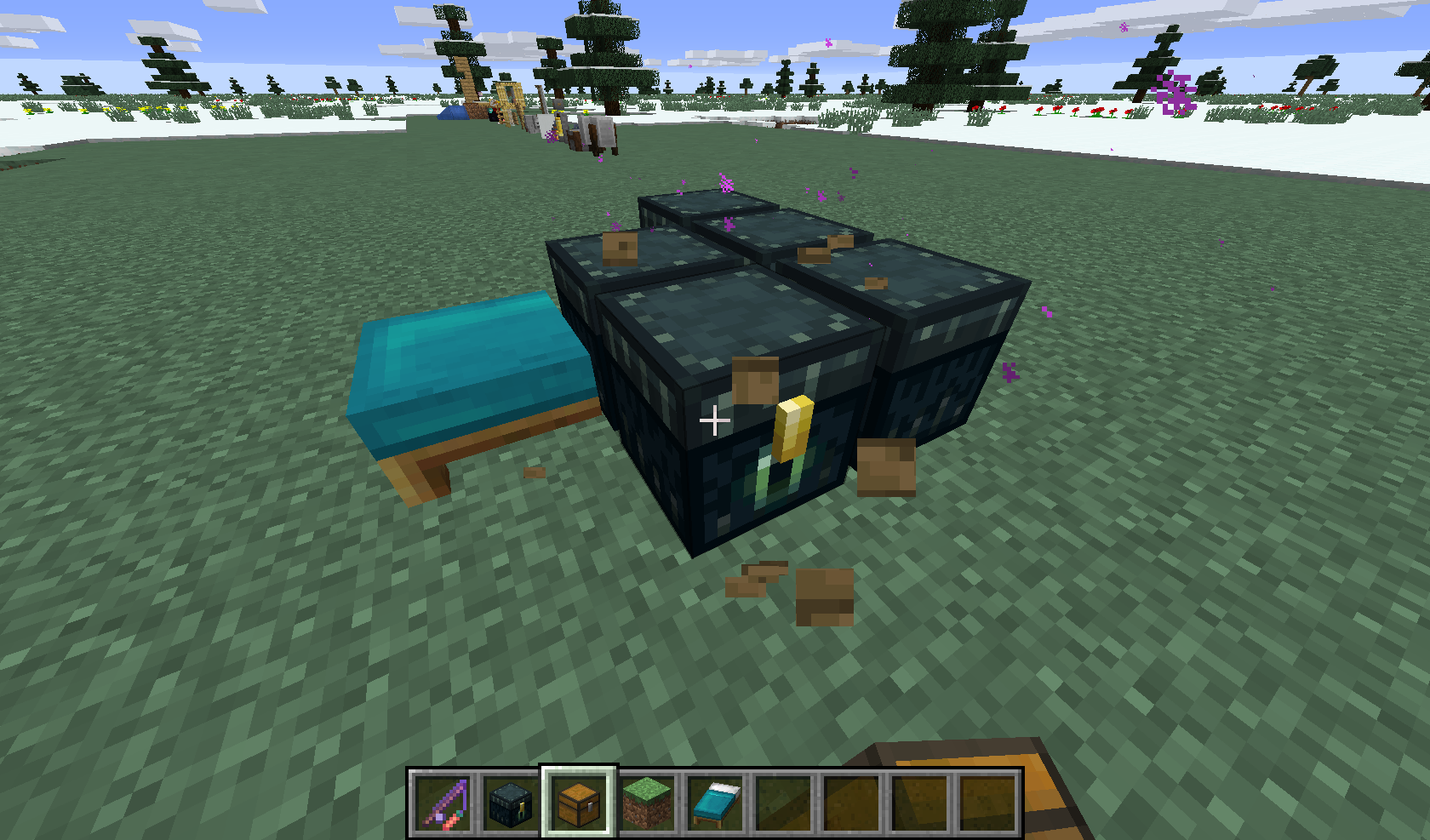
Placing beds, chests, ender chests etc then breaking and placing another bed/chests/ender chest etc shows previously broken tile entity until the game is restarted.
See image.EDIT Crash Error Message when placing banner where bed once stood:
{name=facing, clazz=class ex, values=[north, south, west, east]}
The game crashed whilst rendering block entity
Error: java.lang.IllegalArgumentException: Cannot get property bryas it does not exist in Block
{minecraft:green_banner}
When an entity's hitbox is made biggerusing a command, it shifts north-west
Pointed dripstone
can be brokenwith tridents within vanilla spawn protectionPlayers can break pointed dripstone with tridents within vanilla spawn protection
Pointeddripstone can be broken with tridents in spawn protectionPointed Dripstone can be broken with tridents in spawn protection
Similar to
MC-209324, arrows shot from players break big dripleaves within vanilla spawn protectionArrows shot from players break big dripleaves within vanilla spawn protection
Using data merge or data modify to change the BlockState.Name or BlockState.Properties tag for a falling_block entity will not change how it looks, but it will still settle as the block it was modified to.
{Time:1}
To replicate:
summon falling_block ~ ~ ~data modify entity @e [type=falling_block,limit=1,sort=nearest] {BlockState:{Name:"minecraft:stone"}}
It will continue to look like sand, but once it lands it will place a stone blockUsing data merge or data modify to change the BlockState.Name or BlockState.Properties tag for a falling_block entity will not change how it looks, but it will still settle as the block it was modified to.
To replicate:summon falling_block ~ ~ ~
{Time:1}data modify entity @e [type=falling_block,limit=1,sort=nearest] {BlockState:{Name:"minecraft:stone"}}
It will continue to look like sand, but once it lands it will place a stone block
Players can interact with blocks (such as campfires and tnt) usingarrows shot from flame bows within spawn protectionCampfires and TNT can be lit by arrows shot from flame bows by players within spawn protection
Campfires and TNT can be lit by arrows shot from flame bowsby players within spawn protectionCampfires and TNT can be lit by players using arrows shot from flame bows in spawn protection
Players that are on fire can destroy poweder snowin spawn protectionPowder Snow can be broken by players on fire in spawn protection
Right-clicking a bundle with an item will double that item and put a ghost item into the bundle
NBT Before:
{id: "minecraft:bow", Count: 2b}
`{Items: []}
{id: "minecraft:bow", Count: 2b}`
NBT After:
`{Items: [{id: "minecraft:air", Count: -1b, tag: {Damage: 0}},]}
`
Right-clicking a bundle with an item will double that item and put a ghost item into the bundle
NBT Before:
{id: "minecraft:bow", Count: 2b}
{Items: []}
{id: "minecraft:bow", Count: 2b}
NBT After:
{Items: [{id: "minecraft:air", Count: -1b, tag: {Damage: 0}},]}
Right-clicking a bundle with an item will double that item and put a ghost item into the bundle
NBT Before:
{Items: [
Unknown macro: {id}]}
NBT After:
{Items: [{id: "minecraft:air", Count: -1b, tag: {Damage: 0}},
Unknown macro: {id}]}
Right-clicking a bundle with an item will double that item and put a ghost item into the bundle
NBT Before:
{Items: [
Unknown macro: {id}]}
NBT After:
{Items: [{id: "minecraft:air", Count: -1b, tag: {Damage: 0}},
Unknown macro: {id}]}
Right-clicking a bundle with an item will double that item and put a ghost item into the bundle
NBT Before:
{id: "minecraft:bow", Count: 2b}
{Items: []}
{id: "minecraft:bow", Count: 2b}
NBT After:
{Items: [{id: "minecraft:air", Count: -1b, tag: {Damage: 0}},]}
Right-clicking a bundle with an item will double that item and put a ghost item into the bundle
NBT Before:
{id: "minecraft:bow", Count: 2b}
*{Items: []}*
{id: "minecraft:bow", Count: 2b}
NBT After:
*{Items: [{id: "minecraft:air", Count: -1b, tag: {Damage: 0}},]}*
Right-clicking a bundle with an item will double that item and put a ghost item into the bundle
NBT Before:
{id: "minecraft:bow", Count: 2b}
*{Items: []}*
{id: "minecraft:bow", Count: 2b}
NBT After:
*{Items: [{id: "minecraft:air", Count: -1b, tag: {Damage: 0}},]}*
Right-clicking a bundle with an item will double that item and put a ghost item into the bundle
NBT Before:
{Items: [{id: "minecraft:bow", Count: 2b}]}NBT After:
{Items: [{id: "minecraft:air", Count: -1b, tag: {Damage: 0}}, {id: "minecraft:bow", Count: 2b}]}
Right-clicking a bundle with an item will double that item and put a ghost item into the bundle
NBT Before:
{Items: [{id: "minecraft:bow", Count: 2b}]}NBT After:
{Items: [{id: "minecraft:air", Count: -1b, tag: {Damage: 0}}, {id: "minecraft:bow", Count: 2b}]}Steps to reproduce:
1) Give yourself a bundle with items inside such that the fullness exceeds 64. In the example video, I used/give @s bundle{Items:[{id:"minecraft:bow",Count:2b}]}2) Grab an item in your inventory and right-click the overfilled bundle with it
3) The item should remain being dragged by your cursor, but its Count will double, and the bundle will have an "air" item with Count -1 in itNBT Before:
{Items: [{id: "minecraft:bow", Count: 2b}]}NBT After:
{Items: [{id: "minecraft:air", Count: -1b, tag: {Damage: 0}}, {id: "minecraft:bow", Count: 2b}]}
Steps to reproduce:
1) Give yourself a bundle with items inside such that the fullness exceeds 64. In the example video, I used/give @s bundle{Items:[{id:"minecraft:bow",Count:2b}]}2) Grab an item in your inventory and right-click the overfilled bundle with it
3) The item should remain being dragged by your cursor, but its Count willdouble, and the bundle will have an "air" item with Count -1 in itNBT Before:
{Items: [{id: "minecraft:bow", Count: 2b}]}NBT After:
{Items: [{id: "minecraft:air", Count: -1b, tag: {Damage: 0}}, {id: "minecraft:bow", Count: 2b}]}Steps to reproduce:
1) Give yourself a bundle with items inside such that the fullness exceeds 64. In the example video, I used/give @s bundle{Items:[{id:"minecraft:bow",Count:2b}]}2) Grab an item in your inventory and right-click the overfilled bundle with it
3) The item should remain being dragged by your cursor, but its Count will be increased by the bundle's fullness-64, and the bundle will have an "air" item with Count -1 in itNBT Before:
{Items: [{id: "minecraft:bow", Count: 2b}]}NBT After:
{Items: [{id: "minecraft:air", Count: -1b, tag: {Damage: 0}}, {id: "minecraft:bow", Count: 2b}]}
Overfilled bundles cause items to double when trying to be put insideOverfilled bundles cause items to duplicate when trying to be put inside
Steps to reproduce:
1) Give yourself a bundle with items inside such that the fullness exceeds 64. In the example video, I used/give @s bundle{Items:[{id:"minecraft:bow",Count:2b}]}2) Grab an item in your inventory and right-click the overfilled bundle with it
3) The item should remain being dragged by your cursor, but its Count will be increased by the bundle's fullness-64, and the bundle will have an "air" item with Count-1in itNBT Before:
{Items: [{id: "minecraft:bow", Count: 2b}]}NBT After:
{Items: [{id: "minecraft:air", Count: -1b, tag: {Damage: 0}}, {id: "minecraft:bow", Count: 2b}]}Steps to reproduce:
1) Give yourself a bundle with items inside such that the fullness exceeds 64. In the example video, I used/give @s bundle{Items:[{id:"minecraft:bow",Count:2b}]}2) Grab an item in your inventory and right-click the overfilled bundle with it
3) The item should remain being dragged by your cursor, but its Count will be increased by the bundle's fullness-64, and the bundle will have an "air" item with Count 64-fullness in itNBT Before:
{Items: [{id: "minecraft:bow", Count: 2b}]}NBT After:
{Items: [{id: "minecraft:air", Count: -1b, tag: {Damage: 0}}, {id: "minecraft:bow", Count: 2b}]}
Steps to reproduce:
1) Give yourself a bundle with items inside such that the fullness exceeds 64. In the example video, I used/give @s bundle{Items:[{id:"minecraft:bow",Count:2b}]}2) Grab an item in your inventory and right-click the overfilled bundle with it
3) The item should remain being dragged by your cursor, but its Count will be increased by the bundle's fullness-64, and the bundle will have an "air" item with Count 64-fullness in itNBT Before:
{Items: [{id: "minecraft:bow", Count: 2b}]}NBT After:
{Items: [{id: "minecraft:air", Count: -1b, tag: {Damage: 0}}, {id: "minecraft:bow", Count: 2b}]}Steps to reproduce:
1) Give yourself a bundle with items inside such that the fullness exceeds 64. In the example video, I used/give @s bundle{Items:[{id:"minecraft:bow",Count:2b}]}2) Grab an item in your inventory and right-click the overfilled bundle with it
3) The item should remain being dragged by your cursor, but its Count will be increased by the bundle's (fullness−64), and the bundle will have an "air" item with Count (64−fullness) in itNBT Before:
{Items: [{id: "minecraft:bow", Count: 2b}]}NBT After:
{Items: [{id: "minecraft:air", Count: -1b, tag: {Damage: 0}}, {id: "minecraft:bow", Count: 2b}]}
Steps to reproduce:
1) Give yourself a bundle with items inside such that the fullness exceeds 64. In the example video, I used/give @s bundle{Items:[{id:"minecraft:bow",Count:2b}]}2) Grab an item in your inventory and right-click the overfilled bundle with it
3) The item should remain being dragged by your cursor, but its Count will be increased by the bundle's (fullness−64), and the bundle will have an "air" item with Count (64−fullness) in itNBT Before:
{Items: [{id: "minecraft:bow", Count:2b}]}NBT After:
{Items: [{id: "minecraft:air", Count: -1b, tag: {Damage: 0}}, {id: "minecraft:bow", Count:2b}]}Steps to reproduce:
1) Give yourself a bundle with items inside such that the fullness exceeds 64. In the example videos, I used/give @s bundle{Items:[{id:"minecraft:bow",Count:2b}]} /give @s bundle{Items:[{id:"minecraft:stone",Count:65b}]} /give @s bundle{Items:[{id:"minecraft:stone",Count:66b}]}2) Grab an item in your inventory and right-click the overfilled bundle with it
3) The item should remain being dragged by your cursor, but its Count will be increased by the bundle's (fullness−64), and the bundle will have an "air" item with Count (64−fullness) in itNBT Before:
{Items: [{id: "minecraft:stone", Count: 65b}]}NBT After:
{Items: [{id: "minecraft:air", Count: -1b}, {id: "minecraft:stone", Count: 65b}]}
Steps to reproduce:
1) Give yourself a bundle with items inside such that the fullness exceeds 64. In the example videos, I used/give @s bundle{Items:[{id:"minecraft:bow",Count:2b}]} /give @s bundle{Items:[{id:"minecraft:stone",Count:65b}]} /give @s bundle{Items:[{id:"minecraft:stone",Count:66b}]}2) Grab an item in your inventory and right-click the overfilled bundle with it
3) The item should remain being dragged by your cursor, but its Count will be increased by the bundle's (fullness−64), and the bundle will have an "air" item with Count (64−fullness) in itNBT Before:
{Items: [{id: "minecraft:stone", Count: 65b}]}NBT After:
{Items: [{id: "minecraft:air", Count: -1b}, {id: "minecraft:stone", Count: 65b}]}Steps to reproduce:
1) Give yourself a bundle with items inside such that the fullness exceeds 64. In the example videos, I used/give @s bundle{Items:[{id:"minecraft:bow",Count:2b}]} /give @s bundle{Items:[{id:"minecraft:stone",Count:65b}]} /give @s bundle{Items:[{id:"minecraft:stone",Count:66b}]}2) Grab an item in your inventory and right-click the overfilled bundle with it
3) The item should remain being dragged by your cursor, but its Count will be increased by the bundle's (fullness−64), and the bundle will have an "air" item with Count (64−fullness) in itNBT Before:
{Items: [{id: "minecraft:stone", Count: 66b}]}NBT After:
{Items: [{id: "minecraft:air", Count: -2b}, {id: "minecraft:stone", Count: 66b}]}
Steps to reproduce:
1) Give yourself a bundle with items inside such that the fullness exceeds 64. In the example videos, I used/give @s bundle{Items:[{id:"minecraft:bow",Count:2b}]} /give @s bundle{Items:[{id:"minecraft:stone",Count:65b}]} /give @s bundle{Items:[{id:"minecraft:stone",Count:66b}]}2) Grab an item in your inventory and right-click the overfilled bundle with it
3) The item should remain being dragged by your cursor, but its Count will be increased by the bundle's (fullness−64), and the bundle will have an "air" item with Count (64−fullness) in itBundle's NBT Before:
{Items: [{id: "minecraft:stone", Count: 66b}]}Bundle's NBT After:
{Items: [{id: "minecraft:air", Count: -2b}, {id: "minecraft:stone", Count: 66b}]}
Using a resource pack that changes the
textureof "overfilled" bundles (fullness>64 or filled>1.0) no longer works in 21w20a.{ "parent": "item/generated", "textures": { "layer0": "item/bundle" }, "overrides": [ { "predicate": { "filled": 0.01 }, "model": "item/bundle_filled" }, { "predicate": { "filled": 1.01 }, "model": "item/bundle_overfilled" } ] }Reproduce:
1) Create a world in 21w19a and give yourself a filled bundle, and an "overfilled" bundle/give @s bundle{Items:[{id:'minecraft:stone',Count:1b}]} /give @s bundle{Items:[{id:'minecraft:stone',Count:65b}]}2) Enable the attached resource pack
3) Note that the items have unique textures
4) Create a world in 21w20a (or upgrade that world), and the filled and overfilled bundles have the same textures.Using a resource pack that changes the model of "overfilled" bundles (fullness>64 or filled>1.0) no longer works in 21w20a.
{ "parent": "item/generated", "textures": { "layer0": "item/bundle" }, "overrides": [ { "predicate": { "filled": 0.01 }, "model": "item/bundle_filled" }, { "predicate": { "filled": 1.01 }, "model": "item/bundle_overfilled" } ] }Reproduce:
1) Create a world in 21w19a and give yourself a filled bundle, and an "overfilled" bundle/give @s bundle{Items:[{id:'minecraft:stone',Count:1b}]} /give @s bundle{Items:[{id:'minecraft:stone',Count:65b}]}2) Enable the attached resource pack
3) Note that the items have unique textures
4) Create a world in 21w20a (or upgrade that world), and the filled and overfilled bundles have the same textures.
Using a resource pack that changes the model of "overfilled" bundles (
fullness>64 orfilled>1.0) no longer works in 21w20a.{ "parent": "item/generated", "textures": { "layer0": "item/bundle" }, "overrides": [ { "predicate": { "filled": 0.01 }, "model": "item/bundle_filled" }, { "predicate": { "filled": 1.01 }, "model": "item/bundle_overfilled" } ] }Reproduce:
1) Create a world in 21w19a and give yourself a filled bundle, and an "overfilled" bundle/give @s bundle{Items:[{id:'minecraft:stone',Count:1b}]} /give @s bundle{Items:[{id:'minecraft:stone',Count:65b}]}2) Enable the attached resource pack
3) Note that the items have unique textures
4) Create a world in 21w20a (or upgrade that world), and the filled and overfilled bundles have the same textures.Using a resource pack that changes the model of "overfilled" bundles (using the predicate filled>1.0) no longer works in 21w20a.
{ "parent": "item/generated", "textures": { "layer0": "item/bundle" }, "overrides": [ { "predicate": { "filled": 0.01 }, "model": "item/bundle_filled" }, { "predicate": { "filled": 1.01 }, "model": "item/bundle_overfilled" } ] }Reproduce:
1) Create a world in 21w19a and give yourself a filled bundle, and an "overfilled" bundle/give @s bundle{Items:[{id:'minecraft:stone',Count:1b}]} /give @s bundle{Items:[{id:'minecraft:stone',Count:65b}]}2) Enable the attached resource pack
3) Note that the items have unique textures
4) Create a world in 21w20a (or upgrade that world), and the filled and overfilled bundles have the same textures.
Entities such as `markers` and `area_effect_clouds` cause vibrations when killed. However, they should not because they do not create sound and are often used by datapack developers and map makers for stuff like tracking and raycasting (especially markers). This creates problems for datapack developers.
The current workaround is to teleport the entity away
, wait for 1 tick, then kill the entity.Reproduce:
- Place down a sculk sensor
- Summon a marker closeby (/summon marker)
- Kill the marker (/kill @e[type=marker,limit=1,sort=nearest])
Observe that a vibration is created which travels from the location of the marker to the sculk sensor.
Entities such as `markers` and `area_effect_clouds` cause vibrations when killed. However, they should not because they do not create sound and are often used by datapack developers and map makers for stuff like tracking and raycasting (especially markers). This creates problems for datapack developers.
The current workaround is to teleport the entity away (must be in the same dimension), then kill the entity.
Reproduce:
- Place down a sculk sensor
- Summon a marker closeby (/summon marker)
- Kill the marker (/kill @e[type=marker,limit=1,sort=nearest])
Observe that a vibration is created which travels from the location of the marker to the sculk sensor.
Entities such as `markers` and `area_effect_clouds` cause vibrations when killed. However, they should not because they do not create sound and are often used by datapack developers and map makers for stuff like tracking and raycasting (especially markers). This creates problems for datapack developers.
The current workaround is to teleport the entity away (must be in the same dimension), then kill the entity.
Reproduce:
- Place down a sculk sensor
- Summon a marker closeby (/summon marker)
- Kill the marker (/kill @e[type=marker,limit=1,sort=nearest])
Observe that a vibration is created which travels from the location of the marker to the sculk sensor.
Entities such as `markers` and `area_effect_clouds` cause vibrations when killed. However, they should not because they do not create sound and are often used by datapack developers and map makers for stuff like tracking and raycasting (especially markers). This creates problems for datapack developers.
The current workaround is to teleport the entity away (must be in the same dimension because of
MC-249898), then kill the entity.Reproduce:
- Place down a sculk sensor
- Summon a marker closeby (/summon marker)
- Kill the marker (/kill @e[type=marker,limit=1,sort=nearest])
Observe that a vibration is created which travels from the location of the marker to the sculk sensor.
Entities such as `markers` and `area_effect_clouds` cause vibrations when killed. However, they should not because they do not create sound and are often used by datapack developers and map makers for stuff like tracking and raycasting (especially markers). This creates problems for datapack developers.
The current workaround is to teleport the entity away (must be in the same dimension because of
MC-249898), then kill the entity.Reproduce:
- Place down a sculk sensor
- Summon a marker closeby (/summon marker)
- Kill the marker (/kill @e[type=marker,limit=1,sort=nearest])
Observe that a vibration is created which travels from the location of the marker to the sculk sensor.
Entities such as markers and area_effect_clouds cause vibrations when killed. However, they should not because they do not create sound and are often used by datapack developers and map makers for stuff like tracking and raycasting (especially markers). This creates problems for datapack developers.
The current workaround is to teleport the entity away (must be in the same dimension because of
MC-249898), then kill the entity.Reproduce:
- Place down a sculk sensor
- Summon a marker closeby (/summon marker)
- Kill the marker (/kill @e[type=marker,limit=1,sort=nearest])
Observe that a vibration is created which travels from the location of the marker to the sculk sensor.
The entity_killed event does not distinguish between entitesSome entities incorrectly create vibrations when killed
Entities such as markers and area_effect_clouds
cause vibrations when killed. However, they should not because they do not create sound and are often used by datapack developers and map makers for stuff like tracking and raycasting (especially markers). This creates problems for datapack developers.The current workaround is to teleport the entity away (must be in the same dimension because of
MC-249898), then kill the entity.Reproduce:
- Place down a sculk sensor
- Summon a marker closeby (/summon marker)
- Kill the marker (/kill @e[type=marker,limit=1,sort=nearest])
Observe that a vibration is created which travels from the location of the marker to the sculk sensor.
Entities such as markers and area_effect_clouds cause vibrations when killed. However, they should not because they do not create sound and are often used by datapack developers and map makers for stuff like tracking and raycasting (especially markers). This creates problems for datapack developers. Other entities include armor_stands and items
The current workaround is to teleport the entity away (must be in the same dimension because of
MC-249898), then kill the entity.Reproduce:
- Place down a sculk sensor
- Summon a marker closeby (/summon marker)
- Kill the marker (/kill @e[type=marker,limit=1,sort=nearest])
Observe that a vibration is created which travels from the location of the marker to the sculk sensor.
Entities such as markers and area_effect_clouds cause vibrations when killed. However, they should not because they do not create sound and are often used by datapack developers and map makers for stuff like tracking and raycasting (especially markers). This creates problems for datapack developers. Other entities include armor_stands and items
The current workaround is to teleport the entity away (must be in the same dimension because of
MC-249898), then kill the entity.Reproduce:
- Place down a sculk sensor
- Summon a marker closeby (/summon marker)
- Kill the marker (/kill @e[type=marker,limit=1,sort=nearest])
Observe that a vibration is created which travels from the location of the marker to the sculk sensor.
Entities such as markers and area_effect_clouds cause vibrations when killed. However, they should not because they do not create sound and are often used by datapack developers and map makers for stuff like tracking and raycasting (especially markers). This creates problems for datapack developers. Other entities include armor_stands and items
The current workaround is to teleport the entity away (must be in the same dimension because of
MC-249898), then kill the entity.Reproduce:
- Place down a sculk sensor
- Summon a marker closeby (/summon marker)
- Kill the marker (/kill @e[type=marker,limit=1,sort=nearest])
- Observe that a vibration is created which travels from the location of the marker to the sculk sensor.
Dragging the window edge to resize the game causes a crash with exit code -1073741819. No crash report was generated.
This does not occur if I move the window to the edge of the screen to make Windows resize it for me, or if I click the "maximize" button
Windows 10
Edition Windows 11 Home
Version 22H2
Installed on 21/01/2023
OS build 22621.1105
Experience Windows Feature Experience Pack 1000.22638.1000.0Device name (redacted)
Processor AMD Ryzen 5 5600G with Radeon Graphics 3.90 GHz
Installed RAM 16.0 GB (13.9 GB usable)
Device ID FC450527-7A29-44AB-B682-7C10F08BA0BE
Product ID 00342-21958-98278-AAOEM
System type 64-bit operating system, x64-based processor
Pen and touch No pen or touch input is available for this display
Edition Windows 11 Home
Version 22H2
Installed on 21/01/2023
OS build 22621.1105
Experience Windows Feature Experience Pack 1000.22638.1000.0Device name (redacted)
Processor AMD Ryzen 5 5600G with Radeon Graphics 3.90 GHz
Installed RAM 16.0 GB (13.9 GB usable)
Device ID FC450527-7A29-44AB-B682-7C10F08BA0BE
Product ID 00342-21958-98278-AAOEM
System type 64-bit operating system, x64-based processor
Pen and touch No pen or touch input is available for this display
Attempting to put items intoDecorated Potsthat arein spawn protection createsghost items.Interacting with Decorated Pots in spawn protection can create ghost items.
This can be reproduced by simply running `/particle item air` or by summoning an area effect cloud with its `Particle` nbt tag set to `item air` - `/summon area_effect_cloud ~ ~ ~ {Particle:"minecraft:item minecraft:air"}`.
This can be reproduced by simply running /particle minecraft:item minecraft:air or by summoning an area effect cloud with its Particle nbt tag set to "minecraft:item minecraft:air"
The <message> field for for commands /kick, /ban, /ban-ip, /say, /msg, /teammsg and /me have been changed to only allow 256 characters in the command input. While this has no effect on commands entered into the chat box (as it itself hsa a character limit of
100), this is too restrictive in data packs which provide longer kick/ban messages that provide necessary details to the user.The <message> field for for commands /kick, /ban, /ban-ip, /say, /msg, /teammsg and /me have been changed to only allow 256 characters in the command input. While this has no effect on commands entered into the chat box (as it itself hsa a character limit of 256), this is too restrictive in data packs which provide longer kick/ban messages that provide necessary details to the user.
The <message> field for for commands /kick, /ban, /ban-ip, /say, /msg, /teammsg and /me have been changed to only allow 256 characters in the command input. While this has no effect on commands entered into the chat box (as it itself h
sa a character limit of 256), this is too restrictive in data packs which provide longer kick/ban messages that provide necessary details to the user.The <message> field for for commands /kick, /ban, /ban-ip, /say, /msg, /teammsg and /me have been changed to only allow 256 characters in the command input. While this has no effect on commands entered into the chat box (as it itself has a character limit of 256), this is too restrictive in data packs which provide longer kick/ban messages that provide necessary details to the user.
The `<message>` field for for commands `/kick`, `/ban`, `/ban-ip`, `/say`, `/msg`, `/teammsg` and `/me` have been changed to only allow 256 characters in the command input. While this has no effect on commands entered into the chat box (as it itself has a character limit of 256), this is too restrictive in data packs which provide longer kick/ban messages that provide necessary details to the user.
The `<message>` field for for commands `/kick`, `/ban`, `/ban-ip`, `/say`, `/msg`, `/teammsg` and `/me` have been changed to only allow 256 characters in the command input. While this has no effect on commands entered into the chat box (as it itself has a character limit of 256), this is too restrictive in data packs which provide longer kick/ban messages that provide necessary details to the user.
The <message> field for for commands /kick , /ban , /ban-ip , /say , /msg , /teammsg and /me have been changed to only allow 256 characters in the command input. While this has no effect on commands entered into the chat box (as it itself has a character limit of 256), this is too restrictive in data packs which provide longer kick/ban messages that provide necessary details to the user.
Description
There are several places where inputs written as (S)NBT completely fail to parse if there is an empty compound key (a compound key with no characters in it) anywhere in the structure.
This affects in-lined predicates, loot tables, or item modifiers; items written in commands such as /give or /item; and item predicates in commands such as /execute if items or /clear.This is not an issue with the SNBT parser itself, as the syntax is valid elsewhere such as in /data.
This is unusual as one would expect these keys to simply be ignored, like any other bogus key name would in the same place.For example, these both work:
execute if predicate {condition:"minecraft:entity_properties",entity:"this",predicate:{type:"minecraft:player"}} execute if predicate {condition:"minecraft:entity_properties",entity:"this",predicate:{type:"minecraft:player"},hello_world:1}but these do not:
execute if predicate {condition:"minecraft:entity_properties",entity:"this",predicate:{type:"minecraft:player"},"":1} give @s stone[custom_data={"":1}] execute if items entity @s weapon.mainhand *[custom_data~{"":1}]Note that in JSON form, these keys are correctly ignored. For example, this works in a `.json` file:
{ "condition": "minecraft:entity_properties", "entity": "this", "predicate": { "type": "minecraft:player" }, "": 1 }(See predicate
mc-:test_1 in the attached data pack)
This leads to 2 major issues
Issue 1:
It makes it impossible to test for items with those keys in a component such as `custom_data` where the data should be arbitrary/unstructured nbt data and so should be allowed to have those keys.
You can create an item like this with the following loot table:{ "pools": [ { "rolls": 1, "entries": [ { "type": "minecraft:item", "name": "minecraft:stick", "functions": [ { "function": "minecraft:set_custom_data", "tag": { "": 1 } } ] } ] } ] }
which results in a `custom_data` in SNBT of `{"":1b}`, or a multi-type list:{ "pools": [ { "rolls": 1, "entries": [ { "type": "minecraft:item", "name": "minecraft:paper", "functions": [ { "function": "minecraft:set_custom_data", "tag": { "my_list": [ "hello", 1 ] } } ] } ] } ] }which results in a custom_data in SNBT of {{{}
{my_list:[\{"":"hello"},{"":1}]}{}}}.
(See loot tables mc-:test_2a and mc-:test_2bin the attached data pack)
It's impossible to test for these items with something like if items ... *[custom_data~\{"":1b}] because it fails to parse, and this is similarly true with inlined predicates.
Issue 2:
You can't reliably use the item stack data of an item in the world as input for an in-lined loot table for example. This is because items that contain data with empty keys will cause the whole loot table to break.
A simplistic example of this potentially causing problems is with this function and (sub-) function macro. Its purpose is simply to create a duplicate of the item that a player is holding:
mc-:test_3:data modify storage mc-:temp arguments set value {count:1,components:{}} data modify storage mc-:temp arguments merge from entity @s SelectedItem function mc-:test_3/macro with storage mc-:temp arguments
mc-:test_3/macro:
$loot give @s loot {pools:[{rolls:1,entries:[{type:"item",name:"$(id)",functions:[{function:"set_components",components:$(components)},{function:"set_count",count:$(count)}]}]}]}Expected Result: This works to duplicate any item you hold in your mainhand when ran.
Observed Result: This does not work if the item contains data with an empty key, such as that one obtained from the afformentioned loot tables.
This could be an issue on creative servers where players are able to create items with any data in them, and leads to unexpected results in data packs that don't know about this issue.
It forces you to somehow sanitise or screen for this issue in many contexts which is problematic.
Description
There are several places where inputs written as (S)NBT completely fail to parse if there is an empty compound key (a compound key with no characters in it) anywhere in the structure.
This affects in-lined predicates, loot tables, or item modifiers; items written in commands such as /give or /item; and item predicates in commands such as /execute if items or /clear.This is not an issue with the SNBT parser itself, as the syntax is valid elsewhere such as in /data.
This is unusual as one would expect these keys to simply be ignored, like any other bogus key name would in the same place.For example, these both work:
execute if predicate {condition:"minecraft:entity_properties",entity:"this",predicate:{type:"minecraft:player"}} execute if predicate {condition:"minecraft:entity_properties",entity:"this",predicate:{type:"minecraft:player"},hello_world:1}but these do not:
execute if predicate {condition:"minecraft:entity_properties",entity:"this",predicate:{type:"minecraft:player"},"":1} give @s stone[custom_data={"":1}] execute if items entity @s weapon.mainhand *[custom_data~{"":1}]Note that in JSON form, these keys are correctly ignored. For example, this works in a `.json` file:
{ "condition": "minecraft:entity_properties", "entity": "this", "predicate": { "type": "minecraft:player" }, "": 1 }(See predicate mc-274632:test_1 in the attached data pack)
This leads to 2 major issues
Issue 1:
It makes it impossible to test for items with those keys in a component such as `custom_data` where the data should be arbitrary/unstructured nbt data and so should be allowed to have those keys.
You can create an item like this with the following loot table:{ "pools": [ { "rolls": 1, "entries": [ { "type": "minecraft:item", "name": "minecraft:stick", "functions": [ { "function": "minecraft:set_custom_data", "tag": { "": 1 } } ] } ] } ] }which results in a custom_data in SNBT of {{{}
{"":1b}{}}}, or a multi-type list:
{ "pools": [ { "rolls": 1, "entries": [ { "type": "minecraft:item", "name": "minecraft:paper", "functions": [ { "function": "minecraft:set_custom_data", "tag": { "my_list": [ "hello", 1 ] } } ] } ] } ] }which results in a custom_data in SNBT of {{{}
{my_list:[
{"":"hello"},{"":1}]}{}}}.
(See loot tables mc-274632:test_2a and mc-274632:test_2b in the attached data pack)
It's impossible to test for these items with something like {{if items ... *[custom_data~
{"":1b}]}} because it fails to parse, and this is similarly true with inlined predicates.
Issue 2:
You can't reliably use the item stack data of an item in the world as input for an in-lined loot table for example. This is because items that contain data with empty keys will cause the whole loot table to break.
A simplistic example of this potentially causing problems is with this function and (sub-) function macro. Its purpose is simply to create a duplicate of the item that a player is holding:
mc-274632:test_3:data modify storage mc-:temp arguments set value {count:1,components:{}} data modify storage mc-:temp arguments merge from entity @s SelectedItem function mc-:test_3/macro with storage mc-:temp argumentsmc-274632:test_3/macro:
$loot give @s loot {pools:[{rolls:1,entries:[{type:"item",name:"$(id)",functions:[{function:"set_components",components:$(components)},{function:"set_count",count:$(count)}]}]}]}Expected Result: This works to duplicate any item you hold in your mainhand when ran.
Observed Result: This does not work if the item contains data with an empty key, such as that one obtained from the afformentioned loot tables.
This could be an issue on creative servers where players are able to create items with any data in them, and leads to unexpected results in data packs that don't know about this issue.
It forces you to somehow sanitise or screen for this issue in many contexts which is problematic.
Description
There are several places where inputs written as (S)NBT completely fail to parse if there is an empty compound key (a compound key with no characters in it) anywhere in the structure.
This affects in-lined predicates, loot tables, or item modifiers; items written in commands such as /give or /item; and item predicates in commands such as /execute if items or /clear.This is not an issue with the SNBT parser itself, as the syntax is valid elsewhere such as in /data.
This is unusual as one would expect these keys to simply be ignored, like any other bogus key name would in the same place.For example, these both work:
execute if predicate {condition:"minecraft:entity_properties",entity:"this",predicate:{type:"minecraft:player"}} execute if predicate {condition:"minecraft:entity_properties",entity:"this",predicate:{type:"minecraft:player"},hello_world:1}but these do not:
execute if predicate {condition:"minecraft:entity_properties",entity:"this",predicate:{type:"minecraft:player"},"":1} give @s stone[custom_data={"":1}] execute if items entity @s weapon.mainhand *[custom_data~{"":1}]Note that in JSON form, these keys are correctly ignored. For example, this works in a `.json` file:
{ "condition": "minecraft:entity_properties", "entity": "this", "predicate": { "type": "minecraft:player" }, "": 1 }(See predicate mc-274632:test_1 in the attached data pack)
This leads to 2 major issues
Issue 1:
It makes it impossible to test for items with those keys in a component such as `custom_data` where the data should be arbitrary/unstructured nbt data and so should be allowed to have those keys.
You can create an item like this with the following loot table:{ "pools": [ { "rolls": 1, "entries": [ { "type": "minecraft:item", "name": "minecraft:stick", "functions": [ { "function": "minecraft:set_custom_data", "tag": { "": 1 } } ] } ] } ] }which results in a custom_data in SNBT of {{{}
{"":1b}{}}}, or a multi-type list:
{ "pools": [ { "rolls": 1, "entries": [ { "type": "minecraft:item", "name": "minecraft:paper", "functions": [ { "function": "minecraft:set_custom_data", "tag": { "my_list": [ "hello", 1 ] } } ] } ] } ] }which results in a custom_data in SNBT of {{{}
{my_list:[
{"":"hello"},{"":1}]}{}}}.
(See loot tables mc-274632:test_2a and mc-274632:test_2b in the attached data pack)
It's impossible to test for these items with something like {{if items ... *[custom_data~
{"":1b}]}} because it fails to parse, and this is similarly true with inlined predicates.
Issue 2:
You can't reliably use the item stack data of an item in the world as input for an in-lined loot table for example. This is because items that contain data with empty keys will cause the whole loot table to break.
A simplistic example of this potentially causing problems is with this function and (sub-) function macro. Its purpose is simply to create a duplicate of the item that a player is holding:
mc-274632:test_3:data modify storage mc-:temp arguments set value {count:1,components:{}} data modify storage mc-:temp arguments merge from entity @s SelectedItem function mc-:test_3/macro with storage mc-:temp argumentsmc-274632:test_3/macro:
$loot give @s loot {pools:[{rolls:1,entries:[{type:"item",name:"$(id)",functions:[{function:"set_components",components:$(components)},{function:"set_count",count:$(count)}]}]}]}Expected Result: This works to duplicate any item you hold in your mainhand when ran.
Observed Result: This does not work if the item contains data with an empty key, such as that one obtained from the afformentioned loot tables.
This could be an issue on creative servers where players are able to create items with any data in them, and leads to unexpected results in data packs that don't know about this issue.
It forces you to somehow sanitise or screen for this issue in many contexts which is problematic.
Description
There are several places where inputs written as (S)NBT completely fail to parse if there is an empty compound key (a compound key with no characters in it) anywhere in the structure.
This affects in-lined predicates, loot tables, or item modifiers; items written in commands such as /give or /item; and item predicates in commands such as /execute if items or /clear.This is not an issue with the SNBT parser itself, as the syntax is valid elsewhere such as in /data.
This is unusual as one would expect these keys to simply be ignored, like any other bogus key name would in the same place.For example, these both work:
execute if predicate {condition:"minecraft:entity_properties",entity:"this",predicate:{type:"minecraft:player"}} execute if predicate {condition:"minecraft:entity_properties",entity:"this",predicate:{type:"minecraft:player"},hello_world:1}but these do not:
execute if predicate {condition:"minecraft:entity_properties",entity:"this",predicate:{type:"minecraft:player"},"":1} give @s stone[custom_data={"":1}] execute if items entity @s weapon.mainhand *[custom_data~{"":1}]Note that in JSON form, these keys are correctly ignored. For example, this works in a `.json` file:
{ "condition": "minecraft:entity_properties", "entity": "this", "predicate": { "type": "minecraft:player" }, "": 1 }(See predicate mc-274632:test_1 in the attached data pack)
This leads to 2 major issues
Issue 1:
It makes it impossible to test for items with those keys in a component such as `custom_data` where the data should be arbitrary/unstructured nbt data and so should be allowed to have those keys.
You can create an item like this with the following loot table:{ "pools": [ { "rolls": 1, "entries": [ { "type": "minecraft:item", "name": "minecraft:stick", "functions": [ { "function": "minecraft:set_custom_data", "tag": { "": 1 } } ] } ] } ] }which results in a custom_data in SNBT of {{{}
{"":1b}{}}}, or a multi-type list:
{ "pools": [ { "rolls": 1, "entries": [ { "type": "minecraft:item", "name": "minecraft:paper", "functions": [ { "function": "minecraft:set_custom_data", "tag": { "my_list": [ "hello", 1 ] } } ] } ] } ] }which results in a custom_data in SNBT of {{{}
{my_list:[\{"":"hello"},{"":1}]}{}}}.
(See loot tables mc-274632:test_2a and mc-274632:test_2b in the attached data pack)
It's impossible to test for these items with something like if items ... *[custom_data~\{"":1b}] because it fails to parse, and this is similarly true with inlined predicates.
Issue 2:
You can't reliably use the item stack data of an item in the world as input for an in-lined loot table for example. This is because items that contain data with empty keys will cause the whole loot table to break.
A simplistic example of this potentially causing problems is with this function and (sub-) function macro. Its purpose is simply to create a duplicate of the item that a player is holding:
mc-274632:test_3:data modify storage mc-:temp arguments set value {count:1,components:{}} data modify storage mc-:temp arguments merge from entity @s SelectedItem function mc-:test_3/macro with storage mc-:temp argumentsmc-274632:test_3/macro:
$loot give @s loot {pools:[{rolls:1,entries:[{type:"item",name:"$(id)",functions:[{function:"set_components",components:$(components)},{function:"set_count",count:$(count)}]}]}]}Expected Result: This works to duplicate any item you hold in your mainhand when ran.
Observed Result: This does not work if the item contains data with an empty key, such as that one obtained from the afformentioned loot tables.
This could be an issue on creative servers where players are able to create items with any data in them, and leads to unexpected results in data packs that don't know about this issue.
It forces you to somehow sanitise or screen for this issue in many contexts which is problematic.
Description
There are several places where inputs written as (S)NBT completely fail to parse if there is an empty compound key (a compound key with no characters in it) anywhere in the structure.
This affects in-lined predicates, loot tables, or item modifiers; items written in commands such as /give or /item; and item predicates in commands such as /execute if items or /clear.This is not an issue with the SNBT parser itself, as the syntax is valid elsewhere such as in /data.
This is unusual as one would expect these keys to simply be ignored, like any other bogus key name would in the same place.For example, these both work:
execute if predicate {condition:"minecraft:entity_properties",entity:"this",predicate:{type:"minecraft:player"}} execute if predicate {condition:"minecraft:entity_properties",entity:"this",predicate:{type:"minecraft:player"},hello_world:1}but these do not:
execute if predicate {condition:"minecraft:entity_properties",entity:"this",predicate:{type:"minecraft:player"},"":1} give @s stone[custom_data={"":1}] execute if items entity @s weapon.mainhand *[custom_data~{"":1}]Note that in JSON form, these keys are correctly ignored. For example, this works in a `.json` file:
{ "condition": "minecraft:entity_properties", "entity": "this", "predicate": { "type": "minecraft:player" }, "": 1 }(See predicate mc-274632:test_1 in the attached data pack)
This leads to 2 major issues
Issue 1:
It makes it impossible to test for items with those keys in a component such as `custom_data` where the data should be arbitrary/unstructured nbt data and so should be allowed to have those keys.
You can create an item like this with the following loot table:{ "pools": [ { "rolls": 1, "entries": [ { "type": "minecraft:item", "name": "minecraft:stick", "functions": [ { "function": "minecraft:set_custom_data", "tag": { "": 1 } } ] } ] } ] }which results in a custom_data in SNBT of {
{"":1b}{{}{}}}, or a multi-type list:
{ "pools": [ { "rolls": 1, "entries": [ { "type": "minecraft:item", "name": "minecraft:paper", "functions": [ { "function": "minecraft:set_custom_data", "tag": { "my_list": [ "hello", 1 ] } } ] } ] } ] }which results in a custom_data in SNBT of {
{{}{my_list:[\{"":"hello"},{"":1}]}
{}}}.
(See loot tables mc-274632:test_2a and mc-274632:test_2b in the attached data pack)
It's impossible to test for these items with something like if items ... *[custom_data~\{"":1b}] because it fails to parse, and this is similarly true with inlined predicates.
Issue 2:
You can't reliably use the item stack data of an item in the world as input for an in-lined loot table for example. This is because items that contain data with empty keys will cause the whole loot table to break.
A simplistic example of this potentially causing problems is with this function and (sub-) function macro. Its purpose is simply to create a duplicate of the item that a player is holding:
mc-274632:test_3:data modify storage mc-:temp arguments set value {count:1,components:{}} data modify storage mc-:temp arguments merge from entity @s SelectedItem function mc-:test_3/macro with storage mc-:temp argumentsmc-274632:test_3/macro:
$loot give @s loot {pools:[{rolls:1,entries:[{type:"item",name:"$(id)",functions:[{function:"set_components",components:$(components)},{function:"set_count",count:$(count)}]}]}]}Expected Result: This works to duplicate any item you hold in your mainhand when ran.
Observed Result: This does not work if the item contains data with an empty key, such as that one obtained from the afformentioned loot tables.
This could be an issue on creative servers where players are able to create items with any data in them, and leads to unexpected results in data packs that don't know about this issue.
It forces you to somehow sanitise or screen for this issue in many contexts which is problematic.Description
There are several places where inputs written as (S)NBT completely fail to parse if there is an empty compound key (a compound key with no characters in it) anywhere in the structure.
This affects in-lined predicates, loot tables, or item modifiers; items written in commands such as /give or /item; and item predicates in commands such as /execute if items or /clear.This is not an issue with the SNBT parser itself, as the syntax is valid elsewhere such as in /data.
This is unusual as one would expect these keys to simply be ignored, like any other bogus key name would in the same place.For example, these both work:
execute if predicate {condition:"minecraft:entity_properties",entity:"this",predicate:{type:"minecraft:player"}} execute if predicate {condition:"minecraft:entity_properties",entity:"this",predicate:{type:"minecraft:player"},hello_world:1}but these do not:
execute if predicate {condition:"minecraft:entity_properties",entity:"this",predicate:{type:"minecraft:player"},"":1} give @s stone[custom_data={"":1}] execute if items entity @s weapon.mainhand *[custom_data~{"":1}]Note that in JSON form, these keys are correctly ignored. For example, this works in a `.json` file:
{ "condition": "minecraft:entity_properties", "entity": "this", "predicate": { "type": "minecraft:player" }, "": 1 }(See predicate mc-274632:test_1 in the attached data pack)
This leads to 2 major issues
Issue 1:
It makes it impossible to test for items with those keys in a component such as `custom_data` where the data should be arbitrary/unstructured nbt data and so should be allowed to have those keys.
You can create an item like this with the following loot table:{ "pools": [ { "rolls": 1, "entries": [ { "type": "minecraft:item", "name": "minecraft:stick", "functions": [ { "function": "minecraft:set_custom_data", "tag": { "": 1 } } ] } ] } ] }which results in a custom_data in SNBT of {"":1b}, or a multi-type list:
{ "pools": [ { "rolls": 1, "entries": [ { "type": "minecraft:item", "name": "minecraft:paper", "functions": [ { "function": "minecraft:set_custom_data", "tag": { "my_list": [ "hello", 1 ] } } ] } ] } ] }which results in a custom_data in SNBT of {my_list:[
{"":"hello"},{"":1}]}.
(See loot tables mc-274632:test_2a and mc-274632:test_2b in the attached data pack)
It's impossible to test for these items with something like if items ... *[custom_data~\{"":1b}] because it fails to parse, and this is similarly true with inlined predicates.
Issue 2:
You can't reliably use the item stack data of an item in the world as input for an in-lined loot table for example. This is because items that contain data with empty keys will cause the whole loot table to break.
A simplistic example of this potentially causing problems is with this function and (sub-) function macro. Its purpose is simply to create a duplicate of the item that a player is holding:
mc-274632:test_3:data modify storage mc-:temp arguments set value {count:1,components:{}} data modify storage mc-:temp arguments merge from entity @s SelectedItem function mc-:test_3/macro with storage mc-:temp argumentsmc-274632:test_3/macro:
$loot give @s loot {pools:[{rolls:1,entries:[{type:"item",name:"$(id)",functions:[{function:"set_components",components:$(components)},{function:"set_count",count:$(count)}]}]}]}Expected Result: This works to duplicate any item you hold in your mainhand when ran.
Observed Result: This does not work if the item contains data with an empty key, such as that one obtained from the afformentioned loot tables.
This could be an issue on creative servers where players are able to create items with any data in them, and leads to unexpected results in data packs that don't know about this issue.
It forces you to somehow sanitise or screen for this issue in many contexts which is problematic.
Description
There are several places where inputs written as (S)NBT completely fail to parse if there is an empty compound key (a compound key with no characters in it) anywhere in the structure.
This affects in-lined predicates, loot tables, or item modifiers; items written in commands such as /give or /item; and item predicates in commands such as /execute if items or /clear.This is not an issue with the SNBT parser itself, as the syntax is valid elsewhere such as in /data.
This is unusual as one would expect these keys to simply be ignored, like any other bogus key name would in the same place.For example, these both work:
execute if predicate {condition:"minecraft:entity_properties",entity:"this",predicate:{type:"minecraft:player"}} execute if predicate {condition:"minecraft:entity_properties",entity:"this",predicate:{type:"minecraft:player"},hello_world:1}but these do not:
execute if predicate {condition:"minecraft:entity_properties",entity:"this",predicate:{type:"minecraft:player"},"":1} give @s stone[custom_data={"":1}] execute if items entity @s weapon.mainhand *[custom_data~{"":1}]Note that in JSON form, these keys are correctly ignored. For example, this works in a `.json` file:
{ "condition": "minecraft:entity_properties", "entity": "this", "predicate": { "type": "minecraft:player" }, "": 1 }(See predicate mc-274632:test_1 in the attached data pack)
This leads to 2 major issues
Issue 1:
It makes it impossible to test for items with those keys in a component such as `custom_data` where the data should be arbitrary/unstructured nbt data and so should be allowed to have those keys.
You can create an item like this with the following loot table:{ "pools": [ { "rolls": 1, "entries": [ { "type": "minecraft:item", "name": "minecraft:stick", "functions": [ { "function": "minecraft:set_custom_data", "tag": { "": 1 } } ] } ] } ] }which results in a custom_data in SNBT of {"":1b}, or a multi-type list:
{ "pools": [ { "rolls": 1, "entries": [ { "type": "minecraft:item", "name": "minecraft:paper", "functions": [ { "function": "minecraft:set_custom_data", "tag": { "my_list": [ "hello", 1 ] } } ] } ] } ] }which results in a custom_data in SNBT of {my_list:[
{"":"hello"}
,{"":1}]}.
(See loot tables mc-274632:test_2a and mc-274632:test_2b in the attached data pack)
It's impossible to test for these items with something like if items ... *[custom_data~\{"":1b}] because it fails to parse, and this is similarly true with inlined predicates.
Issue 2:
You can't reliably use the item stack data of an item in the world as input for an in-lined loot table for example. This is because items that contain data with empty keys will cause the whole loot table to break.
A simplistic example of this potentially causing problems is with this function and (sub-) function macro. Its purpose is simply to create a duplicate of the item that a player is holding:
mc-274632:test_3:data modify storage mc-:temp arguments set value {count:1,components:{}} data modify storage mc-:temp arguments merge from entity @s SelectedItem function mc-:test_3/macro with storage mc-:temp argumentsmc-274632:test_3/macro:
$loot give @s loot {pools:[{rolls:1,entries:[{type:"item",name:"$(id)",functions:[{function:"set_components",components:$(components)},{function:"set_count",count:$(count)}]}]}]}Expected Result: This works to duplicate any item you hold in your mainhand when ran.
Observed Result: This does not work if the item contains data with an empty key, such as that one obtained from the afformentioned loot tables.
This could be an issue on creative servers where players are able to create items with any data in them, and leads to unexpected results in data packs that don't know about this issue.
It forces you to somehow sanitise or screen for this issue in many contexts which is problematic.Description
There are several places where inputs written as (S)NBT completely fail to parse if there is an empty compound key (a compound key with no characters in it) anywhere in the structure.
This affects in-lined predicates, loot tables, or item modifiers; items written in commands such as /give or /item; and item predicates in commands such as /execute if items or /clear.This is not an issue with the SNBT parser itself, as the syntax is valid elsewhere such as in /data.
This is unusual as one would expect these keys to simply be ignored, like any other bogus key name would in the same place.For example, these both work:
execute if predicate {condition:"minecraft:entity_properties",entity:"this",predicate:{type:"minecraft:player"}} execute if predicate {condition:"minecraft:entity_properties",entity:"this",predicate:{type:"minecraft:player"},hello_world:1}but these do not:
execute if predicate {condition:"minecraft:entity_properties",entity:"this",predicate:{type:"minecraft:player"},"":1} give @s stone[custom_data={"":1}] execute if items entity @s weapon.mainhand *[custom_data~{"":1}]Note that in JSON form, these keys are correctly ignored. For example, this works in a `.json` file:
{ "condition": "minecraft:entity_properties", "entity": "this", "predicate": { "type": "minecraft:player" }, "": 1 }(See predicate mc-274632:test_1 in the attached data pack)
This leads to 2 major issues
Issue 1:
It makes it impossible to test for items with those keys in a component such as `custom_data` where the data should be arbitrary/unstructured nbt data and so should be allowed to have those keys.
You can create an item like this with the following loot table:{ "pools": [ { "rolls": 1, "entries": [ { "type": "minecraft:item", "name": "minecraft:stick", "functions": [ { "function": "minecraft:set_custom_data", "tag": { "": 1 } } ] } ] } ] }which results in a custom_data in SNBT of {"":1b}, or a multi-type list:
{ "pools": [ { "rolls": 1, "entries": [ { "type": "minecraft:item", "name": "minecraft:paper", "functions": [ { "function": "minecraft:set_custom_data", "tag": { "my_list": [ "hello", 1 ] } } ] } ] } ] }which results in a custom_data in SNBT of {my_list:[\{"":"hello"\},\{"":1\}]}.
(See loot tables mc-274632:test_2a and mc-274632:test_2b in the attached data pack)
It's impossible to test for these items with something like if items ... *[custom_data~\{"":1b}] because it fails to parse, and this is similarly true with inlined predicates.
Issue 2:
You can't reliably use the item stack data of an item in the world as input for an in-lined loot table for example. This is because items that contain data with empty keys will cause the whole loot table to break.
A simplistic example of this potentially causing problems is with this function and (sub-) function macro. Its purpose is simply to create a duplicate of the item that a player is holding:
mc-274632:test_3:data modify storage mc-:temp arguments set value {count:1,components:{}} data modify storage mc-:temp arguments merge from entity @s SelectedItem function mc-:test_3/macro with storage mc-:temp argumentsmc-274632:test_3/macro:
$loot give @s loot {pools:[{rolls:1,entries:[{type:"item",name:"$(id)",functions:[{function:"set_components",components:$(components)},{function:"set_count",count:$(count)}]}]}]}Expected Result: This works to duplicate any item you hold in your mainhand when ran.
Observed Result: This does not work if the item contains data with an empty key, such as that one obtained from the afformentioned loot tables.
This could be an issue on creative servers where players are able to create items with any data in them, and leads to unexpected results in data packs that don't know about this issue.
It forces you to somehow sanitise or screen for this issue in many contexts which is problematic.
Description
There are several places where inputs written as (S)NBT completely fail to parse if there is an empty compound key (a compound key with no characters in it) anywhere in the structure.
This affects in-lined predicates, loot tables, or item modifiers; items written in commands such as /give or /item; and item predicates in commands such as /execute if items or /clear.This is not an issue with the SNBT parser itself, as the syntax is valid elsewhere such as in /data.
This is unusual as one would expect these keys to simply be ignored, like any other bogus key name would in the same place.For example, these both work:
execute if predicate {condition:"minecraft:entity_properties",entity:"this",predicate:{type:"minecraft:player"}} execute if predicate {condition:"minecraft:entity_properties",entity:"this",predicate:{type:"minecraft:player"},hello_world:1}but these do not:
execute if predicate {condition:"minecraft:entity_properties",entity:"this",predicate:{type:"minecraft:player"},"":1} give @s stone[custom_data={"":1}] execute if items entity @s weapon.mainhand *[custom_data~{"":1}]Note that in JSON form, these keys are correctly ignored. For example, this works in a `.json` file:
{ "condition": "minecraft:entity_properties", "entity": "this", "predicate": { "type": "minecraft:player" }, "": 1 }(See predicate mc-274632:test_1 in the attached data pack)
This leads to 2 major issues
Issue 1:
It makes it impossible to test for items with those keys in a component such as `custom_data` where the data should be arbitrary/unstructured nbt data and so should be allowed to have those keys.
You can create an item like this with the following loot table:{ "pools": [ { "rolls": 1, "entries": [ { "type": "minecraft:item", "name": "minecraft:stick", "functions": [ { "function": "minecraft:set_custom_data", "tag": { "": 1 } } ] } ] } ] }which results in a custom_data in SNBT of {"":1b}, or a multi-type list:
{ "pools": [ { "rolls": 1, "entries": [ { "type": "minecraft:item", "name": "minecraft:paper", "functions": [ { "function": "minecraft:set_custom_data", "tag": { "my_list": [ "hello", 1 ] } } ] } ] } ] }which results in a custom_data in SNBT of {my_list:[\{"":"hello"\},\{"":1\}]}.
(See loot tables mc-274632:test_2a and mc-274632:test_2b in the attached data pack)
It's impossible to test for these items with something like if items ... *[custom_data~\{"":1b}] because it fails to parse, and this is similarly true with inlined predicates.
Issue 2:
You can't reliably use the item stack data of an item in the world as input for an in-lined loot table for example. This is because items that contain data with empty keys will cause the whole loot table to break.
A simplistic example of this potentially causing problems is with this function and (sub-) function macro. Its purpose is simply to create a duplicate of the item that a player is holding:
mc-274632:test_3:data modify storage mc-:temp arguments set value {count:1,components:{}} data modify storage mc-:temp arguments merge from entity @s SelectedItem function mc-:test_3/macro with storage mc-:temp argumentsmc-274632:test_3/macro:
$loot give @s loot {pools:[{rolls:1,entries:[{type:"item",name:"$(id)",functions:[{function:"set_components",components:$(components)},{function:"set_count",count:$(count)}]}]}]}Expected Result: This works to duplicate any item you hold in your mainhand when ran.
Observed Result: This does not work if the item contains data with an empty key, such as that one obtained from the afformentioned loot tables.
This could be an issue on creative servers where players are able to create items with any data in them, and leads to unexpected results in data packs that don't know about this issue.
It forces you to somehow sanitise or screen for this issue in many contexts which is problematic.Description
There are several places where inputs written as (S)NBT completely fail to parse if there is an empty compound key (a compound key with no characters in it) anywhere in the structure.
This affects in-lined predicates, loot tables, or item modifiers; items written in commands such as /give or /item; and item predicates in commands such as /execute if items or /clear.This is not an issue with the SNBT parser itself, as the syntax is valid elsewhere such as in /data.
This is unusual as one would expect these keys to simply be ignored, like any other bogus key name would in the same place.For example, these both work:
execute if predicate {condition:"minecraft:entity_properties",entity:"this",predicate:{type:"minecraft:player"}} execute if predicate {condition:"minecraft:entity_properties",entity:"this",predicate:{type:"minecraft:player"},hello_world:1}but these do not:
execute if predicate {condition:"minecraft:entity_properties",entity:"this",predicate:{type:"minecraft:player"},"":1} give @s stone[custom_data={"":1}] execute if items entity @s weapon.mainhand *[custom_data~{"":1}]Note that in JSON form, these keys are correctly ignored. For example, this works in a `.json` file:
{ "condition": "minecraft:entity_properties", "entity": "this", "predicate": { "type": "minecraft:player" }, "": 1 }(See predicate mc-274632:test_1 in the attached data pack)
This leads to 2 major issues
Issue 1:
It makes it impossible to test for items with those keys in a component such as `custom_data` where the data should be arbitrary/unstructured nbt data and so should be allowed to have those keys.
You can create an item like this with the following loot table:{ "pools": [ { "rolls": 1, "entries": [ { "type": "minecraft:item", "name": "minecraft:stick", "functions": [ { "function": "minecraft:set_custom_data", "tag": { "": 1 } } ] } ] } ] }which results in a custom_data in SNBT of {"":1b}, or a multi-type list:
{ "pools": [ { "rolls": 1, "entries": [ { "type": "minecraft:item", "name": "minecraft:paper", "functions": [ { "function": "minecraft:set_custom_data", "tag": { "my_list": [ "hello", 1 ] } } ] } ] } ] }which results in a custom_data in SNBT of {{ {my_list:[
{"":"hello"},
{"":1}]} }}.
(See loot tables mc-274632:test_2a and mc-274632:test_2b in the attached data pack)
It's impossible to test for these items with something like {{if items ... *[custom_data~
{"":1b}]}} because it fails to parse, and this is similarly true with inlined predicates.
Issue 2:
You can't reliably use the item stack data of an item in the world as input for an in-lined loot table for example. This is because items that contain data with empty keys will cause the whole loot table to break.
A simplistic example of this potentially causing problems is with this function and (sub-) function macro. Its purpose is simply to create a duplicate of the item that a player is holding:
mc-274632:test_3:data modify storage mc-:temp arguments set value {count:1,components:{}} data modify storage mc-:temp arguments merge from entity @s SelectedItem function mc-:test_3/macro with storage mc-:temp argumentsmc-274632:test_3/macro:
$loot give @s loot {pools:[{rolls:1,entries:[{type:"item",name:"$(id)",functions:[{function:"set_components",components:$(components)},{function:"set_count",count:$(count)}]}]}]}Expected Result: This works to duplicate any item you hold in your mainhand when ran.
Observed Result: This does not work if the item contains data with an empty key, such as that one obtained from the afformentioned loot tables.
This could be an issue on creative servers where players are able to create items with any data in them, and leads to unexpected results in data packs that don't know about this issue.
It forces you to somehow sanitise or screen for this issue in many contexts which is problematic.
Description
There are several places where inputs written as (S)NBT completely fail to parse if there is an empty compound key (a compound key with no characters in it) anywhere in the structure.
This affects in-lined predicates, loot tables, or item modifiers; items written in commands such as /give or /item; and item predicates in commands such as /execute if items or /clear.This is not an issue with the SNBT parser itself, as the syntax is valid elsewhere such as in /data.
This is unusual as one would expect these keys to simply be ignored, like any other bogus key name would in the same place.For example, these both work:
execute if predicate {condition:"minecraft:entity_properties",entity:"this",predicate:{type:"minecraft:player"}} execute if predicate {condition:"minecraft:entity_properties",entity:"this",predicate:{type:"minecraft:player"},hello_world:1}but these do not:
execute if predicate {condition:"minecraft:entity_properties",entity:"this",predicate:{type:"minecraft:player"},"":1} give @s stone[custom_data={"":1}] execute if items entity @s weapon.mainhand *[custom_data~{"":1}]Note that in JSON form, these keys are correctly ignored. For example, this works in a `.json` file:
{ "condition": "minecraft:entity_properties", "entity": "this", "predicate": { "type": "minecraft:player" }, "": 1 }(See predicate mc-274632:test_1 in the attached data pack)
This leads to 2 major issues
Issue 1:
It makes it impossible to test for items with those keys in a component such as `custom_data` where the data should be arbitrary/unstructured nbt data and so should be allowed to have those keys.
You can create an item like this with the following loot table:{ "pools": [ { "rolls": 1, "entries": [ { "type": "minecraft:item", "name": "minecraft:stick", "functions": [ { "function": "minecraft:set_custom_data", "tag": { "": 1 } } ] } ] } ] }which results in a custom_data in SNBT of {"":1b}, or a multi-type list:
{ "pools": [ { "rolls": 1, "entries": [ { "type": "minecraft:item", "name": "minecraft:paper", "functions": [ { "function": "minecraft:set_custom_data", "tag": { "my_list": [ "hello", 1 ] } } ] } ] } ] }which results in a custom_data in SNBT of {{ {my_list:[
{"":"hello"},
{"":1}]} }}.
(See loot tables mc-274632:test_2a and mc-274632:test_2b in the attached data pack)
It's impossible to test for these items with something like {{if items ... *[custom_data~
{"":1b}]}} because it fails to parse, and this is similarly true with inlined predicates.
Issue 2:
You can't reliably use the item stack data of an item in the world as input for an in-lined loot table for example. This is because items that contain data with empty keys will cause the whole loot table to break.
A simplistic example of this potentially causing problems is with this function and (sub-) function macro. Its purpose is simply to create a duplicate of the item that a player is holding:
mc-274632:test_3:data modify storage mc-:temp arguments set value {count:1,components:{}} data modify storage mc-:temp arguments merge from entity @s SelectedItem function mc-:test_3/macro with storage mc-:temp argumentsmc-274632:test_3/macro:
$loot give @s loot {pools:[{rolls:1,entries:[{type:"item",name:"$(id)",functions:[{function:"set_components",components:$(components)},{function:"set_count",count:$(count)}]}]}]}Expected Result: This works to duplicate any item you hold in your mainhand when ran.
Observed Result: This does not work if the item contains data with an empty key, such as that one obtained from the afformentioned loot tables.
This could be an issue on creative servers where players are able to create items with any data in them, and leads to unexpected results in data packs that don't know about this issue.
It forces you to somehow sanitise or screen for this issue in many contexts which is problematic.Description
There are several places where inputs written as (S)NBT completely fail to parse if there is an empty compound key (a compound key with no characters in it) anywhere in the structure.
This affects in-lined predicates, loot tables, or item modifiers; items written in commands such as /give or /item; and item predicates in commands such as /execute if items or /clear.This is not an issue with the SNBT parser itself, as the syntax is valid elsewhere such as in /data.
This is unusual as one would expect these keys to simply be ignored, like any other bogus key name would in the same place.For example, these both work:
execute if predicate {condition:"minecraft:entity_properties",entity:"this",predicate:{type:"minecraft:player"}} execute if predicate {condition:"minecraft:entity_properties",entity:"this",predicate:{type:"minecraft:player"},hello_world:1}but these do not:
execute if predicate {condition:"minecraft:entity_properties",entity:"this",predicate:{type:"minecraft:player"},"":1} give @s stone[custom_data={"":1}] execute if items entity @s weapon.mainhand *[custom_data~{"":1}]Note that in JSON form, these keys are correctly ignored. For example, this works in a `.json` file:
{ "condition": "minecraft:entity_properties", "entity": "this", "predicate": { "type": "minecraft:player" }, "": 1 }(See predicate mc-274632:test_1 in the attached data pack)
This leads to 2 major issues
Issue 1:
It makes it impossible to test for items with those keys in a component such as `custom_data` where the data should be arbitrary/unstructured nbt data and so should be allowed to have those keys.
You can create an item like this with the following loot table:{ "pools": [ { "rolls": 1, "entries": [ { "type": "minecraft:item", "name": "minecraft:stick", "functions": [ { "function": "minecraft:set_custom_data", "tag": { "": 1 } } ] } ] } ] }which results in a custom_data in SNBT of {"":1b}, or a multi-type list:
{ "pools": [ { "rolls": 1, "entries": [ { "type": "minecraft:item", "name": "minecraft:paper", "functions": [ { "function": "minecraft:set_custom_data", "tag": { "my_list": [ "hello", 1 ] } } ] } ] } ] }which results in a custom_data in SNBT of {my_list:[\{"":"hello"\},\{"":1\}]}.
(See loot tables mc-274632:test_2a and mc-274632:test_2b in the attached data pack)
It's impossible to test for these items with something like if items ... *[custom_data~\{"":1b}] because it fails to parse, and this is similarly true with inlined predicates.
Issue 2:
You can't reliably use the item stack data of an item in the world as input for an in-lined loot table for example. This is because items that contain data with empty keys will cause the whole loot table to break.
A simplistic example of this potentially causing problems is with this function and (sub-) function macro. Its purpose is simply to create a duplicate of the item that a player is holding:
mc-274632:test_3:data modify storage mc-:temp arguments set value {count:1,components:{}} data modify storage mc-:temp arguments merge from entity @s SelectedItem function mc-:test_3/macro with storage mc-:temp argumentsmc-274632:test_3/macro:
$loot give @s loot {pools:[{rolls:1,entries:[{type:"item",name:"$(id)",functions:[{function:"set_components",components:$(components)},{function:"set_count",count:$(count)}]}]}]}Expected Result: This works to duplicate any item you hold in your mainhand when ran.
Observed Result: This does not work if the item contains data with an empty key, such as that one obtained from the afformentioned loot tables.
This could be an issue on creative servers where players are able to create items with any data in them, and leads to unexpected results in data packs that don't know about this issue.
It forces you to somehow sanitise or screen for this issue in many contexts which is problematic.
Description
There are several places where inputs written as (S)NBT completely fail to parse if there is an empty compound key (a compound key with no characters in it) anywhere in the structure.
This affects in-lined predicates, loot tables, or item modifiers; items written in commands such as /give or /item; and item predicates in commands such as /execute if items or /clear.This is not an issue with the SNBT parser itself, as the syntax is valid elsewhere such as in /data.
This is unusual as one would expect these keys to simply be ignored, like any other bogus key name would in the same place.For example, these both work:
execute if predicate {condition:"minecraft:entity_properties",entity:"this",predicate:{type:"minecraft:player"}} execute if predicate {condition:"minecraft:entity_properties",entity:"this",predicate:{type:"minecraft:player"},hello_world:1}but these do not:
execute if predicate {condition:"minecraft:entity_properties",entity:"this",predicate:{type:"minecraft:player"},"":1} give @s stone[custom_data={"":1}] execute if items entity @s weapon.mainhand *[custom_data~{"":1}]Note that in JSON form, these keys are correctly ignored. For example, this works in a `.json` file:
{ "condition": "minecraft:entity_properties", "entity": "this", "predicate": { "type": "minecraft:player" }, "": 1 }(See predicate mc-274632:test_1 in the attached data pack)
This leads to 2 major issues
Issue 1:
It makes it impossible to test for items with those keys in a component such as `custom_data` where the data should be arbitrary/unstructured nbt data and so should be allowed to have those keys.
You can create an item like this with the following loot table:{ "pools": [ { "rolls": 1, "entries": [ { "type": "minecraft:item", "name": "minecraft:stick", "functions": [ { "function": "minecraft:set_custom_data", "tag": { "": 1 } } ] } ] } ] }which results in a custom_data in SNBT of {"":1b}, or a multi-type list:
{ "pools": [ { "rolls": 1, "entries": [ { "type": "minecraft:item", "name": "minecraft:paper", "functions": [ { "function": "minecraft:set_custom_data", "tag": { "my_list": [ "hello", 1 ] } } ] } ] } ] }which results in a custom_data in SNBT of {my_list:[\{"":"hello"\},\{"":1\}]}.
(See loot tables mc-274632:test_2a and mc-274632:test_2b in the attached data pack)
It's impossible to test for these items with something like if items ... *[custom_data~\{"":1b}] because it fails to parse, and this is similarly true with inlined predicates.
Issue 2:
You can't reliably use the item stack data of an item in the world as input for an in-lined loot table for example. This is because items that contain data with empty keys will cause the whole loot table to break.
A simplistic example of this potentially causing problems is with this function and (sub-) function macro. Its purpose is simply to create a duplicate of the item that a player is holding:
mc-274632:test_3:data modify storage mc-:temp arguments set value {count:1,components:{}} data modify storage mc-:temp arguments merge from entity @s SelectedItem function mc-:test_3/macro with storage mc-:temp argumentsmc-274632:test_3/macro:
$loot give @s loot {pools:[{rolls:1,entries:[{type:"item",name:"$(id)",functions:[{function:"set_components",components:$(components)},{function:"set_count",count:$(count)}]}]}]}Expected Result: This works to duplicate any item you hold in your mainhand when ran.
Observed Result: This does not work if the item contains data with an empty key, such as that one obtained from the afformentioned loot tables.
This could be an issue on creative servers where players are able to create items with any data in them, and leads to unexpected results in data packs that don't know about this issue.
It forces you to somehow sanitise or screen for this issue in many contexts which is problematic.Description
There are several places where inputs written as (S)NBT completely fail to parse if there is an empty compound key (a compound key with no characters in it) anywhere in the structure.
This affects in-lined predicates, loot tables, or item modifiers; items written in commands such as /give or /item; and item predicates in commands such as /execute if items or /clear.This is not an issue with the SNBT parser itself, as the syntax is valid elsewhere such as in /data.
This is unusual as one would expect these keys to simply be ignored, like any other bogus key name would in the same place.For example, these both work:
execute if predicate {condition:"minecraft:entity_properties",entity:"this",predicate:{type:"minecraft:player"}} execute if predicate {condition:"minecraft:entity_properties",entity:"this",predicate:{type:"minecraft:player"},hello_world:1}but these do not:
execute if predicate {condition:"minecraft:entity_properties",entity:"this",predicate:{type:"minecraft:player"},"":1} give @s stone[custom_data={"":1}] execute if items entity @s weapon.mainhand *[custom_data~{"":1}]Note that in JSON form, these keys are correctly ignored. For example, this works in a `.json` file:
{ "condition": "minecraft:entity_properties", "entity": "this", "predicate": { "type": "minecraft:player" }, "": 1 }(See predicate mc-274632:test_1 in the attached data pack)
This leads to 2 major issues
Issue 1:
It makes it impossible to test for items with those keys in a component such as `custom_data` where the data should be arbitrary/unstructured nbt data and so should be allowed to have those keys.
You can create an item like this with the following loot table:{ "pools": [ { "rolls": 1, "entries": [ { "type": "minecraft:item", "name": "minecraft:stick", "functions": [ { "function": "minecraft:set_custom_data", "tag": { "": 1 } } ] } ] } ] }which results in a custom_data in SNBT of {"":1b}, or a multi-type list:
{ "pools": [ { "rolls": 1, "entries": [ { "type": "minecraft:item", "name": "minecraft:paper", "functions": [ { "function": "minecraft:set_custom_data", "tag": { "my_list": [ "hello", 1 ] } } ] } ] } ] }which results in a custom_data in SNBT of {my_list:\\{"":"hello"},\\{"":1}}.
(See loot tables mc-274632:test_2a and mc-274632:test_2b in the attached data pack)
It's impossible to test for these items with something like {{if items ... *[custom_data~
{"":1b}]}} because it fails to parse, and this is similarly true with inlined predicates.
Issue 2:
You can't reliably use the item stack data of an item in the world as input for an in-lined loot table for example. This is because items that contain data with empty keys will cause the whole loot table to break.
A simplistic example of this potentially causing problems is with this function and (sub-) function macro. Its purpose is simply to create a duplicate of the item that a player is holding:
mc-274632:test_3:data modify storage mc-274632:temp arguments set value {count:1,components:{}} data modify storage mc-274632:temp arguments merge from entity @s SelectedItem function mc-:test_3/macro with storage mc-274632:temp argumentsmc-274632:test_3/macro:
$loot give @s loot {pools:[{rolls:1,entries:[{type:"item",name:"$(id)",functions:[{function:"set_components",components:$(components)},{function:"set_count",count:$(count)}]}]}]}Expected Result: This works to duplicate any item you hold in your mainhand when ran.
Observed Result: This does not work if the item contains data with an empty key, such as that one obtained from the afformentioned loot tables.
This could be an issue on creative servers where players are able to create items with any data in them, and leads to unexpected results in data packs that don't know about this issue.
It forces you to somehow sanitise or screen for this issue in many contexts which is problematic.
Description
There are several places where inputs written as (S)NBT completely fail to parse if there is an empty compound key (a compound key with no characters in it) anywhere in the structure.
This affects in-lined predicates, loot tables, or item modifiers; items written in commands such as /give or /item; and item predicates in commands such as /execute if items or /clear.This is not an issue with the SNBT parser itself, as the syntax is valid elsewhere such as in /data.
This is unusual as one would expect these keys to simply be ignored, like any other bogus key name would in the same place.For example, these both work:
execute if predicate {condition:"minecraft:entity_properties",entity:"this",predicate:{type:"minecraft:player"}} execute if predicate {condition:"minecraft:entity_properties",entity:"this",predicate:{type:"minecraft:player"},hello_world:1}but these do not:
execute if predicate {condition:"minecraft:entity_properties",entity:"this",predicate:{type:"minecraft:player"},"":1} give @s stone[custom_data={"":1}] execute if items entity @s weapon.mainhand *[custom_data~{"":1}]Note that in JSON form, these keys are correctly ignored. For example, this works in a `.json` file:
{ "condition": "minecraft:entity_properties", "entity": "this", "predicate": { "type": "minecraft:player" }, "": 1 }(See predicate mc-274632:test_1 in the attached data pack)
This leads to 2 major issues
Issue 1:
It makes it impossible to test for items with those keys in a component such as `custom_data` where the data should be arbitrary/unstructured nbt data and so should be allowed to have those keys.
You can create an item like this with the following loot table:{ "pools": [ { "rolls": 1, "entries": [ { "type": "minecraft:item", "name": "minecraft:stick", "functions": [ { "function": "minecraft:set_custom_data", "tag": { "": 1 } } ] } ] } ] }which results in a custom_data in SNBT of {"":1b}, or a multi-type list:
{ "pools": [ { "rolls": 1, "entries": [ { "type": "minecraft:item", "name": "minecraft:paper", "functions": [ { "function": "minecraft:set_custom_data", "tag": { "my_list": [ "hello", 1 ] } } ] } ] } ] }which results in a custom_data in SNBT of {my_list:\\{"":"hello"},\\{"":1}}.
(See loot tables mc-274632:test_2a and mc-274632:test_2b in the attached data pack)
It's impossible to test for these items with something like
{"":1b}{{if items ... *[custom_data~]}} because it fails to parse, and this is similarly true with inlined predicates.
Issue 2:
You can't reliably use the item stack data of an item in the world as input for an in-lined loot table for example. This is because items that contain data with empty keys will cause the whole loot table to break.
A simplistic example of this potentially causing problems is with this function and (sub-) function macro. Its purpose is simply to create a duplicate of the item that a player is holding:
mc-274632:test_3:data modify storage mc-274632:temp arguments set value {count:1,components:{}} data modify storage mc-274632:temp arguments merge from entity @s SelectedItem function mc-:test_3/macro with storage mc-274632:temp argumentsmc-274632:test_3/macro:
$loot give @s loot {pools:[{rolls:1,entries:[{type:"item",name:"$(id)",functions:[{function:"set_components",components:$(components)},{function:"set_count",count:$(count)}]}]}]}Expected Result: This works to duplicate any item you hold in your mainhand when ran.
Observed Result: This does not work if the item contains data with an empty key, such as that one obtained from the afformentioned loot tables.
This could be an issue on creative servers where players are able to create items with any data in them, and leads to unexpected results in data packs that don't know about this issue.
It forces you to somehow sanitise or screen for this issue in many contexts which is problematic.Description
There are several places where inputs written as (S)NBT completely fail to parse if there is an empty compound key (a compound key with no characters in it) anywhere in the structure.
This affects in-lined predicates, loot tables, or item modifiers; items written in commands such as /give or /item; and item predicates in commands such as /execute if items or /clear.This is not an issue with the SNBT parser itself, as the syntax is valid elsewhere such as in /data.
This is unusual as one would expect these keys to simply be ignored, like any other bogus key name would in the same place.For example, these both work:
execute if predicate {condition:"minecraft:entity_properties",entity:"this",predicate:{type:"minecraft:player"}} execute if predicate {condition:"minecraft:entity_properties",entity:"this",predicate:{type:"minecraft:player"},hello_world:1}but these do not:
execute if predicate {condition:"minecraft:entity_properties",entity:"this",predicate:{type:"minecraft:player"},"":1} give @s stone[custom_data={"":1}] execute if items entity @s weapon.mainhand *[custom_data~{"":1}]Note that in JSON form, these keys are correctly ignored. For example, this works in a `.json` file:
{ "condition": "minecraft:entity_properties", "entity": "this", "predicate": { "type": "minecraft:player" }, "": 1 }(See predicate mc-274632:test_1 in the attached data pack)
This leads to 2 major issues
Issue 1:
It makes it impossible to test for items with those keys in a component such as `custom_data` where the data should be arbitrary/unstructured nbt data and so should be allowed to have those keys.
You can create an item like this with the following loot table:{ "pools": [ { "rolls": 1, "entries": [ { "type": "minecraft:item", "name": "minecraft:stick", "functions": [ { "function": "minecraft:set_custom_data", "tag": { "": 1 } } ] } ] } ] }which results in a custom_data in SNBT of {"":1b}, or a multi-type list:
{ "pools": [ { "rolls": 1, "entries": [ { "type": "minecraft:item", "name": "minecraft:paper", "functions": [ { "function": "minecraft:set_custom_data", "tag": { "my_list": [ "hello", 1 ] } } ] } ] } ] }which results in a custom_data in SNBT of
{my_list:[{"":"hello"},{"":1}]}(See loot tables mc-274632:test_2a and mc-274632:test_2b in the attached data pack)
It's impossible to test for these items with something like if items ... *[custom_data~\\{"":1b\}] because it fails to parse, and this is similarly true with inlined predicates.
Issue 2:
You can't reliably use the item stack data of an item in the world as input for an in-lined loot table for example. This is because items that contain data with empty keys will cause the whole loot table to break.
A simplistic example of this potentially causing problems is with this function and (sub-) function macro. Its purpose is simply to create a duplicate of the item that a player is holding:
mc-274632:test_3:data modify storage mc-274632:temp arguments set value {count:1,components:{}} data modify storage mc-274632:temp arguments merge from entity @s SelectedItem function mc-:test_3/macro with storage mc-274632:temp argumentsmc-274632:test_3/macro:
$loot give @s loot {pools:[{rolls:1,entries:[{type:"item",name:"$(id)",functions:[{function:"set_components",components:$(components)},{function:"set_count",count:$(count)}]}]}]}Expected Result: This works to duplicate any item you hold in your mainhand when ran.
Observed Result: This does not work if the item contains data with an empty key, such as that one obtained from the afformentioned loot tables.
This could be an issue on creative servers where players are able to create items with any data in them, and leads to unexpected results in data packs that don't know about this issue.
It forces you to somehow sanitise or screen for this issue in many contexts which is problematic.
/spreadplayers does not affecttargets with no death animation that were killed previously/spreadplayers does not affect entities with no death animation that were killed previously in the same function
If a function, running as an entity (@s) with no death animation, kills the entity and then tries to run /spreadplayers targetting it, the command will "succeed" but the entity will not be moved at all.
This was not the case in versions prior to 24w33a (1.21.1 and prior).
For example, say you have this functionkill @s spreadplayers 0 0 0 100 false @s tellraw @a {"entity":"@s","nbt":"Pos"}And you call it like this:
execute positioned 0.0 0.0 0.0 summon <entity_type> run function <function>
- If the entity type is an entity with a death animation such as a pig, the coordinates of some random position within a range of 100 blocks is printed to chat.
- If the entity type is an entity without a death animation such as a marker, then [0.0d,0.0d,0.0d] is always printed to chat, and ways of repositioning to that entity will show that it has not moved.
You can work around this fairly simply by doing the kill after the spreadplayers, but this behaviour is inconsistent with other commands in the game, breaks previously written code, and was not mentioned in the changelog.
If a function, running as an entity (@s) with no death animation, kills the entity and then tries to run /spreadplayers targetting it, the command will "succeed" but the entity will not be moved at all.
This was not the case in versions prior to 24w33a (1.21.1 and prior).Steps to Reproduce:
- Download the attached data pack and enable it in a world.
- Run the following commands:
execute summon marker run functionFor example, say you have this function
kill @s spreadplayers 0 0 0 100 false @s tellraw @a {"entity":"@s","nbt":"Pos"}And you call it like this:
execute positioned 0.0 0.0 0.0 summon <entity_type> run function <function>
- If the entity type is an entity with a death animation such as a pig, the coordinates of some random position within a range of 100 blocks is printed to chat.
- If the entity type is an entity without a death animation such as a marker, then [0.0d,0.0d,0.0d] is always printed to chat, and ways of repositioning to that entity will show that it has not moved.
You can work around this fairly simply by doing the kill after the spreadplayers, but this behaviour is inconsistent with other commands in the game, breaks previously written code, and was not mentioned in the changelog.
If a function, running as an entity (@s) with no death animation, kills the entity and then tries to run /spreadplayers targetting it, the command will "succeed" but the entity will not be moved at all.
This was not the case in versions prior to 24w33a (1.21.1 and prior).Steps to Reproduce:
- Download the attached data pack and enable it in a world.
- Run the following commands:
execute summon marker run functionFor example, say you have this function
kill @s spreadplayers 0 0 0 100 false @s tellraw @a {"entity":"@s","nbt":"Pos"}And you call it like this:
execute positioned 0.0 0.0 0.0 summon <entity_type> run function <function>
- If the entity type is an entity with a death animation such as a pig, the coordinates of some random position within a range of 100 blocks is printed to chat.
- If the entity type is an entity without a death animation such as a marker
, then[0.0d,0.0d,0.0d]isalways printed to chat, and ways of repositioning to that entity will show that it has not moved.
You can work around this fairly simply by doing the kill after the spreadplayers, but this behaviour is inconsistent with other commands in the game, breaks previously written code, and was not mentioned in the changelog.
If a function, running as an entity (@s) with no death animation, kills the entity and then tries to run /spreadplayers targetting it, the command will "succeed" but the entity will not be moved at all.
This was not the case in versions prior to 24w33a (1.21.1 and prior).You can work around this fairly simply by doing the kill after the spreadplayers, but this behaviour is inconsistent with other commands in the game, breaks previously written code, and was not mentioned in the changelog.
Steps to Reproduce:
- Download the attached data pack and enable it in a world in 1.20.1.
- Run the following commands:
execute positioned 0.0 0.0 0.0 summon marker run function mc-275685:test execute positioned 0.0 0.0 0.0 summon pig run function mc-275685:test- Update to 24w33a or 24w34a and run the same commands.
Observed Results:
- In 1.21.1, both commands correctly spread the entity to some nearby location in the world and print out their coordinates into the chat window to all players.
- In 24w33a, the command that runs the function as a pig works as expected, but the command that runs the function as a marker always prints the coordinates as 0.0 0.0 0.0 (or whatever coordinates you enter after positioned).
Expected Results:
In either version, both commands should spread the entity to some nearby location and print out their coordinates.
If a function, running as an entity (@s) with no death animation, kills the entity and then tries to run /spreadplayers targetting it, the command will "succeed" but the entity will not be moved at all.
This was not the case in versions prior to 24w33a (1.21.1 and prior).You can work around this fairly simply by doing the kill after the spreadplayers, but this behaviour is inconsistent with other commands in the game, breaks previously written code, and was not mentioned in the changelog.
Steps to Reproduce:
- Download the attached data pack and enable it in a world in 1.20.1.
- Run the following commands:
execute positioned 0.0 0.0 0.0 summon marker run function mc-275685:test execute positioned 0.0 0.0 0.0 summon pig run function mc-275685:test- Update to 24w33a or 24w34a and run the same commands.
Observed Results:
- In 1.21.1,
both commands correctly spread the entity to some nearby location in the world and print out their coordinates into the chat window to all players.- In 24w33a, the command that run
sthefunction as a pigworksas expected, but the command that runsthefunction asa marker always prints the coordinates as 0.0 0.0 0.0 (or whatever coordinates you enter after positioned).Expected Results:
In either version, both
commands should spread the entity to some nearby location and print out their coordinates.
If a function, running as an entity (@s) with no death animation, kills the entity and then tries to run /spreadplayers targetting it, the command will "succeed" but the entity will not be moved at all.
This was not the case in versions prior to 24w33a (1.21.1 and prior).You can work around this fairly simply by doing the kill after the spreadplayers, but this behaviour is inconsistent with other commands in the game, breaks previously written code, and was not mentioned in the changelog.
Steps to Reproduce:
- Download the attached data pack and enable it in a world in 1.20.1.
- Run the following commands:
execute positioned 0.0 0.0 0.0 summon marker run function mc-275685:kill_first execute positioned 0.0 0.0 0.0 summon pig run function mc-275685:kill_first execute positioned 0.0 0.0 0.0 summon marker run function mc-275685:kill_after execute positioned 0.0 0.0 0.0 summon pig run function mc-275685:kill_after
- Update to 24w33a or 24w34a and run the same commands.
Observed Results:
- In 1.21.1, all of the commands correctly spread the entity to some nearby location in the world and print out their coordinates into the chat window to all players.
- In 24w33a, the commands that run the mc-275685:kill_after function work as expected, but the commands that run the mc-275685:kill_before function only work as expected for the pig. When ran by a marker, it always prints the coordinates as 0.0 0.0 0.0 (or whatever coordinates you enter after positioned).
Expected Results:
In either version, both functions should spread the entity to some nearby location and print out their coordinates.
If a function, running as an entity (@s) with no death animation, kills the entity and then tries to run /spreadplayers targetting it, the command will "succeed" but the entity will not be moved at all.
This was not the case in versions prior to 24w33a (1.21.1 and prior).You can work around this fairly simply by doing the kill after the spreadplayers, but this behaviour is inconsistent with other commands in the game, breaks previously written code, and was not mentioned in the changelog.
Steps to Reproduce:
- Download the attached data pack and enable it in a world in 1.20.1.
- Run the following commands:
execute positioned 0.0 0.0 0.0 summon marker run function mc-275685:kill_first execute positioned 0.0 0.0 0.0 summon pig run function mc-275685:kill_first execute positioned 0.0 0.0 0.0 summon marker run function mc-275685:kill_after execute positioned 0.0 0.0 0.0 summon pig run function mc-275685:kill_after
- Update to 24w33a or 24w34a and run the same commands.
Observed Results:
- In 1.21.1, all of the commands correctly spread the entity to some nearby location in the world and print out their coordinates into the chat window to all players.
- In 24w33a, the commands that run the mc-275685:kill_after function work as expected, but the commands that run the mc-275685:kill_before function only work as expected for the pig. When ran by a marker, it always prints the coordinates as 0.0 0.0 0.0 (or whatever coordinates you enter after positioned).
In both versions, the entity is killed no matter what but the difference is whether they are repositioned by the /spreadplayers command or not.
Expected Results:
In either version, both functions should spread the entity to some nearby location and print out their coordinates.
If a function, running as an entity (@s) with no death animation, kills the entity and then tries to run /spreadplayers targetting it, the command will "succeed" but the entity will not be moved at all.
This was not the case in versions prior to 24w33a (1.21.1 and prior).You can work around this fairly simply by doing the kill after the spreadplayers, but this behaviour is inconsistent with other commands in the game, breaks previously written code, and was not mentioned in the changelog.
Steps to Reproduce:
- Download the attached data pack and enable it in a world in 1.20.1.
- Run the following commands:
execute positioned 0.0 0.0 0.0 summon marker run function mc-275685:kill_first execute positioned 0.0 0.0 0.0 summon pig run function mc-275685:kill_first execute positioned 0.0 0.0 0.0 summon marker run function mc-275685:kill_after execute positioned 0.0 0.0 0.0 summon pig run function mc-275685:kill_after
- Update to 24w33a or 24w34a and run the same commands.
Observed Results:
- In 1.21.1, all of the commands correctly spread the entity to some nearby location in the world
andprint out their coordinates into the chat window to all players.In 24w33a, the commands that run the mc-275685:kill_after function work as expected, but the commands that run the mc-275685:kill_beforefunction only work as expected for the pig. When ran by a marker, it always prints the coordinates as0.0 0.0 0.0 (or whatever coordinates you enter afterpositioned).In both versions, the entity is killed no matter what but the difference is whether they are repositioned by the /spreadplayers command or not.
Expected Results:
In either version, both functions should spread the entity to some nearby location and print out their coordinates.
If a function, running as an entity (@s) with no death animation, kills the entity and then tries to run /spreadplayers targetting it, the command will "succeed" but the entity will not be moved at all.
This was not the case in versions prior to 24w33a (1.21.1 and prior).You can work around this fairly simply by doing the kill after the spreadplayers, but this behaviour is inconsistent with other commands in the game, breaks previously written code, and was not mentioned in the changelog.
Steps to Reproduce:
- Download the attached data pack and enable it in a world in 1.20.1.
- Run the following commands several times each to see what they output:
execute positioned 0.0 0.0 0.0 summon marker run function mc-275685:kill_first execute positioned 0.0 0.0 0.0 summon pig run function mc-275685:kill_first execute positioned 0.0 0.0 0.0 summon marker run function mc-275685:kill_after execute positioned 0.0 0.0 0.0 summon pig run function mc-275685:kill_after
- Update to 24w33a or 24w34a and run the same commands several times each .
Observed Results:
- In 1.21.1, all of the commands correctly spread the entity to some nearby location in the world; print out their (random) coordinates into the chat window to all players; and kill the entity.
- In 24w33a, the commands that run the mc-275685:kill_after function work as expected, but the commands that run the mc-275685:kill_first function only work as expected for the pig. When ran by a marker, it always prints the coordinates as [0.0d,0.0d,0.0d] (or whatever coordinates you enter after positioned).
In both versions, the entity is killed no matter what but the difference is whether they are repositioned by the /spreadplayers command or not.
Expected Results:
In either version, both functions should spread the entity to some nearby location and print out their coordinates, resulting in random numbers being printed to chat, not 0 0 0 always, no matter what entity it runs as.
If a function, running as an entity (@s) with no death animation, kills the entity and then tries to run /spreadplayers targetting it, the command will "succeed" but the entity will not be moved at all.
This was not the case in versions prior to 24w33a (1.21.1 and prior).You can work around this fairly simply by doing the kill after the spreadplayers, but this behaviour is inconsistent with other commands in the game, breaks previously written code, and was not mentioned in the changelog.
Steps to Reproduce:
- Download the attached data pack and enable it in a world in 1.20.1.
- Run the following commands several times each to see what they output:
execute positioned 0.0 0.0 0.0 summon marker run function mc-275685:kill_first execute positioned 0.0 0.0 0.0 summon pig run function mc-275685:kill_first execute positioned 0.0 0.0 0.0 summon marker run function mc-275685:kill_after execute positioned 0.0 0.0 0.0 summon pig run function mc-275685:kill_after
- Update to 24w33a or 24w34a and run the same commands several times each .
Observed Results:
- In 1.21.1, all of the commands correctly spread the entity to some nearby location in the world; print out their (random) coordinates into the chat window to all players; and kill the entity.
- In 24w33a, the commands that run the mc-275685:kill_after function work as expected, but the commands that run the mc-275685:kill_first function only work as expected for the pig. When ran by a marker, it always prints the coordinates as [0.0d,0.0d,0.0d] (or whatever coordinates you enter after positioned).
In both versions, the entity is killed no matter what but the difference is whether they are repositioned by the /spreadplayers command or not.
All of the functions also print a 1 which represents the success value of the /spreadplayers command, i.e. the command was "successful", despite not moving the entity.
Expected Results:
In either version, both functions should spread the entity to some nearby location and print out their coordinates, resulting in random numbers being printed to chat, not 0 0 0 always, no matter what entity it runs as.
If a function, running as an entity (@s) with no death animation, kills the entity and then tries to run /spreadplayers targetting it, the command will "succeed" but the entity will not be moved at all.
This was not the case in versions prior to 24w33a (1.21.1 and prior).You can work around this fairly simply by doing the kill after the spreadplayers, but this behaviour is inconsistent with other commands in the game, breaks previously written code, and was not mentioned in the changelog.
Steps to Reproduce:
- Download the attached data pack and enable it in a world in 1.20.1.
- Run the following commands several times each to see what they output:
execute positioned 0.0 0.0 0.0 summon marker run function mc-275685:kill_first execute positioned 0.0 0.0 0.0 summon pig run function mc-275685:kill_first execute positioned 0.0 0.0 0.0 summon marker run function mc-275685:kill_after execute positioned 0.0 0.0 0.0 summon pig run function mc-275685:kill_after
- Update to 24w33a or 24w34a and run the same commands several times each .
Observed Results:
- In 1.21.1, all of the commands correctly spread the entity to some nearby location in the world; print out their (random) coordinates into the chat window to all players; and kill the entity.
- In 24w33a, the commands that run the mc-275685:kill_after function work as expected, but the commands that run the mc-275685:kill_first function only work as expected for the pig. When ran by a marker, it always prints the coordinates as [0.0d,0.0d,0.0d] (or whatever coordinates you enter after positioned).
In both versions, the entity is killed no matter what but the difference is whether they are repositioned by the /spreadplayers command or not.
All of the functions also print a
1which represents the success value of the /spreadplayers command, i.e. the command was "successful", despite not moving the entity.Expected Results:
In either version, both functions should spread the entity to some nearby location and print out their coordinates, resulting in random numbers being printed to chat, not 0 0 0 always, no matter what entity it runs as.
If a function, running as an entity (@s) with no death animation, kills the entity and then tries to run /spreadplayers targetting it, the command will "succeed" but the entity will not be moved at all.
This was not the case in versions prior to 24w33a (1.21.1 and prior).You can work around this fairly simply by doing the kill after the spreadplayers, but this behaviour is inconsistent with other commands in the game, breaks previously written code, and was not mentioned in the changelog.
Steps to Reproduce:
- Download the attached data pack and enable it in a world in 1.20.1.
- Run the following commands several times each to see what they output:
execute positioned 0.0 0.0 0.0 summon marker run function mc-275685:kill_first execute positioned 0.0 0.0 0.0 summon pig run function mc-275685:kill_first execute positioned 0.0 0.0 0.0 summon marker run function mc-275685:kill_after execute positioned 0.0 0.0 0.0 summon pig run function mc-275685:kill_after
- Update to 24w33a or 24w34a and run the same commands several times each .
Observed Results:
- In 1.21.1, all of the commands correctly spread the entity to some nearby location in the world; print out their (random) coordinates into the chat window to all players; and kill the entity.
- In 24w33a, the commands that run the mc-275685:kill_after function work as expected, but the commands that run the mc-275685:kill_first function only work as expected for the pig. When ran by a marker, it always prints the coordinates as [0.0d,0.0d,0.0d] (or whatever coordinates you enter after positioned).
In both versions, the entity is killed no matter what but the difference is whether they are repositioned by the /spreadplayers command or not.
All of the functions also print a "success = 1" which represents the success value of the /spreadplayers command, i.e. the command was "successful", despite not moving the entity.
Expected Results:
In either version, both functions should spread the entity to some nearby location and print out their coordinates, resulting in random numbers being printed to chat, not 0 0 0 always, no matter what entity it runs as.
If a function, running as an entity (@s) with no death animation, kills the entity and then tries to run /spreadplayers targetting it, the command will "succeed" but the entity will not be moved at all.
This was not the case in versions prior to 24w33a (1.21.1 and prior).You can work around this fairly simply by doing the kill after the spreadplayers, but this behaviour is inconsistent with other commands in the game, breaks previously written code, and was not mentioned in the changelog.
Steps to Reproduce:
- Download the attached data pack and enable it in a world in 1.20.1.
- Run the following commands several times each to see what they output:
execute positioned 0.0 0.0 0.0 summon marker run function mc-275685:kill_first execute positioned 0.0 0.0 0.0 summon pig run function mc-275685:kill_first execute positioned 0.0 0.0 0.0 summon marker run function mc-275685:kill_after execute positioned 0.0 0.0 0.0 summon pig run function mc-275685:kill_after
- Update to 24w33a or 24w34a and run the same commands several times each .
You can also test this out with other entities. You can swap out pig for any mob, and you can swap out marker for entities such as item_display, interaction, armor_stand, etc.
Observed Results:
- In 1.21.1, all of the commands correctly spread the entity to some nearby location in the world; print out their (random) coordinates into the chat window to all players; and kill the entity.
- In 24w33a, the commands that run the mc-275685:kill_after function work as expected, but the commands that run the mc-275685:kill_first function only work as expected for the pig. When ran by a marker, it always prints the coordinates as [0.0d,0.0d,0.0d] (or whatever coordinates you enter after positioned).
In both versions, the entity is killed no matter what but the difference is whether they are repositioned by the /spreadplayers command or not.
All of the functions also print a "success = 1" which represents the success value of the /spreadplayers command, i.e. the command was "successful", despite not moving the entity.
Expected Results:
In either version, both functions should spread the entity to some nearby location and print out their coordinates, resulting in random numbers being printed to chat, not 0 0 0 always, no matter what entity it runs as.
If a function, running as an entity (@s) with no death animation, kills the entity and then tries to run /spreadplayers targetting it, the command will "succeed" but the entity will not be moved at all.
This was not the case in versions prior to 24w33a (1.21.1 and prior).You can work around this fairly simply by doing the kill after the spreadplayers, but this behaviour is inconsistent with other commands in the game, breaks previously written code, and was not mentioned in the changelog.
Steps to Reproduce:
- Download the attached data pack and enable it in a world in 1.2
0.1.- Run the following commands several times each to see what they output:
execute positioned 0.0 0.0 0.0 summon marker run function mc-275685:kill_first execute positioned 0.0 0.0 0.0 summon pig run function mc-275685:kill_first execute positioned 0.0 0.0 0.0 summon marker run function mc-275685:kill_after execute positioned 0.0 0.0 0.0 summon pig run function mc-275685:kill_after- Update to 24w33a or 24w34a and run the same commands several times each.
You can also test this out with other entities. You can swap out pig for any mob, and you can swap out marker for entities such as item_display, interaction, armor_stand, etc.
Observed Results:
- In 1.21.1, all of the commands correctly spread the entity to some nearby location in the world; print out their (random) coordinates into the chat window to all players; and kill the entity.
- In 24w33a, the commands that run the mc-275685:kill_after function work as expected, but the commands that run the mc-275685:kill_first function only work as expected for the pig. When ran by a marker, it always prints the coordinates as [0.0d,0.0d,0.0d] (or whatever coordinates you enter after positioned).
In both versions, the entity is killed no matter what but the difference is whether they are repositioned by the /spreadplayers command or not.
All of the functions also print a "success = 1" which represents the success value of the /spreadplayers command, i.e. the command was "successful", despite not moving the entity.
Expected Results:
In either version, both functions should spread the entity to some nearby location and print out their coordinates, resulting in random numbers being printed to chat, not 0 0 0 always, no matter what entity it runs as.
If a function, running as an entity (@s) with no death animation, kills the entity and then tries to run /spreadplayers targetting it, the command will "succeed" but the entity will not be moved at all.
This was not the case in versions prior to 24w33a (1.21.1 and prior).You can work around this fairly simply by doing the kill after the spreadplayers, but this behaviour is inconsistent with other commands in the game, breaks previously written code, and was not mentioned in the changelog.
Steps to Reproduce:
- Download the attached data pack and enable it in a world in 1.21.1.
- Run the following commands several times each to see what they output:
execute positioned 0.0 0.0 0.0 summon marker run function mc-275685:kill_first execute positioned 0.0 0.0 0.0 summon pig run function mc-275685:kill_first execute positioned 0.0 0.0 0.0 summon marker run function mc-275685:kill_after execute positioned 0.0 0.0 0.0 summon pig run function mc-275685:kill_after- Update to 24w33a or 24w34a and run the same commands several times each.
You can also test this out with other entities. You can swap out pig for any mob, and you can swap out marker for entities such as item_display, interaction, armor_stand, etc.
Observed Results:
- In 1.21.1, all of the commands correctly spread the entity to some nearby location in the world; print out their (random) coordinates into the chat window to all players; and kill the entity.
- In 24w33a, the commands that run the mc-275685:kill_after function work as expected, but the commands that run the mc-275685:kill_first function only work as expected for the pig. When ran by a marker, it always prints the coordinates as [0.0d,0.0d,0.0d] (or whatever coordinates you enter after positioned).
In both versions, the entity is killed no matter what but the difference is whether they are repositioned by the /spreadplayers command or not.
All of the functions also print a "success = 1" which represents the success value of the /spreadplayers command, i.e. the command was "successful", despite not moving the entity.
Expected Results:
In either version, both functions should spread the entity to some nearby location and print out their coordinates, resulting in random numbers being printed to chat, not 0 0 0 always, no matter what entity it runs as.
If a function, running as an entity (@s) with no death animation, kills the entity and then tries to run anything that moves the entity such as /teleport, /spreadplayers, /data, the commands will "succeed" but the entity will not be moved at all.
This was not the case in versions prior to 24w33a (1.21.1 and prior).Killing the executor entity at the beginning of a function is a commonly used technique to avoid needing to run extra commands later in the function to kill the entity (which is useful for lots of reasons, and very relevant since /return was added). This new behaviour is inconsistent with other commands in the game, inconsistent between entities, breaks much previously written code, and was not mentioned in the changelog.
Steps to Reproduce:
- Download the attached data pack and enable it in a world in 1.21.1.
- The data pack adds two functions, mc-?:kill_first and mc-
?:kill_after, which teleport the executor to a fixed position and rotation, then teleport it elsewhere and with a different rotation then kill it, or vice versa respectively. Both functions also print in chat the entity's coordinates before and after, and print whether the /teleport command itself was stored as "successful" or a "failure" to all players.- Run the following commands several times each to see what they output:
execute summon marker run function mc-???:kill_first execute summon pig run function mc-???:kill_first execute summon marker run function mc-???:kill_after execute summon pig run function mc-???:kill_after
- Update to 24w33a or 24w34a and run the same commands several times each.
You can also test this out with other entities. You can swap out pig for any mob, and you can swap out marker for entities such as item_display, interaction, armor_stand, etc.
Observed Results:
- In 1.21.1, all of the commands correctly teleport the entity; print out their (random) coordinates into the chat window to all players; and kill the entity.
- In 24w33a, the commands that run the mc-?:kill_after function work as expected, but the commands that run the mc-
?:kill_first function only work as expected for the pig. When ran by a marker, it always prints the coordinates as [0.0d,0.0d,0.0d].In both versions, the entity is killed no matter what but the difference is whether they are repositioned by the /teleport command or not.
In both versions, the /teleport command is also "successful", despite not doing anything in mc-
???:kill_first in 24w44a when ran as a marker.Expected Results:
In either version, both functions should teleport the entity and print out their coordinates, no matter what entity it runs as.
If a function, running as an entity (@s) with no death animation, kills the entity and then tries to run anything that moves the entity such as /teleport, /spreadplayers, /data, the commands will "succeed" but the entity will not be moved at all.
This was not the case in versions prior to 24w33a (1.21.1 and prior).Killing the executor entity at the beginning of a function is a commonly used technique to avoid needing to run extra commands later in the function to kill the entity (which is useful for lots of reasons, and very relevant since /return was added). This new behaviour is inconsistent with other commands in the game, inconsistent between entities, breaks much previously written code, and was not mentioned in the changelog.
Steps to Reproduce:
- Download the attached data pack and enable it in a world in 1.21.1.
- The data pack adds two functions, mc-276062:kill_first?? and mc-276062:kill_after, which teleport the executor to a fixed position and rotation, then teleport it elsewhere and with a different rotation then kill it, or vice versa respectively. Both functions also print in chat the entity's coordinates before and after, and print whether the /teleport command itself was stored as "successful" or a "failure" to all players.
- Run the following commands several times each to see what they output:
execute summon marker run function mc-276062:kill_first execute summon pig run function mc-276062:kill_first execute summon marker run function mc-???:kill_after execute summon pig run function mc-???:kill_after
- Update to 24w33a or 24w34a and run the same commands several times each.
You can also test this out with other entities. You can swap out pig for any mob, and you can swap out marker for entities such as item_display, interaction, armor_stand, etc.
Observed Results:
- In 1.21.1, all of the commands correctly teleport the entity; print out their (random) coordinates into the chat window to all players; and kill the entity.
- In 24w33a, the commands that run the mc-276062:kill_after?? function work as expected, but the commands that run the mc-276062:kill_first function only work as expected for the pig. When ran by a marker, it always prints the coordinates as [0.0d,0.0d,0.0d].
In both versions, the entity is killed no matter what but the difference is whether they are repositioned by the /teleport command or not.
In both versions, the /teleport command is also "successful", despite not doing anything in mc-276062:kill_first in 24w44a when ran as a marker.
Expected Results:
In either version, both functions should teleport the entity and print out their coordinates, no matter what entity it runs as.
If a function, running as an entity (@s) with no death animation, kills the entity and then tries to run anything that moves the entity such as /teleport, /spreadplayers, /data, the commands will "succeed" but the entity will not be moved at all.
This was not the case in versions prior to 24w33a (1.21.1 and prior).Killing the executor entity at the beginning of a function is a commonly used technique to avoid needing to run extra commands later in the function to kill the entity (which is useful for lots of reasons, and very relevant since /return was added). This new behaviour is inconsistent with other commands in the game, inconsistent between entities, breaks much previously written code, and was not mentioned in the changelog.
Steps to Reproduce:
- Download the attached data pack and enable it in a world in 1.21.1.
- The data pack adds two functions, mc-276062:kill_first?? and mc-276062:kill_after, which teleport the executor to a fixed position and rotation, then teleport it elsewhere and with a different rotation then kill it, or vice versa respectively. Both functions also print in chat the entity's coordinates before and after, and print whether the /teleport command itself was stored as "successful" or a "failure" to all players.
- Run the following commands several times each to see what they output:
execute summon marker run function mc-276062:kill_first execute summon pig run function mc-276062:kill_first execute summon marker run function mc-???:kill_after execute summon pig run function mc-???:kill_after
- Update to 24w33a or 24w34a and run the same commands several times each.
You can also test this out with other entities. You can swap out pig for any mob, and you can swap out marker for entities such as item_display, interaction, armor_stand, etc.
Observed Results:
- In 1.21.1, all of the commands correctly teleport the entity; print out their (random) coordinates into the chat window to all players; and kill the entity.
- In 24w33a, the commands that run the mc-276062:kill_after?? function work as expected, but the commands that run the mc-276062:kill_first function only work as expected for the pig. When ran by a marker, it always prints the coordinates and rotation as as [0.0d,0.0d,0.0d] [0.0f,0.0f].
In both versions, the entity is killed no matter what but the difference is whether they are repositioned by the /teleport command or not.
In both versions, the /teleport command is also "successful", despite not doing anything in mc-276062:kill_first in 24w44a when ran as a marker.
Expected Results:
In either version, both functions should teleport the entity and print out their coordinates, no matter what entity it runs as.
If a function, running as an entity (@s) with no death animation, kills the entity and then tries to run anything that moves the entity such as /teleport, /spreadplayers, /data, the commands will "succeed" but the entity will not be moved at all.
This was not the case in versions prior to 24w33a (1.21.1 and prior).Killing the executor entity at the beginning of a function is a commonly used technique to avoid needing to run extra commands later in the function to kill the entity (which is useful for lots of reasons, and very relevant since /return was added). This new behaviour is inconsistent with other commands in the game, inconsistent between entities, breaks much previously written code, and was not mentioned in the changelog.
Steps to Reproduce:
- Download the attached data pack and enable it in a world in 1.21.1.
- The data pack adds two functions, mc-276062:kill_first
??and mc-276062:kill_after, which teleport the executor to a fixed position and rotation, then teleport it elsewhere and with a different rotation then kill it, or vice versa respectively. Both functions also print in chat the entity's coordinates before and after, and print whether the /teleport command itself was stored as "successful" or a "failure" to all players.- Run the following commands several times each to see what they output:
execute summon marker run function mc-276062:kill_first execute summon pig run function mc-276062:kill_first execute summon marker run function mc-???:kill_after execute summon pig run function mc-???:kill_after
- Update to 24w33a or 24w34a and run the same commands several times each.
You can also test this out with other entities. You can swap out pig for any mob, and you can swap out marker for entities such as item_display, interaction, armor_stand, etc.
Observed Results:
- In 1.21.1, all of the commands correctly teleport the entity; print out their (random) coordinates into the chat window to all players; and kill the entity.
- In 24w33a, the commands that run the mc-276062:kill_after?? function work as expected, but the commands that run the mc-276062:kill_first function only work as expected for the pig. When ran by a marker, it always prints the coordinates and rotation as as [0.0d,0.0d,0.0d] [0.0f,0.0f].
In both versions, the entity is killed no matter what but the difference is whether they are repositioned by the /teleport command or not.
In both versions, the /teleport command is also "successful", despite not doing anything in mc-276062:kill_first in 24w44a when ran as a marker.
Expected Results:
In either version, both functions should teleport the entity and print out their coordinates, no matter what entity it runs as.
If a function, running as an entity (@s) with no death animation, kills the entity and then tries to run anything that moves the entity such as /teleport, /spreadplayers, /data, the commands will "succeed" but the entity will not be moved at all.
This was not the case in versions prior to 24w33a (1.21.1 and prior).Killing the executor entity at the beginning of a function is a commonly used technique to avoid needing to run extra commands later in the function to kill the entity (which is useful for lots of reasons, and very relevant since /return was added). This new behaviour is inconsistent with other commands in the game, inconsistent between entities, breaks much previously written code, and was not mentioned in the changelog.
Steps to Reproduce:
- Download the attached data pack and enable it in a world in 1.21.1.
- The data pack adds two functions, mc-276062:kill_first and mc-276062:kill_after, which teleport the executor to a fixed position and rotation, then teleport it elsewhere and with a different rotation then kill it, or vice versa respectively. Both functions also print in chat the entity's coordinates before and after, and print whether the /teleport command itself was stored as "successful" or a "failure" to all players.
- Run the following commands several times each to see what they output:
execute summon marker run function mc-276062:kill_first execute summon pig run function mc-276062:kill_first execute summon marker run function mc-???:kill_after execute summon pig run function mc-???:kill_after
- Update to 24w33a or 24w34a and run the same commands several times each.
You can also test this out with other entities. You can swap out pig for any mob, and you can swap out marker for entities such as item_display, interaction, armor_stand, etc.
Observed Results:
- In 1.21.1, all of the commands correctly teleport the entity; print out their (random) coordinates into the chat window to all players; and kill the entity.
- In 24w33a, the commands that run the mc-276062:kill_after
??function work as expected, but the commands that run the mc-276062:kill_first function only work as expected for the pig. When ran by a marker, it always prints the coordinates and rotation as as [0.0d,0.0d,0.0d] [0.0f,0.0f].In both versions, the entity is killed no matter what but the difference is whether they are repositioned by the /teleport command or not.
In both versions, the /teleport command is also "successful", despite not doing anything in mc-276062:kill_first in 24w44a when ran as a marker.
Expected Results:
In either version, both functions should teleport the entity and print out their coordinates, no matter what entity it runs as.
If a function, running as an entity (@s) with no death animation, kills the entity and then tries to run anything that moves the entity such as /teleport, /spreadplayers, /data, the commands will "succeed" but the entity will not be moved at all.
This was not the case in versions prior to 24w33a (1.21.1 and prior).Killing the executor entity at the beginning of a function is a commonly used technique to avoid needing to run extra commands later in the function to kill the entity (which is useful for lots of reasons, and very relevant since /return was added). This new behaviour is inconsistent with other commands in the game, inconsistent between entities, breaks much previously written code, and was not mentioned in the changelog.
Steps to Reproduce:
- Download the attached data pack and enable it in a world in 1.21.1.
- The data pack adds two functions, mc-276062:kill_first and mc-276062:kill_after, which teleport the executor to a fixed position and rotation, then teleport it elsewhere and with a different rotation then kill it, or vice versa respectively. Both functions also print in chat the entity's coordinates before and after, and print whether the /teleport command itself was stored as "successful" or a "failure" to all players.
- Run the following commands several times each to see what they output:
execute summon marker run function mc-276062:kill_first execute summon pig run function mc-276062:kill_first execute summon marker run function mc-???:kill_after execute summon pig run function mc-???:kill_after
- Update to 24w33a or 24w34a and run the same commands several times each.
You can also test this out with other entities. You can swap out pig for any mob, and you can swap out marker for entities such as item_display, interaction, armor_stand, etc.
Observed Results:
- In 1.21.1, all of the commands correctly teleport the entity; print out their (random) coordinates into the chat window to all players; and kill the entity.
- In 24w33a, the commands that run the mc-276062:kill_after function work as expected, but the commands that run the mc-276062:kill_first function only work as expected for the pig. When ran by a marker, it always prints the coordinates and rotation as as [0.0d,0.0d,0.0d] [0.0f,0.0f].
In both versions, the entity is killed no matter what but the difference is whether they are repositioned by the /teleport command or not.
In both versions, the /teleport command is also "successful", despite not doing anything in mc-276062:kill_first in 24w44a when ran as a marker.
Expected Results:
In either version, both functions should teleport the entity and print out their coordinates, no matter what entity it runs as.
If a function, running as an entity (@s) with no death animation, kills the entity and then tries to run anything that moves the entity such as /teleport, /spreadplayers, /data, the commands will "succeed" but the entity will not be moved at all.
This was not the case in versions prior to 24w33a (1.21.1 and prior).Killing the executor entity at the beginning of a function is a commonly used technique to avoid needing to run extra commands later in the function to kill the entity (which is useful for lots of reasons, and very relevant since /return was added). This new behaviour is inconsistent with other commands in the game, inconsistent between entities, breaks much previously written code, and was not mentioned in the changelog.
Steps to Reproduce:
- Download the attached data pack and enable it in a world in 1.21.1.
- The data pack adds two functions, mc-276062:kill_first and mc-276062:kill_after, which teleport the executor to a fixed position and rotation, then teleport it elsewhere and with a different rotation then kill it, or vice versa respectively. Both functions also print in chat the entity's coordinates before and after, and print whether the /teleport command itself was stored as "successful" or a "failure" to all players.
- Run the following commands several times each to see what they output:
execute summon marker run function mc-276062:kill_first execute summon pig run function mc-276062:kill_first execute summon marker run function mc-276062:kill_after execute summon pig run function mc-276062:kill_after
- Update to 24w33a or 24w34a and run the same commands several times each.
You can also test this out with other entities. You can swap out pig for any mob, and you can swap out marker for entities such as item_display, interaction, armor_stand, etc.
Observed Results:
- In 1.21.1, all of the commands correctly teleport the entity; print out their (random) coordinates into the chat window to all players; and kill the entity.
- In 24w33a, the commands that run the mc-276062:kill_after function work as expected, but the commands that run the mc-276062:kill_first function only work as expected for the pig. When ran by a marker, it always prints the coordinates and rotation as as [0.0d,0.0d,0.0d] [0.0f,0.0f].
In both versions, the entity is killed no matter what but the difference is whether they are repositioned by the /teleport command or not.
In both versions, the /teleport command is also "successful", despite not doing anything in mc-276062:kill_first in 24w44a when ran as a marker.
Expected Results:
In either version, both functions should teleport the entity and print out their coordinates, no matter what entity it runs as.
If a function, running as an entity (@s) with no death animation
, kills the entity and then tries to run anything that moves the entity such as/teleport, /spreadplayers,/data, the commands will "succeed" but the entity will not be moved at all.
This was not the case in versions prior to 24w33a (1.21.1 and prior).Killing the executor entity at the beginning of a function is a commonly used technique to avoid needing to run extra commands later in the function to kill the entity (which is useful for lots of reasons, and very relevant since /return was added). This new behaviour is inconsistent with other commands in the game, inconsistent between entities, breaks much previously written code, and was not mentioned in the changelog.
Steps to Reproduce:
- Download the attached data pack and enable it in a world in 1.21.1.
- The data pack adds two functions, mc-276062:kill_first and mc-276062:kill_after, which teleport the executor to a fixed position and rotation, then teleport it elsewhere and with a different rotation then kill it, or vice versa respectively. Both functions also print in chat the entity's coordinates before and after, and print whether the /teleport command itself was stored as "successful" or a "failure" to all players.
- Run the following commands several times each to see what they output:
execute summon marker run function mc-276062:kill_first execute summon pig run function mc-276062:kill_first execute summon marker run function mc-276062:kill_after execute summon pig run function mc-276062:kill_after
- Update to 24w33a or 24w34a and run the same commands several times each.
You can also test this out with other entities. You can swap out pig for any mob, and you can swap out marker for entities such as item_display, interaction, armor_stand, etc.
Observed Results:
- In 1.21.1, all of the commands correctly teleport the entity; print out their (random) coordinates into the chat window to all players; and kill the entity.
- In 24w33a, the commands that run the mc-276062:kill_after function work as expected, but the commands that run the mc-276062:kill_first function only work as expected for the pig. When ran by a marker, it always prints the coordinates and rotation as as [0.0d,0.0d,0.0d] [0.0f,0.0f].
In both versions, the entity is killed no matter what but the difference is whether they are repositioned by the /teleport command or not.
In both versions, the /teleport command is also "successful", despite not doing anything in mc-276062:kill_first in 24w44a when ran as a marker.
Expected Results:
In either version, both functions should teleport the entity and print out their coordinates, no matter what entity it runs as.
If a function, running as an entity (@s) with no death animation (such as a marker), kills the entity and then tries to run anything that moves the entity such as /teleport or /spreadplayers, the commands will "succeed" but the entity will not be moved at all.
This was not the case in versions prior to 24w33a (1.21.1 and prior).Killing the executor entity at the beginning of a function is a commonly used technique to avoid needing to run extra commands later in the function to kill the entity (which is useful for lots of reasons, and very relevant since /return was added). This new behaviour is inconsistent with other commands in the game, inconsistent between entities, breaks much previously written code, and was not mentioned in the changelog.
Steps to Reproduce:
- Download the attached data pack and enable it in a world in 1.21.1.
- The data pack adds two functions, mc-276062:kill_first and mc-276062:kill_after, which teleport the executor to a fixed position and rotation, then teleport it elsewhere and with a different rotation then kill it, or vice versa respectively. Both functions also print in chat the entity's coordinates before and after, and print whether the /teleport command itself was stored as "successful" or a "failure" to all players.
- Run the following commands several times each to see what they output:
execute summon marker run function mc-276062:kill_first execute summon pig run function mc-276062:kill_first execute summon marker run function mc-276062:kill_after execute summon pig run function mc-276062:kill_after
- Update to 24w33a or 24w34a and run the same commands several times each.
You can also test this out with other entities. You can swap out pig for any mob, and you can swap out marker for entities such as item_display, interaction, armor_stand, etc.
Observed Results:
- In 1.21.1, all of the commands correctly teleport the entity; print out their (random) coordinates into the chat window to all players; and kill the entity.
- In 24w33a, the commands that run the mc-276062:kill_after function work as expected, but the commands that run the mc-276062:kill_first function only work as expected for the pig. When ran by a marker, it always prints the coordinates and rotation as as [0.0d,0.0d,0.0d] [0.0f,0.0f].
In both versions, the entity is killed no matter what but the difference is whether they are repositioned by the /teleport command or not.
In both versions, the /teleport command is also "successful", despite not doing anything in mc-276062:kill_first in 24w44a when ran as a marker.
Expected Results:
In either version, both functions should teleport the entity and print out their coordinates, no matter what entity it runs as.
If a function, running as an entity (@s) with no death animation (such as a marker), kills the entity and then tries to run anything that moves the entity such as /teleport or /spreadplayers, the commands will "succeed" but the entity will not be moved at all.
This was not the case in versions prior to 24w33a (1.21.1 and prior).Killing the executor entity at the beginning of a function is a commonly used technique to avoid needing to run extra commands later in the function to kill the entity (which is useful for lots of reasons, and very relevant since /return was added). This new behaviour is inconsistent with other commands in the game, inconsistent between entities, breaks much previously written code, and was not mentioned in the changelog.
Steps to Reproduce:
- Download the attached data pack and enable it in a world in 1.21.1.
- The data pack adds two functions, mc-276062:kill_first and mc-276062:kill_after, which teleport the executor to a fixed position and rotation, then teleport it elsewhere and with a different rotation then kill it, or vice versa respectively. Both functions also print in chat the entity's coordinates before and after, and print whether the /teleport command itself was stored as "successful" or a "failure" to all players.
- Run the following commands several times each to see what they output:
execute summon marker run function mc-276062:kill_first execute summon pig run function mc-276062:kill_first execute summon marker run function mc-276062:kill_after execute summon pig run function mc-276062:kill_after
- Update to 24w33a or 24w34a and run the same commands several times each.
You can also test this out with other entities. You can swap out pig for any mob, and you can swap out marker for entities such as item_display, interaction, armor_stand, etc.
Observed Results:
- In 1.21.1, all of the commands correctly teleport the entity; print out their (random) coordinates into the chat window to all players; and kill the entity.
- In 24w33a, the commands that run the mc-276062:kill_after function work as expected, but the commands that run the mc-276062:kill_first function only work as expected for the pig. When ran by a marker, it always prints the coordinates and rotation as as [0.0d,0.0d,0.0d] [0.0f,0.0f].
In both versions, the entity is killed no matter what but the difference is whether they are repositioned by the /teleport command or not.
In both versions, the /teleport command is also "successful", despite not doing anything in mc-276062:kill_first in 24w44a when ran as a marker.
Expected Results:
In either version, both functions should teleport the entity and print out their coordinates, no matter what entity it runs as.
If a function, running as an entity (@s) with no death animation (such as a marker), kills the entity and then tries to run anything that moves the entity such as /teleport or /spreadplayers, the commands will "succeed" but the entity will not be moved at all.
This was not the case in versions prior to 24w33a (1.21.1 and prior).Killing the executor entity at the beginning of a function is a commonly used technique to avoid needing to run extra commands later in the function to kill the entity (which is useful for lots of reasons, and very relevant since /return was added). This new behaviour is inconsistent with other commands in the game, inconsistent between entities, breaks much previously written code, and was not mentioned in the changelog.
Relates to https://bugs.mojang.com/browse/MC-275685
Steps to Reproduce:
- Download the attached data pack and enable it in a world in 1.21.1.
- The data pack adds two functions, mc-276062:kill_first and mc-276062:kill_after, which teleport the executor to a fixed position and rotation, then teleport it elsewhere and with a different rotation then kill it, or vice versa respectively. Both functions also print in chat the entity's coordinates before and after, and print whether the /teleport command itself was stored as "successful" or a "failure" to all players.
- Run the following commands several times each to see what they output:
execute summon marker run function mc-276062:kill_first execute summon pig run function mc-276062:kill_first execute summon marker run function mc-276062:kill_after execute summon pig run function mc-276062:kill_after
- Update to 24w33a or 24w34a and run the same commands several times each.
You can also test this out with other entities. You can swap out pig for any mob, and you can swap out marker for entities such as item_display, interaction, armor_stand, etc.
Observed Results:
- In 1.21.1, all of the commands correctly teleport the entity; print out their (random) coordinates into the chat window to all players; and kill the entity.
- In 24w33a, the commands that run the mc-276062:kill_after function work as expected, but the commands that run the mc-276062:kill_first function only work as expected for the pig. When ran by a marker, it always prints the coordinates and rotation as as [0.0d,0.0d,0.0d] [0.0f,0.0f].
In both versions, the entity is killed no matter what but the difference is whether they are repositioned by the /teleport command or not.
In both versions, the /teleport command is also "successful", despite not doing anything in mc-276062:kill_first in 24w44a when ran as a marker.
Expected Results:
In either version, both functions should teleport the entity and print out their coordinates, no matter what entity it runs as.
If a function, running as an entity (@s) with no death animation (such as a marker), kills the entity and then tries to run anything that moves the entity such as /teleport or /spreadplayers, the commands will "succeed" but the entity will not be moved at all.
This was not the case in versions prior to 24w33a (1.21.1 and prior).Killing the executor entity at the beginning of a function is a commonly used technique to avoid needing to run extra commands later in the function to kill the entity (which is useful for lots of reasons, and very relevant since /return was added). This new behaviour is inconsistent with other commands in the game, inconsistent between entities, breaks much previously written code, and was not mentioned in the changelog.
Relates to https://bugs.mojang.com/browse/MC-275685
Steps to Reproduce:
- Download the attached data pack and enable it in a world in 1.21.1.
- The data pack adds two functions, mc-276062:kill_first and mc-276062:kill_after, which teleport the executor to a fixed position and rotation, then teleport it elsewhere and with a different rotation then kill it, or vice versa respectively. Both functions also print in chat the entity's coordinates before and after, and print whether the /teleport command itself was stored as "successful" or a "failure" to all players.
- Run the following commands several times each to see what they output:
execute summon marker run function mc-276062:kill_first execute summon pig run function mc-276062:kill_first execute summon marker run function mc-276062:kill_after execute summon pig run function mc-276062:kill_after
- Update to 24w33a or 24w34a and run the same commands several times each.
You can also test this out with other entities. You can swap out pig for any mob, and you can swap out marker for entities such as item_display, interaction, armor_stand, etc.
Observed Results:
- In 1.21.1, all of the commands correctly teleport the entity; print out their (random) coordinates into the chat window to all players; and kill the entity.
- In 24w33a, the commands that run the mc-276062:kill_after function work as expected, but the commands that run the mc-276062:kill_first function only work as expected for the pig. When ran by a marker, it always prints the coordinates and rotation as as [0.0d,0.0d,0.0d] [0.0f,0.0f].
In both versions, the entity is killed no matter what but the difference is whether they are repositioned by the /teleport command or not.
In both versions, the /teleport command is also "successful", despite not doing anything in mc-276062:kill_first in 24w44a when ran as a marker.
Expected Results:
In either version, both functions should teleport the entity and print out their coordinates, no matter what entity it runs as.
If a function, running as an entity (@s) with no death animation (such as a marker), kills the entity and then tries to run anything that moves the entity such as /teleport or /spreadplayers, the commands will "succeed" but the entity will not be moved at all.
This was not the case in versions prior to 24w33a (1.21.1 and prior).Killing the executor entity at the beginning of a function is a commonly used technique to avoid needing to run extra commands later in the function to kill the entity (which is useful for lots of reasons, and very relevant since /return was added). This new behaviour is inconsistent with other commands in the game, inconsistent between entities, breaks much previously written code, and was not mentioned in the changelog.
Steps to Reproduce:
- Download the attached data pack and enable it in a world in 1.21.1.
- The data pack adds two functions, mc-276062:kill_first and mc-276062:kill_after, which teleport the executor to a fixed position and rotation, then teleport it elsewhere and with a different rotation then kill it, or vice versa respectively. Both functions also print in chat the entity's coordinates before and after, and print whether the /teleport command itself was stored as "successful" or a "failure" to all players.
- Run the following commands several times each to see what they output:
execute summon marker run function mc-276062:kill_first execute summon pig run function mc-276062:kill_first execute summon marker run function mc-276062:kill_after execute summon pig run function mc-276062:kill_after
- Update to 24w33a or 24w34a and run the same commands several times each.
You can also test this out with other entities. You can swap out pig for any mob, and you can swap out marker for entities such as item_display, interaction, armor_stand, etc.
Observed Results:
- In 1.21.1, all of the commands correctly teleport the entity; print out their (random) coordinates into the chat window to all players; and kill the entity.
- In 24w33a, the commands that run the mc-276062:kill_after function work as expected, but the commands that run the mc-276062:kill_first function only work as expected for the pig. When ran by a marker, it always prints the coordinates and rotation as as [0.0d,0.0d,0.0d] [0.0f,0.0f].
In both versions, the entity is killed no matter what but the difference is whether they are repositioned by the /teleport command or not.
In both versions, the /teleport command is also "successful", despite not doing anything in mc-276062:kill_first in 24w44a when ran as a marker.
Expected Results:
In either version, both functions should teleport the entity and print out their coordinates, no matter what entity it runs as.
Steps to Reproduce:
- Place a track with a powered powered rail going straight into a block
- Place the
tnt minecart on one end and modify it to set its explosion_power nbt tag to 0.0fdata modify entity @n[type=tnt_minecart] explosion_power set value 0.0f- Push it into the block
Observed Result:
The powered rail the TNT Minecart was on breaks
Expected Result:
No blocks are broken
Steps to Reproduce:
- Place a track with a powered powered rail going straight into a block
- Place the TNT Minecart on one end and modify it to set its explosion_power nbt tag to 0.0f
data modify entity @n[type=tnt_minecart] explosion_power set value 0.0f- Push it into the block
Observed Result:
The powered rail the TNT Minecart was on breaks, and sometimes the block below it will break too. Due to the randomness of explosions, you may need to repeat this a few times to get this result.
Expected Result:
No blocks are broken
Steps to Reproduce:
- Place a track with a powered powered rail going straight into a block
- Place the TNT Minecart on one end and modify it to set its explosion_power nbt tag to 0.0f
data modify entity @n[type=tnt_minecart] explosion_power set value 0.0f- Push it into the block
Observed Result:
The powered rail the TNT Minecart was on breaks, and sometimes the block below it will break too. Due to the randomness of explosions, you may need to repeat this a few times to get this result.
Expected Result:
No blocks are broken as the explosion power is zero.
Steps to Reproduce:
Place atrack with a powered powered rail going straight into a block- Place the TNT Minecart on one end and modify it to set its explosion_power nbt tag to 0.0f
data modify entity @n[type=tnt_minecart] explosion_power set value 0.0f- Push it into the block
Observed Result:
The powered rail the TNT Minecart was on breaks, and sometimes the block below it will break too. Due to the randomness of explosions, you may need to repeat this a few times to get this result.
Expected Result:
No blocks are broken as the explosion power is zero.
Steps to Reproduce:
- Build a rail track with a powered powered rail going straight into a block
- Place the TNT Minecart on one end and modify it to set its explosion_power nbt tag to 0.0f
data modify entity @n[type=tnt_minecart] explosion_power set value 0.0f- Push it into the block
Observed Result:
The powered rail the TNT Minecart was on breaks, and sometimes the block below it will break too. Due to the randomness of explosions, you may need to repeat this a few times to get this result.
Expected Result:
No blocks are broken as the explosion power is zero.
Steps to Reproduce:
- Build a rail track with a powered powered rail going straight into a block
- Place the TNT Minecart on one end and modify it to set its explosion_power nbt tag to 0.0f
- Push
it into the blockObserved Result:
The powered rail the TNT Minecart was on breaks, and sometimes the block below it will break too. Due to the randomness of explosions, you may need to repeat this a few times to get this result.
Expected Result:
No blocks are broken as the explosion power is zero.
Steps to Reproduce:
- Build a rail track with a powered powered rail going straight into a block (see video).
- Place the TNT Minecart on one end and modify it to set its explosion_power nbt tag to 0.0f.
data modify entity @n[type=tnt_minecart] explosion_power set value 0.0f- Push the TNT Minecart into the side of the block using the track.
Observed Result:
The powered rail the TNT Minecart was on breaks, and sometimes the block below it will break too. Due to the randomness of explosions, you may need to repeat this a few times to get this result.
Expected Result:
No blocks are broken as the explosion power is zero.
Steps to Reproduce:
- Build a rail track with a powered powered rail going straight into a block (see video).
- Place the TNT Minecart on one end and modify it to set its explosion_power nbt tag to 0.0f.
data modify entity @n[type=tnt_minecart] explosion_power set value 0.0f- Push the TNT Minecart into the side of the block using the track, causing it to explode.
Observed Result:
The powered rail the TNT Minecart was on breaks, and sometimes the block below it will break too. Due to the randomness of explosions, you may need to repeat this a few times to get this result.
Expected Result:
No blocks are broken as the explosion power is zero.
I cannot reliably replicate this issue, but it has something to do with pack filters removing vanilla recipes. I have encountered these errors/stack traces:
java.util.concurrent.CompletionException: java.lang.NullPointerException at java.base/java.util.concurrent.CompletableFuture.encodeThrowable(CompletableFuture.java:315) ~[?:?] at java.base/java.util.concurrent.CompletableFuture.completeThrowable(CompletableFuture.java:320) ~[?:?] at java.base/java.util.concurrent.CompletableFuture$UniAccept.tryFire(CompletableFuture.java:722) ~[?:?] at java.base/java.util.concurrent.CompletableFuture$Completion.run(CompletableFuture.java:482) ~[?:?] at amw.run(SourceFile:18) ~[server-24w40a.jar:?] at brt.d(SourceFile:164) ~[server-24w40a.jar:?] at brx.d(SourceFile:23) ~[server-24w40a.jar:?] at net.minecraft.server.MinecraftServer.b(SourceFile:889) ~[server-24w40a.jar:?] at net.minecraft.server.MinecraftServer.d(SourceFile:180) ~[server-24w40a.jar:?] at brt.B(SourceFile:138) ~[server-24w40a.jar:?] at net.minecraft.server.MinecraftServer.bv(SourceFile:871) ~[server-24w40a.jar:?] at net.minecraft.server.MinecraftServer.B(SourceFile:865) ~[server-24w40a.jar:?] at brt.b(SourceFile:147) ~[server-24w40a.jar:?] at net.minecraft.server.MinecraftServer.b(SourceFile:829) ~[server-24w40a.jar:?] at net.minecraft.server.MinecraftServer.a(SourceFile:1530) ~[server-24w40a.jar:?] at apg.a(SourceFile:22) ~[server-24w40a.jar:?] at apg.a(SourceFile:53) ~[server-24w40a.jar:?] at com.mojang.brigadier.context.ContextChain.runExecutable(ContextChain.java:73) ~[brigadier-1.3.10.jar:?] at ig.a(SourceFile:29) ~[server-24w40a.jar:?] at ig.execute(SourceFile:13) ~[server-24w40a.jar:?] at ia.a(SourceFile:8) ~[server-24w40a.jar:?] at hs.a(SourceFile:8) ~[server-24w40a.jar:?] at hw.a(SourceFile:107) ~[server-24w40a.jar:?] at ex.a(SourceFile:384) ~[server-24w40a.jar:?] at ex.a(SourceFile:314) ~[server-24w40a.jar:?] at ex.a(SourceFile:304) ~[server-24w40a.jar:?] at aqy.br(SourceFile:300) ~[server-24w40a.jar:?] at aqy.G(SourceFile:282) ~[server-24w40a.jar:?] at net.minecraft.server.MinecraftServer.c(SourceFile:1080) ~[server-24w40a.jar:?] at net.minecraft.server.MinecraftServer.a(SourceFile:953) ~[server-24w40a.jar:?] at net.minecraft.server.MinecraftServer.y(SourceFile:713) ~[server-24w40a.jar:?] at net.minecraft.server.MinecraftServer.a(SourceFile:292) ~[server-24w40a.jar:?] at java.base/java.lang.Thread.run(Thread.java:1583) [?:?] Caused by: java.lang.NullPointerExceptionand
[22:26:55] [Server thread/WARN]: Failed to execute reload java.util.concurrent.CompletionException: java.lang.NullPointerException: Cannot invoke "java.util.List.forEach(java.util.function.Consumer)" because the return value of "java.util.Map.get(Object)" is null at java.base/java.util.concurrent.CompletableFuture.encodeThrowable(CompletableFuture.java:315) ~[?:?] at java.base/java.util.concurrent.CompletableFuture.completeThrowable(CompletableFuture.java:320) ~[?:?] at java.base/java.util.concurrent.CompletableFuture$UniAccept.tryFire(CompletableFuture.java:722) ~[?:?] at java.base/java.util.concurrent.CompletableFuture$Completion.run(CompletableFuture.java:482) ~[?:?] at amw.run(SourceFile:18) ~[server-24w40a.jar:?] at brt.d(SourceFile:164) ~[server-24w40a.jar:?] at brx.d(SourceFile:23) ~[server-24w40a.jar:?] at net.minecraft.server.MinecraftServer.b(SourceFile:889) ~[server-24w40a.jar:?] at net.minecraft.server.MinecraftServer.d(SourceFile:180) ~[server-24w40a.jar:?] at brt.B(SourceFile:138) ~[server-24w40a.jar:?] at net.minecraft.server.MinecraftServer.bv(SourceFile:871) ~[server-24w40a.jar:?] at net.minecraft.server.MinecraftServer.B(SourceFile:865) ~[server-24w40a.jar:?] at brt.b(SourceFile:147) ~[server-24w40a.jar:?] at net.minecraft.server.MinecraftServer.b(SourceFile:829) ~[server-24w40a.jar:?] at net.minecraft.server.MinecraftServer.a(SourceFile:1530) ~[server-24w40a.jar:?] at apg.a(SourceFile:22) ~[server-24w40a.jar:?] at anr.a(SourceFile:120) ~[server-24w40a.jar:?] at anr.i(SourceFile:63) ~[server-24w40a.jar:?] at com.mojang.brigadier.context.ContextChain.runExecutable(ContextChain.java:73) ~[brigadier-1.3.10.jar:?] at ig.a(SourceFile:29) ~[server-24w40a.jar:?] at ig.execute(SourceFile:13) ~[server-24w40a.jar:?] at ia.a(SourceFile:8) ~[server-24w40a.jar:?] at hs.a(SourceFile:8) ~[server-24w40a.jar:?] at hw.a(SourceFile:107) ~[server-24w40a.jar:?] at ex.a(SourceFile:384) ~[server-24w40a.jar:?] at ex.a(SourceFile:314) ~[server-24w40a.jar:?] at atk.b(SourceFile:1334) ~[server-24w40a.jar:?] at atk.b(SourceFile:1322) ~[server-24w40a.jar:?] at amw.run(SourceFile:18) ~[server-24w40a.jar:?] at brt.d(SourceFile:164) ~[server-24w40a.jar:?] at brx.d(SourceFile:23) ~[server-24w40a.jar:?] at net.minecraft.server.MinecraftServer.b(SourceFile:889) ~[server-24w40a.jar:?] at net.minecraft.server.MinecraftServer.d(SourceFile:180) ~[server-24w40a.jar:?] at brt.B(SourceFile:138) ~[server-24w40a.jar:?] at net.minecraft.server.MinecraftServer.bv(SourceFile:871) ~[server-24w40a.jar:?] at net.minecraft.server.MinecraftServer.B(SourceFile:865) ~[server-24w40a.jar:?] at brt.b(SourceFile:147) ~[server-24w40a.jar:?] at net.minecraft.server.MinecraftServer.b(SourceFile:829) ~[server-24w40a.jar:?] at net.minecraft.server.MinecraftServer.x_(SourceFile:836) ~[server-24w40a.jar:?] at net.minecraft.server.MinecraftServer.y(SourceFile:719) ~[server-24w40a.jar:?] at net.minecraft.server.MinecraftServer.a(SourceFile:292) ~[server-24w40a.jar:?] at java.base/java.lang.Thread.run(Thread.java:1583) [?:?] Caused by: java.lang.NullPointerException: Cannot invoke "java.util.List.forEach(java.util.function.Consumer)" because the return value of "java.util.Map.get(Object)" is null at dcf.a(SourceFile:208) ~[server-24w40a.jar:?] at asi.a(SourceFile:353) ~[server-24w40a.jar:?] at axk.a(SourceFile:157) ~[server-24w40a.jar:?] at awi.u(SourceFile:898) ~[server-24w40a.jar:?] at net.minecraft.server.MinecraftServer.a(SourceFile:1523) ~[server-24w40a.jar:?] at java.base/java.util.concurrent.CompletableFuture$UniAccept.tryFire(CompletableFuture.java:718) ~[?:?] ... 39 moreThis was not a crash, just a failure to reload the pack upon running `/reload` or starting the server with it enabled, hence I do not have a crash report.
Teamprefixes and suffixes have dark lines between them and the usernameTeam affixes have dark lines between them and the username in player name tags
[Mod] ManosSef [Mod] Greymagic27 The server name is present in the crash report and I am the owner of the server and my name can be recognised and linked with it. I would prefer not to risk players' coordinates being leaked so, unless the coordinates and usernames can be removed from them, I would like the crash reports to be removed if this is not made private again.
Marked bug report as Private so that the coordinates of players in the crash report aren't leaked as this was on a public server.I am unable to track down exactly what the cause of the crashes are but sometimes when someone teleports (to their base, so it could be any number of things such as maps, large amounts of items, etc.) there is a server crash/stall.
I have attached the crash report which we got on a vanilla dedicated server in 24w40a.
I am unable to track down exactly what the cause of the crashes are but sometimes when someone teleports (to their base, so it could be any number of things such as maps, large amounts of items, etc.) there is a server crash/stall.
I have attached the crash report which we got on a vanilla dedicated server in 24w40a.
I am unable to track down exactly what the cause of the crashes are but sometimes when
someone teleports (to their base, so it could be any number of things such as maps, large amounts of items, etc.) there is a server crash/stall.I have attached the crash report which we got on a vanilla dedicated server in 24w40a.
I am unable to track down exactly what the cause of the crashes are but sometimes when a player is teleported to some location, the stalls for a very long time and eventually crashes or has to be manually closed and restarted.
I have attached the crash report which we got on a vanilla dedicated server in 24w40a.
This was on a very old server so could be any number of things such as maps, large amounts of items, large amounts of data in items/blocks, etc.
I am unable to track down exactly what the cause of the crashes are but sometimes when a player is teleported to some location, the stalls for a very long time and eventually crashes or has to be manually closed and restarted.
I have attached the crash report which we got on a vanilla dedicated server in 24w40a.
This was on a very old server so could be any number of things such as maps, large amounts of items, large amounts of data in items/blocks, etc.
This was the error in the log when running the vanilla server:
[18:47:30] [Server thread/ERROR]: Error executing task on Chunk source main thread executor for minecraft:overworld z: Exception generating new chunk at arm.a(SourceFile:654) ~[server-24w40a.jar:?] at brt.d(SourceFile:164) ~[server-24w40a.jar:?] at ase$b.d(SourceFile:596) ~[server-24w40a.jar:?] at brt.B(SourceFile:138) ~[server-24w40a.jar:?] at ase$b.B(SourceFile:605) ~[server-24w40a.jar:?] at ase.d(SourceFile:277) ~[server-24w40a.jar:?] at net.minecraft.server.MinecraftServer.bv(SourceFile:877) ~[server-24w40a.jar:?] at net.minecraft.server.MinecraftServer.B(SourceFile:865) ~[server-24w40a.jar:?] at brt.b(SourceFile:147) ~[server-24w40a.jar:?] at net.minecraft.server.MinecraftServer.b(SourceFile:829) ~[server-24w40a.jar:?] at net.minecraft.server.MinecraftServer.x_(SourceFile:836) ~[server-24w40a.jar:?] at net.minecraft.server.MinecraftServer.y(SourceFile:719) ~[server-24w40a.jar:?] at net.minecraft.server.MinecraftServer.a(SourceFile:292) ~[server-24w40a.jar:?] at java.base/java.lang.Thread.run(Thread.java:1583) [?:?] Caused by: java.lang.ArrayIndexOutOfBoundsException: Index -4194008 out of bounds for length 315 at ecu$c.a(SourceFile:527) ~[server-24w40a.jar:?] at ecu$c.a(SourceFile:304) ~[server-24w40a.jar:?] at edm.a(SourceFile:193) ~[server-24w40a.jar:?] at emq.calculate(SourceFile:14) ~[server-24w40a.jar:?] at edm.e(SourceFile:225) ~[server-24w40a.jar:?] at edl.a(SourceFile:215) ~[server-24w40a.jar:?] at edl.a(SourceFile:124) ~[server-24w40a.jar:?] at dzj.c(SourceFile:583) ~[server-24w40a.jar:?] at eoc.a(SourceFile:176) ~[server-24w40a.jar:?] at eqp.a(SourceFile:37) ~[server-24w40a.jar:?] at eoc.b(SourceFile:239) ~[server-24w40a.jar:?] at eoc.a(SourceFile:160) ~[server-24w40a.jar:?] at dzj.a(SourceFile:517) ~[server-24w40a.jar:?] at dzj.a(SourceFile:499) ~[server-24w40a.jar:?] at java.base/java.lang.Iterable.forEach(Iterable.java:75) ~[?:?] at dzj.a(SourceFile:452) ~[server-24w40a.jar:?] at eal.b(SourceFile:37) ~[server-24w40a.jar:?] at eam.a(SourceFile:33) ~[server-24w40a.jar:?] at arm.a(SourceFile:639) ~[server-24w40a.jar:?] at ary.a(SourceFile:98) ~[server-24w40a.jar:?] at arj.a(SourceFile:148) ~[server-24w40a.jar:?] at arj.a(SourceFile:125) ~[server-24w40a.jar:?] at arj.d(SourceFile:76) ~[server-24w40a.jar:?] at arj.a(SourceFile:61) ~[server-24w40a.jar:?] at arm.b(SourceFile:673) ~[server-24w40a.jar:?] at aro.a(SourceFile:88) ~[server-24w40a.jar:?] at brz.a(SourceFile:21) ~[server-24w40a.jar:?] at ae.a(SourceFile:292) ~[server-24w40a.jar:?] at brs.f(SourceFile:50) ~[server-24w40a.jar:?] at brs.run(SourceFile:62) ~[server-24w40a.jar:?] at java.base/java.util.concurrent.ForkJoinTask$RunnableExecuteAction.exec(ForkJoinTask.java:1423) ~[?:?] at java.base/java.util.concurrent.ForkJoinTask.doExec(ForkJoinTask.java:387) ~[?:?] at java.base/java.util.concurrent.ForkJoinPool$WorkQueue.topLevelExec(ForkJoinPool.java:1312) ~[?:?] at java.base/java.util.concurrent.ForkJoinPool.scan(ForkJoinPool.java:1843) ~[?:?] at java.base/java.util.concurrent.ForkJoinPool.runWorker(ForkJoinPool.java:1808) ~[?:?] at java.base/java.util.concurrent.ForkJoinWorkerThread.run(ForkJoinWorkerThread.java:188) ~[?:?] {code\} And this is the error we get from the same kind of crash but when running a Fabric server:[05:43:50] [Server thread/ERROR]: Error executing task on Chunk source main thread executor for minecraft:overworld
net.minecraft.class_148: Exception generating new chunk
at net.minecraft.class_3898.method_60445(class_3898.java:654) ~[server-intermediary.jar:?]
at net.minecraft.class_1255.method_18859(class_1255.java:164) ~[server-intermediary.jar:?]
at net.minecraft.class_3215$class_4212.method_18859(class_3215.java:596) ~[server-intermediary.jar:?]
at net.minecraft.class_1255.method_16075(class_1255.java:138) ~[server-intermediary.jar:?]
at net.minecraft.class_3215$class_4212.method_16075(class_3215.java:605) ~[server-intermediary.jar:?]
at net.minecraft.class_3215.method_19492(class_3215.java:277) ~[server-intermediary.jar:?]
at net.minecraft.server.MinecraftServer.method_20415(MinecraftServer.java:877) ~[server-intermediary.jar:?]
at net.minecraft.server.MinecraftServer.method_16075(MinecraftServer.java:865) ~[server-intermediary.jar:?]
at net.minecraft.class_1255.method_18857(class_1255.java:147) ~[server-intermediary.jar:?]
at net.minecraft.server.MinecraftServer.method_18857(MinecraftServer.java:829) ~[server-intermediary.jar:?]
at net.minecraft.server.MinecraftServer.method_16208(MinecraftServer.java:836) ~[server-intermediary.jar:?]
at net.minecraft.server.MinecraftServer.method_29741(MinecraftServer.java:719) ~[server-intermediary.jar:?]
at net.minecraft.server.MinecraftServer.method_29739(MinecraftServer.java:292) ~[server-intermediary.jar:?]
at java.base/java.lang.Thread.run(Thread.java:1583) [?:?]
Caused by: java.lang.ArrayIndexOutOfBoundsException: Index -12582616 out of bounds for length 315
at net.minecraft.class_6350$class_5832.method_33738(class_6350.java:527) ~[server-intermediary.jar:?]
at net.minecraft.class_6350$class_5832.method_38317(class_6350.java:304) ~[server-intermediary.jar:?]
at net.minecraft.class_6568.method_40530(class_6568.java:193) ~[server-intermediary.jar:?]
at net.minecraft.class_6582.calculate(class_6582.java:14) ~[server-intermediary.jar:?]
at net.minecraft.class_6568.method_40536(class_6568.java:225) ~[server-intermediary.jar:?]
at net.minecraft.class_3754.method_26263(class_3754.java:215) ~[server-intermediary.jar:?]
at net.minecraft.class_3754.method_16397(class_3754.java:124) ~[server-intermediary.jar:?]
at net.minecraft.class_2794.method_18028(class_2794.java:583) ~[server-intermediary.jar:?]
at net.minecraft.class_3195.method_41612(class_3195.java:176) ~[server-intermediary.jar:?]
at net.minecraft.class_2956.method_38676(class_2956.java:21) ~[server-intermediary.jar:?]
at net.minecraft.class_3195.method_47932(class_3195.java:239) ~[server-intermediary.jar:?]
at net.minecraft.class_3195.method_41614(class_3195.java:160) ~[server-intermediary.jar:?]
at net.minecraft.class_2794.method_41044(class_2794.java:517) ~[server-intermediary.jar:?]
at net.minecraft.class_2794.method_41041(class_2794.java:470) ~[server-intermediary.jar:?]
at java.base/java.lang.Iterable.forEach(Iterable.java:75) ~[?:?]
at net.minecraft.class_2794.method_16129(class_2794.java:452) ~[server-intermediary.jar:?]
at net.minecraft.class_9310.method_57601(class_9310.java:37) ~[server-intermediary.jar:?]
at net.minecraft.class_9770.method_60560(class_9770.java:33) ~[server-intermediary.jar:?]
at net.minecraft.class_3898.method_60442(class_3898.java:639) ~[server-intermediary.jar:?]
at net.minecraft.class_9761.method_60461(class_9761.java:98) ~[server-intermediary.jar:?]
at net.minecraft.class_9759.method_60428(class_9759.java:148) ~[server-intermediary.jar:?]
at net.minecraft.class_9759.method_60427(class_9759.java:125) ~[server-intermediary.jar:?]
at net.minecraft.class_9759.method_60432(class_9759.java:76) ~[server-intermediary.jar:?]
at net.minecraft.class_9759.method_60424(class_9759.java:61) ~[server-intermediary.jar:?]
at net.minecraft.class_3898.method_60446(class_3898.java:673) ~[server-intermediary.jar:?]
at net.minecraft.class_10171.method_63554(class_10171.java:88) ~[server-intermediary.jar:?]
at net.minecraft.class_10178.method_63604(class_10178.java:21) ~[server-intermediary.jar:?]
at net.minecraft.class_156.method_64122(class_156.java:292) ~[server-intermediary.jar:?]
at net.minecraft.class_10174.method_63592(class_10174.java:50) ~[server-intermediary.jar:?]
at net.minecraft.class_10174.run(class_10174.java:62) ~[server-intermediary.jar:?]
at java.base/java.util.concurrent.ForkJoinTask$RunnableExecuteAction.exec(ForkJoinTask.java:1423) ~[?:?]
at java.base/java.util.concurrent.ForkJoinTask.doExec(ForkJoinTask.java:387) ~[?:?]
at java.base/java.util.concurrent.ForkJoinPool$WorkQueue.topLevelExec(ForkJoinPool.java:1312) ~[?:?]
at java.base/java.util.concurrent.ForkJoinPool.scan(ForkJoinPool.java:1843) ~[?:?]
at java.base/java.util.concurrent.ForkJoinPool.runWorker(ForkJoinPool.java:1808) ~[?:?]
at java.base/java.util.concurrent.ForkJoinWorkerThread.run(ForkJoinWorkerThread.java:188) ~[?:?]
[05:43:50] [Server thread/ERROR]: Encountered an unexpected exception
net.minecraft.class_148: Exception generating new chunk
at net.minecraft.class_3898.method_60445(class_3898.java:654) ~[server-intermediary.jar:?]
at net.minecraft.class_1255.method_18859(class_1255.java:164) ~[server-intermediary.jar:?]
at net.minecraft.class_3215$class_4212.method_18859(class_3215.java:596) ~[server-intermediary.jar:?]
at net.minecraft.class_1255.method_16075(class_1255.java:138) ~[server-intermediary.jar:?]
at net.minecraft.class_3215$class_4212.method_16075(class_3215.java:605) ~[server-intermediary.jar:?]
at net.minecraft.class_3215.method_19492(class_3215.java:277) ~[server-intermediary.jar:?]
at net.minecraft.server.MinecraftServer.method_20415(MinecraftServer.java:877) ~[server-intermediary.jar:?]
at net.minecraft.server.MinecraftServer.method_16075(MinecraftServer.java:865) ~[server-intermediary.jar:?]
at net.minecraft.class_1255.method_18857(class_1255.java:147) ~[server-intermediary.jar:?]
at net.minecraft.server.MinecraftServer.method_18857(MinecraftServer.java:829) ~[server-intermediary.jar:?]
at net.minecraft.server.MinecraftServer.method_16208(MinecraftServer.java:836) ~[server-intermediary.jar:?]
at net.minecraft.server.MinecraftServer.method_29741(MinecraftServer.java:719) ~[server-intermediary.jar:?]
at net.minecraft.server.MinecraftServer.method_29739(MinecraftServer.java:292) ~[server-intermediary.jar:?]
at java.base/java.lang.Thread.run(Thread.java:1583) [?:?]
Caused by: java.lang.ArrayIndexOutOfBoundsException: Index -12582616 out of bounds for length 315
at net.minecraft.class_6350$class_5832.method_33738(class_6350.java:527) ~[server-intermediary.jar:?]
at net.minecraft.class_6350$class_5832.method_38317(class_6350.java:304) ~[server-intermediary.jar:?]
at net.minecraft.class_6568.method_40530(class_6568.java:193) ~[server-intermediary.jar:?]
at net.minecraft.class_6582.calculate(class_6582.java:14) ~[server-intermediary.jar:?]
at net.minecraft.class_6568.method_40536(class_6568.java:225) ~[server-intermediary.jar:?]
at net.minecraft.class_3754.method_26263(class_3754.java:215) ~[server-intermediary.jar:?]
at net.minecraft.class_3754.method_16397(class_3754.java:124) ~[server-intermediary.jar:?]
at net.minecraft.class_2794.method_18028(class_2794.java:583) ~[server-intermediary.jar:?]
at net.minecraft.class_3195.method_41612(class_3195.java:176) ~[server-intermediary.jar:?]
at net.minecraft.class_2956.method_38676(class_2956.java:21) ~[server-intermediary.jar:?]
at net.minecraft.class_3195.method_47932(class_3195.java:239) ~[server-intermediary.jar:?]
at net.minecraft.class_3195.method_41614(class_3195.java:160) ~[server-intermediary.jar:?]
at net.minecraft.class_2794.method_41044(class_2794.java:517) ~[server-intermediary.jar:?]
at net.minecraft.class_2794.method_41041(class_2794.java:470) ~[server-intermediary.jar:?]
at java.base/java.lang.Iterable.forEach(Iterable.java:75) ~[?:?]
at net.minecraft.class_2794.method_16129(class_2794.java:452) ~[server-intermediary.jar:?]
at net.minecraft.class_9310.method_57601(class_9310.java:37) ~[server-intermediary.jar:?]
at net.minecraft.class_9770.method_60560(class_9770.java:33) ~[server-intermediary.jar:?]
at net.minecraft.class_3898.method_60442(class_3898.java:639) ~[server-intermediary.jar:?]
at net.minecraft.class_9761.method_60461(class_9761.java:98) ~[server-intermediary.jar:?]
at net.minecraft.class_9759.method_60428(class_9759.java:148) ~[server-intermediary.jar:?]
at net.minecraft.class_9759.method_60427(class_9759.java:125) ~[server-intermediary.jar:?]
at net.minecraft.class_9759.method_60432(class_9759.java:76) ~[server-intermediary.jar:?]
at net.minecraft.class_9759.method_60424(class_9759.java:61) ~[server-intermediary.jar:?]
at net.minecraft.class_3898.method_60446(class_3898.java:673) ~[server-intermediary.jar:?]
at net.minecraft.class_10171.method_63554(class_10171.java:88) ~[server-intermediary.jar:?]
at net.minecraft.class_10178.method_63604(class_10178.java:21) ~[server-intermediary.jar:?]
at net.minecraft.class_156.method_64122(class_156.java:292) ~[server-intermediary.jar:?]
at net.minecraft.class_10174.method_63592(class_10174.java:50) ~[server-intermediary.jar:?]
at net.minecraft.class_10174.run(class_10174.java:62) ~[server-intermediary.jar:?]
at java.base/java.util.concurrent.ForkJoinTask$RunnableExecuteAction.exec(ForkJoinTask.java:1423) ~[?:?]
at java.base/java.util.concurrent.ForkJoinTask.doExec(ForkJoinTask.java:387) ~[?:?]
at java.base/java.util.concurrent.ForkJoinPool$WorkQueue.topLevelExec(ForkJoinPool.java:1312) ~[?:?]
at java.base/java.util.concurrent.ForkJoinPool.scan(ForkJoinPool.java:1843) ~[?:?]
at java.base/java.util.concurrent.ForkJoinPool.runWorker(ForkJoinPool.java:1808) ~[?:?]
at java.base/java.util.concurrent.ForkJoinWorkerThread.run(ForkJoinWorkerThread.java:188) ~[?:?]
I am unable to track down exactly what the cause of the crashes are but sometimes when a player is teleported to some location, the stalls for a very long time and eventually crashes or has to be manually closed and restarted.
I have attached the crash report which we got on a vanilla dedicated server in 24w40a.
This was on a very old server so could be any number of things such as maps, large amounts of items, large amounts of data in items/blocks, etc.
This was the error in the log when running the vanilla server:
[18:47:30] [Server thread/ERROR]: Error executing task on Chunk source main thread executor for minecraft:overworld z: Exception generating new chunk at arm.a(SourceFile:654) ~[server-24w40a.jar:?] at brt.d(SourceFile:164) ~[server-24w40a.jar:?] at ase$b.d(SourceFile:596) ~[server-24w40a.jar:?] at brt.B(SourceFile:138) ~[server-24w40a.jar:?] at ase$b.B(SourceFile:605) ~[server-24w40a.jar:?] at ase.d(SourceFile:277) ~[server-24w40a.jar:?] at net.minecraft.server.MinecraftServer.bv(SourceFile:877) ~[server-24w40a.jar:?] at net.minecraft.server.MinecraftServer.B(SourceFile:865) ~[server-24w40a.jar:?] at brt.b(SourceFile:147) ~[server-24w40a.jar:?] at net.minecraft.server.MinecraftServer.b(SourceFile:829) ~[server-24w40a.jar:?] at net.minecraft.server.MinecraftServer.x_(SourceFile:836) ~[server-24w40a.jar:?] at net.minecraft.server.MinecraftServer.y(SourceFile:719) ~[server-24w40a.jar:?] at net.minecraft.server.MinecraftServer.a(SourceFile:292) ~[server-24w40a.jar:?] at java.base/java.lang.Thread.run(Thread.java:1583) [?:?] Caused by: java.lang.ArrayIndexOutOfBoundsException: Index -4194008 out of bounds for length 315 at ecu$c.a(SourceFile:527) ~[server-24w40a.jar:?] at ecu$c.a(SourceFile:304) ~[server-24w40a.jar:?] at edm.a(SourceFile:193) ~[server-24w40a.jar:?] at emq.calculate(SourceFile:14) ~[server-24w40a.jar:?] at edm.e(SourceFile:225) ~[server-24w40a.jar:?] at edl.a(SourceFile:215) ~[server-24w40a.jar:?] at edl.a(SourceFile:124) ~[server-24w40a.jar:?] at dzj.c(SourceFile:583) ~[server-24w40a.jar:?] at eoc.a(SourceFile:176) ~[server-24w40a.jar:?] at eqp.a(SourceFile:37) ~[server-24w40a.jar:?] at eoc.b(SourceFile:239) ~[server-24w40a.jar:?] at eoc.a(SourceFile:160) ~[server-24w40a.jar:?] at dzj.a(SourceFile:517) ~[server-24w40a.jar:?] at dzj.a(SourceFile:499) ~[server-24w40a.jar:?] at java.base/java.lang.Iterable.forEach(Iterable.java:75) ~[?:?] at dzj.a(SourceFile:452) ~[server-24w40a.jar:?] at eal.b(SourceFile:37) ~[server-24w40a.jar:?] at eam.a(SourceFile:33) ~[server-24w40a.jar:?] at arm.a(SourceFile:639) ~[server-24w40a.jar:?] at ary.a(SourceFile:98) ~[server-24w40a.jar:?] at arj.a(SourceFile:148) ~[server-24w40a.jar:?] at arj.a(SourceFile:125) ~[server-24w40a.jar:?] at arj.d(SourceFile:76) ~[server-24w40a.jar:?] at arj.a(SourceFile:61) ~[server-24w40a.jar:?] at arm.b(SourceFile:673) ~[server-24w40a.jar:?] at aro.a(SourceFile:88) ~[server-24w40a.jar:?] at brz.a(SourceFile:21) ~[server-24w40a.jar:?] at ae.a(SourceFile:292) ~[server-24w40a.jar:?] at brs.f(SourceFile:50) ~[server-24w40a.jar:?] at brs.run(SourceFile:62) ~[server-24w40a.jar:?] at java.base/java.util.concurrent.ForkJoinTask$RunnableExecuteAction.exec(ForkJoinTask.java:1423) ~[?:?] at java.base/java.util.concurrent.ForkJoinTask.doExec(ForkJoinTask.java:387) ~[?:?] at java.base/java.util.concurrent.ForkJoinPool$WorkQueue.topLevelExec(ForkJoinPool.java:1312) ~[?:?] at java.base/java.util.concurrent.ForkJoinPool.scan(ForkJoinPool.java:1843) ~[?:?] at java.base/java.util.concurrent.ForkJoinPool.runWorker(ForkJoinPool.java:1808) ~[?:?] at java.base/java.util.concurrent.ForkJoinWorkerThread.run(ForkJoinWorkerThread.java:188) ~[?:?]{code\} Andthis is the error we get from the same kind of crash but when running a Fabric server:[05:43:50] [Server thread/ERROR]: Error executing task on Chunk source main thread executor for minecraft:overworld
net.minecraft.class_148: Exception generating new chunk
at net.minecraft.class_3898.method_60445(class_3898.java:654) ~[server-intermediary.jar:?]
at net.minecraft.class_1255.method_18859(class_1255.java:164) ~[server-intermediary.jar:?]
at net.minecraft.class_3215$class_4212.method_18859(class_3215.java:596) ~[server-intermediary.jar:?]
at net.minecraft.class_1255.method_16075(class_1255.java:138) ~[server-intermediary.jar:?]
at net.minecraft.class_3215$class_4212.method_16075(class_3215.java:605) ~[server-intermediary.jar:?]
at net.minecraft.class_3215.method_19492(class_3215.java:277) ~[server-intermediary.jar:?]
at net.minecraft.server.MinecraftServer.method_20415(MinecraftServer.java:877) ~[server-intermediary.jar:?]
at net.minecraft.server.MinecraftServer.method_16075(MinecraftServer.java:865) ~[server-intermediary.jar:?]
at net.minecraft.class_1255.method_18857(class_1255.java:147) ~[server-intermediary.jar:?]
at net.minecraft.server.MinecraftServer.method_18857(MinecraftServer.java:829) ~[server-intermediary.jar:?]
at net.minecraft.server.MinecraftServer.method_16208(MinecraftServer.java:836) ~[server-intermediary.jar:?]
at net.minecraft.server.MinecraftServer.method_29741(MinecraftServer.java:719) ~[server-intermediary.jar:?]
at net.minecraft.server.MinecraftServer.method_29739(MinecraftServer.java:292) ~[server-intermediary.jar:?]
at java.base/java.lang.Thread.run(Thread.java:1583) [?:?]
Caused by: java.lang.ArrayIndexOutOfBoundsException: Index -12582616 out of bounds for length 315
at net.minecraft.class_6350$class_5832.method_33738(class_6350.java:527) ~[server-intermediary.jar:?]
at net.minecraft.class_6350$class_5832.method_38317(class_6350.java:304) ~[server-intermediary.jar:?]
at net.minecraft.class_6568.method_40530(class_6568.java:193) ~[server-intermediary.jar:?]
at net.minecraft.class_6582.calculate(class_6582.java:14) ~[server-intermediary.jar:?]
at net.minecraft.class_6568.method_40536(class_6568.java:225) ~[server-intermediary.jar:?]
at net.minecraft.class_3754.method_26263(class_3754.java:215) ~[server-intermediary.jar:?]
at net.minecraft.class_3754.method_16397(class_3754.java:124) ~[server-intermediary.jar:?]
at net.minecraft.class_2794.method_18028(class_2794.java:583) ~[server-intermediary.jar:?]
at net.minecraft.class_3195.method_41612(class_3195.java:176) ~[server-intermediary.jar:?]
at net.minecraft.class_2956.method_38676(class_2956.java:21) ~[server-intermediary.jar:?]
at net.minecraft.class_3195.method_47932(class_3195.java:239) ~[server-intermediary.jar:?]
at net.minecraft.class_3195.method_41614(class_3195.java:160) ~[server-intermediary.jar:?]
at net.minecraft.class_2794.method_41044(class_2794.java:517) ~[server-intermediary.jar:?]
at net.minecraft.class_2794.method_41041(class_2794.java:470) ~[server-intermediary.jar:?]
at java.base/java.lang.Iterable.forEach(Iterable.java:75) ~[?:?]
at net.minecraft.class_2794.method_16129(class_2794.java:452) ~[server-intermediary.jar:?]
at net.minecraft.class_9310.method_57601(class_9310.java:37) ~[server-intermediary.jar:?]
at net.minecraft.class_9770.method_60560(class_9770.java:33) ~[server-intermediary.jar:?]
at net.minecraft.class_3898.method_60442(class_3898.java:639) ~[server-intermediary.jar:?]
at net.minecraft.class_9761.method_60461(class_9761.java:98) ~[server-intermediary.jar:?]
at net.minecraft.class_9759.method_60428(class_9759.java:148) ~[server-intermediary.jar:?]
at net.minecraft.class_9759.method_60427(class_9759.java:125) ~[server-intermediary.jar:?]
at net.minecraft.class_9759.method_60432(class_9759.java:76) ~[server-intermediary.jar:?]
at net.minecraft.class_9759.method_60424(class_9759.java:61) ~[server-intermediary.jar:?]
at net.minecraft.class_3898.method_60446(class_3898.java:673) ~[server-intermediary.jar:?]
at net.minecraft.class_10171.method_63554(class_10171.java:88) ~[server-intermediary.jar:?]
at net.minecraft.class_10178.method_63604(class_10178.java:21) ~[server-intermediary.jar:?]
at net.minecraft.class_156.method_64122(class_156.java:292) ~[server-intermediary.jar:?]
at net.minecraft.class_10174.method_63592(class_10174.java:50) ~[server-intermediary.jar:?]
at net.minecraft.class_10174.run(class_10174.java:62) ~[server-intermediary.jar:?]
at java.base/java.util.concurrent.ForkJoinTask$RunnableExecuteAction.exec(ForkJoinTask.java:1423) ~[?:?]
at java.base/java.util.concurrent.ForkJoinTask.doExec(ForkJoinTask.java:387) ~[?:?]
at java.base/java.util.concurrent.ForkJoinPool$WorkQueue.topLevelExec(ForkJoinPool.java:1312) ~[?:?]
at java.base/java.util.concurrent.ForkJoinPool.scan(ForkJoinPool.java:1843) ~[?:?]
at java.base/java.util.concurrent.ForkJoinPool.runWorker(ForkJoinPool.java:1808) ~[?:?]
at java.base/java.util.concurrent.ForkJoinWorkerThread.run(ForkJoinWorkerThread.java:188) ~[?:?]
[05:43:50] [Server thread/ERROR]: Encountered an unexpected exception
net.minecraft.class_148: Exception generating new chunk
at net.minecraft.class_3898.method_60445(class_3898.java:654) ~[server-intermediary.jar:?]
at net.minecraft.class_1255.method_18859(class_1255.java:164) ~[server-intermediary.jar:?]
at net.minecraft.class_3215$class_4212.method_18859(class_3215.java:596) ~[server-intermediary.jar:?]
at net.minecraft.class_1255.method_16075(class_1255.java:138) ~[server-intermediary.jar:?]
at net.minecraft.class_3215$class_4212.method_16075(class_3215.java:605) ~[server-intermediary.jar:?]
at net.minecraft.class_3215.method_19492(class_3215.java:277) ~[server-intermediary.jar:?]
at net.minecraft.server.MinecraftServer.method_20415(MinecraftServer.java:877) ~[server-intermediary.jar:?]
at net.minecraft.server.MinecraftServer.method_16075(MinecraftServer.java:865) ~[server-intermediary.jar:?]
at net.minecraft.class_1255.method_18857(class_1255.java:147) ~[server-intermediary.jar:?]
at net.minecraft.server.MinecraftServer.method_18857(MinecraftServer.java:829) ~[server-intermediary.jar:?]
at net.minecraft.server.MinecraftServer.method_16208(MinecraftServer.java:836) ~[server-intermediary.jar:?]
at net.minecraft.server.MinecraftServer.method_29741(MinecraftServer.java:719) ~[server-intermediary.jar:?]
at net.minecraft.server.MinecraftServer.method_29739(MinecraftServer.java:292) ~[server-intermediary.jar:?]
at java.base/java.lang.Thread.run(Thread.java:1583) [?:?]
Caused by: java.lang.ArrayIndexOutOfBoundsException: Index -12582616 out of bounds for length 315
at net.minecraft.class_6350$class_5832.method_33738(class_6350.java:527) ~[server-intermediary.jar:?]
at net.minecraft.class_6350$class_5832.method_38317(class_6350.java:304) ~[server-intermediary.jar:?]
at net.minecraft.class_6568.method_40530(class_6568.java:193) ~[server-intermediary.jar:?]
at net.minecraft.class_6582.calculate(class_6582.java:14) ~[server-intermediary.jar:?]
at net.minecraft.class_6568.method_40536(class_6568.java:225) ~[server-intermediary.jar:?]
at net.minecraft.class_3754.method_26263(class_3754.java:215) ~[server-intermediary.jar:?]
at net.minecraft.class_3754.method_16397(class_3754.java:124) ~[server-intermediary.jar:?]
at net.minecraft.class_2794.method_18028(class_2794.java:583) ~[server-intermediary.jar:?]
at net.minecraft.class_3195.method_41612(class_3195.java:176) ~[server-intermediary.jar:?]
at net.minecraft.class_2956.method_38676(class_2956.java:21) ~[server-intermediary.jar:?]
at net.minecraft.class_3195.method_47932(class_3195.java:239) ~[server-intermediary.jar:?]
at net.minecraft.class_3195.method_41614(class_3195.java:160) ~[server-intermediary.jar:?]
at net.minecraft.class_2794.method_41044(class_2794.java:517) ~[server-intermediary.jar:?]
at net.minecraft.class_2794.method_41041(class_2794.java:470) ~[server-intermediary.jar:?]
at java.base/java.lang.Iterable.forEach(Iterable.java:75) ~[?:?]
at net.minecraft.class_2794.method_16129(class_2794.java:452) ~[server-intermediary.jar:?]
at net.minecraft.class_9310.method_57601(class_9310.java:37) ~[server-intermediary.jar:?]
at net.minecraft.class_9770.method_60560(class_9770.java:33) ~[server-intermediary.jar:?]
at net.minecraft.class_3898.method_60442(class_3898.java:639) ~[server-intermediary.jar:?]
at net.minecraft.class_9761.method_60461(class_9761.java:98) ~[server-intermediary.jar:?]
at net.minecraft.class_9759.method_60428(class_9759.java:148) ~[server-intermediary.jar:?]
at net.minecraft.class_9759.method_60427(class_9759.java:125) ~[server-intermediary.jar:?]
at net.minecraft.class_9759.method_60432(class_9759.java:76) ~[server-intermediary.jar:?]
at net.minecraft.class_9759.method_60424(class_9759.java:61) ~[server-intermediary.jar:?]
at net.minecraft.class_3898.method_60446(class_3898.java:673) ~[server-intermediary.jar:?]
at net.minecraft.class_10171.method_63554(class_10171.java:88) ~[server-intermediary.jar:?]
at net.minecraft.class_10178.method_63604(class_10178.java:21) ~[server-intermediary.jar:?]
at net.minecraft.class_156.method_64122(class_156.java:292) ~[server-intermediary.jar:?]
at net.minecraft.class_10174.method_63592(class_10174.java:50) ~[server-intermediary.jar:?]
at net.minecraft.class_10174.run(class_10174.java:62) ~[server-intermediary.jar:?]
at java.base/java.util.concurrent.ForkJoinTask$RunnableExecuteAction.exec(ForkJoinTask.java:1423) ~[?:?]
at java.base/java.util.concurrent.ForkJoinTask.doExec(ForkJoinTask.java:387) ~[?:?]
at java.base/java.util.concurrent.ForkJoinPool$WorkQueue.topLevelExec(ForkJoinPool.java:1312) ~[?:?]
at java.base/java.util.concurrent.ForkJoinPool.scan(ForkJoinPool.java:1843) ~[?:?]
at java.base/java.util.concurrent.ForkJoinPool.runWorker(ForkJoinPool.java:1808) ~[?:?]
at java.base/java.util.concurrent.ForkJoinWorkerThread.run(ForkJoinWorkerThread.java:188) ~[?:?]
I am unable to track down exactly what the cause of the crashes are but sometimes when a player is teleported to some location, the stalls for a very long time and eventually crashes or has to be manually closed and restarted.
I have attached the crash report which we got on a vanilla dedicated server in 24w40a.
This was on a very old server so could be any number of things such as maps, large amounts of items, large amounts of data in items/blocks, etc.
This was the error in the log when running the vanilla server:
[18:47:30] [Server thread/ERROR]: Error executing task on Chunk source main thread executor for minecraft:overworld z: Exception generating new chunk at arm.a(SourceFile:654) ~[server-24w40a.jar:?] at brt.d(SourceFile:164) ~[server-24w40a.jar:?] at ase$b.d(SourceFile:596) ~[server-24w40a.jar:?] at brt.B(SourceFile:138) ~[server-24w40a.jar:?] at ase$b.B(SourceFile:605) ~[server-24w40a.jar:?] at ase.d(SourceFile:277) ~[server-24w40a.jar:?] at net.minecraft.server.MinecraftServer.bv(SourceFile:877) ~[server-24w40a.jar:?] at net.minecraft.server.MinecraftServer.B(SourceFile:865) ~[server-24w40a.jar:?] at brt.b(SourceFile:147) ~[server-24w40a.jar:?] at net.minecraft.server.MinecraftServer.b(SourceFile:829) ~[server-24w40a.jar:?] at net.minecraft.server.MinecraftServer.x_(SourceFile:836) ~[server-24w40a.jar:?] at net.minecraft.server.MinecraftServer.y(SourceFile:719) ~[server-24w40a.jar:?] at net.minecraft.server.MinecraftServer.a(SourceFile:292) ~[server-24w40a.jar:?] at java.base/java.lang.Thread.run(Thread.java:1583) [?:?] Caused by: java.lang.ArrayIndexOutOfBoundsException: Index -4194008 out of bounds for length 315 at ecu$c.a(SourceFile:527) ~[server-24w40a.jar:?] at ecu$c.a(SourceFile:304) ~[server-24w40a.jar:?] at edm.a(SourceFile:193) ~[server-24w40a.jar:?] at emq.calculate(SourceFile:14) ~[server-24w40a.jar:?] at edm.e(SourceFile:225) ~[server-24w40a.jar:?] at edl.a(SourceFile:215) ~[server-24w40a.jar:?] at edl.a(SourceFile:124) ~[server-24w40a.jar:?] at dzj.c(SourceFile:583) ~[server-24w40a.jar:?] at eoc.a(SourceFile:176) ~[server-24w40a.jar:?] at eqp.a(SourceFile:37) ~[server-24w40a.jar:?] at eoc.b(SourceFile:239) ~[server-24w40a.jar:?] at eoc.a(SourceFile:160) ~[server-24w40a.jar:?] at dzj.a(SourceFile:517) ~[server-24w40a.jar:?] at dzj.a(SourceFile:499) ~[server-24w40a.jar:?] at java.base/java.lang.Iterable.forEach(Iterable.java:75) ~[?:?] at dzj.a(SourceFile:452) ~[server-24w40a.jar:?] at eal.b(SourceFile:37) ~[server-24w40a.jar:?] at eam.a(SourceFile:33) ~[server-24w40a.jar:?] at arm.a(SourceFile:639) ~[server-24w40a.jar:?] at ary.a(SourceFile:98) ~[server-24w40a.jar:?] at arj.a(SourceFile:148) ~[server-24w40a.jar:?] at arj.a(SourceFile:125) ~[server-24w40a.jar:?] at arj.d(SourceFile:76) ~[server-24w40a.jar:?] at arj.a(SourceFile:61) ~[server-24w40a.jar:?] at arm.b(SourceFile:673) ~[server-24w40a.jar:?] at aro.a(SourceFile:88) ~[server-24w40a.jar:?] at brz.a(SourceFile:21) ~[server-24w40a.jar:?] at ae.a(SourceFile:292) ~[server-24w40a.jar:?] at brs.f(SourceFile:50) ~[server-24w40a.jar:?] at brs.run(SourceFile:62) ~[server-24w40a.jar:?] at java.base/java.util.concurrent.ForkJoinTask$RunnableExecuteAction.exec(ForkJoinTask.java:1423) ~[?:?] at java.base/java.util.concurrent.ForkJoinTask.doExec(ForkJoinTask.java:387) ~[?:?] at java.base/java.util.concurrent.ForkJoinPool$WorkQueue.topLevelExec(ForkJoinPool.java:1312) ~[?:?] at java.base/java.util.concurrent.ForkJoinPool.scan(ForkJoinPool.java:1843) ~[?:?] at java.base/java.util.concurrent.ForkJoinPool.runWorker(ForkJoinPool.java:1808) ~[?:?] at java.base/java.util.concurrent.ForkJoinWorkerThread.run(ForkJoinWorkerThread.java:188) ~[?:?]And this is the error we get from the same kind of crash but when running a Fabric server:
[05:43:50] [Server thread/ERROR]: Error executing task on Chunk source main thread executor for minecraft:overworld net.minecraft.class_148: Exception generating new chunk at net.minecraft.class_3898.method_60445(class_3898.java:654) ~[server-intermediary.jar:?] at net.minecraft.class_1255.method_18859(class_1255.java:164) ~[server-intermediary.jar:?] at net.minecraft.class_3215$class_4212.method_18859(class_3215.java:596) ~[server-intermediary.jar:?] at net.minecraft.class_1255.method_16075(class_1255.java:138) ~[server-intermediary.jar:?] at net.minecraft.class_3215$class_4212.method_16075(class_3215.java:605) ~[server-intermediary.jar:?] at net.minecraft.class_3215.method_19492(class_3215.java:277) ~[server-intermediary.jar:?] at net.minecraft.server.MinecraftServer.method_20415(MinecraftServer.java:877) ~[server-intermediary.jar:?] at net.minecraft.server.MinecraftServer.method_16075(MinecraftServer.java:865) ~[server-intermediary.jar:?] at net.minecraft.class_1255.method_18857(class_1255.java:147) ~[server-intermediary.jar:?] at net.minecraft.server.MinecraftServer.method_18857(MinecraftServer.java:829) ~[server-intermediary.jar:?] at net.minecraft.server.MinecraftServer.method_16208(MinecraftServer.java:836) ~[server-intermediary.jar:?] at net.minecraft.server.MinecraftServer.method_29741(MinecraftServer.java:719) ~[server-intermediary.jar:?] at net.minecraft.server.MinecraftServer.method_29739(MinecraftServer.java:292) ~[server-intermediary.jar:?] at java.base/java.lang.Thread.run(Thread.java:1583) [?:?] Caused by: java.lang.ArrayIndexOutOfBoundsException: Index -12582616 out of bounds for length 315 at net.minecraft.class_6350$class_5832.method_33738(class_6350.java:527) ~[server-intermediary.jar:?] at net.minecraft.class_6350$class_5832.method_38317(class_6350.java:304) ~[server-intermediary.jar:?] at net.minecraft.class_6568.method_40530(class_6568.java:193) ~[server-intermediary.jar:?] at net.minecraft.class_6582.calculate(class_6582.java:14) ~[server-intermediary.jar:?] at net.minecraft.class_6568.method_40536(class_6568.java:225) ~[server-intermediary.jar:?] at net.minecraft.class_3754.method_26263(class_3754.java:215) ~[server-intermediary.jar:?] at net.minecraft.class_3754.method_16397(class_3754.java:124) ~[server-intermediary.jar:?] at net.minecraft.class_2794.method_18028(class_2794.java:583) ~[server-intermediary.jar:?] at net.minecraft.class_3195.method_41612(class_3195.java:176) ~[server-intermediary.jar:?] at net.minecraft.class_2956.method_38676(class_2956.java:21) ~[server-intermediary.jar:?] at net.minecraft.class_3195.method_47932(class_3195.java:239) ~[server-intermediary.jar:?] at net.minecraft.class_3195.method_41614(class_3195.java:160) ~[server-intermediary.jar:?] at net.minecraft.class_2794.method_41044(class_2794.java:517) ~[server-intermediary.jar:?] at net.minecraft.class_2794.method_41041(class_2794.java:470) ~[server-intermediary.jar:?] at java.base/java.lang.Iterable.forEach(Iterable.java:75) ~[?:?] at net.minecraft.class_2794.method_16129(class_2794.java:452) ~[server-intermediary.jar:?] at net.minecraft.class_9310.method_57601(class_9310.java:37) ~[server-intermediary.jar:?] at net.minecraft.class_9770.method_60560(class_9770.java:33) ~[server-intermediary.jar:?] at net.minecraft.class_3898.method_60442(class_3898.java:639) ~[server-intermediary.jar:?] at net.minecraft.class_9761.method_60461(class_9761.java:98) ~[server-intermediary.jar:?] at net.minecraft.class_9759.method_60428(class_9759.java:148) ~[server-intermediary.jar:?] at net.minecraft.class_9759.method_60427(class_9759.java:125) ~[server-intermediary.jar:?] at net.minecraft.class_9759.method_60432(class_9759.java:76) ~[server-intermediary.jar:?] at net.minecraft.class_9759.method_60424(class_9759.java:61) ~[server-intermediary.jar:?] at net.minecraft.class_3898.method_60446(class_3898.java:673) ~[server-intermediary.jar:?] at net.minecraft.class_10171.method_63554(class_10171.java:88) ~[server-intermediary.jar:?] at net.minecraft.class_10178.method_63604(class_10178.java:21) ~[server-intermediary.jar:?] at net.minecraft.class_156.method_64122(class_156.java:292) ~[server-intermediary.jar:?] at net.minecraft.class_10174.method_63592(class_10174.java:50) ~[server-intermediary.jar:?] at net.minecraft.class_10174.run(class_10174.java:62) ~[server-intermediary.jar:?] at java.base/java.util.concurrent.ForkJoinTask$RunnableExecuteAction.exec(ForkJoinTask.java:1423) ~[?:?] at java.base/java.util.concurrent.ForkJoinTask.doExec(ForkJoinTask.java:387) ~[?:?] at java.base/java.util.concurrent.ForkJoinPool$WorkQueue.topLevelExec(ForkJoinPool.java:1312) ~[?:?] at java.base/java.util.concurrent.ForkJoinPool.scan(ForkJoinPool.java:1843) ~[?:?] at java.base/java.util.concurrent.ForkJoinPool.runWorker(ForkJoinPool.java:1808) ~[?:?] at java.base/java.util.concurrent.ForkJoinWorkerThread.run(ForkJoinWorkerThread.java:188) ~[?:?] [05:43:50] [Server thread/ERROR]: Encountered an unexpected exception net.minecraft.class_148: Exception generating new chunk at net.minecraft.class_3898.method_60445(class_3898.java:654) ~[server-intermediary.jar:?] at net.minecraft.class_1255.method_18859(class_1255.java:164) ~[server-intermediary.jar:?] at net.minecraft.class_3215$class_4212.method_18859(class_3215.java:596) ~[server-intermediary.jar:?] at net.minecraft.class_1255.method_16075(class_1255.java:138) ~[server-intermediary.jar:?] at net.minecraft.class_3215$class_4212.method_16075(class_3215.java:605) ~[server-intermediary.jar:?] at net.minecraft.class_3215.method_19492(class_3215.java:277) ~[server-intermediary.jar:?] at net.minecraft.server.MinecraftServer.method_20415(MinecraftServer.java:877) ~[server-intermediary.jar:?] at net.minecraft.server.MinecraftServer.method_16075(MinecraftServer.java:865) ~[server-intermediary.jar:?] at net.minecraft.class_1255.method_18857(class_1255.java:147) ~[server-intermediary.jar:?] at net.minecraft.server.MinecraftServer.method_18857(MinecraftServer.java:829) ~[server-intermediary.jar:?] at net.minecraft.server.MinecraftServer.method_16208(MinecraftServer.java:836) ~[server-intermediary.jar:?] at net.minecraft.server.MinecraftServer.method_29741(MinecraftServer.java:719) ~[server-intermediary.jar:?] at net.minecraft.server.MinecraftServer.method_29739(MinecraftServer.java:292) ~[server-intermediary.jar:?] at java.base/java.lang.Thread.run(Thread.java:1583) [?:?] Caused by: java.lang.ArrayIndexOutOfBoundsException: Index -12582616 out of bounds for length 315 at net.minecraft.class_6350$class_5832.method_33738(class_6350.java:527) ~[server-intermediary.jar:?] at net.minecraft.class_6350$class_5832.method_38317(class_6350.java:304) ~[server-intermediary.jar:?] at net.minecraft.class_6568.method_40530(class_6568.java:193) ~[server-intermediary.jar:?] at net.minecraft.class_6582.calculate(class_6582.java:14) ~[server-intermediary.jar:?] at net.minecraft.class_6568.method_40536(class_6568.java:225) ~[server-intermediary.jar:?] at net.minecraft.class_3754.method_26263(class_3754.java:215) ~[server-intermediary.jar:?] at net.minecraft.class_3754.method_16397(class_3754.java:124) ~[server-intermediary.jar:?] at net.minecraft.class_2794.method_18028(class_2794.java:583) ~[server-intermediary.jar:?] at net.minecraft.class_3195.method_41612(class_3195.java:176) ~[server-intermediary.jar:?] at net.minecraft.class_2956.method_38676(class_2956.java:21) ~[server-intermediary.jar:?] at net.minecraft.class_3195.method_47932(class_3195.java:239) ~[server-intermediary.jar:?] at net.minecraft.class_3195.method_41614(class_3195.java:160) ~[server-intermediary.jar:?] at net.minecraft.class_2794.method_41044(class_2794.java:517) ~[server-intermediary.jar:?] at net.minecraft.class_2794.method_41041(class_2794.java:470) ~[server-intermediary.jar:?] at java.base/java.lang.Iterable.forEach(Iterable.java:75) ~[?:?] at net.minecraft.class_2794.method_16129(class_2794.java:452) ~[server-intermediary.jar:?] at net.minecraft.class_9310.method_57601(class_9310.java:37) ~[server-intermediary.jar:?] at net.minecraft.class_9770.method_60560(class_9770.java:33) ~[server-intermediary.jar:?] at net.minecraft.class_3898.method_60442(class_3898.java:639) ~[server-intermediary.jar:?] at net.minecraft.class_9761.method_60461(class_9761.java:98) ~[server-intermediary.jar:?] at net.minecraft.class_9759.method_60428(class_9759.java:148) ~[server-intermediary.jar:?] at net.minecraft.class_9759.method_60427(class_9759.java:125) ~[server-intermediary.jar:?] at net.minecraft.class_9759.method_60432(class_9759.java:76) ~[server-intermediary.jar:?] at net.minecraft.class_9759.method_60424(class_9759.java:61) ~[server-intermediary.jar:?] at net.minecraft.class_3898.method_60446(class_3898.java:673) ~[server-intermediary.jar:?] at net.minecraft.class_10171.method_63554(class_10171.java:88) ~[server-intermediary.jar:?] at net.minecraft.class_10178.method_63604(class_10178.java:21) ~[server-intermediary.jar:?] at net.minecraft.class_156.method_64122(class_156.java:292) ~[server-intermediary.jar:?] at net.minecraft.class_10174.method_63592(class_10174.java:50) ~[server-intermediary.jar:?] at net.minecraft.class_10174.run(class_10174.java:62) ~[server-intermediary.jar:?] at java.base/java.util.concurrent.ForkJoinTask$RunnableExecuteAction.exec(ForkJoinTask.java:1423) ~[?:?] at java.base/java.util.concurrent.ForkJoinTask.doExec(ForkJoinTask.java:387) ~[?:?] at java.base/java.util.concurrent.ForkJoinPool$WorkQueue.topLevelExec(ForkJoinPool.java:1312) ~[?:?] at java.base/java.util.concurrent.ForkJoinPool.scan(ForkJoinPool.java:1843) ~[?:?] at java.base/java.util.concurrent.ForkJoinPool.runWorker(ForkJoinPool.java:1808) ~[?:?] at java.base/java.util.concurrent.ForkJoinWorkerThread.run(ForkJoinWorkerThread.java:188) ~[?:?]
I am unable to track down exactly what the cause of the crashes are but sometimes when a player is teleported to some location, the stalls for a very long time and eventually crashes or has to be manually closed and restarted.
I have attached the crash report which we got on a vanilla dedicated server in 24w40a.
This was on a very old server so could be any number of things such as maps, large amounts of items, large amounts of data in items/blocks, etc.This was
the error in the log when running the vanilla server:[18:47:30] [Server thread/ERROR]: Error executing task on Chunk source main thread executor for minecraft:overworld z: Exception generating new chunk at arm.a(SourceFile:654) ~[server-24w40a.jar:?] at brt.d(SourceFile:164) ~[server-24w40a.jar:?] at ase$b.d(SourceFile:596) ~[server-24w40a.jar:?] at brt.B(SourceFile:138) ~[server-24w40a.jar:?] at ase$b.B(SourceFile:605) ~[server-24w40a.jar:?] at ase.d(SourceFile:277) ~[server-24w40a.jar:?] at net.minecraft.server.MinecraftServer.bv(SourceFile:877) ~[server-24w40a.jar:?] at net.minecraft.server.MinecraftServer.B(SourceFile:865) ~[server-24w40a.jar:?] at brt.b(SourceFile:147) ~[server-24w40a.jar:?] at net.minecraft.server.MinecraftServer.b(SourceFile:829) ~[server-24w40a.jar:?] at net.minecraft.server.MinecraftServer.x_(SourceFile:836) ~[server-24w40a.jar:?] at net.minecraft.server.MinecraftServer.y(SourceFile:719) ~[server-24w40a.jar:?] at net.minecraft.server.MinecraftServer.a(SourceFile:292) ~[server-24w40a.jar:?] at java.base/java.lang.Thread.run(Thread.java:1583) [?:?] Caused by: java.lang.ArrayIndexOutOfBoundsException: Index -4194008 out of bounds for length 315 at ecu$c.a(SourceFile:527) ~[server-24w40a.jar:?] at ecu$c.a(SourceFile:304) ~[server-24w40a.jar:?] at edm.a(SourceFile:193) ~[server-24w40a.jar:?] at emq.calculate(SourceFile:14) ~[server-24w40a.jar:?] at edm.e(SourceFile:225) ~[server-24w40a.jar:?] at edl.a(SourceFile:215) ~[server-24w40a.jar:?] at edl.a(SourceFile:124) ~[server-24w40a.jar:?] at dzj.c(SourceFile:583) ~[server-24w40a.jar:?] at eoc.a(SourceFile:176) ~[server-24w40a.jar:?] at eqp.a(SourceFile:37) ~[server-24w40a.jar:?] at eoc.b(SourceFile:239) ~[server-24w40a.jar:?] at eoc.a(SourceFile:160) ~[server-24w40a.jar:?] at dzj.a(SourceFile:517) ~[server-24w40a.jar:?] at dzj.a(SourceFile:499) ~[server-24w40a.jar:?] at java.base/java.lang.Iterable.forEach(Iterable.java:75) ~[?:?] at dzj.a(SourceFile:452) ~[server-24w40a.jar:?] at eal.b(SourceFile:37) ~[server-24w40a.jar:?] at eam.a(SourceFile:33) ~[server-24w40a.jar:?] at arm.a(SourceFile:639) ~[server-24w40a.jar:?] at ary.a(SourceFile:98) ~[server-24w40a.jar:?] at arj.a(SourceFile:148) ~[server-24w40a.jar:?] at arj.a(SourceFile:125) ~[server-24w40a.jar:?] at arj.d(SourceFile:76) ~[server-24w40a.jar:?] at arj.a(SourceFile:61) ~[server-24w40a.jar:?] at arm.b(SourceFile:673) ~[server-24w40a.jar:?] at aro.a(SourceFile:88) ~[server-24w40a.jar:?] at brz.a(SourceFile:21) ~[server-24w40a.jar:?] at ae.a(SourceFile:292) ~[server-24w40a.jar:?] at brs.f(SourceFile:50) ~[server-24w40a.jar:?] at brs.run(SourceFile:62) ~[server-24w40a.jar:?] at java.base/java.util.concurrent.ForkJoinTask$RunnableExecuteAction.exec(ForkJoinTask.java:1423) ~[?:?] at java.base/java.util.concurrent.ForkJoinTask.doExec(ForkJoinTask.java:387) ~[?:?] at java.base/java.util.concurrent.ForkJoinPool$WorkQueue.topLevelExec(ForkJoinPool.java:1312) ~[?:?] at java.base/java.util.concurrent.ForkJoinPool.scan(ForkJoinPool.java:1843) ~[?:?] at java.base/java.util.concurrent.ForkJoinPool.runWorker(ForkJoinPool.java:1808) ~[?:?] at java.base/java.util.concurrent.ForkJoinWorkerThread.run(ForkJoinWorkerThread.java:188) ~[?:?]And this is the error we get from the same kind of crash but when running a Fabric server:
[05:43:50] [Server thread/ERROR]: Error executing task on Chunk source main thread executor for minecraft:overworld net.minecraft.class_148: Exception generating new chunk at net.minecraft.class_3898.method_60445(class_3898.java:654) ~[server-intermediary.jar:?] at net.minecraft.class_1255.method_18859(class_1255.java:164) ~[server-intermediary.jar:?] at net.minecraft.class_3215$class_4212.method_18859(class_3215.java:596) ~[server-intermediary.jar:?] at net.minecraft.class_1255.method_16075(class_1255.java:138) ~[server-intermediary.jar:?] at net.minecraft.class_3215$class_4212.method_16075(class_3215.java:605) ~[server-intermediary.jar:?] at net.minecraft.class_3215.method_19492(class_3215.java:277) ~[server-intermediary.jar:?] at net.minecraft.server.MinecraftServer.method_20415(MinecraftServer.java:877) ~[server-intermediary.jar:?] at net.minecraft.server.MinecraftServer.method_16075(MinecraftServer.java:865) ~[server-intermediary.jar:?] at net.minecraft.class_1255.method_18857(class_1255.java:147) ~[server-intermediary.jar:?] at net.minecraft.server.MinecraftServer.method_18857(MinecraftServer.java:829) ~[server-intermediary.jar:?] at net.minecraft.server.MinecraftServer.method_16208(MinecraftServer.java:836) ~[server-intermediary.jar:?] at net.minecraft.server.MinecraftServer.method_29741(MinecraftServer.java:719) ~[server-intermediary.jar:?] at net.minecraft.server.MinecraftServer.method_29739(MinecraftServer.java:292) ~[server-intermediary.jar:?] at java.base/java.lang.Thread.run(Thread.java:1583) [?:?] Caused by: java.lang.ArrayIndexOutOfBoundsException: Index -12582616 out of bounds for length 315 at net.minecraft.class_6350$class_5832.method_33738(class_6350.java:527) ~[server-intermediary.jar:?] at net.minecraft.class_6350$class_5832.method_38317(class_6350.java:304) ~[server-intermediary.jar:?] at net.minecraft.class_6568.method_40530(class_6568.java:193) ~[server-intermediary.jar:?] at net.minecraft.class_6582.calculate(class_6582.java:14) ~[server-intermediary.jar:?] at net.minecraft.class_6568.method_40536(class_6568.java:225) ~[server-intermediary.jar:?] at net.minecraft.class_3754.method_26263(class_3754.java:215) ~[server-intermediary.jar:?] at net.minecraft.class_3754.method_16397(class_3754.java:124) ~[server-intermediary.jar:?] at net.minecraft.class_2794.method_18028(class_2794.java:583) ~[server-intermediary.jar:?] at net.minecraft.class_3195.method_41612(class_3195.java:176) ~[server-intermediary.jar:?] at net.minecraft.class_2956.method_38676(class_2956.java:21) ~[server-intermediary.jar:?] at net.minecraft.class_3195.method_47932(class_3195.java:239) ~[server-intermediary.jar:?] at net.minecraft.class_3195.method_41614(class_3195.java:160) ~[server-intermediary.jar:?] at net.minecraft.class_2794.method_41044(class_2794.java:517) ~[server-intermediary.jar:?] at net.minecraft.class_2794.method_41041(class_2794.java:470) ~[server-intermediary.jar:?] at java.base/java.lang.Iterable.forEach(Iterable.java:75) ~[?:?] at net.minecraft.class_2794.method_16129(class_2794.java:452) ~[server-intermediary.jar:?] at net.minecraft.class_9310.method_57601(class_9310.java:37) ~[server-intermediary.jar:?] at net.minecraft.class_9770.method_60560(class_9770.java:33) ~[server-intermediary.jar:?] at net.minecraft.class_3898.method_60442(class_3898.java:639) ~[server-intermediary.jar:?] at net.minecraft.class_9761.method_60461(class_9761.java:98) ~[server-intermediary.jar:?] at net.minecraft.class_9759.method_60428(class_9759.java:148) ~[server-intermediary.jar:?] at net.minecraft.class_9759.method_60427(class_9759.java:125) ~[server-intermediary.jar:?] at net.minecraft.class_9759.method_60432(class_9759.java:76) ~[server-intermediary.jar:?] at net.minecraft.class_9759.method_60424(class_9759.java:61) ~[server-intermediary.jar:?] at net.minecraft.class_3898.method_60446(class_3898.java:673) ~[server-intermediary.jar:?] at net.minecraft.class_10171.method_63554(class_10171.java:88) ~[server-intermediary.jar:?] at net.minecraft.class_10178.method_63604(class_10178.java:21) ~[server-intermediary.jar:?] at net.minecraft.class_156.method_64122(class_156.java:292) ~[server-intermediary.jar:?] at net.minecraft.class_10174.method_63592(class_10174.java:50) ~[server-intermediary.jar:?] at net.minecraft.class_10174.run(class_10174.java:62) ~[server-intermediary.jar:?] at java.base/java.util.concurrent.ForkJoinTask$RunnableExecuteAction.exec(ForkJoinTask.java:1423) ~[?:?] at java.base/java.util.concurrent.ForkJoinTask.doExec(ForkJoinTask.java:387) ~[?:?] at java.base/java.util.concurrent.ForkJoinPool$WorkQueue.topLevelExec(ForkJoinPool.java:1312) ~[?:?] at java.base/java.util.concurrent.ForkJoinPool.scan(ForkJoinPool.java:1843) ~[?:?] at java.base/java.util.concurrent.ForkJoinPool.runWorker(ForkJoinPool.java:1808) ~[?:?] at java.base/java.util.concurrent.ForkJoinWorkerThread.run(ForkJoinWorkerThread.java:188) ~[?:?] [05:43:50] [Server thread/ERROR]: Encountered an unexpected exception net.minecraft.class_148: Exception generating new chunk at net.minecraft.class_3898.method_60445(class_3898.java:654) ~[server-intermediary.jar:?] at net.minecraft.class_1255.method_18859(class_1255.java:164) ~[server-intermediary.jar:?] at net.minecraft.class_3215$class_4212.method_18859(class_3215.java:596) ~[server-intermediary.jar:?] at net.minecraft.class_1255.method_16075(class_1255.java:138) ~[server-intermediary.jar:?] at net.minecraft.class_3215$class_4212.method_16075(class_3215.java:605) ~[server-intermediary.jar:?] at net.minecraft.class_3215.method_19492(class_3215.java:277) ~[server-intermediary.jar:?] at net.minecraft.server.MinecraftServer.method_20415(MinecraftServer.java:877) ~[server-intermediary.jar:?] at net.minecraft.server.MinecraftServer.method_16075(MinecraftServer.java:865) ~[server-intermediary.jar:?] at net.minecraft.class_1255.method_18857(class_1255.java:147) ~[server-intermediary.jar:?] at net.minecraft.server.MinecraftServer.method_18857(MinecraftServer.java:829) ~[server-intermediary.jar:?] at net.minecraft.server.MinecraftServer.method_16208(MinecraftServer.java:836) ~[server-intermediary.jar:?] at net.minecraft.server.MinecraftServer.method_29741(MinecraftServer.java:719) ~[server-intermediary.jar:?] at net.minecraft.server.MinecraftServer.method_29739(MinecraftServer.java:292) ~[server-intermediary.jar:?] at java.base/java.lang.Thread.run(Thread.java:1583) [?:?] Caused by: java.lang.ArrayIndexOutOfBoundsException: Index -12582616 out of bounds for length 315 at net.minecraft.class_6350$class_5832.method_33738(class_6350.java:527) ~[server-intermediary.jar:?] at net.minecraft.class_6350$class_5832.method_38317(class_6350.java:304) ~[server-intermediary.jar:?] at net.minecraft.class_6568.method_40530(class_6568.java:193) ~[server-intermediary.jar:?] at net.minecraft.class_6582.calculate(class_6582.java:14) ~[server-intermediary.jar:?] at net.minecraft.class_6568.method_40536(class_6568.java:225) ~[server-intermediary.jar:?] at net.minecraft.class_3754.method_26263(class_3754.java:215) ~[server-intermediary.jar:?] at net.minecraft.class_3754.method_16397(class_3754.java:124) ~[server-intermediary.jar:?] at net.minecraft.class_2794.method_18028(class_2794.java:583) ~[server-intermediary.jar:?] at net.minecraft.class_3195.method_41612(class_3195.java:176) ~[server-intermediary.jar:?] at net.minecraft.class_2956.method_38676(class_2956.java:21) ~[server-intermediary.jar:?] at net.minecraft.class_3195.method_47932(class_3195.java:239) ~[server-intermediary.jar:?] at net.minecraft.class_3195.method_41614(class_3195.java:160) ~[server-intermediary.jar:?] at net.minecraft.class_2794.method_41044(class_2794.java:517) ~[server-intermediary.jar:?] at net.minecraft.class_2794.method_41041(class_2794.java:470) ~[server-intermediary.jar:?] at java.base/java.lang.Iterable.forEach(Iterable.java:75) ~[?:?] at net.minecraft.class_2794.method_16129(class_2794.java:452) ~[server-intermediary.jar:?] at net.minecraft.class_9310.method_57601(class_9310.java:37) ~[server-intermediary.jar:?] at net.minecraft.class_9770.method_60560(class_9770.java:33) ~[server-intermediary.jar:?] at net.minecraft.class_3898.method_60442(class_3898.java:639) ~[server-intermediary.jar:?] at net.minecraft.class_9761.method_60461(class_9761.java:98) ~[server-intermediary.jar:?] at net.minecraft.class_9759.method_60428(class_9759.java:148) ~[server-intermediary.jar:?] at net.minecraft.class_9759.method_60427(class_9759.java:125) ~[server-intermediary.jar:?] at net.minecraft.class_9759.method_60432(class_9759.java:76) ~[server-intermediary.jar:?] at net.minecraft.class_9759.method_60424(class_9759.java:61) ~[server-intermediary.jar:?] at net.minecraft.class_3898.method_60446(class_3898.java:673) ~[server-intermediary.jar:?] at net.minecraft.class_10171.method_63554(class_10171.java:88) ~[server-intermediary.jar:?] at net.minecraft.class_10178.method_63604(class_10178.java:21) ~[server-intermediary.jar:?] at net.minecraft.class_156.method_64122(class_156.java:292) ~[server-intermediary.jar:?] at net.minecraft.class_10174.method_63592(class_10174.java:50) ~[server-intermediary.jar:?] at net.minecraft.class_10174.run(class_10174.java:62) ~[server-intermediary.jar:?] at java.base/java.util.concurrent.ForkJoinTask$RunnableExecuteAction.exec(ForkJoinTask.java:1423) ~[?:?] at java.base/java.util.concurrent.ForkJoinTask.doExec(ForkJoinTask.java:387) ~[?:?] at java.base/java.util.concurrent.ForkJoinPool$WorkQueue.topLevelExec(ForkJoinPool.java:1312) ~[?:?] at java.base/java.util.concurrent.ForkJoinPool.scan(ForkJoinPool.java:1843) ~[?:?] at java.base/java.util.concurrent.ForkJoinPool.runWorker(ForkJoinPool.java:1808) ~[?:?] at java.base/java.util.concurrent.ForkJoinWorkerThread.run(ForkJoinWorkerThread.java:188) ~[?:?]
I am unable to track down exactly what the cause of the crashes are but sometimes when a player is teleported to some location, the stalls for a very long time and eventually crashes or has to be manually closed and restarted.
I have attached the crash report which we got on a vanilla dedicated server in 24w40a.
> The code section that caused the crash was refactored a bit in 24w39a. But with the decompiled code it's a pain to look at / understand (they added a bunch of variables).
This was on a very old server so could be any number of things such as maps, large amounts of items, large amounts of data in items/blocks, etc.
This was the error in the log when running the vanilla server:
[18:47:30] [Server thread/ERROR]: Error executing task on Chunk source main thread executor for minecraft:overworld z: Exception generating new chunk at arm.a(SourceFile:654) ~[server-24w40a.jar:?] at brt.d(SourceFile:164) ~[server-24w40a.jar:?] at ase$b.d(SourceFile:596) ~[server-24w40a.jar:?] at brt.B(SourceFile:138) ~[server-24w40a.jar:?] at ase$b.B(SourceFile:605) ~[server-24w40a.jar:?] at ase.d(SourceFile:277) ~[server-24w40a.jar:?] at net.minecraft.server.MinecraftServer.bv(SourceFile:877) ~[server-24w40a.jar:?] at net.minecraft.server.MinecraftServer.B(SourceFile:865) ~[server-24w40a.jar:?] at brt.b(SourceFile:147) ~[server-24w40a.jar:?] at net.minecraft.server.MinecraftServer.b(SourceFile:829) ~[server-24w40a.jar:?] at net.minecraft.server.MinecraftServer.x_(SourceFile:836) ~[server-24w40a.jar:?] at net.minecraft.server.MinecraftServer.y(SourceFile:719) ~[server-24w40a.jar:?] at net.minecraft.server.MinecraftServer.a(SourceFile:292) ~[server-24w40a.jar:?] at java.base/java.lang.Thread.run(Thread.java:1583) [?:?] Caused by: java.lang.ArrayIndexOutOfBoundsException: Index -4194008 out of bounds for length 315 at ecu$c.a(SourceFile:527) ~[server-24w40a.jar:?] at ecu$c.a(SourceFile:304) ~[server-24w40a.jar:?] at edm.a(SourceFile:193) ~[server-24w40a.jar:?] at emq.calculate(SourceFile:14) ~[server-24w40a.jar:?] at edm.e(SourceFile:225) ~[server-24w40a.jar:?] at edl.a(SourceFile:215) ~[server-24w40a.jar:?] at edl.a(SourceFile:124) ~[server-24w40a.jar:?] at dzj.c(SourceFile:583) ~[server-24w40a.jar:?] at eoc.a(SourceFile:176) ~[server-24w40a.jar:?] at eqp.a(SourceFile:37) ~[server-24w40a.jar:?] at eoc.b(SourceFile:239) ~[server-24w40a.jar:?] at eoc.a(SourceFile:160) ~[server-24w40a.jar:?] at dzj.a(SourceFile:517) ~[server-24w40a.jar:?] at dzj.a(SourceFile:499) ~[server-24w40a.jar:?] at java.base/java.lang.Iterable.forEach(Iterable.java:75) ~[?:?] at dzj.a(SourceFile:452) ~[server-24w40a.jar:?] at eal.b(SourceFile:37) ~[server-24w40a.jar:?] at eam.a(SourceFile:33) ~[server-24w40a.jar:?] at arm.a(SourceFile:639) ~[server-24w40a.jar:?] at ary.a(SourceFile:98) ~[server-24w40a.jar:?] at arj.a(SourceFile:148) ~[server-24w40a.jar:?] at arj.a(SourceFile:125) ~[server-24w40a.jar:?] at arj.d(SourceFile:76) ~[server-24w40a.jar:?] at arj.a(SourceFile:61) ~[server-24w40a.jar:?] at arm.b(SourceFile:673) ~[server-24w40a.jar:?] at aro.a(SourceFile:88) ~[server-24w40a.jar:?] at brz.a(SourceFile:21) ~[server-24w40a.jar:?] at ae.a(SourceFile:292) ~[server-24w40a.jar:?] at brs.f(SourceFile:50) ~[server-24w40a.jar:?] at brs.run(SourceFile:62) ~[server-24w40a.jar:?] at java.base/java.util.concurrent.ForkJoinTask$RunnableExecuteAction.exec(ForkJoinTask.java:1423) ~[?:?] at java.base/java.util.concurrent.ForkJoinTask.doExec(ForkJoinTask.java:387) ~[?:?] at java.base/java.util.concurrent.ForkJoinPool$WorkQueue.topLevelExec(ForkJoinPool.java:1312) ~[?:?] at java.base/java.util.concurrent.ForkJoinPool.scan(ForkJoinPool.java:1843) ~[?:?] at java.base/java.util.concurrent.ForkJoinPool.runWorker(ForkJoinPool.java:1808) ~[?:?] at java.base/java.util.concurrent.ForkJoinWorkerThread.run(ForkJoinWorkerThread.java:188) ~[?:?]And this is the error we get from the same kind of crash but when running a Fabric server:
[05:43:50] [Server thread/ERROR]: Error executing task on Chunk source main thread executor for minecraft:overworld net.minecraft.class_148: Exception generating new chunk at net.minecraft.class_3898.method_60445(class_3898.java:654) ~[server-intermediary.jar:?] at net.minecraft.class_1255.method_18859(class_1255.java:164) ~[server-intermediary.jar:?] at net.minecraft.class_3215$class_4212.method_18859(class_3215.java:596) ~[server-intermediary.jar:?] at net.minecraft.class_1255.method_16075(class_1255.java:138) ~[server-intermediary.jar:?] at net.minecraft.class_3215$class_4212.method_16075(class_3215.java:605) ~[server-intermediary.jar:?] at net.minecraft.class_3215.method_19492(class_3215.java:277) ~[server-intermediary.jar:?] at net.minecraft.server.MinecraftServer.method_20415(MinecraftServer.java:877) ~[server-intermediary.jar:?] at net.minecraft.server.MinecraftServer.method_16075(MinecraftServer.java:865) ~[server-intermediary.jar:?] at net.minecraft.class_1255.method_18857(class_1255.java:147) ~[server-intermediary.jar:?] at net.minecraft.server.MinecraftServer.method_18857(MinecraftServer.java:829) ~[server-intermediary.jar:?] at net.minecraft.server.MinecraftServer.method_16208(MinecraftServer.java:836) ~[server-intermediary.jar:?] at net.minecraft.server.MinecraftServer.method_29741(MinecraftServer.java:719) ~[server-intermediary.jar:?] at net.minecraft.server.MinecraftServer.method_29739(MinecraftServer.java:292) ~[server-intermediary.jar:?] at java.base/java.lang.Thread.run(Thread.java:1583) [?:?] Caused by: java.lang.ArrayIndexOutOfBoundsException: Index -12582616 out of bounds for length 315 at net.minecraft.class_6350$class_5832.method_33738(class_6350.java:527) ~[server-intermediary.jar:?] at net.minecraft.class_6350$class_5832.method_38317(class_6350.java:304) ~[server-intermediary.jar:?] at net.minecraft.class_6568.method_40530(class_6568.java:193) ~[server-intermediary.jar:?] at net.minecraft.class_6582.calculate(class_6582.java:14) ~[server-intermediary.jar:?] at net.minecraft.class_6568.method_40536(class_6568.java:225) ~[server-intermediary.jar:?] at net.minecraft.class_3754.method_26263(class_3754.java:215) ~[server-intermediary.jar:?] at net.minecraft.class_3754.method_16397(class_3754.java:124) ~[server-intermediary.jar:?] at net.minecraft.class_2794.method_18028(class_2794.java:583) ~[server-intermediary.jar:?] at net.minecraft.class_3195.method_41612(class_3195.java:176) ~[server-intermediary.jar:?] at net.minecraft.class_2956.method_38676(class_2956.java:21) ~[server-intermediary.jar:?] at net.minecraft.class_3195.method_47932(class_3195.java:239) ~[server-intermediary.jar:?] at net.minecraft.class_3195.method_41614(class_3195.java:160) ~[server-intermediary.jar:?] at net.minecraft.class_2794.method_41044(class_2794.java:517) ~[server-intermediary.jar:?] at net.minecraft.class_2794.method_41041(class_2794.java:470) ~[server-intermediary.jar:?] at java.base/java.lang.Iterable.forEach(Iterable.java:75) ~[?:?] at net.minecraft.class_2794.method_16129(class_2794.java:452) ~[server-intermediary.jar:?] at net.minecraft.class_9310.method_57601(class_9310.java:37) ~[server-intermediary.jar:?] at net.minecraft.class_9770.method_60560(class_9770.java:33) ~[server-intermediary.jar:?] at net.minecraft.class_3898.method_60442(class_3898.java:639) ~[server-intermediary.jar:?] at net.minecraft.class_9761.method_60461(class_9761.java:98) ~[server-intermediary.jar:?] at net.minecraft.class_9759.method_60428(class_9759.java:148) ~[server-intermediary.jar:?] at net.minecraft.class_9759.method_60427(class_9759.java:125) ~[server-intermediary.jar:?] at net.minecraft.class_9759.method_60432(class_9759.java:76) ~[server-intermediary.jar:?] at net.minecraft.class_9759.method_60424(class_9759.java:61) ~[server-intermediary.jar:?] at net.minecraft.class_3898.method_60446(class_3898.java:673) ~[server-intermediary.jar:?] at net.minecraft.class_10171.method_63554(class_10171.java:88) ~[server-intermediary.jar:?] at net.minecraft.class_10178.method_63604(class_10178.java:21) ~[server-intermediary.jar:?] at net.minecraft.class_156.method_64122(class_156.java:292) ~[server-intermediary.jar:?] at net.minecraft.class_10174.method_63592(class_10174.java:50) ~[server-intermediary.jar:?] at net.minecraft.class_10174.run(class_10174.java:62) ~[server-intermediary.jar:?] at java.base/java.util.concurrent.ForkJoinTask$RunnableExecuteAction.exec(ForkJoinTask.java:1423) ~[?:?] at java.base/java.util.concurrent.ForkJoinTask.doExec(ForkJoinTask.java:387) ~[?:?] at java.base/java.util.concurrent.ForkJoinPool$WorkQueue.topLevelExec(ForkJoinPool.java:1312) ~[?:?] at java.base/java.util.concurrent.ForkJoinPool.scan(ForkJoinPool.java:1843) ~[?:?] at java.base/java.util.concurrent.ForkJoinPool.runWorker(ForkJoinPool.java:1808) ~[?:?] at java.base/java.util.concurrent.ForkJoinWorkerThread.run(ForkJoinWorkerThread.java:188) ~[?:?] [05:43:50] [Server thread/ERROR]: Encountered an unexpected exception net.minecraft.class_148: Exception generating new chunk at net.minecraft.class_3898.method_60445(class_3898.java:654) ~[server-intermediary.jar:?] at net.minecraft.class_1255.method_18859(class_1255.java:164) ~[server-intermediary.jar:?] at net.minecraft.class_3215$class_4212.method_18859(class_3215.java:596) ~[server-intermediary.jar:?] at net.minecraft.class_1255.method_16075(class_1255.java:138) ~[server-intermediary.jar:?] at net.minecraft.class_3215$class_4212.method_16075(class_3215.java:605) ~[server-intermediary.jar:?] at net.minecraft.class_3215.method_19492(class_3215.java:277) ~[server-intermediary.jar:?] at net.minecraft.server.MinecraftServer.method_20415(MinecraftServer.java:877) ~[server-intermediary.jar:?] at net.minecraft.server.MinecraftServer.method_16075(MinecraftServer.java:865) ~[server-intermediary.jar:?] at net.minecraft.class_1255.method_18857(class_1255.java:147) ~[server-intermediary.jar:?] at net.minecraft.server.MinecraftServer.method_18857(MinecraftServer.java:829) ~[server-intermediary.jar:?] at net.minecraft.server.MinecraftServer.method_16208(MinecraftServer.java:836) ~[server-intermediary.jar:?] at net.minecraft.server.MinecraftServer.method_29741(MinecraftServer.java:719) ~[server-intermediary.jar:?] at net.minecraft.server.MinecraftServer.method_29739(MinecraftServer.java:292) ~[server-intermediary.jar:?] at java.base/java.lang.Thread.run(Thread.java:1583) [?:?] Caused by: java.lang.ArrayIndexOutOfBoundsException: Index -12582616 out of bounds for length 315 at net.minecraft.class_6350$class_5832.method_33738(class_6350.java:527) ~[server-intermediary.jar:?] at net.minecraft.class_6350$class_5832.method_38317(class_6350.java:304) ~[server-intermediary.jar:?] at net.minecraft.class_6568.method_40530(class_6568.java:193) ~[server-intermediary.jar:?] at net.minecraft.class_6582.calculate(class_6582.java:14) ~[server-intermediary.jar:?] at net.minecraft.class_6568.method_40536(class_6568.java:225) ~[server-intermediary.jar:?] at net.minecraft.class_3754.method_26263(class_3754.java:215) ~[server-intermediary.jar:?] at net.minecraft.class_3754.method_16397(class_3754.java:124) ~[server-intermediary.jar:?] at net.minecraft.class_2794.method_18028(class_2794.java:583) ~[server-intermediary.jar:?] at net.minecraft.class_3195.method_41612(class_3195.java:176) ~[server-intermediary.jar:?] at net.minecraft.class_2956.method_38676(class_2956.java:21) ~[server-intermediary.jar:?] at net.minecraft.class_3195.method_47932(class_3195.java:239) ~[server-intermediary.jar:?] at net.minecraft.class_3195.method_41614(class_3195.java:160) ~[server-intermediary.jar:?] at net.minecraft.class_2794.method_41044(class_2794.java:517) ~[server-intermediary.jar:?] at net.minecraft.class_2794.method_41041(class_2794.java:470) ~[server-intermediary.jar:?] at java.base/java.lang.Iterable.forEach(Iterable.java:75) ~[?:?] at net.minecraft.class_2794.method_16129(class_2794.java:452) ~[server-intermediary.jar:?] at net.minecraft.class_9310.method_57601(class_9310.java:37) ~[server-intermediary.jar:?] at net.minecraft.class_9770.method_60560(class_9770.java:33) ~[server-intermediary.jar:?] at net.minecraft.class_3898.method_60442(class_3898.java:639) ~[server-intermediary.jar:?] at net.minecraft.class_9761.method_60461(class_9761.java:98) ~[server-intermediary.jar:?] at net.minecraft.class_9759.method_60428(class_9759.java:148) ~[server-intermediary.jar:?] at net.minecraft.class_9759.method_60427(class_9759.java:125) ~[server-intermediary.jar:?] at net.minecraft.class_9759.method_60432(class_9759.java:76) ~[server-intermediary.jar:?] at net.minecraft.class_9759.method_60424(class_9759.java:61) ~[server-intermediary.jar:?] at net.minecraft.class_3898.method_60446(class_3898.java:673) ~[server-intermediary.jar:?] at net.minecraft.class_10171.method_63554(class_10171.java:88) ~[server-intermediary.jar:?] at net.minecraft.class_10178.method_63604(class_10178.java:21) ~[server-intermediary.jar:?] at net.minecraft.class_156.method_64122(class_156.java:292) ~[server-intermediary.jar:?] at net.minecraft.class_10174.method_63592(class_10174.java:50) ~[server-intermediary.jar:?] at net.minecraft.class_10174.run(class_10174.java:62) ~[server-intermediary.jar:?] at java.base/java.util.concurrent.ForkJoinTask$RunnableExecuteAction.exec(ForkJoinTask.java:1423) ~[?:?] at java.base/java.util.concurrent.ForkJoinTask.doExec(ForkJoinTask.java:387) ~[?:?] at java.base/java.util.concurrent.ForkJoinPool$WorkQueue.topLevelExec(ForkJoinPool.java:1312) ~[?:?] at java.base/java.util.concurrent.ForkJoinPool.scan(ForkJoinPool.java:1843) ~[?:?] at java.base/java.util.concurrent.ForkJoinPool.runWorker(ForkJoinPool.java:1808) ~[?:?] at java.base/java.util.concurrent.ForkJoinWorkerThread.run(ForkJoinWorkerThread.java:188) ~[?:?]
I am unable to track down exactly what the cause of the crashes are but sometimes when a player is teleported to some location, the stalls for a very long time and eventually crashes or has to be manually closed and restarted.
I have attached the crash report which we got on a vanilla dedicated server in 24w40a.
>The code section that caused the crash was refactored a bit in 24w39a. But with the decompiled code it's a pain to look at / understand (they added a bunch of variables).This was on a very old server so could be any number of things such as maps, large amounts of items, large amounts of data in items/blocks, etc.
This was the error in the log when running the vanilla server:
[18:47:30] [Server thread/ERROR]: Error executing task on Chunk source main thread executor for minecraft:overworld z: Exception generating new chunk at arm.a(SourceFile:654) ~[server-24w40a.jar:?] at brt.d(SourceFile:164) ~[server-24w40a.jar:?] at ase$b.d(SourceFile:596) ~[server-24w40a.jar:?] at brt.B(SourceFile:138) ~[server-24w40a.jar:?] at ase$b.B(SourceFile:605) ~[server-24w40a.jar:?] at ase.d(SourceFile:277) ~[server-24w40a.jar:?] at net.minecraft.server.MinecraftServer.bv(SourceFile:877) ~[server-24w40a.jar:?] at net.minecraft.server.MinecraftServer.B(SourceFile:865) ~[server-24w40a.jar:?] at brt.b(SourceFile:147) ~[server-24w40a.jar:?] at net.minecraft.server.MinecraftServer.b(SourceFile:829) ~[server-24w40a.jar:?] at net.minecraft.server.MinecraftServer.x_(SourceFile:836) ~[server-24w40a.jar:?] at net.minecraft.server.MinecraftServer.y(SourceFile:719) ~[server-24w40a.jar:?] at net.minecraft.server.MinecraftServer.a(SourceFile:292) ~[server-24w40a.jar:?] at java.base/java.lang.Thread.run(Thread.java:1583) [?:?] Caused by: java.lang.ArrayIndexOutOfBoundsException: Index -4194008 out of bounds for length 315 at ecu$c.a(SourceFile:527) ~[server-24w40a.jar:?] at ecu$c.a(SourceFile:304) ~[server-24w40a.jar:?] at edm.a(SourceFile:193) ~[server-24w40a.jar:?] at emq.calculate(SourceFile:14) ~[server-24w40a.jar:?] at edm.e(SourceFile:225) ~[server-24w40a.jar:?] at edl.a(SourceFile:215) ~[server-24w40a.jar:?] at edl.a(SourceFile:124) ~[server-24w40a.jar:?] at dzj.c(SourceFile:583) ~[server-24w40a.jar:?] at eoc.a(SourceFile:176) ~[server-24w40a.jar:?] at eqp.a(SourceFile:37) ~[server-24w40a.jar:?] at eoc.b(SourceFile:239) ~[server-24w40a.jar:?] at eoc.a(SourceFile:160) ~[server-24w40a.jar:?] at dzj.a(SourceFile:517) ~[server-24w40a.jar:?] at dzj.a(SourceFile:499) ~[server-24w40a.jar:?] at java.base/java.lang.Iterable.forEach(Iterable.java:75) ~[?:?] at dzj.a(SourceFile:452) ~[server-24w40a.jar:?] at eal.b(SourceFile:37) ~[server-24w40a.jar:?] at eam.a(SourceFile:33) ~[server-24w40a.jar:?] at arm.a(SourceFile:639) ~[server-24w40a.jar:?] at ary.a(SourceFile:98) ~[server-24w40a.jar:?] at arj.a(SourceFile:148) ~[server-24w40a.jar:?] at arj.a(SourceFile:125) ~[server-24w40a.jar:?] at arj.d(SourceFile:76) ~[server-24w40a.jar:?] at arj.a(SourceFile:61) ~[server-24w40a.jar:?] at arm.b(SourceFile:673) ~[server-24w40a.jar:?] at aro.a(SourceFile:88) ~[server-24w40a.jar:?] at brz.a(SourceFile:21) ~[server-24w40a.jar:?] at ae.a(SourceFile:292) ~[server-24w40a.jar:?] at brs.f(SourceFile:50) ~[server-24w40a.jar:?] at brs.run(SourceFile:62) ~[server-24w40a.jar:?] at java.base/java.util.concurrent.ForkJoinTask$RunnableExecuteAction.exec(ForkJoinTask.java:1423) ~[?:?] at java.base/java.util.concurrent.ForkJoinTask.doExec(ForkJoinTask.java:387) ~[?:?] at java.base/java.util.concurrent.ForkJoinPool$WorkQueue.topLevelExec(ForkJoinPool.java:1312) ~[?:?] at java.base/java.util.concurrent.ForkJoinPool.scan(ForkJoinPool.java:1843) ~[?:?] at java.base/java.util.concurrent.ForkJoinPool.runWorker(ForkJoinPool.java:1808) ~[?:?] at java.base/java.util.concurrent.ForkJoinWorkerThread.run(ForkJoinWorkerThread.java:188) ~[?:?]And this is the error we get from the same kind of crash but when running a Fabric server:
[05:43:50] [Server thread/ERROR]: Error executing task on Chunk source main thread executor for minecraft:overworld net.minecraft.class_148: Exception generating new chunk at net.minecraft.class_3898.method_60445(class_3898.java:654) ~[server-intermediary.jar:?] at net.minecraft.class_1255.method_18859(class_1255.java:164) ~[server-intermediary.jar:?] at net.minecraft.class_3215$class_4212.method_18859(class_3215.java:596) ~[server-intermediary.jar:?] at net.minecraft.class_1255.method_16075(class_1255.java:138) ~[server-intermediary.jar:?] at net.minecraft.class_3215$class_4212.method_16075(class_3215.java:605) ~[server-intermediary.jar:?] at net.minecraft.class_3215.method_19492(class_3215.java:277) ~[server-intermediary.jar:?] at net.minecraft.server.MinecraftServer.method_20415(MinecraftServer.java:877) ~[server-intermediary.jar:?] at net.minecraft.server.MinecraftServer.method_16075(MinecraftServer.java:865) ~[server-intermediary.jar:?] at net.minecraft.class_1255.method_18857(class_1255.java:147) ~[server-intermediary.jar:?] at net.minecraft.server.MinecraftServer.method_18857(MinecraftServer.java:829) ~[server-intermediary.jar:?] at net.minecraft.server.MinecraftServer.method_16208(MinecraftServer.java:836) ~[server-intermediary.jar:?] at net.minecraft.server.MinecraftServer.method_29741(MinecraftServer.java:719) ~[server-intermediary.jar:?] at net.minecraft.server.MinecraftServer.method_29739(MinecraftServer.java:292) ~[server-intermediary.jar:?] at java.base/java.lang.Thread.run(Thread.java:1583) [?:?] Caused by: java.lang.ArrayIndexOutOfBoundsException: Index -12582616 out of bounds for length 315 at net.minecraft.class_6350$class_5832.method_33738(class_6350.java:527) ~[server-intermediary.jar:?] at net.minecraft.class_6350$class_5832.method_38317(class_6350.java:304) ~[server-intermediary.jar:?] at net.minecraft.class_6568.method_40530(class_6568.java:193) ~[server-intermediary.jar:?] at net.minecraft.class_6582.calculate(class_6582.java:14) ~[server-intermediary.jar:?] at net.minecraft.class_6568.method_40536(class_6568.java:225) ~[server-intermediary.jar:?] at net.minecraft.class_3754.method_26263(class_3754.java:215) ~[server-intermediary.jar:?] at net.minecraft.class_3754.method_16397(class_3754.java:124) ~[server-intermediary.jar:?] at net.minecraft.class_2794.method_18028(class_2794.java:583) ~[server-intermediary.jar:?] at net.minecraft.class_3195.method_41612(class_3195.java:176) ~[server-intermediary.jar:?] at net.minecraft.class_2956.method_38676(class_2956.java:21) ~[server-intermediary.jar:?] at net.minecraft.class_3195.method_47932(class_3195.java:239) ~[server-intermediary.jar:?] at net.minecraft.class_3195.method_41614(class_3195.java:160) ~[server-intermediary.jar:?] at net.minecraft.class_2794.method_41044(class_2794.java:517) ~[server-intermediary.jar:?] at net.minecraft.class_2794.method_41041(class_2794.java:470) ~[server-intermediary.jar:?] at java.base/java.lang.Iterable.forEach(Iterable.java:75) ~[?:?] at net.minecraft.class_2794.method_16129(class_2794.java:452) ~[server-intermediary.jar:?] at net.minecraft.class_9310.method_57601(class_9310.java:37) ~[server-intermediary.jar:?] at net.minecraft.class_9770.method_60560(class_9770.java:33) ~[server-intermediary.jar:?] at net.minecraft.class_3898.method_60442(class_3898.java:639) ~[server-intermediary.jar:?] at net.minecraft.class_9761.method_60461(class_9761.java:98) ~[server-intermediary.jar:?] at net.minecraft.class_9759.method_60428(class_9759.java:148) ~[server-intermediary.jar:?] at net.minecraft.class_9759.method_60427(class_9759.java:125) ~[server-intermediary.jar:?] at net.minecraft.class_9759.method_60432(class_9759.java:76) ~[server-intermediary.jar:?] at net.minecraft.class_9759.method_60424(class_9759.java:61) ~[server-intermediary.jar:?] at net.minecraft.class_3898.method_60446(class_3898.java:673) ~[server-intermediary.jar:?] at net.minecraft.class_10171.method_63554(class_10171.java:88) ~[server-intermediary.jar:?] at net.minecraft.class_10178.method_63604(class_10178.java:21) ~[server-intermediary.jar:?] at net.minecraft.class_156.method_64122(class_156.java:292) ~[server-intermediary.jar:?] at net.minecraft.class_10174.method_63592(class_10174.java:50) ~[server-intermediary.jar:?] at net.minecraft.class_10174.run(class_10174.java:62) ~[server-intermediary.jar:?] at java.base/java.util.concurrent.ForkJoinTask$RunnableExecuteAction.exec(ForkJoinTask.java:1423) ~[?:?] at java.base/java.util.concurrent.ForkJoinTask.doExec(ForkJoinTask.java:387) ~[?:?] at java.base/java.util.concurrent.ForkJoinPool$WorkQueue.topLevelExec(ForkJoinPool.java:1312) ~[?:?] at java.base/java.util.concurrent.ForkJoinPool.scan(ForkJoinPool.java:1843) ~[?:?] at java.base/java.util.concurrent.ForkJoinPool.runWorker(ForkJoinPool.java:1808) ~[?:?] at java.base/java.util.concurrent.ForkJoinWorkerThread.run(ForkJoinWorkerThread.java:188) ~[?:?] [05:43:50] [Server thread/ERROR]: Encountered an unexpected exception net.minecraft.class_148: Exception generating new chunk at net.minecraft.class_3898.method_60445(class_3898.java:654) ~[server-intermediary.jar:?] at net.minecraft.class_1255.method_18859(class_1255.java:164) ~[server-intermediary.jar:?] at net.minecraft.class_3215$class_4212.method_18859(class_3215.java:596) ~[server-intermediary.jar:?] at net.minecraft.class_1255.method_16075(class_1255.java:138) ~[server-intermediary.jar:?] at net.minecraft.class_3215$class_4212.method_16075(class_3215.java:605) ~[server-intermediary.jar:?] at net.minecraft.class_3215.method_19492(class_3215.java:277) ~[server-intermediary.jar:?] at net.minecraft.server.MinecraftServer.method_20415(MinecraftServer.java:877) ~[server-intermediary.jar:?] at net.minecraft.server.MinecraftServer.method_16075(MinecraftServer.java:865) ~[server-intermediary.jar:?] at net.minecraft.class_1255.method_18857(class_1255.java:147) ~[server-intermediary.jar:?] at net.minecraft.server.MinecraftServer.method_18857(MinecraftServer.java:829) ~[server-intermediary.jar:?] at net.minecraft.server.MinecraftServer.method_16208(MinecraftServer.java:836) ~[server-intermediary.jar:?] at net.minecraft.server.MinecraftServer.method_29741(MinecraftServer.java:719) ~[server-intermediary.jar:?] at net.minecraft.server.MinecraftServer.method_29739(MinecraftServer.java:292) ~[server-intermediary.jar:?] at java.base/java.lang.Thread.run(Thread.java:1583) [?:?] Caused by: java.lang.ArrayIndexOutOfBoundsException: Index -12582616 out of bounds for length 315 at net.minecraft.class_6350$class_5832.method_33738(class_6350.java:527) ~[server-intermediary.jar:?] at net.minecraft.class_6350$class_5832.method_38317(class_6350.java:304) ~[server-intermediary.jar:?] at net.minecraft.class_6568.method_40530(class_6568.java:193) ~[server-intermediary.jar:?] at net.minecraft.class_6582.calculate(class_6582.java:14) ~[server-intermediary.jar:?] at net.minecraft.class_6568.method_40536(class_6568.java:225) ~[server-intermediary.jar:?] at net.minecraft.class_3754.method_26263(class_3754.java:215) ~[server-intermediary.jar:?] at net.minecraft.class_3754.method_16397(class_3754.java:124) ~[server-intermediary.jar:?] at net.minecraft.class_2794.method_18028(class_2794.java:583) ~[server-intermediary.jar:?] at net.minecraft.class_3195.method_41612(class_3195.java:176) ~[server-intermediary.jar:?] at net.minecraft.class_2956.method_38676(class_2956.java:21) ~[server-intermediary.jar:?] at net.minecraft.class_3195.method_47932(class_3195.java:239) ~[server-intermediary.jar:?] at net.minecraft.class_3195.method_41614(class_3195.java:160) ~[server-intermediary.jar:?] at net.minecraft.class_2794.method_41044(class_2794.java:517) ~[server-intermediary.jar:?] at net.minecraft.class_2794.method_41041(class_2794.java:470) ~[server-intermediary.jar:?] at java.base/java.lang.Iterable.forEach(Iterable.java:75) ~[?:?] at net.minecraft.class_2794.method_16129(class_2794.java:452) ~[server-intermediary.jar:?] at net.minecraft.class_9310.method_57601(class_9310.java:37) ~[server-intermediary.jar:?] at net.minecraft.class_9770.method_60560(class_9770.java:33) ~[server-intermediary.jar:?] at net.minecraft.class_3898.method_60442(class_3898.java:639) ~[server-intermediary.jar:?] at net.minecraft.class_9761.method_60461(class_9761.java:98) ~[server-intermediary.jar:?] at net.minecraft.class_9759.method_60428(class_9759.java:148) ~[server-intermediary.jar:?] at net.minecraft.class_9759.method_60427(class_9759.java:125) ~[server-intermediary.jar:?] at net.minecraft.class_9759.method_60432(class_9759.java:76) ~[server-intermediary.jar:?] at net.minecraft.class_9759.method_60424(class_9759.java:61) ~[server-intermediary.jar:?] at net.minecraft.class_3898.method_60446(class_3898.java:673) ~[server-intermediary.jar:?] at net.minecraft.class_10171.method_63554(class_10171.java:88) ~[server-intermediary.jar:?] at net.minecraft.class_10178.method_63604(class_10178.java:21) ~[server-intermediary.jar:?] at net.minecraft.class_156.method_64122(class_156.java:292) ~[server-intermediary.jar:?] at net.minecraft.class_10174.method_63592(class_10174.java:50) ~[server-intermediary.jar:?] at net.minecraft.class_10174.run(class_10174.java:62) ~[server-intermediary.jar:?] at java.base/java.util.concurrent.ForkJoinTask$RunnableExecuteAction.exec(ForkJoinTask.java:1423) ~[?:?] at java.base/java.util.concurrent.ForkJoinTask.doExec(ForkJoinTask.java:387) ~[?:?] at java.base/java.util.concurrent.ForkJoinPool$WorkQueue.topLevelExec(ForkJoinPool.java:1312) ~[?:?] at java.base/java.util.concurrent.ForkJoinPool.scan(ForkJoinPool.java:1843) ~[?:?] at java.base/java.util.concurrent.ForkJoinPool.runWorker(ForkJoinPool.java:1808) ~[?:?] at java.base/java.util.concurrent.ForkJoinWorkerThread.run(ForkJoinWorkerThread.java:188) ~[?:?]
I am unable to track down exactly what the cause of the crashes are but sometimes when a player is teleported to some location, the stalls for a very long time and eventually crashes or has to be manually closed and restarted.
I have attached the crash report which we got on a vanilla dedicated server in 24w40a.
The code section that caused the crash was refactored a bit in 24w39a which is likely the cause.
This was on a very old server so could be any number of things such as maps, large amounts of items, large amounts of data in items/blocks, etc.
This was the error in the log when running the vanilla server:
[18:47:30] [Server thread/ERROR]: Error executing task on Chunk source main thread executor for minecraft:overworld z: Exception generating new chunk at arm.a(SourceFile:654) ~[server-24w40a.jar:?] at brt.d(SourceFile:164) ~[server-24w40a.jar:?] at ase$b.d(SourceFile:596) ~[server-24w40a.jar:?] at brt.B(SourceFile:138) ~[server-24w40a.jar:?] at ase$b.B(SourceFile:605) ~[server-24w40a.jar:?] at ase.d(SourceFile:277) ~[server-24w40a.jar:?] at net.minecraft.server.MinecraftServer.bv(SourceFile:877) ~[server-24w40a.jar:?] at net.minecraft.server.MinecraftServer.B(SourceFile:865) ~[server-24w40a.jar:?] at brt.b(SourceFile:147) ~[server-24w40a.jar:?] at net.minecraft.server.MinecraftServer.b(SourceFile:829) ~[server-24w40a.jar:?] at net.minecraft.server.MinecraftServer.x_(SourceFile:836) ~[server-24w40a.jar:?] at net.minecraft.server.MinecraftServer.y(SourceFile:719) ~[server-24w40a.jar:?] at net.minecraft.server.MinecraftServer.a(SourceFile:292) ~[server-24w40a.jar:?] at java.base/java.lang.Thread.run(Thread.java:1583) [?:?] Caused by: java.lang.ArrayIndexOutOfBoundsException: Index -4194008 out of bounds for length 315 at ecu$c.a(SourceFile:527) ~[server-24w40a.jar:?] at ecu$c.a(SourceFile:304) ~[server-24w40a.jar:?] at edm.a(SourceFile:193) ~[server-24w40a.jar:?] at emq.calculate(SourceFile:14) ~[server-24w40a.jar:?] at edm.e(SourceFile:225) ~[server-24w40a.jar:?] at edl.a(SourceFile:215) ~[server-24w40a.jar:?] at edl.a(SourceFile:124) ~[server-24w40a.jar:?] at dzj.c(SourceFile:583) ~[server-24w40a.jar:?] at eoc.a(SourceFile:176) ~[server-24w40a.jar:?] at eqp.a(SourceFile:37) ~[server-24w40a.jar:?] at eoc.b(SourceFile:239) ~[server-24w40a.jar:?] at eoc.a(SourceFile:160) ~[server-24w40a.jar:?] at dzj.a(SourceFile:517) ~[server-24w40a.jar:?] at dzj.a(SourceFile:499) ~[server-24w40a.jar:?] at java.base/java.lang.Iterable.forEach(Iterable.java:75) ~[?:?] at dzj.a(SourceFile:452) ~[server-24w40a.jar:?] at eal.b(SourceFile:37) ~[server-24w40a.jar:?] at eam.a(SourceFile:33) ~[server-24w40a.jar:?] at arm.a(SourceFile:639) ~[server-24w40a.jar:?] at ary.a(SourceFile:98) ~[server-24w40a.jar:?] at arj.a(SourceFile:148) ~[server-24w40a.jar:?] at arj.a(SourceFile:125) ~[server-24w40a.jar:?] at arj.d(SourceFile:76) ~[server-24w40a.jar:?] at arj.a(SourceFile:61) ~[server-24w40a.jar:?] at arm.b(SourceFile:673) ~[server-24w40a.jar:?] at aro.a(SourceFile:88) ~[server-24w40a.jar:?] at brz.a(SourceFile:21) ~[server-24w40a.jar:?] at ae.a(SourceFile:292) ~[server-24w40a.jar:?] at brs.f(SourceFile:50) ~[server-24w40a.jar:?] at brs.run(SourceFile:62) ~[server-24w40a.jar:?] at java.base/java.util.concurrent.ForkJoinTask$RunnableExecuteAction.exec(ForkJoinTask.java:1423) ~[?:?] at java.base/java.util.concurrent.ForkJoinTask.doExec(ForkJoinTask.java:387) ~[?:?] at java.base/java.util.concurrent.ForkJoinPool$WorkQueue.topLevelExec(ForkJoinPool.java:1312) ~[?:?] at java.base/java.util.concurrent.ForkJoinPool.scan(ForkJoinPool.java:1843) ~[?:?] at java.base/java.util.concurrent.ForkJoinPool.runWorker(ForkJoinPool.java:1808) ~[?:?] at java.base/java.util.concurrent.ForkJoinWorkerThread.run(ForkJoinWorkerThread.java:188) ~[?:?]And this is the error we get from the same kind of crash but when running a Fabric server:
[05:43:50] [Server thread/ERROR]: Error executing task on Chunk source main thread executor for minecraft:overworld net.minecraft.class_148: Exception generating new chunk at net.minecraft.class_3898.method_60445(class_3898.java:654) ~[server-intermediary.jar:?] at net.minecraft.class_1255.method_18859(class_1255.java:164) ~[server-intermediary.jar:?] at net.minecraft.class_3215$class_4212.method_18859(class_3215.java:596) ~[server-intermediary.jar:?] at net.minecraft.class_1255.method_16075(class_1255.java:138) ~[server-intermediary.jar:?] at net.minecraft.class_3215$class_4212.method_16075(class_3215.java:605) ~[server-intermediary.jar:?] at net.minecraft.class_3215.method_19492(class_3215.java:277) ~[server-intermediary.jar:?] at net.minecraft.server.MinecraftServer.method_20415(MinecraftServer.java:877) ~[server-intermediary.jar:?] at net.minecraft.server.MinecraftServer.method_16075(MinecraftServer.java:865) ~[server-intermediary.jar:?] at net.minecraft.class_1255.method_18857(class_1255.java:147) ~[server-intermediary.jar:?] at net.minecraft.server.MinecraftServer.method_18857(MinecraftServer.java:829) ~[server-intermediary.jar:?] at net.minecraft.server.MinecraftServer.method_16208(MinecraftServer.java:836) ~[server-intermediary.jar:?] at net.minecraft.server.MinecraftServer.method_29741(MinecraftServer.java:719) ~[server-intermediary.jar:?] at net.minecraft.server.MinecraftServer.method_29739(MinecraftServer.java:292) ~[server-intermediary.jar:?] at java.base/java.lang.Thread.run(Thread.java:1583) [?:?] Caused by: java.lang.ArrayIndexOutOfBoundsException: Index -12582616 out of bounds for length 315 at net.minecraft.class_6350$class_5832.method_33738(class_6350.java:527) ~[server-intermediary.jar:?] at net.minecraft.class_6350$class_5832.method_38317(class_6350.java:304) ~[server-intermediary.jar:?] at net.minecraft.class_6568.method_40530(class_6568.java:193) ~[server-intermediary.jar:?] at net.minecraft.class_6582.calculate(class_6582.java:14) ~[server-intermediary.jar:?] at net.minecraft.class_6568.method_40536(class_6568.java:225) ~[server-intermediary.jar:?] at net.minecraft.class_3754.method_26263(class_3754.java:215) ~[server-intermediary.jar:?] at net.minecraft.class_3754.method_16397(class_3754.java:124) ~[server-intermediary.jar:?] at net.minecraft.class_2794.method_18028(class_2794.java:583) ~[server-intermediary.jar:?] at net.minecraft.class_3195.method_41612(class_3195.java:176) ~[server-intermediary.jar:?] at net.minecraft.class_2956.method_38676(class_2956.java:21) ~[server-intermediary.jar:?] at net.minecraft.class_3195.method_47932(class_3195.java:239) ~[server-intermediary.jar:?] at net.minecraft.class_3195.method_41614(class_3195.java:160) ~[server-intermediary.jar:?] at net.minecraft.class_2794.method_41044(class_2794.java:517) ~[server-intermediary.jar:?] at net.minecraft.class_2794.method_41041(class_2794.java:470) ~[server-intermediary.jar:?] at java.base/java.lang.Iterable.forEach(Iterable.java:75) ~[?:?] at net.minecraft.class_2794.method_16129(class_2794.java:452) ~[server-intermediary.jar:?] at net.minecraft.class_9310.method_57601(class_9310.java:37) ~[server-intermediary.jar:?] at net.minecraft.class_9770.method_60560(class_9770.java:33) ~[server-intermediary.jar:?] at net.minecraft.class_3898.method_60442(class_3898.java:639) ~[server-intermediary.jar:?] at net.minecraft.class_9761.method_60461(class_9761.java:98) ~[server-intermediary.jar:?] at net.minecraft.class_9759.method_60428(class_9759.java:148) ~[server-intermediary.jar:?] at net.minecraft.class_9759.method_60427(class_9759.java:125) ~[server-intermediary.jar:?] at net.minecraft.class_9759.method_60432(class_9759.java:76) ~[server-intermediary.jar:?] at net.minecraft.class_9759.method_60424(class_9759.java:61) ~[server-intermediary.jar:?] at net.minecraft.class_3898.method_60446(class_3898.java:673) ~[server-intermediary.jar:?] at net.minecraft.class_10171.method_63554(class_10171.java:88) ~[server-intermediary.jar:?] at net.minecraft.class_10178.method_63604(class_10178.java:21) ~[server-intermediary.jar:?] at net.minecraft.class_156.method_64122(class_156.java:292) ~[server-intermediary.jar:?] at net.minecraft.class_10174.method_63592(class_10174.java:50) ~[server-intermediary.jar:?] at net.minecraft.class_10174.run(class_10174.java:62) ~[server-intermediary.jar:?] at java.base/java.util.concurrent.ForkJoinTask$RunnableExecuteAction.exec(ForkJoinTask.java:1423) ~[?:?] at java.base/java.util.concurrent.ForkJoinTask.doExec(ForkJoinTask.java:387) ~[?:?] at java.base/java.util.concurrent.ForkJoinPool$WorkQueue.topLevelExec(ForkJoinPool.java:1312) ~[?:?] at java.base/java.util.concurrent.ForkJoinPool.scan(ForkJoinPool.java:1843) ~[?:?] at java.base/java.util.concurrent.ForkJoinPool.runWorker(ForkJoinPool.java:1808) ~[?:?] at java.base/java.util.concurrent.ForkJoinWorkerThread.run(ForkJoinWorkerThread.java:188) ~[?:?] [05:43:50] [Server thread/ERROR]: Encountered an unexpected exception net.minecraft.class_148: Exception generating new chunk at net.minecraft.class_3898.method_60445(class_3898.java:654) ~[server-intermediary.jar:?] at net.minecraft.class_1255.method_18859(class_1255.java:164) ~[server-intermediary.jar:?] at net.minecraft.class_3215$class_4212.method_18859(class_3215.java:596) ~[server-intermediary.jar:?] at net.minecraft.class_1255.method_16075(class_1255.java:138) ~[server-intermediary.jar:?] at net.minecraft.class_3215$class_4212.method_16075(class_3215.java:605) ~[server-intermediary.jar:?] at net.minecraft.class_3215.method_19492(class_3215.java:277) ~[server-intermediary.jar:?] at net.minecraft.server.MinecraftServer.method_20415(MinecraftServer.java:877) ~[server-intermediary.jar:?] at net.minecraft.server.MinecraftServer.method_16075(MinecraftServer.java:865) ~[server-intermediary.jar:?] at net.minecraft.class_1255.method_18857(class_1255.java:147) ~[server-intermediary.jar:?] at net.minecraft.server.MinecraftServer.method_18857(MinecraftServer.java:829) ~[server-intermediary.jar:?] at net.minecraft.server.MinecraftServer.method_16208(MinecraftServer.java:836) ~[server-intermediary.jar:?] at net.minecraft.server.MinecraftServer.method_29741(MinecraftServer.java:719) ~[server-intermediary.jar:?] at net.minecraft.server.MinecraftServer.method_29739(MinecraftServer.java:292) ~[server-intermediary.jar:?] at java.base/java.lang.Thread.run(Thread.java:1583) [?:?] Caused by: java.lang.ArrayIndexOutOfBoundsException: Index -12582616 out of bounds for length 315 at net.minecraft.class_6350$class_5832.method_33738(class_6350.java:527) ~[server-intermediary.jar:?] at net.minecraft.class_6350$class_5832.method_38317(class_6350.java:304) ~[server-intermediary.jar:?] at net.minecraft.class_6568.method_40530(class_6568.java:193) ~[server-intermediary.jar:?] at net.minecraft.class_6582.calculate(class_6582.java:14) ~[server-intermediary.jar:?] at net.minecraft.class_6568.method_40536(class_6568.java:225) ~[server-intermediary.jar:?] at net.minecraft.class_3754.method_26263(class_3754.java:215) ~[server-intermediary.jar:?] at net.minecraft.class_3754.method_16397(class_3754.java:124) ~[server-intermediary.jar:?] at net.minecraft.class_2794.method_18028(class_2794.java:583) ~[server-intermediary.jar:?] at net.minecraft.class_3195.method_41612(class_3195.java:176) ~[server-intermediary.jar:?] at net.minecraft.class_2956.method_38676(class_2956.java:21) ~[server-intermediary.jar:?] at net.minecraft.class_3195.method_47932(class_3195.java:239) ~[server-intermediary.jar:?] at net.minecraft.class_3195.method_41614(class_3195.java:160) ~[server-intermediary.jar:?] at net.minecraft.class_2794.method_41044(class_2794.java:517) ~[server-intermediary.jar:?] at net.minecraft.class_2794.method_41041(class_2794.java:470) ~[server-intermediary.jar:?] at java.base/java.lang.Iterable.forEach(Iterable.java:75) ~[?:?] at net.minecraft.class_2794.method_16129(class_2794.java:452) ~[server-intermediary.jar:?] at net.minecraft.class_9310.method_57601(class_9310.java:37) ~[server-intermediary.jar:?] at net.minecraft.class_9770.method_60560(class_9770.java:33) ~[server-intermediary.jar:?] at net.minecraft.class_3898.method_60442(class_3898.java:639) ~[server-intermediary.jar:?] at net.minecraft.class_9761.method_60461(class_9761.java:98) ~[server-intermediary.jar:?] at net.minecraft.class_9759.method_60428(class_9759.java:148) ~[server-intermediary.jar:?] at net.minecraft.class_9759.method_60427(class_9759.java:125) ~[server-intermediary.jar:?] at net.minecraft.class_9759.method_60432(class_9759.java:76) ~[server-intermediary.jar:?] at net.minecraft.class_9759.method_60424(class_9759.java:61) ~[server-intermediary.jar:?] at net.minecraft.class_3898.method_60446(class_3898.java:673) ~[server-intermediary.jar:?] at net.minecraft.class_10171.method_63554(class_10171.java:88) ~[server-intermediary.jar:?] at net.minecraft.class_10178.method_63604(class_10178.java:21) ~[server-intermediary.jar:?] at net.minecraft.class_156.method_64122(class_156.java:292) ~[server-intermediary.jar:?] at net.minecraft.class_10174.method_63592(class_10174.java:50) ~[server-intermediary.jar:?] at net.minecraft.class_10174.run(class_10174.java:62) ~[server-intermediary.jar:?] at java.base/java.util.concurrent.ForkJoinTask$RunnableExecuteAction.exec(ForkJoinTask.java:1423) ~[?:?] at java.base/java.util.concurrent.ForkJoinTask.doExec(ForkJoinTask.java:387) ~[?:?] at java.base/java.util.concurrent.ForkJoinPool$WorkQueue.topLevelExec(ForkJoinPool.java:1312) ~[?:?] at java.base/java.util.concurrent.ForkJoinPool.scan(ForkJoinPool.java:1843) ~[?:?] at java.base/java.util.concurrent.ForkJoinPool.runWorker(ForkJoinPool.java:1808) ~[?:?] at java.base/java.util.concurrent.ForkJoinWorkerThread.run(ForkJoinWorkerThread.java:188) ~[?:?]
I am unable to track down exactly what the cause of the crashes are but sometimes when a player is teleported to some location, the server stalls for a very long time and eventually crashes or has to be manually closed and restarted.
I have attached the crash report which we got on a vanilla dedicated server in 24w40a.
The code section that caused the crash was refactored a bit in 24w39a which is likely the cause.
This was on a very old server so could be any number of things such as maps, large amounts of items, large amounts of data in items/blocks, etc.
This was the error in the log when running the vanilla server:
[18:47:30] [Server thread/ERROR]: Error executing task on Chunk source main thread executor for minecraft:overworld z: Exception generating new chunk at arm.a(SourceFile:654) ~[server-24w40a.jar:?] at brt.d(SourceFile:164) ~[server-24w40a.jar:?] at ase$b.d(SourceFile:596) ~[server-24w40a.jar:?] at brt.B(SourceFile:138) ~[server-24w40a.jar:?] at ase$b.B(SourceFile:605) ~[server-24w40a.jar:?] at ase.d(SourceFile:277) ~[server-24w40a.jar:?] at net.minecraft.server.MinecraftServer.bv(SourceFile:877) ~[server-24w40a.jar:?] at net.minecraft.server.MinecraftServer.B(SourceFile:865) ~[server-24w40a.jar:?] at brt.b(SourceFile:147) ~[server-24w40a.jar:?] at net.minecraft.server.MinecraftServer.b(SourceFile:829) ~[server-24w40a.jar:?] at net.minecraft.server.MinecraftServer.x_(SourceFile:836) ~[server-24w40a.jar:?] at net.minecraft.server.MinecraftServer.y(SourceFile:719) ~[server-24w40a.jar:?] at net.minecraft.server.MinecraftServer.a(SourceFile:292) ~[server-24w40a.jar:?] at java.base/java.lang.Thread.run(Thread.java:1583) [?:?] Caused by: java.lang.ArrayIndexOutOfBoundsException: Index -4194008 out of bounds for length 315 at ecu$c.a(SourceFile:527) ~[server-24w40a.jar:?] at ecu$c.a(SourceFile:304) ~[server-24w40a.jar:?] at edm.a(SourceFile:193) ~[server-24w40a.jar:?] at emq.calculate(SourceFile:14) ~[server-24w40a.jar:?] at edm.e(SourceFile:225) ~[server-24w40a.jar:?] at edl.a(SourceFile:215) ~[server-24w40a.jar:?] at edl.a(SourceFile:124) ~[server-24w40a.jar:?] at dzj.c(SourceFile:583) ~[server-24w40a.jar:?] at eoc.a(SourceFile:176) ~[server-24w40a.jar:?] at eqp.a(SourceFile:37) ~[server-24w40a.jar:?] at eoc.b(SourceFile:239) ~[server-24w40a.jar:?] at eoc.a(SourceFile:160) ~[server-24w40a.jar:?] at dzj.a(SourceFile:517) ~[server-24w40a.jar:?] at dzj.a(SourceFile:499) ~[server-24w40a.jar:?] at java.base/java.lang.Iterable.forEach(Iterable.java:75) ~[?:?] at dzj.a(SourceFile:452) ~[server-24w40a.jar:?] at eal.b(SourceFile:37) ~[server-24w40a.jar:?] at eam.a(SourceFile:33) ~[server-24w40a.jar:?] at arm.a(SourceFile:639) ~[server-24w40a.jar:?] at ary.a(SourceFile:98) ~[server-24w40a.jar:?] at arj.a(SourceFile:148) ~[server-24w40a.jar:?] at arj.a(SourceFile:125) ~[server-24w40a.jar:?] at arj.d(SourceFile:76) ~[server-24w40a.jar:?] at arj.a(SourceFile:61) ~[server-24w40a.jar:?] at arm.b(SourceFile:673) ~[server-24w40a.jar:?] at aro.a(SourceFile:88) ~[server-24w40a.jar:?] at brz.a(SourceFile:21) ~[server-24w40a.jar:?] at ae.a(SourceFile:292) ~[server-24w40a.jar:?] at brs.f(SourceFile:50) ~[server-24w40a.jar:?] at brs.run(SourceFile:62) ~[server-24w40a.jar:?] at java.base/java.util.concurrent.ForkJoinTask$RunnableExecuteAction.exec(ForkJoinTask.java:1423) ~[?:?] at java.base/java.util.concurrent.ForkJoinTask.doExec(ForkJoinTask.java:387) ~[?:?] at java.base/java.util.concurrent.ForkJoinPool$WorkQueue.topLevelExec(ForkJoinPool.java:1312) ~[?:?] at java.base/java.util.concurrent.ForkJoinPool.scan(ForkJoinPool.java:1843) ~[?:?] at java.base/java.util.concurrent.ForkJoinPool.runWorker(ForkJoinPool.java:1808) ~[?:?] at java.base/java.util.concurrent.ForkJoinWorkerThread.run(ForkJoinWorkerThread.java:188) ~[?:?]And this is the error we get from the same kind of crash but when running a Fabric server:
[05:43:50] [Server thread/ERROR]: Error executing task on Chunk source main thread executor for minecraft:overworld net.minecraft.class_148: Exception generating new chunk at net.minecraft.class_3898.method_60445(class_3898.java:654) ~[server-intermediary.jar:?] at net.minecraft.class_1255.method_18859(class_1255.java:164) ~[server-intermediary.jar:?] at net.minecraft.class_3215$class_4212.method_18859(class_3215.java:596) ~[server-intermediary.jar:?] at net.minecraft.class_1255.method_16075(class_1255.java:138) ~[server-intermediary.jar:?] at net.minecraft.class_3215$class_4212.method_16075(class_3215.java:605) ~[server-intermediary.jar:?] at net.minecraft.class_3215.method_19492(class_3215.java:277) ~[server-intermediary.jar:?] at net.minecraft.server.MinecraftServer.method_20415(MinecraftServer.java:877) ~[server-intermediary.jar:?] at net.minecraft.server.MinecraftServer.method_16075(MinecraftServer.java:865) ~[server-intermediary.jar:?] at net.minecraft.class_1255.method_18857(class_1255.java:147) ~[server-intermediary.jar:?] at net.minecraft.server.MinecraftServer.method_18857(MinecraftServer.java:829) ~[server-intermediary.jar:?] at net.minecraft.server.MinecraftServer.method_16208(MinecraftServer.java:836) ~[server-intermediary.jar:?] at net.minecraft.server.MinecraftServer.method_29741(MinecraftServer.java:719) ~[server-intermediary.jar:?] at net.minecraft.server.MinecraftServer.method_29739(MinecraftServer.java:292) ~[server-intermediary.jar:?] at java.base/java.lang.Thread.run(Thread.java:1583) [?:?] Caused by: java.lang.ArrayIndexOutOfBoundsException: Index -12582616 out of bounds for length 315 at net.minecraft.class_6350$class_5832.method_33738(class_6350.java:527) ~[server-intermediary.jar:?] at net.minecraft.class_6350$class_5832.method_38317(class_6350.java:304) ~[server-intermediary.jar:?] at net.minecraft.class_6568.method_40530(class_6568.java:193) ~[server-intermediary.jar:?] at net.minecraft.class_6582.calculate(class_6582.java:14) ~[server-intermediary.jar:?] at net.minecraft.class_6568.method_40536(class_6568.java:225) ~[server-intermediary.jar:?] at net.minecraft.class_3754.method_26263(class_3754.java:215) ~[server-intermediary.jar:?] at net.minecraft.class_3754.method_16397(class_3754.java:124) ~[server-intermediary.jar:?] at net.minecraft.class_2794.method_18028(class_2794.java:583) ~[server-intermediary.jar:?] at net.minecraft.class_3195.method_41612(class_3195.java:176) ~[server-intermediary.jar:?] at net.minecraft.class_2956.method_38676(class_2956.java:21) ~[server-intermediary.jar:?] at net.minecraft.class_3195.method_47932(class_3195.java:239) ~[server-intermediary.jar:?] at net.minecraft.class_3195.method_41614(class_3195.java:160) ~[server-intermediary.jar:?] at net.minecraft.class_2794.method_41044(class_2794.java:517) ~[server-intermediary.jar:?] at net.minecraft.class_2794.method_41041(class_2794.java:470) ~[server-intermediary.jar:?] at java.base/java.lang.Iterable.forEach(Iterable.java:75) ~[?:?] at net.minecraft.class_2794.method_16129(class_2794.java:452) ~[server-intermediary.jar:?] at net.minecraft.class_9310.method_57601(class_9310.java:37) ~[server-intermediary.jar:?] at net.minecraft.class_9770.method_60560(class_9770.java:33) ~[server-intermediary.jar:?] at net.minecraft.class_3898.method_60442(class_3898.java:639) ~[server-intermediary.jar:?] at net.minecraft.class_9761.method_60461(class_9761.java:98) ~[server-intermediary.jar:?] at net.minecraft.class_9759.method_60428(class_9759.java:148) ~[server-intermediary.jar:?] at net.minecraft.class_9759.method_60427(class_9759.java:125) ~[server-intermediary.jar:?] at net.minecraft.class_9759.method_60432(class_9759.java:76) ~[server-intermediary.jar:?] at net.minecraft.class_9759.method_60424(class_9759.java:61) ~[server-intermediary.jar:?] at net.minecraft.class_3898.method_60446(class_3898.java:673) ~[server-intermediary.jar:?] at net.minecraft.class_10171.method_63554(class_10171.java:88) ~[server-intermediary.jar:?] at net.minecraft.class_10178.method_63604(class_10178.java:21) ~[server-intermediary.jar:?] at net.minecraft.class_156.method_64122(class_156.java:292) ~[server-intermediary.jar:?] at net.minecraft.class_10174.method_63592(class_10174.java:50) ~[server-intermediary.jar:?] at net.minecraft.class_10174.run(class_10174.java:62) ~[server-intermediary.jar:?] at java.base/java.util.concurrent.ForkJoinTask$RunnableExecuteAction.exec(ForkJoinTask.java:1423) ~[?:?] at java.base/java.util.concurrent.ForkJoinTask.doExec(ForkJoinTask.java:387) ~[?:?] at java.base/java.util.concurrent.ForkJoinPool$WorkQueue.topLevelExec(ForkJoinPool.java:1312) ~[?:?] at java.base/java.util.concurrent.ForkJoinPool.scan(ForkJoinPool.java:1843) ~[?:?] at java.base/java.util.concurrent.ForkJoinPool.runWorker(ForkJoinPool.java:1808) ~[?:?] at java.base/java.util.concurrent.ForkJoinWorkerThread.run(ForkJoinWorkerThread.java:188) ~[?:?] [05:43:50] [Server thread/ERROR]: Encountered an unexpected exception net.minecraft.class_148: Exception generating new chunk at net.minecraft.class_3898.method_60445(class_3898.java:654) ~[server-intermediary.jar:?] at net.minecraft.class_1255.method_18859(class_1255.java:164) ~[server-intermediary.jar:?] at net.minecraft.class_3215$class_4212.method_18859(class_3215.java:596) ~[server-intermediary.jar:?] at net.minecraft.class_1255.method_16075(class_1255.java:138) ~[server-intermediary.jar:?] at net.minecraft.class_3215$class_4212.method_16075(class_3215.java:605) ~[server-intermediary.jar:?] at net.minecraft.class_3215.method_19492(class_3215.java:277) ~[server-intermediary.jar:?] at net.minecraft.server.MinecraftServer.method_20415(MinecraftServer.java:877) ~[server-intermediary.jar:?] at net.minecraft.server.MinecraftServer.method_16075(MinecraftServer.java:865) ~[server-intermediary.jar:?] at net.minecraft.class_1255.method_18857(class_1255.java:147) ~[server-intermediary.jar:?] at net.minecraft.server.MinecraftServer.method_18857(MinecraftServer.java:829) ~[server-intermediary.jar:?] at net.minecraft.server.MinecraftServer.method_16208(MinecraftServer.java:836) ~[server-intermediary.jar:?] at net.minecraft.server.MinecraftServer.method_29741(MinecraftServer.java:719) ~[server-intermediary.jar:?] at net.minecraft.server.MinecraftServer.method_29739(MinecraftServer.java:292) ~[server-intermediary.jar:?] at java.base/java.lang.Thread.run(Thread.java:1583) [?:?] Caused by: java.lang.ArrayIndexOutOfBoundsException: Index -12582616 out of bounds for length 315 at net.minecraft.class_6350$class_5832.method_33738(class_6350.java:527) ~[server-intermediary.jar:?] at net.minecraft.class_6350$class_5832.method_38317(class_6350.java:304) ~[server-intermediary.jar:?] at net.minecraft.class_6568.method_40530(class_6568.java:193) ~[server-intermediary.jar:?] at net.minecraft.class_6582.calculate(class_6582.java:14) ~[server-intermediary.jar:?] at net.minecraft.class_6568.method_40536(class_6568.java:225) ~[server-intermediary.jar:?] at net.minecraft.class_3754.method_26263(class_3754.java:215) ~[server-intermediary.jar:?] at net.minecraft.class_3754.method_16397(class_3754.java:124) ~[server-intermediary.jar:?] at net.minecraft.class_2794.method_18028(class_2794.java:583) ~[server-intermediary.jar:?] at net.minecraft.class_3195.method_41612(class_3195.java:176) ~[server-intermediary.jar:?] at net.minecraft.class_2956.method_38676(class_2956.java:21) ~[server-intermediary.jar:?] at net.minecraft.class_3195.method_47932(class_3195.java:239) ~[server-intermediary.jar:?] at net.minecraft.class_3195.method_41614(class_3195.java:160) ~[server-intermediary.jar:?] at net.minecraft.class_2794.method_41044(class_2794.java:517) ~[server-intermediary.jar:?] at net.minecraft.class_2794.method_41041(class_2794.java:470) ~[server-intermediary.jar:?] at java.base/java.lang.Iterable.forEach(Iterable.java:75) ~[?:?] at net.minecraft.class_2794.method_16129(class_2794.java:452) ~[server-intermediary.jar:?] at net.minecraft.class_9310.method_57601(class_9310.java:37) ~[server-intermediary.jar:?] at net.minecraft.class_9770.method_60560(class_9770.java:33) ~[server-intermediary.jar:?] at net.minecraft.class_3898.method_60442(class_3898.java:639) ~[server-intermediary.jar:?] at net.minecraft.class_9761.method_60461(class_9761.java:98) ~[server-intermediary.jar:?] at net.minecraft.class_9759.method_60428(class_9759.java:148) ~[server-intermediary.jar:?] at net.minecraft.class_9759.method_60427(class_9759.java:125) ~[server-intermediary.jar:?] at net.minecraft.class_9759.method_60432(class_9759.java:76) ~[server-intermediary.jar:?] at net.minecraft.class_9759.method_60424(class_9759.java:61) ~[server-intermediary.jar:?] at net.minecraft.class_3898.method_60446(class_3898.java:673) ~[server-intermediary.jar:?] at net.minecraft.class_10171.method_63554(class_10171.java:88) ~[server-intermediary.jar:?] at net.minecraft.class_10178.method_63604(class_10178.java:21) ~[server-intermediary.jar:?] at net.minecraft.class_156.method_64122(class_156.java:292) ~[server-intermediary.jar:?] at net.minecraft.class_10174.method_63592(class_10174.java:50) ~[server-intermediary.jar:?] at net.minecraft.class_10174.run(class_10174.java:62) ~[server-intermediary.jar:?] at java.base/java.util.concurrent.ForkJoinTask$RunnableExecuteAction.exec(ForkJoinTask.java:1423) ~[?:?] at java.base/java.util.concurrent.ForkJoinTask.doExec(ForkJoinTask.java:387) ~[?:?] at java.base/java.util.concurrent.ForkJoinPool$WorkQueue.topLevelExec(ForkJoinPool.java:1312) ~[?:?] at java.base/java.util.concurrent.ForkJoinPool.scan(ForkJoinPool.java:1843) ~[?:?] at java.base/java.util.concurrent.ForkJoinPool.runWorker(ForkJoinPool.java:1808) ~[?:?] at java.base/java.util.concurrent.ForkJoinWorkerThread.run(ForkJoinWorkerThread.java:188) ~[?:?]
I am unable to track down exactly what the cause of the crashes are but sometimes when a player is teleported to some location, the server stalls for a very long time and eventually crashes or has to be manually closed and restarted.
I have attached the crash report which wegoton a vanilla dedicated server in 24w40a.
The code section that caused the crash was refactored a bit in 24w39a which is likely the cause.Th
is was on a very old server so could be any number of things such as maps, large amounts of items, large amounts of data in items/blocks, etc.This was
the error in the log when running the vanilla server:[18:47:30] [Server thread/ERROR]: Error executing task on Chunk source main thread executor for minecraft:overworld z: Exception generating new chunk at arm.a(SourceFile:654) ~[server-24w40a.jar:?] at brt.d(SourceFile:164) ~[server-24w40a.jar:?] at ase$b.d(SourceFile:596) ~[server-24w40a.jar:?] at brt.B(SourceFile:138) ~[server-24w40a.jar:?] at ase$b.B(SourceFile:605) ~[server-24w40a.jar:?] at ase.d(SourceFile:277) ~[server-24w40a.jar:?] at net.minecraft.server.MinecraftServer.bv(SourceFile:877) ~[server-24w40a.jar:?] at net.minecraft.server.MinecraftServer.B(SourceFile:865) ~[server-24w40a.jar:?] at brt.b(SourceFile:147) ~[server-24w40a.jar:?] at net.minecraft.server.MinecraftServer.b(SourceFile:829) ~[server-24w40a.jar:?] at net.minecraft.server.MinecraftServer.x_(SourceFile:836) ~[server-24w40a.jar:?] at net.minecraft.server.MinecraftServer.y(SourceFile:719) ~[server-24w40a.jar:?] at net.minecraft.server.MinecraftServer.a(SourceFile:292) ~[server-24w40a.jar:?] at java.base/java.lang.Thread.run(Thread.java:1583) [?:?] Caused by: java.lang.ArrayIndexOutOfBoundsException: Index -4194008 out of bounds for length 315 at ecu$c.a(SourceFile:527) ~[server-24w40a.jar:?] at ecu$c.a(SourceFile:304) ~[server-24w40a.jar:?] at edm.a(SourceFile:193) ~[server-24w40a.jar:?] at emq.calculate(SourceFile:14) ~[server-24w40a.jar:?] at edm.e(SourceFile:225) ~[server-24w40a.jar:?] at edl.a(SourceFile:215) ~[server-24w40a.jar:?] at edl.a(SourceFile:124) ~[server-24w40a.jar:?] at dzj.c(SourceFile:583) ~[server-24w40a.jar:?] at eoc.a(SourceFile:176) ~[server-24w40a.jar:?] at eqp.a(SourceFile:37) ~[server-24w40a.jar:?] at eoc.b(SourceFile:239) ~[server-24w40a.jar:?] at eoc.a(SourceFile:160) ~[server-24w40a.jar:?] at dzj.a(SourceFile:517) ~[server-24w40a.jar:?] at dzj.a(SourceFile:499) ~[server-24w40a.jar:?] at java.base/java.lang.Iterable.forEach(Iterable.java:75) ~[?:?] at dzj.a(SourceFile:452) ~[server-24w40a.jar:?] at eal.b(SourceFile:37) ~[server-24w40a.jar:?] at eam.a(SourceFile:33) ~[server-24w40a.jar:?] at arm.a(SourceFile:639) ~[server-24w40a.jar:?] at ary.a(SourceFile:98) ~[server-24w40a.jar:?] at arj.a(SourceFile:148) ~[server-24w40a.jar:?] at arj.a(SourceFile:125) ~[server-24w40a.jar:?] at arj.d(SourceFile:76) ~[server-24w40a.jar:?] at arj.a(SourceFile:61) ~[server-24w40a.jar:?] at arm.b(SourceFile:673) ~[server-24w40a.jar:?] at aro.a(SourceFile:88) ~[server-24w40a.jar:?] at brz.a(SourceFile:21) ~[server-24w40a.jar:?] at ae.a(SourceFile:292) ~[server-24w40a.jar:?] at brs.f(SourceFile:50) ~[server-24w40a.jar:?] at brs.run(SourceFile:62) ~[server-24w40a.jar:?] at java.base/java.util.concurrent.ForkJoinTask$RunnableExecuteAction.exec(ForkJoinTask.java:1423) ~[?:?] at java.base/java.util.concurrent.ForkJoinTask.doExec(ForkJoinTask.java:387) ~[?:?] at java.base/java.util.concurrent.ForkJoinPool$WorkQueue.topLevelExec(ForkJoinPool.java:1312) ~[?:?] at java.base/java.util.concurrent.ForkJoinPool.scan(ForkJoinPool.java:1843) ~[?:?] at java.base/java.util.concurrent.ForkJoinPool.runWorker(ForkJoinPool.java:1808) ~[?:?] at java.base/java.util.concurrent.ForkJoinWorkerThread.run(ForkJoinWorkerThread.java:188) ~[?:?]And this is the error we get from the same kind of crash but when running a Fabric server:
[05:43:50] [Server thread/ERROR]: Error executing task on Chunk source main thread executor for minecraft:overworld net.minecraft.class_148: Exception generating new chunk at net.minecraft.class_3898.method_60445(class_3898.java:654) ~[server-intermediary.jar:?] at net.minecraft.class_1255.method_18859(class_1255.java:164) ~[server-intermediary.jar:?] at net.minecraft.class_3215$class_4212.method_18859(class_3215.java:596) ~[server-intermediary.jar:?] at net.minecraft.class_1255.method_16075(class_1255.java:138) ~[server-intermediary.jar:?] at net.minecraft.class_3215$class_4212.method_16075(class_3215.java:605) ~[server-intermediary.jar:?] at net.minecraft.class_3215.method_19492(class_3215.java:277) ~[server-intermediary.jar:?] at net.minecraft.server.MinecraftServer.method_20415(MinecraftServer.java:877) ~[server-intermediary.jar:?] at net.minecraft.server.MinecraftServer.method_16075(MinecraftServer.java:865) ~[server-intermediary.jar:?] at net.minecraft.class_1255.method_18857(class_1255.java:147) ~[server-intermediary.jar:?] at net.minecraft.server.MinecraftServer.method_18857(MinecraftServer.java:829) ~[server-intermediary.jar:?] at net.minecraft.server.MinecraftServer.method_16208(MinecraftServer.java:836) ~[server-intermediary.jar:?] at net.minecraft.server.MinecraftServer.method_29741(MinecraftServer.java:719) ~[server-intermediary.jar:?] at net.minecraft.server.MinecraftServer.method_29739(MinecraftServer.java:292) ~[server-intermediary.jar:?] at java.base/java.lang.Thread.run(Thread.java:1583) [?:?] Caused by: java.lang.ArrayIndexOutOfBoundsException: Index -12582616 out of bounds for length 315 at net.minecraft.class_6350$class_5832.method_33738(class_6350.java:527) ~[server-intermediary.jar:?] at net.minecraft.class_6350$class_5832.method_38317(class_6350.java:304) ~[server-intermediary.jar:?] at net.minecraft.class_6568.method_40530(class_6568.java:193) ~[server-intermediary.jar:?] at net.minecraft.class_6582.calculate(class_6582.java:14) ~[server-intermediary.jar:?] at net.minecraft.class_6568.method_40536(class_6568.java:225) ~[server-intermediary.jar:?] at net.minecraft.class_3754.method_26263(class_3754.java:215) ~[server-intermediary.jar:?] at net.minecraft.class_3754.method_16397(class_3754.java:124) ~[server-intermediary.jar:?] at net.minecraft.class_2794.method_18028(class_2794.java:583) ~[server-intermediary.jar:?] at net.minecraft.class_3195.method_41612(class_3195.java:176) ~[server-intermediary.jar:?] at net.minecraft.class_2956.method_38676(class_2956.java:21) ~[server-intermediary.jar:?] at net.minecraft.class_3195.method_47932(class_3195.java:239) ~[server-intermediary.jar:?] at net.minecraft.class_3195.method_41614(class_3195.java:160) ~[server-intermediary.jar:?] at net.minecraft.class_2794.method_41044(class_2794.java:517) ~[server-intermediary.jar:?] at net.minecraft.class_2794.method_41041(class_2794.java:470) ~[server-intermediary.jar:?] at java.base/java.lang.Iterable.forEach(Iterable.java:75) ~[?:?] at net.minecraft.class_2794.method_16129(class_2794.java:452) ~[server-intermediary.jar:?] at net.minecraft.class_9310.method_57601(class_9310.java:37) ~[server-intermediary.jar:?] at net.minecraft.class_9770.method_60560(class_9770.java:33) ~[server-intermediary.jar:?] at net.minecraft.class_3898.method_60442(class_3898.java:639) ~[server-intermediary.jar:?] at net.minecraft.class_9761.method_60461(class_9761.java:98) ~[server-intermediary.jar:?] at net.minecraft.class_9759.method_60428(class_9759.java:148) ~[server-intermediary.jar:?] at net.minecraft.class_9759.method_60427(class_9759.java:125) ~[server-intermediary.jar:?] at net.minecraft.class_9759.method_60432(class_9759.java:76) ~[server-intermediary.jar:?] at net.minecraft.class_9759.method_60424(class_9759.java:61) ~[server-intermediary.jar:?] at net.minecraft.class_3898.method_60446(class_3898.java:673) ~[server-intermediary.jar:?] at net.minecraft.class_10171.method_63554(class_10171.java:88) ~[server-intermediary.jar:?] at net.minecraft.class_10178.method_63604(class_10178.java:21) ~[server-intermediary.jar:?] at net.minecraft.class_156.method_64122(class_156.java:292) ~[server-intermediary.jar:?] at net.minecraft.class_10174.method_63592(class_10174.java:50) ~[server-intermediary.jar:?] at net.minecraft.class_10174.run(class_10174.java:62) ~[server-intermediary.jar:?] at java.base/java.util.concurrent.ForkJoinTask$RunnableExecuteAction.exec(ForkJoinTask.java:1423) ~[?:?] at java.base/java.util.concurrent.ForkJoinTask.doExec(ForkJoinTask.java:387) ~[?:?] at java.base/java.util.concurrent.ForkJoinPool$WorkQueue.topLevelExec(ForkJoinPool.java:1312) ~[?:?] at java.base/java.util.concurrent.ForkJoinPool.scan(ForkJoinPool.java:1843) ~[?:?] at java.base/java.util.concurrent.ForkJoinPool.runWorker(ForkJoinPool.java:1808) ~[?:?] at java.base/java.util.concurrent.ForkJoinWorkerThread.run(ForkJoinWorkerThread.java:188) ~[?:?] [05:43:50] [Server thread/ERROR]: Encountered an unexpected exception net.minecraft.class_148: Exception generating new chunk at net.minecraft.class_3898.method_60445(class_3898.java:654) ~[server-intermediary.jar:?] at net.minecraft.class_1255.method_18859(class_1255.java:164) ~[server-intermediary.jar:?] at net.minecraft.class_3215$class_4212.method_18859(class_3215.java:596) ~[server-intermediary.jar:?] at net.minecraft.class_1255.method_16075(class_1255.java:138) ~[server-intermediary.jar:?] at net.minecraft.class_3215$class_4212.method_16075(class_3215.java:605) ~[server-intermediary.jar:?] at net.minecraft.class_3215.method_19492(class_3215.java:277) ~[server-intermediary.jar:?] at net.minecraft.server.MinecraftServer.method_20415(MinecraftServer.java:877) ~[server-intermediary.jar:?] at net.minecraft.server.MinecraftServer.method_16075(MinecraftServer.java:865) ~[server-intermediary.jar:?] at net.minecraft.class_1255.method_18857(class_1255.java:147) ~[server-intermediary.jar:?] at net.minecraft.server.MinecraftServer.method_18857(MinecraftServer.java:829) ~[server-intermediary.jar:?] at net.minecraft.server.MinecraftServer.method_16208(MinecraftServer.java:836) ~[server-intermediary.jar:?] at net.minecraft.server.MinecraftServer.method_29741(MinecraftServer.java:719) ~[server-intermediary.jar:?] at net.minecraft.server.MinecraftServer.method_29739(MinecraftServer.java:292) ~[server-intermediary.jar:?] at java.base/java.lang.Thread.run(Thread.java:1583) [?:?] Caused by: java.lang.ArrayIndexOutOfBoundsException: Index -12582616 out of bounds for length 315 at net.minecraft.class_6350$class_5832.method_33738(class_6350.java:527) ~[server-intermediary.jar:?] at net.minecraft.class_6350$class_5832.method_38317(class_6350.java:304) ~[server-intermediary.jar:?] at net.minecraft.class_6568.method_40530(class_6568.java:193) ~[server-intermediary.jar:?] at net.minecraft.class_6582.calculate(class_6582.java:14) ~[server-intermediary.jar:?] at net.minecraft.class_6568.method_40536(class_6568.java:225) ~[server-intermediary.jar:?] at net.minecraft.class_3754.method_26263(class_3754.java:215) ~[server-intermediary.jar:?] at net.minecraft.class_3754.method_16397(class_3754.java:124) ~[server-intermediary.jar:?] at net.minecraft.class_2794.method_18028(class_2794.java:583) ~[server-intermediary.jar:?] at net.minecraft.class_3195.method_41612(class_3195.java:176) ~[server-intermediary.jar:?] at net.minecraft.class_2956.method_38676(class_2956.java:21) ~[server-intermediary.jar:?] at net.minecraft.class_3195.method_47932(class_3195.java:239) ~[server-intermediary.jar:?] at net.minecraft.class_3195.method_41614(class_3195.java:160) ~[server-intermediary.jar:?] at net.minecraft.class_2794.method_41044(class_2794.java:517) ~[server-intermediary.jar:?] at net.minecraft.class_2794.method_41041(class_2794.java:470) ~[server-intermediary.jar:?] at java.base/java.lang.Iterable.forEach(Iterable.java:75) ~[?:?] at net.minecraft.class_2794.method_16129(class_2794.java:452) ~[server-intermediary.jar:?] at net.minecraft.class_9310.method_57601(class_9310.java:37) ~[server-intermediary.jar:?] at net.minecraft.class_9770.method_60560(class_9770.java:33) ~[server-intermediary.jar:?] at net.minecraft.class_3898.method_60442(class_3898.java:639) ~[server-intermediary.jar:?] at net.minecraft.class_9761.method_60461(class_9761.java:98) ~[server-intermediary.jar:?] at net.minecraft.class_9759.method_60428(class_9759.java:148) ~[server-intermediary.jar:?] at net.minecraft.class_9759.method_60427(class_9759.java:125) ~[server-intermediary.jar:?] at net.minecraft.class_9759.method_60432(class_9759.java:76) ~[server-intermediary.jar:?] at net.minecraft.class_9759.method_60424(class_9759.java:61) ~[server-intermediary.jar:?] at net.minecraft.class_3898.method_60446(class_3898.java:673) ~[server-intermediary.jar:?] at net.minecraft.class_10171.method_63554(class_10171.java:88) ~[server-intermediary.jar:?] at net.minecraft.class_10178.method_63604(class_10178.java:21) ~[server-intermediary.jar:?] at net.minecraft.class_156.method_64122(class_156.java:292) ~[server-intermediary.jar:?] at net.minecraft.class_10174.method_63592(class_10174.java:50) ~[server-intermediary.jar:?] at net.minecraft.class_10174.run(class_10174.java:62) ~[server-intermediary.jar:?] at java.base/java.util.concurrent.ForkJoinTask$RunnableExecuteAction.exec(ForkJoinTask.java:1423) ~[?:?] at java.base/java.util.concurrent.ForkJoinTask.doExec(ForkJoinTask.java:387) ~[?:?] at java.base/java.util.concurrent.ForkJoinPool$WorkQueue.topLevelExec(ForkJoinPool.java:1312) ~[?:?] at java.base/java.util.concurrent.ForkJoinPool.scan(ForkJoinPool.java:1843) ~[?:?] at java.base/java.util.concurrent.ForkJoinPool.runWorker(ForkJoinPool.java:1808) ~[?:?] at java.base/java.util.concurrent.ForkJoinWorkerThread.run(ForkJoinWorkerThread.java:188) ~[?:?]
I am unable to track down exactly what the cause of the crashes are but sometimes when a player is teleported to some location, the server stalls for a very long time and eventually crashes or has to be manually closed and restarted.
The Minecart Improvements and Winter Drop experiments were both enabled.
I have attached the crash report which we got on a vanilla dedicated server in 24w40a.
The code section that caused the crash was refactored a bit in 24w39a which is likely the cause.
This was on a very old server so could be any number of things such as maps, large amounts of items, large amounts of data in items/blocks, etc.
This was the error in the log when running the vanilla server:
[18:47:30] [Server thread/ERROR]: Error executing task on Chunk source main thread executor for minecraft:overworld z: Exception generating new chunk at arm.a(SourceFile:654) ~[server-24w40a.jar:?] at brt.d(SourceFile:164) ~[server-24w40a.jar:?] at ase$b.d(SourceFile:596) ~[server-24w40a.jar:?] at brt.B(SourceFile:138) ~[server-24w40a.jar:?] at ase$b.B(SourceFile:605) ~[server-24w40a.jar:?] at ase.d(SourceFile:277) ~[server-24w40a.jar:?] at net.minecraft.server.MinecraftServer.bv(SourceFile:877) ~[server-24w40a.jar:?] at net.minecraft.server.MinecraftServer.B(SourceFile:865) ~[server-24w40a.jar:?] at brt.b(SourceFile:147) ~[server-24w40a.jar:?] at net.minecraft.server.MinecraftServer.b(SourceFile:829) ~[server-24w40a.jar:?] at net.minecraft.server.MinecraftServer.x_(SourceFile:836) ~[server-24w40a.jar:?] at net.minecraft.server.MinecraftServer.y(SourceFile:719) ~[server-24w40a.jar:?] at net.minecraft.server.MinecraftServer.a(SourceFile:292) ~[server-24w40a.jar:?] at java.base/java.lang.Thread.run(Thread.java:1583) [?:?] Caused by: java.lang.ArrayIndexOutOfBoundsException: Index -4194008 out of bounds for length 315 at ecu$c.a(SourceFile:527) ~[server-24w40a.jar:?] at ecu$c.a(SourceFile:304) ~[server-24w40a.jar:?] at edm.a(SourceFile:193) ~[server-24w40a.jar:?] at emq.calculate(SourceFile:14) ~[server-24w40a.jar:?] at edm.e(SourceFile:225) ~[server-24w40a.jar:?] at edl.a(SourceFile:215) ~[server-24w40a.jar:?] at edl.a(SourceFile:124) ~[server-24w40a.jar:?] at dzj.c(SourceFile:583) ~[server-24w40a.jar:?] at eoc.a(SourceFile:176) ~[server-24w40a.jar:?] at eqp.a(SourceFile:37) ~[server-24w40a.jar:?] at eoc.b(SourceFile:239) ~[server-24w40a.jar:?] at eoc.a(SourceFile:160) ~[server-24w40a.jar:?] at dzj.a(SourceFile:517) ~[server-24w40a.jar:?] at dzj.a(SourceFile:499) ~[server-24w40a.jar:?] at java.base/java.lang.Iterable.forEach(Iterable.java:75) ~[?:?] at dzj.a(SourceFile:452) ~[server-24w40a.jar:?] at eal.b(SourceFile:37) ~[server-24w40a.jar:?] at eam.a(SourceFile:33) ~[server-24w40a.jar:?] at arm.a(SourceFile:639) ~[server-24w40a.jar:?] at ary.a(SourceFile:98) ~[server-24w40a.jar:?] at arj.a(SourceFile:148) ~[server-24w40a.jar:?] at arj.a(SourceFile:125) ~[server-24w40a.jar:?] at arj.d(SourceFile:76) ~[server-24w40a.jar:?] at arj.a(SourceFile:61) ~[server-24w40a.jar:?] at arm.b(SourceFile:673) ~[server-24w40a.jar:?] at aro.a(SourceFile:88) ~[server-24w40a.jar:?] at brz.a(SourceFile:21) ~[server-24w40a.jar:?] at ae.a(SourceFile:292) ~[server-24w40a.jar:?] at brs.f(SourceFile:50) ~[server-24w40a.jar:?] at brs.run(SourceFile:62) ~[server-24w40a.jar:?] at java.base/java.util.concurrent.ForkJoinTask$RunnableExecuteAction.exec(ForkJoinTask.java:1423) ~[?:?] at java.base/java.util.concurrent.ForkJoinTask.doExec(ForkJoinTask.java:387) ~[?:?] at java.base/java.util.concurrent.ForkJoinPool$WorkQueue.topLevelExec(ForkJoinPool.java:1312) ~[?:?] at java.base/java.util.concurrent.ForkJoinPool.scan(ForkJoinPool.java:1843) ~[?:?] at java.base/java.util.concurrent.ForkJoinPool.runWorker(ForkJoinPool.java:1808) ~[?:?] at java.base/java.util.concurrent.ForkJoinWorkerThread.run(ForkJoinWorkerThread.java:188) ~[?:?]And this is the error we get from the same kind of crash but when running a Fabric server:
[05:43:50] [Server thread/ERROR]: Error executing task on Chunk source main thread executor for minecraft:overworld net.minecraft.class_148: Exception generating new chunk at net.minecraft.class_3898.method_60445(class_3898.java:654) ~[server-intermediary.jar:?] at net.minecraft.class_1255.method_18859(class_1255.java:164) ~[server-intermediary.jar:?] at net.minecraft.class_3215$class_4212.method_18859(class_3215.java:596) ~[server-intermediary.jar:?] at net.minecraft.class_1255.method_16075(class_1255.java:138) ~[server-intermediary.jar:?] at net.minecraft.class_3215$class_4212.method_16075(class_3215.java:605) ~[server-intermediary.jar:?] at net.minecraft.class_3215.method_19492(class_3215.java:277) ~[server-intermediary.jar:?] at net.minecraft.server.MinecraftServer.method_20415(MinecraftServer.java:877) ~[server-intermediary.jar:?] at net.minecraft.server.MinecraftServer.method_16075(MinecraftServer.java:865) ~[server-intermediary.jar:?] at net.minecraft.class_1255.method_18857(class_1255.java:147) ~[server-intermediary.jar:?] at net.minecraft.server.MinecraftServer.method_18857(MinecraftServer.java:829) ~[server-intermediary.jar:?] at net.minecraft.server.MinecraftServer.method_16208(MinecraftServer.java:836) ~[server-intermediary.jar:?] at net.minecraft.server.MinecraftServer.method_29741(MinecraftServer.java:719) ~[server-intermediary.jar:?] at net.minecraft.server.MinecraftServer.method_29739(MinecraftServer.java:292) ~[server-intermediary.jar:?] at java.base/java.lang.Thread.run(Thread.java:1583) [?:?] Caused by: java.lang.ArrayIndexOutOfBoundsException: Index -12582616 out of bounds for length 315 at net.minecraft.class_6350$class_5832.method_33738(class_6350.java:527) ~[server-intermediary.jar:?] at net.minecraft.class_6350$class_5832.method_38317(class_6350.java:304) ~[server-intermediary.jar:?] at net.minecraft.class_6568.method_40530(class_6568.java:193) ~[server-intermediary.jar:?] at net.minecraft.class_6582.calculate(class_6582.java:14) ~[server-intermediary.jar:?] at net.minecraft.class_6568.method_40536(class_6568.java:225) ~[server-intermediary.jar:?] at net.minecraft.class_3754.method_26263(class_3754.java:215) ~[server-intermediary.jar:?] at net.minecraft.class_3754.method_16397(class_3754.java:124) ~[server-intermediary.jar:?] at net.minecraft.class_2794.method_18028(class_2794.java:583) ~[server-intermediary.jar:?] at net.minecraft.class_3195.method_41612(class_3195.java:176) ~[server-intermediary.jar:?] at net.minecraft.class_2956.method_38676(class_2956.java:21) ~[server-intermediary.jar:?] at net.minecraft.class_3195.method_47932(class_3195.java:239) ~[server-intermediary.jar:?] at net.minecraft.class_3195.method_41614(class_3195.java:160) ~[server-intermediary.jar:?] at net.minecraft.class_2794.method_41044(class_2794.java:517) ~[server-intermediary.jar:?] at net.minecraft.class_2794.method_41041(class_2794.java:470) ~[server-intermediary.jar:?] at java.base/java.lang.Iterable.forEach(Iterable.java:75) ~[?:?] at net.minecraft.class_2794.method_16129(class_2794.java:452) ~[server-intermediary.jar:?] at net.minecraft.class_9310.method_57601(class_9310.java:37) ~[server-intermediary.jar:?] at net.minecraft.class_9770.method_60560(class_9770.java:33) ~[server-intermediary.jar:?] at net.minecraft.class_3898.method_60442(class_3898.java:639) ~[server-intermediary.jar:?] at net.minecraft.class_9761.method_60461(class_9761.java:98) ~[server-intermediary.jar:?] at net.minecraft.class_9759.method_60428(class_9759.java:148) ~[server-intermediary.jar:?] at net.minecraft.class_9759.method_60427(class_9759.java:125) ~[server-intermediary.jar:?] at net.minecraft.class_9759.method_60432(class_9759.java:76) ~[server-intermediary.jar:?] at net.minecraft.class_9759.method_60424(class_9759.java:61) ~[server-intermediary.jar:?] at net.minecraft.class_3898.method_60446(class_3898.java:673) ~[server-intermediary.jar:?] at net.minecraft.class_10171.method_63554(class_10171.java:88) ~[server-intermediary.jar:?] at net.minecraft.class_10178.method_63604(class_10178.java:21) ~[server-intermediary.jar:?] at net.minecraft.class_156.method_64122(class_156.java:292) ~[server-intermediary.jar:?] at net.minecraft.class_10174.method_63592(class_10174.java:50) ~[server-intermediary.jar:?] at net.minecraft.class_10174.run(class_10174.java:62) ~[server-intermediary.jar:?] at java.base/java.util.concurrent.ForkJoinTask$RunnableExecuteAction.exec(ForkJoinTask.java:1423) ~[?:?] at java.base/java.util.concurrent.ForkJoinTask.doExec(ForkJoinTask.java:387) ~[?:?] at java.base/java.util.concurrent.ForkJoinPool$WorkQueue.topLevelExec(ForkJoinPool.java:1312) ~[?:?] at java.base/java.util.concurrent.ForkJoinPool.scan(ForkJoinPool.java:1843) ~[?:?] at java.base/java.util.concurrent.ForkJoinPool.runWorker(ForkJoinPool.java:1808) ~[?:?] at java.base/java.util.concurrent.ForkJoinWorkerThread.run(ForkJoinWorkerThread.java:188) ~[?:?] [05:43:50] [Server thread/ERROR]: Encountered an unexpected exception net.minecraft.class_148: Exception generating new chunk at net.minecraft.class_3898.method_60445(class_3898.java:654) ~[server-intermediary.jar:?] at net.minecraft.class_1255.method_18859(class_1255.java:164) ~[server-intermediary.jar:?] at net.minecraft.class_3215$class_4212.method_18859(class_3215.java:596) ~[server-intermediary.jar:?] at net.minecraft.class_1255.method_16075(class_1255.java:138) ~[server-intermediary.jar:?] at net.minecraft.class_3215$class_4212.method_16075(class_3215.java:605) ~[server-intermediary.jar:?] at net.minecraft.class_3215.method_19492(class_3215.java:277) ~[server-intermediary.jar:?] at net.minecraft.server.MinecraftServer.method_20415(MinecraftServer.java:877) ~[server-intermediary.jar:?] at net.minecraft.server.MinecraftServer.method_16075(MinecraftServer.java:865) ~[server-intermediary.jar:?] at net.minecraft.class_1255.method_18857(class_1255.java:147) ~[server-intermediary.jar:?] at net.minecraft.server.MinecraftServer.method_18857(MinecraftServer.java:829) ~[server-intermediary.jar:?] at net.minecraft.server.MinecraftServer.method_16208(MinecraftServer.java:836) ~[server-intermediary.jar:?] at net.minecraft.server.MinecraftServer.method_29741(MinecraftServer.java:719) ~[server-intermediary.jar:?] at net.minecraft.server.MinecraftServer.method_29739(MinecraftServer.java:292) ~[server-intermediary.jar:?] at java.base/java.lang.Thread.run(Thread.java:1583) [?:?] Caused by: java.lang.ArrayIndexOutOfBoundsException: Index -12582616 out of bounds for length 315 at net.minecraft.class_6350$class_5832.method_33738(class_6350.java:527) ~[server-intermediary.jar:?] at net.minecraft.class_6350$class_5832.method_38317(class_6350.java:304) ~[server-intermediary.jar:?] at net.minecraft.class_6568.method_40530(class_6568.java:193) ~[server-intermediary.jar:?] at net.minecraft.class_6582.calculate(class_6582.java:14) ~[server-intermediary.jar:?] at net.minecraft.class_6568.method_40536(class_6568.java:225) ~[server-intermediary.jar:?] at net.minecraft.class_3754.method_26263(class_3754.java:215) ~[server-intermediary.jar:?] at net.minecraft.class_3754.method_16397(class_3754.java:124) ~[server-intermediary.jar:?] at net.minecraft.class_2794.method_18028(class_2794.java:583) ~[server-intermediary.jar:?] at net.minecraft.class_3195.method_41612(class_3195.java:176) ~[server-intermediary.jar:?] at net.minecraft.class_2956.method_38676(class_2956.java:21) ~[server-intermediary.jar:?] at net.minecraft.class_3195.method_47932(class_3195.java:239) ~[server-intermediary.jar:?] at net.minecraft.class_3195.method_41614(class_3195.java:160) ~[server-intermediary.jar:?] at net.minecraft.class_2794.method_41044(class_2794.java:517) ~[server-intermediary.jar:?] at net.minecraft.class_2794.method_41041(class_2794.java:470) ~[server-intermediary.jar:?] at java.base/java.lang.Iterable.forEach(Iterable.java:75) ~[?:?] at net.minecraft.class_2794.method_16129(class_2794.java:452) ~[server-intermediary.jar:?] at net.minecraft.class_9310.method_57601(class_9310.java:37) ~[server-intermediary.jar:?] at net.minecraft.class_9770.method_60560(class_9770.java:33) ~[server-intermediary.jar:?] at net.minecraft.class_3898.method_60442(class_3898.java:639) ~[server-intermediary.jar:?] at net.minecraft.class_9761.method_60461(class_9761.java:98) ~[server-intermediary.jar:?] at net.minecraft.class_9759.method_60428(class_9759.java:148) ~[server-intermediary.jar:?] at net.minecraft.class_9759.method_60427(class_9759.java:125) ~[server-intermediary.jar:?] at net.minecraft.class_9759.method_60432(class_9759.java:76) ~[server-intermediary.jar:?] at net.minecraft.class_9759.method_60424(class_9759.java:61) ~[server-intermediary.jar:?] at net.minecraft.class_3898.method_60446(class_3898.java:673) ~[server-intermediary.jar:?] at net.minecraft.class_10171.method_63554(class_10171.java:88) ~[server-intermediary.jar:?] at net.minecraft.class_10178.method_63604(class_10178.java:21) ~[server-intermediary.jar:?] at net.minecraft.class_156.method_64122(class_156.java:292) ~[server-intermediary.jar:?] at net.minecraft.class_10174.method_63592(class_10174.java:50) ~[server-intermediary.jar:?] at net.minecraft.class_10174.run(class_10174.java:62) ~[server-intermediary.jar:?] at java.base/java.util.concurrent.ForkJoinTask$RunnableExecuteAction.exec(ForkJoinTask.java:1423) ~[?:?] at java.base/java.util.concurrent.ForkJoinTask.doExec(ForkJoinTask.java:387) ~[?:?] at java.base/java.util.concurrent.ForkJoinPool$WorkQueue.topLevelExec(ForkJoinPool.java:1312) ~[?:?] at java.base/java.util.concurrent.ForkJoinPool.scan(ForkJoinPool.java:1843) ~[?:?] at java.base/java.util.concurrent.ForkJoinPool.runWorker(ForkJoinPool.java:1808) ~[?:?] at java.base/java.util.concurrent.ForkJoinWorkerThread.run(ForkJoinWorkerThread.java:188) ~[?:?]
I can consistently reproduce this with the /spreadplayers command and not with /teleport, but this issue has occurred in contexts without any /spreadplayers, only /teleport. I believe this may be reproduceable if you were to teleport onto a solid block but I couldn't get it to happen locally.
The footage attached was taken on a local dedicated server on a laptop with low performance, but this has been reproduced on a public (external) server with optimal MSPT too.
This supposedly started occurring around when the crashes caused by
MC-277275started happening, so it's likely related to that part of the code having been refactored.Steps to Reproduce:
- Glide in the air with an elytra (or any equipped item with the glider component)
- Run
/spreadplayers 0 0 0 25000 false @s- Wait to be teleported and observe the glitch
This may need to be retried a few times to get this effect to work as it doesn't seem to happen every time.
Observed Results:
No chunks appear to load around the player, your position in the F3 screen is fixed at one spot, and the player model is rapidly changing rotation (see attached video)
This can stay this way for only a few seconds, or for many minutes. Sometimes moving your head around can fix it, but often you have to relog before anything works correctly.
Expected Results:
The chunks load as normal
When an item that can be tinted is given the consumable component (with has_consume_particles set to true), its particles will not be tinted the same colour as the item.
This affects leather armour, dyed wolf armour, potions, tipped arrows,andcoloured firework stars. This would in theory also affect spawn eggs but they cannot be eaten even with the consumable component so that cannot be observed.How to Reproduce:
- Use this command to give yourself a consumable leather helmet that has been dyed magenta:
/give @s leather_helmet[consumable={},dyed_color=16711935]- Start eating it
Observed Behaviour:
The particles produced are always white, regardless of what the dyed_color value is.
Expected Behaviour:
The particles match the tint colour of the item.
When an item that can be tinted is given the consumable component (with has_consume_particles set to true), its particles will not be tinted the same colour as the item.
This affects leather armour, dyed wolf armour, potions, tipped arrows, coloured firework stars, and all types of tinted foliage such as leaves and grass. This would in theory also affect spawn eggs but they cannot be eaten even with the consumable component so that cannot be observed.How to Reproduce:
- Use this command to give yourself a consumable leather helmet that has been dyed magenta:
/give @s leather_helmet[consumable={},dyed_color=16711935]- Start eating it
Observed Behaviour:
The particles produced are always white, regardless of what the dyed_color value is.
Expected Behaviour:
The particles match the tint colour of the item.
When an item that can be tinted is given the consumable component (with has_consume_particles set to true), its particles will not be tinted the same colour as the item.
This affects leather armour, dyed wolf armour, potions, tipped arrows, coloured firework stars, and all types of tinted foliage such as leaves and grass. This would in theory also affect spawn eggs butthey cannot be eaten even with theconsumablecomponent sothat cannot be observed.How to Reproduce:
- Use this command to give yourself a consumable leather helmet that has been dyed magenta:
/give @s leather_helmet[consumable={},dyed_color=16711935]- Start eating it
Observed Behaviour:
The particles produced are always white, regardless of what the dyed_color value is.
Expected Behaviour:
The particles match the tint colour of the item.
When an item that can be tinted is given the consumable component (with has_consume_particles set to true), its particles will not be tinted the same colour as the item.
This affects leather armour, dyed wolf armour, potions, tipped arrows, coloured firework stars, and all types of tinted foliage such as leaves and grass. This would in theory also affect spawn eggs but, due toMC-269723, that cannot be observed.How to Reproduce:
- Use this command to give yourself a consumable leather helmet that has been dyed magenta:
/give @s leather_helmet[consumable={},dyed_color=16711935]- Start eating it
Observed Behaviour:
The particles produced are always white, regardless of what the dyed_color value is.
Expected Behaviour:
The particles match the tint colour of the item.
The custom_data component sub-predicate succeeds if the sub-predicate value is an empty object (or string containing an empty SNBT compound), even if the item itself doesn't have any custom_data component present. This doesn't make any sense and is inconsistent with all other sub-predicates.
Steps to Reproduce
- Hold any item that does not have a custom_data component (e.g. any item from the creative inventory or the world) in your main hand.
- Use a predicate or if items to test this sub-predicate against the item you are holding
/execute if items entity @s weapon *[custom_data~{}]or
/execute if predicate {condition:"minecraft:entity_properties",entity:"this",predicate:{equipment:{mainhand:{predicates:{"minecraft:custom_data":{}}}}}}Observed Results
The sub-predicate always succeeds, even if the item does not have the custom_data component at all.
Expected Result
The sub-predicate only succeeds if the custom_data component is present, as there should be no NBT compound to compare against if there is no component, and to be more in-line with other component sub-predicates.
i.e. [custom_data~\{\}] should behave identically to [custom_data]
The custom_data component sub-predicate succeeds if the sub-predicate value is an empty object (or string containing an empty SNBT compound), even if the item itself doesn't have any custom_data component present. This doesn't make any sense and is inconsistent with all other sub-predicates.
Steps to Reproduce
- Hold any item that does not have a custom_data component (e.g. any item from the creative inventory or the world) in your main hand.
- Use a predicate or if items to test this sub-predicate against the item you are holding
/execute if items entity @s weapon *[custom_data~{}]or
/execute if predicate {condition:"minecraft:entity_properties",entity:"this",predicate:{equipment:{mainhand:{predicates:{"minecraft:custom_data":{}}}}}}Observed Results
The sub-predicate always succeeds, even if the item does not have the custom_data component at all.
Expected Result
The sub-predicate only succeeds if the custom_data component is present, as there should be no NBT compound to compare against if there is no component, and to be more in-line with other component sub-predicates.
i.e. [custom_data~\{\}] should behave identically to [custom_data]
The custom_data component sub-predicate succeeds if the sub-predicate value is an empty object (or string containing an empty SNBT compound), even if the item itself doesn't have any custom_data component present. This doesn't make any sense and is inconsistent with all other sub-predicates.
Steps to Reproduce
- Hold any item that does not have a custom_data component (e.g. any item from the creative inventory or the world) in your main hand.
- Use a predicate or if items to test this sub-predicate against the item you are holding
/execute if items entity @s weapon *[custom_data~{}]or
/execute if predicate {condition:"minecraft:entity_properties",entity:"this",predicate:{equipment:{mainhand:{predicates:{"minecraft:custom_data":{}}}}}}Observed Results
The sub-predicate always succeeds, even if the item does not have the custom_data component at all.
Expected Result
The sub-predicate only succeeds if the custom_data component is present, as there should be no NBT compound to compare against if there is no component, and to be more in-line with other component sub-predicates.
i.e. *[custom_data~{}] should behave identically to *[custom_data]
Due to text components being changed from strings containing JSON to NBT structures the messages lists in signs can be either a list of 4 strings or a list of 4 compounds. If all lines are unformatted, they resolve to strings.
Due to this, it is no longer possible to replace a line with formatted text if the line current is all unformatted, because the list cannot contain a compound and 3 strings.
This is a breaking change as before it was always 4 strings regardless of text formatting.
Steps to Reproduce:
- Open a world/server in 1.21.4
- Place a sign
- Stand inside of it and run
/data modify block ~ ~ ~ front_text.messages[0] set value '{"text":"Hello","bold":true}'- Close your game and relaunch in 25w02a then reopen the world.
- Destroy the sign and replace it
- Stand inside of it and run
/data modify block ~ ~ ~ front_text.messages[0] set value {text:"Hello",bold:true}Observed Results:
In 1.21.4, the bold line correctly replaces the first line. This works because you are changing the list from ["","","",""] to
{"bold":true,"text":"Hello"}['',"","",""]
In 25w02a, the command that you would expect to do the same thing fails because you are essentially attempting to change ["","","",""] to
{bold:true,text:"Hello"}[,"","",""] which is illegal as NBT lists may only contain a single type.
Expected Results:
In both versions, the respective command should modify the first line of the sign to say "Hello" in bold.
Due to text components being changed from strings containing JSON to NBT structures the messages lists in signs can be either a list of 4 strings or a list of 4 compounds. If all lines are unformatted, they resolve to strings.
Due to this, it is no longer possible to replace a line with formatted text if the line current is all unformatted, because the list cannot contain a compound and 3 strings.
This is a breaking change as before it was always 4 strings regardless of text formatting.
Steps to Reproduce:
- Open a world/server in 1.21.4
- Place a sign
- Stand inside of it and run
/data modify block ~ ~ ~ front_text.messages[0] set value '{"text":"Hello","bold":true}'- Close your game and relaunch in 25w02a then reopen the world.
- Destroy the sign and replace it
- Stand inside of it and run
/data modify block ~ ~ ~ front_text.messages[0] set value {text:"Hello",bold:true}Observed Results:
In 1.21.4, the bold line correctly replaces the first line. This works because you are changing the list from ["","","",""] to ['\{"bold":true,"text":"Hello"}',"","",""]
In 25w02a, the command that you would expect to do the same thing fails because you are essentially attempting to change ["","","",""] to [\{bold:true,text:"Hello"},"","",""] which is illegal as NBT lists may only contain a single type.
Expected Results:
In both versions, the respective command should modify the first line of the sign to say "Hello" in bold.
Due to text components being changed from strings containing JSON to NBT structures the messages lists in signs can be either a list of 4 strings or a list of 4 compounds. If all lines are unformatted, they resolve to strings.
Due to this, it is no longer possible to replace a line with formatted text if the line current is all unformatted, because the list cannot contain a compound and 3 strings.
This is a breaking change as before it was always 4 strings regardless of text formatting.
Steps to Reproduce:
- Open a world/server in 1.21.4
- Place a sign
- Stand inside of it and run
/data modify block ~ ~ ~ front_text.messages[0] set value '{"text":"Hello","bold":true}'- Close your game and relaunch in 25w02a then reopen the world.
- Destroy the sign and replace it
- Stand inside of it and run
/data modify block ~ ~ ~ front_text.messages[0] set value {text:"Hello",bold:true}Observed Results:
In 1.21.4, the bold line correctly replaces the first line. This works because you are changing the list from ["","","",""] to ['\{"bold":true,"text":"Hello"}',"","",""]
In 25w02a, the command that you would expect to do the same thing fails because you are essentially attempting to change ["","","",""] to [\{bold:true,text:"Hello"},"","",""] which is illegal as NBT lists may only contain a single type.
Expected Results:
In both versions, the respective command should modify the first line of the sign to say "Hello" in bold.
Due to text components being changed from strings containing JSON to NBT structures the messages lists in signs can be either a list of 4 strings or a list of 4 compounds. If all lines are unformatted, they resolve to strings.
Due to this, it is no longer possible to replace a line with formatted text if the line current is all unformatted, because the list cannot contain a compound and 3 strings.
This is a breaking change as before it was always 4 strings regardless of text formatting.
Steps to Reproduce:
- Open a world/server in 1.21.4
- Place a sign
- Stand inside of it and run
/data modify block ~ ~ ~ front_text.messages[0] set value '{"text":"Hello","bold":true}'- Close your game and relaunch in 25w02a then reopen the world.
- Destroy the sign and replace it
- Stand inside of it and run
/data modify block ~ ~ ~ front_text.messages[0] set value {text:"Hello",bold:true}Observed Results:
In 1.21.4, the bold line correctly replaces the first line. This works because you are changing the list from
["","","",""]to
['{"bold":true,"text":"Hello"}',"","",""]In 25w02a, the command that you would expect to do the same thing fails because you are essentially attempting to change
["","","",""]to
[{bold:true,text:"Hello"},"","",""]which is illegal as NBT lists may only contain a single type.
Expected Results:
In both versions, the respective command should modify the first line of the sign to say "Hello" in bold.
Due to text components being changed from strings containing JSON to NBT structures the messages lists in signs can be either a list of 4 strings or a list of 4 compounds. If all lines are unformatted, they resolve to strings.
Due to this, it is no longer possible to replace a line with formatted text if the line current is all unformatted, because the list cannot contain a compound and 3 strings.
This is a breaking change as before it was always 4 strings regardless of text formatting.
Steps to Reproduce:
- Open a world/server in 1.21.4
- Place a sign
- Stand inside of it and run
/data modify block ~ ~ ~ front_text.messages[0] set value '{"text":"Hello","bold":true}'- Close your game and relaunch in 25w02a then reopen the world.
- Destroy the sign and replace it
- Stand inside of it and run
/data modify block ~ ~ ~ front_text.messages[0] set value {text:"Hello",bold:true}Observed Results:
In 1.21.4, the bold line correctly replaces the first line. This works because you are changing the list from
["","","",""]to
['{"bold":true,"text":"Hello"}',"","",""]In 25w02a, the command that you would expect to do the same thing fails because you are essentially attempting to change
["","","",""]to
[{bold:true,text:"Hello"},"","",""]which is illegal as NBT lists may only contain a single type.
Expected Results:
In both versions, the respective command should modify the first line of the sign to say "Hello" in bold.
Due to text components being changed from strings containing JSON to NBT structures the messages lists in signs can be either a list of 4 strings or a list of 4 compounds. If all lines are unformatted, they resolve to strings.
Due to this, it is no longer possible to replace a line with formatted text if the line current is all unformatted, because the list cannot contain a compound and 3 strings.
This is a breaking change as before it was always 4 strings regardless of text formatting.
Steps to Reproduce:
- Open a
world/serverin 1.21.4- Place a sign
- Stand inside of it and run
/data modify block ~ ~ ~ front_text.messages[0] set value '{"text":"Hello","bold":true}'- Close your game and relaunch in 25w02a then reopen the world.
- Destroy the sign and replace it
- Stand inside of it and run
/data modify block ~ ~ ~ front_text.messages[0] set value {text:"Hello",bold:true}Observed Results:
In 1.21.4, the bold line correctly replaces the first line. This works because you are changing the list from
["","","",""]to
['{"bold":true,"text":"Hello"}',"","",""]In 25w02a, the command that you would expect to do the same thing fails because you are essentially attempting to change
["","","",""]to
[{bold:true,text:"Hello"},"","",""]which is illegal as NBT lists may only contain a single type.
Expected Results:
In both versions, the respective command should modify the first line of the sign to say "Hello" in bold.
Due to text components being changed from strings containing JSON to NBT structures the messages lists in signs can be either a list of 4 strings or a list of 4 compounds. If all lines are unformatted, they resolve to strings.
Due to this, it is no longer possible to replace a line with formatted text if the line current is all unformatted, because the list cannot contain a compound and 3 strings.
This is a breaking change as before it was always 4 strings regardless of text formatting.
Steps to Reproduce:
- Open a singleplayer world in 1.21.4
- Place a sign
- Stand inside of it and run
/data modify block ~ ~ ~ front_text.messages[0] set value '{"text":"Hello","bold":true}'- Close your game and relaunch in 25w02a then reopen the world.
- Destroy the sign and replace it
- Stand inside of it and run
/data modify block ~ ~ ~ front_text.messages[0] set value {text:"Hello",bold:true}Observed Results:
In 1.21.4, the bold line correctly replaces the first line. This works because you are changing the list from
["","","",""]to
['{"bold":true,"text":"Hello"}',"","",""]In 25w02a, the command that you would expect to do the same thing fails because you are essentially attempting to change
["","","",""]to
[{bold:true,text:"Hello"},"","",""]which is illegal as NBT lists may only contain a single type.
Expected Results:
In both versions, the respective command should modify the first line of the sign to say "Hello" in bold.
Due to text components being changed from strings containing JSON to NBT structures the messages lists in signs can be either a list of 4 strings or a list of 4 compounds. If all lines are unformatted, they resolve to strings.
Due to this, it is no longer possible to replace a line with formatted text if the line current is all unformatted, because the list cannot contain a compound and 3 strings.
This is a breaking change as before it was always 4 strings regardless of text formatting.
Steps to Reproduce:
- Open a singleplayer world in 1.21.4
- Place a sign
- Stand inside of it and run
/data modify block ~ ~ ~ front_text.messages[0] set value '{"text":"Hello","bold":true}'- Observe the sign
- Close your game and relaunch in 25w02a then reopen the world.
- Destroy the sign and replace it
- Stand inside of it and run
/data modify block ~ ~ ~ front_text.messages[0] set value {text:"Hello",bold:true}- Observe the sign
Observed Results:
In 1.21.4, the bold line correctly replaces the first line. This works because you are changing the list from
["","","",""]to
['{"bold":true,"text":"Hello"}',"","",""]In 25w02a, the command that you would expect to do the same thing fails because you are essentially attempting to change
["","","",""]to
[{bold:true,text:"Hello"},"","",""]which is illegal as NBT lists may only contain a single type.
Expected Results:
In both versions, the respective command should modify the first line of the sign to say "Hello" in bold.
Due to text components being changed from strings containing JSON to NBT structures the messages lists in signs can be either a list of 4 strings or a list of 4 compounds. If all lines are unformatted, they resolve to strings.
Due to this, it is no longer possible to replace a line with formatted text if
theline currentis all unformatted,because the list cannot contain a compound and 3 strings.This is a breaking change as before it was always 4 strings regardless of text formatting.
Steps to Reproduce:
- Open a singleplayer world in 1.21.4
- Place a sign
- Stand inside of it and run
/data modify block ~ ~ ~ front_text.messages[0] set value '{"text":"Hello","bold":true}'- Observe the sign
- Close your game and relaunch in 25w02a then reopen the world.
- Destroy the sign and replace it
- Stand inside of it and run
/data modify block ~ ~ ~ front_text.messages[0] set value {text:"Hello",bold:true}- Observe the sign
Observed Results:
In 1.21.4, the bold line correctly replaces the first line. This works because you are changing the list from
["","","",""]to
['{"bold":true,"text":"Hello"}',"","",""]In 25w02a, the command that you would expect to do the same thing fails because you are essentially attempting to change
["","","",""]to
[{bold:true,text:"Hello"},"","",""]which is illegal as NBT lists may only contain a single type.
Expected Results:
In both versions, the respective command should modify the first line of the sign to say "Hello" in bold.
Due to text components being changed from strings containing JSON to NBT structures, the messages lists in signs can be either a list of 4 strings or a list of 4 compounds. If all lines are unformatted, they resolve to strings.
Due to this, it is no longer possible to replace a single line with formatted text if all lines are currently unformatted (because the list cannot contain a compound and 3 strings).
This is a breaking change as before it was always 4 strings regardless of text formatting.
Steps to Reproduce:
- Open a singleplayer world in 1.21.4
- Place a sign
- Stand inside of it and run
/data modify block ~ ~ ~ front_text.messages[0] set value '{"text":"Hello","bold":true}'- Observe the sign
- Close your game and relaunch in 25w02a then reopen the world.
- Destroy the sign and replace it
- Stand inside of it and run
/data modify block ~ ~ ~ front_text.messages[0] set value {text:"Hello",bold:true}- Observe the sign
Observed Results:
In 1.21.4, the bold line correctly replaces the first line. This works because you are changing the list from
["","","",""]to
['{"bold":true,"text":"Hello"}',"","",""]In 25w02a, the command that you would expect to do the same thing fails because you are essentially attempting to change
["","","",""]to
[{bold:true,text:"Hello"},"","",""]which is illegal as NBT lists may only contain a single type.
Expected Results:
In both versions, the respective command should modify the first line of the sign to say "Hello" in bold.
Due to text components being changed from strings containing JSON to NBT structures, the messages lists in signs can be either a list of 4 strings or a list of 4 compounds. If all lines are unformatted, they resolve to strings.
Due to this,it is no longer possible to replace a single line with formatted text if all lines are currently unformatted (because the list cannot contain a compound and 3 strings).This is a breaking change as before it was always 4 strings regardless of text formatting.
Steps to Reproduce:
- Open a singleplayer world in 1.21.4
- Place a sign
- Stand inside of it and run
/data modify block ~ ~ ~ front_text.messages[0] set value '{"text":"Hello","bold":true}'- Observe the sign
- Close your game and relaunch in 25w02a then reopen the world.
- Destroy the sign and replace it
- Stand inside of it and run
/data modify block ~ ~ ~ front_text.messages[0] set value {text:"Hello",bold:true}- Observe the sign
Observed Results:
In 1.21.4, the bold line correctly replaces the first line. This works because you are changing the list from
["","","",""]to
['{"bold":true,"text":"Hello"}',"","",""]In 25w02a, the command that you would expect to do the same thing fails because you are essentially attempting to change
["","","",""]to
[{bold:true,text:"Hello"},"","",""]which is illegal as NBT lists may only contain a single type.
Expected Results:
In both versions, the respective command should modify the first line of the sign to say "Hello" in bold.
Due to text components being changed from strings containing JSON to NBT structures, the messages lists in signs can be either a list of 4 strings or a list of 4 compounds. If all lines are unformatted, they resolve to strings.
A side-effect of this change is that it is no longer possible to replace a single line with formatted text if all lines are currently unformatted (because the list cannot contain a compound and 3 strings).
This is a breaking change as before it was always 4 strings regardless of text formatting.
Steps to Reproduce:
- Open a singleplayer world in 1.21.4
- Place a sign
- Stand inside of it and run
/data modify block ~ ~ ~ front_text.messages[0] set value '{"text":"Hello","bold":true}'- Observe the sign
- Close your game and relaunch in 25w02a then reopen the world.
- Destroy the sign and replace it
- Stand inside of it and run
/data modify block ~ ~ ~ front_text.messages[0] set value {text:"Hello",bold:true}- Observe the sign
Observed Results:
In 1.21.4, the bold line correctly replaces the first line. This works because you are changing the list from
["","","",""]to
['{"bold":true,"text":"Hello"}',"","",""]In 25w02a, the command that you would expect to do the same thing fails because you are essentially attempting to change
["","","",""]to
[{bold:true,text:"Hello"},"","",""]which is illegal as NBT lists may only contain a single type.
Expected Results:
In both versions, the respective command should modify the first line of the sign to say "Hello" in bold.
Replacinga command block with a new one with auto:1b does not run the commandUsing setblock to replace a command block with a new one with auto:1b does not run the command in the command block
Using setblock to replace a command block with a new onewith auto:1bdoes not run the command in the command blockUsing /setblock to replace a command block with a new one that is Always Active does not run the command in the command block
hide_additional_tooltip no longer hides author and generation on written books
Text components written with SNBT require true or false to be written and do not accept 1b or 0b respectively.
This means it is impossible to write a text component containing a boolean (stored as a byte) into a command which affects macros with text component inputs.
This also breaks several places in the game that require macros to enter dynamic text as they do not resolve their text component automatically. For example, scoreboard names, scoreholder/numberformat names and styles, team names, and team affixes.
Steps to Reproduce:
- Run
/tellraw @s {text:"Hello World",bold:true}- Run
/tellraw @s {text:"Hello World",bold:1b}Note: You don't really need to make a whole macro to observe the core issue, as it is to do with how the command is read which macros and chat commands do identically.
Observed Result:
The version with true is parsed as expected but the version with 1b results in a failure/error.
Expected Result:
Both commands function the same as there is no way to write a boolean with macros in this way.
Text components written with SNBT require true or false to be written and do not accept 1b or 0b respectively.
This means it is impossible to write a text component containing a boolean (stored as a byte) into a command
which affectsmacroswith text component inputs.This also breaks several places in the game that require macros to enter dynamic text as they do not resolve their text component automatically. For example, scoreboard names, scoreholder/numberformat names and styles, team names, and team affixes.
Steps to Reproduce:
- Run
/tellraw @s {text:"Hello World",bold:true}- Run
/tellraw @s {text:"Hello World",bold:1b}Note: You don't really need to make a whole macro to observe the core issue, as it is to do with how the command is read which macros and chat commands do identically.
Observed Result:
The version with true is parsed as expected but the version with 1b results in a failure/error.
Expected Result:
Both commands function the same as there is no way to write a boolean with macros in this way.
Text components written with SNBT require true or false to be written and do not accept 1b or 0b respectively.
This means it is impossible to write a text component containing a boolean (stored as a byte) into a command using a macro as they will always write the data as a byte, not as a boolean.
This also breaks several places in the game that require macros to enter dynamic text as they do not resolve their text component automatically. For example, scoreboard names, scoreholder/numberformat names and styles, team names, and team affixes.
Steps to Reproduce:
- Run
/tellraw @s {text:"Hello World",bold:true}- Run
/tellraw @s {text:"Hello World",bold:1b}Note: You don't really need to make a whole macro to observe the core issue, as it is to do with how the command is read which macros and chat commands do identically.
Observed Result:
The version with true is parsed as expected but the version with 1b results in a failure/error.
Expected Result:
Both commands function the same as there is no way to write a boolean with macros in this way.
Text components written with SNBT require true or false to be written and do not accept 1b or 0b respectively.
This means it is impossible to write a text component containing a boolean (stored as a byte) into a command using a macro as they will always write the data as a byte, not as a boolean.
This also breaks several places in the game that require macros to enter dynamic text as they do not resolve their text component automatically. For example, scoreboard names, scoreholder/numberformat names and styles, team names, and team affixes.
Steps to Reproduce:
- Run
/tellraw @s {text:"Hello World",bold:true}- Run
/tellraw @s {text:"Hello World",bold:1b}Note: You don't really need to make a whole macro to observe the core issue, as it is to do with how the command is read which macros and chat commands do identically.
Observed Result:
The version with true is parsed as expected but the version with 1b results in a failure/error.
Expected Result:
Both commands function the same as there is no way to write a boolean with macros in this way.
Text components written with SNBT require true or false to be written and do not accept 1b or 0b respectively.
This means it is impossible to write a text component containing a boolean (stored as a byte) into a command using a macro as they will always write the data as a byte, not as a boolean.
This also breaks several places in the game that require macros to enter dynamic text as they do not resolve their text component automatically. For example, scoreboard names, scoreholder/numberformat names and styles, team names, and team affixes.
Steps to Reproduce:
- Run
/tellraw @s {text:"Hello World",bold:true}- Run
/tellraw @s {text:"Hello World",bold:1b}Note: You don't really need to make a whole macro to observe the core issue, as it is to do with how the command is read which macros and chat commands do identically.
Observed Result:
The version with true is parsed as expected but the version with 1b results in a failure/error.
Expected Result:
Both commands function the same as there is no way to write a boolean with macros in this way.
SNBT text components do not accept 1b or 0b instead of booleans in some cases
Text components written with SNBT require true or false to be written and do not accept 1b or 0b
respectively.This means it is impossible to write a text component containing a boolean (stored as a byte) into a command using a macro as they will always write the data as a byte, not as a boolean.
This also breaks several places in the game that require macros to enter dynamic text as they do not resolve their text component automatically. For example, scoreboard names, scoreholder/numberformat names and styles, team names, and team affixes.
Steps to Reproduce:
- Run
/tellraw @s {text:"Hello World",bold:true}- Run
/tellraw @s {text:"Hello World",bold:1b}Note: You don't really need to make a whole macro to observe the core issue, as it is to do with how the command is read which macros and chat commands do identically.
Observed Result:
The version with true is parsed as expected but the version with 1b results in a failure/error.
Expected Result:
Both commands function the same as there is no way to write a boolean with macros in this way.
Text components written with SNBT require true or false to be written and do not accept 1b or 0b respectively when written in commands that expect a text component such as /tellraw, /title, /scoreboard, /team, and /bossbar.
This means it is impossible to write a text component containing a boolean (stored as a byte) into a command using a macro as they will always write the data as a byte, not as a boolean.
This breaks several places in the game that require macros to enter dynamic text as they do not resolve their text component automatically. For example, scoreboard names, scoreholder/numberformat names and styles, team names, and team affixes.
Steps to Reproduce:
- Run
/tellraw @s {text:"Hello World",bold:true}- Run
/tellraw @s {text:"Hello World",bold:1b}Note: You don't really need to make a whole macro to observe the core issue, as it is to do with how the command is read which macros and chat commands do identically.
Observed Result:
The version with true is parsed as expected but the version with 1b results in a failure/error.
Expected Result:
Both commands function the same as there is no way to write a boolean with macros in this way.
Text components written with SNBT require true or false
to be writtenand do not accept 1b or 0b respectively when written in commands that expect a text component such as /tellraw, /title, /scoreboard, /team, and /bossbar.This means it is impossible to write a text component containing a boolean (stored as a byte) into a command using a macro as they will always write the data as a byte, not as a boolean.
This breaks several places in the game that require macros to enter dynamic text as they do not resolve their text component automatically. For example, scoreboard names, scoreholder/numberformat names and styles, team names, and team affixes.
Steps to Reproduce:
- Run
/tellraw @s {text:"Hello World",bold:true}- Run
/tellraw @s {text:"Hello World",bold:1b}Note: You don't really need to make a whole macro to observe the core issue, as it is to do with how the command is read which macros and chat commands do identically.
Observed Result:
The version with true is parsed as expected but the version with 1b results in a failure/error.
Expected Result:
Both commands function the same as there is no way to write a boolean with macros in this way.
Text components written with SNBT require booleans to be explicitly written as true or false and do not accept 1b or 0b respectively when written in commands that expect a text component such as /tellraw, /title, /scoreboard, /team, and /bossbar.
This means it is impossible to write a text component containing a boolean (stored as a byte) into a command using a macro as they will always write the data as a byte, not as a boolean.
This breaks several places in the game that require macros to enter dynamic text as they do not resolve their text component automatically. For example, scoreboard names, scoreholder/numberformat names and styles, team names, and team affixes.
Steps to Reproduce:
- Run
/tellraw @s {text:"Hello World",bold:true}- Run
/tellraw @s {text:"Hello World",bold:1b}Note: You don't really need to make a whole macro to observe the core issue, as it is to do with how the command is read which macros and chat commands do identically.
Observed Result:
The version with true is parsed as expected but the version with 1b results in a failure/error.
Expected Result:
Both commands function the same as there is no way to write a boolean with macros in this way.
Text components written with SNBT require booleans to be explicitly written as true or false and do not accept 1b or 0b respectively when written in commands that expect a text component such as /tellraw, /title, /scoreboard, /team, and /bossbar.
This means it is impossible to write a text component containing a boolean (stored as a byte) into a command using a macro as they will always write the data as a byte, not as a boolean.
This breaks several places in the game that require macros to enter dynamic text as they do not resolve their text component automatically. For example, scoreboard names, scoreholder/numberformat names and styles, team names, and team affixes.
Steps to Reproduce:
- Run
/tellraw @s {text:"Hello World",bold:true}- Run
/tellraw @s {text:"Hello World",bold:1b}Note: You don't really need to make a whole macro to observe the core issue, as it is to do with how the command is read which macros and chat commands do identically.
Observed Result:
The version with true is parsed as expected but the version with 1b results in a failure/error.
Expected Result:
Both commands function the same as there is no way to write a boolean with macros in this way.
Text components written with SNBT require booleans to be explicitly written as true or false and do not accept 1b or 0b respectively when written in commands that expect a text component such as /tellraw, /title, /scoreboard, /team, and /bossbar.
This means it is impossible to write a text component containing a boolean (stored as a byte) into a command using a macro as they will always write the data as a byte, not as a boolean.
This breaks several places in the game that require macros to enter dynamic text as they do not resolve their text component automatically. For example, scoreboard names, scoreholder/numberformat names and styles, team names, and team affixes.
This does not affect the nbt text component as when it reads the NBT data, it will automatically interpret a 0 or 1 as a boolean in the correct context. This is specifically an issue for commands that bypass NBT entirely, only using the SNBT format as syntax for the input.
Steps to Reproduce:
- Run
/tellraw @s {text:"Hello World",bold:true}- Run
/tellraw @s {text:"Hello World",bold:1b}Note: You don't really need to make a whole macro to observe the core issue, as it is to do with how the command is read which macros and chat commands do identically.
Observed Result:
The version with true is parsed as expected but the version with 1b results in a failure/error.
Expected Result:
Both commands function the same as there is no way to write a boolean with macros in this way.
Text components written with SNBT require booleans to be explicitly written as true or false and do not accept 1b or 0b respectively when written in commands that expect a text component such as /tellraw, /title, /scoreboard, /team, and /bossbar.
This means it is impossible to write a text component containing a boolean (stored as a byte) into a command using a macro as they will always write the data as a byte, not as a boolean.
This
breaks several places in the gamethatrequiremacros to enter dynamic text asthey do not resolve their text component automatically. For example, scoreboard names, scoreholder/numberformat names and styles, team names, and team affixes.This
does not affectthenbttext component aswhen it reads the NBT data, it will automatically interpret a 0 or 1 as a boolean in the correct context. This is specifically an issue for commands that bypass NBT entirely, only using the SNBT format as syntax for the input.Steps to Reproduce:
- Run
/tellraw @s {text:"Hello World",bold:true}- Run
/tellraw @s {text:"Hello World",bold:1b}Note: You don't really need to make a whole macro to observe the core issue, as it is to do with how the command is read which macros and chat commands do identically.
Observed Result:
The version with true is parsed as expected but the version with 1b results in a failure/error.
Expected Result:
Both commands function the same as there is no way to write a boolean with macros in this way.
Text components written with SNBT require booleans to be explicitly written as true or false and do not accept 1b or 0b respectively when written in commands that expect a text component such as /tellraw, /title, /scoreboard, /team, and /bossbar.
This means it is impossible to write a text component containing a boolean (stored as a byte) into a command using a macro as they will always write the data as a byte, not as a boolean.
This does not affect the nbt text component as when it reads the NBT data, it will automatically interpret a 0 or 1 as a boolean in the correct context. This is specifically an issue for commands that bypass NBT entirely, only using the SNBT format as syntax for the input.
This breaks several places in the game that require macros to enter dynamic text as they do not resolve their text component automatically. For example, scoreboard names, scoreholder/numberformat names and styles, team names, and team affixes.
Steps to Reproduce:
- Run
/tellraw @s {text:"Hello World",bold:true}- Run
/tellraw @s {text:"Hello World",bold:1b}Note: You don't really need to make a whole macro to observe the core issue, as it is to do with how the command is read which macros and chat commands do identically.
Observed Result:
The version with true is parsed as expected but the version with 1b results in a failure/error.
Expected Result:
Both commands function the same as there is no way to write a boolean with macros in this way.
Text components written with SNBT require booleans to be explicitly written as true or false and do not accept 1b or 0b respectively when written in commands that expect a text component such as /tellraw, /title, /scoreboard, /team, and /bossbar.
This means it is impossible to write a text component containing a boolean (stored as a byte) into a command using a macro as they will always write the data as a byte, not as a boolean.
This does not affect the nbt text component as when it reads the NBT data, it will automatically interpret a 0 or 1 as a boolean in the correct context. This is specifically an issue for commands that bypass NBT entirely, only using the SNBT format as syntax for the input.
This breaks several places in the game that require macros to enter dynamic text as they do not resolve their text component automatically. For example, scoreboard names, scoreholder/numberformat names and styles, team names, and team affixes.
Steps to Reproduce:
- Run
/tellraw @s {text:"Hello World",bold:true}- Run
/tellraw @s {text:"Hello World",bold:1b}Note: You don't really need to make a whole data pack containing a macro to observe the core issue, as it is to do with how the command is read which macros and chat commands do identically.
Observed Result:
The version with true is parsed as expected but the version with 1b results in a failure/error.
Expected Result:
Both commands function the same as there is no way to write a boolean with macros in this way.
Text components written with SNBT require booleans to be explicitly written as true or false and do not accept 1b or 0b respectively when written in commands that expect a text component such as /tellraw, /title, /scoreboard, /team, and /bossbar.
This means it is impossible to write a text component containing a boolean (stored as a byte) into a command using a macro as they will always write the data as a byte, not as a boolean.
This does not affect the nbt text component as when it reads the NBT data, it will automatically interpret a 0 or 1 as a boolean in the correct context. This is specifically an issue for commands that bypass NBT entirely, only using the SNBT format as syntax for the input.
This breaks several places in the game that require macros to enter dynamic text as they do not resolve their text component automatically. For example, scoreboard names, scoreholder/numberformat names and styles, team names, and team affixes.
Steps to Reproduce:
- Run
/tellraw @s {text:"Hello World",bold:true}- Run
/tellraw @s {text:"Hello World",bold:1b}Note: You don't really need to make a whole data pack containing a macro to observe the core issue, as it is to do with how the command is read which macros and chat commands do identically.
Observed Result:
The version with true is parsed as expected but the version with 1b results in a failure/error.
Expected Result:
Both commands function the same as it is accepted when reading NBT and there is no way to write a boolean with macros in this way.
Text components written with SNBT require booleans to be explicitly written as true or false and do not accept 1b or 0b respectively when written in commands that expect a text component such as /tellraw, /title, /scoreboard, /team, and /bossbar.
This means it is impossible to write a text component containing a boolean (stored as a byte) into a command using a macro as they will always write the data as a byte, not as a boolean.
This does not affect the nbt text component as when it reads the NBT data, it will automatically interpret a 0 or 1 as a boolean in the correct context. This is specifically an issue for commands that bypass NBT entirely, only using the SNBT format as syntax for the input.
This breaks several places in the game that require macros to enter dynamic text as they do not resolve their text component automatically. For example, scoreboard names, scoreholder/numberformat names and styles, team names, and team affixes.
Steps to Reproduce:
- Run
/tellraw @s {text:"Hello World",bold:true}- Run
/tellraw @s {text:"Hello World",bold:1b}Note: You don't really need to make a whole data pack containing a macro to observe the core issue, as it is to do with how the command is read which macros and chat commands do identically.
Observed Result:
The version with true is parsed as expected but the version with 1b results in a failure/error.
Expected Result:
Both commands function the same as it is accepted when reading a text component stored as NBT, and there is no way to write a boolean with macros in this way.
Text components written with SNBT require booleans to be explicitly written as true or false and do not accept 1b or 0b respectively when written in commands that expect a text component such as /tellraw, /title, /scoreboard, /team, and /bossbar.
This means it is impossible to write a text component containing a boolean (stored as a byte) into a command using a macro as they will always write the data as a byte, not as a boolean.
This does not affect the nbt text component as when it reads the NBT data, it will automatically interpret a 0 or 1 as a boolean in the correct context. This is specifically an issue for commands that bypass NBT entirely, only using the SNBT format as syntax for the input.
This breaks several places in the game that require macros to enter dynamic text as they do not resolve their text component automatically. For example, scoreboard names, scoreholder/numberformat names and styles, team names, and team affixes.
Steps to Reproduce:
- Run
/tellraw @s {text:"Hello World",bold:true}- Run
/tellraw @s {text:"Hello World",bold:1b}Note:
You don't reallyneed to make a whole data pack containing a macro to observe the core issue, as it is to do with how the command is read which macros and chat commands do identically.Observed Result:
The version with true is parsed as expected but the version with 1b results in a failure/error.
Expected Result:
Both commands function the same as it is accepted when reading a text component stored as NBT, and there is no way to write a boolean with macros in this way.
Text components written with SNBT require booleans to be explicitly written as true or false and do not accept 1b or 0b respectively when written in commands that expect a text component such as /tellraw, /title, /scoreboard, /team, and /bossbar.
This means it is impossible to write a text component containing a boolean (stored as a byte) into a command using a macro as they will always write the data as a byte, not as a boolean.
This does not affect the nbt text component as when it reads the NBT data, it will automatically interpret a 0 or 1 as a boolean in the correct context. This is specifically an issue for commands that bypass NBT entirely, only using the SNBT format as syntax for the input.
This breaks several places in the game that require macros to enter dynamic text as they do not resolve their text component automatically. For example, scoreboard names, scoreholder/numberformat names and styles, team names, and team affixes.
Steps to Reproduce:
- Run
/tellraw @s {text:"Hello World",bold:true}- Run
/tellraw @s {text:"Hello World",bold:1b}Note: The second command is what you would expect a macro to write when it receives this data structure. However, you do not need to make a whole data pack containing a macro to observe the core issue here, as it is to do with how the command is read which macros and chat commands do identically.
Observed Result:
The version with true is parsed as expected but the version with 1b results in a failure/error.
Expected Result:
Both commands function the same as it is accepted when reading a text component stored as NBT, and there is no way to write a boolean with macros in this way.
Text components written with SNBT require booleans to be explicitly written as true or false and do not accept 1b or 0b respectively when written in commands that expect a text component such as /tellraw, /title, /scoreboard, /team, and /bossbar.
This means it is impossible to write a text component containing a boolean (stored as a byte) into a command using a macro as they will always write the data as a byte, not as a boolean.
This does not affect the nbt text component as when it reads the NBT data, it will automatically interpret a 0 or 1 as a boolean in the correct context. This is specifically an issue for commands that bypass NBT entirely, only using the SNBT format as syntax for the input.
This breaks several places in the game that require macros to enter dynamic text as they do not resolve their text component automatically. For example, scoreboard names, scoreholder/numberformat names and styles, team names, and team affixes.
Steps to Reproduce:
- Run
/tellraw @s {text:"Hello World",bold:true}- Run
/tellraw @s {text:"Hello World",bold:1b}Note: The second command is what you would expect a macro to write when it receives this data
structure. However, you do not need to make a whole data pack containing a macro to observe the core issue here, as it is to do with how the command is read which macros and chat commands do identically.Observed Result:
The version with true is parsed as expected but the version with 1b results in a failure/error.
Expected Result:
Both commands function the same as it is accepted when reading a text component stored as NBT, and there is no way to write a boolean with macros in this way.
Text components written with SNBT require booleans to be explicitly written as true or false and do not accept 1b or 0b respectively when written in commands that expect a text component such as /tellraw, /title, /scoreboard, /team, and /bossbar.
This means it is impossible to write a text component containing a boolean (stored as a byte) into a command using a macro as they will always write the data as a byte, not as a boolean.
This does not affect the nbt text component as when it reads the NBT data, it will automatically interpret a 0 or 1 as a boolean in the correct context. This is specifically an issue for commands that bypass NBT entirely, only using the SNBT format as syntax for the input.
This breaks several places in the game that require macros to enter dynamic text as they do not resolve their text component automatically. For example, scoreboard names, scoreholder/numberformat names and styles, team names, and team affixes.
Steps to Reproduce:
- Run
/tellraw @s {text:"Hello World",bold:true}- Run
/tellraw @s {text:"Hello World",bold:1b}Note: The second command is what you would expect a macro function to write when it receives this data (compound) as a macro variable. However, you do not need to make a whole data pack containing a macro to observe the core issue here, as it is to do with how the command is read which macros and chat commands do identically.
Observed Result:
The version with true is parsed as expected but the version with 1b results in a failure/error.
Expected Result:
Both commands function the same as it is accepted when reading a text component stored as NBT, and there is no way to write a boolean with macros in this way.
Text components written with SNBT require booleans to be explicitly written as true or false and do not accept 1b or 0b respectively when written in commands that expect a text component such as /tellraw, /title, /scoreboard, /team, and /bossbar.
This means it is impossible to write a text component containing a boolean (stored as a byte) into a command using a macro as they will always write the data as a byte, not as a boolean.
This does not affect the nbt text component as when it reads the NBT data, it will automatically interpret a 0 or 1 as a boolean in the correct context. This is specifically an issue for commands that bypass NBT entirely, only using the SNBT format as syntax for the input.
This breaks several places in the game that require macros to enter dynamic text as they do not resolve their text component automatically. For example, scoreboard names, scoreholder/numberformat names and styles, team names, and team affixes.
Steps to Reproduce:
- Run
/tellraw @s {text:"Hello World",bold:true}- Run
/tellraw @s {text:"Hello World",bold:1b}Note: The second command is what you would expect a macro function to write when it receives this data (as a compound) as a macro variable. However, you do not need to make a whole data pack containing a macro to observe the core issue here, as it is to do with how the command is read which macros and chat commands do identically.
Observed Result:
The version with true is parsed as expected but the version with 1b results in a failure/error.
Expected Result:
Both commands function the same as it is accepted when reading a text component stored as NBT, and there is no way to write a boolean with macros in this way.
Text components written with SNBT require booleans to be explicitly written as true or false and do not accept 1b or 0b respectively when written in commands that expect a text component such as /tellraw, /title, /scoreboard, /team, and /bossbar.
This means it is impossible to write a text component containing a boolean (stored as a byte) into a command using a macro as they will always write the data as a byte, not as a boolean.
This does not affect the nbt text component as when it reads the NBT data, it will automatically interpret a 0 or 1 as a boolean in the correct context. This is specifically an issue for commands that bypass NBT entirely, only using the SNBT format as syntax for the input.
This breaks several places in the game that require macros to enter dynamic text as they do not resolve their text component automatically. For example, scoreboard names, scoreholder/numberformat names and styles, team names, and team affixes.
Steps to Reproduce:
- Run
/tellraw @s {text:"Hello World",bold:true}- Run
/tellraw @s {text:"Hello World",bold:1b}Note: The second command is what you would expect a macro function to write when it receives this data (as a compound) as a macro variable. However, you do not need to make a whole data pack containing a macro to observe the core issue here, as it is to do with how the command is read which macros and chat commands do identically.
Observed Result:
The version with true is parsed as expected but the version with 1b results in a failure/error.
Expected Result:
Both commands function the same
as it is acceptedwhen reading a text component stored as NBT, and there is no way to write a boolean with macros in this way.Text components written with SNBT require booleans to be explicitly written as true or false and do not accept 1b or 0b respectively when written in commands that expect a text component such as /tellraw, /title, /scoreboard, /team, and /bossbar.
This means it is impossible to write a text component containing a boolean (stored as a byte) into a command using a macro as they will always write the data as a byte, not as a boolean.
This does not affect the nbt text component as when it reads the NBT data, it will automatically interpret a 0 or 1 as a boolean in the correct context. This is specifically an issue for commands that bypass NBT entirely, only using the SNBT format as syntax for the input.
This breaks several places in the game that require macros to enter dynamic text as they do not resolve their text component automatically. For example, scoreboard names, scoreholder/numberformat names and styles, team names, and team affixes.
Steps to Reproduce:
- Run
/tellraw @s {text:"Hello World",bold:true}- Run
/tellraw @s {text:"Hello World",bold:1b}Note: The second command is what you would expect a macro function to write when it receives this data (as a compound) as a macro variable. However, you do not need to make a whole data pack containing a macro to observe the core issue here, as it is to do with how the command is read which macros and chat commands do identically.
Observed Result:
The version with true is parsed as expected but the version with 1b results in a failure/error.
Expected Result:
Both commands function the same because bytes (and other numerical types) are accepted and interpretted as booleans when reading a text component stored as NBT, and there is no way to write a boolean with macros in this way.
Text components written with SNBT require booleans to be explicitly written as true or false and do not accept 1b or 0b respectively when written in commands that expect a text component such as /tellraw, /title, /scoreboard, /team, and /bossbar.
This means it is impossible to write a text component containing a boolean (stored as a byte in NBT) into a command using a macro as they will always write the data as a byte, not as a boolean.
This does not affect the nbt text component as when it reads the NBT data, it will automatically interpret a 0 or 1 as a boolean in the correct context. This is specifically an issue for commands that bypass NBT entirely, only using the SNBT format as syntax for the input.
This breaks several places in the game that require macros to enter dynamic text as they do not resolve their text component automatically. For example, scoreboard names, scoreholder/numberformat names and styles, team names, and team affixes.
Steps to Reproduce:
- Run
/tellraw @s {text:"Hello World",bold:true}- Run
/tellraw @s {text:"Hello World",bold:1b}Note: The second command is what you would expect a macro function to write when it receives this data (as a compound) as a macro variable. However, you do not need to make a whole data pack containing a macro to observe the core issue here, as it is to do with how the command is read which macros and chat commands do identically.
Observed Result:
The version with true is parsed as expected but the version with 1b results in a failure/error.
Expected Result:
Both commands function the same because bytes (and other numerical types) are accepted and interpretted as booleans when reading a text component stored as NBT, and there is no way to write a boolean with macros in this way.
Text components written with SNBT require booleans to be explicitly written as true or false and do not accept 1b or 0b respectively when written in commands that expect a text component such as /tellraw, /title, /scoreboard, /team, and /bossbar.
This means it is impossible to write a text component containing a boolean (stored as a byte with value 0 or 1 in NBT) into a command using a macro as they will always write the data as a byte, not as a boolean.
This does not affect the nbt text component as when it reads the NBT data, it will automatically interpret a 0 or 1 as a boolean in the correct context. This is specifically an issue for commands that bypass NBT entirely, only using the SNBT format as syntax for the input.
This breaks several places in the game that require macros to enter dynamic text as they do not resolve their text component automatically. For example, scoreboard names, scoreholder/numberformat names and styles, team names, and team affixes.
Steps to Reproduce:
- Run
/tellraw @s {text:"Hello World",bold:true}- Run
/tellraw @s {text:"Hello World",bold:1b}Note: The second command is what you would expect a macro function to write when it receives this data (as a compound) as a macro variable. However, you do not need to make a whole data pack containing a macro to observe the core issue here, as it is to do with how the command is read which macros and chat commands do identically.
Observed Result:
The version with true is parsed as expected but the version with 1b results in a failure/error.
Expected Result:
Both commands function the same because bytes (and other numerical types) are accepted and interpretted as booleans when reading a text component stored as NBT, and there is no way to write a boolean with macros in this way.
Text components written with SNBT require booleans to be explicitly written as true or false and do not accept 1b or 0b respectively when written in commands that expect a text component such as /tellraw, /title, /scoreboard, /team, and /bossbar.
This means it is impossible to write a text component containing a boolean (stored as a
byte with value 0 or 1 in NBT) into a command using amacro as they will always write the data as a byte, not as a boolean.This does not affect the nbt text component as when it reads the NBT data, it will automatically interpret a 0 or 1 as a boolean in the correct context. This is specifically an issue for commands that bypass NBT entirely, only using the SNBT format as syntax for the input.
This breaks several places in the game that require macros to enter dynamic text as they do not resolve their text component automatically. For example, scoreboard names, scoreholder/numberformat names and styles, team names, and team affixes.
Steps to Reproduce:
- Run
/tellraw @s {text:"Hello World",bold:true}- Run
/tellraw @s {text:"Hello World",bold:1b}Note: The second command is what you would expect a macro function to write when it receives this data (as a compound) as a macro variable. However, you do not need to make a whole data pack containing a macro to observe the core issue here, as it is to do with how the command is read which macros and chat commands do identically.
Observed Result:
The version with true is parsed as expected but the version with 1b results in a failure/error.
Expected Result:
Both commands function the same because bytes (and other numerical types) are accepted and interpretted as booleans when reading a text component stored as NBT, and there is no way to write a boolean with macros in this way.
Text components written with SNBT require booleans to be explicitly written as true or false and do not accept 1b or 0b respectively when written in commands that expect a text component such as /tellraw, /title, /scoreboard, /team, and /bossbar.
This means it is impossible to write a text component containing a boolean (stored as a byte in NBT) into a command using a macro as they will always write the data as a byte, not as a boolean.
This does not affect the nbt text component as when it reads the NBT data, it will automatically interpret a 0 or 1 as a boolean in the correct context. This is specifically an issue for commands that bypass NBT entirely, only using the SNBT format as syntax for the input.
This breaks several places in the game that require macros to enter dynamic text as they do not resolve their text component automatically. For example, scoreboard names, scoreholder/numberformat names and styles, team names, and team affixes.
Steps to Reproduce:
- Run
/tellraw @s {text:"Hello World",bold:true}- Run
/tellraw @s {text:"Hello World",bold:1b}Note: The second command is what you would expect a macro function to write when it receives this data (as a compound) as a macro variable. However, you do not need to make a whole data pack containing a macro to observe the core issue here, as it is to do with how the command is read which macros and chat commands do identically.
Observed Result:
The version with true is parsed as expected but the version with 1b results in a failure/error.
Expected Result:
Both commands function the same because bytes (and other numerical types) are accepted and interpretted as booleans when reading a text component stored as NBT, and there is no way to write a boolean with macros in this way.
Text components written with SNBT require booleans to be explicitly written as true or false and do not accept 1b or 0b respectively when written in commands that expect a text component such as /tellraw, /title, /scoreboard, /team, and /bossbar.
This means it is impossible to write a text component containing a boolean (stored as a byte in NBT) into a command using a macro as they will always write the data as a byte, not as a boolean.
This does not affect the nbt text component as when it reads the NBT data, it will automatically interpret a 0 or 1 as a boolean in the correct context. This is specifically an issue for commands that bypass NBT entirely, only using the SNBT format as syntax for the input.
This breaks functionality in several places in the game that require macros to enter dynamic text as they do not resolve their text component automatically. For example, scoreboard names, scoreholder/numberformat names and styles, team names, and team affixes.
Steps to Reproduce:
- Run
/tellraw @s {text:"Hello World",bold:true}- Run
/tellraw @s {text:"Hello World",bold:1b}Note: The second command is what you would expect a macro function to write when it receives this data (as a compound) as a macro variable. However, you do not need to make a whole data pack containing a macro to observe the core issue here, as it is to do with how the command is read which macros and chat commands do identically.
Observed Result:
The version with true is parsed as expected but the version with 1b results in a failure/error.
Expected Result:
Both commands function the same because bytes (and other numerical types) are accepted and interpretted as booleans when reading a text component stored as NBT, and there is no way to write a boolean with macros in this way.
Text components written with SNBT require booleans to be explicitly written as true or false and do not accept 1b or 0b respectively when written in commands that expect a text component such as /tellraw, /title, /scoreboard, /team, and /bossbar.
This means it is impossible to write a text component containing a boolean (stored as a byte in NBT) into a command using a macro as they will always write the data as a byte, not as a boolean.
This does not affect the nbt text component as when it reads the NBT data, it will automatically interpret a 0 or 1 as a boolean in the correct context. This is specifically an issue for commands that bypass NBT entirely, only using the SNBT format as syntax for the input.
This breaks functionality in several places in the game that require macros to enter dynamic text as they do not resolve their text component automatically. For example, scoreboard objective names, scoreholder/numberformat names and styles, team names, and team affixes.
Steps to Reproduce:
- Run
/tellraw @s {text:"Hello World",bold:true}- Run
/tellraw @s {text:"Hello World",bold:1b}Note: The second command is what you would expect a macro function to write when it receives this data (as a compound) as a macro variable. However, you do not need to make a whole data pack containing a macro to observe the core issue here, as it is to do with how the command is read which macros and chat commands do identically.
Observed Result:
The version with true is parsed as expected but the version with 1b results in a failure/error.
Expected Result:
Both commands function the same because bytes (and other numerical types) are accepted and interpretted as booleans when reading a text component stored as NBT, and there is no way to write a boolean with macros in this way.
It is very common for text components containing multiple "extra" components to contain a homogenous list of strings and compounds. This gets stored as a list of compounds, some of which contain empty keys (as is how NBT handles lists like this). This structure however is not accepted by SNBT normally.
This, in some situations, can make it impossible to enter already-resolved text components into commands that expect a text component input written in SNBT, because the empty keys cannot be parsed.
This relates to MC-274632 and
MC-279844also.Steps to Reproduce
- Download the attached data pack and create a world or server in 25w04a with it enabled
- Run this command to resolve a text component and save it in storage:
function mc-_:run- Run this command to attempt to display that text component in chat, and observe the error message:
function mc-_:macro with storage mc-_:main {}Observed Result:
The second function fails, pointing to the empty key as the culprit.
Expected Result:
The text component should be inserted into the command in a parseable way so that it can be displayed.
It is very common for text components containing multiple "extra" components to contain a homogenous list of strings and compounds. This gets stored as a list of compounds, some of which contain empty keys (as is how NBT handles lists like this). This structure however is not accepted by SNBT normally.
This, in some situations, can make it impossible to enter already-resolved text components into commands that expect a text component input written in SNBT, because the empty keys cannot be parsed.
This relates to MC-274632 and
MC-279844also.Steps to Reproduce
- Download the attached data pack and create a world or server in 25w04a with it enabled
- Run this command to resolve a text component and save it in storage:
function mc-279845:run- Run this command to attempt to display that text component in chat, and observe the error message:
function mc-279845:macro with storage mc-279845:main {}Observed Result:
The second function fails, pointing to the empty key as the culprit.
Expected Result:
The text component should be inserted into the command in a parseable way so that it can be displayed.
It is very common for text components containing multiple "extra" components to contain a homogenous list of strings and compounds. This gets stored as a list of compounds, some of which contain empty keys (as is how NBT handles lists like this). This structure however is not accepted by SNBT normally.
This, in some situations, can make it impossible to enter already-resolved text components into commands that expect a text component input written in SNBT, because the empty keys cannot be parsed.
This relates to MC-274632 and
MC-279844also.Steps to Reproduce
- Download the attached data pack and create a world or server in 25w04a with it enabled
- Run this command to resolve a text component and save it in storage:
function mc-279845:run- Run this command to attempt to display that text component in chat, and observe the error message:
function mc-279845:macro with storage mc-279845:main {}Observed Result:
The second function fails, pointing to the empty key as the culprit.
Expected Result:
The text component should be inserted into the command in a parseable way so that it can be displayed.
It is very common for text components containing multiple "extra" components to contain a homogenous list of strings and compounds. This gets stored as a list of compounds, some of which contain empty keys (as is how NBT handles lists like this). This structure however is not accepted by SNBT normally.
This, in some situations, can make it impossible to enter already-resolved text components into commands that expect a text component input written in SNBT, because the empty keys cannot be parsed.
This relates to MC-274632 and
MC-279844also. I believe this to be a distinct issue from MC-274632 as it pertains specifically to broken functionality with text components in the latest snapshots.Steps to Reproduce
- Download the attached data pack and create a world or server in 25w04a with it enabled
- Run this command to resolve a text component and save it in storage:
function mc-279845:run- Run this command to attempt to display that text component in chat, and observe the error message:
function mc-279845:macro with storage mc-279845:main {}Observed Result:
The second function fails, pointing to the empty key as the culprit.
Expected Result:
The text component should be inserted into the command in a parseable way so that it can be displayed.
Steps to Reproduce:
- Run the command
/give @s elytra[equippable={slot:"body"}]- Right-click the item to equip it
- Remove the item by running the command
/item replace entity @s armor.body with airObserved Behaviour
(see video)
This stops if you change dimension or relog.
Expected Behaviour
The client should not think they can glide at all (jumping mid-air should return to doing nothing).
Steps to Reproduce:
- Run the command
/give @s elytra[equippable={slot:"body"}]- Right-click the item to equip it
You can glide as normal
- Remove the item by running the command
/item replace entity @s armor.body with airWhen you attempt to glide, it is very quickly cancelled.
Observed Behaviour
(see video)
This stops if you change dimension or relog.
Expected Behaviour
The client should not think they can glide at all (jumping mid-air should return to doing nothing).
![[Mod] ManosSef](../../../data/avatars/users/61702.png)
DorkOrc: Grey meant that since we don't know what server it was, this report doesn't need to be private.
Note: This only happens when you break the upper half of the small dripleaf
Would you mind letting me know how you came to this conclusion, please?
Yes, all the things you have named there are done using a datapack, but there is nothing in there that could possibly do what was shown in the clip. The server itself is completely vanilla. These issues disappeared after the server was restarted and all the chunk issues that we have been experiencing lately (as a snapshot server) are all snapshot related. Here is the datapack on Github if you need to see it.
Most likely, yes. This is a duplicate then, sorry 👍
This is still an issue in 1.17 Release Candidate 2.
execute in the_nether run summon marker 0. 0 0. {Tags:["target"]} execute in the_nether as @e[type=marker,x=0,y=0,z=0,distance=..0.1,tag=target,limit=1] in overworld run spreadplayers 0 0 0 25000 false @sThe marker stays at 0.0 0.0 0.0 in The Nether.
Attached the launcher log, and corrected and included more information about the environment. No crash report was generated.
Does look fixed in 1.20.3-pre2. No interaction at all from deopped player when right-clicking on a decorated pot in spawn protection (no arm swing either).
Can confirm, there is some strange behaviour with the two items obtained from
/give @s stone[minecraft:custom_data={key:[1, 1]}]and
/loot give @s loot {"pools":[{"rolls":1,"entries":[{"type":"minecraft:item","name":"minecraft:stone","functions":[{"function":"minecraft:set_custom_data","tag":"{key:[1, 1]}"}]}]}]}however
Some behaviour to note:
This doesn't seem to occur on dedicated servers, maybe? (tested on a dedicated server ran with Java version 21.0.2).This is not a valid report. The reason for your issue is that the minecraft:consumable component doesn't have any of the fields you've entered into it. The correct command would be this:
/give @s tnt[consumable={consume_seconds:0.05,on_consume_effects:[{type:"minecraft:apply_effects",effects:[{duration:600,id:"minecraft:wither",amplifier:1,ambient:true,show_icon:true,show_particles:false}],probability:1}]},use_remainder={id:"minecraft:stone",count:1},food={can_always_eat:true,nutrition:10,saturation:20}]@Jingy I've written the steps and attached the data pack which I've personally confirmed to reproduce the bug as explained.
Relates to MC-275685
[Mod] Greymagic27 I can tell you what the server is, I just did not think it was relevant. I would very much appreciate you re-adding the private marking (and I can tell you the name of the server if you need it), otherwise I would like to remove the attached reports.
Uriah, yes the game freezes for quite a while before the crash.
This also happened after we updated to 1.21.2 Pre-Release 1. Haven't updated to the latest pre-releases yet though so can't confirm for that.
[Mojang] Gegy The custom data pack enabled doesn't affect worldgen. Unfortunately I can't disable the data pack on the server as it controls everything we need to run it haha, and I haven't been able to reproduce the issue locally.
However, the Minecart Improvements and Winter Drop experiments were both enabled so the latter would affect worldgen.
Happened again whilst running a vanilla dedicated server in Pre-Release 4
I will update the server as soon as possible and stay vanilla and let you know as soon as we get another crash
I've uploaded crash-2024-10-16_15.26.28-server.txt which happened in 1.21.2 Pre-Release 5
This also affects leather armour, dyed wolf armour, potions, tipped arrows, coloured firework stars, grass blocks, and all types of tinted foliage. This would in theory also affect spawn eggs but, due to
MC-269723, that cannot be observed. This also does not affect azalea leaves which the current description seems to suggest.Nevermind, this is entirely innacurate in a vanilla environment. My bad
Confirmed in 1.21.4 Pre-Release 3
Yes this could be considered MC-274632 but it pertains specifically to the latest changes which spread the issue to far more places as text components in NBT appear everywhere, including item stacks, entity data, etc.
Can confirm
Relates to MC-280136