 Bobby Dobberstein
- Gamershy
- gamershy
- America/Boise
- Yes
- No
 MCPE-23274







 REALMS-9031
 BDS-16458


 MCD-7245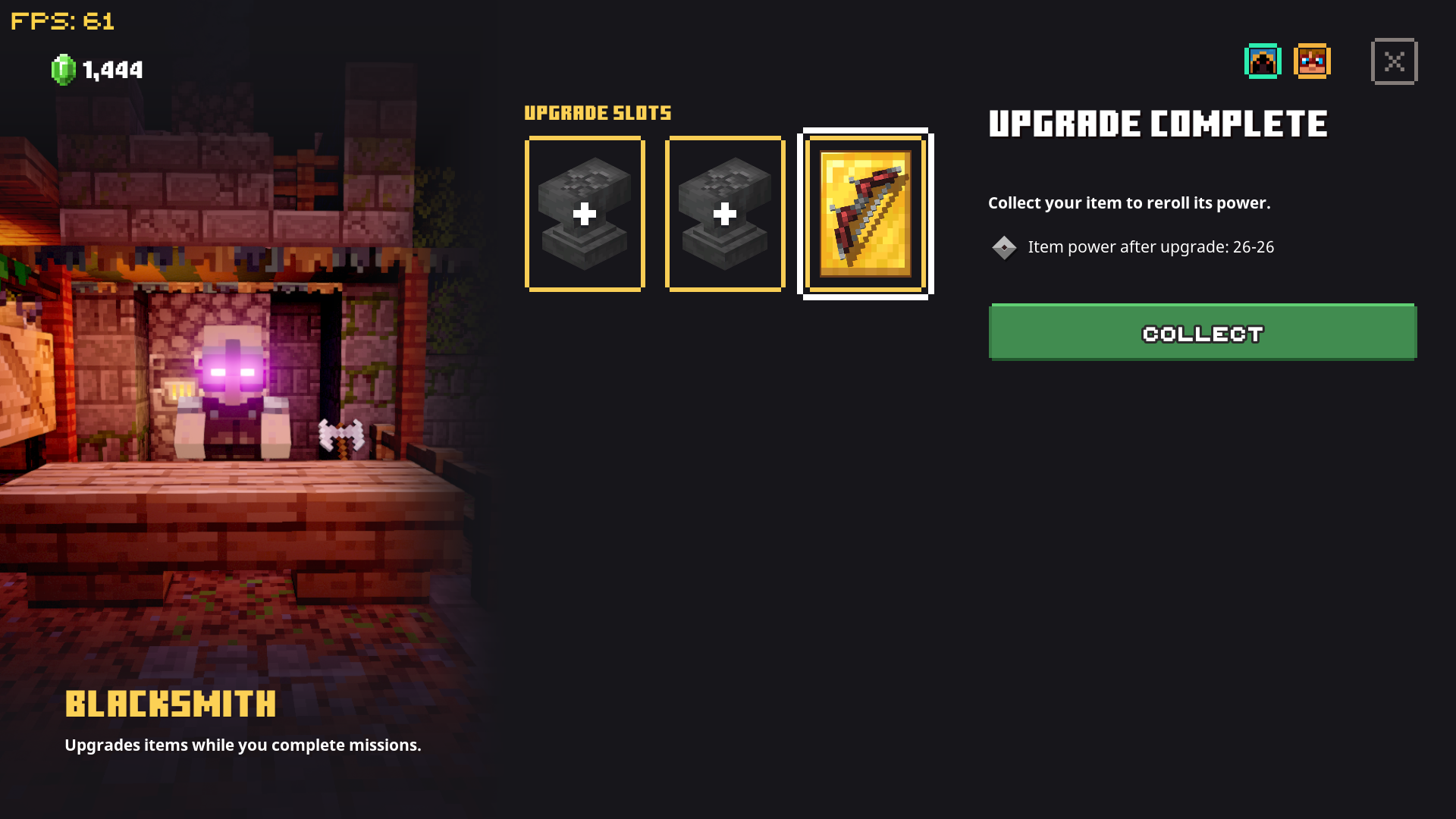

I was testing some commands and noticed that the "CanDestroy" tag seems to be broken. Any time I attempt to use it, I get the error "line 1, column 2, missing '}' or object member name". I've attempted using "minecraft:item_name" and "item_name" and the same error pops up. regardless of how I use the command
{CanDestroy ["minecraft:wall_sign"], Unbreakable: true}
For reference, I wanted to make an axe that coulf only break wall signs
"/give iron_axe 1 0"
The syntax helper dimmed out and upon running the command, the above error popped up. I then tried changing "minecraft:wall_sign" to "wall_sign" and to no avail. Even went as far as using "sign" instead of "wall_sign" and still no results...
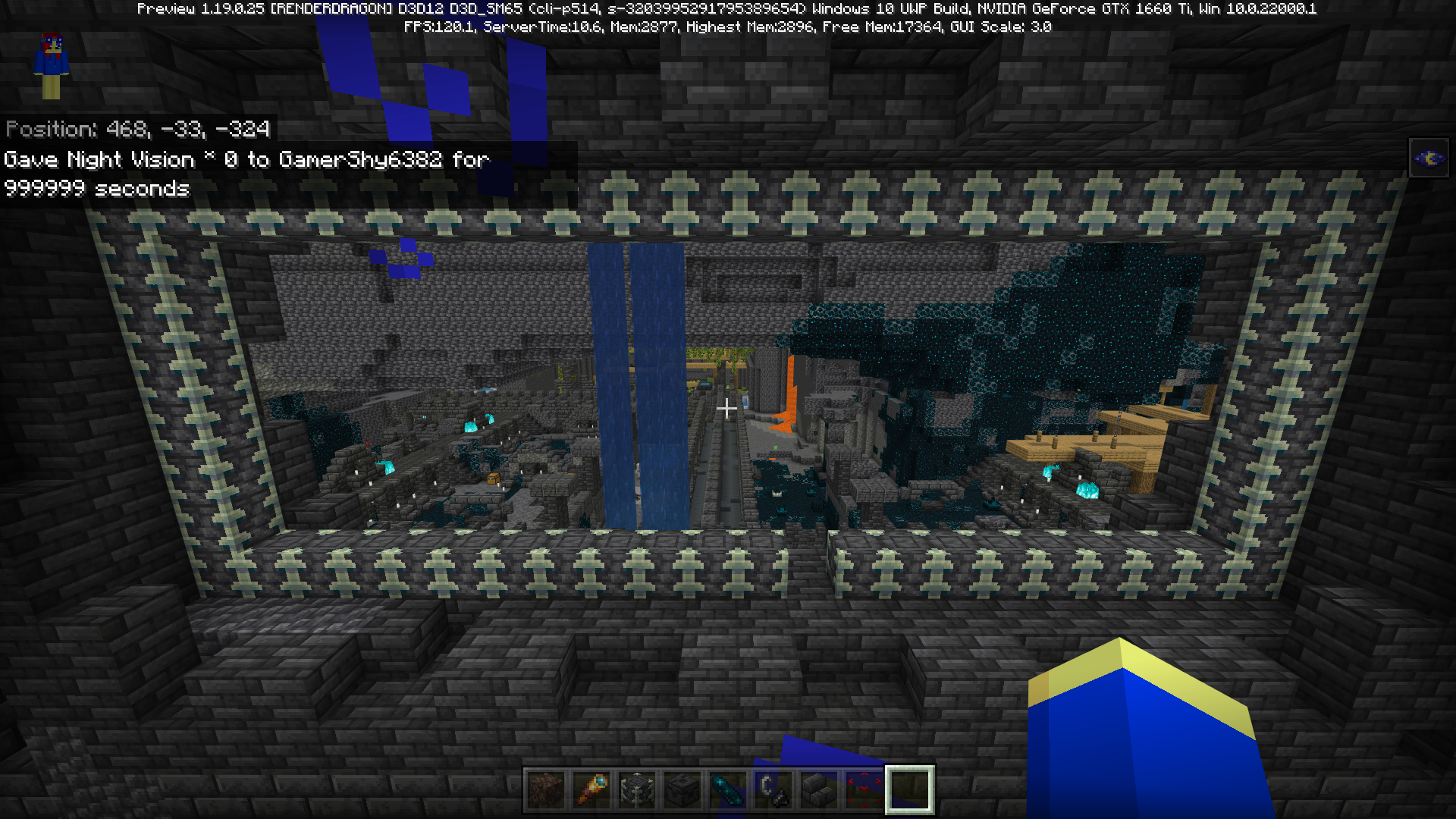
When riding a boat, if you fall into the void, the game crashes, booting you back to the home screen
This has been tested in the overworld, while in creative, and survival, and may potentially affect other ridable entities.
While typically not an issue in general vanilla play, for mapmakers this may prove an issue if, for example, a player is tasked with riding a boat over an ice road
,and has to avoid falling off into the void, or more simply, horse parkourIt seems likely the error is caused by the boat entity being coded to simply despawn upon dropping below Y=0, and likely deleting a
my entities riding the boat at the time. However, since player entities cannot be "deleted", the game simply crashes.Tested on Samsung Galaxy J7 Sky Pro
When riding a boat, if you fall into the void, the game crashes, booting you back to the home screen.
This has been tested in the overworld, while in creative, and survival, and may potentially affect other ridable entities.
While typically not an issue in general vanilla play, for mapmakers this may prove an issue if, for example, a player is tasked with riding a boat over an ice road and has to avoid falling off into the void, or more simply, horse parkour
It seems likely the error is caused by the boat entity being coded to simply despawn upon dropping below Y=0, and likely deleting any entities riding the boat at the time. However, since player entities cannot be "deleted", the game simply crashes.
Tested on Samsung Galaxy J7 Sky Pro
Galaxy j7 sky pro
So, one of the big things I enjoy doing on Minecraft is building custom villages, in survival, by curing zombie villagers and building homes for them. In my current survival world, I had 6 villagers, 2 player built iron golems, spanning 5 homes. I left the village to work on automated farms in my base which is ~ 7 chunks from the village. I've left the world and rejoined multiple times, and decided to check on my village to make sure everything was good.
Note: Every block, save for roofs, was fully lit by torches, and the two golems were more than capable of killing the few mobs that may have spawned on the roofs.
When I checked on the village last, I had:
2 golems
1 cartographer
1 fisherman
2 tool smiths
1 butcher
and 1 baby, born from trading
When I checked, just now
I had lost BOTH golems, and my cartographer, due to them despawning for no apparent reason
That's 72 iron down the drain, and now I need to cure more white robes and HOPE I get a new cartographer.
The bug, tldr, is that mobs that should have the "persistanceRequired" tag despawn randomly, likely due to chunk reloading.
EDIT: It should also be noted the village has walls surrounding the entire perimeter, with fence gates blocking the entrance
Simply put... Signs are completely broken when certain words are entered into signs. My r
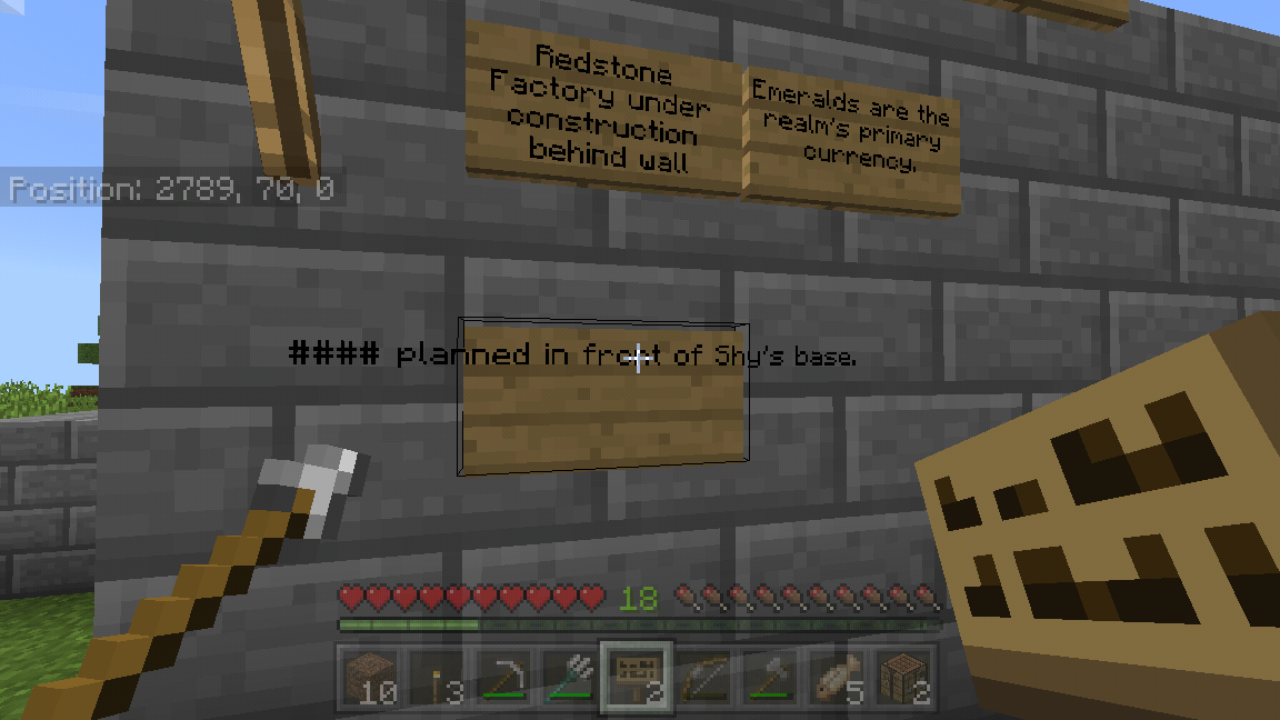
ralm hada message board in which we post things were building and doing for eachother to know. I planned to build a shop in front of my base. Now, my username is "TheGamerShy" and everyone refers to me as "Shy". I had entered this exact phrase into the sign. "Shop planned in front of Shy's base". My friend had watched me inputting the text, and once I had typed "Shy", the sign bugged out and read "#### planned in front of Shy's base" and the text went off the sides of the sign, ignoring any line breaks entirely. It appears to only occur on realms, and I'm unsure if any other words are affected, may require some extensive testing.. but either way, it's extremely annoying.It also doesn't matter what I enter, the moment "Shy" is input, the first word becomes censored with #'s, and the text glitches off the sign...
If you plan to test if this works I'd recommend inputting what I first did, "Shop planned in front of Shy's base" to see if it occurs. It might work the first time, but if you break and replace the sign, odds are it'll bug out like it did for me.
Simply put... Signs are completely broken when certain words are entered into signs. My realm has a message board in which we post things were building and doing for eachother to know. I planned to build a shop in front of my base. Now, my username is "TheGamerShy" and everyone refers to me as "Shy". I had entered this exact phrase into the sign. "Shop planned in front of Shy's base". My friend had watched me inputting the text, and once I had typed "Shy", the sign bugged out and read "#### planned in front of Shy's base" and the text went off the sides of the sign, ignoring any line breaks entirely. It appears to only occur on realms, and I'm unsure if any other words are affected, may require some extensive testing.. but either way, it's extremely annoying.
It also doesn't matter what I enter, the moment "Shy" is input, the first word becomes censored with #'s, and the text glitches off the sign...
If you plan to test if this works I'd recommend inputting what I first did, "Shop planned in front of Shy's base" to see if it occurs. It might work the first time, but if you break and replace the sign, odds are it'll bug out like it did for me.
I love how you moderators replied on this one but not the one I posted a week before this lmfao.
That aside, I can confirm this bug does occur. Sometimes Zombies ignore iron doors, however, if you aggravate the zombie (by hitting it) then escape indoors, the zombie WILL begin to attempt to break down the door.
they attempt to break doors for players, not villagers.

Issue:
Iron doors exist as a form of security door, only openable via redstone and harder to destroy than a wooden door (without tools) During my play in a solo survival world, I was low on health and ran inside while a zombie was chasing me, upon the iron door closing behind me, I turned to see the zombie damaging the door. I thought perhaps this was merely a visual bug and the zombie would be incapable of actually destroying the door, however, I was soon proven wrong once the zombie broke the door down.
It should be noted that iron doors are intended to be mob proof. This bug eliminates thisSteps to reproduce:
Build a home with an iron door as the entrance
Set difficulty to Hard
Spawn a zombie or let one spawn naturally
Lure it to your door and make sure it closes behind you
Observe as the zombie easily breaks the door downExpected Result:
The zombie stops at the door and is unable to proceedActual result:
The zombie destroys the door effortlessly and continues pursuit of the player.Edit:
Looking more and more at how incompetent the staff on this site seems to be, I've attached a video PROVING this bug to exist. If this continues to be ignored, I'm going to the devs directly. I've had it.
Oh hell no. You did not just mark the first report of this issue as a duplicate.... Whatever. At least it's being dealt with.
Me and my gf have been playing Dungeons for a while now, however, we've encountered a strange issue.
All online sources I can find state that artifact cooldown stacks to a maximum of 78%. My gf decided to make an artifact based build for damage, and attempted to use a Fireworks Rocket.
She's using an Evocation Robe with Cooldown 3 on it, which totals, perfectly, to 78% (40% base on the armor + 38% on the enchantment)
Doing some basic math (30-(30*0.78)) says that the cooldown SHOULD be 6.6 Seconds on the dot.
However, timing it in game gives us 15 seconds. Over twice as long as seemingly intended.I'm unsure if there's a new cap, as I can't find any sources saying there is, but this seems to be broken, making Fireworks arrows a bit useless with this good of a build.
Me and my gf have been playing Dungeons for a while now, however, we've encountered a strange issue.
All online sources I can find state that artifact cooldown stacks to a maximum of 78%. My gf decided to make an artifact based build for damage, and attempted to use a Fireworks Rocket.
She's using an Evocation Robe with Cooldown 3 on it, which totals, perfectly, to 78% (40% base on the armor + 38% on the enchantment)
Doing some basic math (30-(30*0.78)) says that the cooldown SHOULD be 6.6 Seconds on the dot.
However, timing it in game gives us 15 seconds. Over twice as long as seemingly intended.I'm unsure if there's a new cap, as I can't find any sources saying there is, but this seems to be broken, making Fireworks arrows a bit useless with this good of a build.
All other testing gives similar results, Spinblade is reduced by 50% instead of 78%, same with Corrupted Seeds. The cap appears to be 50% instead of 78%.
Skeletons killing creepers is meant to make the creeper drop a music disc, however, as of this current update, they no longer drop music discs, making the majority of discs unobtainable
Steps to reproduce:
- Create a creative world for ease of testing
- Build a 1x1 square with any block, place a roof above it
- Place a skeleton inside, this will trap it in place
- Repeat the process a few blocks away but with a creeper instead
- Stand so that the skeleton will hit the creeper when trying to shoot you
- Enter survival, and wait for the creeper to be killed
Observed Results:
The creeper will not drop a music disc
*Expected Results:
*The creeper drops a randomized music disc with the exception of PigstepReally sucks, too, I was gonna build an automatic jukebox for my spawn house in my survival world
Skeletons killing creepers is meant to make the creeper drop a music disc, however, as of this current update, they no longer drop music discs, making the majority of discs unobtainable
Steps to reproduce:
- Create a creative world for ease of testing
- Build a 1x1 square with any block, place a roof above it
- Place a skeleton inside, this will trap it in place
- Repeat the process a few blocks away but with a creeper instead
- Stand so that the skeleton will hit the creeper when trying to shoot you
- Enter survival, and wait for the creeper to be killed
Observed Results:
The creeper will not drop a music discExpected Results:
The creeper drops a randomized music disc with the exception of PigstepReally sucks, too, I was gonna build an automatic jukebox for my spawn house in my survival world
So, I'm not entirely sure how to describe this issue.
I recently re-launched my SMP server and wanted to add some commands to it and chose to use vanilla BDS as opposed to modified software (for feature consistency). WE are using the chat detection system in the Gametest framework for this.
We tested it in a multiplayer setting in a hosted world and it worked flawlessly, however, when put onto the server, even with only 2-3 players, it'll randomly not detect some player's messages, but will detect others. The consistency of the detection is entirely random, one moment it works for me, for example, and then when I relog it stops working, when someone else relogs, it'll suddenly work for them.
I have attached the addon in question for further testing.How to reproduce:
Apply the behavior pack provided in the report in a singleplayer world
All commands use "." instead of "/"
Attempt to use ".spawn", you should be teleported to "0, 116, 0" (location of my server's spawn"
Have any number of other players join
They should all be able to properly use ".spawn" as well.
Apply the behavior pack in BDS
Have the same players join as before
Some players will be able to use ".spawn" to teleport, others cannot as Gametest is failing to detect their messageExpected Result:
All players should be detected in the Gametest Framework's chat detectionObserved Result:
Chat detection is highly inconsistent and seemingly random as to which players it listens for.
So, I'm not entirely sure how to describe this issue.
I recently re-launched my SMP server and wanted to add some commands to it and chose to use vanilla BDS as opposed to modified software (for feature consistency). WE are using the chat detection system in the Gametest framework for this.
We tested it in a multiplayer setting in a hosted world and it worked flawlessly, however, when put onto the server, even with only 2-3 players, it'll randomly not detect some player's messages, but will detect others. The consistency of the detection is entirely random, one moment it works for me, for example, and then when I relog it stops working, when someone else relogs, it'll suddenly work for them.
I have attached the addon in question for further testing.How to reproduce:
Apply the behavior pack provided in the report in a singleplayer world
All commands use "." instead of "/"
Attempt to use ".spawn", you should be teleported to "0, 116, 0" (location of my server's spawn")
Have any number of other players join
They should all be able to properly use ".spawn" as well.
Apply the behavior pack in BDS
Have the same players join as before
Some players will be able to use ".spawn" to teleport, others cannot as Gametest is failing to detect their messageExpected Result:
All players should be detected in the Gametest Framework's chat detectionObserved Result:
Chat detection is highly inconsistent and seemingly random as to which players it listens for.
So, I'm not entirely sure how to describe this issue.
I recently re-launched my SMP server and wanted to add some commands to it and chose to use vanilla BDS as opposed to modified software (for feature consistency). WE are using the chat detection system in the Gametest framework for this.
We tested it in a multiplayer setting in a hosted world and it worked flawlessly, however, when put onto the server, even with only 2-3 players, it'll randomly not detect some player's messages, but will detect others. The consistency of the detection is entirely random, one moment it works for me, for example, and then when I relog it stops working, when someone else relogs, it'll suddenly work for them.
I have attached the addon in question for further testing.How to reproduce:
Apply the behavior pack provided in the report in a singleplayer world
All commands use "." instead of "/"
Attempt to use ".spawn", you should be teleported to "0, 116, 0" (location of my server's spawn")
Have any number of other players join
They should all be able to properly use ".spawn" as well.
Apply the behavior pack in BDS
Have the same players join as before
Some players will be able to use ".spawn" to teleport, others cannot as Gametest is failing to detect their messageExpected Result:
All players should be detected in the Gametest Framework's chat detectionObserved Result:
Chat detection is highly inconsistent and seemingly random as to which players it listens for.
Just an addendum, this appears to primarily effect Linux servers, Windows based servers appear to work flawlessly, much like hosted worlds. This is a major issue as most server hosts use Linux over Windows.
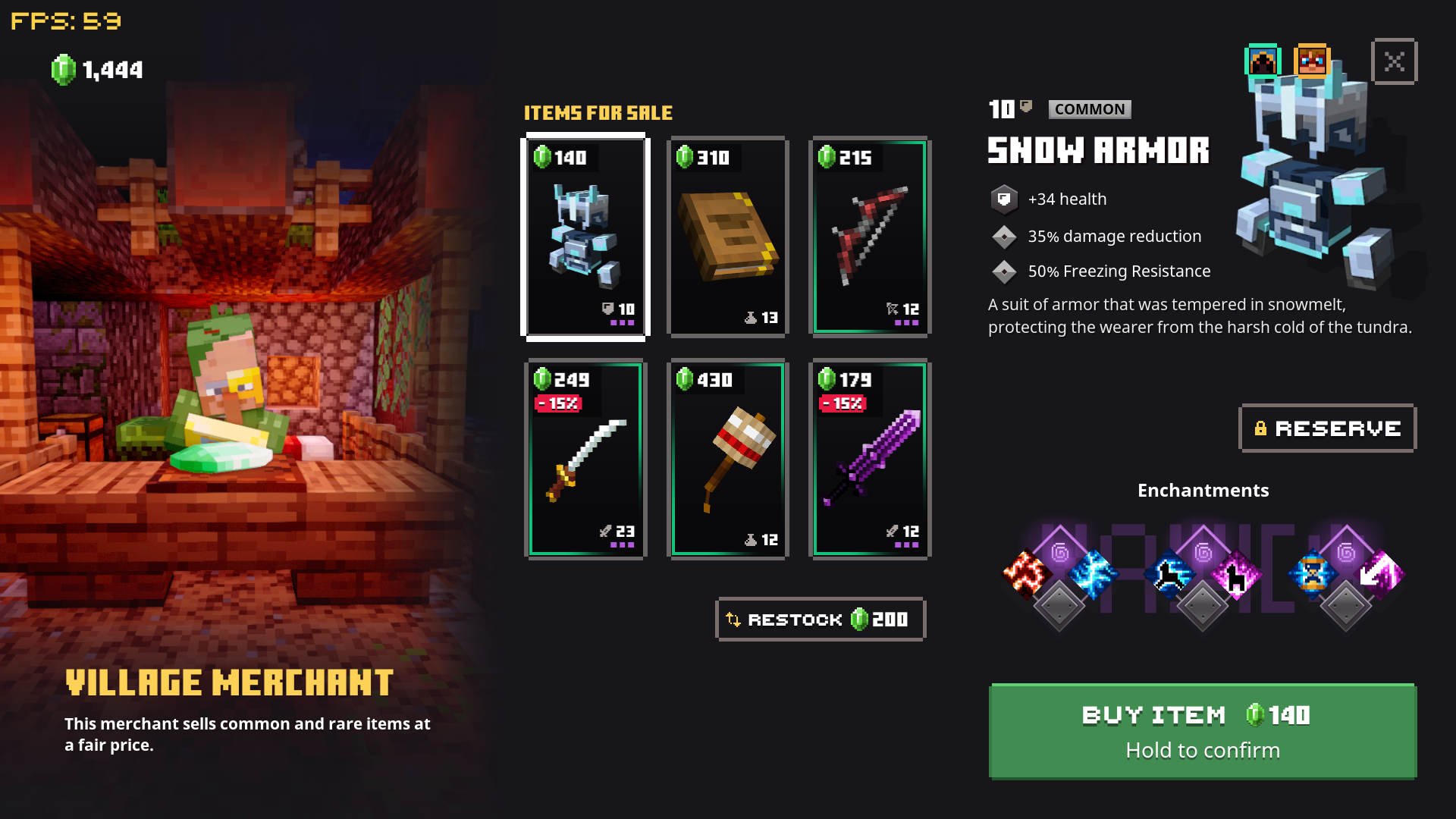
MY GF and I were playing, and she had put an item in the blacksmith, and when she retrieved it, it LOWERED in level. wasting emeralds, and making the item unusable. Why? Why do issues like this keep cropping up...
Edit 1: After further testing, the issue persists to shop items, items dropped in missions, and all blacksmith upgrades. Further bugginess occurs with the blacksmith, as the item level reported says it'll be between two specific levels, but gives back as the lowest possible level of what it should've been (for exmaple, it'll say level after upgrade is 23-23, but is given at level 188). This makes progressing in the game near impossible, as you can't upgrade your items, or get better gear without struggling to get decent enchantments for builds. Please dont' sit on this report, Mojang, fix it.
MY GF and I were playing, and she had put an item in the blacksmith, and when she retrieved it, it LOWERED in level. wasting emeralds, and making the item unusable. Why? Why do issues like this keep cropping up...
Edit 1: After further testing, the issue persists to shop items, items dropped in missions, and all blacksmith upgrades. Further bugginess occurs with the blacksmith, as the item level reported says it'll be between two specific levels, but gives back as the lowest possible level of what it should've been (for exmaple, it'll say level after upgrade is 23-23, but is given at level 188). This makes progressing in the game near impossible, as you can't upgrade your items, or get better gear without struggling to get decent enchantments for builds. Please dont' sit on this report, Mojang, fix it.
Edit 2: After further testing, this only occurs in online sessions for clients (not the host) and fixes itself once a client leaves and rejoins, but only after spending emeralds to restock the shop. It's most common after missions, as if the data for a player's power level is not resent post mission like it should be.
Bobby Dobberstein: Actually, a zoomed map's origin is the same as the original map only 25% of the time, and this is an unavoidable requirement in order to have walls maps with no overlaps nor gaps in them. The reasoning isn't intuitive, but it's supported by a solid mathematical proof.
The fact is that there's a fixed correspondence between maps of the same area at different zoom levels. What I mean by that is that each level 0 map "belongs to" a specific level 1 map, and its image can only appear (in scaled reproduction) in one specific corner of that level 1 map. I know it seems as if you could get it in a different corner by moving to a different level 0 area, but if you actually could do that, you'd be able to make different level 1 maps that contain the same area in different positions, and when you tried to hang them on a map wall you'd either have that area duplicated (because each map is in a different item frame) or you'd have to overlap them somehow (which you can't do with item frames). A level 1 map reproduces the scaled images of four level 0 maps, one in each of its corners. Since the map origin is in the upper left corner, only one of the four maps (25%) can have the same origin at both level 0 and level 1.
Obviously, this same analysis applies all the way up the zoom levels, so a level 1 map "belongs to" a specific level 2 map and its image can only appear in one specific corner of that level 2 map, and so on and so forth. The result is that fixed correspondence I'm talking about: For every point in the world, all the maps at different zoom levels that contain that point are positionally fixed in relationship to one another. Without this fixed correspondence, walls maps would be impossible, or at least extremely frustrating to build.
To respond to your diagram, the map origin did not "shift to where the player was located"; that was just a coincidence. Instead, the X in the first chart happened (25% chance) to correspond, per fixed correspondence, to the lower left corner of the zoomed map that it "belongs to". Think of a square drawn around the Q, the X, and the two Os to their right. That square represents the area covered by the zoomed map. If you zoomed any of the four lower level maps, it would have given you the same zoomed map; that's what the fixed correspondence does. You just happened to put the Q in the position of the map that, by coincidence, was in the upper left corner of the zoomed map. If you had instead swapped the Q and X in the chart, and then zoomed the map from X while standing at Q, it would have given you the same zoomed map and this time the origin would have been unchanged.
I have spent literally hundreds of hours studying how maps work and I could explain it more fully to you, but unfortunately the bug tracker isn't an appropriate place for it. (I've already written more than was necessary for bug tracking purposes, and we don't like to encourage people to treat this site like a help forum, because that creates a lot of clutter that interferes with bug tracking.) I occasionally appear on the Minecraft and Minecraft Wiki Discords; feel free to DM me there for more information if you like. I use the name Auldrick everywhere.
Bobby Dobberstein: To clarify, I don't think that the overbreeding is causing the villagers to forget their beds and workstations, I think it's the other way around. It starts with the "exiled" villagers forgetting that they dwell in this village for some reason (which is the actual bug). A villager can only claim a bed and workstation in a village they dwell in, so they automatically release their claims, leaving their former beds and workstations available. The remaining villagers then notice there are unclaimed beds and breed to fill them.
We've been aware that there are problems with the stability of villager/village relationships, but it seems to happen randomly so it's tough trying to catch it in the act. I'll be trying to reproduce this. If I can, hopefully it'll be the key to solving a bunch of related problems (which, yes, might include expanding villages).
A. Matulich: The villager to bed or workstation distance thing is actually a bit more complicated than that. Basically, it's the village that holds the knowledge about what POI blocks (beds, workstations, and bells) it contains. Villagers have to discover them initially, which they can only do up 16 blocks away horizontally and 4 blocks vertically, but once they do discover them, they add them to the village. At that point any villager who dwells in the village, no matter where he is in the world, becomes aware that they exist, and whoever's turn it is can claim them. So in other words, a villager can't detect a bed or workstation 48 blocks away, but they can claim one at any distance, as long as some villager in the same village detected it at some point. Note that although the village remembers where its POI blocks are, the game doesn't give the villagers access to that information. Unless they're within the 16-block detection range, they only know that it exists, not where it is. This is the reason that some villagers wander around for a while after sunset; they're trying to find their beds. (I don't know why they designed it to work this way.)
Texture pack and resource pack are the same thing, Dawna
This isn't a bug, bro
Bedrock has no need for autosave intervals as it saves as you play
console only has it cuz it interrupts you to save
This is normal. Even in java.
The redstone torches are meant to reactivate after a random amount of time
"component 'minecraft:can_destroy' was not an object"... clearly you don't even know what you're doing. This is mcpe, not mcjava.
can confirm this bug occurs on my phone too. When the view level drops to the 2 pixel height difference soul sand has, the block texture that usually appears when you're suffocating shows. Small bug, and very specific, but it does happen
alright then...
I don't think this is a bug. Bedrock isn't meant ti directly emulate java, for example, if you eat, your arm moves to your mouth (look in third person), that doesn't happen in Java. The hit animation is meant to look like you're throwing the item out.
Certain blocks are unrendered at certain distances. Namely, any non-full blocks with the exception of stairs become unrendered at a certain distance. It's a resource management technique, think of it like culling. I admit it's annoying, but I'd prefer it that way over having an unplayably laggy game.
turtle shell is meant to grant only 10 seconds of watee breathing.
Given my post was marked as a dupe of this, I should also say numerous packs can't even load their entities. Attempting to run /summon never brings up any of the entity names, only vanilla ones.
Project Biome 0 Is an example of this issue
this apparently isn't a bug as far mobs can apparently randomly enter love mode now.
@Auldrick based on what I'm seeing the map origin changes when the map is expanded.
Essentially, every (I think) 6 chunks is a new map chunk, any maps created in a specific map chunk will share the same origin.
Once the user expands a map, if they are within a different map chunk, the origin of the expanded map changes.
For some visual...
Let's say the X represents the map chunk the map origin is located in, O represents a generic chunk, and Q represents the chunk the player is located in
OOOOO
OOQOO
OOXOO
OOOOO
as you cannsee, the player is one chunk north of where theap's origin is. Now if the player expands their map...
OOOOO
OOXOO
OOOOO
OOOOO
The map's origin shifted to where the player was located, rather than remaining where it originally was
Hope this helps
I am not using any addons, the world I'm in has been created since 1.7.1, if that means anything. I have noticed it's fairly inconsistent. Perhaps it's related to the damage caused when a crystal is destroyed while healing the dragon, or if the dragon is shot with an arrow shortly before perching, otherwise, I'm not sure.
It also effects Zombie Villager V2, and the Ravager, and I think it effects Villager V2 as well. Surprised more people didn't notice those
I've never seen a fancy clouds toggle
I can confirm it is not a realm only issue given my instance was in singleplayer..
Glad to see this issue is still being ignored <3
I'm pretty sure this is intended as entities are deleted in the void. Living entities are damaged and killed, while inanimate entities are simply deleted
I'm on pc and this is happening. So I really don't know. All I know is I'm getting tired of not being able to play mc and having the bug moderators ignore all these reports I make.
I can say these types of things are ALSO affecting pocket and windows 10. Yet my reports on the matter are always ignored. 1.10 didn't fix anything, it made it worse. I can't play mc at all regardless of what I use. Except I get the worst lag when chunks are loading.
As a short update, I did some more testing after respawning the dragon. No invulnerability. I'll attempt to recreate this bug in a new world likely tomorrow
I wonder why most of my reports are outright ignored unless it's found to be a duplicate
Well then Auldrick, please explain why the Zombie Pigman skin looks perfectly fine with the arms up? Where's the balancing there? And your argument of "mistaking players for real mobs" is completely arbitrary due to the fact that nametags are always visible. this IS a bug, and it's been neglected because of your ignorance. Get mad at me if you'd like, but this is a bug. If it isn't, then the Zombie Pigman skin in Skinpack 3 needs to be reverted to a normal player model, making it worthless, btw, as anyone can literally pull the texture file from the addon texture pack template and use it as a skin. I'd recommend reopning this, as it's still a bug in 1.10 onward.
Why would you report a bug on a super old alpha version of the game that is no longer supported? If it's not supported, bugs will not be fixed
It's because that's a nitwit villager. Notice that it has a green robe underneath the biome overlay. Nitwits will not claim jobs.
Can also confirm with video evidence to prevent incompetency 2019-05-03 17-14-20.mp4
I've been having this issue, but didn't know what was happening. Me and my gf actually had to kill all our villagers and restart the village because of this bug, as the village began overpopulating and abandoning villagers. Pretty big issue for this update, to be honest.
I mean, I like, and honestly PREFER, the old horse model as it's more detailed and just all around looks better compared to the old one, but the fact that custom models can't be loaded to overwrite it really bugs me. I was actually going to be making a racing addon using the horse, and was going to modify the model to give it some armor and whatnot that required extra 3D geometry, but low and behold this bug somehow crops up. If anything I hope that it's fixed before 1.12 launches (and somewhat hope the old model replaces the new crappy one)
God the staff here don't to their job.
Look in "Profile"
What the hell are you on about emoji boy?
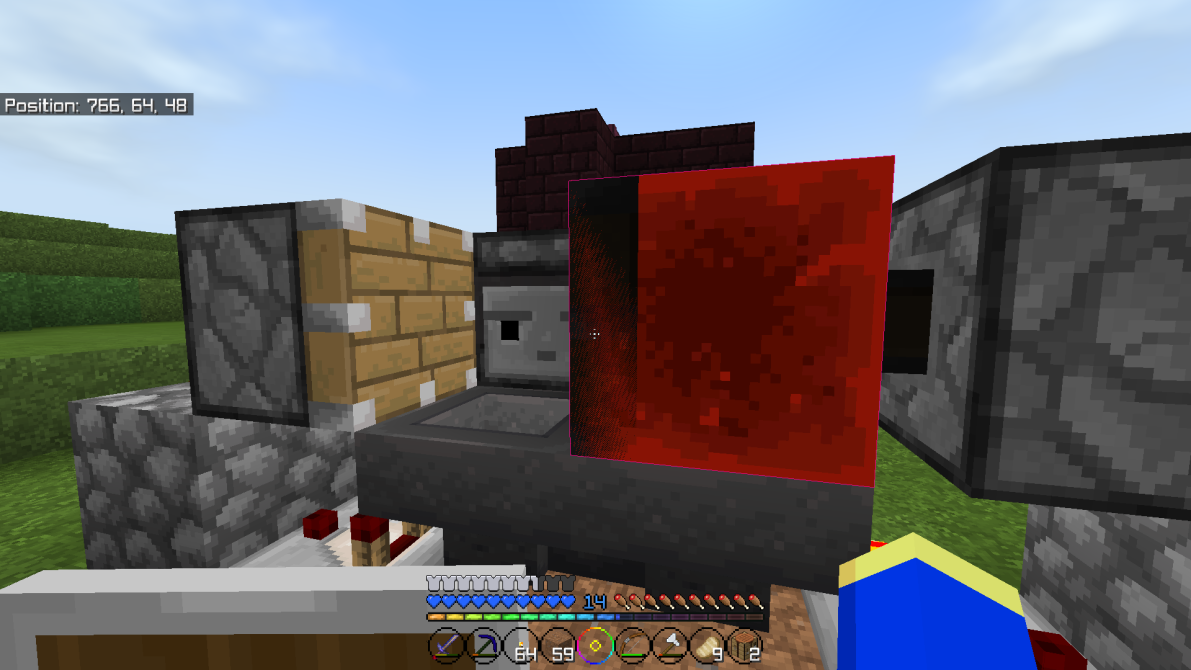
Apologies for the late response, GoldenHelmet, hadn't checked here for a while. The piston's position is 764, 65, 47 while the redstone block is at 764, 65, 48. After doing a bit of math, it appears that neither block is moving into a chunk border, however, the piston came out to 2.937, which means it is against the border, but pushes away from it.
Ahhh, my bad, didn't think about that. Then yes, that confirms that it's yet another chunk border issues. Seems Bedrock seriously struggles with chunk borders, I wonder if it's in the dev's plans to rework the chunk save/load system at some point.
Glad this is being ignored.
Scuse me? "Windows doesn't have this"
Actually, it does. You are able to connect any controller- even an xbox controller, which I use- and Minecraft will detect the controller and you'll be able to play identically to playing on console. Plus, you clearly are misunderstanding the issue. On an xbox controller, the buttons are laid out mirrored to how they are on Switch. With versions prior to 1.16, the Y button, which is the top button on xbox controllers, and the default [inventory] button on controller, would open the inventory and crafting menu, allowing you to close the recipe book, and only have your inventory, and the default 2x2 crafting grid visible. When pressing x, which is the default [crafting] button on xbox controllers, and the left face button, the game would then open your inventory in the same way as you would when openning a crafting table, meaning the recipe book would once again open.
Please, do a bit of research before attempting to impersonate the moderators on here, Jake. You disappoint me.
This bug is STILL present in the latest version of the game.. How is it so hard to change map ID's?
Yes, it is still a problem. except now it comes up as "<player> failed to execute /particle" if you run it in an execute command.
Also, I am following that format in this post.
@Jesse Kohn that's not a bug, that's the entity's UUID, every entity is assigned one so that errors don't occur with game functions. It acts sorta like the entity's username. Name tags do not change that name.
We do not have any Evocation robes with 3 cooldown enchants. Nor do we really have the patience to hunt for one lmao. Though, 40% + 38% = 78%. Shouldn't need all 3 slots filled just to get the capped cooldown reduction.
And yes, we tested it with proper timers. Each time it was 15 seconds as opposed to 6.6 (or 7) seconds.
Then that should REALLY be described in game, as it deceives the player into believing they're getting 78% instead of 50%.
Ah, that makes sense. I wasn't entirely certain as I've seen numerous maps get patches in the Changelogs, though that may be game engine patches as opposed to the map itself being fixed. Apologies.
I can actually explain immediately why this happened, for those of you still paying attention, as I actually fixed it in my resource pack ages ago.
The click sound that blocks use is the exact same as the menu click. Menu sounds are not considered part of the sliders, for whatever reason, and as such, you can always hear menu click even with all sliders (except for main volume) set to 0.
The developers, in a move I find incredibly lazy, used the "random.click" sound definition for the blocks as well, hence why directional sound didn't work properly for redstone clicks- it was playing the sound as if you were pressing buttons in, say, the pause menu.
The easy fix would've been to separate the sound definition to "menu.click" and then have another definition named "block.click" and have them use the UI and blocks respectively, which is what I did to fix the sound issue.
Source- Literally look in the UI code for the pause menu, crafting menus, main menu, etc and you'll see they call for "random.click". Go into "sound_definitions.json" and you'll see that random.click is defined as a UI sound. If you go into "sounds.json" you'll see that the dispenser sounds and whatnot all also call "random.click".
Literally just an oversight caused by a failure to do things thoroughly. I call it lazy cuz it was literally a 1 line of code fix.
Wha... WHY?!
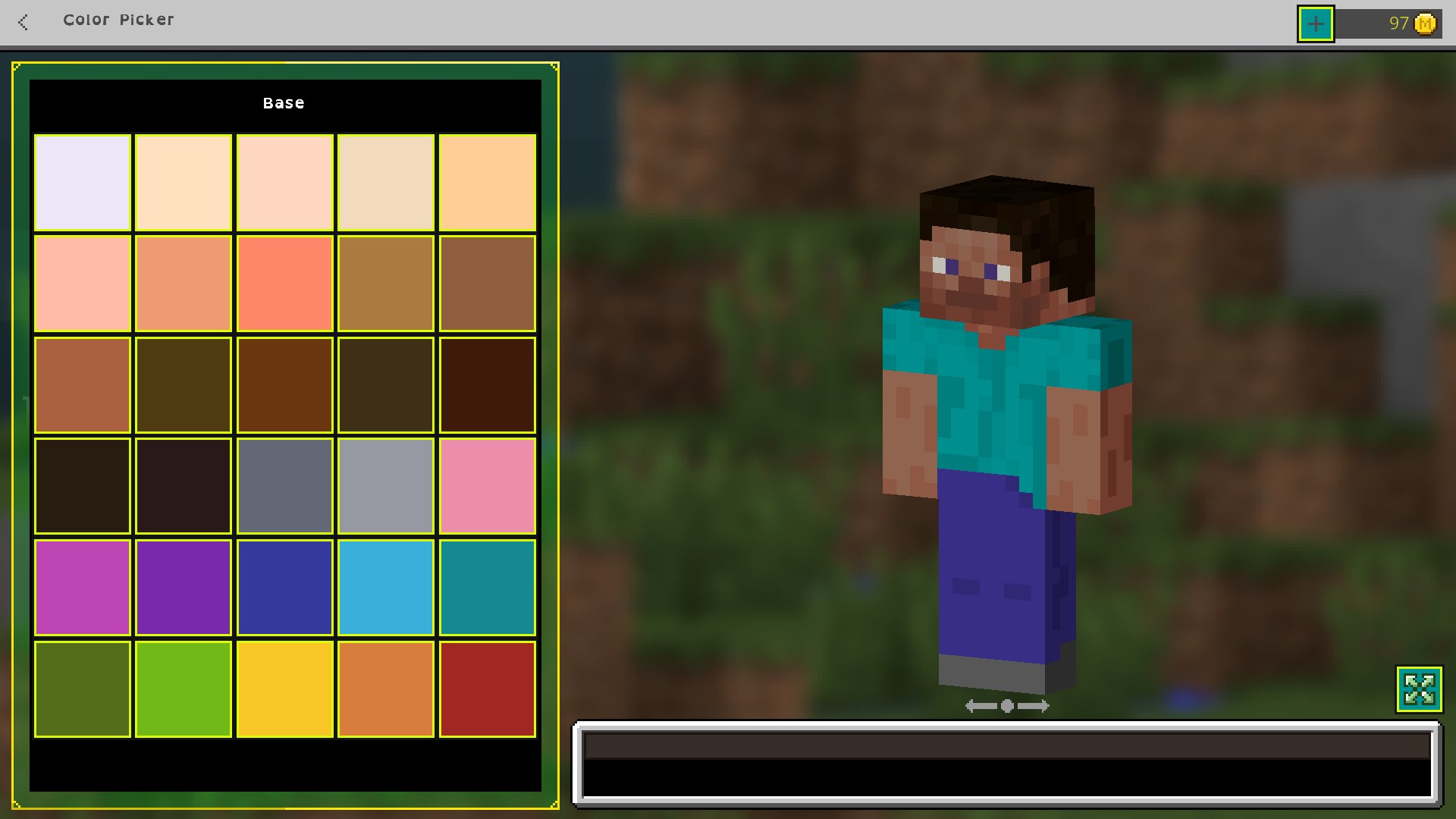
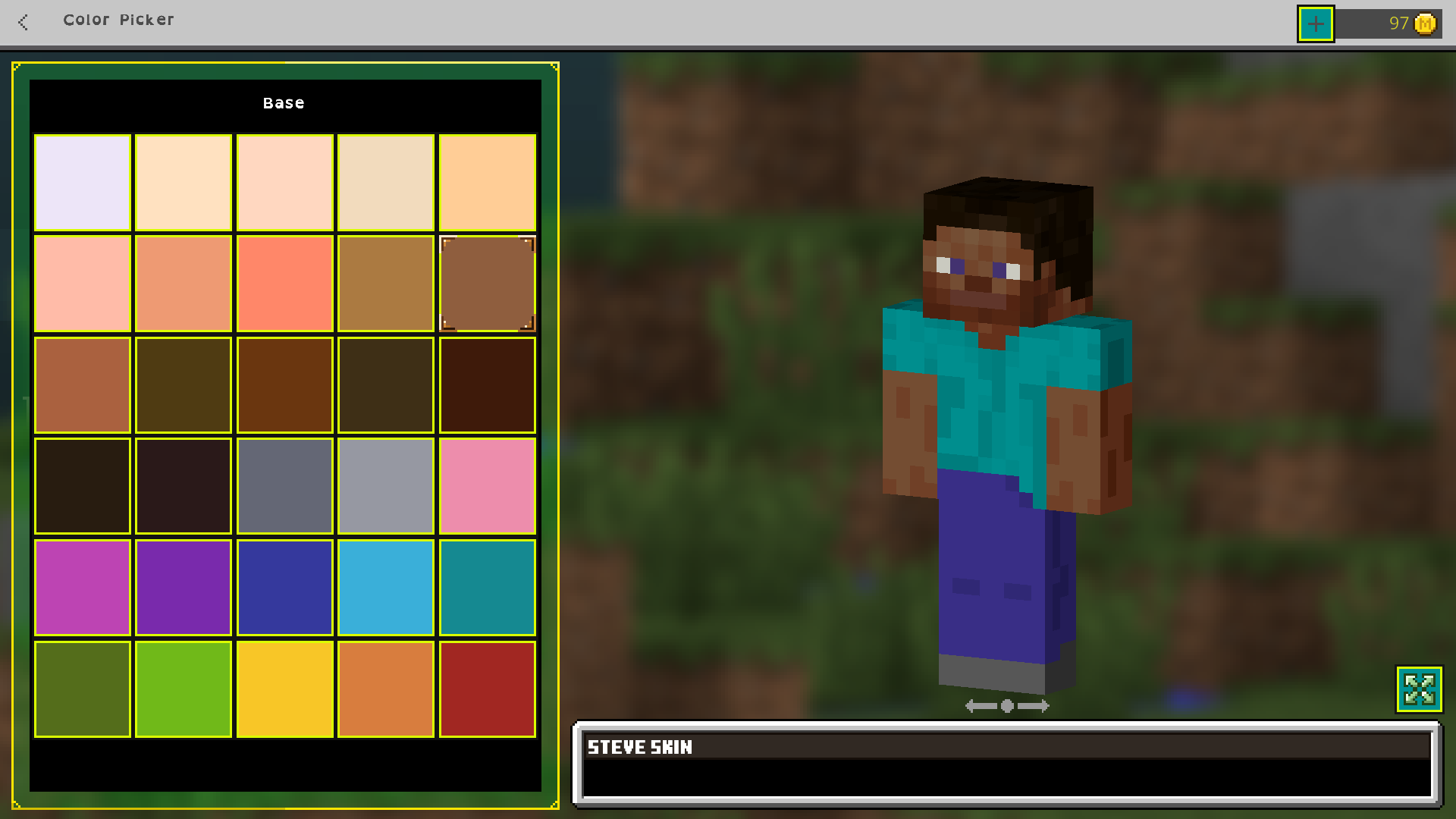
Can confirm this issue as well, the selectable Steve color i nthe Character Creator is far darker than the actual skin color for Steve, making it impossible to create a steve-themed skin without deleting and recreating a skin until Steve is chosen as the random default (Alex seems to have higher priority, or I just have bad luck with coin tosses)

Correct Color:
Incorrect Color:
Also, for the record @King Izdebeska, the format you copy pasted doesn't apply to an issue like this. At all.
We figured out the issue, apologies for the late reply. It;s not qwell telegraphed that the way we were going was intended to be an exit to another route.
What Douglas said, This is an issue with visitor permissions, NOT adventure mode permisssions.
This is still an issue as of 1.17.10, and betas.
Golden, the issue also occurs when the chunk is unloaded at the same time that the movingblock entity is meant to be removed.
Will do so in a moment
Okay so, I don't know how much water this will hold, but I have a strong idea as to WHY this bug happens, and for HOW the despawn can be understood.
It's already been established that the primary problem with entities being randomly deleted from existence can be traced to chunk borders.
To my knowledge, when the game saves chunks, it doesn't do so in a massive lump. It saves each chunk one at time, validates the data, then moves on. To us, this is unnoticeable, and it happens so quickly that it seems negligible, but in this case, it's not. Something I've noticed when just sight-seeing in my world is that far away entities do NOT move smoothly from one point to another, rather, they "teleport" between what appear to be pathfinding checkpoints to reach their destination, often skipping 2-3 blocks at a time. This is likely a method of resource management as the game doesn't need to calculate precise movement for the entity, but rather just roughly moves them to where they want to go.
So, let's build a scenario that would likely recreate this bug:
Most players that visit villages only spend a small amount of time in one, just to do some trading or raiding. So we can safely assume the village is going to be either at the edge of sim distance, or be unloaded while villagers are still moving. If my assumption that chunks are saved one at a time, validated, then moved on is true, then we can see where an issue can lie. Let's say a villager is standing in chunk B. Chunk A is next to it, currently being saved. Now, the villager- while Chunk A is still being saved, decides it wants to move to some block that's within Chunk A. The villager is ignored in Chunk A, as the save already occurred. Now, Chunk B is being saved, and as "luck" would have it, the villager is already in Chunk A. This means there's no villager to be saved to Chunk B. Now, suddenly, a villager that VERY obviously already exists is not saved in either of the chunks it occupied. So the next time the villager is unloaded, it no longer exists when you come back, as neither of the chunks saved the villager. This can also happen when the villager is close to you, but obviously would require more precision to occur. Saves also occur when chunks are unloaded, so if a villager was crossing a chunk boundary at around the same time that the chunk is unloaded, the same issue can occur under the right circumstances, especially if the villager leaves sim distance (chunks are not unloaded all at once, but similarly to how they're saved- one at time)
As for a solution? Don't save entities with chunk data, or at least, prioritize all loaded (or known unloaded) entities to be saved FIRST, before the blocks of the chunk data.
What this would mean is when the game initiates a save all entities are saved internally, possibly to ram, to create a sort of "snapshot" of the entities' positions. Then, when chunk data begins to be saved, any checks to save entities call for the snapshotted positions as opposed to the true positions. This means that even if a villager crosses a chunk border at the same time that the game swaps to save the chunks as described in the scenario, it'd have no effect on where the villager will be saved. The only potential issue this could introduce is mobs being in slightly different positions than when you left, which would likely be unperceivable. In theory, this would entirely solve mobs being despawned at chunk borders.
This whole thing could also explain the random disappearances when you consider the teleporting movement when entities are far from the player.
Still an issue in 1.17.30. This is such a simple button mapping patch, how has it not been fixed yet?
I'm unsure if this issue still occurs given its extremely specific circumstances, but I've been watching for it. I recently built a new auto chicken farm in a new world, so my personal testing is ready to begin again
Also confirmed, set up the TNT multikill trick and through the TNT kill was patched out, turns out it's just all broken.
I'm assuming the thorns change tweaked something in the damage calculation and removed the Skeleton Damage type or something.
This is NOT a duplicate, a there is absolutely no blue screen in this instance. It's a system power cycle.
Items in Bedrock lack the "rarity" colorization Java has, with the exception of enchanted items turning light blue.
How to reproduce:
Apply the behavior pack provided in the report in a singleplayer world
All commands use "." instead of "/"
Attempt to use ".spawn", you should be teleported to "0, 116, 0" (location of my server's spawn)
Have any number of other players join
They should all be able to properly use ".spawn" as well.
Apply the behavior pack in BDS
Have the same players join as before
Some players will be able to use ".spawn" to teleport, others cannot as Gametest is failing to detect their message
Expected Result:
All players should be detected in the Gametest Framework's chat detection
Observed Result:
Chat detection is highly inconsistent and seemingly random as to which players it listens for.
That, right there, is the issue. They should NOT be the same. But, whatever. I'm done reporting bugs for a game where the devs don't even try to fix "smaller" issues.
This is still not fixed, and is affecting the latest version of the game. How has it not been fixed, this literally makes Haste 1 beacons useless.
Wow. It's about time someone actually realized why this is a problem... only had to make a second report that was instantly shot down...
Seriously though, please get this fixed, it's a fairly serious issue.
From what I've seen, it seems like the "Show in store" button may be the culprit. As you'd expect, custom skin packs fail to be in the store for obvious reasons, but the game seems to wait for that "show in store" button to load. Since it never will, the UI never updates to display the equip button. An easy fix should be to disable that check for when a custom pack is loaded.
So, my question is, since this is apparently now WAI, how are we meant to separate chests from boats/minecarts now? Putting it in a crafting grid?
Isn't it like, illegal to force users to give information like this with no way to opt out without them explicitly agreeing to it upon downloading the game? Kinda scummy, Mojang... you're gonna end up killing yourselves at this rate..
Issue still persists.
Oh wow, I actually forgot this bug even existed after all this time. Guess it's finally happened enough to be considered an actual issue.
It's not realms exclusive. It affects Singleplayer as well.
Then it shouldn't be listed under realms, it should be listed under the normal game's bug reports lmao.
Buddy, you're a user, not an admin. Stop acting like an admin.
H-how does this even happen, mojang....?