 Math Bjbo
- Hacker1MC
- JIRAUSER465768
- America/Detroit
- Yes
- No
5 issues
Key
Summary
Status
Reporter
Assignee
Created
 MCPE-182890
Book and Quill repeatedly copies old pages onto the current one while trying to edit
Duplicate
 WEB-5896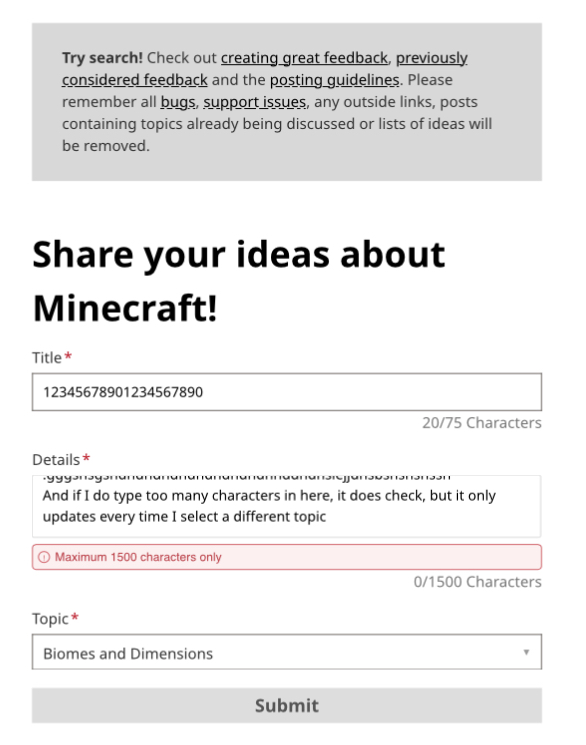
Deleted Comment:
It is still affecting 1.16.40
On Xbox hosted world, Xbox user stands and opens.
Amazon Fire user crashed from world, but not Minecraft.
Xbox guest (2nd) user unaffected.
Added Attachments:
Added Attachments:
IMG_0296.webp
Removed Attachments:
Added Attachments:
Affects 1.16.1 and baby Hoglin knocked me into lava and killed me. The baby Hoglins can chase the player and are the worst.
Similar issues here. Xbox 1 split screen long term world, been having difficulties with the inventory of Username(1) is lost, sometimes XP lost, sometimes back at world spawn, sometimes at the same location but no items, very sad as we lost many shulker boxes and netherite multiple times. And upon relogging him repeatedly, it would go back and forth between world spawn ID and 19 xp base ID. Neither of which had the lost items. Been happening for a very long time, current version 1.16.40
Affects Xbox One X 1.16.100.
Grid has red recipe at first, but as soon as you craft 1, items jump up into grid like before the bug was introduced. This makes it no longer red, items have numbers next to them relating to the amount taken from inventory. One item is returned to player when crafted first, or a whole stack if stack crafted. Items used up correctly. Upon viewing a new recipe, the bug returns.
Just realized this is to prevent the previous bug of the new crafting system, where if you scroll through the recipes, it will take your items and give you the ability to pick more up, and if you press X on Xbox, you can view the recipe with the items from your inventory. No longer think this is a bug, unless Mojang intends to change the background color while not moving items from inventory. Glad Mojang is working hard to fix bugs all the time!
@Jonathan Handel I don’t think it would be by an important amount, that one is relating to the player’s camera, where this one is about the hitbox for walking. They both do involve using the elytra to get a smaller hotbox, but no other similarities from there.
In my case, this has only happened with Xbox Guest accounts, but I can not speak for everyone. ( Xbox One X )
It’s so awful to see all of the new comments of reports of this bug that have happened since 1.16.210, when my problems originated after downloading and removing the beta access maybe half a year ago. All these stories show the same thing, the bedrock playing Xboxes just won’t deal with inventories anymore. Hopefully though this will be fixed because of all the new comment attention, and most of all hopefully they can have an option for split screen second player (or maybe all players) to choose in some way which inventory+xp they want to use, as this will prevent the permanent loss of one or the other characters, as another comment has mentioned. Too bad this couldn’t have been caught before affecting so many people.
@Rich B , that is an excellent idea about reddit. I checked the rules on Reddit, and it turns out this is allowed. Hopefully if we throw a tragic enough story (which is nothing but the truth) we can get it popular. If someone would like to volunteer to create a truly grabbing post, that would be great. I think a video would do best, a video that grabs attention in the start by having someone throw away all their possessions, then transitioning to relating that to how our profiles were taken way completely. Post the link to the post here when you do, as there are many of us eager to get this solved.
@Steve Miller (Does the at symbol work?) this is a bug that has been before, and functions the exact same, just hurts more people now than before. I think the bug was caused for me during my beta usage, and when I reset Minecraft out of the beta and checked my old worlds I stumbled across this bug. Same thing, Xbox one x, 2nd-4th split-screen players had no inventory. In my case, it would bounce back and forth many times where every join was a toss up, and it was so saddening we haven’t really played since. And this was a long time ago.
Make sure, if you haven’t done what was just said about never leaving things in inventory, you get them shulker/chested before this update, or your “blip” inventory will forever be lost. Mojang had to bring people’s inventories back, but they tore down the new ones in the process. Not much else they could do really.
Also happens constantly while splitscreen player is in 3rd person (or second), and it seems that player 1 and 2 on the screen rapidly take turns with or without the crosshair. Seems like the crosshair doesn’t know which user to activate for.
@J9 , extremely useful workaround, I will try that and see if it helps soon. Also, FYI, every ~20 minute interval in which you edit a comment gives an email, so try to keep the edits down to one single full edit. The edits you made and the comment you gave was (hopefully) very helpful though, thank you!
Still around 1.17.2 Xbox One X, thanks for the report and the portal idea I hope that works for me as well.
If the fix is good, thanks for getting it done Mojang!
Can confirm, this issue has reappeared/still present in 1.17.40 or 1.17.41, not sure which update exactly. Xbox One X console.
Mine also keep getting stuck, it only took a minute to lose one to a lantern and the other to dripstone, and then I needed to break the blocks to free them
Affects 1.20.0 mine was 8 blocks of stone layer below the rest, this is just silly
Trying to press enter to save will now delete all text after the cursor.
This stems from how on a sign or book and quill you would proceed to the next line, but in the anvil or chat it is problematic. I noticed today while using an anvil that you fixed the on screen pop-up problem, which I'm very grateful for. Unfortunately, you can now delete an entire message if you go back to the beginning of it to fix a typo and try to send it. This happens using either the Xbox on-screen Keyboard or a USB Keyboard. Thanks for the progress on this bug, Mojang!
Hopefully the fix in the recent beta covers all cases. Glad to see it being worked on!
I just bred 13 donkeys in 1.20.51 on Xbox One X, and they all have the exact same speed. I also bred one donkey and one very fast horse 9 times, and the fastest 6 mules were all the exact same speed as each other. I was hoping to be able to make a fast mule, but I can't see a way to do it.
Still affects 1.20.51, on Xbox One X.
I have a video demonstrating but I am struggling to upload from iPhone
Best I can do for the video https://youtu.be/m4ZhAbnCoo0?si=yswyJ1JmNcsqBksl
I have now uploaded a shortened version here directly
I have an oddly similar issue. Same problem with the Syncing data thing never working properly, so I eventually stopped letting it sync data every time I open a world. Now my world has disappeared, along with the 3 hours of progress since the last backup. I make backup worlds every time I play because I almost expect things like this to happen. There were no warnings or anything, just not having that most recent world there anymore.
edit: Xbox one X, 1.20.72
I was going to write this comment on November 16th, 2024, but I felt it wasn't useful. Now I have re-encountered this bug, even while trying to bypass it using an iPhone Hotspot.
Original below//
I have this issue, and I have resolved it using the iPhone Hotspot work-around.
When I had problems: Xbox One X, 923.6MB world. Abundant free gigabytes on the Xbox and in Minecraft world storage (I deleted multiple world-copy backups to make room, just in case). 7Mbps upload speed, 0% packet loss, 55ms ping. This world has had a texture pack applied before, and according to other comments this might be a factor. I've tried several different internet connections (including with Ethernet connection to router) with the same results each time. Around 10+ failed attempts.
*my solution:*, I connected to my smartphone hotspot (wireless) with 9Mbps up, and it somehow worked. I also reapplied the texture pack and un-applied it before this, but I doubt that was the solution. Unfortunately I did not single out these two factors to determine which solution was the key. I just wanted my realm, and thankfully I got it to work.
//end
I recently tried to upload my 945MB world (same world) using nearly identical conditions but in Minecraft Preview v1.21.0.24. For some reason, the upload workaround I have been using did not seem to work in Preview (tried twice). I then added and unadded the classic resource pack (which I don't think is even downloaded on this app), played on the world for about a minute, and tried again. For some reason this caused it to work.
https://youtu.be/2i4UZSk7zOM?si=W4L12PsnIpd46Ilw
Upon further testing, the book only copies left side (odd) pages to left side (odd) pages and only copies right side (even) pages to right side pages.
Bug showing a pattern: open book and edit twice to copy, then edit a different page to paste?
https://youtu.be/HtE8tlLW6ro?si=bZWjGjMmjGmEV0kr
It is not just this book that has the problem:
https://youtu.be/PxXvHvQ9m9s?si=sIuY6-nfhKY5_vOU
Bug only works when you turn page using controller bumpers:
https://youtu.be/E2augKeOW-g?si=TPWmDURFhsCYjRAw
Bug works in brand new world as well:
https://youtu.be/xVYIxxBLX4Y?si=T8OGPPN1HgXU7nu9
Yes, as shown in the video. This might only be a problem on iOS or other mobile platforms, but it is not working properly for me.
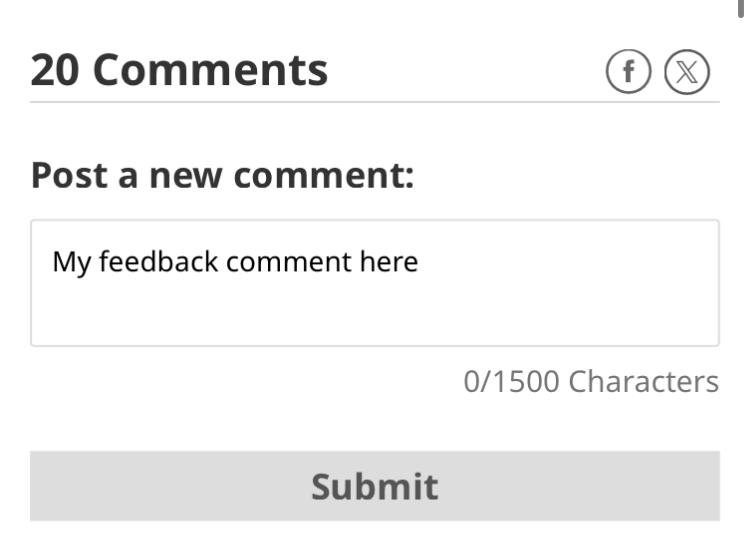
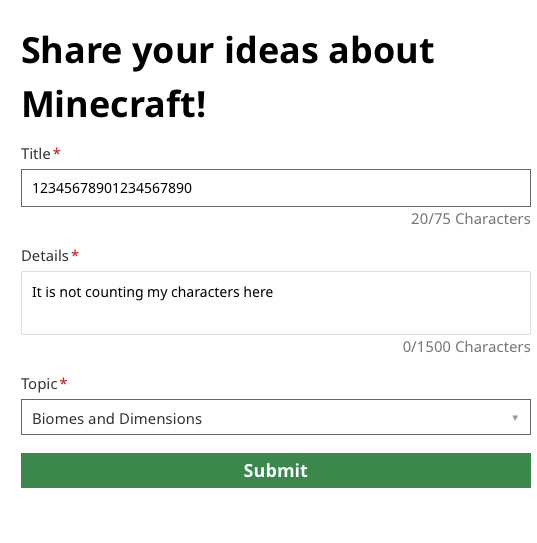
Here are some images of this happening in the submit new feedback menu.
RPReplay_Final1728569408.mp4
This video was made immediately after deleting all Website Data (cache) for Safari on my iPhone.
This problem also occurs on iOS 16.5RPReplay_Final1728569408.mp4
I noticed this as well while clearing out an entire forest with the fill & replace command, not finding a single creaking heart out of over 100 trees.