 Merp is Me
- I_am_Merp
- i_am_merp
- America/New_York
- Yes
- No
 MC-159780
![[Mojang] Cory Scheviak](../../../data/avatars/users/92893.png)
 MCPE-64676
![[Mojang] Chi Wong](../../../data/avatars/users/18941.svg)
 Normal
![[Mojang] Arman V](../../../data/avatars/users/10122.svg)
 Low
Low

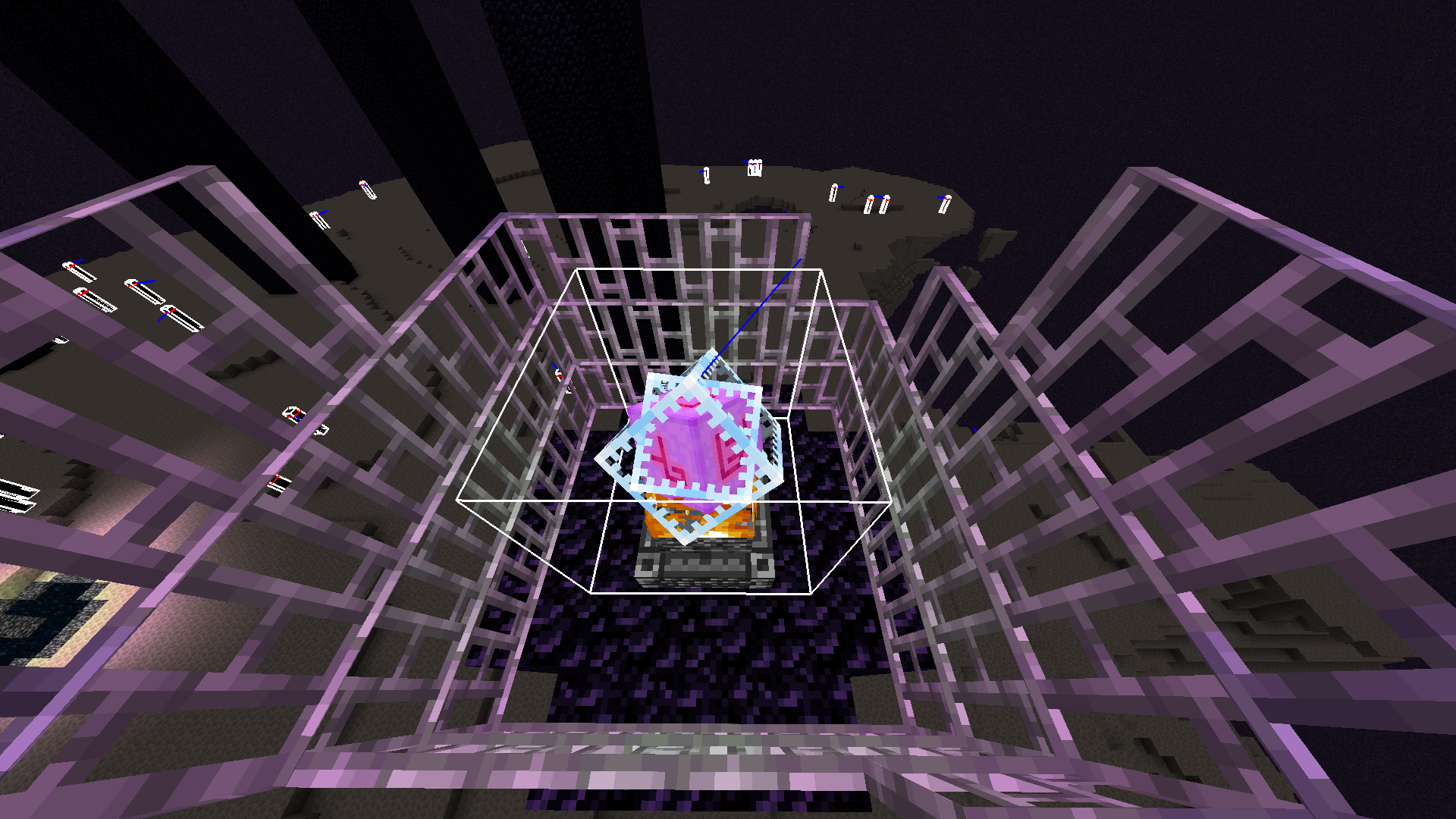
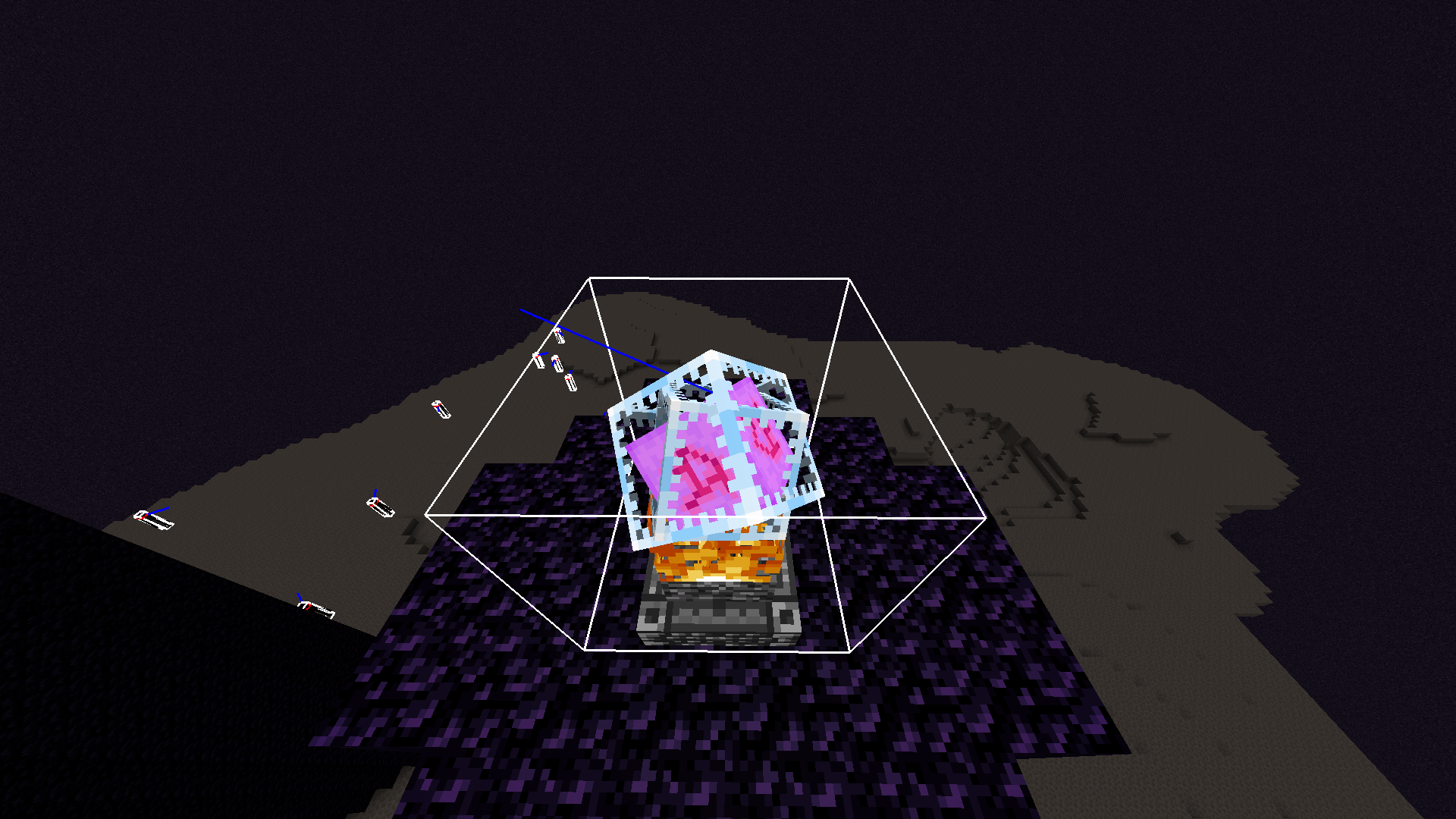
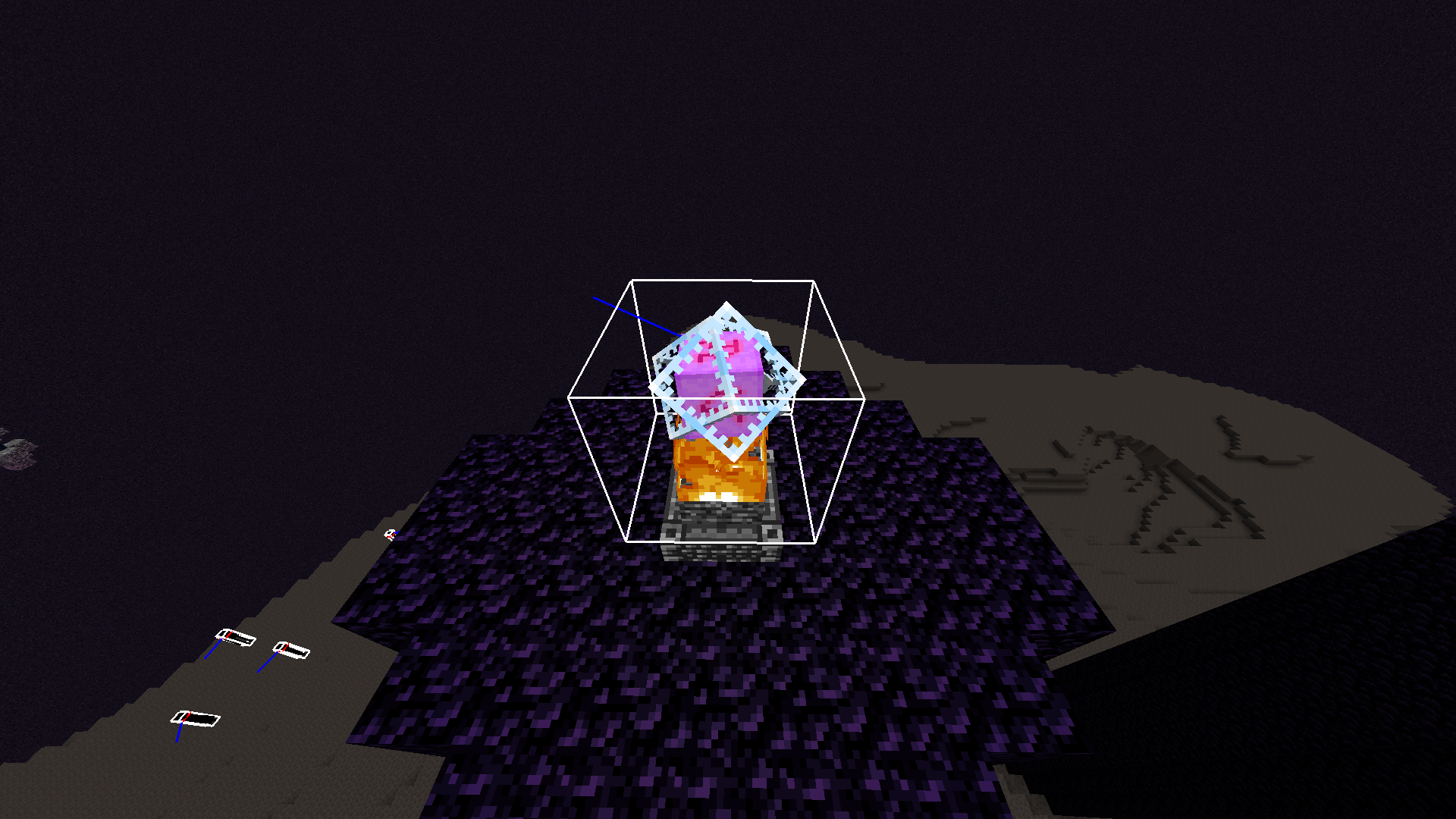

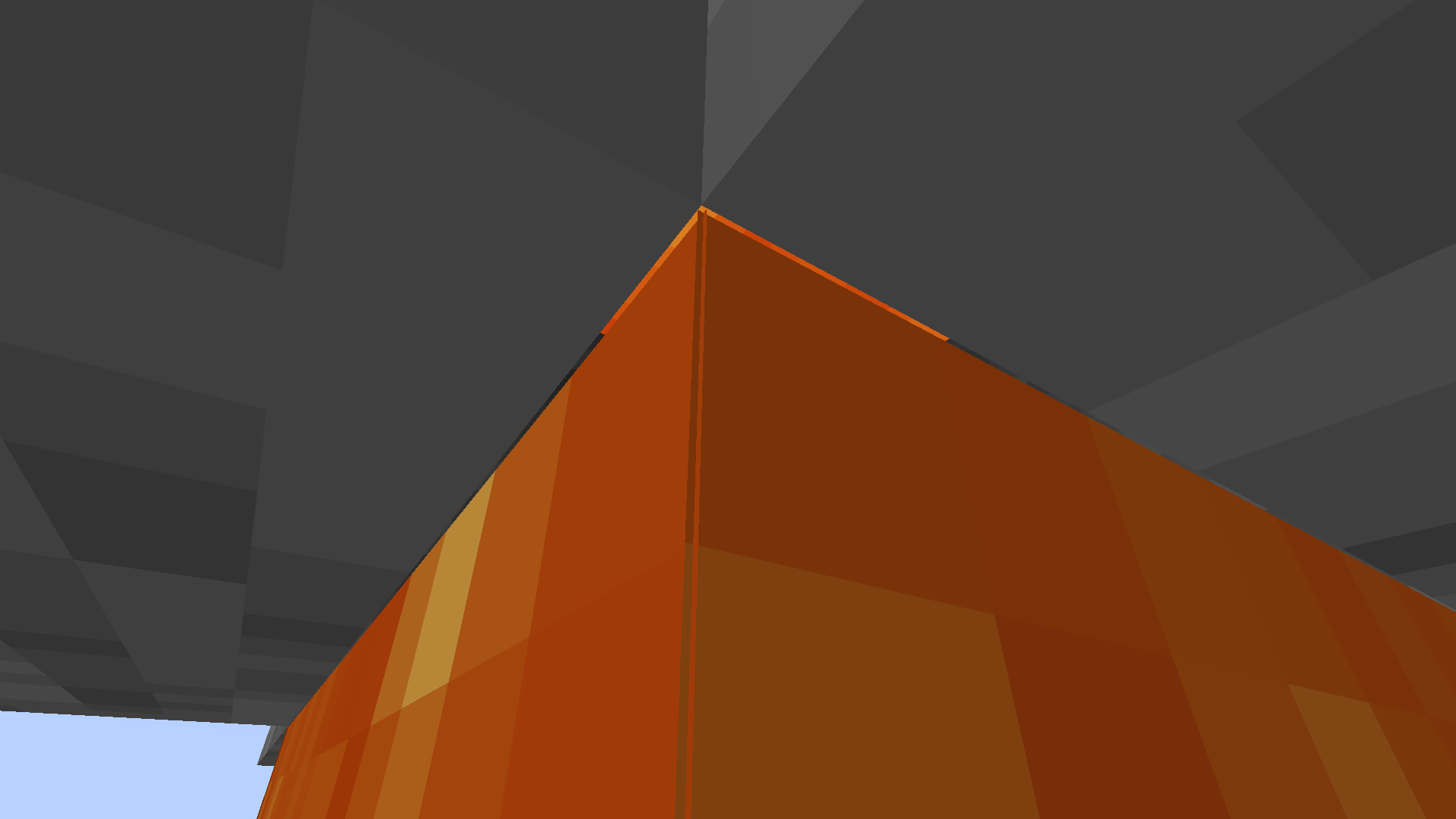
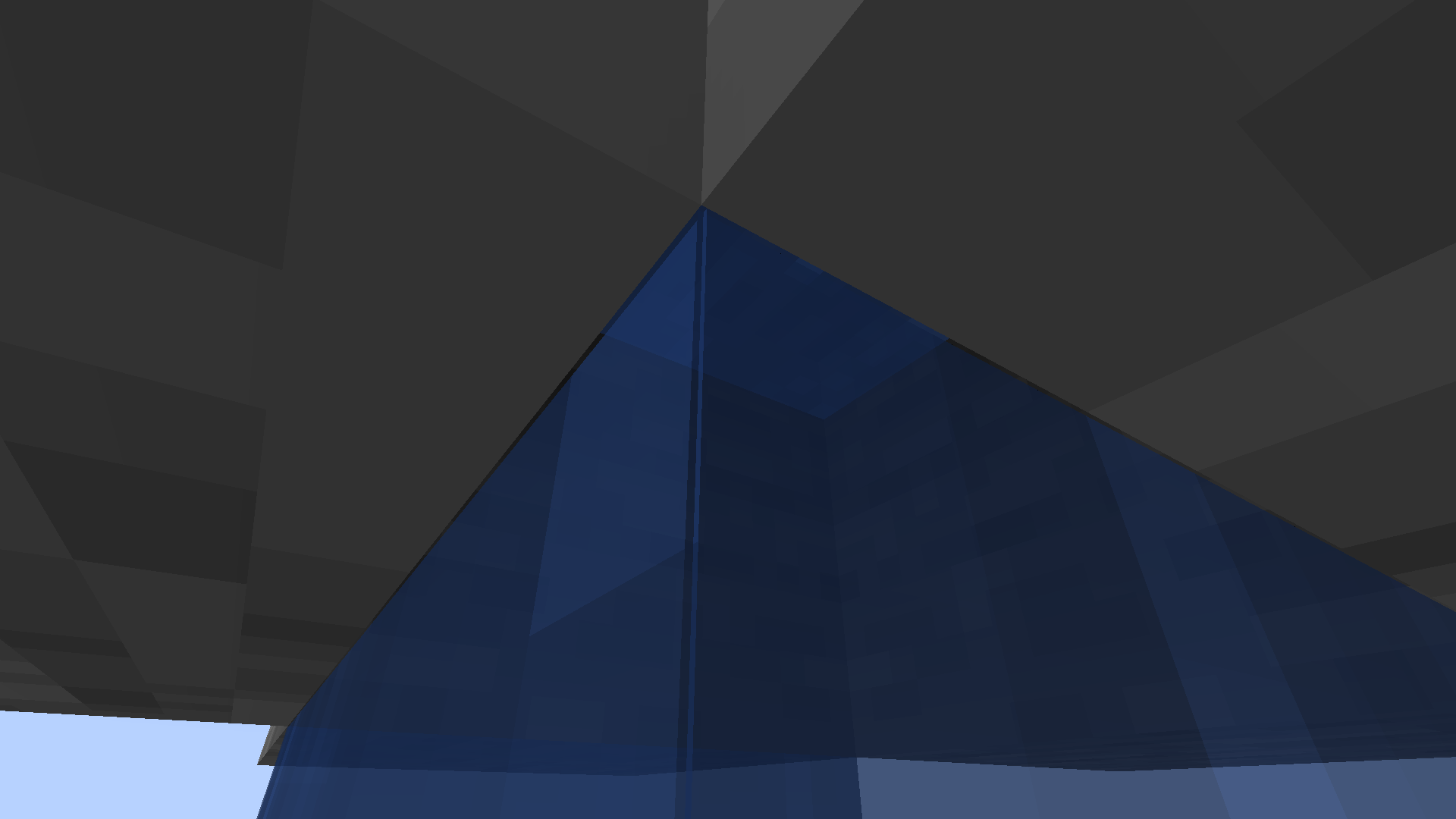








Even if a campfire exists under a bee nest/hive, the bees will still come out of the hive/nest when sheared. These bees are not aggressive toward the player, however, they come out and immediately
startworking.Even if a campfire exists under a bee nest/hive, the bees will still come out of the hive/nest when sheared. These bees are not aggressive toward the player, however, they come out and immediately get to work.
Bees come out of their nest, even when there is a campfire under it, when sheared or used to fill bottles at night.
Even if a campfire exists under a bee nest/hive, the bees will still come out of the hive/nest when used by shearing or filling a glass bottle. These bees are not aggressive toward the player, however, they come out and immediately get to work.
Even if a campfire exists under a bee nest/hive, the bees will still come out of the hive/nest when used by shearing or filling a glass bottle. These bees are not aggressive toward the player, however, they come out and immediately get to work even if it is night.
Pocket Edition registers Xbox One controllers as generic controllers, therefore not detecting stick clicks and occasional deadzone issues. Can be verified, I have tried on other devices and as far as I'm concerned, all versions of the game on bluetooth compatible mobile phones (all, if I'm not wrong) have this issue. I'd like to see a fix to this because it really bums me out not being able to use a control method that I've grown accustomed to.
Pocket Edition registers Xbox One controllers as generic controllers,
therefore notdetecting stick clicks and occasional deadzone issues. Can be verified, I have tried on other devices and as far as I'm concerned, all versions of the game on bluetooth compatible mobile phones (all, if I'm not wrong) have this issue. I'd like to see a fix to this because it really bums me out not being able to use a control method that I've grown accustomed to.Pocket Edition registers Xbox One controllers as generic controllers, which as a result stops the game from detecting stick clicks and giving occasional deadzone issues. I'm assuming this is a result of an error when registering button layout and Xbox One controllers must use a different gate for the stick presses. Can be verified, I have tried on other devices and as far as I'm concerned, all versions of the game on bluetooth compatible mobile phones (all, if I'm not wrong) have this issue. I'd like to see a fix to this because it really bums me out not being able to use a control method that I've grown accustomed to.
Pocket Edition registers Xbox One controllers as generic controllers.
I'm gonna go ahead and throw this up as an idea on the feedback page and credit you for it, since it's a good feature request but not a bug.
Currently, the names of Smooth Basalt (found around amethyst geodes) and Basalt (found in the nether in pillars) are a but misleading. Smooth Basalt should be just Basalt, as it is the "normal" version of basalt, while Basalt should be Basalt Pillar or Basalt Column as it is the pillar or column form of basalt. Moreover, it doesn't make much sense for Smooth Basalt to be referred to as smooth , as its texture is not visually smooth.
Currently, the names of Smooth Basalt (found around amethyst geodes) and Basalt (found in the nether in pillars) are inconsistent:
- What is currently referred to as "Smooth Basalt" is intended to be a regular deposit of Basalt caused by the cooling of stationary lava/magma
- What is currently referred to as "Basalt" is intended to be a pillar or column of basalt caused byt he cooling of flowing lava/magma, so it should be called Basalt Pillar or Basalt Column
Moreover, it doesn't make much sense for Smooth Basalt to be referred to as smooth , as its texture is not visually smooth.
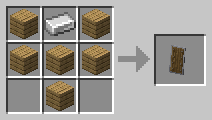
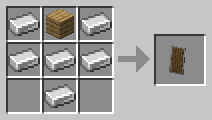
The shield's crafting recipe is inconsistent to the visual design of the shield itself.
The crafting recipe requires one iron ingot for the face surrounded by six wooden planks for the frame. However, this is inaccurate to how the shield looks in-game.
It should instead be one wooden plank for the face surrounded by six iron ingots for the frame, as it is in the shield item.
Despite having distinct footstep sounds in the game files in addition to unique sound
cues for these footstep sounds, Silverfish do not use any footstep sounds at all in-game.minecraft-sounds-mob-silverfish-step1.ogg
minecraft-sounds-mob-silverfish-step2.ogg
Despite having distinct footstep sounds in the game files in addition to unique sound events for these footstep sounds, Silverfish do not use any footstep sounds at all in-game.
minecraft-sounds-mob-silverfish-step1.ogg
minecraft-sounds-mob-silverfish-step2.ogg
Despite having distinct footstep sounds in the game files in addition to unique sound events for these footstep sounds, Silverfish do not use any footstep sounds at all in-game.
minecraft-sounds-mob-silverfish-step1.ogg
minecraft-sounds-mob-silverfish-step2.ogg
minecraft-sounds-mob-silverfish-step3.ogg
minecraft-sounds-mob-silverfish-step4.ogg
Here is a video demonstrating the sound event working in-game:
"block/rooted_dirt/step4.ogg" is identical to "step/gravel4.ogg" despite all of the other step sounds for rooted dirt being unique.
I believe this to be unintended behaviour as it sounds completely out of place to suddenly not hear the extra "root" sounds when walking on rooted dirt.
block.rooted_dirt.step4.ogg
Compared to
block.rooted_dirt.step6.ogg
"block/rooted_dirt/step4.ogg" is identical to "step/gravel4.ogg" despite all of the other step sounds for rooted dirt being unique.
I believe this to be unintended behaviour as it sounds completely out of place to suddenly not hear the extra "root" sounds when walking on rooted dirt.
block.rooted_dirt.step4.ogg
they're also made of wool and have no walkable parts that are made out of wood. chill.
This should probably go under Community Consensus as a lot of the issues described in the list might be potentially used in a lot of redstone contraptions, thereby breaking them if fixed.
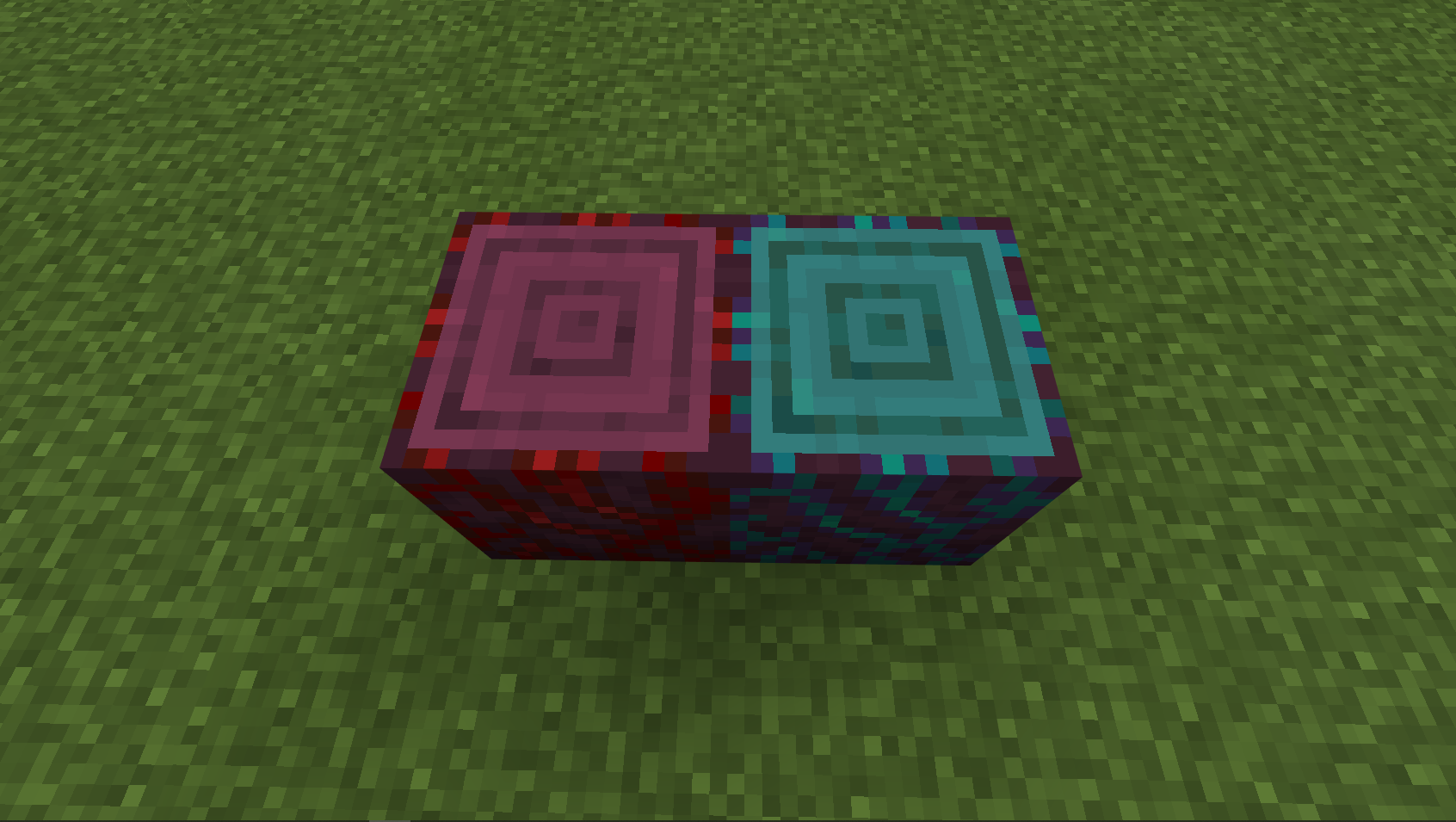
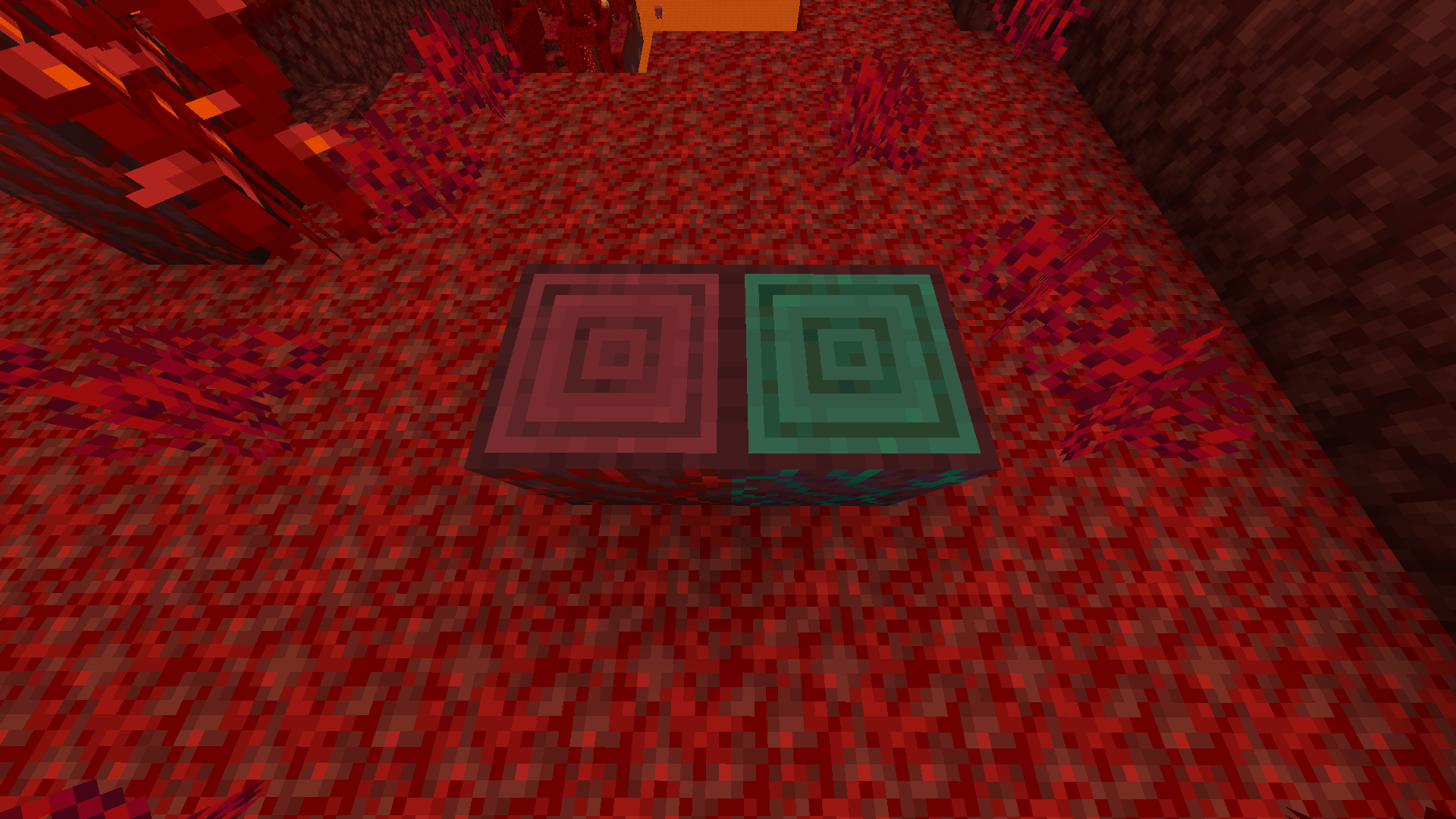
Mud Bricks have their texture incorrectly mirrored, which causes misalignment with the slabs, stairs, and walls.
Instead of using "minecraft:block/mud_bricks", the default blockstate file (mud_bricks.json

Mud Bricks have their texture incorrectly mirrored, which causes misalignment with the slabs, stairs, and walls.
Instead of using "minecraft:block/mud_bricks", the default blockstate file (mud_bricks.json
Proposed Solution:{}
Remove "_north_west_mirrored" from the blockstates/mud_bricks.json file.
it is worth mentioning that, while there is most likely an actual resolution at which the pixels will be 1:1, it is most likely not a multiple of 8 and will thus break mipmapping
In the files of the snapshot, there are two sounds for Copper Bulbs; one for turning them off, and one for turning them on.
However, in the sounds.json file, only the "turn_on" sound is ever used, being pitched down for the off sound event.
turn_on.ogg
turn_off.ogg
"block.copper_bulb.turn_off": {
    "sounds": [
      {
        "attenuation_distance": 6,
        "name": "block/copper_bulb/turn_on",
        "pitch": 0.75
      }
    ],
    "subtitle": "subtitles.block.copper_bulb.turn_off"
  },
  "block.copper_bulb.turn_on": {
    "sounds": [
      {
        "attenuation_distance": 6,
        "name": "block/copper_bulb/turn_on"
      }
    ],
    "subtitle": "subtitles.block.copper_bulb.turn_on"
  },
Current Behaviour:
In the files of the snapshot, there are two sounds for Copper Bulbs; one for turning them off, and one for turning them on.
However, in the sounds.json file, only the "turn_on" sound is ever used, being pitched down for the off sound event.
turn_on.ogg
turn_off.ogg
"block.copper_bulb.turn_off": {
    "sounds": [
      {
        "attenuation_distance": 6,
        "name": "block/copper_bulb/turn_on",
        "pitch": 0.75
      }
    ],
    "subtitle": "subtitles.block.copper_bulb.turn_off"
  },
  "block.copper_bulb.turn_on": {
    "sounds": [
      {
        "attenuation_distance": 6,
        "name": "block/copper_bulb/turn_on"
      }
    ],
    "subtitle": "subtitles.block.copper_bulb.turn_on"
  },
Current Behaviour:
In the files of the snapshot, there are two sounds for Copper Bulbs; one for turning them off, and one for turning them on.
However, in the sounds.json file, only the "turn_on" sound is ever used, being pitched down for the off sound event.
turn_on.ogg
turn_off.ogg
"block.copper_bulb.turn_off": {
    "sounds": [
      {
        "attenuation_distance": 6,
        "name": "block/copper_bulb/turn_on",
        "pitch": 0.75
      }
    ],
    "subtitle": "subtitles.block.copper_bulb.turn_off"
  },
  "block.copper_bulb.turn_on": {
    "sounds": [
      {
        "attenuation_distance": 6,
        "name": "block/copper_bulb/turn_on"
      }
    ],
    "subtitle": "subtitles.block.copper_bulb.turn_on"
  },
In the files of the snapshot, there are two sounds for Copper Bulbs; one for turning them off, and one for turning them on.
However, in the sounds.json file, only the "turn_on" sound is ever used, being pitched down for the off sound event.
turn_on.ogg
turn_off.ogg
"block.copper_bulb.turn_off": { "sounds": [ { "attenuation_distance": 6, "name": "block/copper_bulb/turn_on", "pitch": 0.75 } ], "subtitle": "subtitles.block.copper_bulb.turn_off" }, "block.copper_bulb.turn_on": { "sounds": [ { "attenuation_distance": 6, "name": "block/copper_bulb/turn_on" } ], "subtitle": "subtitles.block.copper_bulb.turn_on" },Current Behaviour:
Expected Behaviour:
In the files of the snapshot, there are two sounds for Copper Bulbs
;one for turning them off, and one for turning them on.However, in the sounds.json file, only the "turn_on" sound is ever used, being pitched down for the off sound event.
turn_on.ogg
turn_off.ogg
"block.copper_bulb.turn_off": { "sounds": [ { "attenuation_distance": 6, "name": "block/copper_bulb/turn_on", "pitch": 0.75 } ], "subtitle": "subtitles.block.copper_bulb.turn_off" }, "block.copper_bulb.turn_on": { "sounds": [ { "attenuation_distance": 6, "name": "block/copper_bulb/turn_on" } ], "subtitle": "subtitles.block.copper_bulb.turn_on" },Current Behaviour:
Expected Behaviour:
In the files of the snapshot, there are two sounds for Copper Bulbs: one for turning them off, and one for turning them on.
However, in the sounds.json file, only the "turn_on" sound is ever used, being pitched down for the off sound event.
turn_on.ogg
turn_off.ogg
"block.copper_bulb.turn_off": { "sounds": [ { "attenuation_distance": 6, "name": "block/copper_bulb/turn_on", "pitch": 0.75 } ], "subtitle": "subtitles.block.copper_bulb.turn_off" }, "block.copper_bulb.turn_on": { "sounds": [ { "attenuation_distance": 6, "name": "block/copper_bulb/turn_on" } ], "subtitle": "subtitles.block.copper_bulb.turn_on" },Current Behaviour:
Expected Behaviour:
Despite not being made of metal, Turtle Eggs, Sniffer Eggs, and Redstone Blocks all use the "Metal" sound group for their sounds.
As a result, resource packs that want to redefine the metal sound group run into an issue wherein these blocks also get redefined, which causes an odd disconnect.Despite not being made of metal, Turtle Eggs, Sniffer Eggs, and Redstone Blocks, Blocks of Diamond, and Blocks of Emerald all use the "Metal" sound group for their sounds. While this sounds fine in vanilla, resource packs that want to redefine the metal sound group run into an issue wherein these blocks also get redefined, which causes an odd dissonance in behaviour versus sounds.
Turtle Eggs, Sniffer Eggs, and Redstone BlocksErroneously use "Metal" Sound GroupTurtle Eggs, Sniffer Eggs, and Redstone Blocks, and more erroneously use "Metal" Sound Group
Despite not being made of metal, Turtle Eggs, Sniffer Eggs, and Redstone Blocks, Blocks of Diamond, and Blocks of Emerald all use the "Metal" sound group for their sounds. While this sounds fine in vanilla, resource packs that want to redefine the metal sound group run into an issue wherein these blocks also get redefined, which causes an odd dissonance in behaviour versus sounds.
Below is an example of a resource pack that applies the netherite sound group to the metal sound group, and only the metal sound group.
Despite not being made of metal, Turtle Eggs, Sniffer Eggs, and Redstone Blocks, Blocks of Diamond, and Blocks of Emerald all use the "Metal" sound group for their sounds. While this sounds fine in vanilla, resource packs that want to redefine the metal sound group run into an issue wherein these blocks also get redefined, which causes an odd dissonance in behaviour versus sounds.
Below is an example of a resource pack that applies the netherite sound group to the metal sound group, and only the metal sound group.
Despite not being made of metal, Turtle Eggs, Sniffer Eggs, and Redstone Blocks, Blocks of Diamond, and Blocks of Emerald all use the "Metal" sound group for their sounds. While this sounds fine in vanilla, resource packs that want to redefine the metal sound group run into an issue wherein these blocks also get redefined, which causes an odd dissonance in behaviour versus sounds.
Below is an example of a resource pack that applies the netherite sound group to the metal sound group, and only the metal sound group.
Turtle Eggs, Sniffer Eggs, and Redstone Blocks, and moreerroneously use "Metal" Sound GroupSeveral Non-Metal blocks erroneously use "Metal" Sound Group
vanilla.mp4
Despite not being related to stone
whatsoever, tripwire (placed string) uses the "Stone" sound group.
When using a resource pack that adds a texture to the "overlay" section of helmets, the respective overlay is incorrectly rendered when an armor stand has the chestplate or boots of that material equipped, even if the helmet is not equipped.
Chestplates and Boots on Armor Stands render the helmet overlay texture
When using a resource pack that adds a texture to the "overlay" section of helmets, the respective overlay is incorrectly rendered when an armor stand has the chestplate or boots of that material equipped, even if the helmet is not equipped.
Below I have used a resource pack (provided) to add a red outline to the overlay section for visibility:

When using a resource pack that adds a texture to the "overlay" section of helmets, the respective overlay is incorrectly rendered when an armor stand has the chestplate or boots of that material equipped, even if the helmet is not equipped.
Below I have used a resource pack (provided) to add a red outline to the overlay section for visibility:
Resource pack used: https://modrinth.com/resourcepack/brush-up
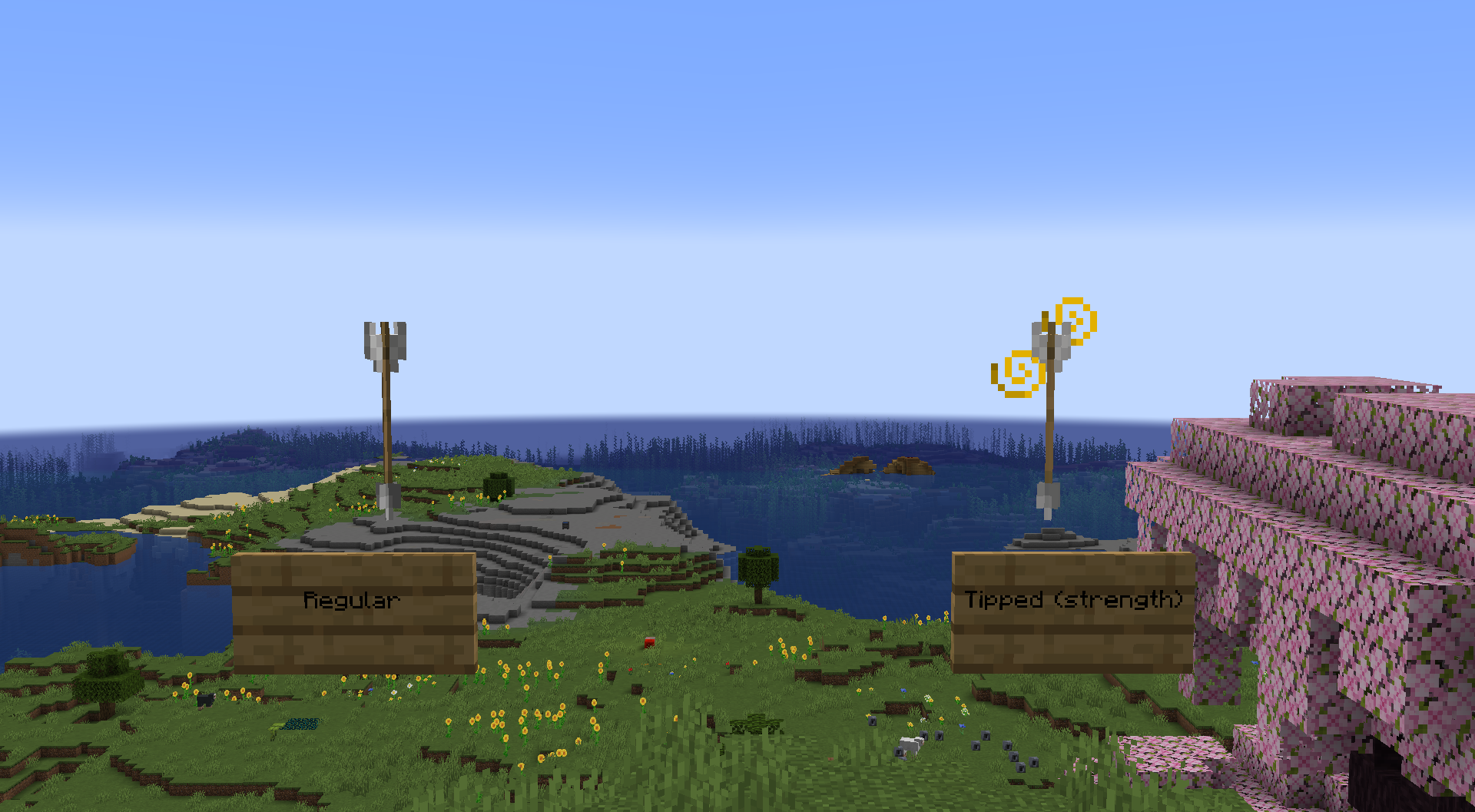
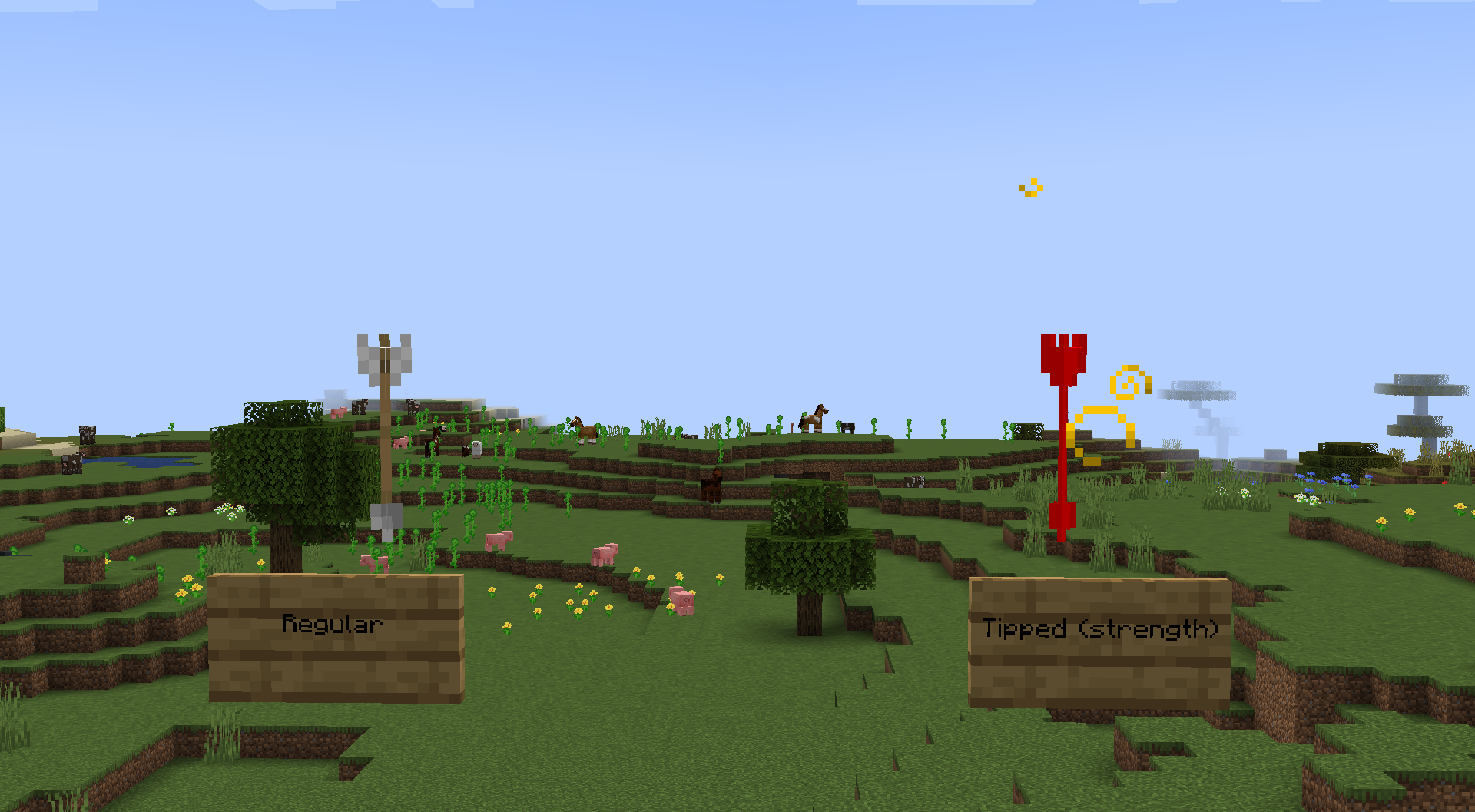
Following the uv change in 24w33a, tipped arrow projectiles no longer use the respective "tipped_arrow.png" texture, instead using the regular arrow texture.
After 1.21, tipped arrow projectiles no longer use the respective "tipped_arrow.png" texture, instead using the regular arrow texture.
Here, I have used a resource pack (provided) that changes the tipped arrow texture to be entirely red for demonstration.
As you can see, in 1.20.6, the tipped arrow is red as expected.
However, in 1.21.1 and onward, using the same resource pack, the arrow simply uses the same texture as regular arrows.

After 1.21, tipped arrow projectiles no longer use the respective "tipped_arrow.png" texture, instead using the regular arrow texture.
Here, I have used a resource pack (provided) that changes the tipped arrow texture to be entirely red for demonstration.
As you can see, in 1.20.6, the tipped arrow is red as expected.
However, in 1.21.1 and onward, using the same resource pack, the arrow simply uses the same texture as regular arrows.
After 1.2
1, tipped arrow projectiles no longer use the respective "tipped_arrow.png" texture, instead using the regular arrow texture.
Here, I have used a resource pack (provided) that changes the tipped arrow texture to be entirely red for demonstration.
As you can see, in 1.20.
6, the tipped arrow is red as expected.
However, in 1.21.1 and onward, using the same resource pack, the arrow simply uses the same texture as regular arrows.
After 1.20.4, tipped arrow projectiles no longer use the respective "tipped_arrow.png" texture, instead using the regular arrow texture.
Here, I have used a resource pack (provided) that changes the tipped arrow texture to be entirely red for demonstration.
As you can see, in 1.20.0, the tipped arrow is red as expected.
However, in 1.21.1 and onward, using the same resource pack, the arrow simply uses the same texture as regular arrows.
After 1.20.4, tipped arrow projectiles no longer use the respective "tipped_arrow.png" texture, instead using the regular arrow texture.
Here, I have used a resource pack (provided) that changes the tipped arrow texture to be entirely red for demonstration.
As you can see, in 1.20.0, the tipped arrow is red as expected.
However, in 1.21.1 and onward, using the same resource pack, the arrow simply uses the same texture as regular arrows.
After 1.20.4, tipped arrow projectiles no longer use the respective "tipped_arrow.png" texture, instead using the regular arrow texture.
Here, I have used a resource pack (provided) that changes the tipped arrow texture to be entirely red for demonstration.
As you can see, in 1.20.0, the tipped arrow is red as expected.
However, in 1.21.1 and onward, using the same resource pack, the arrow simply uses the same texture as regular arrows.
After 1.20
.4, tipped arrow projectiles no longer use the respective "tipped_arrow.png" texture, instead using the regular arrow texture.
Here, I have used a resource pack (provided) that changes the tipped arrow texture to be entirely red for demonstration.
As you can see, in 1.20.0, the tipped arrow is red as expected.
However, in 1.21.1 and onward, using the same resource pack, the arrow simply uses the same texture as regular arrows.
After 1.20 (exact version needs verification; at least some time after 1.20 began receiving 1.21 features), tipped arrow projectiles no longer use the respective "tipped_arrow.png" texture, instead using the regular arrow texture.
Here, I have used a resource pack (provided) that changes the tipped arrow texture to be entirely red for demonstration.
As you can see, in 1.20.0, the tipped arrow is red as expected.
However, in 1.21.1 and onward, using the same resource pack, the arrow simply uses the same texture as regular arrows.
After 1.20 (exact version needs verification; at least some time after 1.20 began receiving 1.21 features), tipped arrow projectiles no longer use the respective "tipped_arrow.png" texture, instead using the regular arrow texture.
Here, I have used a resource pack (provided) that changes the tipped arrow texture to be entirely red for demonstration.
As you can see, in 1.20.0, the tipped arrow is red as expected.
However, in 1.21.1 and onward, using the same resource pack, the arrow simply uses the same texture as regular arrows.
After 1.20 (exact version needs verification; at least some time after 1.20 began receiving 1.21 features), tipped arrow projectiles no longer use the respective "tipped_arrow.png" texture, instead using the regular arrow texture.
Here, I have used a resource pack (provided) that changes the tipped arrow texture to be entirely red for demonstration.
As you can see, in 1.20.0, the tipped arrow is red as expected.
However, in 1.21.1 and onward, using the same resource pack, the arrow simply uses the same texture as regular arrows.
After 1.20 (exact version
needs verification; at least some time after 1.20 began receiving1.21 features), tipped arrow projectiles no longer use the respective "tipped_arrow.png" texture, instead using the regular arrow texture.
Here, I have used a resource pack (provided) that changes the tipped arrow texture to be entirely red for demonstration.
As you can see, in 1.20.0, the tipped arrow is red as expected.
However, in 1.21.1 and onward, using the same resource pack, the arrow simply uses the same texture as regular arrows.
After 1.20 (exact version unknown, however consistently replicable in 1.20), tipped arrow projectiles no longer use the respective "tipped_arrow.png" texture, instead using the regular arrow texture.
Here, I have used a resource pack (provided) that changes the tipped arrow texture to be entirely red for demonstration.
As you can see, in 1.20.0, the tipped arrow is red as expected.
However, in 1.21.1 and onward, using the same resource pack, the arrow simply uses the same texture as regular arrows.
After 1.20
(exact version unknown, however consistently replicable in 1.20), tipped arrow projectiles no longer use the respective "tipped_arrow.png" texture, instead using the regular arrow texture.
Here, I have used a resource pack (provided) that changes the tipped arrow texture to be entirely red for demonstration.
As you can see, in 1.20.
0, the tipped arrow is red as expected.
However, in 1.21.1 and onward, using the same resource pack, the arrow simply uses the same texture as regular arrows.
After 1.20.4, tipped arrow projectiles no longer use the respective "tipped_arrow.png" texture, instead using the regular arrow texture.
Here, I have used a resource pack (provided) that changes the tipped arrow texture to be entirely red for demonstration.
As you can see, in 1.20.4, the tipped arrow is red as expected.
However, in 1.21.1 and onward, using the same resource pack, the arrow simply uses the same texture as regular arrows.
After 1.20.4, tipped arrow projectiles no longer use the respective "tipped_arrow.png" texture, instead using the regular arrow texture.
Here, I have used a resource pack (provided) that changes the tipped arrow texture to be entirely red for demonstration.
As you can see, in 1.20.4, the tipped arrow is red as expected.
However, in 1.2
1.1and onward, using the same resource pack, the arrow simply uses the same texture as regular arrows.
After 1.20.4, tipped arrow projectiles no longer use the respective "tipped_arrow.png" texture, instead using the regular arrow texture.
Here, I have used a resource pack (provided) that changes the tipped arrow texture to be entirely red for demonstration.
As you can see, in 1.20.4, the tipped arrow is red as expected.
However, in 1.20.5 and onward, using the same resource pack, the arrow simply uses the same texture as regular arrows.
Various animated particles, specifically ones that use separate textures per frame, have inconsistent timings between each frame, causing them to appear choppy in certain cases.
This can be observed with the sonic boom texture by executing /tick step; you will notice that some frames last a single tick while others last two, as seen in this example:
Various animated particles, specifically ones that use separate textures per frame, have inconsistent timings between each frame, causing them to appear choppy in certain cases.
This can be observed with the sonic boom texture by executing /tick step;
you willnotice that some frames last a single tick while others last two, as seen in this example:
Various animated particles, specifically ones that use separate textures per frame, have inconsistent timings between each frame, causing them to appear choppy in certain cases.
This can be observed with the sonic boom texture by executing /tick step; notice that some frames (notably the first frame) last a single tick while others last two, as seen in this example:
Various animated particles, specifically ones that use separate textures per frame, have inconsistent timings between each frame, causing them to appear choppy in certain cases.
This can be observed with the sonic boom texture by executing /tick step; notice that some frames (notably the first frame) last
a singletick while others lasttwo, as seen in this example:Various animated particles, specifically ones that use separate textures per frame, have inconsistent timings between each frame, causing them to appear choppy in certain cases.
This can be observed with the sonic boom texture by executing /tick step; notice that some frames (notably the first frame) last two ticks while others only last one, as seen in this example:
Various animated particles, specifically ones that use separate textures per frame, have inconsistent timings between each frame, causing them to appear choppy in certain cases.
This can be observed with the sonic boom texture by executing /tick step; notice that some frames (notably the first frame in this example) last two ticks while others only last one, as seen in this example:
The sound event "minecraft:entity.skeleton_horse.gallop_water", which is intended to be used for galloping while underwater, does not get used
while a Skeleton Horse gallops underwater, instead playing "minecraft:entity.skeleton_horse.gallop".This does not seem to affect any of their other underwater sound events- only the gallop sound event.
The sound event "minecraft:entity.skeleton_horse.gallop_water", which is intended to be used for a Skeleton Horse galloping while underwater, does not get used, instead playing the sound event "minecraft:entity.skeleton_horse.gallop".
This does not seem to affect any of their other underwater sound events- only the gallop sound event.
SkeletonHorse"underwater gallop" sound event is unused"minecraft:entity.skeleton_horse.gallop_water" sound event is unused
The sound event "minecraft:entity.skeleton_horse.gallop_water", which
isintended to be used for a Skeleton Horsegalloping while underwater, doesnot get used, instead playing the sound event "minecraft:entity.skeleton_horse.gallop".This does not seem to affect any of their other underwater sound events- only the gallop sound event.
The sound events "minecraft:entity.skeleton_horse.gallop_water" and "minecraft:entity.skeleton_horse.step_water", which are intended to be used for a Skeleton Horse moving while underwater, do not get used, instead playing their land sound events, "minecraft:entity.skeleton_horse.gallop" and "minecraft:entity.skeleton_horse.step", respectively.
"minecraft:entity.skeleton_horse.gallop_water"sound eventis unusedUnused Skeleton Horse underwater step sound events
The sound events "minecraft:entity.skeleton_horse.gallop
_water" and "minecraft:entity.skeleton_horse.step_water", which are intended to be used for a Skeleton Horse moving while underwater, do not get used, instead playing their land sound events, "minecraft:entity.skeleton_horse.gallop" and "minecraft:entity.skeleton_horse.step", respectively.The sound events for Skeleton Horses galloping and stepping, "minecraft:entity.skeleton_horse.gallop" and "minecraft:entity.skeleton_horse.step", are played regardless of whether or not the Skeleton Horse is in water.
This leaves the sound events, "minecraft:entity.skeleton_horse.gallop_water" and "minecraft:entity.skeleton_horse.step_water" unused.
UnusedSkeleton Horse underwater step sound eventsSkeleton Horse underwater step and gallop sound events are unused
The "Rods" of Blazes appear off
center from their hitbox, being shifted about 1 pixel south and 1 pixel west of their hitbox.The "Rods" of Blazes appear off-center from their hitbox, being shifted about 1 pixel south and 1 pixel west of their hitbox.
The "Rods" of Blazes appear off-center from their hitbox,
being shiftedabout 1 pixel south and 1 pixel west of theirhitbox.The "Rods" of Blazes appear off-center from their hitbox, revolving around a pivot offset about 1 pixel south and 1 pixel west of their actual center.
The "Rods" of Blazes appear off-center from their hitbox, revolving around a pivot offset about 1 pixel south and 1 pixel
west of their actual center.The "Rods" of Blazes appear off-center from their hitbox, revolving around a pivot offset about 1 pixel south and 1 pixel east of their actual center.
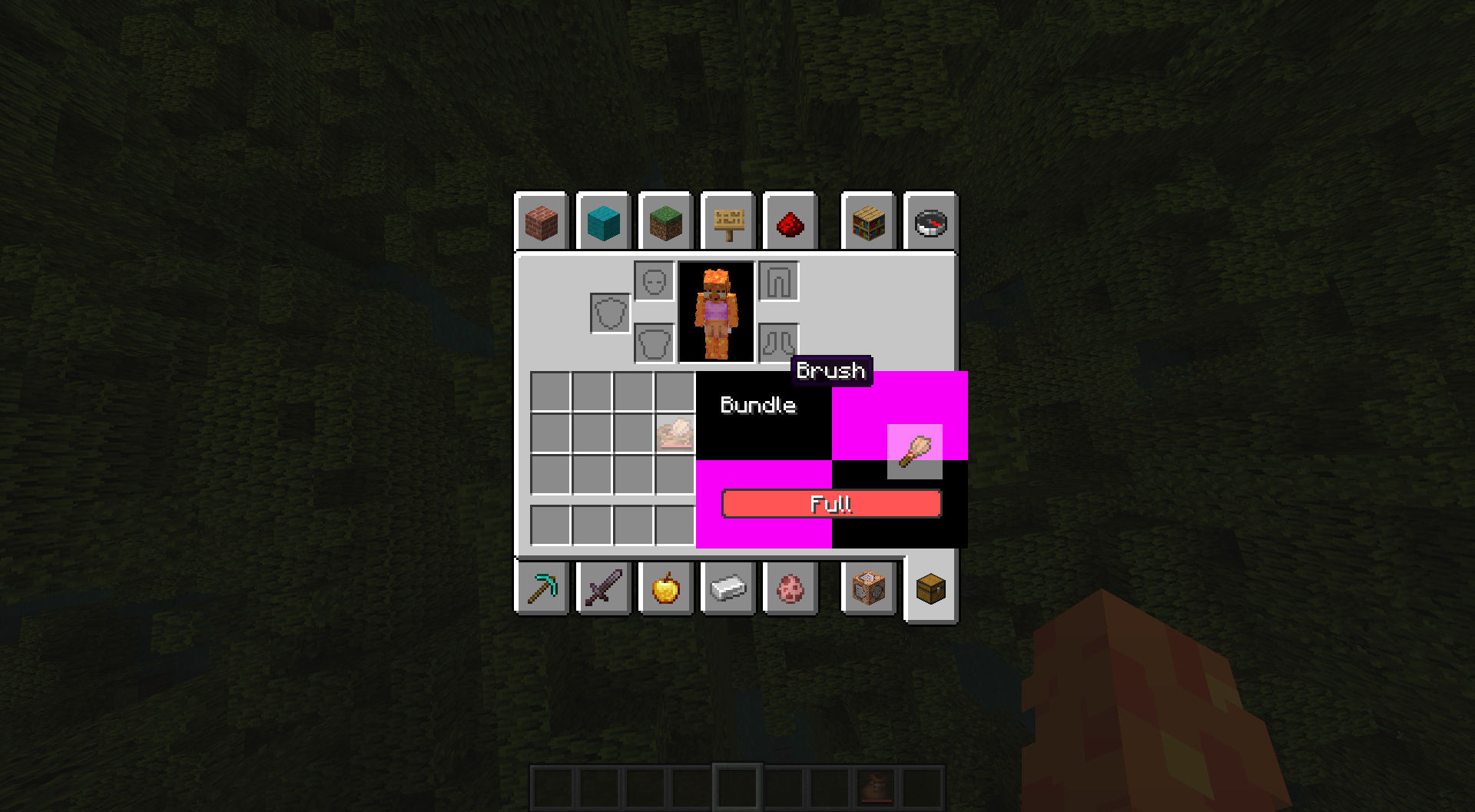
minecraft:tooltip_style component is not reflected on hovered items in a Bundle
minecraft:tooltip_style component is not reflected on hovered items in a BundleHovered items in bundles do not reflect tooltip_style component
Items that have a custom tooltip_styledo not reflect this tooltipstylewhen they are hovered in a Bundle.Steps to Reproduce:
- Run /give @s brush[minecraft:tooltip_style='example']
- Put the Brush into a Bundle
- Observe the tooltip of the item in the bundle
The tooltip displayed above bundles while selecting an item does not reflect the data set by the item's tooltip_style component.
Steps to Reproduce:
- Run /give @s brush[minecraft:tooltip_style='example']
- Put the Brush into a Bundle
- Observe the tooltip of the item in the bundle
The tooltip displayed above bundles while selecting an item does not reflect the data set by both the item's tooltip_style component and the bundle's tooltip_style component.
Steps to Reproduce:
- Run /give @s brush[minecraft:tooltip_style='example']
- Put the Brush into a Bundle
- Observe the tooltip of the item in the bundle
Alternatively:
- Run /give @s bundle[minecraft:tooltip_style='example']
- Put an item into the Bundle
- Observe the tooltip of the item in the bundle
Hovered items in bundles do not reflect any tooltip_style component
The tooltip displayed above bundles while selecting an item
does not reflectthe data set byboththe item's tooltip_style componentandthe bundle's tooltip_style component.Steps to Reproduce:
- Run /give @s brush[minecraft:tooltip_style='example']
- Put the Brush into a Bundle
- Observe the tooltip of the item in the bundle
Alternatively:
- Run /give @s bundle[minecraft:tooltip_style='example']
- Put an item into the Bundle
- Observe the tooltip of the item in the bundle
The tooltip displayed above bundles while selecting an item reflects neither the data set by the item's tooltip_style component nor the bundle's tooltip_style component.
Steps to Reproduce:
- Run /give @s brush[minecraft:tooltip_style='example']
- Put the Brush into a Bundle
- Observe the tooltip of the item in the bundle
Alternatively:
- Run /give @s bundle[minecraft:tooltip_style='example']
- Put an item into the Bundle
- Observe the tooltip of the item in the bundle
BottleO' Enchanting is in the "Ingredients" tabBottle o' Enchanting is in the "Ingredients" tab
Bottle
O' Enchanting can be found in the Ingredients tab of the creative inventory, despite not being an ingredient for anything.
Expected behavior:
Bottle
O' Enchanting would be found in the Tools & Utilities tabActual behavior:
Bottle
O' Enchanting is found in the Ingredients tabBottle o' Enchanting can be found in the Ingredients tab of the creative inventory, despite not being an ingredient for anything.
Expected behavior:
Bottle o' Enchanting would be found in the Tools & Utilities tab
Actual behavior:
Bottle o' Enchanting is found in the Ingredients tab
Undyed bundles still contain the "filled" predicate which is a decimal between 0 and 1, correlating to the percentage of fullness of the bundle's contents. However, dyed bundles do not have this predicate, meaning that it isn't possible to have model overrides for them based on it.
While this predicate is unused on undyed bundles in vanilla, its behavior is still useful for resource pack creators who wish to add different textures for the bundle depending on the fullness.
Attached is a resource pack that applies different textures to bundles based on this filled predicate, as well as corresponding models for white bundles that should in theory mimic this behavior; however, when using the pack, you can see that this is not the case and that only undyed bundles have this behavior.
Colored bundles do not use the "filled" predicateDyed bundles do not use the "filled" predicate
Dyed bundlesdo not usethe "filled" predicateDyed bundles are missing the "filled" predicate
Undyed bundles
still contain the"filled" predicate whichis a decimalbetween 0 and 1, correlating to thepercentage offullness ofthe bundle'scontents. However, dyed bundles do not have this predicate, meaning that it isn't possible to have model overrides for thembased onit.While this predicate is
unused on undyed bundles in vanilla, its behaviorisstill useful for resource pack creators who wish to add different textures for the bundle depending on the fullness.Attached is a resource pack that applies different textures to bundles based on this filled predicate, as well as corresponding models for white bundles that should in theory mimic this behavior; however, when using the pack, you can see that this is not the case and that only undyed bundles have this behavior.
Undyed bundles have a "filled" model predicate which outputs as a decimal percentage of the bundle's fullness. However, dyed bundles do not have this predicate, meaning that it isn't possible to have model overrides for them using it.
While this predicate is no longer used in vanilla following 24w33a, its behavior may still be useful for resource pack creators who wish to add different textures for the bundle depending on the fullness.
Attached is a resource pack that applies different textures to bundles based on this filled predicate, as well as corresponding models for white bundles that should in theory mimic this behavior; however, when using the pack, you can see that this is not the case and that only undyed bundles have this behavior.
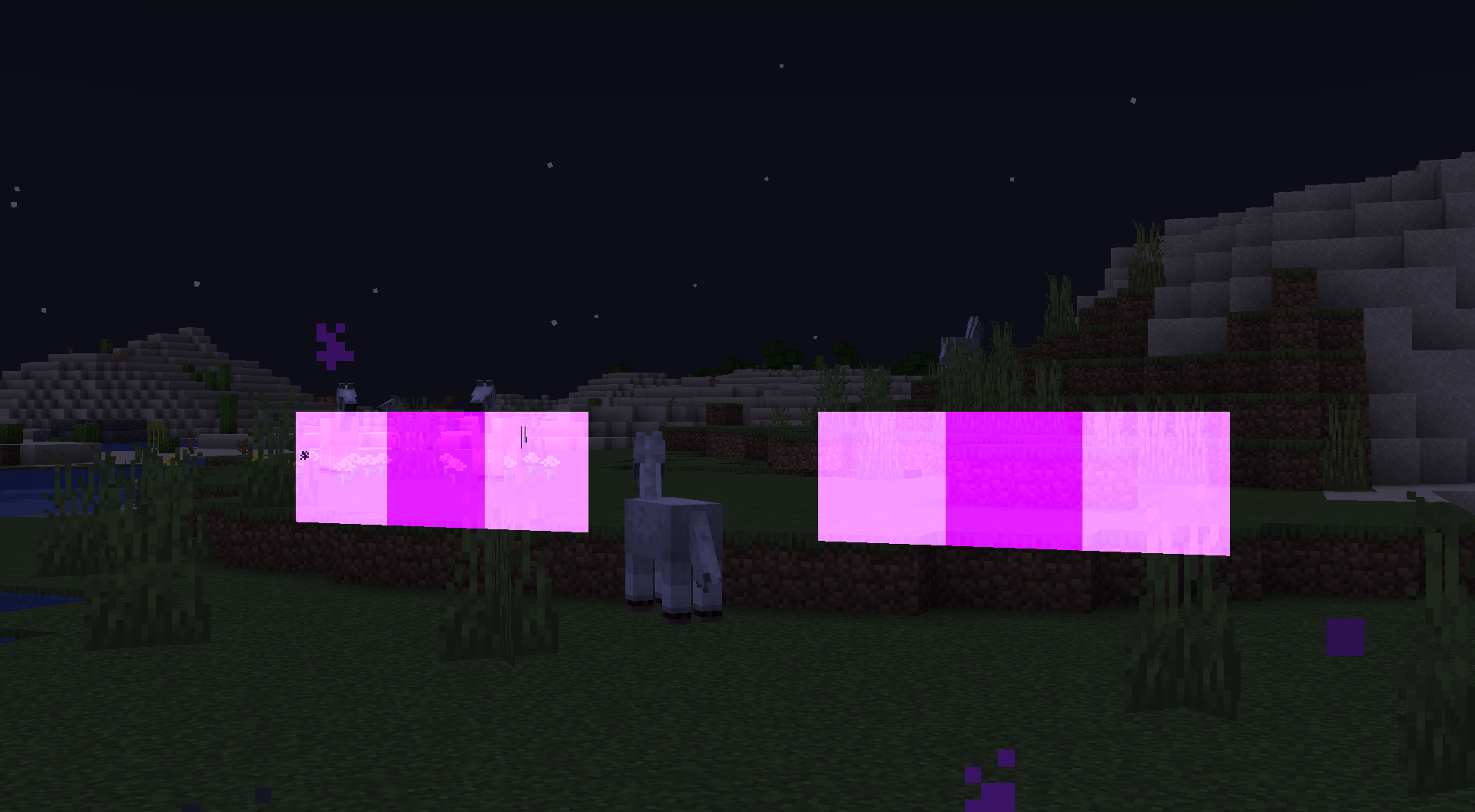
Following the fix
ofMC-276674, specially rendered elements on entities such as spiders, endermen, and phantoms no longer render using additive blending, making their eyes appear completely opaque while invisible as opposed to having a "glowing" effect on objects behind them.Following the fix for
MC-276674, specially rendered elements on entities such as spiders, endermen, and phantoms no longer render using additive blending, making their eyes appear completely opaque while invisible as opposed to having a "glowing" effect on objects behind them.
Following the fix for
MC-276674, specially rendered elements on entities such as spiders, endermen, and phantoms no longer render using additive blending, making their eyes appear completely opaque while invisible as opposed to having a "glowing" effect on objects behind them.24w39a:

24w38a:

Following the fix for
MC-276674, specially rendered elements on entities such as spiders, endermen, and phantoms no longer render using additive blending, making their eyes appear completely opaque while invisible as opposed to having a "glowing" effect on objects behind them.24w39a:
24w38a:
Following the fix for
MC-276674, specially rendered elements on entities such as spiders, endermen, and phantoms no longer render using additive blending, making their eyes appear completely opaque while invisible as opposed to having a "glowing" effect on objects behind them.24w39a:
24w38a:
In the following screenshots, you can also see that the objects behind the enderman's eyes are faintly visible in 24w38a, however they are not in 24w39a:
24w38a:
24w39a:

![[Mod] LateLag](../../../data/avatars/users/92884.png)
Merp is Me - This still qualifies as a parity issue. You do not get to determine what is or isn't intended.
Sure, the bees coming out is probably a feature, I don't doubt that in the slightest. The problem, however, is the fact that they get to work regardless of the time of day. At night, they are intended to remain in their nest until the day, but using shears/glass bottles will interrupt that schedule and kick them out, forcing them to work. The bees coming out might be a feature, but the bees getting to work at night is definitely not.
Ah, I see now.
This is an issue that I have been able to solve myself. It has to do with your skin, so if you have a custom skin, I suggest resetting it as some skins refuse to show up which stops the game from loading a world. Hoping this helps.
Out of curiosity, could the bug I mentioned (
MC-159952) be caused by this bug reportedly being patched? Now that I think about it, the visual movement of both the camera and the player's hand in that bug look very similar to how they do in 1.13.2 and below when falling.Another quick question-- and I apologize for bothering you so much-- but regarding your comment on
MC-162137, were you referring to the fact that the player's arm moving up when falling was a bug that was fixed, or were you referring to the fact that the player's arm NOT moving up when falling was a bug that was fixed? If you were referring to the first question, could I ask why it was removed? I really liked this feature and would love to see this return even if it's just as a togglable video option, so I'd like to know why it was removed if it doing so was intentional. However, if you were referring to the second question, I did some testing and it doesn't seem to appear to work in any version between the version it stopped working (1.14) and the most recent snapshot, 20w46a.Ah. Thanks for the response anyway, I really appreciate your help.
Affects 1.16.3, 1.16.4, 20w45a, and 20w46a.
Added video of just the animation.
Affects all versions through 20w46a.
In addition to that, and while it may not be particularly helpful to talk about a mod on a vanilla bug forum, I thought it was worth mentioning that a popular mod called Sodium fixes both this issue and MC-1531, amongst others. If within reason, someone might want to ask the developer of the mod (JellySquid) to help out with these issues.
While it may not be particularly helpful to talk about a mod on a vanilla bug forum, I thought it was worth mentioning that a popular mod called Sodium fixes both this issue and MC-148689, amongst others. If within reason, someone might want to ask the developer of the mod (JellySquid) to help out with these issues.
Affects 20w46a
That's most likely a stronghold, since they generate large pockets of stone around them now. Try breaking in or using spectator to fly into it.
This might be related to the switch to OpenGL 3.2. Your PC might not be compatible with it.
This isnt meant to be sand and you can even tell from the fact that each slot is different from one another. It's just the "trick" that the devs used to use to make UI elements look shaded by simply adding noise over them.
This is intentional. If two textures are layered very close to each other, they may look fine up close but start z-fighting when the player is far enough away, so they have to be offset quite a bit to prevent this.
Use Fabulous! graphics
They were changed in 21w18a to explicitly not have transparency.
It is intentional-- swimming is directly tied to sprinting, so when you can't sprint, you can't swim.
This also affects clouds, water, and lava (See attached screenshots)
In addition to what was mentioned above, you can also see the mirroring for yourself directly if you replace the texture for an existing (static rotational) block with the texture for mud bricks, and place it next to actual mud bricks.
1.19.3 has now made this issue even more apparent with Bamboo Fences, as they now use a custom item model called "custom_fence_inventory" which has the correct UV mapping and model, while other fences do not.
On a related note, walking on blocks in 1 block deep water no longer plays the swim sounds and instead plays the step sounds of the block below
This only occurs for armour stands- I've attached a minimized resource pack with the issue isolated and updated the screenshots.
This is a feature that already exists in the game elsewhere for items such as leather armor, wolf armor, and shulker boxes. In the case of bundles, this makes it impossible to get the undyed version back after dyeing a bundle, thus leading to a disconnect between similarly dyeable items.
This ticket was not requesting a new feature be added to bundles, it was requesting parity with other vanilla features. As such, it probably shouldn't be marked as a feature request seeing as this is behavior already exists for other items in the game, and should either be reopened if this behavior is unintentional, or marked as Works As Intended if it is intentional.
Blocks
MC-235953; even though it may seem like that issue is fixed, it is only because there is no longer any blending at allThis issue is blocked by
MC-276988as a result of there no longer being any blending at all