 Synthestra
- Jayceebee
- jayceebee
- Europe/London
- Yes
- No
 MC-122539
![[Mojang] Grum (Erik Broes)](../../../data/assets/gravatar/grum.png)
![[Mojang] Ulraf](../../../data/avatars/users/43122.png)
 WEB-1058
![[Mojang] Cory Scheviak](../../../data/avatars/users/92893.png)
 Low
Low![[Mod] Jiingy](../../../data/avatars/users/91802.png)




When loading my world, I tried to stand on a stone pressure plate, an
t itdid not activate, I knew it was visual, because I tried a wooden pressure plate and it worked fine.When loading my world, I tried to stand on a stone pressure plate, and did not activate, I knew it was visual, because I tried a wooden pressure plate and it worked fine.
When loading my world, I tried to stand on a stone pressure plate, and did not activate, I knew it was not visual, because I tried a wooden pressure plate and it worked fine.
Found this too.
Confirmed for 16w44a. Is it because the nether fortress spawning box has been placed everywhere? [~FVbico] If not, this should probably be reopened.
Why is this Works As Intended? Zombie Villagers are always supposed to have a chance to spawn from Zombie Spawners.
Items such as written books don't get cleared properly when /clear is quickly executed after updating written book in same tick
The bug:
- Create a root advancement with "hidden": true
- Make an advancement with the parent as the root advancement you just made.
- /reload
- Grant the child advancement
- Look in the advancements menu, and the advancement you made will be there, even though the root is "hidden": true.
- Also note that the root advancement icon is not there. See attachment.
The bug, and how to reproduce:
- Create a root advancement with "hidden": true
- Make an advancement with the parent as the root advancement you just made.
- /reload
- Grant the child advancement
- Look in the advancements menu, and the advancement you made will be there, even though the root is "hidden": true.
- Also note that the root advancement icon is not there. See attachment.
This also applies to "announce_to_chat" too.
The bug, and how to reproduce:
- Create a root advancement with "hidden": true
- Make an advancement with the parent as the root advancement you just made.
- /reload
- Grant the child advancement
- Look in the advancements menu, and the advancement you made will be there, even though the root is "hidden": true.
- Also note that the root advancement icon is not there. See attachment.
Also applies to "announce_to_chat" too.
Also carrot on a stick is affected by this
Happening in 18w20c in singleplayer, don't know how to "reproduce" it, just jump in water and try to sprint to swim
Not fixed in 18w20a.
Still in 18w20c, reproduce, uh... attempt to swim?
Water and lava buckets can be placed at the edge of the reach distance in adventure mode. 18w20c
The Bug
Water attempts to flow through waterlogged blocks, but can't (as it won't create a source), but doesn't try the "longer" route after the first option fails.
How to reproduce
- **Create a platform like the one shown in
the first screenshot(below)- Place water next to the 2 slabs
The slabs can be replaced with any waterlogged block: stairs, chests, ladders.
The Bug
Water attempts to flow through waterlogged blocks, but can't (as it won't create a source), but doesn't try the "longer" route after the first option fails.
How to reproduce
- **Create a platform like the one shown in 2018-05-31_12.23.28.png (below)
- Place water next to the 2 slabs
The slabs can be replaced with any waterlogged block: stairs, chests, ladders.
The Bug
Water attempts to flow through waterlogged blocks, but can't (as it won't create a source), but doesn't try the "longer" route
after the first option fails.
How to reproduce
- **Create a platform like the one shown in 2018-05-31_12.23.28.png (below)
- Place water next to the 2 slabs
The slabs can be replaced with any waterlogged block: stairs, chests, ladders.
The Bug
Water attempts to flow through waterlogged blocks, but can't (as it won't create a source), but doesn't try the "longer" route if the route is over 2 blocks.
How to reproduce
- **Create a platform like the one shown in 2018-05-31_12.23.28.png (below)
- Place water next to the 2 slabs
The slabs can be replaced with any waterlogged block: stairs, chests, ladders.
Water fails to flowin order to flow downwardif primary route of attempting to create source in waterlogged block failsWater fails to flow to next priority if primary route of attempting to create source in waterlogged block fails
The Bug
Water attempts to flow through waterlogged blocks, but can't (as it won't create a source), but doesn't try the "longer" route if the route is over 2 blocks.
How to reproduce
**Create a platform like the one shown in 2018-05-31_12.23.28.png (below)- Place water next to the 2 slabs
The slabs can be replaced with any waterlogged block: stairs, chests, ladders.
Item frame's cannot be destroyed/item cannot be taken out of the item frame manually with gamerule doEntityDrops false
Place an item inside an item frame, and try to punch it to take the item out. Notice that it plays the "pop" noise, but does not drop the item. This is most very likely due to the
"fixing"ofMC-124833.
Item frame's cannot be destroyed/item cannot be taken out of the item frame manually with gamerule doEntityDrops false
Place an item inside an item frame, and try to punch it to take the item out. Notice that it plays the "pop" noise, but does not drop the item. This is most very likely due to the fixing of
MC-124833.Place an item inside an item frame, and try to punch it to take the item out. Notice that it plays the "pop" noise, but does not drop the item.
The bug
Place an item inside an item frame, and try to punch it to take the item out. Notice that it plays the "pop" noise, but does not drop the item. The item frame and the item inside should get removed from the world.
Code analysis
In 1.12.2, items were removed from item frames by the method EntityItemFrame.attackFromEntity(damageSource, amount). In 1.13, this is now done in the method EntityItemFrame.dropItemOrSelf(entity, self). Since the latter method only runs if doEntityDrops is true, the code that removes the item cannot be reached.
Do note this change was likely made while fixing
MC-124833.
Water filledwaterlogged-taggedblocks have a full cube hitbox
This seems to be related to
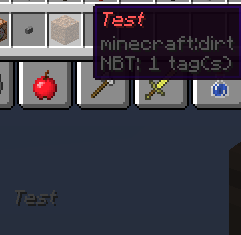
MC-5206although italics seem to work.This appears to be happening because the item rarity colour replaces the colour of the first text component.
Reproduce:
Run the command:
/give @s dirt{display:{Name:"{\"text\":\"Test\",\"color\":\"red\"}"}}And look at the tooltip in the inventory, then look at the item when you switch to the slot in the hotbar.
Tooltip of item with custom display name's text does not displaycolourItem rarity color / colour overrides first text component's colour
Item rarity color / colour overrides first text component's colour
Item rarity color / colour overrides first text component's colour in the held tooltip
This seems to be related to
MC-5206although italics seem to work.This appears to be happening because the item rarity colour replaces the colour of the first text component.
Reproduce:
Run the command:
/give @s dirt{display:{Name:"{\"text\":\"Test\",\"color\":\"red\"}"}}And look at the tooltip in the inventory, then look at the item when you switch to the slot in the hotbar.
Comparing this to spawning in a dragon egg with the same command:
/give @s dragon_egg{display:{Name:"{\"text\":\"Test\",\"color\":\"red\"}"}}You can see that the colour has been overridden by the rarity colour.

This seems to be related to
MC-5206although italics seem to work.This appears to be happening because the item rarity colour replaces the colour of the first text component.
Reproduce:
Run the command:
/give @s dirt{display:{Name:"{\"text\":\"Test\",\"color\":\"red\"}"}}And look at the tooltip in the inventory, then look at the item when you switch to the slot in the hotbar.
Comparing this to spawning in a dragon egg with the same command:
/give @s dragon_egg{display:{Name:"{\"text\":\"Test\",\"color\":\"red\"}"}}You can see that the colour has been overridden by the rarity colour.
This seems to be related to
MC-5206although italics seem to work.This appears to be happening because the item rarity colour replaces the colour of the first text component.
Reproduce:
Run the command:
/give @s dirt{display:{Name:"{\"text\":\"Test\",\"color\":\"red\"}"}}And look at the tooltip in the inventory, then look at the item when you switch to the slot in the hotbar.
Comparing this to spawning in a dragon egg with the same command:
/give @s dragon_egg{display:{Name:"{\"text\":\"Test\",\"color\":\"red\"}"}}You can see that the colour has been overridden by the rarity colour.
Screenshot_1.png
Item rarity color / colour overrides first text component's colour in the held tooltip (item switching)
Using .pngfontsslows client down significantlyUsing .png and .ttf fonts together slows client down significantly
While the Crafting Table, Furnace and Loom output slots have a large output slot, the Anvil and Grindstone do not. This seems to be an inconsistency between crafting apparatus.
While the Crafting Table, Furnace and Loom output slots have a large output slot, the Anvil and Grindstone do not. This seems to be an inconsistency between crafting apparatus.


Inconsistency with Crafting Apparatus' GUI output slots
Duplicate of
MCL-5294. I fixed my similar problem by right clicking a shortcut of the minecraft launcher and go into properties, and in "Target" append --workDir PATH_TO_.MINECRAFT_FOLDER_HERE
Lock NBT tag opens depending on theplayer's translationof the key itemLock NBT tag opens depending on the client's view of the key item
Lock NBT tag opens depending on the client'sviewof the key itemLock NBT tag opens depending on the client's interpretation of the key item's string
Falling Block entity does not check block loot table "minecraft:block_state_property" condition when being broken
Falling Block entity does notcheckblock loot table"minecraft:block_state_property" conditionwhen being brokenFalling Block entity does not evaluate block loot table when being broken
So someone intentionally went to the guys who made the website and said "Hey, we don't want people to copy and paste our names!" ?
bob, please stop pretending to be a bot...

Synthestra, the removal of an unused game asset by the developers is clearly not a bug and any discussion about it doesn't belong on this site.
FVbico, what do you mean we don't have access to them yet? We can play them.
In 14w29b too
Realised this is a duplicate - Please delete this
Fixed in 16w40a.
Bob can you please stop pretending you're a bot and stop spamming?
Can confirm
Confirmed for 1.11
Try "minecraft:horse" instead of "EntityHorse"; in 1.11 all of the mob entity names got changed. Also try adding x=#,y=#,z=# and r=# values. WAI
Confirmed for 1.12.1
Confirmed for 1.12.1
^ 1.12.1 too
Confirmed for 18w21a
kicks clients -> fills memory of clients, went from 7% to 74%, Timed Out message
This may be caused by the fix of
MC-128276Confirmed for 18w22c
The angry villager face is not used, therefore making that point invalid
Confirmed for 1.13-pre2. Also, this isn't blocked, the only reason it would kick you is if you spam a function to execute the command.
Confirmed for 1.13-pre6
Confirmed on 1.13 via this post (Waiting for seed and co-ords) and this post (with confusing instructions on finding said village, but doable with /locate) on reddit. The bug may occur depending on which direction you come in to generate the village.
Actually, high possibility of duplicate of MC-131745
Confirmed for 1.13
[Mod] md_5 TNT has been fixed, explode=true now changes to unstable=true, so I suppose this can be closed
Affects 18w30a
The "minecart rolls" can be removed from the list, from
MC-37557. Affects 18w30bCan reproduce in 18w30b
Confirmed for 18w31a
Confirmed for 1.13.1-pre1
Confirmed for 18w46a, without modifying the data with commands. Slime blocks being pushed by pistons can set a falling block's motion to 1.0d, which will desync the falling block.
On my world, I have generated a function that enters over 100k fakeplayers into a single scoreboard, which puts the scoreboard.dat at 2.65mb. Upon entering the world, everything seems fine.
This isn't an issue anymore.
Are you using a symbolic link in place of your folder, with the actual .minecraft folder in another position?
Confirmed for 1.14.4
I think the block state properties should at least be evaluated, so it doesn't drop a single item.
In 20w10a
20w16a
20w16a
Pretty sure this would be WAI. Use advancements.
+ Pre 2
Can they not just hide the ingot overlay, same as they do with armor slots?
query.scoreboard only works in rp only if the scoreboard you're querying is on the sidebar, i believe. (not sure about bp)
confirmed in 1.17.1
Still an issue.
Still an issue in 1.21.23.1
Occurs in 1.21.40.22 Preview
Occurs in 1.21.51.1
This is clearly not a bug, it's more a peeve or feature request