 Kyle
Kyle
- SlashingData16
- slashingdata16
- America/New_York
- Yes
- No
 MC-27145
 MCPE-11655
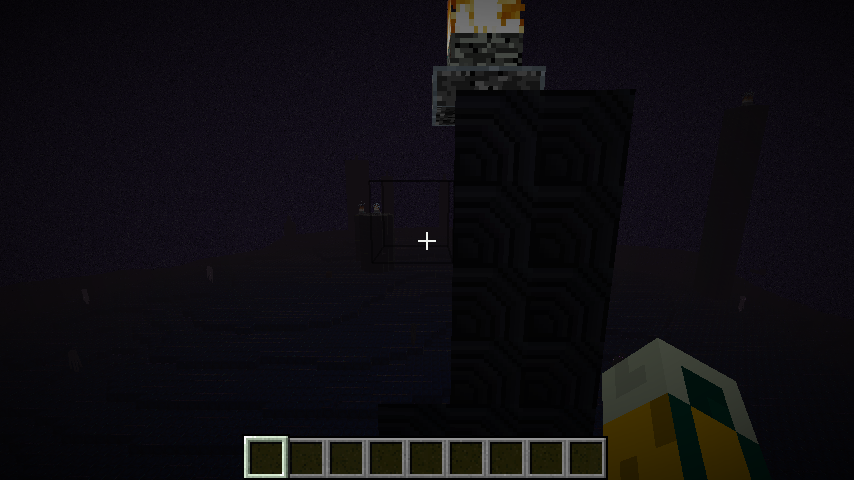


Sometimes while mining or placing blocks in Minecraft, especially in Creative mode although it does happen in survival, Minecraft will be come temporaily unresponsive to any keyboard keys being pressed.
The textures of some blocks don't always show up when using a resource pack.
Note it could be just one block like dirt or something and that some dirt blocks would be textured others not.The textures of some blocks don't always show up when using a resource pack. It could be just only one block type like dirt or something and that some dirt blocks would be textured others not. In my attachment the block happens to be obsidian.
OS: Windows 8.1 x64 Bit
Java Version: 1.8.0_05
Graphics Card(s): nvidia GeForce GTX 660M & Intel HD Graphics 4000
OS: Windows 8.1 x64 Bit
Java Version: 1.8.0_05
Graphics Card(s): nvidia GeForce GTX 660M & Intel HD Graphics 4000
OpenGL: GeForce GTX 660M/PCIe/SSE2 GL version 4.4.0, NVIDIA Corporation
The textures of some blocks don't always show up when using a resource pack. It could be just only one block type like dirt or something and that some dirt blocks would be textured others not. In my attachment the block happens to be obsidian.
Edit: I dont think this is a duplicate as unlike the other issues im having this only when using a resource pack and its happening when building in chunks that already have blocks in it not empty chunks
This is not a bug report per say but rather a grievance. Although depending on what one views as a bug this could indeed be considered a bug.
This new Bedrock codebase version is supposed to be a replacement for the old Xbox One Edition of Minecraft. With this being said, the new version should have major features of the old included in it. However, there are a few notable features from the Xbox One edition that are not part of the new Minecraft.
--The old default crafting GUI from the Xbox One edition is no longer available. Players are forced to use classic crafting setup whereas on the console there was an option to switch between the two.
--On the Xbox One Edition of Minecraft, there was a "Host Privileges" option. Yes most of the options that were a part of that menu are implemented on the new version of Minecraft. However, there are a few major features that did not get implemented. On Xbox One, the host had the option to selectively allow players in any game mode to become invisible or invincible and allow players outside of creative mode to fly. These options were very useful and there omission from the new version of Minecraft is detrimental.
I am proposing that the missing host privilege options be implemented to the Bedrock codebase and/or that for console users, the old Console GUI be implemented and an option to switch between the old console GUI and classic crafting be added as well. These are just some of the more noticeable features from the console edition that didn't make it into the new version of Minecraft. There are certainly others.
Disabling Advanced OpenGL solves this issue (Options -> Video Settings -> Advanced OpenGL -> Off)
If you don't have that option in your video settings, please check your .minecraft/options.txt for the entry
advancedOpengl:false
If it's true, change it to false (Quit Minecraft, edit this file, restart Minecraft)
Affected:
NVIDIA GeForce GT 750M Yegor Wienski
Nvidia GeForce 650 Ti Boosted, latest drivers Justin
Nvidia GTX 460 with latest drivers (337.88) [Mod] Torabi
NVidia GeForce 680 Michael Turner
ATI Radeon HD 2600 XT GL version 3.3.9901 Compatibility Profile Context, ATI Technologies Inc. jeremy branscum
GeForce GTX 660M/PCIe/SSE2 GL version 4.4.0, NVIDIA Corporation Kyle
OpenGL: NVIDIA GeForce GT 750M OpenGL Engine GL version 2.1 NVIDIA-8.26.21 310.40.35f08, NVIDIA Corporation Yegor Wienski
AMD Radeon HD 6520G GL version 4.2.12422 Compatibility Profile Context 13.152.0.0, ATI Technologies Inc. Anon Ymus
Not affected:
AMD Radeon HD 6700 Series GL version 4.4.12874 Compatibility Profile Context 14.100.0.0, ATI Technologies Inc. (AMD Catalyst 14.4, no Advanced OpenGL Switch) Kumasasa
Entire chunks do not visually render, however, their blocks can still be mined/pick blocked/broken like normal. Block updates do not cause the chunk to render.
Relogging does fix the problem, however new chunks will then be visually unloaded.

Disabling Advanced OpenGL solves this issue (Options -> Video Settings -> Advanced OpenGL -> Off)
Or just simply press F3+A to reload the nearest chunks.
If you don't have that option in your video settings, please check your .minecraft/options.txt for the entry
advancedOpengl:false
If it's true, change it to false (Quit Minecraft, edit this file, restart Minecraft)
Affected:
ATI Radeon HD 4300/4500 Series GL version 3.3.11653 Compatibility Profile Context, ATI Technologies Inc. Thijmen F
ATI Radeon X1600 OpenGL Engine GL version 2.0 ATI-1.5.48, ATI Technologies Inc. Simons Mith
Nvidia GTX 460 with latest drivers (337.88) [Mod] Torabi
AMD Radeon HD 6800 Series , Driver version: 9.12.0.0 & Driver version: 14.100.0.0 Marcono1234
GeForce GTX 660M/PCIe/SSE2 GL version 4.4.0, NVIDIA Corporation Kyle
Not affected:
AMD Radeon HD 6700 Series GL version 4.4.12874 Compatibility Profile Context 14.100.0.0, ATI Technologies Inc. (AMD Catalyst 14.4, have no Advanced OpenGL switch) Kumasasa
pillar up from the bottom of the sea all the way up. keep stacking until the blocks turn invisible (about two blocks above water)
This is cancelled when mipmapping is turned on/off
no im not having this issue when no using a resource pack
yes
it seems to have helped
This happens to me on both my iPad Air running iOS 9.2.3 using the standard system keyboard as well as on my iPhone SE running iOS 10.3.3 again using the default system keyboard.
Corrected spelling error