Chunks Don't Render with advancedOpengl = true
Disabling Advanced OpenGL solves this issue (Options -> Video Settings -> Advanced OpenGL -> Off)
If you don't have that option in your video settings, please check your .minecraft/options.txt for the entry
advancedOpengl:false
If it's true, change it to false (Quit Minecraft, edit this file, restart Minecraft)
Affected:
NVIDIA GeForce GT 750M Yegor Wienski
Nvidia GeForce 650 Ti Boosted, latest drivers Justin
Nvidia GTX 460 with latest drivers (337.88) [Mod] Torabi
NVidia GeForce 680 Michael Turner
ATI Radeon HD 2600 XT GL version 3.3.9901 Compatibility Profile Context, ATI Technologies Inc. jeremy branscum
GeForce GTX 660M/PCIe/SSE2 GL version 4.4.0, NVIDIA Corporation Kyle
OpenGL: NVIDIA GeForce GT 750M OpenGL Engine GL version 2.1 NVIDIA-8.26.21 310.40.35f08, NVIDIA Corporation Yegor Wienski
AMD Radeon HD 6520G GL version 4.2.12422 Compatibility Profile Context 13.152.0.0, ATI Technologies Inc. Anon Ymus
Not affected:
AMD Radeon HD 6700 Series GL version 4.4.12874 Compatibility Profile Context 14.100.0.0, ATI Technologies Inc. (AMD Catalyst 14.4, no Advanced OpenGL Switch) Kumasasa
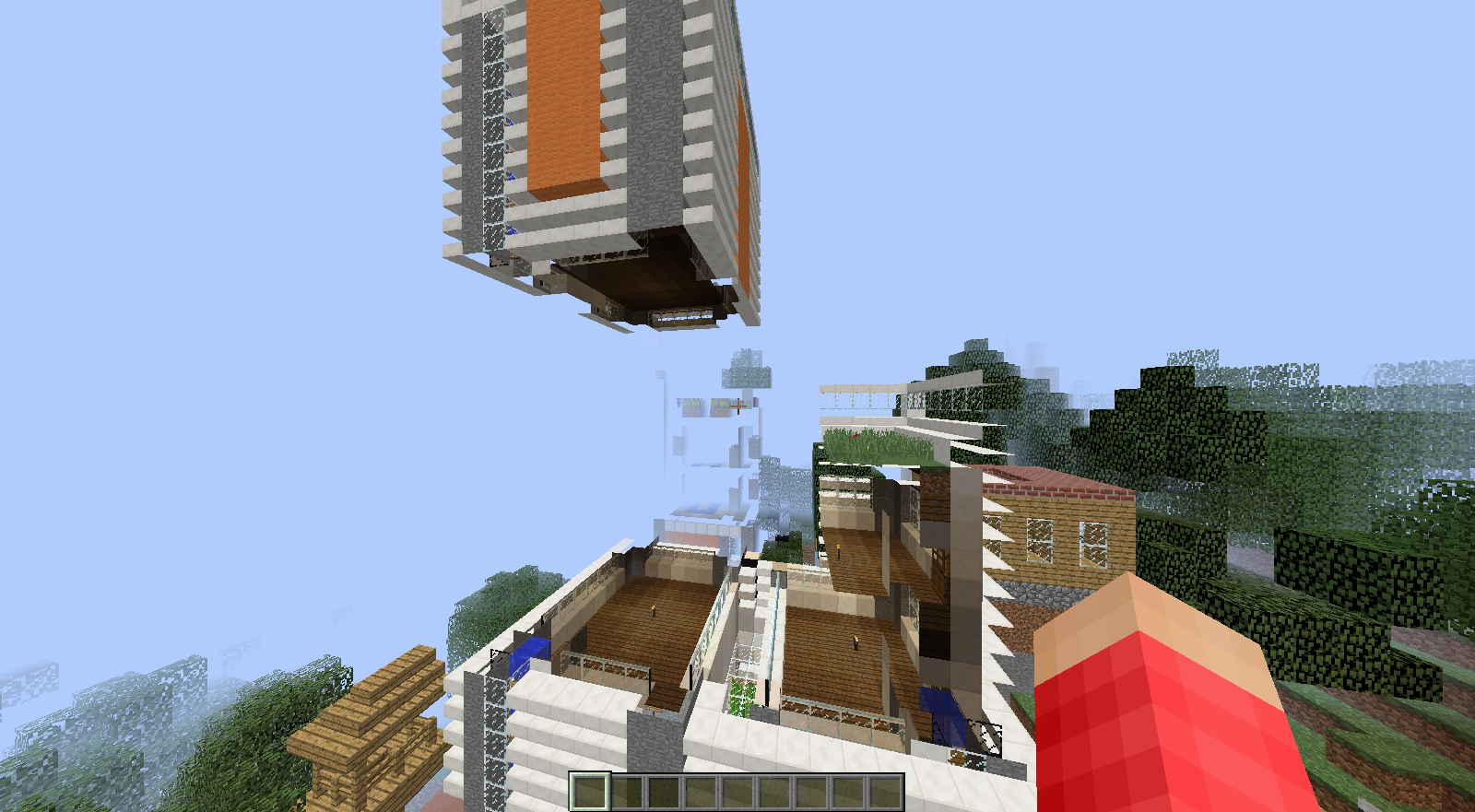
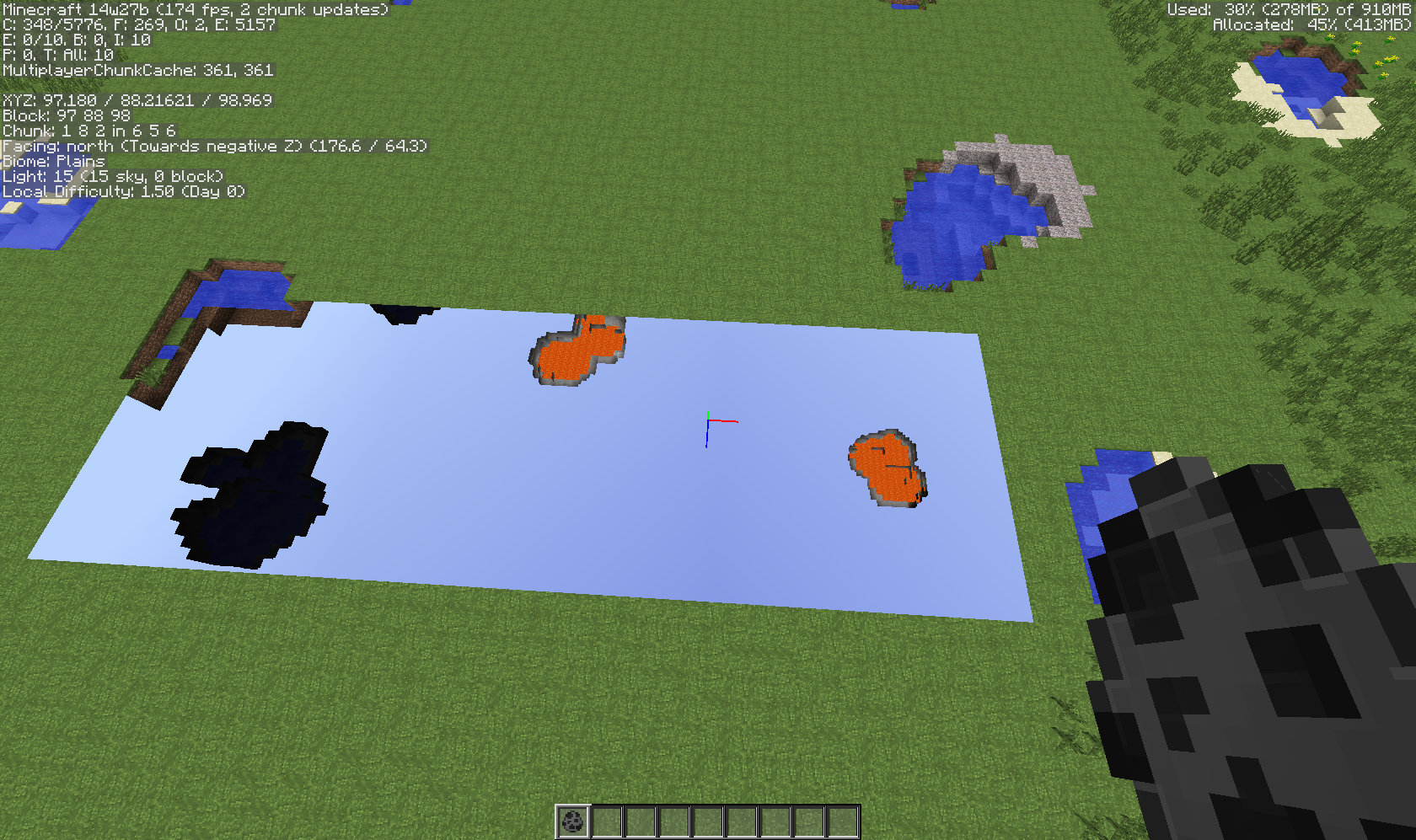
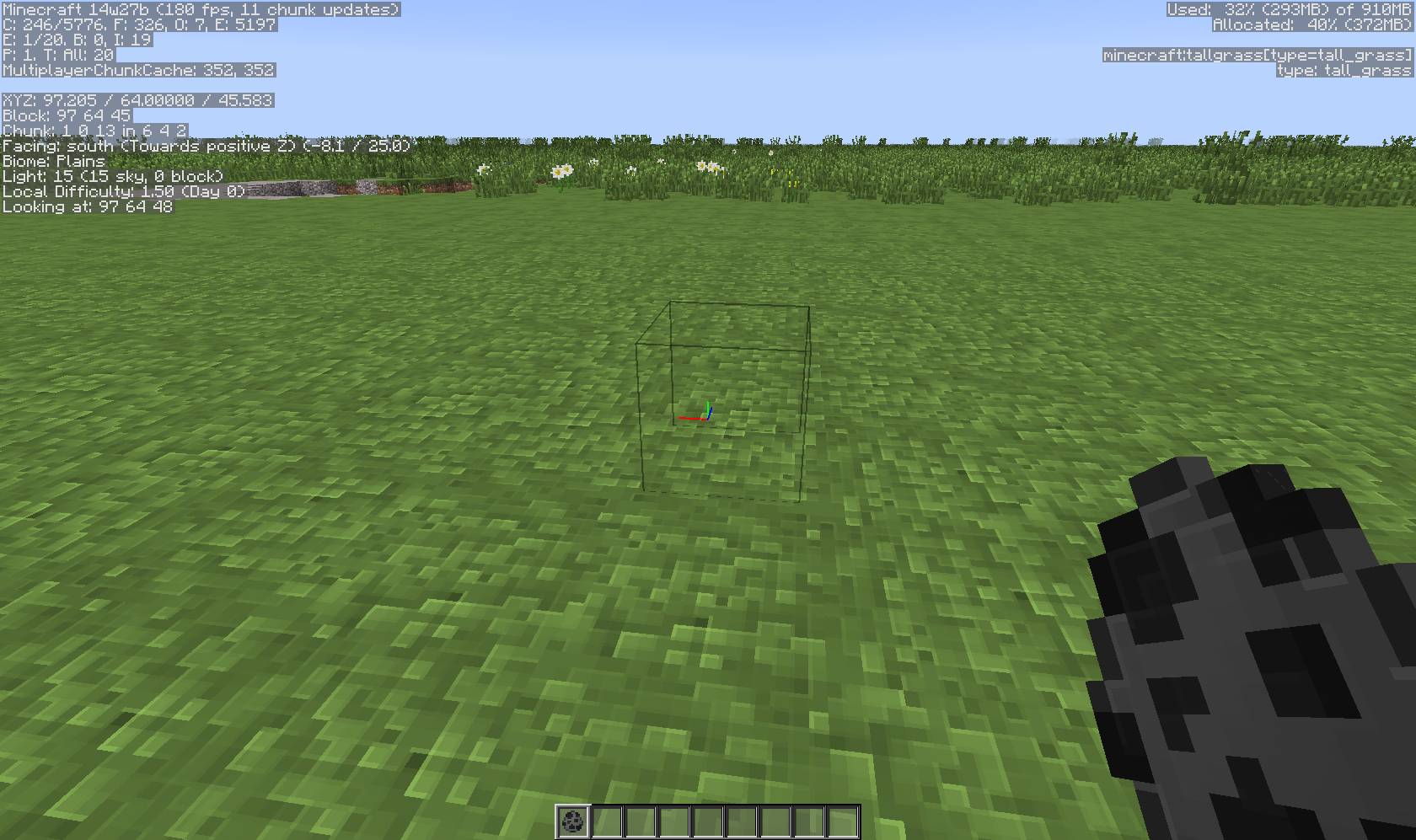
Entire chunks do not visually render, however, their blocks can still be mined/pick blocked/broken like normal. Block updates do not cause the chunk to render.
Relogging does fix the problem, however new chunks will then be visually unloaded.
Environment
Mac OS 10.8
Java 7.45
Singleplayer
Superflat Redstone Ready Preset
Linked Issues
testing discovered1
is duplicated by135
 MC-56896Terrain stops loading in multiplayer after leaving initally-generated chunks.DuplicateMC-56948Chunk IssuesDuplicateMC-57003Chunk Rendering BugDuplicateMC-57064Blocks are invisibleDuplicateMC-57109Chunks sometimes don't load when nearby causing blocks not to renderDuplicateMC-57167Minecraft rendering issues.DuplicateMC-57208Texture rendering.DuplicateMC-57226Textures in some (chunks?) are not renderedDuplicateMC-57248chunks not loading blocks/texturesDuplicateMC-57308Bad world rendering when teleportedDuplicateMC-57360Summery multiple actions that cause game stop renderingDuplicateMC-57364Block Render / Chunk- Errors [14w25a]DuplicateMC-57483Several Chunk Loading issuesDuplicateMC-57489Chunks do not render the correct way; Chunks invisible but interactibleDuplicateMC-57515Chunks not loading correctlyDuplicateMC-57739Rendering ProblemDuplicateMC-57775Massive chunk loading problemsDuplicateMC-57845Nat loeded ChunkDuplicateMC-57872Won't render terrain/blocks when creating a world.DuplicateMC-57892Chunk error that I can walk and dig through.DuplicateMC-57900Inviseble blocksDuplicateMC-57951Invisible blocks?DuplicateMC-57967Missing Terrain TextureDuplicateMC-57982Parts of the world don't render textures but have physicsDuplicateMC-58019Chunks are fixed loaded or not loaded!DuplicateMC-58023Invisible BlocksDuplicateMC-58033Transparent BlocksDuplicateMC-58058Chunks won't loadDuplicateMC-58084Unloading terrain DuplicateMC-58107Invisible chunksDuplicateMC-58116New chunks not loading DuplicateMC-58218invisible blocksDuplicateMC-58249Invisible blocksDuplicateMC-58262Xray Blocks DuplicateMC-58296see through enviromentDuplicateMC-58315Resource Pack Textures Randomly Not Showing Up on BlocksDuplicateMC-58316Entire Nether Isn't LoadingDuplicateMC-58359Can't load Custom worldDuplicateMC-58410map loading and blocking placingDuplicateMC-58419Chunks not rendering in correctleyDuplicateMC-58461Block Render IssuesDuplicateMC-58463Cave View GlitchDuplicateMC-58479Invisible blocks rendering in random placesDuplicateMC-58501Invisible blocks on multiplayerDuplicateMC-58515World Rendering ImproperlyDuplicateMC-58526Digging down under water, texture failDuplicateMC-58549Render Engine not goodDuplicateMC-58595Chunk ErrorsDuplicateMC-58606Previous Made Worlds, Don't render chunks properly at all.DuplicateMC-58620Chunk Loading issueDuplicateMC-58631Rendering issuesDuplicateMC-58655Unloaded chunk will not load after multiple attemptsDuplicateMC-58670A part of world disappear and the block you placed on to that piece of land lost its textureDuplicateMC-58691When i make a single player world or server of the new snapshot 14w25b, chunks are not loading properly. Most of the world is blue, some land has been generated but it doesn't generate the rest.DuplicateMC-58714chunks disappearingDuplicateMC-58773Chunk errors are very commonDuplicateMC-58827Some chunks never load on MAC OSXDuplicateMC-58849Broken everything....Quite literallyDuplicateMC-58965Random Chunks Not Appearing NearbyDuplicateMC-58987Chunks not updatingDuplicateMC-59019New 14w26b World Never Fully RendersDuplicateMC-59063Blocks wont load after breaking a blockDuplicateMC-59210World is not loading, your bug fix is not working correctlyDuplicateMC-59337can see the world loading when you spin aroundDuplicateMC-59359Some blocks fail to render after world generation.DuplicateMC-59400Blank/transparent ground of worldDuplicateMC-59545blocks invisibleDuplicateMC-59640Bad chunk loadingDuplicateMC-59752Invisible BlocksDuplicateMC-59855Terrain not rendered correctly on OS XDuplicateMC-59903Rendering issuesDuplicateMC-60045Block ErrorDuplicateMC-60263Random missing chunksDuplicateMC-60266Textures aren't loading in certain chunksDuplicateMC-60271Chunks Load, but blocks not visibleDuplicateMC-60286ALL of my chunks fail to load in my server.DuplicateMC-60405Large swaths of land fail to render properlyDuplicateMC-60503Not loading chunksDuplicateMC-60567Invisible blocksDuplicateMC-60571performance issue; blocks fail to loadDuplicateMC-60631See Through WorldDuplicateMC-60756Visible Blocks on flatland suddenly disappearDuplicateMC-6090114w27b Bug with RenderingDuplicateMC-60957Some chunks are see-through on first world load.DuplicateMC-61011Transparent Textures - a cube of the world is invisibleDuplicateMC-61127Chunks Occasionally Will not Load Correctly DuplicateMC-61190Large Hole UnloadedDuplicateMC-61209Chunks not renderingDuplicateMC-61364Weird black line in snapshot 14w28aDuplicateMC-61369Chunks dont loadDuplicateMC-61440blocks aren't rendered correctlyDuplicateMC-61479Unloaded/transparent chunks bugDuplicateMC-61486Invisible BlocksDuplicateMC-61515Invisible Parts Of Chunks In RavineDuplicateMC-61522Half of the chunk doesn't loadDuplicateMC-61529Chunks Not Generating/Loading Correctly In Client & Servers (Major issue)DuplicateMC-61532Non-loading Chunks While On MinecartDuplicateMC-61546Chunks not loading properlyDuplicateMC-61582Chunks not rendering properly, transparentDuplicateMC-61647World textures won't load beyond first chunk(?) because of "Alternate Blocks" optionDuplicateMC-61727Snapshot 14w28b Minecraft rendering problemDuplicateMC-61853Some Chucks Never Load until logging back inDuplicateMC-61867Chunks disappearDuplicateMC-61914distance drawing/ refreshDuplicateMC-61935Chunk loading issueDuplicateMC-62019World gets corrupted sometimes when I use Spectator ModeDuplicateMC-62021Block's are invisable and you can see only the under ground Cave's, Dungeon's ectDuplicateMC-62115Invisible, but loaded chunksDuplicateMC-62130Incomplete renderingDuplicateMC-62210When opening new chunks, nothing shows up except entities. chunk errorsDuplicateMC-62233The End generates without blocksDuplicateMC-62235texture loading issueDuplicateMC-62301Not all blocks are renderedDuplicateMC-62306Block X-ray bugDuplicateMC-62309Textures of some chucks NEVER loadDuplicateMC-62377Chunks aren't loadingDuplicateMC-62480Block Textures fail to load at allDuplicateMC-62482Chunk's Block's Textures not appearingDuplicateMC-62495xray holesDuplicateMC-62555Bad Chunk Rendering when creating a New WorldDuplicateMC-62570Blocks/chunks not loadDuplicateMC-62606Transparent ground, AdvOpenGL OFFDuplicateMC-62612Error loading textures in some chunksDuplicateMC-62613The chunks loader takes to loadDuplicateMC-62660Chunks in Singleplayer load way too slowlyDuplicateMC-62667Invisible/Not Updated blocks when spawning in a New World.DuplicateMC-62732Strange Xray GlitchDuplicateMC-62748world does not load rightDuplicateMC-62751Render fails. Invisible blocks sometimes.DuplicateMC-62814Area goes invisible and appears to float above. DuplicateMC-62876Minecraft 14w29b Blocks not updatingDuplicateMC-62883Chunk overwritingDuplicateMC-62948Invisible Blocks/Chunk Error SupremeDuplicateMC-62976Chunk RenderingDuplicateMC-75312Xray when holding an itemDuplicate
Attachments25


![[Mod] Sonicwave](../../../data/avatars/users/94627.png)


![[Mod] Torabi](../../../data/assets/gravatar/torabi.png)

Created Issue:
Chunks Don't Render
Entire chunks do not visually render, however, their blocks can still be mined/pick blocked/broken like normal. Block updates do not cause the chunk to render. Relogging does fix the problem, however new chunks will then be visually unloaded.
Environment
Mac OS 10.8
Java 7.45
Singleplayer
Superflat Redstone Ready Preset

is duplicated by
is duplicated by
is duplicated by
is duplicated by
is duplicated by
is duplicated by
is duplicated by
is duplicated by
is duplicated by
is duplicated by
Crash report
relates to
is duplicated by
is duplicated by
is duplicated by
is duplicated by
Entire chunks do not visually render, however, their blocks can still be mined/pick blocked/broken like normal. Block updates do not cause the chunk to render. Relogging does fix the problem, however new chunks will then be visually unloaded.
WorkaroundDisabling Advanced OpenGL solves this issue (Options -> Video Settings -> Advanced OpenGL -> Off)
Entire chunks do not visually render, however, their blocks can still be mined/pick blocked/broken like normal. Block updates do not cause the chunk to render.
Relogging does fix the problem, however new chunks will then be visually unloaded.
is duplicated by
WorkaroundDisabling Advanced OpenGL solves this issue (Options -> Video Settings -> Advanced OpenGL -> Off)
Affected:
NVIDIA GeForce GT 750M Yegor Wienski
Nvidia GeForce 650 Ti Boosted, latest drivers Justin
Nvidia GTX 460 with latest drivers (337.88) [Mod] Torabi
Not affected:
AMD Radeon HD 6700 Series GL version 4.4.12874 Compatibility Profile Context 14.100.0.0, ATI Technologies Inc. (AMD Catalyst 14.4, no Advanced OpenGL Switch) Kumasasa
Entire chunks do not visually render, however, their blocks can still be mined/pick blocked/broken like normal. Block updates do not cause the chunk to render.
Relogging does fix the problem, however new chunks will then be visually unloaded.
is duplicated by
is duplicated by
WorkaroundDisabling Advanced OpenGL solves this issue (Options -> Video Settings -> Advanced OpenGL -> Off)
Affected:
NVIDIA GeForce GT 750M Yegor Wienski
Nvidia GeForce 650 Ti Boosted, latest drivers Justin
Nvidia GTX 460 with latest drivers (337.88) [Mod] TorabiNot affected:
AMD Radeon HD 6700 Series GL version 4.4.12874 Compatibility Profile Context 14.100.0.0, ATI Technologies Inc. (AMD Catalyst 14.4, no Advanced OpenGL Switch) Kumasasa
Entire chunks do not visually render, however, their blocks can still be mined/pick blocked/broken like normal. Block updates do not cause the chunk to render.
Relogging does fix the problem, however new chunks will then be visually unloaded.WorkaroundDisabling Advanced OpenGL solves this issue (Options -> Video Settings -> Advanced OpenGL -> Off)
Affected:
NVIDIA GeForce GT 750M Yegor Wienski
Nvidia GeForce 650 Ti Boosted, latest drivers Justin
Nvidia GTX 460 with latest drivers (337.88) [Mod] Torabi
NVidia GeForce 680 Michael Turner
ATI Radeon HD 2600 XT GL version 3.3.9901 Compatibility Profile Context, ATI Technologies Inc. jeremy branscum
GeForce GTX 660M/PCIe/SSE2 GL version 4.4.0, NVIDIA Corporation Kyle
Not affected:
AMD Radeon HD 6700 Series GL version 4.4.12874 Compatibility Profile Context 14.100.0.0, ATI Technologies Inc. (AMD Catalyst 14.4, no Advanced OpenGL Switch) Kumasasa
Entire chunks do not visually render, however, their blocks can still be mined/pick blocked/broken like normal. Block updates do not cause the chunk to render.
Relogging does fix the problem, however new chunks will then be visually unloaded.
is duplicated by
WorkaroundDisabling Advanced OpenGL solves this issue (Options -> Video Settings -> Advanced OpenGL -> Off)
Affected:
NVIDIA GeForce GT 750M Yegor Wienski
Nvidia GeForce 650 Ti Boosted, latest drivers Justin
Nvidia GTX 460 with latest drivers (337.88) [Mod] Torabi
NVidia GeForce 680 Michael Turner
ATI Radeon HD 2600 XT GL version 3.3.9901 Compatibility Profile Context, ATI Technologies Inc. jeremy branscum
GeForce GTX 660M/PCIe/SSE2 GL version 4.4.0, NVIDIA Corporation KyleNot affected:
AMD Radeon HD 6700 Series GL version 4.4.12874 Compatibility Profile Context 14.100.0.0, ATI Technologies Inc. (AMD Catalyst 14.4, no Advanced OpenGL Switch) Kumasasa
Entire chunks do not visually render, however, their blocks can still be mined/pick blocked/broken like normal. Block updates do not cause the chunk to render.
Relogging does fix the problem, however new chunks will then be visually unloaded.WorkaroundDisabling Advanced OpenGL solves this issue (Options -> Video Settings -> Advanced OpenGL -> Off)
Affected:
NVIDIA GeForce GT 750M Yegor Wienski
Nvidia GeForce 650 Ti Boosted, latest drivers Justin
Nvidia GTX 460 with latest drivers (337.88) [Mod] Torabi
NVidia GeForce 680 Michael Turner
ATI Radeon HD 2600 XT GL version 3.3.9901 Compatibility Profile Context, ATI Technologies Inc. jeremy branscum
GeForce GTX 660M/PCIe/SSE2 GL version 4.4.0, NVIDIA Corporation Kyle
OpenGL: NVIDIA GeForce GT 750M OpenGL Engine GL version 2.1 NVIDIA-8.26.21 310.40.35f08, NVIDIA Corporation
Not affected:
AMD Radeon HD 6700 Series GL version 4.4.12874 Compatibility Profile Context 14.100.0.0, ATI Technologies Inc. (AMD Catalyst 14.4, no Advanced OpenGL Switch) Kumasasa
Entire chunks do not visually render, however, their blocks can still be mined/pick blocked/broken like normal. Block updates do not cause the chunk to render.
Relogging does fix the problem, however new chunks will then be visually unloaded.
WorkaroundDisabling Advanced OpenGL solves this issue (Options -> Video Settings -> Advanced OpenGL -> Off)
Affected:
NVIDIA GeForce GT 750M Yegor Wienski
Nvidia GeForce 650 Ti Boosted, latest drivers Justin
Nvidia GTX 460 with latest drivers (337.88) [Mod] Torabi
NVidia GeForce 680 Michael Turner
ATI Radeon HD 2600 XT GL version 3.3.9901 Compatibility Profile Context, ATI Technologies Inc. jeremy branscum
GeForce GTX 660M/PCIe/SSE2 GL version 4.4.0, NVIDIA Corporation Kyle
OpenGL: NVIDIA GeForce GT 750M OpenGL Engine GL version 2.1 NVIDIA-8.26.21 310.40.35f08, NVIDIA Corporation Yegor Wienski
Not affected:
AMD Radeon HD 6700 Series GL version 4.4.12874 Compatibility Profile Context 14.100.0.0, ATI Technologies Inc. (AMD Catalyst 14.4, no Advanced OpenGL Switch) Kumasasa
Entire chunks do not visually render, however, their blocks can still be mined/pick blocked/broken like normal. Block updates do not cause the chunk to render.
Relogging does fix the problem, however new chunks will then be visually unloaded.
is duplicated by
is duplicated by
is duplicated by
is duplicated by
is duplicated by
is duplicated by
is duplicated by
relates to
relates to
is duplicated by

WorkaroundDisabling Advanced OpenGL solves this issue (Options -> Video Settings -> Advanced OpenGL -> Off)
Affected:
NVIDIA GeForce GT 750M Yegor Wienski
Nvidia GeForce 650 Ti Boosted, latest drivers Justin
Nvidia GTX 460 with latest drivers (337.88) [Mod] Torabi
NVidia GeForce 680 Michael Turner
ATI Radeon HD 2600 XT GL version 3.3.9901 Compatibility Profile Context, ATI Technologies Inc. jeremy branscum
GeForce GTX 660M/PCIe/SSE2 GL version 4.4.0, NVIDIA Corporation Kyle
OpenGL: NVIDIA GeForce GT 750M OpenGL Engine GL version 2.1 NVIDIA-8.26.21 310.40.35f08, NVIDIA Corporation Yegor WienskiNot affected:
AMD Radeon HD 6700 Series GL version 4.4.12874 Compatibility Profile Context 14.100.0.0, ATI Technologies Inc. (AMD Catalyst 14.4, no Advanced OpenGL Switch) Kumasasa
Entire chunks do not visually render, however, their blocks can still be mined/pick blocked/broken like normal. Block updates do not cause the chunk to render.
Relogging does fix the problem, however new chunks will then be visually unloaded.WorkaroundDisabling Advanced OpenGL solves this issue (Options -> Video Settings -> Advanced OpenGL -> Off)
Affected:
NVIDIA GeForce GT 750M Yegor Wienski
Nvidia GeForce 650 Ti Boosted, latest drivers Justin
Nvidia GTX 460 with latest drivers (337.88) [Mod] Torabi
NVidia GeForce 680 Michael Turner
ATI Radeon HD 2600 XT GL version 3.3.9901 Compatibility Profile Context, ATI Technologies Inc. jeremy branscum
GeForce GTX 660M/PCIe/SSE2 GL version 4.4.0, NVIDIA Corporation Kyle
OpenGL: NVIDIA GeForce GT 750M OpenGL Engine GL version 2.1 NVIDIA-8.26.21 310.40.35f08, NVIDIA Corporation Yegor Wienski
AMD Radeon HD 6520G GL version 4.2.12422 Compatibility Profile Context 13.152.0.0, ATI Technologies Inc. Anon Ymus
Not affected:
AMD Radeon HD 6700 Series GL version 4.4.12874 Compatibility Profile Context 14.100.0.0, ATI Technologies Inc. (AMD Catalyst 14.4, no Advanced OpenGL Switch) Kumasasa
Entire chunks do not visually render, however, their blocks can still be mined/pick blocked/broken like normal. Block updates do not cause the chunk to render.
Relogging does fix the problem, however new chunks will then be visually unloaded.
is duplicated by
WorkaroundDisabling Advanced OpenGL solves this issue (Options -> Video Settings -> Advanced OpenGL -> Off)
If you don't have that option in your video settings, please check if your .minecraft/options.txt for the entry
advancedOpengl:falseIf it's true, change it to false (Quit Minecraft, edit this file, restart Minecraft)
Affected:
NVIDIA GeForce GT 750M Yegor Wienski
Nvidia GeForce 650 Ti Boosted, latest drivers Justin
Nvidia GTX 460 with latest drivers (337.88) [Mod] Torabi
NVidia GeForce 680 Michael Turner
ATI Radeon HD 2600 XT GL version 3.3.9901 Compatibility Profile Context, ATI Technologies Inc. jeremy branscum
GeForce GTX 660M/PCIe/SSE2 GL version 4.4.0, NVIDIA Corporation Kyle
OpenGL: NVIDIA GeForce GT 750M OpenGL Engine GL version 2.1 NVIDIA-8.26.21 310.40.35f08, NVIDIA Corporation Yegor Wienski
AMD Radeon HD 6520G GL version 4.2.12422 Compatibility Profile Context 13.152.0.0, ATI Technologies Inc. Anon Ymus
Not affected:
AMD Radeon HD 6700 Series GL version 4.4.12874 Compatibility Profile Context 14.100.0.0, ATI Technologies Inc. (AMD Catalyst 14.4, no Advanced OpenGL Switch) Kumasasa
Entire chunks do not visually render, however, their blocks can still be mined/pick blocked/broken like normal. Block updates do not cause the chunk to render.
Relogging does fix the problem, however new chunks will then be visually unloaded.
is duplicated by
is duplicated by

is duplicated by
is duplicated by
is duplicated by
is duplicated by
WorkaroundDisabling Advanced OpenGL solves this issue (Options -> Video Settings -> Advanced OpenGL -> Off)
If you don't have that option in your video settings, please check
ifyour .minecraft/options.txt for the entryadvancedOpengl:falseIf it's true, change it to false (Quit Minecraft, edit this file, restart Minecraft)
Affected:
NVIDIA GeForce GT 750M Yegor Wienski
Nvidia GeForce 650 Ti Boosted, latest drivers Justin
Nvidia GTX 460 with latest drivers (337.88) [Mod] Torabi
NVidia GeForce 680 Michael Turner
ATI Radeon HD 2600 XT GL version 3.3.9901 Compatibility Profile Context, ATI Technologies Inc. jeremy branscum
GeForce GTX 660M/PCIe/SSE2 GL version 4.4.0, NVIDIA Corporation Kyle
OpenGL: NVIDIA GeForce GT 750M OpenGL Engine GL version 2.1 NVIDIA-8.26.21 310.40.35f08, NVIDIA Corporation Yegor Wienski
AMD Radeon HD 6520G GL version 4.2.12422 Compatibility Profile Context 13.152.0.0, ATI Technologies Inc. Anon Ymus
Not affected:
AMD Radeon HD 6700 Series GL version 4.4.12874 Compatibility Profile Context 14.100.0.0, ATI Technologies Inc. (AMD Catalyst 14.4, no Advanced OpenGL Switch) Kumasasa
Entire chunks do not visually render, however, their blocks can still be mined/pick blocked/broken like normal. Block updates do not cause the chunk to render.
Relogging does fix the problem, however new chunks will then be visually unloaded.
is duplicated by
is duplicated by
relates to
is duplicated by
is duplicated by
testing discovered
relates to
is duplicated by
is duplicated by
is duplicated by
is duplicated by
is duplicated by
is duplicated by
is duplicated by
is duplicated by
is duplicated by
is duplicated by
is duplicated by
is duplicated by
is duplicated by
is duplicated by
is duplicated by
MC-60573
is duplicated by
is duplicated by
is duplicated by
is duplicated by
is duplicated by
is duplicated by
is duplicated by
is duplicated by
2014-07-08_11.20.22.png
is duplicated by

is duplicated by
is duplicated by
is duplicated by
is duplicated by
is duplicated by

is duplicated by
is duplicated by
is duplicated by
is duplicated by
is duplicated by
is duplicated by
is duplicated by
is duplicated by
![[Mod] CubeTheThird](../../../data/assets/gravatar/cubethethird.jpeg)
is duplicated by
is duplicated by
is duplicated by
is duplicated by
is duplicated by
Forcing a chunk reload (F3+A) will make the missing chunks render, but the issue will eventually reappear if you travel around a bit.
is duplicated by
is duplicated by
is duplicated by
is duplicated by
is duplicated by
is duplicated by
is duplicated by
is duplicated by
is duplicated by
is duplicated by
is duplicated by
is duplicated by
is duplicated by
is duplicated by
is duplicated by
is duplicated by
is duplicated by
is duplicated by
is duplicated by
relates to
is duplicated by
is duplicated by
is duplicated by
is duplicated by
is duplicated by
is duplicated by
Chunks Don't Render with advancedOpengl = true
I always knew the problem was with Advanced OpenGL on, in the previous few snapshots. And even though setting it to off fixes it, l hope this doesn't get categorized a being resolved. It still needs to be sorted out.
![[Mod] Ezekiel (ezfe)](../../../data/assets/gravatar/ezekielelin.jpeg)
Is MC-56897 your issue?
Experienced this with a Nvidia GTX 460. Updating to the latest drivers (337.88) and disabling "Advanced OpenGL" appears to have fixed this and MC-56897 for me.


If it still persists, then duplicate of MC-56897
I tried to reload all chunks (F3 + A and F3 + S), but it did not work. I also tried to close Minecraft and change the "advancedOpengl:false" to "advancedOpengl:true" (at MC-56897), but nothing happened.
As a workaround for now, turn off Advanced OpenGL.
ESC --> Options -> Video Settings -> Advanced OpenGL: OFF
If you don't have that option, check your .minecraft/options.txt for
advancedOpengl:false
If it's true, change it to false (Quit Minecraft, edit this file, restart Minecraft)
@Anton Morozov: I've put your comment in MC-56897
On some systems the setting advancedOpengl:true is still in the file options.txt despite the setting Advanced OpenGL is missing in the video settings and that setting is used ingame for AMD cards despite only useful for NVidia cards.
http://www.reddit.com/r/Minecraft/comments/1s5umw/minecraft_snapshot_13w49a/cduak3p
Steps to reproduce:
- Start Minecraft 1.6.4
- Switch Advanced OpenGL: On
- Quit 1.6.4
- Start Minecraft 14w25b
- No option is visible, but options.txt still shows as
invertYMouse:false
mouseSensitivity:0.5070422
fov:-0.05
gamma:0.5140845
saturation:0.0
renderDistance:12
guiScale:0
particles:0
bobView:true
anaglyph3d:false
advancedOpengl:true
maxFps:120
fboEnable:true
...
This option is apparently still used in-game, because even users with AMD cards are having issues like MC-56897 and MC-56917.
Broken resource pack? Please switch to the default resource pack, and see if it occurs there.
Otherwise, this is a duplicate of MC-56897
Dupe of MC-56897
Dupe of MC-56897
Dupe of MC-56897
Dupe of MC-56897
Dupe of MC-56897
Dupe of MC-56897
Dupe of MC-56897
Dupe of MC-56897
Dupe of MC-56897
Dupe of MC-56897
Dupe of MC-56897
Dupe of MC-56897
Dupe of MC-56897
Dupe of MC-56897
Dupe of MC-56897
Dupe of MC-56897
Dupe of MC-56897
Obviously, this is a dupe of MC-56897
Ryan Holtz, I was wondering, did you decide to remove Advanced OpenGL entirely?
Duplicate of MC-56897
Duplicate of MC-56897
Dupe of MC-56897
Not so duplicate because MC-56897 is affecting MacOS systems, or...
We can add this to the counter ><"
Dupe of MC-56897
Dupe of MC-56897
Dupe of MC-56897
Duplicate of MC-56897
If you have not, please use the search function in the future, to see if your bug has already been submitted. If you could not find the original report, please comment with the keywords you searched for.
A different issue listed a workaround of turning off OpenGL, and since I did that, my trees render correctly. rendering has become much faster and I've had less trouble with many things.
(from MC-56897 Chucks Don't Render)
Disabling Advanced OpenGL solves this issue (Options -> Video Settings -> Advanced OpenGL -> Off)
If you don't have that option in your video settings, please check your .minecraft/options.txt for the entry
advancedOpengl:false
If it's true, change it to false (Quit Minecraft, edit this file, restart Minecraft)
Dupe of MC-56897
Dupe of MC-56897
Dupe of MC-56897
Dupe of MC-56897
Dupe of MC-56897
Duplicate of MC-56897
Duplicate of MC-56897
Duplicate of MC-56897
Duplicate of MC-56897
Duplicate of MC-56897
In 14w29b with VBOs on, with OS X 10.9.4, Java 8u11, ATI Radeon HD 4670, HDD (not SSD), this issue is SIGNIFICANTLY improved. It's almost impossible to see this problem, though it does happen occasionally. The minimum distance before a chunk is forced to render is MUCH higher. Also, I can only get my computer (with the HDD even) to cause this issue on very high render distances.
And as an aside, as far as I can tell, MC-56897 has been eliminated for me on the above setup.
Dupe of MC-56897
Dupe of MC-56897
Dupe of MC-56897
Reopen this please as it is not a duplicate of MC-56897
This happens when you have VBOs activated but advancedOpengl deactivated.
And also only happens after creating a new world or closing Minecraft completely and then with the first world which you select
You should better change the title to:
Chunks near spawn don't render with VBOs activated
Dupe of MC-56897
Duplicate of MC-56897
Also, your graphics card doesn't meet the minimum system requirements.
Duplicate of MC-56897
There is also a new Snapshot.
Persists in 14w25b.
Anyone having this issue:
Please force a crash by pressing F3 + C for 10 seconds while in-game and attach the crash report (minecraft/crash-reports/crash-<DATE>-client.txt) here.
Experienced this with a Nvidia GTX 460. Updating to the latest drivers (337.88) and disabling "Advanced OpenGL" appears to have fixed this and
MC-56917for me. Here's a crash report anyway.I experience both problems (this and https://bugs.mojang.com/browse/MC-56917) on NVIDIA GeForce GT 750M. Disabling advanced OpenGL seems to solve them as well.
Nvidia GeForce 650 Ti Boosted, latest drivers. I can confirm that disabling OpenGL solves the problem.
Has this problem on my SMP server. NVidia GeForce 680.
having this issue but the setting to turn off Advanced OpenGL is not in my video settings menu
Again: @all having this issue:
Please force a crash by pressing F3 + C for 10 seconds while in-game and attach the crash report (minecraft/crash-reports/crash-<DATE>-client.txt) here.
ok here it is
The Nvidia Geforce GTX 780 is affected.
the advanced opengl setting is not in my video settings please advise I updated all drivers and submitted a crash report.
I submitted more screenshots of the issue.
It also happens in the spawn chunks and also affects my processor and graphics card. Intel i7 3520m and nVidia 635m
@Anon Ymus:
Can you install Catalyst 14.4 and check if your video settings in options.txt are as following:
Especially advancedOpengl:false since that setting is not available.
I'm still wondering why I don't have that issue.
+1 to jeremy branscum. I see no Advanced OpenGL in my video settings in 14w25b, can swear I had it earlier.
@Anton Morozov et al. That entry got removed from the video settings for certain video cards some versions ago. Just changed the description of this ticket for manually checking that setting.
Carried over a comment from Anton Morozov in
MC-129:I'm gonna add some of my screenshots I took in my closed duplicate ticket.
also happens with ocean and deep ocean
Thanks to Itouch2 for pointing out this link:
How are we differentiating this with
MC-129?With this bug, the chunks never render until you force them to reload (relogging, pressing f3+A). With
MC-129, the description says they will remain unloaded until you get very close to them.MC-129has been in the game for a very long time, and I have witnessed it as well as this bug in the same version.It also affects 14w26c with NVidia GeForce GTX 650 graphics card.
Disabling OpenGL solves the problem for me as well.
GTX 470 confirming.
Can confirm Nvidia GT640 LE and Intel HD4000
Advanced OpenGL does work as a Workaround.
Nvidia GTX 660 confirm
Confirmed. With Advanced OpenGL: On this bug causes most chunks, except ones near you when entering the game, to not load. Changing Render Distance from any value to any other value causes the chunks close to the player to load, but moving to a new area, new visible chunks fail to load.
Setting Advanced OpenGL:Off most chunks load, except the occasional problem noted in MC-129
NVIDIA GeForce GTS 450
Win7 SP1
Java 7u60 x64
Minecraft 14w27b
Affected: Java: 7 u.60 64Bit
Graphics: AMD Radeon R9-200 - 2014.0131.1535.27922
Cpu: IntelCore i3-3220 3.30GHz
Others: 8GB Ram DDR3 , Win7 64Bit Professional
Windows 7, 64-bit, NVIDIA 240m, with advanced openGL on in MC. 14w27b
Can also confirm for NVIDIA GeForce GTX 770.
Confirmed for 14w27b with NVIDIA GeForce GT 635 on Windows 8 (64 bit). (Advanced OpenGL is on.) Pressing F3+A fixes all missing chunks within the render distance (chunks outside still have this bug), re-logging causes new chunks to disappear.
it also effects NVIDIA GTX 660.
This bug occurs on AMD Radeon HD 6850 too.
Also appears for me - Windows 8.1 64bit, Java 1.7.0_55, Minecraft 14w28b, Geforce 9500 GT. Messing with any graphics settings usually clears up the missing chunks for me, and quitting to title and reloading the game has worked too but periodically some chunks will just disappear again.
ATI HD6800 also effected, using latest 14.4 drivers (about to test beta 14.7RC).
Bug also appears with GeForce GTX 770
Also affects GTX 650.
When switching from nether to overworld even the nether portal is not rendered.
Even not rendered redstone circuits work just fine. There is an automatic chicken farm nearby, thats why there are so many entities.
Turning off advancedOpengl fixes the problem (and the framerate slightly better)
Forced crash report attached: crash-2014-07-12_12.34.22-client.txt and screenshot 2014-07-12_12.32.53.png
Press F3+H to re-render. i think your graphix card is not designed for gaming
It's F3+A and it's not a graphics card issue.
So , this normally is happening when With Advanced OpenGL. But since is false...
Make sure that your computer isnt laggy
And a tip for laggy CPU-s : Use low graphics.
Sorry if im disturbing anyone.
Confirmed for 14w28b.
Not sure whether to raise as separate or add here. Chunks render correctly, but blocks don't render within them (i.e. looks fine, place fence, can't see fence, fence is there and breakable).
New bug?
(have video footage, but will cut and edit from my LP episode before posting)
Chunks are made out of blocks, so it's one or the other... But if you're saying that most of the blocks (such as the "ground") render, but some blocks don't render even though they're placed on top of other blocks that do, that sounds like
MC-56917.Update for 14w29b: This issue can also be caused when Advanced OpenGL is not turned on.
I can confirm that having Advanced OpenGL off doesn't prevent this issue in 14w29b, at least with my Intel i7 4770k and Nvidia GTX760. Other relevant specs: Windows 8.1 64-bit, Java 7 update 60 64-bit,16 gigs of ram, I did have Minecraft set to use 8 Gigs of RAM the first time due to my prior use of texture packs in earlier snapshots but I was not using a texture pack at the time. I attached a crash report using the RAM allocation defaults and with Advanced OpenGL off.
I've not been able to find this at all in 14w29b. OS X 10.9.4, Java 8u11, ATI Radeon HD 4670, HDD (not SSD).
VBOs on, checked at multiple render distances.
(with VBOs off, this (and
MC-129) happened once at the world spawn)While this specific issue is not there anymore, I still have
MC-129, albeit much better than in recent snaps.I hope this's fixed soon, it happened today (for the first time) for me, but is really annoying. I also discovered a huge abandoned mineshaft caused by this, with tons of cave spider spawners, which I need for my potion-room, (for spider-eyes) which is directly (about 6 blocks above, not even one block off in x or z coords) above it.
Happened while having advanced opengl turned off, changing mipmap levels causes the game to freeze then the mousclick is not being released from the bar.
Advanced opengl not shows up on ATI Radeon HD 4600 Series video card.
These reports are wrong linked:
MC-62262MC-62165as it only happens with the spawn chunk and is NOT fixable by setting advancedOpengl to false
Advanced OpenGL has been removed in 14w30a.
Seems to be a duplicate of
MC-3998.I can no longer reproduce this in 14w30b.